UM7206 - Smart Home MARMITEK - Free user manual and instructions
Find the device manual for free UM7206 MARMITEK in PDF.


Frequently Asked Questions - UM7206 MARMITEK
User questions about UM7206 MARMITEK
0 question about this device. Answer the ones you know or ask your own.
Ask a new question about this device
Download the instructions for your Smart Home in PDF format for free! Find your manual UM7206 - MARMITEK and take your electronic device back in hand. On this page are published all the documents necessary for the use of your device. UM7206 by MARMITEK.
USER MANUAL UM7206 MARMITEK
- To prevent short circuits, this product should only be used inside and only in dry spaces. Do not expose the components to rain or moisture. Do not use the product close to a bath, swimming pool etc.
- Do not expose the components of your systems to extremely high temperatures or bright light sources.
- Do not open the product: the device may contain live parts. The product should only be repaired or serviced by a qualified repairman.
- In case of improper usage or if you have opened, altered and repaired the product yourself, all guarantees expire. Marmitek does not accept responsibility in the case of improper usage of the product or when the product is used for purposes other than specified. Marmitek does not accept responsibility for additional damage other than covered by the legal product responsibility.
- This product is not a toy. Keep out of reach of children.
- Only connect the adapter to the mains after checking whether the mains voltage is the same as the values on the identification tags. Never connect an adapter or power cord when it is damaged. In that case, contact your supplier.
- Automatic switching devices provide comfort, but can also be dangerous. They can surprise people or can ignite clothing hanging over an electric heat source. Please be careful and take appropriate measures to avoid accidents.
HOW DOES MARMITEK X-10 WORK?
Marmitek X-10 components use the existing mains wiring to communicate (using Marmitek X-10 signals). You can build a complete system using the three different kind of components of the Marmitek X-10 System:
- Modules: These components will receive Marmitek X-10 signals and will switch or dim the attached lamp or appliance.
- Controllers: These components will transmit Marmitek X-10 signals and thus will control the Modules.
- Transmitters: Wireless components like remotes. The signals of these components will be received by a controller with transceiver functionality (IRRF 7243, TM13 or console of a Marmitek Security System). The Transceiver will translate the signals into Marmitek X-10 signals on the power line.
ADRESSES
Up to a maximum of 256 different addresses can be preset. These are subdivided into a so-called HouseCode (A to P incl.) and a UnitCode (1 to 16 incl.). The HouseCode can also be set on the controllers, so that the controllers and modules become part of the same system. The address can be set either using code dials or by pressing buttons, depending on the type of module.
The Marmitek X-10 System uses standard commands, which control all units with the same HouseCode at the same time (e.g. all lights on, all off, etc.).
SIGNAL RANGE
Range of Marmitek X-10 signals over the Power Line and how to increase the range.
The Marmitek X-10 System is based on power line communication. The range of the Marmitek X-10 signals very much depends on the local circumstances. On average the range is a cable length of 80 meters.
If you have difficulties with the range of your Marmitek X-10 signals, please pay attention to the following facts:
-
When more than one phase is used for your electrical system, it is necessary to couple these phases for the Marmitek X-10 signals. For coupling you can use FD10 Phase Couplers/Filters. You only need to install a Phase Coupler/Filter when your wall outlets and light switches are divided over more than one phase (more than one group is no problem). For bigger buildings or longer distances we advice you to use an active repeater instead of passive FD10's.
-
It is possible that Marmitek X-10 signals are attenuated by devices and lights which are connected to the power line. In a normal home situation this effect is negligible (the Marmitek X-10 system is using active gain control to eliminate the effects). However, it is possible that a particular device in your house is attenuating the signals so much that the range of Marmitek X-10 signals is decreased significantly. When you have range problems, it is wise to try to locate the device which is attenuating the signals simply by unplugging devices from the power line, and testing the differences in range for your Marmitek system. When e.g. your conclusion is that e.g. your computer monitor is attenuating you can use a FM10 Plug-in Filter between the power line and the monitor to eliminate the effects.
Known devices which can cause attenuation are:
PC Monitors
PCs with heavy internal power supplies
Old Televisions
Copiers
Fluorescent Lights
Gas Discharge Lamps (Energy Saving Lamps)
-
Some (old) devices are able to disturb the signal by transmitting noise on the power line. Because the Marmitek X-10 signals are transmitted on 120 kHz, only noise on or near this frequency will have influence on the range. When you use a FM10 Filter to connect this device to the power line, the noise will be filtered.
-
The Marmitek X-10 protocol has several mechanism to avoid modules to be switched on or off by other sources than your Marmitek X-10 Controllers. However, it is possil
the Marmitek X-10 signals are disturbed by e.g. baby phones which are in TALK mode (continuous transmission). When these kind of signals are present on the power line it is possible that the Marmitek X-10 signals will not come through.
- The mains do not stop at the front door of your home. Everything that is attached to mains nearby your home can have influence on Marmitek X-10 signals (e.g. heavy machinery). If you think that your system is influenced by devices out of your house, it is advisable to install FD10 Phase Coupler/Filter on each phase entering the house. These filters will block signals coming into or going out of your house, but will also match the impedance for the mains. Hereby make your house Marmitek X-10 compatible for these units. The FD10's will not only filter but will also couple the phases (please see 1).
INSTRUCTIONS FOR USE
INTRODUCTION
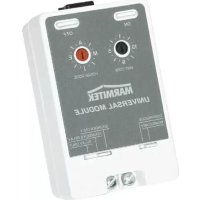
Thank you for buying a Marmitek X-10 UM7206 universal receiver. The UM7206 provides the link between low-voltage appliances and the Marmitek X-10 system. The UM7206 module receives the X-10 signal via the lighting circuit and switches lights and 24 V DC appliances with a current up to 5 A. The UM7206 can be set to pulse or continuous contact and can be controlled remotely with the Marmitek X-10 commands "ON" and "OFF". T manually operated via two keys: "ON" (on/test) and "OFF". The UM7206 also has a built-in buzzer that produces a sound when the module receives an "ON" signal. The buzzer can, if preferred be deactivated. If the unit is set to pulse switching with sound, the built-in buzzer will produce three to four high-pitched bleeps. The module is powered and controlled via the 230V lighting circuit and is fitted with a mains power lead.
INSTALLATION
The module is easy to install. Connect the low-voltage appliance to the two potential-free (dead) contacts (screw connectors) and then set the address. After connecting the plug to the mains, the module can be operated both locally and remotely.
- Using a small screwdriver, set the desired address (e.g. A1).
- Connect the low-voltage appliance to the screw terminals (max. 24 V DC, 5 A).
- Activate the UM7206 by connecting the plug to the mains.
- Adjust the sliding switches to the preferred positions:
Sliding switch Left:
- Continuous: The module switches on when it receives an ON command, and off when it receives an OFF command.
- Momentary: The module switches on for 3 - 5 seconds after receiving an ON command and then switches off again.
Sliding switch Right:
- Sounder Only: Only audio signal.
- Sounder & Relay: Audio signal and relay contact.
- Relay Only: Only relay contact.
FREQENTLY ASKED QUESTIONS
What is the reason for modules to switch on/off spontaneously?
It is possible that a Marmitek X-10 System is installed at one of your neighbours using the same House Code. To solve this problem try to change the House Code of your system, or have FD10 Phase Coupler/Filter installed at your incoming mains.
My modules will not respond to my controller.
Make sure that the House Code on all Modules and Controllers are set to the same House Code (A .. P).
My modules will not react to my remote / sensor.
When you use a remote or sensor, you should have at least one TM13 Transceiver or Marmitek X-10 Security Console installed in your house. These components will translate the radio signals to the Marmitek X-10 signal on the power line. Using several remotes and sensors, you only need one central transceiver.
Am I able to increase the range of my remotes by using more Transceivers?
Yes, you can use more than one TM13 Transceiver in your home when the range of your remotes is not sufficient. The TM13 is using so called collision detection to prevent signals to be disturbed when more than one TM13 is transmitting. TM13's will wait for a quite power line before transmitting their data. To prevent your Marmitek X-10 System to become slow or to prevent dimming from becoming less smooth, make sure that the TM13 units are placed as far away from each other as possible.
What is the maximum load on connections on the UM7206 module?
- Without additional protective housing: maximum 24 VDC/5A.
- With a protective housing which removes all risks of electric shocks: maximum load 230 VAC/500mA.
Do you still have questions? Please check out www.marmitek.com for more information.
TECHNICAL SPECIFICATIONS
Power supply: 230VAC 50 Hz
Power consumption: < 20 mA capacitive
Switching power: 5A at 24 VDC
Signal sensitivity: 15 mVpp min., 50mVpp max. at 120 kHz
Input impedance: > 55 Ohm (P-N) at 120 kHz
Responds to X-10 Key codes: On, Off.
Connectors: 2 x screw connector
Ambient temperature: -10^ to +50^ (operation)
-20°C to +70°C (storage)
Dimensions: 55x90x38mm
Environmental Information for Customers in the European Union
European Directive 2002/96/EC requires that the equipment bearing this symbol on the product and/or its packaging must not be disposed of with unsorted municipal waste. The symbol indicates that this product should be disposed of separately from regular household waste streams. It is your responsibility to dispose of th other electric and electronic equipment via designated collection facilities appointed by the government or local authorities. Correct disposal and recycling will help prevent potential negative consequences to the environment and human health. For more detailed information about the disposal of your old equipment, please contact your local authorities, waste disposal service, or the shop where you purchased the product.
UM7206™
UNIVERSAL EMPFÄNGER
SICHERHEITSHINWEISE
VEILIGHEIDSWAARSCHUWINGEN
Schuifschakelaar Links:
DECLARATION OF CONFORMITY
Hereby, Marmitek BV, declares that this UM7206 is in compliance with the essential requirements and other relevant provisions of the following Directives:
Council Directive 89/336/EEC of 3 May 1989 on the approximation of the laws of the Member States relating to electromagnetic compatibility
Council Directive 73/23/EEC of 19 February 1973 on the harmonization of the laws of Member States relating to electrical equipment designed for use within certain voltage limits
UM7206 ^™ is a trademark of Marmitek B.V. All rights reserved.
Copyright and all other proprietary rights in the content (including but not limited to model numbers, software, audio, video, text and photographs) rests with Marmitek B.V. Any use of the Content, but without limitation, distribution, reproduction, modification, display or transmission without the prior written consent of Marmitek is strictly prohibited. All copyright and other proprietary notices shall be retained on all reproductions.