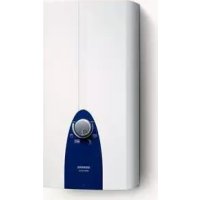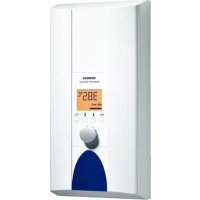
DE1821555 - Boiler SIEMENS - Free user manual and instructions
Find the device manual for free DE1821555 SIEMENS in PDF.



Frequently Asked Questions - DE1821555 SIEMENS
User questions about DE1821555 SIEMENS
0 question about this device. Answer the ones you know or ask your own.
Ask a new question about this device
Download the instructions for your Boiler in PDF format for free! Find your manual DE1821555 - SIEMENS and take your electronic device back in hand. On this page are published all the documents necessary for the use of your device. DE1821555 by SIEMENS.
USER MANUAL DE1821555 SIEMENS
de Deutsch 2
en English 12
fr Francais 22
n! Netherlands 32
pl Polski 42
ru Pycckn 52
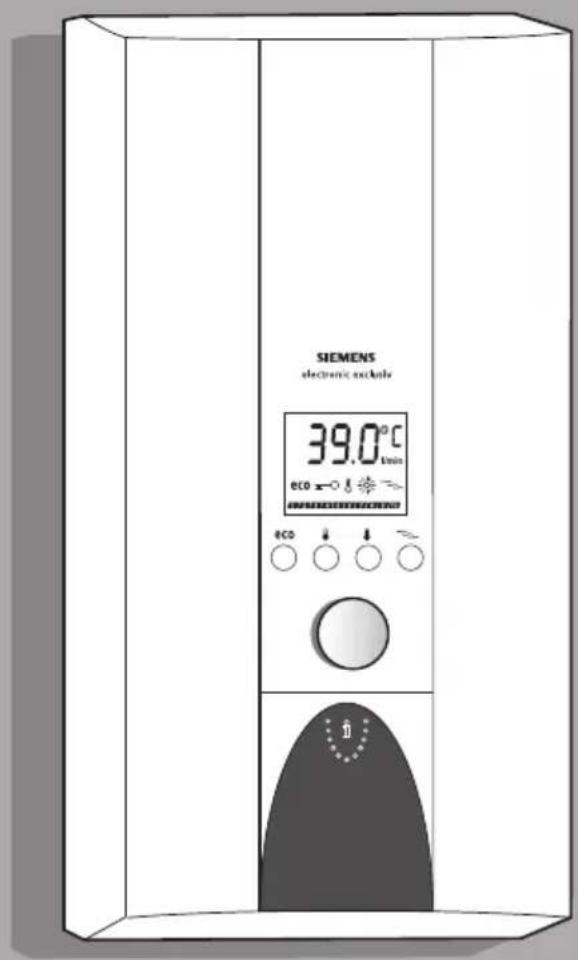
DE1821555
DE2427555
9000415459
Operating instructions Hnctpykun no
Eine Störung, was tun?
Please read the operating instructions carefully before you use the appliance!
Please observe the enclosed instructions.
Safety information

Risk of electric shock!
Switch off the mains voltage supply immediately if a fault occurs.
We do not accept liability for damage resulting from failure to heed these instructions.
The installation and initial start-up must be undertaken by a specialist who complies with these installation instructions.
Repairs may only be undertaken by a suitably qualified specialist to avoid potential sources of danger.
The continuous-flow heater may only be installed in a frost-free room.
Persons (including children) with diminished bodily, sensory or mental perception, or those who lack knowledge or experience should not operate the appliance, unless they are monitored or have received instruction concerning use of the appliance by persons responsible for their safety.
Keep children away from the appliance. Please monitor children to ensure that they do not play with the appliance.
The mixer and the warm water pipe may be hot.
Please switch off all fuses immediately with a malfunction. Immediately shut off the cold water supply to the appliance should it leak. The malfunction can only be repaired by a specialist or an authorised service agent.
Your new appliance
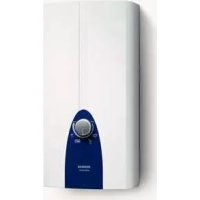
The electronic continuous-flow heater is intended exclusively for heating water which flows through the appliance.
The continuous-flow heater switches on and heats the water when the warm water tap is opened. It switches off as soon as the tap is closed.
Operating the continuous-flow heater
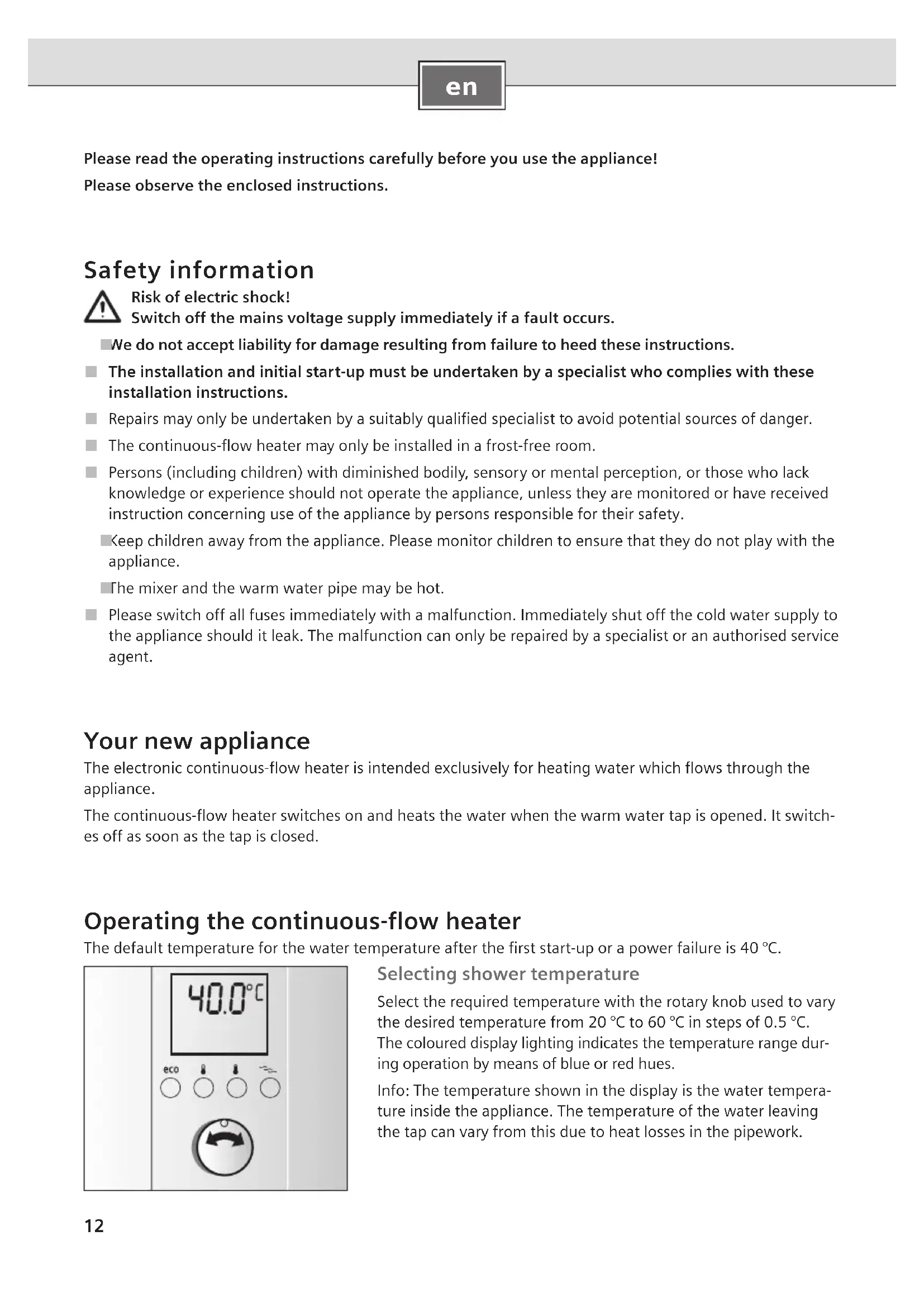
The default temperature for the water temperature after the first start-up or a power failure is 40^
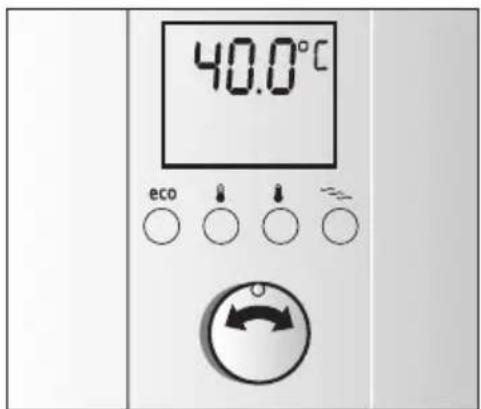
Selecting shower temperature
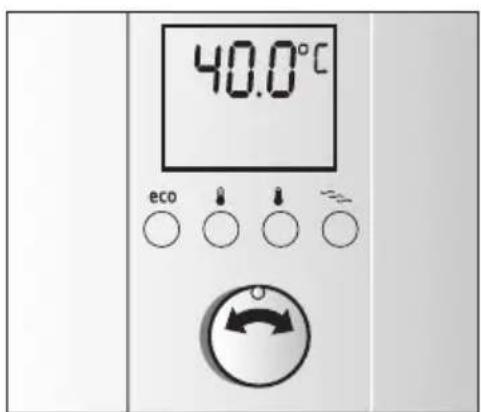
Select the required temperature with the rotary knob used to vary the desired temperature from 20^ to 60^ in steps of 0.5^ . The coloured display lighting indicates the temperature range during operation by means of blue or red hues.
Info: The temperature shown in the display is the water temperature inside the appliance. The temperature of the water leaving the tap can vary from this due to heat losses in the pipework.
Desired temperature
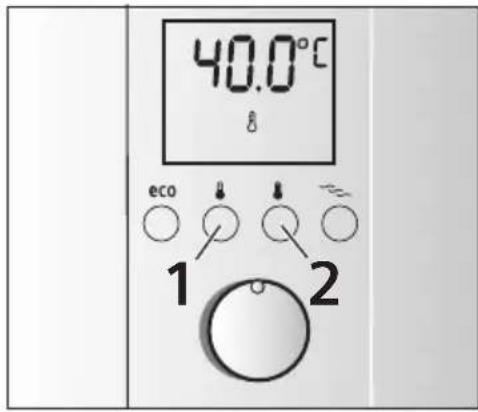
You may also simply select your personally programmed shower temperature at the touch of a button. You have two storage options.
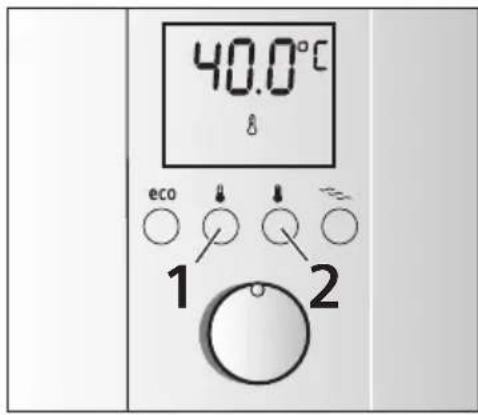
Desired temperature button 1 is preset to 40^ , desired temperature button 2 is preset to 60^ .
Simply press the corresponding button and the set temperature and a thermometer appear on the display.
Info: This setting remains active until a new setting is selected by pushing the button or turning the rotary knob.
Changing the desired temperature
The preset temperatures for button 1 (40^) or button 2 (60^) can be changed individually.
Presdaldslicsttempeansdar,et button
temperature display will start to flash rapidly.
Use the rotary knob to set the desired temperature between 20^ and 60^ .
- Keep desired temperature button 1 pressed for 3 seconds, the setting is stored.
The temperature for desired temperature button 2 can be set in the same way as button 1.
Wellness program
Two wellness programs can be set with the "exclusive" continuous-flow heater.
These wellness programs commence with a warm phase and conclude with a cold phase. The temperature stimulus associated with this can lead to stimulation of the circulation and enhance blood circulation. Consult you doctor if you are unsure concerning your personal suitability for the wellness programs (particularly with an existing illness) and the degree of application.
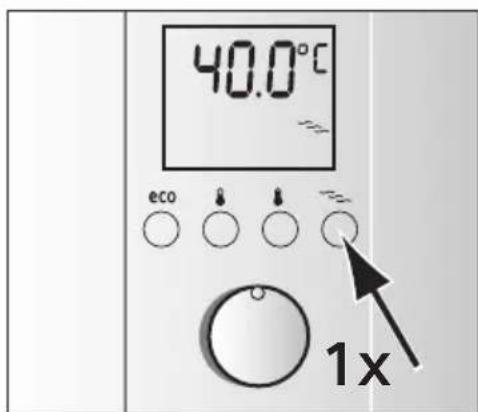
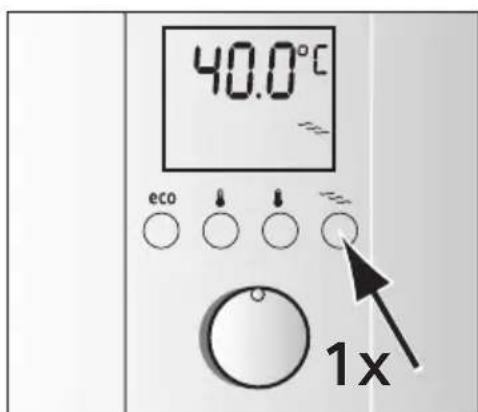
Starting wellness program 1
Preshe the waeidispaayphigrtam button up in colour, the stored shower temperature appears in ^ C and the symbol is displayed.
Now turn on the tap within 2 minutes and wellness program 1 commences. At first, warm water whose temperature depends on your setting will run for 2 minutes and then 30^ cold water will be dispensed for 30 seconds.
Tip: The best effect is achieved with wellness program 1 with two showering cycles.
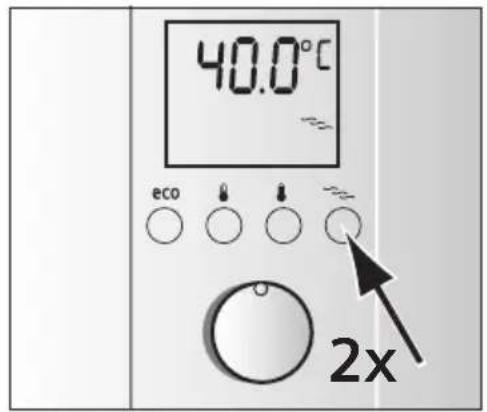
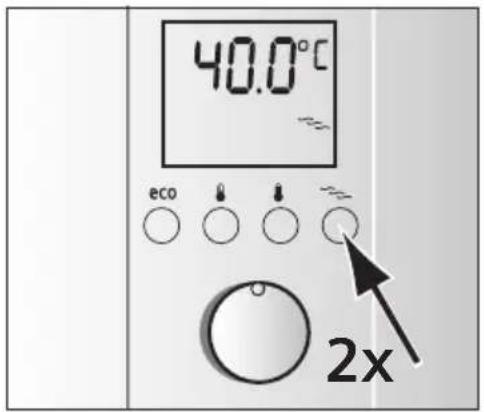
Starting wellness program 2
■ Briefly press the wellness program button twice in succession. The display lights up in colour, the stored shower temperature appears in ^ C and the symbol flashes.
Now turn on the tap within 2 minutes and wellness program 2 commences. At first, warm water will run for 1 minute (water temperature depends on your setting) and then 30^ warm water will be dispensed for 30 seconds.
Tip: Wellness program 2 should be applied for several shower cycles. They can be repeated as often as required.
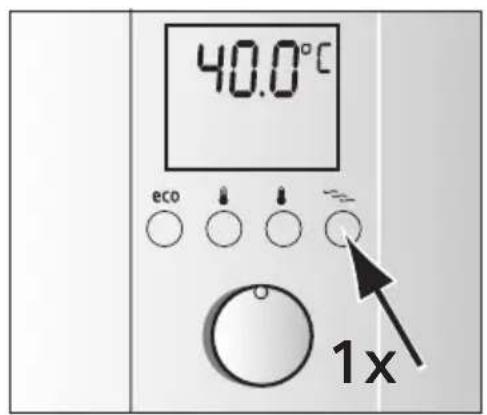
Ending wellness program 1 or 2
Both programs will repeat until either the selected wellness program button is pressed once or the tap is shut off for more than 1 minute. The temperature set before the program starts in now reactivated.
The programs can also be activated while the water is running.
Changing the wellness program temperature
The preset temperature for the warm phase is 39^ . This can be
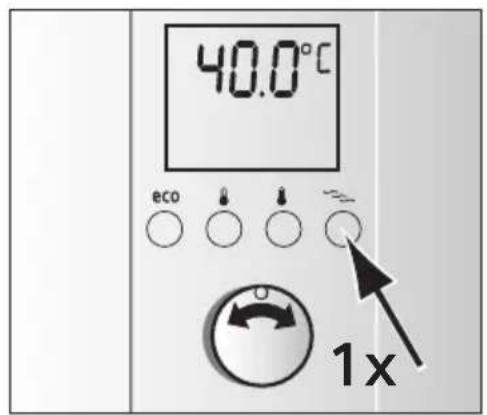
modified in a range from 30^ to 42^ .
Press the键盘 to press the mouse button
program 1. The saved shower temperature in ^ C and the symbol appears.
<epersuedfins spnncprnds button
select the programming function. The ≈ symbol starts to flash rapidly.
Use the rotary knob to set the desired temperature between 30^ and 42^ .
Press the wellness program button for 3 seconds to store the new value.
The selected temperature is now saved in wellness program 1.
Use the same procedure to change the temperature in wellness program 2.
Prewicheowellcwphgarm button program 2. The saved shower temperature in ^ C appears and the \~ symbol flashes.
eessssrsspregrdsbottn
lect the programming function. The symbol starts to flash at intervals.
Use the rotary knob to set the desired temperature between 30^ and 42^ .
Pres Breeoaltheo strgram button
the new value. The selected temperature is now saved in wellness program 2.
Child protection
You have the option of limiting the temperature to 42^ , e.g. to prevent children from being accidentally scalded.
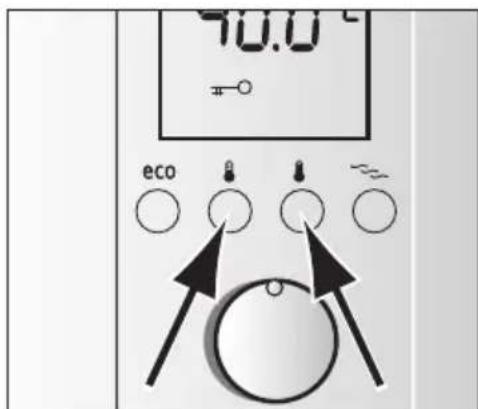
Activating child protection
- Briefly press desired temperature buttons 1 and 2 simultaneously.
The symbol appears on the display, the temperature is limited to maximum 42^ .
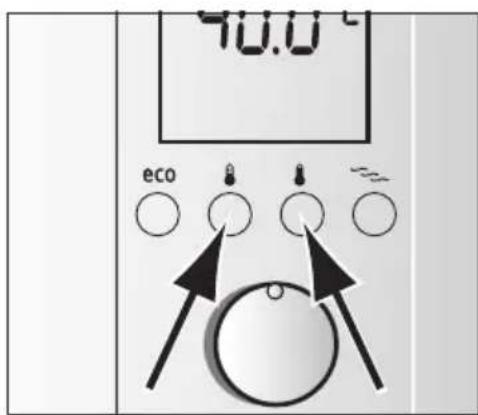
Deactivating child protection
- Briefly press desired temperature buttons 1 and 2 simultaneously.
The symbol on the display disappears, the temperature can now be freely selected between 20^ and 60^ .
Conserving energy and water at the touch of a button
Mixing in of cold water in the fitting requires unnecessary water and energy. You should therefore set the desired water flow directly on the continuous-flow heater and then open the water tap.
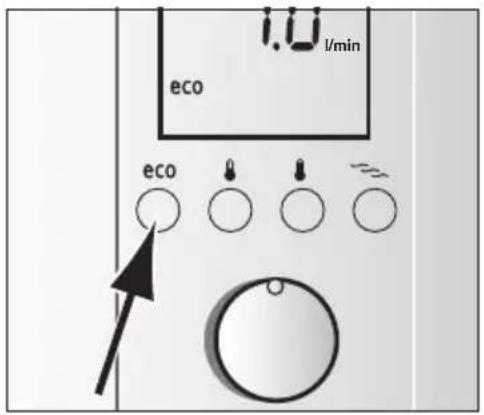
In "eco" program mode the appliance is operated economically.
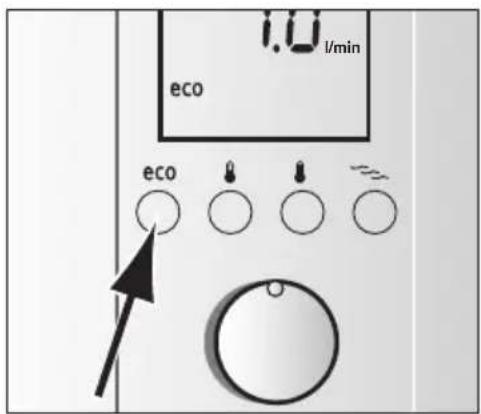
Press the eco button to switch it on.
The preset flow is 7I / min , the temperature setting is 42^ (factory settings).
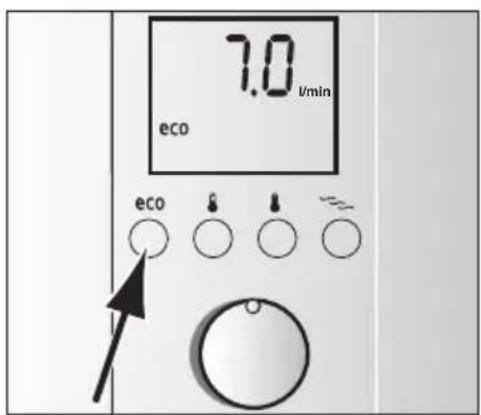
Personal "eco" program setting
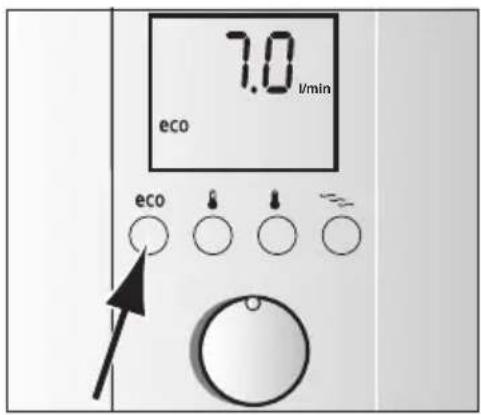
The preset flow can also be modified.
Prerseutert seconds, on the display the factory setting 7.0 l/min appears and eco flashes quickly.
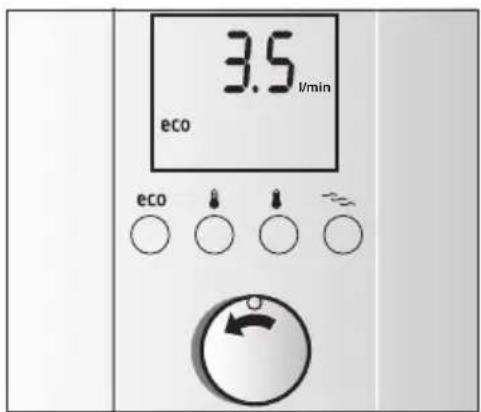
Using the rotary knob you can set the desired water flow between 3.5 l/min to 7.5 l/min in steps of 0.5 l.
<epesatfocreat least 3 seconds and the setting will be stored.
Info: After about three seconds the display will indicate the current water temperature of 42^ and ec shows that it is activated.
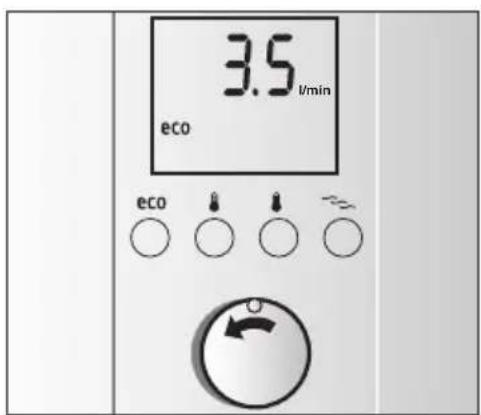
Changing the "eco" program temperature
When the "eco" program is switched on, the preset temperature of 42^ can be made warmer or colder.
Select the desired temperature with the rotary knob.
Info: The customized settings in the "eco" program are only active as long as ecis switched on. The settings of the eco program are maintained if another program or mode is selected.
The meaning of display indications
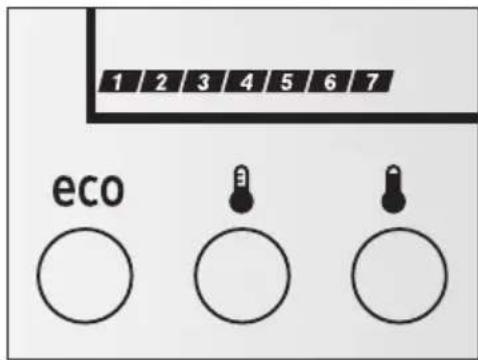
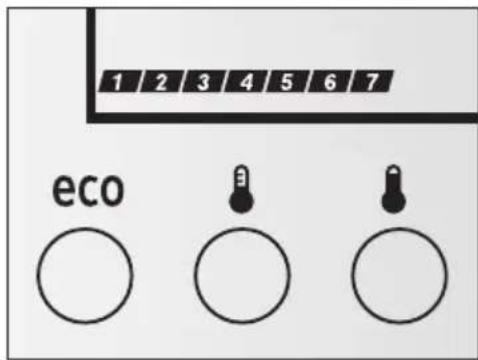
Performance indicator
The performance indicator shows the currently used performance of the continuous-flow heater in 10% increments.
Example: 7 increments are shown while drawing off hot water. This means that the continuous-flow heater is currently only running at 70% of its maximum output.
If the set temperature cannot be reached because the water throughput is too high, the continuous-flow heater will automatically adjust the water throughput until the set temperature is achieved.
Pre-warmed water
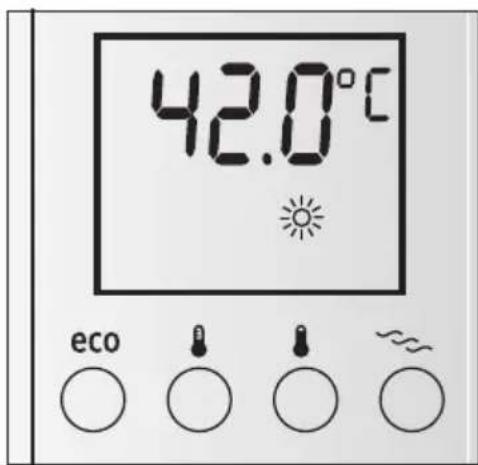
The continuous-flow heater can be operated with pre-warmed water (for example from a solar energy unit). If the supply temperature exceeds 30^ , the lights up on the display.
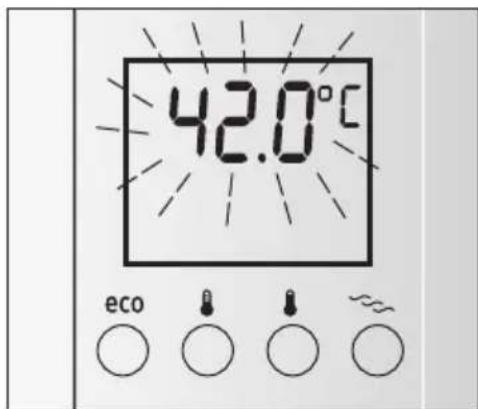
Flashing display
Risk of scalding!
If the temperature display flashes, the temperature of the water leaving the tap is higher than the set temperature.
The supply temperature from the domestic system is too high, e. g. water from a solar energy unit.
The thermostatic premixer in the domestic supply must be set accordingly to lower temperatures.
Error signals
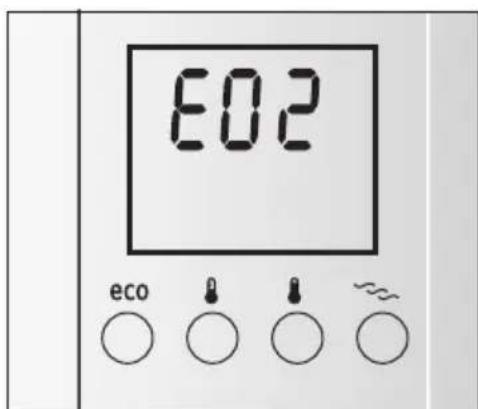
Sometimes e. g. E02 (or E03 to E14) appears in the display due to a very minor problem. Please try to eliminate the fault according to guidelines given in the chapter "A fault, what to do?". You will save yourself the cost of an unnecessary visit by customer service personnel.
Using the appliance after switching off the water supply
- Switch off the appliance (unscrew the fuse in the house electrical installation).
Open the warm water tap and keep it open until the air has been completely forced out of the water pipe.
Switch the fuse back on again.
The appliance is now ready to operate.
Start-up after power failure
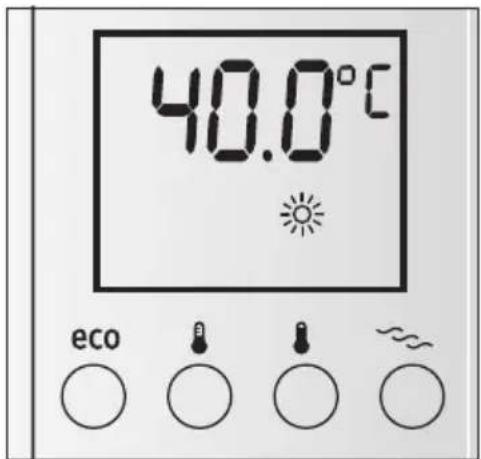
Open the warm water tap fully and allow a minimum water flow of 6 litres/minute.
Cleaning
Only wipe off the appliance using a moist cloth. Do not use acidic or abrasive cleaning materials.
Do not use a steam cleaner.
Customer Service
We ask you to always provide the E-No. and the FD-No. of your appliance when calling in a customer service engineer.
You will find the numbers on the inner side of the fold up operating panel on the continuous-flow heater.
A fault, what to do?
If your appliance does not operate as required, it is often due to a very minor problem. Please check whether you can remedy the fault yourself by using the following guidelines. You will save yourself the costs of an unnecessary visit by customer service personnel.
| Fault Cause Solution Who | |||
| Water flow-rate is too low. The filter in either the water tap or the showerhead is clogged. | The filter in either the water tap or the showerhead is clogged. | Remove the filter and either clean it or descale it. | Customer |
| The filter in the corner regulating valve is clogged. | Get a servicing expert to clean the filter. | Servicing expert | |
| The filter upstream from the check valve in the cold water supply inlet is clogged. | Remove the filter and either clean it or descale it. | Servicing expert | |
| The water volume is steady-ly reducing during use. | Automatic regulation See chapter "The meaning of display indications - Performance indicator" | Customer | |
| The temperature can not be set warmer than 42 °C. | The child protection = fea-ture is activated. | Deactivation of the child pro-tection feature "Operating the continuous-flow heater - Child protection" | Customer |
| The set water temperature is not achieved when a thermostatically-controlled premixer is used. | The thermostatically-controlled premixer only controls accurately with high water supply temperatures. | Set the temperature on the continuous-flow heater to 60 °C. | Customer |
| No display; the water is not getting warm. | The fuse in the house electrical installation has tripped/blown. | Check the fuse in the house electrical installation. | Customer |
| The appliance's automatic circuit breaker has been tripped. | Get the appliance's automatic circuit breaker checked by an electrician. | Servicing expert | |
| From time to time, cold water flows out. | The air sensor in the appliance detects air in the water and momentarily switches the heating element off. | After a few seconds, the continuous-flow heater automatically goes back into operation. | Continuous-flow heater automatically resolves problem |
| The set temperature, for instance 41.0 °C flashes. The temperature of the water leaving the tap is higher than the set temperature. | The temperature of the water supplying the continuous-flow heater is higher than the set temperature (e.g. due to pre-warmed water supplied from a solar water heater). | The thermostatic premixer in the domestic supply must be set accordingly to lower temperatures. | Customer |
| E02 No thermostatic premixer | available. The supply temperature to the continuous-flow heater is higher than 55 °C (e. g. due to pre-warmed water supplied from a solar water heater). | Install a thermostatic premixer in the domestic supply. | Customer |
| The supply temperature to the continuous-flow heater is higher than 55 °C (e. g. due to pre-warmed water supplied from a solar water heater). | The thermostatic premixer in the domestic supply must be set accordingly to lower temperatures. | ||
| E03-E04 Temperature sensor | defective | Please contact customer service. | Customer Service |
| E05-E07 Electronic malfunction | Please contact customer | service. | Customer Service |
| E08 Frost damage | The water supply sensor measures a temperature of ≤0 °C. | The appliance is defective! Switch off the water supply immediately and disconnect the appliance from then electrical supply (also refer to the safety instructions). Please contact customer service. | Customer/ Servicing expert |
| E09 Temperature sensor/ | electronics defective | Please contact customer service. | Customer Service |
| E10-E11 Bubble detection triggers. | Disconnect the appliance from the electrical supply. Open the warm water tap fully for venting purposes and flush out the appliance thoroughly for 1 minute. Switch the power back on again. | Customer/ Servicing expert | |
| E12-E13 Electronic malfunction Please contact customer service. | service. | Customer Service |
If the fault could not be eliminated, please call customer service.
Disposal

This appliance is labelled in accordance with European Directive 2002/96/EG concerning used electrical and electronic appliances (waste electrical and electronic equipment - WEEE).
The guideline determines the framework for the return and recycling of used appliances as applicable throughout the EU.
Please ask your specialist retailer about current disposal facilities.
Guarantee
The guarantee conditions for this appliance are as defined by our representative in the country in which it is sold.
Details regarding these conditions can be obtained from the dealer from whom the appliance was purchased. The bill of sale or receipt must be produced when making any claim under the terms of this guarantee.
Subject to change without notice.
Apifoyier Bactantouche Programme Wellness
Wellness-programma's
Wellness-programma 1 of 2 beeindigen
3NeKtpoHHbI npOToHbI HArpeBaTeIb noOrpeBaET BDOy, KOrda OHa TeuET no erO Tpy6aM.
IpoToHbHnHarpeBaTeB BKnIOuaETcN HArpeBaET BDOy, KOrda OTKpbIBaETcKpaH rOpuee BODbl. OH CHOBA BblKNIOuAeTc, KOrda KpaH 3aKpbIBaETc.
3Kcnpnyataza npoToHoro HarpeBaTeJIa
NepBoHaunbHaayctaHOBKaTeMnepaTypbI BOnbl Nocne BBoDaB3KcnnyatauHIO Hnn Hcye3HOBeHHaHapJxKeHHaCttncoCTabJIeT 40°C.
Bb6op Tempeatypbl dnyu
Bbipabc nOMOsbpyuKNHaCTpOKnXeJaemyToempeatyp: ot 20 ^ do 60 ^ c warom B 0,5 ^
Bo Bpemn EKcnpnyataun CBeHoe OCBeueHne DnCnpeo TOp6paKa et ObnaCTn TemnepaTpO TOny60rO Do KpacHOrO OTtEHKO.
Hhopmaun: OTo6paKaemn Ha nncnnee TeMnepeTpa 06o3Haauet Temnepatpy Bobl B npnbope. B pezylbTaTe noTepb Tpy6onpOBOe TeMnpaTpa Bobl Ha BbIXOe MoKcET OTnHuAtbcr OT OTo6paKaemn.
Kenaemam TemnepaTypa
C nomoIIO npocToro HaKaTnHa KHOKy MoXHO OueHb npocTo Bbl3BaTb IHHHyO JeNaeMyo Tempeatpy. Ecb DBe BO3MOxHocTn CoXpaHeHn JKeNaeMoJ Tempeatpybl.
KhoKa KenaemO TEmnepaTypb1 npedBapnteHbHO 3anporpaMmnpoBaHa Ha 40^ , KhoKa KenaemO TemnepaTypb2 - Ha 60^
1pocto HaKaTb Ha COOTBeTCTByOuIyIO KHOJKy,Ha DnCnJee OTo6pa3ntcHAcTpoEHHa TEmpeaTypa n TepMOMeTp.
HΦopMaζη: HAcTpoiKa aKTiBHa noka He 6ydet BbIbpaHa HOBaHAcTpoiKa c NOMOιbIo HaKαTnI KJIaBnIu nn pyuKn HAcTpoiKn.
I3MeHHe He KeJaemO TempeaTpybI
3HaueHHe TemnepaTpybHa npedBapnteNbHO HAcTpoeHHbIX KONKax TemnepaTyp 1 (40^) n2 (60^) MOryT 6bItb N3MeHeHbI HHINBnDyaJIbHo.
HuaepnKbkyKeIaemOy Tempeatpybl MNmym3cekyHdby,ya3aTeJb Tempeatpybl HaunHaet 6blCTpo Mngatb.
NOMOuBpUcHNaCTPOuKN HAcTPOuTB XeJaEmyTo TEmpePaTpy B Dnana3oHe oT 20°C Do 60°C.
HaKaTb Ha KhoNky XeJaemOy TeMnepaTypb1 N yDepKuBaTb MmHmym 3 ceKyHdbI, NoCne Yero HacTppoKa 6ydt CoXpaHeHa.
Дя Kноги кениаму Tempepatypb2, Temepatypy MoKHO HaCTpOHTb TaKKe, KaN IДЯ KHONKn 1.
Bénhecc- nporpamma
C nOMOuHnpoTOUHO HArpeBaTeJI,3KCKJIHO3NB"y BaC eCTb BO3MOXHOCTb HaCTpOnTb DBe BEnHeCCnporpaMMbl.
Takay BenHecc-pporpamma HauHaeTcA TeIIOJ 4a30N 3aKaHunBaETcXoNoHO. CBraHHoe C 3TNM TemnepaTyphoe pa3dpapkeHne npBODNT K yCnIeHNO KPOBOO6paueHn N KPOBOCha6KeHn. IOnxOHTn IN B KaKOM O6beme nporpaMa-BenHecc dJa Bac, Bbl Cnyuae COMHeHn (ocO6eHNO pRn HauHn 6oJe3-He) DOJIKNbI Chauana o6cydntb c neuaum Bpaem.
3anyck BéNHecC-nporpaMMb1
HaKoHpa3HaKHONkyBENHeCC-nporpaMMb3aRopaETcAeTHbIM,NOBnReTcCOxpaHeHHaTeMnepaTypaДЯduaB°CnCMBOI
DtkpbItb KpaH Ha 2 MHyTbI, 3anyCTnTc nporpaMa BeHHecc. Bhaaane B TeueHne DByx MHyT TeuyTe nnA Boga, cornaCHO HactpoeHHo Tempehpatye, a 3aTeM B TeueHne 30 ckyHd xOIOHaJ.
Cobet: Lyuwee deiCTBne MOxHO nonyunTB, ecn HcnoIb3OBaTb nporpaMMy BeHecC 1 cDByMa nepemHaMn.
3anyck BenHecc-nporpaMMbl 2
Haxmte 2pa3a Kpato NOprHa KNOpky BeHecc-nporpaMmbi .Hcnnne 3aropaeTc UBETbIM, NOBJIeTc COxpanenHnA TeMnepaTypa Dya B C n Mnaet cMbON
Tenepb otKpbItb kpaHa 2 MNHyTbI, 3aNyCTnTBc nporpaMa BEnHecc. BnaHane B TeueHne OndH NMyHtI TeeTe Tepna BOda, corlaCHO HAcTPOeHHo TEMpePaType, a 3aTEM B TeueHne 30 ckyHd Tepna BOda npi Tempepatye 30^
Cobet: NcnoB3OBaTb nporpaMMy BeHHecc 2 c HeckoNbKmN nepeKnHoueHNMa. NobTopaTb no XeJaNHO.
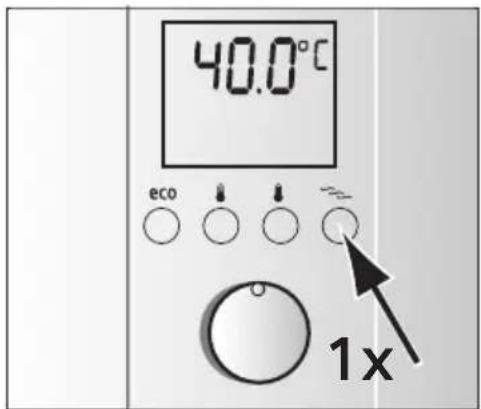
3aBepeHne nporpaMMbI BeHecc 1nn2
IobtopaTb o6e nporpaMMbl, a notom haxkaTb nocne Bb6paHHo nporpaMMbl KhoNky BeJIHeCC nporpaMMbl CHOBa OINH pa3 Hn 3aKpbTb Kpan 6one yem Ha ONDy MInHy. ChOBa AKTNBpyEETc TEmpePaTypa, HacTpoEHHa nepe NycOM nporpaMMbl.
PporpaMMy MoXHO aKTHBnPOBaTb, ecnn TeueT BOda.
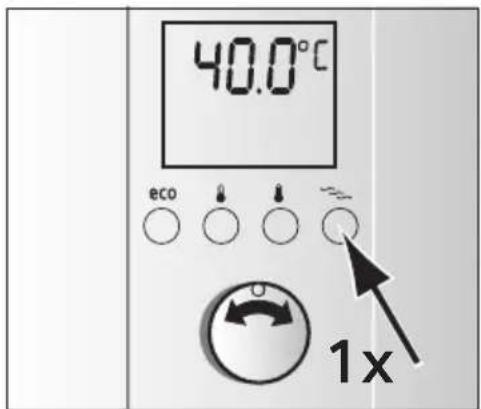
I3MeHeHHe TeMnepeaTypbI B npOrpaMMe BeJIHecc
IpeBapntbHo HAcTpoeHHa TeMnepaTypa dna ropuee fo3bI coCTabJeT 39°C. Ee MoXHO n3MeHrB B DnHaNa3OHe ot 30°C do 42°C.
Hbpeopny6porpaMMbI BeHecc Bbipb nporpaMBy BeHecc 1. NOBHTc coxpaHeHHa Temnepatypa DyaB C n CnMBoN
yepnBb3KBeNky nporpaMMbI BeHecc KyHd, uTo6bl Bbl6paTb yHKUHO nporpaMMnpoBaHHa. CmBOJ haHaet 6bICTpo MmTaB.
C NOMOJIbHpyuKN HAcTpoiKN HAcTPONTb JKeNaeMyTo TempeIpyB dHaNAzoHe oT 30^ do 42^
Iina coxpaHnHaepKnBaTb KNONky nporpaMMbl BeJIHeCC HaxkatoB-TeueHne 3cekyHd.
TenepbI nporpaMMbI BeHHecc 1 coxpaHa Bb6paHHa TemnepaTypa.
ToHToK JKe MoXHo H3MeHHTb Tempeatypy IJI nporpaMMbl BeHecC 2.
HbpaBnporpaMMbI BnHecc BBipb nporpaMMy BeNHecc 2. NOBHTc coXpaHeHHa TeMnepatya Dya BA Cn6ydt Mrratb CNMBON
/epaHbBxHekky nporpaMMbI BeHecc Kyni, uTo6bl BbI6paTb cyHKnIO nporpaMMnpoBaHna. CmBOJ HaunHaET MIRATb C nHTepBaJaMaN.
I NOMOuBPOyKn HAcTpoN Kn HaCTpOnTb XeJaemyo TeMne- paTpy B DnHaNa3OHe ot 30^ do 42^
Iina coxpaHHeHH ydepxKHBaTb KhoNky nporpaMMbl BenHecc HaxkatoB TeueHne 3 cekyHd. Tenepb Ina nporpaMMbl BenHecc 2 coxpaHaHa Bb6paHHa TempepaTypa.
Be3oNaChocTb DeTei
Moxho orpaHnHTb Temnepatypo 42 ^ C ,uTo6bl, Hanpimep, 3aunntb deTei OT OwnapnBaHna.
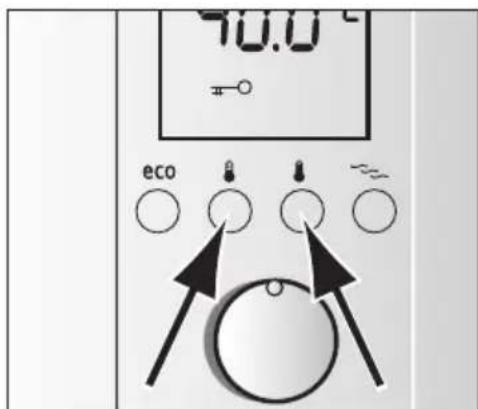
BknoueHne yHKcun 6e3oNaChOCTn dTei
OndOBpeMeHHo HaxaTb KhoNKn Bbl6opa XeJaemoy Temnepa-Typbl-1 n 2.
Ha nncnnee noaBntcra ,temepaTypa orpaHueHa MaKcmyMOM 42^
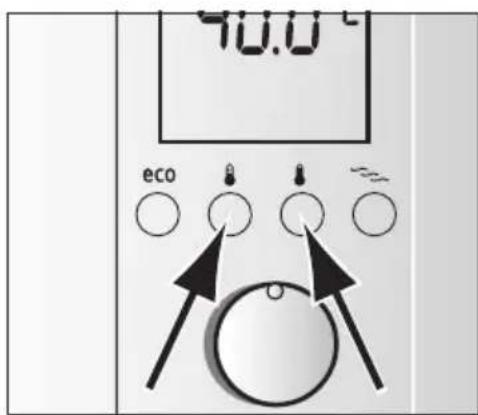
BbIKHoueHne yHKcHn 6e3oNaCHocTn dTee
OndHOBpeMeHHo HaKaTb KHOJIKN BbIbopa JKeJaEMOn Temnepa-Typbl-1 n 2.
Ha nncnnee noBntcra, Temnepatypy moxho cHOBa CBO6oHb bIbnpaTb B dnaana3one ot 20°C do 60°C.
3KOHOMn3Heprn H BODbl npn HaKaTHN Ha KHOKNy
IobabneHnE XoIoHO BODbI B apMaTyPy Notpe6nAeT NnHIO BDOy I3HeprnIO. NoaTOMy HactpaBaiTe Heo6xOIMbI Obem NotoKa HenocpeDCTBeHHo Ha NotoCHom HarpeBaTe Ne OTKpbBaTe KpaH.
PnB KlnoueHHo nporpamme,eco" np6op 3KcnnyatnpyeTcMaKcImaIbHO 3KOHOMHO.
UTo6blBKNHOHTb,HaKMITE KHONKy
IpeBapntbHn HAcTpoeHHbN NOTOK COCTaBnE7 n/MnH,Ha- cTPOKa TemepaTypbl 42 ^ C (3aBoDcKa HaCtPOKa).
Co6cTBeHHbI HacTpoKn nporpaMMbl,eco"
PpeBapntelbHO HAcTpoeHHbI paCXoM MoXHO n3MeHrTb.
HaHnMyyIeKbHbIKHbNkyeco Hncnlee noBtca 3aOcKa HaCTpoKa 7,0JI/MnH n 6bICTPO MnaeTeco.
C NOMOUIIpyuHn HAcTpoiKn BbIbpaTb XeJaEMbI paCxO BoIOT3,5n/MnHdo7,5n/MnHcNHTepBaNoM0,5nITpa.
HpypHnBmM3cekyhbl, noCne yero HacptpoKa 6ydet coxpaHeHa.
Hhopmaun: PnMepHo uepe3 Tpr cekyHbHa dncnnee noBHTcayuzaa TeMnepaTpa BObl 42°C n HnHKaun eco o TOM, UTO hA kTNBnPOBaHa.
I3meHenHe TemnepaTpybI B nporpamMe "ecO"
Ipn Hactpoehno nporpaMMe "eco" MOxHO HAcTpoNTb npedBapnteNbHO yCTaHOBneHHyTO TemnepaTypy 42 ^ C Ha 6onee TennyIO nn xonOndHyIO.
3bIbpaTb c nOMoUbIO pyuKn HAcTpoiKn Heo6xoImyIo TeMnepaTpy.
HΦopMaun: C6cbTbeHHbIe HactpoKn nporpaMMbl eco" DeiCTByHT, noka BknHoueHO eepn BblOpe dpuro nporpaMMbl nnn peXHMa pa60tbi coXpaHraOTc nocneHNHe HactpoKn n3 nporpaMMbl eco.
3haeHne HndnKaun nnCnnpe
HnDkaun MOUHOCTN
Инданаши мошногдп OTбражaelу MOцhoeь npotou-HoroHarpeBaTeJIcCerMeHToM10%.
Ppnmep: Pnp 3a6ope ropueB BObI NOABnEe7cerMeHToB. Ha daHHbIMOMeHT npOTouHomy HArpeBaTeHNO Heo6xOdmo TOnbKO 70% MaKcImaJIbHO MOUHOCtN.
EcnHnHaCTpoeHHaTeMnepaTpyaHeNoCTnraEtcN3-3a BbICOKoro NOTOKBOBbl, npOTouhIn HaReBaTeIb ABToMaTHueckn perynny PyET NOTOK BOBbl DO NOCTnKeHHaCTpoeHHoTemnpaTpybl.
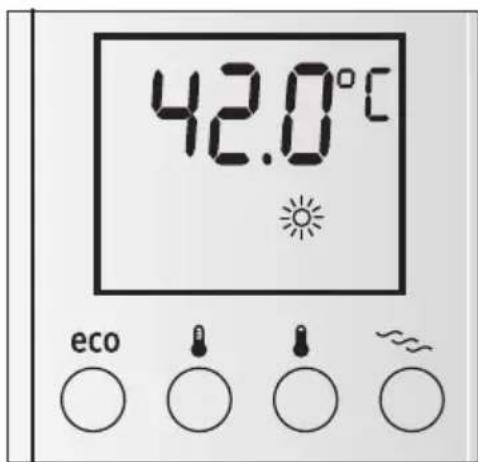
PpeBapntelbHo HarpTea Boda
IpoToHyn HarpeBaTeN MoKHO 3KcNlyaTnpoBaTc npeDbapH TeBHO HarpTeO BDOi (HaNPmEp, n3 reNooyctaHOBKn). Ecn TEmnepaTypa NoCTyNaIOSeB ODoB bBiWe 30^, Ha DnCnnee 3a- ropaetca.
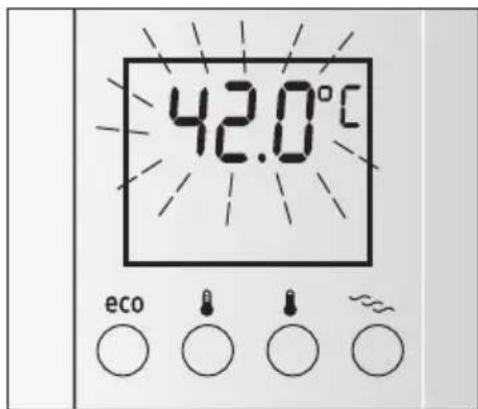
Miraoun Ducnnei
Onachoctb oxxora!
Ecnn Hndnkaunr TemnepaTypbMnraet, TemnepaTpa Ha BbIXOe KpaHa Bblse HacTpoEHHO.
TemnepaTpa Bobl, noctynaOuSei 3 domaHHe yCTaHOBKn CnHbKOM BbICOKa, HApHMeP, n3-3a BObl n3 reNHOyCTaHOBKn.
Hactpontb TepMOCTaTHbI npeBapHTbHbI CMeCNTb BDOMaUHe yCTaHOBKe B COOTBeTcTBn Ha 6OJee Hn3KyuTo Temnepatypy.
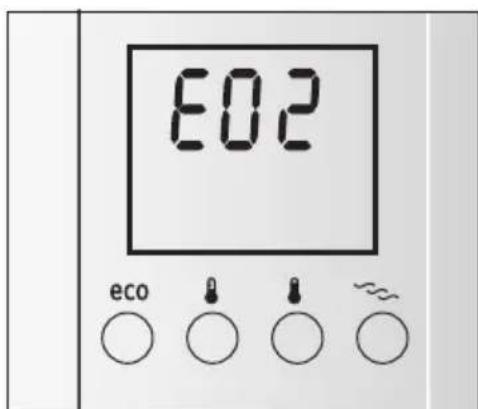
Coo6eHnO HenCnpaBHOCTN
EcnHa dncnnee 3aropaeTcH, Hapnmep, E02 (nn E03 do E14), qacto peub ndet O meJouax. NonbtaaTecb yctpaHntb HeucnpabHoctb, KaK ONcaHO y rnaBe ,HeucnpaBHOCTb, UTO denaTb?". TaKIM o6pa3OM MOxHo cokpatNTb paXOdbI Ha HeHyXHoe nCnoNb3OBaHne cepBnCHbIX ycnyr.
BBoD B 3KcPnyaTaunIO nocne OTKnIoueHNRA BOdbl
06ectoHTb np6op (BbIKHouHTb npedoxpaHnteIN B domaHneYcTaHOBKe).
OCTaBt b KpaHbI OTKpbItbIMn, NOKa I3 Tpy6OpPBOda He BbIeT BO3dyX.
CHOBBA BKNIOHTb npedoxpaHNOUne yctpoCTBa.
Pn6Op rOToB K 3KcNpyaTauu.
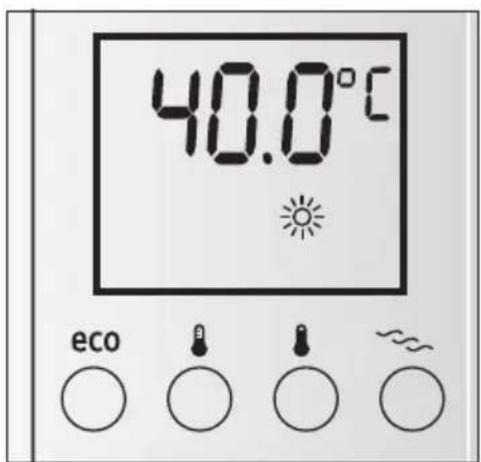
BBoD B 3KcPnyatauHIO NOcIe OTKa3a CeTeBOrO NITAHNIA
IOnHOCTbIO OTKpbITb KpaH rOpayeB ODbI N pa36npaTb BOdy C MHNMaJIbHbIM pacXoDOM 6 NHTPOB/MNH.
OuHCTka
PpOtpaTb np6op TOnbKO BnAaKhbIM cpeIcTBOM. He nCnoB-3OBaTb ocTpbe Hn a6pa3HbIe uHCTaIe cpeIcTba.
He nCnonb3OBAt bpnapocenapaTop.
CepBnchoe 6cnyKbHne
Ecn Heo6xOIMO cepBnchoe 06cnyKbHne, yKaXnte E N n FD No Baawero np6opa.
Cm. daHHbIe Homepa Ha BHyTpEnHcN CTOpOHe OTKnHOn cAnbHaNaHenn ynpaBnHn npoToUHO HorpeBaTeHn.
HencnpaBHOCTb, uTo deLaTb?
Ecnn npn6op He pa6oTaet TaK, KaK HyXHo, npnHNoJ qacto MoKeT 6bItb KaKaa-H6yDb MeNoUb. PpOBepBTe, BO3MOxH0 Jn CaMOCTOaTeNbHO yCTpaHHTb HenCnpaBHOCTb Ha OCHOBaHN daHHbIX yKa3aHIn. TaKIM o6pa3OM MOxH0 COKpaTtB paCxOdbI Ha HeHyXHoe IcNOb3OBAHne cepBnchbIX ycnyr.
Ecnn HeucnpaBHOCTb He ydaIocb ycTpaHHTb, o6paNTecb B cepBncHyO cnyK6y.
YTNIN3aun
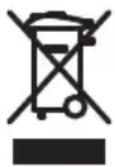
Даньи пибор Имeel Маркюрьу B COOTBeTCTBnC eВpoNeiCKoДиpeKTHBoI 2002/96/EC O cTapbIx ΝлeКтчeCKnxИэлeКтponHbIx пибopax (waste electrical
and electronic equipment - WEEE).
InpkeTnBa onpeDeneT yCNoBna npHnAOBnO6paTHo nYtun3aunn CTapbIX np6bOpOB B EC.
HOpMaunO6akTyaIbHbIXBO3- MoKHOCTx yTnIn3aunn Bbl moKeTe nOnyUHTB MaarAHe, B KOTOpM Bpl npNo6pePn np6op.
UcnoBna rapaHTnHoro 06cnyKbAHn
IonyuHTb hucpePbIBaHOuyo HΦopMaunO 6yCIOBnIX rapaHTnHOrO o6cnyKbAHnB Bbl MoJxTe B BaWem 6nXkaMwem ABTOHOBaHHOM cepBnCHOM zENTpe nIN B cepBnCHOM zENTpe OT npOn3BOIDTeJIY OOO «BCX bItOBaTexNka», aTaKHe NaTn BΦnpMeHHOM rapaHTnHOM TaIOHe, BbIDaBAeMOM npn npOdaKe.
Mbl octabnem 3a co6o npabo Ha BheceHne n3MeHeHn.
| AE United Arab Emirates CZ Ceska Republika, Czech Republic BSH Home Appliances LBSH Home Appliances (SEA) |
| BSH Home Appliances FZ BSH domaci spot tebiče suhl.1 & 2, 3th Floor Pte. Ltd. |
| Round About 13, Plot Niemnižová servi domacic North Block, Skyway House 38D Jalan Pemipin |
| 17312 Jebel Ali Free Zlotte duhai Tiel: 04 881 4401 Pekaška 10b Tai Kok Tsui, Kowloon Tel: 6350 5000 |
| Fax: 04 881 4805 15000 Praha 5 Hongkong Fax: 6350 5050 |
| www siemens-home. ae Tel: 0251 095 546 Fax: 2565 6151 mailto: bshsgp. service@ |
| AT Österreich, Austria Fax: 0251 095 549 Fax: 2565 6252 bshg.com |
| BSH Hausgeräte www siemens-spot rebi c mezzit to: service. siemens SLIO SLOVENIJA, SLOVENIA |
| Gesellschaft mbH DE Deutschland, Germany BSH Hausgeräte Service GmbH KauWalt, GwKauWalt, GwKauWalt, GwKauWalt, GwKauWalt, GwKauWalt, GwKauWalt, GwKauWalt, GwKauWalt, GwKauWalt, GwKauWalt, GwKauWalt, GwKauWalt, GwKauWalt, GwKauWalt, GwKau WALT, GwKauWALT, GwKauWALT, GwKauWALT, GwKauWALT, GwKauWALT, GwKauWALT, GwKauWALT, GwKauWALT, GwKauWALT, GwKauWALT, GwKauWALT, GwKauWALT, GwKauWALT, GwKauWALT, GwKauWALT GwKauWALT, GwKauWALT, GwKauWALT, GwKauWALT, GwKauWALT, GwKauWALT, GwKauWALT, GwKauWALT, GwKauWALT, GwKauWALT, GwKauWALT, GwKauWALT, GwKauWALT, GwKauWALT, GW KauWALT, GwKauWALT, GwKauWALT, GwKauWALT, GwKauWALT, GwKauWALT, GwKauWALT, GwKauWALT, GwKauWALT, GwKauWALT, GwKauWALT, GwKauWALT, GwKauWALT, GwKauWALT, GwKau WALT, GwKauWALT, GwKauWALT, GwKauWALT, GwKauWALT, GwKauWALT, GwKauWALT, GwKauWALT, GwKauWALT, GwKauWALT, GwKauWALT, GwKauWALT, GwKauWALT, GwKauWALT, Cn: 01 583 08 89 |
| Hausgeräte 2 Werkskundendienst für Haugeräte BSH Hausgeräte Service GmbH Ardui Wahab, Sons 8000 Ljubljana 11000 Wien Hausergeräte 100 Online Reparaturannah 0 Box 159 E: 0810 240 260 Ersatzsteile und Zubein 03002 Safat mailto: informacje. servis@ bshg.com |
| zum Regional tarif Fax: 01 605 75 51 212 www siemens-hausgerae Fax: 0251 095 546 Fax: 2565 6151 mailto: bshsgp. service@ |
| At Osterreich, Austria Fax: 0251 095 549 Fax: 2565 6252 bshg.com |
| BSH Hausgeräte www siemens-spot rebi c mezzit to: service. siemens SLIO SLOVENIJA, SLOVENIA BSH Hi sni aparati d.o.o. |
| Gesellschaft mbH De Deutschland, Germany BSH Hausgeräte Service GmbH Ardui Wahab, Sons 8000 Ljubljana 11000 Wien Hausergeräte 100 Online Reparaturannah 00 Box 159 E: 0810 240 260 Ersatzsteile und Zubein 03002 Safat mailto: informacje. servis@ bshg.com |
| Hausgeräte 2 Werkskundendienst für Haugeräte BSH Hausgeräte Service GmbH Ardui Wahab, Sons 8000 Ljubljana 11000 Wien Hausergeräte 100 Online Reparaturannah 00 Box 159 E: 0810 240 260 Ersatzsteile und Zubein 03002 Safat mailto: informacje. servis@ bhsq.com |
| At Osterreich, Austria Fax: 0251 095 546 Fax: 2565 6252 bshg.com |
| BSH Hausgeräte mbH Deutschland, Germany BSH Hausgeräte Service GmbH Ardui Wahab, Sons 8000 Ljubljana 11000 Wien Hausergeräte 100 Online Reparaturannah 00 Box 159 E: 0810 240 260 Ersatzsteile und Zubein 03002 Safat mailto: informacje. serv ises@ bshg.com |
| BAS Bosnia-Herzegovina, Bosnia i Herzegovina BSH CH D.o.o. Eratsztel bestellung* 2328 Luxembourg-Bammmu Huyk Kwang |
| Hi OH SA7 7000 Sarajewo mailto: spare parts@bsh.com |
| hfo-Line: 061 10 09 00 Wür sind an 365 Tagen bshngd um |
| Fax: 033 21 35 13 die Uhr erreichbar! www siemens.lu meFestnetz ME Crna Gora, MontenergeTicaret A.S. |
| mailto: delicnanda@hot der T Com, Mobil ggfs |
| BE Bel gique, Bel giue, Bel guevumhend Ege Egypty# 13000 Ektronika k omerc Cakmak Mahallesi, BSH Home Appliances S.A. |
| Avenue du Laer beek 74 Laer beeklaan 74 Contistahl 58 Ahmed Orbi St. |
| 1090 Bruxelles - Brussels Mwandesseeen (P.O. Box 225 Dokki) |
| Tel: 070 222 142 P.O. Box 225 Dokki) |
| fax: 024 757 292 Calro |
| mailto: bru-repairs@bsh.com |
| www siemens. be |
| BG Bulgaria BSKOPO-000-service BGB Bulgaria BSKOPO-000-service BGB Bulgaria BSKOPO-000-service BGB Bulgaria BSKOPO-000-service BGB Bulgaria BSKOPO-000-service BGB Bulgaria BSKOPO-000-service BGB Bulgaria BSKOPO-000-service BGB BulgariaBSKOPO-000-service BGB Bulgaria BSKOPO-000-service BGB Bulgaria BSKOPO-000-service BGB Bulgaria BSKOPO-000-service BGB Bulgaria BSKOPO-000-service BGB Bulgaria BSKOPO-000-service BGB Bulgaria BSKOPO -000-service BGB Bulgaria BSKOPO -000-service BGB Bulgaria BSKOPO -000-service BGB Bulgaria BSKOPO -000-service BGB Bulgaria BSKOPO -000-service BGB Bulgaria BSKOPO -000-service BGB Bulgaria BSKOPO -000-Service BGB Bulgaria BSKOPO -000-Service BGB Bulgaria BSKOPO -000-Service BGB Bulgaria BSKOPO -000-Service BGB Bulgaria BSKOPO -000-Service BGB Bulgaria BSKOPO -000-Service BGB Bulgaria BSKOPO -000-Service BGSCH Sp. Z 62/13 |
| Bulgaria BSLBOLGA BSLBOLGA BSLBOLGA BSLBOLGA BSLBOLGA BSLBOLGA BSLBOLGA BSLBOLGA BSLBOLGA BSLBOLGA BSLBOLGA BSLBOLGA BSLBOLGA BSLBOLGA BSLBOLGA BSLBOLGA BSLBOLGA BSLBOLGA BSLBOLGA BSLBOLGA BSLBOLNA BSLBOLGA BSLBOLGA BSLBOLGA BSLBOLGA BSLBOLGA BSLBOLGA BSLBOLGA BSLBOLGA BSLBOLGA BSLBOLGA BSLBOLGA BSLBOLGA BSLBOLGA BSLBOLGA BSLBOLGA BSLBOLGA BSLBOLGA BSLBOLGA BSLBOLGA BSLBOL GA BSLBOLGA BSLBOLGA BSLBOLGA BSLBOLGA BSLBOLGA BSLBOLGA BSLBOLGA BSLBOLGA BSLBOLGA BSLBOLGA BSLBOLGA BSLBOLGA BSLBOLGA BSLBOLGA BSLBOLGA BSLBOLGA BSLBOLGA BSLBOLGA BSLBOLGA BSLBOLWA BSLBOLGA BSLBOLGA BSLBOLGA BSLBOLGA BSLBOLGA BSLBOLGA BSLBOLGA BSLBOLGA BSLBOLGA BSLBOLGA BSLBOLGA BSLBOLGA BSLBOLGA BSLBOLGA BSLBOLGA BSLBOLGA BSLBOLGA BSLBOLGA BSLBOLGA BSLBOLQA BSLBOLGA BSLBOLGA BSLBOLGA BSLBOLGA BSLBOLGA BSLBOLGA BSLBOLGA BSLBOLGA BSLBOLGA BSLBOLGA BSLBOLGA BSLBOLGA BSLBOLGA BSLBOLGA BSLBOLGA BSLBOLGA BSLBOLGA BSLBOLGA BSLBOLGA BSLBOLBA BSLBOLGA BSLBOLGA BSLBOLGA BSLBOLGA BSLBOLGA BSLBOLGA BSLBOLGA BSLBOLGA BSLBOLGA BSLBOLGA BSLBOLGA BSLBOLGA BSLBOLGA BSLBOLGA BSLBOLGA BSLBOLGA BSLBOLGA BSLBOLGA BSLBOLGA BSLBOLLA BSLBOLGA BSLBOLGA BSLBOLGA BSLBOLGA BSLBOLGA BSLBOLGA BSLBOLGA BSLBOLGA BSLBOLGA BSLBOLGA BSLBOLGA BSLBOLGA BSLBOLGA BSLBOLGA BSLBOLGA BSLBOLGA BSLBOLGA BSLBOLGA BSLBOLGA BSLBOLGa BSLBOLGA BSLBOLGA BSLBOLGA BSLBOLGA BSLBOLGA BSLBOLGA BSLBOLGA BSLBOLGA BSLBOLGA BSLBOLGA BSLBOLGA BSLBOLGA BSLBOLGA BSLBOLGA BSLBOLGA BSLBOLGA BSLBOLGA BSLBOLGA BSLBOLGA BSLBOLKA BSLBOLGA BSLBOLGA BSLBOLGA BSLBOLGA BSLBOLGA BSLBOLGA BSLBOLGA BSLBOLGA BSLBOLGA BSLBOLGA BSLBOLGA BSLBOLGA BSLBOLGA BSLBOLGA BSLBOLGA BSLBOLGA BSLBOLGA BSLBOLGA BSLBOLGA BSLBOLYA BSLBOLGA BSLBOLGA BSLBOLGA BSLBOLGA BSLBOLGA BSLBOLGA BSLBOLGA BSLBOLGA BSLBOLGA BSLBOLGA BSLBOLGA BSLBOLGA BSLBOLGA BSLBOLGA BSLBOLGA BSLBOLGA BSLBOLGA BSLBOLGA BSLBOLGA BSLBOLHA BSLBOLGA BSLBOLGA BSLBOLGA BSLBOLGA BSLBOLGA BSLBOLGA BSLBOLGA BSLBOLGA BSLBOLGA BSLBOLGA BSLBOLGA BSLBOLGA BSLBOLGA BSLBOLGA BSLBOLGA BSLBOLGA BSLBOLGA BSLBOLGA BSLBOLGA BSLBOLGAL BSLBOLGA BSLBOLGA BSLBOLGA BSLBOLGA BSLBOLGA BSLBOLGA BSLBOLGA BSLBOLGA BSLBOLGA BSLBOLGA BSLBOLGA BSLBOLGA BSLBOLGA BSLBOLGA BSLBOLGA BSLBOLGA BSLBOLGA BSLBOLGA BSLBOLGA BSLBOLPGA BSLBOLGA BSLBOLGA BSLBOLGA BSLBOLGA BSLBOLGA BSLBOLGA BSLBOLGA BSLBOLGA BSLBOLGA BSLBOLGA BSLBOLGA BSLBOLGA BSLBOLGA BSLBOLGA BSLBOLGA BSLBOLGA BSLBOLGA BSLBOLGA BSLBOLGA BSLBOLVA BSLBOLGA BSLBOLGA BSLBOLGA BSLBOLGA BSLBOLGA BSLBOLGA BSLBOLGA BSLBOLGA BSLBOLGA BSLBOLGA BSLBOLGA BSLBOLGA BSLBOLGA BSLBOLGA BSLBOLGA BSLBOLGA BSLBOLGA BSLBOLGA BSLBOLGA BSLBOLOA BSLBOLGA BSLBOLGA BSLBOLGA BSLBOLGA BSLBOLGA BSLBOLGA BSLBOLGA BSLBOLGA BSLBOLGA BSLBOLGA BSLBOLGA BSLBOLGA BSLBOLGA BSLBOLGA BSLBOLGA BSLBOLGA BSLBOLGA BSLBOLGA BSLBOLGA BSLBOLDA BSLBOLGA BSLBOLGA BSLBOLGA BSLBOLGA BSLBOLGA BSLBOLGA BSLBOLGA BSLBOLGA BSLBOLGA BSLBOLGA BSLBOLGA BSLBOLGA BSLBOLGA BSLBOLGA BSLBOLGA BSLBOLGA BSLBOLGA BSLBOLGA BSLBOLGA BSLBOLGI BSLBOLGA BSLBOLGA BSLBOLGA BSLBOLGA BSLBOLGA BSLBOLGA BSLBOLGA BSLBOLGA BSLBOLGA BSLBOLGA BSLBOLGA BSLBOLGA BSLBOLGA BSLBOLGA BSLBOLGA BSLBOLGA BSLBOLGA BSLBOLGA BSLBOLGA BSLBOLLGBA BSLBOLGA BSLBOLGA BSLBOLGA BSLBOLGA BSLBOLGA BSLBOLGA BSLBOLGA BSLBOLGA BSLBOLGA BSLBOLGA BSLBOLGA BSLBOLGA BSLBOLGA BSLBOLGA BSLBOLGA BSLBOLGA BSLBOLGA BSLBOLGA BSLBOLGA BSLBOKA BSLBOKA BSLBOKA BSLBOKA BSLBOKA BSLBOKA BSLBOKA BSLBOKA BSLBOKA BSLBOKA BSLBOKA BSLBOKA BSLBOKA BSLBOKA BSLBOKA BSLBOKA BSLBOKA BSLBOKA BSLBOKA BSLBOKA BSLBOKAI G |
Printed in Germany 03/09
Siemens-Electrogeräte GmbH, 2009.
www.siemens-homeappliances.com
9000415459