
Sonicare ProtectiveClean 5100 HX6850 - Electric toothbrush PHILIPS - Free user manual and instructions
Find the device manual for free Sonicare ProtectiveClean 5100 HX6850 PHILIPS in PDF.
 FR
FR
 AZ
AZ
 BG
BG
 CS
CS
 DA
DA
 DE
DE
 EL
EL
 EN
EN
 ES
ES
 ET
ET
 FI
FI
 HE
HE
 HU
HU
 HY
HY
 IT
IT
 KA
KA
 KK
KK
 KY
KY
 LT
LT
 LV
LV
 MK
MK
 NL
NL
 NO
NO
 PL
PL
 PT
PT
 RO
RO
 RU
RU
 SK
SK
 SL
SL
 SQ
SQ
 SV
SV
 TG
TG
 TK
TK
 UK
UK
 UZ
UZ
| Product type | Electric toothbrush |
| Brand | Philips |
| Model | Sonicare ProtectiveClean 5100 HX6850 |
| Technology | Sonic |
| Brushing modes | 3: Clean (2 min), White (2 min 30 s), Gum Care (3 min) |
| QuadPacer timer | Yes – 4 segments of 30 seconds |
| Smartimer | Automatic stop after cycle |
| Pressure sensor | Yes – modified vibration and orange light |
| EasyStart | Yes – progressive power during first 14 brushings |
| Head replacement reminder | Yes (BrushSync) – orange indicator |
| Battery life | Up to 14 days (2 brushings of 2 min/day) |
| Battery type | Rechargeable lithium-ion, non-removable |
| Charger | Charging stand or UV sanitizer (100-240 V) |
| Full charge time | Up to 24 hours (first use) |
| Compatible brush heads | Philips Sonicare smart brush heads with BrushSync |
| Head replacement frequency | Every 3 months minimum |
| UV sanitizer | Depending on version – 10 min cycle, mercury UV bulb |
| Cleaning and maintenance | Rinse head, wipe handle with damp cloth |
| Safety | Chargers keep away from water; UV dangerous for eyes/skin |
| Warranty | International (see leaflet) |
| Connectivity | Bluetooth (depending on model, 2.4 GHz radio interface) |
| Included accessories | 1 handle, 1 head, 1 charger, 1 case (contents vary) |
Frequently Asked Questions - Sonicare ProtectiveClean 5100 HX6850 PHILIPS
User questions about Sonicare ProtectiveClean 5100 HX6850 PHILIPS
0 question about this device. Answer the ones you know or ask your own.
Ask a new question about this device
Download the instructions for your Electric toothbrush in PDF format for free! Find your manual Sonicare ProtectiveClean 5100 HX6850 - PHILIPS and take your electronic device back in hand. On this page are published all the documents necessary for the use of your device. Sonicare ProtectiveClean 5100 HX6850 by PHILIPS.
USER MANUAL Sonicare ProtectiveClean 5100 HX6850 PHILIPS
Welcome to the Philips Sonicare family!
This toothbrush enables you to obtain superior plaque removal, whiter teeth and healthier gums. Using
Sonicare's combination of gentle sonic technology and clinically developed and proven features, you can be confident that you're getting the very best clean, every time.
Further support and product registration are available to you at: www.philips.com/support
Important safety information
Only use the product for its intended purpose. Read this important information carefully before you use the product and its batteries and accessories, and save it for future reference. Misuse can lead to hazards or serious injuries.
Warnings
- Keep the charger, travel case, and UV sanitizer away from water.
- After cleaning, make sure the charger, travel case, and UV sanitizer are completely dry before you connect these to the wall socket.
- This appliance can be used by children and persons with reduced physical, sensory or mental capabilities or lack of experience and knowledge if they have been given supervision or instruction concerning use of the appliance in a safe way and understand the hazards involved. Cleaning and user maintenance shall not be made by children without supervision.
- Children shall not play with the appliance.
- Only use original Philips accessories or consumables. If supplied, only use the original USB cable and USB power supply unit.
- This appliance contains no user-serviceable parts. If the appliance is damaged, stop using it and contact the Consumer Care Center in your country (see 'Warranty and support').
- If the USB cable or USB power supply unit is damaged, stop using it.
- Do not use the charger, travel case, and/or UV sanitizer outdoors or near heated surfaces.
- Do not clean any part of the product in the dishwasher.
- This appliance has only been designed for cleaning teeth, gums and tongue.
- Keep the UV sanitizer out of the reach of children at all times.
- Stop using the UV sanitizer if the UV LED/Bulb remains on when the UV sanitizer is open. UV light can be harmful to the human eye and skin.
- Only operate the sanitizer with the protective screen in place.
- Do not touch the UV sanitizer's UV light bulb when it is hot.
- Stop using a brush head with crushed or bent bristles. Replace the brush head every 3 months or sooner if signs of wear appear.
- Avoid direct contact with products that contain essential oils or coconut oil. Contact may result in bristles dislodging.
- The maximum altitude of use is 4500 meters.
MEDICAL WARNINGS
- Stop using the appliance and consult your dentist/doctor if excessive bleeding occurs after use, if bleeding continues to occur after 1 week of use or if you experience discomfort or pain.
- If you have had oral or gum surgery in the previous 2 months, consult your dentist before you use this appliance.
- If you have a pacemaker or other implanted device, contact your doctor or the manufacturer of the implanted device prior to use.
- If you have medical concerns, consult your doctor before you use this appliance.
- This appliance is a personal care device and is not intended for use on multiple patients in a dental practice or institution.
Battery safety instructions
- This appliance contains batteries that are only to be removed by skilled persons.
- Only use the product for its intended purpose. Read this information carefully before you use the product and its batteries and accessories, and save it for future reference. Misuse can lead to hazards or serious injuries. Accessories supplied may vary for different products.
- Only use original Philips accessories and consumables. Only use detachable supply unit TCBxxxx (input ratings: 100 - 240V~; 50/60Hz; 1.5W), HX6100 (input ratings: 100 - 240V~; 50/60Hz; 1.4W), HX6110 (input ratings: 100 - 240V~; 50/60Hz; 1.5W), HX6160 (input ratings: 100 - 240V~; 50/60Hz; 6W), WAAxxxx (input ratings: 100 - 240V~; 50/60Hz; 3.5W).
- Keep product and batteries away from fire and do not expose them to direct sunlight or high temperatures.
- If the product becomes abnormally hot or smelly, changes color or if charging takes longer than usual, stop using and charging the product and contact Philips.
- Do not place products and their batteries in microwave ovens or on induction cookers.
- Do not open, modify, pierce, damage or dismantle the product or battery to prevent batteries from heating up or releasing toxic or hazardous substances. Do not short-circuit, overcharge or reverse charge batteries.
- This appliance contains batteries that are non-replaceable. When the battery is at end of life, the appliance shall be properly disposed of, see section on recycling.
- If batteries are damaged or leaking, avoid contact with the skin or eyes. If this occurs, immediately rinse well with water and seek medical care.
- When you handle batteries, make sure that your hands, the product and the batteries are dry.
- Charge and use the product at a temperature between 0°C and 40°C (32°F and 104°F).
- To avoid accidental short-circuiting of batteries after removal, do not let battery terminals come into contact with metal objects (e.g., coins, hairpins, rings). Do not wrap batteries in aluminum foil. Tape battery terminals or put batteries in a plastic bag before discarding them.
- This appliance contains a Lithium-ion rechargeable cell. MUST BE RECYCLED OR DISPOSED OF PROPERLY.
Storage and transportation conditions
Temperature: -10°C to 60°C (14°F to 140°F).
Electromagnetic fields (EMF)
This Philips appliance complies with all applicable standards and regulations regarding exposure to electromagnetic fields.
Radio Equipment Directive
Hereby, Philips declares that electric toothbrushes with radio equipment type (Bluetooth, NFC) are in compliance with Directive 2014/53/EU.
- The Bluetooth radio frequency interface in applicable products operates at 2.4 GHz.
- The maximum output power by the Bluetooth appliance is 3 dBm.
- The NFC radio frequency interface in applicable products operates at 13.56 MHz.
- The maximum RF power transmitted by the appliance is 30.16 dBm.
The full text of the EU declaration of conformity is available at the following internet address:
www.philips.com/support
Note: The features of different models may vary. Some models may not be equipped with Bluetooth or NFC.
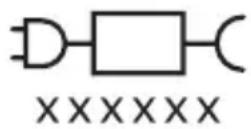
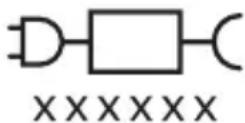
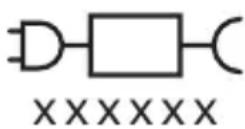
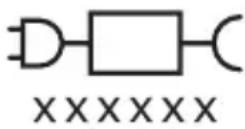
Detachable power supply part: The "xxxxxx" indicates the model number of the approved chargers to be used. (TCBxxxx, HX6100, HX6110, HX6160 or WAAxxxx)

This symbol means read the instructions for use before using the appliance.
Intended use
ProtectiveClean power toothbrushes are intended to remove adherent plaque and food debris from the teeth to reduce tooth decay and improve and maintain oral health. ProtectiveClean power toothbrushes are intended for personal use. Use by children should be with adult supervision.
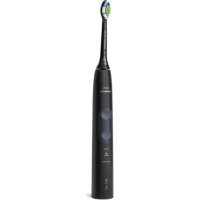
Your Philips Sonicare (Fig 1.)
1 Handle 2 Power on/off button 3 Mode button 4 Mode indicator 5 Brush Head Replacement Reminder 6 Battery indicator
Accessories:
7 Brush head cap 8 Smart brush head(s) 9 Charging base 10 Travel case 11 UV sanitizer and charger
Note: Accessories included may vary based on the model purchased.
Getting started
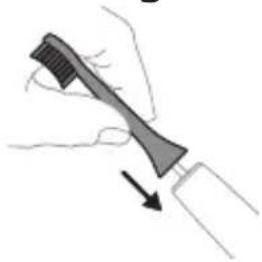
1 Align the brush head so the bristles point in the same direction as the front of the handle.
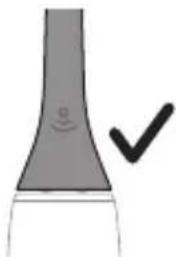
2 Firmly press the brush head down onto the metal shaft until it will not go any further.
Note: It is normal to see a slight gap between the brush head and the handle.
Using your Philips Sonicare toothbrush
If you are using your Sonicare toothbrush for the first time, it is normal to feel more vibration than when using a non-electric toothbrush. It is common for first-time users to apply too much pressure. Only apply gentle pressure and let the toothbrush do the brushing for you. Please follow the brushing instructions below for the best experience. To help you transition to your new Sonicare power toothbrush, it comes with the EasyStart feature activated. This feature gently increases the power over the first 14 brushings to help you adapt to brushing with a Philips Sonicare toothbrush.
Brushing instructions
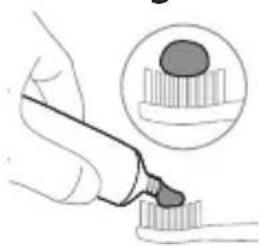
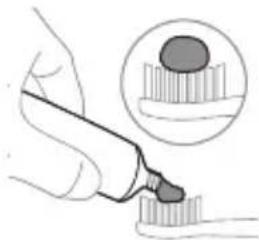
1. Wet the bristles and apply a small amount of toothpaste.
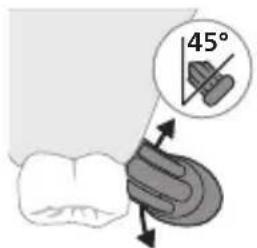
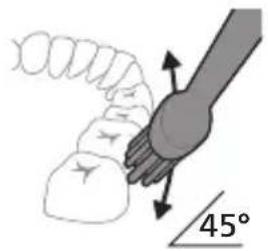
2. Place the toothbrush bristles against the teeth at a slight angle (45 degrees), pressing firmly to make the bristles reach the gumline or slightly beneath the gumline.
Note: Keep the center of the brush in contact with the teeth at all times.
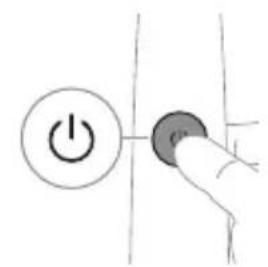
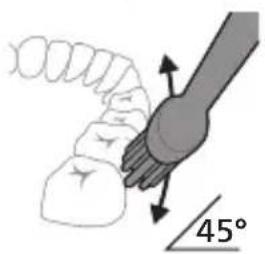
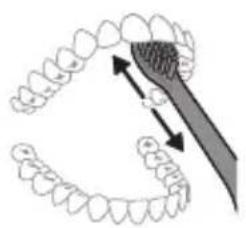
3. Press the power on/off button to switch on the Philips Sonicare.
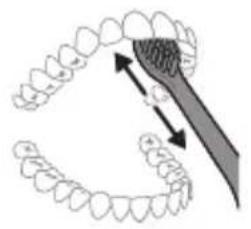
4. Gently keep the bristles placed on the teeth and in the gumline. Brush your teeth with small back and forth motion so the bristles reach between the teeth. Continue this motion throughout your brushing cycle.
Note: The bristles should slightly flare. It is not recommended to scrub as you would with a manual toothbrush.
Note: If you apply too much pressure, you will be alerted by a change in vibration of the handle and the brush head replacement reminder flashing amber.
5. To clean the inside surfaces of the front teeth, tilt the brush handle semi-upright and make several vertical overlapping brushing strokes on each tooth. 6. After you have completed the brushing cycle, you can spend additional time brushing the chewing surfaces of your teeth and areas where staining occurs. You can also brush your tongue, with the toothbrush switched on or off, as you prefer.
Note: Your Philips Sonicare toothbrush is safe to use on braces (brush heads wear out sooner when used on braces) and dental restorations (fillings, crowns, veneers) if they are properly adhered and not compromised.
QuadPacer
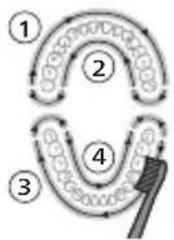
To make sure you brush evenly throughout the mouth, divide your mouth into 4 sections using the QuadPacer feature. The QuadPacer divides the brushing time into 4 equal segments and indicates when you should move to the next area. The segments are indicated with a brief pause in vibration. The toothbrush automatically stops at the end of the brushing session.
Note: Additional time may be added when you use the White or Gum Care Modes.
Modes
Your power toothbrush is equipped with up to 3 modes: Clean, White and Gum Care (specific models only). To change modes, press the mode button while the toothbrush is powered off.
Clean White Gum Care
| Benefit For exceptional everyday clean | Removes surface stains | Gently massages gums |
| Total brushing time | 2 minutes 2 minutes and 30 seconds | 3 minutes |
| How to brush Brush each segment for 30 seconds. | Brush each segment for 30 seconds | Brush each segment for 30 seconds |
| then brush segments 5 and 6 for 15 seconds each to brighten and polish front teeth. | then brush segments 5, 6, 7 and 8 for 15 seconds each to gently stimulate and massage your gums. | |
| 5 | 6 | |
| 6 | 8 |
BrushSync technology
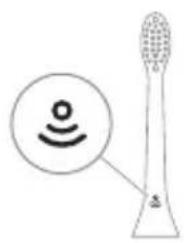
BrushSync technology enables your brush head to communicate with your handle using a microchip. The symbol at the bottom of the brush head indicates that the brush head is equipped with this technology. BrushSync technology enables: - Brush Head Replacement Reminder Philips Sonicare offers a wide range of smart brush heads, equipped with BrushSync technology. To explore our full range of toothbrush brush heads, and find the brush head that is best for you, go to
www.philips.com/toothbrush-heads for more information.
Features
- Pressure Sensor Feedback
- Quadpacer
- Brush head Replacement Reminder
- EasyStart
- SmarTimer
Pressure Sensor Feedback
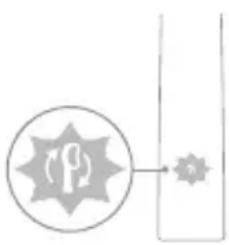
Your Sonicare toothbrush measures the pressure you apply while brushing, to protect your gums and teeth from damage.
If you apply excess pressure, the handle changes its vibration and the brush head replacement reminder icon flashes amber until you reduce the pressure.
Note: Your product comes with the Pressure Sensor activated. To deactivate this feature (see 'Activating or deactivating features').
Quadpacer
The QuadPacer is an interval timer that helps you to brush evenly through the mouth by dividing your mouth into 4 sections. (see 'Brushing instructions')
Brush Head Replacement Reminder
Your Philips Sonicare is equipped with BrushSync technology that tracks the wear of your brush head.
Note: This feature only works with Philips Sonicare smart brush heads with BrushSync technology.
1 When you attach a new smart brush head for the first time, the handle recognizes that you have a Philips brush head with BrushSync technology and begins tracking brush head wear. 2 Over time, based on the pressure you apply and the total time the brush head has been used, the handle tracks brush head wear in order to determine the optimal time to replace your brush head. This feature guarantees the best cleaning and care of your teeth.
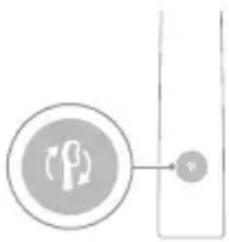
3 When the brush head replacement reminder indicator lights up amber, you should replace your brush head.
All smart brush heads come with the brush head replacement reminder feature activated. To deactivate the brush head replacement reminder see 'Activating or deactivating features'.
EasyStart
This Philips Sonicare model comes with the EasyStart feature activated. The EasyStart feature gently increases the power over the first 14 brushings to help you get used to brushing with the Philips Sonicare.
Disclaimer
When the Philips Sonicare toothbrush is used in clinical studies, it must be used in clean mode at high intensity with the handle fully charged and the EasyStart feature deactivated.
To deactivate EasyStart (see 'Activating or deactivating features').
SmarTimer
The SmarTimer indicates that your brushing cycle is complete by automatically switching off the toothbrush at the end of the brushing cycle.
Dental professionals recommend brushing no less than 2 minutes twice a day.
Note: If you press the power on/off button after you started the brushing cycle, the toothbrush pauses. After a pause of 30 seconds, the SmarTimer resets.
Activating or deactivating features
You can activate or deactivate the following features of your toothbrush:
- EasyStart
- Brush Head Replacement Reminder
- Pressure Sensor Feedback
Note: You can only activate or deactivate the brush head replacement reminder when a smart brush head is on the handle.
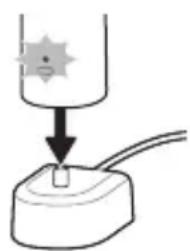
Step 1: Place the handle on the plugged in charging stand.
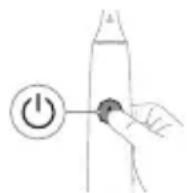
Step 2: Press and hold power on/off button for:
EasyStart Brush head Pressure Sensor replacement Feedback reminder
Up to 3 seconds Up to 5 seconds Up to 7 seconds
Step 3: Let go of the power on/off button when you hear:
1 beep 1 beep and then 1 beep, 2 beeps and 2 beeps then 3 beeps

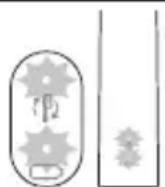
If you see the battery indicator and the brush head replacement reminder light flash green 2 times and hear 3 tones from low to high, then the feature has been activated.
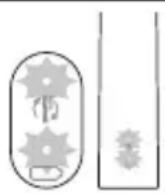
If you see the battery indicator and brush head replacement reminder light flash amber 1 time and hear 3 tones high to low, then the feature has been deactivated.
UV sanitizer
Note: Accessories included may vary based on the model purchased.
With the UV sanitizer you can clean your brush head after every use.
Unplug the sanitizer, discontinue use and call Consumer Care if:
- The UV light bulb remains on when the door is open.
- The window is broken or missing from the sanitizer.
- The sanitizer gives off smoke or a burning smell while it is operating.
Note: UV light can be harmful to the human eye and skin. This device should be kept out of reach of children at all times.
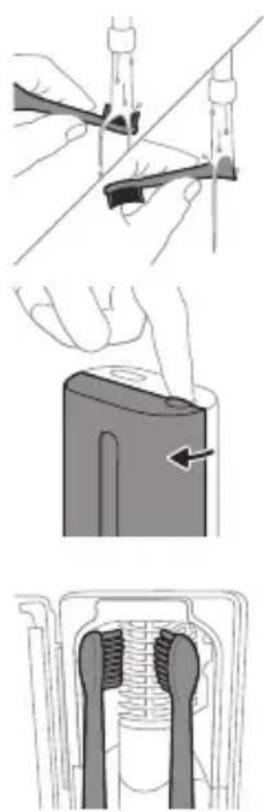
1 After brushing, rinse the brush head and shake off excess water.
Warning: Make sure that the brush head cap is not on the brush head when the brush head is being cleaned in the sanitizer.
2 Place your finger in the door recess on top of the sanitizer and pull open the door. 3 Place the brush head on one of the 2 pegs in the sanitizer with the bristles facing the light bulb.
Note: Only clean Philips Sonicare snap-on brush heads in the sanitizer.
Note: Do not clean Philips Sonicare for Kids brush heads in the sanitizer.
4 Make sure the sanitizer is plugged into a live outlet of appropriate voltage.
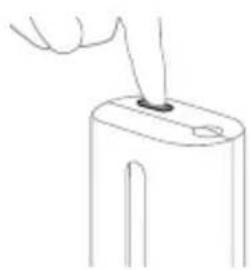
5 Close the door and press the green power on/off button once to select the UV clean cycle.
Note: You can only switch on the sanitizer if the door is properly closed.
Note: The sanitizer stops operating if you open the door during the sanitizer cycle.
Note: The sanitizer cycle takes approximately 10 minutes and then switches off automatically.
The sanitizer is in operation when the light glows through the window.
Charging and battery status
This Philips Sonicare toothbrush is designed to provide at least 28 brushing sessions, each session lasting 2 minutes (14 days if used twice per day) on a fully charged battery. The battery indicator shows the battery status when you complete the 2-minute brushing session, when you pause the toothbrush, or while it is charging.
Note: It can take up to 24 hours to fully charge the battery before first use, but you can use the Philips Sonicare toothbrush before it is fully charged.
Charging
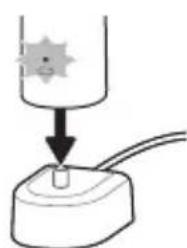
Charging on charger or UV Sanitizer
1 Plug the charger or sanitizer into an electrical outlet. 2 Place the handle on the charger or sanitizer. - The handle emits 2 short beeps to confirm that the handle is placed properly. - The flashing light of the battery indicator shows that the toothbrush is charging. - When the handle is fully charged on the charger, the battery indicator lights up green for 30 seconds and then switches off.
Battery status
Battery status (handle on plugged-in charger)
When the handle is placed on the charger, the battery indicator shows the battery level.
Battery status Battery indicator
| Charging Flashes green |
| Full Solid green for 30 seconds and then switches off |
Battery status (when handle is not placed on charger)
When the toothbrush is awake, the battery indicator at the bottom of the handle shows the battery level.
Battery status Battery indicator Sound
| Full Solid green - | |
| Partially full Flashes green - | |
| Low Flashes amber The handle emits 3 | beeps after brushing |
| Empty Flashes amber The handle emits 2 sets | of 5 beeps after brushing |
Note: To save energy, the battery indicator will switch off when not in use.
Note: When the battery is completely empty, the toothbrush switches off. Place the toothbrush on the charger to charge it.
Note: To keep the battery fully charged at all times, you may keep your toothbrush on the charger when not in use.
Cleaning
Toothbrush handle
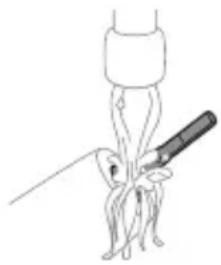
1 Remove the brush head and rinse the metal shaft area with warm water. Make sure you remove any residual toothpaste. Caution: Do not push on the rubber seal on the metal shaft with sharp objects, as this may cause damage. 2 Wipe the entire surface of the handle with a damp cloth.
Note: Do not tap the handle on the sink to remove excess water.
Brush head
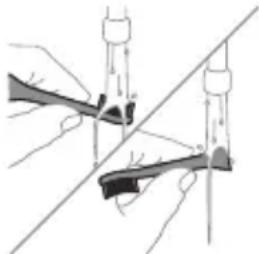
1 Rinse the brush head and bristles after each use. 2 Remove the brush head from the handle and rinse the brush head connection with warm water at least once a week. Rinse the travel cap as often as needed.
Charger
1 Unplug the charger before you clean it. 2 Wipe the surface of the charger with a damp cloth.
Travel case
Rinse with warm water and use a damp cloth to clean the inside of the travel case.
Cleaning the Sanitizer
Warning: Do not immerse the sanitizer in water or rinse it under the faucet.
Warning: Do not clean the sanitizer when the UV light bulb is hot.
For optimal effectiveness, it is recommended to clean your sanitizer weekly.
1. Unplug the sanitizer.
English
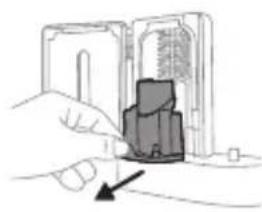
2. Pull the drip tray straight out. Rinse the drip tray and wipe it clean with a damp cloth. 3. Clean all interior surfaces with a damp cloth. 4. Remove the protective screen in front of the UV light bulb.
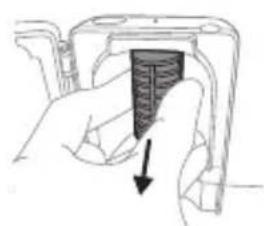
To remove the screen, grasp the edges next to the snaps, gently squeeze, and pull out the protective screen.
5. Remove the UV light bulb. To remove the light bulb, grasp it and pull it out of the metal clasp. 6. Clean the protective screen and the UV light bulb with a damp cloth. 7. Reinsert the UV light bulb. To reinsert the light bulb, align the bottom of the light bulb with the metal clasp and push the bulb into the clasp. 8. Reinsert the protective screen. To reinsert the screen, align the pegs on the screen with the slots on the reflective surface near the UV light bulb. Push the screen straight into the slots on the sanitizer. 9. Place the drip tray back in the UV sanitizer. 10. After cleaning, make sure the sanitizer is completely dry before you connect it to the mains.
Storage
If you are not going to use the product for an extended period of time, unplug it from the electrical outlet, clean it, and store it in a cool and dry place away from direct sunlight.
Replacement
Replace Philips Sonicare brush heads every 3 months to achieve optimal results. Use only Philips Sonicare replacement brush heads.
Locating the model number
Look on the bottom of the Philips Sonicare toothbrush handle for the model number (HX64XX, HX68XX).
Warranty and support
If you need information or support, please visit www.philips.com/support or read the international warranty leaflet.
Warranty exclusions
What is not covered under warranty: - In mouth attachments including brush heads and nozzles. - Damage caused by use of unauthorized replacement parts or unauthorized brush heads. - Damage caused by misuse, abuse, neglect, alterations or unauthorized repair. - Normal wear and tear, including chips, scratches, abrasions, discoloration or fading. - UV light bulb.
Recycling
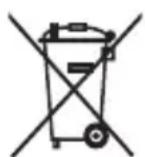
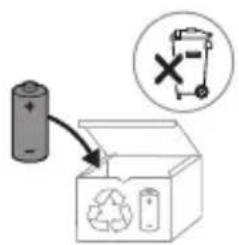
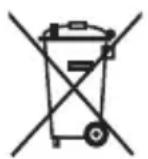
- This symbol means that electrical products and batteries shall not be disposed of with normal household waste.
- Follow your country's rules for the separate collection of electrical products and batteries.
- The UV light bulb of the sanitizer contains mercury. Do not throw the UV light bulb away with the normal household waste at the end of its life. Hand it in at an official collection point for recycling. Information on REACH substances, contained in Philips products, can be found on www.philips.com/REACH
Removing the rechargeable battery
The built-in rechargeable battery must be removed by a qualified professional when the product is discarded.
Instructions for removal of built-in rechargeable batteries can be found on www.philips.com/support.
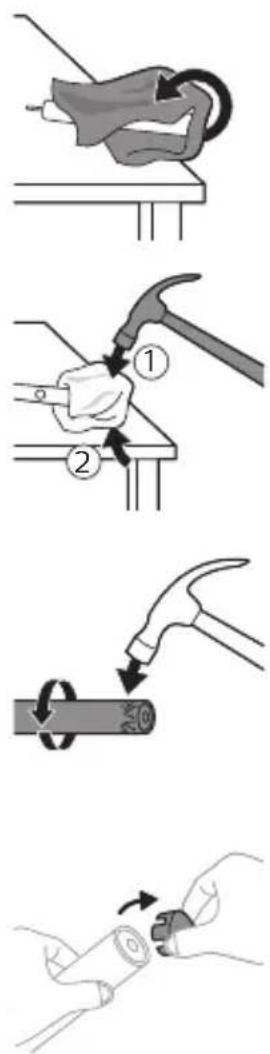
To remove the rechargeable battery, you need a towel or cloth, a hammer and a flat-head (standard) screwdriver. Observe basic safety precautions when you follow the procedure outlined below.
1 To deplete the rechargeable battery of any charge, remove the handle from the charger, turn on the toothbrush and let it run until it stops. Repeat this step until you can no longer turn on the toothbrush. 2 Remove and discard the brush head. Cover the entire handle with a towel or cloth. 3 Hold the top of the handle with one hand and strike the handle housing 0.5 inch above the bottom end. Strike firmly with a hammer on all 4 sides to eject the end cap.
Note: You may have to hit the end several times to break the internal snap connections.
4 Remove the end cap from the toothbrush handle. If the end cap does not release easily from the housing, repeat step 3 until the end cap is released.
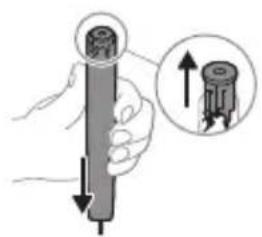
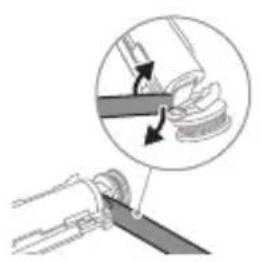
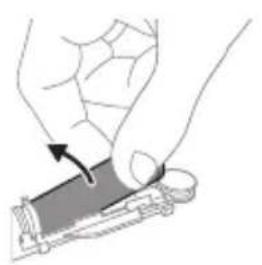
5 Holding the handle upside down, press the shaft down on a hard surface. If the internal components do not easily release from the housing, repeat step 3 until the internal components are released. 6 Wedge the screwdriver between the battery and the black frame at the bottom of the internal components. Then pry the screwdriver away from the battery to break the bottom of the black frame. 7 Insert the screwdriver between the bottom of the battery and the black frame to break the metal tab connecting the battery to the green printed circuit board. This will release the bottom end of the battery from the frame. 8 Grab the battery and pull it away from the internal components to break the second metal battery tab.
Caution: Be aware of the sharp edges of the battery tabs so as to avoid injury to your fingers.
9 Cover the battery contacts with tape to prevent any electrical short from residual battery charge.
The rechargeable battery can now be recycled and the rest of the product discarded appropriately.
Note: Do not throw away the appliance with the normal household waste at the end of its life, but hand it in at an official collection point for recycling. By doing this, you help to preserve the environment.
Introduction
www.philips.com/support
Note: Features may vary by model. Some models may not be equipped with Bluetooth or NFC.

Detachable power supply unit: "xxxxxx" indicates the model number of the approved chargers to be used. (TCBxxxx, HX6100, HX6110, HX6160 or WAAxxxx)
Address: www.philips.com/support
www.philips.com/support
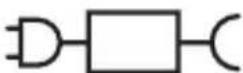
xxxxxx
Clean White Gum Care
www.philips.com/support
Clean White Gum Care
www.philips.com/support

Clean White Gum Care
MEDICAL WARNINGS
Clean White Gum Care
MEDICAL WARNINGS
Clean White Gum Care
Clean White Gum Care
| Prednost Za odlično svakodnevno čišćenje | Uklanjanje povrsinskih mrlja | Nježno masira desni |
| Ukupno vrijeme četkanja | 2 minute 2 minute i 30 sekundi | 3 minute |
| Kako šetkati Četkajte svaki segment 30 sekundi. | šetkajte svaki segment 30 sekundi | šetkajte svaki segment 30 sekundi |
| zatim šetkajte segmente 5 i 6, svakog po 15 sekundi, za posvjeljivanje i poliranje prednjih zuba. | zatim šetkajte segmente 5, 6, 7 i 8, svakog po 15 sekundi, za nježnu stimulaciju i masažu desni. | |
| 5 6 | 5 6 7 8 |
BrushSync technology
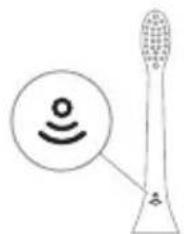
BrushSync technology allows the brush head to communicate with the handle using a microchip. The symbol on the bottom of the brush head indicates that the brush head is equipped with this technology. BrushSync technology enables: a replacement reminder for the brush head. Philips Sonicare offers a wide range of smart brush heads equipped with BrushSync technology. To explore the full range of toothbrush heads and find the
brush head that best suits you, visit www.philips.com/toothbrush-heads for more information.
Features
www.philips.com/support
Clean White Gum Care
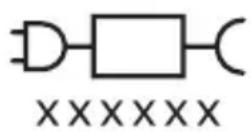
Note: Functions may differ for different models. Some models may not be equipped with Bluetooth or NFC.
Clean White Gum Care
| leguvums lzcilai tirišanai katru dienu (noklusejuma režims). | Aplikuma noğemşana no zobu virmas | Saudziga smaganu masëšana | |
| Kopëjais zobu tirišanas laiks | 2 minutes 2 minutes un 30 sekundes | 3 minutes | |
| Kā tīrit tīriet katru segmentu 30 sekundes. | tīriet katru segmentu 30 sekundes. | tīriet katru segmentu 30 sekundes. | |
| Pēc tam 15 sekundes tīriet 5. un 6. segmentu, lá padarītu priekszobus mirdzošakus un gludākus. | Pēc tam 15 sekundes tīriet 5., 6., 7. un 8. segmentu, lá saudzīgi stimulētu un masētu smaganas. | ||
BrushSync technology
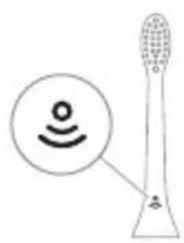
BrushSync technology ensures communication between the brush head and the handle using a microchip. The symbol on the underside of the brush head indicates that the brush head is equipped with this technology.
BrushSync technology provides the following:
- brush head replacement reminder
Clean "White" "Gum Care"
Clean White Gum Care
Clean White Gum Care
Clean White Gum Care
Using Philips Sonicare toothpaste
If you are using Sonicare toothpaste for the first time, it is normal to feel more vibration than when using a non-electric toothbrush. First-time users typically apply too much pressure. Just press gently and let the toothbrush do the cleaning for you. For best results, follow the brushing instructions. The EasyStart feature is activated to help you transition to your new Sonicare power toothbrush.
Clean White Gum Care
| Foydasi Maxsus kundalik tozalah uchun | Yuzadagi dog'larni ketkazadi | Milkarni ohista massaj qiladi |
| Jami tish tozalah vaqti | 2 daqqa 2 daqqa va 30 soniya | 3 daqqa |
| Tozalah usuli Har bir segmentni 30 soniyadan tozalang. | Har bir segmentni 30 soniyadan tozalang | Har bir segmentni 30 soniyadan tozalang |
| keyin old tishlarni oqartirish va jilolash uchun 5- va 6-segmentlarning har birini 15 soniyadan tozalang. | keyin milklaringizni ohista stimullash va massaj qilish uchun 5, 6, 7 va 8-segmentlarning har birini 15 soniyadan tozalang. | |
| 5 6 7 | 6 8 9 |
BrushSync technology
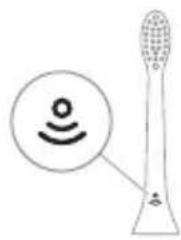
BrushSync technology helps the brush head communicate with the handle via a microchip.
The symbol under the brush head indicates that the brush head is equipped with this technology.
BrushSync technology activates the following:
- Brush head replacement reminder
Philips Sonicare offers a wide range of smart brush heads with BrushSync technology. To explore the full range of toothbrush heads and find the one that best suits you, visit www.philips.com/toothbrush-heads.
Features
- Pressure sensor alert
- QuadPacer
- Brush head replacement reminder
- EasyStart
- SmarTimer
www.philips.com/support
Clean White Gum Care
www.philips.com/support

xxxxxx
Clean White Gum Care
www.philips.com/support
Important safety information
www.philips.com/support
Clean White Gum Care
www.philips.com/support
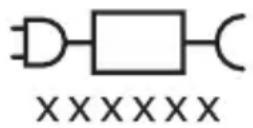
Note: Functions may vary for different models. Some models may not be equipped with "Bluetooth" or "NFC".
Detachable power supply part: "xxxxxx" indicates the model number of approved chargers to be used. (TCBxxxx, HX6100, HX6110, HX6160 or WAAxxxx)

This symbol means "before using the device, read the user instructions".
Intended use
Clean White Gum Care
www.philips.com/toothbrush-heads/ for more information.
Functions
- Pressure sensor signal
- Quadpacer
- Brush head replacement reminder
- EasyStart
- SmartTimer
Pressure sensor signal
Clean White Gum Care
www.philips.com/support
Clean White Gum Care
| Pogodnost Za izvanredno svakodnevno pranje | Uklanja mrlje sa povrsina | Nežno masira desni |
| Ukupno vreme pranja zuba | 2 minuta 2 minuta i 30 sekundi | 3 minuta |
| Kako se pere Perite svaki segment 30 sekundi. | perite svaki segment 30 sekundi | perite svaki segment 30 sekundi |
| zatim perite segmente 5 i 6, svaki u trajanju od 15 sekundi, da biste izbeleli i ispolirali prednje zube. | zatim perite segmente 5, 6, 7 i 8, svaki u trajanju od 15 sekundi, za nežno stimulisanje i masiranje desni. | |
| 5 6 | 5 6 7 8 |
BrushSync technology
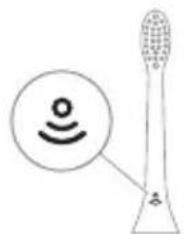
BrushSync technology enables communication between the brush head and the handle using a microchip. The symbol on the bottom of the brush head indicates that the brush head contains this technology.
BrushSync technology enables: - A reminder to replace the brush head. Philips Sonicare has a wide range of smart brush heads with BrushSync technology. For more information about our full range of toothbrush heads, visit
www.philips.com/toothbrush-heads and find the brush head that suits you best.
Functions
- Pressure sensor feedback
- Quadpacer
- Brush head replacement reminder
- EasyStart
- Smartimer
www.philips.com/support
Clean White Gum Care
Clean White Gum Care
5. Turn off the UV lamp.
- If excessive bleeding occurs after use, or if bleeding continues for more than 1 week after use, or if you experience discomfort or pain, stop using the device and consult your dentist/physician.
- If you have had oral or gum surgery in the past 2 months, consult your dentist before using this device.
- If you have a pacemaker or other implanted device, consult your physician or the manufacturer of the implanted device before using.
- If you have any medical concerns, consult your doctor before using this device.
- This product is a personal care device and is not intended for use on multiple patients in a dental clinic or office.
www.philips.com/support
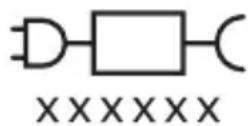
Note: Different models may have different features. Some models may not be equipped with Bluetooth or NFC.
The charging base shows the model number of the approved chargers for use: "xxxxx" (TCBxxx, HX6100, HX6110, HX6160, or WAAxxx).

This symbol means: read the user instructions before using the device.
Intended use
The ProtectiveClean electric toothbrush is intended to remove plaque and food debris from teeth to reduce tooth decay and maintain oral health. The ProtectiveClean electric toothbrush is intended for personal use. Children should use it under adult supervision.
Your Philips Sonicare device (Fig. 1).
1 Handle
Clean White Gum Care
Brush head replacement reminder
Your Philips Sonicare is equipped with BrushSync technology that tracks the wear of the brush head.
Note: This feature works only with Philips Sonicare smart brush heads that have BrushSync technology.
1 When you attach a new smart brush head for the first time, the handle recognizes that you have a Philips brush head with BrushSync technology and starts tracking the wear of the brush head.
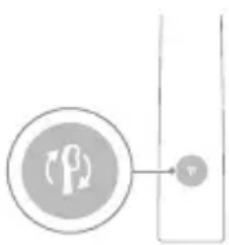
2 Over time, based on the pressure you use and the total time you have used the brush head, the handle tracks its wear to determine the optimal time to replace it. This feature ensures the best cleaning and care for your teeth. 3 When the brush head replacement reminder light turns yellow, you need to replace the brush head.
The brush head replacement reminder feature is enabled by default. To deactivate the brush head replacement reminder, see the section "Activating or deactivating features".
EasyStart
This Philips Sonicare model comes with the EasyStart feature activated. The EasyStart feature helps you get used to brushing with Philips Sonicare by gradually increasing its power over the first 14 brushing sessions.
1 beep, 1 beep and 1 beep, 2 beeps and then 2 beeps, then 3 beeps

If you see the battery indicator and the brush head replacement reminder light flash green 2 times and hear 3 beeps from the handle, the feature is activated.
OR
If you see the battery indicator and the brush head replacement reminder light flash yellow 1 time and hear 3 beeps from the handle, the feature is deactivated.
UV sanitizer
Note: Accessories may vary depending on the model purchased.
You can clean the brush head with the UV sanitizer after each use.
If the following situations occur, unplug the sanitizer, stop using it, and call Customer Care:
- The UV light stays on while the lid is open.
- The window of the sanitizer is broken or missing.
- Disinfectant smells of soap or has a burning smell.
Note: Ultraviolet light can be harmful to human eyes and skin. Always keep this device out of reach of children.
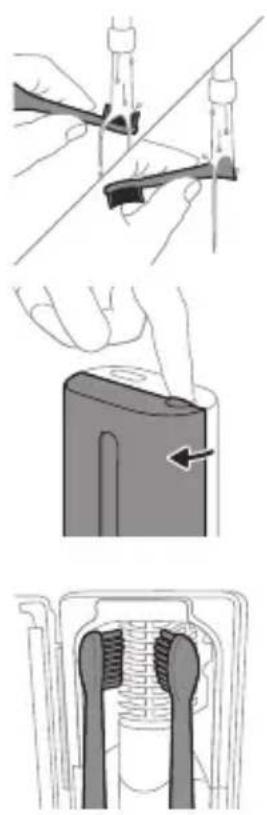
1 After brushing, rinse the brush head and shake off excess water.
Warning: The nozzle cap is not attached to the nozzle while it is being cleaned in the disinfectant.
2 Place your finger in the hole on the lid of the cleaner and push to open the lid. 3 Place the brush head into the 2 slots in the cleaner, with the bristles facing the UV light.
Note: The cleaner only cleans brush heads that fit Philips Sonicare.
Note: Do not clean Philips Sonicare for Kids brush heads in the disinfectant.
4 Make sure the cleaner is plugged into a properly grounded outlet with electricity.
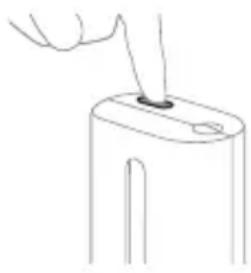
5 Close the lid and press the on/off button once to select the UV cleaning cycle.
Note: You can only operate the disinfectant when the lid is properly closed.
Note: If you open the lid during the disinfectant cycle, the disinfectant will stop working.
Note: The disinfectant cycle takes approximately 10 minutes and then turns off automatically.
When the light is visible through the window, it indicates that the cleaner is working.
Charging and battery status
This Philips Sonicare toothbrush is designed for at least 28 brushing sessions, each session lasting 2 minutes on a fully charged battery (if used twice a day, that's 14 days). The battery indicator shows the battery status when you pick up the toothbrush or while it is charging, after a 2-minute brushing session ends.
Note: For the first time, before using, it may take up to 24 hours to fully charge the battery, but you can use the Philips Sonicare toothbrush even before it is fully charged.
Charging
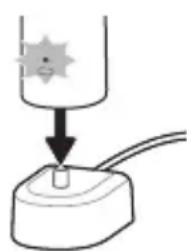
Charging in the charger or in the UV sanitizer
1 Plug the charger or sanitizer into an electrical outlet. 2 Place the toothbrush handle in the charger or sanitizer. - The handle emits two short beeps to confirm that it is correctly placed in the charger. - The battery indicator light flashing indicates that the handle is charging. - When the handle is fully charged in the charger, the battery indicator lights up green for 30 seconds and then turns off.
Battery status
Battery status (handle placed on the charger)
When the handle is placed on the charger, the battery indicator shows the battery level.
Battery status Battery indicator
Charging Flashing green
Full Solid green for 30 seconds
then turns off
Battery status (handle not on the charger)
When the toothbrush is on, the battery indicator at the bottom of the handle shows the battery level.
Battery status Battery indicator Sound
Full Solid green -
Note: The functions of the different models may differ. Some models may not be equipped with Bluetooth or NFC.

The charging base part: "xxxxxx" shows the model numbers of the compatible charging devices to be used. (TCBxxxx, HX6100, HX6110, HX6160 or WAAxxxx)
This symbol means "Read the instructions for use before using the device".
Intended use
The ProtectiveClean electric toothbrushes are intended to remove plaque and food residue from the teeth, to prevent the buildup of plaque and to improve and maintain oral health. The ProtectiveClean electric toothbrushes are intended for home use. Use by children should be under parental supervision.
Your Philips Sonicare (Fig. 1)
1 Handle 2 On/off button for the charging base 3 Mode button 4 Mode indicator 5 Reminder for replacing the brush head 6 Battery indicator
Accessories:
7 Cap of the brush head 8 Smart brush head 9 Charging base 10 Travel charger 11 UV sanitizer 12 Charging device
Note: The included accessories may vary depending on the model purchased.
Instructions for use
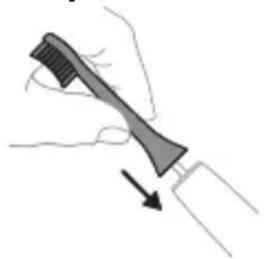
1 Place the brush head on the handle, aligning the bristles with the front of the handle.
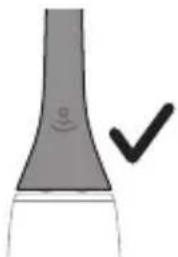
2. Attach the brush head to the handle by aligning the top of the brush head with the handle, until you can no longer press further.
Note: It is normal for there to be a small gap between the brush head and the handle.
Your power toothbrush is equipped with up to 3 modes: Clean, White and Gum Care (specific models only). To change modes, press the mode button while the toothbrush is powered off.
Clean White Gum Care
| Преемстvo 3a поевьзхов Всекидnevно почиствае | Острава пета по ЗбITE | Масжира шадящ Венціte |
| Овso врeme за мени на ЗбITE | 2 минут ni 2 минут ni 30 секунni | 3 минут ni |
| Как дa миete Ми-te Bcekn сетмент B празьлженье на 30 секунni. | Ми-te Bcekn сетмент B празьлженье на 30 секунni | Ми-te Bcekn сетмент B празьлженье на 30 секунni |
| След koeto Ми-te сетменти 5 ni 6 за по 15 секунni Bcekn 3a изебале ni полиране на преимп te 3bби. | След koeto Ми-te сетменти 5, 6, 7 ni 8 за по 15 секунni Bcekn За нежно Стимулиране ni масжиране на Венціte. |
BrushSync
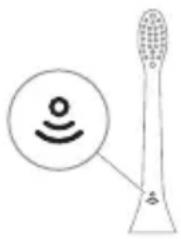
BrushSync technology allows the brush heads to communicate with the handle via microchip. The symbol on the full part of the brush head shows that the head is equipped with this technology. BrushSync technology allows for: -Reminder to replace the brush head. Philips Sonicare brush heads equipped with BrushSync technology. To see the full range of brush heads and to find the best one for you, visit www.philips.com/toothbrush-heads for more information.
Functions
- Pressure Sensor Feedback
- Quadpacer
- Brush head Replacement Reminder
- EasyStart
- Smartimer
Pressure Sensor Feedback
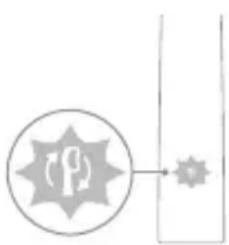
Your Sonicare toothbrush measures the pressure you apply while brushing, to protect your gums and teeth from damage.
If the pressure is too strong, the handle will change vibrations and the indicator light for the brush head replacement will blink in a different color until you reduce the pressure.
Note: This product is offered with the activation of the sensor for pressure. To deactivate this function (see "Activation and deactivation of functions").
QuadPacer
QuadPacer is an interval timer that helps you brush evenly by dividing your mouth into 4 zones.
Brush head replacement reminder
Your Philips Sonicare is equipped with BrushSync technology, which monitors the wear of the brush head.
Note: This function works only with Philips Sonicare smart brush heads with BrushSync technology.
1 When you attach a new smart brush head for the first time, the handle recognizes that you have a Philips brush head with BrushSync technology and starts tracking the wear of the brush head. 2 Over time, depending on the pressure applied and the total brushing time, the handle tracks the wear of the brush head to determine the optimal time for replacing the brush head. This function guarantees the best brushing and care for your teeth. 3 When the brush head replacement reminder light flashes in the handle, you should replace the brush head.

All smart brush heads are delivered with the brush head replacement reminder function activated. To deactivate the brush head replacement reminder, see "Activation and deactivation of functions".
EasyStart
This Philips Sonicare model is delivered with the EasyStart function activated. The EasyStart function gradually increases the power over the first 14 sessions to help you get used to brushing with Philips Sonicare.
Disclaimer
When the Philips Sonicare toothbrush is used in clinical studies, it should be used in Clean mode with high intensity with a fully charged handle, and the EasyStart function should be deactivated.
To deactivate EasyStart (see "Activation and deactivation of functions").
SmarTimer
The SmarTimer shows that the recommended brushing time of 2 minutes is complete by automatically switching off the toothbrush at the end.
The brush head should be replaced at least every 2 minutes to no more than 2 days per use.
Note: If you press the power on/off button, the brush will pause. After a pause of 30 seconds, Smartimer will reset.
Activating or deactivating functions
You can activate or deactivate the following functions of your brush:
- EasyStart
- Brush head replacement reminder
- Pressure sensor feedback
Note: You can activate or deactivate the brush head replacement reminder only when the brush head has an intelligent brush head.
Step 1: Place the handle on the plugged in charging stand.
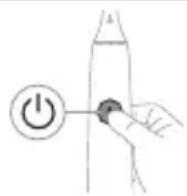
Step 2: Press and hold power on/off button for:
EasyStart Brush head
replacement reminder
Pressure Sensor
Feedback
Up to 3 seconds Up to 5 seconds Up to 7 seconds

Step 3: Let go of the power on/off button when you hear:
1 beep, 1 beep, and then
2 beeps
1 beep, 2 beeps, and
then 3 beeps
If you see the battery indicator and the brush head replacement reminder light flash green 2 times and hear 3 tones from low to high, then the feature has been activated.
OR

If you see the battery indicator and brush head replacement reminder light flash amber 1 time and hear 3 tones high to low, then the feature has been deactivated.
The brush head replacement reminder may vary depending on the model.
To maintain the brush head replacement reminder, you can reset the brush head after each use.
If the brush head replacement reminder is activated, stop using it and contact the service center if:
The control lamp remains on when the brush is open.
- The brush head replacement reminder is damaged or missing.
- The brush head replacement reminder emits a signal at the end of the working time.
- Type of defect and the time of its occurrence must be recorded at the time of work.
Warning: The UV light may be harmful to the eyes and skin. This device must be kept away from children at all times.
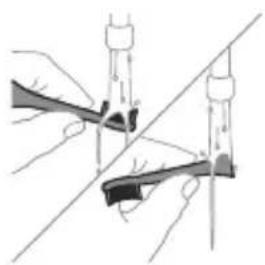
1. Rinse the brush head and squeeze out excess water.
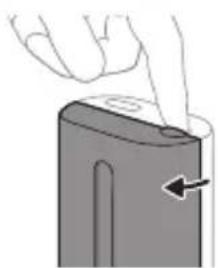
Caution: Make sure the brush head cap is not placed on the brush head when the brush head is being used for disinfection.
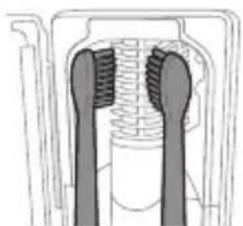
2. Insert the plug into the socket at the top of the disinfection unit and open the lid. 3. Place the brush head on one of the 2 pins in the disinfection unit, with the bristles facing the control lamp.
Note: In the disinfection unit, use only Philips Sonicare brush heads with a grip.
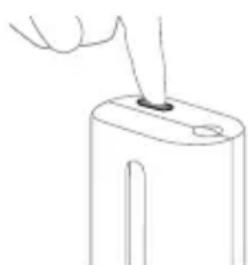
Note: Do not use your Philips Sonicare for Kids brush heads in the disinfection unit.
4. Make sure the disinfection unit is plugged into a working outlet with proper voltage. 5. Close the lid and press the green button to turn the charging on/off, to select the disinfection cycle.
Note: You can turn on the disinfection unit only if the lid is closed properly.
Note: The disinfection unit will stop working if you open the lid during the disinfection cycle.
Note: The disinfection cycle lasts about 10 minutes, after which the unit turns off automatically.
The disinfection unit works when, through the transparent window, you see the lamp is on.
Charging and battery status
This Philips Sonicare toothbrush is designed to provide up to 28 brushing sessions, each with a duration of 2 minutes (14 days if used twice daily) with a fully charged battery. The battery indicator shows the battery status when you finish a 2-minute brushing session, when you place the toothbrush on the charger, or when it is charging.
Note: A full charge may take up to 24 hours before first use, but you can use the Philips Sonicare toothbrush before it is fully charged.
Charging
Charging on charger or UV Sanitizer
1. Place the handle on the charging device to disinfect the electrical contacts.
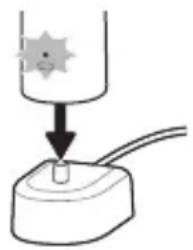
2. Place the handle on top of the charging device to disinfect.
- Hold the handle and press briefly to confirm it is placed correctly. - The battery indicator light will show that the handle is charging. - When the handle is fully charged in the charging device, the battery indicator will light green for 30 seconds, then turn off.
Battery status
Battery status (handle placed in charging device, which is connected to power)
When the handle is placed on the charging device, the battery indicator shows the battery level.
Battery status Battery indicator
Charging Flashing green
Full Constant green for 30
seconds, then turns off
Battery status (when the handle is not placed in the charging device)
When the handle is active, the battery indicator on the handle shows the battery level.
Battery status
Battery indicator
The light is constantly
green
The brush head is green -
Check the model number on the bottom
The model numbers are on the bottom side of the handle of the Philips Sonicare toothbrush (HX64XX, HX68XX).
Warranty and support
If you need information or support, visit www.philips.com/support or read the international warranty leaflet.
Exclusions from warranty
What is not covered by the warranty:
- Brush heads, including the brush head bristles and caps.
- Damage caused by use of unauthorized replacement parts or unauthorized brush heads. - Damage caused by improper use, use for other than intended purpose, negligence, accidents, modifications, or unauthorized repair.
- Normal wear and tear, including chipping, scratching, abrasion, discoloration, or fading.
- Ultraviolet light bulb.
Recycling
The built-in rechargeable battery must be removed by a qualified specialist when the product is discarded. Instructions for removing the built-in battery can be found at www.philips.com/support.
Removing the rechargeable battery
Warning: Remove the rechargeable battery before disposing of the product. Use a screwdriver (flathead or Phillips). Observe the basic safety measures when performing the procedure described below.
1 To fully discharge the rechargeable battery, unplug the appliance from the charging device, including the charging cord, and let it run until it stops by itself. Repeat this step until the charging cord can no longer be turned on.
2 Remove and discard the brush head. Cover the brush head and the handle with a cloth or towel.
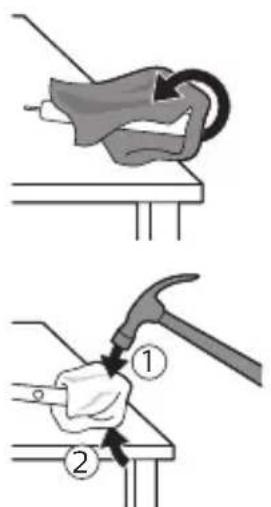
3 Hold the upper part of the handle with one hand and press the body of the handle about 1 cm below the end. Press firmly with both thumbs on all 4 sides to release the end cap.
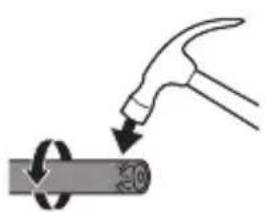
Note: You may need to press the end cap several times to release the internal locking hooks.
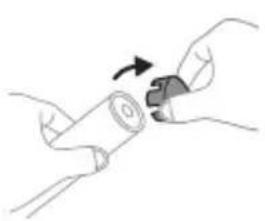
4 Slide the end cap off the handle of the toothbrush. If removal from the body is not easy, repeat step 3 until it is released.
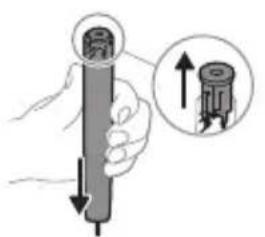
5 While holding the handle with the open end facing up, press the handle down onto a hard surface. If the internal components do not release easily from the body, repeat step 3 until they are released.
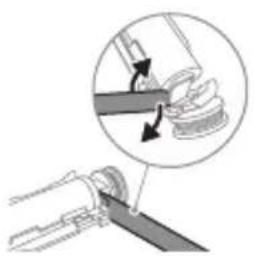
6 Insert the screwdriver between the battery and the red frame at the lower part of the internal components. Then pry the screwdriver away from the battery to release the lower part of the red frame.
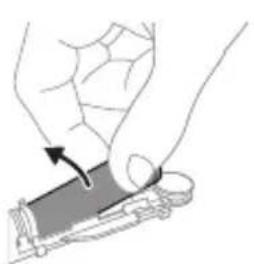
7 Insert the screwdriver between the lower part of the battery and the gray frame to release the metal clamp connecting the battery to the green circuit board. This will release the lower end of the battery from the frame.
8 Hold the battery and pull it out of the internal components to release the second metal clamp of the battery.
Caution: Be careful of the sharp edges of the battery clamps to avoid injury to your fingers.
9 Cover the contacts of the battery with tape to prevent any residual charge from causing a short circuit.
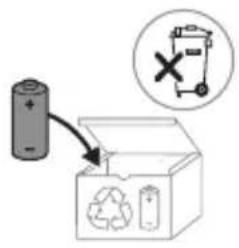
The battery is designed so that it can be recycled at the end of the product's life.
Note: Do not dispose of the appliance with normal household waste at the end of its life, but hand it in at an official collection point for recycling. By doing this you help to preserve the environment.
Recycling
www.philips.com/support

xxxxxx
Note: The handle is suitable for use with the following brush heads. The handle is compatible with Philips Sonicare brush heads with Bluetooth and NFC.

The handle has a unique code printed on the bottom of the handle. (TCBxxxx, HX6100, HX6110, HX6160, and WAAxxxx)
This symbol indicates that the user should read the instructions before using the handle.
Handle bottom
ProtectiveClean electric toothbrushes are designed to remove plaque and stains from teeth and to improve oral health. ProtectiveClean electric toothbrushes are also suitable for use with the handle. Please read the instructions before use.
Philips Sonicare handle (Fig. 1)
1 Brush head 2 On/off button 3 Mode button 4 Mode indicator 5 Brush head replacement reminder 6 Battery indicator
Accessories:
7 Brush head cap 8 Start brush head 9 Handle 10 Charging base 11 Charging glass
Note: The brush heads are compatible with the handle and can be used with it.
Brush head
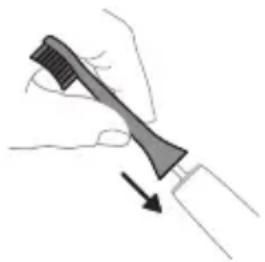
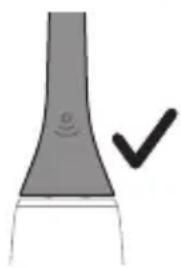
1 To avoid damage to the brush head bristles, do not bend or pull them. 2 Do not press the brush head against the metal part of the handle too hard.
Expert tip: The brush head and the handle should be at a 90-degree angle for optimal cleaning.
Philips Sonicare brush heads
If you use a Philips Sonicare brush head with a non-Sonicare electric toothbrush, it may not work properly. Using a non-Sonicare brush head may cause damage. Philips Sonicare brush heads are designed to work with Philips Sonicare handles. To get the best results, use genuine Philips Sonicare brush heads. The EasyStart feature is intended to help you get used to the Philips Sonicare brush head. This feature gradually increases the power over the first 14 uses to help you adapt to brushing with the Philips Sonicare brush head.
Brushing instructions
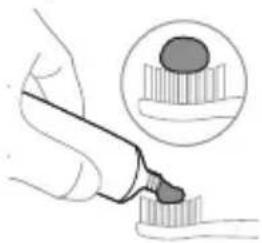
1 Wet the bristles and apply a small amount of toothpaste.
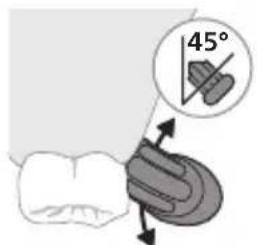
2 Place the bristles against your teeth at a 45-degree angle, gently press the bristles against the gumline, and brush gently.
Expert tip: The brush head should be angled slightly toward the gumline.
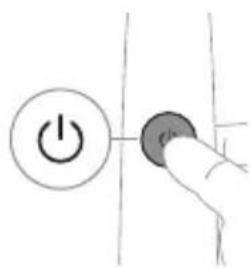
3 Press the power button to turn on the Philips Sonicare toothbrush.
4 Gently move the brush head back and forth across the teeth. To clean between teeth, hold the brush at a slight angle and use gentle pressure. Do not scrub.
Expert tip: Brush gently. This will help prevent damage to your teeth and gums.
Expert tip: Consult your dentist or dental professional before using the brush if you have had oral surgery or have any dental conditions.
5 To clean the inside of your front teeth, hold the brush vertically and make several gentle up-and-down strokes. 6 After brushing, rinse the brush head and handle thoroughly. Replace the brush head every 3 months or sooner if the bristles are worn or frayed.
Expert tip: Philips Sonicare brush heads are compatible with Philips Sonicare handles (except for the Sonicare AirFloss and Sonicare Power Flosser). They are not compatible with other toothbrush brands (e.g., Oral-B, Colgate).
QuadPacer
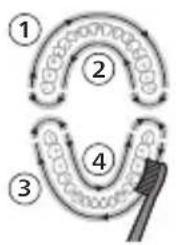
The QuadPacer feature helps you brush for the recommended 2 minutes. The QuadPacer signals you every 30 seconds to move to the next quadrant of your mouth. The intervals are indicated by a short pause and a vibration. You can turn this feature on or off in the settings.
Note: The brush head is compatible with the White and Gum Care modes.
Modes
There are three modes: Clean, White, and Gum Care (depending on the model).
To switch modes
Press the power button.
Clean White Gum Care
| Аръкь淋巴дik ΘЗгоч КУншдуК Тазалоу Учн | Сырткы Таektары Кетер | Тиш отун akсырь M reassождай |
| Жалны ТИSTN Тазало убakъсы | 2 мунот 2 мунот жан 30 секунд | 3 мунот |
| Кантын ТИSTN Тазалоо ке配电 | Ap бир сetimeTTN 30 секундай Тазалан. | Ap bир сetimeTTN 30 секундай Тазалан. |
| 1 2 3 4 | 1 2 3 4 | |
| anдан кимин 5 жаHA 6-6элүстордун ap bирin 15 секунд boю Тазалan, alдынкы Тиштэрд Жылърарытбд. | anдан кимин 5, 6,7жаHA 8-6элүстордун ap bирin 15 секунд boю Тазалan, ТИSS элтэринизд akсырьн Стимул栓ялан жаHA М reassождай. |
BrushSync technology
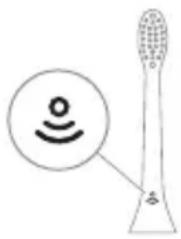
BrushSync technology uses a microchip in the brush handle to communicate with the brush head. The brush head's built-in chip tells you when it's time to replace it.
BrushSync technology features:
- Brush head replacement reminder
Philips Sonicare BrushSync technology with
Brush head replacement notification
The brush handle is compatible with Philips Sonicare BrushSync
This is a cleaning reminder for the toothbrush head.
Replace the brush head every 3 months.
www.philips.com/toothbrush-heads Site in English.
Functions
- Brush head sensor
- Quadpacer
- The brush head sensor reminds you to replace the brush head.
- EasyStart
- SmartTimer
Brush head sensor
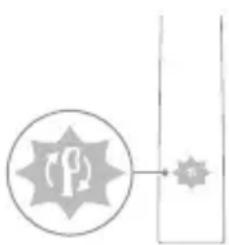
The Sonicare toothbrush head is designed to fit the handle and provide optimal cleaning.
If the brush head is not properly attached, the handle may vibrate excessively and the brush head may detach during use.
Expert: The brush head sensor may need to be activated. See "Activating the functions".
Quadpacer
QuadPacer - this is a timer that helps you brush your teeth in 4 quadrants, with a short pause between each.
The brush head replacement reminder
The Philips Sonicare brush head replacement reminder uses the BrushSync technology and a blue color.
Note: This function is only available with Philips Sonicare brush heads that have the BrushSync technology.
1 If you use the brush head longer than 3 months, the Philips brush head with BrushSync technology will remind you to replace the brush head. 2 If you ignore the reminder, the brush head will continue to work, but the brush head replacement reminder will appear periodically. This function helps you maintain optimal brushing performance. 3 When the brush head replacement reminder is activated, the brush head will show a blue color, and you should replace it.
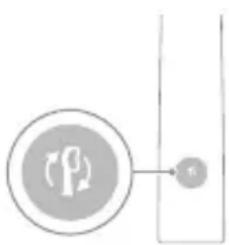
The brush head replacement reminder function is activated by default. To turn off the brush head replacement reminder, see 'Turning on or off the functions'.
EasyStart
This Philips Sonicare model comes with the EasyStart function activated. The EasyStart function gradually increases the power over the first 14 brushings to help you get used to brushing with Philips Sonicare.
Starting with the EasyStart function:
The Philips Sonicare TnW brush head is clinically proven to be more effective in removing plaque and improving gum health when used with the EasyStart function, compared to the Clean mode.
To turn on EasyStart (see 'Turning on or off the functions').
SmarTimer
SmarTimer automatically turns off the brush after 2 minutes of brushing and indicates the brushing cycle is complete. Most people brush for at least 2 minutes twice a day.
Note: If you pause the brushing cycle and press the on/off button, the brush will beep. After 30 seconds of beeping, the SmarTimer will reset.
Turning on or off the functions
You can turn on or off the following functions of your TnW brush head:
- EasyStart
- This passage is in a non-English language and appears to be garbled OCR text. It is not usable.
- This passage is in a non-English language and appears to be garbled OCR text. It is not usable.
This passage is in a non-English language and appears to be garbled OCR text. It is not usable.
This passage is in a non-English language and appears to be garbled OCR text. It is not usable.
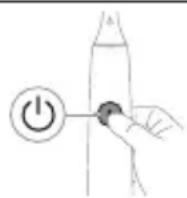
This passage is in a non-English language and appears to be garbled OCR text. It is not usable.
This passage is in a non-English language and appears to be garbled OCR text. It is not usable.
This passage is in a non-English language and appears to be garbled OCR text. It is not usable.
This passage is in a non-English language and appears to be garbled OCR text. It is not usable.
This passage is in a non-English language and appears to be garbled OCR text. It is not usable.
This passage is in a non-English language and appears to be garbled OCR text. It is not usable.
This passage is in a non-English language and appears to be garbled OCR text. It is not usable.
This passage is in a non-English language and appears to be garbled OCR text. It is not usable.
This passage is in a non-English language and appears to be garbled OCR text. It is not usable.
This passage is in a non-English language and appears to be garbled OCR text. It is not usable.
The battery compartment cover
Press for 30 seconds to reset
Open the cover, then insert
Battery indicator (flashes when battery is low)
The LED indicator shows the battery level when the battery is inserted.
Battery indicator and battery compartment
Reset button -
www.philips.com/support

Note: The functions of the different models may differ. Some models may not be compatible with Bluetooth or NFC.
Your Philips Sonicare (fig. 1)
1 Handle 2 On/off button 3 Mode button 4 Mode indicator 5 Replacement reminder for brush head 6 Battery indicator
Accessories:
7 Cap for brush head 8 Brush head (main) 9 Charging base 10 Charging cup 11 UV sanitizer and holder Note: Accessories may differ depending on the model.
Getting started
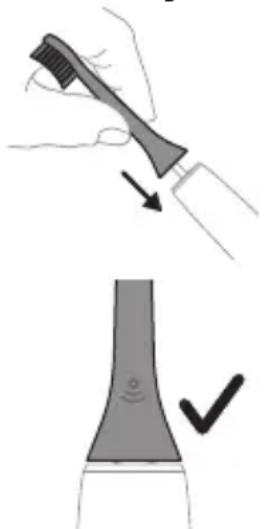
1 Place the brush head on the handle, so that the bristles are positioned at a slight angle to the handle. 2 Gently press the brush head onto the metal shaft until you feel it click into place.
Note: It is normal for there to be a small gap between the brush head and the handle.
Using your Philips Sonicare toothbrush
If you are using your Sonicare toothbrush for the first time, it is normal to feel more vibrations than when using a manual toothbrush. It is common for those who use it for the first time to apply too much pressure. Apply only gentle pressure and let the toothbrush do the brushing for you. Follow the brushing instructions for the best technique. To help you transition to the new electric Sonicare toothbrush, it comes with the EasyStart feature activated. This function gradually increases the power over the first 14 brushings to help you adapt to brushing with the Philips Sonicare toothbrush.
Brushing instructions
1 Wet the bristles and apply a small amount of toothpaste.
2 Place the toothbrush bristles against the teeth at a slight angle (45 degrees), pressing gently so the bristles reach the gumline or slightly below the gumline.
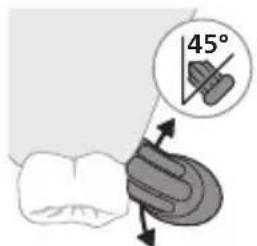
Note: The center of the brush must remain in contact with the teeth at all times.
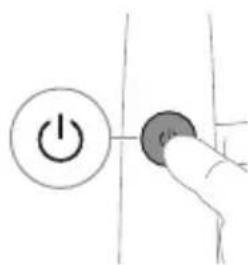
3 Press the on/off button to turn on the Philips Sonicare.

4 Gently move the brush head across the teeth in a slow, back-and-forth motion, so that the bristles reach between the teeth. Continue this motion for the entire brushing time.
Note: The bristles should not be spread apart. It is not recommended to brush as you would with a manual toothbrush.
Note: If you apply excessive pressure, you will be alerted by a change in the vibrations of the handle, and the indicator for replacing the brush head will flash in an orange color.
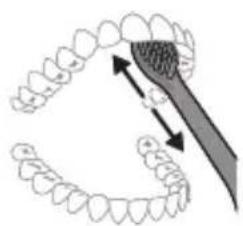
5 To clean the inner surfaces of the front teeth, tilt the brush handle vertically and make several vertical overlapping strokes on each tooth. 6 After you complete the brushing cycle, you can additionally brush the chewing surfaces of the teeth and the areas where stains occur. You can also brush your tongue, with the toothbrush on or off, as you prefer.
Note: Your Philips Sonicare toothbrush is safe for use on prostheses (the bristles wear out faster when used on prostheses) and dental restorations (fillings, crowns, veneers) as long as they are properly placed and not compromised.
The Philips Sonicare brush head is designed for use on prostheses (the bristles wear out faster when used on prostheses) and dental restorations (fillings, crowns, veneers) provided they are properly attached and not compromised.
QuadPacer
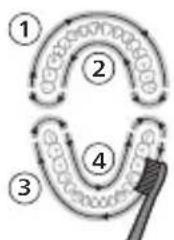
The QuadPacer feature helps you brush more evenly and reminds you to move to the next area. It divides the brushing time into 4 equal segments and signals when it's time to switch to the next area. The segments are marked with a short pause in the vibrations. The toothbrush automatically stops at the end of the brushing session.
Note: You can add extra time when using the White or Gum Care modes.
Modes
Your Sonicare toothbrush is equipped with up to 3 modes: Clean, White, and Gum Care (only on specific models). To change modes, press the mode button while the toothbrush is turned off.
Clean White Gum Care
| Придобivalka 3а Исклuyчтелно сековдnevно чисhevе | Остразува повшински дамки | Нжно ги масURA нецатуа |
| Вкунио врееме на чеканые | 2 минут ni 2 минут ni 30 секун di | 3 минут ni |
| Како дa чеканые | Чекajte ro секoj сегмent 30 секун di. | Чекajte ro секoj сегмent 30 секун di. |
| 1 2 3 4 | 1 2 3 4 | |
| потoa чекajte ги сегмentite 5 ni 6, секoj посебно 15 секун di 3aodia ri обелITE ni полиратe пухимпente заби. | потoa чекajte ги сегмentite 5, 6, 7 ni 8, секoj посебно 15 секун di 3a нжноodia ri стMuлиратe ni масURA. ненцатуа. |
BrushSync technology
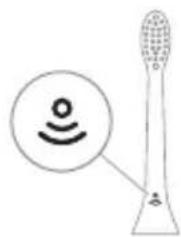
BrushSync technology enables the brush head to communicate with the handle using microchips. The symbol on the brush head indicates that it is equipped with this technology.
BrushSync technology enables:
- Brush head replacement reminder
Philips Sonicare offers a wide range of brush heads equipped with BrushSync technology. To explore the full spectrum of brush heads and find the one that best suits you, visit www.philips.com/toothbrushheads for more information.
Features
- Pressure sensor information - QuadPacer - Brush head replacement reminder - EasyStart - SmartTimer
Pressure sensor information
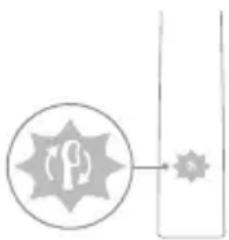
The Sonicare toothbrush measures the pressure you apply while brushing to protect your gums and teeth from damage.
If you do not find the pressure sensor, the handle will change the vibration and the brush head replacement reminder will flash in the water flow.
Note: Your product is equipped with a pressure sensor. To activate or deactivate this function (see "Activating or deactivating functions").
Quadpacer
QuadPacer is a timer for intervals that helps you brush evenly across the mouth by dividing the mouth into 4 sections.
Brush head replacement reminder
Your Philips Sonicare brush is equipped with BrushSync technology that tracks the wear of the brush head.
Note: This function works only with Philips Sonicare brush heads with BrushSync technology.
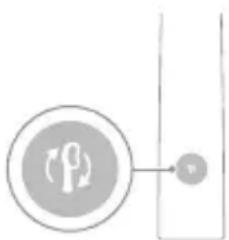
1 When you attach a new brush head for the first time, the handle recognizes that you have a Philips brush head with BrushSync technology and starts tracking the wear of the brush head. 2 Over time, based on the pressure you apply and the total time the brush head is used, the handle tracks the wear of the brush head to determine the optimal time for replacement. This function guarantees the best cleaning and care for your teeth. 3 When the brush head replacement reminder indicator lights up in a flashing color, you should replace the brush head.
All Philips Sonicare brush heads are equipped with the brush head replacement reminder function. To activate or deactivate the brush head replacement reminder, see "Activating or deactivating functions".
EasyStart
This Philips Sonicare model is equipped with the EasyStart feature. The EasyStart function gradually increases the power over the first 14 brushings to help you get used to Philips Sonicare brushing.
Disposal
When the Philips Sonicare toothbrush is used for clinical purposes, it must be used in the Clean mode with high intensity, the handle must be fully charged, and the EasyStart function must be deactivated.
To deactivate EasyStart (see "Activating or deactivating functions").
SmarTimer
SmarTimer 03NaCyBa DeKa ZIKLyCOT Ha YeTKaHBe 3aBpShnI CO aBTOMaTcKO NCKLyCyBaHbe Ha YeTKaTa 3a 3a6n Ha KpaJOT Ond ZIKLyCOT Ha YeTKaHBe. CTomatoIOn3nte npenopayBaat YeTKaHBe He nomaJIky Od 2 MInHyTu DbapaNtN dHeBHO.
3a6eileka:Ako ro npntncheTe konyeTo 3a BKnyBaHe/ncKnyBaHe oTKako Ke ro 3anOHTe UNKlycOT Ha YeTkaHbe, YeTkata 3a 3a6n nay3npa. Np na3a od 30 cekyHn, SmarTimer ce pecenpa.
AKTINBIPAHe IJIIN DeaKTHBnPaHbe Ha yHKcUNTe
Mokete da rnaKTbupate nnn deakTbupate cneHnBe cyHKun Ha Baawata yetka 3a 3a6n:
- EasyStart -NotceTnK 3a 3aMeHa Ha rJaBa Ha YeTka -Повразн Информацни На сеньзорот за пптUCOK
3a6eileka: Moxete da ro akTbVipate nnn DeakTbVipate NOTceTHNKOT 3a 3aMeHa Ha rIaBaTa Ha cheTKaTa 3a 3a6n Kora Ha paKaTa ce Hao'ra NaMeTHa rIaBa Ha yeTka 3a 3a6n.
YeKOp 1: NocTaBeTe ja paUkaTHa npNKlyueHnOT dpXaU 3a noJIHeIbe.
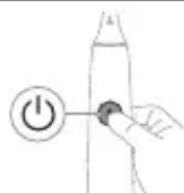
Yekop 2:Прип�性е и зашикete ro konчeto 3a BKnyBaHbe/ИСКnyuBaHbe:
| EasyStart ПOTсЕТнИК 3a | ПовpaTHи Инфорmaци |
| Замена Ha ГliaВа | Ha сEHЗОрТ 3a |
| На чЕТka | ПрINТИСОК |
do 3cekyHn do 5 cekyHn do 7 cekyHn

Yekop 3: Пуштete Го кончeto 3a вклuyваьe/ИSCКлuyваьe KORA ke сFlyшhte:
1 THTKaHbe 1 THTKaHbe, a 1 THTKaHbe, 2 THTKaHba, a notoa 2 THTKaHba notoa 3 THTKaHba

Ako Bnnte Deka CBeTlOTo Ha HnDnKaTOpOT 3a 6aTepnja N Ha NOTcETHnKOT 3a 3aMeHa Ha TlaBaTa Ha YeTkata TpeNkaat BO 3eJeha 6oJa 2 nATn n CnyuHeTe 3 ToHOBn, Od Hn3OK Do BnCOK, TOraW yHKunjata e aKTbBnpaHa.
NJI

Ako Bnnte Deka CBETNoto Ha HnDnKaTOpOT 3a 6aTepeNuja Ha NOTceTHNKOT 3a 3aMeHa Ha TnaBaTa Ha YeTkata TpeNkaaT BO Noptokaloba 6oJa eHaH u CnyuHHeTe 3 ToHOBn, Od BnCOK Do Hn3OK, TOraaw yHKunjatae daekTbVbpaHa.
YB-CTepnIIN3aTOp
The UV sterilizer may be used to disinfect compatible models.
With the sterilizer, you can clean the brush heads after each use.
Stop using the sterilizer and contact the Customer Care Center if:
- The UV lamp turns on when the lid is open.
- The transparent cover is damaged by the sterilizer.
- The sterilizer has fallen or is damaged in any way.
Warning: UV light can be harmful to eyes and skin. Always keep it away from the face at all times.
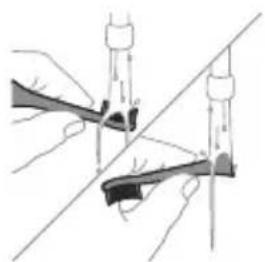
1 Before cleaning, make sure the brush head is not inserted in the water.
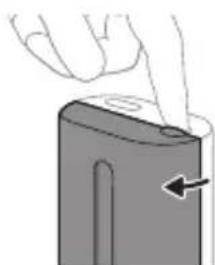
Caution: Make sure the brush head is not attached to the handle when cleaning it in the sterilizer.
2 Place the brush head in the slot on the top part of the sterilizer and close the lid.
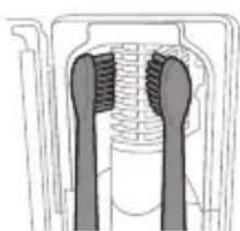
3 Place the brush head on one of the 2 pins of the sterilizer with the bristles facing the lamp.
Warning: In the sterilizer, clean only the brush heads of Philips Sonicare that are compatible.
Warning: Do not clean the brush heads of Philips Sonicare for kids in the sterilizer.
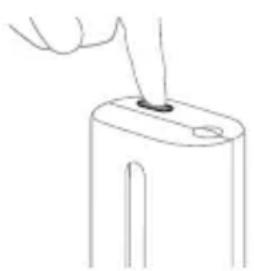
4 Check that the sterilizer is plugged into an outlet with the correct voltage. 5 Close the lid and press the green button to turn on/off the UV cycle.
Warning: You can turn on the sterilizer only when the lid is properly closed.
Caution: The sterilizer will not work if you open the door during the sterilization cycle.
Caution: The sterilization cycle lasts approximately 10 minutes, then it turns off automatically.
The sterilizer works when the light is on inside the appliance.
Battery status
This Philips Sonicare toothbrush has a capacity of up to 28 brushing sessions, each session lasting 2 minutes (14 days, if used twice daily) with a fully charged battery. The battery indicator shows the battery status when you finish the 2-minute brushing session, when you pause the toothbrush, or when you turn it on.
Caution: It takes up to 24 hours for the battery to fully charge before first use, but you can use the Philips Sonicare toothbrush before it is fully charged.
Charging
Charging the toothbrush with the UV sterilizer
1 Plug the charger or sterilizer into an electrical outlet.
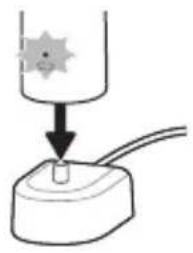
2 Place the handle on the charger or sterilizer.
- The handle emits 2 short beep signals to confirm that the handle is correctly placed.
- The white light of the battery indicator shows that the toothbrush is charging. When the handle is fully charged on the charger, the battery indicator lights up green for 30 seconds, then turns off.
This Philips device complies with all applicable standards and norms regarding electromagnetic fields.
www.philips.com/support
www.philips.com/support
The device is powered by a rechargeable battery. If you use the device for the first time, the battery may be completely discharged, and the device may not turn on until it has been charged for a while. Use only the supplied adapter to charge the device.
Discard
- When operating, keep the device away from water and fire.
- Before use and after cleaning, make sure the device is completely dry before operating it. Otherwise, it may cause electric shock.
Use the device only with the accessories supplied. Do not use any other accessories. If the device is damaged, do not use it. Contact the service center for repair. Do not disassemble the device yourself.
- Do not use the device with damaged accessories.
Only use the original Philips adapter to charge the device. If it is lost, use only a USB adapter that meets the USB specifications.
The device is intended for household use only. If the device is used for professional purposes, the warranty will be void and the manufacturer will not be liable for any damage.
- If the USB cable is damaged, stop using it and replace it.
When operating, keep the device away from water and fire. Do not use the device near water.
Do not use the device if the adapter is damaged.
This device is intended for use only by qualified personnel, in accordance with the instructions in this manual.
- Sanitizers UV should always be kept out of reach of children.
- If the sanitizer UV is used incorrectly, if the LED/UV lamp is damaged, the sanitizer UV may emit harmful radiation. Improper use may cause damage to health and property.
- The sanitizer should only be used for its intended purpose in accordance with the instructions.
If the lamp is damaged, stop using the device and contact the manufacturer for repair.
- Use only the specified lamp type. Using a different lamp may cause malfunction or damage. The lamp should be replaced every 3 months or as needed, depending on usage.
From the manufacturer's warranty, if the device is used improperly, the warranty may be void. The warranty does not cover damage caused by misuse.
- The maximum operating altitude is 4500 meters.
OFOXNXON TNB
- If the device is used beyond the specified limits, or if the device is used for more than 1 hour continuously, it may overheat. In such cases, turn off the device and let it cool down before further use.
- If the device is used for more than 2 months without cleaning, it may malfunction. Clean the device regularly to ensure proper operation.
- If the device is used with accessories not approved by the manufacturer, the device may malfunction. Use only approved accessories. If the device is damaged, contact the manufacturer for repair. This device is intended for use only by qualified personnel, in accordance with the instructions in this manual.
www.philips.com/support

Type: Model name indicates the type of product. The model name is indicated on the Bluetooth and NFC label.
Using the label: Press the button to activate the label, if necessary. (TCBxxx, HX6100, HX6110, HX6160 and WAAxxx)

The device is intended for use with the original cable and adapter only.
Using the device
The brush head is designed for cleaning teeth and removing plaque from teeth and between teeth for better oral hygiene. The brush head is intended for use with the device. Use as directed by your dentist.
Philips Sonicare (Fig. 1)
1 Handle 2 Power button 3 Brush head 4 Charging base 5 Brush head storage cap 6 Charging base with battery
Note:
7 Brush head storage cap 8 Brush head(s) 9 Charging base 10 Power cord 11 UV sanitizer and charging base
Note: The type of device is indicated on the model label.
Overview
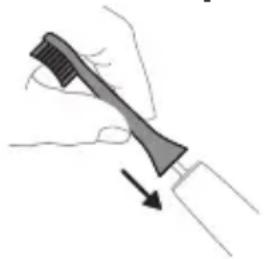
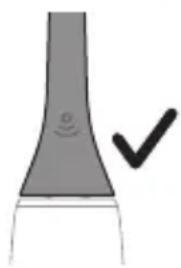
1 Place the brush head on the handle, aligning the bristles with the front of the handle. 2 Press the brush head onto the metal shaft until it clicks into place.
Note: The brush head and handle should be replaced every 3 months.
1 Remove the brush head and rinse it under water.
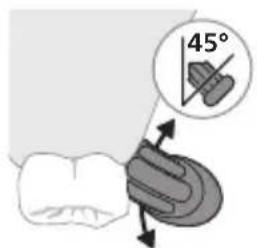
2. The brush head should be replaced every 3 months (or sooner if the bristles are worn or if you have been ill). To replace the brush head, simply pull the old one off and push the new one on.
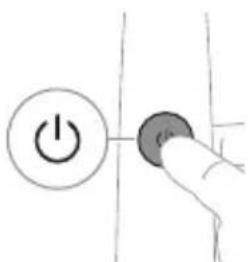
Note: The brush head should be replaced every 3 months for optimal results.
3. Philips Sonicare brush heads are compatible with all Philips Sonicare handles.
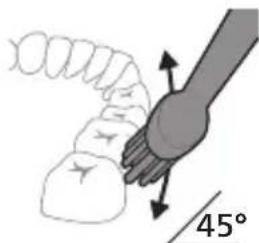
4. The brush head should be replaced when the bristles are worn or every 3 months. If the bristles are frayed or bent, replace the brush head immediately. Frayed bristles may reduce the effectiveness of the brush and may cause damage to the teeth or gums.
Note: A worn brush head may cause damage to the teeth or gums. If you notice any damage, stop using the brush head and replace it.
Note: If you have any questions or concerns about this product, please contact the consumer care line or visit our website for further assistance.
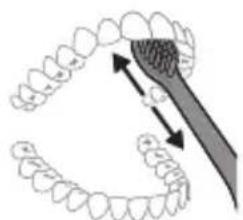
5. To clean the brush head and handle, rinse the brush head and handle under running water. Do not use harsh chemicals or abrasive cleaners. 6. After cleaning, shake off excess water and let the brush head and handle air dry. Do not put the brush head or handle in the dishwasher or microwave.
Note: The Philips Sonicare brush head is intended for personal use only. It is not intended for use by multiple users. If the brush head is used by multiple users, it may cause cross-contamination.
QuadPacer
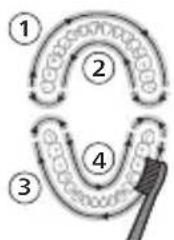
The QuadPacer feature helps you brush evenly. It divides your brushing time into 4 intervals. The QuadPacer signals you when it is time to move to the next quadrant of your mouth. This ensures that you brush all areas of your mouth equally. The intervals are indicated by a short pause in the brushing action. The QuadPacer is activated by default.
The correct brushing technique is essential for good oral hygiene.
Note: When the timer is activated, it will pause briefly at 30-second intervals. If you are using the 'White' or 'Gum Care' mode, the pause will be longer.
Modes
Your brush handle has 3 brushing modes: 'Clean', 'White', and 'Gum Care' (depending on the model). To switch between modes, press the power button. The mode indicator light will show which mode is selected.
Clean White Gum Care
- Before using the device, consult your dentist or doctor if: you experience bleeding gums or if bleeding continues after using the device; you feel pain or discomfort during use. - If you have had oral or gum surgery in the last 2 months, consult your dentist before using the device. - If you have a pacemaker or other implant, consult your doctor or the manufacturer of the implant before using the device. - If you have any medical questions, consult your doctor before using the device. - This device is for personal hygiene and is not intended for use by multiple patients in a dental office or clinic.
Battery safety warnings
- This device contains a rechargeable battery. Only qualified personnel should replace it.
- Use the device only for its intended purpose. Before using the device, battery, and accessories, carefully read this booklet with information and keep it for future reference. Incorrect use of the device can lead to injury and serious harm. Accessory kits may vary between devices.
- Use only original Philips accessories and consumables. Use only the following charging units: HXxxxx (input: 100-240 V~; 50/60 Hz; 1.5 W), HX6100 (input: 100-240 V~; 50/60 Hz; 1.4 W), HX6110 (input: 100-240 V~; 50/60 Hz; 1.5 W), HX6160 (input: 100-240 V~; 50/60 Hz; 6 W) or WAAxxxx (input: 100-240 V~; 50/60 Hz; 3.5 W).
- Keep the device and battery away from fire and do not expose them to direct sunlight or high temperatures.
- If the device gets very hot, emits an unusual smell, changes color, or if charging takes longer than usual, stop using and charging the device and contact Philips.
- It is forbidden to place the device and battery in a microwave oven or on an induction cooktop.
- Do not charge the battery or use it in the presence of flammable or hazardous substances. Do not charge, modify, puncture with sharp objects, disassemble, or dismantle the battery device. Do not short-circuit the battery, and dispose of it properly at the end of its life.
- The device contains a non-replaceable rechargeable battery. When the battery's service life ends, the device must be disposed of properly (see section "Disposal").
If the batteries show signs of damage or leakage, avoid contact with the skin and eyes. If this happens, rinse the eyes with plenty of water and seek medical help immediately.
www.philips.com/support
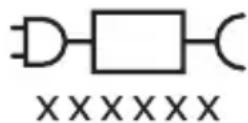
Note: The functions of different models may vary. Some models may not be equipped with Bluetooth or NFC.
Component replacement block: "XXXXX" indicates the model number of the charging device suitable for use. (TCBxxxx, HX6100, HX6110, HX6160 or WAAxxxx)

This symbol indicates that you should read the instructions before using the device.
Intended use
The Philips Sonicare ProtectiveClean electric toothbrush helps remove plaque and stains to keep teeth and gums healthy. The Sonicare ProtectiveClean electric toothbrush is intended for personal use. It should only be used under the supervision of adults.
Philips Sonicare toothbrush (fig. 1)
1 Handle 2 On/Off button 3 Mode button 4 Mode indicator 5 Reminder for brush head replacement 6 Charge indicator
Accessories:
7 Brush head cap 8 Smart brush heads 9 Charging base 10 Travel case 11 Sanitizer with UV lamp and charging device.
Note: Access to the complex is allowed only if the attached model is used.
Getting started
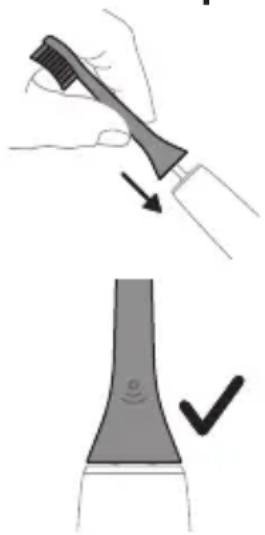
1. Turn the nozzle so that the chains are directed towards the front part of the handle. 2. Place the nozzle on the metal rod and press it firmly against the end.
Note: There is a small gap between the nozzle and the handle. This is normal.
Step 2. Press and hold the "ON/OFF" button for the specified time.
EasyStart "Easy Start" notification about nozzle replacement
Reverse connection of the pressure sensor
Step 3. Release the "ON/OFF" button when you receive:
Sound signal
1 sound signal, then 2 sound signals
1 sound signal, then sequentially 2 sound signals, then 3 sound signals

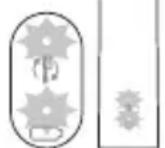
If the battery charge indicator and the nozzle replacement indicator flash green 2 times and the handle emits a tonal signal (from low to high), this means that the function is activated.
OR
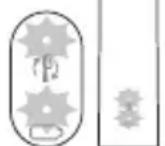
If the battery charge indicator and the nozzle replacement indicator flash red 1 time and the handle emits a tonal signal (from high to low), this means that the function is deactivated.
Disinfection unit with UV lamp
Note. Accessories included in the kit may differ slightly from those shown in the figure.
Using the disinfection unit with the UV lamp, you can disinfect the nozzle after each use. Disconnect the disinfection unit from the power supply, allow it to cool, and contact the customer service center if:
- the UV lamp does not light up when the door is opened;
- the disinfection unit housing is damaged or missing; - the disinfection unit emits an odor or smoke when it is operating.
Note. The UV lamp may be on for a short time during operation. The disinfection unit is designed to keep the nozzle clean during use.
1 Rinse the nozzle and shake off any remaining water.
I Completely dry the nozzle with a soft cloth.
Battery level 2 of 5
Sound signals
Note. To save battery, the battery indicator turns off when the toothbrush is not in use.
Note. When the battery is completely discharged, the toothbrush turns off. Place the toothbrush on the charger until it is charged.
Note. If the battery was fully charged, keep the toothbrush on the charger when not in use.
Cleaning
Toothbrush handle
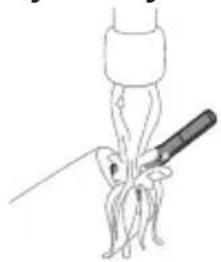
1 Rinse the metal shaft with warm water. Do not forget to remove the attachments. Caution! Do not press with sharp objects on the rubber seal on the metal shaft, as this may cause damage. 2 Wipe the entire surface of the seal with a damp cloth.
Note: Do not tap the handle against the sink to remove water.
Attachment
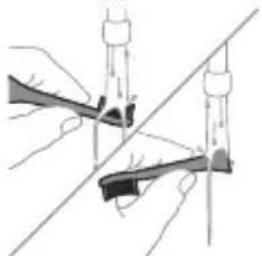
1 Rinse the attachment and the filter after each use. 2 At least once a week, remove the attachment from the handle and rinse the connection area with warm water. Rinse the empty measuring cup if needed.
Charging device
1 Disconnect the charging device from the power supply. 2 Wipe the surface of the charging device with a damp cloth.
Empty container
Rinse the empty container with warm water and clean its interior with a damp cloth.
Cleaning the disinfection block
Caution. Do not immerse the disinfection block in water and do not place it under the tap.
Caution. Do not clean the disinfection block when the UV lamp is hot.
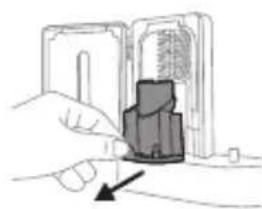
For optimal effectiveness, we recommend cleaning the disinfection block regularly.
1 Disconnect the disinfection block from the power supply. 2 Remove the water tank for drops. Rinse it with water and a damp cloth. 3 Wipe all internal surfaces with a damp cloth. 4 Remove the protective screen in front of the UV lamp.
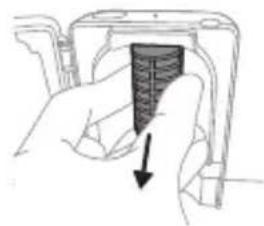
To remove the screen, take it by the edge near the fixator, gently press the protective screen inward.
5 Remove the UV lamp. To remove the lamp, take it and pull it out of the metal bracket. 6 Wipe the protective screen and the UV lamp with a damp cloth. 7 Insert the UV lamp back into place.
Insert the appliance into the base, align it with the metal contact and push it into the base.
8 Insert the protective screen into place. To insert the screen into place, align the pins on the screen with the openings on the upper surface of the brush head. Push the screen straight into the openings on the disinfecting block. 9 Install the brush heads in place on the disinfecting block with the UV lamp. 10 Before first use of the disinfecting block after cleaning, make sure it is completely dry.
Storage
If you do not plan to use the appliance for an extended period, disconnect it from the power supply, clean it, and store it in a cool, dry place away from direct sunlight.
Replacement
To obtain optimal cleaning results, the Philips Sonicare brush heads should be replaced every 3 months. Use only genuine Philips Sonicare replacement brush heads.
Model number
The model number is indicated on the lower part of the handle of the Philips Sonicare toothbrush (HX64XX, HX68XX).
Warranty and support
If you need information or support, visit the website www.philips.com/support or read the warranty leaflet.
Warranty limitations
The warranty does not cover: - accessories, including brush heads; - damage caused by the use of unauthorized spare parts or unauthorized brush heads; - damage caused by misuse, accidents, neglect, alterations, or unauthorized repairs; - normal wear and tear, including scratches, chips, discoloration, or stains. - UV lamp.
Disposal
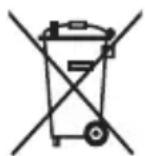
- This symbol means that electrical products and batteries should not be disposed of with normal household waste. Follow local rules for separate collection of electrical and electronic products and batteries.
- UV lamp contains mercury. Do not dispose of the UV lamp together with normal household waste. Hand it in at an official collection point for recycling.
- Information on the content of Philips products can be found on the REACH regulation page at www.philips.com/REACH.
Removal of the built-in rechargeable battery
The built-in rechargeable battery must be removed by qualified professionals when disposing of the device. Instructions for removing built-in rechargeable batteries can be found at: www.philips.com/support.
Removing the battery
To remove the rechargeable battery, you need a screwdriver or cloth, hammer and flat-head screwdriver. When performing the steps below, follow the basic safety rules.
1 Discharge the battery to any level of charge, remove the handle from the charging device, engage the gear and let it run until it stops completely. Repeat this operation until the gear stops.
2 Remove and discard the attachment. Wrap the entire handle in a screwdriver or cloth.
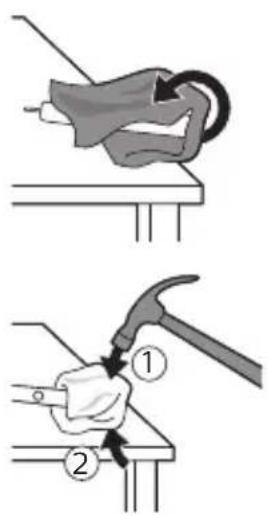
3 While holding the upper part of the handle firmly, hit its body about 1 cm above the lower edge. Hit firmly with a hammer on all 4 sides to remove the end cap.
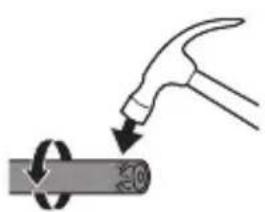
Note: If the internal components are difficult to remove, try hitting the lower edge of the handle several times.
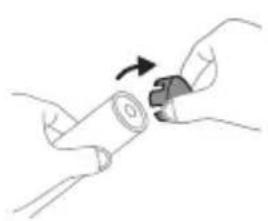
4 Remove the end cap from the handle of the gear. If the end cap is difficult to remove from the body, repeat step 3 until it can be removed.
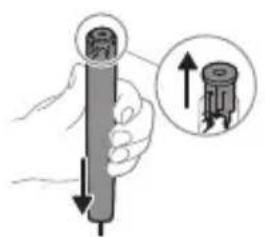
5 Hold the handle with the bottom facing down and press it against a hard surface. If the internal components are difficult to remove from the body, repeat step 3 until it can be removed.
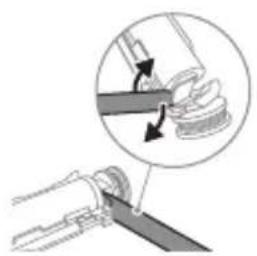
6 Insert the screwdriver between the battery and the frame, and pry the internal components out. If the battery is difficult to remove, use the screwdriver to break the lower part of the frame.
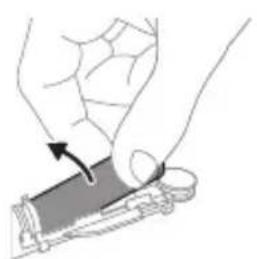
7 Insert the battery into the charger with the metal contacts facing the green plate. This way the bottom part of the battery is separated from the frame. 8 Take the battery and place it so that the metal contacts of the battery are facing down.
Warning! To avoid injury, be careful, the battery contacts are sharp.
9 Wrap the battery contacts with insulating tape to prevent short circuiting during battery disposal.
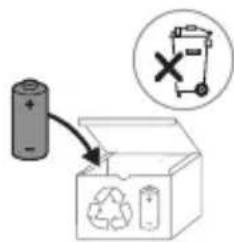
The battery can now be recycled, and the rest can be disposed of properly.
Note: Do not dispose of the appliance with normal household waste, but take it to an official recycling point. In this way you will help protect the environment.
Recycling
Philips Sonicare is a great choice!
This electric toothbrush is designed for personal oral care. Sonicare's unique sonic technology and clinically proven benefits
It is recommended to consult your dentist before using this product if you have any medical conditions.
For support, visit our website: www.philips.com/support
Warranty
This product is intended for its intended purpose. Read this manual carefully before using the product, its batteries, and accessories, and keep it for future reference. Misuse can lead to hazards or injury.
Expertise
-Do not immerse chargers, charging bases, and UV sanitizers in water. -After cleaning, connect to the power outlet and check that the charger, charging base, and UV sanitizer are dry before use. -This appliance can be used by children aged 8 years and above and persons with reduced physical, sensory, or mental capabilities or lack of experience and knowledge if they have been given supervision or instruction concerning use of the appliance in a safe way and understand the hazards involved. Children shall not play with the appliance. Cleaning and user maintenance shall not be made by children without supervision. - Children should be supervised to ensure that they do not play with the appliance.
- Only use Philips accessories or
The device is intended for household use.
Connect the device to the USB cable and
the USB port of the computer.
This device must be connected to a power source
more powerful. If the device is turned off, stop using it and contact the service center for assistance (see "Warranty and Service").
- If the USB cable or USB port is damaged, stop using it.
- Do not use the device in a dusty environment.
Do not use the device near flammable or explosive materials.
Do not expose the device to direct sunlight or high temperatures.
- Do not use the device in a humid environment.
Do not use the device in a humid environment.
- The device is intended for use only with dry, clean fabrics and for cleaning purposes.
- Ultraviolet disinfectant lamps
Balance the lamp before use.
- Ultraviolet disinfectant lamps
Do not look directly at the ultraviolet light.
Disinfectant lamps should be turned off. The heat
may cause burns to eyes and skin.
-Disinfectants should be used with protective
screens.
-Do not use disinfectant lamps in the presence of
people or animals.
- If the lamp is dirty, clean it with a soft brush
or cloth. If the brush or cloth is wet,
or if there are any stains, dry them
thoroughly.
IMPORTANT SAFETY INSTRUCTIONS
If the appliance has been dropped, if there are visible signs of damage, or if it does not operate normally, stop using it and contact your doctor. Consult your doctor before using this appliance if you have any medical concerns. This appliance is not intended for use by persons with reduced physical, sensory, or mental capabilities, or lack of experience and knowledge, unless they have been given supervision or instruction concerning use of the appliance by a person responsible for their safety.
BATTERY SAFETY WARNINGS
This appliance contains only rechargeable batteries. Use the appliance only for its intended purpose. Before using the appliance and its batteries and accessories, read this information carefully and keep it for future reference. Misuse of batteries can cause fire or chemical burns.
Accessories that are not supplied with the appliance may be available separately.
- Only use original Philips accessories or consumables. Only use the following chargers: TCBxxxx (input: 100-240V; 50/60Hz; 1.5W), HX6100 (input: 100-240V; 50/60Hz; 1.4W), HX6110 (input: 100-240V; 50/60Hz; 1.5W), HX6160 (input: 100-240V; 50/60Hz; 6W), WAAxxx (input: 100-240V; 50/60Hz; 3.5W).
- Do not expose the appliance and batteries to direct sunlight, high temperature, or fire.
- If the appliance gets hot, emits smoke, changes color, or if charging takes longer than usual, stop using and charging the appliance and contact Philips.
- This device can be used by children aged from 8 years and above and by persons with reduced physical, sensory or mental capabilities or lack of experience and knowledge if they have been given supervision or instruction concerning use of the appliance in a safe way and understand the hazards involved. Children shall not play with the appliance. Cleaning and user maintenance shall not be made by children without supervision. -This device contains batteries. After the battery is fully charged, unplug the charger and disconnect it from the device. Refer to the section "Unplugging" for more information.
- Batteries must be disposed of properly. Do not dispose of batteries in fire or water. If a battery leaks, avoid contact with skin or eyes. If contact occurs, rinse with water and seek medical advice. -When using batteries, keep them away from children and ensure that batteries are not swallowed.
- Store and charge the device at a temperature between 0°C and 40°C. -To prevent short circuit, do not let metal objects (such as coins, paper clips, keys) come into contact with the battery terminals. Do not place batteries in a fire or expose them to high temperatures. When disposing of batteries, place them in a plastic bag. -This device contains a lithium-ion battery. Do not expose it to high temperatures or fire.
Electromagnetic fields (EMF)
This Philips appliance complies with all applicable standards and regulations regarding exposure to electromagnetic fields.
Radio Equipment Directive
This Philips appliance complies with the 2014/53/EU Radio Equipment Directive for devices with radio modules (Bluetooth, NFC).
- The Bluetooth radio module used in this device operates at a frequency of 2.4 GHz. -The maximum output power of the Bluetooth module is 3 dBm.
- The NFC radio interface used in this device operates at a frequency of 13.56 MHz.
- The maximum output power of the radio module is 30.16 dBm. You can obtain the EU declaration of conformity from the following website:
www.philips.com/support

Note: The features of the two models may differ. Some models may not have Bluetooth or NFC functionality.
The model number of the device is indicated on the rating label. (TCBxxxx, HX6100, HX6110, HX6160 or WAAxxxx)

This label indicates that the device should not be disposed of with household waste. Please read the disposal instructions.
Intended use
ProtectiveClean 3-in-1 toothbrush heads for cleaning teeth, gums, and tongue. Philips Sonicare toothbrush heads are designed for effective plaque removal and improved oral health.
ProtectiveClean electric toothbrush heads are also available. Children should be supervised by an adult when using the toothbrush.
Philips Sonicare (Figure 1)
1 Handle 2 Brush head attachment/removal button 3 Mode button 4 Mode indicator 5 Brush head shaft 6 Battery indicator
Accessories:
7 Brush head storage cap 8 Smart brush head identifier 9 Charger base 10 Handle 11 Interdental cleaner and charger
Note: The content of this section is not clear.
Additional accessories may be available.
Attaching the brush head
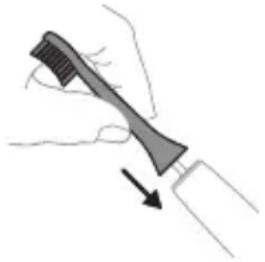
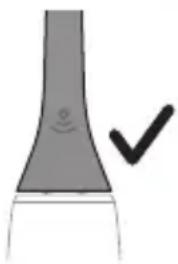
1 Align the brush head with the handle and press firmly until it clicks into place. 2 Do not press the brush head against metal objects.
Note: There should be a small gap between the brush head and the handle.
Using the Philips Sonicare toothbrush
If you are using the Sonicare toothbrush for the first time, you may experience a different sensation compared to a manual toothbrush. The first few uses may feel intense. Over time,
the sensation will become more comfortable. For best results, use the brush head with the recommended brushing technique. The Sonicare electric toothbrush comes with the EasyStart feature to help you get used to it. To reduce the intensity during the first 14 brushing sessions, this feature gradually increases the power.
Brushing instructions
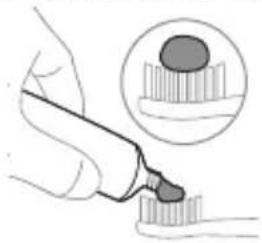
1. Remove the brush head from the handle and rinse it under the tap.
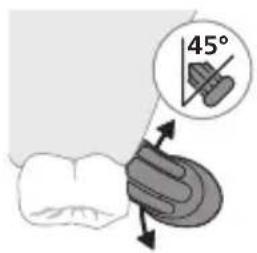
2. Place the brush head at a 45-degree angle to the teeth, gently moving the bristles back and forth, ensuring the bristles reach the gum line.
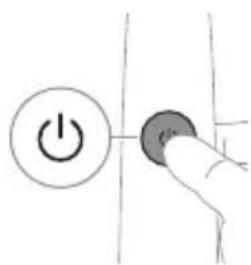
Note: The handle is waterproof and can be rinsed under the tap.
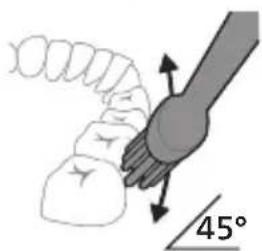
3. For Philips Sonicare, use the brush head for brushing your teeth.
4. Place the brush head and the interdental brush. The brush head should be placed at a 45-degree angle to the teeth. When cleaning with this brush, use gentle pressure.
Note: The brush head should be replaced every 3 months or sooner if the bristles are frayed.
Expert tip: Do not press too hard, as this can damage the teeth and gums.
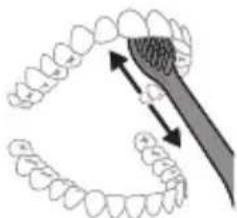
To clean the tongue, use the tongue cleaner on the back of the brush head.
5. For optimal cleaning, replace the brush head every 3 months or sooner if the bristles are worn. After brushing, rinse the brush head and handle thoroughly. Do not use the brush head if it is damaged or if the bristles are bent.
Expert tip: If you have braces (or have recently had braces removed) or have dental restorations (crowns, bridges, implants), you can still use the Philips Sonicare brush head, but be careful.
QuadPacer
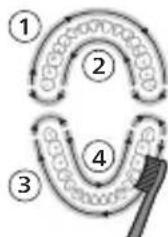
For a thorough clean, use the QuadPacer feature, which divides your mouth into 4 sections. The QuadPacer will beep at the end of each 30-second interval, signaling you to move to the next section. The sections are indicated by a short pause. At the end of the brushing cycle, the brush will automatically stop.
Note: The White or Gum Care modes can be selected, and the brush will pause briefly between sections.
Modes
The electric toothbrush has 3 modes: Clean, White, and Gum Care (only on certain models). To switch modes, press the mode button while the brush is on.
Clean White Gum Care
| Паадасы Кунделikтite Ерекше Тазалay ушin | Бети徴eri Дактуdi Кетерidi | Кьзblп点点头erpe Жаксы массж Жасайды | |
| Жалны Шетамен Тазалay укыты | 2 минут 2 минут xэне 30 секунд | 3 минут | |
| Шетамен Тазалay anecdici | эрбip 6элikтiti 30 секунд шетамен Тазаланы. | эрбip 6элikтiti 30 секунд шетамен Тазалан одан кeийн алдынfvы Ticterdi afapту xэнe харкырату ушin 5 xэнe 6 бөлikтepihi, эрkaïсысын 15 секунд шетамен Тазаланы. | эрбip 6элikтiti 30 секунд шетамен Тазалан одан кeийн Кьзblл пектерінizdi Жаксы дайындан Жэне массж Жасay ушin 5, 6, 7 xэнe 8 бөлikтepihi, эрkaïсысын 15 секунд шетамен Тазаланы. |
BrushSync technology
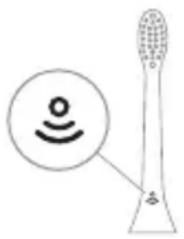
BrushSync technology indicator: The brush head replacement reminder uses BrushSync technology. The brush head's replacement reminder is indicated by the BrushSync technology. To use BrushSync technology:
- The brush head replacement reminder is activated when you use a Philips Sonicare brush head with BrushSync technology. The brush head replacement reminder is only activated when you use a Philips Sonicare brush head with BrushSync technology. To purchase replacement brush heads, visit www.philips.com/toothbrush-heads.
Features
- Brush head replacement reminder - Quadpacer - Brush head replacement reminder - EasyStart - SmartTimer
Brush head replacement reminder
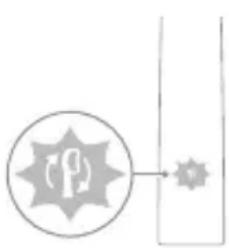
Your Sonicare brush head with BrushSync technology tracks the wear of the brush head to remind you when it's time to replace it.
When the brush head replacement reminder is activated, the brush head replacement reminder indicator will flash amber.
Note: If you do not want the brush head replacement reminder, you can turn it off. To do this, see 'Turning off the brush head replacement reminder'.
Quadpacer
Quadpacer is a timer that helps you brush your teeth evenly by dividing your mouth into 4 sections.
Brush head replacement reminder
The Philips Sonicare brush head replacement reminder uses BrushSync technology.
Note: This feature works only with Philips Sonicare smart brush heads that have BrushSync technology.
1 The Philips Sonicare brush head is designed for effective cleaning and gentle care of teeth and gums. 2 The brush head is designed to remove plaque and stains from teeth, and to help prevent gum disease. This feature helps to improve oral hygiene and overall health. 3 For information on brush head replacement, see the yellow indicator on the brush head.
All Sonicare brush heads have a brush head replacement reminder function. To replace the brush head, press the 'Add or remove brush head' button.
EasyStart
This Philips Sonicare model includes the EasyStart feature. To get used to brushing with Philips Sonicare, the EasyStart feature gradually increases the power over the first 14 brushing sessions.
Getting started
If the Philips Sonicare toothbrush is used in clinical studies, it should be used in the Clean mode with the EasyStart feature disabled.
To disable EasyStart (see 'Enable or disable features').
SmarTimer
The SmarTimer feature automatically turns off the brush at the end of the brushing cycle, indicating that the recommended brushing time has been completed.
Dental professionals recommend brushing twice a day for 2 minutes each time.
Note: If you start brushing and then pause or stop, the brush will stop after 30 seconds. After the 30-second interval, the SmarTimer will reset.
Enable or disable features
You can enable or disable the following features of the toothbrush:
- EasyStart
- Brush head replacement reminder: The yellow indicator on the brush head.
Warning: Do not use the charger near water, and do not insert the charger into a socket if it is wet.
1st step: Insert the plug into the socket firmly.

2nd step: To remove the brush head, press the release button.
| EasyStart Lüctka 6acbH aybICTbIpy kepektirH ecke caJIbIiS | KbICbIM dATChrHin, Kepi 6aIJaHbIcBi |
| 3 sekyndka deiH | 5 sekyndka deiH |
| ↓ ↓ ↓ | 7 sekyndka deiH |
| 3-Kaadam: EctiJrH Ke3De, KyaT Kocy/öwipy TymeciH Xi6epiHi3: | |
| 1 дыбыс 1 дыбыс, одан keин 2 дыбыс | 1 дыбыс, 2 дыбыс, одан keин 3 дыбыс |
| ↓ ↓ ↓ | |
| Баразец Иndикаторы мен сетукбасын aybICTbypy Тураль ecke салл buшшамы жасын бolyн 2 pet КыпьлбКТафан Керсанiz кэн 3 дыбics biptiHдeр КATырak, Шыгл ecтілс, фунksця iccke Косылды. | |
| HEMECE | |
| Баразец Иndикаторы мен сетукбасын aybICTbypy Тураль ecke салл buшшамы capы 6olyн 1 pet КыпьлбКТафан Керсанiz кэн 3 дыбics biptжогары-Тeмeн DeHreДe ectіци3, фунksця ewipilдi. | |
UV Sanitizer
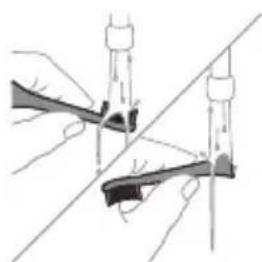
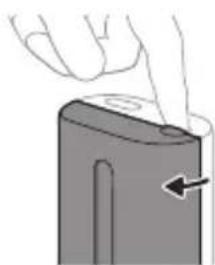
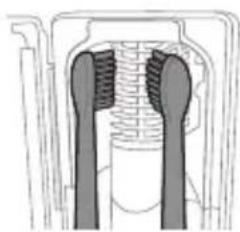
Warning: The accessories may become hot after use. Handle with care.
UV Sanitizer: After each use, the brush head should be cleaned.
In the following cases, unplug the sanitizer, stop using it, and contact customer service.
- Do not use the sanitizer if the power cord is damaged or broken.
- Do not pull the cord or the plug with wet hands.
Warning: The plug can be inserted either way. Always keep the device out of reach of children.
After cleaning the brush head, rinse it thoroughly with water.
Warning: When cleaning the brush head in the sanitizer, do not touch the brush head with your hands.
Place the brush head on the peg in the sanitizer, then close the lid. Press the button on the sanitizer to start the cleaning cycle.
Warning: Only clean Philips Sonicare brush heads in the sanitizer.
Warning: Do not clean Philips Sonicare for Kids brush heads in the sanitizer.
4 Disinfect the brush head.
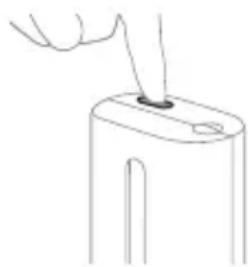
5 If the bristles are worn or bent, replace the brush head.
Note: If the bristles are worn, replace the disinfectant brush.
Note: During disinfection, open the lid; the disinfectant solution will stop.
Note: The disinfectant cycle takes 10 minutes, then the device turns off automatically.
After the cycle is complete, the disinfectant solution is ready.
Charging the battery
This Philips Sonicare toothbrush uses a rechargeable battery. A full charge takes about 2 minutes and provides up to 28 uses (if used twice a day, it lasts about 14 days). The battery indicator will show the battery level when the 2-minute brushing session is complete, or when the brush is turned on or charging.
Note: Before first use, it is recommended to charge the battery for 24 hours, but the Philips Sonicare toothbrush can be used while charging.
Charging
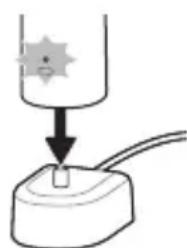
Charging or disinfecting
1 Plug the charger or disinfectant into an electrical outlet. 2 Place the handle on the charger or disinfectant. - The handle will beep twice to confirm correct placement. - The battery indicator will flash, indicating that the brush is charging. - When the handle is on the charger, during charging, the battery indicator will be solid for 30 seconds and then turn off.
Battery status
1 To check the battery level, remove the handle from the charger and turn it on. The brush will beep and the indicator will show the battery level.
2 Rinse the brush head under water and shake it dry. Do not use hot water or harsh chemicals.
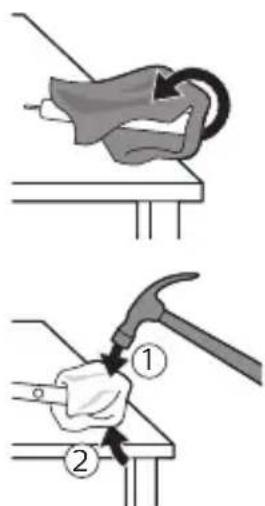
3. Remove the hot water tank cover by turning it counterclockwise. Then lift the tank body straight up. To remove the filter, pull it out with a firm tug.
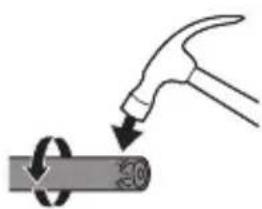
Caution: To avoid damaging the appliance, do not use excessive force.
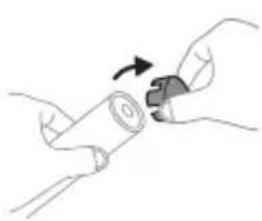
4. Remove the filter by pulling it out gently. If the filter is stuck in the body, pull it out with a twisting motion.
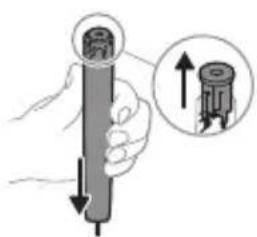
5. Turn the hot water tank upside down and press firmly on the base. If the two components are stuck together, pull them apart with a twisting motion.
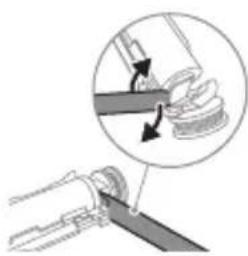
6. Insert a screwdriver between the battery and the two components to pry them apart. Then use the screwdriver to gently pry the battery away from the components.
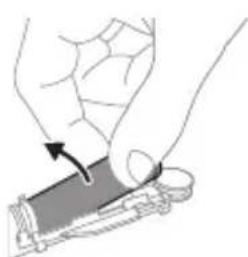
7. To remove the battery, insert a screwdriver between the battery's positive terminal and the metal contact, then pry. This is the final step in removing the battery. 8. To remove the second metal contact, turn the appliance over and pull out the two components.
Warning: To avoid short circuit, do not touch the battery terminals with your hands.
9. To prevent the battery from discharging, remove the battery from the device.
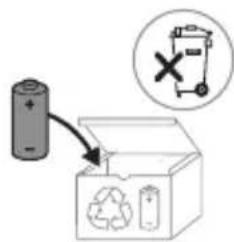
If the battery is leaking, dispose of it properly and clean the affected area with a dry cloth.
Caution: Do not dispose of the device in household waste. Instead, take it to a designated recycling point. This helps protect the environment.
Philips Sonicare instructions for use: Read this user manual carefully before using the appliance. Save these instructions for future reference. If you have any questions, contact the Philips Consumer Care Center. This appliance is intended for oral care and is not intended for use by children.
Important safety instructions
Read all instructions before using the appliance. When using electrical products, especially when children are present, basic safety precautions should always be followed. Do not use this appliance if it is damaged.
Warning
- dmnnnngm gssg6n, bs883mm dnlnn 0s UV b6nog8mn 6ysml.
-3662660nU 24003, 3000mU mm8000 10000000000000000000000000000000000000000000000000000000000000000
- tnhuwutn u $hqhwywu, qwgnnuwuyu wunwn n anu ywnnnnnauiutnu uwwny quwnn bu oqwnqnnotu wnpn shwu utwhuhynnjuw utnpn, ywu tbat unwup unwgt bu oqwnqnnu whuwwwnwuhwu hnuwuaqutn u hwulwunu bu huwnwnu qnuuttn: Uwnp uwpnuu u uwwwnyu w qnnnonnnauiutn stu quwnn wnultanhwutnh unnuhg, tbat unwup stu utwhuhyuni:
- tnhwutn gutnp hunwu uunphhtn:
-Uhwu oqwnwqnnotp Philips-h onhqhuwU wputunwnutn ywu δ whuunn n jnnpa:Uhwu oqwnqnnotp onhqhuwL USB uwnihu L USB uuniguw pIny (Bt npwup wunwynwnuTu):
- Uju uwnp nsh uwwnuiuynu foqunnnh ynuhg uwwuunyunn uwutn: 4ab uwnp uwwuulw t, uh oqunwqnnotp wju u ywuultp abn bnynh 3wawunnnutnh uwwuunluyu ubuunnnh htn (Stu qinhu «tnw2uhp lu wguugniu»):
- 5p USB uwnihun yu USB uniguwu pnu UwwuWt, wJlu uoh oqwnqnnbtip wju:
- 6m gdmny6mn gdo86n, bdo8s3nm jno6/00 UV b6n8m no nnu d3d5b00 m 8oos3mgoos6 sbmmbl.
-Uh luugtp uwnph nnu uwwuuph luwgwu utpuaun:
- Uju uwnp uwhuwintuulwot shwu wunwutnp, huntnn u taani wupnini huuwn:
- UV b6n8jyn ym3jmon3nl dn6bgon 33gbn3nl an63gmadg moganmol.
- 6y300 UV b6n8m5 gmy6ds, ng UV b6n8m5 g6b6nb g2gog8 UV LED/60nm 60ngmo h6ds. Nunnwunuun2uwqnu lnjup ywnnn 5 uwnquwn n hui uwnywhu wph lu w2yh hwwn:
-Uhujoqunwqnnotupwhunuwuhuunwwuunnuw w2unwuhgynwnu:
-Uh atnp untp nU wunwhuhh nunnwuwun2wqwnu lnun, np wu unwp:
-Uh oqunwqnnodp hnquuwuwh quhun, buet hnquuwlyh uwatnn u2nulw yuu dnunluw t: Phnuunhubp hnquuwwh quhun wutu 3 wuhun uty uu wutih 2niun, buet wju u2wubn hwjnuultu:
- funuwwhtp gatnwhj nintn ywu unynuh jnin wwnnuwnn wunwuputnh htn 2chnug: chnup yunn t hwuqgbu lunquuwuh uwhuyutnh pwhubniu:
- Oqunuqqnouwu unwubluqniju pwnannjnt 4500 utunn t:
fddcu4uL 29nhcu8nhulr
-Uh oqunwqnnotup uwnp u hunnhnuugtp atn wunuwupnydh/pd2yh htun, tatao qunwqnnotinig htttn wqnuiuwhnunajniu 5 unwguuniu, tata wjnuiuwhnunaijniun 2wnnuuulnui 5 wju oqunwqnnotinig htttn 1 2wpu, ywu tata niutunu tipuhwonujntu ywu gwu: - トト nubgtb p bpnuuh ywu hunbnh hnwhwunniu uwhulhu2 wunu, hnhhnnwugtp atn wwnuwnpnydhtun'uwupwu wju uunpu oqwnqnnobln: - 7p oqunwqnnnup unuh nhrawuwn yuw wJL huwunwnuwwu uwp, ywwut dn p2yh yuw huwunh wnunwnnnh hn'uwupwu uwnph oqunwqnnn: - tpa p2uulw uunuhnqnju nutn utp, hnnhnnwlgat npd2yh htn uwhupwu wju uwnpu oqnwnnpnt: - Uju uwnpu wudwulwu huwuph uwnp t u uwhuuntuwo 5uh puuh pnudwnutnh ynnug oqunwannduu hwuwunwuwnpndwu wunyunhuynu wuuuunwnnjuu ynnug:
Uunlungh wuunwqnjuu gniuiutn
- This appliance can be used by children aged from 8 years and above and persons with reduced physical, sensory or mental capabilities or lack of experience and knowledge if they have been given supervision or instruction concerning use of the appliance in a safe way and understand the hazards involved. Children shall not play with the appliance. Cleaning and user maintenance shall not be made by children unless they are older than 8 and supervised.
This appliance is intended for household and similar applications such as: staff kitchen areas in shops, offices and other working environments; farm houses; by clients in hotels, motels and other residential type environments; bed and breakfast type environments.
Never immerse the appliance, cord or plug in water or any other liquid.
- If the supply cord is damaged, it must be replaced by the manufacturer, its service agent or similarly qualified persons in order to avoid a hazard.
Do not use the appliance if the plug, cord or appliance is damaged.
- Keep the appliance, cord and plug away from hot surfaces and open flames. Do not let the cord hang over the edge of a table or counter. Do not operate the appliance with wet hands.
- This appliance is intended for indoor use only and not for outdoor use. Do not use the appliance in damp or wet locations, such as bathrooms or near swimming pools.
- Before connecting the appliance, check that the voltage indicated on the appliance corresponds to the local mains voltage. If the plug does not fit the socket, do not use the appliance.
- The appliance is intended for household use only. Do not use it for commercial purposes.
This appliance can be used at ambient temperatures between 0°C and 40°C. Do not place the appliance near heat sources (e.g., stoves, radiators, ovens). Do not place the appliance on soft surfaces. Do not cover the appliance while it is in use. This appliance is not intended for use by persons (including children) with reduced physical, sensory or mental capabilities, or lack of experience and knowledge, unless they have been given supervision or instruction concerning use of the appliance by a person responsible for their safety.
Keep the appliance clean.
2nuaunhau-10°C-hg 60°C:
Egunwquhuwu n2n (EMF)
Philips-h wju uunpn hwwwwwnwuhwunu 5 tylnnwuwwqhuwuw nu2ntnh wqntignjwu utnwptnjwlhwnuyn nn pinn unwnwnunubnlu unnuutnh:
nunhnuunpuuunnnuiutnh uynupnjwul nwhuq
Unjun Philips-n hujunwnwnu 5, nn nwnhnu npwunnnn (Bluetooth®, NFC) wuwhnluw wnuwutnh 5tunwnwu lunquwuwutnp puwnwnu bu rhu2014/53/EU 3nuhwuaqh whuwugupn:
-Bluetooth 2wnhnhwuawhuwunjuu ughgntbun huwwuwunwu w uwnptnnu whuwunu 2,4 g hawuwuwunjuwup: -Bluetooth uwnph unwullwwqnuu bipwju hqnnnayniun ywquinui 3 dBm: - NFC nunnhnawuwhuwuunjuwu ughntun huwwuunwuwu uwnpnnu whuwannu 13,56 URg hwawhuwuwunjwup: -Uwnphynnug hnhuugun nR unwutlqnu hqnnuajniu yquuni 30,16 dBm:
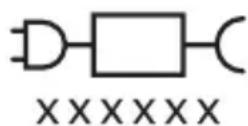
U hwwwwnwwhunjuwu hwjunwnwnwqnh untpuu wupnnnajwup hwwutihhtunlwl huntnputn hwugtnu www.philips.com/support
L2nW nnwnnyuabnn ywnnn bu unwnpntulunwnptn unntutnh hwwn: Rwnwunnp 5, nn nnn2 unntutn Bluetooth yuu NFC ntiutwu:
Luyunwuuniguwu hwnuh uww. 一 xxxxx ^ 一 gng 1 unhu huuunwunluhghpuynnhugnbnih huwn, nupunp oqwnqnnoh: (TCBxxxx, HX6100, HX6110, HX6160 ywWAAxxx)

Uju u2wn gnyg 5 unu hnu, nn wuhnpdt2un 5 yunnw oqwnqnnouh nwhwuqutn uwhupwu uunpu oqwnqnnotn:
Luwunwulwuhu oqnuqnpnni
ProtectiveClean 日 liyunnwuyu wunwuh hunquuwuyutn uwhuwunbuwdu wunwuutphu yuwu puyntphwutn u uunh uwnugnnutn hnugutni huunwunwuwutnh pwwjwnuun wuqgtutni u ptnuwunh unnsh wwnngnajnun pwnuutni ni uywhuwutni hwuun: ProtectiveClean liyunnwuyu wunuwunquwuyutn uwhuwuntbuwdu bu wouwu oqunwqnnduwu hwuun: tnhwutnh lnuhg oqunwqnnnonu wupt jhuh utwhuwuwutnh ubnwhulnnnpjuw utnpn:
2tp Philips Sonicare- (Uy. 1.)
1 FnTuWU 23nuuuphuhwguw/uitgwnuwynow 3 Ntuduh ynawu 4 Abduhutn gnighs 5 lunquwuh quhuh uhnwhuwwu h2gnu 6 Uununngngh gnighs
Uputuniunutn.
7. Toothbrush head 8. Toothbrush handle 9. Charger 10. Travel charger 11. Philips Sonicare logo
Read all instructions carefully before using the appliance.
Important
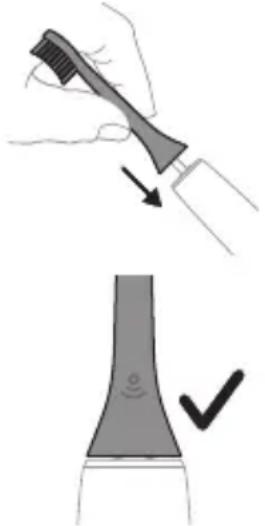
1. The toothbrush head is not intended for use by children or persons with reduced physical, sensory, or mental capabilities, unless they are supervised. 2. Use this toothbrush only for its intended purpose. If you have any questions, contact the manufacturer.
Philips Sonicare toothbrush use
To get the most out of your Sonicare toothbrush, follow the instructions below. First, attach the brush head to the handle. Then, place the brush head in your mouth before turning on the toothbrush. To reduce plaque and improve gum health, use the Sonicare toothbrush with the EasyStart feature. This feature gradually increases the power over the first 14 uses, helping you adapt to the Sonicare brushing experience.
Using the toothbrush
Charging the toothbrush
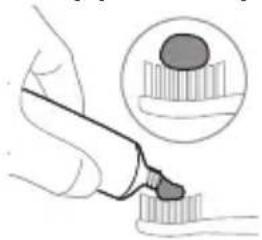
1. Connect the charger to a power outlet.
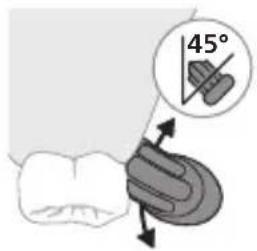
2. Place the toothbrush handle on the charger (45 degrees) and ensure it is properly seated. The charging indicator will light up.
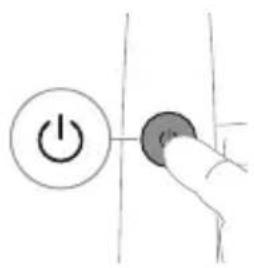
The toothbrush is now charging.
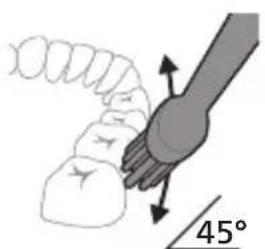
3. The toothbrush is compatible with Philips Sonicare chargers. 4. Do not use the toothbrush if the brush head is damaged. Replace the brush head every 3 months for optimal results.
The toothbrush is not intended for use by children. Keep it out of reach of children and do not allow them to play with it.
If you have any questions or concerns, contact the manufacturer or visit the Philips Sonicare website.
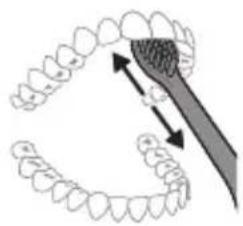
5. Do not immerse the toothbrush handle in water. 6. Do not use the toothbrush if it has been dropped or damaged. If the toothbrush is damaged, stop using it and contact the manufacturer.
Remove the Philips Sonicare brush head from the handle and rinse the brush head (under the bristles and the entire brush head) with warm tap water. Then wipe the handle with a damp cloth.
QuadPacer
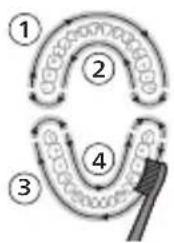
The QuadPacer interval timer reminds you to brush all four quadrants of your mouth equally. The QuadPacer is a short pause that signals you to move to the next quadrant. This feature is available on the Clean, White, and Gum Care modes.
Remove the White and Gum Care brush heads from the handle and rinse them thoroughly.
Modes
Your toothbrush has 3 modes: Clean, White, and Gum Care (see the mode selector). The modes are designed to give you a superior clean.
Clean White Gum Care
| Unwutunjnu | Pugunhy wubuonju uwpnwu hwun | 3nugunl uwytplunyeh pottn | hujwnupwn utpunl l'unttn |
| hunquutunl nunhuunl duuutul | 2 pnu 2 pnu, 30 | qwnjnuw | 3 pnu t |
| hugutu hunquutl | 3nnpwusgn hwunluw hunqwutlp 30 qwnjnuw: | 3nnpwusgn hwunluw hunqwutlp 30 qwnjnuw | 3nnpwusgn hwunluw hunqwutlp 30 qwnjnuw |
| www hunqwutlp 5 u 6 hwnuwrtnn jnpwusgnnn 15 qwnjnuw npuwgnw wnguh wnwutbn hwtagutini u wugih wjdw nwnutini hwunw: | www hunqwutlp 5, 6,7 u 8 hwunuwrtnn jnpwusgnnn 15 qwnjnuw npuwgnw wnguh hwtagutini u hwugih wjdw nwnutini hwunw: |
BrushSync technology
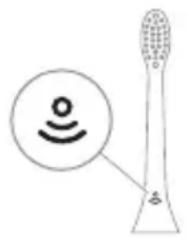
BrushSync technology uses a microchip embedded in the brush head to automatically select the optimal mode and intensity for your brushing needs. The brush head with a microchip is marked with the BrushSync logo. BrushSync technology also tracks the wear of your brush head and reminds you when it's time to replace it. To learn more about BrushSync-compatible brush heads, visit www.philips.com/toothbrush-heads.
Accessories
- Charging base
- QuadPacer
- Brush head replacement reminder
- EasyStart
- SmartTimer
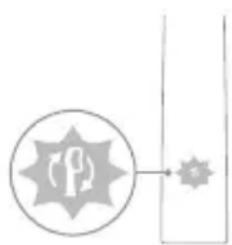
Your Philips Sonicare toothbrush comes with a special feature that helps you get the most out of your brushing experience. When the handle is turned on, the brush will gently pulse to guide you through your brushing routine. The handle is designed to be used with the Sonicare app for a more personalized experience. This feature is called the "Guide" or "Guided Brushing" feature.
Quadpacer
The QuadPacer is a 5-minute timer that helps you brush all four quadrants of your mouth evenly.
Brush head replacement reminder
Your Philips Sonicare toothbrush features BrushSync (Brush Head Sync) technology, which tracks your brush head usage.
This toothbrush is compatible with Philips Sonicare brush heads that have the BrushSync (Brush Head Sync) chip.
1. When you attach a new brush head, the handle will automatically detect it and start tracking its usage. 2. Over time, the handle will remind you to replace your brush head based on the amount of brushing time accumulated. This feature helps you maintain optimal cleaning performance. 3. When the brush head needs replacement, the handle will show a reminder indicator.
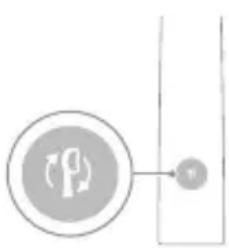
To reset the brush head replacement reminder, follow the instructions in the "Resetting the Brush Head Replacement Reminder" section.
EasyStart
This Philips Sonicare toothbrush features the EasyStart function. The EasyStart function gradually increases the power over the first 14 brushing sessions to help you get used to using your new Philips Sonicare toothbrush.
If you are already an experienced Philips Sonicare user
If you are already used to the Sonicare brushing sensation, you can turn off the EasyStart feature by following the instructions in the "Turning Off EasyStart" section.
To turn off the EasyStart feature, see the "Turning Off EasyStart" section.
SmarTimer
The SmarTimer is a 5-day timer, and it can be programmed for 5 different on/off programs. The programming is done using the two buttons on the front panel. The 6-pin connector is used for connecting the timer to the control board. The 30-day battery backup is included.
Installation and connection instructions
Before installing or connecting the timer, read the following instructions carefully.
- EasyStart
- Timer connection diagram
- Timer wiring diagram
The 6-pin connector is used for connecting the timer to the control board, which controls the operation of the device.
Step 1. Connect the timer to the control board using the 6-pin connector.
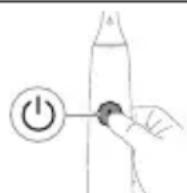
- Ensure the connector is properly seated.
| EasyStart lunquuulh quhuh yhnhuunhuu hh2gniu | zhuu wu utuunh wnauwuuu | |
| Uhug 3 luyjnuw ununnjuwup | Uhug 5 V uwjnuw ununnjuwup | Uhug 7 lujnuw ununnjuwup |
| ↓ ↓ ↓ | ||
| Pwjl 3. Fug pannp hnuwuph uhwguw/wwguwunw unwup, bp pt. | ||
| 1 wqnwu2wu 1 wqnwu2wu, wqw 2 wqnwu2wu | 1 wqnwu2wu, 2 wqnwu2wu, wqw 3 wqnwu2wu | |
| ↓ ↓ ↓ | ||
| bta uwnunlng hnqghn u lunquuwluh quhuh yhnuwunhuuuh hh2tgwuu gniighn 2 uquwpuwpanpatu lquwus injunu l u bp 3 awjuwhu wqnwu2wu' gwonghg uhuu pwnan, wqw qnnouwnu wlnhulwgulw: | ||
| 4UU | ||
| bta uwnunlng hnqghn u lunquuwluh quhuh yhnuwunhuuuh hh2tgwuu gniighn 1 uquwpuwpanpatu ntnhu injunu l u bp 3 awjuwhu wqnwu2wu' pwnonghg uhuu gwon, wqw qnnouwnu wqwuulhunlwgulw: | ||
Control board
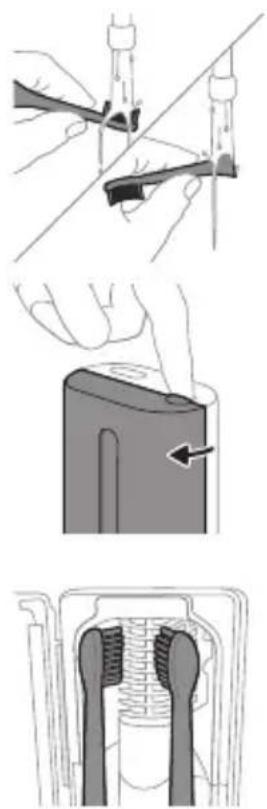
The 6-pin connector is used for connecting the timer to the control board, which controls the operation of the device.
The timer is powered by a 12V DC supply, which is connected to the control board.
The control board provides the necessary signals for the timer to operate.
The timer has a built-in battery backup, which maintains the time and program settings during power outages.
- The timer can be programmed for up to 5 on/off cycles per day.
- Uhuunuhwuhsh wunnnihwn gwnnuw 5 yu wpuugwywni5: -U2huunwuph npawgpiu wunwhuhgh dnlu nninu qiu h yuw uunuoh hn un quih:
L2nW Nunnwunuun2wUqny uynu yunnnt 5 Unwuuu nn hui uunnuh u2ph u w2uh hwun: Uuu np u2un hn nni uwhtp nthwuubnhg:
1 Uwnpnting hann luugtp hnqwuwh quhunu wuhuwntnhtnugnp wutinn gnn: 2qnl2wgnui hnquuwh qluhun uhuunwhuuhn uwpntlu hwuunqtp, nnuwhun hnquuwh qluh yuw5: 2 Stunnnpabn uwn npw uhnwnu whunwhuhsh utnuiu puwp npnn: 3 hnquwuwqinun nnpwhunwwuush2 tnuunutng uhy unw uwhuyutn nguh wuw h nyun:
U2nui Uwnpntuwhwu Philips Sonicare-h uyniu hnquuwuh quhuyutwnwhunwhuhsh ubg:
L2nus Uh uwpnpb Philips Sonicare for Kids hunquuwuh quhuyutnn whunwhuushgstg:
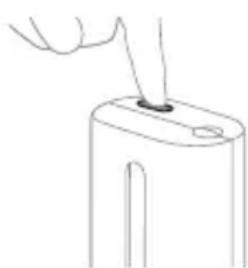
4 Rwnqbp, nwhunwhwuhn uhwguwds hwwwnuwu wunw uhnwup ywnnuh: 5 wγt pninnulutywuqwuunubpywuwu shwguwu/wugwuunuwuynawyn'chnn hn unnnwwwni2wqwnu dnwnqwnu wupnnn nunnntn hwwwn:
L2nus nupynnn bp uhwugulwhunwhwuhn uhwju wju nuaepnu, bpa nninuwwun2wa ytpwnu hwhyluo5:
L2nU Uhnwhuuhu wugununlnt, t a nnn pugtp whunwhuwu ughyh npawgpniu:
L2nu'Uhunwhwuwughun ununu 1nnn 10 nwn, wunhtunu hupwptnpwn uugwnunu:
Ununwhuuhn qnnonu 5, np njuun huwunu uwnnhug:
Lhgpunnnu u wunlungh hgh yunquuhaw
Uju Philips Sonicare wunwuh hnquuwuyn wuhwuunluw 5 wunwq u28 hnquwwuwwu hwwwn, jnuwuwynn wngttnnwnu 2 nnu b unnnnyaup (14 on, tba oqnwnnouh onwuu tnu n uquu) nhu hgpwrnnu wunlungnu: Uwnlungh hgh gnighn gnug 5 unhu wunlungh uwnqwhawu, np wunwnu bp hnquwwu wu 2 nnuwug wnngttnnu, bp wugwnu bp hnquwwu, ywu tp wju hgpwrnnu l:
L2nuiuwnn 5 uwhuwugulhugu 24 duu, nnuuqhu wunlungu wupnnnjuwup hgpwunnu uwhupwu unwgh ouqnwnnonun, uuwjnu npu wunnnp oqwnqnnol Philips Sonicare wunwuh junwuwu, uwhupwu wju wupnnnuhugpwunpu:
Lhgpuunnniu
Lhgpwnnnnghpwnnhyww nHU Uunwhuuhwun
1. This appliance can be used by children aged from 8 years and above and persons with reduced physical, sensory or mental capabilities or lack of experience and knowledge if they have been given supervision or instruction concerning use of the appliance in a safe way and understand the hazards involved.
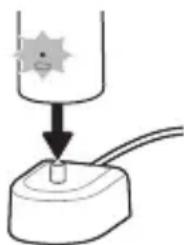
2. Children shall not play with the appliance.
- 2. Children shall not play with the appliance. Cleaning and user maintenance shall not be made by children without supervision. - If the supply cord is damaged, it must be replaced by the manufacturer, its service agent or similarly qualified persons in order to avoid a hazard.
- 1. This appliance is intended for household use only. Use only the charging base provided with the appliance. Do not use the appliance outdoors.
Important safety instructions
Important safety instructions (Read all instructions before using this appliance)
This product is not intended for use by persons (including children) with reduced physical, sensory or mental capabilities, or lack of experience and knowledge, unless they have been given supervision or instruction concerning use of the appliance by a person responsible for their safety.
Important safety instructions
This appliance is not intended for use by persons (including children) with reduced physical, sensory or mental capabilities, or lack of experience and knowledge, unless they have been given supervision or instruction concerning use of the appliance by a person responsible for their safety.
Use only the charging base provided with the appliance.
Do not use the appliance outdoors.
Important safety instructions (Read all instructions before using this appliance)
If the supply cord is damaged, it must be replaced by the manufacturer, its service agent or similarly qualified persons in order to avoid a hazard.
a6365: 808mno m653 y60g oanommlb. bmnl oynmnbl 80mnblnabu 803b00 806g60 mgmd6ogoymo smnbl.
a6n36: ng 8gdo8gmmolny6do ond36 86mgoon l6bmynub nnoanb 3mnogonl a3monoos 508mnnb no3n b3mnogonl ab6doqn m3nugno 60gon.
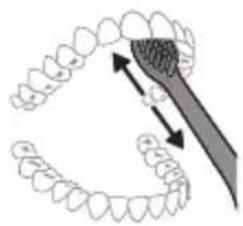
5 6n630ngjndnang8gog3nnl g666666 ambmgo 508mnbu b6bmyn 6663no 30n0smymoo no modg6fmdg 8ybu mnmmgyo ng n, mda b63nu 30n0smymoa goom3oglu. 6 6u 6u 6u 6u 6u 6u 6u 6u 6u 6u 6u 6u 6u 6u 6u 6u 6u 6u 6u 6u 6u 6u 6u 6u 6u 6u 6u 6u 6u 6u 6u 6u 6u 6u
g6n36: Philips Sonicare 30ngmnb 58mnb n6gds yusghmbm dmo32008g 3dmy6gonb (s8mnblns o30nn yom m oom (3300o o m30008 g 3dmy6gonlbu) o o oogobnm 30ngmgo (a3uoyomj, 33m83n6jon, 36nmgon) on 1000000000000000000000000000
QuadPacer-n
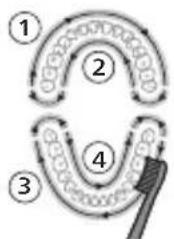
nabun3nb, mda oom6b6gogm, mda on30bn 50mnol m6b6mo amdnmb 3nmnub nyan, goyosnn 3nmol m4 6b6moo QuadPacer-n bgy6jnnl 8dmy6jnon. QuadPacer-n b63nb qmmbl 4 n6b6o ymgu yngnnnongdo, mmnl y6 80063noa d8m68. yag6foa 6b36 3noa noa 3noa. 60b6no bjunb dmml J0nmnu 30mnu 30ma7yng 86nd36: White Gug Health ngndon 8dmy6jnonss, agsdmmns gogdmu
mgnndg
m36n m0d6m6ymo 2o0nnb 5a0nnb m30mo 3-0g hndnon: Clean, White Gum Care (dbmmoo 36m6mgoomdoog8).mgndn 33mgo, oosgnm goon nms 30m m0n 0amn
Clean White Gum Care
3oomnub 58mnbubsbmymno
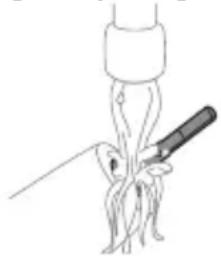
1 208n 508nun no3o 8083mnnn 00mn 608nmn nn mnnn 6ymmn. 66666666, nma 666666666
803mmbomgds: 905630n m8n5nb bogmdu afoomnu 8082 agfno mn b86jdoan, no8o6o aondmo 8ns6n 8oadmn63nml.
2 8o0a0mogmgo b6gmyfnn 8goo3nm 6mnm 6gfnnn.
g6n36: n Bg30n bbgmyfn 6ngmndgymn ymnl aMbngmgo.
58mnb03n
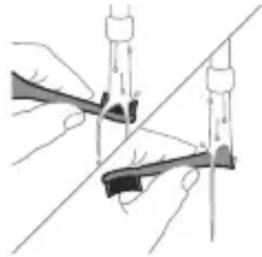
Philips Sonicare models HX64XX, HX68XX.
For assistance, visit www.philips.com/support or contact the local Consumer Care center.
Read this user manual carefully before using the appliance.
- Keep the charger away from water. - Do not use the appliance if it is damaged or has a broken part. - This appliance can be used by children aged from 8 years and above and persons with reduced physical, sensory or mental capabilities or lack of experience and knowledge if they have been given supervision or instruction concerning use of the appliance in a safe way and understand the hazards involved. - Children shall not play with the appliance. - Cleaning and user maintenance shall not be made by children without supervision.
- If the appliance is used in a bathroom, unplug it after charging.
- For REACH information, visit the Philips website at www.philips.com/REACH.
Safety instructions
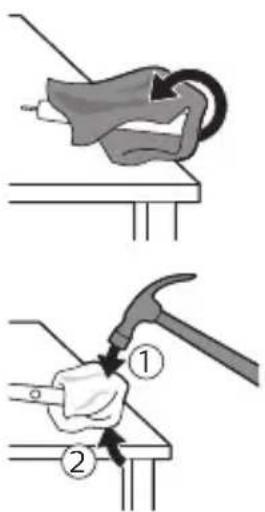
Read these instructions carefully before using the device. Keep these instructions for future reference. Follow all warnings and instructions marked on the device.
1. Place the device on a stable, level surface. Do not place it near water or in damp areas. Use only the supplied power adapter.
2. Do not use the device if the power cord or plug is damaged. Contact qualified personnel for repair.
3. Keep the device away from heat sources such as radiators, stoves, or other appliances that produce heat. Do not block ventilation openings.
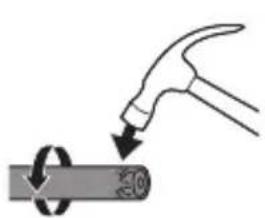
Note: The device is for indoor use only.
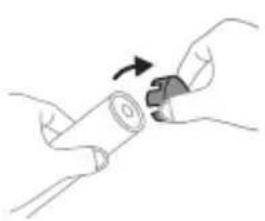
4. Do not immerse the device in water or any liquid. If liquid enters the device, unplug it immediately and contact customer service.
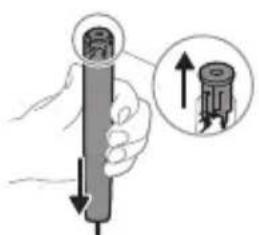
5. Do not attempt to repair the device yourself. If service is needed, contact qualified service personnel. Use only replacement parts specified by the manufacturer.
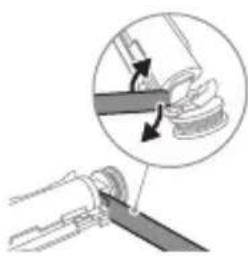
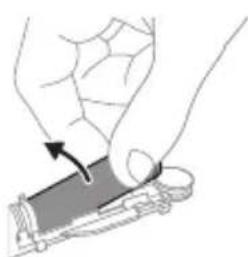
6. Unplug the device during lightning storms or when unused for long periods. 7. The device should be serviced by qualified personnel when: the power cord or plug is damaged, liquid has been spilled into the device, the device has been exposed to rain or moisture, the device does not operate normally, or the device has been dropped or damaged. 8. Do not place the device on an unstable cart, stand, or table.
Warning: To reduce the risk of fire or electric shock, do not expose this device to rain or moisture.
9. Do not use the device near water, for example, near a bathtub, washbowl, kitchen sink, or laundry tub.
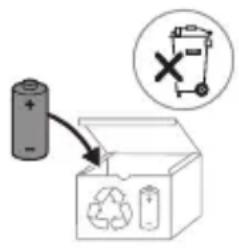
This device complies with Part 15 of the FCC Rules. Operation is subject to the following two conditions: (1) this device may not cause harmful interference, and (2) this device must accept any interference received, including interference that may cause undesired operation.
Note: This equipment has been tested and found to comply with the limits for a Class B digital device, pursuant to Part 15 of the FCC Rules. These limits are designed to provide reasonable protection against harmful interference in a residential installation. This equipment generates, uses, and can radiate radio frequency energy and, if not installed and used in accordance with the instructions, may cause harmful interference to radio communications. However, there is no guarantee that interference will not occur in a particular installation.
Philips Sonicare nn9nn7 nn
77777777777777
7 7
7n7n9nynnnn nn nnnn nn nnnn
IIOI IINN NNNN NNNN NNNN, Sonicare
.
n nn nnnnnnnnnnnnnnnnn
www.philips.com/support
NINIO NUNIUN YTD
wn 197. nn n nn 7 nn nn
yinnn nnnn77 1770n770n
IN N77 IN,INNININNNIN
y
N71N .N70NN NDOONN DIOO
n7nn n1y9 1y7 xyn nn nn 7
Philips USB 70wnwnn,17910 nx.
USB nni 7wnnnn790x7 nni7n
-77y71907
N T D 109n7 u,7T N won n .wnwn
n nn nnnnnnnnnnnnnnnnnnnnnnnnnnnnnnnnnnnnnnnnnnnnnnnnnnnnnnnnnnnnnnnnnnnnnnnnnnnnn
.(nnnnnNIN)7w
DINDIN DINOWT7XYIN
.090
-UV-nXUNND
.
-1071
-7201777
LED UV/nn LED
77.077
0.017
nnnnn
7uD9iTu
Nn nn nnn7.19910n IN
17 1000000000000000000000000000000000000000000
0.01717|n
0.017N 0
4500
JX197 JNNTX
yN70N91/
TNNYJN7YIN7DINDN,
.
7
.197 100n 1
.17 10000000000000000000000000000000000
TINXN7977777910
N7707 NINONIN
77 non 17y
-7nD,
-77x917n
-yynn7
-7w wunw7T
111111111111111111111
IN 1007 177 77 JN7 WnW,
y
.
- 10 + 7 = 77
-NTYIN
-7uDnDn
nnon7 nnn nn 790nn nn nn nn .Philips ;n nn nn 240 - 100 :n nn nT CCBxxx 240 - 100 :n nn ,HX6100,(nII 1.5 ;n 50/60 nI),HX6110,(nII 1.4 ;n 50/60 ;n nn nnn nnn nnn nnn nnn nnn nnn nnn nnn nnn nnn nnn nnn nnn nnn nnn nnn nnn nnn nnn nnn nnn nnn nnn nnn nnn nnn nnn nnn nnn nnn nnn nnn nnn nnn nnn nnn nnn nnn nnn nnn nnn nnn nnn nnn nnn nnn nnn nnn nann nn nn nn nn nn nn nn nn nn nn nn nn nn nn nn nn nn nn nn nn nn nn nn nn nn nn nn nn nn nn nn nn nn nn nn nn nn nn nn nn nn nn nn nn nn nn nn nn nn nn nn nn nn nn nn nn nn nn nn nn nn nn nn nn nn nn nn nn nn nn nn nn nn nn nn nn nn nn nn nn nn nn nn nn nn nn nn nn nn nn nn nn nn nn nn nn nn nn nn nn nee
. 777777777777777777777777
n71n nnnn nn 7y
-|X|,UND 7n7
-ww,wn
-1N7n7n
-1N 1
-7wN.997nn
-yny
-177017XIN
- · C°40 - 1C°0
-1X,INONN
-60° T 10° -nio
(EMF) D'ONNIN7N NITU
D"017n 7n7n 7n 7n 7n n Philips
T
TIYIOIy7nNniuynn Philips,NT EU/2014/53 (Bluetooth,NFC)
-7y19 D01117
GHz 2.4-
-Bluetooth
.dBm3
-7y19 D0117
.MHz 13.56-
-
.dBm 30.16
www.philips.com/support:
NFC IN Bluetooth- Dnu Dnu Dnu Dnu Dnu
7u 190nN|"Xxxxx" -n:77n 7n nD 790,TCBxxxx,HX6100,HX6110).unwn7 u nn nD 790
(WAAxxxx IN HX6160

xxxxxx

UINUN 197 UINUN NININN XIN77 UU IN 700
TYPING
NITYIND ProtectiveClean 7u nn nnnn nn nnnn nn nnnn nn nnnn nn nnnn nn nnnn nn nnnn nn nnnn nn nnnn nn nnnn nn nnnn nn nnnn nn nnnn nn nnnn nn nnnn nn nnnn nn nnnn nn nnnn nn nnnn nn nnnn nn nnnn nn nnnn nn nnnn nn nnnn nn nnnnn nn nnnn nn nnnn nn nnnn nn nnnn nn nnnn nn nnnn nn nnnn nn nnnn nn nnnn nn nnnn nn nnnn nn nnnn nn nnnn nn nnnn nn nnnn nn nnnn nn nnnn nn nnnn nn nnnn nn nnnn nn nnnn nn nnnn nn nnnn nn nnnn nn nnnn nn nnn
(.1 ネNX) ユ Philips Sonicare
1
211/7y9n!
3xn7
4n nn
Philips Sonicare 1
Sonicare
| NJNJNJNJNJNJNJNJNJNJNJNJNJNJNJNJNJNJNJNJNJNJNJNJNJNJNJNJNJNJNJNJNJNJNJNJNJNJNJNJNJNJNJNJNJNJNJNJNJNJNJNJNJNJNJNJNJNJNJNJNJNJNJNJNJNJNJNJNJNJNJNJNJNJNJNJNJNJNJNJNJNJNJNJNJNJNJNJNJNJNJNJNJNJNJNJNJNJNJNJJNJNJNJNJNJNJNJNJNJNJNJNJNJNJNJNJNJNJNJNJNJNJNJNJNJNJNJNJNJNJNJNJNJNJNJNJNJNJNJNJNJNJNJNJNJNJNJNJNJNJNJNJNJNJNJNJNJNJNJNJNJNJNJNJNJNJNJNJNJNJNJNJNJNJNJNJNJNJNJNJNJNJNJNJNJNJNJNJNJNJNJNJNJNJNJNJNJNJNJJJNJJJNJJJNJJJNJJJNJJJNJJJNJJJNJJJNJJJNJJJNJJJNJJJNJJJNJJJNJJJNJJJNJJJNJJJNJJJNJJJNJJJNJJJNJJJNJJJNJJJNJJJNJJJNJJJNJJJNJJJNJJJNJJJNJJJNJJJNJJJNJJJNJJJNJJJNJJJNJJJNJJJNJJJNJJJNJJJNJJJNJJJNJJJNJJJNJJJNJjjJJJJJJJJJJJJJJJJJJJJJJJJJJJJJJJJJJJJJJJJJJJJJJJJJJJJJJJJJJJJJJJJJJJJJJJJJJJJJJJJJJJJJJJJJJJJJJJJJJJJJJJJJJJJJJJJJJJJJJJJJJJJJJJJJJJJJJJJJJJJJJJJJJJJJJJJJJJJJJJJJJJJJJJJJJJJJJJJJJJJJJJJJJJJJJJJJJJJJJJJjjJJJJJJJJJJJJJJJJJJJJJJJJJJJJJJJJJJJJJJJJJJJJJJJJJJJJJJJJJJJJJJJJJJJJJJJJJJJJJJJJJJJJJJJJJJJJJJJJJJJJJJJJJJJJJJJJJJJJJJJJJJJJJJJJJJJJJJJJJJJJJJJJJJJJJJJJJJJJJJJJJJJJJJJJJJJJJJJJJJJJJJJJJJJJJJJJJJJJjjjjjjjjjjjjjjjjjjjjjjjjjjjjjjjjjjjjjjjjjjjjjjjjjjjjjjjjjjjjjjjjjjjjjjjjjjjjjjjjjjjjjjjjjjjjjjjjjjjjjjjjjjjjjjjjjjjjjjjjjjjjjjjjjjjjjjjjjjjjjjjjjjjjjjjjjjjjjjjjjjjjjjjjjjjjjjjjjjjjjjjjjjjjjjjjjjjjjjjjJJJJJJJJJJJJJJJJJJJJJJJJJJJJJJJJJJJJJJJJJJJJJJJJJJJJJJJJJJJJJJJJJJJJJJJJJJJJJJJJJJJJJJJJJJJJJJJJJJJJJJJJJJJJJJJJJJJJJJJJJJJJJJJJJJJJJJJJJJJJJJJJJJJJJJJJJJJJJJJJJJJJJJJJJJJJJJJJJJJJJJJJJJJJJJJJJJJJ JJJJJJJJJJJJJJJJJJJJJJJJJJJJJJJJJJJJJJJJJJJJJJJJJJJJJJJJJJJJJJJJJJJJJJJJJJJJJJJJJJJJJJJJJJJJJJJJJJJJJJJJJJJJJJJJJJJJJJJJJJJJJJJJJJJJJJJJJJJJJJJJJJJJJJJJJJJJJJJJJJJJJJJJJJJJJJJJJJJJJJJJJJJJJJJJJJJJJJJJ JJ JJJJJJJJJJJJJJJJJJJJJJJJJJJJJJJJJJJJJJJJJJJJJJJJJJJJJJJJJJJJJJJJJJJJJJJJJJJJJJJJJJJJJJJJJJJJJJJJJJJJJJJJJJJJJJJJJJJJJJJJJJJJJJJJJJJJJJJJJJJJJJJJJJJJJJJJJJJJJJJJJJJJJJJJJJJJJJJJJJJJJJJJJJJJJJJJJJJJJJjj JJ JJJJJJJJJJJJJJJJJJJJJJJJJJJJJJJJJJJJJJJJJJJJJJJJJJJJJJJJJJJJJJJJJJJJJJJJJJJJJJJJJJJJJJJJJJJJJJJJJJJJJJJJJJJJJJJJJJJJJJJJJJJJJJJJJJJJJJJJJJJJJJJJJJJJJJJJJJJJJJJJJJJJJJJJJJJJJJJJJJJJJJJJJJJJJJJJJJJJjj JJJJJJJJJJJJJJJJJJJJJJJJJJJJJJJJJJJJJJJJJJJJJJJJJJJJJJJJJJJJJJJJJJJJJJJJJJJJJJJJJJJJJJJJJJJJJJJJJJJJJJJJJJJJJJJJJJJJJJJJJJJJJJJJJJJJJJJJJJJJJJJJJJJJJJJJJJJJJJJJJJJJJJJJJJJJJJJJJJJJJJJJJJJJJJJJJJJJJJ JJjjjjjjjjjjjjjjjjjjjjjjjjjjjjjjjjjjjjjjjjjjjjjjjjjjjjjjjjjjjjjjjjjjjjjjjjjjjjjjjjjjjjjjjjjjjjjjjjjjjjjjjjjjjjjjjjjjjjjjjjjjjjjjjjjjjjjjjjjjjjjjjjjjjjjjjjjjjjjjjjjjjjjjjjjjjjjjjjjjjjjjjjjjjjjjjjjjjjjj jjjjjjjjjjjjjjjjjjjjjjjjjjjjjjjjjjjjjjjjjjjjjjjjjjjjjjjjjjjjjjjjjjjjjjjjjjjjjjjjjjjjjjjjjjjjjjjjjjjjjjjjjjjjjjjjjjjjjjjjjjjjjjjjjjjjjjjjjjjjjjjjjjjjjjjjjjjjjjjjjjjjjjjjjjjjjjjjjjjjjjjjjjjjjjjjjjjjjjjjll |
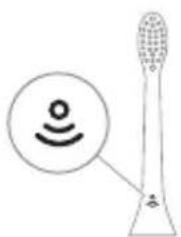
BrushSync
BrushSync
-
Philips Sonicare
www.philips.com/toothbrush-heads
#
- Quadpacer - EasyStart - Smartimer
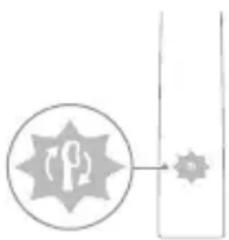
Philips Sonicare toothbrush. If you have any questions, please contact us.
707.79in71nDy7uynn (n7u 710IN7y9n IN) n
Quadpacer
The QuadPacer is a feature that helps you brush for the recommended two minutes. It is a short interval timer.
n7nn7
BrushSync technology. Philips Sonicare. This is a long paragraph that seems to be repeated. It is likely a placeholder or repeated text. I will remove it.
1. Place the brush head on the handle.
2. Wet the bristles and apply toothpaste.
Nnnn
-7
-
.
-777n771on
n 30
7710
(wnn yon n) 7ion
n nn nnnn nn nnnn nn nnnn nn
.7710n
n710 jinn n710
y
3077n7
(ynnnn nn nnnn nn) 77ion
n nn nnnn nn 710n, n nn nn nn nn
n71on nn nn
777710 11nnn7710
-77n7n7n
| -הכלהההען 77 | |
| | |
| | |
| | |
| |
1777777777777777777777
.11111111111111111111111111111
www.philips.com/REACH
For support, visit www.philips.com/support
This device complies with part 15 of the FCC Rules. Operation is subject to the following two conditions: (1) This device may not cause harmful interference, and (2) this device must accept any interference received, including interference that may cause undesired operation.
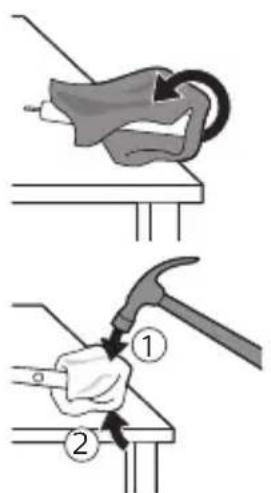
This equipment has been tested and found to comply with the limits for a Class B digital device, pursuant to part 15 of the FCC Rules. These limits are designed to provide reasonable protection against harmful interference in a residential installation.
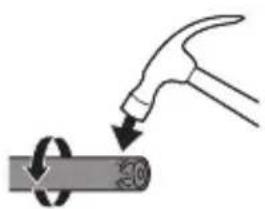
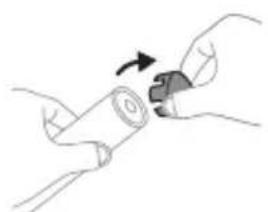
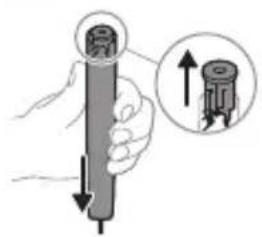
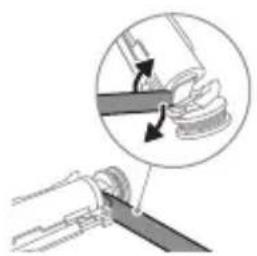
EAC UK CA
www.philips.com/Sonicare
©2024 Koninklijke Philips N.V. (KPNV). All rights reserved. Philips and the Philips shield are trademarks of KPNV. Sonicare and the Sonicare logo are trademarks of Philips Oral Healthcare, LLC and/or KPNV. 300008527982 (20/08/2024)

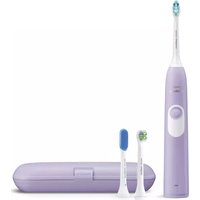


- IMPORTANT SAFETY INFORMATION
- WARNINGS
- MEDICAL WARNINGS
- BATTERY SAFETY INSTRUCTIONS
- STORAGE AND TRANSPORTATION CONDITIONS
- ELECTROMAGNETIC FIELDS (EMF)
- RADIO EQUIPMENT DIRECTIVE
- WWW.PHILIPS.COM/SUPPORT
- INTENDED USE
- YOUR PHILIPS SONICARE (FIG 1.)
- ACCESSORIES
- GETTING STARTED
- USING YOUR PHILIPS SONICARE TOOTHBRUSH
- BRUSHING INSTRUCTIONS
- QUADPACER
- MODES
- BRUSHSYNC TECHNOLOGY
- FEATURES
- PRESSURE SENSOR FEEDBACK
- BRUSH HEAD REPLACEMENT REMINDER
- EASYSTART
- DISCLAIMER
- SMARTIMER
- ACTIVATING OR DEACTIVATING FEATURES
- UV SANITIZER
- CHARGING AND BATTERY STATUS
- CHARGING
- CHARGING ON CHARGER OR UV SANITIZER
- BATTERY STATUS
- BATTERY STATUS (HANDLE ON PLUGGED-IN CHARGER)
- BATTERY STATUS (WHEN HANDLE IS NOT PLACED ON CHARGER)
- CLEANING
- TOOTHBRUSH HANDLE
- BRUSH HEAD
- CHARGER
- TRAVEL CASE
- CLEANING THE SANITIZER
- ENGLISH
- STORAGE
- REPLACEMENT
- LOCATING THE MODEL NUMBER
- WARRANTY AND SUPPORT
- WARRANTY EXCLUSIONS
- RECYCLING
- REMOVING THE RECHARGEABLE BATTERY
- INTRODUCTION
- CLEAN WHITE GUM CARE
- USING PHILIPS SONICARE TOOTHPASTE
- FUNCTIONS
- PRESSURE SENSOR SIGNAL
- YOUR PHILIPS SONICARE DEVICE (FIG. 1)
- CHARGING IN THE CHARGER OR IN THE UV SANITIZER
- BATTERY STATUS (HANDLE PLACED ON THE CHARGER)
- BATTERY STATUS BATTERY INDICATOR
- BATTERY STATUS (HANDLE NOT ON THE CHARGER)
- BATTERY STATUS BATTERY INDICATOR SOUND
- YOUR PHILIPS SONICARE (FIG. 1)
- INSTRUCTIONS FOR USE
- BRUSHSYNC
- ACTIVATING OR DEACTIVATING FUNCTIONS
- OR
- THE BRUSH HEAD REPLACEMENT REMINDER MAY VARY DEPENDING ON THE MODEL
- BATTERY STATUS (HANDLE PLACED IN CHARGING DEVICE, WHICH IS CONNECTED TO POWER)
- BATTERY STATUS (WHEN THE HANDLE IS NOT PLACED IN THE CHARGING DEVICE)
- CHECK THE MODEL NUMBER ON THE BOTTOM
- EXCLUSIONS FROM WARRANTY
- HANDLE BOTTOM
- PHILIPS SONICARE HANDLE (FIG. 1)
- PHILIPS SONICARE BRUSH HEADS
- BRUSH HEAD SENSOR
- THE BRUSH HEAD REPLACEMENT REMINDER
- STARTING WITH THE EASYSTART FUNCTION
- TURNING ON OR OFF THE FUNCTIONS
- THIS PASSAGE IS IN A NON-ENGLISH LANGUAGE AND APPEARS TO BE GARBLED OCR TEXT. IT IS NOT USABLE
- BATTERY INDICATOR (FLASHES WHEN BATTERY IS LOW)
- BATTERY INDICATOR AND BATTERY COMPARTMENT
- WET THE BRISTLES AND APPLY A SMALL AMOUNT OF TOOTHPASTE
- PRESSURE SENSOR INFORMATION
- DISPOSAL
- AKTINBIPAHE IJIIN DEAKTHBNPAHBE HA YHKCUNTE
- NJI
- YB-CTEPNIIN3ATOP
- CHARGING THE TOOTHBRUSH WITH THE UV STERILIZER
- DISCARD
- OFOXNXON TNB
- USING THE DEVICE
- PHILIPS SONICARE (FIG. 1)
- NOTE
- OVERVIEW
- BATTERY SAFETY WARNINGS
- PHILIPS SONICARE TOOTHBRUSH (FIG. 1)
- DISINFECTION UNIT WITH UV LAMP
- ATTACHMENT
- CHARGING DEVICE
- EMPTY CONTAINER
- CLEANING THE DISINFECTION BLOCK
- CAUTION. DO NOT CLEAN THE DISINFECTION BLOCK WHEN THE UV LAMP IS HOT
- MODEL NUMBER
- WARRANTY LIMITATIONS
- REMOVAL OF THE BUILT-IN RECHARGEABLE BATTERY
- REMOVING THE BATTERY
- WARRANTY
- EXPERTISE
- IMPORTANT SAFETY INSTRUCTIONS
- PHILIPS SONICARE (FIGURE 1)
- ATTACHING THE BRUSH HEAD
- USING THE PHILIPS SONICARE TOOTHBRUSH
- ENABLE OR DISABLE FEATURES
- CHARGING THE BATTERY
- CHARGING OR DISINFECTING
- WARNING
- FDDCU4UL 29NHCU8NHULR
- UUNLUNGH WUUNWQNJUU GNIUIUTN
- KEEP THE APPLIANCE CLEAN
- EGUNWQUHUWU N2N (EMF)
- NUNHNUUNPUUUNNNUIUTNH UYNUPNJWUL NWHUQ
- LUWUNWULWUHU OQNUQNPNNI
- TP PHILIPS SONICARE- (UY. 1.)
- IMPORTANT
- PHILIPS SONICARE TOOTHBRUSH USE
- CHARGING THE TOOTHBRUSH
- INSTALLATION AND CONNECTION INSTRUCTIONS
- CONTROL BOARD
- LHGPUNNNU U WUNLUNGH HGH YUNQUUHAW
- LHGPUUNNNIU
- LHGPWNNNNGHPWNNHYWW NHU UUNWHUUHWUN
- IMPORTANT SAFETY INSTRUCTIONS (READ ALL INSTRUCTIONS BEFORE USING THIS APPLIANCE)
- QUADPACER-N
- MGNNDG
- OOMNUB 58MNBUBSBMYMNO
- MNB03N
- SAFETY INSTRUCTIONS
- NINIO NUNIUN YTD
- JX197 JNNTX
- N7707 NINONIN
- (EMF) D'ONNIN7N NITU
- T
- TYPING
- (.1 ネNX) ユ PHILIPS SONICARE
- PHILIPS SONICARE
- N7NN
- (WNN YON N) 7ION
- N710 JINN N
- (YNNNN NN NNNN NN) 77ION
- NNN
- EAC UK CA
Brand : PHILIPS
Model : Sonicare ProtectiveClean 5100 HX6850
Category : Electric toothbrush