RCS 1044 - Smart Home BRENNENSTUHL - Free user manual and instructions
Find the device manual for free RCS 1044 BRENNENSTUHL in PDF.


| Product type | Smart home remote control socket kit |
| Brand | Brennenstuhl |
| Model | RCS 1044 N Comfort |
| Socket supply voltage | 230 V / 50 Hz |
| Remote control voltage | 12 V (battery type A23) |
| Max switching power | 1000 W |
| Protection rating | IP44 (suitable for outdoor use) |
| Radio signal range | 25 m max (depending on infrastructure) |
| Operating frequency | 433.92 MHz |
| Temperature range (operation) | 0 °C to 35 °C |
| Temperature range (storage) | -40 °C to 70 °C |
| Number of sockets included | 2 |
| Battery type | 12 V, type A23 (included) |
| Main functions | Remote on/off, adjustable system code (5 DIP switches), 4 control channels (A-D) |
| Safety | Child protection on sockets, IP44, disconnect before cleaning, do not use with motor capacitor appliances |
| Maintenance | Clean with a slightly damp soft cloth and mild detergent; do not use corrosive products |
| Spare parts / Repairability | Replaceable battery (type A23); no other spare parts specified |
| Warranty | 2 years from date of purchase |
| Package contents | 1 remote control (with battery), 2 IP44 remote control sockets |
| Intended use | Private use only, do not daisy chain, do not use with unattended appliances (e.g., iron) |
Frequently Asked Questions - RCS 1044 BRENNENSTUHL
User questions about RCS 1044 BRENNENSTUHL
0 question about this device. Answer the ones you know or ask your own.
Ask a new question about this device
Download the instructions for your Smart Home in PDF format for free! Find your manual RCS 1044 - BRENNENSTUHL and take your electronic device back in hand. On this page are published all the documents necessary for the use of your device. RCS 1044 by BRENNENSTUHL.
USER MANUAL RCS 1044 BRENNENSTUHL
The devices are constructed as wireless switch sets for private use. It is not suitable for commercial use.
The wireless switch set is for switching lamps and electrical devices on and off. The receivers are suitable for outdoor use.
The devices may only be used individually. Do not connect multiple switch outlets in a row.
Any other use is considered improper use. The manufacturer does not assume any liability for damages resulting from improper use.
Operating Instructions

Read these operating instructions completely before using the device. Do not throw the operating instructions away. If you pass the device on, include the
operating instructions.
Basic safety instructions
- Children do not know the risks that can arise when electronic devices are not used properly. Do not ever allow children to use electronic devices unintended.
- Risk of suffocation! Do not leave the packaging material lying around carelessly. Children may swallow small parts and choke on them.
- Only plug the switch outlet in conventional shockproof outlets with an alternating current of 220 - 240V and 50Hz .
- Do not plug the switch outlet into an extension cord.
- Only connect devices within the specified performance limits of the switch outlet.
- Do not connect devices that, when switched on without supervision, may cause fires (for instance an iron) or other damages.
- Do not connect any devices that require a motor capacitor (for instance a refrigerator).
- Ensure that the outlet is installed close to the connected product, is easily accessible and that the product is not operated while covered.
- Check the devices regularly for damage. Do not replace damaged parts. Contact the manufacturer or dispose of the device in an environmentally compatible manner.

- Do not touch the devices with wet hands.
- To shut off the voltage to the switch outlets, disconnect the switch outlets from the power grid.
Batteries must be handled with particular care.
- Risk of explosion! Do not attempt to recharge non-rechargeable batteries.
- As soon as a battery is spent, remove it from the battery compartment and dispose of it in an environmentally compatible manner.
- Do not throw batteries into fire or subject them to high temperatures.
- Do not open or short-circuit batteries.
- Battery acid leaking from a battery can lead to skin irritation. In case of contact, rinse thoroughly with water. If the fluid gets into the eyes, do not rub your eyes. Flush with water for at least 10 minutes and immediately go to the doctor.
- If you are not using the battery, remove it to avoid unnecessary discharges.
DISPOSAL
Dispose of electrical devices in an environmentally compatible manner!
Do not throw electronic devices away with the house rubbish. In accordance with European Guideline 2012/19/EU for electronic and old electronic devices, used electronic devices must be collected separately and disposed of in an environmentally sound recyclable manner.. you can learn more about the disposal options for the used devices at your municipal or city administration.

Improper disposal of the batteries is harmful to the environment!
Do not throw batteries away with the house rubbish. They can contain toxic heavy metals and are subject to hazardous waste treatment. Therefore, dispose of spent batteries at a communal collection site.
RCS 1044 N Comfort

DEVICE
Scope of delivery
The scope of delivery includes:
- A remote control with battery and
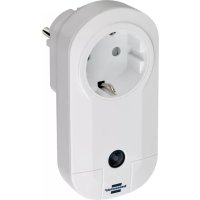
- two switch outlets IP44.
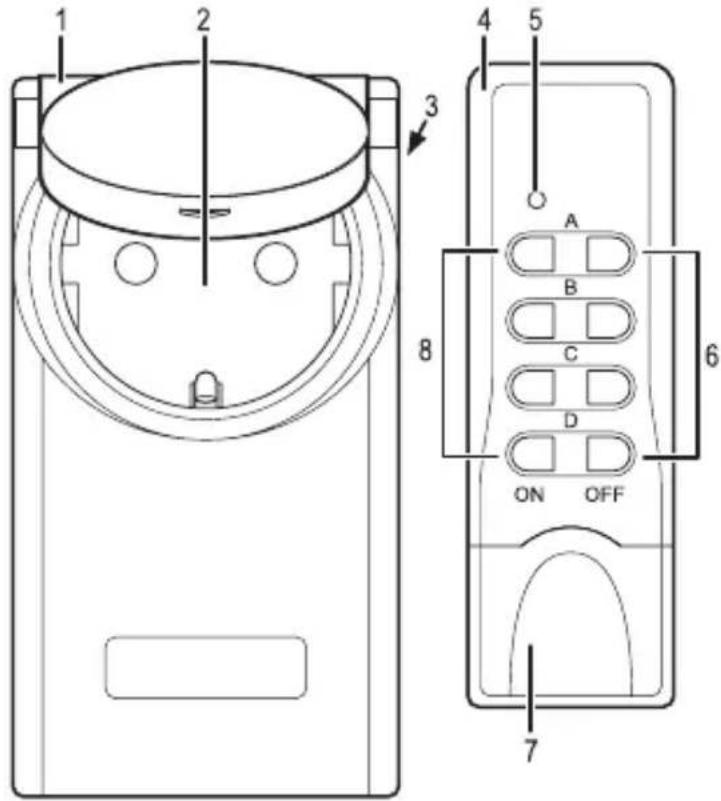
Device overview
1 Switch outlet 4 Remote control
2 Shockproof outlet 5 Function lamp IP44 with folding cover 6 Buttons OFF (A, B, C, D) and child safety 7 Battery compartment cover
3 Shockproof outlet 8 Buttons ON (A, B, C, D)
Preparing the device
Before you can use the device, you must
- insert the battery,
- synchronize the system code between the remote control and the switch outlets and
- assign an ON/OFF button pair on the remote control to a switch outlet.

RCS 1044 N Comfort
Inserting the battery

Caution!
Make sure the battery is aligned with the correct pole.
Incorrect insertion of the battery may result in property damages.
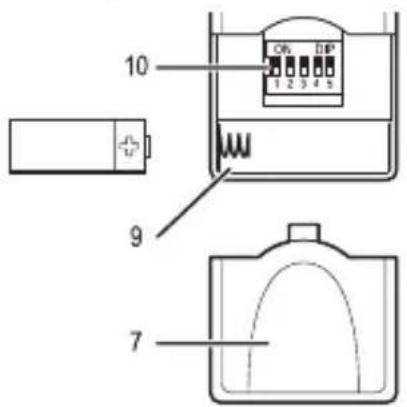
- Open the cover (7) on the battery compartment (9).
- Insert the battery as shown in the figure.
- Close the battery compartment (9).
- Press any button on the remote control (4). The function lamp (5) will illuminate when the button is pressed.

If the function lamp (5) does not illuminate when the button is pressed, the device is not receiving any power the battery.
Check to ensure the battery has been installed properly.
Synchronize the system code
Prior to initial use of the devices, the system code must be synchronized so all of the switch outlets react to the wireless signal from the remote control.
In addition, each switch outlet must be assigned a frequency from a button pair on the remote control so each switch outlet can be operated separately.

Adjust the DIP switch with a suitable object, for instance a small screwdriver by sliding the DIP switch up or down.
Setting the system code on the remote control
- Open the cover (7) on the battery compartment (9).
RCS 1044 N Comfort

- Using DIP switches (10) 1 through 5, set a system code.
- Close the battery compartment (9).
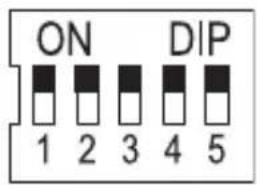
Setting the system code on the switch outlet
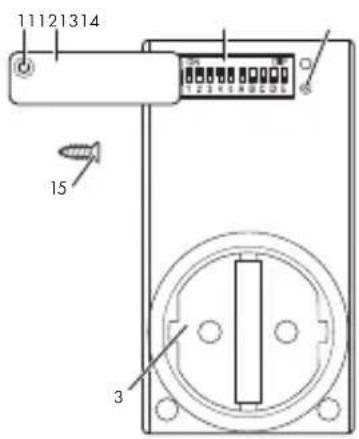
- Unscrew the screw (15) on the cover (12) using the right sized Phillips head screwdriver.
- Slightly lift the cover (12) over the screw opening (11) and swivel it outward.
- Using DIP switches (13) 1 through 5, set the same system code used for the remote control.
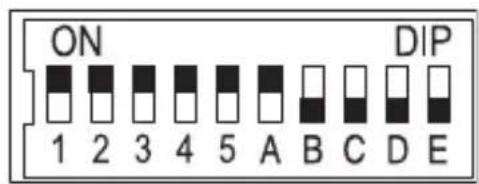
Assigning the switch outlet to an operating button
- Using DIP switches (13) A through E, set an operating button on the remote control.

DIP switch E is not assigned.

RCS 1044 N Comfort
Control key DIP switch
- Swivel the cover (12) inward and close it.
- Insert the screw (15) through the screw opening (11) and into the threading (14) and screw it tight.
Example
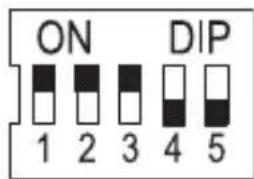
Set the system code to 123 on the remote control.
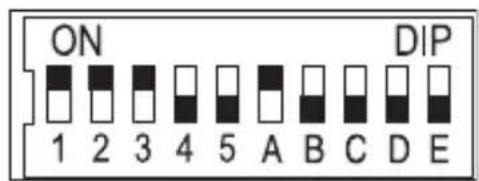
Set the system code to 123 on the switch outlet. Also set an operating button. In the figure, the button pair A is set with DIP switch A.
Connecting the device
The range of the wireless signal of the remote control is max. 25m and depends on the structural conditions.
The range an be interrupted by structural (for instance reinforced concrete), electrical (for instance electrical lines) or electromagnetic (for instance telephones) conditions. If necessary, remove the source of the interference or maintain an appropriate distance from the source of the interference.
RCS 1044 N Comfort

In order to connect the switch outlets
- plug the switch outlet into an outlet.
In order to connect the remote control - insert the battery into the battery compartment (9).
OPERATION
Switching on the switch outlet
- Plug the switch outlet (1) into an outlet.
- Plug the device into the switch outlet (2).
- Press the preset button (8) ON (for instance A) in order to switch the switch outlet (1) on.
The function lamp (5) will illuminate every time the button is pressed.
Switching off the switch outlet
- Press the preset button (6) OFF (for instance A) in order to switch the switch outlet (1) off.
The function lamp (5) will illuminate every time the button is pressed.
CLEANING

Attention! Risk of electrical shock
Prior to cleaning the device, disconnect it from the
power grid.

Attention! Risk of electrical shock
Make sure no liquids get into the device.
Moisture in the outlet can lead to short circuits.

Attention! Risk due to aggressive solvents.
Never use aggressive solvents or scouring agents to
clean the outlet.
Clean the device with a soft, slightly moistened cloth and mild detergent.
Prior to the next use, ensure the device is completely dry.
MAINTENANCE
Regularly check the battery for damage.
TECHNNICAL DATA:
Operating voltage 230V 50Hz
Switch voltage 230V 4.35A
Switch outlet switching capacity max. 1000 W
Protection class IP44
Wireless signal range max. 25m
Operating frequency 433.92 MHz
Ambient temperature 0^ to 35^
Storage temperature - 40^ to 70^
Battery 12 Volt, Type A 23
EC-compliant

FAULT RECTIFICATION
| Fault Cause Repair | ||
| Function lamp (5) does not illuminate when a button is pressed. | Battery incorrectly inserted. | Insert the battery correctly. |
| Battery does not have contact. | Press the battery against the contact terminals. | |
| Battery is empty. | Insert a new battery. | |
| Device is not functioning | Switch outlet not properly connected. | Plug the switch outlet firmly into the outlet. |
| Device not switched on. | Switch on the device. |
RCS 1044 N Comfort

| Fault Cause Repair | ||
| Switch outlet does not switch on. | System code for the switch outlet not properly set. | Set the system code on the remote control. |
| Range between the remote control and the switch outlet is not sufficient. | Reduce the distance between the remote control and switch outlet. | |
| Electrical devices cause interference. | Remove potential sources of interference. |
GUARANTEE
This device has a 2-year guarantee from the purchase date. Please keep the purchase receipt as verification. The guarantee only applies for material or manufacturing defects but not for wear parts or damage due to improper use. The guarantee expires in the event of unauthorized intervention. Your statutory rights are not limited by this guarantee. In the event of a guarantee case please contact the service department via telephone.
This is the only way to ensure your device can be sent in at no charge. The original guarantee period does not extend due to repairs or replaced parts.
Manufacturer
For further information, we recommend reading the Service/FAQs on our homepage www.brennenstuhl.de
SECURITE
De dip-schakelaar E is vrij.
RCS 1044 N Comfort

Cleintb 3a TeM, yTo6bl HnKaKne JxNdkOCTn He npOHnKaJI N np6op.
TEXHINQUECKNEXAPAKTEPNUCTUKN
Pa60uee HanpJxKeHne: 230B nep. ToKa, 50 Tc
Hapjxene BkIoueHn: 230B nep. toka, 4,35 A
KOMmyTnpyUo7a cnoc6Hoctb KOMMy
TaunHOHoi WTeNcIbHOJ po3eTKn: mKc. 1000 Bt
Klacc 3aunTbI: IP44
ДаьhoeТыдйсТВЯ радиocnHaJa: MaKc.25M
Paboua yactota: 433,92 M
Okpykaioza Tempepatya: 0o 35oC
TeMnepaTpya xpaHeHn: oT-40°do70°C
3JIeMeHT nITaHnA: 12B,TnA23
CoOTBeTCTBnE HopMaM EC: