35020072 - Smart Home Niko - Free user manual and instructions
Find the device manual for free 35020072 Niko in PDF.



Frequently Asked Questions - 35020072 Niko
User questions about 35020072 Niko
0 question about this device. Answer the ones you know or ask your own.
Ask a new question about this device
Download the instructions for your Smart Home in PDF format for free! Find your manual 35020072 - Niko and take your electronic device back in hand. On this page are published all the documents necessary for the use of your device. 35020072 by Niko.
USER MANUAL 35020072 Niko
8. WAARSCHUWINGEN VOOR INSTALLATIE
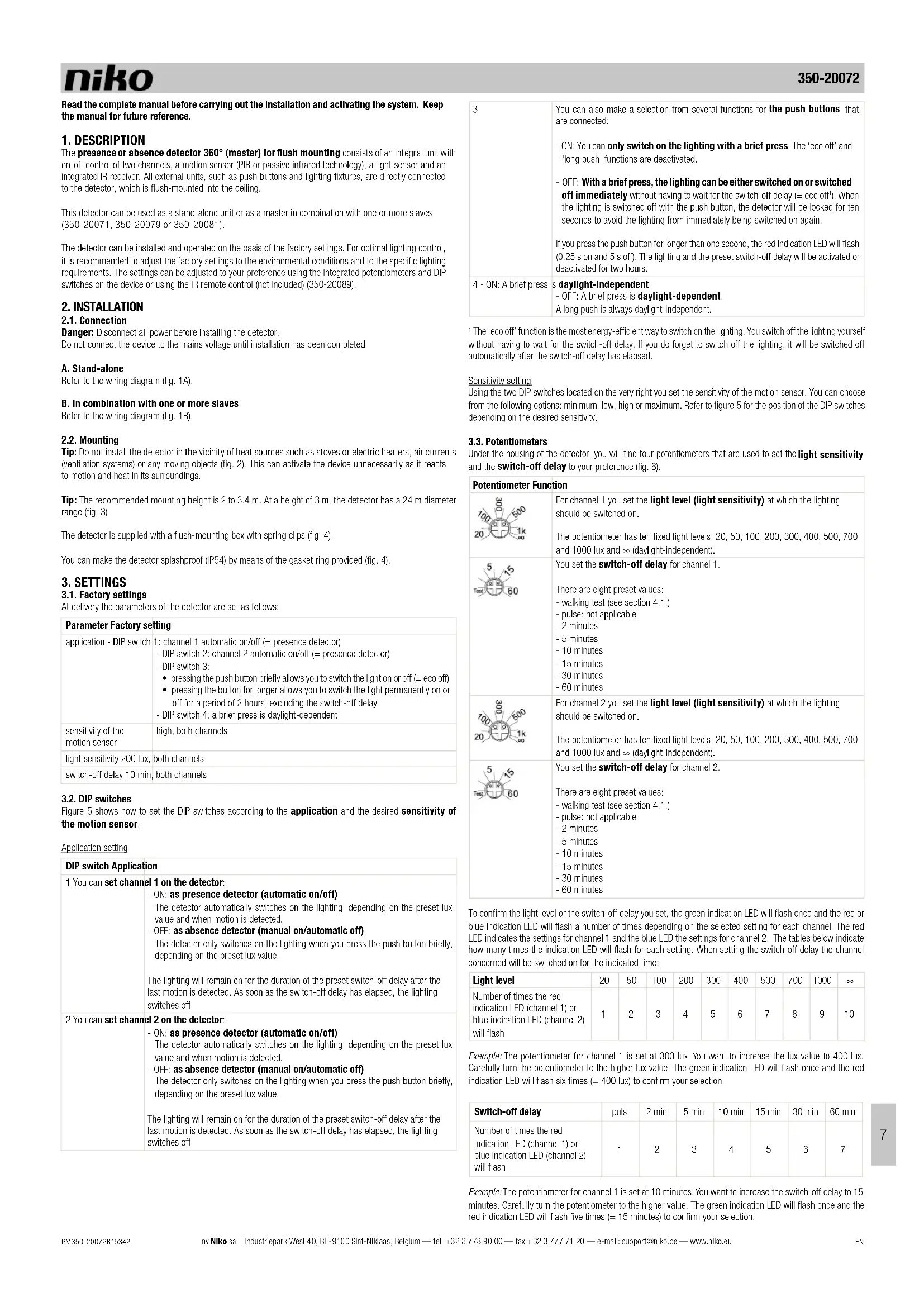
Read the complete manual before carrying out the installation and activating the system. Keep the manual for future reference.
1.DESCRIPTION
The presence or absence detector 360^ (master) for flush mounting consists of an integral unit with on-off control of two channels, a motion sensor (PIR or passive infrared technology), a light sensor and an integrated IR receiver. All external units, such as push buttons and lighting fixtures, are directly connected to the detector, which is flush-mounted into the ceiling.
This detector can be used as a stand-alone unit or as a master in combination with one or more slaves (350-20071, 350-20079 or 350-20081).
The detector can be installed and operated on the basis of the factory settings. For optimal lighting control, it is recommended to adjust the factory settings to the environmental conditions and to the specific lighting requirements. The settings can be adjusted to your preference using the integrated potentiometers and DIP switches on the device or using the IR remote control (not included) (350-20089).
2. INSTALLATION
2.1. Connection
Danger: Disconnect all power before installing the detector.
Do not connect the device to the mains voltage until installation has been completed.
A. Stand-alone
Refer to the wiring diagram (fig. 1A).
B. In combination with one or more slaves
Refer to the wiring diagram (fig. 1B).
2.2. Mounting
Tip: Do not install the detector in the vicinity of heat sources such as stoves or electric heaters, air currents (ventilation systems) or any moving objects (fig. 2). This can activate the device unnecessarily as it reacts to motion and heat in its surroundings.
Tip: The recommended mounting height is 2 to 3.4m . At a height of 3m , the detector has a 24m diameter range (fig. 3)
The detector is supplied with a flush-mounting box with spring clips (fig. 4).
You can make the detector splashproof (IP54) by means of the gasket ring provided (fig. 4).
3. SETTINGS
3.1. Factory settings
At delivery the parameters of the detector are set as follows:
Parameter Factory setting
| application - DIP switch | 1: channel 1 automatic on/off (= presence detector) |
| - DIP switch 2: channel 2 automatic on/off (= presence detector) | |
| - DIP switch 3: | |
| • pressing the push button briefly allows you to switch the light on or off (= eco off) | |
| • pressing the button for longer allows you to switch the light permanently on or off for a period of 2 hours, excluding the switch-off delay | |
| - DIP switch 4: a brief press is daylight-dependent | |
| sensitivity of the motion sensor | high, both channels |
| light sensitivity 200 lux, | both channels |
| switch-off delay 10 min, | both channels |
3.2. DIP switches
Figure 5 shows how to set the DIP switches according to the application and the desired sensitivity of the motion sensor.
Application setting
DIP switch Application
| 1 You can set channel 1 on the detector: - ON: as presence detector (automatic on/off) The detector automatically switches on the lighting, depending on the preset lux value and when motion is detected. - OFF: as absence detector (manual on/automatic off) The detector only switches on the lighting when you press the push button briefly, depending on the preset lux value. The lighting will remain on for the duration of the preset switch-off delay after the last motion is detected. As soon as the switch-off delay has elapsed, the lighting switches off. |
| 2 You can set channel 2 on the detector: - ON: as presence detector (automatic on/off) The detector automatically switches on the lighting, depending on the preset lux value and when motion is detected. - OFF: as absence detector (manual on/automatic off) The detector only switches on the lighting when you press the push button briefly, depending on the preset lux value. The lighting will remain on for the duration of the preset switch-off delay after the last motion is detected. As soon asthe switch-off delay has elapsed, the lighting switches off. |
| 3 | You can also make a selection from several functions for the push buttons that are connected: - ON: You can only switch on the lighting with a brief press. The 'eco off' and 'long push' functions are deactivated. - OFF: With a brief press, the lighting can be either switched on or switched off immediately without having to wait for the switch-off delay (= eco off!). When the lighting is switched off with the push button, the detector will be locked for ten seconds to avoid the lighting from immediately being switched on again. If you press the push button for longer than one second, the red indication LED will flash (0.25 s on and 5 s off). The lighting and the preset switch-off delay will be activated or deactivated for two hours. |
| 4 - ON: A brief press is daylight-independent. - OFF: A brief press is daylight-dependent. A long push is always daylight-independent. | |
The 'eco-off' function is the most energy-efficient way to switch on the lighting. You switch off the lighting yourself without having to wait for the switch-off delay. If you do forget to switch off the lighting, it will be switched off automatically after the switch-off delay has elapsed.
Sensitivity setting
Using the two DIP switches located on the very right you set the sensitivity of the motion sensor. You can choose from the following options: minimum, low, high or maximum. Refer to figure 5 for the position of the DIP switches depending on the desired sensitivity.
3.3. Potentiometers
Under the housing of the detector, you will find four potentiometers that are used to set the light sensitivity and the switch-off delay to your preference (fig. 6).
| Potentiometer Function | |
| 1000 500 1k 60 | For channel 1 you set the light level (light sensitivity) at which the lighting should be switched on. The potentiometer has ten fixed light levels: 20, 50, 100, 200, 300, 400, 500, 700 and 1000 lux and ≈ (daylight-independent). |
| 5 15 60 | You set the switch-off delay for channel 1. There are eight preset values: - walking test (see section 4.1.) - pulse: not applicable - 2 minutes - 5 minutes - 10 minutes - 15 minutes - 30 minutes - 60 minutes |
| 1000 500 1k 60 | For channel 2 you set the light level (light sensitivity) at which the lighting should be switched on. The potentiometer has ten fixed light levels: 20, 50, 100, 200, 300, 400, 500, 700 and 1000 lux and ≈ (daylight-independent). |
| 5 15 60 | You set the switch-off delay for channel2. There are eight preset values: - walking test (see section 4.1.) - pulse: not applicable - 2 minutes - 5 minutes - 10 minutes - 15 minutes - 30 minutes - 60 minutes |
To confirm the light level or the switch-off delay you set, the green indication LED will flash once and the red or blue indication LED will flash a number of times depending on the selected setting for each channel. The red LED indicates the settings for channel 1 and the blue LED the settings for channel 2. The tables below indicate how many times the indication LED will flash for each setting. When setting the switch-off delay the channel concerned will be switched on for the indicated time:
| Light level | 20 | 50 | 100 | 200 | 300 | 400 | 500 | 700 | 1000 | ∞ |
| Number of times the red indication LED (channel 1) or blue indication LED (channel 2) will flash | 1 | 2 | 3 | 4 | 5 | 6 | 7 | 8 | 9 | 10 |
Example: The potentiometer for channel 1 is set at 300 lux. You want to increase the lux value to 400 lux. Carefully turn the potentiometer to the higher lux value. The green indication LED will flash once and the red indication LED will flash six times (= 400lux) to confirm your selection.
| Switch-off delay | puls | 2 min | 5 min | 10 min | 15 min | 30 min | 60 min |
| Number of times the red indication LED (channel 1) or blue indication LED (channel 2) will flash | 1 | 2 | 3 | 4 | 5 | 6 | 7 |
Example: The potentiometer for channel 1 is set at 10 minutes. You want to increase the switch-off delay to 15 minutes. Carefully turn the potentiometer to the higher value. The green indication LED will flash once and the red indication LED will flash five times ( = 15 minutes) to confirm your selection.
4. IR REMOTE CONTROL
In addition to adjusting the settings manually using the potentiometers and DIP switches on the device, you can also use the IR remote control (fig. 7) to select another application, perform a test or enter other parameters.
4.1. Function buttons
| Button Function | |
| You switch the light permanently on or off, irrespective of the detected movement and the light level. 1. Press to switch the lighting on or off. If the function is activated, the red indication LED will flash (1 s on, 10 s off). 2. Press to switch the lighting on or off again. 3. Press times one after the other (as explained above) or activate the detector using the push button to exit this mode. The detector will return to the selected settings. The red indication LED will flash once to confirm. | You switch the light permanently on or off, irrespective of the detected movement and the light level. 1. Press to switch the lighting on or off. If the function is activated, the blue indication LED will flash (1 s on, 10 s off). 2. Press to switch the lighting on or off again. 3. Press times one after the other (as explained above) or activate the detector using the push button to exit this mode. The detector will return to the selected settings. The red indication LED will flash once to confirm. |
| You switch the indication LED on or off. The green indication LED will flash once when this function is deactivated and twice when activated. | You switch the indication LED on or off. The green indication LED will flash once when this function is deactivated and twice when activated. |
| If you press this button, the device will show the current settings for channel 1 via the indication LEDs. First, the green indication LED flashes once, after which the red indication LED indicates the status. The first time the red indication LED flashes, it indicates the lux level you set; the second time, this LED refers to the switch-off delay (see also the tables in section 3.3). Example: Channel 1 is set at 300 lux and 10 minutes. Press to the green indication LED flashes five times (= 300 lux), after which the green indication LED flashes once again and the red indication LED flashes four times (= 10 min). | If you press this button, the device will show the current settings for channel 2 via the indication LEDs. First, the green indication LED flashes once, after which the blue indication LED indicates the status. The first time the blue indication LED flashes, it indicates the lux level you set; the second time, this LED refers to the switch-off delay (see also the tables in section 3.3). Example: Channel 1 is set at 300 lux and 10 minutes. Press to the green indication LED flashes five times (= 300 lux), after which the green indication LED flashes once again and the red indication LED flashes four times (= 10 min). |
| The detection area is tested by activating the integrated motion sensor for the walking test: - Press three times within five seconds to unlock the device. - The green indication LED flashes twice to confirm. The device is now in 'set' mode. - Press to both channels are activated. - The blue indication LED lights up when you activate the test mode and no movement is detected by the sensor. - Lighting is switched on for five seconds and the red indication LED lights up each time the sensor detects activity. - If no activity is detected and the sensor is still in test mode, the blue indication LED lights up. - Complete the walking test by pressing again. - Lock the device by pressing again. - If you forget to close the test mode, the detector will return to the selected settings after five minutes. The light sensor does not work during the walking test. You can also activate the walking test via the potentiometer for the switch-off delay. | The detection area is tested by activating the integrated motion sensor for the walking test: - Press three times within five seconds to unlock the device. - The green indication LED flashes twice to confirm. The device is now in 'set' mode. - Press to both channels are activated. - Lighting is switched on for five seconds and the red indication LED lights up each time the sensor detects activity. - If no activity is detected and the sensor is still in test mode, the blue indication LED lights up. - Complete the walking test by pressing again. - Lock the device by pressing again. - If you forget to close the test mode, the detector will return to the selected settings after five minutes. The light sensor does not work during the walking test. You can also activate walking test via the potentiometer for the switch-off delay. |
4.2. Set' buttons
To change the settings of the detector:
- Press loc three times within five seconds to unlock the device.
The green Indication LED flashes twice to confirm. The device is now in 'set' mode.
-
Change the light level or the switch-off delay using the buttons below.
-
Press (Enter) once to lock the device again.
The green indication LED flashes twice to confirm. The modified setting is activated and the device will return to the selected settings.
Note: If you do not lock the device, it will be locked automatically after two minutes. All changes will then be saved automatically.
| Button Function | |||
| Ch-1 | Press this button to set the lux value and/or the switch-off delay for channel 1. The red indication LED indicates that you can adjust the setting. | ||
| Ch-2 | Press this button to set the lux value and/or the switch-off delay for channel 2. The blue indication LED indicates that you can adjust the setting. | ||
| LUX | KILUX | LUX | With these red buttons, you set the desired light level (lux value). - There are ten fixed lux values: 20, 50, 100, 200, 300, 400, 500, 700 and 1000 lux and No lux (daylight-independent). |
| KILUX | KILUX | KILUX | Use this setting if the desired minimum light level in the room has been achieved. This is the point at which the lighting should be switched on as the daylight level is no longer sufficient. |
| LUX | KILUX | LUX | With these blue buttons, you set the desired switch-off delay. - There are six fixed values: 2, 5, 10, 15, 30 and 60 minutes. |
| KILUX | KILUX | KILUX | Not applicable. |
| Pressure | Press this button: - The selected channel will be switched on permanently for eight hours. This time can, for example, be used to set HVAC installations connected to this channel. - The blue indication LED will flash (0.25 s on and 2 s off). Press this button again to deactivate the function. The blue indication LED will no longer flash. You cannot switch off this function via a push button. | ||
| Pressure | The device returns to the factory settings. | ||
5. OPERATION AND USE
5.1. Activation
The detector should not be powered until all cables are connected. After powering the device, the detector will be ready for use after approximately 120 seconds (warm-up time).
The red indication LED flashes during warm-up time. After the device has warmed up, the green indication LED will flash briefly twice.
5.2. General operation
The integrated light sensor continuously measures the daylight level in the detection area and compares this level to the preset lux value. Thanks to the light sensor, the light switches on automatically only if the detector detects motion within the detection range and if there is insufficient daylight:
The lighting remains switched on as long as motion is detected and the amount of daylight available in the room is insufficient.
- After the last motion is detected, the lighting remains switched on for the duration of the preset switch-off delay (2 to 60 minutes). As soon as the switch-off delay has elapsed, the lighting switches off.
- The lighting also switches off automatically as soon as the daylight level is sufficiently high, even when motion is still detected in the room at that time.
5.3.Detection range
The detection area can be increased by adding an extra detector (slave) (350-20071, 350-20079 or 350-20081). A maximum of ten slaves can be connected to one master (350-20072). The lighting is operated in accordance with the settings on the master. Both the master and the slave have the same detection range (a circle with a diameter of 24m ). When covering a complete area using several detectors, it is recommended to take into account an overlap of approximately 30% (fig. 8).
If you would like to exclude motion detection in a portion of the detection area or if the detection area is too large, you cover the sensor lens using the cover cap supplied. This allows you to reduce the maximum range to 24m . The 360^ detection angle can be reduced in steps of 30^ .
5.4. Examples of applications
Example 1: classroom
| DIP switch 1 DIP switch 2 DIP switch 3 DIP switch 4 | ||||
| ON | X | |||
| OFF x x x | ||||
How the detector works:
- Both channels function as absence detectors. Activate the lighting by pressing the push button briefly (daylight-independent).
The lighting is automatically switched off again after a preset time (switch-off delay), provided that no more motion is detected by the detector in the detection area.
- Lighting can also be switched off manually (= eco off) without having to wait for the switch-off delay.
In addition, you can also press and hold the push button, which is ideal for situations in which the lighting should remain switched on (e.g. exam) or off (e.g. movie) for a longer period of time:
- By pressing and holding the push button while the lighting is switched on, the lighting will be switched off. The detector will be locked for as long as activity is detected and the preset switch-off delay - 2 hours has not yet elapsed. After that, the detector will return to the selected settings and the lighting will be switched on.
- By pressing and holding the push button while the lighting is switched off, the lighting will be switched on (irrespective of the daylight level). The lighting remains switched on for as long as activity is detected and the preset switch-off delay +2 hours has not yet elapsed. After that, the lighting will be switched off, the detector will return to the selected settings and the lighting will be switched on.
The rod indication LED on the detector flashes (0.25 s on and 5 s off) to indicate that you have pressed and held the push button. The 'long push' function can be interrupted at any time by briefly pressing the push button, after which the lighting will be switched on and the detector will return to the selected settings.
Example 2: office with ventilation
| DIP switch 1 DIP switch 2 DIP switch 3 DIP switch 4 | ||||
| ON | X | |||
| OFF x x x | ||||
How the detector works:
-
Channel 1 functions as an absence detector, which means that lighting must be switched on by briefly pressing the push button (daylight-dependent). Channel 2 functions as a presence detector, which means that the ventilation is switched on automatically.
The lighting is automatically switched off again after a preset time (switch-off delay), provided that no more movement is detected by the sensor in the detection area or the light level has exceeded the preset lux value for five minutes.
The lighting can be switched on manually at any time by briefly pressing the push button. You can also switch off the lighting manually (= eco off).
In addition, you can also press and hold the push button, which is ideal for situations in which the lighting should remain switched on (e.g. exam) or off (e.g. movie) for a longer period of time. -
By pressing and holding the push button while the lighting is switched on, the lighting will be switched off. The detector will be locked for as long as activity is detected and the preset switch-off delay 2 hours has not yet elapsed. After that, the detector will return to the selected settings and the lighting will be switched on.
- By pressing and holding the push button while the lighting is switched off, the lighting will be switched on (irrespective of the daylight level). The lighting remains switched on for as long as activity is detected and the preset switch-off delay +2 hours has not yet elapsed. After that, the lighting will be switched off, the detector will return to the selected settings and the lighting will be switched on.
The red indication LED on the detector flashes (0.25 s on and 5 s off) to indicate that you have pressed and held the push button. The 'long push' function can be interrupted at any time by briefly pressing the push button, after which the lighting will be switched on and the detector will return to the selected settings.
Example 3: staircase
| DIP switch 1 DIP switch 2 DIP switch 3 DIP switch 4 | ||||
| ON x x x x | ||||
| OFF | ||||
How the presence detector works:
- The lighting functions as a presence detector and is automatically switched on when the detector detects movement in the detection area and the light level does not exceed the preset lux value.
The lighting is automatically switched off again after a preset time (switch-off delay), provided that no more motion is detected by the detector in the detection area or the light level has been higher than the preset lux value for five minutes. - The lighting can be switched on manually at any time via the push button, irrespective of the daylight level.
6. MAINTENANCE
Dirt may prevent the detector from functioning properly. Therefore, always keep the lens clean and dry. Use a damp cloth and water with some detergent to clean the lens. Never exert pressure to wipe the lens clean. If the lens or other parts of the detector are defective, please contact an authorised installer.
- TECHNICAL DATA
| dimensions | 46.4 x 100 mm (HxW)133.4 x 100 mm (HxW) (incl. flush-mounting box supplied) |
| drill diameter | 89 mm |
| power supply voltage | 230 Vac ± 10 %, 50 Hz |
| power consumption | 0.2 W |
| relay contact* | NO (max. 10 A), potential-free, light- and motion-sensitive |
| maximum load* | incandescent lamps (2300 W) |
| 230 V halogen lamps (2300 W) | |
| all low-voltage halogen lamps (500 VA) | |
| fluorescent lamps (non-compensated) (1200 VA) | |
| economy lamps (CFL) (1200 VA) | |
| maximum switching capacity* | 140 μF |
| maximum inrush current* | 165 A/20 ms |
| light sensitivity* | 20 - 1000 lux |
| hysteresis on light sensitivity | + 10 % |
| switch-off delay* | 2 - 60 min |
| mounting height (fig. 3) | 2 - 3.4 m |
| detection angle (fig. 3) | 360° |
| detection range (fig. 3) | circular, 24 m (from a height of 3 m) |
| cable input flush-mounting box (max. 14 mm) | 4x with strain relief |
| wire input per connection terminal | 3 x 2.5 mm² |
| protection degree | IP54 |
| protection class | class I devices |
| ambient temperature | -5 - +50 °C |
| quality mark | CE marked in compliance with EN 60669-2-1 |
| accessories IR remote control (350-20089) | |
| presence or absence detector 360° (slave) (350-20071 or possibly 350-20079 or 350-20081) |
*indicates the value per channel, given that both channels have the same properties
8. WARNINGS REGARDING INSTALLATION
- The installation should be carried out by a registered installer and in compliance with the statutory regulations.
- This user manual should be presented to the user. It should be included in the electrical installation file, and it should be passed on to any new owners. Additional copies are available on the Niko website or via the Niko support service.
- During installation, the following should be taken into account (non-exhaustive list):
the statutory laws, standards and regulations.
the technology currently available at the time of installation.
this user manual, which only states general regulations and should therefore be read within the scope of each specific installation.
the rules of proper workmanship.
C
This product complies with all of the relevant European guidelines and regulations. If applicable, you can find the EC declaration of conformity regarding this product at www.niko.eu.
9. NIKO SUPPORT
In case of doubt or for the specific exchange procedure in case of a possible defect, contact the Niko support service in Belgium at +32 3 778 90 80 or your wholesaler/instituter. Contact details and more information can be found at www.niko.eu under the "Help and advice" section.
10. GUARANTEE PROVISIONS
- The period of guarantee is four years from the date of delivery. The delivery date is the invoice date of purchase of the product by the consumer. If there is no invoice, the date of production applies.
The consumer is obliged to inform Niko in writing about the non-conformity, within two months after stating the defect.
In case of a non-conformity, the consumer only has the right to a product repair or replacement free of charge, which shall be decided by Niko. - Niko shall not be held liable for a defect or damage resulting from incorrect installation, improper or careless use, incorrect operation, transformation of the product, maintenance that does not adhere to the maintenance instructions or an external cause, such as damage due to moisture or overvoltage.
The compulsory regulations of the national legislation concerning the sale of consumer goods and the protection of the consumer in the countries where Niko sells, directly or via sister companies, subsidiaries, chain stores, distributors, agents or permanent sales representatives, take priority over the above-mentioned rules and regulations.
Do not dump this product with the unsorted waste. Bring it to a recognised waste collection point. Together with producers and importers, you have an important role to play in the advancement of sorting, recycling and reusing discarded electrical and electronic appliances. In order to finance the waste collection and processing, the government levies a recycling contribution in some cases (included in the purchase price of this product).
| DIP preinacl 1 | DIP preinacl 2 | DIP preinacl 3 | DIP preinacl 4 | |
| ON (ZAP) x xxxx | ||||
| OFF (WYP) | ||||
Ako fungue detektor pritamnosti:
- Osvetenie funguje ako detektor pritomnosti a zapnea automatickty, po torn, co detektor v smimanej oblast degetuje pohy b uroven osvetlenia neprekrci nastaveni hodnotu luxov.
- Osvetlenie sa automaticky vypne po uplynuti nastavenho casy (oneskorenie vypnutia), za predpokladu, Ze v smaninej oblasti nebude detegovany zladny dalsy pohby alebo uroven svetla bude yssia ak nostavena hodnota luxov po dobu platich minut.
- Osvetlenie sa moze kedykolvek zapnut manuale stlaenim tlacidla, bez ohtadu na uroven denneho svetla.
6. UDRZBA
Spravnej fungki detektora moze branil nefstota. Preto udrižiavaje sosovky cisté a suhé. Na cisterie sosovky pouvajte vhlk handrücku a vodu s trochu saponatu. Pri cisteni sosovky na fui nikdy nevyvjate tiak. Ak je chybná sosovka alebo iné CSTe detektora protnostmi, obstrata na authonzovaného elektrónsvätlafera.
- TECHNICKÉ UDAJE
| rozmery: | 46,4 x 100 mm (V x S)133,4 x 100 mm (VxS) (vrátane montážnej krabice) |
| priemer vrtáka | 89 mm |
| siefové napătie | 230 Vac ± 10 %, 50 Hz |
| spotreba elektrickoj energia | 0,2 W |
| reléový kontakt:* | NO (max. 10 A), s bezpotenciálovým kontaktom, cillívé na svétlo a pohyb |
| maximána záťaž* | žiarovky (2300 W)230 V halogenovéžiarovky (2300 W)větěký nizkonapátové halogenovéžiarovky (500 VA)žiarovky (nekompenzované) (1200 VA)úspornéžiarivky (CFLI) (1200 VA) |
| maximána kapacitná záťaž* | 140 μF |
| maximány nárazový prud* | 165 A/20 ms |
| svetelná cittivost* | 20 až 1000 lux |
| hysteresá svetelnej cittivosti | + 10 % |
| doba oneskorenia vypnutlva* | 2 až 60 min |
| montážna výška (obr. 3) | 2 až 3,4 m |
| uhol smirmania (obr. 3) | 360° |
| smirmania oblast' (obr. 3) | kruhová, 24 m (2 výška 3 m) |
| káblové vystupy montážnej krabice (max 14 mm) | 4x s odlahčanim fahu kábla |
| vstupné vodične na pripojovacej svorke | 3 x 2,5 mm² |
| stupeř ochrany | IP54 |
| trieda ochrany | zariadenia triedy I |
| preváždková teplota | -5 až +50 °C |
| značka kvalty | označene CE v súlade s EN 60669-2-1 |
| prislušensko | IR dialkové ovládanie (350-20089)IR dialkové ovládanie (350-20089) detektor pritomnosti alebo nepitromnosti 360° (slave) (350-20071 alebo aj 350-20079, resp. 350-20081) |
indikujhehodnotu pre kazdy kanai za predpokladu, ze oka kanaly maju rovnaké vlastnosti.
8. PRAVNE UPOZORNENIA
-
Instalaciu musi vykonat kvalitikovany odobornik v sialade s platymi predispimi. Tento nadvod musi byodovzdan yuzivatefoi. Musi byt sucafou Dokumentacie o elektrickj instalaciia musi byt odovzdan kazdemu novemu yuzivatefoi. Dalie kopi nadvod su dostupne na wet stranje Niko alebo czu zby zakznikom. Najovski nadvod na instalaciio tohty wrobkju je k dispezicijn na internetych stranskach Niko.
-
Pocas instalación je potrebné braf do ivahy nasledovné (nebmedzuje sa iba na nasledovny zoznam):
- aktuáine zákony, normy a výhásky.
- aktuániy stav technologie y case instalación.
-
tento navod, ktory obsahuje iba všeobecné pravidă, je potrebné použit sohladom na Specifická kázde instalación.
-
pravidá správnéj instalacia.
C
Tento vyrobok spha vsetky relevantne Europske predpisy a nariadenia. V priade potreby najdete prisluanse ES vynlasei o zhode na www.niko.eu.
9. NIKO TECHNICKÁ PODPORA
Ak mate otazky, obtratte sa na zastipenie fimy Niko (Slovenská republica: +421 2 63 825 155) alebo vás veikooibchod. Daisie informáce a kontakty najdete na stränke www.niko.eu v sekci "Pomoc a podpora".
10. ZARUCNE PODMIENKY
Zarucna doba je styri roky od datumu dodavky. Za datum dodavky sa povazjue datum fakturacie alebo vydania inno dahoveho dokladu zakaznikovi. Ak takto doklad nie je k dispozici, plati datum wroby.
Zakaznik je pouinny pisomnou formou informovat Niko o poruche do dvoch mesiacov od jej objavenia.
V tripade poruchy vyrobku ma zakaznik narok na bezpltu opravu alebo ymenu (na zaklade posudenia firmy Niko).
- Niko nenesia zodpovednosz na poruchu alebo poskodenie sposobene nespravnou instalaciou, nespravnym alebo nebulym pouzim, prepravu vyrobku, nespravnu udrzhou, alebo vonkajsimi xylvmi ak so zyena vhixot ci pepalte.
Zavazne zakony narodnej legislavy, tskajice sa predaja tovaru a ochrny zakaznika platne v krajnach, kde sa predavaju vrobyniko, priamo alebo cez sesterske c di dcerske spolocnosti, refazce, distributerov, agentov alebo stalych predajnych zastupcov, su nadriadene vyssle uvedenym prvidlam a nariadeniam.