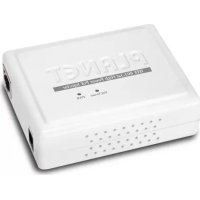
POE161 - Network card / adapter Planet - Free user manual and instructions
Find the device manual for free POE161 Planet in PDF.



| Brand | Planet |
| Model | POE161 |
| Category | PoE injector / network adapter |
| Product type | Ethernet PoE injector compliant with IEEE 802.3at/af |
| Dimensions (L x W x H) | 95 x 70 x 25 mm |
| Weight | 83 g |
| Input power | 100-240 V AC, 50/60 Hz |
| Output power (PoE) | 52 to 56 V DC, up to 30 W |
| Maximum power delivered | 30 watts |
| Supported PoE standard | IEEE 802.3at (PoE+) and IEEE 802.3af (PoE) |
| Transfer speed | 10/100/1000 Mbps (Gigabit Ethernet) |
| Required cable type | Category 5/5e/6 UTP/STP with 8 conductors, up to 100 m |
| Connectors | 1 RJ45 data input port, 1 RJ45 PoE output port (data + power), 1 DC power jack (52-56 V) |
| LED indicators | 1 green LED (power), 1 green LED (PoE active) |
| Package contents | POE161 injector, 54 V DC power adapter, user manual |
| Operating temperature | 0 to 50 °C |
| Storage temperature | -10 to 70 °C |
| Operating humidity | 5 to 95 % (non-condensing) |
| Power consumption | 30 W maximum |
| Maintenance and cleaning | Disconnect the device before cleaning. Use a dry, soft cloth. Do not use abrasive or liquid products. |
| Safety | Use only with equipment compliant with IEEE 802.3at/af. Check voltage compatibility before connection. |
| Spare parts and repairability | The power adapter is included. No internal spare parts available. In case of failure, contact customer service. |
| General information | Mid-range PoE injector, compatible with IP cameras, access points, VoIP phones and other PoE devices. |
Frequently Asked Questions - POE161 Planet
User questions about POE161 Planet
0 question about this device. Answer the ones you know or ask your own.
Ask a new question about this device
Download the instructions for your Network card / adapter in PDF format for free! Find your manual POE161 - Planet and take your electronic device back in hand. On this page are published all the documents necessary for the use of your device. POE161 by Planet.
USER MANUAL POE161 Planet
IEEE 802.3at/af Power over Ethernet Injectors
- Overview 1-1
- Package Contents.. 1-1
- Product Outlook 1-2
- LED Indication 1-2
5.Hardware Installation. 1-3 - Product Specifications 1-6
Française
Thank you for purchasing PLANET IEEE 802.3at/af Power over Ethernet Injectors. These PoE injectors work with any powered device (PD) that also supports the IEEE 802.3af/at standards. The models that come with the standards are:
| Model | PoE Standard | Max. PoE Out | Power In | Pass-thru. Speed |
| POE-151 | IEEE 802.3af 15.4 | watts 48V | DC 10/100Mbps | |
| POE-152 | IEEE 802.3af 15.4 | watts 48V | DC 10/100/100Mbps | |
| POE-161 | IEEE 802.3at/af 30 | watts | 52V to 56V DC | 10/100/1000Mbps |
Unless specified, the term "PoE Injector" mentioned in the following sections means the models listed above.
2. Package Contents
Carefully unpack the box of the PoE Injector, which should contain following items:
| POE-151/POE-152 | POE-161 |
| ● The 802.3af PoE Injector x 1 ● User's Manual x 1 ● 48V DC Power Adapter x | ● The 802.3at High Power over Etherne Injector x 1 ● User's Manual x 1 ● 54V DC Power Adapter x 1 |
3. Product Outlook
POE-151/POE-152
There are two RJ45 twisted-pair jacks, one 48V DC power sock two LED indicators.
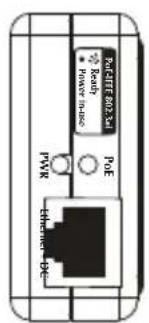

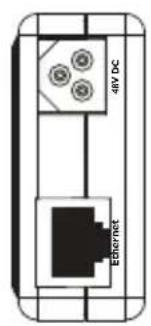
Figure 1: POE-151/POE-152
POE-161
There are two RJ45 twisted-pair jacks, one 52V to 56V DC and two LED indicators.
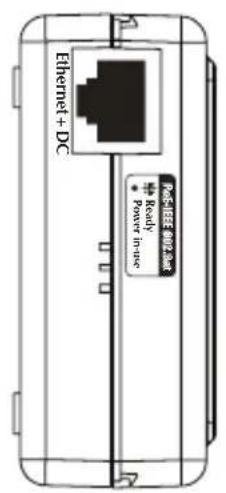
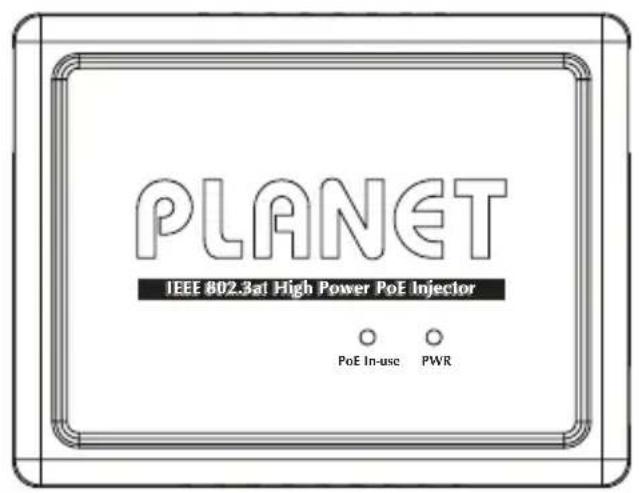
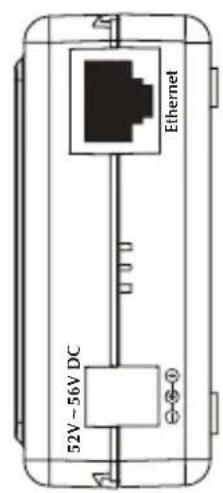
Figure 2: POE-161 Overview
4. LED Indication
| LED Description | |
| Power | Lights to indicate that the PoE Injector has power from AC-DC adapter. |
| PoE-in-use | Lights to indicate the PoE Injector is providing DC in-line power. |
5. Hardware Installation
This section describes the hardware features of PoE Injector. Before connecting any network device to the PoE Injector, refer to this chapter carefully.
5.1 Before Installation
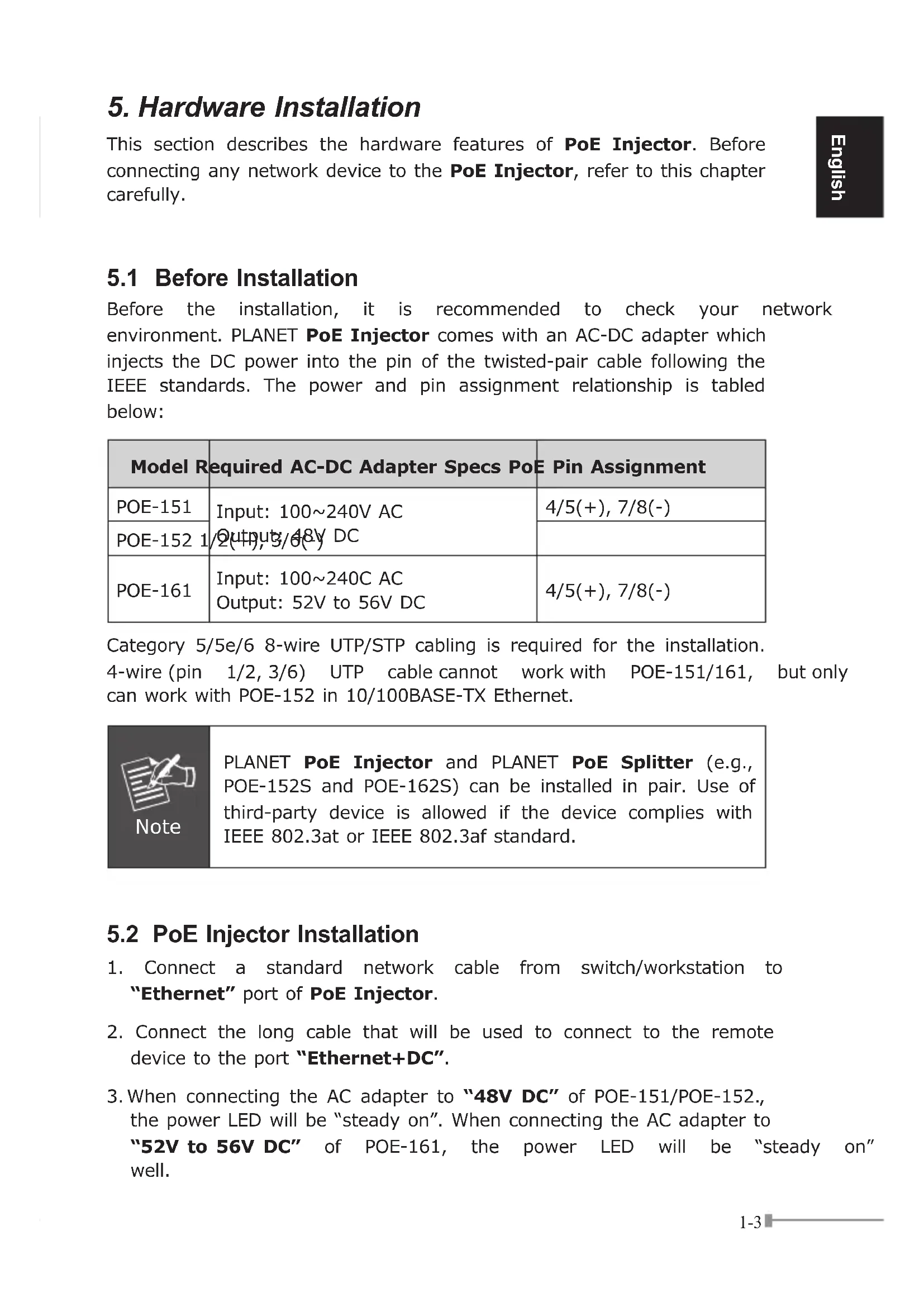
Before the installation, it is recommended to check your network environment. PLANET PoE Injector comes with an AC-DC adapter which injects the DC power into the pin of the twisted-pair cable following the IEEE standards. The power and pin assignment relationship is tabled below:
| Model Required AC-DC Adapter Specs PoE Pin Assignment | ||
| POE-151 | Input: 100~240V AC | 4/5(+), 7/8(-) |
| POE-152 | Outputs/Off DC | |
| POE-161 | Input: 100~240C AC | 4/5(+), 7/8(-) |
| Output: 52V to 56V DC | ||
Category 5/5e/6 8-wire UTP/STP cabling is required for the installation.
4-wire (pin 1/2, 3/6) UTP cable cannot work with POE-151/161, but only can work with POE-152 in 10/100BASE-TX Ethernet.

Note
PLANET PoE Injector and PLANET PoE Splitter (e.g., POE-152S and POE-162S) can be installed in pair. Use of third-party device is allowed if the device complies with IEEE 802.3at or IEEE 802.3af standard.
5.2 PoE Injector Installation
- Connect a standard network cable from switch/workstation to "Ethernet" port of PoE Injector.
- Connect the long cable that will be used to connect to the remote device to the port "Ethernet+DC".
-
When connecting the AC adapter to "48V DC" of POE-151/POE-152., the power LED will be "steady on". When connecting the AC adapter to "52V to 56V DC" of POE-161, the power LED will be "steady on" well.
-
Based on IEEE 802.3af standards, the POE-151/POE-152 can connect with any IEEE 802.3af end-nodes like wireless access VoIP phones and IP camera that support IEEE 802.3af Power over Ethernet interface.

Note
Based on IEEE 802.3at standards, the POE-161 can directly connect with any IEEE 802.3at end-nodes such as PTZ (Pan, Tilt & Zoom) IP camera, speed dome and power consumption wireless LAN access point that support IEEE 802.3at Power over Ethernet port.
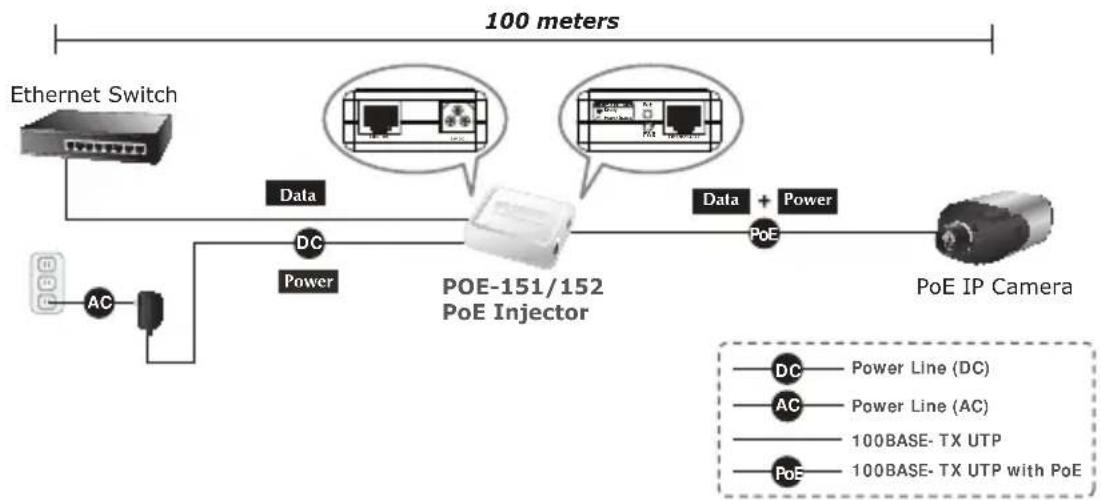
Figure 3: Connection to IEEE 802.3af Device
- Once POE-151/POE-152 detects the existence of an IEEE 802.3af device, the LED indicator will be steady ON to show it is power. The same goes to POE-161 that detects the existence of an IEEE 802.3at/af device.

Note
If the connected device does not fully comply with IEEE 802.3af standards, the LED indicator of POE-151/POE-152 will not be "steady on".

Note
-
Since the POE-161 PoE port supports 52V to 56V DC PoE power output, please check and assure the powered device (PD) acceptable DC power range is from 52V to 56V DC. Otherwise, it will damage the powered device (PD).
-
If the connected device does not fully comply with IEEE 802.3at/af Power over Ethernet, the LED indicator of POE-161 will not be "steady on".
5.3 PoE Injector and PoE Splitter Installation
For non-PoE remote device or Ethernet equipment, the PoE Injector and PoE Splitter can run in pair to provide DC power to those devices. The table below shows the models of PLANET PoE Splitter:
| Model PoE Standards DC | Power Out Pass-thru. Speed |
| POE-152S IEEE 802.3af 5V/12V DC 10/100/1000Mbps | |
| POE-162S IEEE 802.3at 12V/24V DC 10/100/1000Mbps | |
- Follow Steps 1, 2 and 3 of Section 5.2 for the connection.
- Connect the UTP cable in the package from "Ethernet" of the PoE splitter to the RJ45 port of remote device.
- Connect properly DC plug from "DC OUT" of PoE Splitter to a remote device.
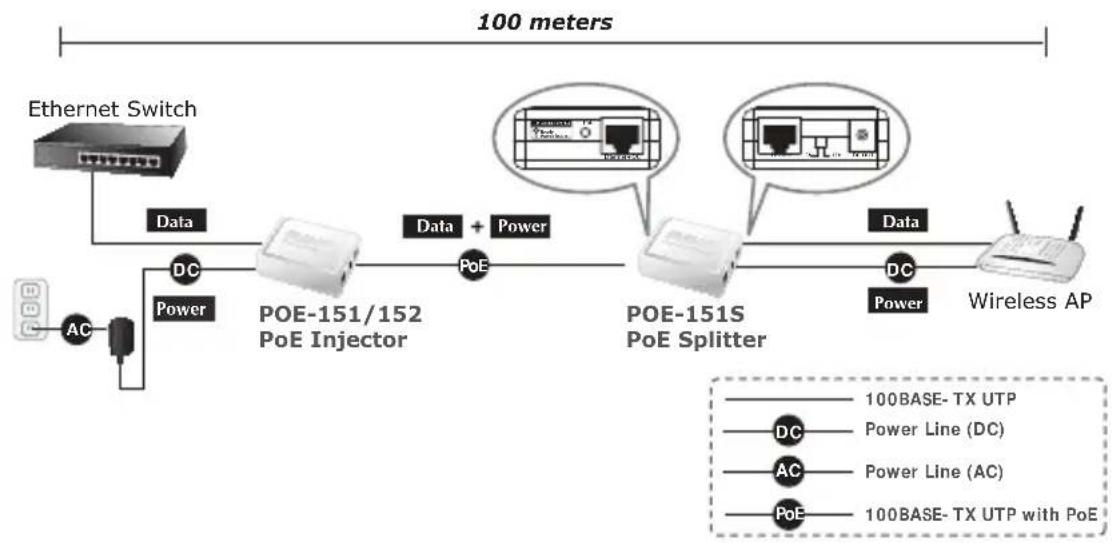

Figure 4: Connection Architecture via PoE Injector and PoE Splitter
Please ensure the PoE Splitter output voltage is correct before applying power to remote device; otherwise, it may damage the remote device.
6. Product Specifications
| Product POE-151 POE-152 POE-161 | ||||
| Hardware Specifications | ||||
| Interface | "Data" Input Port 1 x RJ45 STP | |||
| "PoE (Data+Power)" Output Port | 1 x RJ45 STP | |||
| DC Input power socket | 1 x 48V DC 1 x 52V to 56V DC | |||
| LED Indicator | System: Power x 1 (Yellow) PoE Port: PoE-in-Use x 1 (Green) | System: Power x 1 (Green) PoE Port: PoE-in-Use x 1 (Green) | ||
| Network Cable UTP Cat. 5/5e/6, up | to 100m (328ft) | |||
| Data Rate 10/100Mbps 10/100/10000Mbps 10/100/10000Mbps | ||||
| Dimensions (W x D x H) 73 x 55 x | 24 mm 73 x 55 x | 24 mm 95 x 70 x 25 mm | ||
| Weight 50g 50g 83g | ||||
| Unit Input Voltage 48V DC, 0.4A | 48V DC, 0.4A | 52V to 56V DC, 0.74A Max. | ||
| Power Requirements | 100-240V AC, 50/60Hz | |||
| Power Consumption | 15.4 watts max. | 15.4 watts max. | 30 watts max. | |
| Power over Ethernet | ||||
| PoE Standards | IEEE 802.3af Power over Ethernet/PSE | IEEE 802.3at/af Power over Ethernet/PSE | ||
| PoE Power Output | 48V DC/15.4 watts | 52V to 56V DC/30 watts | ||
| PoE Power Supply Type | Mid-span | End-span | Mid-span | |
| Power Pin Assignment | 4/5(+), 7/8(-) | 1/2(+), 3/6(-) | 4/5(+), 7/8(-) | |
| Standards Conformance | ||||
| IEEE 802.3 10BASE-T Ethernet | ■ | ■ | ■ | |
| IEEE 802.3u 100BASE-TX Fast Ethernet | ■ | ■ | ■ | |
| IEEE 802.3ab 1000BASE-T Gigabit Ethernet | - | ■ | ■ | |
| IEEE 802.3af Power over Ethernet | ■ | ■ | ■ | |
| IEEE 802.3at Power over Ethernet | - | - | ■ | |
| Regulatory Compliance | FCC Class B, CE mark | FCC Class B, CE mark | FCC Class A, CE mark | |
| Environment | ||||
| Operating Temperature | 0 ~ 50 degrees C | |||
| Storage Temperature | -10 ~ 70 degrees C | |||
| Humidity | 5 ~ 90% (non-condensing) | |||
1. Vue d'ensemble
Upon open the box of the PoE Injector and carefully unpack it. The box should contain the following items:
5.1 Before Installation
5.3 IPOE Injector and PoE Splitter Installation
5.3 PoE Injector and PoE Splitter Installation
EC Declaration of Conformity
For the following equipment:
*Type of Product : IEEE 802.3af Power over Ethernet Injector
*Model Number : POE-151, POE-152
- Produced by:
Manufacturer's Name : Planet Technology Corp.
Manufacturer's Address : 10F., No.96, Minquan Rd., Xindian Dist.,
New Taipei City 231, Taiwan (R.O.C.).
is herewith confirmed to comply with the requirements set out in the Council Directive on the Approximation of the Laws of the Member States relating to Electromagnetic Compatibility Directive on (2004/108/EC).
For the evaluation regarding the EMC, the following standards were applied:
EN 55022 (CLASS B: 2006 + A1:2007)
EN61000-3-2 (2006+A2:2009)
EN 61000-3-3 (2008)
EN 55024 (1998+A1:2001+A2:2003)
EN 50130-4 (1995+A1:1998+A2:2003)
IEC 61000-4-2 (2008)
IEC 61000-4-3 (2006 + A1:2008 + A2:2010)
EN 61000-4-2 (1995)
IEC 61000-4-4 (2004 + A1:2010)
EN 61000-4-3 (1996)
IEC 61000-4-5 (2005)
EN 61000-4-4 (1995)
IEC 61000-4-6 (2008)
EN 61000-4-5 (1995)
IEC 61000-4-8 (2009)
EN 61000-4-6 (1996)
IEC 61000-4-11 (2004)
EN 61000-4-11 (1994)
Responsible for marking this declaration if the:
Manufacturer Authorized representative established within the EU
Authorized representative established within the EU (if applicable):
Company Name: Planet Technology Corp.
Company Address: 10F., No.96, Minquan Rd., Xindian Dist., New Taipei City 231, Taiwan (R.O.C.)
Person responsible for making this declaration
Name, Surname Kent Kang
Position / Title : Product Manager
Taiwan
22, Dec., 2011
Place Date Legal Signature

EC Declaration of Conformity
For the following equipment:
*Type of Product : IEEE 802.3at High Power over Ethernet Injector (25 Watts)
*Model Number : POE-161
- Produced by:
Manufacturer's Name : Planet Technology Corp.
Manufacturer's Address : 10F., No.96, Minquan Rd., Xindian Dist.,
New Taipei City 231, Taiwan (R.O.C.).
is herewith confirmed to comply with the requirements set out in the Council Directive on the Approximation of the Laws of the Member States relating to Electromagnetic Compatibility Directive on (2004/108/EC).
For the evaluation regarding the EMC, the following standards were applied:
EN 55022 (CLASS B: 2006 + A1:2007)
EN 61000-3-2 (2006)
EN 61000-3-3 (1995+A1:2001+A2:2005)
EN 55024 (1998+A1:2001+A2:2003)
IEC 61000-4-2 (2008)
IEC 61000-4-3 (2008)
IEC 61000-4-4 (2004)
IEC 61000-4-5 (2005)
IEC 61000-4-6 (2008)
IEC 61000-4-8 (2009)
IEC 61000-4-11 (2004)
EN 50130-4 (1995+A1:1998+A2:2003)
EN 61000-4-2 (1995)
EN 61000-4-3 (1996)
EN 61000-4-4 (1995)
EN 61000-4-5 (1995)
EN 61000-4-6 (1996)
EN 61000-4-11 (1994)
Responsible for marking this declaration if the:
Manufacturer Authorized representative established within the EU
Authorized representative established within the EU (if applicable):
Company Name: Planet Technology Corp.
Company Address: 10F., No.96, Minquan Rd., Xindian Dist., New Taipei City 231, Taiwan (R.O.C.)
Person responsible for making this declaration
Name, Surname Kent Kang
Position / Title : Product Manager
Taiwan
27,Aug.,2010
Place Date Legal Signature