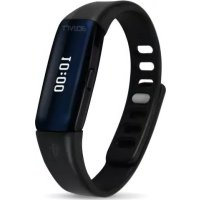
ActiviT Band - Sports Watch TERRAILLON - Free user manual and instructions
Find the device manual for free ActiviT Band TERRAILLON in PDF.



| Product type | Connected activity bracelet |
| Brand | Terraillon |
| Model | ActiviT Band |
| Power supply | Rechargeable battery via built-in USB port |
| Compatibility | iOS and Android smartphones with Bluetooth |
| Main functions | Pedometer, distance traveled, calories burned, sleep tracking, vibrating alarm, Bluetooth synchronization |
| Display | Digital screen with icons |
| Button | 1 multi-function button (walk, modes, synchronization) |
| Modes | Day mode (activity), night mode (sleep) |
| Alarm | Vibrating alarm adjustable via the Terraillon Wellness Coach app |
| Synchronization | Terraillon Wellness Coach app (free) |
| Warranty | 2 years against defects in materials and workmanship |
| Care and cleaning | Not waterproof, remove before bath or shower. Clean with a dry cloth. |
| Safety | Compliant with R&TTE directive 1999/5/EC |
| After-sales service | Terraillon after-sales service at GEFCO, ZA La Porte des Champs, Building A, 95470 SURVILLIERS, France. Tel: 0 826 88 1789 |
| Regulatory information | Declaration of conformity available at www.terraillon.com |
Frequently Asked Questions - ActiviT Band TERRAILLON
User questions about ActiviT Band TERRAILLON
0 question about this device. Answer the ones you know or ask your own.
Ask a new question about this device
Download the instructions for your Sports Watch in PDF format for free! Find your manual ActiviT Band - TERRAILLON and take your electronic device back in hand. On this page are published all the documents necessary for the use of your device. ActiviT Band by TERRAILLON.
USER MANUAL ActiviT Band TERRAILLON
iPhone ^® 4S/5/5C/5S/6/6Plus
iPod® Touch 5 ^th generation

iPad® 3/4/Air
iPad® Mini

Android 4.3
Bluetooth Smart 4.0 / Bluetooth Smart Ready
text_image
QR code image containing encoded data, no visible human-readable text
text_image
Terraillon. WELLNESS COACH
text_image
QR code image containing encoded data, no visible human-readable text
text_image
QR code image containing encoded data, no visible human-readable text


iPhone is registered trademark of Apple Inc.
Android is a trademark of Google Inc.
The Bluetooth ^® word mark and logos are registered trademarks owned by Bluetooth SIG, Inc.
Other trademarks and trade names are those of their respective owners.
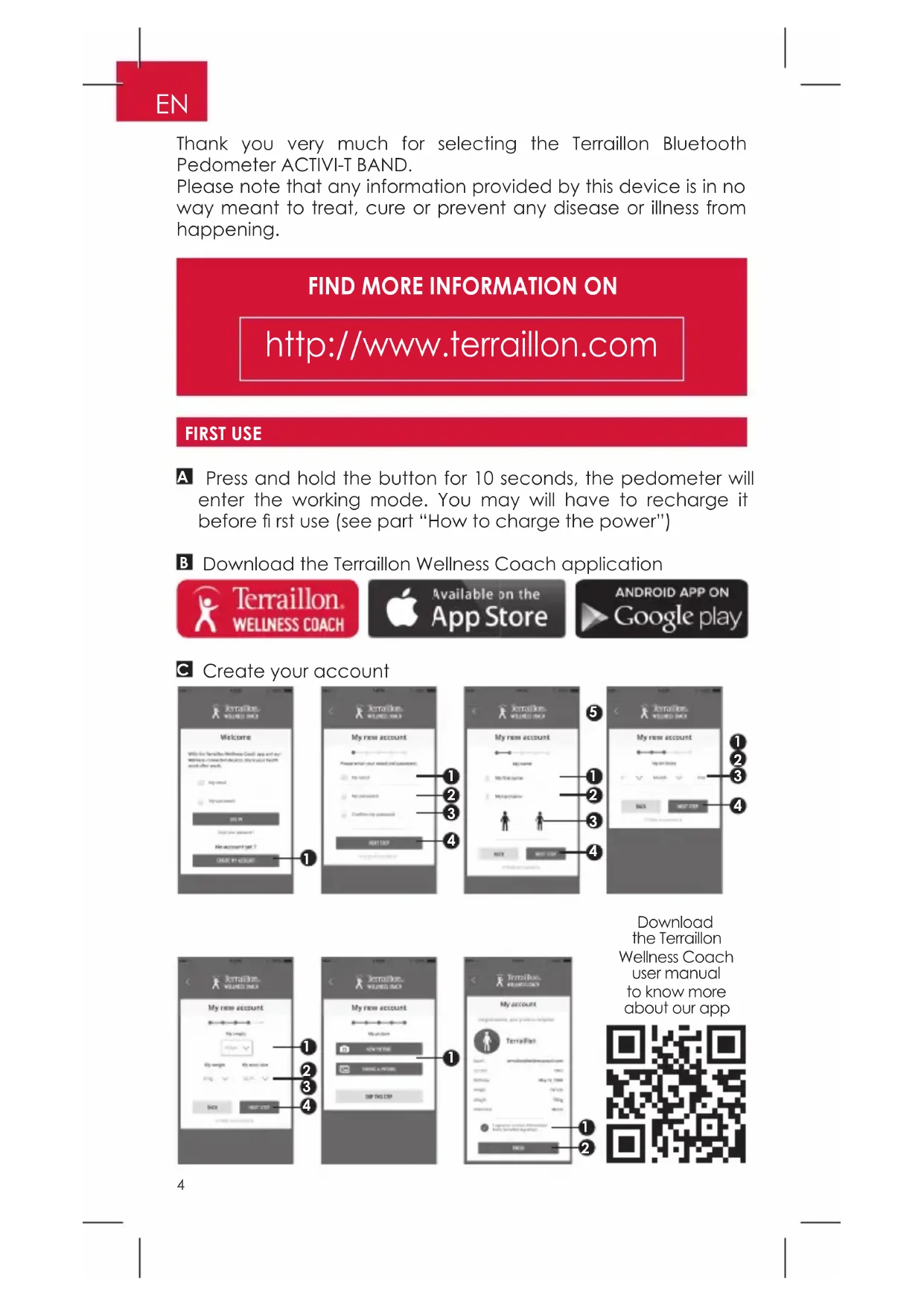
Thank you very much for selecting the Terraillon Bluetooth Pedometer ACTIVI-T BAND.
Please note that any information provided by this device is in no way meant to treat, cure or prevent any disease or illness from happening.
FIND MORE INFORMATION ON
http://www.terraillon.com
FIRST USE
A Press and hold the button for 10 seconds, the pedometer will enter the working mode. You may will have to recharge it before first use (see part "How to charge the power")
B Download the Terraillon Wellness Coach application

Terraillon. WELLNESS COACH

Available on the App Store

ANDROID APP ON Google play
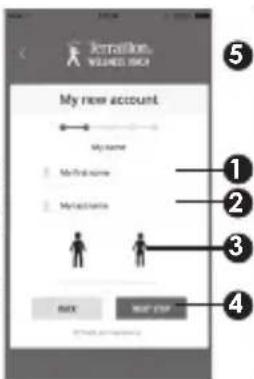
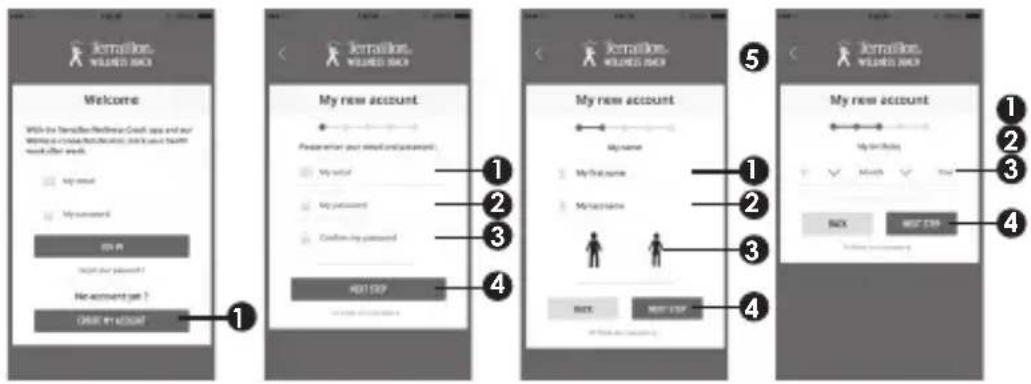
© Create your account
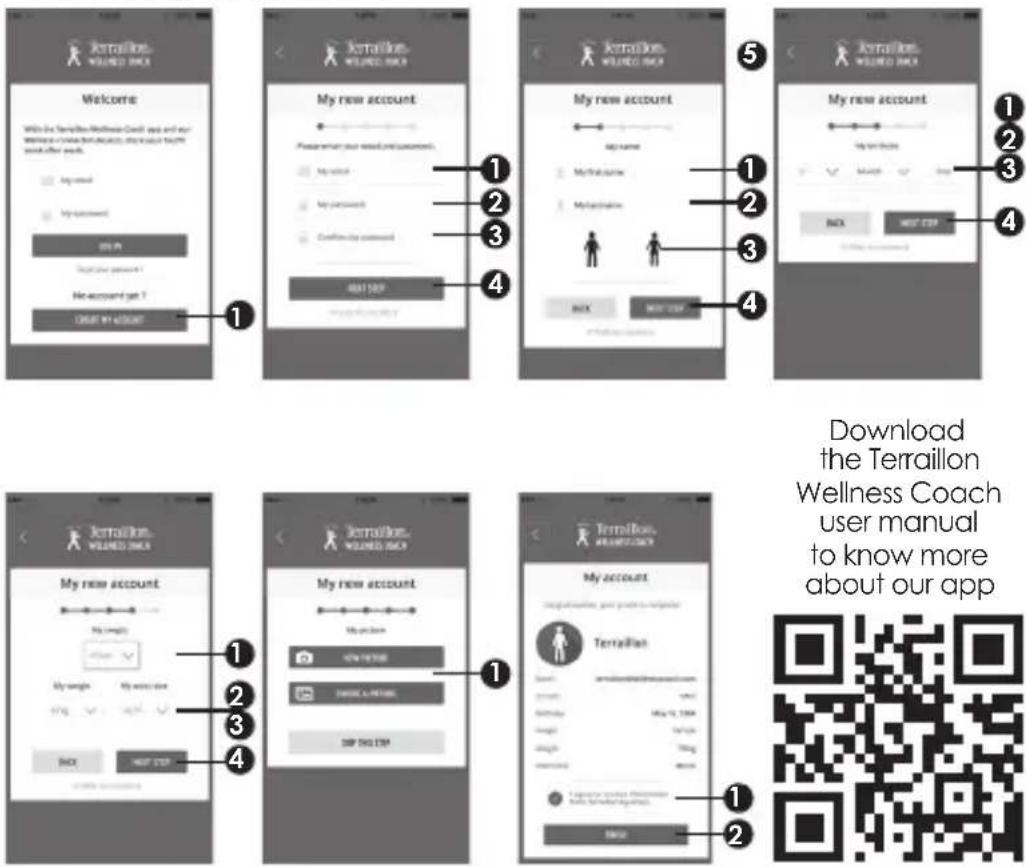
text_image
Jerrallon WILEND BACK Welcome With the Terraillon Wellness Coach app and our welfare is a voice that allows you to access your health work after work. My new account My new account My new account My new account My new account My new account My new account My new account My new account My new account My new account My new account My new account My new account My new account My new account My new account My new account My new account My new account My new account My new account My new account My new account My new account My new account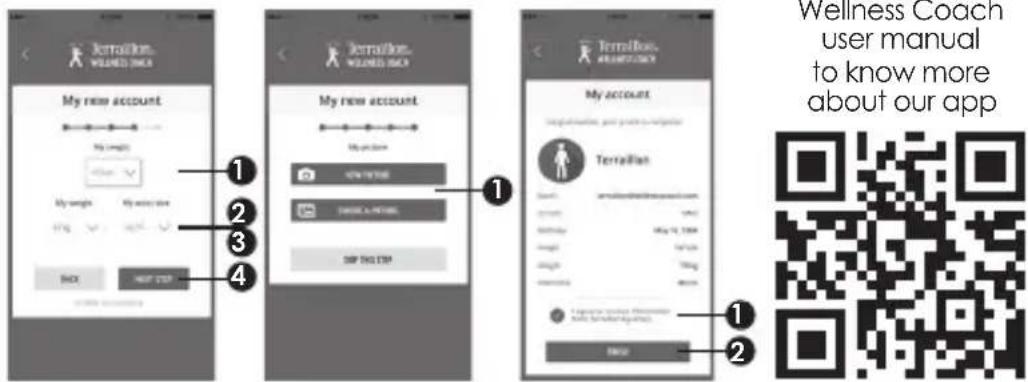
text_image
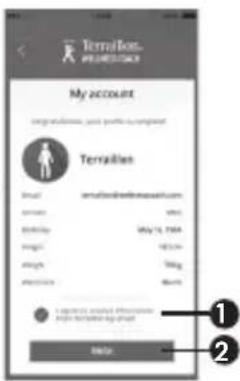
Jerrallion. WILEND ONEA My new account My new account My new account My new account My new account My new account My new account My new account My new account My new account My new account My new account My new account My new account My new account My new account My new account My new account My new account My new account My new account My new account My new account My new account My new account My new accounts to know more about our appD Turn on Bluetooth on your Smartphone (Setting > Bluetooth > ON)
E Press and hold the key on the pedometer 10 sec (2 vibrations) to start pair-up. The symbol □□ is displayed on the screen.
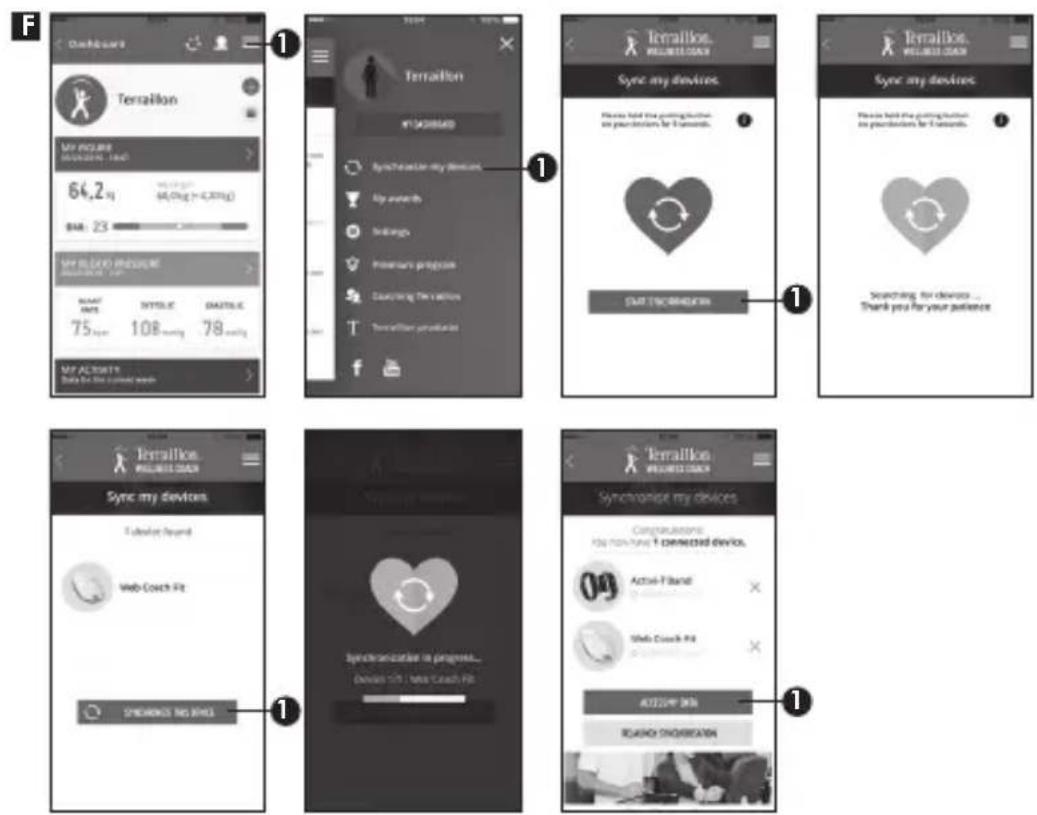
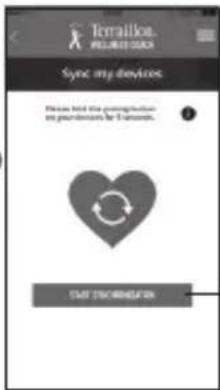
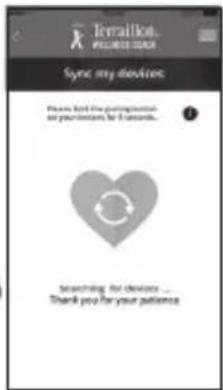
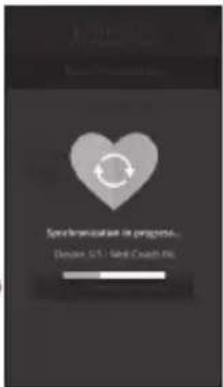
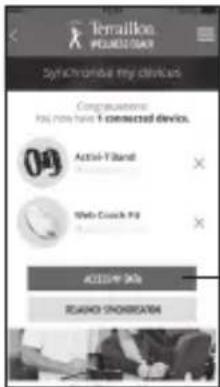
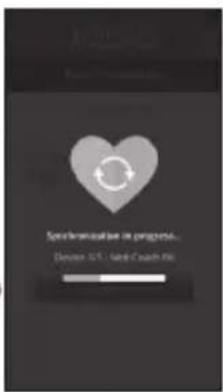
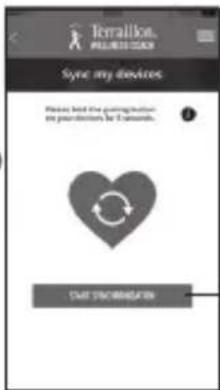
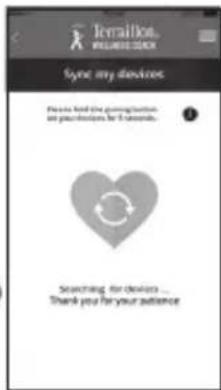
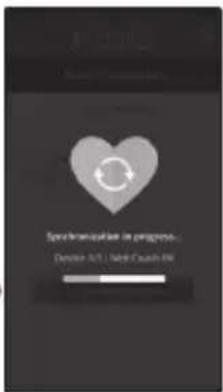
G If succeed, SUCCESS is displayed on the screen. If fail, the symbol FAIL is displayed on the screen. Please note that you need to be quick on step 5 when clicking on SYNCHRONIZE ALL DEVICES.
HOW WEAR THE ACTIVI-T BAND
- Depending the size of your wrist, choose the small or the large wristband.
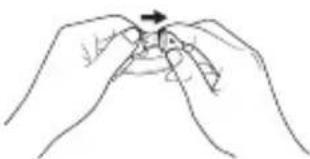
- Insert each part of the wristband on the Activi-T Band core. Make sure that the part of the wristband with the USB logo is plugged on the USB side of the core.
- Put the Activi-T Band on your wrist and adjust the size.
- Whatever your wear the Activi-T Band on your left or right arm, please make sure that the button is oriented to your arm and not to your hand.
natural_image
Line drawing of two hands holding a small object with an arrow indicating rotation (no text or symbols)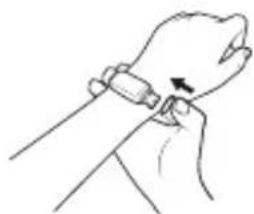
natural_image
Line drawing of a hand holding a wristband with an arrow indicating motion (no text or symbols)HOW TO VIEW THE DATA
When the screen is off, and there is enough power, press the button on the Activi-T Band, the screen will display your activity achieved. Note: all data are reinitialized to 0 at midnight but data are saved in the device during 7 days if they haven't been synchronized with the app.
Number of steps
2715
Distance
2.36
Calories burned
158.4

Time
10:43
When the battery is almost empty, this first symbol will be displayed on the screen each time you activate the device with the button. The second symbol is displayed when the battery is completely empty and the device is not working anymore until you recharge it.
Battery almost empty Battery empty


HOW TO CHARGE THE POWER
When the battery is almost empty or fully empty, please insert the USB part of the core on a USB (computer or USB).
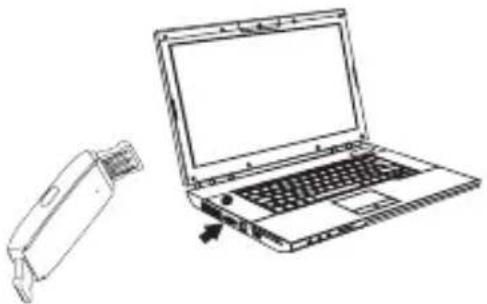
natural_image
Line drawing of a laptop and its external device (no text or symbols)Battery is charging Battery fully recharged


SLEEP MODE
The Activi-T Band lets you know your sleep cycles (duration, light and deep sleep).
To do this, when you go to bed, please switch the device to sleep mode by pressing the button 5 seconds. The device vibrates and the logo D blinks on the screen.
In the morning, press again the button 5 seconds to switch back to Activity mode. The symbol ☐ disappears on the screen.
HOW TO SET AN ALARM CLOCK
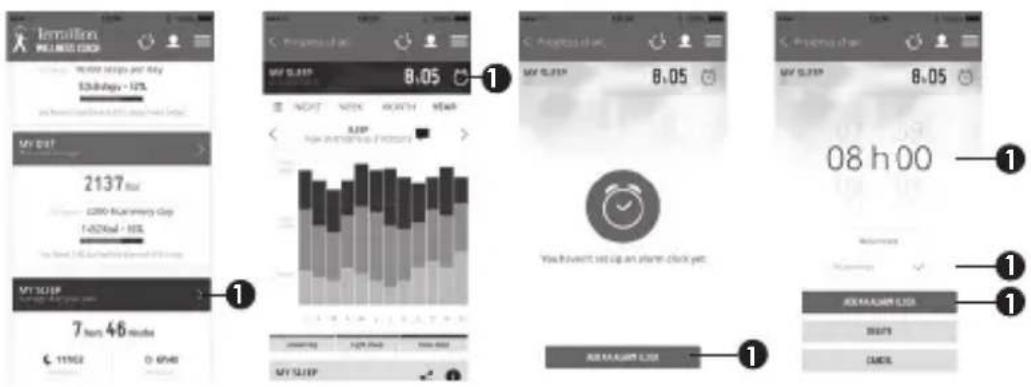
text_image
Remission WALMEE CLOL 8:05 5000+ days - 10% MY SLEEP 2137 kcal 2200+ Inventory Day 1-4/20 kcal - 10% MY SLICEF 7 hrs. 46 hours 11:50 0:00 AM MY SLICEF 8:05 8:05 08 h 00 You have won't set up an alarm clock yet. MY SLICEF LIST OK SLICEF LIST STARTS CANCELOnce you have set an alarm clock, please press the button on the tracker few times to synchronize the settings from the app to the tracker.
WARRANTY & ENVIRONMENT PROTECTION
This product is guaranteed for 2 years against material and manufacturing defects. During this period, such defects will be repaired free of charge (proof of purchase must be presented if the scale is under warranty). This warranty does not cover damage resulting from accidents, improper use or negligence. If you have a complaint please contact the store where you purchased the pedometer first.
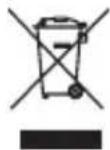
Waste electrical products should not be disposed of with household waste. Please recycle where facilities exist. Check with your local authority or retailer for recycling advice.
Please note that this product is not waterproof. DON'T wear it when swimming. You can wear it when you wash your hand or do your running. It's better to remove it before you take your shower.
text_image
Jornalion WILEED BACK Welcome With the Jornalion Healthcare Care app and our women's health education, this was your health care after work. My email My password 20.9 HKEY DO NOT No account yet ? ORDER #1 ACCOUNT My new account Preservation your email and payment. My email My password Confirm My password 400100? My new account My name My first name My second name NEW NEW APP My new account My first name Month Next BACK NEW APP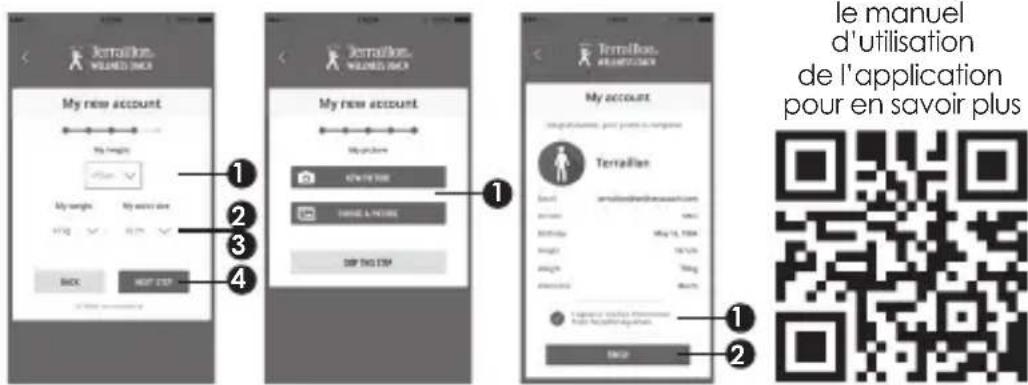
text_image
Jerraflois WILLIANDS D'ICE My new account My height 1 2 3 4 Jerraflois WILLIANDS D'ICE My new account My profile 678-101500 CHANGE & PRICE SHOP THIS ITEM Jerraflois WILLIANDS D'ICE My account June 14, 2024 Search: www.jerraflois.com Date: May 14, 2024 Weight: 100 gm Height: 100 gm Balance: 0.0000000000000000000000000000000000000000000000000000000000000000000000000000000000000 le manuel d'utilisation de l'application pour en savoir plusTélécharger
le manuel
d'utilisation
de l'application
pour en savoir plus
text_image
QR code image containing encoded data, no visible human-readable texttext_image
Terrain 413408888 Synthesis my devices My awards Settights Premium projects Customizing the values To settights profile it1
text_image
Terrainous FOR ALL DOCCUM Sync my devices Please hold the composition my projects for 1 month. CMT魂就是你1
text_image
Terraition. WELCOME YOUR Sync my devices Please find the password that are your users for 5 seconds... Searching for devices ... Thank you for your patients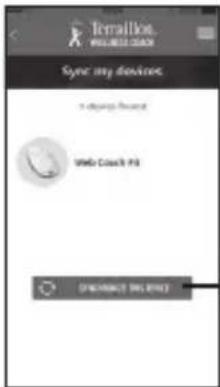
text_image
Terrallion WELCOME DOCK Sync my devices. I change your device Web Coach 43 ON/OFFRANCE BIG FREE1
text_image
Specification in progress... Device: SLS - Solid-Chain filem = 311
text_image
Terrain PROCEED DAY Synchroful my devices Congratulations: You have 1 connected devices. Active-T-band Web Coach Kit ACCESS 94% ROKATO SHOWERS1
natural_image
Line drawing of two hands holding a small object with an arrow indicating rotation (no text or symbols)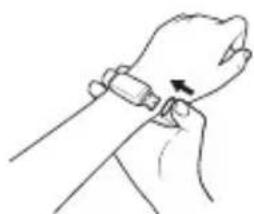
natural_image
Line drawing of a hand holding a wristwatch with an arrow indicating motion (no text or symbols)COMMENT VISUALISER LES DONNÉES
natural_image
Simple red and white battery icon with no text or symbols
natural_image
Simple white rectangular shape on a red background, no text or symbols present.COMMENT RECHARGER L'APPAREIL
natural_image
Line drawing of a laptop and its external device (no text or symbols)natural_image
Simple red and white battery icon with no text or symbolsnatural_image
Red battery icon with five white bars representing four consecutive cycles (no text or symbols)MODE SOMMEIL
MEER INFORMATIE OVER
http://www.terraillon.com
DE STAPPENTELLER KOPPELEN
text_image
Available on the App Store
text_image
Rattalion WILEND BACK Welcome With the Translation Fitness App and our Wiley's Search Engine, this is your Health user, after search. Up search My account OK OK No account up? Create my account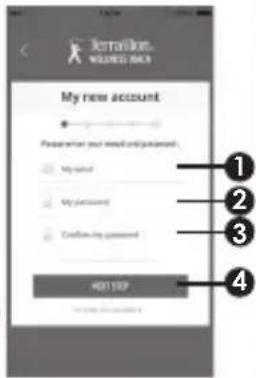
text_image
Irranlalon WALMED RACE My new account Please enter your email and password. My name My password Confirm my password 401109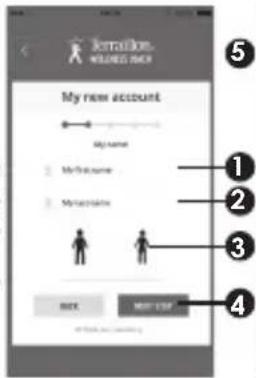
text_image
Isolation. WELLESS BACK My new account My name Methacoma Methacoma BACK NOT LIST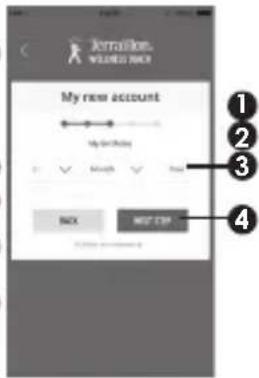
text_image
My new account My new account BACK MOST STOP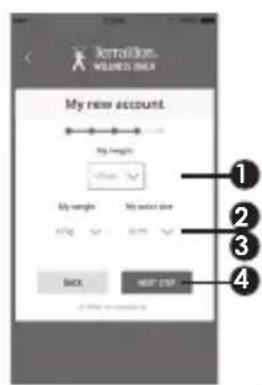
text_image
My new account My height My weight My size My size size Back NEW CISP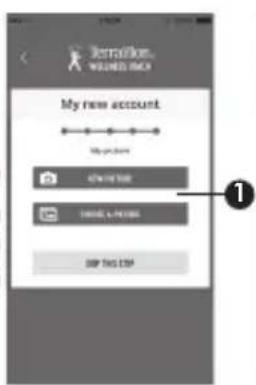
text_image
My new account My new account NEW PRICE NEW PRICE NEW PRICE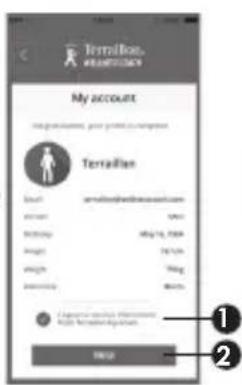
text_image
Terrallion My account my accounts, your personal account Terrallion Count: arr@trallion.com name: date: Date: May 10, 2004 Height: 18.5cm Weight: 10kg Security: 90% 1. Customer service information Please have been sent to the account. OKtext_image
QR code image containing encoded data, no visible human-readable texttext_image
Terrallon #14308888 Synthesis my devices Top awards Tensions Promotion program Creating the version Transitions profile f1
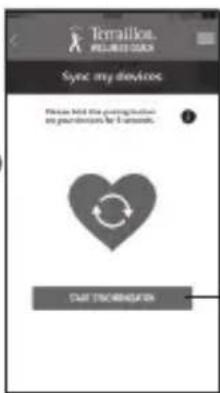
text_image
Terrallok PELENT OUS Sync my devices Please hold the coordination my pre-allocation for 1 account. START CONNECTION1
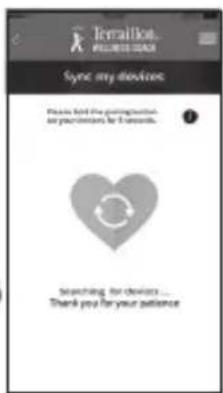
text_image
Tetralikat. PEELED DAY Sync my division Please find the waiting time and prevent me for 5 seconds. Searching for devices ... Thank you for your patience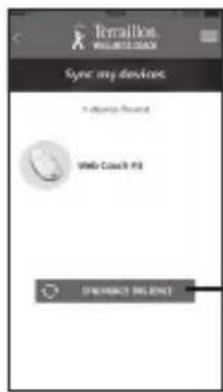
text_image
Termallot. WALMELLOAN Sync my devices I always secure WMo Coach's PS DUALMANE1
text_image
Synchronization in progress... Device: 10.5 - Send a search file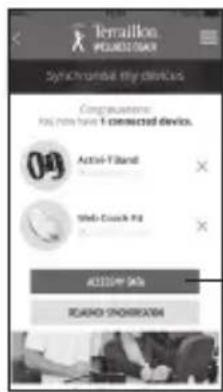
text_image
Terrallon PROCEEDAY Syncrumsell my devices Complications: Has more have 1 connected devices. Active-F-band Mini-Couch Kit ADDITION 94% ROBOO SHOREMISTRY1
natural_image
Line drawing of two hands holding a small object with an arrow indicating rotation (no text or symbols)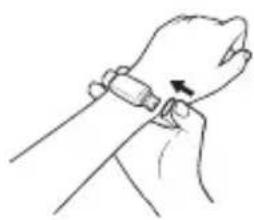
natural_image
Line drawing of a hand holding a wristwatch with an arrow indicating motion (no text or symbols)natural_image
Simple red and white battery icon with no text or symbols
natural_image
Simple red and white rectangular shape with no text or symbolsDE STAPPENTELLER OPLADEN
natural_image
Line drawing of a laptop computer with an open rear panel showing its front screen (no text or symbols)natural_image
Simple red and white battery icon with no text or symbols
natural_image
Red battery icon with five vertical bars, no text or symbols presentHOE OM TE SCHAKELEN NAAR DE SLAAPMODUS
text_image
Jemission WILELESS BACK Welcome Which the Jemission Wireless Back says and the Wednesday is about this day's choice, which your health week offers such! ■ Apply next ■ Welcome next 20 M Impact your password? No accounts yet ? OK! OK!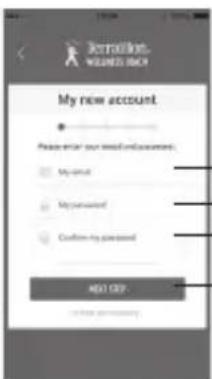
text_image
Jerradist WISHERS RICH My new account Please enter your email account. My account My unsunited Confirm my account Next Step Cancel your account1 2 3 4
text_image
Jennation WESSED RISK My new account My name 1 MyName 2 MyName 3 MyName BACK NOT OFF NOT OK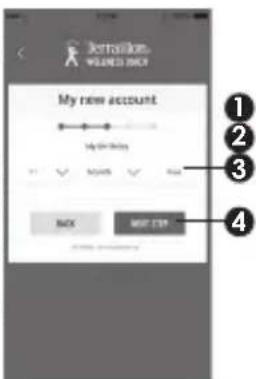
text_image
My new account My New Account BACK MOST STOP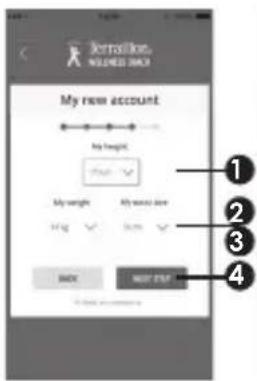
text_image
Tertallion, WOLDED BACK My new account Weight 1 2 3 4 My weight My size Hg 500 BACK NEXT END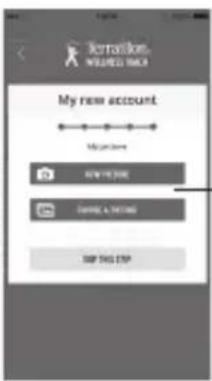
text_image
My new account Magnetone NEW HISTORY GARLIC & HISTORY SHOP THIS STOP1
text_image
Terrallon PREMESTANCE My account Get recommendations, your profile or assignment Terrallon Email: terrallon@trmmware.com email: www.trmmware.com email: 10.14.7004 email: 10.14.7004 email: 10.14.7004 email: 10.14.7004 email: 10.14.7004 email: 10.14.7004 email: 10.14.7004 email: 10.14.7004 Email: 10.14.7004 Email: 10.14.7004 Email: 10.14.7004 Email: 10.14.7004 Email: 10.14.7004 Email: 10.14.7004 Email: 10.14.7004 Email: http://www.trmware.com/ Email: http://www.trmware.com/ Email: http://www.trmware.com/ Email: http://www.trmware.com/ Email: http://www.trmware.com/ Email: http://www.trmware.com/ Email: http://www.trmware.com/ Email: http://www.trmware.com/ Email: http://www.trmware.com/ Email: http://www.trmware.com/ Email: http://www.trmware.com/text_image
QR code image containing encoded data, no visible human-readable texttext_image
Dashboard Terrallon My FLAGF 64.2 q 80 (log > 6,75%) SRR 23 MY BLOOD RESPONSE START WRITE 108 mmHg 78 mmHg MY ACTIVITIES Data for the current work Terrallon ¥1499MAD Sync my devices Please find the gaming device my device has 6 seconds. CME INFORMATION Terrallon. Sync my devices Please find the gaming device my device has 6 seconds. Searching for devices ... Thank you for your patience Terrallon. Sync my devices Sync my devices Sync my devices Sync my devices Sync my devices Sync my devices Sync my devices Sync my devices Sync my devices Sync my devices Sync my devices Sync my devices Sync my devices Sync my devices Sync my devices Sync my devices Sync my devices Sync my devices Sync my devices Sync my devices Sync my devices Sync my devices Sync my devices Sync my devices Sync my devices Sync my devicesnatural_image
Illustration of two hands holding a small object with an arrow indicating rotation (no text or symbols)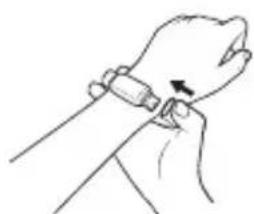
natural_image
Line drawing of a hand holding a wristwatch with an arrow indicating motion (no text or symbols)COME VISUALIZZARE I DATI
natural_image
Simple red and white battery icon with no text or symbols
natural_image
Simple red and white battery icon outline (no text or symbols)COME RICARICARE LA BATTERIA
natural_image
Line drawing of a laptop and its external device (no text or symbols)natural_image
Simple red and white battery icon with no text or symbols
natural_image
Simple red battery icon with five vertical bars (no text or symbols)COME ATTIVARE LA MODALITÀ SLEEP
text_image
Remission WELLING GOUR 1 Month Update and Day $3.50/day - 12% MY DAY 2137 Hour 2000 Summary Day 1-02/04 - 10% MY SLICEF 2 Hours, 46 hours 6:11:00 O SPAS MY SLICEF Programs of the 8:05 Next Week Month Next 8:05 Previous day 8:05 08 h 00 You didn't set up an alarm clock yet. MY SLICEF 08 h 00 OK SLICEF LIST STARTS CANCELAvailable on the App Store

ANDROID APP ON Google play
C Crear una Cuenta
text_image
Jerralike WILENEE RICH Welcome With the Jerralike Newline Credit app and our www.jerralike.com/you@jerralike.com/you@jerralike.com/ My name My name My name My name My name My name My name My name My name My name My name My name My name My name My name My name My name My name My name My name My name My name My name My name My name My name My name My name My name My name My name My name My name My name MY name MY name MY name MY name MY name MY name MY name MY name MY name MY name MY name MY name MY name MY name MY name MY name MY name MY name MY name MY name MY name MY name MY name MY name MY name MY name MY name MY name MY name MY name MY name MY name MY name MY Name: My Name: My Name: My Name: My Name: My Name: My Name: My Name: My Name: My Name: My Name: My Name: My Name: My Name: My Name: My Name: My Name: My Name: My Name: My Name: My Name: My Name: My Name: My Name: My Name: My Name: My Name: My Name: My Name: My Name: My Name: My Name: My Name: My Name: My NAME: My Name: My Name: My Name: My Name: My Name: My Name: My Name: My Name: My Name: My Name: My Name: My Name: My Name: My Name: My Name: My Name: My Name: My Name: My Name: My Name: My Name: My Name: My Name: My Name: My Name: My Name: My Name: My Name: My Name: My Name: My Name: My Name: My Name: OK! OK! Cancel OK! Help you? No answer? OK! OK! Cancel OK! Help you? No answer? OK! OK! Cancel OK! Help you? No answer? OK! OK! Cancel OK! Help you? No answer? OK! OK! Cancel OK! Help you? No answer? OK! OK! Cancel OK! Help you? No answer? OK! OK! Cancel OK! Help you? No answer? OK! OK! Cancel OK! Help you? No answer? OK! OK! Cancel OK! Help your? No answer? OK! OK! Cancel OK! Help you? No answer? OK! OK! Cancel OK! Help you? No answer? OK! OK! Cancel OK! Help you? No answer? OK! OK! Cancel OK! Help you? No answer? OK! OK! Cancel OK! Help you? No answer? OK! OK! Cancel OK! Help you? No answer? OK! OK! Cancel OK! Help you? No answer? OK! OK! Change OK!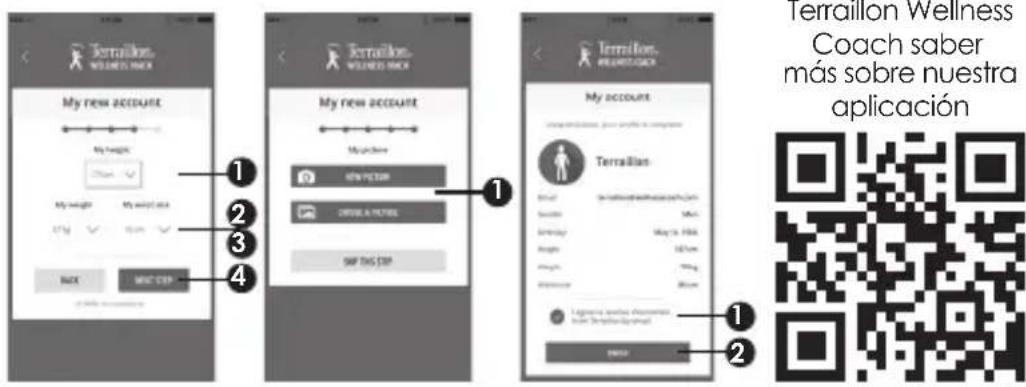
text_image
Terrallón Wellness Coach saber más sobre nuestra aplicación 1 2 3 4 My new account My height My weight My size 2.5x STG NEW CTR My new account My name SPY PETER ORRILA PICTIL SAP THIS CTR Terrallón Wellness Terraillón Wellness Terraillón Wellness Terraillón Wellness Terraillón Wellness Terraillón Wellness Terraillón Wellness Terraillón Wellness Terraillón Wellness Terraillón Wellness Terraillón Wellness Terraillón WellnessTelecargar las
instrucciones Terraillon Wellness
text_image
QR code image containing encoded data, no visible human-readable textnatural_image
Illustration of two hands performing a finger manipulation or massage motion (no text or symbols)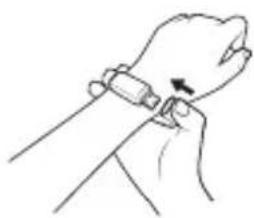
natural_image
Line drawing of a hand holding a wristwatch with an arrow indicating motion (no text or symbols)natural_image
Simple red and white battery icon with no text or symbols
natural_image
Simple red and white rectangular shape with no text or symbolsCÓMO CARGAR LA BATERÍA
natural_image
Line drawing of a laptop and its external device (no text or symbols)natural_image
Simple red and white rectangular shape with no text or symbols
natural_image
Red background with a white battery icon in the middle (no text or symbols)text_image
Remission WELLING GOUR 1 Month Update and Day $3.50/day - 12% MY DAY 2137 Hour 2000 Summary Day 1-02/04 - 10% MY SLICEF 2 Hours, 46 hours 6:11:00 O SPAS MY SLICEF Programs of the 8:05 Next Week Month Next 8:05 Previous day 8:05 08 h 00 You didn't set up an alarm clock yet. MY SLICEF 08 h 00 OK SLICEF LIST STARTS CANCELWIE SIE GERÄTE KÖPPELN KÖNNEN
Available on the App Store

ANDROID APP ON Google play
text_image
Terrain ¥13408MAD Synchetsome key devices Key awards Setraings Promotion projects Connecting the culture Terrainers projected f1
text_image
Terralka. WELLER ESO Sync my devices Please hold the programming my your device is 1 second. Save Trackering1
text_image
Tetralikat, WELLBEE DOCK Sync my devices Please find the questions about my deviceless for it seconds. Searching for devices ... Thank you for your audience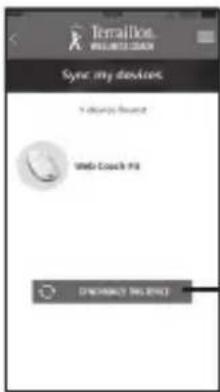
text_image
Terrallion WALMELLO GAIN Sync my devices I always secure Web-Couch PS DINQUENCY NO SPACE1
text_image
Specification in progress... Device ACL | Solid Search Path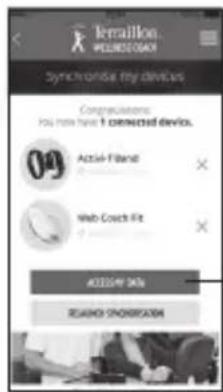
text_image
Teratillon WEDNESDAY Synchronise my devices Accrualization: You have have 1 connected devices. 09 Acta-Filter Web Coach Fit ACCESSIVE OK RESEARCH SHOWERS1
natural_image
Line drawing of two hands holding a small object with an arrow indicating direction (no text or symbols)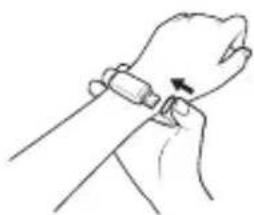
natural_image
Line drawing of a hand holding a wristband with a finger, no text or symbols presentWIE SIE DIE DATEN ANSEHEN KÖNNEN
natural_image
Line drawing of a laptop and a handheld device (no text or symbols)
text_image
Irralston WALMELD LEEP 10:00 hrs per day 12.5hrs - 12% MY SLIP 2137 hrs 1-60 hrs - 10% MY SLIP 7 hrs 46 mms 11/02 0 PM MY SLIP 8:05 8:05 08 h 00 You have only set up an alarm clock per! MY SLIP 8:05 08 h 00 Access Status List BUTS CANCELWIE SIE GERÄTE KÖPPELN KÖNNEN
text_image
Welcome With the following Wealthiest Credit app and your Wealthiest credit card, you have your full credit card after your. My account My account OK OK Cancel your account? No account yet ? Create MY ACCOUNT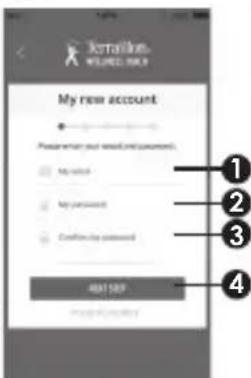
text_image
My new account Please wait your email and password. My password My password Confirm my password 401109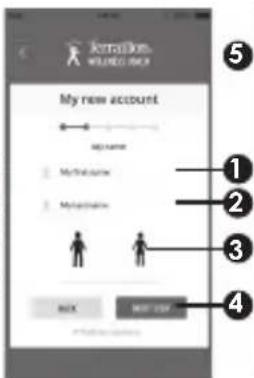
text_image
My new account My name Methalocaine Methalocaine BACK NEXT STOP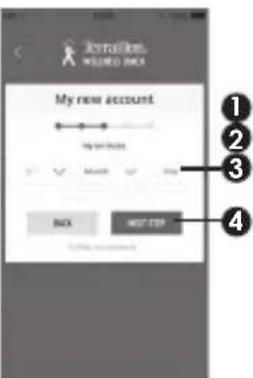
text_image
My new account Back MOST STOP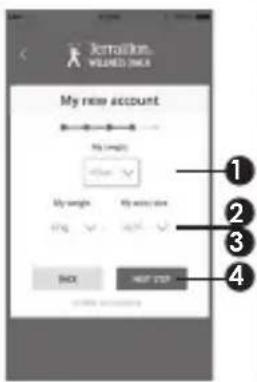
text_image
Jortalkin WILENEE ONCE My new account My new My new My new My new BACK NEXT STOP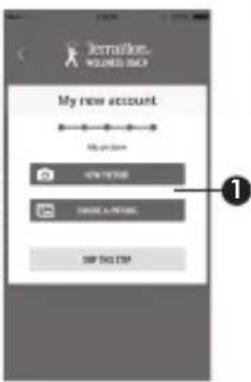
text_image
Installation-WIERNES BACK My new account My new account NEW PRICE CHANGE-A-PRICE SIP THIS STOP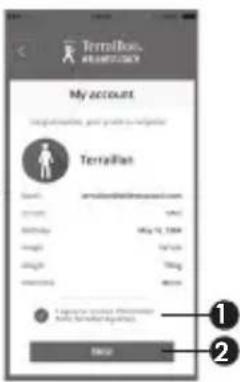
text_image
Terrifios. TerraRis My account TerraRis Start: www.terraRis.com Entry: 100% Birthday: May 12, 2004 Height: 50 cm Weight: 70 kg Duration: 30 min 1. TerraRis accounts for the following: 2. Note: The user is to access a login or access to the TerraRis account.text_image
QR code image containing encoded data, no visible human-readable textnatural_image
Simple red and white rectangular shape with no text or symbols
natural_image
Simple red and white battery icon outline (no text or symbols)natural_image
Line drawing of a laptop and a handheld device (no text or symbols)natural_image
Simple red and white rectangular shape with a small square cutout in the center (no text or symbols)natural_image
Red battery icon with five white bars (no text or symbols)COMO MUDAR O MODO DE SUSPENSÃO
text_image
Irrigation WHILE MEET CHILL 2137 kcal 2200 ft (minutes) Day 1-0.05 kcal - 10% MY LEEP 7 hrs 48 minutes 11:56E 0 PWR MY LEEP 8.05 8.05 08 h 00 You have spent up an plan clock yet. MY LEEP MY LEEP MY LEEP LIST STARTS CANCELTerraillon SAS France & Headquarters
1, rue Ernest Gouin
78290 Croissy-sur-Seine - France
Quarry Bay - Hong Kong
Tel: + 852 (0)2960 7200
customerservice@terraillon-asia.com