DXSC71 - Soundcard Dynex - Free user manual and instructions
Find the device manual for free DXSC71 Dynex in PDF.



| Product Type | Internal sound card |
| Brand | Dynex |
| Model | DX-SC71 |
| Dimensions (approx.) | 12 x 6 x 2 cm |
| Weight (approx.) | 100 g |
| Power | Via PCI bus |
| Internal connectors | CD In (Sony and Panasonic), Aux In, front panel connectors (SPDIF, 8-channel, Mic, slave card) |
| External connectors | Mic In, Line In, Front Out, Side Surround Out, Central/Subwoofer, Back Surround Out (3.5 mm jacks), digital optical output and input |
| Audio channels | 7.1 (8 channels) |
| Main functions | Analog and digital output, headphone mode, S/PDIF (44.1/48/96 kHz), Xear 3D, mixing console, sound effects (environment, equalizer), karaoke/Magic Voice |
| Maintenance and cleaning | Disconnect the device before cleaning. Use a dry cloth to remove dust. Do not use solvents. |
| Safety | Discharge static electricity before handling. Disconnect the power cord before opening the case. Do not touch the components on the card. |
| Compatible operating systems | Windows 98SE, Windows Me, Windows 2000, Windows XP |
| Provided driver software | CD-ROM with C-Media PCI Audio drivers |
| Warranty | Refer to the manual for warranty conditions |
Frequently Asked Questions - DXSC71 Dynex
User questions about DXSC71 Dynex
0 question about this device. Answer the ones you know or ask your own.
Ask a new question about this device
Download the instructions for your Soundcard in PDF format for free! Find your manual DXSC71 - Dynex and take your electronic device back in hand. On this page are published all the documents necessary for the use of your device. DXSC71 by Dynex.
USER MANUAL DXSC71 Dynex
Hardware installation 6
Installing the driver software 7
Installation under Windows XP/2000/ME 7
Installation under Windows 98SE 9
Remove the driver under Windows XP、2000、ME、98SE 9
Dynex DX-SC71 Control Panel 9
Main Setting 9
Mixer 10
Sound Effect 12
Karaoke/Magic Voice 12
Information 13
WELCOME
We are pleased that you have chosen this high quality sound card from Dynex. The Dynex 7.1 Sound Card represents our commitment to high-quality, state-of- the-art sound card technology. With this product you have acquired a power packed 3D audio accelerator that also knows how to "aim to please" when it comes to digital I/O's.
We're sure that your new 7.1 Sound Card is just the ticket to bring a whole new dimension of fun to your music, movies, and more, as well as offering comfortable and flexible functionality.
This manual covers the Dynex DX-SC71 7.1 Sound Card and its uses in great detail.
But first, here's a quick overview.
DYNEX DX-SC71 7.1 SOUND CARD OVERVIEW
The following figure shows an example for the port design of a sound card bracket and also illustrates how to connect your audio devices to the sound card.
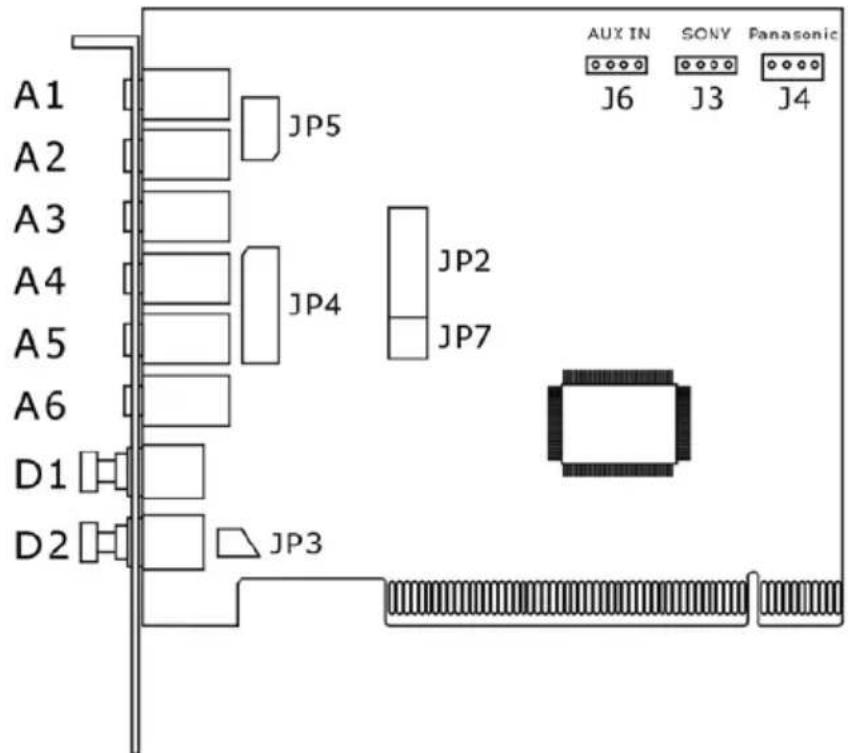
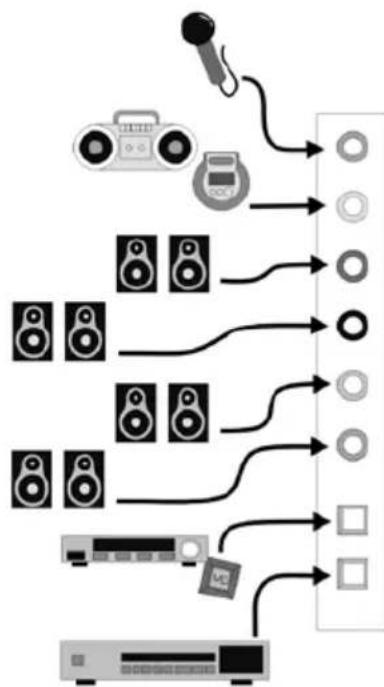
A1: Microphone In(Pink) 3.5mm Jack
A2: Line In(Bright Light) 3.5mm Jack
A3:Front Out (Light Green) 3.5mm Jack
A4: Side Surround OUT(Light Green) 3.5mm Jack
A5: Center/Subwoofer(Light Green) 3.5mm Jack
A6: Back Surround OUT (Light Green) 3.5mm Jack
D1: Optical digital output
D2: Optical digital input
A1 - Microphone In (Pink) 3.5mm Jack
A2 - Line In (Bright Blue) 3.5mm Jack
A3 - Front Out (Light Green) 3.5mm Jack
A4 - Side Surround OUT (Light Green) 3.5mm Jack
A5 - Center/Subwoofer OUT (Light Green) 3.5mm Jack
A6 - Back Surround OUT (Light Green) 3.5mm Jack
D1 - Optical digital output
D2 - Optical digital input
JP2 - Game Port
JP3 - Connect to the front box for SPDIF_IN (OUT)
JP4 - Connect to the front box for 8CH_OUT
JP5 - Connect to the front box for Mic (Line)_In
JP7 - Connect to the front box for slave card
J6 - Aux In
J3 - CD In (Sony)
J4 - Panasonic CD In
HARDWARE INSTALLATION
Installing the Card.
Before opening the case, unplug the AC power cable from the wall socket as well as from PC.
- Switch off your PC and all connected peripheral devices such as your printer and monitor. Leave AC cable connected for the time being, so that your computer is still with ground.
- Touch the metal chassis at the rear of the PC to ground and to discharge static. Now unplug the cord from the AC socket.
- Remove the cover from the case of your PC.
Installing the PCI card.
- Find a free PCI slot, remove the screw securing the metal cover over the slot and remove the cover itself. If it is necessary to break a plate out of the case, do so with great care avoiding injury.
- Carefully remove the PCI card from its package. Pick it up by the edges with one hand while your other hand is resting on the metal of the PC case. This will ensure that your body is completely discharged via your computer without affecting the card. Please do not touch the components of the board.
- Next connect the internal cables (e.g. from the CD drive). For further information on the various connectors, please see page 5.
- Align the audio card so that the strip with the golden connector pin is located exactly over the PCI slot. Insert the card into the slot. You might have to press the card firmly into the slot to make good contact. Take care to ensure that the contacts are precisely in the line in order to avoid damaging the audio card or the motherboard in your PC.
- Secure the card with the screw from the slot plate (these screws are generally also included with PC cases).
Finishing up.
- Reinstall the cover of your PC case.
- Connect your audio peripherals (HIFI amp, active speakers, mixer, mic, etc.) to the 7.1 Sound Card.
- Reconnect the AC power cable as well as all other cables and turn your PC on. Make sure that your speaker or HIFI system is set to low volume.
- Start your computer. The installation of the driver software is the next step.
INSTALLING THE DRIVER SOFTWARE.
The Dynex DX-SC71 currently comes with the drivers for Windows 98SE, Windows Me, Windows 2000 and Windows XP. Please check which operating system you are using before installing the card.
Installation under Windows XP/2000/ME
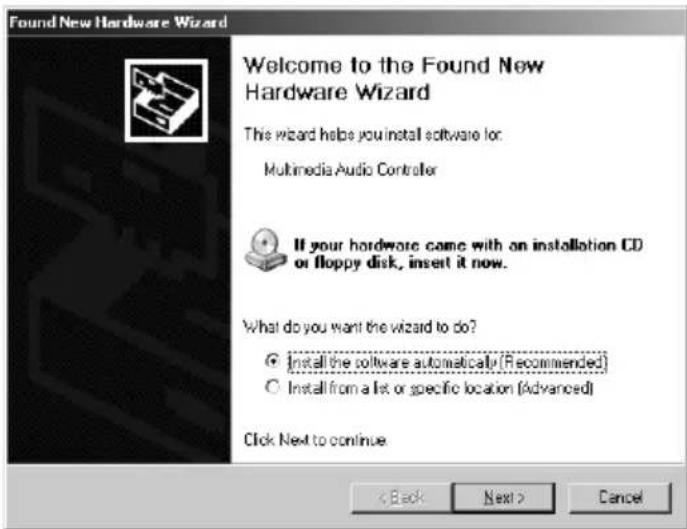
- Once the computer has been restarted, the new hardware has been detected by the Windows hardware wizard, the following window will appear. Please select "Cancel".
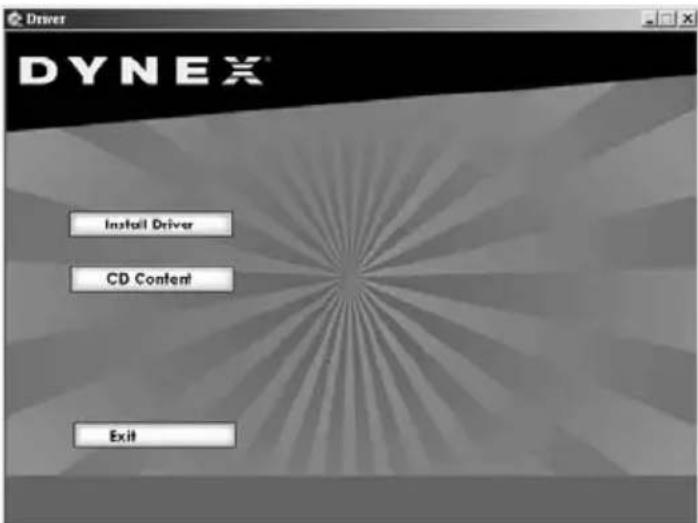
- Please insert the accompanying driver CD-ROM into your drive. Following the instruction hint, select the correct language then click the "Install Driver" and follow the dialogue window to install the driver.
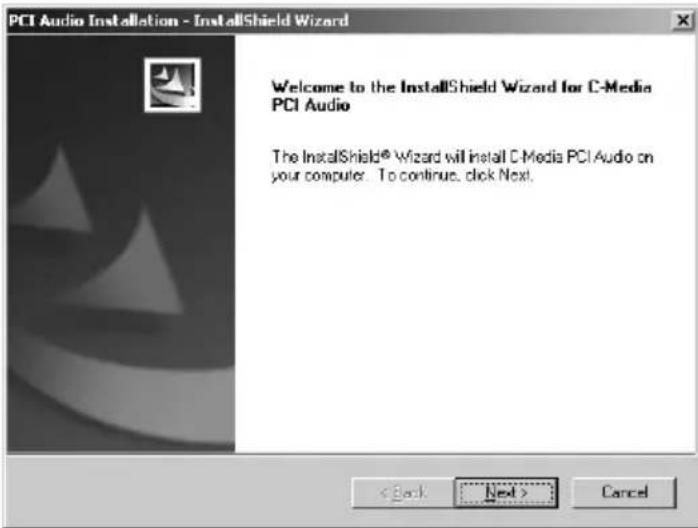
- Click "Next".
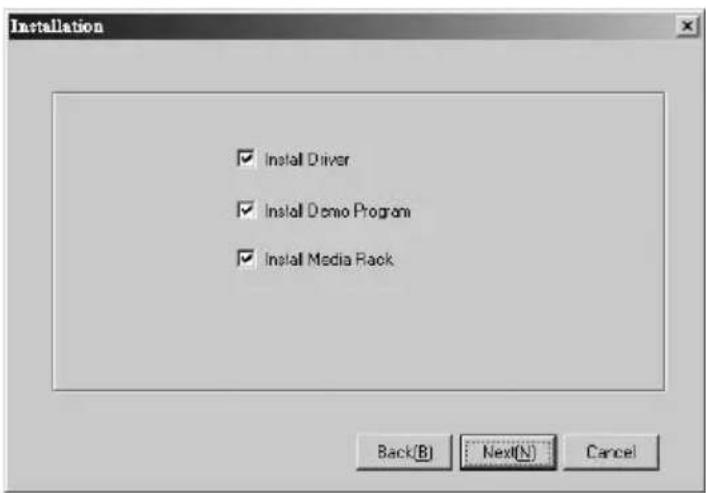
- Select the "Install Driver" and other two items if needed then click "Next".
- Click "Next" to start the driver installation.
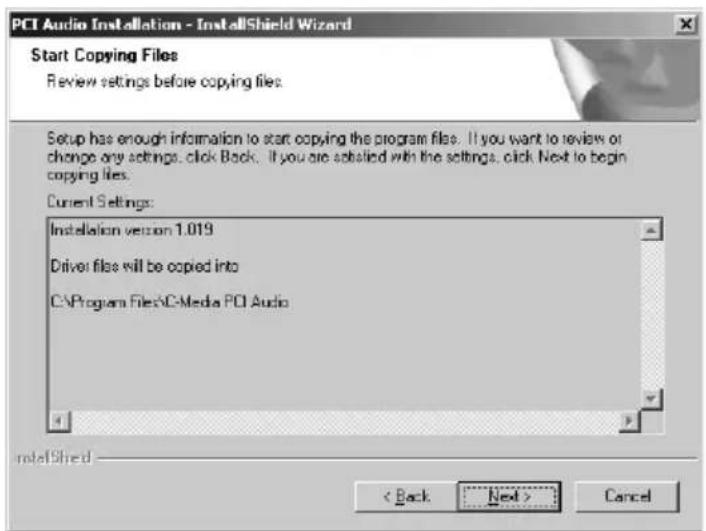
- After installation the system will reboot.
Installation under Windows 98SE
Please refer to the Windows XP installation from step 1 to 6 and installation system will ask you to insert Windows 98SE CD-ROM. Please follow the instructions and the system will reboot after installation.
REMOVING THE DRIVER UNDER WINDOWS XP/2000/ME/98SE
To remove the driver of the DX-SC71, please click Starta Program filesaC-Media PCI AudioaUninstall C-Media PCI Audio and follow the system instruction.
DYNEX DX-SC71 SOUND CARD CONTROL PANEL
- Main Setting
Here you can set the levels of the individual speakers.
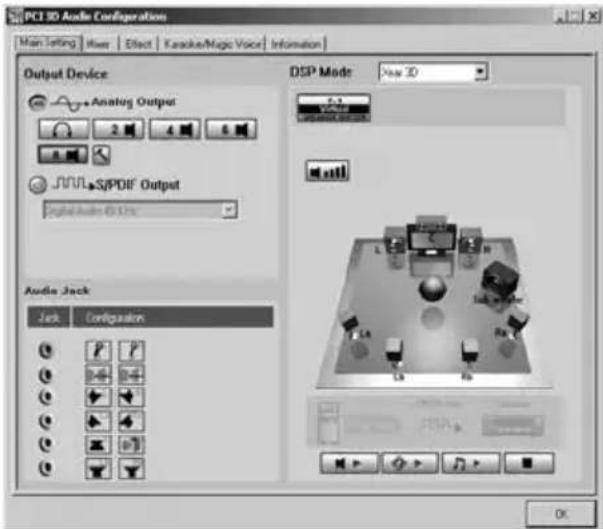
Output Device
Analog Output
Headphone/Headphone Output Mode
2 Mode/2 Channel Output
4 Mode/4 Channel Output
6 Mode/6 Channel Output
8 Mode/8 Channel Output
S/PDIF Output
Digital Source 44.1KHz Transfer Digital Signal in 44.1KHz
Digital Source 48KHz Transfer Digital Signal in 48KHz
Digital Source 96KHz Transfer Digital Signal in 96KHz
S/PDIF Input to Output: Digital Input Signal directly sends to Digital output
DSP MODE:
Xear 3D: Enable Xear 3D 7.1 Virtual Speaker Shifter
None: Disable Xear 3D
- Mixer
Each signal source level can be muted or adjusted individually by clicking on its button and slider bar.
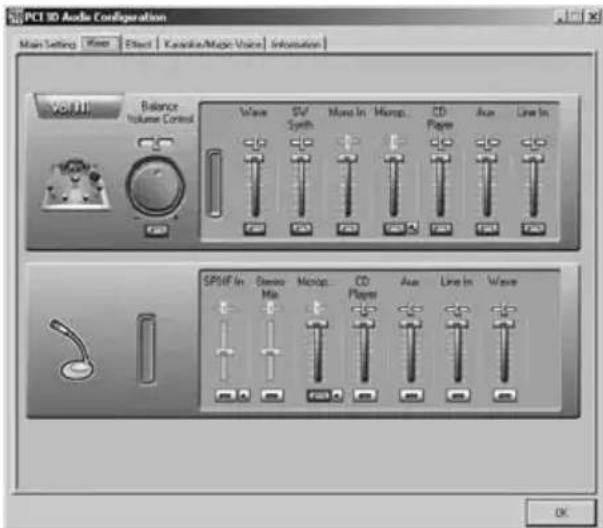
Volume control: Master Volume Control and speaker balance
Wave: Volume control of WAV, MP3, WMA, etc format.
SWsynth: Volume control of MIDI.
CD Player: Volume control of analog out of CD-ROM drive which is connected to the soundcard.
AUX: Volume control of AUX input analog source.
Select S/PDIF-IN Source
Coaxial (S/PDIF-IN #1): The DX-SC71 does not support the coaxial in/out function.
Optical (S/PDIF-IN #2): This can offer the digital source to DAT/MD player or AC3/DTS decoder.
Reverse S/PDIF-IN Format: The format of some S/PDIF signal sources may be inverse and will hear the noise. This can offer an option to reverse the format for normal reception.
Validity Check: It will assure to neglect the non-PCM audio to avoid the noise.
Monitor S/PDIF-IN to Analog Output: When you are recording S/PDIF-In Audio, you can choose to monitor it. However it may stop the usual playback function. *Please remember to keep it unchecked when you don't need to monitor.
Stereo Mixer: It can control and mix all of the audio sources.
Microphone In: Only select recording Microphone as gain control.
Microphone Setting
Mute Microphone: You can click the checkbox to mute the microphone. Default setting is mute.
Microphone Boost: If you think the microphone sound is too quiet, click the checkbox of "Boost" to enable the +20db boost option. It is natural that the background noise will be louder.
CD Player: Select onboard CD-audio as recording source.
AUX: Select onboard audio input (AUX) as recording source.
Line In: Select Line In as recording source.
Wave: Select control of WAV, MP3, WMA, etc. as recording source.
Sound Effect
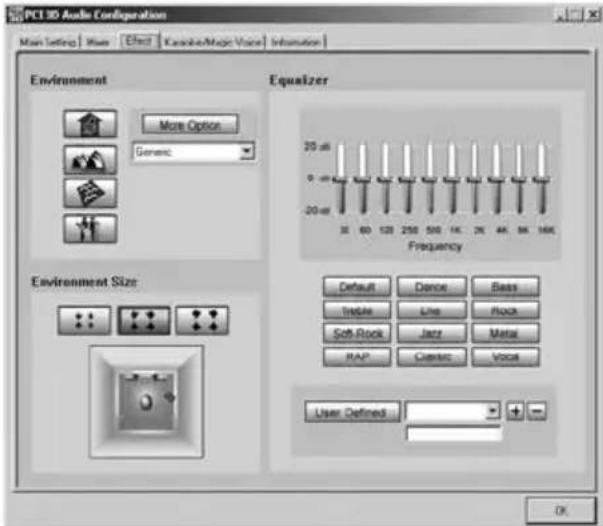
Environment: It can offer environment emulation that is implemented by producing the sound and reverberation.
Equalizer: Select a pre-set mode for equalizer, there are 12 preset modes such as Bass, Treble, Live, Rock, Jazz, etc.
Environment Size: You can change the "Environment Size" to Large or Small (default setting is Medium)
- Karaoke/Magic Voice
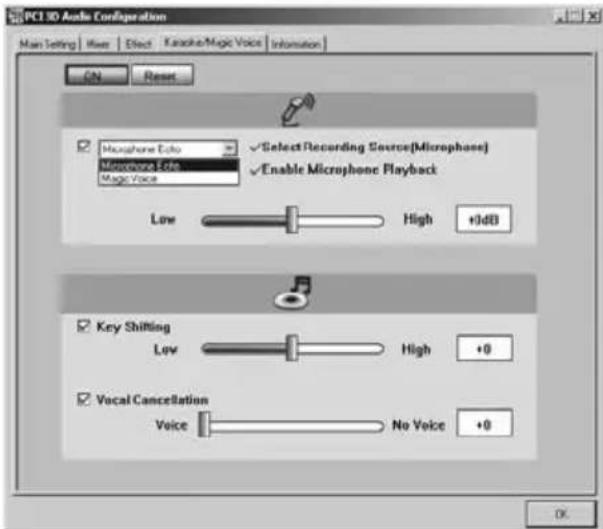
Microphone Echo: Special effect for the microphone Echo effect in singing. Magic voice: Effect to disguise your identification such as cartoon, male, female, etc.
Key shifting: For Karaoke or the music to make it suitable for your voice pitch. The range is -4b to +4b
Vocal cancellation: to cancel the original singer's voice.
Information
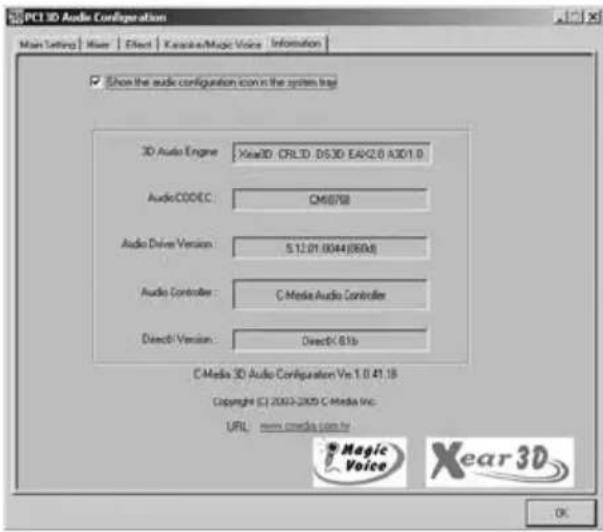
The "Information" window contains a number of details.
TABLE DES MATIÈRES
Bienvenue 15
Configuration principal 21
Microphone In (Entree microphone) : Volume du microphone.