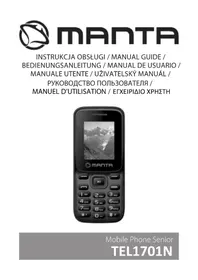
TEL1701N - Smartphone Manta - Free user manual and instructions
Find the device manual for free TEL1701N Manta in PDF.


| Brand | Manta |
| Model | TEL1701N |
| Product type | Smartphone |
| Battery | Removable, lithium-ion |
| Battery charging | First charge minimum 4 hours |
| SIM cards | Dual SIM (slot for two cards) |
| Memory card | MicroSD (dedicated slot) |
| Camera | Built-in, allows photos and videos |
| FM radio | Built-in |
| Bluetooth | Yes (depending on model) |
| Flashlight | Built-in, activatable by long press on key 0 |
| Main functions | Contacts, Messages, Calendar, Alarm, Calculator, Call log, Profiles |
| Screen | Not specified in the manual |
| Weight | Not specified in the manual |
| Dimensions | Not specified in the manual |
| Maintenance and cleaning | Clean with a soft, dry cloth |
| Security | PIN and PUK code, reset with password 1234 |
| Spare parts and repairability | Removable battery, replaceable SIM and memory cards |
| General information | Manual available in multiple languages, free download |
Frequently Asked Questions - TEL1701N Manta
User questions about TEL1701N Manta
0 question about this device. Answer the ones you know or ask your own.
Ask a new question about this device
Download the instructions for your Smartphone in PDF format for free! Find your manual TEL1701N - Manta and take your electronic device back in hand. On this page are published all the documents necessary for the use of your device. TEL1701N by Manta.
USER MANUAL TEL1701N Manta
- Left soft key / right soft key: Functions as shown in the left / bottom right-hand corner of the screen.
- Call / Answer: Press after dialing a number to call. Press to answer an incoming call. Press in standby mode to enter the call history.
- End / Power button: press and hold to turn on / off the phone. Press to reject a call or exit the menu.
- OK: Confirmation or accept the selection on the menu. Press in standby mode to enter into a hash function. SOS: Long press the SOS button causes the activation of the SOS feature
- Navigation keys: Press the up / down / left / right on the menu to scroll, browse or edit. In standby mode, press the up / down / left / right to select the shortcut.
- 0-9 alphanumeric keys: Press the keys to enter numbers when dialing numbers or numbers and characters during editing. In standby mode: Long press "0" to turn on / off the flashlight.
PREPARING YOUR PHONE
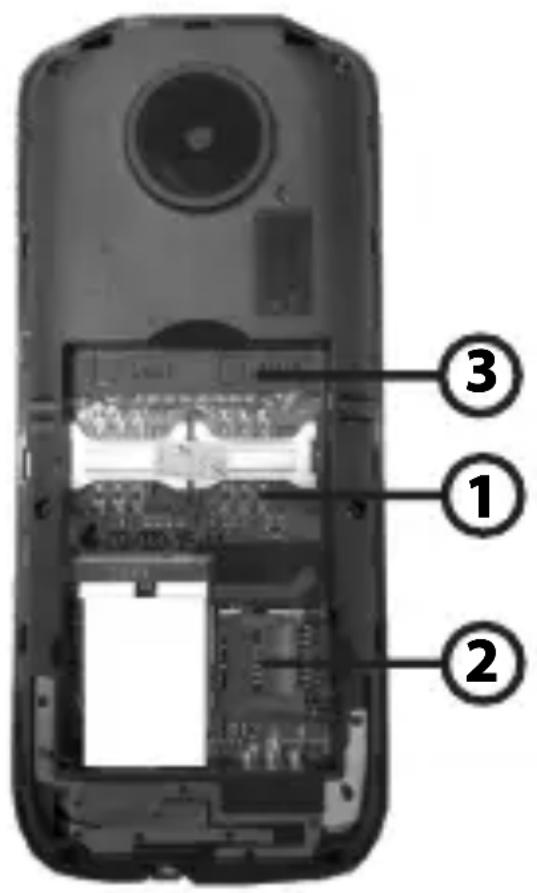
1. Install the SIM card
Before installing or removing the SIM card, make sure the phone is turned off. Remove the back cover and remove the battery. NOTE: During installation, make sure that the SIM card contacts are facing down and pay attention to the markings towards the slot.
2. Installing a memory card
This phone supports a memory card. Please make sure that the memory card is inserted correctly before use.
When installing the microSD card, pay attention to the direction of the outlet, tilt the memory card slot cover, insert the memory card until it is fully inserted and close the cover. The phone supports microSD cards.
EN
3. Inserting the battery
Insert the battery according to the markings, the battery contacts in the contacts on your phone and press the top of the battery down until it is inserted into the battery slot.
- Remove the battery - Turn off the phone, put him face down and slide the battery cover, remove the cover and remove the battery.
- Charging the battery
Connect the charger to the socket on the phone and a power outlet. During charging, a charging icon appears on the screen. After charging, disconnect the plug.
NOTE: Before first use charge for at least 4 hours. It will reach its maximum capacity after several cycles of charging and discharging..
4. Turn on / off
- Press and hold the power button to turn on or turn off the phone.
NOTE: Do not switch the phone on the premises, where it is forbidden to use the cellular network, or in places where it may cause interference or danger. Make sure that the "Auto On / Off" is deactivated.
EN
MAKING / RECEIVING CALLS
1. Making connections
- On the home screen, enter the area code and phone number.
- Select Call / Receive to connect.
2. Accept or reject calls
- Receiving a call To answer an incoming call, press the Call // AAAnnnsswwwweeerr...
- Rejecting a callTo reject an incoming call, press the End / PPPooowwwweeerrr kkkeeeyyy...
3. Adjusting the call volume
Nacisnijsnij during a call up / down to adjust the volume on the speaker phone.
4. End the call
It allows you to view the phone book, dialing a number from the phone book, add and delete entries.
Messages
It allows you to view received SMS / (MMS - select models), to create new messages, delete messages.
Call Records
Displays a list of the last dialed numbers / missed calls / dialed calls / rejected calls.
Profile
The phone allows you to set up several user profiles, so you can customize the sounds and ring tones to your own needs.
EN
Multimedia
1. Camera
You can take photos and record of films
2. Gallery
This feature allows you to quickly view all your photos and ob-times.
3. Player of films
It enables playback of films
4. FM Radio
You can listen to FM radio.
Settings
It allows you to change your phone settings. For example, change the date and go-gins, language selection, settings, Dual-SIM, call forwarding.
Security
Restore factory settings
This feature allows you to restore your phone to factory settings. The default password is 1234.
Tools
- Calendar: Displays the calendar.
- Alarm: Sets the alarm.
- Calculator: Allows you to use the calculator.
- Bluetooth:* Allows you to connect to other devices, headsets or handsfree. * Bluetooth is available on selected phone models.
- Flashlight:* This feature allows you to enable and disable the flashlight in your phone. Long press the 000 key in the standby mode, turn on / off the flashlight. * The Flashlight is available on selected phone models.
DE
TASTEN
I03B0JAE TnpocMaTpNBaTb CnncOK HomepoB TelefoHOB,Ha6npaTb Homep n3 cnNcKa HomepoB,do6abTb u ydaJIaTb 3aIINcN.