
MS4502 - Smartphone Manta - Free user manual and instructions
Find the device manual for free MS4502 Manta in PDF.


| Product Type | Smartphone |
| Brand | Manta |
| Model | MS4502 |
| SIM Configuration | Dual SIM (SIM1 and SIM2) |
| Front Camera | Yes |
| Headphone Jack | Yes |
| USB Port | Yes |
| Buttons | Volume +/-; Power; Option; Return; Main Menu |
| Charging Time | Approximately 3-4 hours |
| Charger Voltage | AC 220V |
| Maximum Continuous Charge | 24 hours (do not exceed) |
| Battery Indicator | Flashing during charging; steady when full |
| Standby Time | Varies with network and usage |
| Cleaning | Use soft dry cloth; avoid alcohol, thinner, benzene |
| Operating Conditions | Avoid high temperature, humidity, dust |
| Disposal | Do not dispose with household waste; recycle batteries at designated points |
| IMEI Location | Under battery (on label) |
| Languages | English, Polish |
| Safety Warnings | Read manual before use; avoid flammable gases; keep away from children |
| Battery Precautions | Do not disassemble, short-circuit, or expose to fire; dispose properly |
Frequently Asked Questions - MS4502 Manta
User questions about MS4502 Manta
0 question about this device. Answer the ones you know or ask your own.
Ask a new question about this device
Download the instructions for your Smartphone in PDF format for free! Find your manual MS4502 - Manta and take your electronic device back in hand. On this page are published all the documents necessary for the use of your device. MS4502 by Manta.
USER MANUAL MS4502 Manta
natural_image
Abstract black-and-white circular logo with interlocking curved shapes (no text or symbols)MANTA
Smartphone Duo Galactic
MS4502
Instrukcja obsługi
User's Manual
Instrukcja obsługi
Uwaga!
natural_image
Simple line drawing of a curved object with an arrow pointing to it, enclosed in a circle (no text or symbols)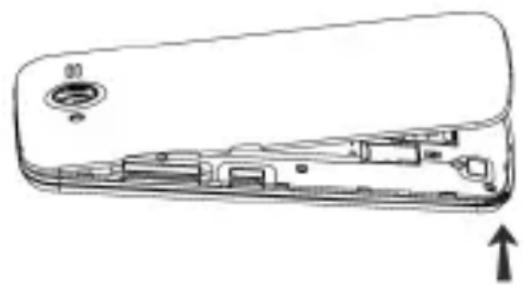
natural_image
Line drawing of a device interior with labeled ports and an upward arrow indicator (no text or symbols present)Instalacja kart SIM
natural_image
Top-down schematic of a smartphone showing internal components and casing (no text or labels)Ostrzeżenie:
natural_image
Simple line drawing of a curved object with an arrow pointing to it, enclosed in a circle (no text or symbols)
natural_image
Line drawing of a mechanical component with internal parts and a downward arrow indicating motion (no text or symbols)-If your mobile phone is lost or stolen, please contact the telecommunications authorities or a sales agent immediately to have a hold on the phone and the SIM card. This will prevent economic loss caused by unauthorized calls made from your mobile phone.
- When you contact the telecommunications authorities or a sales agent, they will need to know the IMEI number of our mobile phone (remove battery to expose number located on the label on back of phone). Please copy this number and keep in a safe place for future use.
In order to avoid the misuse of your mobile phone please take – the following preventative measures:
- Set the PIN number of your mobile phone's SIM card and change this number immediately if it becomes known to a third party.
- Please keep the phone out of sight when leaving it in a vehicle. It is best to carry the phone with you, or lock it in the trunk.
Safety warnings and notices
Before using your mobile phone, read and understand the following notices carefully to ensure you will use it safely and properly.
General attention
Only the battery and battery charger specified by our company – should be used in your phone. Other products might result in battery leakage, overheating, fire or explosion.
USER'S MANUAL
To avoid your phone malfunctioning, or catching fire, please do – not violently impact, jolt or throw your phone.
Please do not place the battery, mobile phone, or charger in a microwave oven or high-pressure equipment. Otherwise it could lead to unexpected accidents such as damage to the circuitry or fire hazard.
Please do not use your phone near flammable or explosive gases, otherwise it could cause malfunction of your phone or fire hazard.
-Please do not subject your phone to high temperatures, high humidity or dusty places; otherwise this may lead to the malfunction of your phone.
Keep your phone out of the reach of small children. Your phone – is not a toy. Children could hurt themselves.
To avoid your phone falling and malfunctioning or being damaged, please do not place it on uneven or unstable surfaces.
Notices when using your phone
-Turn off your mobile phone where the phone is not allowed, such as, on the airplane or in hospitals. Using the mobile phone in those places may impact the normal operation of electronic devices and medical instruments. Follow relevant regulations when using your mobile phone in those places. Your mobile phone has the auto turn-on feature. Check your alarm clock settings to confirm that your mobile phone will not be turned on automatically during flight.
- Please do not use your mobile phone near the weak signal or high precision electronic devices. RF interference might cause malfunctioning of such electronic devices and other problems. Special tips must be paid near the following equipment: hearing aids, pace makers and other medical electronic devices, fire detectors, automatic doors and other automatic control installations. To find
USER'S MANUAL
out the effect of mobile phones on a pacemaker or other pieces of electronic medical equipment please contact the manufacturers or local sales agents of the equipment.
- Please do not subject the LCD to impact or use the screen to strike things, as this will damage the LCD board and cause leakage of the liquid crystal. There is a risk of blindness if the liquid crystal substance gets into the eyes. If this occurs rinse eyes immediately with clear water (under no circumstances rub your eyes) and go immediately to a hospital for treatment.
- Do not disassemble or modify your mobile phone, as it will lead to damage to the phone such as battery leakage or circuitry failure.
- Under very rare circumstances using the mobile phone in certain model cars may negatively affect the internal electronic equipment. In order to assure your safety under such circumstances please do not use the mobile phone.
- Please do not use needles, pen tips, or other sharp objects on the keypad as this may damage the mobile phone or cause it to malfunction.
In the event of antenna malfunction, do not use your phone, as – it could be harmful to human body.
Avoid letting the phone come into close contact with magnetic - objects such as magnetic cards as the radiation waves of the mobile phone may erase the information stored on floppy disks, pay cards and credit cards.
- Please keep small metal objects, such as thumbtacks far away from the receiver. When the receiver is in use it becomes magnetic and may attract these small metal objects and thus these may cause injury or damage the mobile phone.
- Avoid having the mobile phone come into contact with water or other liquids. If liquids enter the phone, this could cause a short circuit, battery leakage or other malfunction.
USER'S MANUAL
Notices when using the battery
–The battery has a limited service life. The remaining life gets shorter as the times of charging increase. If the battery becomes feeble even after the charging, this indicates the service life is over and you have to use a new battery.
- Do not dispose of old batteries with everyday domestic garbage. Please dispose of old batteries at the directed places with specific rules for their disposal.
-Please do not throw batteries into a fire, as this will cause the batter to catch fire and explode.
When installing the battery, do not use force or pressure, as this – will cause the battery to leak, overheat, crack and catch fire.
Please do not use wires, needles or other metal objects to short-circuit the battery. Also, do not put the battery near necklaces or other metal objects, as this will cause the battery to leak, overheat, crack and catch fire.
- Please do not solder the contact points of the battery, as this will cause the battery to leak, overheat, crack and catch fire.
- If the liquid in the batteries goes into the eyes, there is a risk of blindness. If this occurs do not rub the eyes, but immediately rinse eyes with clear water and go to the hospital for treatment.
- Please do not disassemble or modify the battery, as this will cause the battery to leak, overheat, crack and catch fire.
Please do not use or place the batteries near high temperature – places such as near a fire or heating vessel, as this will cause the battery to leak, overheat, crack and catch fire.
- If the battery overheats, changes color, or becomes distorted during use, charging, or storage, please stop using and replace it with a new battery.
USER'S MANUAL
- If the liquid from the battery comes in contact with skin or clothing this could cause burning of the skin. Immediately use clear water to rinse and seek medical tips if necessary.
- If the battery leaks or gives off a strange odor, please remove the battery from the vicinity of the open fire to avoid a fire or explosion.
-Please do no let the battery become wet as this will cause the battery to overheat, smoke and corrode. - Please do not use or place batteries in places of high temperature such as in direct sunlight, as this will cause the battery to leak and overheat, lower performance, and shorten the battery's life. Please do not continuously charge for more than 24 hours.
Charging your phone
-Connect the connector of charger to the mobile phone. The battery level indicator flashes on the screen. Even if the phone has been turned off, the charging image still appears, indicating that the battery is being charged. If the phone is overused when the current is insufficient, it may take longer time for the charging indicator to appear on the screen after the charging begins.
- When the battery level indicator does not flash and indicates the battery is full, this indicates the charging has been completed. If the phone is off during charging, the charging being completed image also appears on the screen. The charging process often takes 3 to 4 hours. During the charging, the battery, phone and charger gets warm, this is a normal phenomenon.
Upon the completion of charging, disconnect the charger from - AC power socket, and from the mobile phone.
Notes:
–The standby time and call duration provided by the manufacturer are based on ideal operating environment. In practice, the
USER'S MANUAL
battery's operating time varies depending on network conditions, operating environment and usage methods.
- Make sure the battery has been installed before charging. It is best not to remove the battery while charging.
—Upon completion of charging, disconnect the charger from your phone and the power supply.
If you have not disconnected the charger from your phone and – the power supply, the charger will continue to charge the battery after about 5 to 8 hours when the batter level decreases substantially. We advise you not to do like this, as it lowers your phone performance and shortens your phone life.
Notices when using your charger
Please use AC 220 volts. The use of any other voltage will cause – battery leakage, fire and cause damage to the mobile phone and charger.
- It is forbidden to short circuit the charger, as this will cause electrical shock, smoking and damage to the charger.
Please do no use the charger if the power cord is damaged, as – this will cause fire or electrical shock.
- Please immediately clean any dust gathered on the electrical outlet.
- Please do no place vessels with water near the charger in order to avoid water splashing onto the charger and causing an electrical shortage, leakage or other malfunction.
-If the charger comes in contact with water or other liquid the power must immediately be switched off to avoid an electrical short or shock, fire or malfunction of the charger. - Please do not disassemble or modify the charger, as it will lead to bodily harm, electrical shock, fire or damage to the charger.
USER'S MANUAL
- Please do not use the charger in the bathroom or other excessively moist areas, as this will cause electrical chock, fire or damage to the charger.
- Please do not touch the charger with wet hands, as this will cause electrical shock.
Do not modify or place heavy objects on the power cord, as this – will cause electrical shock or fire.
Before cleaning or carrying out maintenance please unplug the charger from the electrical outlet.
When unplugging charger, do not pull on the cord, but rather – hold on to the body of the charger, as pulling on the cord will damage the cord and lead to electrical shock or fire.
Cleaning and maintenance
The mobile phone, battery, and charger are not water resistant. Please do not use them in the bathroom or other excessively moist areas and likewise avoid allowing them to get wet in the rain.
Use a soft, dry cloth to clean the mobile phone, battery and charger.
Please do not use alcohol, thinner, benzene or other solvents to wipe the mobile phone.
A dirty outlet will cause poor electrical contact, lose of power and even inability to recharge. Please clean regularly.
USER'S MANUAL
Appearance and button

- Headphone Jack
- Receiver
-
Front Camera
-
Volume Key +/-
- Power
-
Option Key
-
Return Key
- Main Menu
- USB Jack
USER'S MANUAL
Power on preparation
Make sure the device is under the condition of power off, operate as follows
Open the battery cover
1) Hold the device tight, pressing one side of the battery cover with your fingers.
2) Align the battery cover button position to open it.
3) Be carefully when opening the cover forward along the slit cut(when you hear the "click" sound, i.e the battery cover separates from the devices body successfully)

natural_image
Simple line drawing of a curved object with an arrow pointing to it, enclosed in a circle (no text or symbols)
natural_image
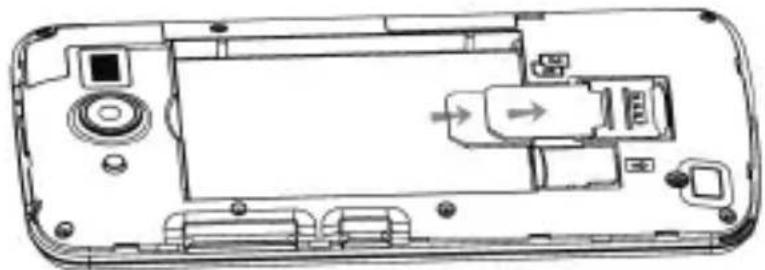
Diagram of a device interior showing internal components and a directional arrow (no text or symbols)Sim Cards
1) SIM1/SIM2 card's gold contacts facing down, indicated by the arrow;
2) Insert SIM1/SIM2 cards into the card slots carefully.
natural_image
Technical line drawing of a smartphone rear panel showing internal components and ports (no text or symbols)USER'S MANUAL
Install battery cover
- Align the battery cover with the device housing.
- Press the battery cover from every angle( when you hear the "click" sound, i.e the battery cover matches and installs the device body successfully).

natural_image
Simple line drawing of a curved object inside a circle, with an arrow pointing to it (no text or symbols)
natural_image
Diagram of a device interior showing internal components and a downward arrow (no text or symbols)MS4502
MANTA S.A.
al. Maraszewska 14, badynek B-4
03-876 Wargadea
tel: +48 22 332 34 50, fax: +48 22 332 34 60,
e-mail: manta@manta.com.pl; www.manta.com.pl

MANTA


0700
Numer Deklaraçi 07BM/13
Number of declaration of Conflency
DEKLARACJA ZGODNOŚCI WE
EC DECLARATION OF CONFIRMITY
My / We MANTA S.A.
(масса Production/ manufacturing)
(adresa producencia / manufacturer's address)
declare, under our responsibility, that the electrical product
smartfon
(normal reference/some of the article)
MANTA MS4502
(8p wrofa / 4ps or mude')
to which this declaration relates to in conformity with the following standards
EN 60950-1:2006+A11:2009+A1:2010+A12:2011
EN 60950-1:2006+A11:2009+A1:3010+A12:2011
EN 50360:2001/A1:2012;EN 62209-1:2006 EN 62311:2008;EN 62209-2:2010
EN 62479:2010 EN 301 489-1 V1.9.2; EN 301 489-3 V1.4.1
EN 301 489-7 V1.3.1; EN 301 489-1 V2.2.1
EN301 489-24 V1.5.1;EN 301 489-34 V1.3.1 EN 301 511 V9.0.2
EN300 328 V1.7.1 EN 301 908-1 V5.2.1; EN 301 908-2 V5.2.1
EN 300 440-1 V1.6.1;EN 300 440-2 V1.4.1 EN 55022:2010
EN 55024:2010 EN 61000-3-2:2006+A1:2009+A2:2009
EN 61000-3-3:2008
Zasilacz sieciowy:
EN55014-1 2006+A1:2009 EN55024:2010
EN 55022:2006+A1:2007 EN 55024:1998+A1:2001+A2:2003
EN 61000-3-2:2006+A1:2009-A2:2009
EN 61000-3-3:2008 EN40950-1+A11:2009
( mener i data wyklasia money / title, member and day of time of the standards ).
( ,following the previation of )
RATTE Directive: 1999/5/EC
ENC Directive: 2004/108/EC
LVD Directive: 2006/95/EC


- MANTA
- Smartphone Duo Galactic
- MS4502
- Instrukcja obsługi
- Uwaga!
- Instalacja kart SIM
- Ostrzeżenie:
- Safety warnings and notices
- General attention
- USER'S MANUAL
- Notices when using your phone
- Notices when using the battery
- Charging your phone
- Notes:
- Notices when using your charger
- Cleaning and maintenance
- Power on preparation
- Open the battery cover
- Sim Cards
- Install battery cover
- MANTA S.A.
Brand : Manta
Model : MS4502
Category : Smartphone