EX1005 - Shredder Swingline - Free user manual and instructions
Find the device manual for free EX1005 Swingline in PDF.



| Brand | Swingline |
| Model | EX1005 |
| Product type | Document shredder |
| Cut type | Confetti cut |
| Shred size | 4 mm x 45 mm |
| Cutting capacity (80 g/m²) | 10 sheets |
| Cutting capacity (75 g/m²) | 12 sheets |
| Entry width | 220 mm |
| Dimensions (H x W x D) | 370 x 340 x 230 mm |
| Rated voltage | 120 V ~ 60 Hz |
| Rated current | 2.7 A |
| Main functions | Automatic shredding, forward/reverse, auto stop, thermal protection |
| Maintenance and cleaning | Unplug, clean with a damp cloth, lubricate with Swingline oil (1760049) |
| Safety | Warning symbols: hair, hands, ties, jewelry, children, aerosols, cooling |
| Spare parts and repairability | Swingline lubrication oil, repair by qualified personnel only |
| General information | 24-month warranty, customer service: 1-800-541-0094 (US), 1-800-263-1063 (Canada) |
Frequently Asked Questions - EX1005 Swingline
User questions about EX1005 Swingline
0 question about this device. Answer the ones you know or ask your own.
Ask a new question about this device
Download the instructions for your Shredder in PDF format for free! Find your manual EX1005 - Swingline and take your electronic device back in hand. On this page are published all the documents necessary for the use of your device. EX1005 by Swingline.
USER MANUAL EX1005 Swingline
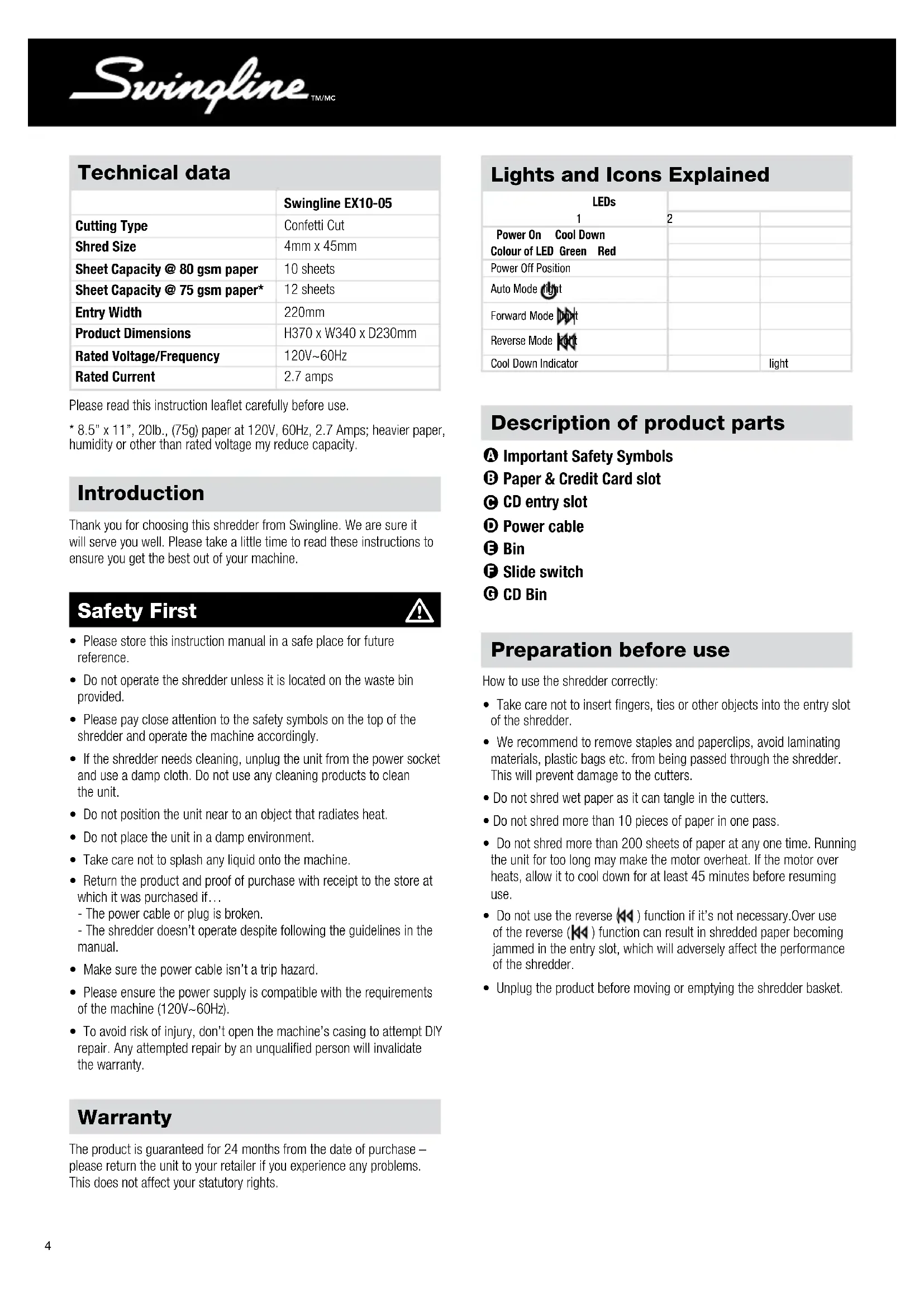
| Swingline EX10-05 | |
| Cutting Type | Confetti Cut |
| Shred Size | 4mm x 45mm |
| Sheet Capacity @ 80 gsm paper | 10 sheets |
| Sheet Capacity @ 75 gsm paper* | 12 sheets |
| Entry Width | 220mm |
| Product Dimensions | H370 x W340 x D230mm |
| Rated Voltage/Frequency | 120V~60Hz |
| Rated Current | 2.7 amps |
Please read this instruction leaflet carefully before use.
- 8.5" x 11", 20lb., (75g) paper at 120V, 60Hz, 2.7 Amps; heavier paper, humidity or other than rated voltage my reduce capacity.
Introduction
Thank you for choosing this shredder from Swingline. We are sure it will serve you well. Please take a little time to read these instructions to ensure you get the best out of your machine.
Safety First

- Please store this instruction manual in a safe place for future reference.
- Do not operate the shredder unless it is located on the waste bin provided.
- Please pay close attention to the safety symbols on the top of the shredder and operate the machine accordingly.
- If the shredder needs cleaning, unplug the unit from the power socket and use a damp cloth. Do not use any cleaning products to clean the unit.
- Do not position the unit near to an object that radiates heat.
- Do not place the unit in a damp environment.
Take care not to splash any liquid onto the machine. - Return the product and proof of purchase with receipt to the store at which it was purchased if...
- The power cable or plug is broken.
- The shredder doesn't operate despite following the guidelines in the manual.
Make sure the power cable isn't a trip hazard. - Please ensure the power supply is compatible with the requirements of the machine (120V~60Hz).
- To avoid risk of injury, don't open the machine's casing to attempt DIY repair. Any attempted repair by an unqualified person will invalidate the warranty.
Warranty
The product is guaranteed for 24 months from the date of purchase - please return the unit to your retailer if you experience any problems. This does not affect your statutory rights.
Lights and Icons Explained
| LEDs 1 | 2 | |
| Power On Cool Down Colour of LED Green Red | ||
| Power Off Position | ||
| Auto Mode light | ||
| Forward Mode Digt | ||
| Reverse Mode light | ||
| Cool Down Indicator | light |
Description of product parts
±b Important Safety Symbols
3 Paper & Credit Card slot
CD entry slot
Power cable
Bin
F Slide switch
CD Bin
Preparation before use
How to use the shredder correctly:
- Take care not to insert fingers, ties or other objects into the entry slot of the shredder.
- We recommend to remove staples and paperclips, avoid laminating materials, plastic bags etc. from being passed through the shredder. This will prevent damage to the cutters.
- Do not shred wet paper as it can tangle in the cutters.
- Do not shred more than 10 pieces of paper in one pass.
- Do not shred more than 200 sheets of paper at any one time. Running the unit for too long may make the motor overheat. If the motor over heats, allow it to cool down for at least 45 minutes before resuming use.
- Do not use the reverse (A) function if it's not necessary. Over use of the reverse (A) function can result in shredded paper becoming jammed in the entry slot, which will adversely affect the performance of the shredder.
- Unplug the product before moving or emptying the shredder basket.
Correct operating procedure
Insert plug (D) into the AC power socket.
Slide the switch (F) to the AUTO position (
3 When not in use, slide the switch to the (off position).
Empty the waste basket regularly to ensure the shredder exit does not become blocked with paper.
Shredder Control Panel

AutoOff


Forward

Reverse

Safety First

This means you should be careful because long hair can become entangled in the cutting head.

This means don't reach into the feed opening of the cutting head.

This means be careful of ties and other loose clothing which could become entangled in the cutting head.

This means keep children away from shredder.

This means be careful of loose jewelry which could become entangeld in the cutting head.

This means no aerosols.

This means machine is cooling down.
Troubleshooting
If the paper shredder will not start, please check the following:
Is the machine plugged in correctly?
Is the switch pushed to the 'ON/AUTO' position?
3 Is the machine jammed with paper?
4 Has the motor overheated?
5 Is the shredder head located correctly on the bin
In case of jammed paper, please follow the procedure below:
Check if the bin is too full with paper - the bin should be emptied regularly to avoid paper becoming jammed in the cutters.
Slide the switch to reverse position to reverse the jammed paper.
If the paper is so jammed that it will not come out in reverse function, slowly push the switch between reverse (A) and ON AUTO. Don't do this too quickly as this can damage the shredder.
4WARNING - Do not under any circumstances use any metal objects (scissors, letter openers etc.) in an attempt to clear the entry - this model has main voltage inside the casing, which could cause serious injury.
Lubrication of the shredder
Only use Swingline Oil (1760049) to lubricate. ACCO Brands accepts no liability for product performance or safety when other types or brands of lubricants are used on any part(s) of this machine.
Emptying the waste basket
Empty the shredder bin regularly. Over filling the bin will cause the shredder to stop operating.
Unplug the product and lift away the head.
Empty the shredder bin.
3 Locate the shredder onto the bin.

CAUTION:
- Never insert fingers into the entry slot of the shredder.
- Turn the power off immediately if your hair, tie or sleeve becomes entangled in the shredder.
- Empty the shredder bin when it is full otherwise the shredder's performance will be adversely affected. Operating the shredder with a full shredder bin can result in paper jamming in the cutters, which will increase the machine's noise level.
Auto shred and stop
Place the paper or credit card into the center of entry slot (B), place CD into the center of entry slot (C) - shredding will start automatically.
Paper smaller than letter width should be placed in the middle of the entry slot (B) to ensure the shredder works automatically.
The cutters will stop rotating automatically after finishing shredding.
A separate CD tray is provided to collect the shredded CD shards. CD and credit card shards should be disposed of separately to paper.
Don't shred more than 10 sheets of paper at a time. Do not attempt to shred more than one credit card or CD at a time.
If too many sheets are inserted at a time, the shredder can become jammed. If the shredder becomes jammed, switch the button to reverse (K) position to clear the jam by reversing the paper. If the paper has become so entangled in the cutter that it can't be reversed, turn off the power and pull out the paper by hand. Restart with fewer sheets and feed the nonshredded end of the paper in first.

CAUTION: Don't let the machine operate continuously for more than 2 minutes. When the motor has overheated, the thermal safety switch will start working automatically. If the thermal switch trips, do not use the machine for about 30 minutes while the thermal sensitive safety switch cools down so the shredder can be safely used again.
CD and Credit Card Shredding
A separate CD tray is provided to collect the shredded CD shards. Ensure that this is correctly mounted onto the bin before shredding CDs or credit cards. CD and credit card shards should be disposed of separately from paper.
Empty the CD tray after 8 credit cards or CDs to avoid waste spilling over into the paper waste bin. Remove the CD tray before recommencing to shred paper.
Credit cards should only be shredded through the center of the main paper entry slot (not the CD slot). This is to ensure that the strip and the chip on the credit card are destroyed. Swingline encourages customers to recycle shredded paper. Please note that shredded paper can not be recycled if mixed with credit card shards. If recycling, please separate shredded paper, credit cards and CDs.

Données techniques
Limited 1 Year Warranty for EX10-05 Shredder
ACCO Brands USA LLC, 300 Tower Parkway, Lincolnshire, IL 60069 (in Canada, ACCO Brands Canada Inc., 5 Precidio Court, Brampton, ON L6S-6B7; and in Mexico, ACCO Mexicana, S.A. de C.V. Av. Circuito Industrial Norte #6 Parque Industrial Lerma 52000, Lerma Edo, De Mexico) (each, respectively, "ACCO Brands") warrants to the original purchaser that the parts of this SwinglineTM Shredder EX10-05 are free from defects in workmanship and material under normal use and service for a period of 1 year after purchase.
ACCO Brands' obligation under this warranty is limited to replacement or repair, at ACCO Brands' option, of any warranted part found defective by ACCO Brands without charge for material or labor. Any replacement, at ACCO Brands' option, may be the same product or a substantially similar product that may contain remanufactured or refurbished parts. This warranty shall be void in the following circumstances:
(ii) if the product has been misused,
(ii) if the product has been damaged by negligence or accident, or
(iii) if the product has been altered by anyone other than ACCO Brands or ACCO Brands' authorized agents.
For warranty execution, please call:
1-800-541-0094 in the USA
1-800-263-1063 in Canada
1-800-758-6825 in Mexico
Or go to www.swingline.com.
TO THE EXTENT ALLOWED BY APPLICABLE LAW, THIS WARRANTY IS IN LIEU OF ALL OTHER EXPRESSED WARRANTY. REPRESENTATIONS OR PROMISSES INCONSISTENT WITH OR IN ADDITION TO THIS WARRANTY ARE UNAUTHORIZED AND SHALL NOT BE BINDING ON ACCO BRANDS. TO THE EXTENT PERMITTED BY APPLICABLE LAWS, ANY IMPLIED WARRANTYES (IF APPLICABLE) ARE LIMITED IN DURATION TO THE DURATION OF THIS WARRANTY. SOME STATES AND JURISDICTIONS DO NOT ALLOW LIMITATIONS ON HOW LONG AN IMPLIED WARRANTY LASTS, SO THE ABOVE LIMITATION MAY NOT APPLY TO YOU. TO THE EXTENT PERMITTED BY APPLICABLE LAW, IN NO EVENT SHALL ACCO BRANDS BE LIABLE FOR ANY SPECIAL, INCIDENTAL, PUNITIVE, EXEMPLARY, CONSEQUENTIAL OR SIMILAR DAMAGES, WHETHER OR NOT FORSEABLE. SOME STATES AND JURISDICTIONS DO NOT ALLOW THE EXCLUSION OR LIMITATION OF SPECIAL, INCIDENTAL, PUNITIVE, EXEMPLARY, CONSEQUENTIAL, OR SIMILAR DAMAGES, SO THE ABOVE EXCLUSION OR LIMITATION MAY NOT APPLY TO YOU.
FOR CONSUMERS WHO HAVE THE BENEFIT OF CONSUMER PROTECTION LAWS OR REGULATIONS IN THEIR JURISDICTION OF PURCHASE OR, IF DIFFERENT, IN THEIR JURISCIETION OF RESIDENCE, THE BENEFITS CONFERRED BY THIS WARRANTY ARE IN ADDITION TO ALL RIGHTS AND REMEDIES CONVEYED BY SUCH CONSUMER PROTECTION LAWS AND REGULATIONS.
To the extent permitted by law, this warranty is not transferable and will automatically terminate if the original product purchaser sells or otherwise disposes of the product.
This warranty gives you specific legal rights. Other rights, which vary from jurisdiction to jurisdiction, may exist. In addition some jurisdictions do not allow (i) the exclusion of certain warranties, (ii) limitations on how long an implied warranty lasts and/or (iii) the exclusion or limitation of certain types of costs and/or damages, so the above limitations may not apply.
O visit www.swingline.com.