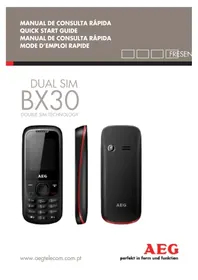
BX30 - Smartphone AEG - Free user manual and instructions
Find the device manual for free BX30 AEG in PDF.



| Brand | AEG |
| Model | BX30 |
| Product type | Smartphone |
| SIM cards | Dual SIM |
| Memory card | Micro SD (removable) |
| Battery | Lithium-ion, initial charge at 50% |
| Charger | 220 V AC |
| Charging temperature | Between -10°C and +45°C |
| Main functions | Calls, SMS, MMS, flashlight, alarm clock |
| Battery safety | Do not expose to heat, do not short-circuit |
| Charger safety | Do not use if cable is damaged, avoid contact with water |
| Maintenance and cleaning | Soft dry cloth, no solvents |
| Disposal | Recycle at collection points, do not dispose of with household waste |
| Warranty | Limited, requires proof of purchase |
| Compliance | R&TTE Directive 1999/5/EC, CE marking |
| After-sales service | Contact the seller or an AEG authorized center |
Frequently Asked Questions - BX30 AEG
User questions about BX30 AEG
0 question about this device. Answer the ones you know or ask your own.
Ask a new question about this device
Download the instructions for your Smartphone in PDF format for free! Find your manual BX30 - AEG and take your electronic device back in hand. On this page are published all the documents necessary for the use of your device. BX30 by AEG.
USER MANUAL BX30 AEG
This QUICK START MANUAL is intended to give you a basic idea of how to start using your phone. Further information may be found on AEG Telecom's website. To learn
about specific operator services and functions, contact your network provider.
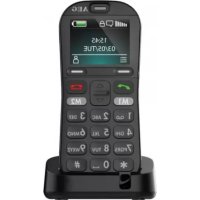
LIST OF PRIMARY KEYS
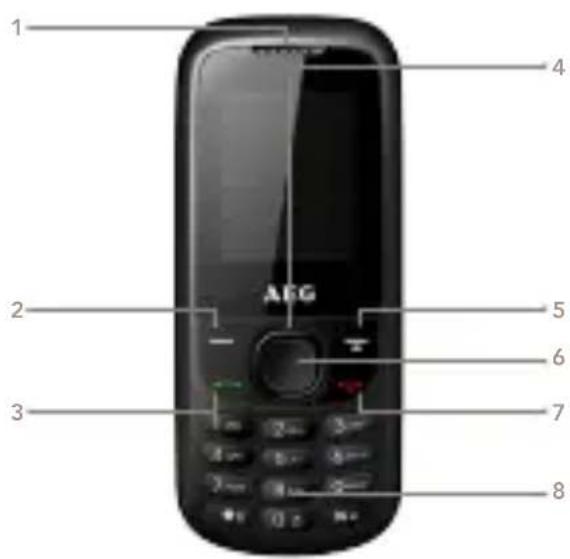
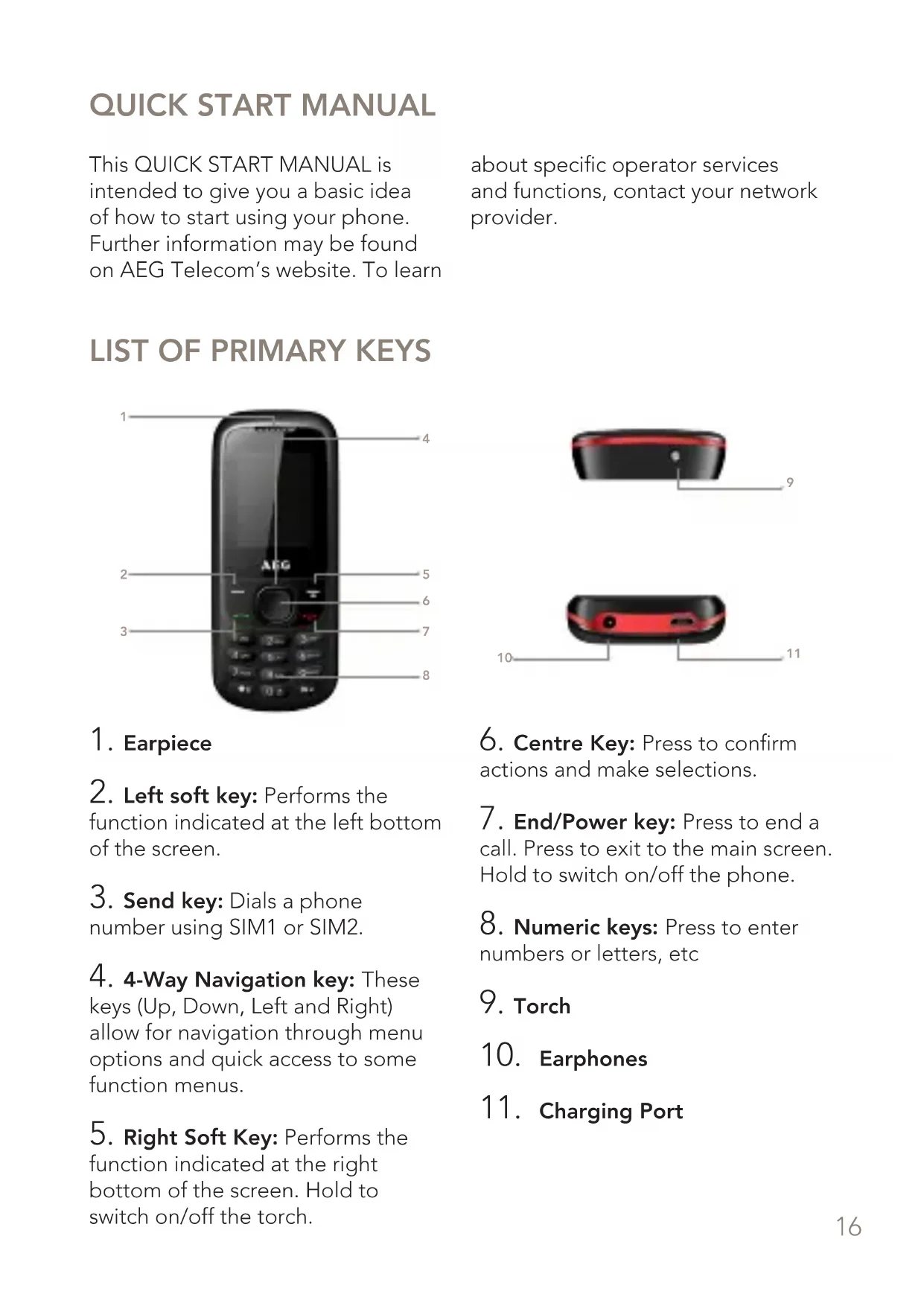
1. Earpiece
-
Left soft key: Performs the function indicated at the left bottom of the screen.
-
Send key: Dials a phone number using SIM1 or SIM2.
-
4-Way Navigation key: These keys (Up, Down, Left and Right) allow for navigation through menu options and quick access to some function menus.
-
Right Soft Key: Performs the function indicated at the right bottom of the screen. Hold to switch on/off the torch.
-
Centre Key: Press to confirm actions and make selections.
-
End/Power key: Press to end a call. Press to exit to the main screen. Hold to switch on/off the phone.
-
Numeric keys: Press to enter numbers or letters, etc
-
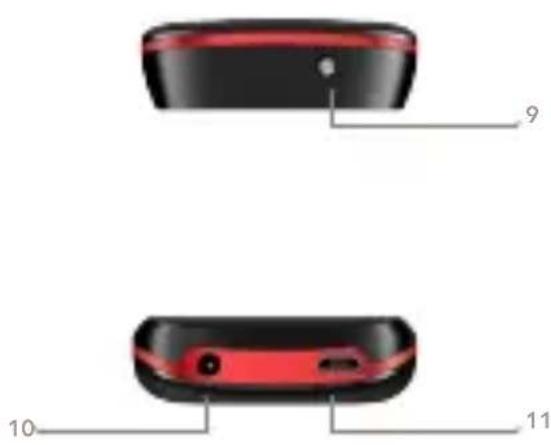
Torch
-
Earphones
-
Charging Port
HOW TO INSERT SIM CARDS AND BATTERY
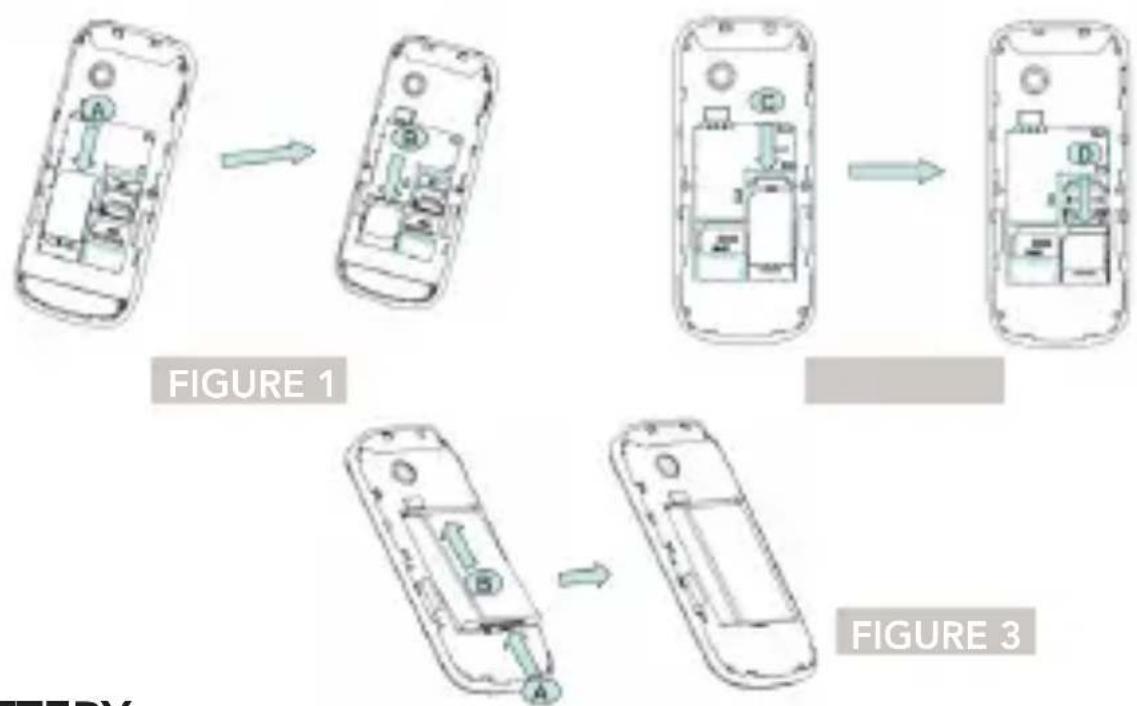
- Remove the back cover over the battery.
- Pull the battery tab upwards and remove the battery.
- Insert the SIM card into the memory-card slot carefully, with the card's cut edge lined up with the slot's indentation and the golden side turned downwards until the SIM card is not able to go any further (image 1 and 2).
- With the battery's metal contacts turned towards the battery slot's metal contacts, push down on the battery until it is locked in place (image 3).
BATTERY
The battery is shipped with a 50% charge, and may be used immediately out of the box. Recharge the battery fully after the first 3 times it discharges completely to empty, charging for at least 4 hours, in order to get the best possible performance from your battery.
Batteries have a service life cycle. It is normal for the battery to wear out gradually, requiring longer charge times. If the recharge cycle is very short, the battery service life cycle is coming to an end. Replace the battery with a new one.
Warning: Disconnect the mobile phone before removing the battery. The battery should never be removed when the mobile phone is plugged in, as this may damage the SIM card and the mobile phone.
CHARGING THE BATTERY
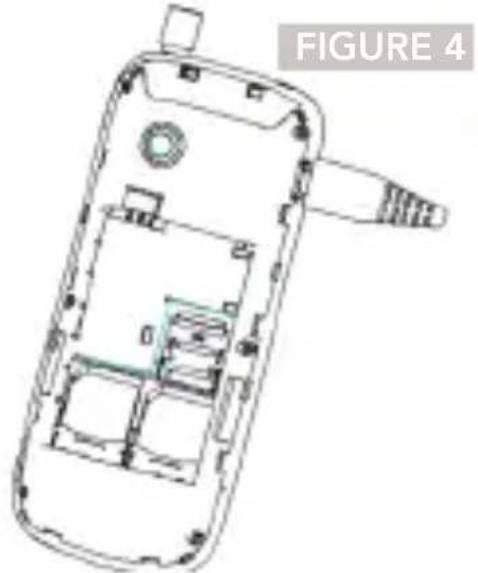
- Connect the charger to a power outlet.
- Connect the charger to its jack on the mobile phone (Figure 4)
- When the charging process is complete, disconnect the charger from the outlet and from the phone.
Warning: Always be sure to charge your phone in a location with ambient temperature between -10^ and +45^ , and always use chargers supplied by the original manufacturer. The use of unauthorized chargers may be hazardous, and will void the manufacturer's warranty coverage.
INSERT MEMORY CARD MICROSD
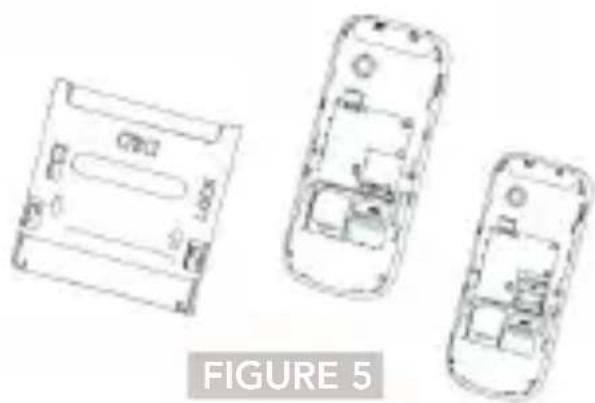
The memory card slot is located behind the battery.
- Remove the battery
compartment cover.
- Remove the battery if installed.
- Insert the Micro SD memory card as shown in figure 5.
- Insert the battery, sliding it into its compartment, with the contacts in the correct position (see image).
Replace the battery compartment cover.
TURNING ON YOUR PHONE
To turn on your phone, first makesure that it has a charged batteryinstalled andthat the SIM card isproperly inserted. Press and holdthe On/Off key.
CHANGING THE LANGUAGE
To change the language on your mobile phone, take the following steps:
- Menu
- Settings
- Phone Settings
- Language
- Select Language
MAKING CALLS
The signal bar at the top left of the screen indicates the quality of the network signal - if you see four lines than the signal is stronger. You can make a call by entering a phone number of selecting a contact from your contacts list. You can choose to make a call from SIM card 1 or from SIM card 2.
SENDING TEXT OR MULTIMEDIA MESSAGES
You can create and send a simple SMS message, or an MMS containing text, image, video, and sound files.
MOBILE PHONE SAFETY
-
Do not disassemble or modify your mobile phone, since to do so may cause damage, such as battery leakage or malfunctions in the mobile device.
-
Please do not scratch the LCD or strike the screen, as this may damage the LCD and cause liquid crystal leakage. If the liquid crystal substance enters the eyes, it may cause blindness. If this occurs, wash your eyes immediately with clean water (do not in any circumstance rub your eyes) and immediately seek medical treatment at a hospital.
- Please do not use sharp objects on the keypad, as this may damage the mobile phone or cause malfunction.
- Prevent the mobile phone from coming in contact with magnetic objects such as memory cards, as the radiation waves from the mobile phone may erase the information stored on them.
- Prevent the mobile phone from coming in contact with water or other liquids. If liquids enter the mobile phone, this may cause a short circuit, battery leakage, or other damage.
- Please use your mobile phone away from landline phones, televisions, radios, and automated office equipment as much as possible, in order to avoid effecting the equipment and the mobile phone.
BATTERY SAFETY
- Please discard used batteries in designated locations with specific rules providing for their disposal.
- Please do not place / discard batteries in fire, as this will cause the battery to catch fire and explode.
- When installing the battery, do not use force or pressure, as this may cause leaks, cracks, or may cause the battery to catch fire.
- Please do not use wires, needles or other metal objects to cause short circuits in the battery. Also avoid placing the battery near necklaces or other metal objects, as this may cause leakage, overheating and cracks in the battery.
- If the battery liquid enters the eyes, it may cause blindness. If this occurs, wash your eyes immediately with clean water and immediately seek medical treatment at a hospital.
- Please do not use or place the battery near locations with high ambient temperature, such as near a fireplace or a hot kitchenware, as this may cause leaks, cracks, or may cause the battery to catch fire.
- If the battery overheats, if its color changes, or if it becomes
deformed during use or storage, stop using the battery and replace it with a new one.
- If the battery liquid comes in contact with the skin or clothing, it may cause burns on the skin. Immediately use clean water to rinse the area, and seek medical assistance if necessary.
- Please do not allow the battery to get wet, as this may cause a short circuit.
- Please do not use or place batteries in locations with high ambient temperature, such as in direct sunlight, as this may cause leakage and overheating, poor performance, and may reduce the battery's service life.
- Please do not charge the battery for more than 24 consecutive hours.
Always store the battery in a cool, shaded, well ventilated location, away from direct sunlight. - Battery use time decreases with frequent charging. When charging becomes inefficient, this means that the battery is approaching the end of its service life, and should be replaced by a new battery of the proper type.
CHARGER SAFETY
Please do not disassemble or
modify the charger, since this may cause bodily harm, electric shock, fire, or damage to the charger.
- Please use 220-volt AC power. Using any other electric voltage may cause leakage in the battery, fire, or may cause damage to the mobile phone and charger.
- Please do not use the charger if the power cable is damaged, as this may cause fire or electric shock.
- Please do not place water near the charger, in order to avoid water splashing onto the charger, which may cause power loss, leakage, or malfunction.
- If the charger comes in contact with water or other liquids, immediately disconnect it from the power outlet to prevent electric shock, fire, or charger damage.
- Please do not use the charger in the bathroom or in other damp environments as this may cause shock, fire, or charger damage.
- Please do not touch the charger with wet hands, as this may cause electric shock.
- Do not modify or place heavy objects on the power cord, as this may cause electric shock or fire.
- When disconnecting the charger, pull out the charger body rather than pulling on the cord, as
pulling the cord may damage it and cause electric shock or fire.
CLEANING AND MAINTENANCE
The mobile phone, battery and charger are not waterproof. Please do not use them in the bathroom or in other excessively damp areas and avoid exposing them to rain.
- Use a dry, soft cloth to clean the mobile phone, battery and the charger.
- Please do not use alcohol, thinner, benzene or other detergents to clean the mobile phone.
DISPOSING OF (RECYCLING) OLD ELECTRICAL AND ELECTRONICEQUIPMENT
Electric equipment and batteries should never be disposed of in domestic waste systems; instead they should be discarded at appropriate recycling collection points. This will help to prevent negative environmental and human health impacts. For more information regarding local regulations, contact the local authorities, the waste collection services, the shop where you purchased your product or device, or the AEG technical assistance
center. Do not attempt to remove internal batteries. The internal batteries should only be removed at waste treatment centers or by qualified professionals.

BATTERY DISPOSAL
Consult local regulations or contact the AEG technical assistance center for information. Never dispose of the product in domestic waste disposal.

WARRANTY, CERTIFICATE AND CONTACT INFORMATION
AEG Telecomunicações, S.A provides this limited warranty to the end purchaser of this phone and the corresponding original accessories (hereinafter referred to as the "Product").
If the Product requires repairs under this warranty, return the Product to the seller/retail outlet where it was purchased, or contact a certified AEG Telecom repair center. Under the conditions stipulated in the present limited warranty, AEG Telecom
guarantees that this Product shall be free of material, design, and manufacturing defects for the warranty period required by law. If during the warranty period this Product does not operate in normal usage and maintenance conditions because of material, design, or manufacturing defects, dealers authorized by AEG Telecom, or certified repair centers, will repair or replace the defective Product in accordance with the general conditions stipulated in this warranty.
Conditions:
To invoke this limited warranty, the Customer must present the original, legible, unaltered proof of purchase, clearly indicating the name and address of the seller/AEG Telecom authorized dealer, the date and location of purchase, the product type, and the serial number. AEG Telecom reserves the right to refuse to provide service under the warranty if any such information has been removed or modified after the original purchase of the Product from the seller/dealer.
This warranty does not cover any defects caused by the Product being subject to:
Normal wear and tear or usage in conditions not compliant with those described in the Product user manual, usage in conditions considered abnormal
or careless use relative to the recommendations made by AEG Telecom for the proper use and maintenance of the Product (accidents, natural disasters, or damage caused by food or liquid spills or exposure to humidity).
Any modifications made to the Product (repair or disassembly) carried out by persons/technicians not authorized by AEG Telecom.
Battery charging with the use of a non-original charger.
Damage caused to the battery by excessive charging or usage not in compliance with the maintenance recommendations given in the Product user manual. Forced opening of housing or cells, or signs of improper manipulation of those elements.
Modification, removal, or rendering illegible the Product Serial Number.
This warranty constitutes the Customer's sole and exclusive recourse, and neither AEG Telecom nor its dealers may be held responsible in any case for any fortuitous or indirect damage caused by a failure to comply with any warranty conditions, whether express or tacit, regarding this Product.
This warranty provides specific rights to the Customer, as well as certain supplementary rights, which
may vary from country to country. This product is compliant with the EU R&TTE directives. Moreover, it is also compliant with the European electromagnetic compatibility (CEM) and product safety directives. The Product bears the EC mark indicating its compliance with these directives.
Conformity with EU Regulations
AEG Telecomunicações, S.A.
declares that this device conforms to the essential requirements and other relevant provisions in Directive 1999/5/CE.
To read the declaration of conformity, visit www.aegtelecom.com.pt
2200
Information regarding disposal and recycling

This symbol, found on the device (and any battery it may include), indicates that it must not be disposed of as normal domestic waste.
After Sales Service
COUNTRY CONTACTS
PORTUGAL
Contact Center: 808 203 428
suporte@aeg.pt


- LIST OF PRIMARY KEYS
- Earpiece
- HOW TO INSERT SIM CARDS AND BATTERY
- BATTERY
- CHARGING THE BATTERY
- INSERT MEMORY CARD MICROSD
- TURNING ON YOUR PHONE
- CHANGING THE LANGUAGE
- MAKING CALLS
- SENDING TEXT OR MULTIMEDIA MESSAGES
- MOBILE PHONE SAFETY
- BATTERY SAFETY
- CHARGER SAFETY
- CLEANING AND MAINTENANCE
- DISPOSING OF (RECYCLING) OLD ELECTRICAL AND ELECTRONICEQUIPMENT
- BATTERY DISPOSAL
- WARRANTY, CERTIFICATE AND CONTACT INFORMATION
- Conditions:
- Conformity with EU Regulations
- 2200
- Information regarding disposal and recycling
- After Sales Service
Brand : AEG
Model : BX30
Category : Smartphone