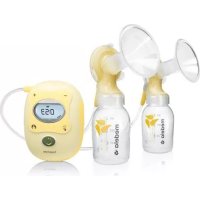
Freestyle - Breast pump MEDELA - Free user manual and instructions
Find the device manual for free Freestyle MEDELA in PDF.



| Product type | Hands-free double expression breast pump |
| Brand | Medela |
| Model | Freestyle |
| Dimensions (motor unit) | 148 x 66 x 46.5 mm |
| Weight (motor unit) | 273 g |
| Power supply | Integrated rechargeable Li-ion battery (2750 mAh) + mains adapter 100-240 V~50/60 Hz, output 5 V 2 A |
| Battery life | Approximately 2 complete sessions (varies with use) |
| Expression technology | 2-Phase Expression (rapid stimulation then slow expression) |
| Suction levels | 9 adjustable levels (L1 to L9) |
| Suction pressure | -45 to -245 mmHg |
| Connectivity | Bluetooth 4.0 LE (compatible with Medela Family app) |
| Special features | Delayed start, pause, memorization of last 30 sessions |
| Display | LED screen with phase indicators, suction level, battery and Bluetooth |
| Service life | 250 hours of use |
| Materials of parts in contact | Polypropylene, silicone, BPA-free |
| Maintenance | Hand washing or dishwasher (plastic parts), disinfection with boiling water or Quick Clean microwave bags |
| Safety | Personal use only, do not immerse motor unit, check condition of parts before each use |
| Available spare parts | Breast shields (21, 24, 27 mm), yellow membranes, valves, Y-tubing, external cups |
| Warranty | 1 year parts and labor (excluding accessories) |
| Protection rating | IP22 |
Frequently Asked Questions - Freestyle MEDELA
User questions about Freestyle MEDELA
0 question about this device. Answer the ones you know or ask your own.
Ask a new question about this device
Download the instructions for your Breast pump in PDF format for free! Find your manual Freestyle - MEDELA and take your electronic device back in hand. On this page are published all the documents necessary for the use of your device. Freestyle by MEDELA.
USER MANUAL Freestyle MEDELA
ENIaandnreovrnrnneurnrnrnnnne nne
and dndn n 120
12345678901011234567890
1
d

1
B
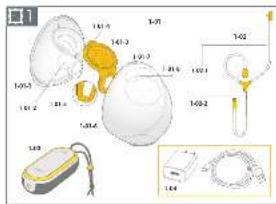
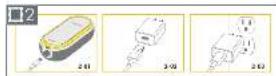
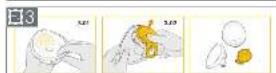
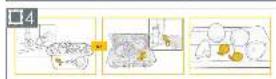
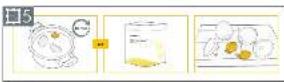
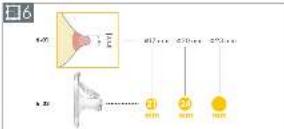
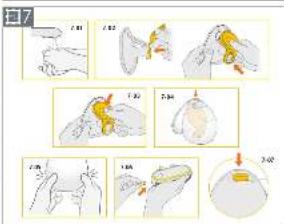
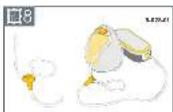
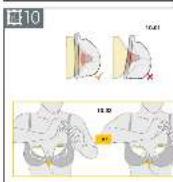
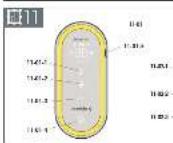
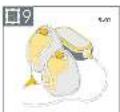
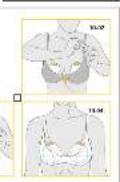
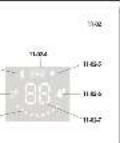
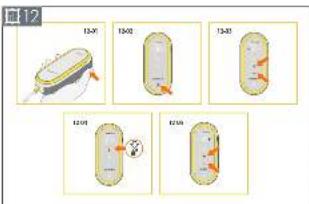
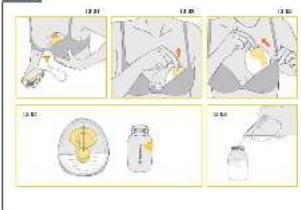
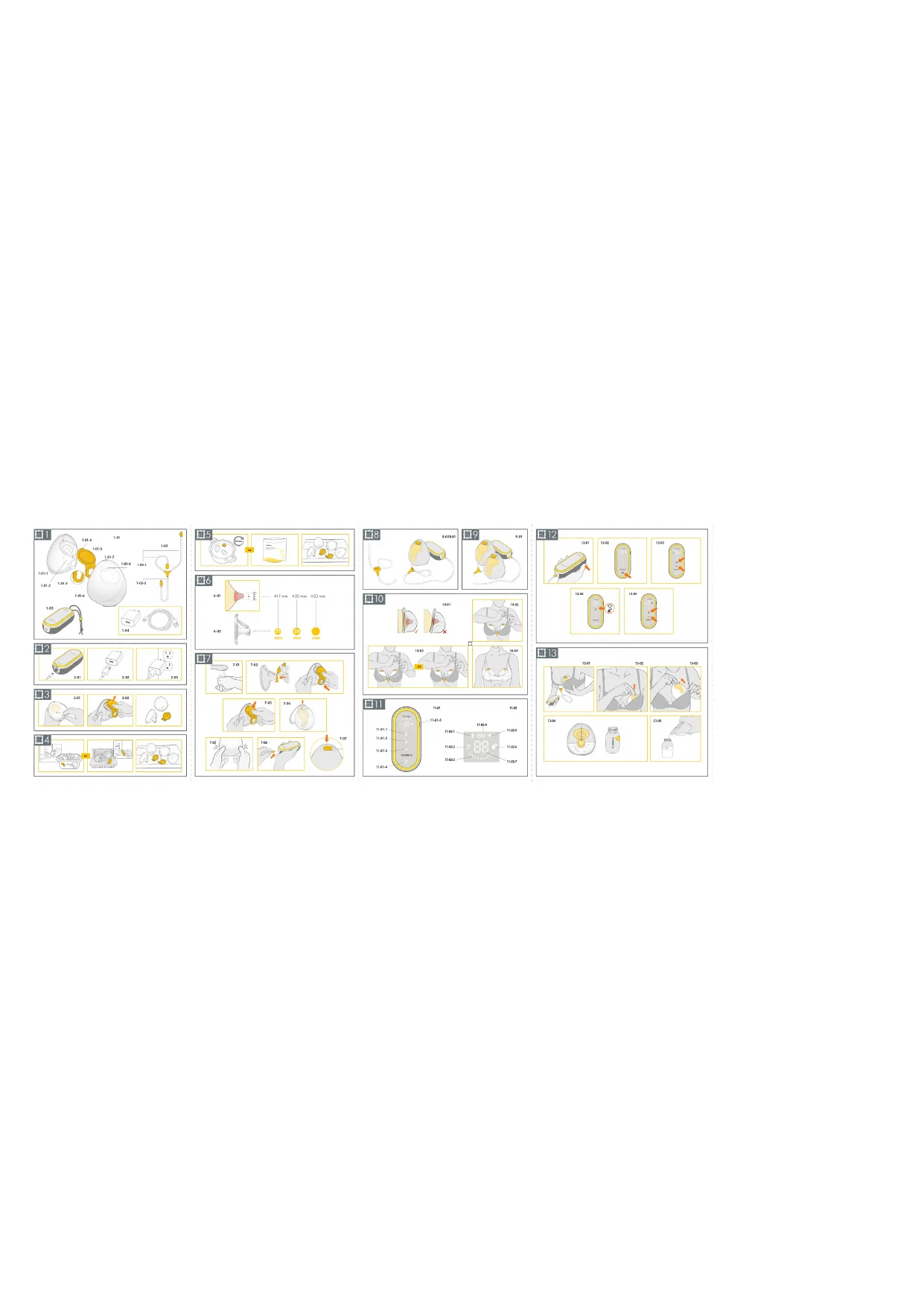
图13
1. Important safety information

Please read all instructions before using this product.
Keep these instructions for future reference.
Warnings identify all instructions that are important for safety. Failure to observe these instructions can lead to personal injury or damage to the product.
The following symbols and signal words show the significance of the warnings:

WARNING
Can lead to serious injury or death.

CAUTION
Can lead to minor injury.
NOTICE
Can lead to material damage (not related to personal injury).

Information
Useful or important information that is not related to safety.
When using electrical products, especially when children are present, basic safety precautions must always be followed.

WARNING
To avoid fire, electric shock, or serious burns:
- The breast pump should never be left unattended when plugged into a power source.
- Never operate an electrical device if it has a damaged cord or plug, if it is not working properly, if it has been dropped or damaged, or dropped into water. If damage is found, immediately discontinue use of power adaptor and call Medela Customer Service.
- Do not use an electrical product that has been exposed to water or other liquids including: - Do not use while bathing or showering.
- Never place or drop into water or other liquids.
- Do not run water over the breast pump.
- If an electrical product has been exposed to water or other liquids, do not touch and, if possible, unplug the device from electrical outlet, turn off and contact the manufacturer.

WARNING
To avoid health risks and reduce the risk of severe injury:
- This is a single-user product. Use by more than one person may present a health risk and voids the warranty.
- Do not use the breast pump while operating a moving vehicle.
- Pumping may induce labor. Do not pump until after giving birth. If you become pregnant while breastfeeding or breast pumping, consult with a licensed healthcare professional before continuing.
- If infected with Hepatitis B, Hepatitis C, or Human Immunodeficiency Virus (HIV), pumping breast milk will not reduce or remove the risk of transmitting the virus to your baby through your breast milk.
- Wash all parts that come into contact with your breast and breast milk after every use.
- The tubing poses a risk of strangulation when being played with and small parts may be swallowed by toddlers.
Close supervision is necessary when the breast pump or accessories are used in the vicinity of children.

CAUTION
To avoid fire or burns:
- Make sure the voltage of the power adaptor is compatible with the power source. See chapter 18 for technical specifications.
- Always unplug electrical products immediately after use except for when charging.
- Do not place or store the product where it can fall into water.
- The breast pump and accessories are not heat-resistant. Keep away from heated surfaces or open flames.
- Do not use near flammable materials.

CAUTION
To avoid health risks and reduce the risk of injury:
- Before each use visually inspect the individual components for cracks, chips, tears, discoloration or deterioration. In the event that damage to the device is observed, please discontinue use until the parts have been replaced.
- This product cannot be serviced or repaired. Do not repair it yourself. Do not modify the device.
- Never use a damaged device. Replace defective or worn parts.
- Use the breast pump only for its intended purpose as described in these instructions for use.
- Do not use the breast pump while sleeping or overly drowsy.
- If tubing becomes moldy, discontinue use and replace tubing.
- Do not microwave or boil breast milk. Microwaving can cause severe burns to baby's mouth from hot spots that develop in the milk during microwaving (microwaving or boiling can also change the composition of breast milk).
- Clean and sanitize all parts that come into contact with your breast and breast milk prior to first use.
- Only use Medela recommended parts with your breast pump.
- If pumping is uncomfortable or causing pain, turn the unit off, break the seal between the breast and the breast shield with your finger and remove the breast shield from your breast.
- While some discomfort may be felt when first using a breast pump, using a breast pump should not cause pain. If you are unsure about correct breast shield sizing please visit www.medela.com or see a lactation consultant/breastfeeding specialist who can help you get a proper fit.
- Contact your healthcare professional or breastfeeding specialist if you can express only minimal or no milk or if expression is painful. See chapter 7.1 for more information.
NOTICE
Take appropriate care in handling bottles and components:
- Plastic bottles and parts become brittle when frozen and may break when dropped.
- Bottles and parts may become damaged if mishandled (e.g., dropped, over-tightened, or knocked over).
- Do not use the breast milk from bottles or components that show signs of damage.
Contents
1. Important safety information 3
2. Intended purpose 8
2.1 Indications for use 8
2.2 Contraindications 8
3. Product description 8
3.1 Description of the device 8
3.2 Your breast pump system features 8
4. Getting started 9
4.1 First steps 9
4.2 Powering your breast pump 9
4.3 Charging the battery 10
5. Disassembling your collection cups
6. Cleaning
6.1 Cleaning overview 12
6.2 Washing 13
6.3 Sanitizing 14
6.4 Cleaning the motor unit 15
6.5 Cleaning the tubing 16
7. Assembling your breast pump
7.1 Selecting the correct breast shield size 17
7.2Assembling the collection cups 17
7.3 Preparing for single pumping 18
7.4 Preparing for double pumping 18
7.5 Placing collection cups within your bra 18
8. Operating your breast pump
8.1 Terms and designations 19
8.2 Operating and display elements 19
8.3 Power and battery status display 20
8.4 Bluetooth® connectivity 20
8.5 Delayed start 21
9. Expressing your breast milk 22
10. Handling of breast milk
10.1 Removing the collection cups from your bra 23
10.2 Pouring milk from collection cups 23
10.3 General storage guidelines 24
10.4 Freezing 24
10.5 Thawing 25
10.6 Feeding breast milk 25
11. Maintenance and care 26
11.1 Power adaptor care 26
11.2 Battery maintenance 26
11.3 Long-term storage 27
12. Troubleshooting 28
13. Ordering information 30
- Warranty 31
- Disposal 32
- Meaning of symbols 33
- International regulations 36
17.1 Electromagnetic compatibility (EMC) 36
17.2 Radio transmission 40
18. Technical specifications 41
2. Intended purpose
2.1 Indications for use
The Freestyle™ Hands-free breast pump is a powered breast pump to be used by lactating women to express and collect milk from their breasts. The Freestyle Hands-free breast pump is intended for a single user. The breast pump is intended to be used in a home environment.
2.2 Contraindications
There are no known contraindications for the Freestyle Hands-free breast pump.
3. Product description
3.1 Description of the device
The Freestyle Hands-free breast pump is a personal-use electric breast pump that includes
2-Phase Expression technology and is capable of single and double pumping.
Mode of operation: Continuous.
The operating life of the breast pump is 250 hours.
3.2 Your breast pump system features
Refer to figure 1 on the foldout pages.
1-01 Hands-free In-bra Collection Cups
1-01-1 Breast shield 21 mm (2pcs) (Applied part)
1-01-1 Breast shield 24 mm (2pcs) (Applied part)
1-01-2 Nipple Tunnel
1-01-3 Yellow membrane (2pcs)
1-01-4 Alignment tab
1-01-5 Valve
1-01-6 Outer shell (2pcs)
1-01-7 Pouring spout
1-01-8 Tubing connection port
1-02 Tubing
1-02-1 Short ends of tubing (connects to collection cups)
1-02-2 Long end of tubing (connects to motor unit)
1-03 Motor unit (Applied part)
1-04 Power adaptor with cable
For ordering information about accessories see chapter 13.
All pictures shown in these instructions are for illustration purpose only. The actual product may vary due to local differences or product enhancement. Medela reserves the right to substitute any component or accessory with a replacement of equivalent performance.
4. Getting started
4.1 First steps
To be ready for expressing milk, do the following before using your breast pump for the first time:
- Charge the battery of your Freestyle Hands-free breast pump for two hours - see chapter 4.3.
- Separate all parts that are exposed to the breast or breast milk prior to cleaning - see chapter 5.
- Wash and sanitize the parts - see chapter 6.2 and 6.3.
4.2 Powering your breast pump
There are two ways to power your breast pump for your pumping session:
By the rechargeable battery By the power adaptor/cable
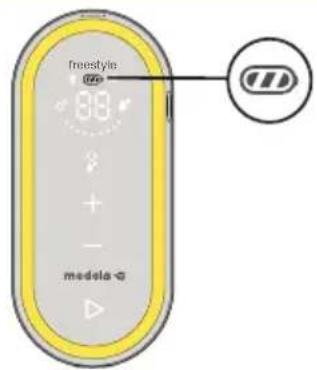
Before first time use, charge the breast pump battery for two hours with the power adaptor.
The battery display shows all three bars when charging is complete.
For details on the battery display see chapter 8.3.
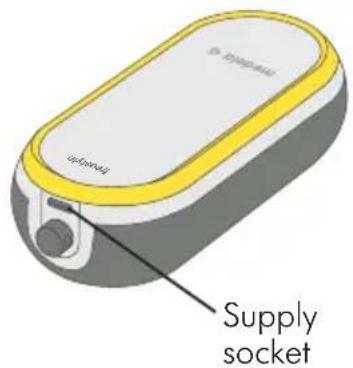
Plug the power cable into the supply socket on top of the motor unit.
For details on powering your breast pump/ charging the battery see chapter 4.3.
4.3 Charging the battery

WARNING
Only use the power adaptor and cable that came with the breast pump. An inadequate power source or cable may result in a fire hazard, electric shock or malfunction equipment.
Refer to figure 2 on the foldout pages.
Charge the battery for two hours before using the breast pump for the first time.
- 2-01 Connect the power cable to the motor unit.
- 2-02 Connect the power cable to the power adaptor.
- 2-03 Plug the power adaptor into a wall outlet.
The battery display shows all three bars when charging is complete.
For details on the battery display see chapter 8.3.

Information
You can use the breast pump while charging the battery. However, it will charge in a slower mode when the pump is running.
5. Disassembling your collection cups
Refer to figure 3 on the foldout pages.
- 3-01 Open the collection cup using the tabs at the bottom.
- 3-02 Remove the yellow membrane from the breast shield.
6. Cleaning
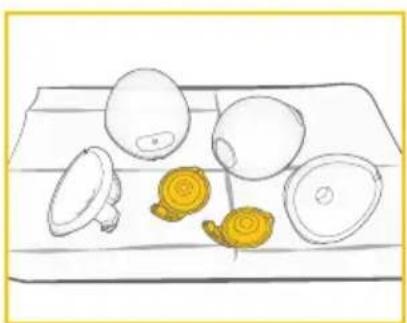
It is important you do the following before using your breast pump for the first time: Disassemble all parts & clean following your breast pump cleaning instructions.
For additional cleaning guidelines see the Center for Disease Control website:
https://www.cdc.gov/healthywater/hygiene/healthychildcare/infantfeeding/breastpump.html (U.S).
Supplies needed:
- Dish soap
- Clean soft brush
- Clean wash basin or dishwasher
- Drinking-quality water
- Clean pot for boiling water
Parts to wash and sanitize:
Breast shields
- Outer shells
- Yellow membranes
CAUTION
Separate and wash all parts that are exposed to breast milk immediately after use. This will help to remove breast milk residue and prevent growth of bacteria.
- Wash hands thoroughly with soap and water.
- Only use drinking-quality tap water or bottled water for cleaning.
- Do not place collection cup parts directly in the sink to rinse or wash. Use a clean wash basin used only for infant items.
- Do not use a dish towel to rub or pat items dry.
- Do not use disinfectants for cleaning.
NOTICE
To prevent damage to the tubing.
- Only clean the tubing as described in chapter 6.5. Do not clean the tubing as described below or with the Quick Clean Micro-Steam bags in the microwave.
NOTICE
Pay attention to the following:
- Take care not to damage parts of the collection cups during cleaning.
- Store the dry collection cups in a clean bag/container until next use.
- Do not store wet or damp parts as mold may develop.
- If you notice a white residue on your collection cup parts after boiling, your water may have a high mineral content. Remove residue by wiping parts with a clean towel and allow to air dry.
- Distilled water is recommended when boiling parts to prevent substantial mineral build-up over time, which may compromise the parts.
6.1 Cleaning overview
Washing and sanitizing are two different activities. They must be done separately to protect you and your baby, and to maintain the performance of your breast pump.
Wash - To clean the surfaces of the parts by physically removing milk residues and other possible contaminants.
Sanitize - To efficiently lower the number of germs that may be present on the surfaces of the washed parts.
| When to clean | Breast shield Outer shell Yellow membrane | ||
| Before first use | Disassemble the parts according to chapter 5 Wash the parts according to chapter 6.2 Sanitize the parts according to chapter 6.3 | ||
| After each use | Disassemble the parts according to chapter 5 Wash the parts according to chapter 6.2 | ||
| Once per day after use | Disassemble the parts according to chapter 5 Wash the parts according to chapter 6.2 Sanitize the parts according to chapter 6.3 | ||
| When to clean | Tubing Motor unit | ||
| As needed | Normally, cleaning of the tubing is not necessary. Refer to chapter 6.5. | Wipe with clean, damp towel. Refer to chapter 6.4. | |
6.2 Washing
Refer to figure 4 on the foldout pages.
Rinse and wash by hand (before first use and after each use)
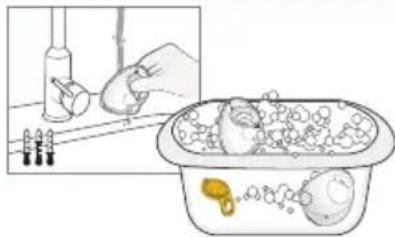
Do not place the parts directly in the kitchen sink for rinsing and washing. Use a dedicated wash basin for infant items.
- Rinse the disassembled parts, except for the tubing, with cold clear drinking-quality water (approx. 68^ / 20^ ).
- Clean these parts with plenty of warm, soapy water (approx. 86^ / 30^ ). Use a commercially available dish soap and clean soft brush.
- Rinse the parts with cold clear drinking-quality water for 10 to 15 seconds (approx. 68^ / 20^ ).
- Allow to completely dry after washing.
or
Wash in dishwasher (maximum once per day)
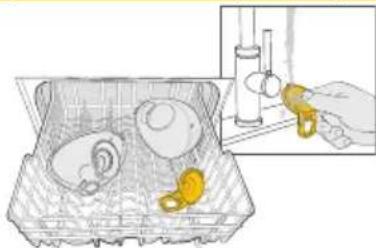
- Place the disassembled parts, except for the tubing, on the top rack or in the cutlery section. Use a commercially available dishwashing detergent.
- Rinse the yellow membrane under running water after dishwashing.
- Allow to completely dry after washing.

Information
If using the dishwasher, parts may become discolored. This will not impact the functioning of the parts. Do not routinely wash the tubing. See chapter 6.5 for more details.
Drying
- Allow to air-dry on a clean, unused dish towel or paper towel.
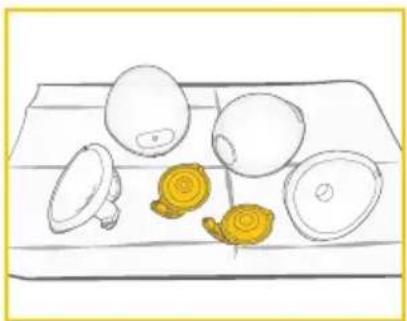
6.3 Sanitizing
Refer to figure 5 on the foldout pages.
Sanitize on stovetop (before first use and once per day after use)
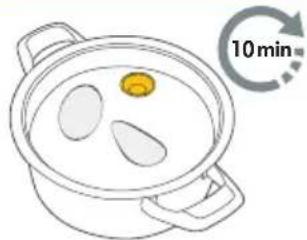
- Cover the disassembled, washed parts, except for the tubing, with plenty of water and boil at least for 10 minutes. Ensure that the parts are not in direct contact with the bottom of the pot.
- Allow to dry after sanitizing.
or
Sanitize in microwave (before first use and once per day after use)
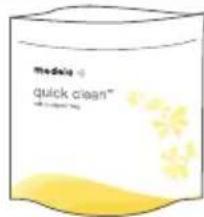
- Use Quick Clean Micro-Steam bags* in the microwave in accordance with the instructions on the bags.
-
Allow to dry after sanitizing.
-
Refer to local website/shops for availability in your country.
Drying
- Allow to air-dry on a clean, unused dish towel or paper towel.
- Put the clean and dry parts in a clean storage bag or a clean environment.
Do not store parts in an airtight container/bag if moist. It is important that all residual moisture dries.
6.4 Cleaning the motor unit
Supplies needed:
- Drinking-quality water
- Dish soap
- Clean dish towel or paper towel
Parts needed:
- Motor unit
CAUTION
To prevent electric shock and damage to the material:
- Unplug the breast pump before cleaning the motor unit.
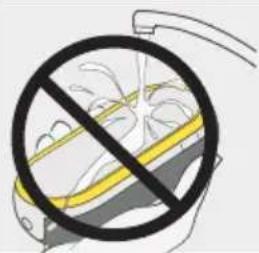
- Do not immerse the motor unit in water; do not run water over the motor unit.
NOTICE
- Do not spray or pour liquid directly onto the pump.
- When cleaning the motor unit display, only use a damp, soft towel with mild washing-up liquid. Other cleaners or abrasive cloths may degrade the display performance.
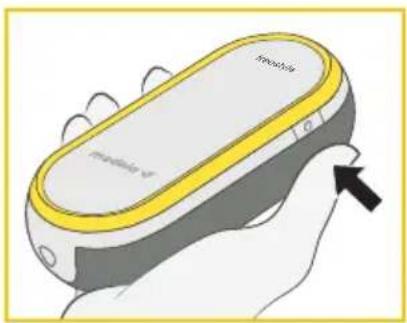
- Switch the breast pump off.
- Unplug the breast pump from the power source.
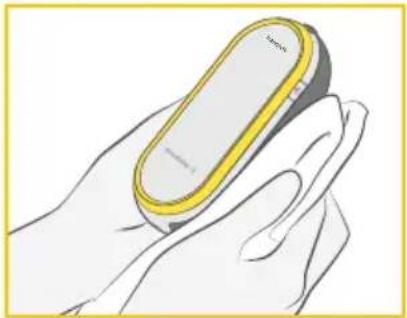
- Wipe the motor unit with a clean towel moistened with drinking-quality water.
- Wipe the motor unit dry with a clean, dry towel.
6.5 Cleaning the tubing
Normally, cleaning of the tubing is not necessary.
Information
Inspect the tubing. If you find condensation in the tubing, wash and dry it immediately or replace the tubing. If you see breast milk inside the tubing or tubing connector do not attempt to wash, clean or sanitize the tubing or tubing connector. Instead contact the manufacturer.
Supplies needed:
- Drinking-quality water
- Dish soap
Parts needed:
- Tubing
Washing the tubing
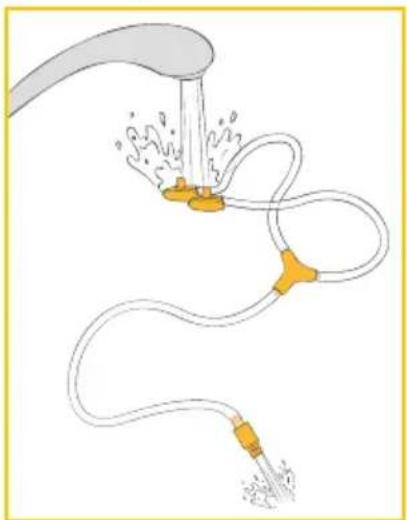
- Switch the breast pump off.
- Remove the tubing from the motor unit.
- Unplug the tubing from the collection cups.
- Rinse the tubing by pouring cool water into both short tubing ends until it flows out of the long tubing end.
- Wash the tubing in warm, soapy water.
- Rinse the tubing with clear water.
Drying the tubing
- Shake out any water droplets.
- Hang the tubing to air dry.
- Make sure that the tubing is completely dry before using it.
NOTICE
- If the tubing becomes moldy, discontinue use and replace tubing. Refer to chapter 13 for ordering information.
- Do not run the breast pump with wet tubing; doing so will cause damage to your breast pump.
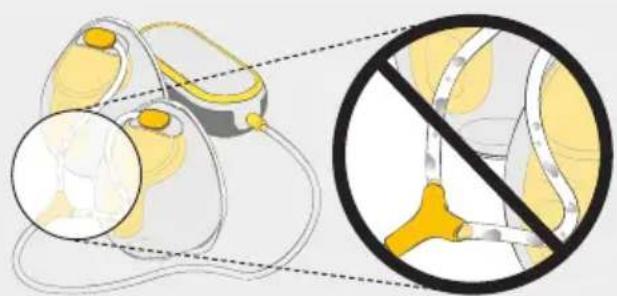
7. Assembling your breast pump
Only use clean and dry parts for assembly. Refer to chapter 6 for cleaning.
7.1 Selecting the correct breast shield size
Make sure to use the correct breast shield size. It is an essential component of effective pumping, helping to optimize milk flow.
Refer to figure 6 on the foldout pages.
- Select the breast shield size by measuring the diameter of your nipple ( 6-01).
- Select the breast shield size that is slightly larger than your nipple ( 6-02). 21 mm and 24 mm size shields are included in the pack.
For more information on breast shield sizing and other available sizes, visit www.medela.com or see chapter 13 for ordering information.
72 Assembling the collection cups
Only use clean and dry parts for assembly. Refer to chapter 6 for cleaning.
Parts needed:
-
Tubing
-
Yellow membrane
Breast shield
-
Outer shell
-
Motor unit

CAUTION
To prevent contamination of your milk:
- Wash hands thoroughly with soap and water before touching the motor unit, parts of the collection cups and breasts.
- Dry your hands with a fresh towel or a single-use paper towel.
- Avoid touching the inside of the collection cup components.
To make sure that your breast pump works properly and safely:
- Check collection cup components for wear or damage before use. Replace if necessary.
- Always inspect all parts prior to use for cleanliness. If dirty, clean according to chapter 6.
- Only use genuine Medela parts. See chapter 13 for details.
NOTICE
To prevent damage to the breast pump, all components must be completely dry before use.
Refer to figure 7 on the foldout pages.
- 7-01 Wash hands thoroughly with soap and water before touching the motor unit, parts of the collection cups and breasts. Dry your hands with a clean towel.
- 7-02 First assemble the valve of the yellow membrane on the front of the breast shield.
- 7-03 Align the disc of the yellow membrane on the designated circular slot using the alignment tab at the top to ensure that it is at the right place. Press around the edges to make sure it is fully assembled.
- 7-04 Insert the pouring spout into the opening on the shield.
- 7-05 Push the outer shell and breast shield together tightly, ensuring it is fully sealed all the way around until you hear a snapping sound.
- 7-06 Connect the long end of the tubing to the motor unit as far as it will go.
- 7-07 Connect the short end of the tubing into the tubing connection port on the collection cup.
73 Preparing for single pumping
Refer to figure 18 on the foldout pages.
- Assemble one collection cup as described in chapter 7.2.
8-01 Insert the unused tubing end into the Y-shaped tubing holder.
8-02 Correctly assembled system (for single pumping).
- 8-03 Place the collection cup in your bra according to chapter 7.5.
Start pumping as described in chapter 9.
74 Preparing for double pumping
Information
- Double pumping saves time and increases the nutritional value of the milk.
- For the delayed start function see chapter 8.5.
Refer to figure 9 on the foldout pages.
- Assemble the two collection cups as described in chapter 7.2.
9-01 Correctly assembled system (for double pumping).
- 9-02 Place the collection cups in your bra according to chapter 7.5.
Start pumping as described in chapter 9.
75 Placing collection cups within your bra
Refer to figure 10 on the foldout pages.
- 10-01 Ensure that the nipple is centered in the tunnel of the breast shield.
- 10-02 The hands-free collection cups can be worn under your regular nursing bra. Your bra will hold the collection cup in place. If you find it uncomfortable or painful during use, try switching to a looser, more stretchy nursing bra.
- 10-03 The tubing can be connected facing inwards (towards the breasts) or outwards (towards the arms) based on personal preference. Ensure that the tubing is placed outside your bra so that it is not pinched or bent during use.
- 10-04 The hands-free collection cups can be used in a vertical or slightly tilted position for better visibility of the nipple and milk ejection. The scale on the collection cup gives you an approximate indication of the volume during pumping.
8. Operating your breast pump
8.1 Terms and designations
| 2-Phase Expression | Through research, Medela found that babies nurse in 2 phases - Stimulation and Expression. This research is the basis for the technology in all Medela breast pumps. |
| Stimulation phase | Fast sucking/pumping mode to stimulate milk flow. |
| Expression phase | Slower sucking/pumping mode for gentle and efficient milk removal after milk has started flowing. |
| Maximum comfort vacuum | Highest vacuum setting where pumping still feels comfortable. Different for every mother. |
| Let-down | The reflex that makes the milk begin to flow from the breast. |
8.2 Operating and display elements
Refer to figure 111 on the foldout pages.
| 11-01 Control elements | 11-02 Display elements |
| 11-01-1 Let-down button11-01-2 Increase vacuum button11-01-3 Decrease vacuum button11-01-4 Start/Pause button11-01-5 On/Off buttonUser guidance:The control and display elements are not visible at all times.When the breast pump is switched on,the active elements light up. | 11-02-1 Bluetooth indicator11-02-2 Stimulation phase indicator11-02-3 Vacuum level display11-02-4 Battery display11-02-5 Power indicator11-02-6 Expression phase indicator11-02-7 Multifunction displayThe multifunction display shows,depending on the device state,the following information:Session time in seconds (first minute of pumping), then in minutesL1 to L9 for the vacuum level (along with the vacuum level display)Pairing code (during Bluetooth connection)Start delay in seconds |
8.3 Power and battery status display
| The power indicator (lightning symbol) indicates if the power adaptor is connected. → If it lights up, the power adaptor is connected. | |
| The battery display shows the state of the battery and its charging level. → The display of all three bars indicates that the battery is full. | |
| With decreasing battery capacity, fewer bars appear. → Two bars: approx. 75% of the capacity is remaining. → One bar: approx. 40% of the capacity is remaining. | |
| flashing | → When the breast pump emits an audio signal and the last single bar is flashing, the battery is almost empty. |
| flashing | → After emitting a second audio signal while the outline of the battery display is flashing, the breast pump will stop operation and switches off completely after five seconds. |
| flashing | If all three bars and the outline of the battery display are flashing at the same time, this indicates that the battery is overheated or defective. See Troubleshooting (chapter 12) or call Medela Customer Service. |
8.4 Bluetooth® connectivity
Bluetooth is a wireless technology for exchanging data over short distances. This can be used to connect your Freestyle Hands-free breast pump to the Medela Family smartphone app. By connecting your breast pump to the Medela Family app you can automatically transfer your pumping data (session length, phases & levels) and manually input the amount of milk expressed.
To benefit from the features of the app you need to create an account in the Medela Family app.
Installing the Medela FamilyTM app
- Download and install the Medela Family app to your mobile device. The app is available free of charge for Apple® iOS and Android™ operating systems.
- Open the Medela Family app on your mobile device and register by means of the app.
Connecting (pairing) your Freestyle Hands-free breast pump
- Make sure that Bluetooth is enabled on your mobile device. When asked, please make sure to give the app permission to use Bluetooth. Android only: When you start Medela Family you get asked if you want to give the app permission to use your Location. We don't track the position of your phone, but this is a requirement of the smartphone's operating system to connect to a Bluetooth device.
- In the Medela Family app, click on "Connect pump" > "Set up a new breast pump" and follow the set-up and pairing instructions on the screen.
Saving your pumping session into the app
After you finished a session, press the power button of the breast pump to transmit the data to the Medela Family app.
Information
- By tracking your pumping sessions on the Medela Family app, you can stay up to date with daily highlights and custom content.
- Having visibility of your pumping history gives you the opportunity to plan efficiently each day and track changes in your body like an increase or decrease in milk output.
- After initial set-up, the Bluetooth indicator will automatically appear on your breast pump, when powered on, if your paired device is near and the Medela Family app is open.
- You can pair multiple mobile devices with your Freestyle Hands-free breast pump.
- Only one mobile device at a time can interact with the Freestyle Hands-free breast pump.
- The breast pump has the ability to store your last 30 pumping sessions in its memory. If the pump is not connected prior to session 31, your history will be overwritten with new session data.
- When connected to the pump, your Medela Family app account will log an infinite number of historical sessions.
- After you finished a session, press the power button on the breast pump to transmit the data to the Medela Family app.
Removing your Freestyle Hands-free breast pump from your smartphone
- Inside the Medela Family app go to 'more' and then to pump settings.
- Tap on the pump you want to remove and then tap on 'remove this pump' button.
Information
- Removing the Freestyle Hands-free breast pump from your mobile device will not delete pumping information stored in the Medela Family app.
- If you reconnect your breast pump and mobile device, the last 30 records stored within your pump will be transferred.
To learn more, please visit www.medela.com/app.
Trademark recognition: The Bluetooth® word mark and logos are registered Trademarks owned by Bluetooth SIG, Inc., and any use of such marks by Medela AG is under license. Apple is a trademark of Apple Inc., registered in the U.S. and other countries. Android is a trademark of Google LLC.
8.5 Delayed start
The Freestyle Hands-free breast pump features a delayed start function. With this, the pump only starts after a delay of ten seconds.
This is useful in case you want to multitask and prepare yourself before pumping starts.
- To activate the delay, press and hold the Start/Pause button for two seconds in either standby or pause mode.
The breast pump emits an audio signal to indicate that the delay has started.
During the delay time the Start/Pause button is flashing and the multifunction display shows the remaining time in seconds.
- After the delay time has elapsed the breast pump starts operating.
To skip the delay, press the Start/Pause button
The breast pump starts operating immediately.
9. Expressing your breast milk

CAUTION
- Do not try to express with vacuum that is too high and uncomfortable (painful). The pain, along with potential breast and nipple trauma, may decrease milk output.
- Contact your healthcare professional or breastfeeding specialist if you can express only minimal or no milk or if expression is painful.
NOTICE
Make sure that the tubing is not kinked or pinched while pumping.
Refer to figure 12 on the foldout pages.
- Make sure that the collection cups are connected and positioned properly.
- 12-01 Press the On/Off button on the side until the breast pump emits an audio signal, then release the button.
The breast pump is now in standby mode.
- 12-02 Press the Start/Pause button to start the pumping operation.
The breast pump begins in the stimulation phase. - 12-03 Adjust the vacuum with the Increase vacuum (+) and Decrease vacuum (-) buttons to find a comfortable level.
- 12-04 As soon as your milk begins to flow, press the Let-down button to go to the expression phase.
The breast pump proceeds with the expression phase.
If the Let-down button is not pressed within two minutes, your breast pump will automatically go to expression phase.
- 12-05 Adjust the vacuum with the Increase vacuum (+) and Decrease vacuum (-) buttons to find your maximum comfort vacuum.
Once you are pumping in the Expression phase, increase the vacuum level until pumping feels slightly uncomfortable (not painful), then decrease the vacuum by 1 level with the Decrease vacuum ( ) button.

formation
- Maximum comfort vacuum is the highest vacuum setting where pumping still feels comfortable. This is different for every mother.
- Stimulation should be at a comfortable vacuum level, striving for a maximum level is not necessary.
-
Reassess your maximum comfort vacuum throughout your pumping experience. It may change throughout each stage of lactation.
-
When your pumping session is over, press the Start/Pause button to stop the pumping operation.
→ The breast pump stops automatically after 30 minutes if there is no user interaction with the pump.
- Press the On/Off button on the side to switch the breast pump off.
Pausing
In both stimulation and expression phase the breast pump can be paused.
This allows you to readjust yourself or your collection cups, or attend to your surroundings.
- For pausing, press the Start/Pause button while the breast pump is running.
The pumping operation stops and the Start/Pause button and the time display are flashing.
- To resume pumping, press the Start/Pause button again.
If you want to start a completely new pumping session, switch the breast pump off and on again by pressing the On/Off button twice.
Information
- If pumping is not resumed within two minutes, the breast pump switches off automatically.
- To resume pumping, you will need to start a new session.
- If you need to pause for more than two minutes, we recommend restarting with stimulation phase.
- Do not forget to record milk output in the Medela Family app.
10. Handling of breast milk
10.1 Removing the collection cups from your bra
Refer to figure 13 on the foldout pages.
- 13-01 While the pump is still running, slightly lean forward and ensure all milk from the nipple tunnel enters the collection container. Turn off pump.
- 13-02 Detach the tubing from the collection cups.
- 13-03 Carefully remove the collection cups from your bra.
10.2 Pouring milk from collection cups
Refer to figure 13 on the foldout pages.
- 13-04 Place the collection cups in an upright position on a surface where they will not be easily knocked over. You can use the volume scale markings on the shield to read the collected milk volume. The scale on the outer shell gives you an approximate indication of the volume during pumping.
- 13-05 With the rounded outer shell facing down, pour breast milk through the pouring spout into a bottle or container for storage. Do not use collection cups to store milk. Do not store assembled cups in the refrigerator.
- Fully disassemble and clean after each use and sanitize once per day as described in chapter 5 and chapter 6.
10.3 General storage guidelines
Refer to www.medela.com for a recommendation on storing and thawing of breast milk.
Storage guidelines for freshly expressed breast milk (for healthy term babies)
| Room temperature 60 to 77°F (16 to 25°C) | Refrigerator 39°F (4°C) or colder | Freezer 0°F (-18°C) or colder | Breast milk thawed in the refrigerator |
| Up to 4 hours is best | Up to 3 days is best | Up to 6 months is best | At room temperature: Up to 2 hours |
| *Up to 6 hours for milk expressed under very clean conditions | *Up to 5 days for milk expressed under very clean conditions | *Up to 9 months for milk expressed under very clean conditions | Refrigerator: Up to 24 hours Do not refreeze! |
*Guidelines for expressing milk under very clean conditions:
Before expressing breast milk, mothers should wash their hands with soap and water or an alcohol-based hand sanitizer. The pump parts and pumping area must be clean.
Breasts and nipples do not need to be washed before pumping.
- These guidelines for storage and thawing of breast milk are a recommendation.
Contact your lactation consultant or breastfeeding specialist for further information. - Store breast milk in the coldest spot of the refrigerator (at the back of the glass shelf above the vegetable compartment).
For information on storing your breast milk, visit www.medela.com.
For information on storing your breast milk, visit BreastMilkGuidelines.com (U.S.) or https://www.womenshealth.gov/breastfeeding/pumping-and-storing-breastmilk (U.S) or Medela.ca/Breastfeeding/Moms-Journey/Storing-and-Thawing-Breast-Milk (Canada).
10.4 Freezing
NOTICE
- Repeated freeze/thaw cycles destroy the structure of the milk. Therefore, never refreeze breast milk.
- Freeze expressed breast milk in plastic food-grade bottles or milk storage bags. Do not fill the bottles or bags more than 3/4 full to allow space for possible expansion.
- Label the bottles or bags with the date and volume of expression.
- Plastic bottles and parts become brittle when frozen and may break when dropped.
- Do not use the breast milk from bottles or components that show signs of damage.
10.5 Thawing

CAUTION
Do not thaw or warm breast milk in a microwave or a pan of boiling water. This helps preserve important components and prevents burns.
- To preserve breast milk components, thaw the milk overnight in the refrigerator.
- Alternatively, hold the bottle or bag under warm water (max. 98.6^ / 37^ ) and use immediately, as soon as it has been thawed.
NOTICE
Gently swirl the bottle or bag to mix any fat that has separated. Avoid shaking or stirring the milk.
10.6 Feeding breast milk
It is recommended that breastfeeding is well established prior to bottle feeding your baby.
- Always inspect the bottle, the teat and other components immediately before and after each use. If the teat appears cracked or torn, discontinue use immediately.
- To prevent a possible choking hazard, test the strength of the teat by pulling on the end of the teat.
- Do not attempt to enlarge the teat hole.
- Infants must not be bottle fed without adult supervision.
- Do not use the teat as a pacifier.
For additional breast milk collection & storage information, please visit www.medela.com, BreastMilkGuidelines.com (U.S.) or
Medela.ca/Breastfeeding/Moms-Journey/Storing-and-Thawing-Breast-Milk (Canada).
11. Maintenance and care
11.1 Power adaptor care

WARNING
If the power adaptor outer casings become loose or are separating, stop use and contact Medela immediately. Separation of the casing can result in electric shock.
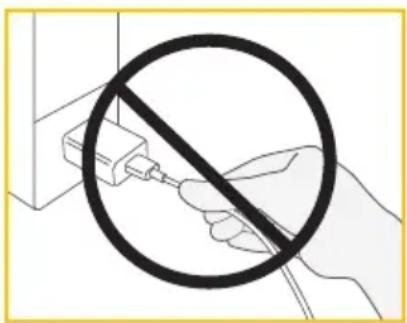
NOTICE
To keep your power adaptor and cable in good working condition, pay attention to the following:
Do not unplug the cable or the power adaptor by pulling on the cord, but hold it by the connector housing and adaptor body.
Traveling internationally

Information
Hints on traveling with your breast pump.
When traveling internationally, we recommend purchasing a travel adaptor (not included) to match the corresponding wall outlet. Please consult with the country you are visiting to find out what type of adaptor will work best. The power adaptor of the breast pump is two-pronged and does not require a grounded outlet.
112 Battery maintenance
Your breast pump contains a built-in (not replaceable) lithium-ion rechargeable battery.
NOTICE
In case of a completely discharged battery, the breast pump cannot be used instantly after connecting it to the power adaptor. Allow the battery to be charged for at least 15 minutes before attempting to switch the pump on.
NOTICE
- For optimum pump and battery performance, use the power adaptor that comes with the breast pump.
- Make sure that the voltage of the power adaptor is compatible with the power source.
Information
To preserve the battery life cycle:
- Keep your breast pump in a cool place.
- Recharge the battery before it completely drains. This is better for the life cycle of the battery.
- Fully charge the battery before storing your breast pump.
Refer to chapter 8.3 for information on the battery charging state.
- If your breast pump has been stored in a hot location, it may not run on battery power right away. To resume normal battery function, allow the breast pump to cool down for one hour. During this time, you can power your breast pump with the power adaptor plugged into a wall outlet.
Traveling internationally
Information
This breast pump has a lithium-ion battery. Carrying such batteries on airplanes may be restricted by the country you are visiting. Please consult with the country you are visiting to find out if there are any restrictions that pertain to traveling with lithium-ion batteries.
113 Long-term storage
Your breast pump contains a rechargeable battery. To preserve your breast pump, when not in use for an extended amount of time, it will automatically transition into storage mode. To remove from storage mode, plug your breast pump into an external power source and charge the battery for two hours. Do not store collection cups in assembled state over an extended period of time.
Before storing your breast pump for an extended amount of time remember to:


Clean the collection cup (refer to chapter 6)
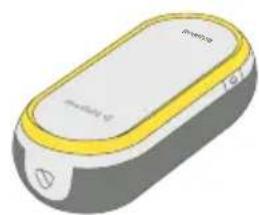

Clean the motor unit (refer to chapter 6.4)
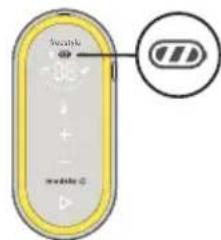

Make sure that the battery is charged (see below)
It is best to fully charge the battery before storing your breast pump for an extended period of time. Refer to chapter 8.3 for information on the battery charging state.
12 Troubleshooting
In case of an unexpected behavior of your breast pump, check with the troubleshooting table if you find the issue in the column "Problem" and follow the instructions in the column "Solution".
Troubleshooting table
| Problem Solution | |
| The breast pump does not enter the standby mode after you pressed the On/Off button | You pressed the On/Off button for too short or too long a time. Press the On/Off button until you hear an audio signal, then release it. If the pump is in storage mode, it will take somewhat longer (approx. one second) until the audio signal is emitted. |
| The display does not light up after you pressed the On/Off button | To reset your breast pump, press and hold the On/Off button (on the side) for seven to ten seconds. If there is no change, make sure that the breast pump is connected to a properly working power supply. If there is still no change, contact the Medela Customer Service. |
| The timer does not count up after you pressed the Start/Pause button | Contact the Medela Customer Service. |
| The breast pump generates no vacuum (motor not working) after you pressed the Start/Pause button | Make sure that the breast pump is switched on. Contact the Medela Customer Service. |
| The breast pump generates only constant vacuum instead of sucking cycles | Contact the Medela Customer Service. |
| The breast pump stops operation or cannot be turned on (emits an audio signal and all elements of the battery display are flashing) | The breast pump refuses operation due to battery over-heating. Allow the motor unit to cool down, then restart the breast pump. |
| All elements of the battery display are flashing when you are trying to charge your breast pump | • Charging is not possible when the battery temperature is too high. Allow the motor unit to cool down, then resume charging. |
| There is low or no suction | • Make sure that all collection cup components are clean and dry and that connections are secure. • While pumping, make sure the breast shields form a complete seal around the breast. • When single pumping, make sure that the unused tubing end is correctly plugged into the tubing holder. • If suction does not improve after having followed these steps, contact Medela Customer Service. |
| The breast pump is not responding as expected | • To reset your breast pump, press and hold the On/Off button (on the side) for seven seconds. • If there is no change, contact the Medela Customer Service. |
| The breast pump exterior got wet | • Unplug the breast pump from the power source and switch it off. • Dry off the exterior of the breast pump. |
| The breast pump has been submerged in water | • Unplug the breast pump from the power source and switch it off. • Contact Medela Customer Service. |
| Data cannot be sent | • The Bluetooth function isn't the mobile device is turned off. Turn the Bluetooth function on and try to send the data again. • Pairing between the two devices has not been completed. Perform pairing instructions again. Refer to chapter 8.4. • The mobile device is too far away from the breast pump. Move the device and breast pump closer together. • The application on the mobile device is not ready. Check the application. |
If you have not resolved the problem with your breast pump or you have further questions, please contact Medela Customer Service. For contact details visit www.medela.com. Under "Contact" choose your country.
13. Ordering information
Accessories
Article number Product
Depending on your region, check local website/shops for availability.
21 mm Breast shields compatible with Medela Hands-free collection cups
24 mm Breast shields compatible with Medela Hands-free collection cups
27 mm Breast shields compatible with Medela Hands-free collection cups*
Y-shaped tubing compatible with Medela Freestyle Hands-free
- If the result of expression is unsatisfactory or expression is painful, contact your lactation consultant or breastfeeding specialist. A different size of breast shield may help make expression more comfortable and effective.
In case of difficulties in finding your desired accessory, please contact Medela Customer Service.
For contact details visit www.medela.com. Under "Contact" choose your country.
For replacement of lost or defective parts please contact Medela Customer Service.
Other Medela products are available at www.medela.com.
14. Warranty
This product is warranted by Medela, LLC to the original retail purchaser to be free from defects in material and workmanship for the period of 1 year for pump mechanism from the date of purchase. Warranty can only be claimed in the country of purchase. In the event of defect, at Medela's option, Medela will replace this product, without charge for such replacement parts. Purchaser shall bear all expense for returning this product to Medela. This warranty does not apply to any product used commercially or which has been subjected to misuse, abuse or alteration.
ANY AND ALL IMPLIED WARRANTY, INCLUDING THE WARRANTY OF MERCHANTABILITY, ARE LIMITED TO A DURATION OF 1 YEAR FROM DATE OF PURCHASE. SOME AREAS DO NOT ALLOW LIMITATIONS ON HOW LONG AN IMPLIED WARRANTY LASTS, SO THE ABOVE LIMITATIONS MAY NOT APPLY TO YOU. THIS WARRANTY GIVES YOU SPECIFIC LEGAL RIGHTS AND YOU MAY ALSO HAVE OTHER RIGHTS WHICH VARY FROM STATE TO STATE OR IN YOUR COUNTRY.
Before you make a claim under this warranty, it may save time and expense to call Medela Customer Service (see contacts below). You may also call this number for additional information concerning this warranty. If you wish to make a claim under this warranty, you must return this product to Medela with a return authorization number received from Medela Customer Service, prepaid, together with your dated bill of sale or other proof of purchase and a brief statement of the problem to the following address:
USA
Medela LLC - Returns, Door 4501
1101 Corporate Dr.
McHenry, IL 60050
ATTENTION:RETURNS
Medela Customer Service (toll free): 1-800-435-8316
Medela Canada
4160 Sladeview Crescent Unit #8
Mississauga, ON L5L 0A1
ATTENTION:RETURNS
info@medela.ca
Contact Customer Service for a return authorization number. Returns are not accepted without an authorization number.
15. Disposal
Disposal of your breast pump
At the end of its operating life, separate the parts of your breast pump and dispose of according to the following instructions.
Breast shields, outer shells, tubing and membranes
The parts are made of plastics that are not harmful to the environment when disposed of as household waste. Recycle or dispose of according to local regulations.
Motor unit and power adaptor

Do not dispose of electric or electronic equipment together with unsorted municipal waste, but collect it separately.
In the European Union the manufacturer or its vendor must take back waste equipment.
Other countries may have similar collection and recycling systems. Dispose of the waste equipment according to local regulations.
Inquire at the point of sale or contact your local authority for appropriate collection points for waste equipment.
The separate collection and recycling of your waste equipment at the time of disposal will help conserve natural resources and ensure that it is recycled in a manner that protects human health and the environment.
CAUTION
Hazardous materials present in electric/electronic equipment may harm human health and the environment if the waste equipment is not disposed of properly.
16. Meaning of symbols
The following tables explain the meaning of the symbols found on the product parts and its packaging.
Symbols used in these instructions
| A | General safety alert symbol, points to information related to safety.1 | % | Defines a relative humidity range (e.g. for operation, transport, or storage).3 |
| X | Defines a temperature range (e.g. for operation, transport, or storage).2 | °C | Defines an atmospheric pressure range (e.g. for operation, transport, or storage).4 |
| ® | Indicates that this device contains Bluetooth wireless technology. (Trademarks of Bluetooth Special Interest Group (SIG)) | ||
Symbols on the motor unit
| Indicates the location of the On/Off button.5 | Identifies the manufacturer.6 | ||
| Indicates the date of manufacturing.7 | REF | Indicates the part number of the device.8 | |
| SN | Indicates the serial number of the device.9 | IP22 | Indicates the degree of protection against ingress of foreign objects and moisture.10 |
| Indicates compliance with international requirements for protection from electric shock (Type BF applied parts).11 | Do not dispose of electric/electronic devices together with unsorted municipal waste (dispose of the device in accordance with local regulations).12* | ||
| Indicates the compliance with additional USA and Canada safety requirements for medical electrical equipment.13 | Indicates that this device contains Bluetooth wireless technology. (Trademarks of Bluetooth Special Interest Group (SIG)) | ||
| Read and follow the instructions for use.14 | --- | Indicates direct current.16 | |
| FC | Indicates the compliance with the requirements of the Federal Communications Commission.15 | CE | The CE mark indicates conformity with the European applicable directive.* |
| The Regulatory Compliance Mark indicates the compliance with Australian EMC and radio transmission requirements.* | |||
Symbols on the power adaptor
| ~ | Indicates alternating current.17 | --- | Indicates direct current.16 |
| +--- | Indicates the polarity of the USB power output.18 | □ | Indicates that the device is a Class II electrical appliance (double insulated).19 |
| Indicates that the device is for indoor use only.20 | VI | Indicates the efficiency level for external power supplies.21 | |
| FC | Indicates the compliance with the requirements of the Federal Communications Commission.15 | NOM | The NOM (Norma Oficial Mexicana) mark indicates that the product is found to be in compliance with the applicable Mexican requirements. |
| cULUS LISTED | The UL LISTED mark indicates that the product is manufactured in compliance with UL safety requirements for USA and Canada (USA: UL60950-1, CAN: CSA C22.2 NO. 60950-1). | ||
Symbols on the packaging
| Identifies the manufacturer.6 | Keep away from sunlight.23 | ||
| REF | Indicates the part number of the product.8 | Contains fragile goods. Handle with care.22 | |
| Defines the temperature range for transport or storage.2 | Defines the relative humidity range for transport or storage.3 | ||
| Defines the atmospheric pressure range for transport or storage.4 | Keep away from rain. Keep in dry conditions.24 | ||
| The packaging contains products intended to come in contact with food according to Regulation (EC) No 1935/2004.* | Do not dispose of electric/electronic devices together with unsorted municipal waste (dispose of the device in accordance with local regulations).12* | ||
| CE | The CE mark indicates conformity with the European applicable directive.* | FC | Indicates the compliance with the requirements of the Federal Communications Commission.15 |
| Read and follow the instructions for use.14 | Indicates that the package is capable of being recycled.25 | ||
| LOT | Indicates the lot/batch number.27 | PAP | Indicates the date of manufacturing.7 |
| SN | Indicates the serial number of the device.9 | 20 PAP | Indicates the material from which an item is made.26* |
References
IEC 60601-1, Medical electrical equipment - Part 1: General Requirements for basic safety and essential performance, Table D.2 Symbol 2 General warning sign.
2 ISO 15223-1, Medical devices - Symbols to be used with information to be supplied by the manufacturer - Part 1: General requirements, Clause 5.3.7 Temperature Limit / ISO 7000-0632, Graphical symbols for use on equipment, Temperature Limit.
3 ISO 15223-1, Medical devices - Symbols to be used with information to be supplied by the manufacturer - Part 1: General requirements, Clause 5.3.8 Humidity Limit / ISO 7000-2620, Graphical symbols for use on equipment, Humidity Limit.
4 ISO 15223-1, Medical devices - Symbols to be used with information to be supplied by the manufacturer - Part 1: General requirements, Clause 5.3.9 Pressure Limit / ISO 7000-2621, Graphical symbols for use on equipment, Pressure Limit.
IEC 60601-1, Medical electrical equipment - Part 1: General Requirements for basic safety and essential performance, Table D.1 Symbol 29 Stand-by.
6 ISO 15223-1, Medical devices - Symbols to be used with information to be supplied by the manufacturer - Part 1: General requirements, Clause 5.1.1 Manufacturer.
7 ISO 15223-1, Medical devices - Symbols to be used with information to be supplied by the manufacturer - Part 1: General requirements, Clause 5.1.3 Manufacturing Date / ISO 7000-2497, Graphical symbols for use on equipment, Date of manufacture.
8 ISO 15223-1, Medical devices - Symbols to be used with information to be supplied by the manufacturer - Part 1: General requirements, Clause 5.1.6 Article number / ISO 7000-2493, Graphical symbols for use on equipment, Catalogue number.
9 ISO 15223-1, Medical devices - Symbols to be used with information to be supplied by the manufacturer - Part 1: General requirements, Clause 5.1.7 Serial number / ISO 7000-2498, Graphical symbols for use on equipment, Serial number.
10 IEC 60601-1, Medical electrical equipment - Part 1: General Requirements for basic safety and essential performance, Table D.3 Symbol 2 IP Code IEC 60529: Degrees of protection provided by enclosures (IP Code).
IEC 60601-1, Medical electrical equipment - Part 1: General Requirements for basic safety and essential performance, Table D.1 Symbol 20 Type BF applied parts.
12 EN 50419, Marking of Electrical and Electronic Equipment in accordance with Article 11(2) of Directive 2002/96/EC (WEEE).
13 TUV (Technical Inspection Association) mark indicates that the product is manufactured in compliance with UL safety requirements for USA and Canada (USA: UL60950-1, CAN: CSA C22.2 NO. 60950-1).
14 IFC 60601-1, Medical electrical equipment - Part 1: General requirements for basic safety and essential performance, Table D.2 Symbol 10 Refer to instruction manual/booklet.
15 Code of Federal Regulations, Title 47, Part 15b / 15c
16 IEC 60601-1, Medical electrical equipment - Part 1: General Requirements for basic safety and essential performance, Table D.1 Symbol 1 Direct current.
17 IEC 60601-1, Medical electrical equipment - Part 1: General Requirements for basic safety and essential performance, Table D.1 Symbol 4 Alternating current.
18 IEC 60950-1 Information technology equipment - Safety - Part 1: General requirements, Clause 1.7.1 / IEC 60417 Graphical symbols for use on equipment
19 IEC 60601-1, Medical electrical equipment - Part 1: General Requirements for basic safety and essential performance, Table D.1 Symbol 9 Class II equipment.
20 IEC 60417-5957, Graphical symbols for use on equipment, For Indoor use only.
21 US Department of Energy Requirement, 10 CFR Part 430.
22 ISO 15223-1, Medical devices - Symbols to be used with information to be supplied by the manufacturer - Part 1: General requirements, Clause 5.3.1, Fragile, handle with care / ISO 7000-0621, Graphical symbols for use on equipment, Fragile, handle with care.
23 ISO 15223-1, Medical devices - Symbols to be used with information to be supplied by the manufacturer - Part 1: General requirements, Clause 5.3.2 Keep away from sunlight / ISO 7000-0624, Graphical symbols for use on equipment, Keep away from sunlight.
- ISO 15223-1, Medical devices — Symbols to be used with information to be supplied by the manufacturer — Part 1: General requirements, Clause 5.3.4, Keep away from rain / ISO 7000-0626, Graphical symbols for use on equipment, Keep away from rain.
25 ISO 7000-1135, Graphical symbols for use on equipment, General symbol for recovery/recyclable.
26 97/129/EC, Commission Decision establishing the identification system for packaging materials.
27 ISO 15223-1, Medical devices - Symbols to be used with information to be supplied by the manufacturer - Part 1: General requirements, Clause 5.1.5 Batch code / ISO 7000-2492, Graphical symbols for use on equipment, Batch code.
- These symbols are not applicable for the US, Canada, Mexico market.
17. International regulations
17.1 Electromagnetic compatibility (EMC)
The Freestyle Hands-free breast pump is intended to be used in a home environment and is EMC-tested in conformity with the requirements of the standard IEC 60601-1-2:2014 4th Edition according to clause 7 and 8.9.
The breast pump needs special precautions regarding EMC and needs to be installed and put into service according to the EMC information provided in these instructions for use.
Portable and mobile RF communications can affect the breast pump.

WARNING
To prevent malfunction resulting from electromagnetic interference:
- The electric breast pump Freestyle Hands-free should not be used adjacent to or stacked with other equipment. If adjacent or stacked use is necessary, the electric breast pump Freestyle Hands-free should be observed to verify normal operation in the configuration in which it will be used.
- Wireless communications equipment such as wireless home network devices, mobile phones, cordless telephones and their base stations, walkie-talkies, RFID can affect the electric breast pump and should be kept at a distance of at least 30~cm (12 inches) away from the device.
- Use of accessories or cables other than those provided by the manufacturer of this device could result in increased electromagnetic emissions or decreased electromagnetic immunity of this equipment and result in improper operation.
NOTICE
This equipment has been tested and found to comply with the limits for a Class B digital device, pursuant to part 15 of the FCC Rules. These limits are designed to provide reasonable protection against harmful interference in a residential installation. This equipment generates, uses and can radiate radio frequency energy and, if not installed and used in accordance with the instructions, may cause harmful interference to radio communications. However, there is no guarantee that interference will not occur in a particular installation. If this equipment does cause harmful interference to radio or television reception, which can be determined by turning the equipment off and on, the user is encouraged to try to correct the interference by one or more of the following measures:
- Reorient or relocate the receiving antenna.
- Increase the separation between the equipment and receiver.
- Connect the equipment into an outlet on a circuit different from that to which the receiver is connected.
- Consult the dealer or an experienced radio/TV technician for help.
Guidance and manufacturer's declaration - electromagnetic emissions
This breast pump is intended for use in the electromagnetic environment specified below. The customer or the user of the breast pump should assure that it is used in such an environment.
| Emission tests | Compliance | Electromagnetic environment – guidance |
| RF Emissions CISPR 11 | Group 1 | The breast pump uses RF energy only for its internal function. Therefore, its RF emissions are very low and are not likely to cause any interference in nearby electronic equipment. |
| RF emissions | Class B | The breast pump is suitable for use in all establishments, including domestic establishments and those directly connected to the public low-voltage power supply network that supplies buildings used for domestic purposes. |
| Harmonic emissions IEC 61000-3-2 | Not applicable | |
| Voltage fluctuations/ flicker emissions IEC 61000-3-3 | Not applicable |
Guidance and manufacturer's declaration - electromagnetic immunity
This breast pump is intended for use in the electromagnetic environment specified below. The customer or the user of the breast pump should assure that it is used in such an environment. The Freestyle Hands-free breast pump has no essential performance but was tested for immunity to electromagnetic disturbances and passed using the following criteria:
- No change in mode and operation of the breast pump.
- The pump can be controlled by changing the vacuum level and/or pressing the On/Off button.
- The Bluetooth communication may be impaired temporarily but may never be completely interrupted in such a way that a new pairing is necessary.
Reset (The following sequence can be used to reset the device in the event of an EM Disturbance)
- Unplug the power cable from the motor unit.
- Unplug the power adaptor from the wall outlet.
- Attach a breast pump set to the tubing port (if none is attached).
- Press and hold the On/Off button for seven to ten seconds.
- Plug the power adaptor back into the wall outlet.
- Plug the power cable into the supply socket of the motor unit.
- Press the On/Off button to switch the breast pump on.
- Press the Start/Pause button to begin pumping.
| Immunity test IEC 60601 test level Compliance level | Electromagnetic environment – guidance | ||
| Electrostatic discharge (ESD)IEC 61000-4-2 | +/- 8 kVcontact discharge+/- 15 kVair discharge | +/- 8 kVcontact discharge+/- 15 kVair discharge | Floors should be wood, concrete or ceramic tile. If floors are covered with synthetic material, the relative humidity should be at least 5%. |
| Electrical fast transient/burstIEC 61000-4-4 | ± 2 kVfor power supply lines | ± 2 kVfor power supply lines | Mains power quality should be that of a typical commercial or hospital environment. |
| SurgeIEC 61000-4-5 | ± 0.5 kV, ± 1 kVLine-to-line | ± 0.5 kV, ± 1 kVLine-to-line | Mains power quality should be that of a typical commercial or hospital environment. |
| Voltage dips, short interruptions and voltage variations on power supply input lines IEC 61000-4-11 | 0%UTfor 0.5 cycle at 0°, 45°, 90°, 135°, 180°, 225°, 270°, and 315° | 0% UTfor 0.5 cycle at 0°, 45°, 90°, 135°, 180°, 225°, 270°, and 315° | Mains power quality should be that of a typical commercial or hospital environment. If the user of the breast pump requires continued operation during power mains interruptions, it is recommended that the breast pump be powered from an uninterruptible power supply or a battery. |
| 0% UTfor 1 cycle at 0° | 0% UTfor 1 cycle at 0° | ||
| 70% UTfor 25 cycles at 50 Hz at 0° for 30 cycles at 60 Hz at 0° | 70% UTfor 25 cycles at 50 Hz at 0° for 30 cycles at 60 Hz at 0° | ||
| 0% UTfor 250 cycles at 50 Hz at 0° for 300 cycles at 60 Hz at 0° | 0% UTfor 250 cycles at 50 Hz at 0° for 300 cycles at 60 Hz at 0° | ||
| Power frequency (50/60 Hz) magnetic field IEC 61000-4-8 | 30 A/m 30 A/m | It may be necessary to position the breast pump further from sources of power frequency magnetic fields or to install magnetic shielding. The power frequency magnetic field should be measured in the intended installation location to assure that it is sufficiently low. | |
NOTE: U_T is the a.c. mains voltage prior to application of the test level.
Table of frequencies of portable and mobile transmitters for which the recommended separation distance is 30~cm (12 inches):
| Band (MHz) Service | |
| 380 - 390 TETRA 400 | |
| 430 - 470 GMRS 460, FRS 460 | |
| 704 - 787 LTE Band 13, 17 | |
| 800 - 960 GSM 800/900, TETRA 800, iDEN 820, CDMA 850, LTE Band 5 | |
| 1700 - 1990 | GSM 1800; CDMA 1900; GSM 1900; DECT; LTE Band 1, 3, 4, 25; UMTS |
| 2400 - 2570 | Bluetooth, WLAN, 802.11 b/g/n, RFID 2450, LTE Band 7 |
| 5100 - 5800WLAN 802.11 a/n | |
WARNING: Portable RF communications equipment (including peripherals such as antenna cables and external antennas) should be used no closer than 30~cm (12 inches) to any part of the Freestyle Hands-free breast pump including cables specified. Otherwise, degradation of the performance of this equipment could result.
172 Radio transmission
FCC (USA) statement
Changes or modifications not expressly approved by the party responsible for compliance could void the user's authority to operate the equipment.
This device complies with Part 15 of the FCC Rules. Operation is subject to the following two conditions:
(1) this device may not cause harmful interference, and
(2) this device must accept any interference received, including interference that may cause undesired operation.
ISED (Canada) statement
This device complies with Industry Canada's licence-exempt RSSs. Operation is subject to the following two conditions:
(1) this device may not cause interference; and
(2) this device must accept any interference, including interference that may cause undesired operation of the device.
18. Technical specifications
Summary of important technical specifications
Vacuum performance (at 500 m above sea level [954.62 hPa ambient pressure]) -45 to -245 mmHg (-60 to -327 hPa) 45 to 111 cpm
+35oC Operating temperature range 41 to 95^ (5 to 35^)
Power adaptor (S010W*0500200)
93% Operating humidity range (15% to 93% relative humidity)
*country code
| Input 100 to 240 V~ | 50/60 Hz max. 0.4 A | |
| Output 5 V | 2 A | 10 W |
| Average efficiency | 79% | |
| No-load power consumption | Lower than 0.1 W | |
106kPa Ambient pressure range (70 kPa to 106 kPa)
+50°CTransport/storage temperature -4 to 122°F (-20 to 50^
93% Transport/storage humidity range (15% to 93% relative humidity)
Motor unit
| Battery capacity and type | Min. 2750 mAh Li-ion, Size 18650 |
| Size 148 x 66 x 46.5 mm | |
| Weight 273 g | |
Ingress protection level: IP22
Transmission standard: Bluetooth version 4.0 LE
Frequency range: 2402-2480 MHz
Max. power output: +4 dBm (class 2)
Materials touching skin or coming in contact with milk
- Breast shield: Polypropylene
- Outer shell: Polypropylene, Thermoplastic Elastomer
- Membrane: Silicone
Not intentionally made of BPA.
- Agua potable
Detergente
Piezas necessities:
Manguera
Eau potable
Liquide vasselle
8-4160 SLADEVIEW CRESCENT,
MISSISSAUGA, ONTARIO, L5L 0A1
ATTENTION: RETOURS
4160 Sladeview Crescent, unite 8
Mississauga, ON L5L 0A1
ATTENTION: RETOURS
info@medela.ca

- Important safety information
- WARNING
- CAUTION
- NOTICE
- Contents
- Important safety information 3
- Intended purpose 8
- Product description 8
- Getting started 9
- Disassembling your collection cups
- Cleaning
- Assembling your breast pump
- Operating your breast pump
- Expressing your breast milk 22
- Handling of breast milk
- Maintenance and care 26
- Troubleshooting 28
- Ordering information 30
- Technical specifications 41
- Intended purpose
- Indications for use
- Contraindications
- Product description
- Description of the device
- Your breast pump system features
- Getting started
- First steps
- Powering your breast pump
- By the rechargeable battery By the power adaptor/cable
- Charging the battery
- Information
- Supplies needed:
- Parts to wash and sanitize:
- Cleaning overview
- Washing
- Rinse and wash by hand (before first use and after each use)
- Wash in dishwasher (maximum once per day)
- Drying
- Sanitizing
- Sanitize on stovetop (before first use and once per day after use)
- Sanitize in microwave (before first use and once per day after use)
- Cleaning the motor unit
- Parts needed:
- Cleaning the tubing
- Washing the tubing
- Drying the tubing
- Selecting the correct breast shield size
- Assembling the collection cups
- Preparing for single pumping
- Preparing for double pumping
- Placing collection cups within your bra
- Terms and designations
- Operating and display elements
- Power and battery status display
- Bluetooth® connectivity
- Installing the Medela FamilyTM app
- Connecting (pairing) your Freestyle Hands-free breast pump
- Saving your pumping session into the app
- Removing your Freestyle Hands-free breast pump from your smartphone
- Delayed start
- Expressing your breast milk
- formation
- Pausing
- Removing the collection cups from your bra
- Pouring milk from collection cups
- General storage guidelines
- Freezing
- Thawing
- Feeding breast milk
- Maintenance and care
- Power adaptor care
- Traveling internationally
- Battery maintenance
- Long-term storage
- Troubleshooting
- Troubleshooting table
- Ordering information
- Accessories
- Article number Product
- Warranty
- Disposal
- Disposal of your breast pump
- Breast shields, outer shells, tubing and membranes
- Motor unit and power adaptor
- Meaning of symbols
- References
- International regulations
- Electromagnetic compatibility (EMC)
- Guidance and manufacturer's declaration - electromagnetic emissions
- Guidance and manufacturer's declaration - electromagnetic immunity
- Radio transmission
- FCC (USA) statement
- ISED (Canada) statement
- Technical specifications
- Summary of important technical specifications
- Motor unit
- Materials touching skin or coming in contact with milk
- Piezas necessities:
Brand : MEDELA
Model : Freestyle
Category : Breast pump