USER MANUAL Mobil Classic Tensoval
Instructions for use


⑦

⑧

(9)
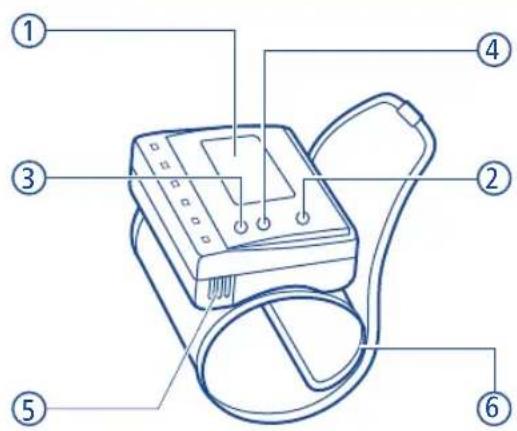
1) Display - Écran d'affichage digital
2) START/STOP-Taste - Bouton START / STOP
3) Memory-Taste M1 - Bouton mémoire M1
4) Memory-Taste M2 - Bouton mémoire M2
5) Batteriefach - Compartiment à piles
6) Schalenmanschette - Bracelet préforme
7) Aufbewahrungsbox - Coque protectrice de rangement rigide
8) 2 x LR03 (AAA) Batterien - 2 piles LR03 (AAA)
(9) Gebrauchsanleitung - Mode d'emploi
1) Visor digital - Digital Display
2) Tecla START/STOP - START/STOP-button
3) Tecla de memoria M1 - Memory-button M1
4) Tecla de memoria M2 - Memory-button M2
5) Compartmento de pilas - Battery compartment
6) Manguito anatomico - Preformed cuff
7) Estuche de plastico duro - Sturdy hard plastic storage box
8) 2 pilas LR03 (AAA) - 2 x LR03 (AAA) batteries
9) Instrucciones de uso - Instructions for use
Vorbemerkungen:
Please read these instructions carefully before first use as correct blood pressure measurement depends on the appropriate use of the device. These instructions for use are designed to instruct you, from the very start, in the individual steps of self-measurement of blood pressure using Tensoval mobil classic. You will thus receive important and helpful hints for producing reliable results for your personal blood pressure profile. Be sure to keep these instructions for use for future reference.
Chere cliente, cher client,
13.2 Service clients
Lab. PAUL HARTMANN S.a.r.l.
S.A.V. Autotensiometres
Route de Sélestat
Chatenois
67607 Selestat Cedex
Tel.: 03.88.83.44.36
- Introduction Page 61
- The importance of self-measurement of blood pressure 61
- Getting ready for self-measurement 61
3.1 Inserting the batteries 61
3.2 Setting date and time 62
3.3 Correct posture and position 63
3.4 Applying the wrist monitor 63
- Measuring blood pressure 64
- Setting the memory function 65
5.1 Saving the measured values 65
5.2 Recalling the measured values 66
5.3 Deleting the measured values 66
-
Maintenance of the device 67
-
Tensoval range of products
8.Warranty conditions 68
9.Explanation of error displays 70
- Technical data 73
- Power supply, disposal note and safety information 75
11.1 Batteries and disposal 75
11.2 Safety information 75
- Explanation of measurement function check 75
- Personal blood pressure profile 76

1. Introduction
Dear Customer,
We are pleased that you have decided to purchase a wrist blood pressure monitor from HARTMANN. Tensoval mobil classic is a quality product for fully automatic self-measurement of blood pressure on the wrist. Requiring no preliminary settings, this device conveniently inflates automatically for easy, quick and reliable measurement of the systolic (upper) and diastolic (lower) blood pressures as well as the heart rate. This device is designed to optimally support you in taking blood pressure measurements. We wish you all the best for your health.
2. The importance of self-measurement of blood pressure
Constantly elevated blood pressure multiplies the risk for other health problems. In addition to other medical treatment measures, daily blood pressure monitoring will help to protect you from these adverse health outcomes.
3. Getting ready for self-measurement
3.1 Inserting the batteries
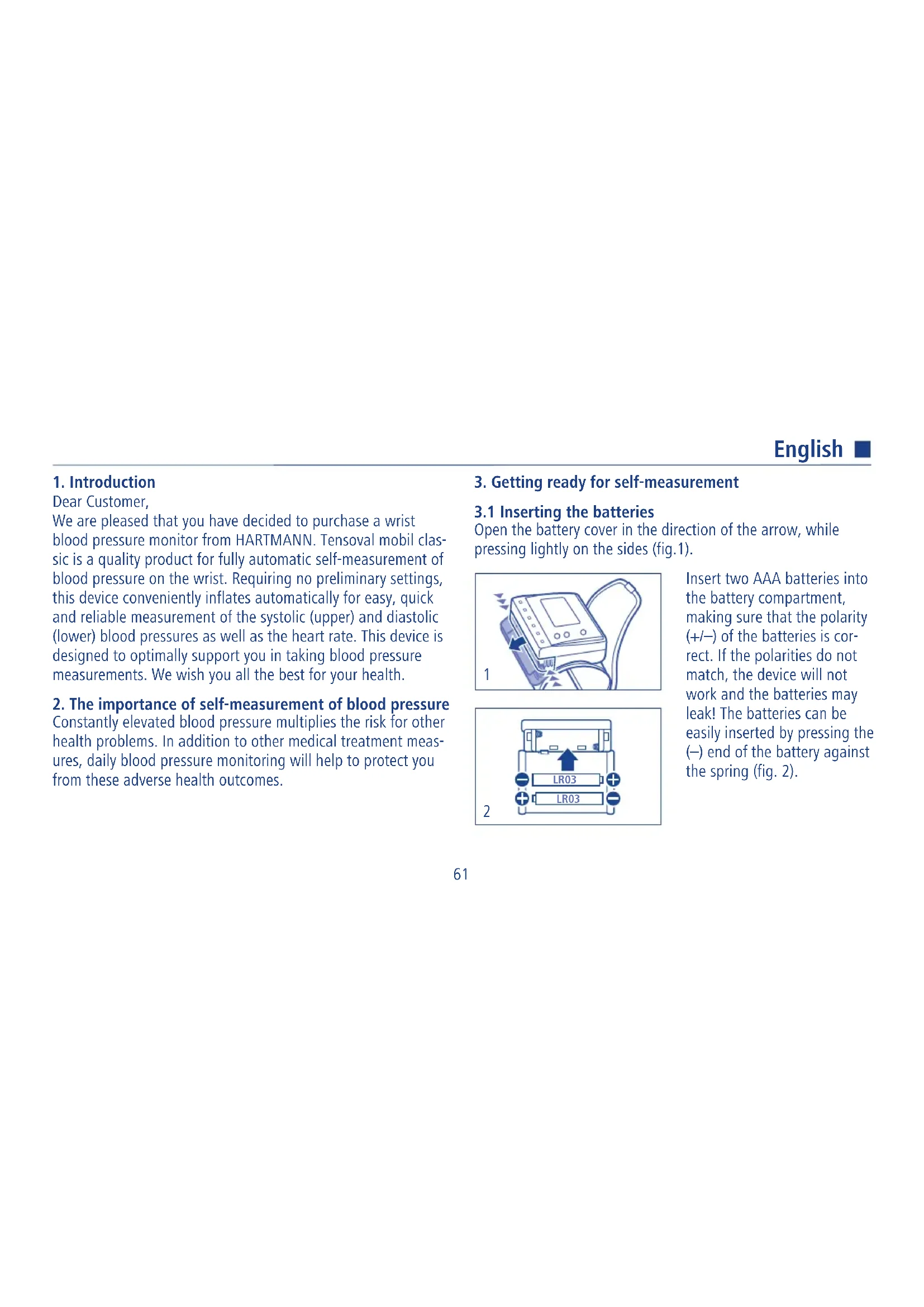
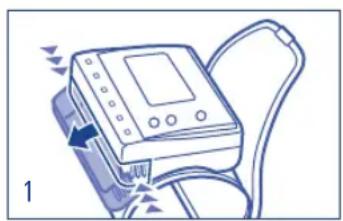
Open the battery cover in the direction of the arrow, while pressing lightly on the sides (fig.1).
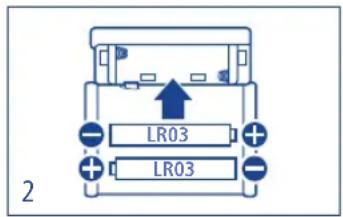
Insert two AAA batteries into the battery compartment, making sure that the polarity (+/-) of the batteries is correct. If the polarities do not match, the device will not work and the batteries may leak! The batteries can be easily inserted by pressing the (-) end of the battery against the spring (fig. 2).
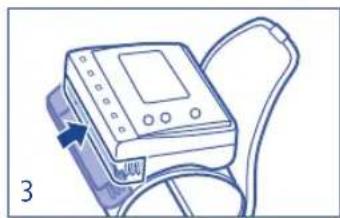
Replace the lid of the battery compartment, applying gentle pressure until the hook snaps in place (fig. 3).
3.2 Setting date and time
The batteries must have been inserted before you can set the date and time. Set the date and time correctly so that the measurement results are stored with the correct date and time details. The year indication flashes on the display. Use memory button M1 to increase the flashing year indication and memory button M2 to decrease it.
Press the blue START/STOP button to store and continue to the next step.
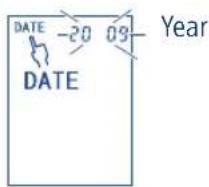
The month indication flashes. Press the M1 or M2 buttons to display the current month and store it by pressing the blue START/STOP button.
The date indication flashes. Set the date with the buttons M1 and M2 and press the blue START/STOP button to store.
The hour indication flashes. Set the hour with the buttons M1 and M2 and press the blue START/STOP button to store. The clock operates in 24-hour mode.

Month

Day
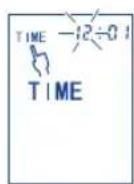
Hour
English
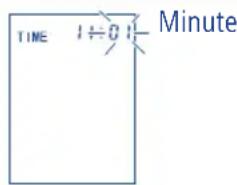
The minute indication flashes. Set the minutes with the buttons M1 and M2 and press the blue START/STOP button to store.
The time is set and the device switches off automatically.
3.3 Correct posture and position
Measurements can be taken on the right or left arm. The arm giving higher readings should be used for long-term blood pressure.
The device must be placed at the level of the heart to give an accurate measurement result. To do this, hold the cuff at the level of the heart, supporting the arm at the elbow. A cuff position below (above) the heart easily results in a higher (lower) value.
■ Be sure to rest for 5 minutes before taking blood pressure measurements.
- Do not talk or move during the measuring procedure. This may lead to false measurements.
You should take your blood pressure in a quiet place, in a relaxed seated position.
- You should wait an hour before taking measurements after having coffee, alcohol or smoking.
- Do not take your blood pressure after taking a bath or exercising.
If you feel an urge to urinate, you should go to the toilet before taking measurements.
Take measurements every day at the same time.
Measurements should also be taken on the same wrist and with the same body posture. The measured data varies slightly during measurement depending on the body posture.
3.4 Applying the wrist monitor
Measurement should be taken on the naked wrist which usually has the higher blood pressure value. If you are unsure which arm to use, ask your doctor. The device is permanently connected to the cuff, and the cuff should not be removed from the device. Now wrap the cuff round the wrist. The wrist monitor should be positioned on the inside of the wrist about 5 - 10mm above the base of the wrist. The lettering on the
upper side of the device points in your direction (fig. 4):
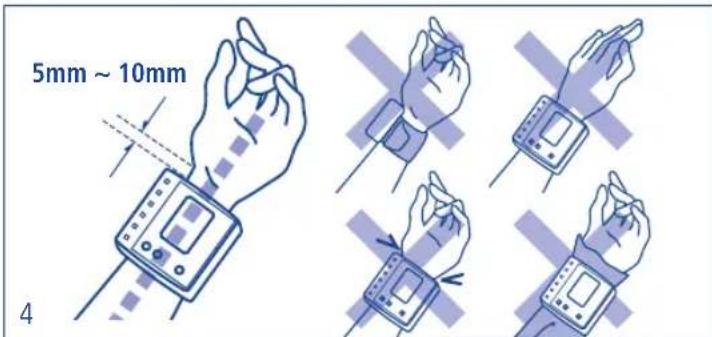
The cuff should be firmly attached. Press the surface of the cuff to ensure that it has been firmly applied. Please note that inappropriate application of the cuff can lead to inaccurate readings.
4. Measuring blood pressure
We recommend carrying out blood pressure measurements whilst seated. Do not turn the device on until the cuff has been applied, otherwise the cuff can become damaged through the
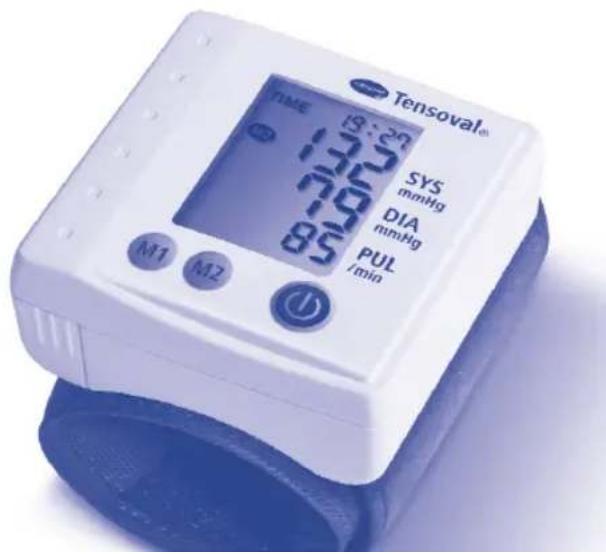
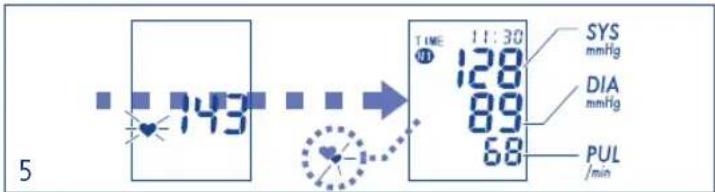
resulting excess pressure. Position the wrist with the strapped-on device and the palm of the hand pointing inwards at the level of the heart. Press the blue START/STOP button. The cuff is automatically inflated to the applied pressure of approximately 190mmHg . The pressure (indicated value) begins to fall and the pulse is displayed by way of the heart symbol. Once the measurement has been completed, the air is automatically released from the cuff. The maximum and minimum blood pressure and pulse rate are displayed (fig. 5).
Important: You should not move or talk throughout the entire measuring procedure! If you wish to stop measurement for any reason, simply press the blue START/STOP button. The inflation or measuring procedure is interrupted and an automatic fall in pressure occurs (fig. 6).
English

6
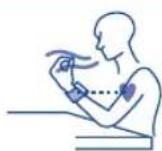
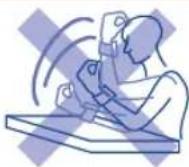
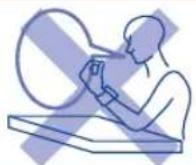
Press one of the memory buttons M1 or M2 and the result is placed in the selected measurement memory. The selected measurement memory number appears on the display. The result is stored in the measurement memory selected when the device is switched off. If a measurement results in an error, it is not stored (fig. 7).
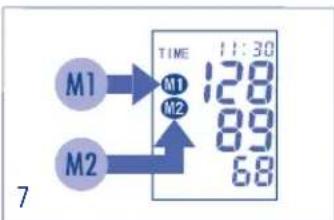
In order to switch off the device, press the blue START/ STOP button. Otherwise the device will switch itself off automatically after 3 minutes.
Important: If you wish to repeat the measurement,
allow the wrist to rest for at least 1 minute.
Automatic repeat pumping function
The inflation pressure for each measurement is automatically set at approx. 190mmHg . If this pressure is insufficient or if the measurement is interrupted, the device continues to pump at a rate of 40mmHg until a high enough pressure is reached so that the measurement can start. If you require a higher inflation pressure, you can avoid having to repeat pumping by pressing the blue START/STOP button again shortly after inflation starts and holding down on it until the desired cuff pressure is reached. This should be approx. 30mmHg over the systolic (upper) value. The pressure can be increased to approx. 280mmHg .
5. Setting the memory function
5.1 Saving the measured values
The measurement result is stored either in M1 or M2. Select the memory position after measurement. Each of the two memory positions can store 30 measurement results and the average value of the results. Once the number of measurements
exceeds 30 the oldest data is deleted and overwritten with the newest data. You can decide in which memory position your measuring results are to be stored in order to avoid confusing the data with that of other persons, or you can, for example, use one memory position for measurements in the morning and one for measurements in the evening.
5.2 Recalling the measured values
Press memory button M1 or M2 to view the stored data. The average of the stored results in the selected measurement memory is displayed. The last stored result is displayed if only one value is present. The memory data is displayed for around 30 seconds. 30 seconds after releasing the memory button the device switches off (fig. 8).
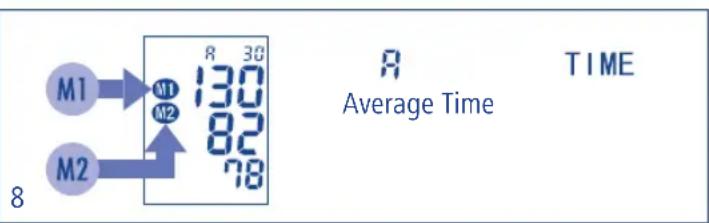
Press the memory buttons (M1 or M2) to call up the next memory data. Memory data number 1 is the most recent value in the selected measurement memory. The indication at the top of the display switches between the memory data number, date and time.
Through alternating pressing of the memory button all the stored values of the selected measurement memory can be called up consecutively. The stored values are displayed in order from the most recent to the oldest.
5.3 Deleting the measured values
Call up the average of a measurement memory to delete all measurement memory data. Keep one of the memory buttons
English
pressed: button M1 to delete the data in measurement memory M1 and button M2 to delete the data in measurement memory M2. The displayed data set starts to flash. Keep the button pressed until only the measurement memory number is displayed. It can only be deleted if 2 values at least have been stored.
6. Maintenance of the device
This device consists of precision components. Therefore avoid extreme fluctuations in temperature and humidity, knocks, dust and direct sunlight. Do not drop or knock against the device. Do not expose the device to moisture. The device is not protected against water penetration.
Only use a soft, dry cloth to clean the device. Do not use benzene, paint thinner or any other strong solvents. As the cuff can absorb perspiration or other fluids check it for stains and discolorations after every use. Use a synthetic detergent and wipe the surface gently.
If the device has been stored at a temperature below freezing point, leave it at room temperature for at least one hour before use.
We recommend having your blood pressure monitor checked every 2 years. Such checks may only be carried out by the manufacturer or a dealer appointed by the manufacturer.
Do not inflate the cuff if it is not applied around the wrist. Do not stretch or twist the cuff or allow it to come into contact with sharp or pointed objects. Do not take the device apart, do not modify anything on the device and do not repair the device by yourself. Use the device only to measure blood pressure on the human wrist. Do not leave the device unsupervised with small children or persons who cannot operate it themselves.
7. Tensoidal range of products
Apart from this wrist monitor, the HARTMANN range of products also includes upper arm blood pressure monitors. If you would like to learn more about other HARTMANN blood pressure devices, contact your specialist medical supplier (pharmacies or medical stores). Here is an overview of our product range:
Wrist monitor Tensoval mobil featuring Comfort Air Technology
Upper arm blood pressure monitor Tensoval duo control featuring Duo Sensor Technology
Upper arm blood pressure monitor Tensoval comfort
- Accessory cuffs such as:
- Large cuff for upper arm circumference 32 - 42cm - Standard draw-clamp cuff for upper arm circumference 22 - 32cm - Preformed moulded cuff for upper arm circumference 22 - 32cm
HARTMANN mains adapter (suitable for upper arm blood pressure monitors only)
8. Warranty conditions
We give a 3-year warranty on this high-quality device for measuring blood pressure from the day of purchase and in accordance with the following conditions. Claims must be made during the warranty period. The date of purchase may be documented by the appropriately completed and stamped warranty document or proof of purchase. Within the warranty period, HARTMANN shall replace or repair any faulty device components free of charge which were
caused by material or manufacturing errors. This does not extend the warranty period.
This warranty is not applicable to damage caused by improper use or unauthorized interference. Parts that are subject to wear and tear, such as batteries, cuffs, etc. are excluded from the warranty. Claims for compensation are limited to the value of the goods; compensation for subsequent damages is expressly excluded.
In warranty cases please send the device with cuff and with the fully completed and stamped warranty certificate direct, or via your dealer to the Customer Services department for your country.
Please note that we can only accept and process sufficiently franked return deliveries.
English

Date of purchase
Serial number (see battery compartment)
Reason for complaint
Dealer's stamp
- Explanation of error displays
| Error which has occurred | Possible causes | Remedy |
| Excess pressure | The pressure in cuff exceeds 300 mmHg. Therefore, an automatic fall in pressure occurs. | Please rest for at least a minute and take the measurement again. |
| Measuring error | Measurement could not be carried out due to talking or moving. Irregular pulse was measured. | Do not talk or move during the measuring procedure. |
| Inflation error | The cuff has not been applied correctly. | Apply the cuff correctly. |
| If Err-2 appears several times after the cuff has been correctly applied, a fault is presumably present. | Contact your specialist dealer. |
| Deflation error | Movement or talking detected during the measurement. | Switch the device off and carry out another measurement in calm conditions. |

| Error which has occurred | Possible causes | Remedy |
| Batteries are almost dead. Only a few more measurements are possible. | Keep new, identical batteries handy. |
| Batteries are dead and have to be replaced. | Insert new, identical batteries. |
| The blood pressure is different every time. The displayed value is extremely low (or high). | Blood pressure readings vary constantly depending on the time of measurement as well as mental and physical condition. | See: Correct posture and position. |
| Measurement not carried out with the correct posture or the cuff has been incorrectly applied. | Repeat measurement. |
| Measured value impaired by movement or talking. | Do not talk or move during blood pressure measurement. |
| Measurement carried out soon after sports training or other activities, which influence the measured value. | Carry out measurement again after resting for more than 5 minutes.See: Correct posture and position. |
| Memory cannot be deleted. | Only one stored value is in memory. The memory cannot be deleted until two values at least have been stored. | Store a second value. Then delete the memory. |
| The memory can only be deleted when the average value is displayed. | Press the memory button until the average value is displayed. |
If you still cannot obtain a proper measurement with the above assistance do not continue to use the device and contact your dealer. Do not tamper with the internal mechanism of the device. If the device does not work, or only works inadequately return it to your dealer or an authorised agent for servicing in accordance with the warranty conditions.
English

10. Technical data
Model: Tensoval mobil classic
Measuring method: Oscillometric
Display: 12-digit liquid crystal display
Pressure reading range: 0 to 300mmHg (cuff pressure)
Measuring range: Systole (SYS): 50 - 250 mmHg
Diastole (DIA): 40 - 180 mmHg
Pulse: 40 - 160 beats / minute
Technical measuring
precision: Cuff pressure: +/-3 mmHg,
Pulse: +/- 5% of displayed
pulse rate
Inflation: Automatic
Pressure release valve: Electronically controlled
Deflation: Automatic rapid release valve
Power supply: 2 × 1.5 ~V Mignon alkaline
manganese (AAA/LR03) batteries
Battery capacity: approx. 1,000 measurements
Memory capacity: 2 × 30 measurements and mean
value
Inflation pressure: 190mmHg (fixed)
Operating conditions: Ambient temperature: +10^ to
+40°C (50°F to 104°F)
Relative humidity: 85% or less
Storage conditions:
Ambient temperature: -5^ to
+50°C (23°F to 122°F)
Relative humidity: 85% or less
Serial number:
See battery compartment
Cuff:
Preformed cuff type
Wrist circumference:
approx. 12.5 - 21.5cm
Main casing: Size: approx. 70 (w) x 70 (h) x
29.9 (d) mm
Weight: approx. 115g (without batteries)
Explanation of the symbols: Protection against electric
A shock (type BF)

Observation of the operating instructions

Electronic device disposal note

PAUL HARTMANN AG
Marketer of the medical device

Disposal note
Classification: Internally switched on equipment
Tensoval mobil classic complies with the requirements of the
EC directive 93/42/EEC on medical devices (Medical Device Directive MDD) and bears the CE mark.
The technical data is subject to change without prior indication due to improvements in performance and quality.
This device is in accordance with the EMC (electromagnetic compatibility) regulations (European Standard EN 60601-1 Medical Electrical Devices - General Safety Stipulations - and European Standard EN 60601-1-2 - General Safety Stipulations - Additional Standard - Electromagnetic Compatibility) and specifications of the European standard (non-invasive blood pressure measuring devices: European Standards EN 1060-1 and EN 1060-3).
Clinical testing of measurement precision was performed according to the European Standard EN 1060-4.
Manufacturer: PAUL HARTMANN AG
89522 Heidenheim, Germany
Electrical medical devices require special precautions with regard to electromagnetic compatibility (EMC). The use of this device in the vicinity of portable, mobile high-frequency
English
communication devices or other devices with strong electromagnetic fields can impair its functional capability.
11.1 Batteries and disposal
Never mix old and new batteries or batteries made by different manufacturers.
- Immediately remove exhausted batteries.
If you do not intend to use the device for a longer period of time, you should remove the batteries to prevent possible leakage.
- Keep batteries out of the reach of children.
Please help protect the environment: Do not dispose of batteries in household waste! Use designated collection points or municipal collection/recycling centres to dispose of hazardous household waste.
Information concerning the disposal of electronic devices (private households):

This symbol on products and/or accompanying documents means that spent electronic products must not be mixed with regular household waste. Take these products to designated collection points where they are accepted free of charge for proper treatment, reclamation and recycling. Proper disposal is in the interests of environmental protection and prevents possible harmful effects on people and the environment that may result from inappropriate handling of wastes. More detailed information about your nearest collection point is available from your local council office.
If you require special information about your blood pressure, please contact your doctor. Never draw your own conclusions on the basis of your measurement results.
12. Explanation of measurement function check
Each Tensoval mobil classic device has been carefully tested by HARTMANN for measuring precision, and been developed for a long useable service life. We recommend a check of the measurement function at intervals of two years. Measurement
function checks can be carried out either by the indicated Service address, by competent authorities or authorised maintenance providers against compensation. Instructions for the measurement function check: A device function check can be carried out on people or using a suitable simulator. Measurement function check involves testing for leak tightness of the pressure system and possible deviations of the pressure reading. Remove at least one battery in order to switch to calibration mode. Hold down on the START/STOP button and then insert the battery. Release the button and, after a few moments, two zeros will appear one above each other on the display. Instructions on the measurement function check will be supplied on request to competent authorities or authorised maintenance providers by HARTMANN.
13. Personal blood pressure profile
Your personal blood pressure profile is an important piece of information. In the event of medical treatment (e.g. in the event of high blood pressure), on the basis of your blood pressure profile your doctor can come to a better decision as to which form of treatment you require. The better you are
controlled by medication the better you will feel and will suffer less from the side effects of the medication. Regular, precise blood pressure monitoring with the Tensoval mobil classic will help you with this.
Numerous factors, such as physical exertion, taking medicines or the time of day can affect your blood pressure. You should therefore always measure your blood pressure at the same time of day in comparable conditions. Our heart beats up to 100,000 times per day. This also corresponds to 100,000 different blood pressure values.
Date of revision of the text: 2010-01
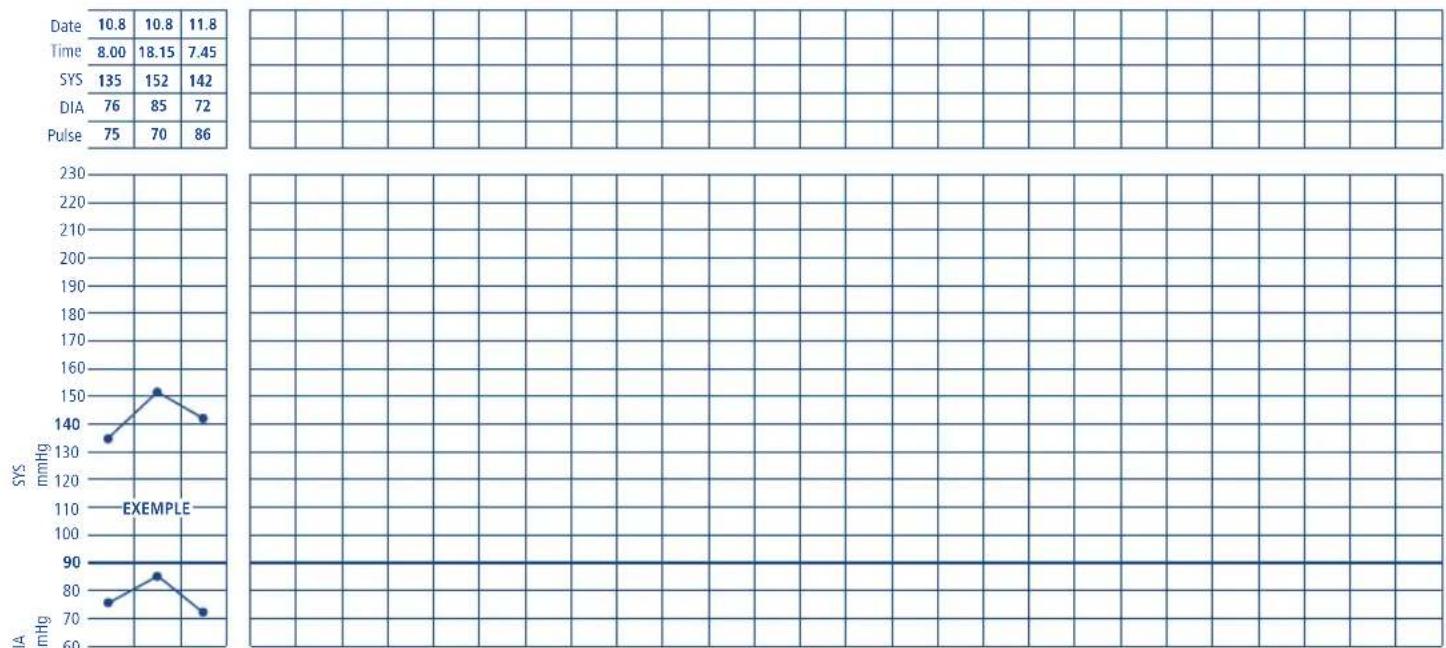
Please enter your values here


PAUL HARTMANN AG · 89522 Heidenheim, Germany
ES - Laboratorios HARTMANN S.A. · 08302 Mataró
FR - Lab. PAUL HARTMANN S.a.r.l. 67607 Sélestat CEDEX
www.hartmann.info
www.tensoval.de
0210