BC5700D - Baby monitors Neonate - Free user manual and instructions
Find the device manual for free BC5700D Neonate in PDF.



Frequently Asked Questions - BC5700D Neonate
User questions about BC5700D Neonate
0 question about this device. Answer the ones you know or ask your own.
Ask a new question about this device
Download the instructions for your Baby monitors in PDF format for free! Find your manual BC5700D - Neonate and take your electronic device back in hand. On this page are published all the documents necessary for the use of your device. BC5700D by Neonate.
USER MANUAL BC5700D Neonate
text_image
25°C MIC SENS VOX Baby Unit neonate.
text_image
25°C Parent Unit neonate®User manual
BC-5700D
BU
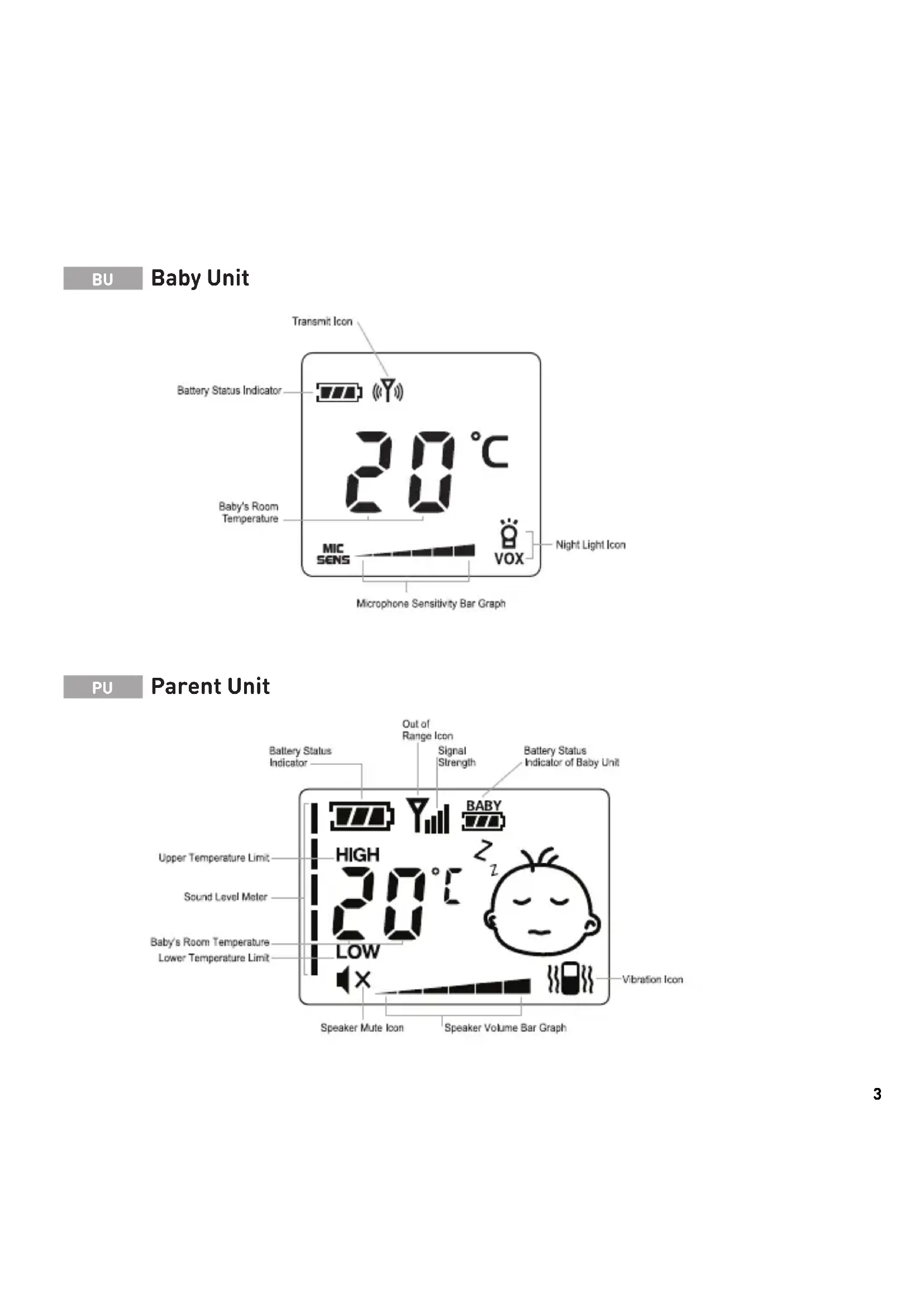
Baby Unit

text_image
Transmit Icon Battery Status Indicator 20°C Baby's Room Temperature MIC SENS VOX Night Light Icon Microphone Sensitivity Bar GraphPU
Parent Unit

text_image
Battery Status Indicator Out of Range Icon Signal Strength Battery Status Indicator of Baby Unit BABY Upper Temperature Limit HIGH 20°C Sound Level Meter Baby's Room Temperature Lower Temperature Limit LOW Vibration Icon Speaker Mute Icon Speaker Volume Bar Graph
text_image
Night Light 25°C On/Off/ On w/Night Light Down Up Baby Unit neonate Microphone
text_image
25°C On/Off/ On w/Vibration Down Up Mode Parent Unit neonate SpeakerWarning!
- Read the instructions for the baby monitor and the safety instructions thoroughly before use.
- This baby monitor is only intended as an aid to monitor your baby, it is not a substitute for responsible adult supervision.
- Keep the baby monitor completely out of reach of your baby. The baby monitor is not a toy, and your baby must not play with any of the units or any accessories.
- Be aware of strangulation hazard of the cord/cable and neck strap (when included) and keep cord/cable/neck strap out of reach of your baby.
- Do not expose the baby monitor or battery to direct sunlight, high temperatures, water or excessive moisture or dusty environment.
- Do not cover the baby monitor with towels, clothes, blankets, other fabrics or any other items.
- Only use original batteries in the units. If you need to replace batteries, check instructions or contact local dealer or Neonate who will provide instructions on how to remove and replace batteries.
- Only use original charger when charging the batteries/units. Only charge the batteries/units when you are present and can monitor the charging. Ensure the charger and units/batteries do not get unusually hot when charging. If the units/batteries do not charge, or charging takes longer than usual, stop the charging and contact your local dealer or Neonate. When batteries/units are charged, remove them from charger and unplug electrical connections.
- Do not modify, pierce, damage or dismantle the product or the battery. Dismantling the product invalidates the guarantee of the product. If product or batteries get damaged, stop using them. The same applies if the units or batteries get unusually hot under use, smells or in any way deviate from their normal condition. All repairs must only be done by qualified service personnel. Neonate can, in some circumstances, guide and allow end-users to replace certain parts in the products.
- The baby monitor and batteries contain electrical components and chemicals. This means that any disposal of such products must be done according to local regulations and environmental considerations.
Batteries requires caution!
When charging a battery there is always a small risk that a short-circuit or a malfunction can cause the battery to overheat and catch fire. It is highly recommended that you never charge a battery in an unsupervised environment.
Warning!
- Do not charge the battery without regular supervision.
- Do not charge the batteries through the night.
- Avoid charging the batteries in direct sunlight.
- Keep batteries away from moist environments and steam.
- Do not bend, twist, pierce or deform the battery.
The life of your battery will increase if you try to:
• charge the battery between 25-80%
- keep the battery from going to 0% or 100% .
- avoid charging the battery beyond 100% .
It is recommended to replace battery after 600 cycles of charging and discharging.
All Neonate batteries has a 2 year warranty.
Instructions for safe removal of the batteries or accumulators.
Remove the back cover of the device which you intend to remove the battery from. Lift the battery carefully without pulling on the wires. Grasp the wire between the battery and the white battery connector within the battery compartment. Pull gently on the wires so that these are stretched and apply pressure to the white battery connector. Make sure not to pull on the wires placed on the actual battery. The battery connector at the end of the wire should now disconnect from the PCB card within the battery compartment.
The following batteries or accumulators are contained in this electrical device.
Battery type:
Lithium Ion Polymer rechargeable battery
Chemical system:
Lithium Cobalt Dioxide and Graphite
ENGLISH
Pairing (connecting) units
NOTE: PU and BU are already paired and ready to use out of the box. Nevertheless, we recommend you to pair the units again to ensure a private connection.
1 Parent unit: Press and hold the (+) button and set the ON/OFF switch to ON position. Do not release the (+) button before (P) is shown in display.

text_image
p
text_image
"BU#" button ON/OFF switchParent unit
2 Baby unit: Press and hold the (+) button and set the ON/OFF switch to ON position. Do not release the (+) button before (P) is shown in display.

text_image
p
text_image
"PAGE" button ON/OFF switchBaby unit
3 Baby unit: Press (•) to confirm the pairing between PU and BU. Two beeps (sound) will confirm that the units are paired.
4 Both units: Turn the units off and on by setting the ON/OFF switch to OFF, and then back to ON again. The units are now ready to use.
Turning on/off and adjusting the temperature alarm
The parent unit must be turned on.
1 Parent unit: Press and hold the (•) button for 2 seconds. You will now see degree number flashing (or word “off”) and HIGH will appear steady in display.
2 Parent unit: Use the (+) /(-) buttons to select the upper temperature limit. If current temperature exceeds this chosen temperature limit, the temperature alarm will go off.

text_image
HIGH 383 Parent unit: Press the (•) button once. You will now see degree number flashing (or word “off”) and LOW will appear steady in display.
4 Parent unit: Use the (+)/(-) buttons to select the lower temperature limit. If current temperature goes below this chosen temperature limit, the temperature alarm will go off.

text_image
0.8 LOW5 Parent unit: Press the (•) button once more. The parent unit will return to standby mode. The upper and lower temperature limits are now adjusted/defined.
NOTE: Both the upper and lower temperature limit can be turned off completely. The upper temperature limit can be turned off by pressing the (+) button until the temperature limit is set at +50°C, and then pressing the (+) button once more. The lower temperature limit can be turned off by pressing the (-) button until the temperature limit is set at -19°C, and then pressing the (-) button once more (OFF will appear in display instead of selected temperature limit).
Adjusting the speaker volume on parent unit
Parent unit must be turned on.
1 Parent unit: Use the (+) /(-) buttons to adjust the volume. The volume bar graph at the bottom of the display will be adjusted at the same time to show the current speaker volume. When volume is turned all the way down (volume = OFF) display is showing

Adjusting the microphone sensitivity of the baby unit
The baby unit must be turned on.
1 Baby unit: Use the (+) /(-) buttons to adjust the sensitivity of the microphone. The MIC SENS bar graph at the bottom of the display will be adjusted at the same time to show the current microphone sensitivity. When sensitivity is turned up, lower sounds are detected easier. When the sensitivity is turned down, the sound has to be louder for the microphone and thereby the baby unit to be activated.

text_image
20°C MIC SENS VOXENGLISH
Turn on night light on baby unit / Change to voice activated (VOX) night light
1 Baby unit: Press the ON/OFF switch down to “ON with night light” position.
2 Baby unit: Press the (•) button to change if the night light should be on constantly or voice activated (VOX). When FOX is shown in display, the night light is voice activated.

text_image
20°C MIC SONS VOXTurn on vibration function on parent unit
1 Parent unit: Press the ON/OFF switch down to “ON with vibration” position.
is shown in display when vibration function is activated.

text_image
HIGH 20°C LOW BABY Z X
Information concerning the disposal of exhausted batteries
The pictured symbol on the left side on batteries, the packing or the enclosed documents signifies that the batteries should not be disposed of at the end of their life cycle together with the domestic waste. Possible added letters under the waste bin signify that the battery contains lead (Pb), cadmium (Cd) or mercury (Hg). You as consumer are obliged by law to render all kind of batteries (both rechargeable as well as non-rechargeable) inclusive button cells at local places of collection or at the retail market. This is at no charge. The proper disposal enables the recycling of valuable resources and avoids possible negative effects on humans and the environment.

Information concerning the disposal of old electric and electronic products
The pictured symbol on the product, the packing or the enclosed documents signifies that the product should not be disposed of after the end of its life cycle together with the domestic waste. You as consumer are obliged by law to render electric and electronic products at a local place of collection for electronic equipment. This is at no charge. Please take out the batteries before disposal of the product. The proper disposal enables the recycling of valuable resources and avoids possible negative effects on humans and the environment. For further information please contact your local authority or the vendor of the product.
Alarms / Warnings
OUT-OF-RANGE alarm/alert is activated in parent unit after 30 seconds when/if:
1 baby- and parent unit is beyond communication range
② baby unit is turned off
3 baby unit cannot send signal to parent unit (example; if baby unit is defect)
An alarm will be activated, signal strength symbol and LCD-light will flash.
TEMPERATURE alarm/alert is activated in parent unit when/if:
1 the actual temperature exceeds the selected high temperature limit
② the actual temperature goes below the selected low temperature limit
An alarm will be activated, LCD-display will show HIGH or LOW and the temperature indicator will flash.
LOW BATTERY alarm/alert is activated in parent unit when/if:
1 baby or parent unit's battery power level falls below a certain limit
An alarm will be activated and the battery status indicator (of either baby or parent unit) will flash in LCD-display.
NORSK
A 1 x Baby unit / Transmitter
B 1 x Parent unit / Receiver
2 x Lithium Polymer 1100mAh rechargeable batteries (inside PU & BU)
D 2 x Neck straps
E 2x Power adapters
A

text_image
Baby Unit neonateB

text_image
Power Unit neonate©

natural_image
Simple line drawing of a closed book with a small attached object (no text or symbols)D


natural_image
Line drawing of a cable with a plug and connector, no text or symbols presentDECLARATION OF CONFORMITY
Noricon AS
Nandrups vei 1 b
0490 Oslo
NORGE
Declares that the following produkt:
Model Neonate BC-5700D is compliant
with the following relative harmonized
standards:
• EN 300 220-1 V3.1.1 (2017-02)
• EN 300 220-2 V3.2.1 (2018-06)
• EN 301 489-1 V2.2.3 (2019-11)
• EN 301 489-3 V2.1.1 (2019-03)
• EN 62368-1:2014+A11:2017
• EN 62479:2010
EN 50663:2017
In accordance with the requirements set forth by the RED directive (2014/53/EU) regarding radio and telecommunications terminal equipment and mutual recognition of their conformity.
Name: Glenn Ulverud
Position: CEO
www.neonate.no
Date: 20.10.2020

text_image
Olen U Signature

Operating frequency :
863-870MHz
Output Power :
Baby unit : 12dBm
Parent unit : 12dBm
EU AUTHORISED REPRESENTATIVE
NORICON AS, CVR-NR. DK35493867
THOMAS BERGS GADE 12
DK-9900 FREDERIKSHAVN
DENMARK
neonate.
www.neonate.no