CC300T - Thermostat Tylö - Free user manual and instructions
Find the device manual for free CC300T Tylö in PDF.



| Product type | Thermostat for sauna and steam room (Tylarium) |
| Display | Backlit LCD screen with icons and text |
| Controls | 3 touch-sensitive keys (left, center, right) |
| Main functions | Temperature and humidity regulation, weekly programming, timer, standby mode, lighting |
| Temperature range | Up to 55 °C (adjustable in maintenance mode) |
| Humidity range | Depends on temperature (programmable in % RH) |
| Weekly programming | Up to 7 days with multiple time slots per day |
| Timer | Programmable delayed start (1-24h) |
| Standby mode | Energy saving with fast temperature recovery |
| Code lock | User code (4 digits), general code 1995 |
| Power supply | Low voltage via shielded 6-conductor cable (installation by licensed electrician) |
| Sensors | Humidity and temperature sensor (thermistor) mounted at 1500 mm from floor |
| Lighting | Integrated control, automatic or manual activation |
| Maintenance | Descaling recommended every 40 hours of operation (built-in timer) |
| Automatic drying | Activated if humidity >30% when stopped (duration 20 min, temperature 80 °C adjustable) |
| External connection | External on/off switch possible (momentary or continuous) |
| Compatibility | Tylö sauna heaters (SK, SDK, SE) and steam generators (VA/VB) |
| Factory settings | Restorable via Service menu |
| Dimensions | Flush-mounted (not specified) |
| Weight | Not specified |
| Standards | Electrical installation by professional, grounding mandatory |
Frequently Asked Questions - CC300T Tylö
User questions about CC300T Tylö
0 question about this device. Answer the ones you know or ask your own.
Ask a new question about this device
Download the instructions for your Thermostat in PDF format for free! Find your manual CC300T - Tylö and take your electronic device back in hand. On this page are published all the documents necessary for the use of your device. CC300T by Tylö.
USER MANUAL CC300T Tylö
Bruksanvising for manoverpanel CC 300/CC 300T. Svenska sid 2.
Las anvisningen tillsammans med instruktionerna for bastuaggregat resp anggenerator. Inkoppling skall utforas av behorig el-installator. SPARA ANVISNINGEN! Efter installation overlamnas denna till bastun/steambadets agare ellter den som skoter anlaggningen.
Operating instructions for control panel CC 300/CC 300T. English page 8.
Please read this information together with the instructions supplied with the sauna heater or steam generator. Installation work must be carried out by an authorised electrician. KEEP THIS INFORMATION IN A SAFE PLACE. On completion of the installation work, please give these instructions to the owner or operator of the sauna/steam bath.
Fig. 1. Menu display
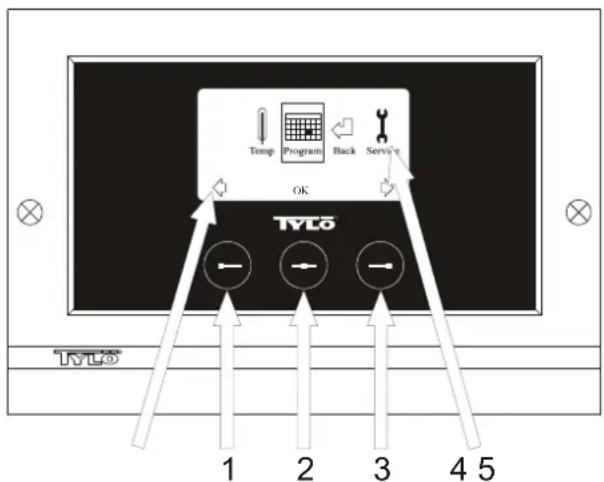
1 = Left button, 2 = Middle button, 3 = Right button. 4 = Symbols/text that correspond to the respective button. 5 = Symbols/text for setting and displaying current values.
Buttons and display.
There are three buttons on the control panel. Symbols shown above the buttons at the bottom of the display correspond to the respective button. These symbols differ depending on the panel's current mode. When the arrows are shown in the Menu display (fig. 1), use the left and right buttons to move to the desired symbol. To select a symbol, confirm with the middle button.
In the Normal display (fig. 2) the left button has an ON/OFF function. The symbol for this appears at the bottom of the display above the left button. When the facility is operational, this symbol shows green; when it is switched off, the symbol is red; and when it is on stand-by, the symbol is orange. The right button controls the lighting function. The lighting symbol shows yellow when the lighting is on and white when the lighting is off. The display also shows the current temperature.
To return to the Normal display from another mode, press the middle button until the Normal display shows.
When a program is active, press the left button for 2 seconds to switch off the active program.
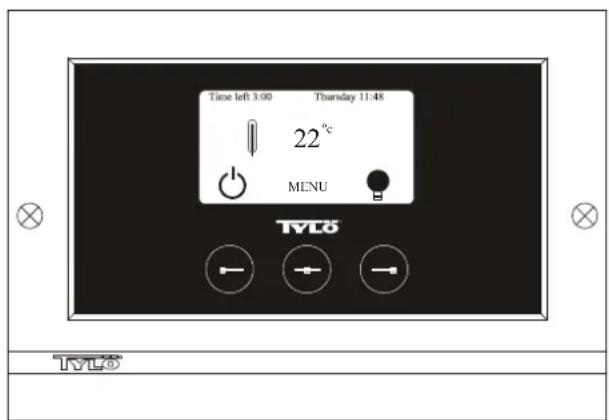
Fig. 2. Normal display
Initial start-up.
When you switch on the control panel for the first time, you must configure certain basic settings. First select the relevant region and confirm your choice by pressing the middle button. Then select the desired language and confirm with the middle button. Next, use the left and right buttons to set the correct date and time, and confirm with the middle button. Finally, set the running time for a manually activated bathing cycle. (The standard setting is for 3 hours, but you can choose 1-24 hours.) Move up/down with the right/left button respectively until the desired running time is displayed. Each button press increases/
decreases the running time by 15 minutes. To move more quickly, keep the button depressed. Confirm the time with middle button. The basic settings are now stored in the control panel's memory.
Lighting.
The lighting comes on/goes off automatically when the facility starts/ shuts down. The lighting can also be controlled manually by pressing the right button when the lighting symbol shows at the bottom right of the display. The symbol shows white when the lighting is off and yellow when the lighting is on.
Code lock.
Prevents unauthorized users from changing the programmed settings.
Main power switch.
This switch, on the underside of the relay box, SE sauna heater and small steam generators, should be used only when the facility is to remain switched off for a prolonged period of time.
Note! Place the thermometer in the sauna room at a height where the values shown correspond exactly with the figures displayed on the CC 300T panel.
Stand-by.
The stand-by function is invaluable for Tylarium facilities in hotels, public baths, etc., where visitor frequency varies. During off-peak hours the equipment is set at stand-by heat, which can rapidly be raised to the desired temperature by pressing the ON button or using an external switch. This stand-by feature can yield substantial savings every year. The examples below show how easy it is to program a suitable bathing schedule.
Examples of Stand-by operation.
Here are examples of three different options for public facilities open between 8 am to 8 pm, with varying numbers of visitors:
Option 1) A limited number of visitors use the facility sporadically throughout the day. Program "stand-by" between 8 am and 8pm . Bathers (or the attendant responsible) activate the bathing cycle by pressing the control panel's ON button.
Option 2) A limited number of visitors use the facility sporadically between 8 am and 2 pm. From 2 pm to 8 pm there is a steady flow of bathers. Program "stand-by" between 8 am and 2 pm, and program a permanent "ON" time from 2 pm to 8 pm. Visitors during the morning activate the bathing cycle by pressing the control panel's ON button.
Option 3) Large numbers of bathers 8-10 am, 1-2 pm and 6-8 pm. The rest of the day, the facility is used only sporadically. Program "stand-by" between 8 am and 8 pm and program permanent "ON" times for the peak periods above. Visitors during off-peak times activate the bathing cycle by pressing the control panel's ON button.
SETTINGS CC 300
MANUAL ON/OFF.
Setting the bathing temperature.
Select [MENU] in the Normal display and then select the thermometer symbol. Use the arrow keys to enter the desired temperature and then confirm with [OK].
Starting the bathing cycle.
Then select the Return symbol, confirm with the middle button and select the ON/OFF symbol to start the bathing cycle. To switch the unit off, press once more on ON/OFF. The symbol shows red when the facility is switched off, and green when the facility is in operation.
AUTOMATIC ON/OFF.
Setting the bathing temperature.
Select [MENU] in the Normal display and then select the thermometer symbol. Use the arrow keys to enter the desired temperature and then confirm with [OK].
Starting the timer function.
Select [MENU] in the Normal display. Select [Program] and then [Timer]. Enter the countdown time (= time remaining before the facility is automatically switched on) and confirm with OK.
The switch-on time has now been set and the bathing cycle will begin automatically at the pre-set time. The countdown to the switch-on time is shown at the top left of the display. You can switch off the countdown
function at any time by pressing twice on the button under the ON/OFF symbol. To switch off the equipment after the bathing cycle has begun, press just once on the ON/OFF button.
PROGRAMMING THE WEEKLY TIMER
with different settings for different days of the week, or with the same setting for every day of the week.
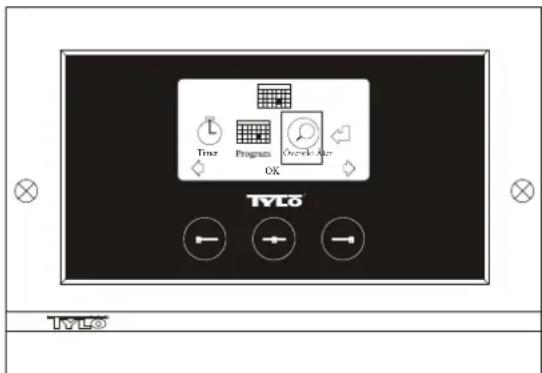
Fig. 3. Program display
Setting on/off/stand-by times and temperature.
Select [MENU] in the Normal display and then select [Program]. Select [Program] one more time in the Program display (see fig. 3). When you press [OK] the highlighted text [Add] changes colour to dark blue. You are now in the Programming mode. First use the arrow keys to select the desired weekday (current choice is shown in red). You can select each weekday separately or choose Monday-Sunday (for the same setting on all days), Monday-Friday or Saturday-Sunday. Confirm with [OK]. Then set the start time. Each key press increases/decreases the time shown by 15 minutes. Press [OK] when the desired start time is displayed. Then set the desired switch-off time and press [OK]. Indicate whether the facility is to be on, off or on stand-by for the time chosen The ON/OFF symbol shows green if the facility is to be on, red if it is to be off and orange for stand-by. When selecting the ON mode, you must also set the desired temperature. Use the arrow keys and confirm with [OK]. To program a new value, press the right button once to highlight [Add] and then press [OK]. Then repeat the procedure described above. To return to the Normal display, select [Back] and confirm with [OK]. Select [Back] once more and then [OK]. If no buttons are pressed, the control panel automatically reverts to the Normal display after approx. 30 seconds. To delete all pre-programmed times, select [Clear calendar]. You can also temporarily deactivate all programmed values by selecting [Calendar OFF].
For a simple overview of the pre-programmed schedule select [Overview] in the Program display. A schematic bar chart diagram shows red for times when the facility is switched off, green when it is in operation and yellow when it is on stand-by.
When ON is pressed while the bathing facility is in stand-by mode, the temperature immediately begins to rise to the pre-set value for bathing. After 1 hour, the temperature automatically reverts to the stand-by temperature. Each time the ON button is pressed, a new 1-hour operating cycle is started.
When the facility is in the OFF mode, the settings are those that were entered as part of the initial start-up process.
At any time while the facility is operational, you can switch it off manually by pressing OFF. (This switches off only the current bathing cycle.) You can also deactivate the entire calendar function temporarily, for example, to carry out service or maintenance, and then reactivate it.
BATHING OUTSIDE PROGRAMMED TIMES
if the control panel's security code function has been activated.
The Tylarium can also be used at times other than those that have been programmed. Pressing ON starts a 1-hour bathing cycle. To prolong the bathing period, simply press ON again. The bathing cycle is terminated automatically 1 hour after the ON button has last been pressed.
IMPORTANT! Don't forget to use the security code to lock the panel.
PANEL SETTINGS
CC300
Display.
LCD brightness.
Select [MENU] in the Normal display, [Service] and then [Display]. Highlight [(Brightness (%) ] and press the middle button. The highlighted text then turns dark blue and the value for the brightness of the LCD display can be changed. Press [OK] to confirm.
LCD brightness in sleep mode.
Select [MENU] in the Normal display, [Service] and then [Display]. Highlight [Stand by] and press the middle button. The highlighted text then turns dark blue and the value for the brightness of the LCD display when the panel is on stand-by can be changed. Press [OK] to confirm. (The factory setting is 30% .)
Countdown to LCD sleep mode.
Select [MENU] in the Normal display, [Service] and then [Display]. Highlight [Stand by time] and press the middle button. The highlighted text then turns dark blue, and you can reduce or extend the length of time it takes before the LCD display dims after the panel has switched to stand-by. Press [OK] to confirm.
Service.
See SERVICE SETTINGS
Code lock.
Select [MENU] in the Normal display and then [Service]. Use the arrow keys to move to [Code lock] and press [OK]. Enter the desired code. Use the arrow keys to display the correct combination and confirm with [OK]. The security code function is automatically activated during programming and the panel shows Normal display.
To return to unlocked mode, repeat the above procedure and set the code to 0000.
It is not possible to change any settings when the security function has been activated. It is possible, however, to switch both the facility and the lighting on and off. The bathing cycle runs for the time indicated in the Service menu under [Time outside timer]. (Factory setting: 1 hour).
A general code that always works is 1995.
IMPORTANT! Program all settings before activating security code.
Language.
Select [MENU] in the Normal display and then [Service]. Select language. Use the arrow keys to select the required language and then press [OK].
Clock.
Select [MENU] in the Normal display and then [Service]. Select [Set clock). First use the arrow keys to set the right day and confirm with [OK]. Then set the correct time; first the hour and then the minutes.
Factory settings.
Select [MENU] in the Normal display and then [Service]. Select [Factory settings]. Use the arrow keys to select [Yes] or [No] and then press [OK]. Selecting [Yes] deletes all your own programmed settings and the panel reverts to the original factory settings.
SERVICE SETTINGS
CC 300
Service.
The Service menu enables the bathing facility attendant to change certain settings such as the maximum bathing temperature. However, we recommend that the original factory settings are always retained. The Service menu is protected by a code to prevent unauthorized users from changing factory settings. In the Normal display press [MENU] and then [Service]. Select [Service] and enter the code 124.
System settings.
Maximum running time
[Max running time (hrs)] - The running time that was set at the initial start-up. This setting does not apply when the equipment has been programmed. Adjustable from 1-24 hrs. Factory setting: 3 hrs.
Temperature unit
[Temperature (^ / ^)] - This feature enables you to display temperatures in Celsius or Fahrenheit.
Test menu
The Test menu is used only for trouble-shooting and technical support via Tylo.
Max temperature.
[Max temp (^ / ^)] - Used to set the maximum temperature to which the facility can be programmed. For Tylarium bathing, the maximum temperature is 55^
Temperature reduction during stand-by.
[Temp reduction Stand by (^ / ^)] - This is where you indicate the reduction in temperature from the programmed bathing temperature to the stand-by temperature. Factory setting: 30^
Max. running time during stand-by.
[On time Stand by (mins)) - The duration of the bathing cycle that is initiated when the ON button is pressed while the facility is on stand-by. Factory setting: 60 minutes.
Max running time outside programmed time.
[Time outside timer (mins)] - The duration of the bathing cycle outside code-locked, programmed time.
Removing limescale
[De-scaling (hrs)] - Timer function that records total operating time and counts down to signal when it is time to clean the equipment from any limescale deposits. Factory setting: 40 hours.

In the event of a problem, please contact your Tylo retailer.
© This content may not be reproduced in part or in whole without written permission from Tylo. Tylo reserves the right to amend specifications of materials, construction and design.
INSTALLATION CC 300T
Please read these instructions together with the installation instructions supplied with the sauna heater or steam generator.
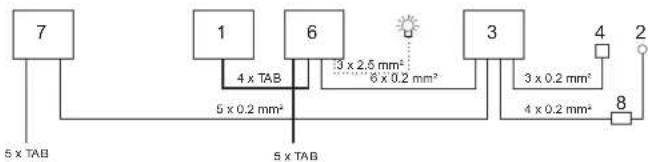
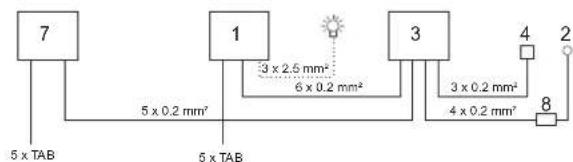
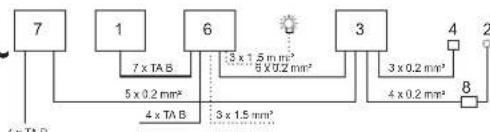
Fig. A - TYLARIUM.
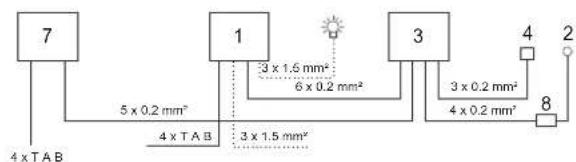
(Sauna heater type SK, SDK, and steam generator type VA/VB). 1 = sauna heater. 2 = humidity/temperature sensor. 3 = control panel CC 300T. 4 = external on/off switch (where applicable). 5 = main electrical distribution box. 6 = relay box RB30/60. 7 = steam generator. 8 = amplifier.
Fig.B-TYLARIUM.
(Sauna heater type SE and steam generator type VA/
1 = sauna heater. 2 = humidity/temperature sensor. 3 = control panel CC 300T. 4 = external on/off switch (where applicable). 5 = main electrical distribution box. 7 = steam generator. 8 = amplifier.
Relay box (RB).
(No relay box is needed with Tylo SE sauna heaters).
Install outside the Tylarium and at any distance from the Tylarium in a cool, well-ventilated room. Important! Always ensure a minimum distance of at least 1 metre between the relay box and the CC 300T.
Shielded low-current cable (LiYCY 6-core).
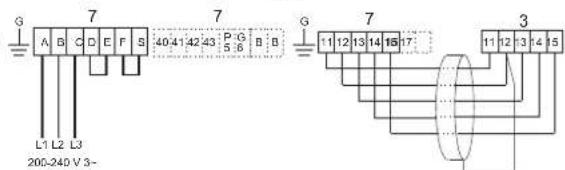
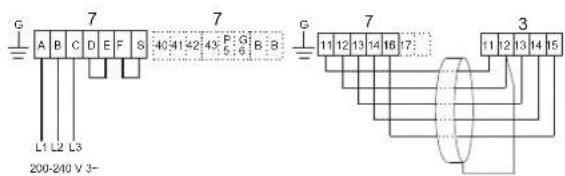
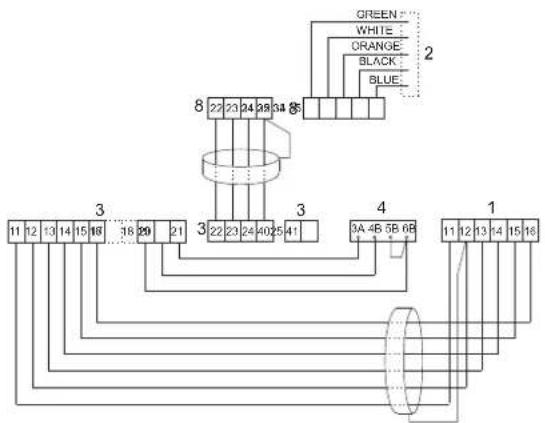
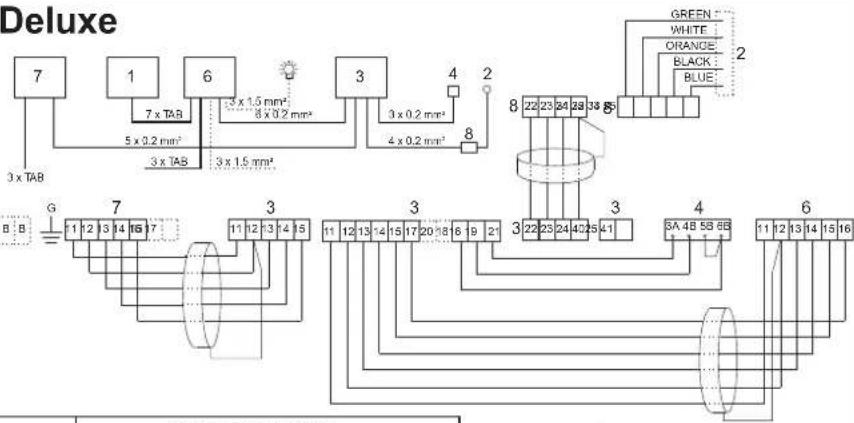
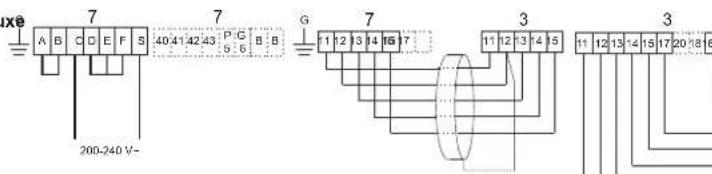
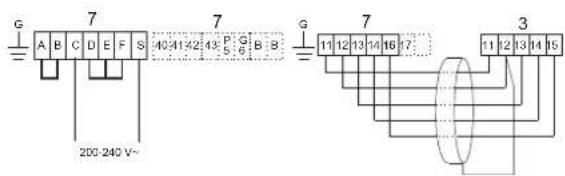
Use only a shielded low-current cable (LiYCY, 6-core) between the CC 300T and the relay box, SE sauna heater or steam generator. Connect the shielding to terminal 12 on the CC panel.
Location of thermistor, humidity/temperature sensor.
Install 1500mm above floor level (but not directly above a sauna heater). Place the sensor so that it does not risk being affected directly or indirectly by a jet of steam.
Amplifier.
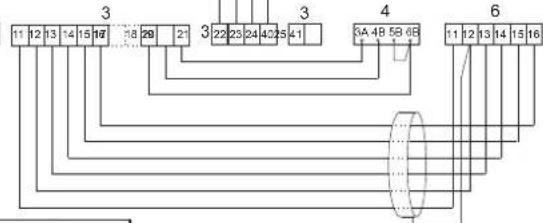
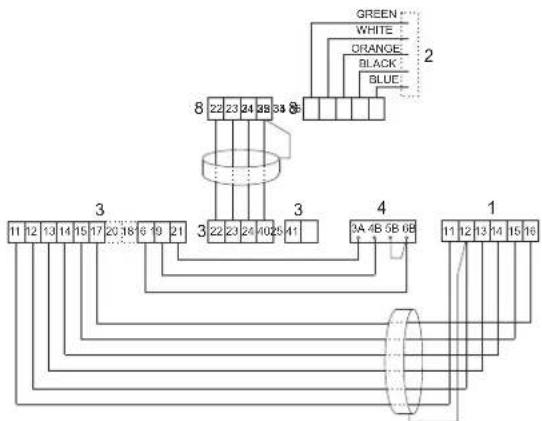
Install outside the Tylarium, no more than 2 metres from the sensor, but at any distance from the CC 300T panel. Use only a shielded low-current cable (4-core) between the amplifier and the CC 300T. Connect the shielding to terminal 25 on the amplifier.
Lighting.
Connect the lighting as indicated in the wiring diagram.
Optional external on/off-switch (quick-break).
May be placed at any distance from the Tylarium. Connect to the CC 300T using a low-current cable - see wiring diagram. If more than one external on/off switch is used, the switches must be connected in parallel. Press once on the external switch to start the CC300T, which then remains in operation for as long as the running time has been set. (See 'Initial start-up'). The next time you press the external switch, this will turn off the CC300T - unless it has been pre-programmed or is protected by a security code. If the CC300T has been pre-programmed or is protected by a security code, it must be switched off by pressing the ON/OFF button on the control panel.
Optional external on/off-switch (maintained contact).
May be placed at any distance from the Tylarium. Connect to the CC 300T using a low-current cable - see wiring diagram. If more than one external on/off switch is used, the switches must be connected in parallel. When connected to receive a constant signal, the facility remains operational for as long as contact closure is maintained between terminals 19 and 20, but only up to the maximum running time that has been set.
Connection to a central computer.
The unit can also be connected to a central computer that transmits a momentary contact closure (short impulse) or constant signal between terminals 19 and 20 in the CC 300T. The maximum permissible running time is 24 hours.
Important! In order for the steam generator's automatic emptying function to work, the control panel must be switched off for at least 1.5 hours each day.
Controlling other Tylo products.
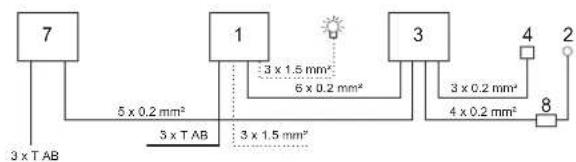
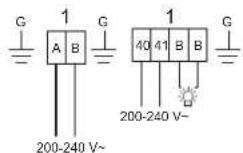
The CC300T can also be used to control other Tylo products, such as a Tylo Fresh fragrance dispenser, which can be activated while the panel is in operation. Wiring for Tylo Fresh or other CC-panels must be connected between terminals 40 and 41 on the CC 300T and terminals 19 and 20 on the other Tylo product. See Fig. J for an example of this.
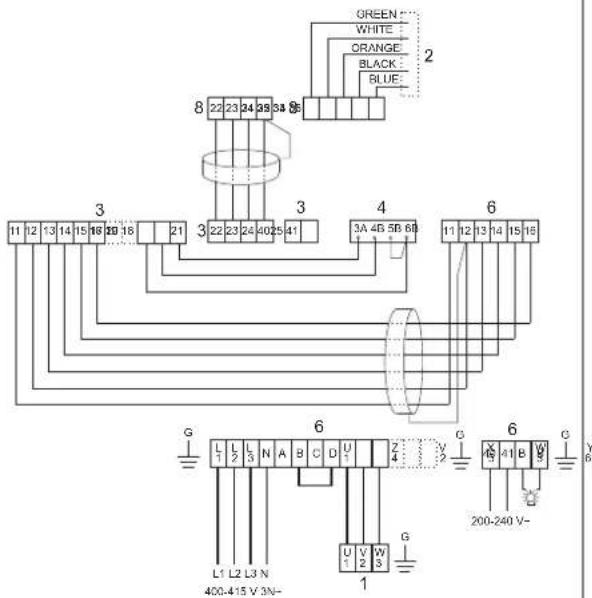
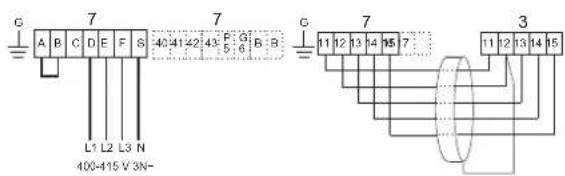
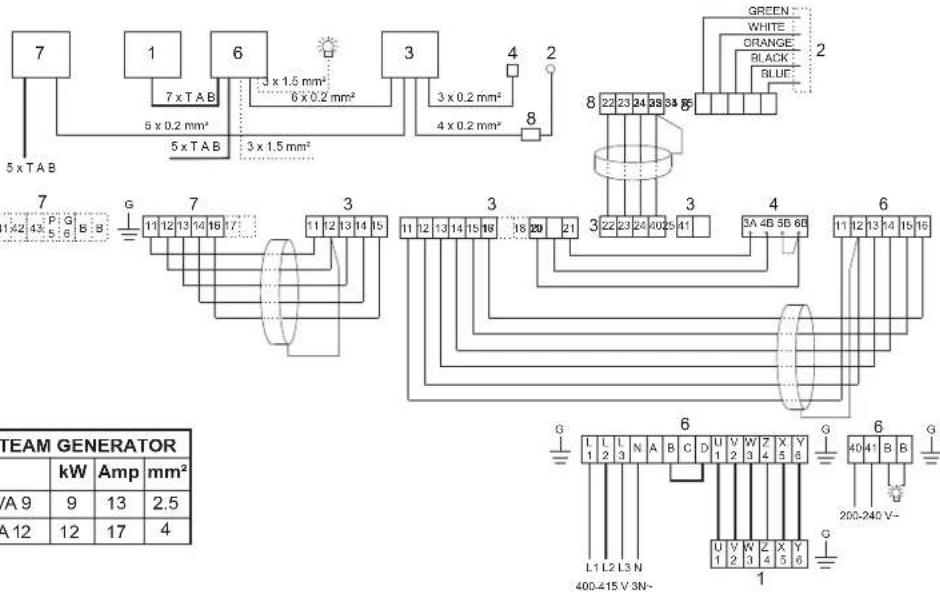
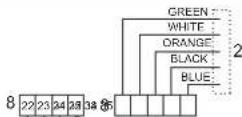
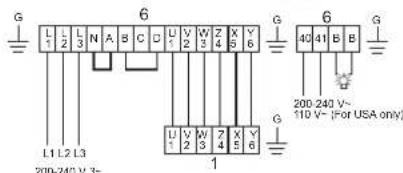
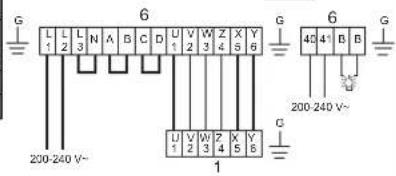
Fig. C, E - wiring diagram.
(Sauna heater type SK, SDK and steam generator type VA/VB with control panel type CC 300T).
1 = sauna heater. 2 = humidity/temperature sensor. 3 = control panel CC 300T. 4 = external on/off switch (where applicable). 6 = relay box RB30/60. 7 = steam generator. 8 = amplifier.
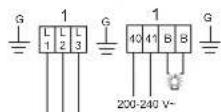
Check the type plate on the sauna heater/steam generator to ensure that the equipment is connected to the right supply voltage.
Do not forget to earth/ground the equipment!
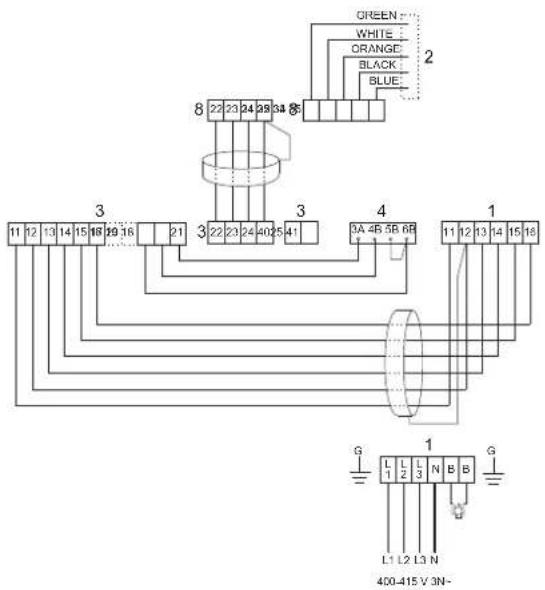
Fig. D - wiring diagram.
(Sauna heater type SE and steam generator type VAVB with control panel type CC 300T).
1 = sauna heater. 2 = humidity/temperature sensor. 3 = control panel CC 300T. 4 = external on/off switch (where applicable). 7 = steam generator. 8 = amplifier.
Check the type plate on the sauna heater/steam generator to ensure that the equipment is connected to the right supply voltage.
Do not forget to earth/ground the equipment!
OPERATING INSTRUCTIONS CC 300T
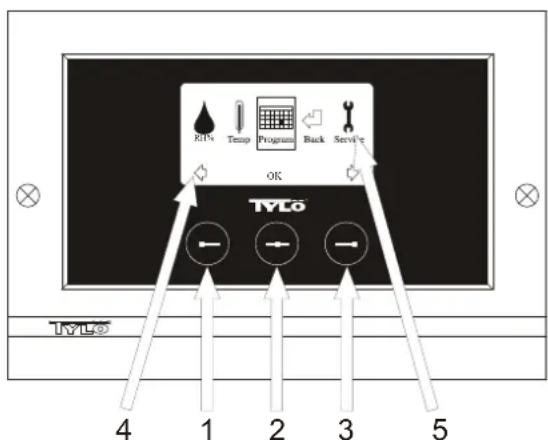
Fig.1. Menu display
1 = Left button, 2 = Middle button, 3 = Right button. 4 = Symbols/text that correspond to the respective button. 5 = Symbols/text for setting and displaying current values.
Buttons and display.
There are three buttons on the control panel. Symbols shown above the buttons at the bottom of the display correspond to the respective button. These symbols differ depending on the panel's current mode. When the arrows are shown in the Menu display (fig. 1), use the left and right buttons to move to the desired symbol. To select a symbol, confirm with the middle button.
In the Normal display (fig. 2) the left button has an ON/OFF function. The symbol for this appears at the bottom of the display above the left button. When the facility is operational, this symbol shows green; when it is switched off, the symbol is red; and when it is on stand-by, the symbol is orange. The right button controls the lighting function. The lighting symbol shows yellow when the lighting is on and white when the lighting is off. The display also shows the current temperature/humidity.
To return to the Normal display from another mode, press the middle button until the Normal display shows.
When a program is active, press the left button for 2 seconds to switch off the active program.
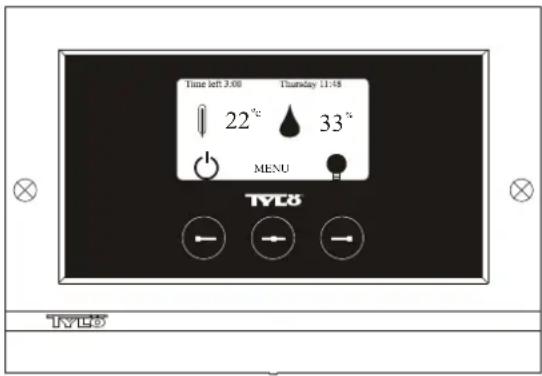
Fig. 2. Normal display
Initial start-up.
When you switch on the control panel for the first time, you must configure certain basic settings. First select the relevant region and confirm your choice by pressing the middle button. Then select the desired language and confirm with the middle button. Next, use the left and right buttons to set the correct date and time, and confirm with the middle button. Finally, set the running time for a manually activated bathing cycle. (The standard setting is for 3 hours, but you can choose 1-24 hours.) Move up/down with the right/left button respectively until the desired running time is displayed. Each button press increases/ decreases the running time by 15 minutes. To move more quickly, keep the button depressed. Confirm the time with middle button. The basic settings are now stored in the control panel's memory.
Lighting.
The lighting comes on/goes off automatically when the facility starts/ shuts down. The lighting can also be controlled manually by pressing the right button when the lighting symbol shows at the bottom right of the display. The symbol shows white when the lighting is off and yellow when the lighting is on.
Code lock.
Prevents unauthorized users from changing the programmed settings.
Main power switch.
This switch, on the underside of the relay box, SE sauna heater and small steam generators, should be used only when the facility is to remain switched off for a prolonged period of time.
Note! Place the thermometer (hygrometer) in the Tylarium at a height where the values shown correspond exactly with the figures displayed on the CC 300T panel.
Stand-by.
The stand-by function is invaluable for Tylarium facilities in hotels, public baths, etc., where visitor frequency varies. During off-peak hours the equipment is set at stand-by heat, which can rapidly be raised to the desired temperature by pressing the ON button or using an external switch. This stand-by feature can yield substantial savings every year. The examples below show how easy it is to program a suitable bathing schedule.
Examples of Stand-by operation.
Here are examples of three different options for public facilities open between 8 am to 8 pm, with varying numbers of visitors: Option 1) A limited number of visitors use the facility sporadically throughout the day. Program "stand-by" between 8 am and 8 pm. Bathers (or the attendant responsible) activate the bathing cycle by pressing the control panel's ON button.
Option 2) A limited number of visitors use the facility sporadically between 8 am and 2 pm. From 2 pm to 8 pm there is a steady flow of bathers. Program "stand-by" between 8 am and 2 pm, and program a permanent "ON" time from 2 pm to 8 pm. Visitors during the morning activate the bathing cycle by pressing the control panel's ON button. Option 3) Large numbers of bathers 8-10 am, 1-2 pm and 6-8 pm. The rest of the day, the facility is used only sporadically. Program "stand-by" between 8 am and 8 pm and program permanent "ON" times for the peak periods above. Visitors during off-peak times activate the bathing cycle by pressing the control panel's ON button.
SETTINGS
CC 300T
MANUAL ON/OFF.
Setting the bathing temperature.
Select [MENU] in the Normal display and then select the thermometer symbol. Use the arrow keys to enter the desired temperature and then confirm with [OK].
Setting the humidity level.
Select the water droplet symbol. Use the arrow keys to enter the desired humidity (RH%) . Confirm with [OK]. Note! The value for the maximum humidity varies according to the bathing temperature selected.
Starting the bathing cycle.
Then select the Return symbol, confirm with the middle button and select the ON/OFF symbol to start the bathing cycle. To switch the unit off, press once more on ON/OFF. The symbol shows red when the facility is switched off, and green when the facility is in operation.
AUTOMATIC ON/OFF.
Setting the bathing temperature.
Select [MENU] in the Normal display and then select the thermometer symbol. Use the arrow keys to enter the desired temperature and then confirm with [OK].
Setting the humidity level.
Select the water droplet symbol. Use the arrow keys to enter the desired humidity [(RH%)] . Confirm with [OK]. Note! The value for the maximum humidity varies according to the bathing temperature selected.
Starting the timer function.
Select [MENU] in the Normal display. Select [Program] and then [Timer]. Enter the countdown time (= time remaining before the facility is automatically switched on) and confirm with OK.
The switch-on time has now been set and the bathing cycle will begin automatically at the pre-set time. The countdown to the switch-on time is shown at the top left of the display. You can switch off the countdown function at any time by pressing twice on the button under the ON/OFF symbol. To switch off the equipment after the bathing cycle has begun, press just once on the ON/OFF button.
If the humidity level exceeds 30% when the equipment is switched off, an automatic drying cycle will be activated. This takes about 20 minutes (factory setting).
PROGRAMMING THE WEEKLY TIMER
with different settings for different days of the week, or with the same setting for every day of the week.
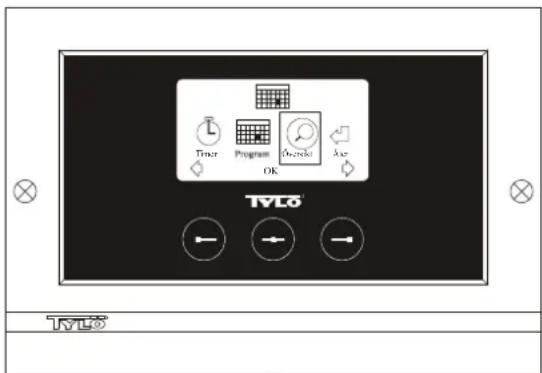
Fig. 3. Program display
Setting on/off/stand-by times, temperature/humidity.
Select [MENU] in the Normal display and then select [Program]. Select [Program] one more time in the Program display (see fig. 3). When you press [OK] the highlighted text [Add] changes colour to dark blue. You are now in the Programming mode. First use the arrow keys to select the desired weekday (current choice is shown in red). You can select each weekday separately or choose Monday-Sunday (for the same setting on all days), Monday-Friday or Saturday-Sunday. Confirm with [OK]. Then set the start time. Each key press increases/decreases the time shown
by 15 minutes. Press [OK] when the desired start time is displayed. Then set the desired switch-off time and press [OK]. Indicate whether the facility is to be on, off or on stand-by for the time chosen. The ON/OFF symbol shows green if the facility is to be on, red if it is to be off and orange for stand-by. When selecting the ON mode, you must also set the desired temperature and humidity. Use the arrow keys and confirm with [OK]. To program a new value, press the right button once to highlight [Add] and then press [OK]. Then repeat the procedure described above. To return to the Normal display, select [Back] and confirm with [OK]. Select [Back] once more and then [OK]. If no buttons are pressed, the control panel automatically reverts to the Normal display after approx. 30 seconds. To delete all pre-programmed times, select [Clear calendar]. You can also temporarily deactivate all programmed values by selecting [Calendar OFF].
For a simple overview of the pre-programmed schedule select [Overview] in the Program display. A schematic bar chart diagram shows red for times when the facility is switched off, green when it is in operation and yellow when it is on stand-by.
When ON is pressed while the bathing facility is in stand-by mode, the temperature immediately begins to rise to the pre-set value for bathing. After 1 hour, the temperature automatically reverts to the stand-by temperature. Each time the ON button is pressed, a new 1-hour operating cycle is started.
When the facility is in the OFF mode, the settings are those that were entered as part of the initial start-up process.
At any time while the facility is operational, you can switch it off manually by pressing OFF. (This switches off only the current bathing cycle.) If the humidity level exceeds 30% when the equipment is switched off, an automatic drying cycle will be activated. This takes about 20 minutes (factory setting).
You can also deactivate the entire calendar function temporarily, for example, to carry out service or maintenance, and then reactivate it.
BATHING OUTSIDE PROGRAMMED TIMES if the control panel's security code function has been activated.
The Tylarium can also be used at times other than those that have been programmed. Pressing ON starts a 1-hour bathing cycle. To prolong the bathing period, simply press ON again. The bathing cycle is terminated automatically 1 hour after the ON button has last been pressed.
IMPORTANT! Don't forget to use the security code to lock the panel.
PANEL SETTINGS CC300T
Display.
LCD brightness.
Select [MENU] in the Normal display, [Service] and then [Display]. Highlight [(Brightness (%) ] and press the middle button. The highlighted text then turns dark blue and the value for the brightness of the LCD display can be changed. Press [OK] to confirm.
LCD brightness in sleep mode.
Select [MENU] in the Normal display, [Service] and then [Display]. Highlight [Stand by] and press the middle button. The highlighted text then turns dark blue and the value for the brightness of the LCD display when the panel is on stand-by can be changed. Press [OK] to confirm. (The factory setting is 30% .)
Countdown to LCD sleep mode.
Select [MENU] in the Normal display, [Service] and then [Display]. Highlight [Stand by time] and press the middle button. The highlighted text then turns dark blue, and you can reduce or extend the length of time it takes before the LCD display dims after the panel has switched to stand-by. Press [OK] to confirm.
Service.
See SERVICE SETTINGS
Code lock.
Select [MENU] in the Normal display and then [Service]. Use the arrow keys to move to [Code lock] and press [OK]. Enter the desired code. Use the arrow keys to display the correct combination and confirm with [OK]. The security code function is automatically activated during programming and the panel shows Normal display.
To return to unlocked mode, repeat the above procedure and set the code to 0000.
It is not possible to change any settings when the security function has been activated. It is possible, however, to switch both the facility and the lighting on and off. The bathing cycle runs for the time indicated in the Service menu under [Time outside timer]. (Factory setting: 1 hour).
A general code that always works is 1995.
IMPORTANT! Program all settings before activating security code.
Language.
Select [MENU] in the Normal display and then [Service]. Select language. Use the arrow keys to select the required language and then press [OK].
Clock.
Select [MENU] in the Normal display and then [Service]. Select [Set clock). First use the arrow keys to set the right day and confirm with [OK]. Then set the correct time; first the hour and then the minutes.
Factory settings.
Select [MENU] in the Normal display and then [Service]. Select [Factory settings]. Use the arrow keys to select [Yes] or [No] and then press [OK]. Selecting [Yes] deletes all your own programmed settings and the panel reverts to the original factory settings.
SERVICE SETTINGS CC300T
Service.
The Service menu enables the bathing facility attendant to change certain settings such as the maximum bathing temperature. However, we recommend that the original factory settings are always retained. The Service menu is protected by a code to prevent unauthorised users from changing factory settings. In the Normal display press [MENU] and then [Service]. Select [Service] and enter the code 124.
System settings.
Limit for automatic drying cycle
[Dryup limit (%)] - When the facility switches off, it measures the relative humidity in the room. If this exceeds 30% (factory setting), the equipment initiates a drying cycle.
Drying temperature
[Dryup temperature (^)] - The ambient temperature in the facility during the drying cycle. Factory setting: 80^ .
Drying time
[Dryiup time (mins.)] - The duration of the drying cycle. Factory setting: 20 minutes.
Minimum temperature for steam generation
[Min. temp. steam (^)] - The lowest temperature at which the steam generator starts. Factory setting: 40^
Maximum running time
[Max running time (hrs)] - The running time that was set at the initial start-up. This setting does not apply when the equipment has been programmed. Adjustable from 1-24 hrs. Factory setting: 3 hrs.
Temperature unit
[Temperature (^ / ^)] - This feature enables you to display temperatures in Celsius or Fahrenheit.
Test menu
The Test menu is used only for trouble-shooting and technical support via Tylo.
Max temperature.
[Max temp (^ / ^)] - Used to set the maximum temperature to which the facility can be programmed. For Tylarium bathing, the maximum temperature is 55^
Temperature reduction during stand-by.
[Temp reduction Stand by (^ / ^)] - This is where you indicate the reduction in temperature from the programmed bathing temperature to the stand-by temperature. Factory setting: 30^
Max. running time during stand-by.
fOn time Stand by (mins)) - The duration of the bathing cycle that is initiated when the ON button is pressed while the facility is on stand-by. Factory setting: 60 minutes.
Max running time outside programmed time.
[Time outside timer (mins)] - The duration of the bathing cycle outside code-locked, programmed time.
Removing limescale
[De-scaling (hrs)] - Timer function that records total operating time and counts down to signal when it is time to clean the equipment from any limescale deposits. Factory setting: 40 hours.
TYLARIUM
A Tylarium gives you full freedom to enjoy all types of sauna bathing - dry saunas, wet saunas and steam saunas, too. As the relative humidity in a Tylarium tends to be higher than in traditional sauna bathing, you are kindly requested to take note of the following advice.
- Treat the lower mouldings of any windows in sauna room doors or walls with boat varnish, and seal the gap between the pane of glass and the moulding with bathroom silicone. This prevents any condensation on the glass from seeping into the gap.
- Treat threshold and door handles with a couple of coats of boat varnish. This preserves the finish of the wood and makes cleaning the sauna much simpler. Oil sauna benches, skirting panels and backrests on both sides with Tylo sauna oil.
IMPORTANT! Leave all other wood in the sauna room untreated.
TYLO
In the event of a problem, please contact your Tylö retailer.
© This content may not be reproduced in part or in whole without written permission from Tylo. Tylo reserves the right to amend specifications of materials, construction and design.
MARCHE/ARRÉT MANUEL.
MARCHE/ARRET MANUEL.
SLA P A ON/OFF MANUEL T.
Systeminnstillinger.
Maximal driftstid
SLA P A ON/OFF MANUEL T.
Systeminnstillinger.
MANUEL TIL-OG FRAKOBLING
Indstilling at temperature
Indstilling at temperature
Maks. driftsid under standby
[On time stand by (min)] - När anlaegget er programmeret til standby, og der trykkes på ON-knappen, er badet aktiv i den tidssperiode, der er indlaest her. Fabriksindstilling 60 minutter.
MANUEL TIL-OG FRAKOBLING
Indstilling at temperature
Indstilling at temperature
Maks. driftsid under standby
[On time stand by (min)] - När anlaegget er programmeret til standby, og der trykkes på ON-knappen, er badet aktiv i den tidssperiode, der er indlaest her. Fabriksindstilling 60 minutes.
Maks. driftsid.uden for programmeret tid
1=8SK,10SDK
2 = sensor
3 = CC300T
4 = external switch
6 = RB30
7=VA6VB6
8 = amplifier
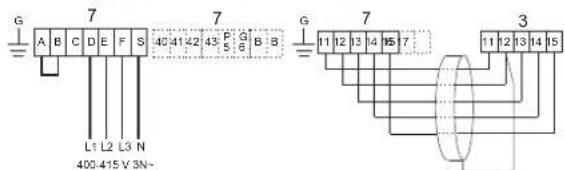

SAUNA: Type SE
STEAM: Type VA, VB
400-415V3N\~
TAB
| Room volume min/max m (cu.m) | SAUNA HEATER | STEAM GENERATOR | ||||||
| Type | kW | Amp | mm² | Type | kW | Amp | mm² | |
| 6-12 | 8 S E | 8 | 12 | 2.5 | VA 6, V B | 66-6.6 | 10 | 1.5 |
1=8SE
2 = sensor
3 = CC300T
4 = external switch
7=VA6,VB6
8 = amplifier

SAUNA: Type SD
STEAM: Type VA
400 - 415 V 3N~
1 = 16SD ,20SD
2 = sensor
3 = CC300T
4 = external switch
6 = RB30,RB60
7=VA9,VA12
8 = amplifier
TAB
| Room volume min/max m3(cu.m) | SAUNA HEATER | STEAM GENERATOR | |||||||
| Type | Type | RB-type | Amp | mm2 | kW | Amp | mm2 | ||
| 1 5 - 3 5 | 16 SD | 16 | RB 30 | 23 | 6 | VA 9 | 9 | 13 | 2.5 |
| 2 2 - 4 3 | 20 SD | 20 | RB 60 | 29 | 10 | VA 12 | 12 | 17 | 4 |

SAUNA: Type SK, SDK, SD, Deluxe
STEAM: Type VA, VB
200 - 208 - 230 - 240 V 3~
1=8SK,10SDK,16SD,20SD
8 Deluxe, 10 Deluxe, 16 Deluxe
2 = sensor
3 = CC300T
4 = external switch
6=RB30.RB60
7=VB6.VA6.VA9.VA12
8 = amplifier
TAB
| Room volume min/max m3 (cu.m) | SAUNA HEATER | STEAM GENERATOR | |||||||||||||||
| Type | kW | RB-type | 200-208V 3~ Amp mm2 | AWG | 230-240V 3~ Amp mm2 | AWG | Type | kW | 200-208V 3~ Amp mm2 | AWG | 230-240V 3~ Amp mm2 | AWG | |||||
| 6 - 12 | 8 SK, 8 Deluxe | 8 | RB 30 | 23 | 6 | 10*12** | 20 | 4 | 10*12** | VA 6, VB 6 | 6 - 6.6 | 19 | 4 | 12* | 17 | 4 | 12* |
| 10 - 18 | 10 SDK, 10 Deluxe | 10.7 | RB 30 | 31 | 10 | 8*10** | 27 | 10 | 10*12** | VA 6, VB 6 | 6 - 6.6 | 19 | 4 | 12* | 17 | 4 | 12* |
| 15 - 35 | 16 SD, 16 Deluxe | 16 | RB 60 | 46 | 16 | 6*8** | 40 | 16 | 6*8** | VA 9 | 9 | 26 | 10 | 8* | 23 | 6 | 10* |
| 22 - 43 | 20 SD | 20 | RB 60 | 58 | 25 | - | 50 | 16 | - | VA 12 | 12 | 35 | 10 | - | 30 | 10 | - |
For USA only:
Use copper wire for at least 90^ C (194F).
Min. copper wire size, supply power - RB box.
* Min. copper wire size, RB box - heater.

SAUNA: Type SE
STEAM: Type VA, VB
200 - 208 - 230 - 240 V 3~
TAB
| Room volume min/max m3(eu.m) | SAUNA HEATER | STEAM GENERATOR | ||||||||||
| Type | kW | 200-208V 3~ Amp | mm2 | 230-240V 3~ Amp | mm2 | Type | kW | 200-208V 3~ Amp | mm2 | 230-240V 3~ Amp | mm2 | |
| 6 - 12 | 8 SE | 8 | 23 | 6 | 20 | 4 | VA 6, VB 6 | 6 - 6.6 | 19 | 4 | 17 | 4 |
1=8SE
2 = sensor
3=CC300T
4 = external switch
7=VA6.VB6
8 = amplifier
20D-24D V 3

SAUNA: Type SK, SDK, Deluxe
STEAM: Type VA, VB
200 - 208 - 230 - 240 V~
1=8SK,10SDK,8 Deluxe,10 Deluxe
2=sensor
3=CC300T
4-external switch
4=external switch 2-PP-00-PP-00
6=RB30,RB605
7=VA6,VB6
8 = amplifier
TAB
| Room volume min/max m3 (cu.m) | SAUNA HEATER | STEAM GENERATOR | ||||||||||||||
| Type | kW | RB-type | 200-208V~ | 230-240V~ | Type | kW | 200-208V~ | 230-240V~ | ||||||||
| Amp | mm² | AWG | Amp | mm² | Amp | mm² | Amp | mm² | ||||||||
| 6 - 12 | 8 SK, 8 Deluxe | 8 | RB 30 | 40 | 16 | 6*8** | 35 | 10 | 8*10** | VA 6, VB 6 | 6 | 33 | 10 | 8* | 29 | 10 |
| 10 - 18 | 10 SDK, 10 Deluxe | 10.7 | RB 30 | - | - | - | 47 | 16 | 8* | VA 6, VB 6 | 6 | - | - | - | 29 | 10 |
For USA only:
Use copper wire for at least 90^ C (194F).
Min. copper wire size, supply power - RB box.
* Min. copper wire size, RB box - heater.

SAUNA:Type SE
STEAM: Type VA, VB
200 - 208 - 230 - 240 V~
TAB
| Room volume min/max m3 (cu.m) | SAUNA HEATER | STEAM GENERATOR | ||||||||||
| Type | Type | 200-208V 3~ Amp | mm2 | 230-240V 3~ Amp | mm2 | kW | 200-208V 3~ Amp | mm2 | 230-240V 3~ Amp | mm2 | ||
| 6 - 12 | 8 SE | 8 | 16 | 35 | 10 | VA 6, VB 6 | 6 - 6.6 | 33 | 10 | 29 | 10 | |
1=8SE
2 = sensor
3 = CC300T
4 = external switch
7=VA6.VB6
8 = amplifier

Example
CC300T and Tylö Fresh
3 = CC300T
9 = Tylo Fresh

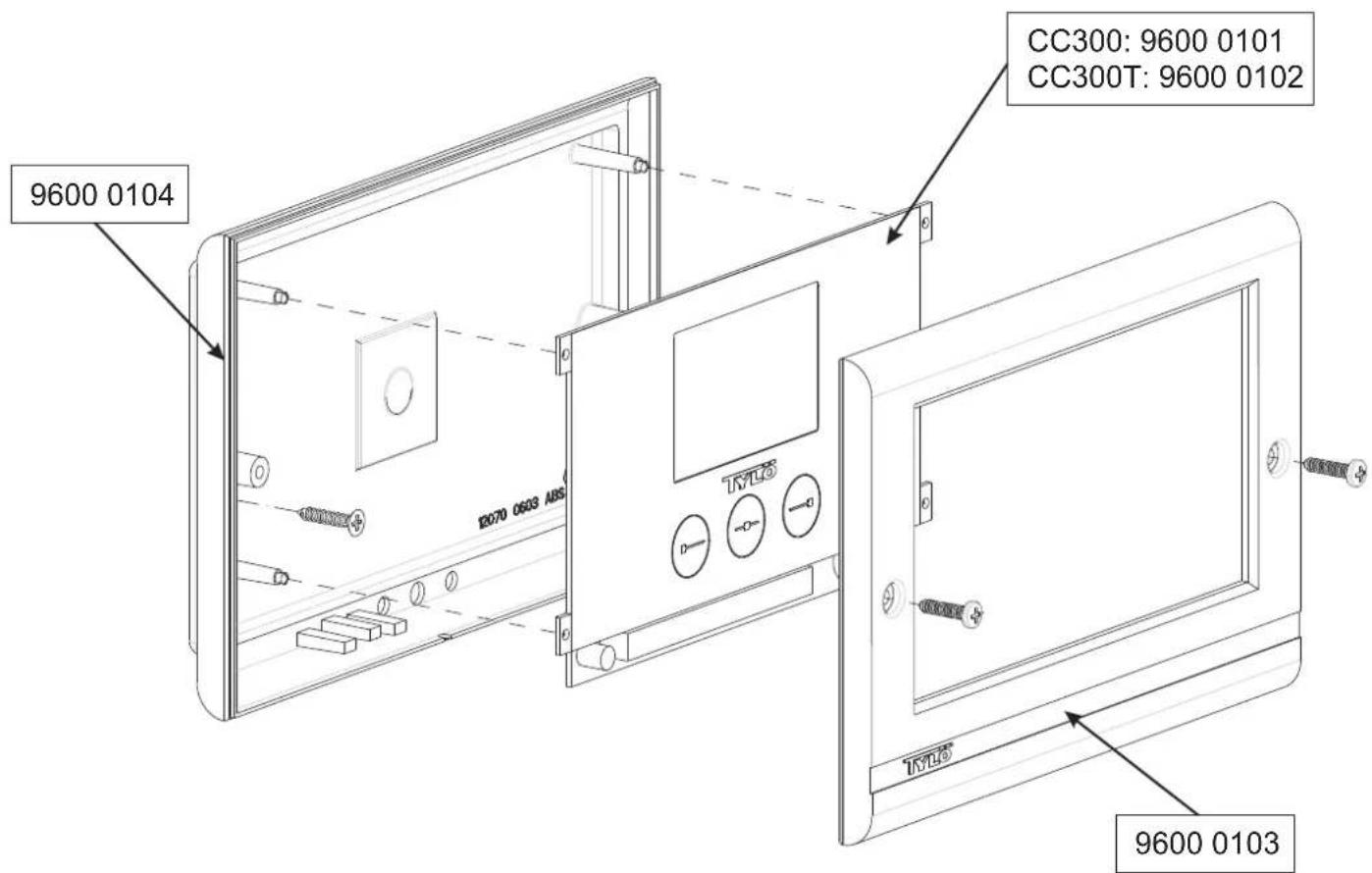
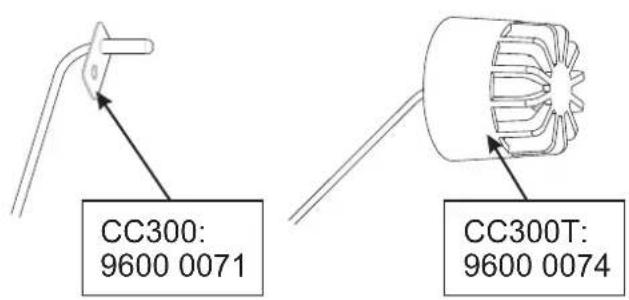
Available spare parts