Pilot II - Counter LeMond Fitness - Free user manual and instructions
Find the device manual for free Pilot II LeMond Fitness in PDF.


| Product Type | Cadence and Heart Rate Monitor for Exercise Bike |
| Brand | LeMond Fitness |
| Model | Pilot II |
| Console Power | 2 AA batteries (battery life: 6 months to 1 year) |
| Transmitter Power | 3 AA batteries (battery life: 6 months to 1 year) |
| Heart Rate Range | 30 to 240 beats per minute |
| Heart Rate Accuracy | ±4 beats per minute |
| Transmitter Frequency | 122 kHz |
| Display | Cadence (rpm), speed (km/h or mph), time, distance, calories, heart rate |
| Backlight | Yes, button activation (5 seconds) |
| Compatibility | LeMond RevMaster exercise bike only |
| Warranty | 1 year on cadence meter and transmitter (batteries not covered) |
| Maintenance | Clean with a damp cloth and diluted household cleaner; do not immerse; do not use solvents |
| Safety | Consult a physician before any exercise program; stop if chest pain, dizziness, severe shortness of breath |
| Customer Service | +1 425-482-6773 (United States) |
| Compliance | FCC Part 15 |
Frequently Asked Questions - Pilot II LeMond Fitness
User questions about Pilot II LeMond Fitness
0 question about this device. Answer the ones you know or ask your own.
Ask a new question about this device
Download the instructions for your Counter in PDF format for free! Find your manual Pilot II - LeMond Fitness and take your electronic device back in hand. On this page are published all the documents necessary for the use of your device. Pilot II by LeMond Fitness.
USER MANUAL Pilot II LeMond Fitness
CERTAIN EXERCISES, PROGRAMS, OR TYPES OF EQUIPMENT MAY NOT BE APPROPRIATE FOR ALL INDIVIDUALS, ESPECIALLY IF YOU ARE ABOVE 40 YEARS OF AGE, AND/OR HAVE PRE-EXISTING HEALTH, AND/OR ORTHOPEDIC MEDICAL CONDITIONS. YOUR PHYSICIAN CAN HELP YOU DETERMINE WHAT ACTIVITIES OR PROGRAMS ARE MOST SUITABLE FOR YOU.
WARRANTY
This is to certify that the Pilot II© wireless cadence meter is warranted by HOIST Fitness to be free of all defects in materials and workmanship. This warranty does not apply to any defect caused by negligence, misuse, accident, alteration, improper maintenance, or an "act of God." The Pilot II cadence meter can only be used on the Rev-Master indoor cycling bike. Any attempts to use this meter on any other equipment voids the warranty.
The Pilot II carries a one year warranty on the meter and transmitter. Batteries are not warranted. Contact our Customer Service Department to report any problems. When calling, please be prepared to provide the customer service representative with the following information: Your name, the serial number of the inoperable unit, and the date(s) of purchase for the meter. If warranty replacement parts are shipped to you, you may be required to return the inoperable part.
HOIST Fitness neither makes, assumes nor authorizes any representative or other person to make or assume for us, any other warranty whatsoever, whether expressed or implied, in connection with the sale, service, or shipment of our products. We reserve the right to make changes and improvements in our products without incurring any obligation to similarly alter products previously purchased. In order to maintain your product warranty and to ensure the safe and efficient operation of your cadence meter, only authorized replacement parts can be used. This warranty is void if parts other than those provided by HOIST Fitness are used.
SPECIFICATIONS
Cadence Meter
Heart Rate Range: 30 to 240 bpm (beats per minute)
Heart Rate Accuracy: ± 4 bpm
Battery: 3 AAA batteries
Battery Life: 6 months to 1 year, depending on usage
Transmitter
Emitted Signal: ANT+ Enabled
Battery: 2 AA batteries
Battery Life: 6 months to 1 year, depending on usage
CONTENTS
Description 7
Installation on the RevMaster Batteries 8
Console. 10
Transmitter 10
Display Window. 12
Quick Start Program 14
Custom HR Training and Calorie Calculation 15
Key Function 17
Cadence Training. 20
Troubleshooting 22
Appendix
FCC Compliance 24
Pairing the Console to the Transmitter ....25
Console Codes 28
NOTE:
Press any key to turn on the Pilot II console.
- Never disassemble the console or transmitter as it can not be reassembled.
- The console is water resistant, not water proof. Do not deliberately place it in water.
- To clean the console, wipe it off with a clean rag sprayed with diluted household cleaner.
DESCRIPTION
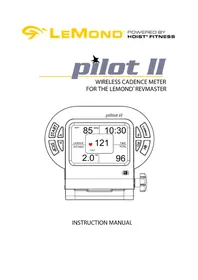
The Pilot II assembly consists of a console, a magnet, and a transmitter. A sensor in the transmitter counts the number of times a magnet mounted in the right crank passes the sensor.
The transmitter will then send a coded ANT+ signal to the console containing the measured values.
The console has onboard receivers that pick up RPM signals from the transmitter and heart rate signals from a telemetry chest strap. The heart rate is then shown in the display window. The console will track cadence (RPMs), speed (MPH/KPH), time, distance, and caloric expenditure.
NOTE:
Excessive use of the back light [ ]will drain the console batteries prematurely.
Expected life of the console batteries is 6 months to 1 year.
- If the console battery power is low, then "BATT LOW" will be shown in the display window for 2 seconds after the display is turned on to inform you to change the console batteries.
Expected life of the transmitter batteries is 6 months to 1 year.
INSTALLATION OF PILOT
NOTE:
The Pilot II can only be installed on a LeMond RevMaster Pro bike.
The console uses three(3) AAA batteries and the transmitter uses two(2) AA batteries as a source of power. Install the supplied batteries in the console and in the transmitter prior to using.
To install the meter (console and the transmitter), you will need
the following tools:
Phillips Screwdriver
2.5-mm Hex Key (supplied)
3-mm Hex Key (supplied)
4-mm Hex Key (supplied)
INSTALLATION OF PILOT
Transmitter Battery Installation:
Remove the battery cover screw and cover from the 1. transmitter with a 2.5-mm hex key.
Install two (2) AA batteries in the battery compartment.2.
Retain the battery cover and its screw until you have 3. installed the transmitter on the bike. You will reinstall the battery cover at that time.
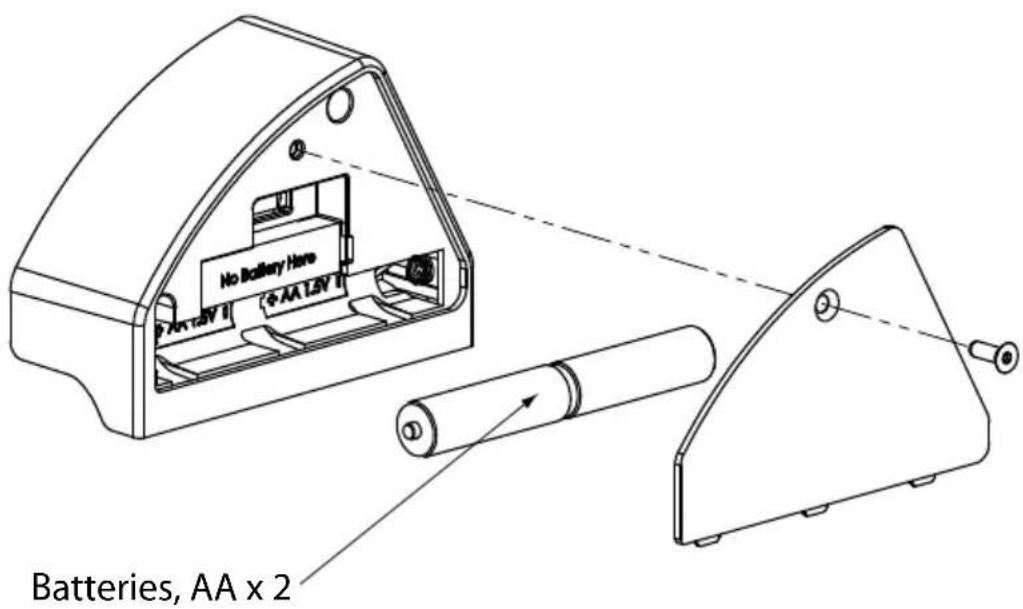
INSTALLATION OF PILOT
Console Battery Installation:
Loosen the battery cover screw and remove the battery 1. cover from the console.
Insert 3 AAA batteries into the battery compartment 2. and reinstall the battery cover.
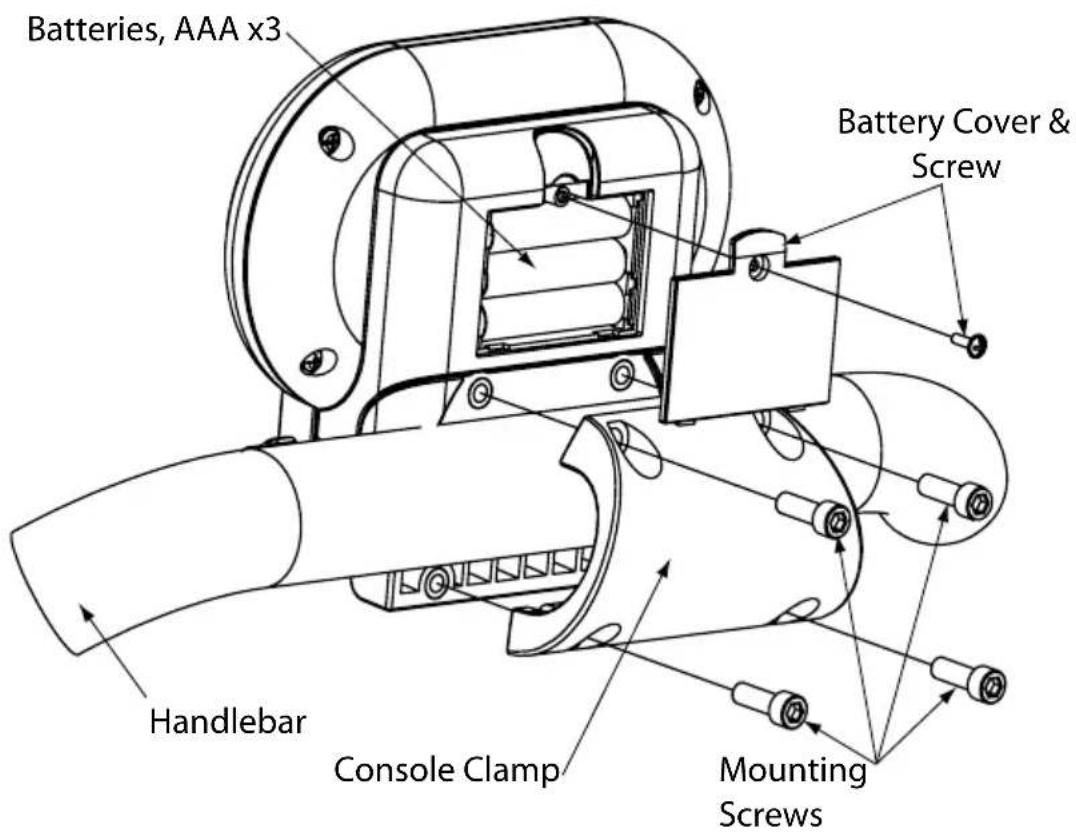
Console Installation:
Open the console clamp and align the two halves 2. around the top center of the handlebar.
Insert a mounting screw into each hole and use a 4-mm 3. hex key to tighten the screws.
INSTALLATION OF PILOT
Transmitter Installation:
Ensure that the batteries are installed in the transmitter.1. Position the transmitter next to the cover.2.
Note: The RPM sensor at the back of the transmitter will align with the indentation in the back of the drive cover.
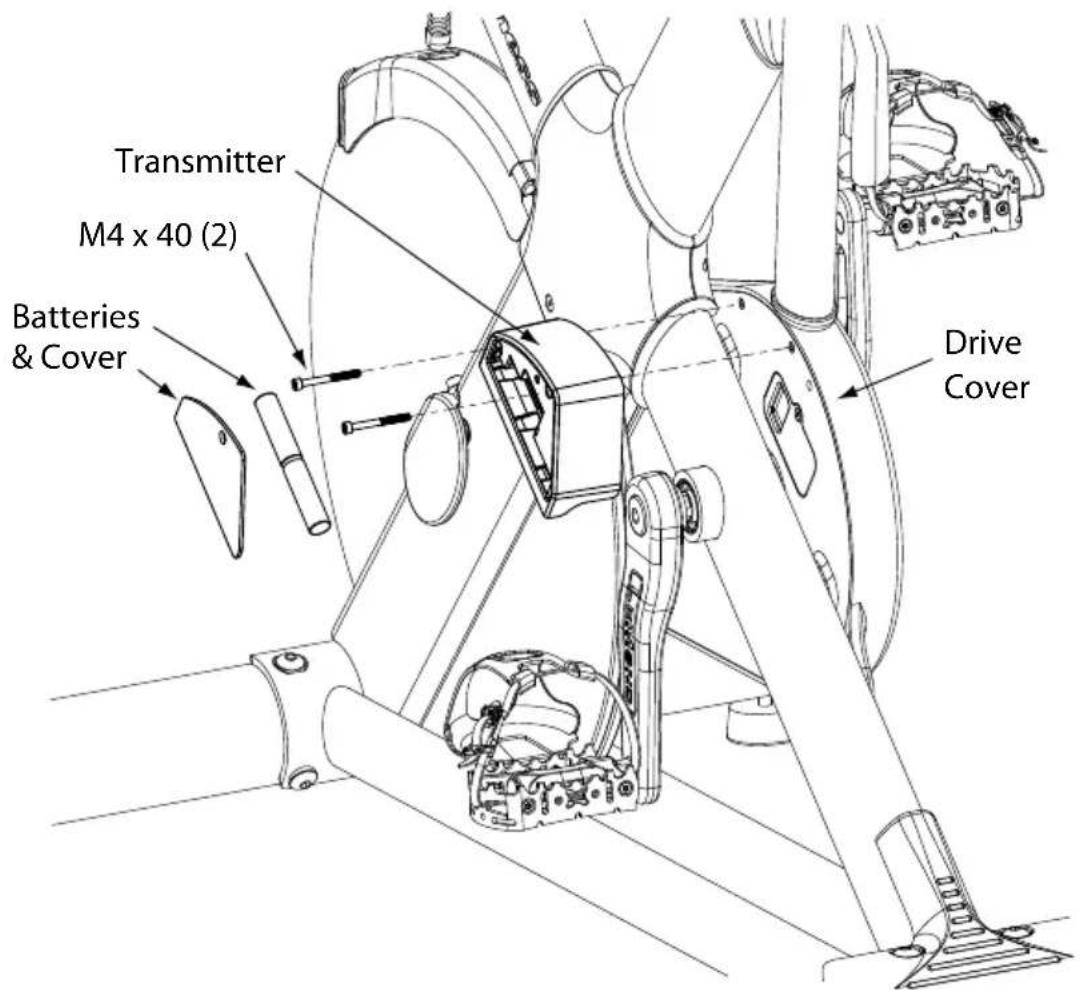
INSTALLATION OF PILOT
Secure the transmitter to the bike with two M4 x 40 3. screws; tighten with a 3mm hex key.
Reinstall the transmitter battery cover and screw; 4. tighten with a 2.5mm hex key.
Checking the Installation:
Turn the console on by pressing START.1.
Rotate the cranks for 10 seconds and verify that the con-2. sole is detecting up the crank rotation and displaying RPM's in the cadence section of the display window.
If you do not see RPMs in the display window, press 3. the [CADENCE] key repeatedly until "INST" RPM is shown in the display window. If RPM still does not show, refer to the troubleshooting section of this manual.
DISPALY WINDOW
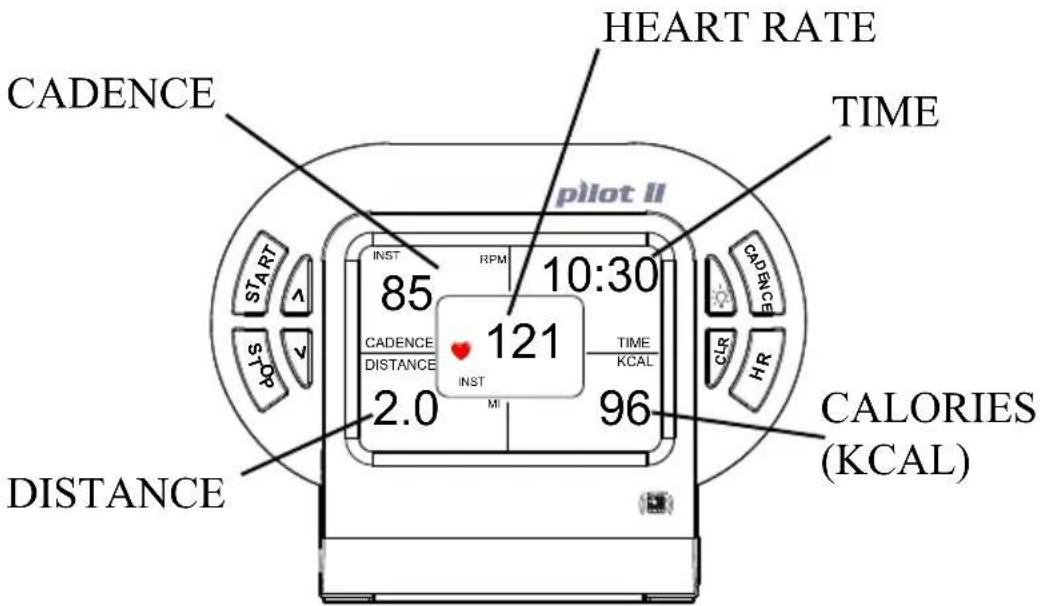
CADENCE
Cadence is the measurement of how fast the crank is rotating in RPM's. The approximate speed of the bike can also be displayed (MPH/KPH) in this area.
TIME
Time is the length of time (min:sec) since you pressed the start button.
DISTANCE
Distance is calculated as if the user was riding a bike with tires the same size of the flywheel. Speed at 80 Pedal RPM 18MPH
KCAL
Kcal is the approximation of calories burned during your workout. The calories are estimated by measuring your instantaneous heart rate (HR) and factoring in your age, ambient HR, and weight.
HEART RATE
This is the measurement, by telemetry (chest strap), of your heart rate in beats per minute (BPM).
Note: You must wear a chest strap during your workout in order to see your heart rate. The Pilot II console will detect heart rate signals from most chest straps that emit an analog signal and all ANT+ digital chest transmitters.

WARNING
IF AT ANY TIME DURING YOUR WORKOUT YOU FEEL CHEST PAIN, EXPERIENCE SEVERE MUSCULAR DISCOMFORT, FEEL FAINT, OR ARE SHORT OF BREATH, STOP EXERCISING IMMEDIATELY. IF THE CONDITION PERSISTS, YOU SHOULD CONSULT YOUR MEDICAL DOCTOR IMMEDIATELY
The Pilot II also features heart zone training. After selecting your maximum and minimum heart rate limits, the console will show flashing up or down arrows over the heart icon to indicate that you need to adjust your intensity either up or down to stay within your selected heart rate zone. See pg. 15 for more info.
Any time you want to bypass entering your personal data and start using the meter, simply press any key to turn on the console. After you press the [START] key, the timer will start
QUICK START PROGRAM
counting and the console will start tracking usage information.
The Pilot will calculate calories burned based on the following default perimeters for Quick Start Workout:
Ambient Heart Rate (AHR): 70 bpm
Age: 30 Years old
Weight: 175 lbs.
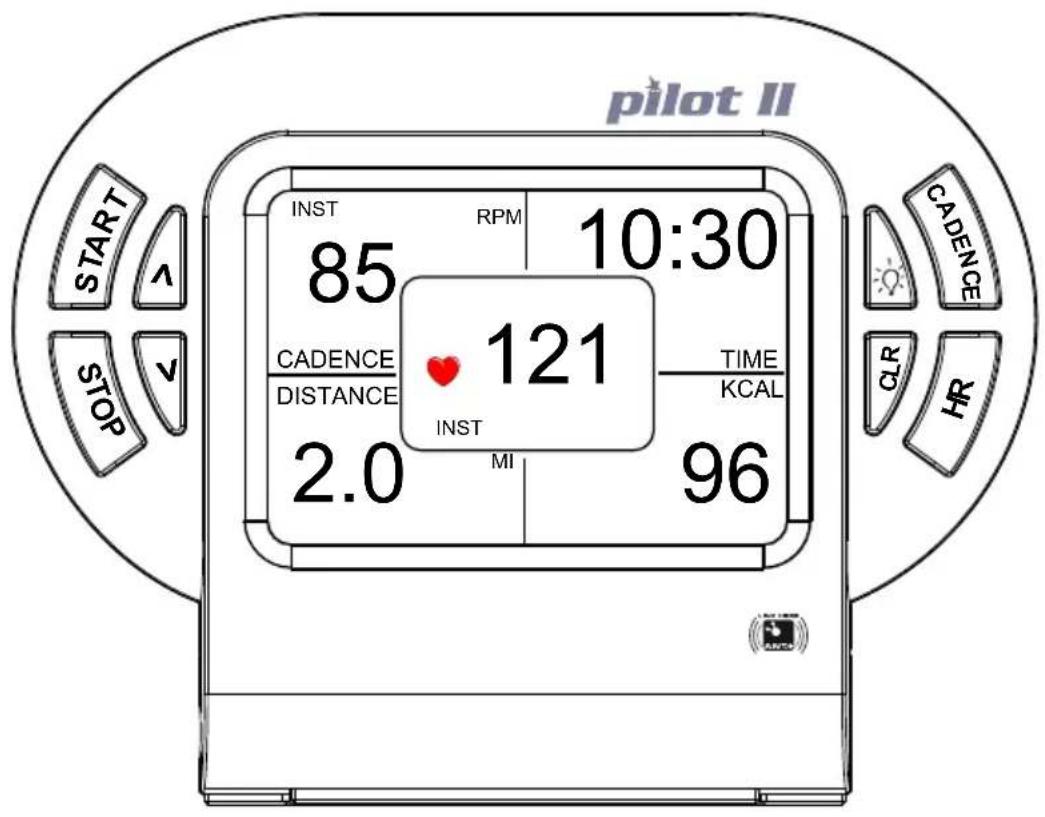
CUSTOM HEART RATE TRAINING AND CALORIE CALCULATIONS
Press and 1. hold the [HR] key until the display window shows "√ 240."
Use the [2. ] key to change the upper limit of your target heart rate from 240 BPM to your desired beats per minute and press [HR] to select the number. Or, simply press [HR] to accept the default value of 240 BPM.
Note: If your heart rate during your workout session is higher than the selected upper limit of your target heart rate range, there will be a flashing "√" above the heart icon in the display window. This indicates that you should adjust your workout to bring your heart rate down
The display window will now show "3. 30
Use the [4. ] key to change the bottom limit of your target heart rate from 30 BPM to your desired beats per minute and press [HR] to select the number. Or, simply press [HR] to accept the default value of 30 BPM.
Note: If your heart rate is lower than the selected bottom limit of your target heart rate range, there will be a flashing "^" above the heart icon. This indicates that you should adjust your workout to bring your heart rate up.
The lower right portion of the display window will show 5. 70 BPM as the default ambient heart rate (AHR). It is sometimes referred to as resting heart rate and is measured when you are sitting and relaxed.
CUSTOM HEART RATE TRAINING AND CALORIE CALCULATIONS
Use the [6. ] or [] key to change the default AHR value to your AHR value.
Press the [7. HR] key to select your AHR value.
The default age of 30 years old will be displayed. Use the 8. [ ] or [ ] key to change the default age to your age.
Press the [9. HR] key to select your age.
The default weight of 175 lbs. will be displayed. Use 10. the [ ] or [ ] key to change the default weight to your weight.
Press the [11. HR] key to select your weight and return you to the main screen.
Press the [12. START] key to activate the timer and start tracking usage information.
KEY FUNCTIONS
[START]
The start key will start the timer and enable the cadence meter to begin calculating HR and Kcal values.
[CLEAR]
A short press ( < 3 sec) of the clear key will reset the time, distance and calorie measurements.
Pressing and holding the clear key ( >3sec ) will reset the AVG (average) and MAX (maximum) values for cadence and HR measurements. In addition, the calorie calculation values will be reset to their default values
[STOP]
The stop key will stop the calculation of the time, distance and calorie measurements without resetting the values of the measurements. Pressing the start key again will restart the console
[CADENCE]
The cadence key allows you to change the cadence section of the display window between INST (instantaneous) RPM, AVG (average) RPM, MAX (maximum) RPM, INST (instantaneous) MPH/KPH, AVG (average) MPH/KPH, and MAX (maximum) MPH/KPH.
[∧]
The up arrow allows you to increase the default max HR, min HR, ambient HR, age, and weight for target heart zone training and calorie calculations.
[V]
The down arrow allows you to decrease the default max HR, min HR, ambient HR, age, and weight to select your values for target heart zone training and calorie calculations.
[HR]
A short press of the heart rate key allows you to change the display of the HR section of the display window between INST (instantaneous) HR, AVG (average) HR and MAX (maximum) HR.
![LeMond Fitness Pilot II - [HR] - 1](/content/2026/02/408073/images/e0a4ee071377ab820679ca21901913c8cb2dec7c387762a5f1ec2ab210f668ff.jpg)
A long press ( >3sec ), places you in the HR data entry mode where you can use the [] and [] keys to select your upper target HR and lower target HR. You can also modify the ambient HR, age, and weight default values for more user specific calorie calculations.
![LeMond Fitness Pilot II - [HR] - 2](/content/2026/02/408073/images/23365e89f247d6332d897fce336904b3c5cfe0d08ebe6c145a6bc9f0375d3df6.jpg)
![LeMond Fitness Pilot II - [HR] - 3](/content/2026/02/408073/images/6d77f165090a55a68ac8ae254fb0a6bbab885ab52445171a7d05d748589ba8d1.jpg)
Pressing the light key will back-light the display window for 5 seconds. If another key is pressed while the light is on, the back light will stay on for an additional 5 seconds. As long as keys are pressed with the back light on, the console light will stay on.
Note: When the back light is on, all calculations are suspended. During this time, heart rate and cadence are not detected.
CADENCE TRAINING
Definition of Cadence
How rapidly the cranks are rotated or the rhythm of the pedal stroke; often referred to as RPM (revolutions per minute).
Concepts using Cadence for training
You can choose the goal of your workout in relation to Resistance, Cadence, and Heart Rate. The intensity of your workout is affected by pedal speed change and the resistance applied. This is quantified as RPE - Relative Perceived Exertion)
| Resistance Used | Cadence | Heart Rate | RPE | Feeling |
| Light | RPM 50-70 | 35%-50% MHR | 1-2 | Very easy |
| Light | RPM 70-90 | 50%-60% MHR | 3-4 | Easy |
| Light | RPM 90-100 | 60%-70% MHR | 5 | Steady; c o m |
| Light | RPM 100-135 | 70%-85% MHR | 6+ | Challenging |
| Moderate | RPM 50-70 | 55%-65% MHR | 4-5 | Somewhat h a r d |
| Moderate | RPM 70-90 | 65%-75% MHR | 5-6 | Challenging, s t e a d y |
| Moderate | RPM 90-100 | 75%-85% MHR | 6-7 | Hard! |
| Moderate | RPM 100+ 85%-100% MHR | 7-10 | Very hard; c h a s i n g | |
| Heavy | RPM 50-60 | 70%-80% MHR | 6-7 | Hard; talking is hard |
| Heavy | RPM 60-70 | 80%-85% MHR | 7-8 | Very hard; pushing |
| Heavy | RPM 70-80 | 85%-90% MHR | 8-9 | Very Hard!! |
| Heavy | RPM 80+ | 90%-100% MHR | 9-10 | Maximal |
| Resistance Used | Speed Change | Effects on Heart Rate |
| Light | Lower RPM | HR remains relaxed |
| Light | Higher RPM | HR begins to rise |
| Moderate | Lower RPM | HR near to steady state |
| Moderate | Higher RPM | HR rises from steady state |
| Heavy | Lower RPM | HR rises - hard effort |
| Heavy | Higher RPM | HR rises very hard to maximal effort |
Warm-Up
Warm up is of critical importance to the success of your cycling. The demands of your riding profile should be prepared in the warm-up to achieve maximal results. You must get your working muscles to a temperature of optimum performance where the circulatory system is delivering oxygen and nutrients efficiently to those muscles. Depending on the workout session goal, warm up can take from 15 minute to 20 minutes.
TROUBLESHOOTING
No Display on Console
Press any key to bring the console out of sleep mode.1.
Ensure that the batteries are installed properly in the 2. console and transmitter. If they are, install fresh batteries.
Verify that the cadence transmitter and console are 3. paired correctly (see Appendix).
- Call our Customer Service department at 858-578-7676 for assistance.
No Heart Rate signal displayed
Ensure that your chest strap is worn correctly, and that 1. there is moisture under the electrodes of the chest strap.
Relocate the RevMaster bike away from any equipment 2. that could potentially interrupt the radio frequency signal, such as a DVD player or television, etc.
Enure that there is at least 36 inches between bikes in a 3. group exercise class setting.
Call our Customer Service department at 858-578-7676 4. for assistance.
RPM or HR does not change
Press [CADENCE] repeatedly to toggle between 1. instantaneous (INS), average (AVG), and maximum (MAX) values.
Press [HR] repeatedly to toggle between instantaneous 2. (INS), average (AVG), and maximum (MAX) values.
TROUBLESHOOTING(CONT.)
Cadence number jumps high or low
Verify that the cadence transmitter and the console are 1. paired to one another (see Appendix).
Relocate the bike to a different part of the room, away 2. from any RF interference areas.

CAUTION
EXTERNAL INTERFERENCE MAY BE CAUSED BY NEARBY TELEVISIONS, STEREO EQUIPMENT, SPEAKERS, ELECTRICAL WIRE CABLING, ETC. IF YOU EXPERIENCE DISTURBANCES IN THE CONSOLE DISPLAY TRY MOVING YOUR BIKE(s) AWAY FROM POTENTIAL RF INTERFERENCE AREAS.
Call our Customer Service department at 858-578-76763. for assistance.
Heart Rate signal gets interrupted or drops out
Ensure that there is a minimum distance of 36 inches 1. between bikes.
Verify that your chest strap is secure and that the elec-2. trodes are making contact with your chest at all times.
Call our Customer Service department at 858-578-76763. for assistance.
APPENDIX
Notice of FCC Compliance
This equipment has been tested and found to comply with the limits for a Class C Low Power Communication Device Transmitter, pursuant to Part 15 of the FCC rules. Operation is subject to the following conditions: (1) This device may not cause harmful interference, and (2) this device must accept any interference received, including interference that may cause undesired operation.
There is no guarantee that interference will not occur in a particular installation. If this equipment experiences interference from a radio, television, or other RF signal, the user is encouraged to try and correct the interference by increasing the separation between the equipment and the apparatus emitting the interfering RF signal.

WARNING
CHANGES OR MODIFICATIONS TO EQUIPMENT NOT EXPRESSLY APPROVED BY HOIST® FITNESS COULD Void THE USER'S AUTHORITY TO OPERATE THIS EQUIPMENT.
APPENDIX
Pairing the Console and the Cadence Transmitter
The Cadence Transmitter and the Console communicate via an ANT+ signal. They will be paired from the factory, but should they lose connection, follow the steps below to reestablish the pairing.
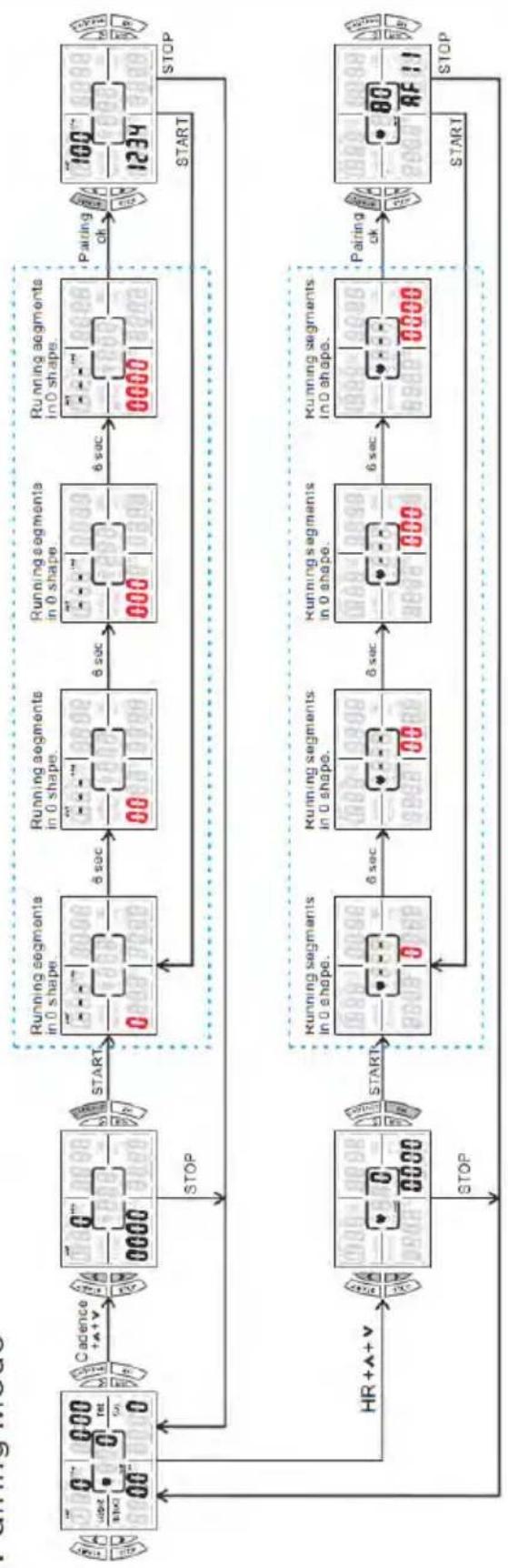
Pairing the Cadence Transmitter (see diagram on p. 27)
- With the console ON. Press the [] + [] + [CA-DENCE] buttons simultaneously.
- Start pedaling.
- When "0000" or another 4 numbers appears in the lower left window, press [START] and the console will search for the cadence signal. "Searching" will be indicated by blinking lights in the lower left window.
- When the console detects the cadence transmitter then the blinking lights will hold a solid 4 digit number to indicate the pair has been made, and your cadence will appear in the upper left window.
- Press [STOP] to return to main screen.
Pairing to an ANT+ HR strap (see diagram on p.27)
Note: HR signal detection is based on proximity; meaning whichever HR strap is the closest to the console is the signal that the console will display. If the console has trouble detecting your ANT+ HR strap, follow the steps below. This is only for ANT+ HR straps. 5K Analog and digital straps will be detected by proximity, not by pairing.
- While wearing the ANT+ HR strap and with the console ON. Press the [] + [] + [HR] buttons simultaneously.
- When "0000" or another 4 numbers appears in the lower right window, press [START] and the console will search for the HR signal. "Searching" will be indicated by blinking lights in the lower right window.
- When the console detects the HR signal then the blinking lights will hold a solid 4 digit number to indicate the pair has been made, and your HR will appear in the middle window.
- Press [STOP] to return to main screen.
APPENDIX
Pairing Diagram
CONSOLE CODES
[CADENCE] + [HR]
Pressing both these keys switches from English units - Miles (MI), Miles per Hour (MPH), and pounds (Lb); to metric units - Kilometers (KM), kilometers per hour (KPH), and kilograms (KG)
[CADENCE] + [∧] + [∨]
Simultaneously pressing these three keys displays the currently paired code. The transmitter has a small sticker indicating its code. Press [STOP] to return to the main screen.
$$ \left[ \mathbf {H R} \right] + \left[ \wedge \right] + \left[ \vee \right] $$
Simultaneously pressing these three keys displays the currently paired ANT+ chest strap code. Press [STOP] to return to the main screen.
[ \text{[STOP]} + [\wedge] + \text{[CADENCE]} ]
Simultaneously pressing these three keys will light up the entire display window. Use this code to verify that the Liquid Crystal Display (LCD) is working properly. Press [STOP] to return to the main screen.
Corporate Headquarters
11900 Community Road
Poway, CA 92064
Telephone: +1(858) 578-7676
Fax: +1(858) 578-9558
www.HOISTfitness.com
Document No:
300219 Rev C

CADENCEMÈTRE SANS FIL POUR VÉLO D'APPARTEMENT REVMASTER LEMOND
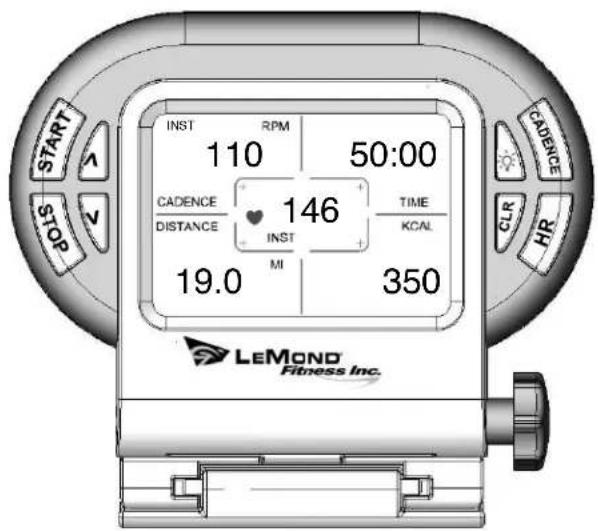
MANUEL D'INSTRUCTIONS

2004 LeMond Fitness
15540 Woodinville-Redmond Rd
Building A, Suite 100
www.LeMondfitness.com
Document ^ ..
300204 Rev. D
Installation am RevMaster 9
Konsole 9
Sender 10
Magnet 12
Display 13
Quick Start Programm 15
Warm-up (15 Minutes)
15540 Woodinville-Redmond Rd
Building A, Suite 100
Woodinville, WA 98072
Telefon: +1(425) 482-6773
Telefax: +1(425) 482-6724
www.LeMondfitness.com
Dokument-Nr:
300204 Rev D
15540 Woodinville - Redmond Rd
Building A, suite 100
Woodinville, WA 98072
Www.LeMondfitness.com
PN:300204
| Dip Switch Number | ||||
| Code Number (00-15) | 1 | 2 | 3 | 4 |
| off | off | off | off | |
| 01 | on | off | off | off |
| 02 | off | on | off | off |
| 03 | on | on | off | off |
| 04 | off | off | on | off |
| 05 | on | off | on | off |
| 06 | off | on | on | off |
| 07 | on | on | on | off |
| 08 | off | off | off | on |
| 09 | on | off | off | on |
| 10 | off | on | off | on |