GFORCE UT - Exercise bike LeMond Fitness - Free user manual and instructions
Find the device manual for free GFORCE UT LeMond Fitness in PDF.


Frequently Asked Questions - GFORCE UT LeMond Fitness
User questions about GFORCE UT LeMond Fitness
0 question about this device. Answer the ones you know or ask your own.
Ask a new question about this device
Download the instructions for your Exercise bike in PDF format for free! Find your manual GFORCE UT - LeMond Fitness and take your electronic device back in hand. On this page are published all the documents necessary for the use of your device. GFORCE UT by LeMond Fitness.
USER MANUAL GFORCE UT LeMond Fitness
OWNER'S MANUAL g·force UT digital


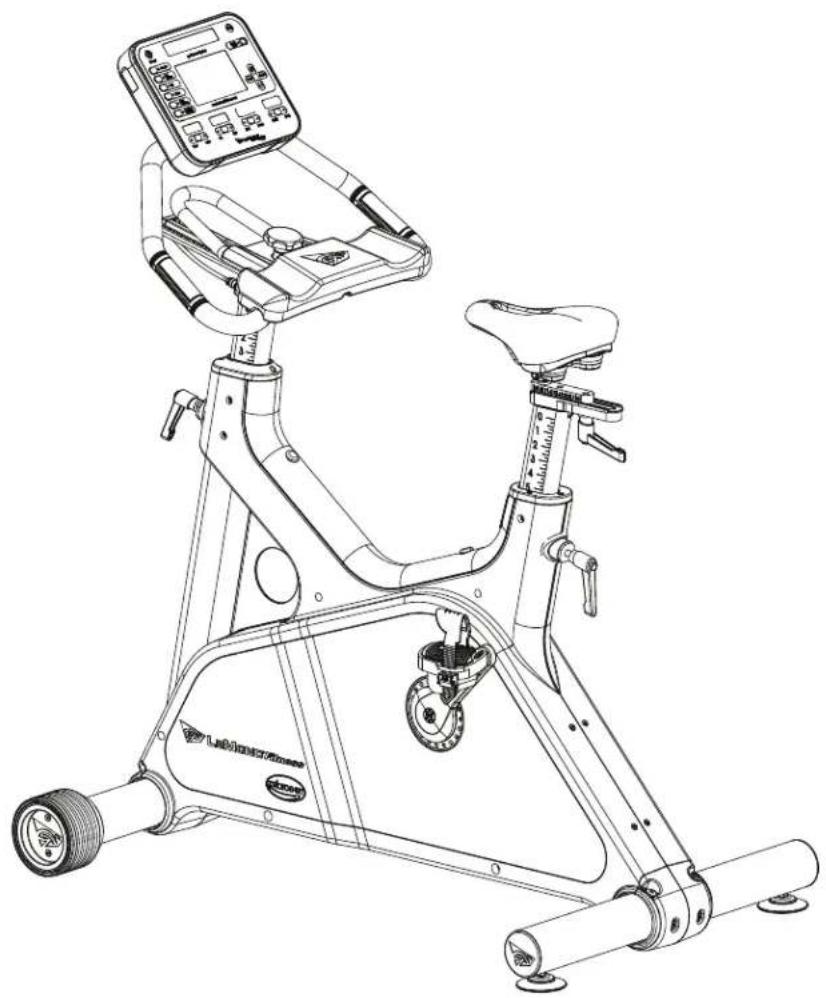
LeMond® g·force UT digital™
Visit our website at
www.LeMondfitness.com

LEMOND
Fitness Inc.
15540 Woodinville-Redmond Road NE
Building A Suite 100
Woodinville, WA 98072 USA
Telephone (+1) 425.482.6773
Fax: (+1) 425.482.6724
You have just become a valued LeMond fitness customer. Our team is committed to making your cycling experience fun and rewarding — offering you detailed product information, expert fitness advice, and direct customer support you can depend on. We at LeMond Fitness want to thank-you for purchasing an exciting LeMond g·force UT digital upright bike.
This g-force UT digital Owner's Manual will help you get the most enjoyment from your new upright bike. It not only explains all the important features, programs and safety considerations of the g-force UT digital, but also includes great workout tips and riding profiles; including how to use our popular heart-rate training programs. If at any time you have questions about this information, please call us directly at (425) 482-6773 and we will be happy to assist you. To help us answer your questions quickly, we recommend having the serial number of your bike ready when you call us. The serial number of your bike is located on the front tubing near the bottom of the bike.
The g·force UT digital has been tested by some of America's most famous cyclists. Our company founder, Greg LeMond, is the force (the "g" force) behind the inspiration and design of this remarkable indoor bike. Greg's story is one of courage and heroic accomplishment. In 1986, Greg became the first American to win the longest and most physically demanding event in the world — the Tour de France. Only nine months later in April of 1987, he narrowly escaped death when he was accidentally shot in a hunting accident. During a long and painful rehabilitation, he set a goal that many considered inconceivable: to once again win the Tour de France. In 1989, he achieved that goal and then proved it was no mere stroke of luck by winning the Tour a third time in 1990.
A legendary athlete, Greg introduced many cycling innovations during his racing career. Just as aero bars are now commonplace, the g-force UT digital will be the new standard in indoor fitness bikes. The g-force UT digital combines Greg's passion for cycling with exceptional product innovation. Built to deliver an incredible workout, every component of the g-force UT digital has been designed to be more innovative, user friendly and comfortable than any other indoor bike you have ridden. Whether you are a beginning fitness enthusiast or a highly conditioned athlete, you will immediately feel the difference.
Attractive and cordless, you can position the g·force UT digital anywhere in your home for maximum enjoyment. Starting with how quiet a g·force UT digital workout is, you will quickly discover that the g·force UT digital gives you a better cycling experience than any other indoor exercise bike.
Greater Comfort
- 4x4 handlebar & seat adjustability allows you to properly fit your bike ranging from the upright cruiser to a lean mean triathlete machine.
- Narrower crank design replicates the geometry of a road bike for greater comfort and training.
- Interchangeable seat options allow you to change the seat to your personal preference.
More Features
Cordless power supply — place your new bike anywhere
More training resistance levels — from 1-20 with the greatest watt range available; from 33 to over 1200
Ratchet style pedal straps — for more secure and comfortable positioning of the foot
Standard thread for pedal options—accepts any standard cycling pedal
Exclusive 'time out' option — take up to a 2 minute exercise break without powering down
- Contact heart rate sensors — maximize your workout efficiency with heart rate monitoring
Telemetry Heart Rate equipped—heart rate strap included
No calibration required - just hop on and ride
Digital Drive System — For smooth and accurate power feedback
USB Port — For workout data retrieval
Challenging Workout Programs
Enjoy thirteen different workout programs; seven traditional exercise programs and six Greg LeMond training programs specifically designed for a variety of training applications.
Traditional Programs:
Manual
Hill
Constant Heart Rate
Hill Heart Rate
Fat Burner
Race
Interval Heart Rate
Exclusive 30 minute Greg LeMond Training and Conditioning Programs
Anaerobic Programs:
Rev-It-Up
Bust Your Gut
Pump the Power
Aerobic Intervals:
Strong and Steady
Fat Burner Plus
Race Day Warm Up:
Race Day
Exclusive Features
- 4x4 Micro adjustability for both seat & handlebars put you in the "sweet zone" for muscular participation—allowing you to involve a larger number of muscles to get results faster and easier
The g-force UT digital is so smooth you can actually work out longer and more efficiently than you ever imagined - Switch Between Exercise Mode and Bike Modes on Manual, Hill, and Fat Burner programs
Please review the rest of this Owner's Manual carefully before you start using your new g·force UT digital. The information enclosed here will help you get the most enjoyment out of your workout and includes valuable, operating, service, safety, and trouble-shooting information, as well as guidelines for an effective exercise program. We are confident that you will love your new g·force UT digital. From Greg and the whole LeMond Fitness team, we wish you a lifetime of good rides and great workouts.
TABLE OF CONTENTS
BEFOREGETTINGSTARTED 6
IMPORTANT SAFETY INSTRUCTIONS 7
SETTING UP AND OPERATING THE g-force UT Digital 8
SAVING EXERCISE DATA 13
GUIDELINES FOR AN EFFECTIVE EXERCISE PROGRAM 14
PROGRAMPROFILES 17
MAINTENANCE INSTRUCTIONS 29
TROUBLESHOOTING 30
LIMITED WARRANTY 32
PRODUCT SERVICE 34
WARRANTY REGISTRATION 35
SPECIFICATIONS 37
APPENDIX. 38
It is always important to consult a physician for a complete physical examination before starting any exercise program. Beyond identifying any risk factors you may have, your health professional can assist you in developing an exercise program which establishes the frequency and intensity appropriate for your age and current health status.
The g-force UT digital is an excellent choice for overweight or severely deconditioned individuals in that it provides more seat and handlebar adjustability and the lowest pedaling requirement of all other fitness bikes. However, if you consider yourself such an individual, you should still exercise caution when using this equipment for the first time. Overexertion or the possibility of injury exists when starting any new exercise program.
CAUTION: If at any time during a workout, you experience pain or tightness in the chest, an irregular heartbeat, shortness of breath, feel faint or severe discomfort of any kind, STOP exercising immediately. Consult your physician before continuing your program.
SAVE THESE INSTRUCTIONS
This Owner's Manual contains all the information necessary to operate the g·force UT digital in a safe and enjoyable manner. Please read and understand the contents of this Owner's Manual in it's entirety before attempting to operate the g·force UT digital.
- The g-force UT digital was designed for indoor use only. Choose a location that is clear of any obstructions, including walls and furniture. Leave a minimum of 12 in (30.5 cm) clearance on each side of the bike.
- The display console of the g·force UT digital uses four AA rechargeable nickel-metal hydride (Ni-MH) batteries. Never replace with conventional alkaline batteries. Doing so will damage your electronics and void your warranty.
- Keep the area around your bike clear while in use.
- The g-force UT digital was designed for users between 58 in (147.3 cm) and 80 in (203.2 cm) in height. Children who meet the height requirements should be closely supervised when using the bike.
- Keep very young children, disabled persons and pets away from the g·force UT digital while it is in use. Children, and pets in particular, may find the repetitive motion of the pedals fascinating, and this curiosity may result in injury. Do not allow any child or pet to touch the bike while it is still in motion.
- Keep all loose clothing, shoelaces, cords and towels away from pedals and other moving parts. Shoe-laces, in particular, can become entangled in the pedal mechanism, causing serious discomfort or injury.
- Do not place fingers or any other objects into moving parts of the equipment.
- Never drop or insert any object into any opening.
- Never turn pedal crank arms by hand. To avoid entanglement and possible injury, hands or arms should not be exposed to the drive mechanism.
Always wear appropriate shoes while riding the g-force UT digital. - Use the g-force UT digital only as described in this manual. Attachments or modifications not recommended by the manufacturer will void the warranty.
- Do not attempt to remove the side panels of the g·force UT digital. Service should be completed by an authorized service provider. Please call the LeMond Fitness Customer Service Department at (+1) 425.482.6773 between the hours of 7:00 a.m. - 5:00 p.m. M - F Pacific time for assistance.
- Do not use the g-force UT digital in the vicinity where aerosol spray or oxygen is being used.
- User capacity of the g·force UT digital is 350 lbs. (159.1 kg)
All equipment manufactured by LeMond Fitness, Inc. has been thoroughly inspected by the manufacturing facility prior to shipment. Proper installation and regular maintenance of the g·force UT digital is required to ensure the safety of the operators.
Location
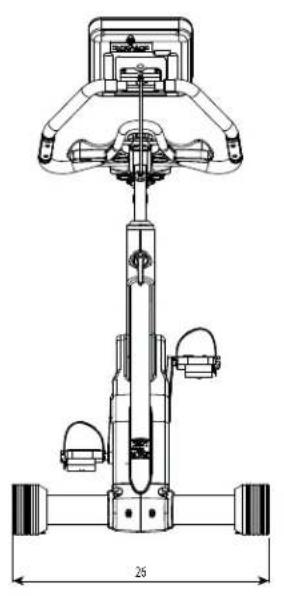
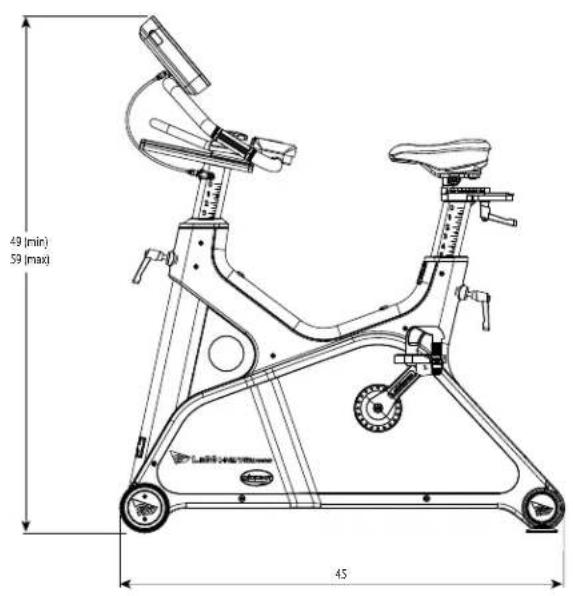
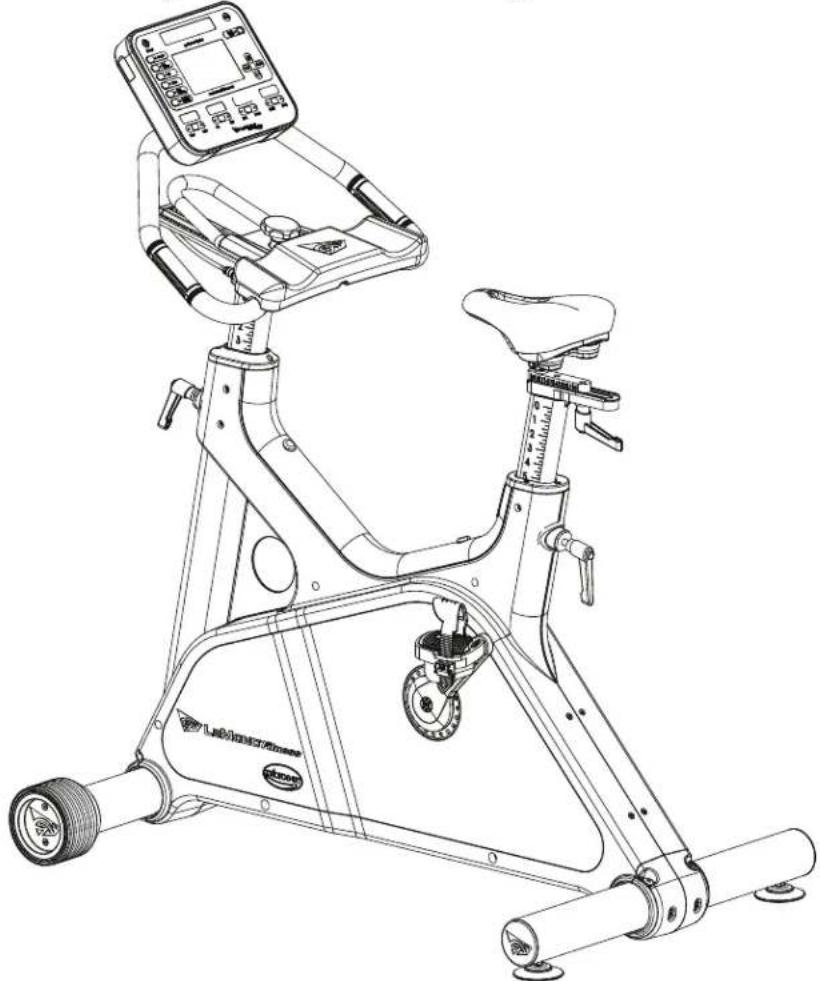
It is to your benefit to choose a suitable location in your home for your new upright bike. The g·force UT digital was designed to be an unobtrusive and attractive addition to your home. A smaller profile and much quieter drive mechanism than other upright bikes, allows the bike to be situated and used in almost any location in the home with a minimum of disruption. Make sure that the chosen location provides adequate room for the equipment while it is in use. The physical dimensions of the assembled bike are listed below.
Choose a setting that is comfortable and appealing and that will encourage you to continue with your fitness goals. A cool and dry location will make the time you spend exercising on theg·force UT digital more enjoyable and will extend the life of the bike.
Dimensions for the assembled g·force UT digital Upright Fitness Bike
Physical Dimensions
Length 45 in (152 cm)
Width 26 in (66 cm)
Height 49-59 in (120 - 150 cm)
Weight 160 lbs (72.7 kg)
SETTING UP YOUR BIKE
Taking a moment to learn how to correctly fit your g-force UT digital will make your workouts a more pleasant experience. The design of the g-force UT digital provides more seat and handlebar adjustability than any other upright bike available. Making full use of these features will give you the most comfortable ride possible and ensure maximum exercise efficiency. Using the bike in an incorrect position can result in unnecessary discomfort and increase the risk of injury.
SEAT ADJUSTMENT
Seat Height
Rotate the pedals so that one of the pedals is in the upward position.1.
- Place your foot in the toe clip of the pedal closest to the floor and mount the bike. Ensure that the ball of your foot is over the center of the pedal. Your leg should be slightly bent at the knee.
If your leg is too straight or your foot cannot touch the pedal you will need to lower the seat. If you leg is bent too much you will need to raise the seat. Dismount the bike and rotate the seat post adjustment handle counter 4. clockwise. Once loosened you may slide the eat post up or down as necessary.
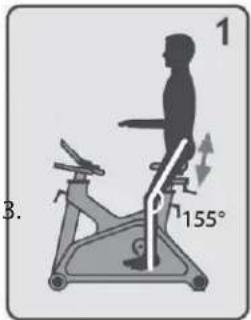
When the seat is in the desired position rotate the seat stem adjustment handle clockwise to secure 5. the seat post. Note the final position mark on the seat stem for future reference.
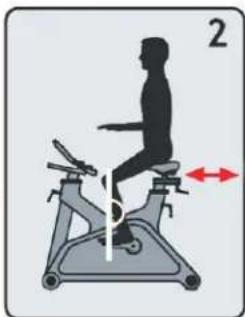
Seat Fore/Aft Position
- Adjusting the fore/aft allows for a better fit. Rotate the seat adjustment handle counter clockwise and slide the seat forward or backward.
Sit on your bike with the cranks in the 3 & 9 o'clock position. Proper fore/7. aft position is achieved when the small bump at the top of the shin directly below the knee cap (tibial tuberosity) is approximately over the pedal axle (at the 3 o'clock position).
-
Rotate the adjustment handle clockwise to secure the seat.
-
Note the final position mark under the seat for future reference.
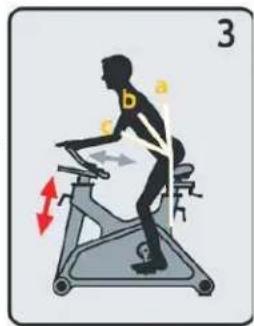
HANDLEBAR ADJUSTMENT:
Handlebar Height
Raise or lower the handlebars by rotating the handlebar post adjustment 1. handle counter clockwise and sliding the post up or down.
Handlebar height is a matter of preference, start with the handlebars at the 2. same height as the seat. Adjusting the handlebars higher than the seat will give the rider a more upright position, lowering them will result in a more fl exed position.
Handlebar Fore/Aft Position
Turn the handlebar adjustment knob counter clockwise and slide the 3. handlebars either forward or backward as desired.
The fore/aft position should be set to allow the rider to comfortably grasp the handles with a slight 4. bend at the elbow.
- Tighten by turning the knob clockwise and note the final position for future reference.
PEDAL STRAP ADJUSTMENT
The straps of the g-force UT digital are designed to allow you to adjust the pedal to your individual foot size. The pedals include spring-loaded, locking clips for easy adjustments. Follow the steps below to adjust the straps so that your foot does not slip or slide about on the pedal.
Place the ball of each foot on the center of the pedal and under the strap.1.
Rotate the pedals until one foot is in the position closest to you.2.
- To tighten the strap, simply pull down on the end of the strap until it fits snugly over your shoe. Make sure that the strap is secure, but not overly tight or pressing uncomfortably on your foot. Repeat these steps for the other foot.4.
To loosen the pedal strap, press down at the top of the clip that holds the strap secure, and pull the 5. strap up. Release the clip to lock the strap into place.
Now that you have established a riding position, take a few minutes to ride the bike and confirm that your position is comfortable. Start pedaling at a slow pace with your toes and knees pointed directly forward. Hold the grips lightly and in a position that allows your shoulders and upper body to relax. Pedal easily at a low resistance until you feel confident that you could ride in that position comfortably for the duration of your workout.
DISPLAYCONSOLE
The display console of the g-force UT digital serves two purposes: to allow you to choose the bike's functions, and to provide you with feedback about the progress of your current workout.
Note: Always use a light touch when pressing keys on the console overlay. Never press the keys with anything other than your fingers. Sharp objects such as ball point pens, keys or tools could damage the overlay and are considered misuse for warranty purposes.
DISPLAY CONSOLE FEATURES
Power: Turns the display console on or off. You can start the display console by pressing the POWER button, but the easiest way to power up the display console is to simply start pedaling.
Quick Start: This key overrides the need to enter user data and starts a selected program with default parameters.
Note: This function can not be used in the HR programs. User data is required to establish your target heart rate.
Stop: This key is only effective while a DEFINED PROGRAM is running. Pressing the STOP key once will pause the program. To restart the program where you left off, simply press ENTER. Pressing the STOP key twice will end the program and theMESSAGE DISPLAY will show the data accumulated during your workout. Pressing the STOP key three times will return you to the SELECT WORKOUT prompt.
Enter: Press this key when prompted by theMESSAGE DISPLAY to enter values such as time or weight. Pressing the ENTER key will confirm the value you have chosen and move you to the next step in setting up your program.
Back: Use this key to return to the previous screen on theMESSAGE DISPLAY.
+/- Keys: These keys serve two functions. While setting up a program, the +/- KEYS are used to increase or decrease values such as weight, or age. While a defined program is running, the +/- KEYS are used to increase or decrease resistance.
+Key: While setting up a program or a profile, use this key to increase a numeric value. While a defined program is running, use this key to increase the resistance level - making the workout harder.
- Key: While setting up a program or a profile, use this key to decrease a numeric value. While a defined program is running, use this key to decrease the resistance level – making the workout easier.
Note: You can press these keys repeatedly or, simply touch and hold the key until the desired value appears on the PROFILE DISPLAY.
Message Display: This LCD display will guide you through the steps to set up your user profiles and the program workouts. Simply answer the prompts that are given on the screen to start any of the eleven DEFINED PROGRAMS.
Feedback Displays: These displays show you physiological information such as heart rate and the calories you are expending, as well as physical information such as the time you have spent working out & the number of miles you have traveled in your living room.
- [TIME/INTERVAL]—switches between time left on the program and time left in the specific program segment in the dedicated display above the button
- [HR/DISTANCE]—switches between HR and DISTANCE in the dedicated display above the button.
Note: The heart rate function of the g·force UT is intended only for use as an exercise aide. Various factors can affect the accuracy of your heart rate reading. The heart rate function of the g·force UT should not be considered or used as a medical devise.
- [LEVEL/RPM]—switches between RPM and LEVEL in the dedicated LED display above the button.
- [KCAL/WATTS]—switches between KCAL and WATTS in the dedicated LED displays above the button.
Note: The WATT is a measurement of workload. It is affected by both resistance and pedal speed. Increased resistance and increased pedal rate increases the WATTS expended. This information can be used to evaluate your fitness progress over time.
- Wrong Battery Message: g-force UT uses rechargeable NiMH batteries. If the user installs alkaline AA batteries by mistake, the power button will not turn on and a "wrong battery" message will be displayed if the bike is pedaled.
Note: The use of alkaline batteries will void the warranty, damage the electronics and potentially be a fire hazard.
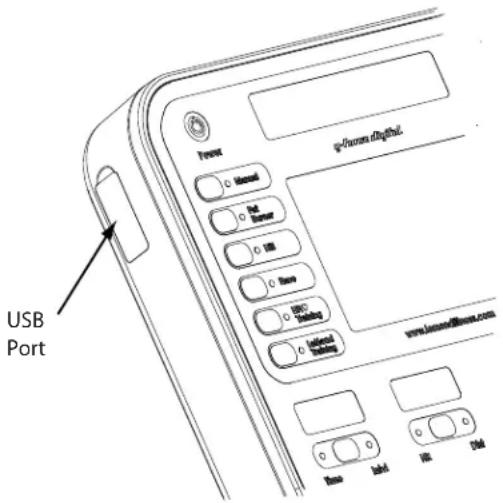
User Port: Your g-force UT digital is equipped with a USB port on the side of the console, near the power button. When a USB Flash Drive is installed into this port, the console will be able to download your workout data for future reference.
Note: Pull back, but do not remove the USB Port cover to access the USB port.
Defined Programs: A variety of workouts that allow you to keep your exercise program varied and interesting, including some of Greg LeMond's favorite workouts, located in the LEMOND TRAINING program group.
-
Manual 6. LeMond Training
-
Hill Pump the Power
-
Fat Burner
Bust your Gut
- Race
Strong & Steady
- Heart Rate Training
Fat Burner Plus
Constant HR
Race Day
Interval HR
Hill HR
Rev-it-Up
SAVING EXERCISE DATA
Exercise data is collected and saved by the display console during your workout. At the end of your workout, you can download the data to a USB Flash Drive. The data can then be displayed in a spread sheet, or evaluated with any compatible Performance Evaluation software.
Where is the USB Port
Your g-force digital is equipped with a USB port on the left side of the console, near the power button. Pull back (do not remove) the USB port cover and insert a USB Flash Drive into this port at anytime before the end of your workout to save a record of your workout.
What data is recorded
While you exercise, your g-force digital console will sample and record the following exercise parameters once every second, for a maximum of 99 minutes:
Time (MM:SS) HR (BPM) Calories (kcal)
Speed (KPH) Power (W) Torque (kg· cm)
Distance (km)
RPM
Target
HR
(BPM)
In what format is the data stored
The data will be saved in a "LeMond" folder on the USB Flash Drive as a .csv (Excel compatible) file. The file will be automatically labelled with an MMDDYX format, with x being a sequential number from 0 to 9. (This will allow a maximum of ten data downloads per day to the same flash drive.)
How do I save my exercise data to the Flash Drive
Install a flash drive into the USB port any time before you end your workout; the display console will indicate that the flash drive has been installed. At anytime during your workout program, press the STOP button three times to manually end the program, or continue your workout until you reach the cool down period. At that time the display console will prompt you with a message, asking if you want to download your data. To download, press [ENTER] and continue to pedal until the display shows "DOWNLOAD DONE."
Note: If you manually end a program, only exercise data collected to that point will be available for download
If you didn't have a USB Flash Drive installed, you will not be prompted to download your data, but the console will retain the data until the next workout. At that time, install a USB Flash Drive before you begin a new workout program; then press [+] and [-] simultaneously and the console will prompt you to download the previous workout data. If anyone starts a new exercise program before you retrieve your data, the console will over-write the memory, and your data will be lost.
GUIDELINES FOR EFFECTIVE EXERCISE
Often, the toughest, but most important step, of any exercise program is simply getting started. By purchasing the g-force UT digital, you have already achieved what many people are still struggling with making the commitment to leading a more fulfilling life by including a program of physical activity.
Congratulations on accomplishing the first step towards a healthier and more satisfying future.
SETTING A GOAL AND DEFINING OBJECTIVES
An important step in a successful exercise program is to set achievable goals and objectives. Regardless of your current physical condition, you need to establish a workable plan to reach your fitness goals.
Begin by asking yourself a few basic questions. Are you just beginning an exercise program and wishing to change your lifestyle from sedentary to physically active, or are your goals to enhance your current fitness levels? What are your primary objectives? Is your program to be geared toward losing weight, increasing aerobic capacity, maintaining or building muscle tone, or perhaps all three?
In order to ensure that you fully receive all benefits associated with a sound exercise program, you should first identify any risk factors that may influence the design of your exercise program. Your health care professional should be the first step in identifying risk factors that may need to be addressed in establishing a program. Consider having a trained fitness professional help you in developing an individualized program that is enjoyable, easily maintained, but still challenging enough to achieve your desired results.
Remember that your greatest benefit will come from an increased sense of well-being that comes along with a lifestyle that includes physical activity. People who have already made physical fitness a part of their daily lives, will confirm that the benefits of including physical activity in your life far outweigh the inconvenience and time spent.
Any time you spend on your exercise program will reward you with increased energy, reduced stress, a greater ability to focus and concentrate, and improved self-confidence. You and the people you share your life with will reap the rewards of your new lifestyle.
FLEXIBILITY TRAINING
Achieving and maintaining an adequate range of motion should always be included in a comprehensive exercise program. Sufficient flexibility will increase your enjoyment and maximize the effectiveness of exercising on the g-force UT digital. It will also reduce discomfort while working out and reduce the risk of injury. Always warm-up before stretching. Warm-up should include light activity to increase both your heart rate and body temperature. Increasing your body temperature allows you to stretch muscles more effectively and safely. Attempting to stretch a cold muscle is counterproductive and can lead to an injury that may interfere with the continuation of your fitness program and can postpone reaching your goals.
GUIDELINES FOR EXERCISING ON THE g·force UT digital
WARMING UP
A good warm-up is one of the most important and most frequently overlooked part of an exercise regimen. Without a proper warm-up, the muscles of the body are far more prone to injury. A good warm-up prepares the body for the stress you will place your muscles under during your workout and will decrease your chances of becoming injured. Muscles perform better when they are warmer than normal body temperature. Always take the time to warm-up properly. It will decrease the discomfort during exercise and will help you get the most out of your workout.
While a 5 to 10 minute warm-up is adequate for some people, others may need a longer warm-up period to be physiologically ready for intense efforts. Because different people have different requirements for an adequate warm-up, the workouts in the g-force UT digital, do not include a specific warm-up segment. This allows you to warm up for a period of time and at a resistance level that is appropriate for you.
Take the time to learn what your personal requirements are for warming up. Pedal slowly and at a low resistance at first, gradually increasing your pedal speed until you feel the muscles in your legs begin to relax. Slowly increase your heart rate to about 110-120 beats per minute. Once you have warmed up sufficiently, begin your workout. Your workout will be more enjoyable and more productive
FREQUENCY
How often should you exercise? The number of times per week that you engage in aerobic exercise depends largely on what your goals are and your current fitness level. People new to an active lifestyle are more likely to keep with it if they start gradually. Beginners might consider a weekly schedule that includes days off. Seasoned athletes may workout almost every day, but even these athletes know that easy days are essential for muscular and mental recovery. Work towards a goal of including exercise at least 3 to 5 days per week.
INTENSITY
How hard should you exercise? Again, the intensity of your workout will reflect your goals and your current fitness level. To achieve the greatest cardiovascular benefit, and to see the most improvement in weight loss and physical tone, you must raise your heart rate into your target zone. Your target zone is generally between 55 to 85% of your maximum heart rate. Training in this zone is what is referred to by exercise scientists as 'aerobic exercise'. The CONSTANT HR program in the g -force UT digital is programmed to help you exercise in the middle of this zone by maintaining your heart rate at 70% of you maximum heart rate.
DURATION
How long should you exercise? You should aim to complete 20 to 60 minutes of continuous activity in your aerobic exercise zone. Keep in mind that this does not include warm-up or cool-down. A 30 minute workout with 10 minutes warm-up and 10 minutes cool-down, five days a week, will result in noticeable improvement in physical conditioning.
COOL-DOWN
Just as the warm-up is essential for preparing your muscles for vigorous exercise, the cool-down is equally important. It is tempting to simply stop pedaling as soon as you have finished your programmed workout. You will reap greater rewards from your workout, however, if you consistently take the time for a proper cool-down. This process is important in allowing your body's cardiovascular system to gradually return to normal. It also allows your muscles to begin the process of recovery which will make your next workout easier.
Over 5 to 10 minutes, gradually lower your heart rate to below 110 beats per minute by slowly decreasing your exercise intensity.
Taking the time to warm-up and cool-down properly will decrease the level of discomfort you will experience when you tackle your next workout. More importantly, though, proper warm-up and cool-down segments will greatly decrease your risk of injury.
Most importantly: Stick with your program! You already accomplished the hard part. You made the commitment and you researched, chose, and bought the equipment to make your goals become reality. Now it's up to you. Remember that all of the guidelines you just read are just that - guidelines. If a 30 minute workout is too much for your current fitness level, choose a duration that you can complete and gradually increase your time. Any increase in the amount of physical activity over what you are currently doing, is a step forward.
Remember that even the most conditioned and dedicated athletes have days in which they slip from their training plans, make poor nutritional choices, or quit in the middle of a workout. If you find yourself in such a situation, think about the progress you had made previously, reevaluate your training plan, and recommit to your goals. Keep in mind the story of Greg LeMond who came back from a near fatal injury to win the most famous bike race in the world - not just once but twice. He too had to start over one step at a time.
DEFINED PROGRAMS
The g·force UT digital has thirteen different workouts programmed into the console. Each PROGRAM provides different benefits and can help you achieve your own personal fitness goals, be it weight loss, increasing endurance, or improving your aerobic threshold. The variety of programs allows you to use your g·force UT digital for very different aspects of your fitness program. Seasoned athletes know that varying your routine is essential to success. A tough day of interval training or a challenging hill workout is best followed by an easy day that allows your body to recover from the previous days efforts.
For example, you can choose a challenging workout such as a RACE against Greg LeMond on a Tuesday, and then do a less intense, recovery ride with the CONSTANT HR workout on the following day.
These programs allow you to vary your workouts and provide you with fun and challenging ways to jump-start your fitness program and reach your fitness goals faster. Having a variety of programs available to you, keeps you from becoming bored with your daily workout routine and more likely to stick with your fitness plan.
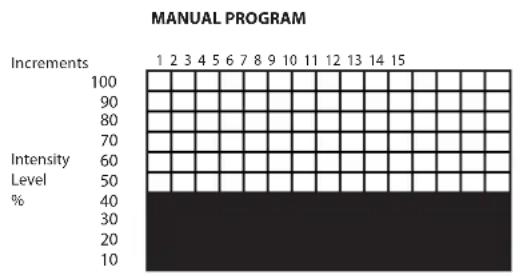
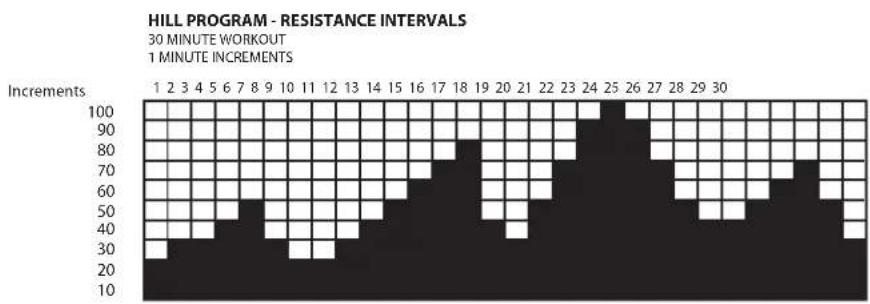
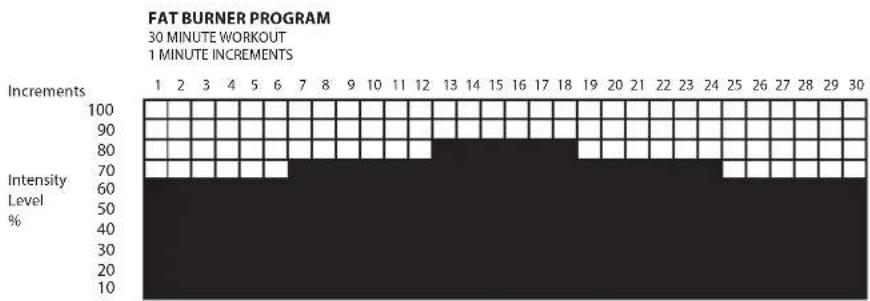
Note: Dim (gray) squares on the LED matrix indicate half levels (65%, 75%, etc.)
1 Manual
The simplest program in the g·force UT digital, the MANUAL program provides a workout with a constant resistance and a time limit that you specify. At any time during the workout you can increase or decrease the resistance using the + or - keys.
We recommend that you use this program to become familiar with the bike and the resistance functions.
2 Hill
The HILL workout is designed to increase your strength as you pedal up and over four resistance hills of varying steepness and distance.
3 Fat Burner
The FAT BURNER program is a challenging workout with several intervals of increased resistance. The program is specifically designed to optimize your workout for weight loss.
4 Race
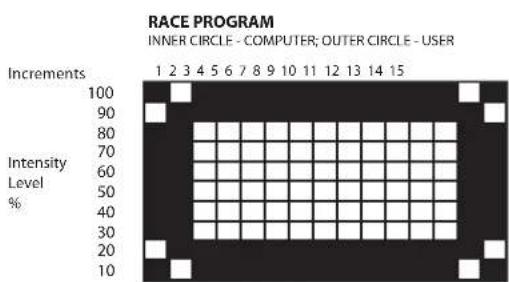
Test your fitness against Greg's! The RACE program is a simulated competition between yourself and Greg LeMond. In the PROFILE DISPLAY a circle of lights represents your progress throughout the race. The inside circle of lights represents Greg and the outside circle of lights represents you. The flashing LED represents the 'racer'. See if you can overtake Greg during your workout and win the race.
5 Heart Rate Training
The CONSTANT HR workout is programmed to help you maintain a chosen target heart rate by automatically changing the level intensity during your workout.
Note: The HR programs may require the use of a heart rate transmitter chest strap.
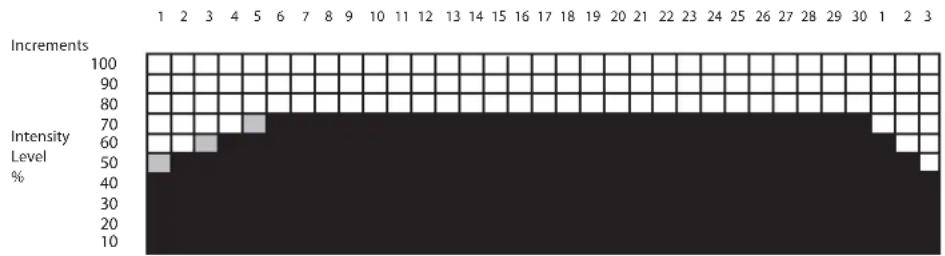
Constant HR Program
This program is an easy way to keep you from becoming lazy during your workout. It is also a good program to make sure that you are not working too hard during a recovery ride.
The target heart rate that the computer chooses for you is based on the age you have entered during the set up of the program. The value of your target heart rate for this program is 70% of your theoretical maximum heart rate. For example, the theoretical maximum heart rate for a 40 year-old is 180~bpm . The target heart rate of 70% is 126~bpm .
Heart rate is detected when you grip the sensors on the handle bar, or wear the heart rate transmitter across your chest. To get a good heart rate reading, your hands should be slightly moist when gripping the metal sensor pads on the handle bar, or likewise, when wearing the heart rate strap across your chest, your skin should be slightly moist where the ribbed sensor pads make contact. (Wear the strap with the logo facing out.)
When setting up the CONSTANT HR program theMESSAGE DISPLAY will ask you to enter your age. Once your age has been entered the console will calculate your target heart rate and display it on the PROFILE DISPLAY. At this point you can change your target heart rate with the +/- Keys and then press ENTER to accept.
The minimum target heart rate that you will be allowed to ENTER is 80. The maximum target heart rate is 200.
HR Interval Program
Interval program (5 shown) with 6 minute warm up and 3 minute cool down
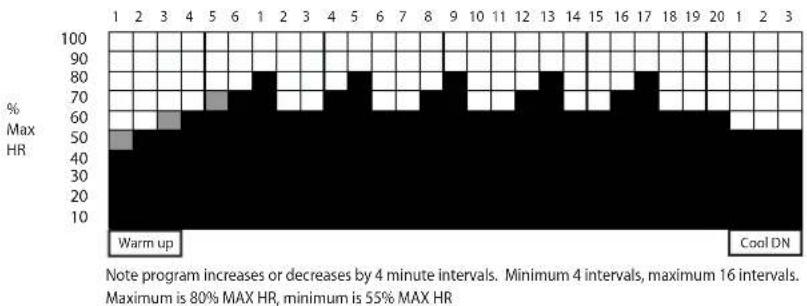
During the Interval HR program, the LED matrix will show a version of the above profile. When the user selects the HR interval program, the console will prompt them to enter the number of intervals. The LED matrix will then display the profile with the correct number of intervals. Each column will represent 1 minute. The column that the user is currently on will flash for reference. The HR intervals will vary from 60% to 80% of the users Max HR. The program will also have a constant 6 minute warm up and 3 minute cool down period. The cool down will be the standard cool down used on the programs (manual, hill, etc.). The goal of the program is to have the users HR at the level indicated by the LED matrix by the end of the interval time.
Hill HR Program
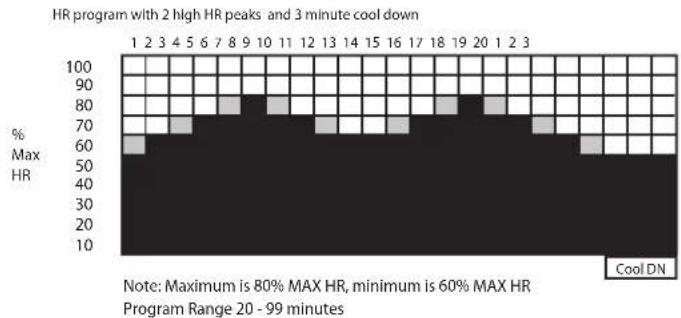
During the Hill program, the LED matrix will display the above profile. The profile will not change and each column duration will be determined by the total workout time. The workout time can vary between 20 minutes and 99 minutes. The column that the user is currently in will flash for reference. The user's HR will vary between 60% max HR and 80% max HR.
The goal of the program is to have the users HR at the level indicated by the LED matrix by the end of the interval time.
SETTING UP AND RUNNING THE PROGRAMS
The easiest way to set up and run the programs in the display console, is to simply enter data as asked for by theMESSAGE DISPLAY. The prompts in theMESSAGE DISPLAY are simple messages that guide you through the program set up. The following is a detailed description of the same messages that are asked of you in theMESSAGE DISPLAY.
Select Mode:
Your g·force UT digital allows you to choose between two different ways to vary the exercise resistance; Exercise mode or Bike Mode. In Exercise mode the power level stays the same, regardless of your pedal RPM. This means that the resistance will change automatically as you pedal faster or slower such that your power output (watts) stays the same. In Bike Mode the resistance stays constant, and your power output increases or decreases as you pedal faster or slower.
You can select either mode in the Manual, Hill, or Fat Burner programs. The Heart Rate (HR) programs are always in Exercise Mode. The LeMond and Race programs are always in Bike Mode.
Select Level:
Choose a resistance level for your exercise; 1 through 20. The higher the level, the greater the resistance as you pedal. The default level is 4.
Select Time
Enter in minutes how long your want your exercise program to run, from 5 to 99 minutes long. The default time is 30 minutes.
Select RPM / Power
Some programs set the exercise goals based on pedal RPM, other use exercise power (watts). Use the + or - keys to change the default value shown in the PROFILE DISPLAY, then press the ENTER key
Entering Weight:
Your current body weight is used to calculate your caloric expenditure. After selecting a PROGRAM, theMESSAGE DISPLAY will prompt you to enter your weight. Use the + or - keys to change the default weight of 180 that is shown in the PROFILE DISPLAY. When your current weight is displayed in the PROFILE DISPLAY, press the ENTER key.
Entering Age:
Your current age is used to calculate your target heart rate. Use the + or - keys to change the default age of 40 that is shown in the PROFILE DISPLAY. When your correct age is displayed in the PROFILE DISPLAY, press the ENTER key.
Choosing a Target Heart Rate:
You may wish to change the target heart rate that the console calculates for you based on the age you entered in the previous step. The console automatically generates a target heart rate that is 70% of your
theoretical maximum heart rate. You may wish to increase or decrease your target heart rate. To do so, simply change your calculated target heart rate that is displayed in the PROFILE DISPLAY, using the + or - keys. Once the desired target heart rate is displayed, press the ENTER key.
RUNNING THE DEFINED PROGRAMS
Once you have become comfortable with the DISPLAY CONSOLE, take the following steps to run a DEFINED PROGRAM and begin your exercise routine in earnest. Remember that the messages in theMESSAGE DISPLAY will quickly and easily get you started with your workout.
Begin pedaling until you see the SELECT WORKOUT prompt, in theMESSAGE DISPLAY 1.
- Choose a workout from the six keyed programs and press ENTER when asked to confirm the program you have chosen.
Note: Remember that you cannot use the QUICK START key with the Heart Rate programs, because user data is required to establish your target heart rate zone. - Once a workout has been selected or defined, theMESSAGE DISPLAY will ask you to input your exercise parameters Using the + or - keys, to change the parameter, then press the ENTER key to make your selection.
ENDING A DEFINED PROGRAM
The best way to end a defined program is to finish your workout. Once the time you have selected for your workout has elapsed, the workout is ended and theMESSAGE DISPLAY will show the statistics from the workout you have just completed. If you have a USB Drive installed at that time, theMESSAGE DISPLAY will also prompt you to download your data.
You can also end a workout by simply pressing the STOP key. Pressing this key once will pause your workout. Press ENTER to resume your workout where you left off, or press STOP again to end your workout. Pressing STOP for a third time will bring you back to the SELECT WORKOUT prompt. If you have a USB Drive installed at that time, you will be prompted to download your data.
Once a program has paused, if no action is taken and the bike is at rest, the display console will automatically shut off after two minutes of inactivity.
6 LeMond Training Programs
Within the LeMond Training Program are six different workouts specifically designed by Greg LeMond, which he uses for race preparation. The set up of these programs is identical to the other DEFINED PROGRAMS in the g-force UT digital, with one exception – the duration of the workout is fixed and cannot be changed.
All of the workouts are 30 minutes in duration. These are challenging workouts that are a mix of aerobic and anaerobic efforts. Make sure that you have completed a proper warm-up before undertaking these programs. The programs will be far easier to complete if your muscles are sufficiently prepared.
SETTING UP AND RUNNING THE LEMOND TRAINING PROGRAMS
- To run one of the six workouts in the LeMond training program, first select LEMOND TRAINING at the SELECT WORKOUT prompt.
After pressing ENTER you will be prompted to SELECT PROGRAM. Using the + or - keys, scroll 2. through the six different programs and select your program by pressing ENTER.
Once a program has been entered theMESSAGE DISPLAY will guide you through set up of the 3. chosen program as is done in any of the other DEFINED PROGRAMS, with the exception of duration. All LeMond training programs are a fixed duration of 30 minutes.
If no program is chosen at the SELECT PROGRAM prompt, by default you will be started on the REV 4. IT UP program.
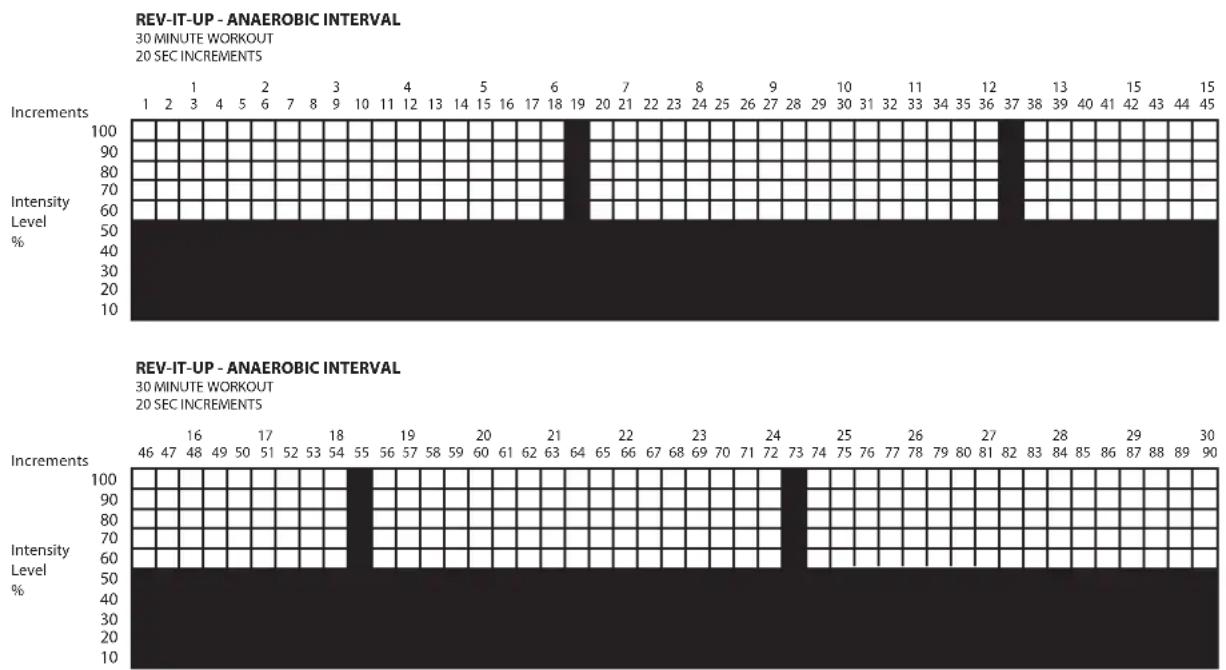
Rev-it-Up:
The REV-IT-UP program is designed to increase your maximum power output. Low intensity, recovery segments are punctuated by short but extremely high intensity intervals. Designed to increase your top end, this workout will give you speed and power to spare!
Pump the Power:
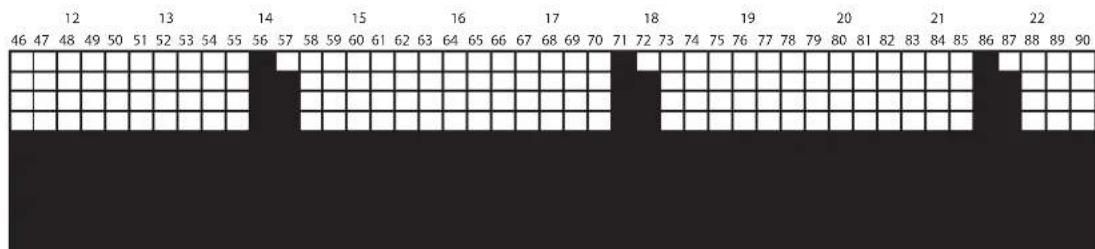
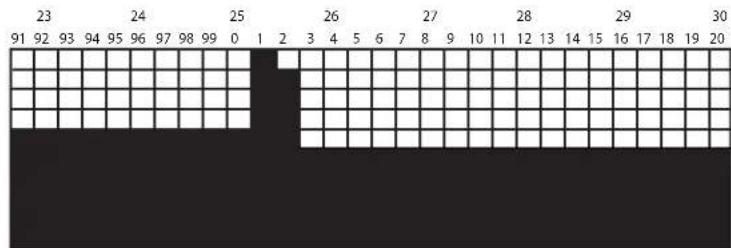
This challenging workout is designed to develop greater strength and endurance. Higher intensity anaerobic efforts of varied duration are followed by moderate intensity recovery segments. A sure winner for those who want to see results fast.
30 MINUTE WORKOUT
15 SEC INCREMENTS, 30 & 45 SEC INTERVALS
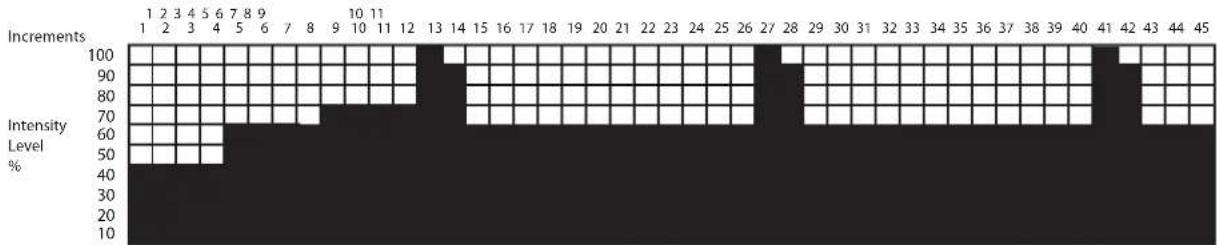
PUMP THE POWER- ANAEROBIC INTERVALS
Bust Your Gut:
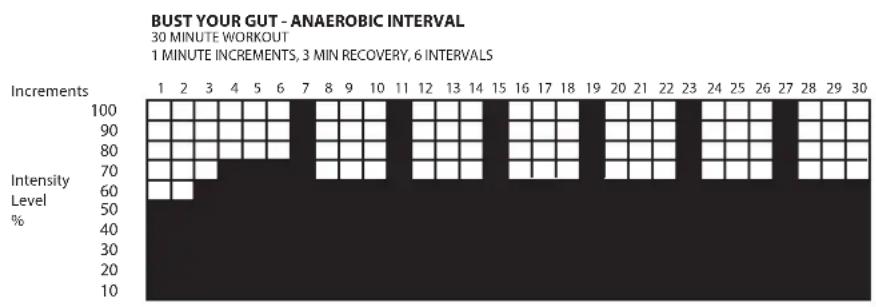
This workout tests all aspects of your fitness. 60 second high intensity efforts are followed by three minute recovery periods of moderate intensity. Those three minutes might feel pretty short by the end of this 30 minute workout. This program will do wonders for your strength, power, endurance, and, of course, your waistline.
Strong and Steady:
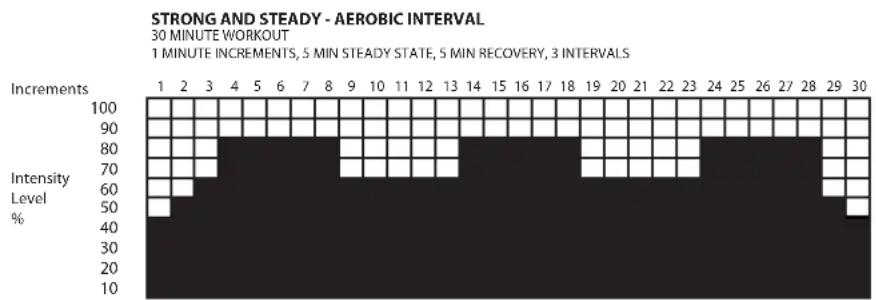
This workout focuses on building aerobic capacity. Combining moderate intensity efforts with low intensity recovery segments, aerobic strength and fat metabolism are the main objectives. Just a couple of STRONG AND STEADY workouts a week will have you looking leaner and breathing easier in no time.
Fat Burner Plus:
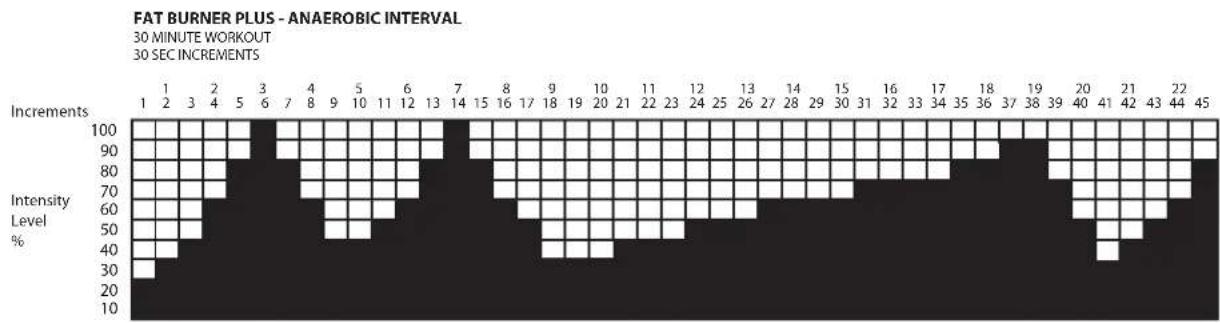
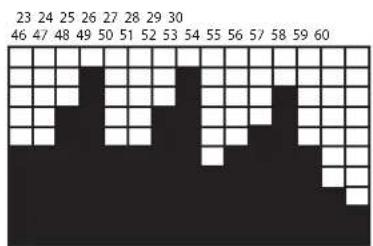
In this program you will complete an 'aerobic ladder'. Starting at a low intensity, you will gradually climb to a moderate intensity level and then gradually work your way back down. This is a great program to alternate with STRONG AND STEADY to enhance fat metabolism and improve aerobic capacity.
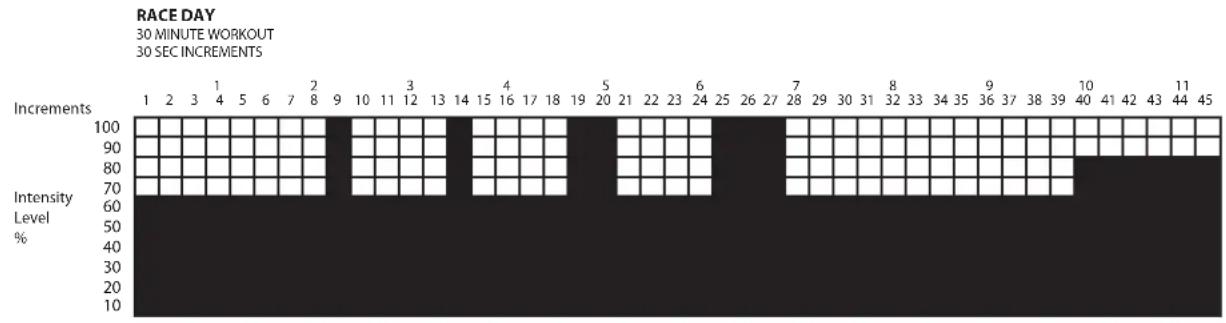
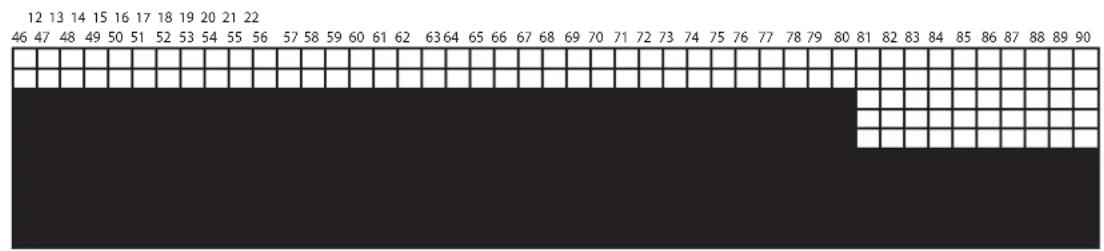
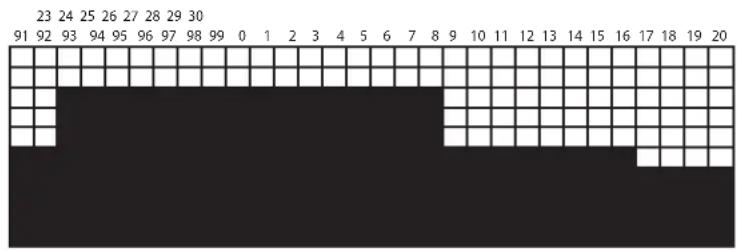
Race Day:
A great workout for 'active recovery' rest days or as a warm up for races, ball games or a hard weight lifting session. With several bursts of hard efforts in the beginning, and finishing with an extended tempo segment, you'll be ready for your next power workout.
A FEW ADDITIONAL TIPS ABOUT THE FUNCTIONS OF THE DISPLAY CONSOLE:
- You can easily change the resistance level of a workout after the program is running. Using the + or - keys, increase or decrease the resistance to suit your needs. Doing so changes the resistance throughout all segments of the program.
- The duration of a workout can be changed before a program begins running but not during the program. To change the duration once a program is running, you will need to exit the program and restart it after entering in the desired duration.
- During a workout, theMESSAGE DISPLAY will scroll through the statistics of your current workout.
- At the completion of a workout, theMESSAGE DISPLAY will summarize statistical information from the workout you have just completed such as total distance, and total time. These statistics are also displayed if the workout has been ended prematurely.
- Pressing STOP during a program will pause the program. To restart the workout, simply press ENTER and the workout will resume at the segment that it was paused. If no action is taken within 15 seconds of a program being paused, the display console will switch to a resting mode. After two minutes the display console will turn itself off.
- If you stop pedaling during a workout, the display console will behave in the same manner as if you had pressed the STOP key.
- You can change the units that distance is measured in from miles to kilometers (km), by pressing the ENTER, BACK and MANUAL keys simultaneously. Use the + or - keys to toggle between UNITS USA (miles) and UNITS METRIC (km).
The g-force UT digital was designed to be an attractive, effective and safe method for realizing your fitness goals. Durable and high performance components were a key design feature of the g-force UT digital. The safety level achieved by the design, however, can only be maintained when the equipment is regularly examined for damage and wear. Inoperable or worn components should be replaced immediately and the equipment should be put out of use until it is repaired. Read all maintenance instructions thoroughly before beginning work. Maintenance is the sole responsibility of the owner.
Initial Service
Choosing a cool and dry location for the g·force UT digital will extend the lifetime of the equipment and increase your enjoyment while using the bike. After assembling the equipment, use a soft cotton cloth to remove any dust or residue that may have accumulated during shipping. Regular maintenance will keep your bike in good working order. No calibration is required by the user.
Maintenance Tips
- Always use a soft, cotton cloth and dilute non-abrasive cleaner or a mild detergent for cleaning the exterior of the bike.
- Never use ammonia, acid-based, or petroleum-based solvents on any portion of the bike as it may damage the finish.
Preventative Maintenance Schedule
Daily
- Before each use, make certain that the area around the bike is free of obstacles and any clutter that may interfere with the pedal rotation.
- After each use, wipe down the surfaces of the g·force UT digital to remove sweat and moisture.
- Wipe the face of the display console with a slightly damp, soft, cotton cloth. Avoid getting extra moisture on the display console. Keeping the display console free of fingerprints and sweat will extend the life of the console.
Regularly
- Thoroughly clean the housing of the bike.
- Clean the top of the pedal straps, accessory trays, saddle and seat back, and the display console.
- Check that pedals are securely tightened and inspect both pedals and pedal straps for wear.
- Inspect all assembly bolts for wear and ensure that they are sufficiently tight.
Moving the g-force UT digital
To move the bike, simply lift the rear end of the bike and slowly push it forward to the desired location.
Use caution when moving the bike. Theg-force UT digital is well-built and the stability that you experience when riding the bike is due to its substantial weight. Use care and additional help, if necessary, when moving the bike.
The g-force UT digital was specifically designed to be easy to use, reliable and maintenance free. However, certain common problems that may arise are addressed in the following TROUBLESHOOTING guide. Should the symptom not be resolved after consulting this section, please contact our LeMond Fitness Customer Service Department at (+1) 425.482.6773 between the hours of 7:00 a.m. - 5:00 p.m. M-F, Pacific time for assistance.
PROBLEM: Display console doesn't light up.
SOLUTION: If the bike has been out of use for an extended period of time the batteries may have discharged over time and the console will not light up when the POWER key is pressed. Begin pedaling the bike to light the console and recharge the batteries.
SOLUTION: If the display console is dim once you have begun pedaling, press the power key to turn on the display console.
SOLUTION: If the display console remains dim or doesn't light up after attempting the previous solutions, you may need to replace the rechargeable batteries. The longevity of rechargeable batteries varies depending on frequency and type of use, as well as differences between brands. The force UT digital require rechargeable AA nickel-metal hydride batteries. Never replace with conventional alkaline batteries. Doing so will damage your electronics and void your warranty.
PROBLEM: No heart rate signal is shown on the console, or heart rate reading is erratic or inconsistent.
SOLUTION: If using a heart rate chest strap:
Make certain that the strap is being worn correctly. When worn correctly the rubber electrodes of the strap are fl at against the skin.
The electrodes must be sufficiently moist before heart rate can be accurately detected by the console. Removing the chest strap and re-wetting the electrodes will frequently solve the problem.
Make sure the chest strap transmitter is within three feet of the display console.
Heart rate chest straps emit a low-level radio signal that is detected by the display console of the g-force UT digital. Interference from other radio or sound waves such television sets, DVD players, cell phones, computers, or loudspeakers can cause erratic readings. Moving your bike away from such interference may eliminate this problem.
Another heart rate transmitter within three feet may cause abnormal heart rate readings.
Check the battery in the back of the chest strap transmitter.
SOLUTION: If using the contact heart rate sensor grips:
Make sure that the connection for the sensor grips is secure. Refer to the Assembly Guide for specific connection instructions.
Grasp the heart rate sensor grips with both hands and apply firm and even pressure to the grips.
Remember that contact heart rate grips are not always accurate due, in part, to biological differences between users. Contact heart rate can be affected by body oils, metal from jewelry or in clothing, as well as outside electrical interference.
PROBLEM: Bike makes clicking noises.
SOLUTION: Silly as it sounds, this is often simply a matter of shoelaces or pedal straps hitting the side covers of the bike.
SOLUTION: So, you say it's not the shoelaces. Remove the pedals from the crank arms using the pedal wrench that came with your bike. Apply multipurpose grease to the pedal threads, then reattach and tighten the pedals keeping in mind that the left pedal is reverse threaded.
PROBLEM: Bike wobbles or rocks when in use.
SOLUTION: Make sure that the bike is level in the position that it is located in. It should not rock back and forth when in use. Make needed adjustments with the leveling feet that are located on the rear stabilizer. Refer to the Assembly Guide for specific leveling instructions.
LeMond Fitness warrants that all parts of the g·force UT digital are free of defects in material and workmanship. LeMond Fitness will repair or replace defective parts or equipment in accordance to the terms listed below. Warranty coverage begins from the date of original purchase and is for the original purchaser.
LIMITED WARRANTY FOR RESIDENTIAL USE:
| FRAME and CRANKS LIFETIME | |
| ELECTRONIC BRAKE 6 YEARS | |
| ELECTRONIC COMPONENTS 3 YEARS | |
| PARTS - pedal straps, saddle, console overlay, etc. 2 YEARS | |
| LABOR 1 YEAR |
LIMITED WARRANTY FOR COMMERCIAL USE:
| FRAME and CRANKS 10 YEARS | |
| ELECTRONIC BRAKE 3 YEARS | |
| ELECTRONIC COMPONENTS 2 YEARS | |
| PARTS - pedal straps, saddle, console overlay, etc. 6 MONTHS | |
| LABOR 1 YEAR |
EXCLUSIONS:
Batteries.1.
Normal wear and tear.2.
Any damage, failure or loss caused by improper assembly and installation.3.
Any damage done to the seat by abuse or misuse.4.
Any damage, failure or loss caused by accident, neglect, abuse improper maintenance or failure to 5.2 follow instructions or warnings in this Owner's Manual.
Use of the product in a manner for which it was not designed.6.
Use of the product in other than a residential setting unless noted in the Owner's Manual.7.
Note: This Limited Warranty applies only to the cost of repair or replacement parts, normal ground shipping charges and labor, providing service is provided within the warranty period and by an authorized LeMond Fitness service agent.
LIMITATIONS:
LeMond Fitness Inc. neither makes nor authorizes any representative or other person to make or assume for us, any other warranty whatsoever, whether express or implied, in connection with the sale, service, or shipment of our products. We reserve the right to make changes and improvements in our products without incurring any obligation to similarly alter products previously purchased. In order to maintain your product warranty and to ensure the safe and efficient operation of your machine, only authorized replacement parts can be used. This warranty is void if parts other than those provided by LeMond Fitness are used.
THIS LIMITED WARRANTY IS IN LIEU OF ALL WARRANTYES, EXPRESS OR IMPLIED, AND IN LIEU OF ALL OTHER OBLIGATIONS OR LIABILITIES ON THE PART OF LEMOND FITNESS. LEMOND FITNESS SHALL IN NO EVENT BE LIABLE BY VIRTUE OF THIS LIMITED WARRANTY FOR INCIDENTAL OR CONSEQUENTIAL LOSSES, DAMAGES OR EXPENSES IN CONNECTION WITH EXERCISE PRODUCTS.
Any implied warranty is limited in duration to the time period covered by this Limited Warranty. Some states do not permit the exclusion or limitation of implied warranties of incidental or consequential damages, so the preceding limitations and exclusions may not apply to you.
Claims:
Warranty service may be obtained by contacting the authorized LeMond Fitness dealer from whom you purchased the product, or by contacting LeMond Fitness between the hours of 7:00 a.m. - 5:00 p.m. M-F, Pacific Time.
LeMond Fitness Inc.
15540 Woodinville-Redmond Rd. NE
Building A, Suite 100
Woodinville, WA 98072 USA
Telephone: (+1) 425.482.6773
Fax: (+1) 425.482.6724
Email: service@LeMondfi tness.com
www.LeMondfitness.com
To submit a warranty claim, LeMond Fitness requires a proof-of-purchase and the serial number of the equipment in question.
LeMond Fitness will have the option of either repair or replacement at no charge for any defective product. Delivery of the product to and from the authorized LeMond Fitness dealer is the sole responsibility of the purchaser.
Most common problems can be quickly remedied by reviewing the OPERATING INSTRUCTIONS or the TROUBLESHOOTING section of this manual. In the event that review of these sections fails to pinpoint and solve the problem, please contact our LeMond Fitness Customer Service Department at (+1) 425.482.6773 between the hours of 7:00 a.m. - 5:00 p.m. M-F, Pacific time for assistance.
ENTER YOUR SERIAL NUMBER IN THE BOX BELOW
LeMond Fitness Inc.
15540 Woodinville-Redmond Rd. NE
Building A, Suite 100
Woodinville, WA 98072 USA
Telephone: (+1) 425.482.6773
Fax: (+1) 425.482.6724
Email: service@LeMondfitness.com
www.LeMondfitness.com

WARRANTY REGISTRATION
PLEASE FILL OUT & RETURN TO REGISTER YOUR FITNESS PRODUCT FOR WARRANTY
Thank you for purchasing a g-force UT. You have just purchased the finest, most technologically advanced piece of exercise equipment. To validate your product warranty, please have the primary user of the product complete the following information and return to LeMond Fitness within 60 working days from the date of equipment installation.
NAME OF PURCHASER
ADDRESS
CITY STATE ZIP COUNTRY
PHONE( ) FAX( )
Please send me special offers, timely fitness tips and health information*
STORE PURCHASED FROM
CITY STATE ZIP
SERIAL NO.
MODEL NO.
SIGNATURE
DATE OF PURCHASE
Mail to:

LEMONO
Fitness Inc.
15540 Woodinville-Redmond Rd NE
Building A, Suite 100
Woodinville, WA 98072 USA
Telephone: (+1) 425.482.6773
Fax: (+1) 425.482.6724
Mail Warranty to:

LEMOND
Fitness Inc.
15540 Woodinville-Redmond Rd NE
Building A, Suite 100
Woodinville, WA 98072 USA
Designed Use: Consumer or commercial.
Maximum User Weight: 350 pounds (159.1 kg)
User Height Range: 58 in (147.3 cm) to 80 in (203.2 cm) tall
Workload Range: 30 - 450 Watts at 70 rpm and a maximum output of 1200 watts (speed dependent)
External Power Requirements: None. The g·force UT digital is a cordless product.
Batteries: The display console is powered by (4) rechargeable AA nickel-metal hydride (NiMH) batteries.
Heart Rate Monitoring System: Contact Heart Rate Sensor Grips are located on the handlebars. Telemetry HR straps are also supported.
Physical Dimensions:
Length: 45 in (114 cm)
Height: 49 - 59 in (124 - 150 cm)
Width: 26 in (66 cm)
Weight: 127 lbs (58 kg)
Shipping Dimensions:
Length: 56 in (142 cm)
Height: 41 in (104 cm)
Width: 9 in (23 cm)
Weight: 160 lbs (72.7 kg)
FCC Regulations
This equipment has been tested and found to comply with the limits for a Class B digital device, pursuant to part 14 of FCC rules. In accordance with the FCC, operation of this equipment is subject to the following guidelines:
This device may not cause harmful interference.1.
This device must accept any interference received, including interference that may cause undesired 2. operation.
The g-force UT digital uses, generates, and can radiate radio frequency energy. If the equipment is not installed and used in accordance to the instructions provided in this Owner's Manual, interference with radio communications may occur. The intent of the FCC Class B regulations is to provide reasonable protection against interference when installed in a residential application. However, there is no guarantee that interference will not occur in a particular installation. If your installation does cause interference to radio, television or other electronic equipment reception, turn off the power to the g-force UT digital to verify that it is the source of the interference. If so, attempt to correct the interference by the following measures:
Relocate the unit to increase the distance between the g·force UT digital and the affected electronics.
Reorient or relocate the receiving antennae for your television, radio or other electronic equipment that is in the vicinity.
- Consult LeMond Fitness Customer Service, your authorized dealer, or a qualified radio/television technician for help.
This product has also been tested and certified to meet the following standards:
CAN/CSA 22.2 No 68
UL 1647
ASTM F1250
ASTM F2276
EN 957-1.
EN957-5
EM 60335-1
It has also been tested to United States, Canadian and European requirements for:
Radiated Emissions
- Radiated Immunity
Static Electricity Immunity
| Week # | Weekly Goals | ||||
| 1. | |||||
| 2. | |||||
| 3. | |||||
| Day Date Distance Calories Time Comments | |||||
| Mon | |||||
| Tue | |||||
| Wed | |||||
| Thu | |||||
| Fri | |||||
| Sat | |||||
| Sun | |||||
| Weekly Totals | |||||
| MONTH | Monthly Goals | ||
| 1. | |||
| 2. | |||
| 3. | |||
| Week | Distance | Calories | Time |
| Monthly Totals | |||
| MONTH | Monthly Goals | ||
| 1. | |||
| 2. | |||
| 3. | |||
| Week | Distance | Calories | Time |
| Monthly Totals | |||

LEMOND
Fitness Inc.
15540 Woodinville-Redmond Road NE
Building A Suite 100
Woodinville, WA 98072 USA
www.Lemondfityness.com
Telephone: (+1) 425.482.6773
Fax: (+1) 425.482.6724
MANUEL DU PROPRIÉTAIRE g·force UT digital

LeMond® g·force UT digital™
www.LeMondfitness.com

LEMON
Fitness Inc.
15540 Woodinville-Redmond Rd NE
Building A, Suite 100
Woodinville, WA 98072 USA
Telephone: (+1)425.482.6773
15540 Woodinville-Redmond Rd. NE
Building A, Suite 100
Woodinville, WA 98072 USA
Telephone: (+1)425.482.6773
Courriel: service@LeMondfitness.com
www.LeMondfitness.com
15540 Woodinville-Redmond Rd. NE
Building A, Suite 100
Woodinville, WA 98072 USA
Telephone: (+1)425.482.6773
Telécopieur: (+1) 425.482.6724
Courriel: service@LeMondfitness.com
www.LeMondfitness.com

ENREGISTREMENT DE LA GARANTIE
À REMPLIR ET À RENVOYER POUR ENREGISTRER VOTRE PRODUIT DE MISE EN FORME POUR LA GARANTIE
15540 Woodinville-Redmond Rd NE
Building A, Suite 100
Woodinville, WA 98072 USA
Telephone: (+1) 425.482.6773
Fax: (+1) 425.482.6724
15540 Woodinville-Redmond Rd NE
Building A, Suite 100
Woodinville, WA 98072 USA
Building A Suite 100
Woodinville, WA 98072 USA
www.Lemondfitness.com
Telephone: (+1) 425.482.6773
Fax: (+1) 425.482.6724
15540 Woodinville-Redmond Rd NE
Building A, Suite 100
Woodinville, WA 98072 USA
Telephone: (+1) 425.482.6773
Fax: (+1) 425.482.6724
15540 Woodinville-Redmond Rd. NE
Building A, Suite 100
Woodinville, WA 98072 USA
Telefon: (+1)425.482.6773
Fax: (+1) 425.482.6724
E-Mail: service@LeMondfitness.com
www.LeMondfitness.com
15540 Woodinville-Redmond Rd. NE
Building A, Suite 100
Woodinville, WA 98072 USA
Telephone: (+1) 425.482.6773
Fax: (+1) 425.482.6724
E-Mail: service@LeMondfitness.com
www.LeMondfitness.com

GARANTIEREGISTRIERUNG
BITTE AUSFÜLLEN UND ZUR GARANTIEREGISTRIERUNG IHRES FITNESSPRODUKTS ZURÜCKSENDEN
15540 Woodinville-Redmond Rd NE
Building A, Suite 100
Woodinville, WA 98072 USA
Telefon: (+1)425.482.6773
Fax: (+1) 425.482.6724
Postanschrift:

LEMOND
Fitness Inc.
15540 Woodinville-Redmond Rd NE
Building A, Suite 100
Woodinville, WA 98072 USA
Building A Suite 100
Woodinville, WA 98072 USA
www.Lemondfitness.com
Telefon: (+1) 425.482.6773
Fax: (+1) 425.482.6724
300208, Version B
MANUAL DEL USUARIO
g·force UT digital

LeMond® g·force UT digital™
www.LeMondfitness.com

LEMON
Fitness Inc.
15540 Woodinville-Redmond Road NE
Building A Suite 100
Woodinville, WA 98072 USA
15540 Woodinville-Redmond Rd. NE
Building A, Suite 100
Woodinville, WA 98072 USA
www.LeMondfitness.com
15540 Woodinville-Redmond Rd. NE
Building A, Suite 100
Woodinville, WA 98072 USA
www.LeMondfitness.com

REGISTRO DE GARANTÍA
POR FAVOR COMPLETE LA SIGUIENTE INFORMACION Y ENVIELA PARA REGISTRAR SU PRODUCTO DE ACONDICIONAMIENTO FISICO PARA LA GARANTIA
15540 Woodinville-Redmond Rd NE
Building A, Suite 100
Woodinville, WA 98072 USA
TelEfo: (+1) 425.482.6773
Fax: (+1) 425.482.6724
15540 Woodinville-Redmond Rd NE
Building A, Suite 100
Woodinville, WA 98072 USA
Building A Suite 100
Woodinville, WA 98072 USA
www.Lemondfitness.com
Telefon: (+1) 425.482.6773
Fax: (+1) 425.482.6724
Documento #300209, Rev B