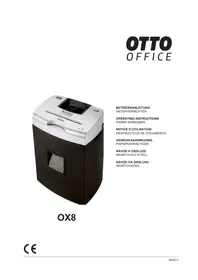
OX8 - Shredder OTTO - Free user manual and instructions
Find the device manual for free OX8 OTTO in PDF.


| Product type | Document shredder |
| Brand | OTTO |
| Model | OX8 |
| Cut type | Cross cut |
| Cut size | 3 x 9 mm |
| Cutting capacity (80 g/m² paper) | 8 sheets per pass |
| Cutting capacity (CD) | 1 CD (max. thickness 1.2 mm) |
| Cutting capacity (credit card) | 1 card per pass |
| Cutting speed | 40 mm/s |
| Paper bin volume | 25 liters |
| Power supply | 220-240 V, 50-60 Hz |
| Dimensions (W x D x H) | 395 x 270 x 580 mm |
| Weight | 16 kg |
| Automatic stop | Yes, approximately 3 seconds after feeding ends |
| Reverse function | Yes, switch to position R |
| Overheat protection | Yes, automatic shutdown, max. 5 min |
| CD destruction | Separate slot, cuts into 5 strips |
| Warranty | 2 years |
| Cutter oil reference | 1.235.997.421 |
Frequently Asked Questions - OX8 OTTO
User questions about OX8 OTTO
0 question about this device. Answer the ones you know or ask your own.
Ask a new question about this device
Download the instructions for your Shredder in PDF format for free! Find your manual OX8 - OTTO and take your electronic device back in hand. On this page are published all the documents necessary for the use of your device. OX8 by OTTO.
USER MANUAL OX8 OTTO
english: Paper shredder OTTO Office OX8 7
Customer service adress
1 Proper use, warranty
The shredder is designed exclusively for destroying paper. Depending on the cutting type, it can also handle small quantities of CDs, credit and charge cards.
Its sturdy drive mechanism is not damaged by paper clips and staples.
The warranty period for the document shredder is 2 years. This warranty and guarantee exclude wear and damage caused by improper handling or actions taken by third parties.
2 Safety instructions

Before using the machine for the first time, read the operating manual, and keep it for later use and to pass on to
any subsequent users. Observe all safety instructions on to the machine.

Risk of injury!
Do not reach into the paper feed slot.
Risk of injury from being pulled in!
Keep long hair, loose articles of clothing, ties, scarves, jewellery, etc. away from feed opening.
Material with the tendency to form loops, e.g. tapes, strapping material, etc. must not be shredded.
Keep the paper shredder out of the reach of children. Do not let the shredder run if the person using it is not present.


Switch the shredder off and disconnect it from the mains if it is damaged, not working correctly or before relocating or cleaning it.
Service work may only be carried out by HSM Customer Service or by the service technicians of our contractual partners.
- Make sure that the mains plug is easily accessible.
- Before you insert the mains plug, make sure that the voltage and frequency of your power supply comply with the information on the name plate.
Make sure that no liquid gets into the shredder. - The shredder is for indoor use only and must not be placed near a heater or other heat source. The ventilation slots must not be blocked or covered and they must be at a distance of at least 2" (5 cm) away from walls or furniture.
- If you detach the cutting head from the base cabinet, please pay attention to the flap on the bottom side of the cutting head.
3 Machine components
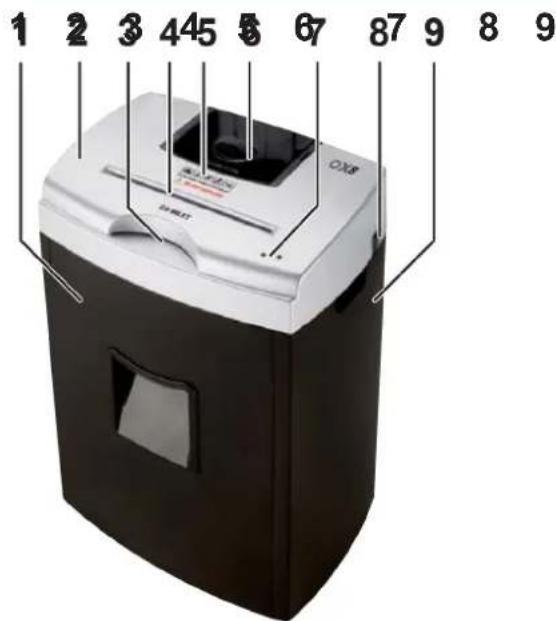
1 Shredded paper container
2 Cutting head
3 Feed opening for CDs
4 Feed opening for paper and cards
5 Safety notice
6 Container for shredded CD
7 LED indicator
8 Rocker switch
I: On
0:Off
R: Reverse
9 Base cabinet
4 Setting up
Take the shredded paper container and cutting head out of the base cabinet.
- Carefully place the cutting head on the base cabinet.
The lugs on the bottom of the cutting head latch into the openings on the base cabinet. - Push the shredded paper container into the base cabinet until it latches in the housing.
Plug in the mains plug.
5 Operation
Switching the paper shredder on
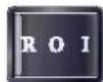
Press the rocker switch, I.
The rocker switch locks in place.
The green LED lights up.
The paper shredder is ready for operation (standby).
Shredding paper and credit cards
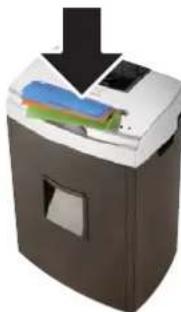
- Feed in only one credit card or no more than 8 sheets of paper.
The light barrier starts the cutting unit automatically.
The material is pulled into the cutting unit and shredded.
Three seconds after the feed opening is clear again, the shredder switches off automatically and goes into standby.
Shredding CDs
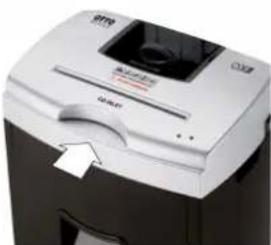
The machine is equipped with a separate CD cutting unit. Push the CD into the feed opening until the cutting unit catches it.
The CD is cut into five strips.
The shredder switches off.
Switching the paper shredder off
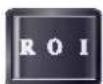
- Press the rocker switch "R".
The rocker switch locks in place.
6 Troubleshooting
| LED-indicator Cause | Remedy | |
| No LED lights up - Place the cutting head | ad correctly on the base cabinet and push the containers for shredded paper and CDs in properly. Press "I" on the switch. | |
| Both LEDs light up The shredded paper container is full | Empty the container. If you take the cutting head off the base cabinet, take care not to damage the fl ap on the bottom of the cutting head. | |
| The red LED flashes | Overheating | The maximum uninterrupted operating time is five minutes. Let the machine cool down for around 20 minutes. |
| Only the red LED lights up | Paper cutting unit overloaded | Press "R" on the switch. Note: The cutting unit starts up with a delay of two seconds. Remove the paper. Do not feed in more than 15 sheets of paper at a time. |
For all other malfunctions, check whether the cutting head was correctly positioned on the shredded material container before contacting our customer service. If the motor was overloaded, let the shredder cool down for 15 to 20 minutes before using it again.
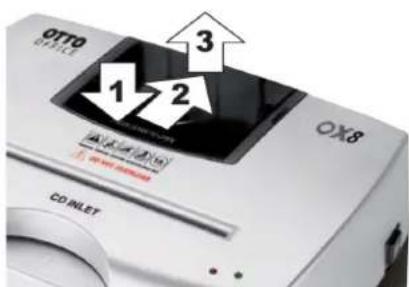
Instructions on removing the CD container
Push down the front of the container (1), push it back (2) and lift the container out of the bracket (3).
Note that the shredder can only be switched on when the CD container is properly in place.
7 Cleaning and maintenance
Switch off the shredder and pull out the mains plug. When cleaning only use a soft cloth and a mild soap-water solution. However, no water may enter the equipment.

Oil the cutting unit when cutting performance deteriorates or the device becomes noisy, or every time you empty the waste container.
- Squirt special cutting unit oil (order number 1.235.997.421) through the paper feed across the entire width of the cutting shafts.
- Without feeding in paper, run the cutting unit in reverse (R).
This loosens paper dust and particles.
8 Technical data
| Cutting type * Cross cut | |
| Shred size * 1/8" x 1 1/16" (3 x 9 mm) | |
| Cutting ca pa ci ty per cycle 1 CD (max. 1.2 mm thick) or 1 credit card / store card or 8 sheets of paper (80 g/m²) 9 sheets of paper (70 g/m²) | |
| Cutting speed* | 7.9 ft/min (40 mm/s) |
| Shredded material container volume * 6.6 gal (25 l) | |
| Voltage 120 V / 60 Hz | 220 - 240 V, 50 - 60 Hz |
| Dimensions B x T x H | 15.6" x 10.6" x 22.5"(395 x 270 x 580 mm) |
| Weight 35.3 lbs. (16 kg) |
*: only applies to the paper/card cutting unit
EC Declaration of Conformity
HSM GmbH + Co. KG, Austrasse 1 - 9, D-88699 Frickingen hereby declares that the machine, referred to here as document shredder OTTO Office OX8
corresponds to the health and safety requirements of the following EC directives listed below due to its conception and design of the version in which it was put into circulation by us:
Low voltage directive 2006 / 95 / EEC
EMC directive 2004 / 108 / EC
Applied standards and technical specifications:
EN 13857:2008 EN 55014-1:2006
EN 55014-2:1997 + A1:2001
EN 61000-3-3:2008
EN 61000-3-2:2006
Frickingen, 26.10.2010
Rolf Gasteier - Technical Director
9 Compartment inférieur