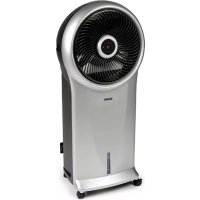
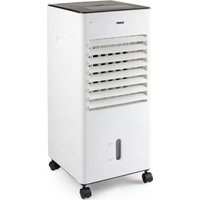
DO152A - Air Conditioning DOMO - Free user manual and instructions
Find the device manual for free DO152A DOMO in PDF.



| Brand | DOMO |
| Model | DO152A |
| Product type | Air cooler / portable air conditioner |
| Use | Indoor, domestic |
| Operating modes | Normal, Natural, Sleep |
| Ventilation speeds | 3 (1, 2, 3) |
| Cooling/humidification function | Yes, with water tank and cooling elements |
| Swing function (rotating grill) | Yes |
| Timer | Adjustable from 0.5 to 7.5 hours |
| Display | LED screen |
| Remote control | Yes, with holder on device |
| Filters | Dust filter and honeycomb water filter |
| Cooling elements | 2 reusable cooling elements |
| Water level alarm | Yes, sound signal and automatic pump stop |
| Safety | Automatic shut-off when tank empty (pump protection) |
| Maintenance | Monthly cleaning of water filter and tank; regular cleaning of dust filter and grill |
| Warranty | 2 years (manufacturing defects) |
| Included accessories | Remote control, 2 cooling elements |
| Spare parts availability | Online on the Domo webshop (http://webshop.domo-elektro.be) |
| After-sales service | Manufacturer or authorized service |
Frequently Asked Questions - DO152A DOMO
User questions about DO152A DOMO
0 question about this device. Answer the ones you know or ask your own.
Ask a new question about this device
Download the instructions for your Air Conditioning in PDF format for free! Find your manual DO152A - DOMO and take your electronic device back in hand. On this page are published all the documents necessary for the use of your device. DO152A by DOMO.
USER MANUAL DO152A DOMO
DOMO Downloaded from www.vandenborre.be
HANDLEIDING
MODE D'EMPLOI
GEBRAUCHSANLEITUNG
INSTRUCTION BOOKLET
natural_image
Exterior view of a modern office air conditioner unit (no signage or text visible)DO152A
PRODUCT OF LINEA 2000
GARANTIEVOORWAARDEN
CONDITIONS DE GARANTIE
This appliance has a two year warranty period. During this period the manufacturer is responsible for any failures that are the direct result of construction failure. When these failures occur the appliance will be repaired or replaced if necessary. The warranty will not be valid when the damage to the appliance is caused by wrong use, not following the instructions or repairs executed by a third party. The guarantee is issued with the original till receipt. All parts, which are subject to wear, are excluded from the warranty.
If your device breaks down within the 2-year warranty period, you can return the device together with your receipt to the shop where you purchased it.
CONDICIONES DE GARANTÍA
RECYCLAGE-INFORMATIE
natural_image
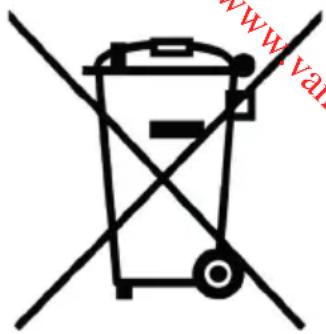
Symbol of a trash bin crossed with two crossed lines, no text or numbers presentRECYCLING INFORMATIONEN
natural_image
Recycling symbol with three arrows forming a triangle (no text or labels)RECYCLING INFORMATION
This symbol on the product or on its packaging indicates that this product may not be treated as household waste. Instead it must be brought to the applicable collection point for recycling of electrical and electronic equipment. By ensuring this product is disposed of correctly, you will help prevent potential negative consequences for the environment and human health, which could otherwise be caused by inappropriate waste handling of this product. For more detailed information about recycling of this product, please contact your local city office, your household waste disposal service or the shop where you purchased the product.
The packaging is recyclable. Please treat package ecologically.

natural_image
Recycling symbol composed of three chasing arrows forming a triangle (no text or labels)From now on, accessories and parts of Domo appliances can also be ordered online from the Domo webshop*:
http://webshop.domo-elektro.be
You can reach the webshop through the Domo website as well: www.domo-elektro.be. The accessories and parts can also still be obtained at the shop where you bought the appliance.
natural_image
Simple black line drawing of a plug with a curved wire (no text or symbols)If the supply cord is damaged, it must be replaced by the manufacturer, its service agent or a similarly qualified person in order to avoid a hazard.
Extra accessoires
- 2 koelementen
- Afstandsbediening
natural_image
Two blue plastic blocks with white connectors next to a black remote control with four buttons (no text or symbols visible)Display
Extra Zubehör
natural_image
Two blue plastic blocks with white connectors, one labeled with number 15 and number 6 (no text or symbols on the blocks themselves)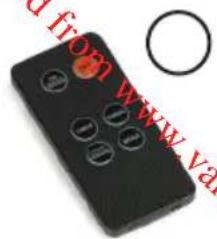
natural_image
Black remote control device with circular buttons and a red circular hole, no visible text or symbols on the device itself.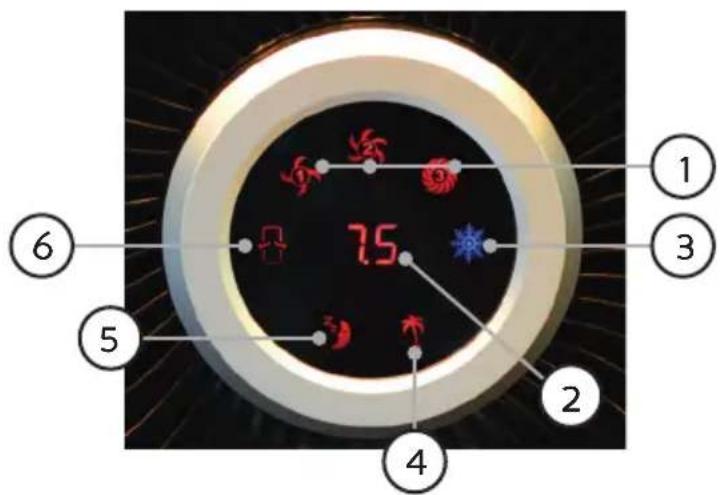
GEBRAUCH
This appliance may be used by children from the age of 8 and up, and also by persons with a physical or sensory limitation, as well as mentally limited persons or persons with a lack of experience and knowledge. But only on the condition that these persons have received the necessary instructions on how to use this appliance in a safe way and know the dangers that can occur by using this appliance.
Children cannot be allowed to play with the appliance. Maintenance and cleaning of the appliance may not be done by children, unless they are older than 8 years old and are under supervision. Keep the appliance out of reach of children younger than 8 years old.
This appliance is suitable to be used in a household environment and in similar surroundings such as:
- Kitchen for personnel of shops, offices or other similar professional surroundings
- Farms
- Hotel or motel rooms and other surroundings with a residential character
- Guest rooms or similar
Attention: This appliance cannot be used with an external timer or a separate remote control.
- Read the instruction manual carefully before using the appliance.
- Always switch off the appliance before placing or removing any parts.
- Keep fingers away from moving parts and openings of the appliance and accessories.
- Only use the appliance for domestic use. The manufacturer can not be held responsible for accidents that result from improper use of the appliance or not following the instructions described in this manual.
- Never leave the appliance unattended when it is in use. Especially when children or people with a limitation are around.
- Check if the voltage of the appliance corresponds with the voltage of the power net you want to connect it to.
- Always remove the plug from the socket after each use and before cleaning the appliance.
- If you notice that the appliance or accessories have been damaged, do not use them anymore. Contact a service center.
- All repairs should be carried out by the manufacturer or its aftersales service.
- Never immerse the appliance, the cord or the plug in water or any other liquid.
- Make sure that children do not touch the cord or appliance.
-
If the cord or plug is damaged, do not use the appliance anymore. Check with an electrician or an aftersales service to replace the cord or plug.
-
Switch off the appliance and remove the plug from the socket before replacing or touching parts that move during use.
- Never use other accessories than the ones supplied or recommended by the manufacturer.
- Keep the cord away from sharp edges and hot parts or other heat sources.
- Before use, remove all packaging materials and any promotional stickers.
- Always remove the plug from the socket before refilling the water tank.
- Always switch off the appliance before removing the plug from the socket.
• Always place the appliance on a flat, stable surface. - To move the appliance, use the handles, unlock the wheels and roll the appliance on its wheels. Make sure that the appliance does not tip over and that no water is being spilled from the water tank.
- Always lock the appliance in place by pressing down the levers on the wheels.
- Do not handle the appliance with wet hands.
- In case of bad odor, switch off the appliance and remove the plug from the socket.
- Do not cover the air inlet and air outlet.
- Do not place the appliance directly under a socket.
- Do not use this appliance in the immediate surroundings of a bath tub, shower or swimming pool.
- Do not use the appliance near inflammable or explosive gases.
• Make sure that the appliance is at least 1 meter away from TV and radio to avoid interference.
- Never pull the cord to remove the plug from the socket. Always pull the plug itself.
- Do not shake or beat the unit.
PARTS
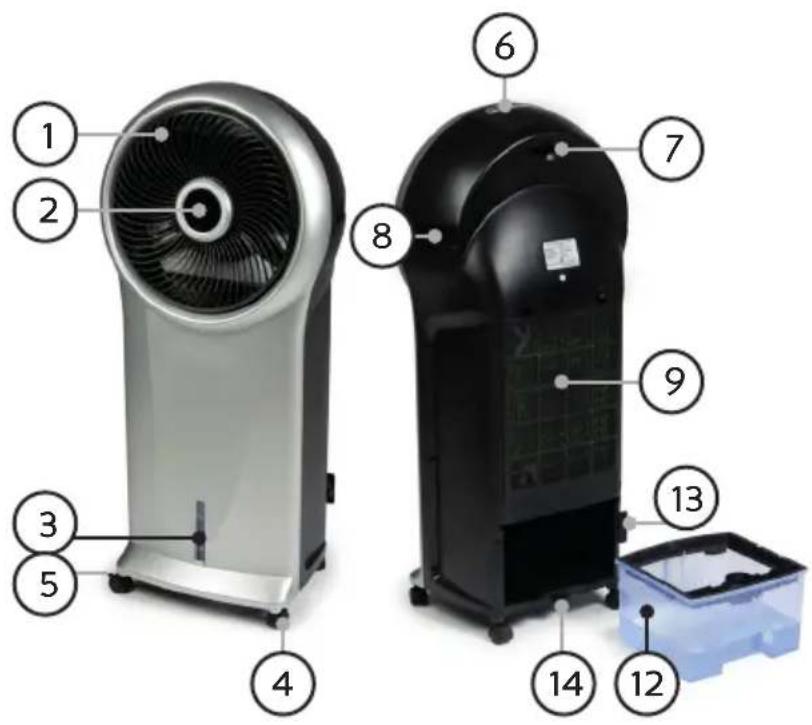
- Air vent
- LED display
- Water level indication
- Wheels
- Wheel locks
- Control panel
- Remote storage compartment
- Handle
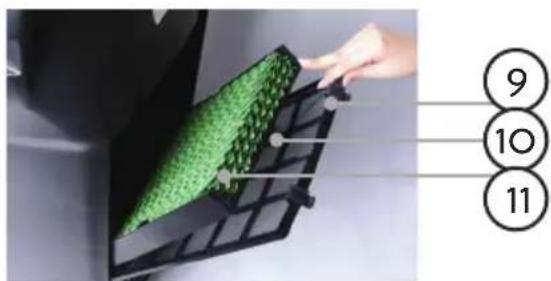
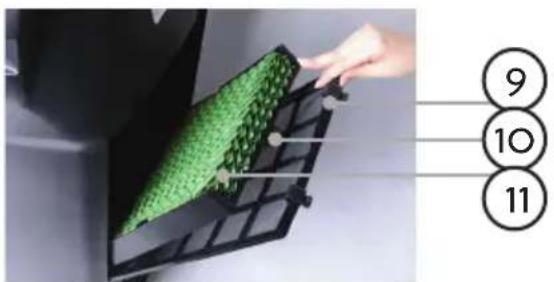
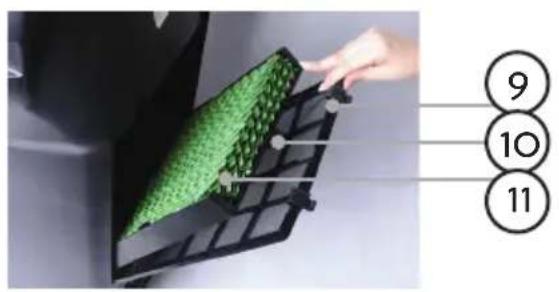
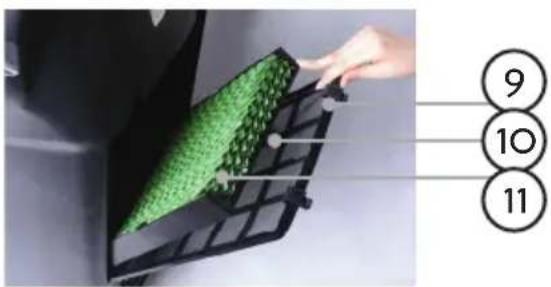
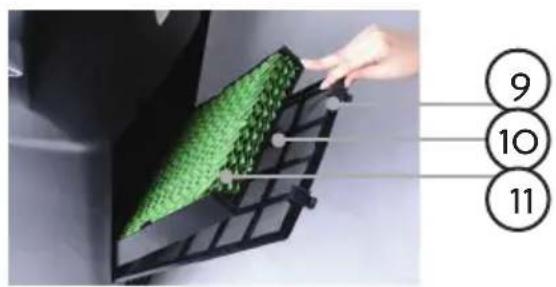
- Dust filter
- Water filter lock
- Honeycomb water filter
- Water tank
- Cord storage
- Water tank lock
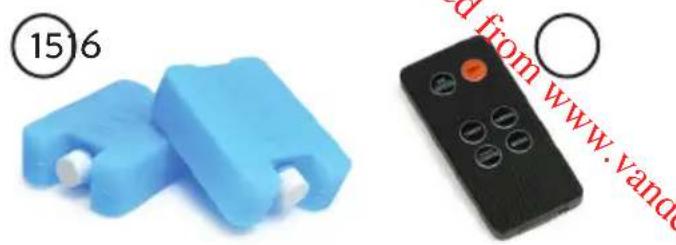
Extra accessories
-
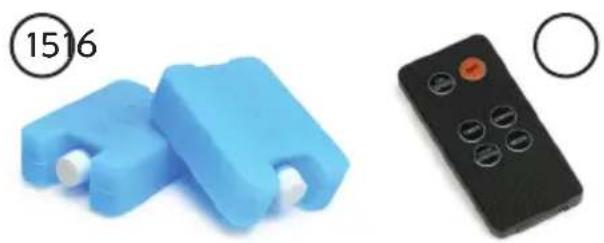
2 ice packs
-
Remote control
natural_image
Two blue plastic blocks with white connectors next to a black remote control with four buttons (no text or symbols visible)Display
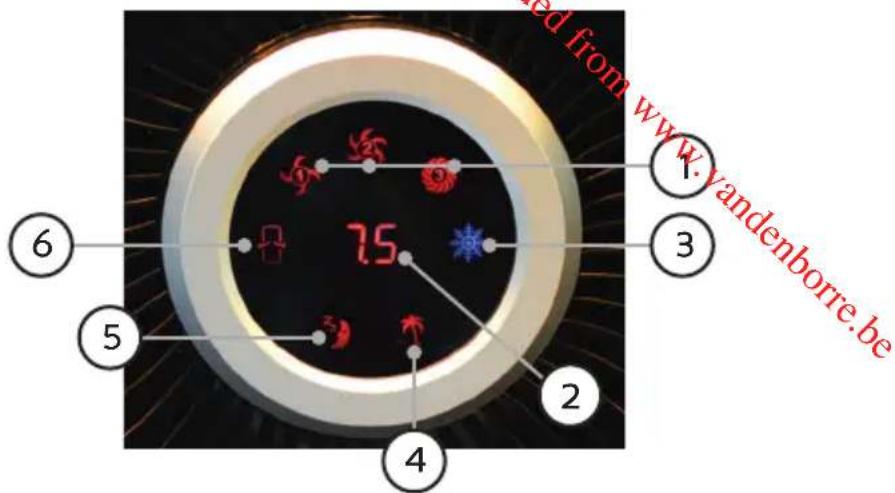
- Ventilation speed (1, 2, 3)
- Timer
- Cooler/humidifier
- Natural mode
- Sleep mode
- Turning air vent
USE
This appliance is equipped with a remote control. The buttons on the remote are the same as the buttons on the control panel. The remote can be stored in the remote compartment in the appliance.
- Fill the water tank with water. Make sure that you do not exceed the maximum level (check the maximum indication at the front of the appliance).
- Put the 2 ice packs in the freezer until they are completely frozen.
- Place 1 ice pack in the water tank, close the water tank and lock.
- The temperature of the water will approximately be reduced until 6^ C below room temperature and this will remain so for 4 hours, so that the wind is cooled.
Add the second ice pack for an even lower temperature.
The 2 ice packs are reusable.
FUNCTIONS
ON/SPEED & OFF
With the On/Speed button you switch on the appliance and you can switch between the different ventilation speeds 1, 2 and 3. The LED display will indicate the corresponding speed.
Important: When the appliance is switched on, it will automatically start at medium speed, after which it will switch to low speed after 3 seconds. This to prolong the life of the product.
With the Off button you can switch off the appliance.
COOLER/HUMIDIFIER
Only press this button when there is water and possibly ice in the water tank. The appliance will automatically start at the medium speed and will maintain this speed for
3 minutes. Then the appliance will switch to the speed that has been set during those 3 minutes. If no speed has been set, the appliance will automatically switch to high speed. This to prolong the life of the product.
SWING
By pressing the Swing button, the air vent will start turning. This helps to spread the air flow over a larger surface.
TIMER
The timer can be set from 0.5 to 7.5h.
MODE
Press the Mode button to change the mode between: normal, natural or sleep.
Normal mode: the fan will work at the selected speed (1, 2 or 3).
Natural mode: the fan will alternate speeds randomly to obtain a natural air flow. The fan will switch between the different speeds to immitate a natural and comfortable sea breeze. In this mode you can also choose a high, medium or low speed cycle, which then results in a strong, moderate or light sea breeze.
Sleep mode: the sleep mode also works with the imitation of a sea breeze (like in natural mode), but the strength of that breeze will reduce every half hour. At the setting HI, the air cooler will consecutively produce a strong, moderate and light sea breeze over a time period of 1.5 hours, after which this cycle is repeated. At the setting ME, this is a moderate sea breeze followed by a light breeze. At the setting LO this is only a light breeze. The sleep mode is best combined with the timer function, so that the appliance switches off automatically when the set time has passed.
WATER LEVEL ALARM
When the water tank is running out of water during the function cooler/humidifier, there will be an alarm signal during 10 seconds. After these 10 seconds the water pump will automatically switch off. This to protect the water pump. The appliance will continue to work as a fan.
CLEANING AND MAINTENANCE
- Remove the plug from the socket before cleaning the appliance.
-
Remove the honeycomb filter. Clean the filter every 1 or 2 months if the environment is susceptible to dust and dirt. Wash the filter in slightly soapy water, with a soft cloth. Rinse well, so that all soap residues are removed. Let the filter dry for at least 4 hours before placing it back into the air cooler.
-
The dust filter can be cleaned with water and a soft brush. Dry thoroughly before placing it back.
- Clean the water tank once a month for an optimal and hygienic performance. Empty the water tank through the drain hole by pulling out the drain plug and dry thoroughly.
- Regularly vacuum the air vent at the front to remove dust. Or wipe clean with a damp cloth.
PRECAUCIONES IMPORTANTES
natural_image
Two blue plastic electronic components with white connectors, one labeled with number 1516 and the other with red text 'cd from www.'DISPLEJ
natural_image
Two cylindrical white liquid droplets on a plain white background, no text or symbols visible
natural_image
Three product photos: square tiles, a clear glass coffee maker with black handle, and a rectangular container filled with dark liquid (no text or symbols visible)of scan hier:
ou scannez ici:
oder hier scannen:
or scan here:


- DOMO Downloaded from www.vandenborre.be
- GARANTIEVOORWAARDEN
- CONDITIONS DE GARANTIE
- CONDICIONES DE GARANTÍA
- RECYCLAGE-INFORMATIE
- RECYCLING INFORMATIONEN
- RECYCLING INFORMATION
- Extra accessoires
- Display
- Extra Zubehör
- GEBRAUCH
- PARTS
- Extra accessories
- USE
- FUNCTIONS
- ON/SPEED & OFF
- COOLER/HUMIDIFIER
- SWING
- TIMER
- MODE
- WATER LEVEL ALARM
- CLEANING AND MAINTENANCE
- PRECAUCIONES IMPORTANTES
- DISPLEJ
Brand : DOMO
Model : DO152A
Category : Air Conditioning