
AMW5021EU - Mouse TARGUS - Free user manual and instructions
Find the device manual for free AMW5021EU TARGUS in PDF.



| Product type | Wireless mouse |
| Brand | Targus |
| Model | AMW5021EU |
| Tracking technology | Bluetrace |
| Connectivity | Wireless via mini USB receiver |
| Power source | 2 AA batteries |
| Battery life | Varies depending on usage |
| Low battery indicator | Visible light beam between buttons |
| Buttons | 2 buttons + scroll wheel |
| Wheel function | Vertical scrolling, programmable click |
| Installation | Plug & Play, no driver required |
| Compatible operating systems | Windows 2000, XP, Vista; Mac OS X 10.4 or higher |
| Box contents | Mouse, 2 AA batteries, mini USB receiver, user manual |
| Care and cleaning | Clean with a soft, dry cloth |
| Safety | Remove batteries if not used for extended periods |
| Repairability | Not user repairable |
| Operating temperature | 0°C to 40°C (estimated) |
| Operating humidity | 20% to 80% RH (estimated) |
Frequently Asked Questions - AMW5021EU TARGUS
User questions about AMW5021EU TARGUS
0 question about this device. Answer the ones you know or ask your own.
Ask a new question about this device
Download the instructions for your Mouse in PDF format for free! Find your manual AMW5021EU - TARGUS and take your electronic device back in hand. On this page are published all the documents necessary for the use of your device. AMW5021EU by TARGUS.
USER MANUAL AMW5021EU TARGUS
1 YEAR LIMITED WARRANTY: We pride ourselves on inequality of our products. For complete warranty details and a list of our worldwide offices, please visit www. largus.com. Features and specifications are subject to change without notice. Microsoft, Windows and Windows Vista are registered trademarks or trademarks of Microsoft Corporation in the United States and/or other countries. Media is a trademark of Apple Inc., registered商标 for use in the United States and/or registered trademark of Logitech International in the United States and other countries. All trademarks and registered trademarks are the property of their respective owners. ©2011 Taurus Group International, Inc.

User Guide
Targus Wireless Bluetrace Mouse
Table of Contents
GB-English
Targus Wireless Bluetrace Mouse 6
BG-BbIrapckn(e3nk)
Bluetrace 6e3xuHa Mmua Targus 12
CZ-Cestina
Bezdralova Bluetrace mys Targus 18
DE-Deutsch
Targus Drahtlose Bluetrace Maus 24
DK-Dansk
Targus Tradlos Bluetrace Mus 30
EE-Eesti
Targus traadita Bluetrace hir 36
ES-Espanol
Raton Bluetrace Inalambrico Targus 42
Targus Wireless Bluetrace Mouse
FI-Suomi
Targus langaton Bluetrace hiiri 48
FR-Frççais
Souris Bluetrace sans fil de Targus 54
GR-EAAnvikAnnpoopieC
Aogupato Bluetrace movri Targus 60
HR-Hrvatski
Targus bezicni Bluetrace mis 66
HU-Magyar
Targus gezetek nelkuli Bluetrace eger 72
IT-Italiano
Mouse Bluetrace Wireless Targus 78
LT-Lietuviškai
Targus" bevièle Bluetrace peIe 84
LV-Latviesu
Targus bezvadu Bluetrace pele 90
Targus Wireless Bluetrace Mouse
Targus Wireless Bluetrace Mouse
NL-Nederlandlands
Targus Wireless Bluetrace Mouse (Targus Draadloze Bluetrace Muis) ..
96
NO-Norsk
Targus tradios Bluetrace mus 102
PL-Polski
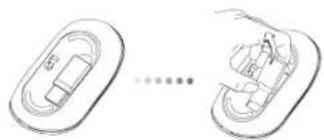
Thank you for your purchase of the Targus Wireless Bluetrace Mouse. The USB receiver conveniently attaches to the mouse for ease of use while traveling or on the go. This is a plug and play device so no additional software is required.
Contents
Targus Wireless Bluetrace Mouse
-2xAA Batteries
·Mini USB Receiver
-User Guide
System Requirements
Hardware
- USB port
Operating System
Microsoft Windows® 2000
Microsoft WindowsXP
Microsoft Windows Vista®
MacOSX10.4or later
Installing the Batteries
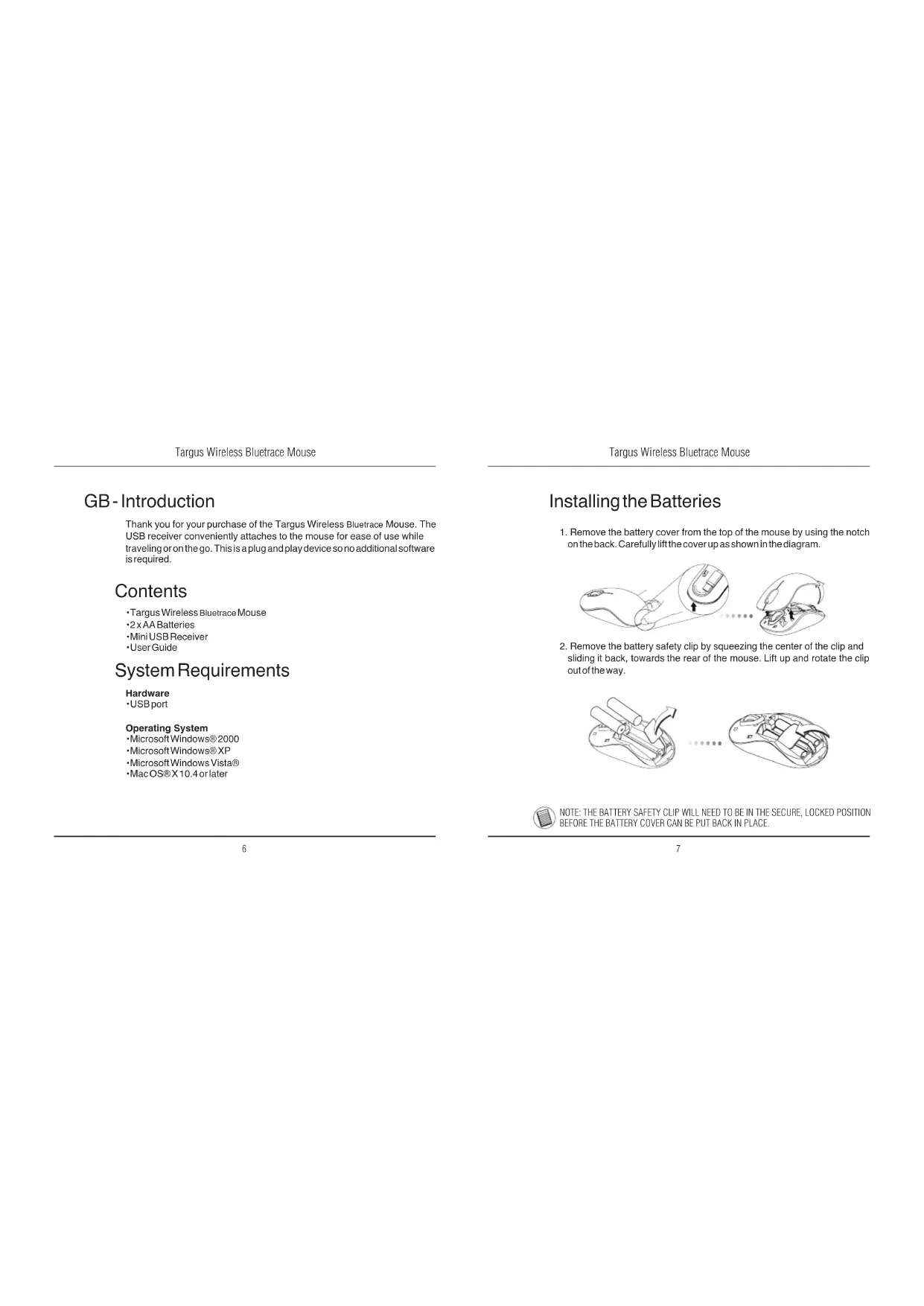
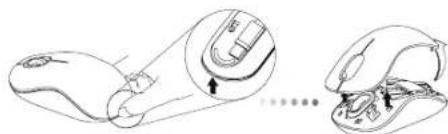
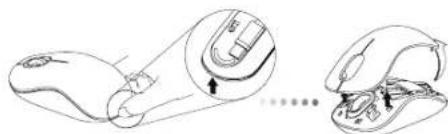
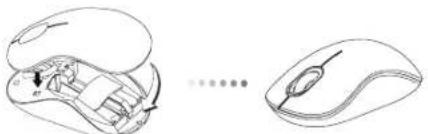
- Remove the battery cover from the top of the mouse by using the notch on the back. Carefully lift the cover up as shown in the diagram.
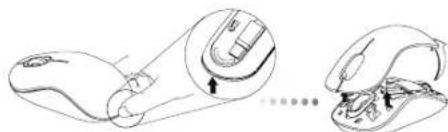
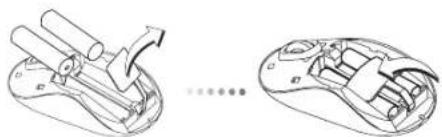
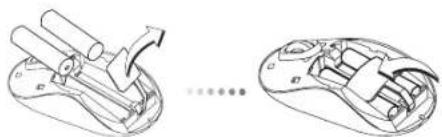
- Remove the battery safety clip by squeezing the center of the clip and sliding it back, towards the rear of the mouse. Lift up and rotate the clip out of the way.

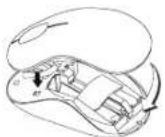
NOTE: THE BATTERY SAFETY CLIP WILL NEED TO BE IN THE SECURE. LOCKED POSITION BEFORE THE BATTERY COVER CAN BE PUT BACK IN PLACE.
Targus Wireless Bluetrace Mouse
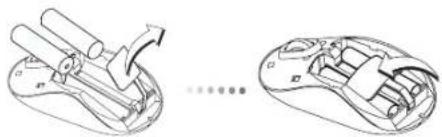
- Insert two AA-size batteries, making sure that the positive (+) and negative (-) ends of each battery match the polarity indicators inside the battery compartment.
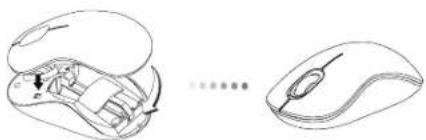
- Replace the battery cover, carefully fit the cover until it clicks into place.
Establishing the Connection
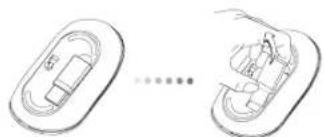
(A) Remove the USB receiver from the bottom of the mouse.
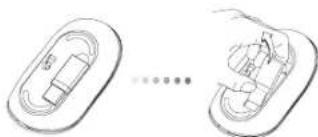
Targus Wireless Bluetrace Mouse
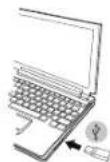
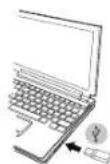
(B) Plug the USB receiver into an available USB port on your computer.
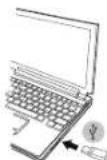
(C) This mouse is a plug and play device. It will automatically operate when the USB receiver is connected to the computer.
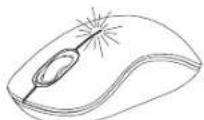
Low Battery Power Indicator
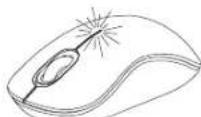
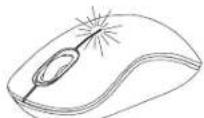
The light illuminates from the seam between the left and right buttons. It will turn on when the power is low and batteries need to be replaced.
Targus Wireless Bluetrace Mouse
Targus Wireless Bluetrace Mouse
Programming Your Mouse
(Windows)
To access the advanced scroll wheel features you will need to download and install the software driver. This can be downloaded from the following location:
Visit www.targus.com to download and install the driver.
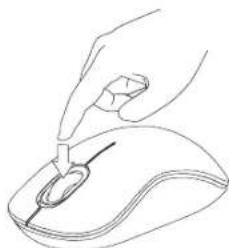
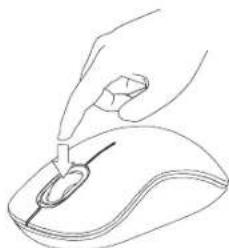
Once installation is complete, open the driver software and select the desired setting for the scroll-wheel button. Close the driver software application and you're ready to go. Activate your selected feature by pressing down on the scroll wheel.
BG-BbBedeHne
Bnaoradapm, Ye 3aaynxte Bluterace 6e3xHnHa Mmka Targus. Mmkaata ce cBp3ba ydo6ho c USB npneMHNk 3a neKota npn nTbYBaHe nn KOrato cte B dBnKeHne. PnpedanBanAa plug and play ycTpoiCTBO n He n3NCBA DOnblHntenEcoFyep.
CbDpbXaHne
- Bluetrace 6e3KmHa Mmka Targus
-2xAA6aTeepn - MHHN USB npHEmHHK
PbkoBcTBOHaNTpe6nte
CNCTeMHN 3nCKBaHn
Xapnyep
- USB nopT
OnepaHnHa cnCTema
Microsoft Windows® 2000
Microsoft WindowsXP
Microsoft Windows Vista®
Mac OS® X 10.4 mnn no-HOBA
HCTaIIpaHe Ha 6aTepeInTe
- OCTpaHETe KANAKA ha 6atepHnTA OT rOpHATA CTpaH a MmUKaTa, KATO hON3BATE 6yToHa 03ad.BHMAtenHO NOBnHHTe KANAKA, KAKTo E NOK3AHO HA CXEMATA.
- NtctpaHete cKb6ata Ha 6atepe3 npntnckaHe Ha eHTbpaN, Hn3hETe KbM 3aHaT aHCT Ha MNkata. NOBnHrTe Hn 3abpTe cKb6ata, 3 da n 3BaNDte.

3AEJEKKA: OBE3OACNTIENHATA CKOBA HA MATEPIRTA TPR5BA DA BbDE B 3AXBAHATO, BLOKIPAPOHIOIOKHEME, PEPDN DA BbPHETE KANAKA HA MCTO KANIKA HA OTJEEHEMETO 3A BATEPN.
Targus Wireless Bluetrace Mouse
- NocTabete DBe 6aepm Cpa3mep AA, KaTo cna3BaTe nonpaTeTa (+) n(-) Ha otDeneHMeTO 3a 6aepm.

4.BbPHTe BnHmATEIHO HA MRCTO KANAKA HA OTIDENEHMeTO 3a BatePN I ce yBepTe, Ye IpaKaBa HA MRCTo.
YctaHOBBAHe Ha Bpb3Ka
(A)OTctpaHete USB npmEHnka OT dONHaTcpaHa Ha MMkata.
Targus Wireless Bluetrace Mouse
(5) CbpgkTe USB npmEmHnKa KbM USB nopt Ha KOMNIOBpa.
(C) MnKkata npedctabnaB plug and play yctpoNCTBO. 3anOyba pa6ota ABTOMATUHO npn BKNIOUbaHe Ha USB npneMHNK kMb KOMNIOTp..
HdkaTOp 3a HnCKo HnBO Ha 6aTepyTa
CBeTINHATA Ce H3JIbYBa MEKdy JIeBn I DeceH 6yToHN. BKnIOUba ce npn HnCKO 3axpaHbAne HnyXda OT CMHa Ha 6aTePmTE.
Targus Wireless Bluetrace Mouse
Targus Wireless Bluetrace Mouse
IIOBTOPO nporpaMaPe Ha MUskata (Windows)
3a da IMATE doctbI DO ycbbpueHCTBaHTe FyHcun HA npDIBHXBAHe H a konelto Ite Tp86Ba d 3apeNITe INHCTanipate coOpTyepen DapBepR. ToM OKeJ da ce 3apeNDOTCnEDHOTMOCTO:
Pocetete www.targus.com, 3a da 3apeiTe nHCTanpate dpainBepa
CnEaKATO HNCTAANHATA E npKNIOUeHA, CTAPImpaTte COPTyeepa N3bpeTe KeJAnHMe HAcTPOkHnHa nPpDnBnKBaHe.3aTbOpTe NPINOJOEHMe HcTe TOTOBn 3a p6O7a.
AKnBpuAne 36paHata FyHKUa Ype3 HAtnckAHe HA KOneNTo 3a npeBbPte.
CZ- Uvod
Dekujeme vam, ze jste si zakoupili bezdratovou Bluetrace mys od spolecnosti Targus. Prijima USB je practicky pifevné k mysi pro snadne pouziti na cestach. Toto je zaflzeni typu plug und play, proto neni tbreba dalsi software.
Obsah
Anainnoeic ouoTmuToC
YAIKO
- Upa USB
AeIoupyIKo ouotnua
Microsoft Windows® 2000
Microsoft Windows XP
Microsoft Windows Vista®
Mac OSX 10.4 n eTayevTeep Ekoan
ToTOnTeTnO Tuv mTatapiWv
1.ApaiaeTe To Kaumu To Uv Ttataipov AtTo Trawupeo Tou Novtkoiu XpoiiojovTAs IVy EKOTn OTo Tiwpeo. EKnWote TpOeKTka To Kauimu Jev To VTOPO TO UTODEkVUeTa ot Didyapua.
2.ApaapeTo auovetnpa aopaaiae tauv pitatapuiv niieovtac ato Kevpto tou kai oupvotav to npoc to maw epos tou novtkio. Sknwote to kaluauma kai teripatpeite yia va toydaete.

AnnapaTHbIe CpeDCTBa
USB-nopt
OnepaounHnA cnTeMa
Microsoft Windows® 2000
Microsoft WindowsXP
Microsoft Windows Vista®
Mac OSX 10.4 mnn 6one no3dne Bepcnn
YctaHOBka 6aTapeek
1.CHMMTE KpIbXy OTeCKA DnB 6BaTaeP C BepXHn Chtn KpOlyCa Mbln c nmoaHbNo na3c3aDn. AkkypaTHo NpDHMMTE KpbIbXy, KaK NOKa3Ha Hn pCHyKe.
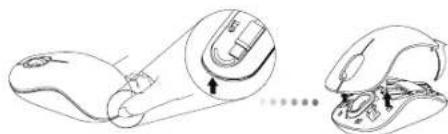
2.HaxMnTe Ha cpeHIOO qACTb npEOxpaHNTeBHO 3aKIMMa DnB 6atapeH nCDBHBe erO B CTOPOHy 3aHNHe qACTN MbIu. PNOHMnTe N NOEPAHTE 3aKIMB CTOPOH.
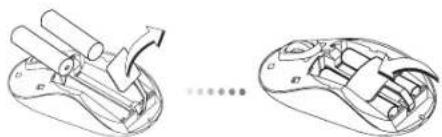

PIMMEAHNE:PEPEDYCTAHOBKOHA MECTO KPBILIKNOTCEKA DIA BATAPENEHOOXBODMOYCTAHOBNTB N3AOFKNCPOBATB NPABINHBOMNIOXQEHNIPDEOXPAHNTEBHb3AXHM.
Targus Wireless Bluetrace Mouse
3.BCTabte DBe 6aPatekn Tnna AA, y6eDITcB, YTO KONTAKbTI NIOC (+) INMHyc(-) KaKdoB 6aPaten COOTBeTCTBYIOT 3HaKaAM NOIAPHOCTN BOTCEK dne 6aPaten.
4.YctahOBHTeHaMeTOKpbIuKyOTcKaDn8BaTapeIN3aФHKpnyTe COUENKOM.
YctahOBka coeHHeHHa
(A) BbHbTe USB-pecBep n3 HmKHeu qactn MbIaM.
Targus Wireless Bluetrace Mouse
(6)Поклоче USB-pecnBep KdocTyHOMy USB-nopTy KOMnIbOtepa.
(C)Даннь Мьшьpb6aToTЯNot pRnHmNy plug-n-play(BKIOHm INpA).ОддONКHA abOMATMHeCkHaNCTPOMTbCBy Ha pa6OtyNoceNoDKNKHOeHN USB-peCBeBa K KomnBtoEpy.
HndkaTOp Hn3KOrO 3apJa6atapei
Bue Meky npabOB Hneob KhoNkAMM 3aoropTcR CBeOTHMdkaTOp. OH BKNIOUaTeC, KOra 3apd 6aTaapeek nadaet, INx Heo6XODIMO 3aMeHnltb.
Targus Wireless Bluetrace Mouse
Targus Wireless Bluetrace Mouse
gaiyai all aie jayalalal 1y jai yaiy gaiy caiy