Airwasher 739 - Air purifier Solis - Free user manual and instructions
Find the device manual for free Airwasher 739 Solis in PDF.


| Product type | Air purifier with humidification |
| Brand | Solis |
| Model | Airwasher 739 |
| Dimensions (L x W x H) | 380 x 320 x 425 mm |
| Weight (empty) | 5.9 kg |
| Power supply | 230 V / 50 Hz |
| Power consumption | 24 W |
| Recommended area | Up to 50 m² |
| Humidification capacity | Up to 300 g/h |
| Water tank capacity | 4.5 liters |
| Basin capacity | 2.5 liters |
| Cable length | Approx. 2 m |
| Main function | Filter-free air purification and humidification |
| Purification system | Rotating humidification discs (Bionic principle) |
| Antibacterial protection | Ionic Silver Stick (effective against over 650 types of bacteria and viruses) |
| Power levels | 2 (silent mode and normal mode) |
| Automatic shut-off | Yes, when the water tank is empty |
| Maintenance of tank and basin | Every 2 weeks |
| Maintenance of humidification discs | Every 4 weeks (descaling possible) |
| Spare parts available | Humidification discs, Ionic Silver Stick |
| Technical support | Solis Helpline: 044 874 64 14 (Switzerland) |
| Warranty | Exclusion for damage caused by additives (essential oils, etc.) |
Frequently Asked Questions - Airwasher 739 Solis
User questions about Airwasher 739 Solis
0 question about this device. Answer the ones you know or ask your own.
Ask a new question about this device
Download the instructions for your Air purifier in PDF format for free! Find your manual Airwasher 739 - Solis and take your electronic device back in hand. On this page are published all the documents necessary for the use of your device. Airwasher 739 by Solis.
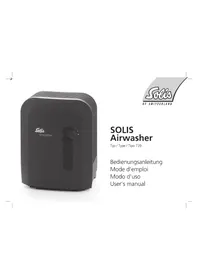
USER MANUAL Airwasher 739 Solis
natural_image
Exterior view of a black airwasher washing machine (no text or symbols visible on the device body)
text_image
Soleis OF SWITZERLANDSOLIS Airwasher
Typ / Type / Tipo 739
Bedienungsanleitung Mode d'emploi Modo d'uso User's manual
|
[Non-Text]
2
| _
1
Inhaltsverzeichnis
Safety instructions ...... Page 34-35
Description of the appliance ...... Page 35-38
Cleaning/Maintenance Page 39-42
Troubleshooting Page 43
Disposal Page 43
D
Vorwort
natural_image
Illustration of a computer monitor with a power outlet and explosion effect (no text or symbols)
natural_image
Illustration of a child sitting on the floor next to a portable electric heater (no text or symbols present)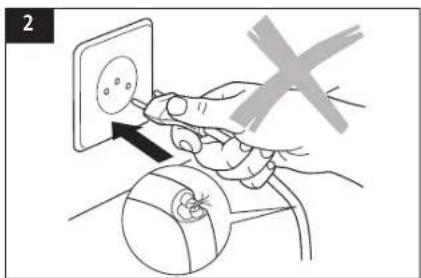
text_image
2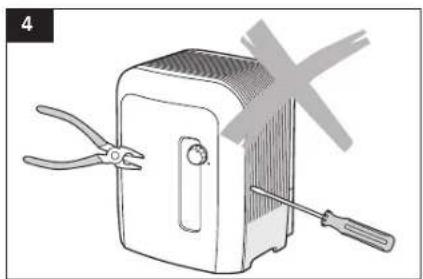
natural_image
Illustration of a portable device with pliers and a screwdriver, no text or symbols present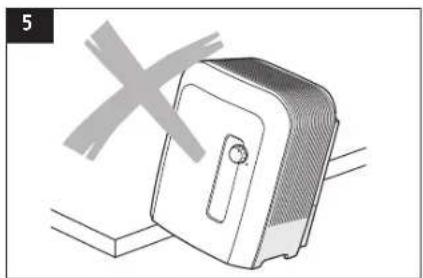
natural_image
Illustration of a portable device with a cross symbol overlay (no text or symbols present)D
natural_image
Illustration of a person using a portable electric heater connected to a power outlet (no text or symbols)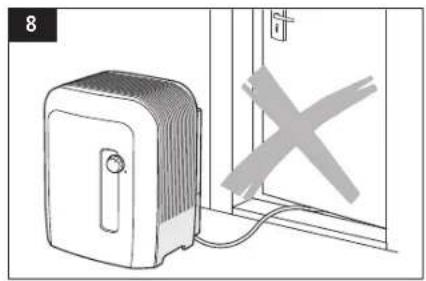
natural_image
Illustration of a portable heater connected to a door with a cross symbol (no text or labels)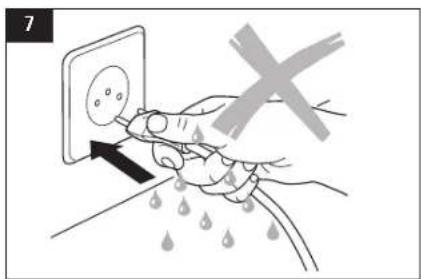
text_image
7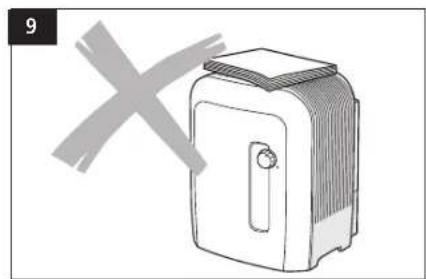
natural_image
Simple line drawing of a toaster with a cross mark overlay (no text or symbols)Aufstellen
natural_image
Diagram of a mechanical device with a rotating arrow indicating rotation (no text or symbols)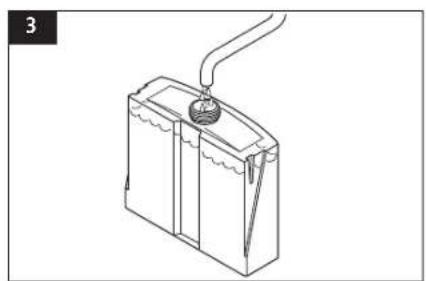
natural_image
Line drawing of a battery with a plug inserted into the top casing (no text or symbols)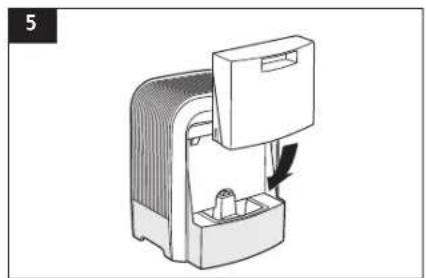
natural_image
Diagram of a device with a handle and internal components, no visible text or symbols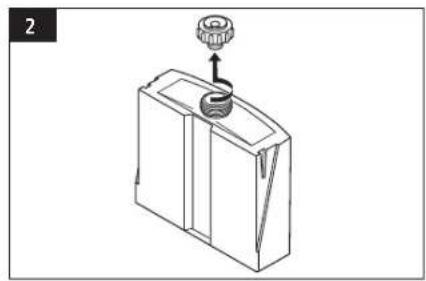
natural_image
Line drawing of a mechanical device with a knob and handle (no text or symbols)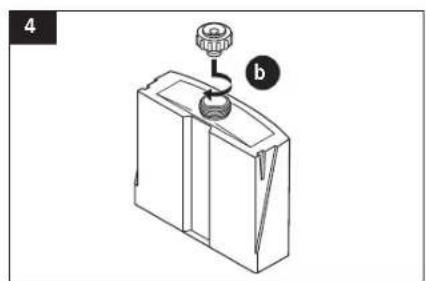
natural_image
Line drawing of a mechanical component with a knob and handle, labeled 'b' (no text or symbols on the object itself)
D
In Betrieb nehmen
natural_image
Hand inserting a plug into an electrical outlet (no text or symbols visible)2
natural_image
Pure technical diagram of a mechanical component with no text, numbers, or symbolsWasserreinhaltung
natural_image
Isometric line drawing of a mechanical or architectural component with no visible text or symbolsReinigen
natural_image
Diagram of a kitchen sink with a showerhead and water surface, no text or symbols presentD
natural_image
Diagram of a mechanical device with a handle and internal components, showing a curved arm and directional arrow (no text or symbols)2
natural_image
Line drawing of a mechanical component with a knob and arrow indicator (no text or symbols)3
natural_image
Line drawing of a mechanical device with a threaded rod and pipe, resting on a surface (no text or symbols)4
natural_image
Diagram of a device with internal components and an upward arrow indicating motion (no text or symbols)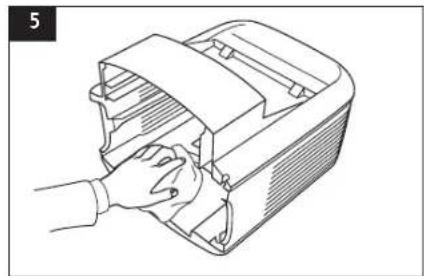
natural_image
Line drawing of a hand inserting a plastic bag into a box (no text or symbols)10
6
natural_image
Technical illustration of a mechanical component with a cylindrical housing and an upward arrow indicating motion (no text or symbols)7
natural_image
Line drawing of a mechanical device with a curved pipe and lever, partially submerged in water (no text or symbols)natural_image
Hand inserting a plug into an electrical socket (no text or symbols visible)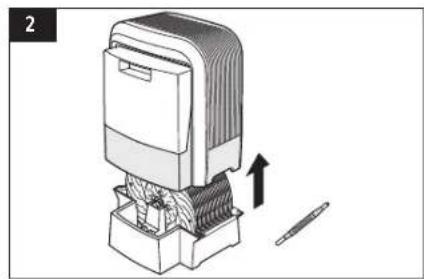
natural_image
Diagram of a mechanical device with a tool and directional arrow indicating movement (no text or symbols)
text_image
3 E4cal 60°C 30 min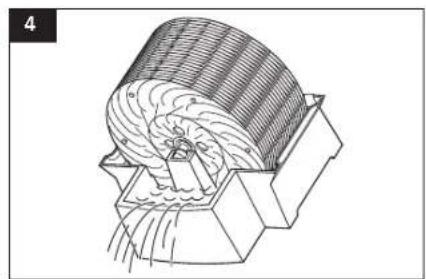
natural_image
Technical line drawing of a mechanical component with internal gear-like structure (no text or symbols)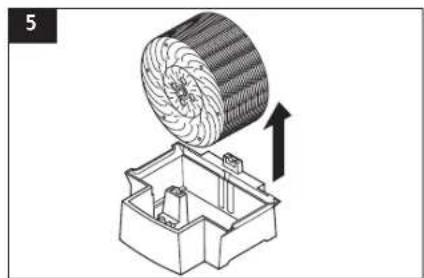
natural_image
Technical illustration of a mechanical component with a circular component and an upward arrow indicating motion (no text or symbols)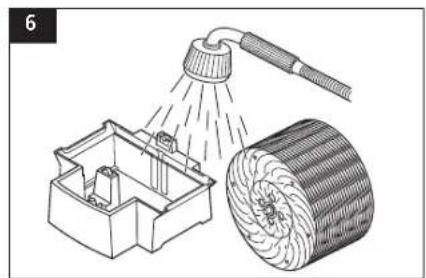
natural_image
Illustration of a showerhead spraying water into a mechanical housing and a coiled cylindrical object (no text or symbols)D
natural_image
Diagram showing a circular object being processed into a mechanical device with a cross mark (no text or symbols present)
natural_image
Illustration of a child sitting on the floor next to a portable electric heater (no text or symbols present)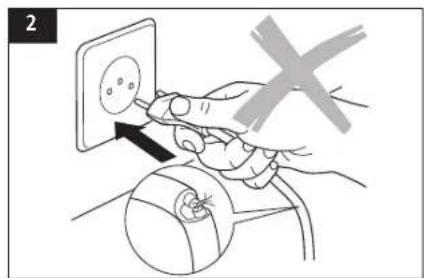
text_image
2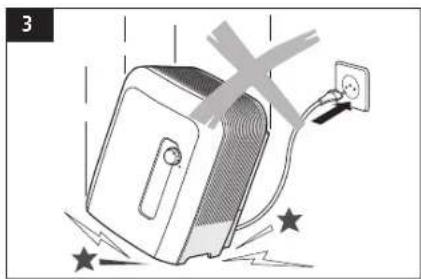
natural_image
Illustration of a computer monitor with a power outlet and explosion effect (no text or symbols)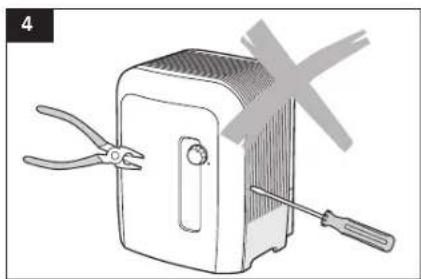
natural_image
Illustration of a portable device with pliers and a screwdriver, no text or symbols present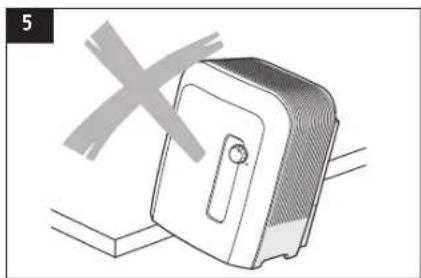
natural_image
Illustration of a portable device with a cross symbol above it, no text or symbols present
natural_image
Illustration of a person using a portable electric heater connected to a wall socket (no text or symbols)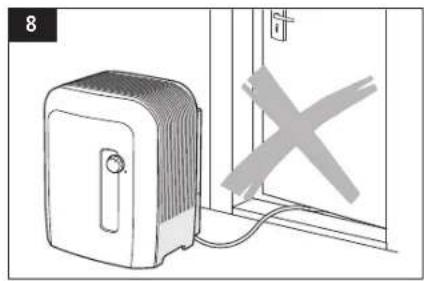
natural_image
Illustration of a portable heater connected to a door with a cross symbol (no text or labels)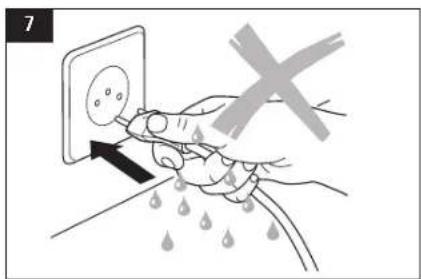
text_image
7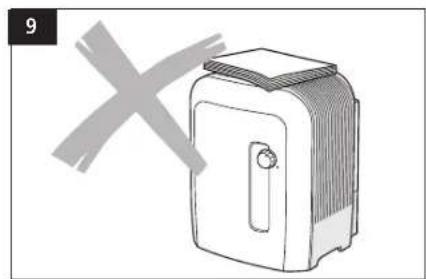
natural_image
Simple line drawing of a toaster with a cross mark overlay (no text or symbols)Placement
natural_image
Diagram of a mechanical device with a rotating component and a handle, no visible text or symbols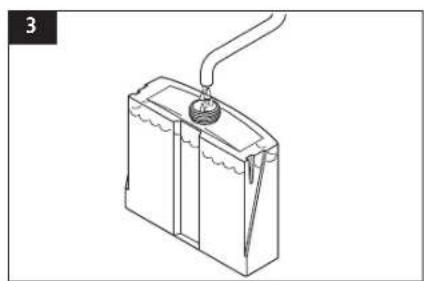
natural_image
Line drawing of a battery with a plug inserted into the top section (no text or symbols)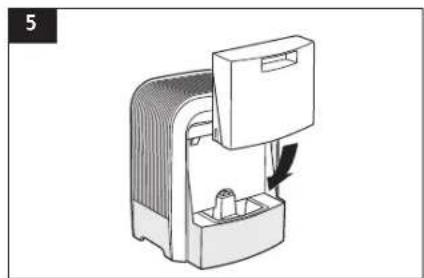
natural_image
Diagram of a device with a handle and internal components, no visible text or symbols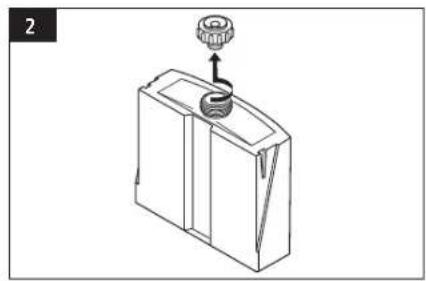
natural_image
Line drawing of a mechanical device with a knob and handle (no text or symbols)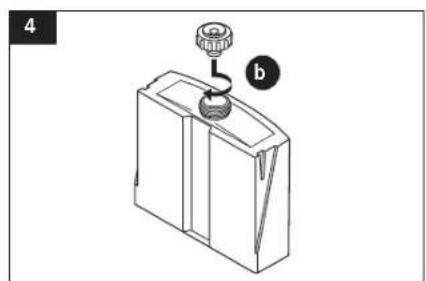
natural_image
Line drawing of a mechanical component with a knob and handle, labeled 'b' (no text or symbols on the object itself)Mise en service
natural_image
Hand inserting a plug into an electrical socket (no text or symbols visible)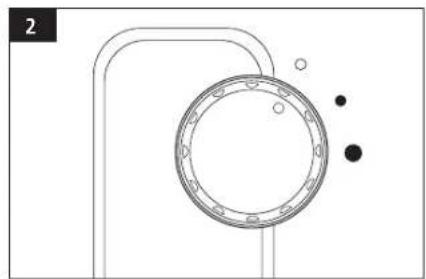
natural_image
Pure mechanical diagram showing a circular component with mounting holes and surrounding dots (no text or symbols)Epuration de l'eau
natural_image
Isometric line drawing of a mechanical housing or enclosure with internal components and a downward arrow indicating direction (no text or symbols)Nettoyage
natural_image
Illustration of a kitchen sink with a showerhead and a cross mark, no text or symbols presentnatural_image
Diagram of a mechanical device with a rotating arrow indicating rotation (no text or symbols)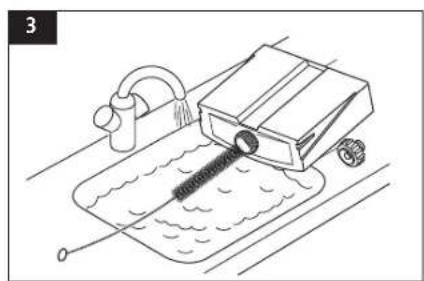
natural_image
Line drawing of a mechanical device with a drain and pipe, no text or symbols present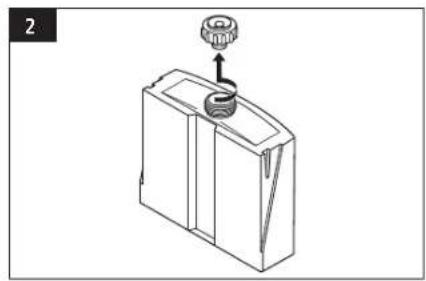
natural_image
Technical line drawing of a mechanical device with a gear and handle (no text or symbols)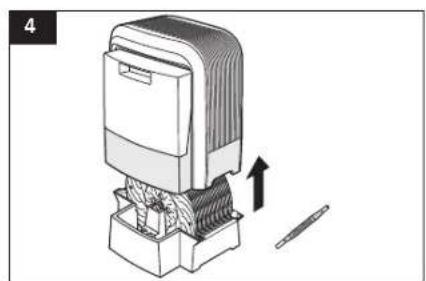
natural_image
Illustration of a mechanical device with an upward arrow indicating motion or assembly (no text or symbols present)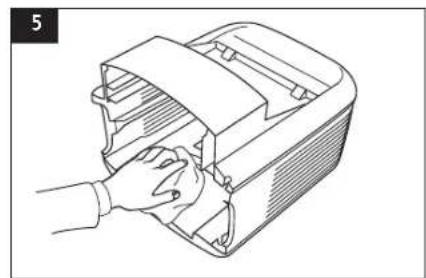
natural_image
Line drawing of a hand inserting or adjusting a device into a box (no text or symbols)20

natural_image
Technical illustration of a mechanical component with a circular component and an upward arrow indicating motion (no text or symbols)
natural_image
Technical illustration of a mechanical component with a circular component and an upward arrow indicating motion (no text or symbols)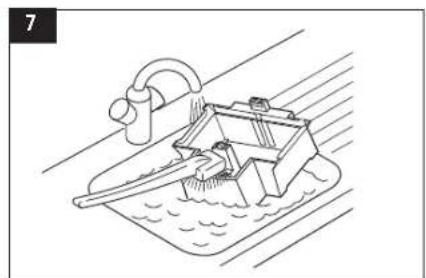
natural_image
Line drawing of a boat with water and a curved ramp, no text or symbols presentnatural_image
Hand inserting a plug into an electrical socket (no text or symbols visible)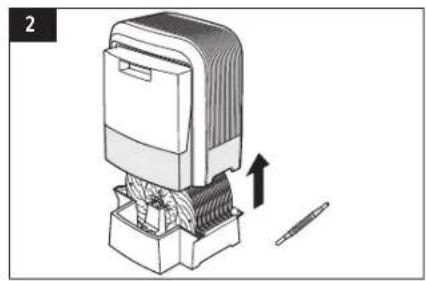
natural_image
Diagram of a mechanical device with an arrow indicating motion, showing internal components and a tool (no text or symbols present)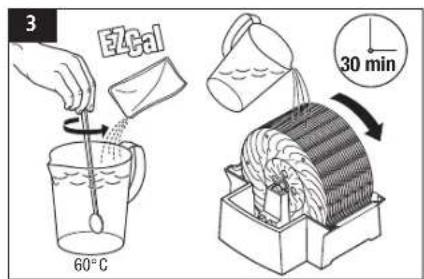
text_image
3 E4cal 60°C 30 min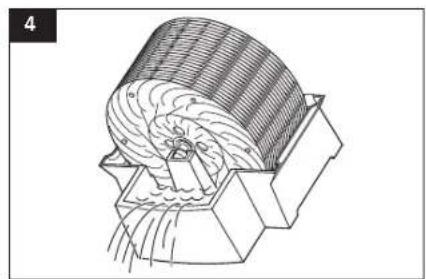
natural_image
Technical line drawing of a mechanical component with internal gear-like structure (no text or symbols)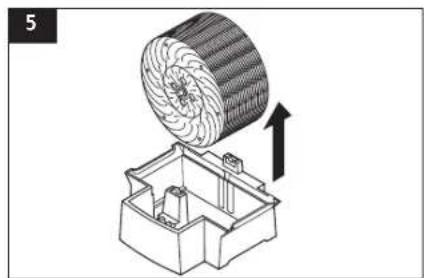
natural_image
Technical illustration of a mechanical component with a circular component and an upward arrow indicating motion (no text or symbols)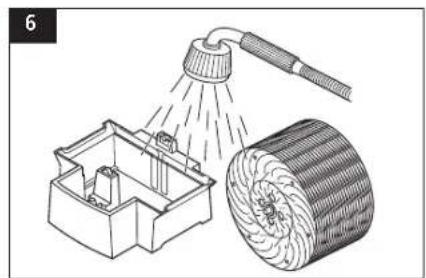
natural_image
Illustration of a showerhead spraying water into a mechanical housing and a cylindrical object (no text or symbols)natural_image
Diagram showing a circular object being processed by a mechanical device with a cross mark (no text or symbols present)
natural_image
Illustration of a child sitting on the floor next to a portable refrigerator (no text or symbols)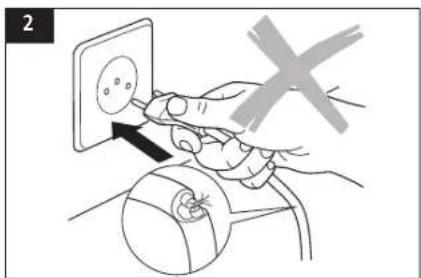
text_image
2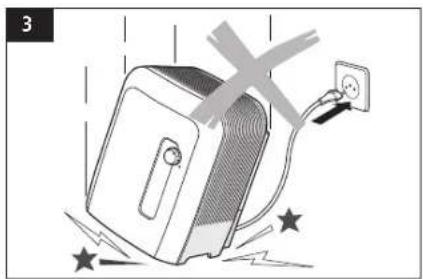
natural_image
Illustration of a computer monitor with a power outlet and explosion effect (no text or symbols)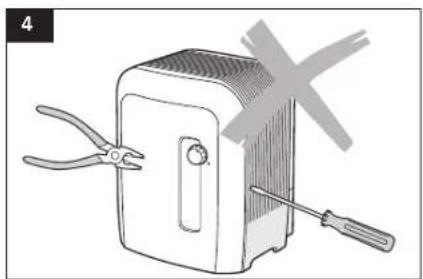
natural_image
Illustration of a portable device with pliers and a screwdriver, no text or symbols present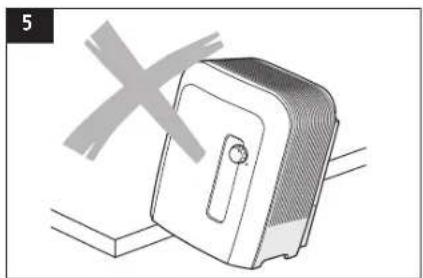
natural_image
Illustration of a portable device with a cross symbol above it, no text or symbols present
natural_image
Illustration of a person using a portable electric heater connected to a power outlet (no text or symbols)
natural_image
Illustration of a portable heater connected to a door with a cross symbol (no text or labels)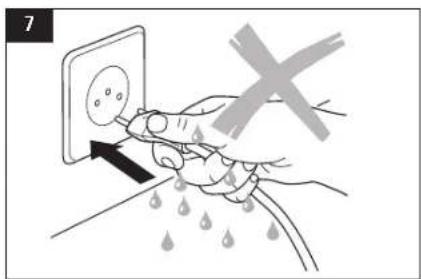
text_image
7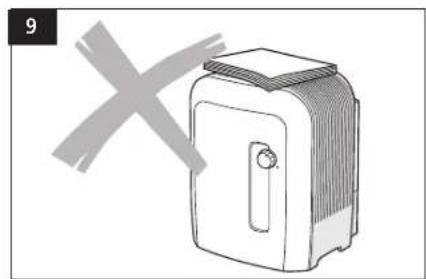
natural_image
Simple line drawing of a toaster with a cross mark overlay (no text or symbols)Posizionamento
natural_image
Diagram of a mechanical device with a handle and internal components, showing a rotation arrow (no text or symbols)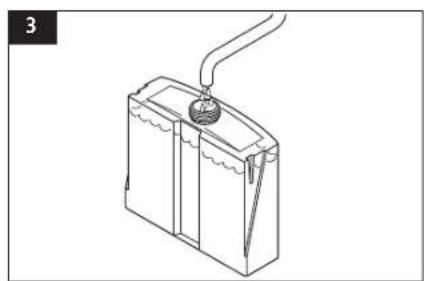
natural_image
Line drawing of a battery with a plug inserted into the top panel (no text or symbols)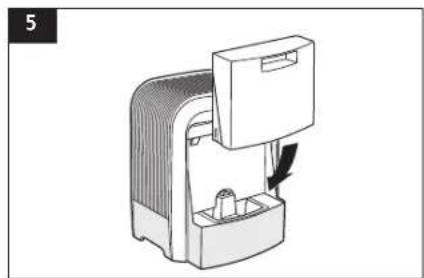
natural_image
Diagram of a device with a handle and internal components, no visible text or symbols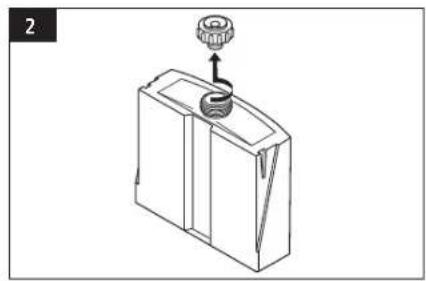
natural_image
Line drawing of a mechanical device with a knob and handle (no text or symbols)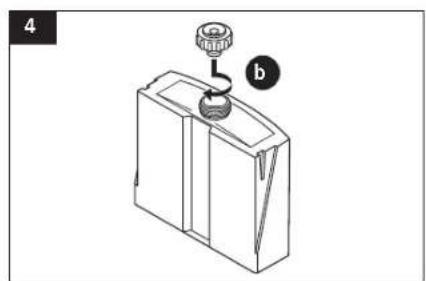
natural_image
Diagram of a mechanical device with a knob and lever, labeled 'b' (no text or symbols on the device itself)Messa in funzione
natural_image
Hand inserting a plug into an electrical socket (no text or symbols visible)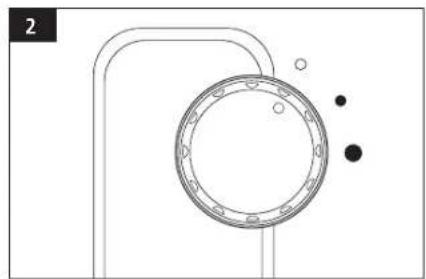
natural_image
Pure technical diagram of a mechanical component with no text, numbers, or symbols
natural_image
Isometric line drawing of a mechanical housing or enclosure with internal components and a downward arrow indicating direction (no text or symbols)Pulizia
natural_image
Diagram of a kitchen sink with a showerhead and water surface, no text or symbols present
natural_image
Diagram of a mechanical device with a rotating arrow indicating rotation (no text or symbols)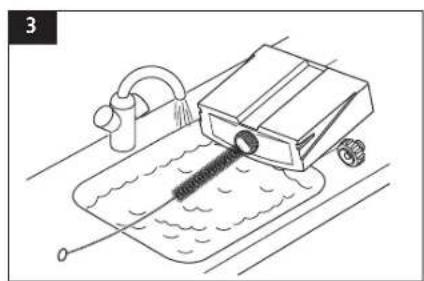
natural_image
Line drawing of a mechanical device with a drain and pipe, no text or symbols present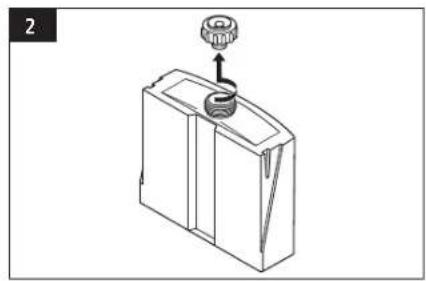
natural_image
Line drawing of a mechanical device with a gear and handle (no text or symbols)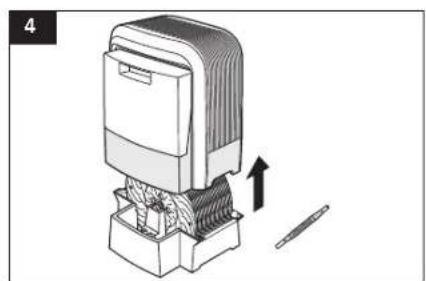
natural_image
Illustration of a mechanical device with an upward arrow indicating motion or assembly (no text or symbols present)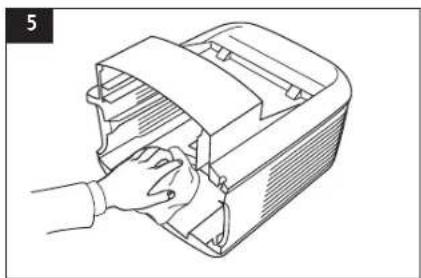
natural_image
Line drawing of a hand inserting or adjusting a device into a container (no text or symbols)30
natural_image
Technical illustration of a mechanical component with a circular component and an upward arrow indicating motion (no text or symbols)
natural_image
Technical illustration of a mechanical component with a circular component and an upward arrow indicating motion (no text or symbols)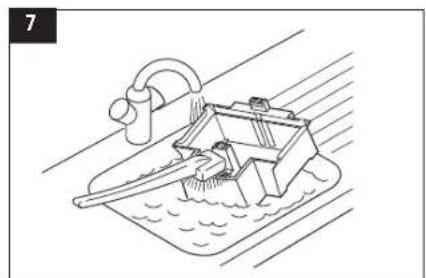
natural_image
Line drawing of a boat with water and a curved ramp, no text or symbols presentnatural_image
Hand inserting a plug into an electrical socket (no text or symbols visible)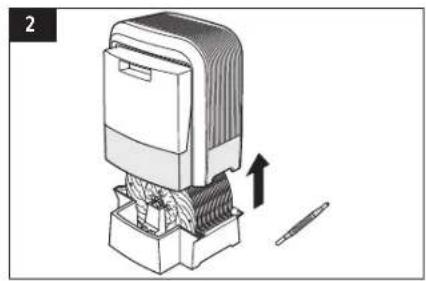
natural_image
Diagram of a mechanical device with a tool and directional arrow indicating movement (no text or symbols)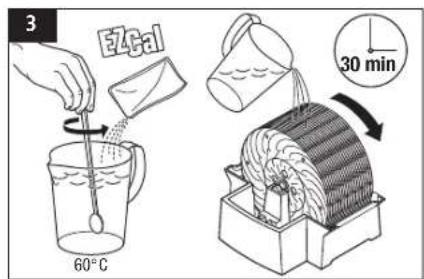
text_image
3 E4cal 60°C 30 min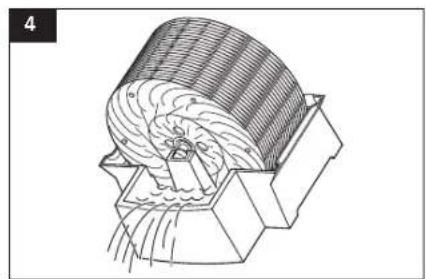
natural_image
Technical line drawing of a mechanical component with internal gear-like structure (no text or symbols)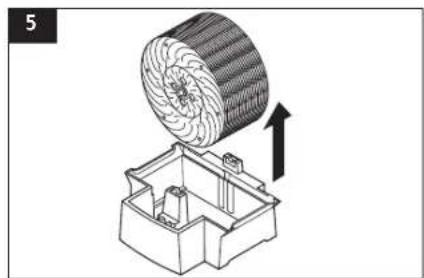
natural_image
Technical illustration of a mechanical component with a circular component and an upward arrow indicating motion (no text or symbols)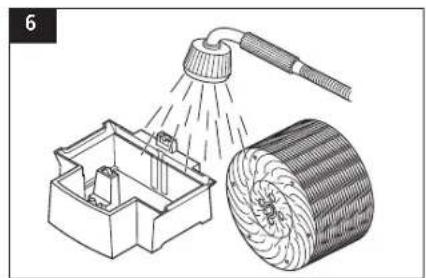
natural_image
Illustration of a showerhead spraying water into a mechanical housing and a cylindrical object (no text or symbols)natural_image
Diagram showing a circular object being processed by a mechanical device with a cross mark (no text or symbols present)
text_image
SONIS HELPLINE: 044 874 64 14 (Sogn per i consenti in Svizzera)Congratulations on your choice of the SOLIS Airwasher
Did you know that dry room air
- Causes the membranes in your respiratory system to dry out, and also causes chapped lips and stinging eyes?
- Encourages infections and illnesses of the respiratory system?
- Causes weariness, tiredness and poor concentration?
• Stresses household pets and house plants? - Encourages the formation of dust and the electrostatic charging of textiles made of synthetic fibres, carpets and plastic flooring?
- Damages furnishings made of wood and parquet?
• Detunes musical instruments?
Usage tips
The usage of humidifiers
• Is particularly advisable during the winter,
- However, it does not take the place of the regular airing of rooms.
- Should provide a recommended relative humidity of 40 – 60 %.
Appliance description
The SOLIS Airwasher
— Washes and humidifies the air without filter mats,
- Operates quietly at two power settings,
- Is suitable for rooms of up to 600 square ft in size,
— Is manufactured from high-quality, long-life components.
– excellent humidification of the air thanks to «Bionic» honeycomb structure.
Inside the SOLIS Airwasher, special humidification discs rotate through a water bath; during this process, the air flowing past the discs is cleaned of contaminants in a natural manner – in the same way that the air is washed clean by rain in nature.
Humidification is performed using the self-regulating cold evaporation principle. The SOLIS Airwasher thus produces an optimal level of humidity without the need for additional control equipment.
A specially tuned antibacterial protection system (Ionic Silver Stick) prevents germ formation in the water bath. Thus, no chemical additives are necessary to disinfect the water.
Safety instructions
- Read the instructions for use carefully before putting the appliance into operation, and keep in a safe place for later reference.
- Connect the appliance to an AC supply only with a voltage that corresponds to the rating plate on the unit.
- Only use the air humidifier in living spaces and within the specified technical data. Incorrect use may be dangerous to health and life.
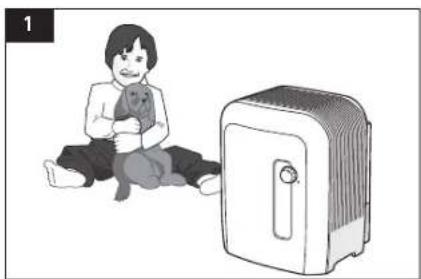
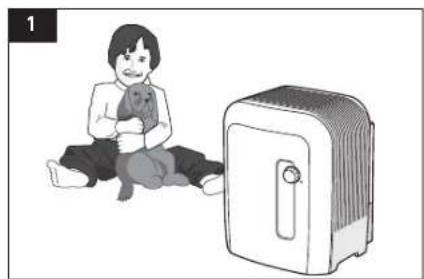
- Children cannot recognise the dangers associated with the use of electrical devices. For this reason, always supervise children when they are in the vicinity of the air humidifier (Fig. 1).
- Persons who have not familiarised themselves with the instructions for use, as well as children and persons under the influence of medicines, alcohol or drugs, must not operate the unit, or do so only under super-vision.
- Never use the appliance if a cable or plug is damaged (2), after the unit malfunctions or if it has fallen to the floor (3), or has been damaged in any other way.
- The air humidifier may only be put into operation in a completely assembled state.
- Repairs to electrical appliances may only be carried out by specialist technicians (4). Non-specialist repairs can pose significant hazards to the user.
-
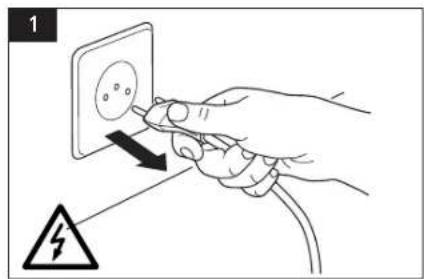
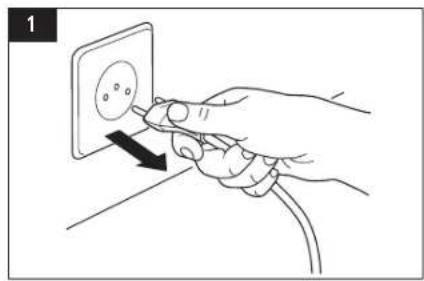
The power plug must be removed from the mains socket each time the water tank is filled/emptied, before each cleaning session, before each assembly/disassembly of individual parts and before each re-location of the appliance.
-
Never remove the power plug from the mains socket by pulling on the cable or with wet hands.
- Place the air humidifier on a level, dry surface only (5). We cannot accept any claims for damage arising from incorrect placing of the unit.
- Never immerse the base in water or other liquids.
- Place the unit so that it cannot be knocked over.
- Remove the power plug when the appliance is not in use.
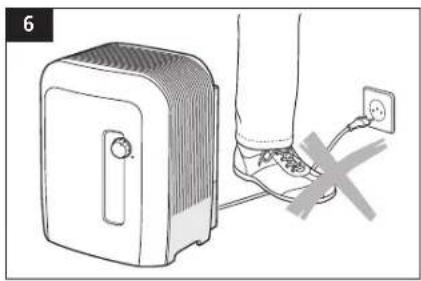
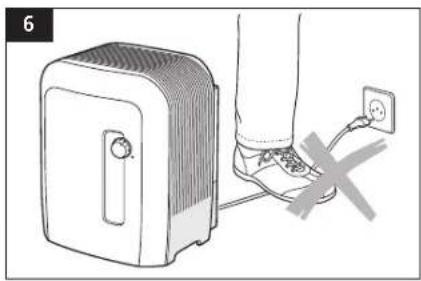
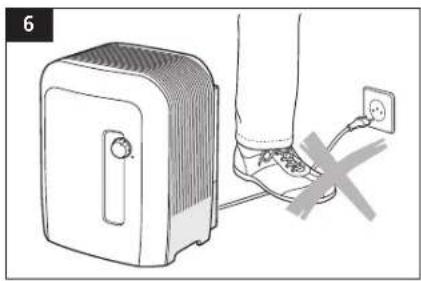
- Do not cover the cable with a carpet or other objects. Place the unit so that you cannot trip over the cable (6).
- Do not operate the appliance in rooms containing flammable goods, gases or vapours.
- Do not place the appliance in the rain, and do not use it in damp rooms.
- Do not insert any foreign objects into the unit.
- Ensure that the air inlet is unobstructed at all times.
- Never sit on the unit, and do not place any objects on it (9).
- Do not add any additives such as essential oils directly into the water tank or the water base. These additives will damage your appliance! Appliances that are damaged by additives are excluded from the warranty.
The unit is fitted with an automatic cut-off switch. As soon as the water tank is empty, the unit switches off automatically.
injury from electric shock. Always unplug from the mains prior to
- Cleaning and care,
- Repositioning the appliance,
- Emptying the water.

to the SOLIS Airwasher or damage to property, e.g. due to a water leak.
natural_image
Illustration of a child sitting on the floor next to a portable air conditioner unit (no text or symbols present)
text_image
2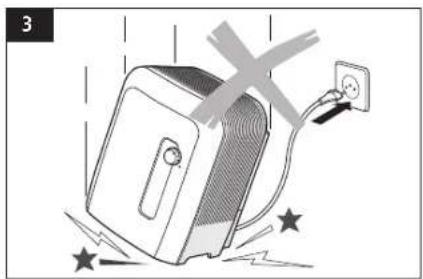
natural_image
Illustration of a computer monitor with a power outlet and explosion effect (no text or symbols)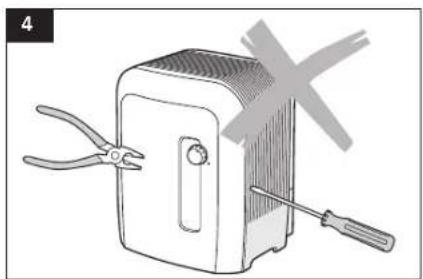
natural_image
Illustration of a portable device with pliers and a screwdriver, no text or symbols present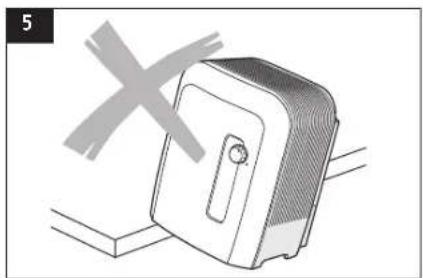
natural_image
Illustration of a portable device with a cross symbol overlay (no text or symbols present)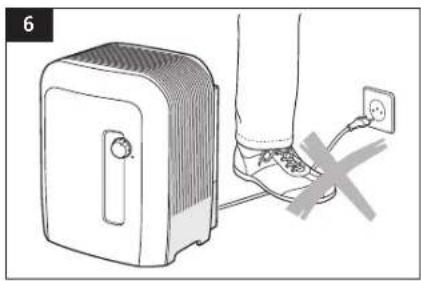
natural_image
Illustration of a person using a portable electric heater connected to a wall socket (no text or symbols)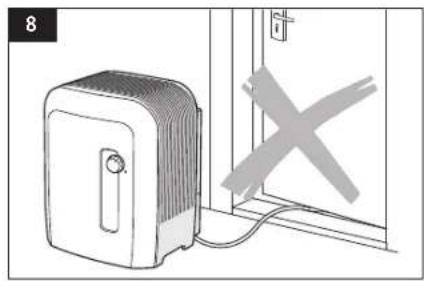
natural_image
Illustration of a portable heater connected to a door with a cross symbol (no text or labels)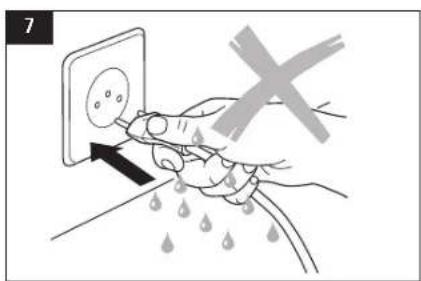
text_image
7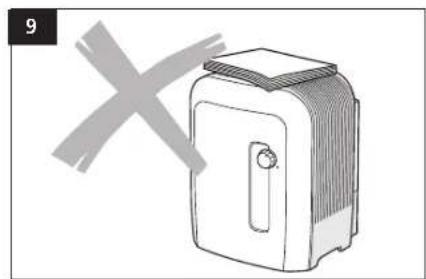
natural_image
Simple line drawing of a toaster with a cross mark overlay (no text or symbols)Setting up
Check the mains rating information on the rating plate.
- The rating plate is on the underside of the base tray.
Place the SOLIS Airwasher on the floor, or a flat, dry surface in the room.
- Ensure that there is good access to the SOLIS Airwasher and that there is sufficient space for maintenance and cleaning.
- For increased evaporation performance in large rooms, place the SOLIS Airwasher near a radiator (do not exceed max. temperature of 50 °C).
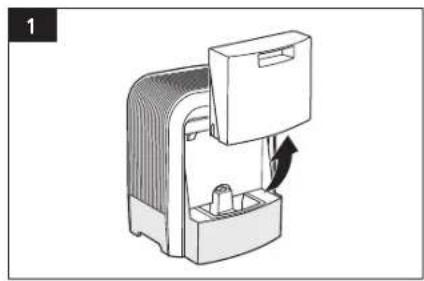
Filling/re-filling the tank
Only fill the water tank with fresh, cold tap water.

put the water tank under pressure, e.g. by filling with carbonated mineral water.
Do not add any essential oils or fragrances to the water; the plastic material might then become discoloured and damaged.
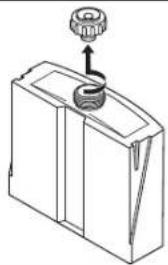
Close bayonet cap (b) fully to prevent water from leaking out of the tank.
natural_image
Diagram of a mechanical device with a rotating component and a handle, no visible text or symbols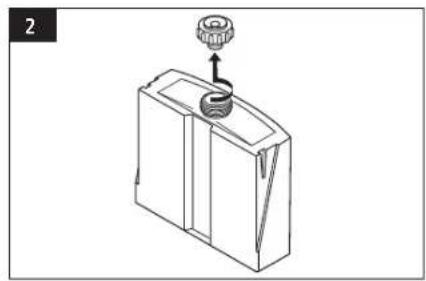
natural_image
Line drawing of a mechanical device with a knob and handle (no text or symbols)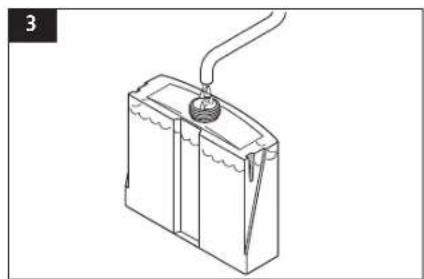
natural_image
Line drawing of a battery with a plug and outlet tube (no text or symbols)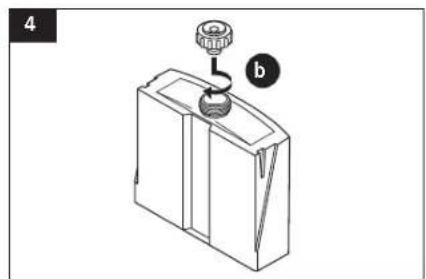
natural_image
Diagram of a mechanical device with a knob and lever, labeled 'b' (no text or symbols on the device itself)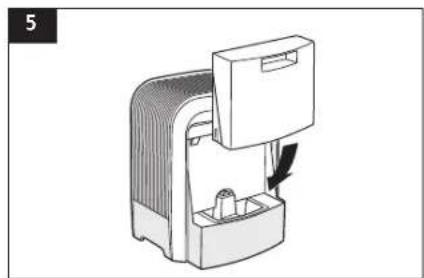
natural_image
Diagram of a device with a handle and internal components, no visible text or symbols
Putting into operation
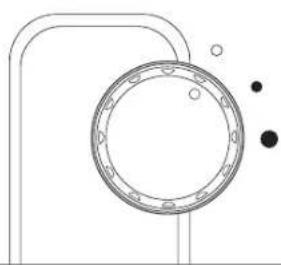
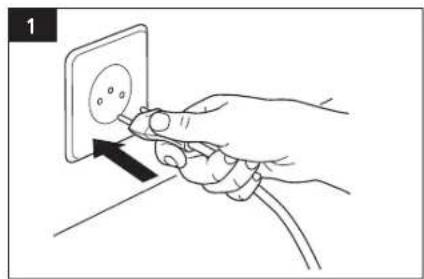
Connect the SOLIS Airwasher to the mains supply. Place the rotary switch in position • or ● as required.
The green lamp (LED) lights.
To switch off, place the switch in position 0.
The SOLIS Airwasher
- operates particularly quietly in night mode (setting●),
- reaches maximum humidification performance in normal mode (setting ●).
natural_image
Hand inserting a plug into an electrical socket (no text or symbols visible)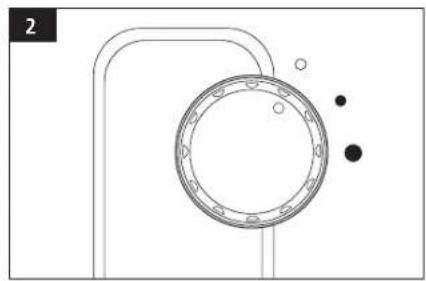
natural_image
Pure technical diagram of a mechanical component with no text, numbers, or symbolsWater purification
E
An Ionic Silver Stick keeps the water pure. The anti-microbial action of silver is used (silver is effective against more than 650 bacteria and virus types).
The Ionic Silver Stick releases an exactly proportioned amount of silver ions to the water over a long period (approx. two years).
The system is maintenance-free.
natural_image
Isometric line drawing of a mechanical housing or enclosure with internal components and a downward arrow indicating direction (no text or symbols)Cleaning
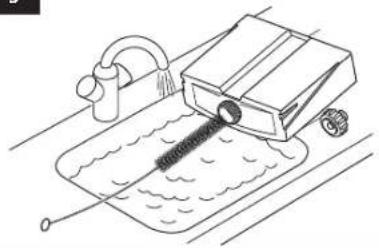
– water tank and base tray every 2 weeks
– humidification discs every 4 weeks
First clean the housing with a damp cloth and wipe dry; if necessary use a plastics cleaner.
- Regular cleaning is a prerequisite for hygienic, malfunction-free operation.
- The recommended cleaning intervals are dependent on the quality of the air and water, as well as on the operating time.
- Limed up humidifier disks can damage the casing. Faults like this are not eligible for repair under guarantee.
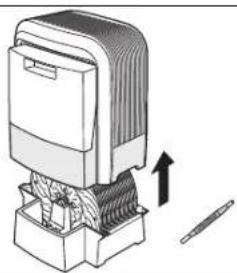
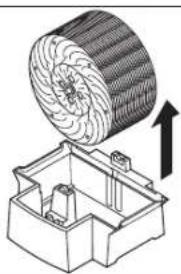
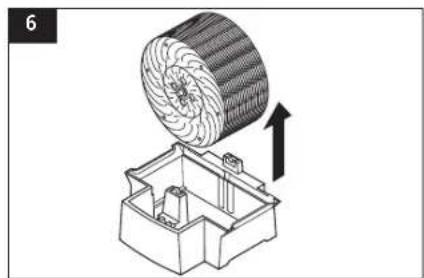
- The SOLIS Airwasher can be easily disassembled for cleaning.

perative that the SOLIS Airwasher be completely drained of water and cleaned if the appliance has not been used for more than a week and is filled with water.
text_image
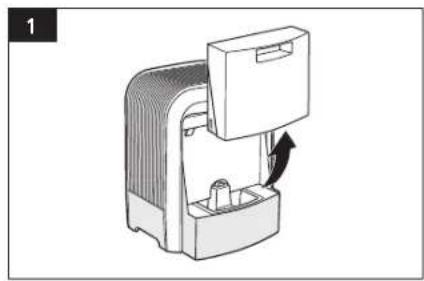
1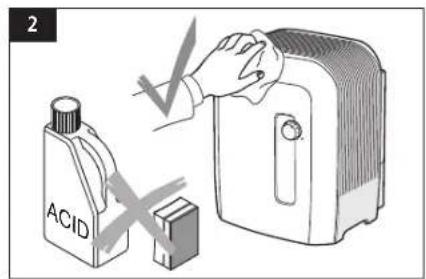
text_image
2 ACID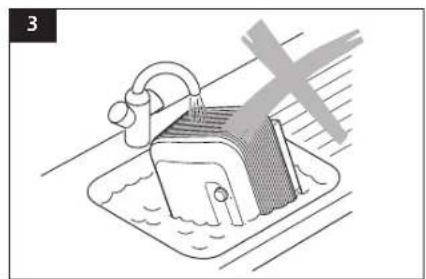
natural_image
Diagram of a kitchen sink with a showerhead and water surface, no text or symbols present
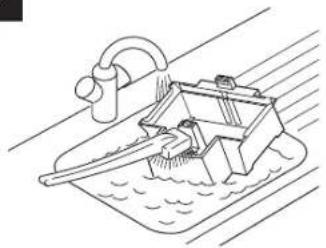
Cleaning the water tank and base tray (every 2 weeks)
Wipe clean the interior of the upper housing once or twice a year using a moistened cleaning cloth (5).
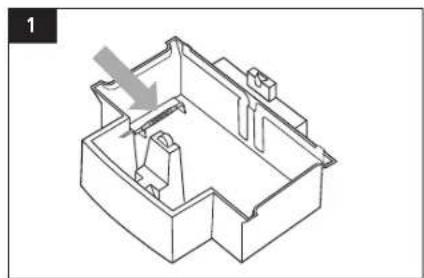
- Before cleaning, remove the Ionic Silver Stick from the base tray.
- Remove deposits from the base tray using a plastic or wooden brush and a commercially available, diluted cleanser.
- When cleaning inside the casing (5), please be careful not to bend or displace the metal contacts on the inner surface.
natural_image
Diagram of a mechanical device with a rotating arrow indicating rotation (no text or symbols)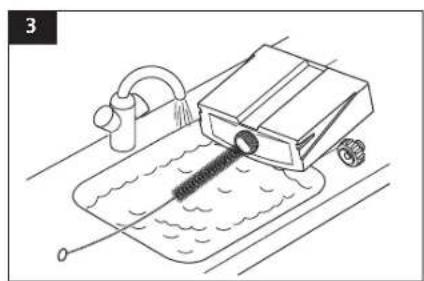
natural_image
Line drawing of a mechanical device with a drain and pipe, no text or symbols present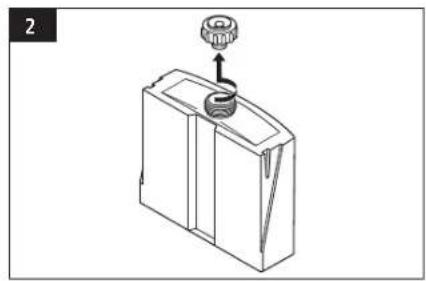
natural_image
Line drawing of a mechanical device with a gear and handle (no text or symbols)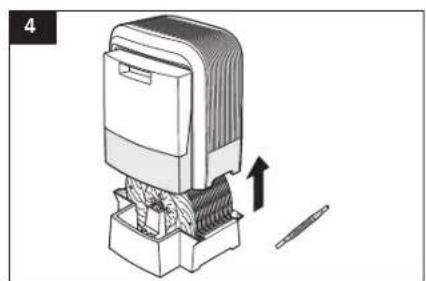
natural_image
Illustration of a mechanical device with an upward arrow indicating motion or assembly (no text or symbols present)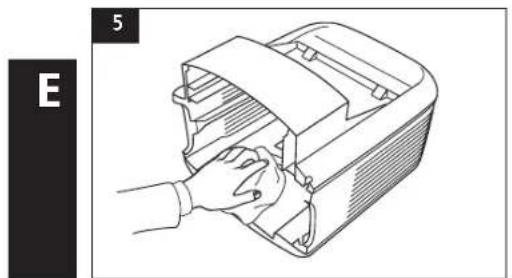
natural_image
Line drawing of a hand opening a mechanical device with a strap (no text or symbols)40
natural_image
Technical illustration of a mechanical component with a circular component and an upward arrow indicating motion (no text or symbols)
natural_image
Technical illustration of a mechanical component with a circular component and an upward arrow indicating motion (no text or symbols)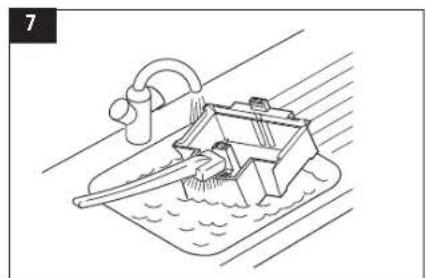
natural_image
Line drawing of a boat with water and a curved ramp, no text or symbols presentCleaning the humidification discs (every 4 weeks)
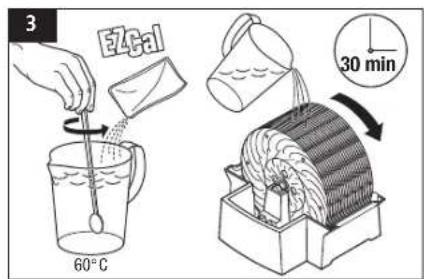
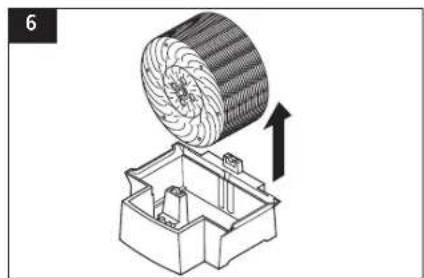
Pour a commercially available decalcifier into the water-filled base tray and allow it to work in. Manually turn the disk pack a few times. Empty the base tray and rinse it along with the disk pack.
Note: A thin layer of lime on the disks increases humidification efficiency.
natural_image
Hand inserting a plug into an electrical socket (no text or symbols visible)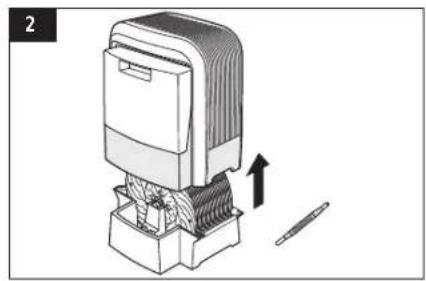
natural_image
Diagram of a mechanical device with a tool and directional arrow indicating movement (no text or symbols)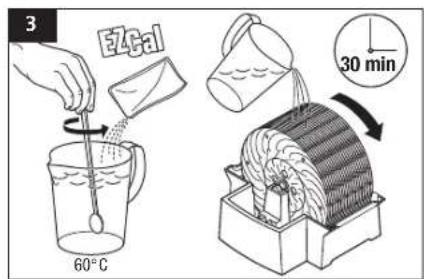
text_image
3 E4cal 60°C 30 min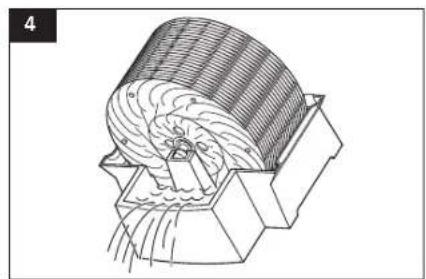
natural_image
Technical line drawing of a mechanical component with internal flow patterns (no text or symbols)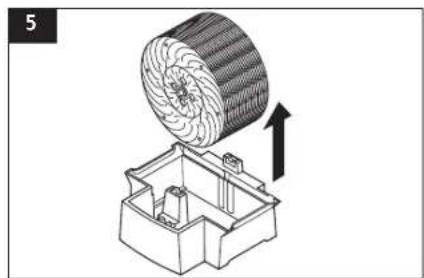
natural_image
Technical illustration of a mechanical component with a circular component and an upward arrow indicating motion (no text or symbols)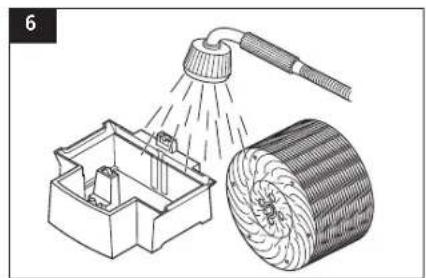
natural_image
Illustration of a showerhead spraying water into a mechanical housing and a cylindrical object (no text or symbols)Cleaning the humidification discs (continued)
Do not wash the disc pack in the dishwasher!
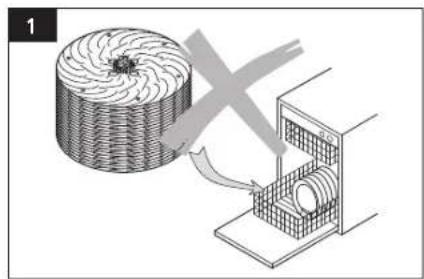
natural_image
Diagram showing a circular object being processed by a mechanical device with a cross mark (no text or symbols present)
text_image
SOLUS HELPLINE: 044 874 64 14 (Only for customers in Switzerland)This item stands out due to its long-life cycle and reliability. Despite this though, if a malfunction ever occurs, simply give us a call. Often a breakdown can be easily and quickly remedied with the right tip or technique without having to straight away send off the device for repair. We will give you all the advice and practical support you require.
Rectifying malfunctions
Problema Possible cause Rectification
| Does not operate Mains cable not plugged in. Connect to the mains.Rotary switch is set to (0). Set rotary switch to (●/ ●). | |
| Scraping noise Disc pack not placed correctly in the base tray. Insert disc pack correctly. | |
| Bent discs. Replace discs. | |
| No humidification Disc pack not placed correctly in the base tray. Insert disc pack correctly. | |
| No water in the base tray. Refill water tank. |
Storage
Empty the water tank.
Clean the SOLIS Airwasher as described and leave to dry fully.
Remove bayonet lock from water tank and store separately in order to spare the washers.
Store the SOLIS Airwasher, preferably in the original packing, in a dry place that is also not too hot.
Disposal of appliance

2002/96/EC
In conformity with Directive 2002/96/EC on waste electrical and electronic equipment (WEEE), at the end of its life the unit should be taken to an electrical appliance collection point for its environmentally friendly disposal.
Technical data
| Dimensions (LxBxH) | 14.8"x12.5"x16.6"m |
| Cable length | approx. 78.7" |
| Weight empty | approx. 138bs |
| Mains voltage | 120V/60 HZ |
| Power consumption | 24 W |
| Suitable for rooms up to | 600 square ft |
| Humidification performance up to | 3 gallons/24h |
| Capacity Tank capacity | 1,18 gallons |
| Tray capacity | 0,67 gallons |

text_image
SoleisOF SWITZERLAND
SOLIS AG, Solis-Haus · CH-8152 Glattbrugg · Telefon +41 44 874 64 54 · Fax +41 44 874 64 99 · info@solis.ch · www.solis.ch