VapYoo 900 - Iron YOO DIGITAL - Free user manual and instructions
Find the device manual for free VapYoo 900 YOO DIGITAL in PDF.


| Product type | Steam generator (iron with base) |
| Brand | YOO DIGITAL |
| Model | VapYoo 900 |
| Power supply | Mains socket with grounding (voltage per nameplate) |
| Water tank capacity | Fill up to MAX mark (capacity not specified) |
| Ironing functions | Steam ironing, dry ironing, vertical steam |
| Temperature adjustment | Rotary knob: Synthetic (min), Wool (medium), Cotton (high), Linen (max) |
| Steam setting | 3 levels: Low, Medium, High + steam stop |
| Steam lock | Lock button for continuous steam |
| Anti-scale system | Replaceable descaling filter (built into tank) |
| Anti-drip function | Automatically activated to prevent water leaks |
| Automatic shut-off | After 20 minutes of inactivity (if steam button not pressed) |
| Indicator lights | Ready light, temperature (4 levels), water level, pump status, filter replacement, steam |
| Carrying handle | Integrated handle on base, also serves as switch (raised = off, lowered = on) |
| Safety mechanism | Safety valve in case of electrical plug blockage |
| Maintenance and cleaning | Clean with a damp cloth; empty tank after use; replace worn filter |
| Spare parts and repairability | Replaceable filter; for other parts, contact customer service |
| Warranty | According to manufacturer's conditions (not specified in the manual) |
| Country of origin | Not specified |
Frequently Asked Questions - VapYoo 900 YOO DIGITAL
User questions about VapYoo 900 YOO DIGITAL
0 question about this device. Answer the ones you know or ask your own.
Ask a new question about this device
Download the instructions for your Iron in PDF format for free! Find your manual VapYoo 900 - YOO DIGITAL and take your electronic device back in hand. On this page are published all the documents necessary for the use of your device. VapYoo 900 by YOO DIGITAL.
USER MANUAL VapYoo 900 YOO DIGITAL
VAPYOO900 CENTRALE VAPEUR
User's manual/Notice
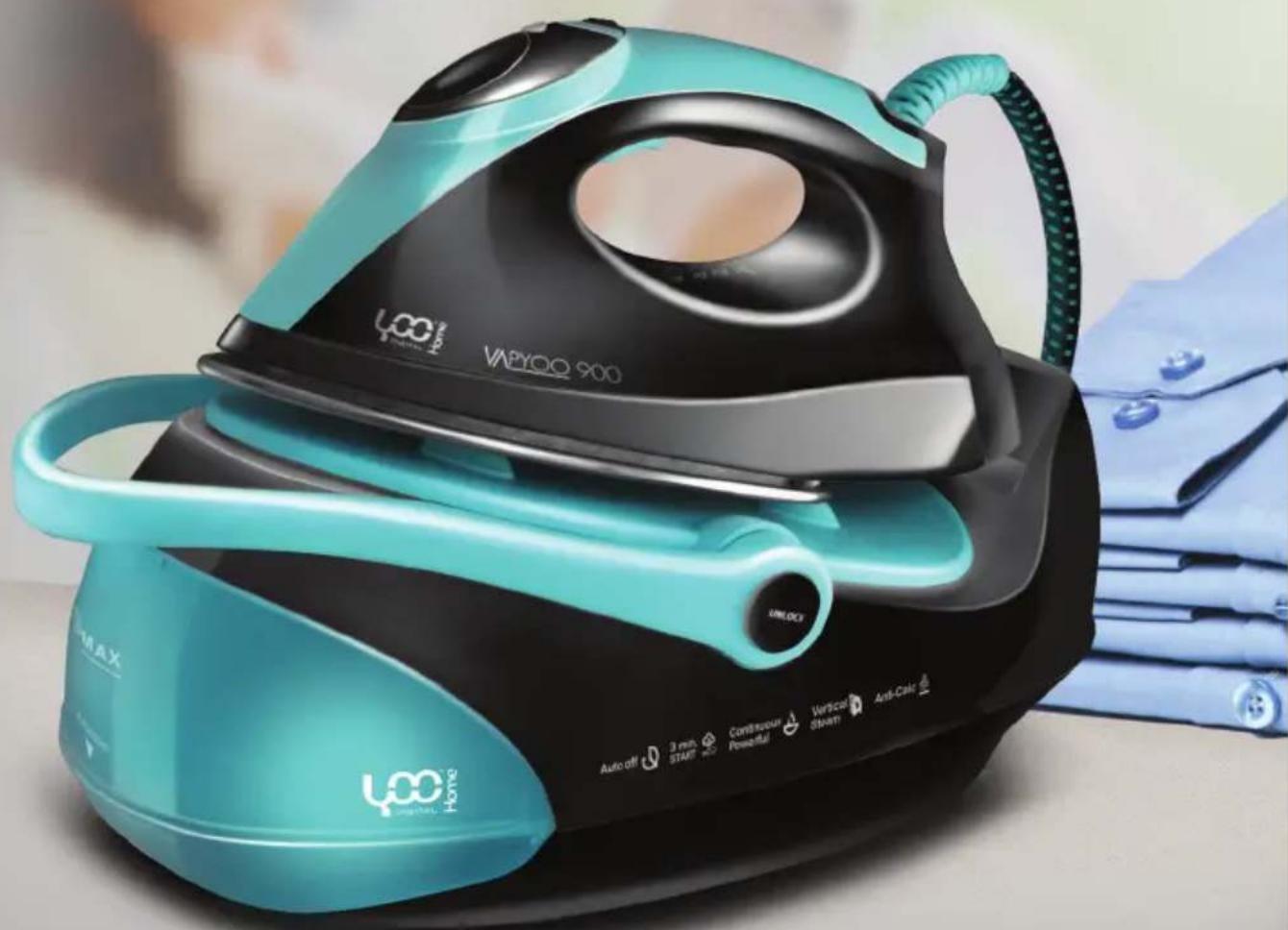



Important safeguards 04
Parts and Features 06
Fabric Setting Chart 07
Ironing Temperature Setting Guide 07
How to use your steam generator 08
Anti-calc system 13
Safety protection device 13
Auto shut off function 13
Use of the handle 14
Emptying and storing 14
Cleaning and Maintenance 14
Trouble shooting 15
- Make sure to read all the safety precautions below and look at the illustrations before you start using the appliance.
• Use the appliance for its intended use only.
• The appliance is intended for household use only.
- In order to protect against the risk of electric shock, do not immerse iron, power base into water or any other liquids.
- Connect the appliance only to an alternating current of the voltage specified on the rating plate and only to an earthed socket. To avoid a circuit overload, do not operate another high wattage appliance in the same circuit.
• Never yank cord to disconnect from outlet ; instead, grasp plug and pull to disconnect.
• During use, do not lift the appliance by power cord/supply hose.
- Always disconnect the plug of the appliance from electrical outlet when filling with water or emptying and when not in use.
- Do not operate the appliance with a damaged cord or if the appliance has been dropped or damaged, it must be taken to a qualified serviceman or manufacturer or its service agent for examination and repair. Incorrect re-assembly can cause a risk of electric shock when the iron is used.
- Keep the iron and its cord out of reach of children less than 8 years of age when it is energized or cooling down.
- During use, always place the power base on a stable, level and horizontal surface or ironing board, and then place the iron on the power base.
- Place the iron on the power base. Do not allow power cord or supply hose to touch hot surface.
- Burns can occur from touching hot metal parts, hot water or steam. Use caution when using the appliance. If the iron is placed onto the iron rest plate during in use, the iron rest plate may become a hot surface. Do not touch the iron rest plate and the soleplate until they have cooled down completely.
• Never use the iron facing towards people because the steam can cause burns.
• Never twist the supply hose during use.
• The iron must not left unattended while it is connected to the supply mains.
• The appliance must be used or stored in a level and horizontal surface.
- When placing the iron on its stand, ensure that the surface on which the stand is placed is stable.
- The iron is not to be used if it has been dropped, if there are visible signs of damage or if it is leaking.
- If the supply cord is damaged, it must be replaced by the manufacturer, its service agent or similarly qualified persons in order to avoid a hazard.
- This appliance can be used by children aged from 8 years and above and persons with reduced physical, sensory or mental capabilities or lack of experience and knowledge if they have been given supervision or instruction concerning use of the appliance in a safe way and understand the hazards involved.
- Children shall not play with the appliance. Cleaning and user maintenance shall not be made by children without supervision.
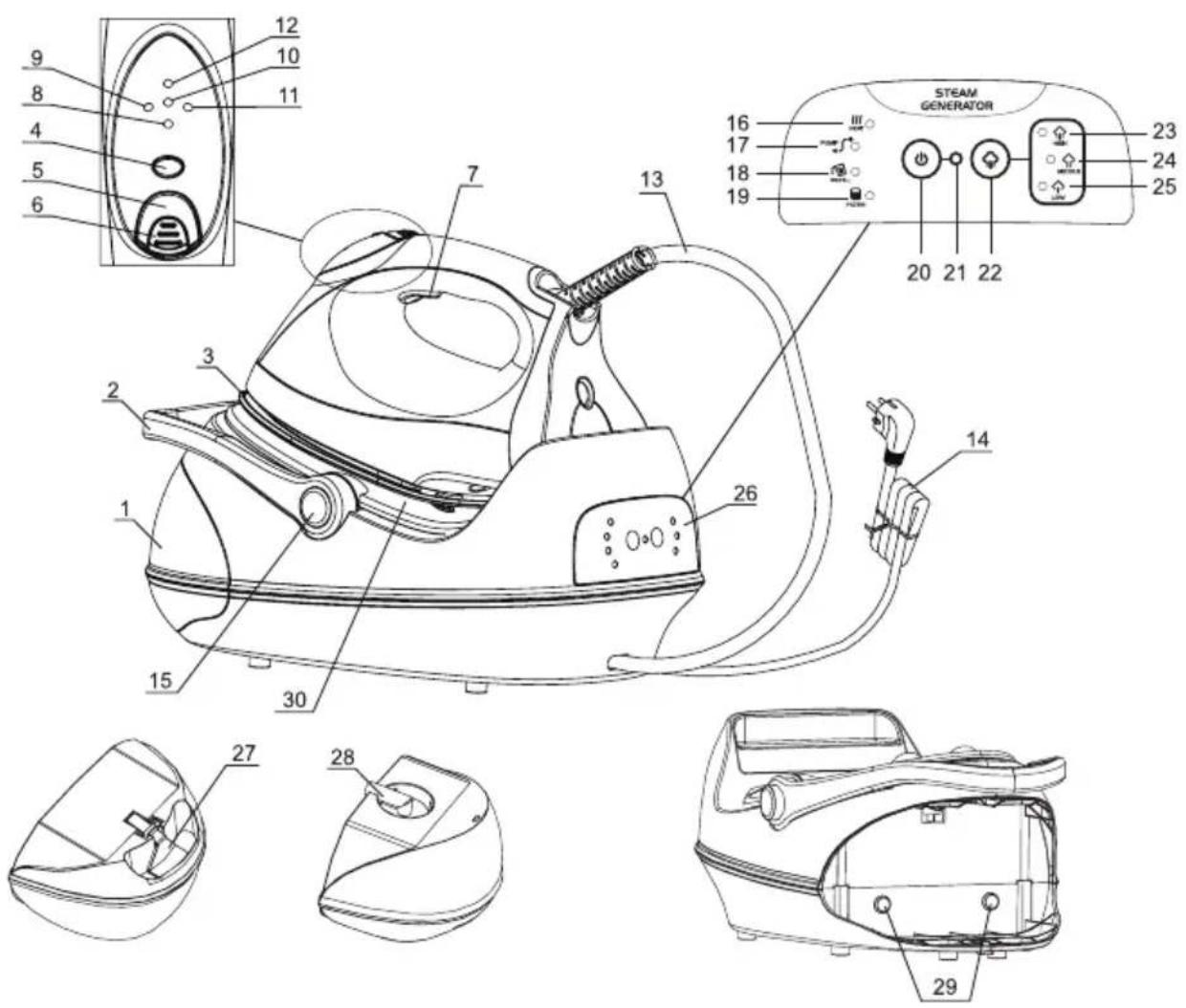
- Water tank
- Handle
- Soleplate
- Temperature setting button
- Steam button
- Steam button lock
- Steam button
- Ready indicator light
- Temperature indicator light 1
- Temperature indicator light 2
- Temperature indicator light 3
- Temperature indicator light 4
- Power cord/Supply hose
- Power cord
- Handle button
- Heating indicator light in base
- Pump working indicator light
- Filling indicator light
- Filter replacement indicator light
- Power ON/OFF
- Power indicator light
- Steam selection switch.
- High steam setting indicator light
- Medium steam setting indicator light
- Low steam setting indicator light
- Control panel
- Water tank release
- Filter
- Water tank decoration indicator light
- Iron rest plate
| Temperature Setting | Synthetics Low setting | wool Medium setting | cotton High setting | Linen Max |
| Fabric Synthetics, Silk, Nylon, Arcrylic, Acetate | Wool, Polyester | Rayon cotton, Linen | Rayon cotton, Linen | |
| Ironing Instruction | Dry Iron on the opposite side of the fabric | Use a press cloth and Steam Iron on the opposite side of the fabric | Iron while fabric is still damp | Steam Ironing |
| Steam Selection |  |  |  | |
IRONING TEMPERATURE SETTING GUIDE \_\_\_\_.
- Follow up the ironing instructions on the garment label. If there is not any instruction label, but you know what kind of the fabric is, please refer to the fabric setting chart described in this instruction manual.
- The fabric setting chart is only valid for plain fabrics and not for materials to which finishes, glosses etc, have been applied. Textile to which some kind of finish has been applied (gloss, crinkle, relief etc.) is best ironed at lower temperature.
- First sort laundry according to ironing temperature setting guide: wool with wool, cotton with cotton, etc.
- The iron heats up more quickly than it cools down. Therefore, start ironing articles that need to be ironed at the lowest temperature, such as those made of synthetic fibres.
- If the fabric consists of various kinds of fibres, always select the temperature required by the most delicate fibres, i.e. the lowest temperature. If, for example, an article consists of 60% polyester and 40% cotton, according to the fabric setting chart it should be ironed for polyester and without steam.
- If you do not know what kind of fabric the article is made of, iron a piece of the material which is not visible when you wear to find out the appropriate temperature for your articles.
- Pure woolen fabrics (100% wool) should be ironed with the iron setting to steam ironing position. It
is advisable to set the temperature control button to "Max" position and use a dry pressing cloth.
- When steam ironing woolen fabrics, shiny patches may occur. You may prevent this by turning the article inside out and ironing the reverse side.
- After using of steam ironing for cotton fabrics, do not iron articles required by lower temperature (such as nylon etc.) immediately. It is advisable to adjust the temperature button to the lower setting, waiting for about 2-4 minutes till the power indicator light turn off, and then you can start ironing.
IMPORTANT HINTS
Do not fill water tank with vinegar, perfume, starch, chemically descaled water or descaling agents.
HOW TO USE YOUR STEAM GENERATOR
PREPARE THE APPLIANCE FOR USE
- Check if the rating indicated in the rating plate corresponding to the main voltage in your home
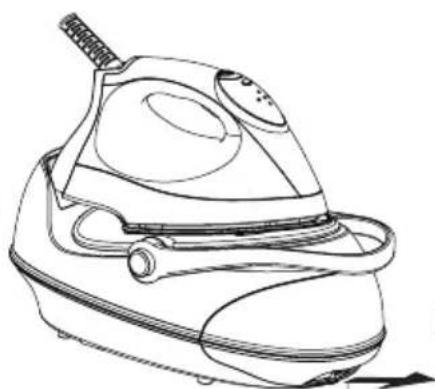
- Press handle button to lay handle down. (Fig.1) (Note: When handle lift up, the unit is shut off, it will be ON when handle is laid down.)
- Remove the protective foil or sticker or card from the sole-plate.
- Fully unwind and straighten the power cord and the supply hose.
- Place the appliance on a stable, level and horizontal surface such as ironing board.
- Place the iron onto the iron rest plate horizontally at the base unit.
FILL WATER TANK
- Press the water tank lock upwards and slide the detachable water tank outwards from the base.(Once power on, water tank decoration indicator light will turn off while water tank is sliding out.) Fig.2
natural_image
Line drawing of a steam iron with handle and control panel (no text or symbols)Fig.1
Fig.2
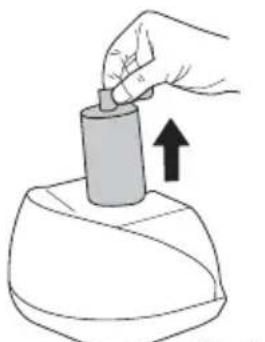
- Take the filter upwards out from the water fill hole. (You can take the filter out of the opening for filling water into water tank, or fill water into water tank directly with the filter existing in the opening) Fig.3
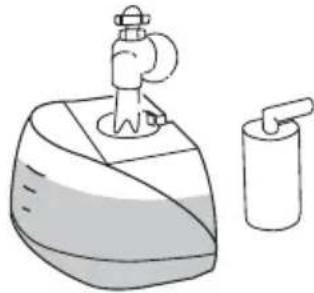
- Fill the water tank up to or below the "MAX" fill line with clean tap water. Fig.4
- Replace filter back into water filling hole.
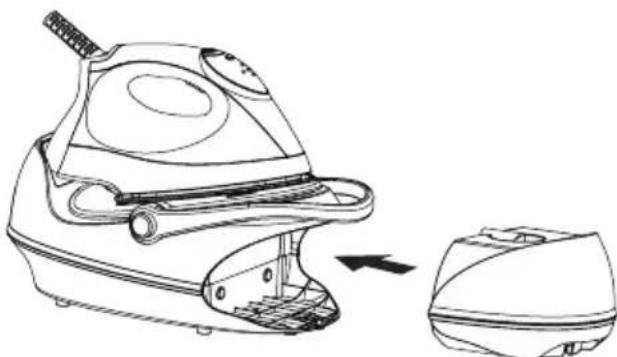
- Replace the water tank into the base unit again. It will be locked in place with the base unit until a "click" sound is provided. (Water tank decoration indicator light will light up to indicate that water tank and filter have been installed in place if power ON) Fig.5
- Always pour out the remaining water after use.
natural_image
Hand holding a cylindrical object with an upward arrow, no text or symbols presentFig.3
natural_image
Illustration of a washing machine with a tap and a delivery tube (no text or symbols)Fig.4
natural_image
Line drawing of a steam iron machine with a separate close-up view showing internal components (no text or symbols)Fig.5
FUNCTIONS FOR WATER TANK DECORATION INDICATOR LIGHT
- After power On, water tank decoration indicator light will light up. Water tank decoration indicator light blinks to show that no water or not enough water in water tank, please fill water to Max level. After filled water, water tank decoration indicator litgh will light up steadily for easy viewing water level.
- Water tank decoration indicator light will not light up when water tank or filter are not well installed in place, and no steam escaped even if steam button is pressed. This will alarm by 5 "BEEP" sounds from base unit.
STEAM FUNCTION SETTING
Once the unit energized with power supply, steam indicator light automatically sets at low steam setting. Press steam selection switch to change to MAX or Medium steam setting. If steam ironing is not necessary, please turn off the steam selection switch, and wait for all steam indicator light going out. It can cut off steam ironing function. For steam ironing again, only to press down steam selection switch.
STEAM IRONING
- Fill water tank with clean tap water refer to above filling instruction. For better performance, please immerse filter in water for several minutes before install it into the water tank)
- Connect the appliance into a suitable socket outlet. Press power switch on control panel, a Beep sound will be provided and the power indicator light lights up, it shows that the unit has been connected to the power supply. Concurrently, water tank decoration indicator light will also light up. Heating indicator light turn on to indicate that the steam chamber being heated up. Low steam setting indicator light turn on to indicate steam is set at low setting. During use, it is normal that heating indicator light will cycle from on to off. This shows that steam chamber automatically keeps temperature constant.
- Set temperature setting button to steam ironing position according to fabric setting chart mentioned above. Heating indicator light at iron unit blinks slowly to indicate the unit being heated up. When the heating indicator light change to light up steadily, the desired temperature has been reached. It is ready for steam ironing. During use, temperature indicator light sometimes blinks, and sometimes lights up steadily, it does not indicate a defects or hazard, it is just because the appliance are temperature constant.
- Before every first time use, it is proposed to clean iron unit as following methods: Take the iron up from the base unit, press steam button underneath the handle to allow steam ON for 20 seconds, and then OFF for 30 seconds, this cycle should be repeated for 2 times. When temperature indicator light stops blinking, it is ready for use.
- During steam ironing, please adjust steam rate according to your requirement as indicated in the steam function setting.
- After use. Set the temperature setting button to "Ready indicator light" position, and place the iron back on the iron rest plate. Switch off the unit by pressing the power switch and then unplug the appliance from the outlet.
- Slide out the water tank and pour out the remaining water.
Note
- For every first time use, it is normal that's a slightly vibration sound may be occurred from electrical pump inside the base unit for a few seconds when steam ironing started. It is because there is air inside the filter, it will stop till the air inside the filter has been pumped out.
- During use, if steam stop escaping suddenly along with 5 BEEP sound alarm, or water tank indicator light and water filling indicator light on control panel blink. This indicates that it is time to fill water in water tank.
- For continuous use of steam ironing, sometimes pump working indicator light will turn off for several seconds, steam also will stop for several seconds. This is normal. It is because anti-drip function has been activated to protect leakage from
DRY IRONING
- Connect the appliance to a suitable socket outlet. Press power switch on control panel, a Beep sound will be provided and the power indicator light lights up. It shows that the unit has been connected to the power supply. Press steam selection switch to turn off 3 steam indicator lights, it is ready for dry ironing.
- Set temperature setting button to desired position according to above ironing temperature setting guide or fabric setting chart. Temperature indicator light iron unit will slowly blink to indicate that the steam chamber being heated up. When temperature indicator light change to light up steadily, it indicates that desired temperature has been reached, it is ready for dry ironing. During use, it is normal that heating indicator light will cycle from on to off. This shows that steam chamber automatically keeps temperature constant.
- During use, please press steam lock every 15 minutes. Otherwise, iron will automatically shut off.(Refer to auto-shut off function).
- After use, Set the temperature setting button to "Ready indicator light" position, and place the iron back on the iron rest plate. Switch off the unit by pressing the power switch and then unplug the appliance from the outlet.
Note
When changing your Temperature setting from higher setting to lower, it is proposed that not to start ironing immediately since it may cause burns to your fabrics. Please wait until temperature indicator light from blinking to lights up steadily, and then start ironing.
VERTICAL STEAM IRONING
Follow the steam ironing process, and then hold the iron in vertical position between 5cm and 15cm away from the hanged fabrics(Fig.6). Press the steam button, and then will create vertical steam. This feature is especially used for removing creases from hanging clothes and curtains. Never direct perform steam to people.
Note
- During steam ironing, supply hose is very hot, please do not touch it.
- Never block the steam hose.
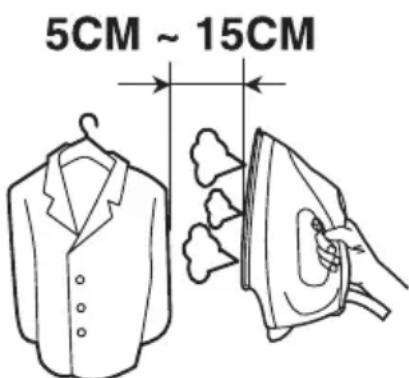
Fig.6
AUTO-LOCKING FUNCTION FOR STEAM BUTTON
If long time steam ironing is needed, please press down steam button lock and then push it backwards, steam button will automatically lock. Steam will escape continuously. If you want to stop steam, please push steam button lock forward.
Note
Once steam button auto-locking function is activated, users can not left steam escaping unattended.
WATER FILLING INDICATION FUNCTION
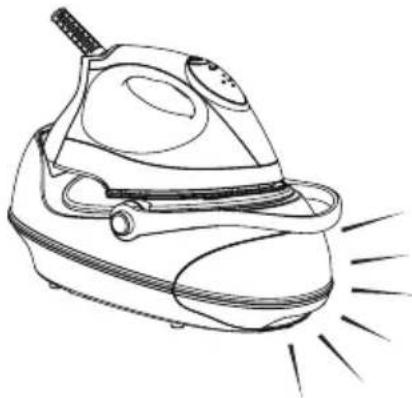
No water or water not enough in water tank, water tank decoration indicator light and water filling indicator light on control panel will start blinking concurrently (Fig.7).
5 BEEP sounds alarm to indicate filling is needed.
natural_image
Line drawing of a steam iron with radiating lines indicating sparks (no text or symbols)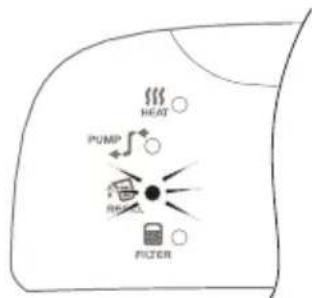
Fig.7
FILTER REPLACEMENT
- Filter invalid checking system is built in this appliance. It can detect the working time for the filter. Once the filter is invalid, the filter replacement indicator light on control panel will continuously blink to indicate that the filter need to be replaced. (Fig.8)
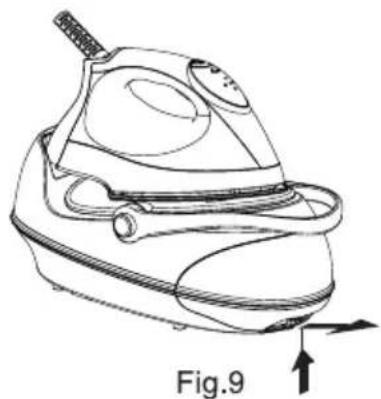
- Replacement Method: Slide water tank out from base unit (Fig.9), take the filter out from water tank (Fig.10), and then replace with a new one (Fig.11). After new filter has been well installed into water
tank, fill water into water tank to Max fill level, and then slide water tank back into base unit. (Immerse filter in water for several minutes in order to gain better performance for future use.)
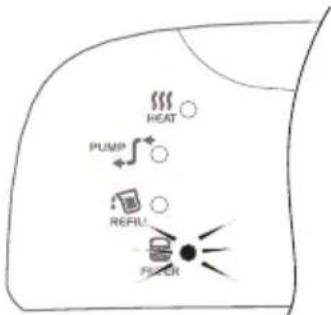
Fig.8
natural_image
Line drawing of a steam iron with a handle and internal components, labeled Fig.9 (no text or symbols on the diagram itself)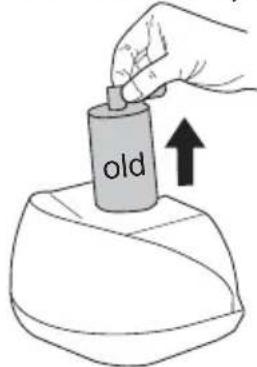
Fig.10
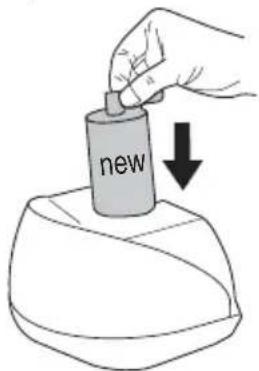
Fig.11
- After power on, press steam selection switch and Power ON/OFF concurrently (Fig.12), filter replacement indicator light will stop blinking and come into checking program again.
ANTI-CALC SYSTEM
- The filter is designed to reduce the build-up of limescale which occurs during steam ironing, this will prolong the working life of your iron. However, please note that the filter will not completely stop the natural process of limescales build-up.
- After the filter is invalid, even if a new one is not available at that time. The filter can still be used continuously. However, limescales may be most probably built up in steam chamber. This happens always depending on your local water quality. It is proposed that replace filter as soon as possible or mix your water with 50% proportion of distilled water.
SAFETY PROTECTION DEVICE
This appliance has a safety protection device in the base unit. If the supply hose is blocked accidentally, the safety valve will be opened to release steam from the safety vents under the base unit along with high pitch sounds. Once this happen, unplug the appliance immediately, and check whether any damage is found in the supply hose.
AUTO SHUT OFF FUNCTION
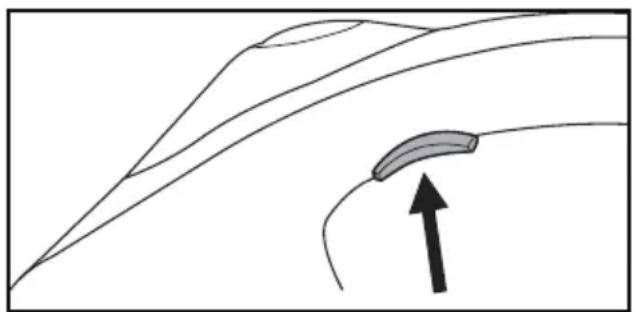
The iron will auto shut off after 20 minutes if the steam button is not pressed (Fig 13). All indicator lights OFF. Press Power ON/OFF to turn the iron back ON for resuming.
Note
Auto shut off function will not be activated if the steam button lock is locked for a long term. Release the steam button lock it can resume.
natural_image
Diagram showing a curved road with an arrow pointing upward, no text or symbols presentFig.13
USE OF THE HANDLE
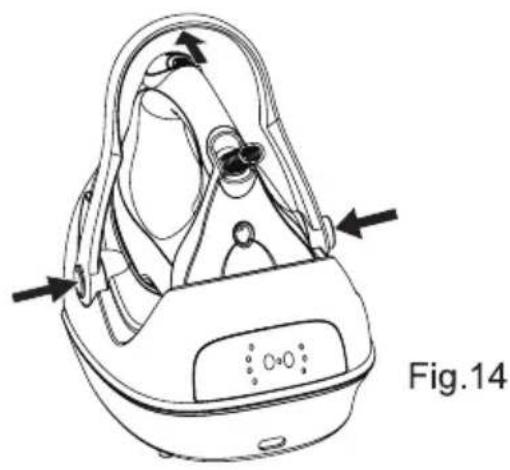
Handle attached to the base unit used for carrying the appliance, it also serves as a power on/off switch: Lift the handle up to power OFF. Lay it down for power ON. Before use, please lay the handle down as following method: Press two handle buttons synchronously to lay down the handle(Fig.14). After use, allow the appliance completely cool down(Fig.15), put the iron onto power base. Lift handle up. There will be a "click" sound provided to indicate the handle has been locked in place and you can carry the appliance by the handle.
natural_image
Line drawing of a medical device with labeled components and directional arrows (no text or symbols on the device itself)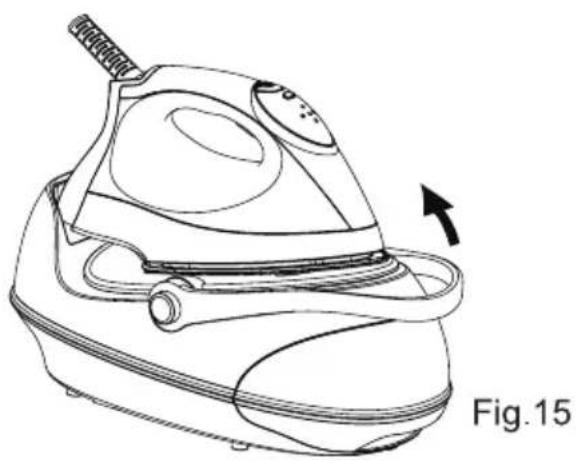
natural_image
Line drawing of a steam iron with a label 'Fig.15' indicating it is part of the diagram (no technical text or symbols on the diagram itself)EMPTYING AND STORING
- Disconnect the appliance from the power supply and allow the appliance to cool down for 60 minutes at least.
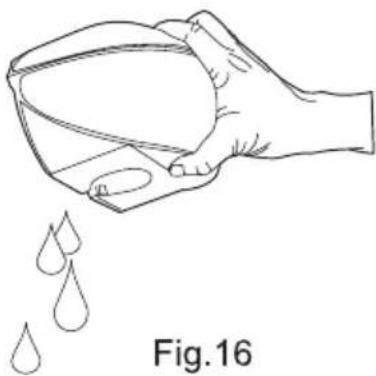
- After use, slide out the water tank and pour out all the remaining water. (Fig.16)
- The iron should be place on the iron rest plate, and then store.
natural_image
Line drawing of a hand holding a container with liquid droplets falling (no text or symbols)CLEANING AND MAINTENANCE
- Unplug the appliance from the main supply and let the iron completely cool down.
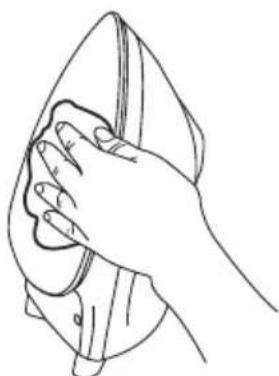
- Clean the iron with a damp cloth.
- Wipe off scale and any other deposits on the soleplate with a damp cloth or non-abrasive(liquid) cleaner. (Fig.17)
- Never clean the appliance in the tap water
natural_image
Line drawing of a hand cleaning a garment with a cloth (no text or symbols)Fig.17
| Problems Possible | causes Solution | |
| Iron won't heat Incorrect | connection to the main socket. | Re-plug the unit to main socket. |
| Temperature setting button is set at O position. | Set to the required position. | |
| Power OFF Switch the appliance ON. | ||
| Handle has not been laid down. Lay | handle down. | |
| Unknown malfunction. Take it to qualify | qualified service man or manufacturer for repair. | |
| Water tank decoration indicator light blinks.5 BEEP sounds alarm when press down the steam button. | No water or not enough water in water tank. | Fill water to water tank as described in “Fill water tank”. |
| Droplets of water escape from the soleplate | Temperature setting button is set at low temperature position. | Set temperature setting button to suitable position refer to Fabric setting chart. |
| The set temperature has not been reached or is too low. | Allow sufficient time for iron to preheat or set higher temperature. | |
| Steam is set at higher position. | Set to lower steam setting. | |
| Water tank decoration indicator light OFF | Water tank has not been installed in place. | Well install the water tank. |
| Filter is missed to install. | Install the filter. | |
| Un-known malfunctions. | Take it to qualified service man or manufacturer for repair. | |
| All indicator light OFF | The appliance comes into auto-shut off mode. | Press power ON/OFF to reset it. |
| Iron does not produce steam | The set temperature has not been reached. | Allow sufficient time to preheat until heating indicator light turn off. |
| Steam button is not set at steam ironing position. | Ensure the steam button is set at steam ironing position and steam indicator light is ON. | |
All information subject to change without notice!

natural_image
Symbol of a trash bin crossed out by two diagonal lines (no text or labels)Recycling
This symbol is a symbol of sorting garbage electrical and electronic equipment (WEEE). This means that this product should be treated in accordance with European Directive 2002/96/EC to be recycled or dismantled to minimize its impact on the environment.
For more information, contact your local or regional authorities.
TABLEAU DE RÉGLAGE DE LA CHALEUR
natural_image
Line drawing of a medical or industrial device with no visible text, numbers, or symbolsFig.1
REMLISSAGE DU RÉSERVOIR D'EAU
natural_image
Line drawing of a steam iron with labeled component 'Fig.2' and directional arrow (no text or symbols on the diagram itself)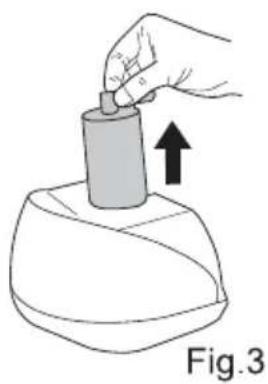
natural_image
Hand holding a cylindrical object with an arrow indicating upward motion, labeled Fig.3 (no text or symbols on the object itself)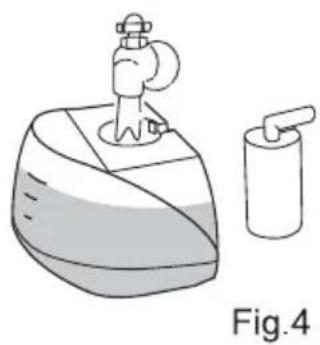
natural_image
Illustration of a washing machine with a tap and a delivery tube, labeled Fig.4 (no text or symbols on the diagram itself)natural_image
Line drawing of a steam iron with a separate close-up view showing internal components (no text or symbols)FONCTIONS DE LE VOYANT LUMINEUX DU RÉSERVOIR D'EAU
FONCTION D'AUTO-VERROUILLAGE DU BOUTON DE LA VAPEUR
natural_image
Line drawing of a steam iron with radiating lines indicating heat or vibration (no text or symbols)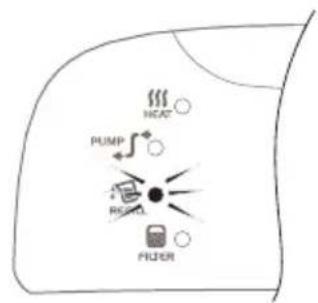
Fig.7
FR
REEMPLACEMENT DU FILTRE
natural_image
Line drawing of a steam iron with labeled component 'Fig.9' and directional arrow (no text or symbols on the diagram itself)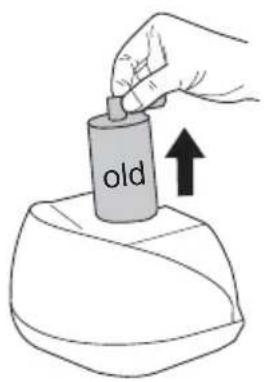
Fig.10
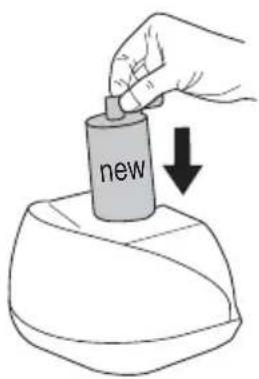
Fig.11
natural_image
Line drawing of a hand pressing down on a device component (no text or symbols)SYSTÈME ANTI-CALCAIRE
natural_image
Diagram showing curved lines and a shaded rectangular object with an upward arrow, no text or symbols presentFig.13
UTILISATION DE LA POIGNÉE
natural_image
Line drawing of a medical device with labeled components and directional arrows (no text or symbols on the device itself)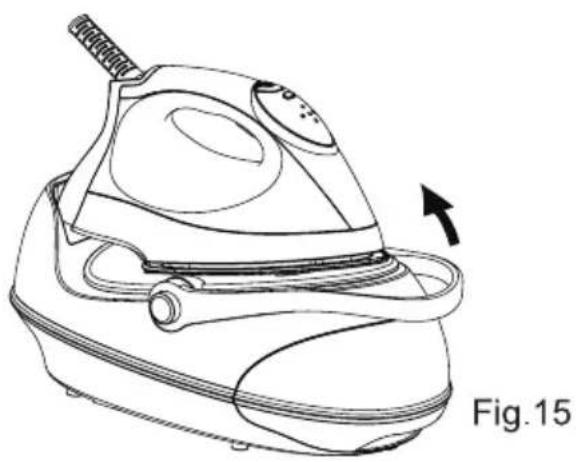
natural_image
Line drawing of a steam iron with a label 'Fig.15' indicating it is part of the device (no text or symbols on the diagram itself)VIDANGE ET RANGEMENT
natural_image
Line drawing of a hand holding a bowl with droplets falling below, labeled Fig.16 (no text or symbols on the diagram itself)NETTOYAGE ET MAINTENANCE
natural_image
Line drawing of a hand cleaning a garment with a cloth (no text or symbols)Fig.17
natural_image
Symbol of a trash bin crossed out by two diagonal lines, no text or labels presentRecyclage





- VAPYOO900 CENTRALE VAPEUR
- User's manual/Notice
- IRONING TEMPERATURE SETTING GUIDE \_\_\_\_.
- IMPORTANT HINTS
- HOW TO USE YOUR STEAM GENERATOR
- PREPARE THE APPLIANCE FOR USE
- FILL WATER TANK
- FUNCTIONS FOR WATER TANK DECORATION INDICATOR LIGHT
- STEAM FUNCTION SETTING
- STEAM IRONING
- Note
- DRY IRONING
- VERTICAL STEAM IRONING
- AUTO-LOCKING FUNCTION FOR STEAM BUTTON
- WATER FILLING INDICATION FUNCTION
- FILTER REPLACEMENT
- ANTI-CALC SYSTEM
- SAFETY PROTECTION DEVICE
- AUTO SHUT OFF FUNCTION
- USE OF THE HANDLE
- EMPTYING AND STORING
- CLEANING AND MAINTENANCE
- Recycling
- TABLEAU DE RÉGLAGE DE LA CHALEUR
- REMLISSAGE DU RÉSERVOIR D'EAU
- FONCTIONS DE LE VOYANT LUMINEUX DU RÉSERVOIR D'EAU
- FONCTION D'AUTO-VERROUILLAGE DU BOUTON DE LA VAPEUR
- REEMPLACEMENT DU FILTRE
- SYSTÈME ANTI-CALCAIRE
- UTILISATION DE LA POIGNÉE
- VIDANGE ET RANGEMENT
- NETTOYAGE ET MAINTENANCE
- Recyclage
Brand : YOO DIGITAL
Model : VapYoo 900
Category : Iron