
CookYoo 7900 - Pasta machine YOO DIGITAL - Free user manual and instructions
Find the device manual for free CookYoo 7900 YOO DIGITAL in PDF.



| Product type | Multifunction stand mixer with accessories |
| Brand | YOO DIGITAL |
| Model | CookYoo 7900 |
| Category | Pasta machine / Food processor |
| Voltage | 220-240 V |
| Frequency | 50/60 Hz |
| Power | 1200 W |
| Stainless steel bowl capacity | 5.5 L (up to 2.3 kg of dough) |
| Bowl material | Stainless steel |
| Included accessories | Beater, dough hook, whisk, blender blade, pasta machine, meat grinder (auger, 3 discs, blades, ring), blender with glass bowl, pusher, tray |
| Functions | Mixing, kneading, beating, grinding, blending, making fresh pasta (tagliatelle, fettuccine) |
| Speeds | Speed control from 1 to 9 + Pulse (P) position |
| Control type | Rotary control |
| Safety | Arm release button, unplug before assembly/cleaning, do not use for more than 10 consecutive minutes, rest for 30 minutes |
| Cleaning | Motor unit: damp cloth; accessories: dishwasher safe except metal parts of grinder (blades, discs, auger, ring); pasta machine: manual cleaning with cloth, do not immerse |
| Maintenance | Lubricate grinding discs and blades with a thin layer of cooking oil after each use |
| Repairability | Authorized after-sales service for any intervention other than cleaning; cord and plug replacement by an authorized professional |
| Approximate weight | 6 kg |
Frequently Asked Questions - CookYoo 7900 YOO DIGITAL
User questions about CookYoo 7900 YOO DIGITAL
0 question about this device. Answer the ones you know or ask your own.
Ask a new question about this device
Download the instructions for your Pasta machine in PDF format for free! Find your manual CookYoo 7900 - YOO DIGITAL and take your electronic device back in hand. On this page are published all the documents necessary for the use of your device. CookYoo 7900 by YOO DIGITAL.
USER MANUAL CookYoo 7900 YOO DIGITAL
natural_image
Red modern kitchen mixer with stainless steel bowl and metallic handle (no visible text or symbols)User's manual Notice d'utilisation Bedienungsanleitung Gebruikershandleiding
Carefully read the instructions before using your appliance.
Switch off the appliance before fitting and removing the attachment.
Keep your fingers away from moving parts and the opening on the attachment.
Always ensure loose articles and clothing are secured before using pasta makers attachment.
- Only use the appliance for its intended domestic use, the manufacture will not accept any liability if the appliance is subject to improper use or failure to comply with these instructions.
- Never leave the appliance to run unsupervised, especially when young children or handicapped persons are present.
- Check that the voltage rating of the appliance does in fact match that of your electrical system.
Any connection error will nullify the guarantee.
The appliance must be plugged into an earthed electrical socket.
- If you have to use an electrical extension lead, it must be earthed and you should make sure that no-one can trip over it.
- Unplug the appliance as soon as you have finished using it and when you clean it.
- Don't use your attachment and/or appliance if it has been damaged. You should contact an approved service centre.
- Any work on the appliance other than normal care and cleaning by the customer must be carried out by an approved service centre.
- Do not immerse the appliance, the power cord or the plug in water or in any other liquid.
- Do not allow the power cord to hang within the reach of children, to come close to or into contact with the hot parts of your appliance, any other source of heat or any sharp edge.
- If the power cord or the plug are damaged, don't use your appliance. To avoid any risk, these must be replaced by an approved service centre.
- Do not put any accessories containing metal in a microwave oven.
- Switch off the appliance and disconnected from supply before changing accessories or approaching parts which move in use.
- Do not touch the whisk, mixer blade or kneading hook while the appliance is in operation.
- Only ues one attachment at a time.
- Do not operate the appliance for more than 10 minutes at one time. Allow 30 minutes rest before next use.
- This appliance is not intended for use by children or other persons without assistance or supervision if their physical, sensory or mental capabilities prevent them form using it safely.
- Children should be supervised to ensure that they do not play with the appliance.
Your safety and the safety of others are very important.
We have provided many important safety messages in this manual and on your appliance. Always read and obey all safety messages.

This is the safety alert symbol. This symbol alerts you to potential hazards that can kill or hurt you and others. All safety messages will follow the safety alert symbol and either the word "DANGER" or "WARNING." These words mean:

DANGER
You can be killed or seriously injured if you don't immediately follow instructions.

WARNING
You can be killed or seriously injured if you don't follow instructions.
All safety messages will tell you what the potential hazard is, tell you how to reduce the chance of injury, and tell you what can happen if the instructions are not followed.
ELECTRICAL REQUIREMENTS
Volts:220/240 V.A.C. Hertz: 50/60 Hz
The wattage rating for your stand mixer is printed on a tag under the mixer base. It is also listed on the trim band. If the power cord is too short, have a qualified electrician or serviceman install an outlet near the appliance. The maximum rating is based on the attachment that draws the greatest load (power). Other recommended attachments may drawsignifi cantly less power.

WARNING

Electrical Shock Hazard
Plug into a grounded 3 prong outlet.
Do not remove ground prong.
Do not use an adapter.
Do not use an extension cord.
Failure to follow these instructions can result in death, fire, or electrical shock.
DESCRIPTION
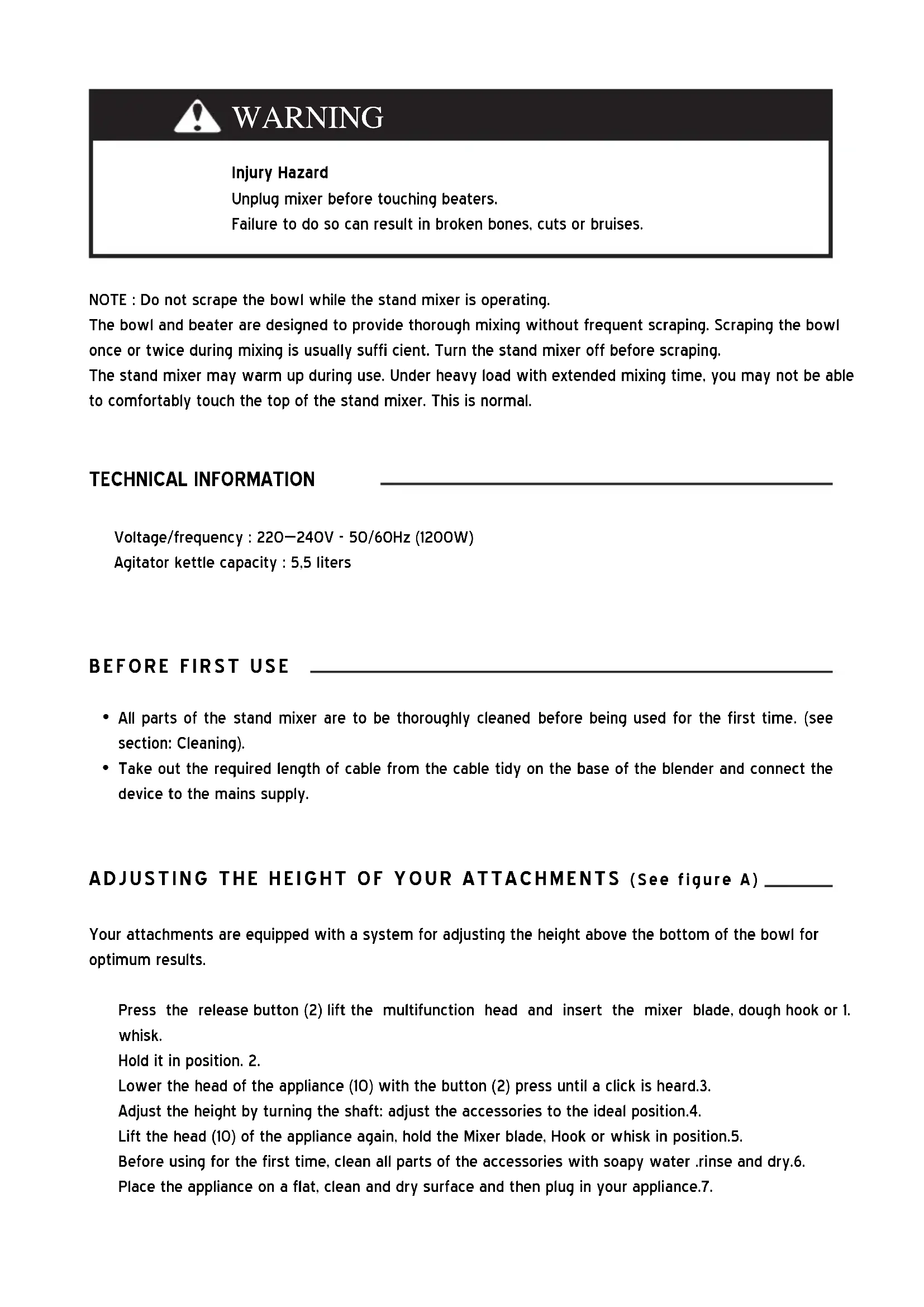
- Speed control switch
- Release button for multifunction head
- Cover
- Removable cover for mincer outlet
4.1. Release button for Cutter housing - Outlet for mincer
-
Bowl cover
-
Stainless steel bowl
- Outlet for blender
- Release button for Cover 3
- Multifunction head
- Whisk
- Dough hook
- Mixer blade
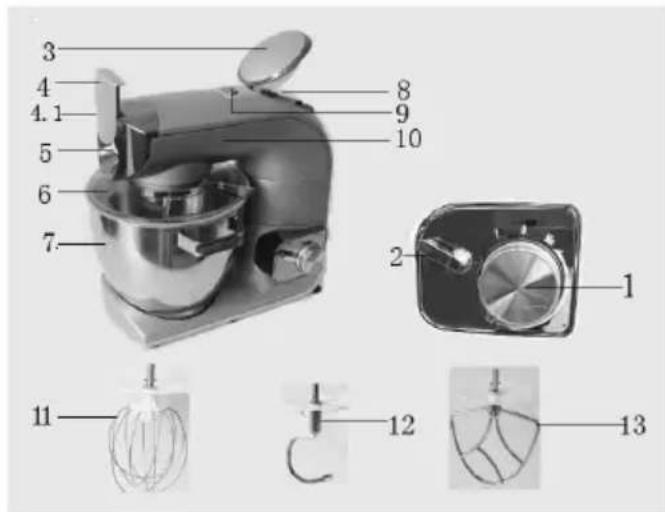
- Fine grinding disc
- Medium grinding disc
-
Worm shaft
-
Cutter blade
- Coarse grinding disc
- Screw ring
- Pusher
- Tray
- Cutter housing
- Cover for jug
- Glass jug
- Blade
- Blade seat
Injury Hazard
Unplug mixer before touching beaters.
Failure to do so can result in broken bones, cuts or bruises.
NOTE : Do not scrape the bowl while the stand mixer is operating.
The bowl and beater are designed to provide thorough mixing without frequent scraping. Scraping the bowl once or twice during mixing is usually sufficient. Turn the stand mixer off before scraping.
The stand mixer may warm up during use. Under heavy load with extended mixing time, you may not be able to comfortably touch the top of the stand mixer. This is normal.
TECHNICAL INFORMATION
Voltage/frequency : 220-240V - 50/60Hz (1200W)
Agitator kettle capacity : 5,5 liters
BEFORE FIRST USE
- All parts of the stand mixer are to be thoroughly cleaned before being used for the first time. (see section: Cleaning).
- Take out the required length of cable from the cable tidy on the base of the blender and connect the device to the mains supply.
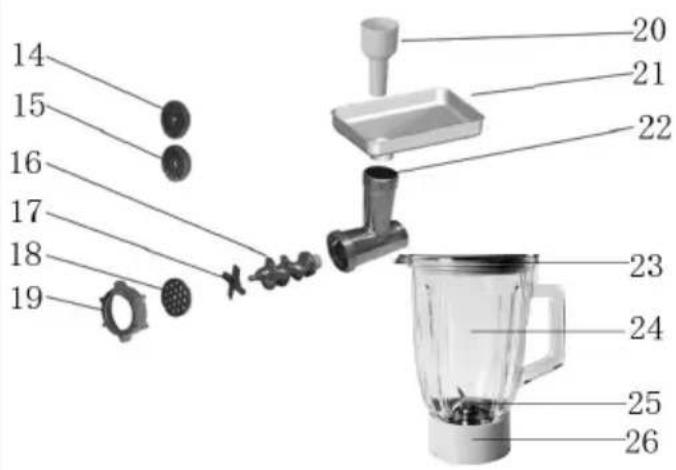
ADJUSTING THE HEIGHT OF YOUR ATTACHMENTS (See figure A) \_\_\_\_
Your attachments are equipped with a system for adjusting the height above the bottom of the bowl for optimum results.
Press the release button (2) lift the multifunction head and insert the mixer blade, dough hook or 1. whisk.
Hold it in position. 2.
Lower the head of the appliance (10) with the button (2) press until a click is heard.3.
Adjust the height by turning the shaft: adjust the accessories to the ideal position.4.
Lift the head (10) of the appliance again, hold the Mixer blade, Hook or whisk in position.5.
Before using for the first time, clean all parts of the accessories with soapy water .rinse and dry.6.
Place the appliance on a flat, clean and dry surface and then plug in your appliance.7.
natural_image
Exterior view of a modern kitchen mixer with a side-mounted stand (no text or symbols visible)MIXING/KNEADING/BEATING/EMULSIFYING/WHISKING (See figure B)\_
Depending on the nature of the ingredients. the bowl (7) with its cover can be used to prepare up to 2.3 kg of dough.
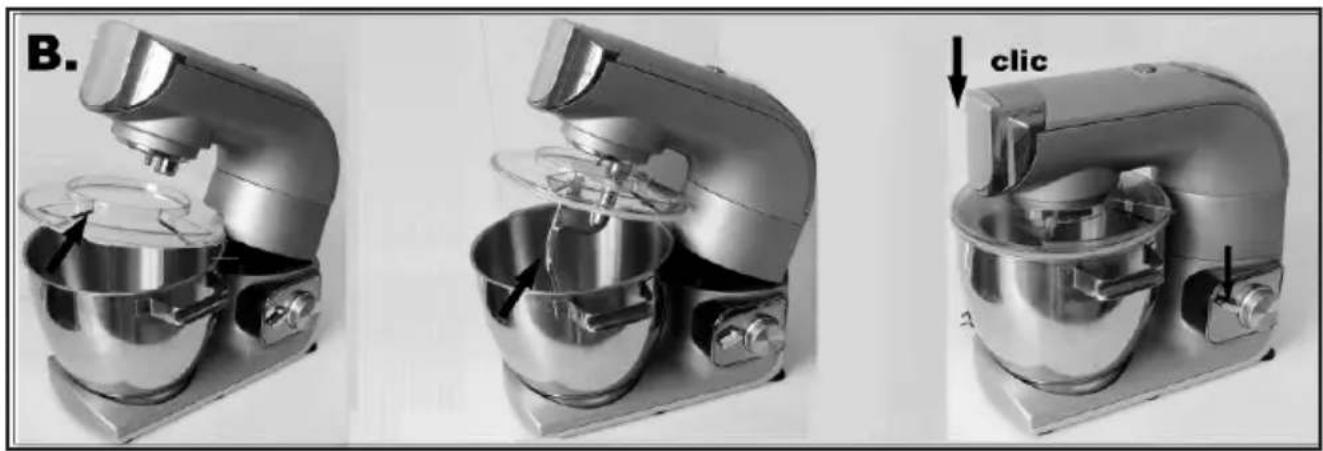
Press button (2) to the release the multifunction head (10) and raise it to a vertical position.1.
Fit the bowl(7) onto the appliance by turning until it locks in position and place the ingredients in it, 2. weighting them as indicated under the weighing function (see figure B).
Position the cover on the head with the filling opening at the front of the appliance (see figure B).3.
Fit the desired accessory (11, 12,13) in the outlet, pushing the shaft of the accessory home and turn it a 4. quarter turn towards you to lock it in position (see figure B).
Lower the multifunction head of the appliance to horizontal position and press button again (a click 5. should be heard).
During preparation, you can add ingredients through the opening the cover. 6.
To stop the appliance, turn the knob (1) back to 0.7.
Depending on the nature of the ingredients, the blender can be used to prepare up to 1.4L of mixture.
Assembling and fitting the attachment
natural_image
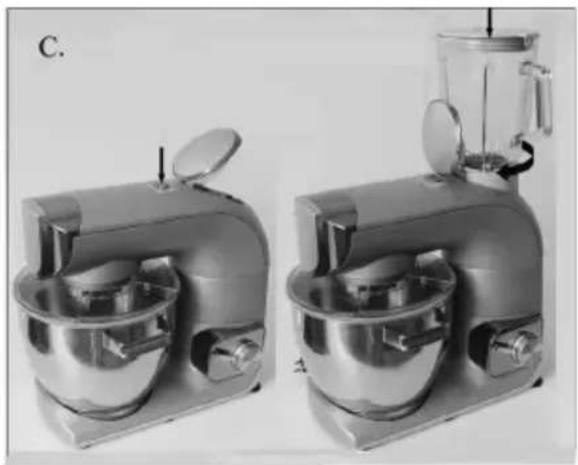
Two identical kitchen mixing machines shown side by side, no text or symbols visible.Assemble the blade assembly to the seal and lock it with a quarter turn clockwise into the bottom of 1. the jug (the jug must be upright).
Lower the multifunction heard of the appliance (10) to a horizontal position and press button (2) 2. again (a click should be heard).
Press button (9) to open the cover (3).3.
Ensure that the appliance is at a standstill before latching on the assembled blender.4.
Fit the assembled blender and lock it in position by turning it anticlockwise.5.
Place the ingredients in the blender jug, weighing them as indicated under the weighing function and 6. then fit the cover with the measuring plug.

WARNING
Do not run the blender empty for more than 1 minute.
Never fill the mixing jug with boiling fluids, you could allow these to cool down to a room temperature. Otherwise, the appliance could overheat and the glass of the mixing jug could crack.
When you use the jug operate ice, you could select nine ices each time and the every ice size is 40MM * 40MM * 20 MM.
Assembling and fitting the attachment
natural_image
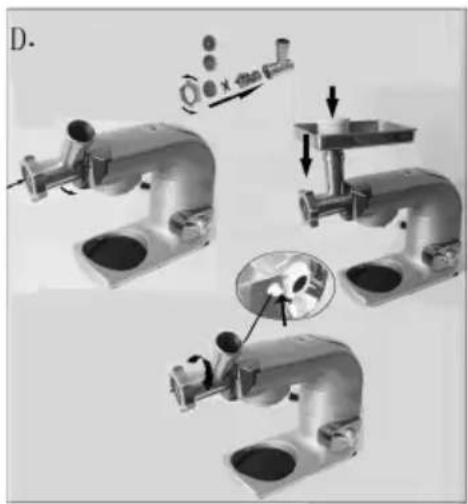
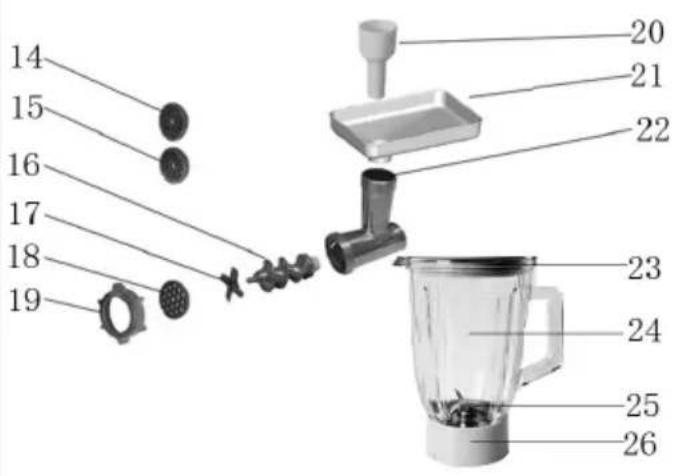
Mechanical assembly diagram showing three stages of a pipe fitting with a magnified inset detail (no text or symbols)Take the body (Cutter housing 22) by the feed tube with the largest opening upwards.1.
Insert the worm shaft 16 (drive pins first) in the cutter housing 22.2.
Fit the cutter blade 17 on the shaft with the cutting edges upwards.3.
Place the selected hole-plate over the blades ensuring that the two lugs fit in the two cut-outs in the 4. body (see the figure D).
Screw ring (19) the cap nut fully home on the body.5.
Check the assembly .the shaft should have no play nor be able to turn on itself.6.
Play the multifunction head in the horizontal position (a click should be heard).7.
Offer up the assembled mincer attachment, titled towards you. to the outlet and engage it fully. 8.
Return the feed tube to a vertical position by turning to the rear until it stops.
Place the removable tray on the feed tube.9.

WARNING
When you dissembled the body (Cutter housing 22), you must press the button (Release button for Cutter housing, see the arrow of figure D).
Insert the pieces of meat in the feed tube piece by piece using the pusher, never push the meat with the finger or any other utensil.
TO ASSEMBLE
natural_image
White kitchen brush tool with control panel and spool, labeled Figure 1 (no visible text or symbols on the device itself)
natural_image
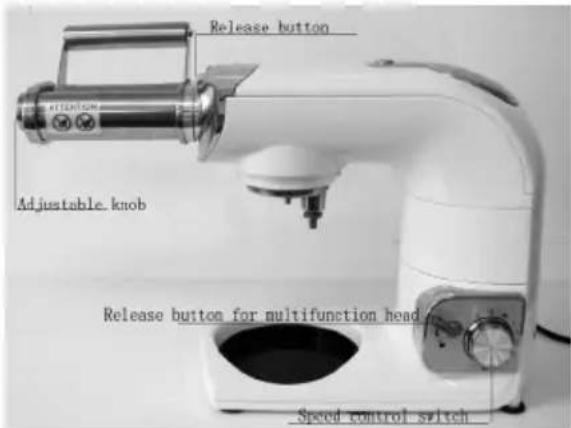
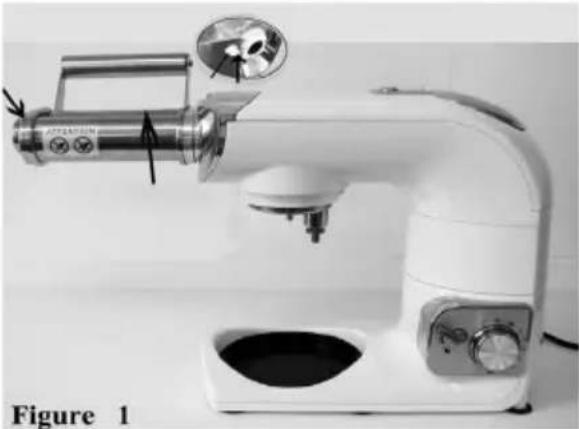
White ceramic kitchen brush with control lever and baseplate, labeled Figure 2 (no text on device)To remove the removable cover for mincer outlet (4), slide the catch then pull off. 1.
Hold the attachment one hand and press the release button another hand, then insert the attachment 2. into the outlet drive and turn until the drive clicks into place. You may have to turn it both ways, when the drive is engaged, rotate the attachment so that the pin is in a vertical position, then engage the pin into the slot. (See figure 1)
Release the catch. 3.
Make your pasta dough, follow one of the dough recipes supplied.1.
Set the adjustable knob on the side of the pasta attachment to number 1 by pulling the knob out and 2. turning.
Flatten a piece of dough and sprinkle some flour between the rollers. 3.
Turn the kitchen machine to speed 1(you will see the rollers turning). 4.
Pass the piece of dough through the rollers repeating until you get a smooth surface ,(folding the dough 5. in half across its witch or length between rolling will help to achieve this).
Adjust the knob progressively from 1 to 9, each time re-feeding the dough through the attachment to 6. achieve the desired thickness ,pasta thickness using settings 7 to 9 is recommended.
Cut the rolled pasta into desired /manageable pieces, use as required. 7.
Caution: when you use the pasta attachment, the speed control switch you could choose 3-4 speeds.
Using an additional attachment
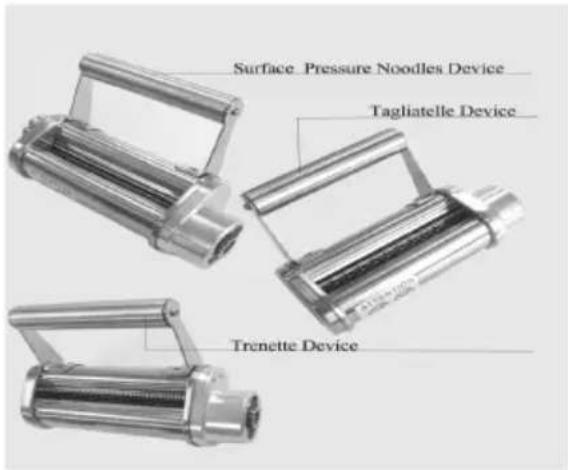
Tagliatelle (Tagliatelle device)
Trenette (Trenette device)
To use these attachments you must have rolled out pasta using the flat pasta attachment (surface 1. pressure noodles device) first. (see figure 2)
To fit any of the additional attachments available, follow the to assemble instructions. 2.
Feed the rolled out pasta through the pasta attachment and the different cutters will slice the pasta 3. to create different pasta variations.
Pasta can be left for up to 4 hours before cooking.4.
To cook pasta
Bring a pan three quarters full of water to the boil, add salt to taste.1.
It is optional to add a small amount of olive oil to the water, this may help prevent the pasta from 2. sticking.
Add the pasta and gently boil for approximately 2 to 4 minutes to taste.3.
Basic pasta dough
500g flour or plain flour
4 eggs
2.5ml salt
2.5ml oil
Water if necessary
WHOLEMEAL PASTA
500g wholemeal flour
4 eggs
2.5ml salt
2.5ml oil
Water if necessary
PASTA ROSSA
500g flour or plain flour
3 eggs
75g pureed tomato
2.5ml salt
2.5ml oil
Water if necessary
Method
It the flour, salt, oil and beaten eggs (eggs should be mixed with tomato puree if applicable) into the 1. mixing bowl.
- Mix with the dough hook on speed 1-2 for approximately 2-3 minutes, adding water if the mix is too 2. dry.
Switch off the machine and gather the ingredients together and knead by hand until you obtain a 3. smooth dough.
For best results, wrap the dough then let it rest for approximately 15 minutes before rolling out with 4. the pasta attachment
Fit the flat pasta making attachment and follow the previous instructions.5.
Unplug the appliance.1.
Never immerse the motor until in water or put it under running water wipe it with a soft dry or slight damp cloth.
For easier cleaning, quickly rinse the accessories after use. Completely dismantle the mixer 3. attachment. Handle the blades with care, as some have sharp cutting edges.
Wash, rinse and wipe the accessories or the can be put in the dishwasher, except for the metal 4. components of the mincer attachment body Fine grinding disc(14).Medium grinding disc(15).Worm shaft(16).Cutter blade (17).Coarse grinding disc (18) and Screw ring(19).
The grinding disc and the blade must be kept lubricated. Wipe them over with cooking oil after each 5. use.
If your accessories are discoloured by food (carrots, oranges etc), rub them gently with kitchen towel 6. dipped in cooking oil and then clean in the usual way.
Blender assembly: pour hot water with a few drops of washing up liquid into the blender jug. Close 7. the cover. Fit it on the appliance and give a few pulses. Remove the blender, rinse the jug under running water and leave it upside down to dry .for cleaning more difficult residues, especially with thicker preparations. The blade nut assembly can be detached from the bottom of the jug, to do this, place the empty blender upside down on a flat surface, release the blade /nut assembly with a quarter turn and lift out the seal with care.

WARNING
Don't wash the pasta attachment in the dishwasher, wipe clean with a damp cloth do not immerse in water.
| Accessory Food Maximum | Operation | time | Speeds Preparation | ||
| whisk | Cream(include 38%fat) | 250ml 10 minutes 5-6 / | |||
| Egg white 12pcs 3 minutes 5-6 / | |||||
| Dough hook | Flour 1700g | 10 minutes | 5-6 / | ||
| Salt 20g | |||||
| Yeast 10g | |||||
| Sugar | 10g | ||||
| Water | 1100g | ||||
| Lard | 20g | ||||
| Mixer blade | Flour | 100g | 5 minutes | 1-4 | / |
| Castor sugar | 100g | ||||
| Margarine | 100g | ||||
| Egg | 2pcs | ||||
| Blender | Carrot | 560g | 3 minutes | P/6 | 15x15x15mm |
| Water | 840g | / | |||
| Meet Grinder | Beef | 2000g | 3 minutes | 3-6 20x20x60mm | |
| Pork | 2000g | 3 minutes | |||
PACKING LIST
• Main body COOKYOO 7900
- Steel bowl 5.5 L
- Dusty cover
- Beater
- Dough hook
- Whisk
- Pasta machine
- Mixer blade
- Blender
- Meet Grinder
- Wire whipe
- Instruction manual
- Warranty card

WARNING

Electrical Shock Hazard
Unplug before servicing.
Failure to do so can result in death or electrical shock.
Please read the following before calling your service center.
The Stand Mixer may warm up during use. Under heavy loads with extended mixing time periods, you 1. may not be able to comfortably touch the top of the unit. This is normal.
The Stand Mixer may emit a pungent odor, especially when new. This is common whit electric 2. motors.
If the flat beater hits the bowl, stop the stand mixer.3.
If your Stand Mixer should malfunction or fail to operate, please check the following :
Is the Stand Mixer plugged in?•
- Is the fuse in the circuit to the Stand Mixer in working order? If you have a circuit breaker box, be sure the circuit is closed.
- Turn the Stand Mixer off for 10-15 seconds, then turn it back on. If the mixer still does not star, allow it to cool for 30 minutes before turning it back on.
If the problem is not due to one of the above items, see "Service Centers".
natural_image
Exterior view of a modern kitchen mixer with a side-mounted stand (no text or symbols visible)MÉLANGER/PÉTRIR/BATTRE/EMULSIFIER/FOUETTER (Voir figure B)
natural_image
Three-panel image showing a kitchen mixer with a click button, no text or symbols presentnatural_image
Two identical kitchen mixing machines shown from different angles, no text or symbols visiblenatural_image
Three-step industrial processing diagram showing pipe assembly, mixing, and final assembly with a magnified inset (no text or symbols)natural_image
White kitchen brush with control panel and mechanical components, labeled Figure 1 (no text or symbols on device)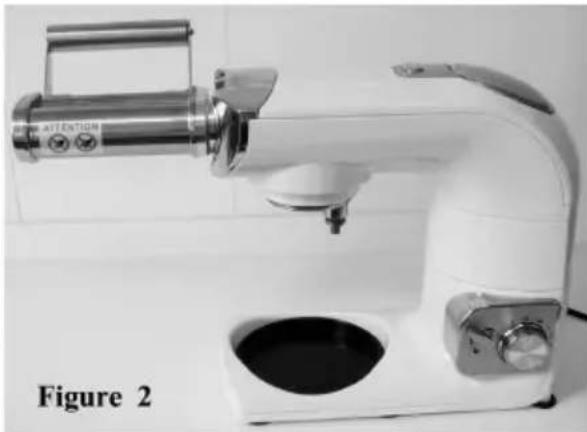
natural_image
White laboratory brush tool with control panel and base, labeled Figure 2 (no text on device)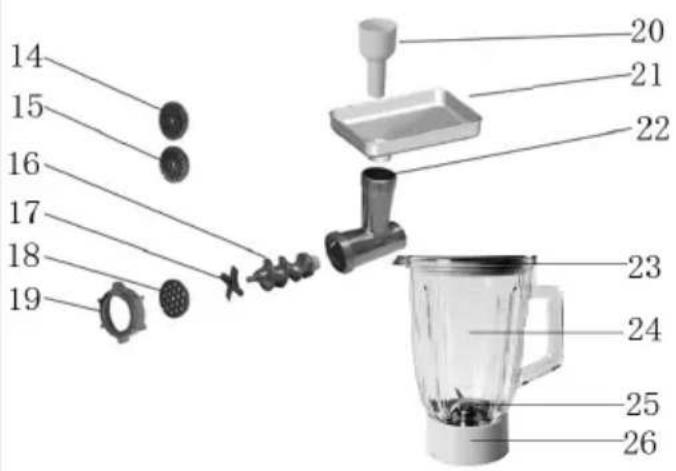
natural_image
Exterior view of a modern kitchen mixer with a side-mounted stand (no text or symbols visible)MIXEN/KNETEN/SCHLAGEN/EMULGIEREN/AUFSCHÄUMEN
(Siehe Abbildung B)
natural_image
Three-panel image showing a kitchen mixer with a click button, no text or symbols presentnatural_image
Two identical kitchen mixing machines shown from different angles, no text or symbols visible.natural_image
Mechanical assembly diagram showing three stages of a pipe fitting with internal components and a close-up inset (no text or symbols)natural_image
White kitchen brush tool with control panel and mechanical components, labeled Figure 1 (no visible text or symbols on the device itself)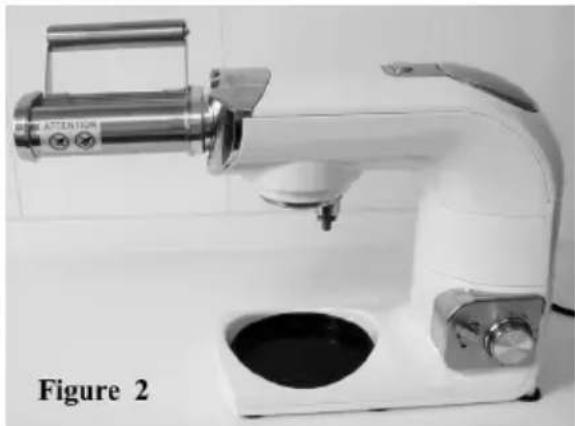
natural_image
White laboratory brush tool with digital display and base, labeled Figure 2 (no text or symbols on device)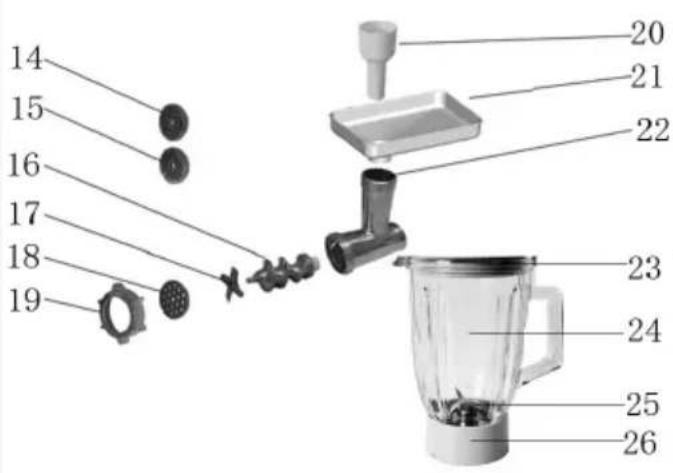
natural_image
Exterior view of a modern kitchen mixer with a side-mounted stand (no text or symbols visible)natural_image
Three views of a modern kitchen mixer with a click button, shown from different angles (no text or symbols on the device itself)natural_image
Two identical kitchen mixing machines shown from different angles, no text or symbols visible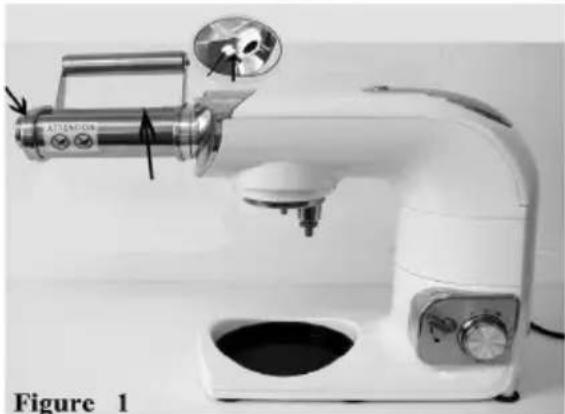
natural_image
White kitchen brush with control panel and mechanical components, labeled Figure 1 (no visible text or symbols on device)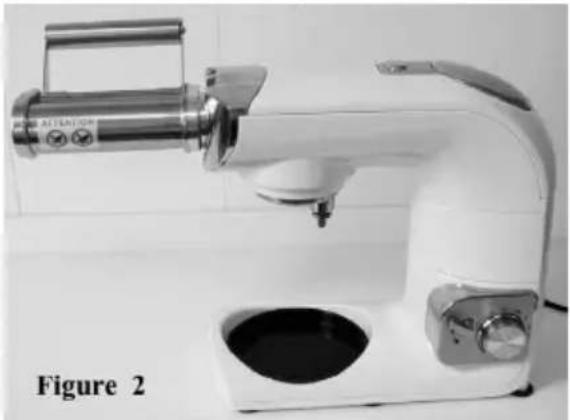
natural_image
White ceramic water dispenser with digital display and control panel, labeled Figure 2 (no text on device)Tagliatelle (Tagliatelle-opzetstuk) Trenette (Trenette-opzetstuk)
natural_image
Symbol of a trash bin crossed out by two crossed lines, no text or labels presentRecyclage





- Your safety and the safety of others are very important.
- DANGER
- WARNING
- ELECTRICAL REQUIREMENTS
- DESCRIPTION
- TECHNICAL INFORMATION
- BEFORE FIRST USE
- ADJUSTING THE HEIGHT OF YOUR ATTACHMENTS (See figure A) \_\_\_\_
- MIXING/KNEADING/BEATING/EMULSIFYING/WHISKING (See figure B)\_
- Assembling and fitting the attachment
- TO ASSEMBLE
- Using an additional attachment
- To cook pasta
- Basic pasta dough
- WHOLEMEAL PASTA
- PASTA ROSSA
- Method
- PACKING LIST
- Please read the following before calling your service center.
- If your Stand Mixer should malfunction or fail to operate, please check the following :
- MÉLANGER/PÉTRIR/BATTRE/EMULSIFIER/FOUETTER (Voir figure B)
- MIXEN/KNETEN/SCHLAGEN/EMULGIEREN/AUFSCHÄUMEN
- Recyclage
Brand : YOO DIGITAL
Model : CookYoo 7900
Category : Pasta machine