66100 KFN - Cooker AEG-ELECTROLUX - Free user manual and instructions
Find the device manual for free 66100 KFN AEG-ELECTROLUX in PDF.


Frequently Asked Questions - 66100 KFN AEG-ELECTROLUX
User questions about 66100 KFN AEG-ELECTROLUX
0 question about this device. Answer the ones you know or ask your own.
Ask a new question about this device
Download the instructions for your Cooker in PDF format for free! Find your manual 66100 KFN - AEG-ELECTROLUX and take your electronic device back in hand. On this page are published all the documents necessary for the use of your device. 66100 KFN by AEG-ELECTROLUX.
USER MANUAL 66100 KFN AEG-ELECTROLUX
Electrolux Home Products Belgium
Consumer services 02/363.04.44 02/363.04.00
02/363.04.60
ELECTROLUX SERVICE
Bergensestenweg 719
1502 Lembeek
E-mail: consumer.service@electrolux.be
Luxemburg
Telefon Telefax
Grand-Duché de Luxembourg
Consumer services 00 352 42 431-1 00 352 42 431-360
ELECTROLUX HOME PRODUCTS
Rue de Bitbourg. 7
L-1273 Luxembourg-Hamm
E-mail: consumer-service.luxembourg@electrolux.lu
Thank you for choosing one of our high-quality products.
With this appliance you will experience the perfect combination of functional design and cutting edge technology.
Convince yourself that our appliances are engineered to deliver the best performance and control - indeed we are setting the highest standards of excellence.
In addition to this you find environmental and energy saving aspects as an integral part of our products.
To ensure optimal and regular performance of your appliance please read this instruction manual carefully. It will enable you to navigate all processes perfectly and most efficiently.
To refer to this manual any time you need to, we recommend you to keep it in a safe place. And please pass it to any future owner of the appliance.
We wish you much joy with your new appliance.
The following symbols are used in this user information:

Warning! This must be read! Important advice for the safety of persons and information on avoiding damage to the appliance

General information and advice

Information on environmental protection

angerous voltage
Contents
Operating Instructions 32
Safety instructions 32
Description of the Appliance 34
Cooking surface layout 34
Control panel layout 34
Touch Control sensor fields 35
Displays 35
Residual heat indicator 35
Operating the appliance 36
Switching the appliance on and off 36
Setting the heat setting 36
Switching the outside ring on and off 37
Locking/unlocking the control panel 37
Using the automatic warm-up function 38
Using the child safety device 39
Using the timer 40
Automatic switch off 43
Tips on Cooking and Frying 44
Cookware 44
Energy saving 44
Examples of cooking applications 45
Cleaning and Care 46
What to do if ... 47
Disposal 49
Installation Instructions 50
Safety instructions 50
Guarantee/Customer Service 52
Service 55
Assembly 86
Rating Plate 89
Operating Instructions
!Safety instructions
Please comply with these instructions. If you do not, any damage resulting is not covered by the warranty.
Correct use
- This appliance is not intended for use by children or other persons whose physical, sensory or mental capabilities or lack of experience and knowledge prevents them from using the appliance safely without supervision or instruction by a responsible person to ensure that they can use the appliance safely.
- Do not leave the appliance unattended during operation.
- This appliance should be used only for normal domestic cooking and frying of food.
- The appliance must not be used as a work surface or as a storage surface.
- Additions or modifications to the appliance are not permitted.
- Do not place or store flammable liquids, highly inflammable materials or fusible objects (e.g. plastic film, plastic, aluminium) on or near the appliance.
Children's safety
- Small children must be kept away from the appliance.
- Only let bigger children work on the appliance under supervision.
- To avoid small children and pets unintentionally switching the appliance on, we recommend activation of the child safety device.
General safety
- The appliance may only be installed and connected by trained, registered service engineers.
- Built-in appliances may only be used after they have built in to suitable built-in units and work surfaces that meet standards.
- In the event of faults with the appliance or damage to the glass ceramic (cracks, scratches or splits), the appliance must be switched off and disconnected from the electrical supply, to prevent the possibility of an electric shock.
- Repairs to the appliance must only be carried out by trained registered service engineers.
Safety during use
Overheated fats and oils can ignite very quickly. Warning! Fire hazard!
- There is the risk of burns from the appliance if used carelessly.
- Remove stickers and film from the glass ceramic.
- Cables from electrical appliances must not touch the hot surface of the appliance or hot cookware.
- Switch the cooking zones off after each use.
Safety when cleaning
- For cleaning, the appliance must be switched off and cooled down.
- For safety reasons, the cleaning of the appliance with steam jet or high-pressure cleaning equipment is not permitted.
How to avoid damage to the appliance
- The glass ceramic can be damaged by objects falling onto it.
- The edge of the glass ceramic can be damaged by being knocked by the cookware.
- Cookware made of cast iron, cast aluminium or with damaged bottoms can scratch the glass ceramic if pushed across the surface.
- Objects that melt and things that boil over can burn onto the glass ceramic and should be removed straightaway.
- To avoid damaging cookware and glass ceramics, do not allow saucepans or frying pans to boil dry.
- Do not use the cooking zones with empty cookware or without cookware.
Description of the Appliance
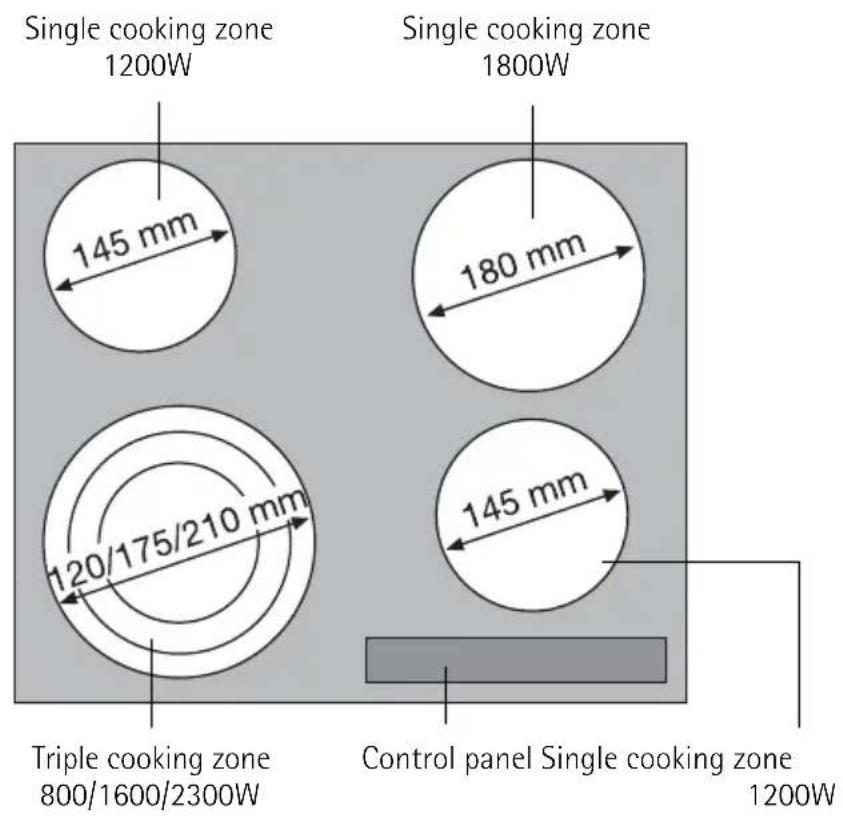
Cooking surface layout
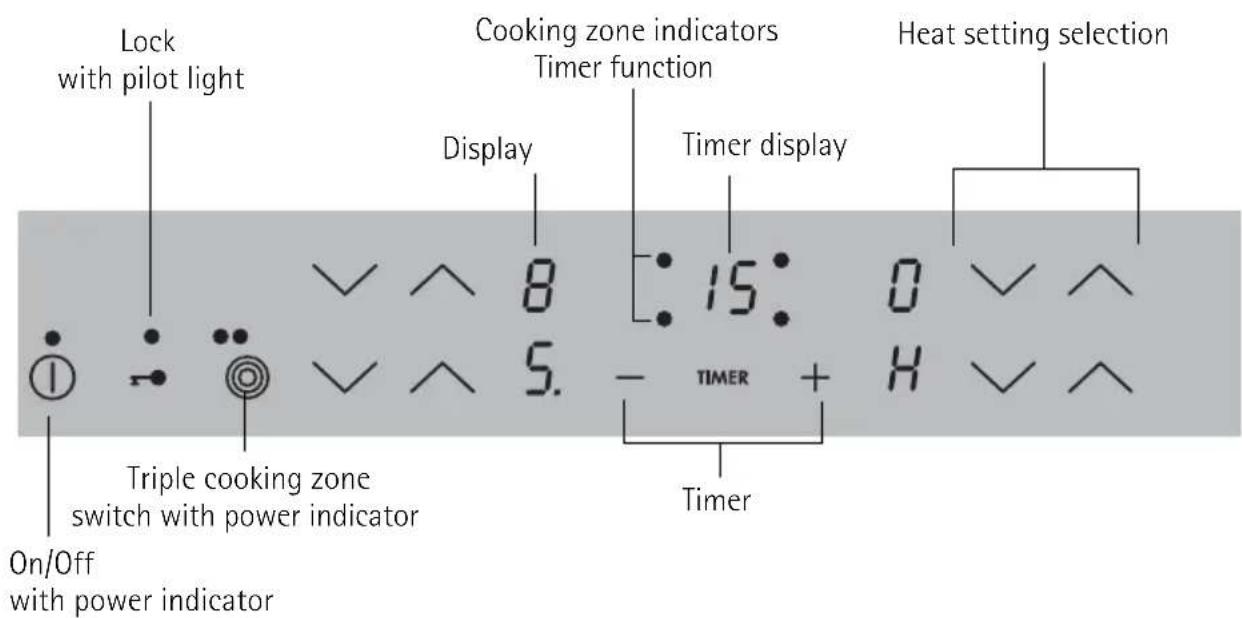
Control panel layout
Touch Control sensor fields
The appliance is operated using Touch Control sensor fields. Functions are controlled by touching sensor fields and confirmed by displays and acoustic signals. Touch the sensor fields from above, without covering other sensor fields.
| Sensor field Function | |
| ① On / Off To switch the appliance on and off | |
| ○ Increase settings To increase heat settings | |
| ○ Reduce settings To reduce heat settings | |
| TIMER Timer Timer selection | |
| ○ Increase settings To increase Timer time | |
| ○ Reduce settings To reduce Timer time | |
| ○ Lock Locking/unlocking the control panel | |
| ○ | Triple ring switch To switch outer rings on and off |
Displays
| Display Description | ||
| ○ | Cooking zone is switched off | |
| ○ | Keep warm setting | Keep warm setting is set |
| ○-○ | Heat settings | Heat setting is set |
| ○-○. | Heating setting plus decimal point | Intermediate heat setting is set |
| ○Automatic warm up func-tion | Automatic warm-up function is acti-vated | |
| ○Fault | Malfunction has occurred | |
| ○ | Residual heat | Cooking zone is still hot |
| ○ | Child safety device | Lock/child safety device is engaged |
| ○ | Automatic switch off | Switch off is active. |
Residual heat indicator

Warning! Risk of burns from residual heat. After being switched off, the cooking zones need some time to cool down. Look at the residual heat indicator H.

Residual heat can be used for melting and keeping food warm.
Operating the appliance
Switching the appliance on and off
| Control panel Display Pilot light | |||
| Switch on | Touch ① for 2 seconds | ○/○ | lights up |
| Switch off | Touch ① for 1 second | ○/ none | goes out |

After switching on, within approx. 10 seconds a heat setting or a function must be set, otherwise the appliance automatically switches itself off.
Setting the heat setting
| Control panel Indicator | ||
| To increase Touch | to | ○ 9 |
| To decrease | Touch | ○ 9 ○ |
| To switch off | Touch and at the same time | ○ |

The keep warm setting lies between and . It is used to keep food warm.
Switching the outside ring on and off
By switching the outside rings on or off, the effective heating surface can be matched to the size of the cookware.

Before an outside ring can be switched on, the inside ring must be switched on.
| Triple cooking zone Sensor panel Power indicator | ||
| To switch on middle ring | Touch Ⓒ for 1-2 seconds. | One power indicator is lit. |
| To switch on outside ring | Touch Ⓒ for 1-2 seconds. | Two power indicators are lit. |
| To switch off outside ring | Touch Ⓒ for 1-2 seconds. | Second power indicator goes out. |
| To switch off middle ring | Touch Ⓒ for 1-2 seconds. | First power indicator goes out. |
Locking/unlocking the control panel
The control panel, with the exception of the "On/Off" sensor field, can be locked at any time in order to prevent the settings being changed e.g. by wiping over the panel with a cloth.
| Control panel Display | ||
| Switch on Touch (for 5 seconds) | L | |
| Switch off Touch previously set heat setting | ||

When you switch the appliance off, the locking function is automatically switched off.
Using the automatic warm-up function
All cooking zones are equipped with an automatic warm up function When setting a heat setting using , when starting from 0 , the cooking zone switches to full power for a certain amount of time and then automatically switches back to the heat setting set.
| Control panel | possible heat settings | Display | |
| Switch on (only when starting at 0) | Touch to (after 5 seconds) | R | |
| Switch off | Touch to / to | R to | |
| Not used Touch to to | √ to | √ to | √ to |
If during the automatic warm up a her heat setting is selected, e.g. from 3 to 5 the automatic warm up is adjusted.
If there is still residual heat on the cooking zone (display), the automatic warm up is not performed.
The length of time that the automatic warm up function operates depends on the heat setting selected.
| Heat setting | Length of the automatic warm up [min:sec] | Intermedi- ate heat setting | Length of the automatic warm up [min:sec] |
| 0:30 | |||
| 1:00 | |||
| 1:40 2. | 2:40 | ||
| 4:50 3. | 5:30 | ||
| 6:30 4. | 8:10 | ||
| 5 | 10:10 | 5. | 12:20 |
| 2:00 6. | 2:30 | ||
| 3:30 | |||
| 4:30 | |||
| 9 | --- |
Using the child safety device
The child safety device prevents unintentional use of the appliance.
Switching on the child safety device
| Step | Control panel | Display/Signal |
| 1. Switch on appliance. (Do not set a heat setting.) | 0 | |
| 2. Touch for 4 seconds | L | |
| The child safety device is switched on. | ||
Switching off the child safety device
| Step | Control panel | Display/Signal |
| 1. Switch | on appliance. (Do not set a heat setting.) | L |
| 2. | Touch for 4 seconds | lights up |
| 3. Switch appliance off. | ||
| The child safety device is switched off. | ||

The child safety device can only be switched on and off, if no heat setting is set.
Overriding the child safety device
The child safety device can be switched off in this way for a single cooking session; it remains activated afterwards.
| Step | Control panel | Display/Signal |
| 1. Switch appliance on | L | |
| 2. | Touch for 4 seconds | lights up |
| Until the appliance is next switched off, it can used as normal. After switching off the appliance, the child safety device is active again. | ||

After overriding the child safety device, a heat setting or a function must be set within approx. 10 seconds, otherwise the appliance automatically switches itself off.
Using the timer
| Function Condition | Outcome after the | time has elapsed |
| Automatic cut-out a heat setting is set acoustic signal | 00 flashes Cooking zone switches off | |
| Countdown timer | cooking zones not in use | acoustic signal 00 flashes |
If a heat setting is set on this cooking zone in addition to a countdown timer, the cooking zone is switched off after the time set has elapsed.
iIf a cooking zone is switched off, the timer function set is also switched off.
Selecting a cooking zone
| Step Control panel Display | ||
| 1. | Touch TIMER once | Pilot light of the first cooking zone flashes |
| 2. | Touch TIMER once | Pilot light of the second cooking zone flashes |
| 3. | Touch TIMER once | Pilot light of the third cooking zone flashes |
| 4. | Touch TIMER once | Pilot light of the fourth cooking zone flashes |

If the pilot light is flashing more slowly, the heat setting can be set or modified. If other timer functions are set, after a few seconds the shortest remaining time of all the timer functions is displayed and the corresponding pilot light flashes.
Setting the time
| Step | Control panel | Indicator |
| 1. Select | TIMER cooking zone | Pilot light for the cooking zone selected flashes |
| 2. | Touch ⊕ or ⊙ | 00 to 99 minutes |
| After a few seconds the pilot light flashes more slowly. The time is set. The time counts down. | ||
Switching off the timer function
| Step | Control panel | Indicator |
| 1. Select | TIMER cooking zone | Pilot light of cooking zone selected flash- es faster Time remaining is displayed |
| 2. Touch The time remaining counts | backwards to 00. | |
| The pilot light goes out. The Timer function for the selected cooking zone is switched off. | ||
Changing the time
| Step Control panel Indicator | ||
| 1. Select | TIMER cooking zone | Pilot light of the selected cooking zone flashes faster Time remaining is displayed |
| 2. | Touch ⊕ or ⊙ | 0 to 99 minutes |
| After a few seconds, the pilot light flashes more slowly. The time is set. The time counts down. | ||
Displaying the time remaining for a cooking zone
| Step Control panel field Display | ||
| 1. Select cooking zone | Pilot light of the cooking zone selected flashes faster The time remaining is displayed | |
| After a few seconds the pilot light flashes more slowly. | ||
Switching off the acoustic signal
| Step Control panel field Acoustic signal | ||
| 1. | Touch TIMER | Acoustic signal to acknowledge. |
| Acoustic signal stops. | ||
Automatic switch off
Cooking surface
- If after switching on the cooking surface, a heat setting is not set for a cooking zone within approx. 10 seconds, the cooking surface automatically switches itself off.
- If one or more sensor fields are covered by objects (a pan, cloths, etc.) for longer than approx. 10 seconds, a signal sounds and the cooking surface switches off automatically.
- If all cooking zones are switched off, the cooking surface automatically switches itself off after approx. 10 seconds.
Cooking zones
- If one of the cooking zones is not switched off after a certain time, or if the heat setting is not modified, the relevant cooking zone switches off automatically. - is displayed. Before being used again, the cooking zone must be set to 0
| Heat setting Switches off after | |
| u, 1-2 6 hours | |
| 3-4 5 hours | |
| 5 4 hours | |
| 6-9 1.5 hours | |
Tips on Cooking and Frying

Information on acrylamides
According to the latest scientific knowledge, intensive browning of food, especially in products containing starch, can constitute a health risk due to acrylamides. Therefore we recommend cooking at the lowest possible temperatures and not browning foods too much.
Cookware
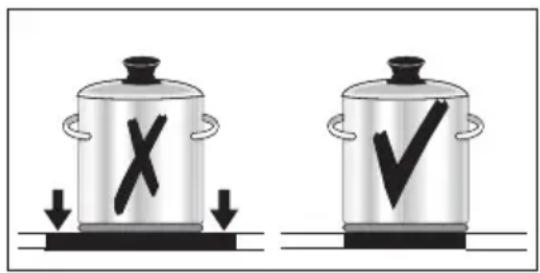
- You can recognise good cookware from the bottoms of the pans. The bottom should be as thick and flat as possible.
- Cookware made of enamelled steel or with aluminium or copper bottoms can leave discolorations on the glass ceramic surface which are difficult or impossible to remove.
Energy saving

Always place cookware on the cooking zone before it is switched on.

If possible, always place lids on the pans.
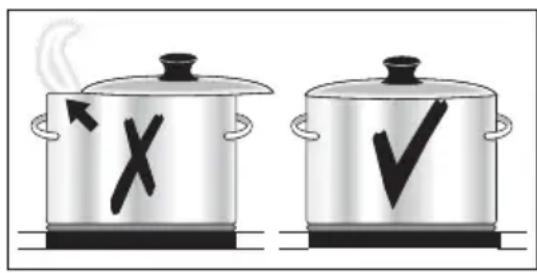

Switch cooking zones off before the end of the cooking time, to take advantage of residual heat.

Bottom of pans and cooking zones should be the same size.
Examples of cooking applications
The information given in the following table is for guidance only.
| Heat setting | Cooking-process | suitable for | Cooking time | Tips/Hints |
| 0 Residual heat, Off position | ||||
| u | Keeping food warm | Keeping cooked foods warm as required Cover | ||
| 1-2 | Melting | Hollandaise sauce, melting butter, chocolate, gelatine | 5-25 mins. Stir occasionally | |
| Solidifying | Fluffy omelettes, baked eggs | 10-40 mins. | Cook with lid on | |
| 2-3 | Simmer-ing on low heat | Simmering rice and milk-based dishes Heating up ready-cooked meals | 25-50 mins. | Add at least twice as much liquid as rice, stir milk dishes part way through cooking |
| 3-4 | Steaming Braising | Steaming vegetables, fish braising meat | 20-45 mins. | With vegetables add only a little liquid (a few table-spoons) |
| 4-5 Boiling | Steaming potatoes 20-60 mins. | Use only a little liquid, e.g.: max. 1/4 l water for 750 g potatoes | ||
| Cooking larger quantities of food, stews and soups | 60-150 mins. | Up to 3 l liquid plus ingredients | ||
| 6-7 | Gentle Frying | Frying escalopes, veal cor-don bleu, cutlets, rissoles, sausages, liver, roux, eggs, pancakes, doughnuts | Steady frying | Turn halfway through cooking |
| 7-8 | Heavy Frying | Hash browns, loin steaks, steaks, Flädle (pancakes for garnishing soup) | 5-15 mins. per pan | Turn halfway through cooking |
| 9 | Boiling Searing Deep frying | Boiling large quantities of water, cooking pasta, searing meat (goulash, pot roast), deep frying chips | ||
Cleaning and Care

Take care! Risk of burns from residual heat.
Warning! Sharp objects and abrasive cleaning materials will damage the appliance. Clean with water and washing up liquid.

Warning! Residues from cleaning agents will damage the appliance. Remove residues with water and washing up liquid.
Cleaning the appliance after each use
- Wipe the appliance with a damp cloth and a little washing up liquid.
- Rub the appliance dry using a clean cloth.
Removing deposits
- Place a scraper on the glass ceramic surface at an angle.
- Remove residues by sliding the blade over the surface.
- Wipe the appliance with a damp cloth and a little washing up liquid.
- Rub the appliance dry using a clean cloth.
| Type of dirt | Remove | ||
| immediately | when the appliance has cooled down | using | |
| sugar, food containing sugar yes --- | a scraper* | ||
| plastics, tin foil yes --- | |||
| limescale and water rings --- yes | cleaner for glass ceramic or stainless steel* | ||
| fat splashes --- yes | |||
| shiny metallic discolouration --- yes | |||
*Scrapers and cleaners for glass ceramic and stainless steel can be purchased in specialized shops

Remove stubborn residues with a cleaner for glass ceramic or stainless steel.

Scratches or dark stains on the glass ceramic that cannot be removed do not however affect the functioning of the appliance.
What to do if …
| Problem Possible cause | Use Remedy | |
| The cooking zones will not switch on or are not functioning | More than 10 seconds have passed since the appliance was switched on | Switch the appliance on again. |
| The child safety device is switched on | Deactivate the child safety device (See the section "Child safety device") | |
| Several sensor fields were touched at the same time | Only touch one sensor field | |
| Automatic switch off has been triggered | Remove any objects (pan,cloths,etc.) that are lying on the control panel.Switch the appliance on again | |
| The lock is switched on | off the lock (See the section "Locking/unlocking the control panel") | |
| Acoustic signal sounds when appliance is switched off | The control panel is wholly or partly covered by objects. | Remove objects. |
| The residual heat indicator is not displaying anything | The cooking zone was only on for a short time and is there-fore not hot | If the cooking zone is sup-posed to be hot, call the Cus-tomer Service Department. |
| The automatic warm up func-tion is not switching itself on | There is still residual heat on the cooking zone | Let the cooking zone cool down |
| The highest heat setting is set | The highest heat setting has the same power as the auto-matic warm up function | |
| The heat setting was set using the sensor field | 1. Switching off the cooking zone1. Set the cooking zone using the sensor field | |
| Acoustic signal sounds and appliance switches itself on and then off again; after 5 seconds another acoustic sig-nal sounds | The On/Off sensor field has been covered up,e.g.by a cloth | Do not place any objects on the control panel |
| is lit Overheating protection | for the cooking zone has been trig-gered | Switch off the cooking zone.Switch the cooking zone on again |
| Automatic switch off has been triggered | Switch off the cooking zone.Switch the cooking zone on again | |
| Problem Possible cause Remedy | ||
| E and number are displayed | Electronics fault | Disconnect the appliance from the electrical supply for a few minutes (Take the fuse out of the house's wiring system)If after switching on again, E is displayed again, call the customer service department |
If you are unable to remedy the problem by following the above suggestions, please contact your local Service Force Centre.


Warning! Repairs to the appliance are only to be carried out by qualified service engineers. Considerable danger to the user may result from improper repairs.
If the appliance has been operated incorrectly, the engineer's visit will be chargeable, even during the warranty period.
Disposal

Packaging material
The packaging materials are environmentally friendly and can be recycled. The plastic components are identified by markings, e.g. >PE< , >PS< , etc. Please dispose of the packaging materials in the appropriate container at the community waste disposal facilities.

Old appliance
The symbol on the product or on its packaging indicates that this product may not be treated as household waste. Instead it shall be handed over to the applicable collection point for the recycling of electrical and electronic equipment. By ensuring this product is disposed of correctly, you will help prevent potential negative consequences for the environment and human health, which could otherwise be caused by inappropriate waste handling of this product. For more detailed information about recycling of this product, please contact your local city office, your household waste disposal service or the shop where you purchased the product.
Installation Instructions

Safety instructions
Warning! This must be read!
The laws, ordinances, directives and standards in force in the country of use are to be followed (safety regulations, proper recycling in accordance with the regulations, etc.)
Installation may only be carried out by a qualified electrician.
The minimum distances to other appliances and units are to be observed.
Anti-shock protection must be provided by the installation, for example drawers may only be installed with a protective floor directly underneath the appliance.
The cut surfaces of the worktop are to be protected against moisture using a suitable sealant.
The sealant seals the appliance to the work top with no gap.
Avoid installing the appliance next to doors and under windows. Otherwise hot cookware may be knocked off the rings when doors and windows are opened.
Risk of injury from electrical current.
The electrical mains terminal is live.
- Make electrical mains terminal free of voltage.
- Follow connection schematic.
- Observe electrical safety rules.
- Ensure anti-shock protection by installing correctly.
- The appliance must be connected to the electrical supply by a qualified electrician.
Risk of injury from electrical current.
- Loose and inappropriate plug and socket connections can make the terminal overheat.
- Have the clamping connections correctly installed by a qualified electrician.
- Use strain relief clamp on cable.
- In the event of single-phase or two-phase connection, the appropriate mains cable of type H05BB-F Tmax 90^ (or higher) must be used.
- If this appliance's mains cable is damaged, it must be replaced by a special cable (type H05BB-F Tmax 90^ ; or higher). The latter is available from the Customer Care Department.
A device must be provided in the electrical installation which allows the appliance to be disconnected from the mains at all poles with a contact opening width of at least 3mm .
Suitable isolation devices include line protecting cut-outs, fuses (screw type fuses are to be removed from the holder), earth leakage trips and contactors.
Sticking on the seal
Clean the worktop around the cut-out area.
- Stick the single-sided adhesive sealing tape provided on the underside of the hob around the outside edge ensuring that it is not stretched. The two ends of the tape should join in the middle of one side. After trimming the tape (alow it to overlap by 2 - 3mm ), press the two ends together.
Guarantee/Customer Service
Belgium
DECLARATION OF GUARANTEE TERMS.
Our appliances are produced with the greatest of care. However, a defect may still occur. Our consumer services department will repair this upon request, either during or after the guarantee period. The service life of the appliance will not, however, be reduced as a result.
This declaration of guarantee terms is based on European Union Directive 99/44/EC and the provisions of the Civil Code. The statutory rights that the consumer has under this legislation are not affected by this declaration of guarantee terms.
This declaration does not affect the vendor's statutory warranty to the end user. The appliance is guaranteed within the context of and in adherence with the following terms:
- In accordance with provisions laid down in paragraphs 2 to 15, we will remedy free of charge any defect that occurs within 24 months from the date the appliance is delivered to the first end user.
These guarantee terms do not apply in the event of use for professional or equivalent purposes. - Performing the guarantee means that the appliance is returned to the condition it was in before the defect occurred. Defective parts are replaced or repaired. Parts replaced free of charge become our property.
- So as to avoid more severe damage, the defect must be brought to our attention immediately.
- Applying the guarantee is subject to the consumer providing proof of purchase showing the purchase and/or delivery date.
- The guarantee will not apply if damage caused to delicate parts, such as glass (vitreous ceramic), synthetic materials and rubber, is the result of inappropriate use.
- The guarantee cannot be called on for minor faults that do not affect the value or the overall reliability of the appliance.
-
The statutory warranty does not apply when defects are caused by:
-
a chemical or electrochemical reaction caused by water,
abnormal environmental conditions in general, -
unsuitable operating conditions,
contact with harsh substances. -
The guarantee does not apply to defects due to transport which have occurred outside of our responsibility. Nor will the guarantee cover those caused by inadequate installation or assembly, lack of maintenance or failure to respect the assembly instructions or directions for use.
-
Defects that result from repairs or measures carried out by people who are not qualified or expert or defects that result from the addition of non-original accessories or spare parts are not covered by the guarantee.
-
Appliances that are easy to transport may be delivered or sent to the consumer services department. Home repairs are only anticipated for bulky appliances or built-in appliances.
-
If the appliances are built-in, built-under, fixed or suspended in such a way that removing and replacing them in the place where they are fitted takes more than half an hour, the costs that result therefrom will be charged for. Connected damage caused by these removal and replacement operations will be the responsibility of the user.
- If, during the guarantee period, repairing the same defect repeatedly is not conclusive, or if the repair costs are considered disproportionate, in agreement with the consumer, the defective appliance may be replaced with another appliance of the same value.
In this event, we reserve the right to ask for a financial contribution calculated according to the length of time it has been used.
- A repair under guarantee does not mean that the normal guarantee period will be extended nor that a new guarantee period begins.
- We give a twelve month guarantee for repairs, limited to the same defect.
- Except in the event where liability is legally imposed, this declaration of guarantee terms excludes any compensation for damage outside the appliance for which the consumer wishes to assert his rights. In the event of legally admitted liability, compensation will not exceed the purchase price paid for the appliance.
These guarantee terms are only valid for appliances purchased and used in Belgium. For exported appliances, the user must first make sure that they satisfy the technical conditions (e.g.: voltage, frequency, installation instructions, type of gas, etc.) for the country concerned and that they can withstand the local climatic and environmental conditions. For appliances purchased abroad, the user must first ensure that they meet the qualifications required in Belgium. Non-essential or requested adjustments are not covered by the guarantee and are not possible in all cases.
Our consumer services department is always at your disposal, even after the guarantee period has expired.
Address for our consumer services department:
ELECTROLUX HOME PRODUCTS BELGIUM
Bergensesteenweg, 719 - 1502 LEMBEEK
Tel.: 02.363.04.44
Belgium
Electrolux Home Products Belgium
ELECTROLUX SERVICE
Bergensesteenweg 719
1502 Lembeek
E-mail:
consumer.servicese@electrolux.be
Tel.: Fax.:
Consumer services 02/363.04.44 02/363.04.00
02/363.04.60
European Guarantee
This appliance is guaranteed by Electrolux in each of the countries listed at the back of this user manual, for the period specified in the appliance guarantee or otherwise by law. If you move from one of these countries to another of the countries listed below the appliance guarantee will move with you subject to the following qualifications:
- The appliance guarantee starts from the date you first purchased the appliance which will be evidenced by production of a valid purchase document issued by the seller of the appliance.
- The appliance guarantee is for the same period and to the same extent for labour and parts as exists in your new country of residence for this particular model or range of appliances.
- The appliance guarantee is personal to the original purchaser of the appliance and cannot be transferred to another user.
- The appliance is installed and used in accordance with instructions issued by Electrolux and is only used within the home, i.e. is not used for commercial purposes.
- The appliance is installed in accordance with all relevant regulations in force within your new country of residence.
The provisions of this European Guarantee do not affect any of the rights granted to you by law.
Service
In the event of technical faults, please first check whether you can remedy the problem yourself with the help of the operating instructions (section "What to do if...").
If you were not able to remedy the problem yourself, please contact the Customer Care Department or one of our service partners.
In order to be able to assist you quickly, we require the following information:
-Model description
-Product number (PNC)
-Serial number (S No.)
(for numbers see rating plate)
-Type of fault
Any error messages displayed by the appliance
-three digit letter-number combination for glass ceramic
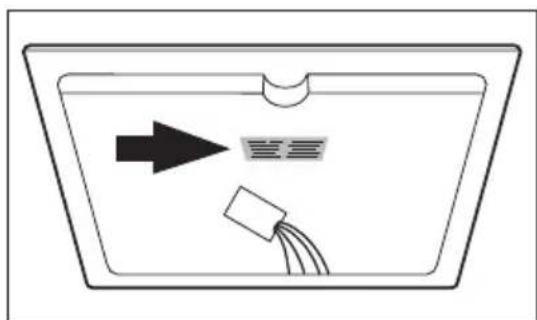
So that you have the necessary reference numbers from your appliance at hand, we recommend that you write them in here:
Model description:
PNC:
S No:
Chere cliente, cher client
Touch sensitive "Touch Control" 61
Voyants 62
Touch sensitive "Touch Control"
If a heat setting is set on this cooking zone in addition to a countdown timer, the cooking zone is switched off after the time set has elapsed.
i La désactivation d'une zone de cuisson entraine la désactivation de la fonction Minuteur.
Electrolux Home Products Belgium
Consumer services 02/363.04.44 02/363.04.00
02/363.04.60
ELECTROLUX SERVICE
Bergensesteenweg 719
1502 Lembeek
E-mail: consumer.service@electrolux.be
ELECTROLUX HOME PRODUCTS
Rue de Bitbourg. 7
L-1273 Luxembourg-Hamm
E-mail: consumer-service.luxembourg@electrolux.lu
Garantie Europeenne
NE S'APPLIQUE PAS POUR LES APPAREILS COMMERCIALISES SUR LE TERRITOIRE FRANÇAIS.