PW 2982 FA - Scale CLATRONIC - Free user manual and instructions
Find the device manual for free PW 2982 FA CLATRONIC in PDF.



| Product Type | Impedance scale with analysis of body fat and water |
| Brand | Clatronic |
| Model | PW 2982 FA |
| Maximum Weight | 150 kg |
| Weight Measurement Accuracy | 0.1 kg |
| Body Fat Measurement Range | 4 – 45% |
| Body Water Measurement Range | 37.8 – 66% |
| Number of User Memories | 8 |
| Power Supply | 1 x 9V block battery (type 6LR61, not included) |
| Estimated Battery Life | Approximately 1 year with regular use |
| Display | Digital display with segments |
| Main Functions | Weighing, analysis of body fat and water, storage of personal data (gender, height, age) |
| Programmable Height Range | 100 to 250 cm |
| Programmable Age Range | 10 to 100 years |
| Automatic Shut-off | Yes, after a few seconds |
| Care and Cleaning | Clean with a slightly damp cloth, without aggressive products. Do not immerse in water. |
| Safety | Not recommended for persons with a pacemaker. Do not use on carpet. Max weight 150 kg. |
| Warranty | 24 months from date of purchase |
| Included Accessories | Instruction manual (battery not included) |
Frequently Asked Questions - PW 2982 FA CLATRONIC
User questions about PW 2982 FA CLATRONIC
0 question about this device. Answer the ones you know or ask your own.
Ask a new question about this device
Download the instructions for your Scale in PDF format for free! Find your manual PW 2982 FA - CLATRONIC and take your electronic device back in hand. On this page are published all the documents necessary for the use of your device. PW 2982 FA by CLATRONIC.
USER MANUAL PW 2982 FA CLATRONIC
natural_image
Digital kitchen digital balance scale with four feet, showing temperature reading (no text or symbols on the device itself)PW 2982 FA
CE
DEUTSCH
NORSK
Inhalt
D-47906 Kempen/Germany
General Safety Instructions
- Read the operating instructions carefully before putting the appliance into operation and keep the instructions including the warranty, the receipt and, if possible, the box with the internal packing.
- The appliance is designed exclusively for private use and for the envisaged purpose. This appliance is not fit for commercial use. Do not use it outdoors (except if it is designed to be used outdoors). Keep it away from sources of heat, direct sunlight, humidity (never dip it into any liquid) and sharp edges. Do not use the appliance with wet hands. If the appliance is humid or wet, unplug it immediately. Do not put it in water.
- When cleaning or putting it away, switch off the appliance and always pull out the plug from the socket (pull on the plug, not the cable) if the appliance is not being used and remove the attached accessories.
- Do not operate the machine without supervision. If you should leave the workplace, always switch the machine off or remove the plug from the socket (pull the plug itself, not the lead).
- To protect children from the dangers posed by electrical appliances, make sure that the cable is hanging low and that children do not have access to the appliance.
- Check the appliance and the cable for damage on a regular basis. Do not use the appliance if it is damaged.
- Do not try to repair the appliance on your own. Always contact an authorized technician. To avoid the exposure to danger, always have a faulty cable be replaced only by the manufacturer, by our customer service or by a qualified person and with a cable of the same type.
- Use only original spare parts.
- Pay careful attention to the following "Special Safety Instructions".
Special Safety Instructions for this Machine
- The body fat scales are not suitable for the following people:
• Children under 10 and adults over 80
- Individuals with symptoms of fever, oedemas or osteoporosis
• People undergoing dialysis treatment
• Those taking cardiovascular medication
- Pregnant women
- Sportsmen and women who do more than 5 hours of intense sporting activity a day
• People with a pulse of less than 60 beats a minute
- The device can bear a maximum body weight of 150 kg! A larger weight can damage the device!
Overview of the Components
| 1 | ▲/▼ Selection arrow keys |
| 2 | ■ On/off switch |
| 3 | ► Storage button for personal values |
| 4 | Contact surfaces |
| 5 | Display |
6 Body size in cm
7 Percentage ratio
8 Age
9 Body weight in kg
10 Body fat/body water display
11 Body fat bar display
| 12 | Memory | location |
| 13 | Female | |
| 14 | Male |
Inserting the batteries (not supplied)
- Open the battery compartment on the back of the device.
- Insert one 9V E-Block = 6LR61 into the battery holder.
- Close the battery compartment again.
Note: Do not dispose of batteries in the domestic waste. Please return used batteries to the relevant collection points or the shop where they were bought.
Never throw batteries into a fire.
Attention: The batteries have a life of approx. 1 year if used regularly and are to be changed when this period elapses.
Information for body fat measurement
People who use a heart pacemaker or another type of medical implant with electronic components are advised not to use these scales, as otherwise the performance of the implant may be impaired or endangered.
The device functions correctly if your feet are bare and dry and if you are in standing position.
The basic principle of these scales is measurement of the electrical impedance of the body. The scales send a weak, imperceptible electrical signal through your body in order to determine the current values.
Under normal circumstances the signal is completely harmless! Nevertheless you should read our special safety instructions!
The measurement is known as “biometric impedance analysis” (BIA), a factor which is associated with the body fat and body water ratio and which is subject to other biological aspects (age, sex, height).
There are heavy people with a well-balanced relation between fat and muscular mass and there are apparently slender people with substantially higher body fat values. Fat is a factor that contributes to burdening the body and, in particular, the circulatory system. Te checks of both values (fat and weight) are hence a basic prerequisite for health and fi tness.
Body Fat
Body fat is an important part of the body. Fat plays an important role in your body ranging from the protection of joints with its reserve of vitamins to the regulation of the body temperature. The goal is not to reduce drastically the quantity of fat in your body, but to reach and maintain a balanced relation between the muscular mass and the fat mass.
The signifi cance of water for our health
The human organism consists of approximately 55-60% water, with this quantity varying according to age and sex.
Water has a number of tasks to fulfil in the body:
- It is a building block of our cells. This means that all cells in the body, whether these are skin, gland, muscle, brain or other cells, can only function if they receive enough water.
- It is a solvent for important substances in our organism.
- It is a means of transport for nutrients, the body's own substances and metabolic products.
Please see the table of guideline values for the reference value for your fitness profile. It shows that there is a relation between the body fat values and your age and sex. Always bear in mind that, as in the case of the water balance in your body, also the share of fat is subject to great variations. Therefore, weigh yourself always at the same hour of the day to obtain a comparable value.
The results of the analysis of the body fat and body water ratio are only reference values. They are not recommended for use for medical purposes. You should always consult your doctor if you have any questions about medical treatment or a diet to achieve your normal weight.
Technical Features
Memory presets:
| Memory Sex Height Age | ||
| 1 Male 165 cm 25 |
Memory locations: 8
Height setting: from 100 to 250 cm
Age: from 10 to 100 years
Minimum weight: 2.0 kg
Maximum weight: 150 kg
Weight measurement acc.: 0.1 kg steps
Body fat measurement range: 4 – 45 %
Body water measurement range: 37.8 – 66 %
Reference Value Table (approx. and in %)
| Age | Women | Men | Tendency | ||
| Fat | Hydration | Fat | Hydration | ||
| Up to 30 | 4,0-16,0% | 66,0-57,8% | 4,0-11,0% | 66,0-61,2% | too thin |
| 16,1-20,5% | 57,7-54,7% | 11,1-15,5% | 61,1-58,1% | thin | |
| 20,6-25,0% | 54,6-51,6% | 15,6-20,0% | 58,0-55,0% | normal | |
| 25,1-30,5% | 51,5-47,8% | 20,1-24,5% | 54,9-51,9% | high | |
| 30,6-45,0% | 47,7-37,8% | 24,6-45,0% | 51,8-37,8% | very high | |
| Over 30 | 4,0-20,0% | 66,0-55,0% | 4,0-15,0% | 66,0-58,4% | too thin |
| 20,1-25,0% | 54,9-51,6% | 15,1-19,5% | 58,3-55,3% | thin | |
| 25,1-30,0% | 51,5-48,1% | 19,6-24,0% | 55,2-52,3% | normal | |
| 30,1-35,0% | 48,0-44,7% | 24,1-28,5% | 52,2-49,2% | high | |
| 35,1-45,0% | 44,6-37,8% | 28,6-45,0% | 49,1-37,8% | very high | |
Attention: Owing to great variations in the level of body fat it is difficult to obtain a reference value. On average for adult men the best time for the measurement is between 6 and 8 o'clock p.m. because the level of body fat is very constant during this period!
Putting into service
Simple Weighing Function
Position the balance on a hard, fl at surface (avoid carpets). Uneven floors lead to imprecise readings.
- Switch on the scales by pressing lightly with your foot or toes on the glass surface.
Note: "88888" appears in the display.
- After a few seconds "0.0" appears in the display (5). Now stand with both feet on the contact surfaces (4) of the scales. Spread your weight out evenly and wait while the scales calculate your weight.
- Your weight is shown on the display (5). After a few seconds the device shuts off automatically!
Programming your personal data
Attention: Carry out the following operations one after the other and within a few seconds or the device will automatically interrupt the programming mode!
- Press the on switch ■ to switch on the device. For a short time all segments appear in the display (5); then the „memory location“ display (12) fl ashes.
- Select a memory location with the ▲/▼ arrow keys.
- Press the switch-on button ■ again to reach the programming mode.
- A female (13) or male (14) symbol flashes in the display. Use the ▲/▼ arrow keys to select a setting.
- Press the switch-on button ■ again to reach the "height" setting. Use the arrow keys ▲/▼ to select a value between 100 and 250 cm.
- Press the settings button ■ again to reach the "age" setting. Use the arrow keys ▲/▼ to select a value between 10 and 100 years.
- Press the switch-on button ■ again to return to the "memory location" display. Here you can choose between two alternatives:
a. Press the switch-on button ■ again to review all the settings and change if necessary.
b. Press the ▶ storage button to reach the body fat measurement mode.
The memory location and the height that has been set appear in the display for a few seconds before the display changes to "0.0". See also section 4 "Determining your Weight, Body Fat and Body Water Ratio".
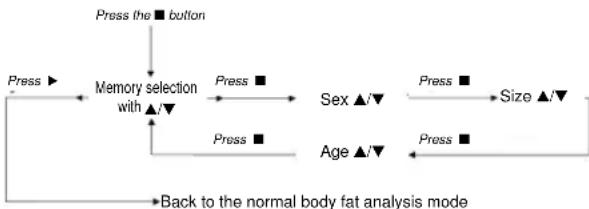
The following function diagram will help you to understand this more easily:
flowchart
graph TD
    A["Press the ■ button"] --> B["Memory selection with ▲/▼"]
    B --> C["Sex ▲/▼"]
    C --> D["Size ▲/▼"]
    D --> E["Back to the normal body fat analysis mode"]
    B --> F["Press ■"]
    B --> G["Press ■"]
    B --> H["Age ▲/▼"]
    H --> I["Press ■"]
Your personal values are now saved in the selected memory slot.
A total of 8 memory slots are available. It is therefore possible to store not only your own personal values but also those of your family members in seven additional memory locations.
Determining your Weight, Body Fat and Body Water Ratio
First save your personal data in a memory slot.
Note: The measurement can only be performed if you are barefoot. If necessary, wipe the contact surfaces to improve conduction of the electricity. Place each of your bare feet on 2 of the 4 contact surfaces.
- Press the switch-on button ■ to switch the device on. All segments appear briefly in the display (5); then the "memory location" display (12) fl ashes.
- Use the ▲/▼ arrow keys to select a memory location.
- Press the storage button ▶ to enter the body fat measurement mode.
- The memory location and the height that has been set appear in the display for a few seconds before the display changes to "0.0".
-
Place both your feet on the contact surfaces (4) of the scales.
-
At first your weight is shown in the display.
- Within a few seconds the scales calculate your body fat and body water ratio automatically.
- The display then shows your body fat percentage ("BF" symbol), followed by the body water percentage ("BW" symbol).
- Then the LCD display alternates fi ve times between the values for the body fat and the body water percentage before switching off automatically.
Display and Error Messages
General
If an error message (Err) appears in the display please wait until the scales switch off. Then switch them on again to continue using them.
For a complete reset remove the battery for a moment and then reconnect it.
Messages
| Switching on | All segments light up simultaneously. This is a check that the displays are working correctly. | |
| „----“ | The scales are not positioned correctly or the weight to be measured is too low. | Correct operation is not possible. Place the scales on a fl at and solid surface. |
| „Err“ | The scales are not positioned correctly or overloaded. | Place the scales on a fl at and solid surface. |
| Is the weight being measured greater than 150kg? | ||
| „LO“ | The battery charge is too low. | |
| „Err-h“ | The calculated body fat % ratio is above the upper limit of the measurement range. | |
| „Err-l“ | The calculated body fat % ratio is below the lower limit of the measurement range. | |
Usage and care tips
- Weigh yourself without any clothes or shoes on before meals and always at the same hour of the day.
• The balance rounds off weight to the closest 100 g. - If you weigh yourself twice and two different values are given, it means that your weight is comprised between both values.
- Do not immerse the balance in water: the electronic components can be damaged.
- Remove the batterie if the balance is not to be used for a long period of time.
- Handle the balance with care, as it is a precise measuring instrument. Do not drop it or jump on it.
• Absolutely no need for maintenance. - Do not load the appliance with more than 150 kg to avoid damaging the device.
Cleaning
- Clean the device with a slightly moist cloth. Make sure that no humidity or waters seeps into the device!
- Do not use abrasive detergents! These can damage the casing of the device!
- Use a commercially sold detergent or soap for cleaning.
- Dry the device well after cleaning with a dry and soft cloth.
This device has been tested according to all relevant current CE guidelines, such as electromagnetic compatibility and low voltage directives, and has been constructed in accordance with the latest safety regulations.
Subject to technical changes without prior notice!
Guarantee
The device supplied by our Company is covered by a 24 month guarantee starting on the date of purchase (receipt).
During the life of the guarantee any fault of the device or its accessories *) ascribable to material or manufacturing defects will be eliminated free of charge by repairing or, at our discretion, by replacing it. The guarantee services do not entail an extension of the life of the guarantee nor do they give rise to any right to a new guarantee!
Proof of the guarantee is provided by the proof of purchase. Without proof of purchase no free replacement or repair will be carried out.
If you wish to make a claim under the guarantee please return the entire machine in the original packaging to your dealer together with the receipt.
*) Damage to accessories does not mean automatic free replacement of the whole machine. In such cases please contact our hotline. Broken glass or breakage of plastic parts are always subject to a charge.
Defects to consumables or parts subject to wearing (e.g. motor pistons, kneading blades, drive shafts, spare remote control, spare toothbrushes, saw blades, etc.) as well as cleaning, maintenance or the replacement of said parts are not covered by the guarantee and hence are to be paid!
The guarantee lapses in case of unauthorized tampering.
After the expiry of the guarantee
After the expiry of the guarantee repairs can be carried by the competent dealer or repair service against the payment of the ensuing costs.