XDC 5760 MP3 - Car radio Trevi - Free user manual and instructions
Find the device manual for free XDC 5760 MP3 Trevi in PDF.



| Product type | Car radio |
| Brand | Trevi |
| Model | XDC 5760 MP3 |
| Power supply | 12 V DC |
| Maximum power consumption | 10 A |
| Maximum output power | 40 W × 4 channels |
| Speaker impedance | 4 Ω per channel |
| Radio frequency bands | FM: 87.5 – 108 MHz; MW: 522 – 1620 kHz |
| Playback formats | Audio CD, CD-R, CD-RW, MP3 |
| Audio sources | CD, USB, SD/MMC card, AUX input (3.5 mm jack) |
| Radio functions | RDS (AF, TA, PTY), station presets (6 per band), auto search |
| Audio settings | Volume, bass, treble, balance, fader, Loudness, preset equalizer (User, Flat, Classic, Rock, Pop) |
| Detachable faceplate | Yes, with REL button; store in the provided case |
| Contact cleaning | Cotton swab lightly moistened with alcohol; do not bend the contacts |
| Precautions | Do not expose the faceplate to sunlight or heat sources; do not drop it; do not use solvents |
| Reset | RESET button (20) |
| Dimensions (approx.) | Standard 1 DIN (178 × 50 mm, variable depth) |
| Weight (approx.) | Approximately 1.5 kg (estimated) |
| Documentation | User manual downloadable in PDF format |
Frequently Asked Questions - XDC 5760 MP3 Trevi
User questions about XDC 5760 MP3 Trevi
0 question about this device. Answer the ones you know or ask your own.
Ask a new question about this device
Download the instructions for your Car radio in PDF format for free! Find your manual XDC 5760 MP3 - Trevi and take your electronic device back in hand. On this page are published all the documents necessary for the use of your device. XDC 5760 MP3 by Trevi.
USER MANUAL XDC 5760 MP3 Trevi
PAIOΦΩNO, ANAIIAPATΩΓEAΩ RDS
OdyieC xpoewc kai oovdeon


Manuale d'uso e collegamento Instruction manual

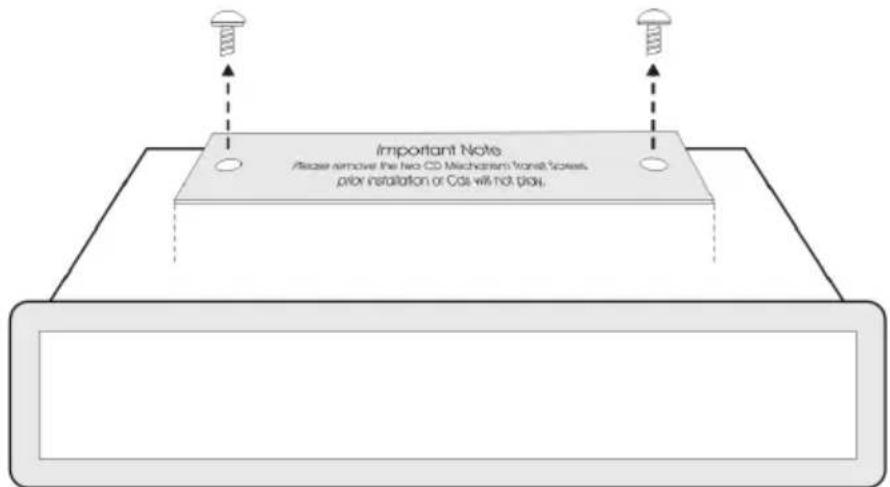
Please remove the two CD Mechanism Trans Screws prior to installation or CD's will not play.
CONNECTIONI - WIRES CONNECTION
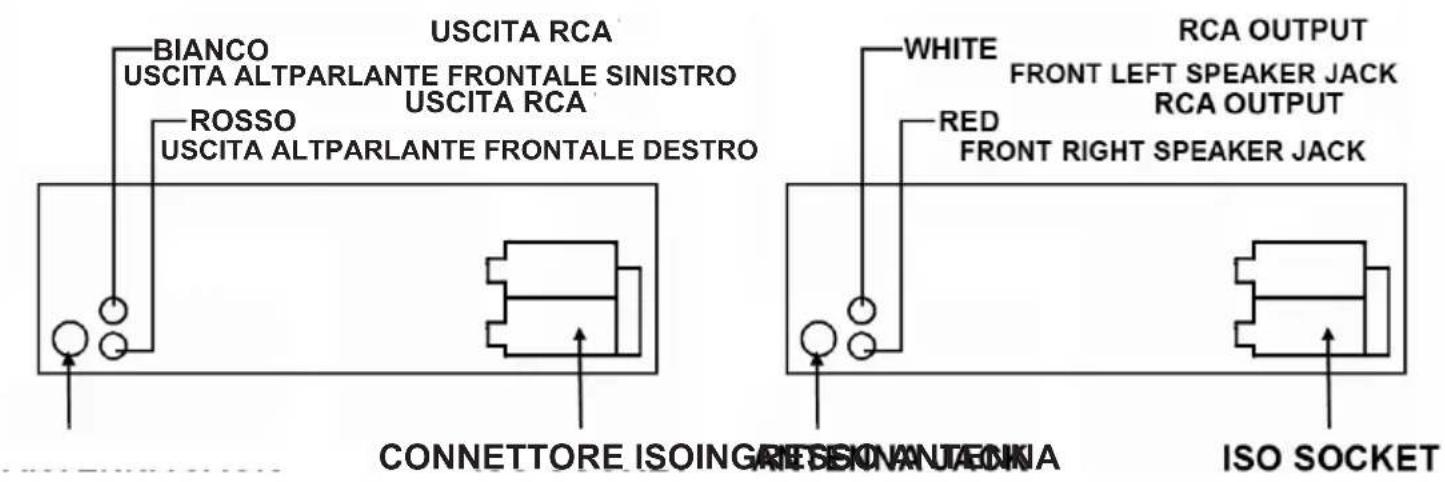
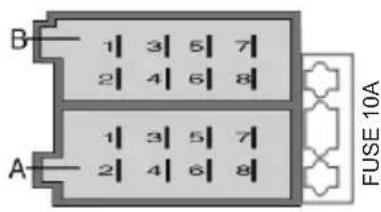
A ALIMENTAZIONE
- + Rear right
-
- Rear right
-
- Front right
-
- Front right
-
- Front left
-
- Front left
-
- Rear left
-
- Rear left
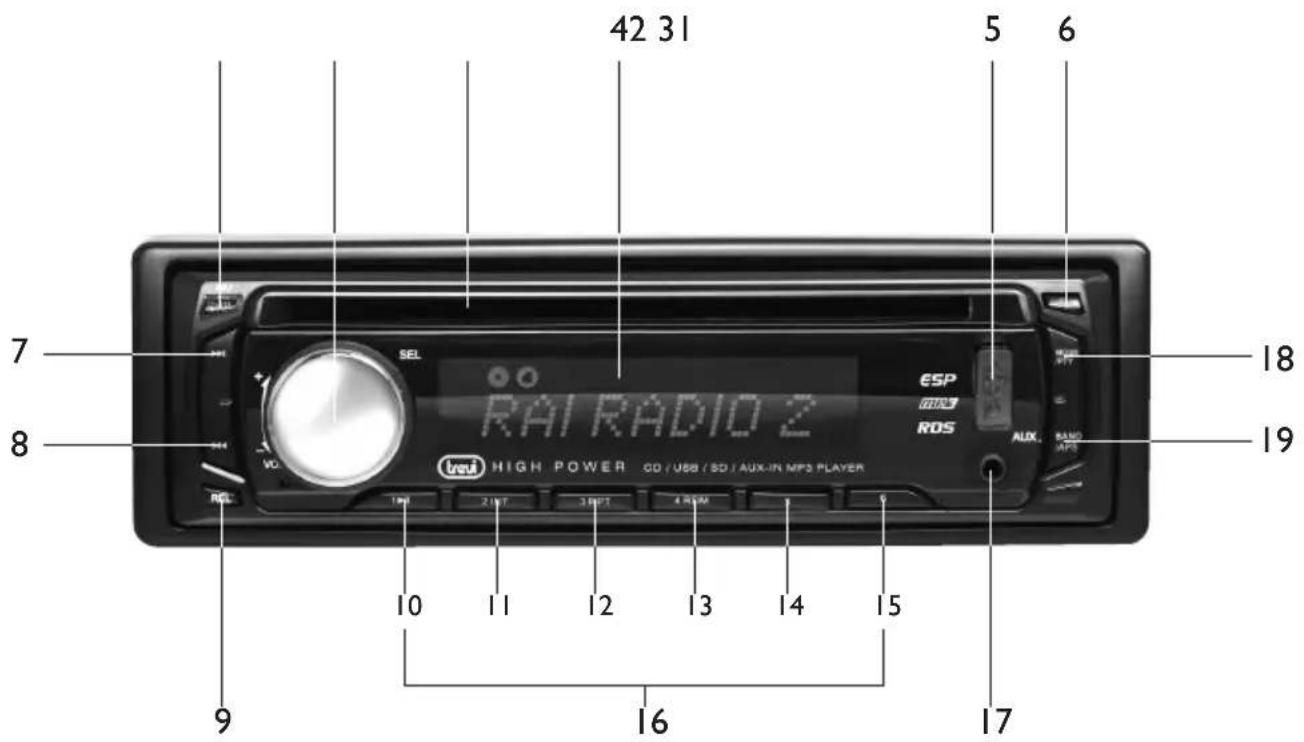
USO DEL FRONTALINO ESTRABILE
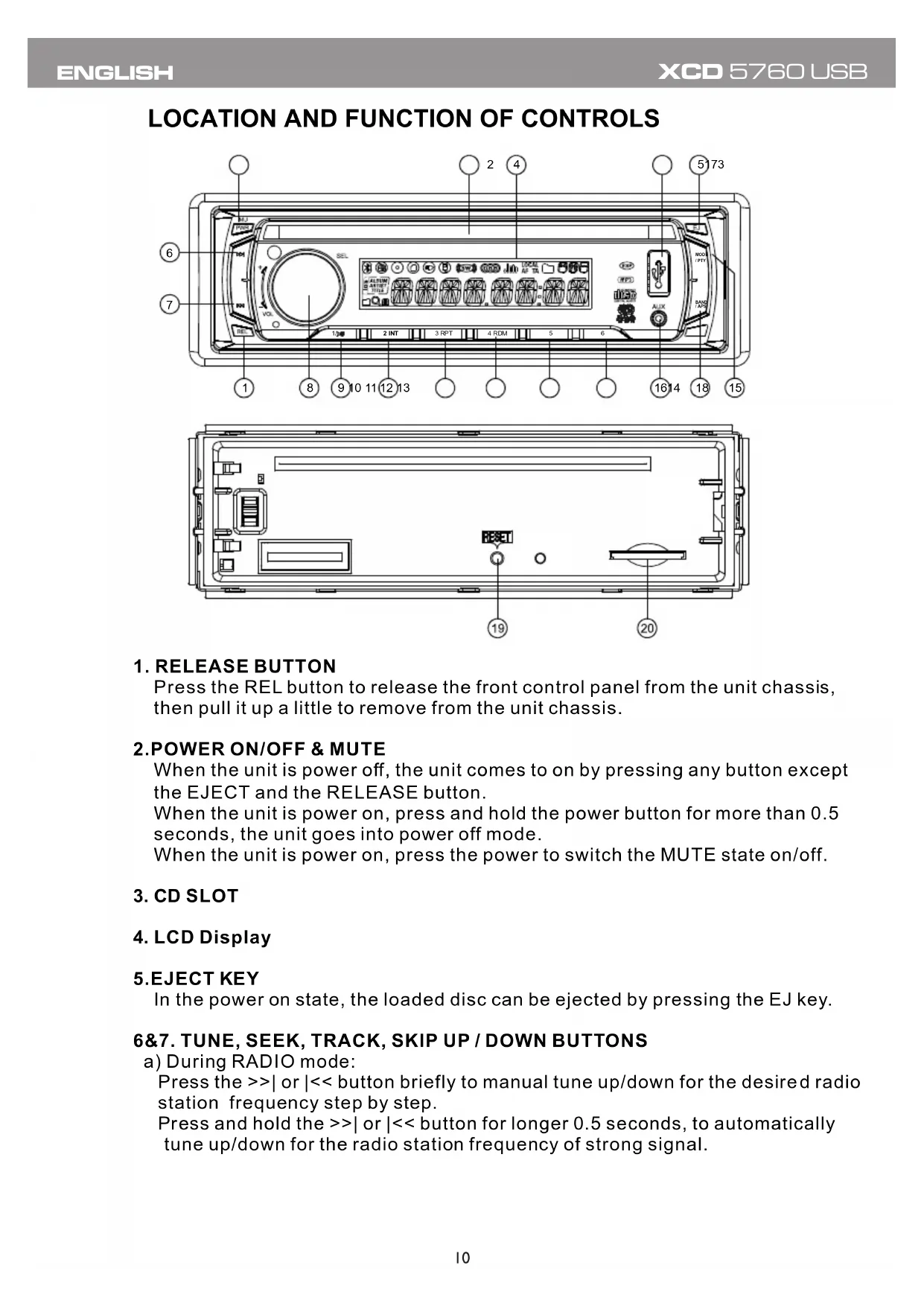
Press the REL button to release the front control panel from the unit chassis, then pull it up a little to remove from the unit chassis.
2.POwER ON/OFF & MUTE
When the unit is power off, the unit comes to on by pressing any button except the EJECT and the RELEASE button.
When the unit is power on, press and hold the power button for more than 0.5 seconds, the unit goes into power off mode.
When the unit is power on, press the power to switch the MUTE state on/off.
3. CD SLOT
4. LCD Display
5.EJECT KEY
In the power on state, the loaded disc can be ejected by pressing the EJ key.
6&7. TUNE, SEEK, TRACK, SKIP UP / DOWN BUTTONS
a) During RADIO mode:
Press the >>| or |<< button briefly to manual tune up/down for the desired radio station frequency step by step.
Press and hold the >>| or | << button for longer 0.5 seconds, to automatically tune up/down for the radio station frequency of strong signal.
b) During disc, USB playback mode:
Press the >>| button briefly to play next track.
Press the |<< button briefly to play the current track from the beginning of it if the playing time is more than 2 seconds.
Press the |<< button briefly to play the previous track if the playing time is less than 2 seconds.
Press the >>| or | button and hold to skip forwards or backwards, release to resume normal playback.
8.SEL(MENU) BUTTON AND VOLUME UP (+)/DN (-) KONB
a) Press the SEL button briefly, it is activated as selecting each mode of E. VOL.
-> VOLUME ->BASS ->TREBLE -> BALANCE -> FADER ->
When selecting a desired audio mode, rotate the VOL knob to adjust the audio effect.
In each mode, the waiting time is about 5 seconds, and the time waiting time is over, it returns to the last display mode of tuner or CD mode.
The control mode of E.VOL is operated with following numeric display.
-VOL: (MIN)00, 01, ..., 46, 47(MAX).
-BASS/TRE: -07, -06,..., 00,...+06, +07
-BAL:0LR9,1LR9,...,9LR9,...,9LR1,9LR0
-FAD:0FR9,1FR9,...,9FR9,...,9FR1,9FR0
b) When pressed longer 2 seconds, it show the time then it is activated as cyclical mode of following functions for user's selection.
->TA(ON/OFF) -> AF(ON/OFF) -> TA (ALARM/SEEK) ->PI (SOUND/MUTE)
->RETUNE (LONG/SHORT) ->MASK(DPI/ALL) ->BEEP (ON/OFF)
->USER SET(FLAT/CLASSIC/ROCK/POP) ->VOL(LAST/DEFA)
-> EUROPE/AMERICA->MONO/STEREO(only for FM mode)
->LOUD(ON/OFF) ->LOCAL/DX(only for FM mode) ->CLK(ON/OFF)
->CLK(12/24)mode->CLK 00'00 (you can adjust HOUR or MINUTE by rotate the VOL knob).
After selecting the desired mode, rotate the VOL knob to select one setup item of the desired mode.
1) TA [TRAFFIC ANNOUNCEMENT]
When TA mode is on (TA is displayed on LCD), it will begin to seek TA station and TA SEEK will be displayed on LCD for a while.
When traffic announcement is transmitted:
(1) If the unit is in USB or disc mode, it will switch to radio mode temporarily. Temporarily switch over to an EON linked station when EON detects a traffic announcement on that other program, and TP will be displayed on LCD
(2) If volume level is below 20, volume level is raised to 20, and returns to its previous mode and volume level when the traffic announcement is over.
(3)If volume is adjusted during traffic announcement, only the traffic announcement volume is valid.
- TA interruption function:
The current traffic announcement is cancelled by pressing this key. But the TA mode will not be off.
- When TA is on, SEEK, (SCAN), AUTO MEMORY function can be received or saved only when traffic program identification code has been received.
2) AF [ALTERNATIVE FREQUENCIES]
When AF switching mode is selected and the state of AF switching mode is displayed by AF segment in display.
Segment off: AF switching mode off.
Segment on: AF switching mode on, and has RDS information.
Segment flashing: AF switching mode on, but RDS information is not received yet.
When AF switching mode is selected, the radio checks the signal strength of AF all the time. The interval of checking time of each AFs depends on the signal strength of current station, from a few minute for strong station to a few seconds for weak station. Every time that new AF is stronger than current station, it switches over to that frequency for very short time, and NEW FREQUENCY is displayed for 1-2 seconds. Because the mute time of AF switching or checking time is very short, it is almost inaudible in case of normal program.
During FM mode, when AF is on, SEEK, (SCAN), AUTO-MEMORY function can only receive and save RDS program.
3) TA SEEK/TAALARM:
TA SEEK mode: when newly tuned station does not receive TP information for 5 seconds, the radio retunes to next station which has a different PI to the last station, but has the TP information.
When TP information gets lost at the current station for retune time which is set by RETUNE SHORT(60 seconds) or RETUNE LONG(90 seconds), the radio starts to retune to next same PI station. When same PI station does not receive in 1 cyclic search, the radio retunes to next station with TP information. TA ALARM mode: when this mode is selected, any automatic retune mode is not activated. Only double beep sound(ALARM) will be heard.
When newly tuned station does not have TP information for 5 seconds, beeps are sounded.
When TP information gets lost at the current station for retune time, the beep sound will be heard.
When newly tuned station has no RDS signal, PI SEEK is suppressed.
4) PI SOUND/PI MUTE:
PI SOUND mode: if a car cruises between buildings that could cause reflecting signals, a phenomenon may occur, due to different PI codes being received from the same AF source. When different PI sounds (DIP) are heard occasionally, this will happen for less than 1 second.
PI MUTE mode: under above same situation, a mute sound will be heard for less than 1 second.
5) RETUNE L/RETUNE S:
The initial time of automatic TA search or PI SEARCH mode is selected. When PI information is not received for retune interval, the radio starts to retune to next same PI station.
When same PI station does not receive 1 cyclic search, the radio goes to last station and waits for 4-5 minutes until PI code is received.
RETUNE L mode: selected as 90 seconds.
RETUNE S mode: selected as 60 seconds.
MASK DPI mode: masks only the AF which has different PI.
MASK ALL mode: masks the AF which has different PI and NO RDS signal with high field strength.
7)BEEP ON/BEEP OFF
BEEP ON mode: The beep is generated when any key is pressed.
BEEP OFF mode: The beep sound is disabled..
8) VOL LAST/VOL DEFA
VOL LAST: The radio switches on at the actual volume it had when it was last switched off.
VOL DEFA: After pressing SEL button, AVOL will be displayed. Then you can pre-select a constant switch-on volume by using the VOL knob.
9)CLK ON/OFF
CLK ON: Clock will always show on the display when power off.
CLK OFF: Clock will disappear on the display when power off.
9-14. PRESET STATION MEMORY AND TOP/>|, INT, RPT, RDM BUTTONS
a) During radio mode:
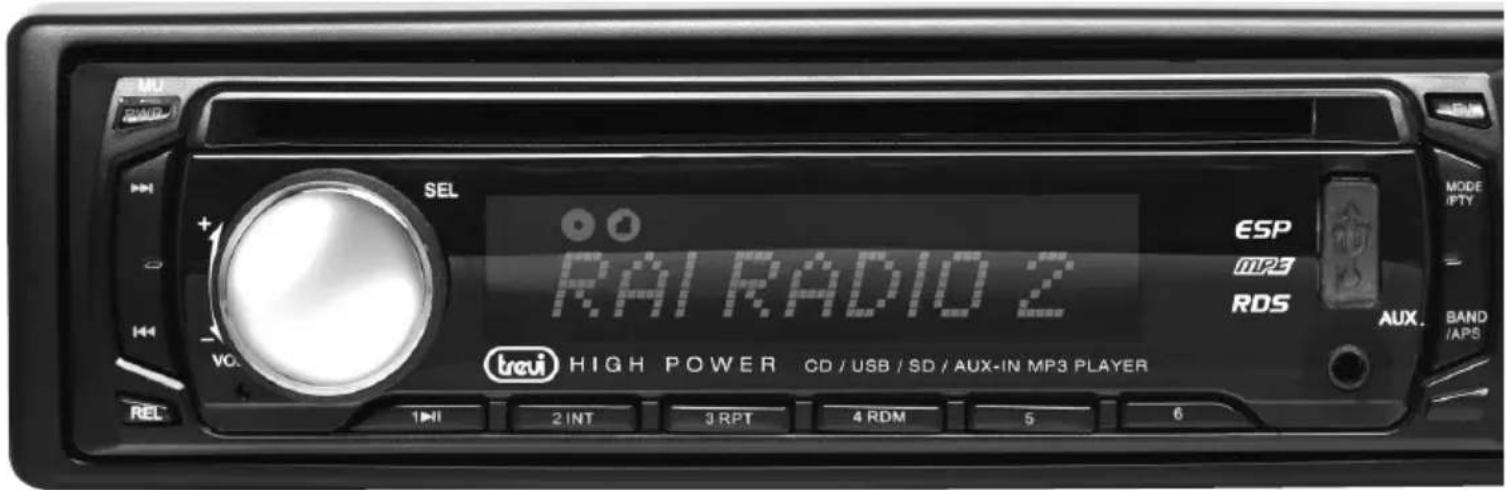
Go to any preset station by pressing one of the 6 preset station buttons (1-6).
If one of these buttons is pressed for more than 2 seconds, the station currently being listened to will be memorized into the selected preset button.
b) During disc, MMC/SD or USB mode:
1) Press the TOP/ >|| button briefly to interrupt the playback of the disc, MMC/SD or USB. Press again to resume normal playback of the disc, MMC/SD or USB. Press the TOP/ >|| button and hold for approximately 0.5 seconds to play the first track of the disc, MMC/SD or USB.
2) Press the INT button to sample the first 10 seconds part of each track, and the INT ON will be visible on the LCD display.
In the process of INT, pressINT button again to stop sampling and to continue playing the current track, and the LCD will display INT OFF.
3) Press the RPT button once to play the current track repeatedly, and the RPT ONE will be visible on the LCD display.
During MP3/WMA disc, MMC/SD or USB mode, press the RPT button twice continuously to play the current folder repeatedly, and the RPT ABM will be visible on the LCD display.
In the process of RPT, press RPT button again to stop playing repeatedly mode and the LCD will display RPT OFF.
4) Press the RDM button to play all tracks on disc in random order, and the RDM ON will be visible on the LCD display.
In the process of RDM, press RDM button again to stop playing in random order and the LCD will display RDM OFF.
5) Press the 5 and 6 button to move up and down10 tracks at a time.
When the remained total tracks is lack of 10, the both buttons are inactively. Press and hold the 5 and 6 button to select next or previous folder to be play.
15. MODE AND PTY (PROGRAM TYPE) BUTTON
Press the MODE button to change among tuner (radio), disc (when a disc is loaded), USB (when an USB stick is inserted) and AUX mode.
In Radio mode, Press MODE/PTY button longer to select one of the following mode: POP M- - NEWS
While selecting PTY TYPE, its selection is implemented by preset buttons as described in preset key. (press one of the 6 preset buttons shortly and repeatedly to select the PTY TYPE in the preset button)
When POP M or NEWS is on, the previous PTY program and PTY word is displayed on LCD.
If there are no keys entered for 2 seconds, previously selected PTY is searched.
During 1 loop, if desired PTY is not found, NO PTY is flashed, then return to previous normal radio and PTY icon goes off.
16.AUX INPUT JACK
Press the mode button to select auxiliary input playing mode. Then you can connect any matched external audio device to this socket. Use the volume knob to adjust volume.
17.USB SOCKET
In order to play the file in the USB stick, turn over the plastic cover cap then insert the USB stick into the USB socket. The system will change into the USB mode automatically, and then play the first file in the USB.
18. BAND/APS BUTTON
During radio mode:
1) Press this button briefly to select the radio broadcasting band you would like to hear. The AM/FM band is toggled cyclically through the tuning bands: ->FM 1-> FM 2-> FM 3-> MW 1->MW 2->.
2) Press and hold for more than 1 second, the radio searches from the current frequency and checks the signal strength level until 6 station are found.
And then the 6 stations frequency are preset to the corresponding preset memory numbered bank. The auto-storage operation is implemented in the each selected band. When the auto-storage operation is finished, the radio execute the Preset Scan.
During MP3 file in disc, or USB mode:
Press this button to turn to TRACK SEARCH mode, the LCD will display TRK 000 and flash the biggest digit 0 that the USB stick contain. (if the number of tracks is less than 100 and more than 9, it will be TRK 00)
Then rotate the VOL knob to select the number of the flashing digit from 0 9 . Then press SEL button to confirm the number and flash next smaller digit 0. With the same means, select the number of the flashing digit. After finishing selecting the number of all flashing digit, press SEL button to play the track of the selected serial number.
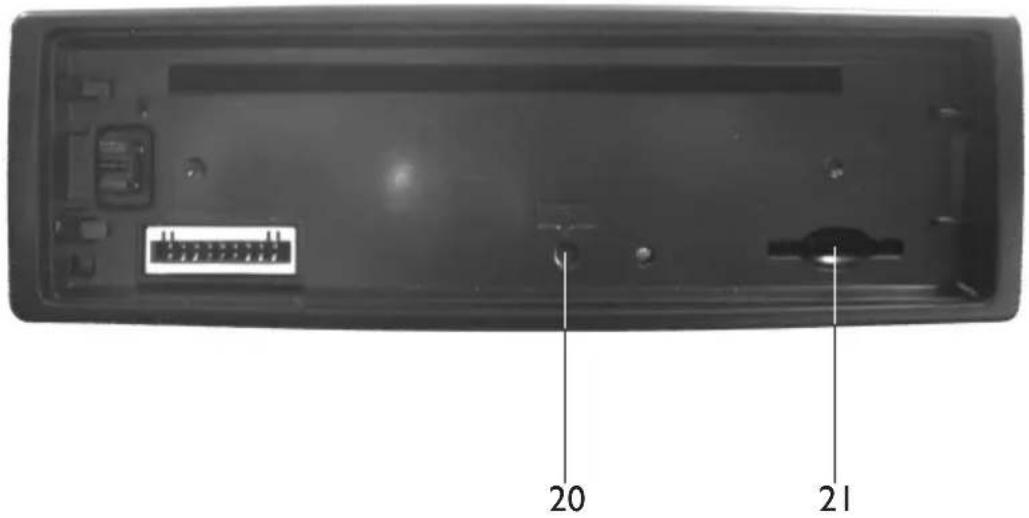
19. RESET BUTTON
Before operating the unit for the first time, or after replacing the car battery or changing the connections. You must reset the unit.
Press this button with a cuspidal object. This operation will erase the clock setting and some stored contents.
20. MMC/SD CARD SLOT
When you need to play the file in the MMC/SD card, insert the MMC/SD card into the MMC/SD card slot. The system will change into the MMC/SD mode automatically, and then play the first file in the MMC/SD.
Note:
When MMC/SD card and USB stick are both inserted into their slot or socket, the system will change into the playback mode of the latter one.
INSTALLATION METHOD
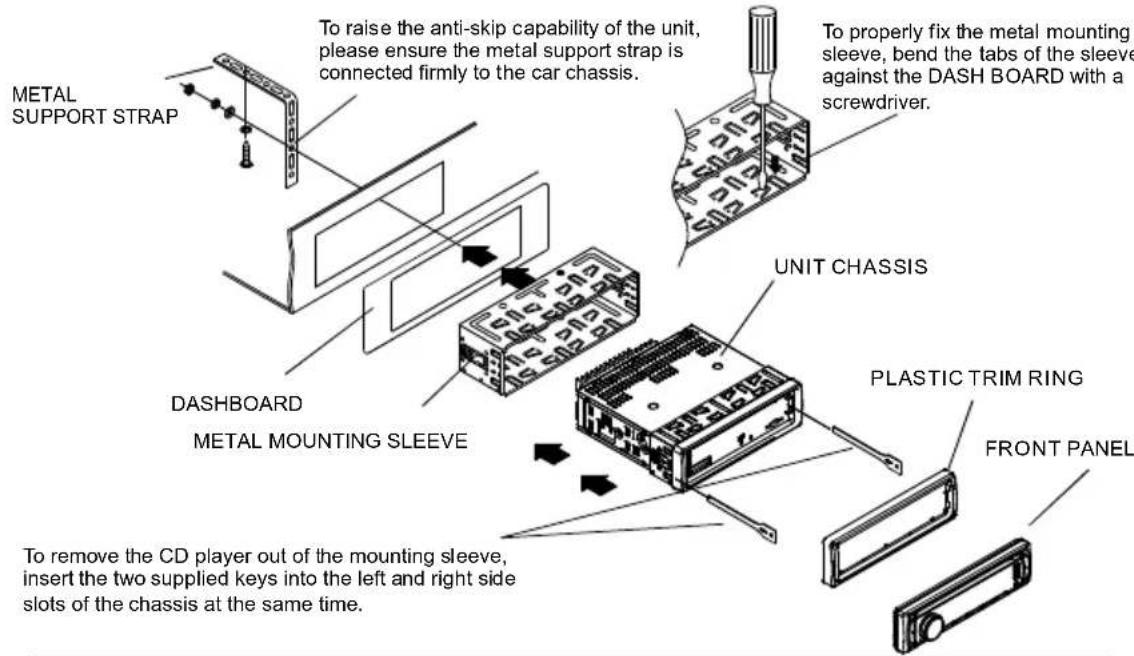
This is an anti-theft installation method.
The main unit wears a METAL MOUNTING SLEEVE.
Please connect the wiring, eg, the Power supply, the Speakers and the Antenna according to the requirements of this Instruction Manual, then install the metal mounting sleeve into the car as per the diagram illustrated below.
NOTE
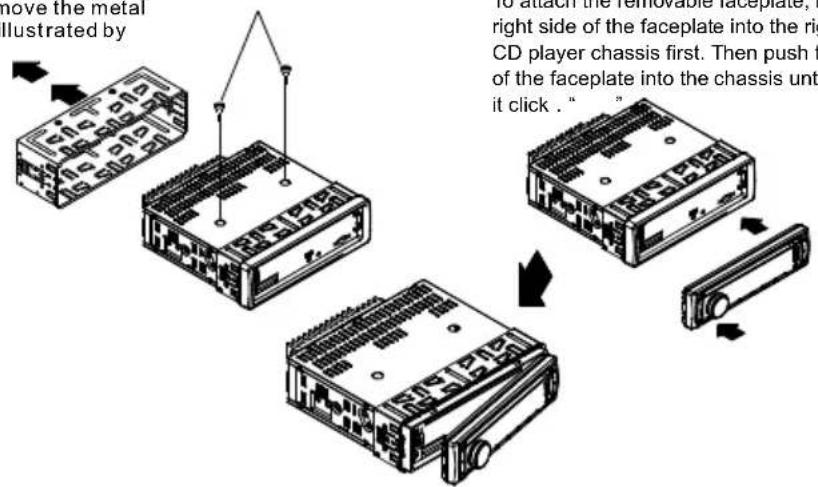
Before installing and operating the CD player, remove the metal mounting sleeve illustrated by the arrows.
Remove the two screws that protect the CD player during transportation before operating the player.
To attach the removable faceplate, insert the right side of the faceplate into the right of the CD player chassis first. Then push the left side of the faceplate into the chassis until you hear it click .
CARE FOR USING CD'S:
About CD-R/CD-R/W discs:
In addition to commercially-recorded audio CD's, this unit can play CD-R and CD-R/W discs. In some cases, particularly when recorded on older CD burners, some CD-R and CD-R/W discs may not play. Also, whenever you are recording a CD for playback in this receiver, it is recommended that you record at 24x or slower speed for CD-R and 4x or slower for CD-R/W to achieve higher signal quality and better playback performance.
- To keep the disc clean:
Do not attach any sticker or adhesive tape on the disc.
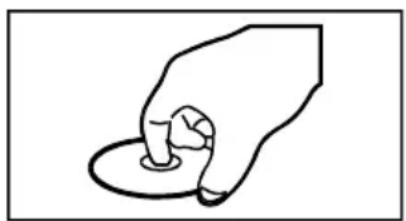
Handle the disc by its edge to keep the disc clean and do not touch the surface.
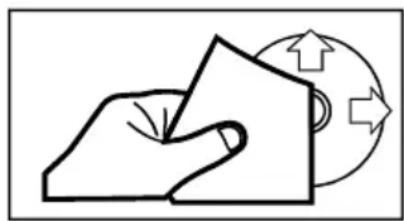
Before playing a disc, wipe it off with a clean, dust-free cleaning cloth.
Wipe the disc outwards from the disc center.
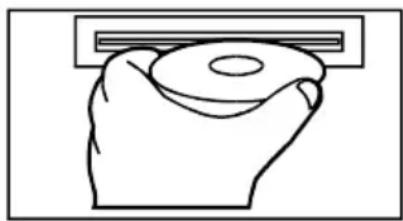
- When one has already been inserted. Doing so may damage the unit. Insert a disc with labeled surface up, or it will damage the unit.
- Do not expose the disc to direct sunlight or nearby heat sources such as heating vents, caliduct which can cause the disc to warp.
Do not leave disc in a car if it is parked in direct sunlight as that will lead to a considerable rise in the temperature inside the car.
- Do not use any secondhand or rented disc, usually, there is glue on the surface of those discs, it will stop the unit working and damage it.
- Always store the disc in its case for protection. Scratched up discs will produce poor sound performance and cause CD player to skip.
- In raining day or wet area, the moisture may form on the disc or the optical parts, the playback may not be possible. If moisture forms on the disc, wipe it off with a soft cloth.
If moisture forms on the optical parts of the unit, allow the unit to sit for about one hour with power on.
- Do not use solvents such as benzine or thinners. Commercially available cleaners or anti-static spray will damage the unit.
TROUBLE SHOOTING
Before using the check list please make all the connections first. If you still have questions after going through the checklist, please consult your local customer service representative.
| Common Symptoms | Cause | Solution |
| There is no power. | The car ignition is switched off. | If the power supply is properly connected to the car accessory, switch the ignition key to "ON" or "ACC". |
| The fuse has blown. | Replace another fuse according to the wiring diagram. | |
| The CDs cannot be loaded. | Presence of CD disc inside the player | Remove the disc in the player then put a new upward |
| The CDs are loaded only halfway into the CD tray. | The transport screws have not been removed. | Remove the transport screws before using. |
| The device does not work correctly (EJECT, LOAD, PLAY) | Inserting the disc in upside down | Insert the compact disc with the label facing upward |
| The surface of CD is extremely dirty or it is damaged. | Clean the CD or try another CD, if this works correctly, the first CD is properly damaged. | |
| Temperature inside the car is too high. | Cool off until the ambient temperature returns to normal | |
| There is no sound. | The volume control is set too low. | Turn up the volume properly. |
| The device has not been correctly connected. | Check the power and earth connection according to the wiring diagram. | |
| The operation keys do not work | 1.The built-in microcomputer is not operating properly due to noise2.Front panel is not properly fix into its place | 1. Switch the device off and on again. Or press the RESET button to resume the program. 2. Reinstall the front panel |
| The sound of the CD player skips | The installation angle is more than 30 degrees | Adjust the installation angle to less than 30 degrees |
| The surface of the road is uneven. | Wait until the road becomes smoother before playing the CD. | |
| The surface of CD is extremely dirty or it is damaged. | Clean the CD or try another CD, if this works correctly, the first CD is properly damaged. | |
| No radio reception. | The antenna cable is not connected. | Insert the antenna cable firmly into the antenna socket of the device. |
| In automatic search mode the radio does not stop at a transmitting station. | The transmission signals are too weak. | Tune in to a radio station manually. |
WIRES CONNECTION
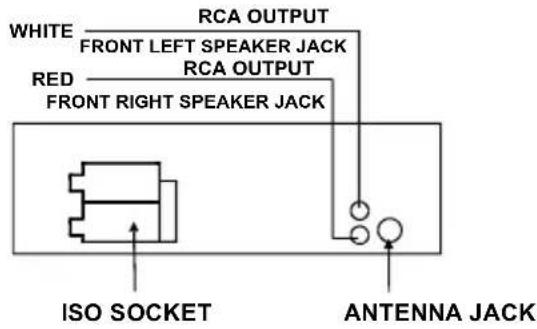
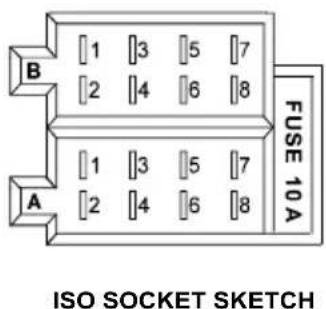
CONNECTOR A
- Memory +12V
- Auto Antenna Output
- 7.12V (To Ignition Key)
- GROUND
CONNECTOR B
- Rear Right Speaker (+)
- Rear Right Speaker (-)
- Front Right Speaker (+)
- Front Right Speaker (-)
- Front Left Speaker (+)
- Front Left Speaker (-)
- Rear Left Speaker (+)
- Rear Left Speaker (-)
SPECIFICATION
GENERAL
Supply Voltage
Current Consumption
Power Output
Number of channels
Unit Dimensions
DC 12 V. Negative Ground
Max.10A
45Watts X 4ch
2 STEREO channels.
178[W] X 165[D] X 50[H] mm.
FM SECTION
Frequency range
Effective sensitivity
I.F Frequency
87.5MHz -108MHz
3uV.
10.7MHz.
AM SECTION
Frequency range
Effective sensitivity
I.F Frequency
522KHz - 1620KHz
40dB.
450KHz
RCA LINE OUT
Output
1000mV @ CD MAX.
CD PLAYER
System
Suitable CDs
Frequency characteristics
S/N Ratio to CD
MP3 Audio System.
MP3, CD, CD-R, CD-RW Disc
20Hz-100Hz≤5dB
10KHz - 20KHz 5dB.
50dB [1KHz]
EMPLOI DE LA FAÇADE AMOVIBLE
Rapport S/R CD: 50dB [1KHz]
REMARQUE
PRECAUTIONS FOR CORRECT DISPOSAL OF THE PRODUCT
The symbol shown on the equipment indicates that waste must be disposed of in "separate collection" and so the product must not be disposed of together with urban waste.
The user must take the product to special "separate waste collection centres" provided by local government, or deliver it to the retailer against the purchase of a new product.
Separate collection of waste and subsequent treatment, recycling and disposal operations promotes the production of equipment with recycled materials and limits negative effects on the environment and on health caused by improper handling of waste.
Illegal disposal of the product leads to the enforcement of administrative penalties.
RECOMMANDATIONS POUR L'ELIMINATION CORRECTE DU PRODUIT


- CONNECTIONI - WIRES CONNECTION
- A ALIMENTAZIONE
- USO DEL FRONTALINO ESTRABILE
- 2.POwER ON/OFF & MUTE
- CD SLOT
- LCD Display
- 5.EJECT KEY
- 6&7. TUNE, SEEK, TRACK, SKIP UP / DOWN BUTTONS
- 8.SEL(MENU) BUTTON AND VOLUME UP (+)/DN (-) KONB
- 1) TA [TRAFFIC ANNOUNCEMENT]
- 2) AF [ALTERNATIVE FREQUENCIES]
- 3) TA SEEK/TAALARM:
- 4) PI SOUND/PI MUTE:
- 5) RETUNE L/RETUNE S:
- 9-14. PRESET STATION MEMORY AND TOP/>|, INT, RPT, RDM BUTTONS
- MODE AND PTY (PROGRAM TYPE) BUTTON
- 16.AUX INPUT JACK
- 17.USB SOCKET
- BAND/APS BUTTON
- RESET BUTTON
- MMC/SD CARD SLOT
- INSTALLATION METHOD
- NOTE
- CARE FOR USING CD'S:
- About CD-R/CD-R/W discs:
- TROUBLE SHOOTING
- WIRES CONNECTION
- CONNECTOR A
- CONNECTOR B
- SPECIFICATION
- EMPLOI DE LA FAÇADE AMOVIBLE
- REMARQUE
- PRECAUTIONS FOR CORRECT DISPOSAL OF THE PRODUCT
- RECOMMANDATIONS POUR L'ELIMINATION CORRECTE DU PRODUIT
Brand : Trevi
Model : XDC 5760 MP3
Category : Car radio