C60 - Smartphone YEZZ - Free user manual and instructions
Find the device manual for free C60 YEZZ in PDF.



| Product Type | Smartphone |
| Brand | YEZZ |
| Model | C60 |
| Dimensions (approx.) | Approximately 120 x 50 x 12 mm (estimation) |
| Weight (approx.) | Approximately 100 g (estimation) |
| Power supply | Rechargeable lithium-ion battery, 5V AC adapter, USB cable |
| Main features | Dual SIM, camera, FM radio, Bluetooth, flashlight, SMS messaging, phonebook, web browsing |
| Screen type | Color TFT screen (not specified, estimation) |
| Camera | Built-in photo sensor, resolution not specified (estimated VGA/1.3 MP) |
| Bluetooth | Version not specified, range about 10 m |
| FM Radio | Yes, requires connection of earphone kit |
| Connectivity | GSM 900/1800, WCDMA 900/2100 (according to SAR) |
| SIM cards | Dual SIM (mini-SIM) |
| Memory | microSD memory card (optional) |
| Care and cleaning | Use a clean, soft cloth, do not use chemicals or detergents |
| Safety | Do not expose to liquids, extreme temperatures, shocks; do not disassemble; keep away from pacemakers |
| Included accessories | Battery, travel adapter, USB cable, headset |
| Repairability | Do not repair yourself, contact an authorized service |
| Operating temperature | 5°C to 35°C (recommended for charging: 5-25°C) |
| SAR (head / body) | GSM 900: 0.216 W/kg / 1.383 W/kg; GSM 1800: 0.253 / 0.451; WCDMA 900: 0.105 / 0.177; WCDMA 2100: 0.056 / 0.087 |
Frequently Asked Questions - C60 YEZZ
User questions about C60 YEZZ
0 question about this device. Answer the ones you know or ask your own.
Ask a new question about this device
Download the instructions for your Smartphone in PDF format for free! Find your manual C60 - YEZZ and take your electronic device back in hand. On this page are published all the documents necessary for the use of your device. C60 by YEZZ.
USER MANUAL C60 YEZZ
BAY AREA COMPLIANCE LABORATORIES CORP.
1274 Anvilwood Ave. Sunnyvale, CA 94089. USA
www.baclcorp.com
Phone: +1 408 732 9162 Fax: +1 408 732 9164
Luis Sosa / President
BAY AREA COMPLIANCE LABORATORIES CORP.
1274 Anvilwood Ave. Sunnyvale, CA 94089. USA
www.baclcorp.com
Phone: +1 408 732 9162 Fax: +1 408 732 9164
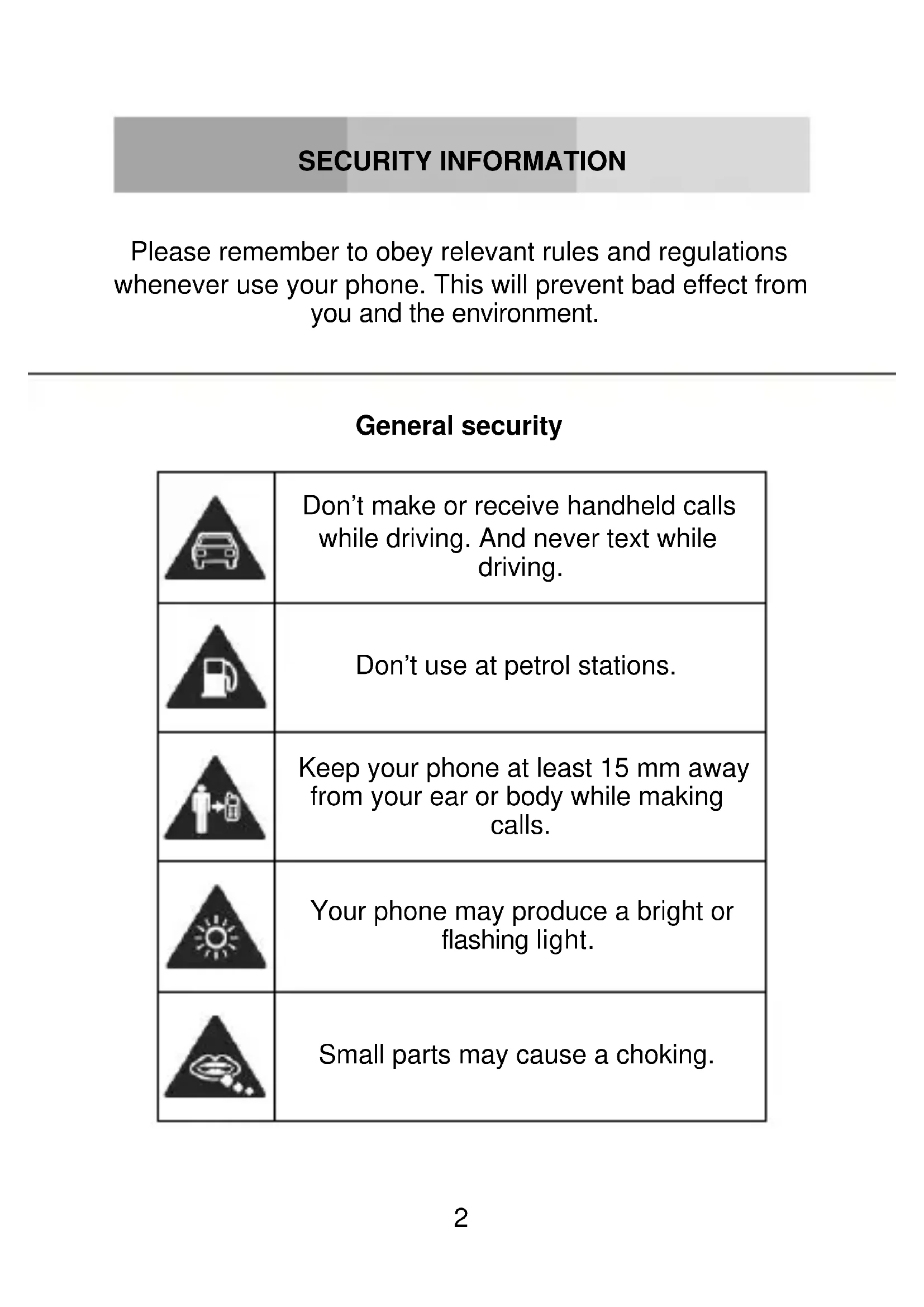
Please remember to obey relevant rules and regulations whenever use your phone. This will prevent bad effect from you and the environment.
General security
| Don't make or receive handheld calls while driving. And never text while driving. | |
| Don't use at petrol stations. | |
| Keep your phone at least 15 mm away from your ear or body while making calls. | |
| Your phone may produce a bright or flashing light. | |
| Small parts may cause a choking. | |
| Don't dispose of your phone in fire. | |
| Your phone can produce a loud sound. | |
| Avoid contact with anything magnetic. | |
| Keep away from pacemakers and other electronic medical devices. | |
| Avoid extreme temperatures. | |
| Switch off when asked to in hospitals and medical facilities. | |
| Avoid contact with liquids. Keep your phone dry. | |
| Switch off when told to in aircrafts and airports. | |
| Don't take your phone apart. | |
| Switch off when near explosive materials or liquids. | |
| Only use approved accessories. | |
| Don't rely on your phone for emergency communications. | |
| Warning electrical hazard To avoid serious injury do not touch charger pins. Unplug the charger when not in use. To unplug a charger or an accessory, hold and pull the plug, not the cord. The power adaptor is the switch off device of the equipment. The wall power socket should be located near the equipment and easily accessible. |
Look at the adapter regularly, specifically at the plug and the layer to detect any damages. If the adapter is damaged, you can't use it until it's fixed.
Plug in the adapter to a power outlet which is easily accessible. Always unplug the adapter after using it.
Use only the adapter provided with the device.
Do not expose your device to direct sunlight, like on your car's dashboard, for example.
In case of overheating do not use the device.
Be careful when using the device while walking.
Do not subject the device to severe impact or drop it from high position, it could cause damages or malfunctions.
Do not disassemble, modify or fix the device by yourself.
To clean the device, use a clean and soft rag. Do not use any chemical product or detergent.
INTRODUCING YOUR MOBILE PHONE
Learn about your mobile phone's layout, keys, display and icons.
Unpacking
Check the product box for the following items:
- Mobile phone
- Battery
- Travel adapter (charger)
USB cable - Headset
- User manual
- Quick start guide
The supplied accessories perform best for your phone.
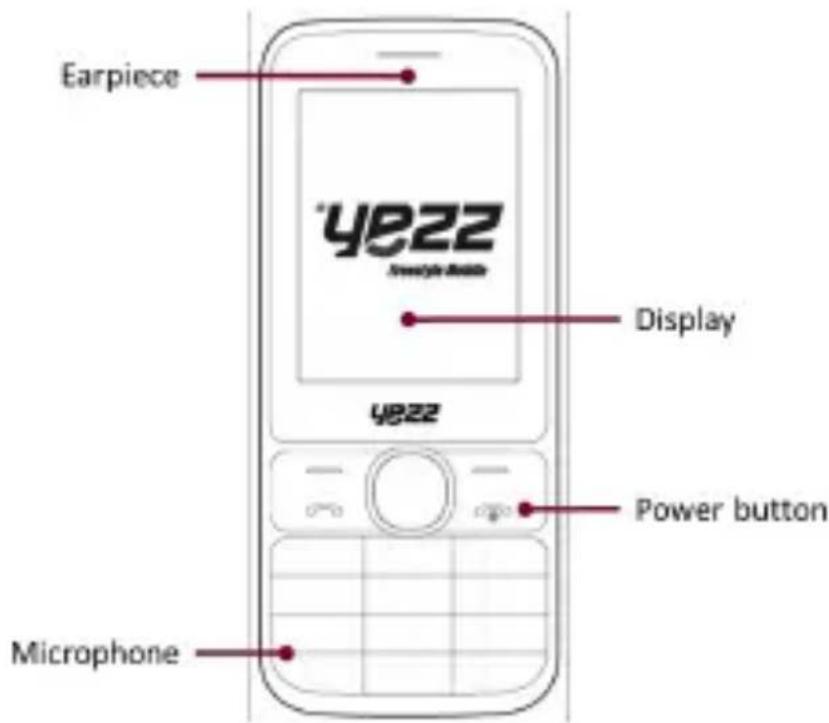
Phone layout
From the front view of your phone you will observe the following elements:
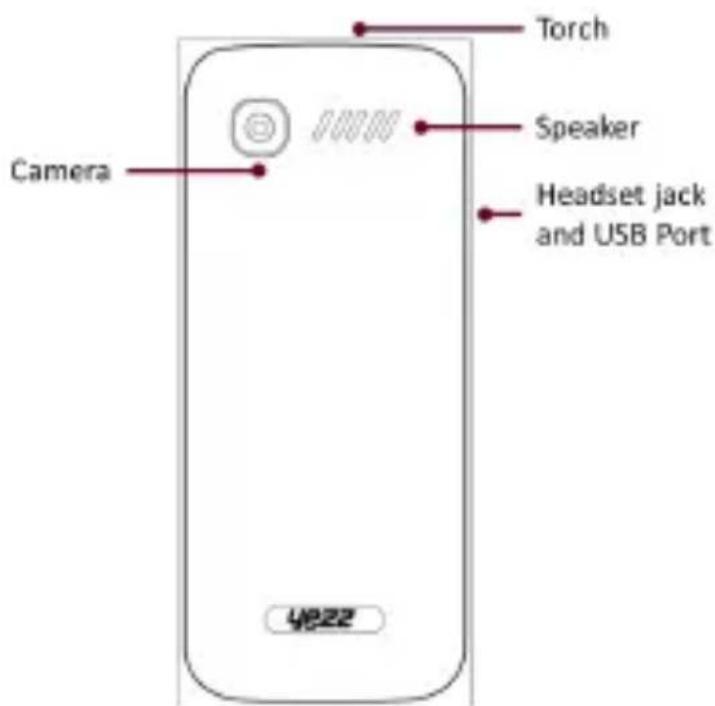
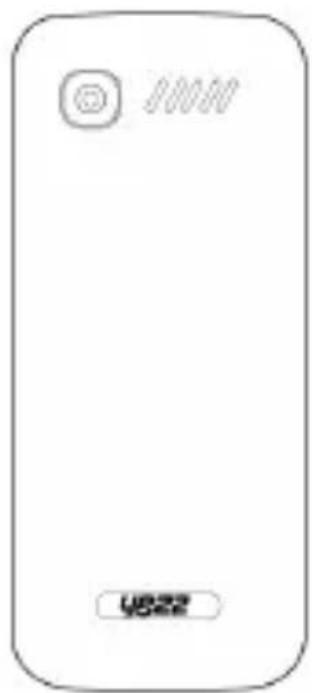
From the back view of your phone you will observe the following elements:
Keys
The following table offers you a quick description about the phone's keys:
| Key Function | |
| Function | Perform the action indicated in the bottom of the screen. |
| Navigation | In standby mode, you can access the user-defined functions, in menu mode, scroll through menu options. |
| Central Button | In standby mode and menu mode, select the highlighted menu option or confirm an action. |
| Call | Open the list of recent calls or make a call to the displayed number. You can answer an incoming call. |
| Hang up | Ends a call or reject an incoming call. Hold down for 3 seconds to turn on / off the phone. |
| 1......0 | Enter numbers, text and special characters. |
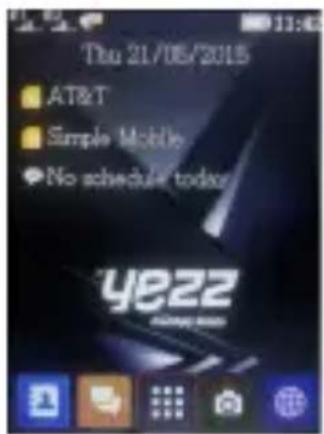
Screen
The screen of your mobile phone is designed as follows:
Icons
Learn about the icons that are displayed on the top of the screen, indicating the status of the phone:
| Icon | Function description |
| E1 | Represent current network signal. The more bars, stronger the signal. |
| Battery status. More bars indicate more battery. | |
| Unread SMS | |
| Alarm set | |
| Bluetooth function activated | |
| Profile set to Silent Mode | |
| Profile set to Meeting Mode | |
| Profile set to Indoor Mode | |
| Profile set to Outdoor Mode | |
| Roaming indicator |
PREPARED YOUR MOBILE PHONE
Get started setting up your mobile phone for its first use.
Install the SIM card and battery
When you subscribe to a cellular service, you will receive a Subscriber Identity Module (SIM) card, with subscription details, such as your personal identification number (PIN) and optional services.
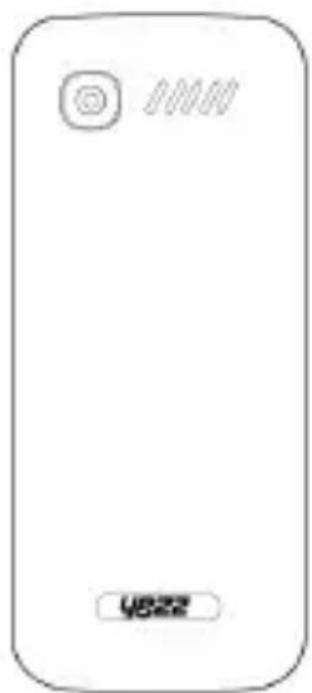
To install the SIM card and battery,
- Remove the battery cover.
- Insert the SIM card.
Your phone has 2 SIM card slots to allow you use 2 SIM cards and switch between them.
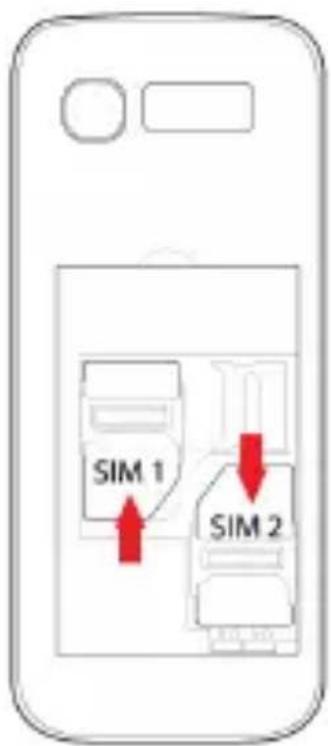
-
Place the SIM card in the phone with the gold-colored contacts facing down.
-
Without inserting a SIM card, you can use your phone's non-network services and some menus.
- Insert the battery.
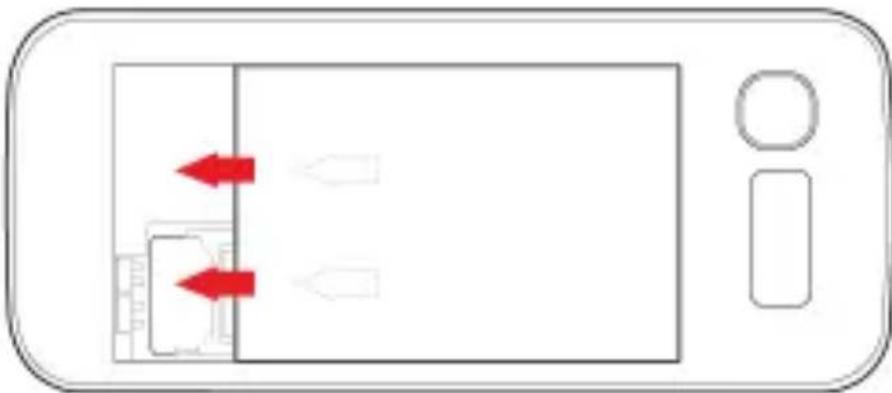
- Replace the battery cover.
Insert a memory card (optional)
To store additional multimedia files, you must insert a memory card.
-
Formatting the memory card on a PC may cause incompatibility with your phone. Format the memory card only on the phone.
-
Remove the battery cover.
- Insert a memory holder with the label side facing up.
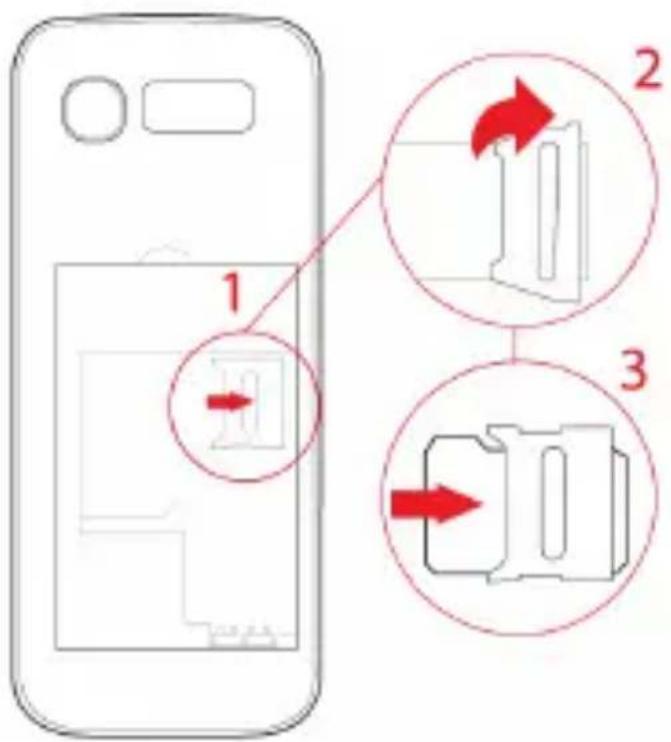
USING BASIC FUNCTIONS
Learn how to perform basic operations of your mobile phone.
Turn your phone on and off
To turn your phone on,
- Long press the power button [ ]
- Type in your PIN number and press OK (if it is needed).
To shut down your phone, go to step 1 above.
Access menus and applications
To get access to the Menu and Applications,
To access your phone's menus,
- In Idle mode, press the left soft key < Menu > to access Menu mode.
- Use the Navigation key to scroll to a menu or option.
- Press < Select>,
, or the Central button to confirm the highlighted option. - Press
to move up one level, press [ ] to return to Idle mode.
Use basic call functions
Learn to make or answer calls in this section.
Make a call:
- In Idle mode, enter an area code and a phone number.
- Press [ ] to dial the number.
- To end the call, press [ ]
Answer a call:
- When a call comes in, press [ ]
- To end the call, press [ ]
Send and view messages
In this section, learn to send and view text (SMS).
To send a text message:
- In Menu mode, select Messaging Write message-> New SMS.
- Enter the contact number.
- Enter your message text.
- Press
→ Send.
Z
Add contacts
Learn the basics of using the phonebook feature.
Add a new contact:
- In Menu mode, select Phonebook Options New.
- Select the storage (Phone, SIM1, or SIM2).
- Enter contact information.
- Press < Save > Save to add the contact to memory.
Find a contact:
- In Menu mode, select Phonebook.
- Enter the first few letters of the name you want to find.
- Select the contact's name from the search list.
Once you have found a contact, you can call the contact by pressing [ ]
Listen to music
Learn how to listen to music via the music player or FM radio.
Listen to the FM radio:
- Plug the supplied headset into the phone's multifunction jack.
-
In Menu mode, select FM radio.
-
Control the FM radio using the Navigation keys.
Listen to music files:
After transferring music files to the "Audio" folder of your phone or memory card,
- In Menu mode, select Multimedia Audio.
- Select Options Music list.
- Control playback using the Navigation keys.
Browse the web
Learn to access your favorite web pages.
Browse web pages:
- In Menu mode, select Services.
- Navigate web pages using the Navigation keys.
Using the flashlight
To turn on or off the flashlight, press and keep pressing the 0 button for about 3 seconds.
Learn the basics to capture and view photos.
Capture photos
- In Menu mode, select Camera to turn on the camera.
- Aim the lens at the subject and make any adjustments.
- Press the Central button to take a photo. The photo is saved automatically.
- Press < Back> to take another photo (step 2).
View taken photos
While using the camera, press the left soft key -> Image viewer to access to the photos gallery quickly.
Camera options
Entering in the Camera options you will be able to configure the following options:
Camera settings:
Select quality option to configure the image quality.
Select the Banding value to eliminate the fluorescent effect on the photos.
Select (Activate or Deactivate) in the shutter sound option.
Select (Activate or Deactivate) in the auto save option.
Select the preferred storage (Phone or Memory card).
CONNECTING TO INTERNET
Learn the basics to configure your phone and connect to Internet.
Add a new connection
- In Menu mode, select Settings Connections Network account.
- Options New account OK
- Set the parameters according to your carrier.
The basic parameters are:
Name
-Username
- Password
- Access point
- Auth type
- Gateway
- Port
Some carriers use Proxy Servers, refer to your carrier configuration for more information.
- Once the needed parameters are set, press < Save > To add another connection, repeat all the steps.
Configure the browser
Once the connection is added, you need to configure the Internet browser:
- In Menu mode, select Services Select SIM card (1 or 2) Options Settings SIM (1 or 2) network account and choose the connection created in the previous step.
Switch between carriers (SIM cards)
If you use multiple SIM cards and want to switch to another one, follow these steps:
- Configure the connection for both SIM cards (refer to "Add a new connection").
- In Menu mode, select Services Select Sim card SIM1 or SIM2 according your necessities.
Is possible to select Always ask, then the browser will ask which SIM you want to use before start the Internet session.
USING THE BLUETOOTH
Learn about your phone's ability to connect to other wireless devices for exchanging data.
Turn on the Bluetooth wireless feature
- In Menu mode, select Settings Connections Bluetooth.
- Select Bluetooth.
- Press the left soft key to turn it On.
- To allow other devices to locate your phone, scroll down to Visibility and press the left soft key to turn it On.
Find and pair with other Bluetooth enabled devices
- In Menu mode, select Settings Connections Bluetooth Paired device Add new device.
- Scroll to a device and press
. - Enter a PIN for the Bluetooth wireless feature or the other device's Bluetooth PIN, if it has one, and press OK>.
When the owner of the other device enters the same code or accepts the connection, pairing is complete.
Send data using the Bluetooth wireless feature.
- Select the file or item from one of your phone's applications that you want to send.
- Press < Options > Share -> Bluetooth -> Select the device name then accept the file on the receiver.
Receive data using the Bluetooth wireless feature
- Enter or accept the PIN for the Bluetooth wireless feature and press < OK> (if necessary).
- Press < Yes> to confirm that you are willing to receive data from the device (if necessary).
Change the Bluetooth device name
- In Menu mode, select Settings Connections Bluetooth Device name.
- Write the name you desire then press OK.
EU WEEE
Information to consumers in application of EU WEEE.
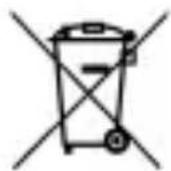
This product is subject to European Union regulations that promote the re-use and recycling of used electrical and electronic equipment. This product required the extraction and use of natural resources and may contain hazardous substances. The symbol above, on the product or its packaging, indicates that this product must not be disposed of with your other household waste. Instead, it is your responsibility to dispose of your waste equipment by handling it over to a designated collection point for the recycling of waste electrical and electronic equipment.
The separate collection and recycling of your waste equipment at the time of disposal will help to conserve natural resources and ensure that it is recycled in a manner that protects human health and the environment.
For more information about where you can drop of your waste equipment for recycling, please contact your local city office, your household waste disposal service, or the store from which you purchased the product.
Recommendations:
- Do not disassemble, open or tear up the device or the batteries.
- Do not expose the product or the battery to heat or fire. Avoid storage the device directly to the sunlight.
- Do not short-circuit a battery. Do not stock batteries in a drawer where it could short-circuit between each other or get in contact by any other metallic objects.
- Do not cause mechanical shocks to batteries.
- In case of the leak, do not let the liquid get in contact with your eyes or skin. If that happens wash with clear water the affected zone and seek medical advice.
- Follow the marks plus (+) and minus (-) on the battery and the device and ensure that the use is correct.
- Do not use any accessories or batteries that are not made to be used with the device.
Monitor the use of batteries by children. - Consult a doctor immediately in case of ingestion of an element or a battery.
- Always buy the battery recommended by the manufacturer of the device.
-
Always maintain the product and the battery clean and dry.
-
Wipe the terminals of the product or the battery, if it became dirty, with a clean and dry rag.
- It is necessary to charge the battery before its use. Always use the charger and read the manufacturer instructions or the manual of the device for the instructions regarding charging.
- Do not leave a battery charged when it's not going to be used.
- After long periods of storage, it may be necessary to charge and discharge the battery several times in order to achieve maximum performance.
- Always keep the original documentation of the device, you might need it later for future reference.
- If it's possible, take out the battery of the device when it's not used.
- Do not store your device in extremely hot or cold places like inside of a car during the summer. It might damage the device and cause explosion of the battery. It's recommended to use the device in a range of temperatures between 5^ and 35^ .
RADIO WAVES
Proof of compliance whit international standards (ICNIRP) or with European Directive 1999/5/EC (R&TTE) is required of all mobile phone models before they can be put on the market. The protection of the health and safety for the user any other person is an essential requirement of these standards or this directive.
THIS DEVICE MEETS INTERNATIONAL GUIDELINES FOR EXPOSURE TO RADIO WAVES
Your mobile device is a radio transmitter and receiver. It is designed not to exceed the limits for exposure to radio waves (radio frequency electromagnetic fields) recommended by international guidelines. The guidelines were developed by an independent scientific organization (ICNIRP) and include a substantial safety margin designed to assure the safety of all persons, regardless of age and health.
The radio wave exposure guidelines use a unit of measurement known as the Specific Absorption Rate, or SAR. The SAR limit for mobile devices is 2W/kg .
Tests for SAR are conducted using standard operating positions with the device transmitting at its highest certified power level in all tested frequency bands.
Body-worn SAR testing has been carried out at a separation
distance of 1.0~cm . to meet RF exposure guidelines during body-worn operation, the device should be positioned at least this distance away from the body. If you are not using an approved accessory ensure that whatever product is used is free of any metal and that it positions the phone the indicated distance away from the body.
For more information you can go to www.sayyezz.com
Additional information about electromagnetic fields and public health are available on the following site. http://www.who.int/peh-emf.
Your telephone is equipped whit a built-in antenna. For optimal operation, you should avoid touching it or degrading it.
As mobile devices offer a range of functions, they can be used in positions other than your ear. In such circumstances the device will be compliant whit the guidelines when used with headset or USB data cable. If you are using another accessory ensure that whatever product is used is free of any metal and that it positions the phone at least 1.0cm away from the body.
LICENCES
The Bluetooth word mark and logos are owned by Bluetooth SIG, Inc. and any use of such marks by DDMBrands LLC and its affiliates is under license. Other trademarks and tradenames are those of their respective owners.
RADIO WAVES
Proof of compliance whit international standards (ICNIRP) or with European Directive 1999/5/EC (R&TTE) is required of all mobile phone models before they can be put on the market. The protection of the health and safety for the user any other person is an essential requirement of these standards or this directive.
THIS DEVICE MEETS INTERNATIONAL GUIDELINES FOR EXPOSURE TO RADIO WAVES
Your mobile device is a radio transmitter and receiver. It is designed not to exceed the limits for exposure to radio waves (radio frequency electromagnetic fields) recommended by international guidelines. The guidelines were developed by an independent scientific organization (ICNIRP) and include a substantial safety margin designed to assure the safety of all persons, regardless of age and health.
EU Regulatory Conformance
Hereby, this device is in compliance with the essential requirements and other relevant provisions of Directive 1999/5/EC.
For the declaration of conformity, visit the Web site www.sayyezz.com/certifications.
Notice: Observe the national local regulations in the location where the device is to be used. This device may be restricted for use in some or all member states of the European Union (EU).
Notes:
-
Due to the used enclosure material, the mobile phone shall only be connected to a USB Interface of version 2.0 or higher. The connection to so called power USB is prohibited.
-
The adapter shall be installed near the equipment and shall be easily accessible.
-
Do not use the mobile phone in the environment at too high or too low temperature, never expose the mobile phone under strong sunshine or too wet environment. The suitable temperature for the phone and accessories is -10°C-55°C.
-
When charging, please place the phone in an environment that has a normal room temperature and good ventilation. It is recommended to charge the phone in an environment with a temperature that ranges from 5^ 25^ . Please ensure to use only the charger offered by the manufacturer. Using unauthorized charger may cause danger and violate the authorization of the phone and the guarantee article.
-
CAUTION: RISK OF EXPLOSION IF BATTERY IS REPLACED WITH AN INCORRECT TYPE. DISPOSE USED BATTERIES ACCORDING TO THE INSTRUCTIONS
-
Excessive sound pressure from earphones and headphones can cause hearing loss.
For more information you can go to www.sayyezz.com
Additional information about electromagnetic fields and public health are available on the following site. http://www.who.int/peh-emf.
Your telephone is equipped whit a built-in antenna. For optimal operation, you should avoid touching it or degrading it.
As mobile devices offer a range of functions, they can be used in positions other than your ear. In such circumstances the device will be compliant whit the guidelines when used with headset or USB data cable. If you are using another accessory ensure that whatever product is used is free of any metal and that it positions the phone at least 1.5 cm away from the body.
LICENCES
Bluetooth SIG, Inc. owns the Bluetooth word mark and logos and any use of such marks by DDM Brands LLC and its affiliates is under license. Other trademarks and trade names are those of their respective owners.
We, DDM BRANDS LLC
(1616 NW, 84TH Ave. Miami, Florida U.S.A. 33126)
Hereby declares that:
YEZZ compiles with the standards and provisions of the directives. The certificate of conformity procedure defined in article IV of directive 1999/5/EC has been under the control of the following organization:
BAY AREA COMPLIANCE LABORATORIES CORP.
1274 Anvilwood Ave. Sunnyvale, CA 94089. USA
www.baclcorp.com
Phone: +1 408 732 9162 Fax: +1 408 732 9164
The full text of the certificate of conformity of the device is available upon request by mail at the following address: DDM BRANDS LLC - 1616 NW 84TH Ave. Miami, Florida U.S.A. 33126.
2015/04/30
(Date)
Luis Sosa / CEO
(Name and signature of authorized person)
| Maximum SAR for this model and conditions under which it was recorded: | |
| GSM 900 | 0.216 W/kg 10g Head SAR – 0.383 W/kg 10g Body SAR |
| GSM 1800 | 0.253 W/kg 10g Head SAR – 0.451 W/kg 10g Body SAR |
| WCDMA 900 | 0.105 W/kg 10g Head SAR – 0.177 W/kg 10g Body SAR |
| WCDMA 2100 | 0.056 W/kg 10g Head SAR – 0.087 W/kg 10g Body SAR |
During use, the actual SAR values for this device are usually well below the values stated above. This is because, for purposes of system efficiency and to minimize interference on the network, the operating power of your mobile device is automatically decreased when full power is not needed for the call. The lower the power output of the device, the lower its SAR value.
FCC
Please take time to read this important section.
FCC Caution
Any Changes or modifications not expressly approved by the party responsible for compliance could void the user's authority to operate the equipment.
Before a new model phone is available for sale to the public, it must be tested and certified to the FCC that it does not exceed the exposure limit established by the FCC. Tests for each phone are performed in positions and locations (e.g. at the ear and worn on the body) as required by the FCC.
This device complies with part 15 of the FCC Rules. Operation is subject to the following two conditions: (1) This device may not cause harmful interference, and (2) this device must accept any interference received, including interference that may cause undesired operation.
Note: This equipment has been tested and found to comply with the limits for a Class B digital device, pursuant to part 15 of the FCC Rules. These limits are designed to provide reasonable protection against harmful interference in a residential installation.
This equipment generates, uses and can radiate radio frequency energy and, if not installed and used in accordance
with the instructions, may cause harmful interference to radio communications. However, there is no guarantee that interference will not occur in a particular installation. If this equipment does cause harmful interference to radio or television reception, which can be determined by turning the equipment off and on, the user is encouraged to try to correct the interference by one or more of the following measures:
- Reorient or relocate the receiving antenna.
- Increase the separation between the equipment and receiver.
- Connect the equipment into an outlet on a circuit different from that to which the receiver is connected.
- Consult the dealer or an experienced radio/TV technician for help.
BAY AREA COMPLIANCE LABORATORIES CORP.
1274 Anvilwood Ave. Sunnyvale, CA 94089. USA
www.baclcorp.com
Phone: +1 408 732 9162 Fax: +1 408 732 9164
O texto completeness do certificado de conformidade do disposicao está disponivel.
mediante solicitaao por carta para o segunte endereco: DDM BRANDS LLC 1616 NW, 84TH Ave. Miami, Florida, U.S.A. 33126
2015/01/27
(Date)
Luis Sosa / CEO
| Maximum SAR for this model and conditions under which it was recorded: | |
| GSM 900 | 0.216 W/kg 10g Head SAR – 0.383 W/kg 10g Body SAR |
| GSM 1800 | 0.253 W/kg 10g Head SAR – 0.451 W/kg 10g Body SAR |
| WCDMA 900 | 0.105 W/kg 10g Head SAR – 0.177 W/kg 10g Body SAR |
| WCDMA 2100 | 0.056 W/kg 10g Head SAR – 0.087 W/kg 10g Body SAR |
(1616 NW, 84TH Ave. Miami, Florida U.S.A. 33126)
Declaramca:
BAY AREA COMPLIANCE LABORATORIES CORP.
1274 Anvilwood Ave. Sunnyvale, CA 94089. USA
www.baclcorp.com
Phone: +1 408 732 9162 Fax: +1 408 732 9164
OocTbI Do MeHOTa N npNIOXeHn
3a da noIyUHTe doCTbI Do MeHIOTo I npINOJKeHnraTa,
3a DoctbI Do MeHOTa Ha Baunr TeJefoH,
- B peЖIM Ha Heɪn3ПОЛЗВане HATиСHTe Левя 6уТоH < MeHIO > 3a Дa ВлeЗTe B peЖIM MeHIO.
- Изполизвайтесутона за Habигагац,在а за певыртente до даден� Meню Или ONця.
-
HatncheTe < N36epn>, < OK> nIeHTpaHn8 6yToH, 3a Da NOTBbPdnte NOdYeptHaTa ONuJ.
-
HaTnCHeTe
3a Da ce npemecTnte C eEDHO HnBO, HaTnCHeTe [ ] 3a Da cce Bb pHeTe B HeN3NoJ3BaHe.
I3noJI3BaHe Ha OCHOBHInTe ФункиN 3a 6axdaHe
BTo3n pa3delen ige HayuHTe KaK da npaBnte nn da OTROBaprTe Ha obaxdaHna.
Kak da HappaBITE o6aXdaHe:
1.В ржим Ha HeN3NoI3BaHe BbBeJeTe KoJ Ha o6JaCTTa I TeJeΦoHnIy Homep.
2. Hatnchete [ ] 3a da n36epeTe homepa.
3. 3a Да пекразиTe обжданeto, habnchete [ T.
Kak da otrobopte Ha obaekdahe:
1.Привховаято обждане натусане [ ]
2. 3a Да пекразиTe обжданeto, habnchete [ T.
I3npaune n npereJed Ha cbo6eHnA
BTo3n pa3delen igeHayuHTe KaK da n3npaUaTe npa3rIeJdaTe TeKCT (SMS).
3a da n3npaTnte TeKCTOBO cbo6eHne:
B
- В ржим Мени зберете Сьобшени → Нлиши сьобшени → Нов SMS.
-
BbBedeTe HOMepa Ha KOHTaKTa.
-
BbBeTe TeKCTa Ha BaWeTo cbo6eHne.
- Hatachete
N3npaTn.
Добаяне на Конт
Hayute OCHOBHnTe Hea 3a n3noI3BaHe Ha yHKnraTa TelefoH en yka3aTeI.
Добаяне на HOВ KOHTaKT:
1.ВржимМeнюи3берeteКоHTaKTn Onци->HOB.
2. Изберете място за съхсанения (Телегон, SIM1 илл SIM2).
3. BbBeTe INHΦopMaζηa 3a KOHTaKaTa.
4. Hatachete < 3a > 3a 3a doabayhe Ha KOHTaKta B nametTa.
OTkpenBaHe Ha KOHTaKT
1.ВразимМенииберeteКонткп.
2. Въbebete пьвпг РяковукВИ OT Имeto, Koeto nckaTe da HaMepeTe.
3.Изберете IMETO Ha KOHTaKta OT cIncBka Ha TbpceHe.
CneI KaTo HamePte DaJeHnKoHTaKT, MoKeTe Da My ce oBaIte KaTo HaTncHeTe [ ]
CnyshaHe Ha My3nka
HayuTe KaK Da CnyWaTe My3nKa Ype3 My3nKaJIHnI PJIeBp nn FM paJnOTO.
CnyshaheHaFMpaNo:
1.BkIIOUeTe IpeIOCTaBeHInTe CnyuAnKn B MyIITnOyHKcNoHaJIHHa XaK Ha TeJeΦoHa.
2.В ржим Мению n3берете FM paадио.
3. Moxe Ta ynpabBbATE FM paNoto KaTO n3NoJ3BaTe 6yToHnTe 3a HABnraun.
CnyshaheHa my3nkaJIHnФaIIOBe:
Cnei npexBbprJHe Ha My3nKaJIHn 0aJIOBe B nApKaTa, Audio"Ha BaIyra TeJefoH nII KApTa naMeT,
1.ВржимМeнюи3берeteMyЛтимеди Aydno.
2.ИзберетеОпци Cпськузka.
3. Mojete da ynpabBraTe n3PbJIHeHneTo KaTO n3NoJ3BaTe 6yToHnte 3a HabnraZna.
Tbpche B nHTepHeT
HayeTe ce kaK da BIn3aTe B IIO6MnTe cn INHTepHET CTpaHnCn.
TbpcHe Ha nHTepHET cTpaHnI:
1.ВржимMeHIO n36epeTe YcIyI.
- Mojete da ynpabBraTe nHTepHeT cTpaHnCITE KaTo n3PON3BaTe 6yTOHnTe 3a HABnRaCnJ.
I3noJ3BaHe Ha fpeHepyeTo
3a Da BKNIOHTe IIN N3KNOHTe 0eHepue, HATNCHe Tn 3aApbXTe 6yToHa 0 3a OKO1o 3 cekyn.
ИЗПОЛ3BAHE HA KAMEPATA
Hayute OCHOBHTe Hea 3a 3aChemaHe n ppeIeHa CHIMK.
3achemaHe Ha cHmKn
1.В ржим Мению n36epeTe Kamepa 3a Да вклочи Te kamepata.
2. Hacoute leuTe KbM npedMeTa n HaPpaBeTe KopeKcN, aKO e HxKHO.
3. Hatnchete uehtpaHnna 6yToH, 3a da HappaBnte Chmka. ChmkaTa ce 3ana3Ba aBTOMaTNo.
4. Hatahe
IperJIeHa 3aChEITe CHIMKn
Korato n3noJ3BaTe kamepata, haTnCHete Jebn 6yToH -> IperIeHa n3o6paXeHn 3a 6bp3 doCTbN Do ranepyTa cbc CHIMKIn.
OnuHa kamepata
Bn3aikn B Hactpoikn Ha kamepata ige mokeTe da n36epTe da KOHfNrgnpate cIeHNITE onuIN:
Hac troponn ha kamepata:
I36epeTe onuTAta 3a KaueCTBO, 3a Da KOHqnpynpate KaueCTBOTO Ha CHIMKata.
I36epTe OmeKOTraHe, 3a da npemaxHete 尼 y o p e c 山 eHTnRAeEeKT Bbpxy CHIMKITE.
I36epTe (AKTINBnpaHe nII N DeaKTNBnpaHe) B OOnyTa 3a 3Byk Ha 3aTbopa.
Изберетe (Актувираны илп Ддаektиьраhe) в орцята 3a ABTO 3anametrayaHe.
I36epete IpeDnOHTaHO cBxpaHHe (TelefoH nII KapTa naMeT).
HayeTe OCHOBHTe Hea, 3a da KOHcHypnpate Baunr TeJeOHn Da Ce CBpKeTe KbM INHTepHeT.
(1616 NW, 84TH Ave., Maamy, Φлорпа, CAU 33126)
C HactoIoo 3aBbAme, ye:
YEZZ cBOTBeTCTBa Ha cTaHdApTHe n pa3nope6Bte Ha dIpeKTHBtTe. IpoceDypaTa Ha ceTpNphiKata 3a cBOTBeTCTBne, nocOeHa B qI. 10.5 Ha DInpeKTHBa 1999/5/EO ce pBkoBoi OT cJeDHa t opraHn3aun:
BAY AREA COMPLIANCE LABORATORIES CORP.
1274 Anvilwood Ave. Sunnyvale, CA 94089. USA
www.baclcorp.com
Phone: +1 408 732 9162 Fax: +1 408 732 9164
Пьлни Тект Ha ceptнфикata 3a cbOTBeTCTBVE Ha yctpoiCTBOTo e haJIuHOn при посквае по поца на сдедни adpec: DDM BRANDS LLC, 1616 NW, 84thAve, Маям, Флорда, CAU 33126
2015/01/27
(DaTa)
Jync Coca / N3pbHnTeJeH DnpeKTop
(Име и подinc Ha yпьномошно Лицe)
BAY AREA COMPLIANCE LABORATORIES CORP.
1274 Anvilwood Ave. Sunnyvale, CA 94089 USA
www.baclcorp.com