ALPHA 507 - Exercise bike KETTLER - Free user manual and instructions
Find the device manual for free ALPHA 507 KETTLER in PDF.


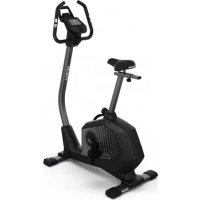
| Product type | Exercise bike |
| Brand | Kettler |
| Model | ALPHA 507 |
| Power supply | 2 batteries 1.5 V UM-3/AA (included) |
| Digital display | RPM, speed (SPD), time (TM), distance (DST), calories (CAL), pulse (PLS) |
| SCAN mode | Alternating display of all functions every 6 seconds |
| Training programs | Manual setting of goals for time, distance, calories or pulse |
| RECOVERY function | Measurement of recovery pulse after exertion with evaluation from F1 to F6 |
| Pulse sensors | Handles with manual sensors |
| Resistance | Manual adjustment by brake on the steering column |
| Standby mode | After 4 minutes of inactivity, display of time, temperature and date |
| Reset (RESET) | Reset values by RESET key (short = function, long = all) |
| Date and time display | Setting via SET and MODE keys (year, month, day, hours, minutes) |
| Sound signal | Beeps when powering on and when the goal is reached |
| Aerobic zone | Indicative formula: 180 - age (recommended training pulse) |
| Safety | Consult a doctor before any training; do not exceed your maximum heart rate |
| Maintenance | Replace batteries if the display is unreadable; clean with a soft cloth |
| Dimensions | Not specified in the manual |
| Weight | Not specified in the manual |
Frequently Asked Questions - ALPHA 507 KETTLER
User questions about ALPHA 507 KETTLER
0 question about this device. Answer the ones you know or ask your own.
Ask a new question about this device
Download the instructions for your Exercise bike in PDF format for free! Find your manual ALPHA 507 - KETTLER and take your electronic device back in hand. On this page are published all the documents necessary for the use of your device. ALPHA 507 by KETTLER.
USER MANUAL ALPHA 507 KETTLER
GERÄTESTART
PLS = PULSE = Herzfrequenz


Operating instructions for the training computer with digital display
1. Start without previous knowledge
You can begin with the training without previous knowledge. In the display, the different information is shown. For an efficient training and for setting your personal training specifications, please read and follow these operating instructions.
Starting the device
Insert 2 batteries. (1,5 V UM 3/AA). The computer carries out a segment test and shows all presentable signs. A beep sounds for confirmation.
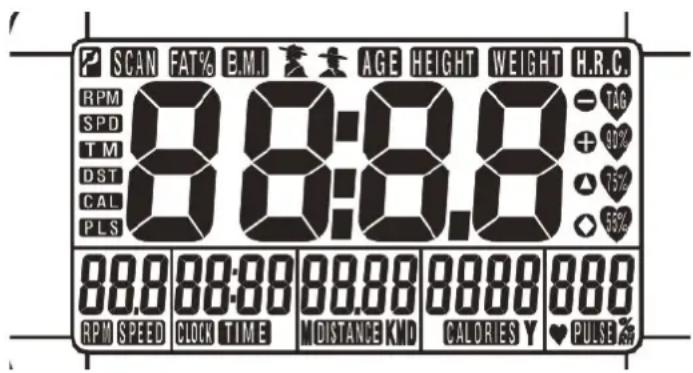
Afterwards the calendar display appears and the year display blinks.
Designation Y = Year. With the key SET, select the current year. If you have set the year too far, enter RESET: Start again with 2004. After confirmation with MODE, you reach the date display to the
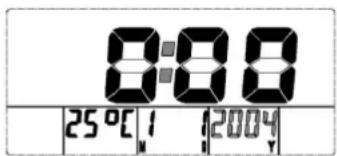
left of this. Here with SET in the same manner enter the month (M=Month), and after confirmation with MODE the day (D=Day). In turn MODE takes over the day and switches to the large display time. Here also with SET and MODE enter first the hour and then the minutes. After confirmation of the minutes through the key MODE, you come in the settings area of the functions.
The calendar and time settings remain stored until the batteries must be changed.
2. Function keys
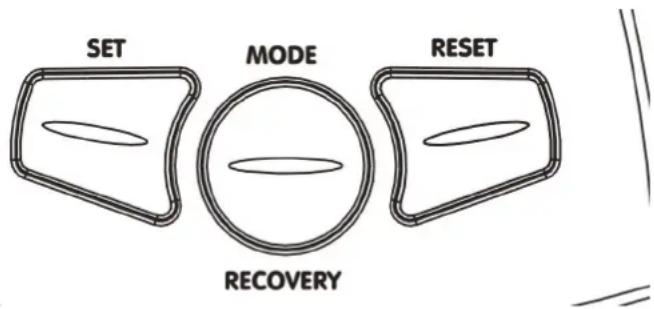
MODE
Through shortly pressing the MODE key, you select between the functions [TIME, DISTANCE, CALORIES or PULSE] both for the display as well as for your personal settings.
If you press the MODE key for a longer time, all values are set to >0<.
SET
With the SET key, the standard values are set. For this the device must be in idle state > shown in the display in the upper left: STOP: Through shortly pressing the SET key, the setting values of the differing functions increases > [TIME; DISTANCE, CALORIES or PULSE]. If the SET key is pressed for a longer time, the setting values can be reached in a quicker counting sequence.
RESET
With the RESET key, the functions are set to >0<. With the input settings of the respective function, only the value of these functions is set to >0< through shortly pressing the RESET key. If the RESET key is pressed for longer than 2 seconds, all values are set to >0<, this corresponds to a new start of the computer.
When exchanging the batteries, all values are set back to >0< as well.
RECOVERY
Use the RECOVERY key to activate the recovery pulse function after exercising.
3. Functions - Display
General:
In the display respectively a large display and at the same time several segment displays appear in the lower area next to each other.
After finishing exercising, the exercise data remains and can be called up when you begin exercising again. The new data is then added to these.
Exception: The computer was set to >0< with RESET, in the personal exercise presettings the value was set at >0< or the batteries were changed.
- With an interruption of the exercising for 4 minutes, the main screen is shut off.
- If the computer shows undefinable displays, take out the batteries, replace them again and try it again.
SCAN
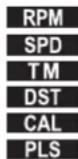
Alternating display of all functions in large display. Left in the display respectively the designation appears in a shortened form:
RPM = Round Per Minute = Rotations per minute / pedal frequency SPD = SPEED
TM = TIME = Exercise time DST = DISTANCE = distance
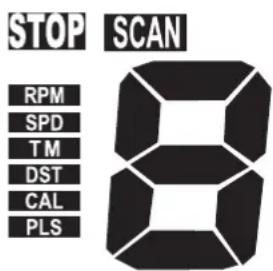
covered
CAL = CALORIES = Energy, calorie consumption
PLS = PULSE = Pulse frequency
If the large display with the respective unit appears, the function description blinks in the small window.
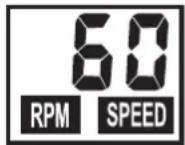
RPM /SPEED (left)
In this display, at turning intervals (every 6 seconds), the pedaling frequency as RPM (=rotations per minute) and the speed SPEED in km/r are shown. The highest speed is 99.9 km/h.
TIME (2nd left)
In this display the exercise time is measured. The maximum time measurement is 99:99 minutes.
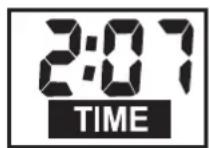
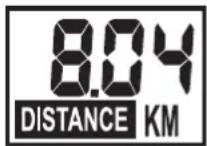
DISTANCE (middle)
The distance covered is measured in km. The counting of the distance begins with >0< and a maximum of up to 99.9 km can be shown. The counting grading follows in 0.01 km sections = 10 meters.
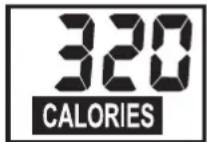
CALORIES (2nd right)
In this display the calculated calorie consumption is displayed. The maximum display is 9999.
The data however only serves as a rough guideline in comparison to the different exercises and cannot be used for medical purposes.
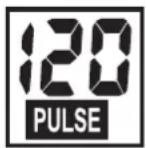
PULSE (right)
If you hold the hand grip sensors with both hands, the display shows the current pulse frequency value. You can enter a target value before beginning exercising. If the pulse frequency has exceeded this target, an alarm sounds in order to inform you of this.
SLEEP MODE (empty)
If no RPM or PULSE are recorded or no manual settings have been made within 4 minutes, the device switches to the sleep mode. In this mode, the time, as a large display, the temperature and the date with month, day and year are shown.
4. Personal exercising specifications
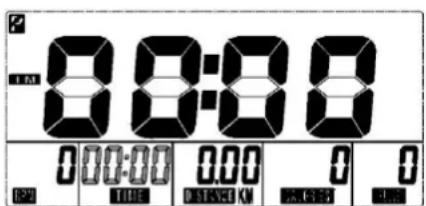
General
- Without particular preliminary settings, the values in the individual functions [TIME, DISTANCE; CALORIES and PULSE] count from >0< upwards.
- For reasonable exercising, it is sufficient to merely set a target value in one function [TIME, DISTANCE, CALORIEN or PULSE].
- If a personal target value is set as an exercise specification, the computer counts from this value downwards. When reaching the target value >0<, an acoustic signal sounds off. If afterwards, without setting of a new target value, you continue exercising, the computer counts in this mode from >0< upwards again.
- Once target values have been set, during exercising these cannot be changed, only during a standstill.
Target value specifications
The setting of the target values is the same with all functions: e.g. DISTANCE
- Press the MODE key until in the field the number blinks in the field DISTANCE and the large number is in the display (identification left > DST).
- Through shortly pressing the key SET, you increase the value. E.g. DISTANCE in 0.5 km steps. If you press and hold the SET key, the set value is counted quicker.
- If you would like to reduce the target value again, shortly press the RESET KEY: Counting will begin again from >0<. Press the SET key again until the target value has been reached.
- If you have set the target value, press the MODE key. The value is then stored in this function and you go to the next function, e.g. CALORIES.
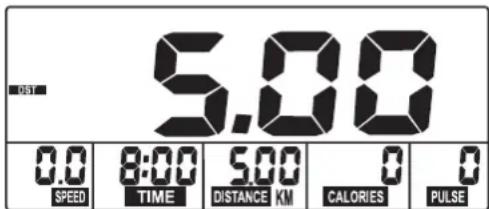
- Enter the specification values if possible only in one function because otherwise the exercise goals will be overlapped. E.g. if you would reach the preset time goal earlier than the preset distance goal.
- The specified values in the other functions [TIME; CALORIES or PULSE] are, as described with 1-4, also entered with the keys SET, RESET and MODE.
After finishing the presettings, you can begin with exercising. During the exercise session, in the display the display of the different functions changes every 6 seconds. If you press the MODE key during this display, the selected function remains in the display in large numbers. In the small display the function name blinks, e.g. PULSE.
Pressing the MODE key again operates the SCAN operation > display change every 6 seconds.
RECOVERY
With the RECOVERY key, you reach a recovery pulse measurement at the end of the exercise session. From the beginning and ending pulse of one minute, the deviation and the fitness grade is determined. With the same exercise session, the improvement of this grade is a measurement of the increased fitness. If you have reached the target value, end the exercise session, press the RECOVERY KEY and then lay your hands on the hand pulse sensors. With a previous pulse measurement in the display 00:60 appears for the time and in the PULSE display the current pulse value blinks. The time begins to count from 00:60 backwards. Keep your hands on the hand pulse sensors until >0<
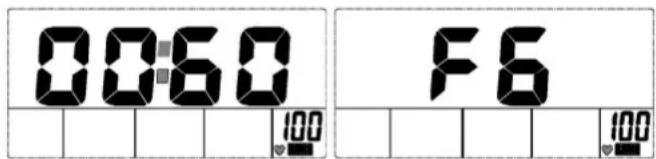
is reached. Right in the display a value between F1 and F6 is shown. F1 is the best and F6 the worse status. By pressing RECOVERY again, the function is ended.
5. Recording pulse beat
The correct pulse rate for training [aerobic zone]
The basis for selecting the pulse rate for training is age. There is a "correct", so-called aerobic training range to suit every age (rough formula: 180 less age), which is characterised by an upper and lower pulse-rate limit (+/- 10 beats). Ideally, the pulse rate during training should always lie within the aerobic zone. The maximum pulse-rate frequency (200 less age) should not be exceeded. The following diagram applies for healthy persons.
![KETTLER ALPHA 507 - The correct pulse rate for training [aerobic zone] - 1](/content/2026/02/396180/images/e0a53a79b4a4a43d95549aac110d9fdb98b08fd52586d701a01d31655d3a63b0.jpg)
line
| Age | Puls / min. | | --- | --- | | 20 | 180 | | 30 | 170 | | 40 | 160 | | 50 | 150 | | 60 | 140 | | 70 | 130 | | 80 | 120 | | 90 | 110 | | 100 | 100 | | >100 | 90 |6. Training instruction
For Your Safety:
Before beginning your program of exercise, consult your doctor to ensure that you are fit enough to use the equipment. Base your program of exercise on the advice given by your doctor. Incorrect or excessive exercise may damage your health.
This device has particularly been designed and developed for leisure time sportsmen. It is excellently suited for cardiovascular training.
The training methodically has to be organised on the principles of stamina training. This will predominantly cause changes and adaptations of the cardiovascular system. This includes the reduction of the resting pulse frequency and of the load pulse. This gives the heart more time for filling the ventricles and for the blood circulation of the cardiac musculature (through the coronary vessels). Moreover, depth of breathing and the volume of air that can be breathed in (vital capacity) are increased. Further positive changes take place in the metabolic system. In order to achieve these positive changes, the training has to be planned according to certain guidelines.
The intensity of training
When training with the device, the intensity of training on the one hand is regulated through the step frequency and on the other hand through the step resistance. The training person can adjust the step resistance via the braking force regulation at the steering column. Always pay attention to the fact not to overstrain yourself with regard to intensity of training and to avoid overstress. Wrong or excessive training may be prejudicial to health. Therefore, during training check as to whether you have correctly
determined your training intensity on the basis of your pulse frequency. A rule of thumb for an appropriate pulse frequency is:
180 minus life age
This means that a 50 year old person, for example, should organise his/her training at a pulse frequency of 130.
Training recommendations on the basis of this calculation are considered to be favourable by numerous recognised sports physicians. According to them you should determine your step frequency and the pedalling resistance such that you achieve your optimal pulse frequency according to the above mentioned rule of thumb.
These recommendations, however, only apply to healthy persons and are not valid for cardiovascular patients!
Frequency Duration
daily 10 min
2-3 times weekly 20-30 min
1-2 times weekly 30-60 min
The exercise and load scope
Beginners should increase the load and intensity of their training only step by step. The first training units should be relatively short
Frequency Length of exercise blocks
| 1st week |
| three times a week 2 minutes training |
| 1 minute break for gymnastics |
| 2 minutes training |
| 1 minute break for gymnastics |
| 2 minutes training |
| 2nd week |
| three times a week 3 minutes training |
| 1 minute break for gymnastics |
| 3 minutes training |
| 1 minute break for gymnastics |
| 2 minutes training |
| 3rd week |
| three times a week 4 minutes training |
| 1 minute break for gymnastics |
| 3 minutes training |
| 1 minute break for gymnastics |
| 3 minutes training |
| 4th week |
| three times a week 5 minutes training |
| 1 minute break for gymnastics |
| 4 minutes training |
| 1 minute break for gymnastics |
| 4 minutes training |
and organised in intervals.
Sports physicians consider the following load factors to be positive for fitness:
Beginners should not start with training units of 30 to 60 minutes. A beginner training could be organised as follows during the first four weeks:
In order to have a personal training documentation, you can enter the training values achieved in the performance table.
Prior to and after every training unit gymnastic exercises lasting approx. 5 minutes serve the warming up and/or cooling down. There should be a day without training between two training units, if you later on prefer to train three times a week for 20 - 30 minutes each. Otherwise nothing can be said against a daily training.
Type d'appareil
2-3 x per week 20-30 min
1-2 x per week 30-60 min
Arranque del aparato
Avvio del computer
Start urządzenia

- GERÄTESTART
- Operating instructions for the training computer with digital display
- Start without previous knowledge
- Starting the device
- Function keys
- MODE
- SET
- RESET
- RECOVERY
- Functions - Display
- General:
- SCAN
- RPM /SPEED (left)
- TIME (2nd left)
- DISTANCE (middle)
- CALORIES (2nd right)
- PULSE (right)
- SLEEP MODE (empty)
- Personal exercising specifications
- General
- Target value specifications
- Recording pulse beat
- The correct pulse rate for training [aerobic zone]
- Training instruction
- For Your Safety:
- The intensity of training
- minus life age
- These recommendations, however, only apply to healthy persons and are not valid for cardiovascular patients!
- The exercise and load scope
- Type d'appareil
- Arranque del aparato
- Avvio del computer
- Start urządzenia
Brand : KETTLER
Model : ALPHA 507
Category : Exercise bike