Slim Powerbank S2500 - Battery charger INTENSO - Free user manual and instructions
Find the device manual for free Slim Powerbank S2500 INTENSO in PDF.



User questions about Slim Powerbank S2500 INTENSO
0 question about this device. Answer the ones you know or ask your own.
Ask a new question about this device
Download the instructions for your Battery charger in PDF format for free! Find your manual Slim Powerbank S2500 - INTENSO and take your electronic device back in hand. On this page are published all the documents necessary for the use of your device. Slim Powerbank S2500 by INTENSO.
USER MANUAL Slim Powerbank S2500 INTENSO
Read this manual carefully and observe, read and follow all instructions mentioned in this to ensure the long life and reliable use of the device.
Please keep this manual handy for future reference and pass it on to other users of the device.
Intended use
This Powerbank is meant solely for the purpose of power supply to devices with an operating voltage of 5V DC (mobile phones, MP3 player etc.). Any other use is considered as unintended use and may lead to damages and injuries. Claims of any type resulting from unintended use are ruled out.
To avoid dysfunctions do not connect the USB starting compound of the device with the USB connections of computers of other devices. They are only designed to charge devices.
Do not disassemble the device into its single parts and do not try to repair it. It does not contain user serviceable parts and in this case the warranty becomes void.
Do not enter objects which are not designed for use into the openings of the product. There is a danger of short circuit.
Do not handle this device with wet hands.
Do not use water or chemical solutions to clean the device. Only use a dry cloth.
It is normal that the device produces heat while used. Do not cover the product while used.
Do not use the device if there is visible damage or in case it is wet.
Safety Instructions:

Operating conditions:
Operate the device at 0 to 40 degree Celsius at max. 90% relative humidity. If you do not use Powerbank for long periods of time, store the device at a temperature range of -10 to 45 degree Celsius at max. 90% relative humidity (for short period) and charge the device every three months to maintain the total performance of the device.

Do not use the device in extremely cold, hot, humid or dusty areas; also do not expose to direct sunlight. Avoid contact with open flame. Risk of Explosion!

Shock, drop:
Please protect the device against shock and drops in all operating modes.

Electrostatic discharge:
This device is sensitive to electrostatic discharge. Please protect the device against any possible electrostatic discharge.

Disposal of old batteries
The devices marked with this symbol are subject to the European Directive 2006/66/EG. All the old batteries must be disposed separated from household garbage through the government agencies designated for that purpose.
By disposing the batteries in this prescribed manner, you can avoid environmental damages.

Disposal of Used Electronic Equipment
Equipment marked with this symbol is subject to the European Directive 2012/19/EG.
All electrical devices and used electrical equipment must be disposed of separately from household waste over the appropriate government agencies.
Proper disposal of old electronic equipment helps avoid environmental damage.
Scope of delivery
- Intenso Powerbank S2500
- Micro USB - Charging cable
- Operating instructions
Technical data
| Dimensions: | 100 x 62 x 7.2 mm |
| Power consumption (Input): | 5V 1 A |
| Charging current output (Output): | 5V 1 A |
| Internal Battery: | 2.500 mAh / 3.7 V Lithium-Polymer battery |
| Status display: | LED lamp |
| Built-in overcharge/discharge protection | Yes |
| Simultaneous charging of the Powerbank and a connected device: | Yes |
| Standby time: | Up to 3 months |
Device Overview
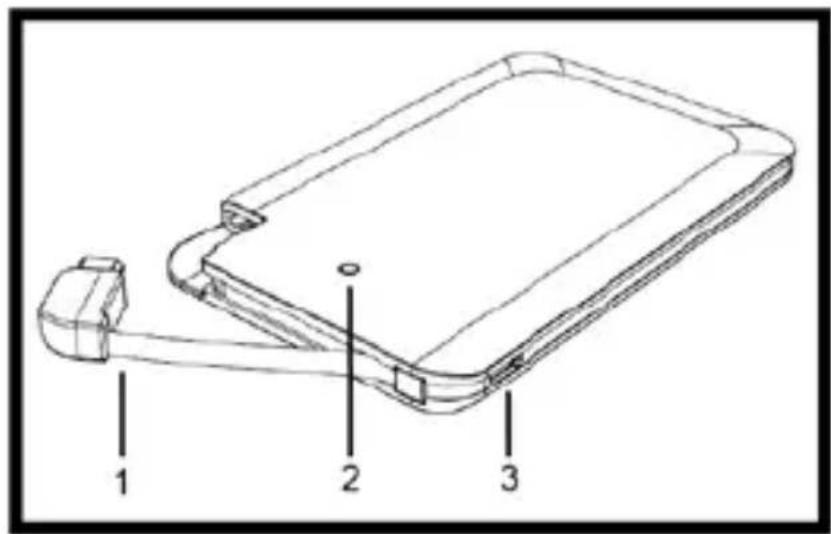
1 Integrated micro USB cable
2 Status LED
3 Micro USB IN
Operation
1. Status display LED
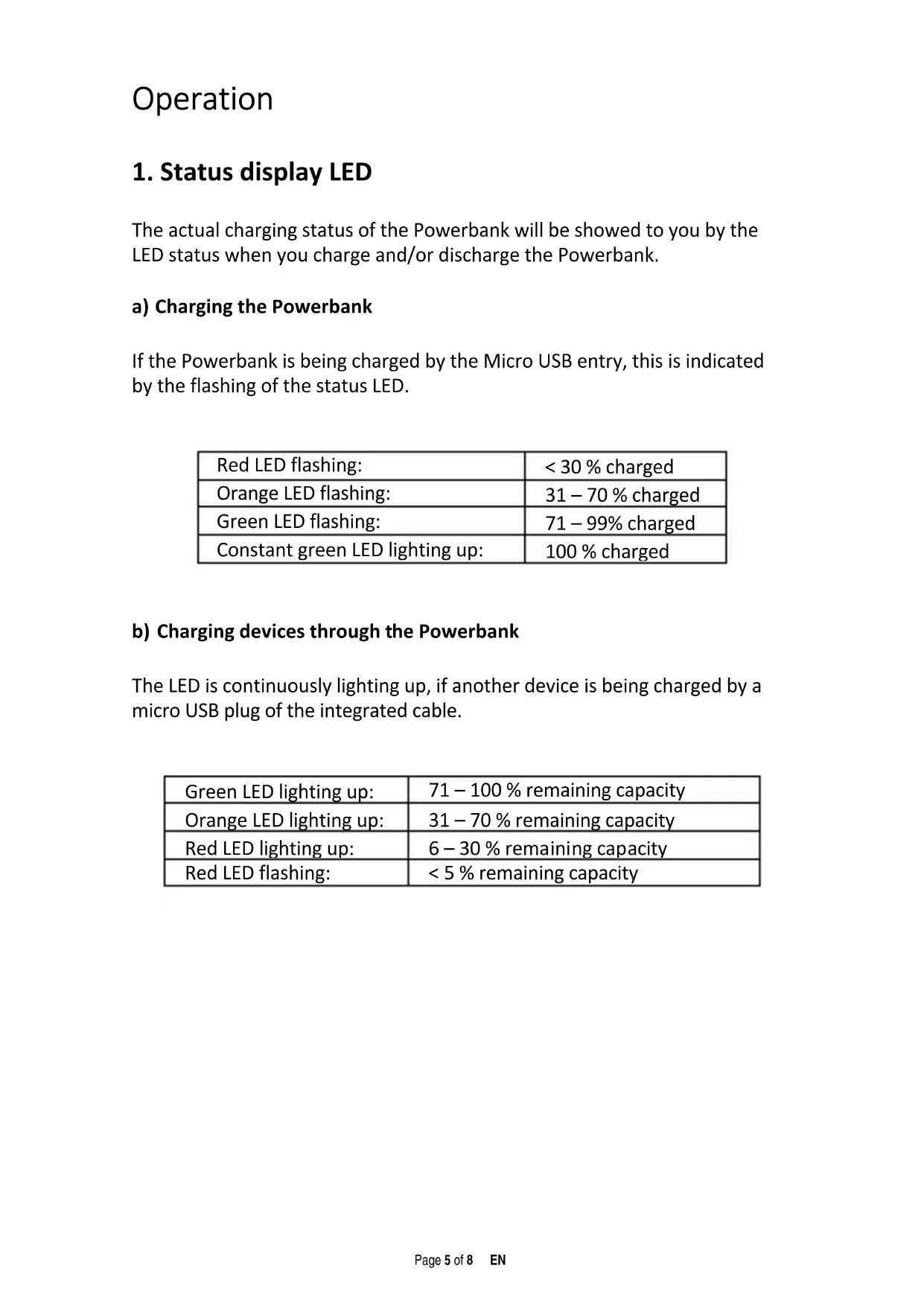
The actual charging status of the Powerbank will be showed to you by the LED status when you charge and/or discharge the Powerbank.
a) Charging the Powerbank
If the Powerbank is being charged by the Micro USB entry, this is indicated by the flashing of the status LED.
| Red LED flashing: | < 30 % charged |
| Orange LED flashing: | 31 – 70 % charged |
| Green LED flashing: | 71 – 99% charged |
| Constant green LED lighting up: | 100 % charged |
b) Charging devices through the Powerbank
The LED is continuously lighting up, if another device is being charged by a micro USB plug of the integrated cable.
| Green LED lighting up: | 71 – 100 % remaining capacity |
| Orange LED lighting up: | 31 – 70 % remaining capacity |
| Red LED lighting up: | 6 – 30 % remaining capacity |
| Red LED flashing: | < 5 % remaining capacity |
2. Starting-Up / Powerbank Charge / Charging Connected Devices
a) Charging the Powerbank
Please connect the included micro USB cable with the Powerbank micro USB entry. Connect the other USB cable end with the standard USB port of a computer or USB power supply. Charging process and actual charging status are displayed by the status LED. If the Powerbank is completely charged, the status LED lights up continuously. The needed charging of Powerbank depends from the selection charging source and their starting performance (5V / 1 A).
b) Charging devices through the Powerbank
- This Powerbank is equipped with an integrated USB cable plug (Standard Output 1A).
- To charge a device by Powerbank, connect the micro USB connection of the integrated cable with micro USB entry of the device to be charged. The charging procedure starts automatically.
- If a device is charged with Powerbank and the Powerbank capacity has almost finished, this is showed by red flashing of status LED. Please recharge Powerbank.
- Please note that, when charging a device with a Powerbank nearly 30% of total capacity is consumed by the charging process alone. This is caused for example by the loss of power from circuit heat and voltage conversion.
- For optimal performance, the Powerbank must be used regularly. If this is not the case, fully charge the Powerbank at least every three months.
Limited warranty conditions
The warranty only covers the replacement of this Intenso product. The warranty is not applicable for normal wear & tear resulting from erroneous, improper use of the device, negligence, accident or incompatibility.
There are no warranty claims if the Intenso user manual is not followed and if the device is damaged through improper use or defects caused by other devices.
We are not liable for damage or data loss (of the device to be charged) caused by dysfunction, wrong handling, repairs or battery change made by you.
There are no warranty claims if the product is exposed to shocks, electrostatic discharges, heat or humidity effects beyond the product specifications.
Intenso is not liable for any collateral damages or consequential losses, for violation of warranty conditions or any other losses irrespective of the cause.
Important note:
Please note that any warranty claim shall expire if the housing of the Powerbank has been opened.
This product is not meant for a commercial use or for medical and special applications, where the failure of the product may cause injuries, death or significant material damages.
(Intenso)
49377 Vecchia
Germany
www.intensode.com


Intenso Warranty conditions
Dear Intenso customer,
Thank you for opting for a high-quality Intenso product. All Intenso products are subject to constant quality inspections and the legal warranty period applies, of course, from the date of purchase. Please be sure therefore to save the sales receipt as proof of purchase.
Warranty conditions
The warranty only covers material and production defects. Intenso GmbH is not liable for the loss of data in units sent to us. The free of charge warranty service covers the repair or replacement of defective parts. Please understand that we cannot render any warranty services, e.g. in case of:
Misuse or improper handling, installation or use
- Damages, scratches or wear
- Modifications, manipulation or repairs by third parties
- Damages through force majeure or transport
Your Intenso GmbH
CLAIM PROCEDURE
In case of a claim, please proceed as follows:
- Only returns accompanied with all accessories and sales receipt are accepted.
- In addition, a RMA number is absolutely required for return shipments. You can request this RMA number via e-mail or through the service hotline.
- Please package the product including all accessories and the sales receipt safe for transport. Please stamp the package.
- Please affix the RMA number clearly visible on the outside of the package.
Please send to the following service address:
INTENSO GMBH Service Hotline: +49 (0) 900 -1 50 40 30
Service Center (your RMA-No.) landline in Germany.
(0.39 € / min. from the
Service Center (Seu N° ADM)
He pa3bpaIte yCTpoiCTBO Ha OTdIbHbIe qactn He nbITaHTecb peMOHTnpoBaTb erO. YCTPOiCTBO He IMeet o6cIyJINBaEMbIX
Nolb3OBaTeIeM DeTaIe N B 3TOM Clyuae rapaHTn TepreT cnIy.
He BCTaBnIe B OTBepcTna yCtpoNcTBa npEmdTebl, He npEHa3HaueHbIe DJIy nCNOlb3OBAHnA. CyUecBye TOnaCHOctb KOpOTKOro 3AmbIkaHnI.
He TporaTe Hn He 6epnte yctpoiCTBO MOKpbIMn pyKaMn.
He nCnoIb3yIte Body nIIN XIMnueckne paCTBOpbl dJIa OUnIeHnYcTpoIcTBa. IcNoIb3yIte TOnbKO cyXyIO TKaHb.
To, yCTPOcTBo HaPeBaetc Bo BpeMn cNoIb3OBaHnA, COOTBeTcTByET HopMe. He NaKpbIbAaTe yCTPOcTBo BO BpeMn nCNoIb3OBaHnA.
He nCnoIb3yIte yCTpoiCTBO, eCIn IMeOTcBnDnMbIe NOBpeJdeHnI IN B cLyuae eCIn OHO MOKpoe.
YTNn3aun Otpa6oTaHHbIX aKKymyIaTOPOB N 6atapeek
UcTpoIcTba, 6o3HaueHHbIe 3TIM CmMBOJOM
NoIpaIaIOT NOI DeIcTBnE EbponeNcKOn dIpeKTHBbl
2006/66/EG.
Otpa6OtaHbIe aKKymyJIaTOpbI n 6aTaapeIKn
Heo6xOdIMO yTINl3InpOBaTb OTJeIbHO OT 6bITOBOrO
Mycopa,B IpeDyCMOTpeHHbIX DnIg 3TOrO MeCTax.
BlaIroIapra NaIeJkaIe yTINl3aIuN He HaHocNTcR
yIep6 OkpyKaIOSe cpeIe.

YtHn3aunna 3JeKtpnueckoro o6OpydoBaHn
Bce yctpoiCTBa nmeoiuie daHnyo MapKnipOBky
PnHaJIeKaT K cPiNcKy TOBapOB BKIOUeHHbIX B
DInpeKtIBy 2012/19/EG.
Bce 3JIeKtpoTOBapbl N yCTapeBwne 3JIeKtpoTOBapbl
YTNIIIN3NPYOTcpa3dEJbHO OT DOMaUSHero Mycopa Ha
CpeuaJIbHO O6OpyIDOBaHHbIX TOnkax IINI
ROcyIapCTBeHHbIX MeCTax YTNIIIN3aUIN I nepepa6OTKN.
Co6IIOJaIopraDOK YTNIIIN3aUIN Bbl COxpaHЯTe
PnpRoDu OKpykaIOUs e CpeDbI.
KoMnJIeKT NOCTaBKN
Intenso Powerbank S2500 (Портанhoe зардhoe yctpoiCTBO)
- Micro USB - 3apЯнь кабель
- INHCTpyKunno 3KcNlyatau
TexHnueckne xapaKTepeNCTnKN
1. CBeToINoIbI INHdNkATOp COCTOHNIA
Фактуескоe coctогнue зардк Powerbank 6удт поka3aHo CBETODIOndbIM INДИКaTOpOM COCTOHRn, KOrda Bbl 3apЯжaeTe n/NIpa3prjaete Powerbank.
a) 3apяdka Powerbank
Ecnn Powerbank 3apjkaetcyepe3 Micro-USB pa3bem,Ha 3to 6ydet yka3bIBaTb MiraHne CBeToDIOHOrO INDNKaTopa.
CBeToIIOHbIe HnDnKaTOpbI COCTOHN3aRopaOTcN I RopT NOCTOHNHO.
Heo6xodmam 3apdka Powerbank 3abncnt OT BbIbopa nCTouHnKa 3apdkn ero npckOBbIX xapaKTepcntk (5V / 1A).
b) 3apraKa yctpoiCtB uepe3 Powerbank
- Данны Powerbank ochaши встwoehnhbIM pa3beMOM严禁 USB-ka6ela (стандартны BBIXOD 1A).
ДязардкустрочьоТ Powerbank,норлочиприлaramы Micro USB kaбельк Micro USB pa3bemy ha yстрочь, кotopoe 6ydET 3apжathc. Процс зардкн hayetca ABTomatnueckn. - Ecni yctpoiCTBO 3apjkaetcyepe3 Powerbank, a MoUHocTb Powerbank NOHTN NCHepnHa, CBeTOIOHbI INHdNKaTOP COCTOHN HaHT MIRATb KpaChbIM cBETOM. Poxkaynta, 3apJnte Powerbank.
- 06paTnte BnHMaHne, yTo npu 3apAKe ycTpoiCtBa uepe3 Powerbank noTu 30% ot cymMapHOJ MOUHOCrN notpe6JIeTcra Tolbko B npouece 3apAKn. 3To Bbl3BaHo, HApPIMep, nOtepeJ MOUHOCrN OT npoe6pa3OBaHn TepLa n HAnpJKeHn B cePi.
Для обесенья ONТIMальною поиЗВODиTeьнocт,在 Powerbankdoлжен Испальзоватбая ретуларно.Еси зTo He taK,полhoeztю3apaxkaite Powerbank He pexe odHoro pa3aВ Trn Mecaua.
OrpaHnueHHbIe rapaHTnHbIe o6aTeJIbCTBa
TapaHTnI NOpa3yMeBaET TOLbKO 3aMeHy DaHHoro N3deJIy. TapaHTnI He pacnpoctpaHareTc H a cTeCTBeHHbI IN3HOC, KOTOpbI BO3HnKaET B pe3yIbTaTe HenpaBnIbHorO, HeHaJIeJkaUero IcNoIb3OBaHHra, XaIaTHoCTN, HeCuaCTHO rO CnyaA INHeCOBMeCTMOCtN.
Ipn Heco6JIODeHn Tpe6oBaHn HNCTpyKcHn NO 3KcnlyatauHn FnpMbIntenso, a taKxpe npn HeHaJeXaUeM nCNoJIb3OBAHn IIn nobpeJdeHnDpyrIMn yCTpOyCTBaMn, rapaHTnHbIe Tpe6oBaHn He npHHMaIoTc.
Mbl He Hecem OTBETCTBEHHOCTn 3a yuep6 nIi noTepn DaHHbIX (Ha YcTPOINCTBAX, KOTOpbie 6ydyT 3apJxKaTbc), Bbl3BaHHbIe DnCfYHKUnei, HnPaBnJIbHbIM o6paueHHeM, peMOHTOM nIi 3aMeHoN 6aTapeN, KOToPbIE Bbl npOn3BeDeTe caMoCTOaTeNbHO.
Ecn yctpoCTBO NOBepraIocb cotpceHnM, 3JeKTPoCTaTneCKOMy
pa3pyd, TeNIOBOMy BO3deJCTBnIO nIN BO3deJCTBnIO BlaRn,
OTInuOUMc8 OT cpeunphiKaun Ha npOdyKT, rapaHTnHbIe Tpe6OBaHnA
He npHHMaOTc.
KoMaHnI Intenso He HeceT OTBeTCTBeHHocTn 3a IIO6oB BO3HKnIi No6OuHbI NII KOCBeHHbI yUeP6, 3a HApUWeHne ycNoBn rapaHTnHbIX O6ra3aTeJIbCTB NII 3a dpyroYUeP6, He3aBnCmO oTe erpnuH.
Baxhnoe npumeyaHue:
IooaIyIcTa, yUHTte, yTO rapaHnHbIe Tpe6oBaHnAHHyIpyOTcR, ecIn OTKpbIbALcKopnyc yCTpOiCTBa Powerbank.
CepBnchbI ζeHTp (Baaw Ng RMA)
MNH. B HemeucKoN CtaauHOHapHOcTeN.