ARCHOS 50d Helium - Smartphone

50d Helium - Smartphone ARCHOS - Free user manual and instructions

Find the device manual for free 50d Helium ARCHOS in PDF.
📄 197 pages English EN Download 💬 AI Question
Notice ARCHOS 50d Helium - page 8
Pick your language and provide your email: we'll send you a specifically translated version.

User questions about 50d Helium ARCHOS

0 question about this device. Answer the ones you know or ask your own.

Ask a new question about this device

The email remains private: it is only used to notify you if someone responds to your question.

No questions yet. Be the first to ask one.

Download the instructions for your Smartphone in PDF format for free! Find your manual 50d Helium - ARCHOS and take your electronic device back in hand. On this page are published all the documents necessary for the use of your device. 50d Helium by ARCHOS.

USER MANUAL 50d Helium ARCHOS

natural_image Two horizontal color swatches: black and white with gradient shading, each containing a distinct color block (no text or symbols)

ARCHOS 50d Helium - 1

Table of contents

Package contents....2

Description of the phone....3

Getting started....6

Mobile data & WiFi connection....10

Google account & Contacts....12

Hints & tips with Android™....14

Troubleshooting....16

ARCHOS 50d Helium - Table of contents - 1

For more information, please consult the FAQs on www.archos.com.

Make sure to read them before considering any product return. As we are often updating and improving our products, your device's software may have a slightly different appearance or modified functionality than presented in this Quick Start Guide.

Consult the declaration of conformity on http://www.archos.com/gb-en/support/support_tech/downloads.html

1

ARCHOS 50d Helium - Table of contents - 2

ARCHOS 50D Helium book.indd 1 15/07/2015 18:03:03

ARCHOS 50d Helium - Table of contents - 3

ARCHOS 50d Helium - Table of contents - 4

natural_image Two horizontal color swatches: black and white with a row of solid color blocks (no text or symbols)

ARCHOS 50d Helium - Table of contents - 5

Package Contents

Check your product box for the following items:

-ARCHOS 50D Helium
-Battery
-Headset
-USB cable
-Charger
-Quick start guide
-Warranty Legal & Safety notices

ARCHOS 50d Helium - Package Contents - 1

ARCHOS 50d Helium - Package Contents - 2

The items supplied with your device and available accessories may vary depending on your region or service provider.

The supplied items are designed only for your device and may not be compatible with other devices.

Unapproved accessories may cause your device to malfunction.

2

ARCHOS 50d Helium - Package Contents - 3

ARCHOS 50d Helium - Package Contents - 4

natural_image Color swatch bar with grayscale gradient from black to white (no text or symbols)

ARCHOS 50d Helium - Package Contents - 5

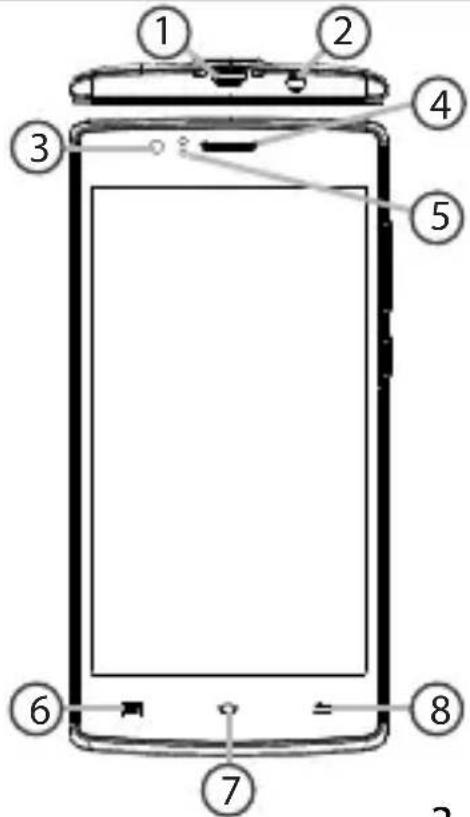
Description of the phone

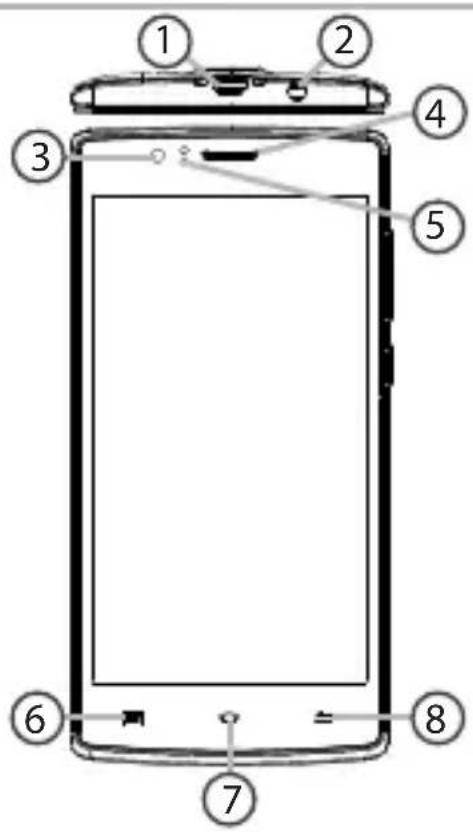
① Micro-USB port
② Headset jack
③ Front camera
④ Phone speaker
⑤ Light sensor
⑥ Recent apps
⑦ Home/Google NOW
⑧ Back
ARCHOS 50d Helium - Description of the phone - 1

text_image Diagram of a smartphone front panel with numbered parts for identification

English

ARCHOS 50d Helium - Description of the phone - 2

3

ARCHOS 50d Helium - Description of the phone - 3

ARCHOS 50d Helium - Description of the phone - 4

ARCHOS 50d Helium - Description of the phone - 5

natural_image Two horizontal color swatches: black and white with various shades of gray, transitioning to solid colors in yellow, magenta, cyan, blue, green, red, and yellow.

ARCHOS 50d Helium - Description of the phone - 6

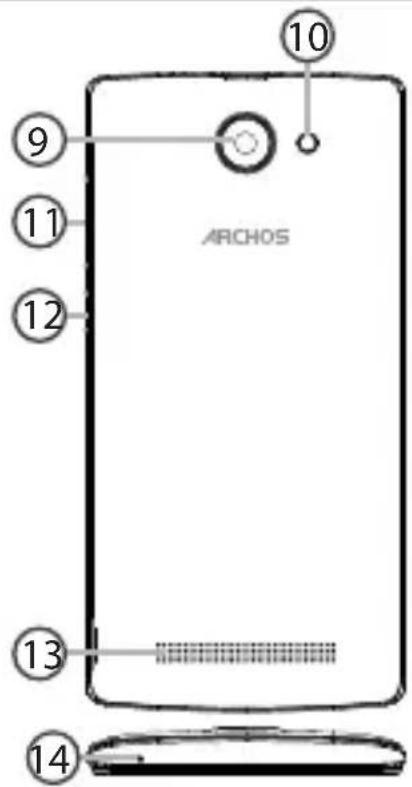
Description of the phone

⑨ Camera
10 Flash light
⑪ Volume buttons
12 ON/OFF button
13 Loudspeaker
14 Microphone
ARCHOS 50d Helium - Description of the phone - 1

text_image ARCHOS 10 9 11 12 13 14

ARCHOS 50d Helium - Description of the phone - 2

4

ARCHOS 50D Helium book.indd 4 15/07/2015 18:03:05

ARCHOS 50d Helium - Description of the phone - 3

ARCHOS 50d Helium - Description of the phone - 4

natural_image Gradient color bar transitioning from black to white (no text or symbols)

ARCHOS 50d Helium - Description of the phone - 5

natural_image Color swatch bar with eight distinct squares in yellow, magenta, cyan, blue, green, red, black, and light pink (no text or symbols)

ARCHOS 50d Helium - Description of the phone - 6

English

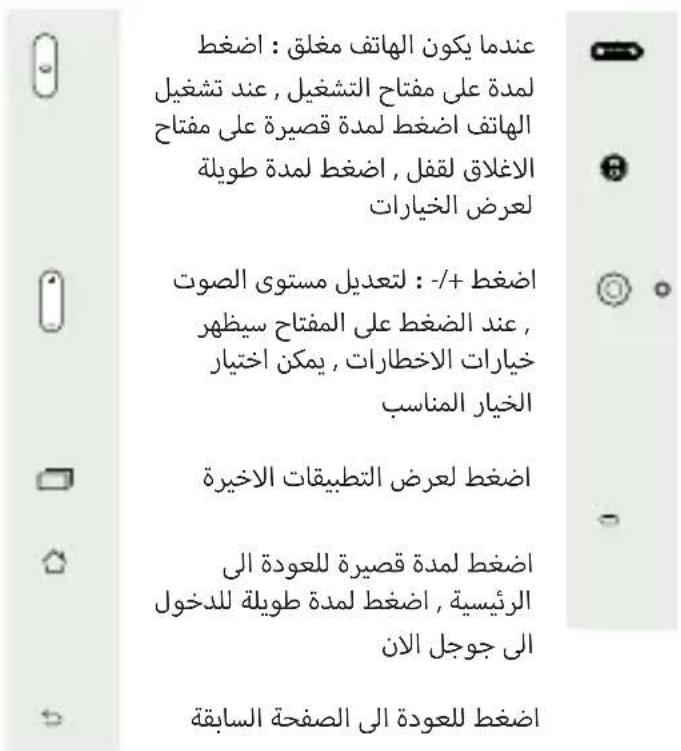
ON/OFF: when the device is off, long press to turn on. When the device is on, short press to turn off the screen and long press to display options.Micro-USB port: plug the provided cable to charge the device or to connect it to a computer.
Volume +/-: press +/- to adjust the volume. When you press the button, notification options are displayed. You can select the most appropriate one.Headphone jack: connect the provided carphones to make hand-free calls.
Recent apps: press to display recent apps.Camera & Flash: take pictures or make movies. To extend movies duration, insert a micro-SD card. Activate the flash option in a dark environment and use it as a torch through the quick settings.
Home: short press to return to the homescreen, long press to access Google Now.
Back: press to go back to the previous screen.Light sensor: it turns off the screen when the device is close to your ear during a call.

ARCHOS 50d Helium - Description of the phone - 7

ARCHOS 50d Helium - Description of the phone - 8

ARCHOS 50d Helium - Description of the phone - 9

natural_image Two horizontal color swatches: one grayscale from black to white, the other solid-colored from yellow to pink (no text or symbols)

ARCHOS 50d Helium - Description of the phone - 10

Getting started

Assembling

After you have unpacked your mobile phone box:

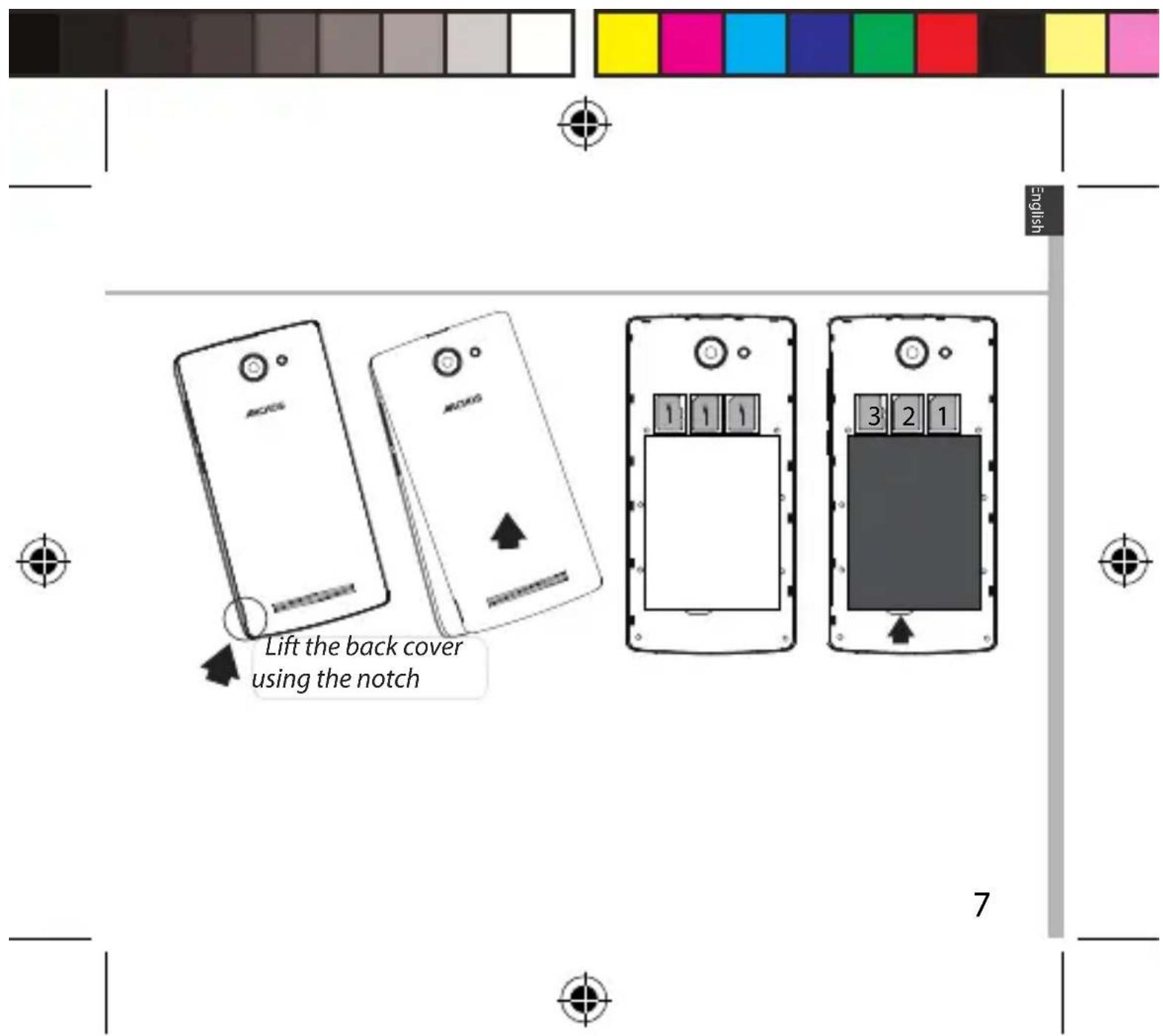
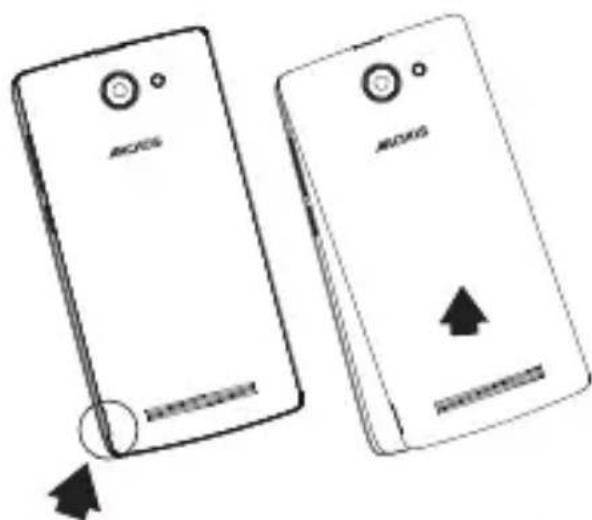
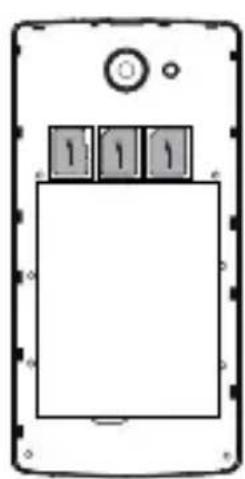
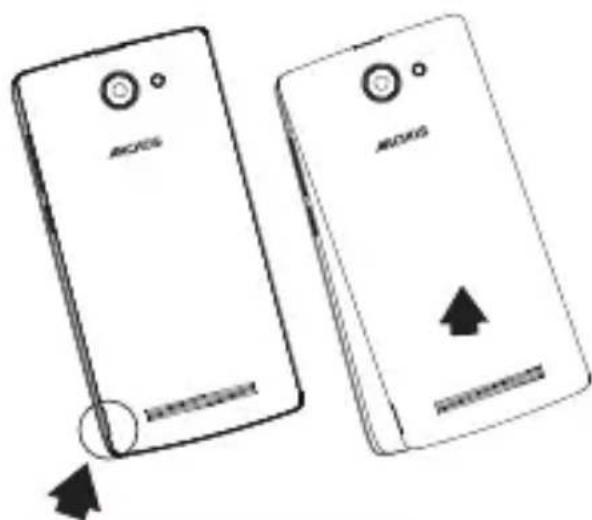
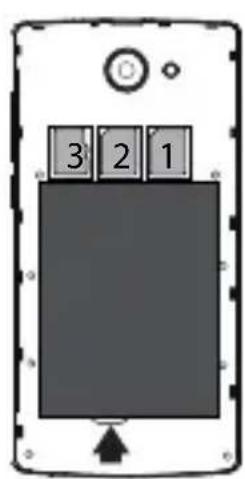
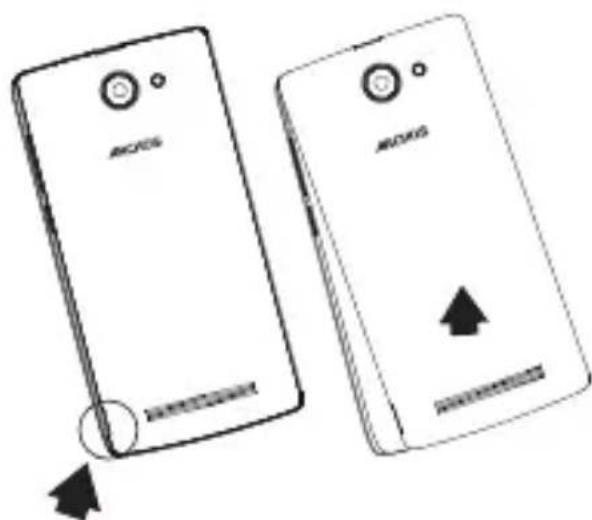
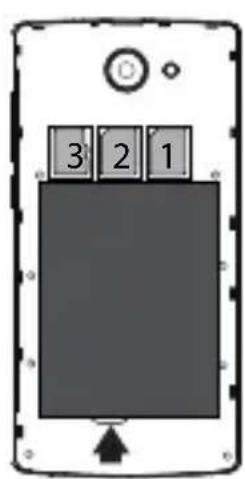
  1. Remove the device's back cover using the notch.
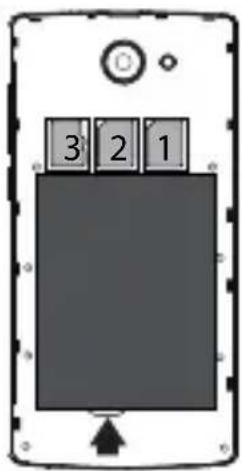
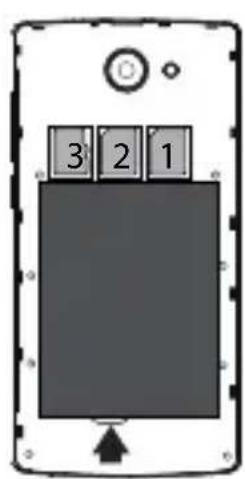
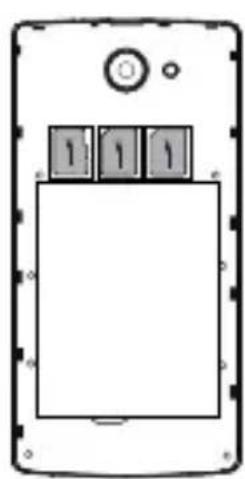
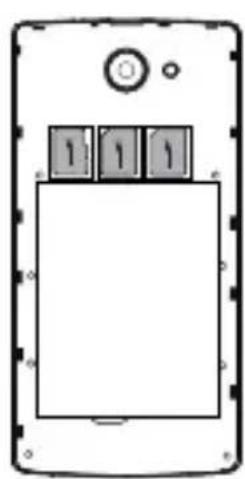
  2. Insert your SIM card or Memory card in the corresponding slot.
  3. Insert the device's battery.
  4. Replace the back cover.

ARCHOS 50d Helium - Assembling - 1

4G/3G/2G slot 1 When inserting your SIM card or micro-SD card, make sure to follow the illustration, otherwise you 2G slot 2 may damage the slot or the card.

Micro-SD card slot 3

ARCHOS 50d Helium - Assembling - 2

6

ARCHOS 50D Helium book.indd 6 15/07/2015 18:03:07

ARCHOS 50d Helium - Assembling - 3

ARCHOS 50d Helium - Assembling - 4

text_image Lift the back cover using the notch

ARCHOS 50D Helium book.indd 7 15/07/2015 18:03:08

ARCHOS 50d Helium - Assembling - 5

natural_image Two horizontal color swatches: black and white with gradient shading, each containing a distinct color block (no text or symbols)

ARCHOS 50d Helium - Assembling - 6

Getting started

Turning on

  1. Plug the charging cable in the Micro-USB port and connect it to its charger.

Before using your device for the first time, charge its battery completely.

  1. Press and hold the ON/OFF button to turn on the device.

The first time you start up your ARCHOS, the installation wizard will help you set up your device.

  1. Follow the instructions.

If you have inserted a SIM card, you may need to enter a PIN code. Beware of typing a wrong PIN code.

ARCHOS 50d Helium - Turning on - 1

ARCHOS 50d Helium - Turning on - 2

Tip:

Your device goes in standby mode when you do not use it for a specific period of time. To wake up your device, press the ON/OFF button. To set the duration, go to Settings > Display > Sleep.

8

ARCHOS 50d Helium - Tip: - 1

ARCHOS 50d Helium - Tip: - 2

natural_image Color swatch bar with grayscale gradient from black to white (no text or symbols)

ARCHOS 50d Helium - Tip: - 3

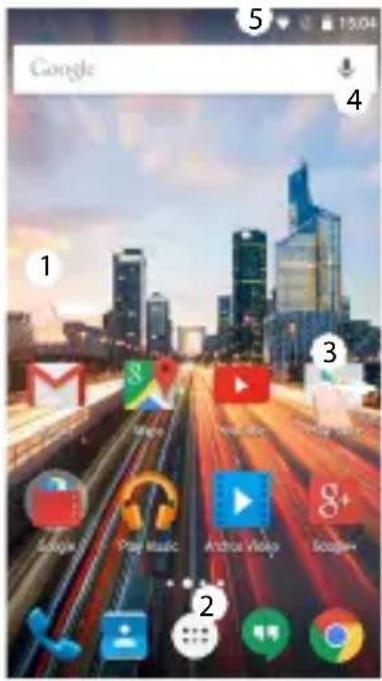
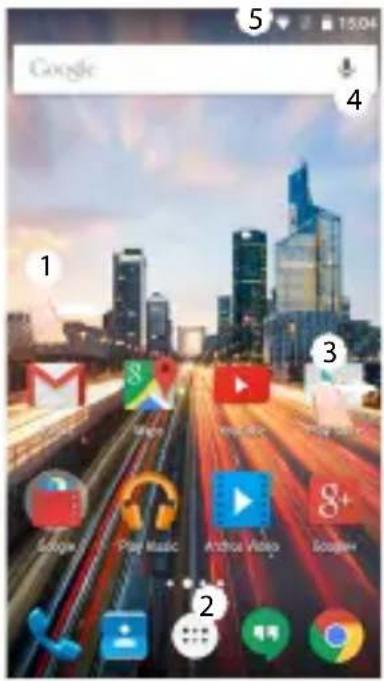
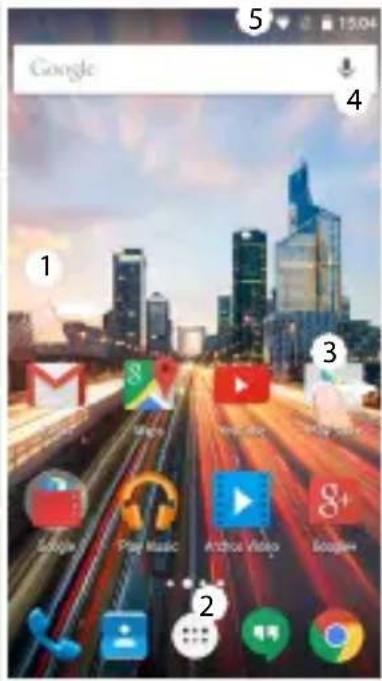
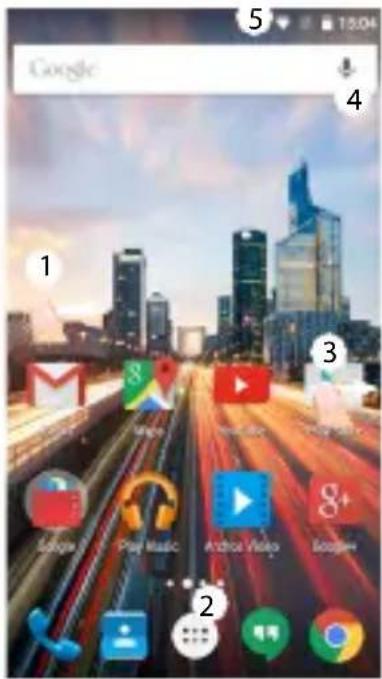
On your homescreen

  1. Swipe right to access Google Now
  2. Press [::] to access all your apps
  3. Hold your finger on an app to move it right and create a new homescreen.
  4. Say "Ok Google" to launch the search page.
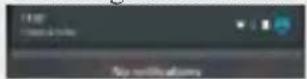
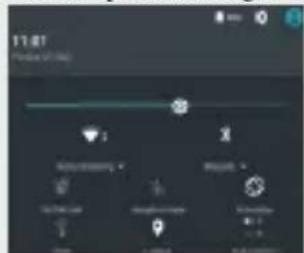
  5. Touch and pull down the status bar to display it. Touch again the bar to reveal the quick settings.
ARCHOS 50d Helium - On your homescreen - 1

ARCHOS 50d Helium - On your homescreen - 2

text_image 11:07 Status (Yes) Auto Parking Google My Info Google Google Google Google Google Google Google Google Google Google Google Google Google Google Google Google Google Google Google Google Google Google Google Google Google Google Google Google Google Google Google Google Google Google Google Google Google Google Google Google Google Google Google Google Google Google Google Google Google Google G6x8x8x8x8x8x8x8x8x8x8x8x8x8x8x8x8x8x8x8x8x8x8x8x8x8x8x8x8x8x8x8x8x8x8x8x8x8x8x8x8x8x8x8x8x8x8x8x8x8x8x

ARCHOS 50d Helium - On your homescreen - 3

text_image Google 1 2 3 4 5 6 7 8 9 10 11 12 13 14 15 16 17 18 19 20 21 22 23 24 25 26 27 28 29 30 31 32 33 34 35 36 37 38 39 40 41 42 43 44 45 46 47 48 49 50 51 52 53 54 55 56 57 58 59 60 61 62 63 64 65 66 67 68 69 70 71 72 73 74 75 76 77 78 79 80 81 82 83 84 85 86 87 88 89 90 91 92 93 94 95 96 97 98 99 100

ARCHOS 50d Helium - On your homescreen - 4

ARCHOS 50d Helium - On your homescreen - 5

natural_image Two horizontal color swatches: black and white with various shades of gray, transitioning to solid colors in yellow, magenta, cyan, blue, green, red, and yellow (no text or symbols)

ARCHOS 50d Helium - On your homescreen - 6

Mobile Data & WiFi connection

Mobile data connection

If your mobile phone subscription includes a mobile data option, you should be connected to the Internet without any further setup. The ARCHOS will only have signal if you are in an area covered by your provider's 4G or 3G network.

Activating/Deactivating the mobile data

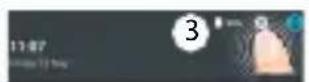
  1. Touch and pull down the status bar to display it.
  2. Touch again the bar to reveal the quick settings.
  3. Select the Settings icon.
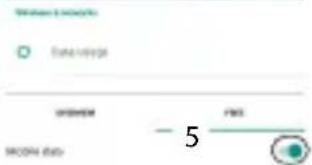
  4. In Wireless & networks, select Data usage, then the SIM card tab.
  5. Slide the Mobile data switch to turn on/off.

ARCHOS 50d Helium - Activating/Deactivating the mobile data - 1

ARCHOS 50d Helium - Activating/Deactivating the mobile data - 2

ARCHOS 50d Helium - Activating/Deactivating the mobile data - 3

text_image FMS FMS - 5

ARCHOS 50d Helium - Activating/Deactivating the mobile data - 4

10

ARCHOS 50d Helium - Activating/Deactivating the mobile data - 5

ARCHOS 50d Helium - Activating/Deactivating the mobile data - 6

natural_image Gradient color bar transitioning from black to white (no text or symbols)

ARCHOS 50d Helium - Activating/Deactivating the mobile data - 7

natural_image Color swatch bar with eight distinct squares in yellow, magenta, cyan, blue, green, red, black, and white (no text or symbols)

ARCHOS 50d Helium - Activating/Deactivating the mobile data - 8

English

WiFi connection

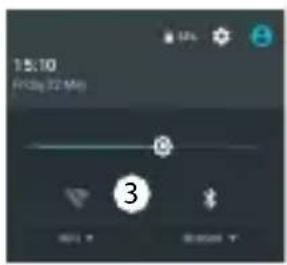
WARNING: Make sure that you are in a WiFi zone. You can access the WiFi settings quickly from the status bar.

  1. Touch and pull down the status bar to display it.
  2. Touch again the bar to reveal the quick settings.
  3. Select the WiFi icon to activate the WiFi connection

ARCHOS 50d Helium - WiFi connection - 1

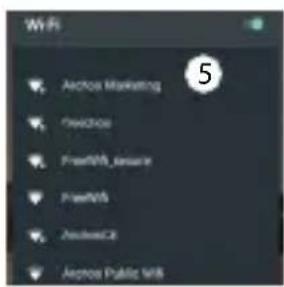
  1. Select "WiFi" below the WiFi icon.

  2. Touch the name of network you want to connect to. Private networks are shown with a lock icon and will require you to enter your password.
ARCHOS 50d Helium - WiFi connection - 2

text_image 15:10 Friday 22 Mon 3

ARCHOS 50d Helium - WiFi connection - 3

text_image Wi-Fi Arcos Marketing Preference FreeMS issue FreeMS Access Arcos Public MS 5

ARCHOS 50d Helium - WiFi connection - 4

ARCHOS 50d Helium - WiFi connection - 5

ARCHOS 50D Helium book.indd 11 15/07/2015 18:03:10

ARCHOS 50d Helium - WiFi connection - 6

natural_image Two horizontal color swatches: black and white with a row of solid-colored squares (no text or symbols)

ARCHOS 50d Helium - WiFi connection - 7

Google & Contacts

Adding a Google account

A Google account lets you take full advantage of any Google apps and services that you may want to use.

  1. Go to "Settings" > "Accounts" > "Add account".
  2. Select the account type "Google" to add.
  3. Follow the onscreen instructions to enter information about the account. Once the account is created, you can access Play Store, Gmail, Hangouts, Maps and many other apps.

ARCHOS 50d Helium - Adding a Google account - 1

Synchronizing info

Information must be sync to be saved. Your data is backed up on Google servers.

  1. Go to "Settings" > "Accounts" > "Google".
  2. Select your account.
    The list of information that can be sync are displayed.
    Automatic sync should be activated. To launch the sync, press the Menu button then Sync now. You can get them back in case of loss of your device or SIM card. When your Google account is added to a new device, all your saved information is transferred.

12

ARCHOS 50d Helium - Synchronizing info - 1

ARCHOS 50D Helium book.indd 12 15/07/2015 18:03:10

ARCHOS 50d Helium - Synchronizing info - 2

ARCHOS 50d Helium - Synchronizing info - 3

natural_image Gradient color bar transitioning from black to white (no text or symbols)

ARCHOS 50d Helium - Synchronizing info - 4

natural_image Color swatch bar with eight distinct squares in yellow, magenta, cyan, blue, green, red, black, and yellow (no text or symbols)

ARCHOS 50d Helium - Synchronizing info - 5

English

Saving your contacts

When your contacts are saved, they are always available on the web and can be synced to any Android phone that's set up with your Google account.

  1. Install the SIM card with your contacts in your phone.
  2. From the Home screen or the All Apps screen, select the Contacts app
  3. Touch the Menu button > "Import/Export".
  4. In Import/export contacts, select "Import from SIM card".
  5. Select your Google account.
  6. Check contacts to be imported and validate.
  7. Once the contacts are imported in the Google account, go to "Settings" > "Accounts" > "Google".
  8. Select you Google account.
  9. Select the Menu button then "Sync now".
    Your contacts are saved to your Google account.

ARCHOS 50d Helium - Saving your contacts - 1

13

ARCHOS 50d Helium - Saving your contacts - 2

ARCHOS 50d Helium - Saving your contacts - 3

ARCHOS 50d Helium - Saving your contacts - 4

ARCHOS 50d Helium - Saving your contacts - 5

natural_image Two horizontal color swatches: black and white with a row of solid color blocks (no text or symbols)

ARCHOS 50d Helium - Saving your contacts - 6

Hints & tips for Android™

Moving a home screen item:

Touch and hold your finger onto it, then slide it to the desired location, and release your finger.

Removing a home screen item:

Touch and hold it, slide your finger towards the top of the screen and drop it over the "Remove" icon.

Uninstalling an item:

From the "All apps" screens, touch and hold it, slide your finger towards the top of the screen and drop it over "Uninstall" bin.

Creating application folders:

Drop one app icon over another on a home screen and the two icons will be combined.

ARCHOS 50d Helium - Creating application folders: - 1

ARCHOS 50d Helium - Creating application folders: - 2

14

ARCHOS 50D Helium book.indd 14 15/07/2015 18:03:10

ARCHOS 50d Helium - Creating application folders: - 3

ARCHOS 50d Helium - Creating application folders: - 4

natural_image Two horizontal color swatches: black and white with gradient shading, each containing a solid color bar (no text or symbols)

ARCHOS 50d Helium - Creating application folders: - 5

English

Widgets:

Hold your finger on a homescreen at an empty location. Touch "Widgets".

Changing your wallpaper:

Hold your finger on a home screen at an empty location.

Touch "Wallpapers".

Locking the touchscreen:

Select the "Settings" app, then scroll down and touch "Security". Touch "Screen lock". Touch the type of lock you would like to use. After you set a lock, a lock screen is displayed whenever your screen wakes up, requesting the pattern, pin or other specified key.

ARCHOS 50d Helium - Locking the touchscreen: - 1

ARCHOS 50d Helium - Locking the touchscreen: - 2

15

ARCHOS 50d Helium - Locking the touchscreen: - 3

ARCHOS 50D Helium book.indd 15 15/07/2015 18:03:10

ARCHOS 50d Helium - Locking the touchscreen: - 4

natural_image Two horizontal color swatches: one grayscale from black to white, the other solid-colored from yellow to pink (no text or symbols)

ARCHOS 50d Helium - Locking the touchscreen: - 5

Troubleshooting

My phone is frozen or cannot switch on

  1. Remove and replace the battery.
  2. Charge your device.

My phone cannot connect to a network or "No service" is displayed

Try connecting in another location. Verify the network coverage with your operator.

Unable to make outgoing calls

Make sure your phone is connected to a network, and the network is not overloaded or unavailable.

Unable to receive incoming calls

Make sure your phone is switched on and connected to a network (check for overloaded or unavailable network).

SIM card PIN locked

Contact your network operator to obtain the PUK code (Personal Unblocking Key).

To configure a new 4G network:

On your device, tap Settings.

  1. Select Wireless & networks > More... > Mobile networks.
  2. In Mobile network settings, select your operator in Network operators.
  3. In Mobile network settings, select Access point names, then select
    to add new parameters and enter the exact connection parameters provided by your 4G provider.

ARCHOS 50d Helium - To configure a new 4G network: - 1

ARCHOS 50d Helium - To configure a new 4G network: - 2

ARCHOS 50d Helium - To configure a new 4G network: - 3

natural_image Two horizontal color swatches: black and white with gradient shading, each containing a solid square (no text or symbols)

ARCHOS 50d Helium - To configure a new 4G network: - 4

Table des matières

natural_image Two horizontal color swatches: black and white with a row of solid color blocks (no text or symbols)

ARCHOS 50d Helium - Table des matières - 1

Contenu de la boîte

natural_image Color swatch bar with grayscale gradient from black to white (no text or symbols)

ARCHOS 50d Helium - Contenu de la boîte - 1

text_image Diagram of a smartphone front panel with numbered parts for identification

19

ARCHOS 50d Helium - Contenu de la boîte - 2

ARCHOS 50d Helium - Contenu de la boîte - 3

ARCHOS 50d Helium - Contenu de la boîte - 4

ARCHOS 50d Helium - Contenu de la boîte - 5

natural_image Two horizontal color swatches: black and white with various shades of gray, transitioning to solid colors in yellow, magenta, cyan, blue, green, red, and yellow (no text or symbols)

ARCHOS 50d Helium - Contenu de la boîte - 6

natural_image Two horizontal color swatches: black and white with gradient shading, each containing a distinct color block (no text or symbols)

ARCHOS 50d Helium - Contenu de la boîte - 7

Prise en main

Assemblage

natural_image Gradient color bar transitioning from black to white (no text or symbols)

ARCHOS 50d Helium - Assemblage - 1

natural_image Color swatch bar with eight distinct squares in yellow, magenta, cyan, blue, green, red, black, and yellow (no text or symbols)

ARCHOS 50d Helium - Assemblage - 2

Prise en main

Allumer l'appareil

natural_image Gradient color bar transitioning from black to white (no text or symbols)

ARCHOS 50d Helium - Allumer l'appareil - 1

natural_image Color palette bar with eight distinct squares in yellow, magenta, cyan, blue, green, red, black, and yellow (no text or symbols)

ARCHOS 50d Helium - Allumer l'appareil - 2

text_image 11:07 Time 5:00:00 Auto Learning On 20 Sep Refresh Time Save

ARCHOS 50d Helium - Allumer l'appareil - 3

text_image Google 1 2 3 4 5 15:04

ARCHOS 50d Helium - Allumer l'appareil - 4

ARCHOS 50d Helium - Allumer l'appareil - 5

natural_image Two horizontal color swatches: black and white with various shades of gray, transitioning to solid colors in yellow, magenta, cyan, blue, green, red, and yellow (no text or symbols)

ARCHOS 50d Helium - Allumer l'appareil - 6

natural_image Gradient color bar transitioning from black to white (no text or symbols)

ARCHOS 50d Helium - Allumer l'appareil - 7

natural_image Color swatch bar with eight distinct squares in yellow, magenta, cyan, blue, green, red, black, and light pink (no text or symbols)

ARCHOS 50d Helium - Allumer l'appareil - 8

Connexion WiFi

natural_image Gradient color bar transitioning from black to white (no text or symbols)

ARCHOS 50d Helium - Connexion WiFi - 1

natural_image Color swatch bar with eight distinct squares in yellow, magenta, cyan, blue, green, red, black, and light pink (no text or symbols)

ARCHOS 50d Helium - Connexion WiFi - 2

Compte Google & Contacts

natural_image Color swatch bar with grayscale gradient from black to white (no text or symbols)

ARCHOS 50d Helium - Compte Google & Contacts - 1

Sauvegarder vos contacts

natural_image Two horizontal color swatches: black and white with a row of solid-colored squares (no text or symbols)

ARCHOS 50d Helium - Sauvegarder vos contacts - 1

natural_image Two horizontal color swatches: one grayscale from black to white, the other solid-colored from yellow to pink (no text or symbols)

ARCHOS 50d Helium - Sauvegarder vos contacts - 2

Français

Widgets :

natural_image Gradient color bar transitioning from black to white (no text or symbols)

ARCHOS 50d Helium - Widgets : - 1

natural_image Color swatch bar with eight distinct squares in yellow, magenta, cyan, blue, green, red, black, and yellow (no text or symbols)

ARCHOS 50d Helium - Widgets : - 2

Dépannage

natural_image Two horizontal color swatches: black and white with gradient shading, each containing a distinct color block (no text or symbols)

ARCHOS 50d Helium - Dépannage - 1

Inhaltsverzeichnis

natural_image Two horizontal color swatches: black and white with a row of solid-colored squares (no text or symbols)

ARCHOS 50d Helium - Inhaltsverzeichnis - 1

Verpackungsinhalt

natural_image Two horizontal color swatches: black and white with gradient shading, each containing a solid square (no text or symbols)

ARCHOS 50d Helium - Verpackungsinhalt - 1

text_image Diagram of a smartphone with numbered parts for identification and assembly reference

Deutsch

ARCHOS 50d Helium - Verpackungsinhalt - 2
35

ARCHOS 50d Helium - Verpackungsinhalt - 3

ARCHOS 50d Helium - Verpackungsinhalt - 4

ARCHOS 50d Helium - Verpackungsinhalt - 5

natural_image Two horizontal color swatches: black and white with various shades of gray, transitioning to solid colors in yellow, magenta, cyan, blue, green, red, and yellow.

ARCHOS 50d Helium - Verpackungsinhalt - 6

natural_image Two horizontal color swatches: one grayscale from black to white, the other solid-colored from yellow to pink (no text or symbols)

ARCHOS 50d Helium - Verpackungsinhalt - 7

Erste Schritte

Montage

natural_image Two horizontal color swatches: black and white with gradient shading, each containing a distinct color block (no text or symbols)

ARCHOS 50d Helium - Montage - 1

Erste Schritte

Einschalten

natural_image Gradient color bar transitioning from black to white (no text or symbols)

ARCHOS 50d Helium - Einschalten - 1

natural_image Color swatch bar with eight solid color blocks (yellow, magenta, cyan, blue, green, red, black, yellow, pink) in a horizontal row (no text or symbols)

ARCHOS 50d Helium - Einschalten - 2

text_image Screenshot showing a mobile app interface with a message and a UI control panel, both in Chinese.

ARCHOS 50d Helium - Einschalten - 3

text_image Google 1 M Email 2 Play Music 3 Android Video 4 Google 5 1504

Deutsch

41

ARCHOS 50d Helium - Einschalten - 4

ARCHOS 50d Helium - Einschalten - 5

natural_image Two horizontal color swatches: black and white with various shades of gray, transitioning to solid colors in yellow, magenta, cyan, blue, green, red, and yellow (no text or symbols)

ARCHOS 50d Helium - Einschalten - 6

natural_image Gradient color bar transitioning from black to white (no text or symbols)

ARCHOS 50d Helium - Einschalten - 7

natural_image Color swatch bar with eight distinct color blocks (yellow, magenta, cyan, blue, green, red, black, yellow, pink) in a horizontal row.

ARCHOS 50d Helium - Einschalten - 8

WLAN-Verbindung

natural_image Gradient color bar transitioning from black to white (no text or symbols)

ARCHOS 50d Helium - WLAN-Verbindung - 1

natural_image Color swatch bar with eight distinct squares in yellow, magenta, cyan, blue, green, red, black, and light pink (no text or symbols)

ARCHOS 50d Helium - WLAN-Verbindung - 2

natural_image Color swatch bar with grayscale gradient from black to white (no text or symbols)

ARCHOS 50d Helium - WLAN-Verbindung - 3

natural_image Two horizontal color swatches: black and white with a row of solid color blocks (no text or symbols)

ARCHOS 50d Helium - WLAN-Verbindung - 4

natural_image Color swatch bar with grayscale gradient from black to white (no text or symbols)

ARCHOS 50d Helium - WLAN-Verbindung - 5

Widgets:

natural_image Two horizontal color swatches: one grayscale from black to white, the other solid-colored from yellow to pink (no text or symbols)

ARCHOS 50d Helium - Widgets: - 1

Fehlerbehebung

natural_image Two horizontal color swatches: black and white with gradient shading, each containing a solid square (no text or symbols)

ARCHOS 50d Helium - Fehlerbehebung - 1

Índice

natural_image Two horizontal color swatches: black and white with a row of solid-colored squares (no text or symbols)

ARCHOS 50d Helium - Índice - 1

natural_image Gradient color bar transitioning from black to white (no text or symbols)

ARCHOS 50d Helium - Índice - 2

natural_image Color swatch bar with eight distinct squares in yellow, magenta, cyan, blue, green, red, black, and white (no text or symbols)

ARCHOS 50d Helium - Índice - 3

natural_image Color swatch bar with grayscale gradient from black to white (no text or symbols)

ARCHOS 50d Helium - Índice - 4

natural_image Two horizontal color swatches: one grayscale from black to white, the other solid-colored from yellow to pink (no text or symbols)

ARCHOS 50d Helium - Índice - 5

Primeros pasos

Montaje

natural_image Two horizontal color swatches: black and white with gradient shading, each containing a distinct color block (no text or symbols)

ARCHOS 50d Helium - Montaje - 1

Primeros pasos

Encendido

natural_image Two horizontal color swatches: black and white with various shades of gray, transitioning to solid colors in yellow, magenta, cyan, blue, green, red, and black (no text or symbols)

ARCHOS 50d Helium - Encendido - 1

natural_image Two horizontal color swatches: black and white with various shades of gray, transitioning to solid colors in yellow, magenta, cyan, blue, green, red, and yellow (no text or symbols)

ARCHOS 50d Helium - Encendido - 2

text_image 11:07 Friday 12:07 Settings Time to start Data range FBS 5 MOMO data

ARCHOS 50d Helium - Encendido - 3

ARCHOS 50d Helium - Encendido - 4

ARCHOS 50d Helium - Encendido - 5

natural_image Gradient color bar transitioning from black to white (no text or symbols)

ARCHOS 50d Helium - Encendido - 6

natural_image Color swatch bar with eight distinct squares in yellow, magenta, cyan, blue, green, red, black, and light pink (no text or symbols)

ARCHOS 50d Helium - Encendido - 7

Conexión WiFi

text_image Wi-Fi Archos Marketing Switches FreeMS_ware FreeMS AccessCE Access Public MS

ARCHOS 50d Helium - Conexión WiFi - 1

ARCHOS 50d Helium - Conexión WiFi - 2

natural_image Gradient color bar transitioning from black to white (no text or symbols)

ARCHOS 50d Helium - Conexión WiFi - 3

natural_image Color swatch bar with eight distinct squares in yellow, magenta, cyan, blue, green, red, black, and yellow (no text or symbols)

ARCHOS 50d Helium - Conexión WiFi - 4

natural_image Gradient color bar transitioning from black to white (no text or symbols)

ARCHOS 50d Helium - Conexión WiFi - 5

natural_image Color swatch bar with eight distinct squares in yellow, magenta, cyan, blue, green, red, black, and light pink (no text or symbols)

ARCHOS 50d Helium - Conexión WiFi - 6

natural_image Two horizontal color swatches: black and white with a row of solid color blocks (no text or symbols)

ARCHOS 50d Helium - Conexión WiFi - 7

natural_image Two horizontal color swatches: black and white with gradient shading, each containing a solid square (no text or symbols)

ARCHOS 50d Helium - Conexión WiFi - 8

Widgets:

natural_image Two horizontal color swatches: one grayscale from black to white, the other solid-colored from yellow to pink (no text or symbols)

ARCHOS 50d Helium - Widgets: - 1

natural_image Two horizontal color swatches: black and white with gradient shading, each containing a solid square (no text or symbols)

ARCHOS 50d Helium - Widgets: - 2

Sommario

natural_image Two horizontal color swatches: black and white with a row of solid color blocks (no text or symbols)

ARCHOS 50d Helium - Sommario - 1

natural_image Color swatch bar with grayscale gradient from black to white (no text or symbols)

ARCHOS 50d Helium - Sommario - 2

text_image Diagram of a smartphone front panel with numbered parts for identification

Italiano

ARCHOS 50d Helium - Sommario - 3
67

ARCHOS 50d Helium - Sommario - 4

ARCHOS 50d Helium - Sommario - 5

natural_image Color swatch bar with grayscale gradient from black to white (no text or symbols)

ARCHOS 50d Helium - Sommario - 6

natural_image Two horizontal color swatches: black and white with gradient shading, and solid color blocks in yellow, magenta, cyan, blue, green, red, and yellow (no text or symbols)

ARCHOS 50d Helium - Sommario - 7

Introduzione

Assemblaggio

natural_image Front view of a smartphone with a control panel and three labeled buttons on the front screen (no text or symbols beyond basic labels)

ARCHOS 50d Helium - Assemblaggio - 1

text_image 3 2 1

ARCHOS 50d Helium - Assemblaggio - 2

natural_image Gradient color bar transitioning from black to white (no text or symbols)

ARCHOS 50d Helium - Assemblaggio - 3

natural_image Color swatch bar with eight distinct squares in yellow, magenta, cyan, blue, green, red, black, and yellow (no text or symbols)

ARCHOS 50d Helium - Assemblaggio - 4

Introduzione

Accensione

natural_image Gradient color bar transitioning from black to white (no text or symbols)

ARCHOS 50d Helium - Accensione - 1

natural_image Color swatch bar with eight solid color blocks (yellow, magenta, cyan, blue, green, red, black, yellow, pink) in a horizontal row (no text or symbols)

ARCHOS 50d Helium - Accensione - 2

Schermata iniziale

natural_image Two horizontal color swatches: black and white with various shades of gray, transitioning to solid colors in yellow, magenta, cyan, blue, green, red, and yellow (no text or symbols)

ARCHOS 50d Helium - Accensione - 3

natural_image Gradient color bar transitioning from black to white (no text or symbols)

ARCHOS 50d Helium - Accensione - 4

natural_image Color swatch bar with eight distinct squares in yellow, magenta, cyan, blue, green, red, black, and yellow (no text or symbols)

ARCHOS 50d Helium - Accensione - 5

Connessione Wi-Fi

text_image Wi-Fi Archos Marketing Fronchos FreeMS_Leserve FreeMS Arcosus Arcros Public VIB

ARCHOS 50d Helium - Connessione Wi-Fi - 1

ARCHOS 50d Helium - Connessione Wi-Fi - 2

ARCHOS 50d Helium - Connessione Wi-Fi - 3

natural_image Gradient color bar transitioning from black to white (no text or symbols)

ARCHOS 50d Helium - Connessione Wi-Fi - 4

natural_image Color swatch bar with eight distinct squares in yellow, magenta, cyan, blue, green, red, black, and light pink (no text or symbols)

ARCHOS 50d Helium - Connessione Wi-Fi - 5

Account Google e contatti

natural_image Gradient color bar transitioning from black to white (no text or symbols)

ARCHOS 50d Helium - Account Google e contatti - 1

natural_image Color swatch bar with eight distinct color blocks (yellow, magenta, cyan, blue, green, red, black, yellow, pink) arranged horizontally.

ARCHOS 50d Helium - Account Google e contatti - 2

natural_image Two horizontal color swatches: black and white with a row of solid-colored squares (no text or symbols)

ARCHOS 50d Helium - Account Google e contatti - 3

Conoscere Android™

natural_image Two horizontal color swatches: black and white with gradient shading, each containing a distinct color block (no text or symbols)

ARCHOS 50d Helium - Conoscere Android™ - 1

Widget:

natural_image Gradient color bar transitioning from black to white (no text or symbols)

ARCHOS 50d Helium - Widget: - 1

natural_image Color swatch bar with eight distinct squares in yellow, magenta, cyan, blue, green, red, black, and yellow (no text or symbols)

ARCHOS 50d Helium - Widget: - 2

natural_image Two horizontal color swatches: black and white with gradient shading, each containing a distinct color block (no text or symbols)

ARCHOS 50d Helium - Widget: - 3

Inhoudsopgave

natural_image Gradient color bar transitioning from black to white (no text or symbols)

ARCHOS 50d Helium - Inhoudsopgave - 1

natural_image Color swatch bar with eight distinct squares in yellow, magenta, cyan, blue, green, red, black, and yellow (no text or symbols)

ARCHOS 50d Helium - Inhoudsopgave - 2

natural_image Gradient color bar transitioning from black to white (no text or symbols)

ARCHOS 50d Helium - Inhoudsopgave - 3

natural_image Color swatch bar with eight distinct squares in yellow, magenta, cyan, blue, green, red, black, and white (no text or symbols)

ARCHOS 50d Helium - Inhoudsopgave - 4

natural_image Color swatch bar with grayscale gradient from black to white (no text or symbols)

ARCHOS 50d Helium - Inhoudsopgave - 5

natural_image Two horizontal color swatches: black and white with gradient shading, each containing a distinct color block (no text or symbols)

ARCHOS 50d Helium - Inhoudsopgave - 6

Aan de slag

Montage

natural_image Two horizontal color swatches: one grayscale from black to white, the other solid-colored from yellow to pink (no text or symbols)

ARCHOS 50d Helium - Montage - 1

ARCHOS 50d Helium - Montage - 2

text_image MCKS MCKS

ARCHOS 50d Helium - Montage - 3

natural_image Front view of a smartphone with a control panel and three labeled buttons on the front panel (no text or symbols beyond basic labels)

ARCHOS 50d Helium - Montage - 4

text_image 3 2 1

Nederlands

ARCHOS 50d Helium - Montage - 5

natural_image Gradient color bar transitioning from black to white (no text or symbols)

ARCHOS 50d Helium - Montage - 6

natural_image Color swatch bar with eight distinct squares in yellow, magenta, cyan, blue, green, red, black, and yellow (no text or symbols)

ARCHOS 50d Helium - Montage - 7

Aan de slag

Inschakelen

natural_image Gradient color bar transitioning from black to white (no text or symbols)

ARCHOS 50d Helium - Inschakelen - 1

natural_image Color swatch bar with eight distinct squares in yellow, magenta, cyan, blue, green, red, black, and yellow (no text or symbols)

ARCHOS 50d Helium - Inschakelen - 2

Op het beginscherm

natural_image Gradient color bar transitioning from black to white (no text or symbols)

ARCHOS 50d Helium - Inschakelen - 3

natural_image Color swatch bar with eight distinct squares in yellow, magenta, cyan, blue, green, red, black, and white (no text or symbols)

ARCHOS 50d Helium - Inschakelen - 4

Mobiele data & WiFi-verbinding

Mobiele dataverbinding

natural_image Gradient color bar transitioning from black to white (no text or symbols)

ARCHOS 50d Helium - Mobiele dataverbinding - 1

natural_image Color swatch bar with eight distinct squares in yellow, magenta, cyan, blue, green, red, black, and yellow (no text or symbols)

ARCHOS 50d Helium - Mobiele dataverbinding - 2

WiFi-verbinding

natural_image Gradient color bar transitioning from black to white (no text or symbols)

ARCHOS 50d Helium - WiFi-verbinding - 1

natural_image Color swatch bar with eight distinct squares in yellow, magenta, cyan, blue, green, red, black, and yellow (no text or symbols)

ARCHOS 50d Helium - WiFi-verbinding - 2

Google account & Contacten

natural_image Color swatch bar with grayscale gradient from black to white (no text or symbols)

ARCHOS 50d Helium - Google account & Contacten - 1

Contacten opslaan

natural_image Two horizontal color swatches: black and white with a row of solid color blocks (no text or symbols)

ARCHOS 50d Helium - Contacten opslaan - 1

natural_image Two horizontal color swatches: black and white with gradient shading, each containing a solid square (no text or symbols)

ARCHOS 50d Helium - Contacten opslaan - 2

Widgets:

natural_image Two horizontal color swatches: one grayscale from black to white, the other solid-colored from yellow to pink (no text or symbols)

ARCHOS 50d Helium - Widgets: - 1

Probleemoplossing

natural_image Two horizontal color swatches: black and white with gradient shading, each containing a distinct color block (no text or symbols)

ARCHOS 50d Helium - Probleemoplossing - 1

Índice

natural_image Two horizontal color swatches: black and white with a row of solid-colored squares (no text or symbols)

ARCHOS 50d Helium - Índice - 1

natural_image Gradient color bar transitioning from black to white (no text or symbols)

ARCHOS 50d Helium - Índice - 2

natural_image Color swatch bar with eight distinct squares in yellow, magenta, cyan, blue, green, red, black, and white (no text or symbols)

ARCHOS 50d Helium - Índice - 3

natural_image Color swatch bar with grayscale gradient from black to white (no text or symbols)

ARCHOS 50d Helium - Índice - 4

natural_image Two horizontal color swatches: one grayscale from black to white, the other solid-colored from yellow to pink (no text or symbols)

ARCHOS 50d Helium - Índice - 5

Introdução

Montagem

natural_image Two horizontal color swatches: black and white with gradient squares, each containing a distinct color block (no text or symbols)

ARCHOS 50d Helium - Montagem - 1

ARCHOS 50d Helium - Montagem - 2

text_image RICHUS MUSKS

ARCHOS 50d Helium - Montagem - 3

natural_image Simple line drawing of a smartphone front panel with control buttons and a display (no text or symbols)

ARCHOS 50d Helium - Montagem - 4

text_image 3 2 1

Português

natural_image Two horizontal color swatches: black and white with various shades of gray, transitioning to solid colors in yellow, magenta, cyan, blue, green, red, and yellow (no text or symbols)

ARCHOS 50d Helium - Montagem - 5

Introdução

Ligar

natural_image Two vertical color swatches: one grayscale from black to white, the other solid-colored from yellow to pink (no text or symbols)

ARCHOS 50d Helium - Ligar - 1

No seu ecrã inicial

text_image 11:07 Friday 57:00 Accounting > No 200 and Add account name Add account Add account

ARCHOS 50d Helium - No seu ecrã inicial - 1

text_image Google 1 2 3 4 5 15:04

Português

ARCHOS 50d Helium - No seu ecrã inicial - 2

ARCHOS 50D Helium book.indd 105 15/07/2015 18:03:40

ARCHOS 50d Helium - No seu ecrã inicial - 3

natural_image Two horizontal color swatches: black and white with various shades of gray, transitioning to solid colors in yellow, magenta, cyan, blue, green, red, and yellow (no text or symbols)

ARCHOS 50d Helium - No seu ecrã inicial - 4

text_image 11:07 Date 12 July Settings Status: 0.0000 Status: 0.0000 Status: 0.0000 OK Cancel OK/OK Date 3 4 5

ARCHOS 50d Helium - No seu ecrã inicial - 5

106

ARCHOS 50D Helium book.indd 106 15/07/2015 18:03:40

ARCHOS 50d Helium - No seu ecrã inicial - 6

ARCHOS 50d Helium - No seu ecrã inicial - 7

natural_image Gradient color bar transitioning from black to white (no text or symbols)

ARCHOS 50d Helium - No seu ecrã inicial - 8

natural_image Color swatch bar with eight distinct squares in yellow, magenta, cyan, blue, green, red, black, and yellow (no text or symbols)

ARCHOS 50d Helium - No seu ecrã inicial - 9

Ligação Wi-Fi

text_image Wi-Fi Archos Marketing Switches FreeWeb_January FreeWeb Ambusa3 Arcos Public Web

ARCHOS 50d Helium - Ligação Wi-Fi - 1

ARCHOS 50d Helium - Ligação Wi-Fi - 2

natural_image Two horizontal color swatches: black and white with gradient shading, each containing a distinct color block (no text or symbols)

ARCHOS 50d Helium - Ligação Wi-Fi - 3

natural_image Gradient color bar transitioning from black to white (no text or symbols)

ARCHOS 50d Helium - Ligação Wi-Fi - 4

natural_image Color swatch bar with eight distinct squares in yellow, magenta, cyan, blue, green, red, black, and light pink (no text or symbols)

ARCHOS 50d Helium - Ligação Wi-Fi - 5

natural_image Two horizontal color swatches: black and white with a row of solid color blocks (no text or symbols)

ARCHOS 50d Helium - Ligação Wi-Fi - 6

natural_image Color swatch bar with grayscale gradient from black to white (no text or symbols)

ARCHOS 50d Helium - Ligação Wi-Fi - 7

Widgets:

natural_image Two horizontal color swatches: one grayscale from black to white, the other solid-colored from yellow to pink (no text or symbols)

ARCHOS 50d Helium - Widgets: - 1

natural_image Two horizontal color swatches: black and white with various shades of gray, transitioning to solid colors in yellow, magenta, cyan, blue, green, red, and yellow (no text or symbols)

ARCHOS 50d Helium - Widgets: - 2

Содержание

natural_image Gradient color bar transitioning from black to white (no text or symbols)

ARCHOS 50d Helium - Содержание - 1

natural_image Color swatch bar with eight distinct squares in yellow, magenta, cyan, blue, green, red, black, and yellow (no text or symbols)

ARCHOS 50d Helium - Содержание - 2

Содержимое упаковки

natural_image Gradient color bar transitioning from black to white (no text or symbols)

ARCHOS 50d Helium - Содержимое упаковки - 1

natural_image Color swatch bar with eight distinct squares in yellow, magenta, cyan, blue, green, red, black, and white (no text or symbols)

ARCHOS 50d Helium - Содержимое упаковки - 2

Описание устройства

text_image Diagram of a smartphone front panel with numbered parts for identification

РУССКИЙ

115

ARCHOS 50d Helium - Описание устройства - 1

ARCHOS 50d Helium - Описание устройства - 2

natural_image Two horizontal color swatches: black and white with various shades of gray, transitioning to solid colors in yellow, magenta, cyan, blue, green, red, and yellow.

ARCHOS 50d Helium - Описание устройства - 3

Описание устройства

natural_image Two horizontal color swatches: one grayscale from black to white, the other solid-colored from yellow to pink (no text or symbols)

ARCHOS 50d Helium - Описание устройства - 1

Начало работы

Сборка

natural_image Gradient color bar transitioning from black to white (no text or symbols)

ARCHOS 50d Helium - Сборка - 1

natural_image Color swatch bar with eight distinct squares in yellow, magenta, cyan, blue, green, red, black, and yellow (no text or symbols)

ARCHOS 50d Helium - Сборка - 2

Начало работы

Включение

natural_image Two vertical color swatches: black and white with solid, gradient, and cyan/pink squares (no text or symbols)

ARCHOS 50d Helium - Включение - 1

На главном экране

text_image 11:01 Status Bar File downloads/forms 11:01 Status Bar (5.0 mm) Backpropagation OK Cancel Help Help Help

ARCHOS 50d Helium - Включение - 2

text_image Google 1 2 3 4 5 6 7 8 9 10 11 12 13 14 15 16 17 18 19 20 21 22 23 24 25 26 27 28 29 30 31 32 33 34 35 36 37 38 39 40 41 42 43 44 45 46 47 48 49 50 51 52 53 54 55 56 57 58 59 60 61 62 63 64 65 66 67 68 69 70 71 72 73 74 75 76 77 78 79 80 81 82 83 84 85 86 87 88 89 90 91 92 93 94 95 96 97 98 99 100

РУССКИЙ

121

ARCHOS 50d Helium - Включение - 3

ARCHOS 50D Helium book.indd 121 15/07/2015 18:03:45

ARCHOS 50d Helium - Включение - 4

natural_image Two horizontal color swatches: black and white with various shades of gray, transitioning to solid colors in yellow, magenta, cyan, blue, green, red, and yellow (no text or symbols)

ARCHOS 50d Helium - Включение - 5

text_image Time stamp OFFICE - 5 FMS WORKING

12

ARCHOS 50d Helium - Включение - 6

ARCHOS 50D Helium book.indd 122 15/07/2015 18:03:45

ARCHOS 50d Helium - Включение - 7

ARCHOS 50d Helium - Включение - 8

natural_image Gradient color bar transitioning from black to white (no text or symbols)

ARCHOS 50d Helium - Включение - 9

natural_image Color test bar with eight distinct squares in yellow, magenta, cyan, blue, green, red, black, and yellow (no text or symbols)

ARCHOS 50d Helium - Включение - 10

Подключение WiFi

text_image WiFi Anchor Marketing Switches FreeWeb Anover FreeWeb Ambience Anchor Public Web

РУССКИЙ

123

ARCHOS 50d Helium - Подключение WiFi - 1

ARCHOS 50D Helium book.indd 123 15/07/2015 18:03:45

ARCHOS 50d Helium - Подключение WiFi - 2

natural_image Gradient color bar transitioning from black to white (no text or symbols)

ARCHOS 50d Helium - Подключение WiFi - 3

natural_image Color swatch bar with eight distinct squares in yellow, magenta, cyan, blue, green, red, black, and yellow (no text or symbols)

ARCHOS 50d Helium - Подключение WiFi - 4

natural_image Gradient color bar transitioning from black to white (no text or symbols)

ARCHOS 50d Helium - Подключение WiFi - 5

natural_image Color swatch bar with eight distinct squares in yellow, magenta, cyan, blue, green, red, black, and light pink (no text or symbols)

ARCHOS 50d Helium - Подключение WiFi - 6

natural_image Gradient color bar transitioning from black to white (no text or symbols)

ARCHOS 50d Helium - Подключение WiFi - 7

natural_image Color swatch bar with eight distinct squares in yellow, magenta, cyan, blue, green, red, black, and yellow (no text or symbols)

ARCHOS 50d Helium - Подключение WiFi - 8

natural_image Two horizontal color swatches: black and white with gradient shading, each containing a solid square (no text or symbols)

ARCHOS 50d Helium - Подключение WiFi - 9

Виджеты:

natural_image Two horizontal color swatches: one grayscale from black to white, the other solid-colored from yellow to pink (no text or symbols)

ARCHOS 50d Helium - Виджеты: - 1

natural_image Two horizontal color swatches: black and white with gradient shading, each containing a distinct color block (no text or symbols)

ARCHOS 50d Helium - Виджеты: - 2

Spis treści

natural_image Two horizontal color swatches: black and white with gradient shading, each containing a distinct color block (no text or symbols)

ARCHOS 50d Helium - Spis treści - 1

natural_image Two horizontal color swatches: one grayscale from black to white, the other solid-colored from yellow to pink (no text or symbols)

ARCHOS 50d Helium - Spis treści - 2

Opis telefonu

text_image Diagram of a smartphone front panel with numbered parts for identification

131

ARCHOS 50d Helium - Opis telefonu - 1

ARCHOS 50d Helium - Opis telefonu - 2

ARCHOS 50d Helium - Opis telefonu - 3

natural_image Two horizontal color swatches: black and yellow squares with no text or symbols, arranged horizontally.

ARCHOS 50d Helium - Opis telefonu - 4

Opis telefonu

natural_image Gradient color bar transitioning from black to white (no text or symbols)

ARCHOS 50d Helium - Opis telefonu - 1

natural_image Color swatch bar with eight distinct squares in yellow, magenta, cyan, blue, green, red, black, and yellow (no text or symbols)

ARCHOS 50d Helium - Opis telefonu - 2

natural_image Two horizontal color swatches: black and white with various shades of gray, transitioning to solid colors in yellow, magenta, cyan, blue, green, red, and yellow (no text or symbols)

ARCHOS 50d Helium - Opis telefonu - 3

natural_image Two horizontal color swatches: black and white with gradient shading, each containing a solid color block (no text or symbols)

ARCHOS 50d Helium - Opis telefonu - 4

Na ekranie głównym

natural_image Two horizontal color swatches: black and white with various shades of gray, transitioning to solid colors in yellow, magenta, cyan, blue, green, red, and yellow (no text or symbols)

ARCHOS 50d Helium - Na ekranie głównym - 1

natural_image Gradient color bar transitioning from black to white (no text or symbols)

ARCHOS 50d Helium - Na ekranie głównym - 2

natural_image Color swatch bar with eight distinct squares in yellow, magenta, cyan, blue, green, red, black, and yellow (no text or symbols)

ARCHOS 50d Helium - Na ekranie głównym - 3

Połączenie Wi-Fi

text_image WiFi Anchor Marketing Connection FreeMS issue FreeMS Accessible Anchor Public MS

Polski.

ARCHOS 50d Helium - Połączenie Wi-Fi - 1

ARCHOS 50d Helium - Połączenie Wi-Fi - 2

natural_image Two horizontal color swatches: black and white with various shades of gray, transitioning to solid colors in yellow, magenta, cyan, blue, green, red, and yellow (no text or symbols)

ARCHOS 50d Helium - Połączenie Wi-Fi - 3

natural_image Two horizontal color swatches: black and white with gradient shading, each containing a solid color block (no text or symbols)

ARCHOS 50d Helium - Połączenie Wi-Fi - 4

natural_image Gradient color bar transitioning from black to white (no text or symbols)

ARCHOS 50d Helium - Połączenie Wi-Fi - 5

natural_image Color swatch bar with eight distinct squares in yellow, magenta, cyan, blue, green, red, black, and yellow (no text or symbols)

ARCHOS 50d Helium - Połączenie Wi-Fi - 6

natural_image Two horizontal color swatches: black and white with gradient shading, each containing a solid square (no text or symbols)

ARCHOS 50d Helium - Połączenie Wi-Fi - 7

Widżety:

natural_image Two horizontal color swatches: one grayscale from black to white, the other solid-colored from yellow to pink (no text or symbols)

ARCHOS 50d Helium - Widżety: - 1

natural_image Two horizontal color swatches: black and white with gradient shading, each containing a distinct color block (no text or symbols)

ARCHOS 50d Helium - Widżety: - 2

Tartalomjegyzék

natural_image Two horizontal color swatches: black and white with a row of solid color blocks (no text or symbols)

ARCHOS 50d Helium - Tartalomjegyzék - 1

A csomag tartalma

natural_image Color swatch bar with grayscale gradient from black to white (no text or symbols)

ARCHOS 50d Helium - A csomag tartalma - 1

text_image Diagram of a smartphone front panel with numbered labels pointing to key components

Magyar

147

ARCHOS 50d Helium - A csomag tartalma - 2

natural_image Two horizontal color swatches: black and white with various shades of gray, transitioning to solid colors in yellow, magenta, cyan, blue, green, red, and yellow (no text or symbols)

ARCHOS 50d Helium - A csomag tartalma - 3

natural_image Two horizontal color swatches: one grayscale from black to white, the other solid-colored from yellow to pink (no text or symbols)

ARCHOS 50d Helium - A csomag tartalma - 4

Első lépések

Összeszerelés

natural_image Two horizontal color swatches: black and white with gradient squares, each containing a distinct color block (no text or symbols)

ARCHOS 50d Helium - Összeszerelés - 1

ARCHOS 50d Helium - Összeszerelés - 2

natural_image Two smartphones shown side by side, one with a circular button and the other with an upward arrow (no text or symbols on the devices themselves)

ARCHOS 50d Helium - Összeszerelés - 3

natural_image Simple line drawing of a smartphone front panel with control buttons and a display (no text or symbols)

ARCHOS 50d Helium - Összeszerelés - 4

text_image 3 2 1
natural_image Two horizontal color swatches: black and white with gradient shading, each containing a distinct color block (no text or symbols)

ARCHOS 50d Helium - Összeszerelés - 5

Első lépések

Bekapcsolás

natural_image Two horizontal color swatches: black and white with solid, gradient, and cyan/pink squares (no text or symbols)

ARCHOS 50d Helium - Bekapcsolás - 1

A kezdőképernyőn

natural_image Two horizontal color swatches: black and white with various shades of gray, transitioning to solid colors in yellow, magenta, cyan, blue, green, red, and yellow (no text or symbols)

ARCHOS 50d Helium - A kezdőképernyőn - 1

text_image 11:07 Time to play Settings Time to watch Time range OFFICE FMS 5

ARCHOS 50d Helium - A kezdőképernyőn - 2

154

ARCHOS 50d Helium - A kezdőképernyőn - 3

ARCHOS 50d Helium - A kezdőképernyőn - 4

natural_image Gradient color bar transitioning from black to white (no text or symbols)

ARCHOS 50d Helium - A kezdőképernyőn - 5

natural_image Color swatch bar with eight distinct squares in yellow, magenta, cyan, blue, green, red, black, and light pink (no text or symbols)

ARCHOS 50d Helium - A kezdőképernyőn - 6

Wi-Fi kapcsolat

text_image Wi-Fi Anchor Marketing Switches FreeMBS_wareny FreeMBS Ambience Anchor Public MBS

Magyar

155

ARCHOS 50d Helium - Wi-Fi kapcsolat - 1

ARCHOS 50D Helium book.indd 155 15/07/2015 18:03:55

ARCHOS 50d Helium - Wi-Fi kapcsolat - 2

natural_image Gradient color bar transitioning from black to white (no text or symbols)

ARCHOS 50d Helium - Wi-Fi kapcsolat - 3

natural_image Color swatch bar with eight distinct squares in yellow, magenta, cyan, blue, green, red, black, and yellow (no text or symbols)

ARCHOS 50d Helium - Wi-Fi kapcsolat - 4

natural_image Gradient color bar transitioning from black to white (no text or symbols)

ARCHOS 50d Helium - Wi-Fi kapcsolat - 5

natural_image Color swatch bar with eight distinct squares in yellow, magenta, cyan, blue, green, red, black, and light pink (no text or symbols)

ARCHOS 50d Helium - Wi-Fi kapcsolat - 6

Névjegyek mentése

natural_image Two horizontal color swatches: black and white with a row of solid-colored squares (no text or symbols)

ARCHOS 50d Helium - Névjegyek mentése - 1

natural_image Two horizontal color swatches: black and white with gradient shading, each containing a solid square (no text or symbols)

ARCHOS 50d Helium - Névjegyek mentése - 2

Minialkalmazások:

natural_image Two horizontal color swatches: one grayscale from black to white, the other solid-colored from yellow to pink (no text or symbols)

ARCHOS 50d Helium - Minialkalmazások: - 1

Hibaelhárítás

natural_image Two horizontal color swatches: black and white with gradient shading, each containing a solid square (no text or symbols)

ARCHOS 50d Helium - Hibaelhárítás - 1

MỤC LỤC

Hộp thiết bị....2

Mô tả thiết bị....3

natural_image Two horizontal color swatches: black and white with a row of solid color blocks (no text or symbols)

ARCHOS 50d Helium - MỤC LỤC - 1

HỘP THIẾT BỊ

natural_image Color swatch bar with grayscale gradient from black to white (no text or symbols)

ARCHOS 50d Helium - HỘP THIẾT BỊ - 1

Description of the phone

natural_image Two horizontal color swatches: black and white with gradient shading, each containing a distinct color block (no text or symbols)

ARCHOS 50d Helium - Description of the phone - 1

BẮT ĐẦU SỬ DỤNG ĐIÊN THOẠI

Lắp điện thoại

natural_image Two horizontal color swatches: black and white with gradient shading, each containing a distinct color block (no text or symbols)

ARCHOS 50d Helium - Lắp điện thoại - 1

Bật điện thoại

Turning on

natural_image Two vertical color swatches: black and white with various shades of gray, transitioning from black to yellow and pink (no text or symbols)

ARCHOS 50d Helium - Turning on - 1

Trên màn hình chủ

ARCHOS 50d Helium - Trên màn hình chủ - 1

natural_image Two horizontal color swatches: black and white with various shades of gray, transitioning to solid colors in yellow, magenta, cyan, blue, green, red, and yellow (no text or symbols)

ARCHOS 50d Helium - Trên màn hình chủ - 2

KẾT NỐI Dữ LIỆU VÀ WIFI

Kết nối dữ liệu

text_image 11:07 Status 12 July Settings Status 12 July Status 12 July Status 12 July Status 12 July OK Cancel OK/OK Status OK/OK Status OK/OK Status OK/OK Status OK/OK Status OK/OK Status OK/OK Status OK/OK Status OK/OK Status OK/OK Status OK/OK Status OK/OK Status OK/OK Status OK/OK Status OK/OK Status OK/OK Status OK/OK Status OK/OK Status OK/OK Status OK/OK Status OK/OK Number OK/OK Number OK/OK Number OK/OK Number OK/OK Number OK/OK Number OK/OK Number OK/OK Number OK/OK Number OK/OK Number OK/OK Number OK/OK Number OK/OK Number OK/OK Number OK/OK Number OK/OK Number OK/OK Number OK/OK Number OK/OK Number OK/OK Number OK/OK Location

ARCHOS 50d Helium - Kết nối dữ liệu - 1

170

ARCHOS 50D Helium book.indd 170 15/07/2015 18:04:01

ARCHOS 50d Helium - Kết nối dữ liệu - 2

ARCHOS 50d Helium - Kết nối dữ liệu - 3

natural_image Gradient color bar transitioning from black to white (no text or symbols)

ARCHOS 50d Helium - Kết nối dữ liệu - 4

natural_image Color swatch bar with eight distinct squares in yellow, magenta, cyan, blue, green, red, black, and yellow (no text or symbols)

ARCHOS 50d Helium - Kết nối dữ liệu - 5

Kết nối WiFi

text_image WiFi Aarctoe Marketing Switches FreeWeb_Issue FreeWeb AnalogCC Arctoe Public Web

tiếng Việt

ARCHOS 50d Helium - Kết nối WiFi - 1

ARCHOS 50d Helium - Kết nối WiFi - 2

ARCHOS 50d Helium - Kết nối WiFi - 3

ARCHOS 50d Helium - Kết nối WiFi - 4

natural_image Two horizontal color swatches: black and white with various shades of gray, transitioning to solid colors in yellow, magenta, cyan, blue, green, red, and yellow (no text or symbols)

ARCHOS 50d Helium - Kết nối WiFi - 5

TÀI KHOẢN GOOGLE VÀ DANH BẠ

natural_image Color swatch bar with grayscale gradient from black to white (no text or symbols)

ARCHOS 50d Helium - TÀI KHOẢN GOOGLE VÀ DANH BẠ - 1

Lưu danh ba

natural_image Two horizontal color swatches: black and white with a row of solid-colored squares (no text or symbols)

ARCHOS 50d Helium - Lưu danh ba - 1

MỆO VÀ THỦ THUẬT ANDROID™

natural_image Two horizontal color swatches: black and white with gradient shading, each containing a distinct color block (no text or symbols)

ARCHOS 50d Helium - MỆO VÀ THỦ THUẬT ANDROID™ - 1

Widgets:

natural_image Gradient color bar transitioning from black to white (no text or symbols)

ARCHOS 50d Helium - Widgets: - 1

natural_image Color swatch bar with eight distinct squares in yellow, magenta, cyan, blue, green, red, black, and yellow (no text or symbols)

ARCHOS 50d Helium - Widgets: - 2

GIẢI QUYẾT SỰ CỐ

natural_image Gradient color bar transitioning from black to white (no text or symbols)

ARCHOS 50d Helium - GIẢI QUYẾT SỰ CỐ - 1

natural_image Color test bar with eight distinct squares in yellow, magenta, cyan, blue, green, red, black, and yellow (no text or symbols)

ARCHOS 50d Helium - GIẢI QUYẾT SỰ CỐ - 2

جدول المحتويات

natural_image Gradient color bar transitioning from black to white (no text or symbols)

ARCHOS 50d Helium - جدول المحتويات - 1

natural_image Color swatch bar with eight distinct squares in yellow, magenta, cyan, blue, green, red, black, and yellow (no text or symbols)

ARCHOS 50d Helium - جدول المحتويات - 2

المحتوى

ARCHOS 50D Helium

- الهاتف

- البطارية

-السماعة

- USB کابل

- الشاحن

- دليل المستخدم

- طاقة الضمان

ARCHOS 50d Helium - المحتوى - 1

ARCHOS 50d Helium - المحتوى - 2

natural_image Gradient color bar transitioning from black to white (no text or symbols)

ARCHOS 50d Helium - المحتوى - 3

natural_image Color swatch bar with eight distinct squares in yellow, magenta, cyan, blue, green, red, black, and light pink (no text or symbols)

ARCHOS 50d Helium - المحتوى - 4

ARCHOS 50d Helium - المحتوى - 5

ARCHOS 50d Helium - المحتوى - 6

text_image Diagram of a smartphone front panel with numbered components for identification

وصف الهاتف

Micro-USB منقد

1

منFOUND سماعة الادن

2

الكامي را الامامية

3

حساس الضوء

4

سماعة الهاتف

5

التطبيقات الاخرة

6

natural_image Two horizontal color swatches: black and white with gradient shading, each containing a distinct color block (no text or symbols)

ARCHOS 50d Helium - وصف الهاتف - 1

وصف الهاتف

ARCHOS 50d Helium - وصف الهاتف - 1

natural_image Gradient color bar transitioning from black to white (no text or symbols)

ARCHOS 50d Helium - وصف الهاتف - 2

natural_image Color swatch bar with eight distinct squares in yellow, magenta, cyan, blue, green, red, black, and yellow (no text or symbols)

ARCHOS 50d Helium - وصف الهاتف - 3

تهيئة الاستخدام

تهيئة الاستخدام

عند فتح علبة الجهاز

natural_image Color swatch bar with grayscale gradient from black to white (no text or symbols)

ARCHOS 50d Helium - تهيئة الاستخدام - 1

التشغيل

natural_image Gradient color bar transitioning from black to white (no text or symbols)

ARCHOS 50d Helium - التشغيل - 1

natural_image Color swatch bar with eight solid color blocks (yellow, magenta, cyan, blue, green, red, black, yellow, pink) in a horizontal row (no text or symbols)

ARCHOS 50d Helium - التشغيل - 2

بدء الاستخدام

الشاهة الرئيسية

natural_image Gradient color bar transitioning from black to white (no text or symbols)

ARCHOS 50d Helium - الشاهة الرئيسية - 1

natural_image Color swatch bar with eight distinct squares in yellow, magenta, cyan, blue, green, red, black, and yellow (no text or symbols)

ARCHOS 50d Helium - الشاهة الرئيسية - 2

اتصال البيانات

natural_image Gradient color bar transitioning from black to white (no text or symbols)

ARCHOS 50d Helium - الشاهة الرئيسية - 3

natural_image Color swatch bar with solid and dotted squares in yellow, magenta, cyan, blue, green, red, black, and yellow (no text or symbols)

ARCHOS 50d Helium - الشاهة الرئيسية - 4

text_image WIFI Anchor Marketing Preference FreeMS issue FreeMS Ambience Anchor Public MS

ARCHOS 50d Helium - الشاهة الرئيسية - 5

ARCHOS 50d Helium - الشاهة الرئيسية - 6

ARCHOS 50d Helium - الشاهة الرئيسية - 7

natural_image Gradient color bar transitioning from black to white (no text or symbols)

ARCHOS 50d Helium - الشاهة الرئيسية - 8

natural_image Color swatch bar with eight distinct squares in yellow, magenta, cyan, blue, green, red, black, and yellow (no text or symbols)

ARCHOS 50d Helium - الشاهة الرئيسية - 9

Google اضافة حساب

natural_image Gradient color bar transitioning from black to white (no text or symbols)

ARCHOS 50d Helium - Google اضافة حساب - 1

natural_image Color swatch bar with eight distinct squares in yellow, magenta, cyan, blue, green, red, black, and yellow (no text or symbols)

ARCHOS 50d Helium - Google اضافة حساب - 2

natural_image Color swatch bar with grayscale gradient from black to white (no text or symbols)

ARCHOS 50d Helium - Google اضافة حساب - 3

natural_image Gradient color bar transitioning from black to white (no text or symbols)

ARCHOS 50d Helium - Google اضافة حساب - 4

natural_image Color swatch bar with eight distinct squares in yellow, magenta, cyan, blue, green, red, black, and yellow (no text or symbols)

ARCHOS 50d Helium - Google اضافة حساب - 5

تعليمات الاستخدام

natural_image Two horizontal color swatches: black and white with gradient shading, each containing a distinct color block (no text or symbols)

ARCHOS 50d Helium - تعليمات الاستخدام - 1

natural_image Two horizontal color swatches: black and white with gradient shading, each containing a distinct color block (no text or symbols)

ARCHOS 50d Helium - تعليمات الاستخدام - 2

Open Source Software Offer

The software bundled with this product includes software files subject to certain open source license requirements. Such open source software files are subject solely to the terms of the relevant open source software license. Such open source software is provided on an "AS IS" basis to the maximum extent permitted by applicable law.

For the open source files contained herein, please access "Open source license" section located at: Settings\About phone\Legal information on the device for the relevant copyright and licensing terms. You may obtain a copy of Apache License, Version 2.0 at http://www.apache.org/licenses/LICENSE-2.0. You may also obtain a copy of GNU General Public License, Version 2 at the Free Software Foundation, INC, 51 Franklin Street, Fifth Floor, Boston, MA 02110-1301, USA.

Until the date that is three years after our last shipment of this product, you may obtain a copy of the source code corresponding to the binaries for any GPL-Licensed file by contacting ARCHOS customer service at http://www.archos.com and ARCHOS will send you a link to such source code or will provide instructions to get the source on a physical medium.

This offer is valid to anyone in receipt of this information.

ARCHOS 50d Helium - Open Source Software Offer - 1

ARCHOS 50d Helium - Open Source Software Offer - 2

ARCHOS 50d Helium - Open Source Software Offer - 3

ARCHOS 50d Helium - Open Source Software Offer - 4

natural_image Gradient color bar transitioning from black to white (no text or symbols)

ARCHOS 50d Helium - Open Source Software Offer - 5

natural_image Color swatch bar with eight distinct squares in yellow, magenta, cyan, blue, green, red, black, and light pink (no text or symbols)

ARCHOS 50d Helium - Open Source Software Offer - 6

National restrictions

This device is intended for home and office use in all EU countries (and other countries following the EU directive 1999/5/EC) without any limitation except for the countries mentioned below:

Country Restriction Reason/remark

Bulgaria None General authorization required for outdoor use and public service

ARCHOS 50d Helium - National restrictions - 1

France Outdoor use

limited to 10

mW e.i.r.p.

within the

band 2454-

2483.5 MHz

Military Radiolocation use. Refarming of the

2.4 GHz band has been ongoing in recent years to allow current relaxed regulation. Full implementation planned 2012

Italy None If used outside of own premises, general

authorization is required.

Luxembourg None General authorization required for network and service supply (not for spectrum)

196

ARCHOS 50d Helium - National restrictions - 2

ARCHOS 50D Helium book.indd 196 15/07/2015 18:04:10

ARCHOS 50d Helium - National restrictions - 3

ARCHOS 50d Helium - National restrictions - 4

natural_image Gradient color bar transitioning from black to white (no text or symbols)

ARCHOS 50d Helium - National restrictions - 5

natural_image Color swatch bar with eight distinct squares in yellow, magenta, cyan, blue, green, red, black, and yellow (no text or symbols)

ARCHOS 50d Helium - National restrictions - 6

Norway Implemented This subsection does not apply for the geographical aera within a radius of 20 km from the centre of Ny-Alesund

Russian Federation None Only for indoor applications

Note: Frequency 2454-2483.5MHZ are restricted to indoor use in France.

Consult the declaration of conformity on http://www.archos.com/products/declaration_conformity.html

ARCHOS 50d Helium - National restrictions - 7

ARCHOS 50d Helium - National restrictions - 8

SAR

After the laboratory measurement, this mobile phone SAR value is:

The max SAR value for head: 0.362W/kg (10g)

The max SAR value for body: 1.223W/kg (10g)

Archos company declares that this device is in compliance with the essential requirements and other relevant provisions of Directive 1999/5/EC

C€ 2200

197

ARCHOS 50d Helium - SAR - 1

ARCHOS 50D Helium book.indd 197 15/07/2015 18:04:10

Table of contents Click a title to access it
Manual assistant
Powered by Anthropic
Waiting for your message
Product information

Brand : ARCHOS

Model : 50d Helium

Category : Smartphone