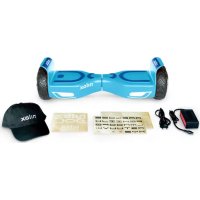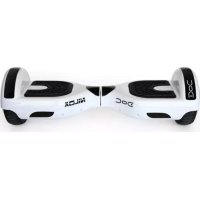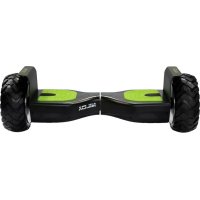
DOC OffRoad - Self-balancing scooter NILOX - Free user manual and instructions
Find the device manual for free DOC OffRoad NILOX in PDF.



User questions about DOC OffRoad NILOX
0 question about this device. Answer the ones you know or ask your own.
Ask a new question about this device
Download the instructions for your Self-balancing scooter in PDF format for free! Find your manual DOC OffRoad - NILOX and take your electronic device back in hand. On this page are published all the documents necessary for the use of your device. DOC OffRoad by NILOX.
USER MANUAL DOC OffRoad NILOX
Thanks for choosing DOC OFF ROAD.
The electronic user manual can be downloaded from the Nilox website at www.nilox.it/it/manuali-e-download. Enter in the search field "Product code or model" the code of your DOC OFF ROAD.
TECHNICAL SUPPORT
This product is warranted in accordance with current legislation; please contact your dealer if you require technical assistance and / or warranty service.
INSTRUCTIONS FOR THE ENVIRONMENT
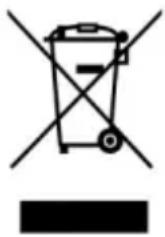
This product may contain substances that can be harmful to the environment and to human health, if not disposed of properly. We therefore provide the following information in order to prevent the release of such substances and to improve the use of natural resources. Electrical and electronic products should not be disposed of in normal household waste, but should be properly collected in order to be processed correctly. The symbol of the crossed bin shown on the product and in this page is to
remind you of the need to properly dispose of the product at the end of its life. In this way, we can prevent a non-specific treatment of the substances contained in these products, or an improper use of parts of them leading to harmful consequences for the environment and human health. Moreover, you can contribute to the recovery, recycling and reuse of many of the materials that make up these products. This is why manufacturers and distributors of electrical and electronic systems organize proper collection and disposal of the equipment themselves. At the end of the product's lifespan, please contact your dealer for instructions regarding disposal. When purchasing this product your distributor will inform you of the possibility of replacing your old device with a new one, on condition that the type of product and its functions are the same or, if the dimensions do not exceed 25~cm , EEE (Electrical and Electronic Equipment) they can be returned without any equivalent product purchase obligation. Disposal of the product in any other way will be liable to the penalties established by the laws in force in the country where the product is disposed of. Moreover, we suggest adopting additional environmentally friendly measures: recycling the inner and outer packaging and disposing of any used batteries correctly. With your help, we can reduce the amount of natural resources used in the manufacturing of electrical and electronic equipment, minimize use of landfills for product disposal and improve quality of life by preventing the release into the environment of potentially dangerous substances.
BATTERY DISPOSAL
The product contains a battery, which must be disposed of separately from general household waste. Throw the battery in the appropriate containers. Collection and recycling of batteries helps protect the environment and preserve material resources, through the recovery of valuable materials.
WARRANTY VALIDITY
- One year if the product is purchased by a natural or legal person who uses it in business as an entrepreneur, sales representative, craftsman or professional or his/her intermediary.
- Two years if the product is purchased by a consumer or user (the natural person who does not use it in business as an entrepreneur, sales representative, craftsman or professional).
Six months on the battery, regardless of the occupation of the product purchaser.
The warranty covers factory or material defects. - Product support and warranty: visit www.nilox.com to learn more.
WARRANTY RESTRICTIONS
The warranty is null and void in the following cases:
No proof of purchase (invoice or receipt).
- Tampering or alteration of parts.
- Other defects due to: inappropriate use, unauthorized changes, operations or storage not in accordance with technical product specifications; incorrect maintenance; defects due to use of other than that supplied and all elements not designed to be used with the product; technical work performed by unauthorized personnel.
The above refers to consumer goods warranty principles pursuant to Directive 1999/44/EC.

CE ( ) logo and/or WEEE () logo, in some devices, isn't fully compliant with minimum dimensions requirement to European Directive due to limited sticker area. We recommend you keep the original packaging.
SUMMARY
PREFACE 4
WARNING FOR USE 4
DOC OFF ROAD: DESCRIPTION 6
Control sensors 7
Control lights. 8
SAFEUSE 8
Weight limits for the driver 9
Speed limit 9
Distances you can travel 9
Slopes 9
HOW TO DRIVE DOC. 9
To start 9
Running. 10
Protection functions 11
Driving practice and safe driving 11
BATTERY 12
Use of the Battery 12
Instructions for charging the battery. 13
Temperature of the battery and specifications. 13
Transportation of the batteries. 14
MAINTENANCE 14
Cleaning 14
Conservation 14
TECHNICAL SPECIFICATIONS 15
RULES FOR USE ON PAVEMENTS 15
SYMBOLS AND PICTOGRAMS ON THE PACKAGINGPRODUCT 16
PREFACE
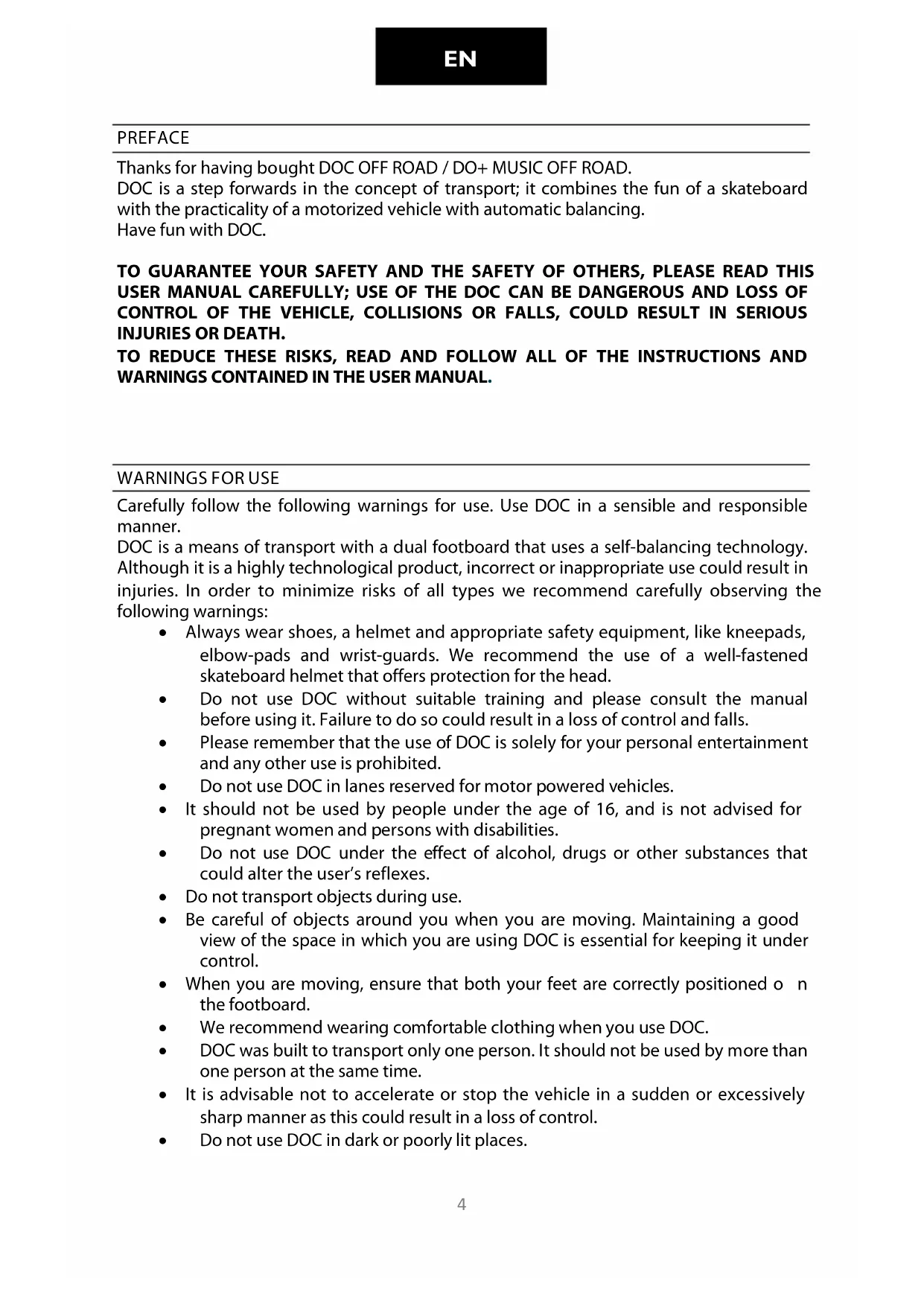
Thanks for having bought DOC OFF ROAD / DO+ MUSIC OFF ROAD.
DOC is a step forwards in the concept of transport; it combines the fun of a skateboard with the practicality of a motorized vehicle with automatic balancing.
Have fun with DOC.
TO GUARantee YOUR SAFETY AND THE SAFETY OF OTHERS, PLEASE READ THIS USER MANUAL CAREFULLY; USE OF THE DOC CAN BE DANGEROUS AND LOSS OF CONTROL OF THE VEHICLE, COLLISIONS OR FALLS, COULD RESULT IN SERIOUS INJURIES OR DEATH.
TO REDUCE THESE RISKS, READ AND FOLLOW ALL OF THE INSTRUCTIONS AND WARNINGS CONTAINED IN THE USER MANUAL.
WARNING FOR USE
Carefully follow the following warnings for use. Use DOC in a sensible and responsible manner.
DOC is a means of transport with a dual footboard that uses a self-balancing technology. Although it is a highly technological product, incorrect or inappropriate use could result in injuries. In order to minimize risks of all types we recommend carefully observing the following warnings:
- Always wear shoes, a helmet and appropriate safety equipment, like kneepads, elbow-pads and wrist-guards. We recommend the use of a well-fastened skateboard helmet that offers protection for the head.
- Do not use DOC without suitable training and please consult the manual before using it. Failure to do so could result in a loss of control and falls.
- Please remember that the use of DOC is solely for your personal entertainment and any other use is prohibited.
- Do not use DOC in lanes reserved for motor powered vehicles.
- It should not be used by people under the age of 16, and is not advised for pregnant women and persons with disabilities.
- Do not use DOC under the effect of alcohol, drugs or other substances that could alter the user's reflexes.
- Do not transport objects during use.
- Be careful of objects around you when you are moving. Maintaining a good view of the space in which you are using DOC is essential for keeping it under control.
- When you are moving, ensure that both your feet are correctly positioned on the footboard.
We recommend wearing comfortable clothing when you use DOC. - DOC was built to transport only one person. It should not be used by more than one person at the same time.
- It is advisable not to accelerate or stop the vehicle in a sudden or excessively sharp manner as this could result in a loss of control.
- Do not use DOC in dark or poorly lit places.
EN
Make sure that the speed with which DOC is being used allows you to stop it any time and in any situation.
We recommend that you keep a suitable safety distance from other vehicles when you are driving DOC.
- When you are standing on DOC the height of the user will be 12cm ; take this difference into account in the event of particularly low ceilings and doors.
It is strictly forbidden to use DOC in combustible environments.
Do not try tricks or feats of agility.
- Do not lean any objects on the footboards except for your feet as these could interfere with the monitoring systems.
- Do not get off the DOC when it is in motion.
It is essential to read this manual for a correct use of DOC and to reduce potential risks of injury.
BEFORE USING, MAKE SURE THAT THE BATTERY IS FULLY CHARGED.
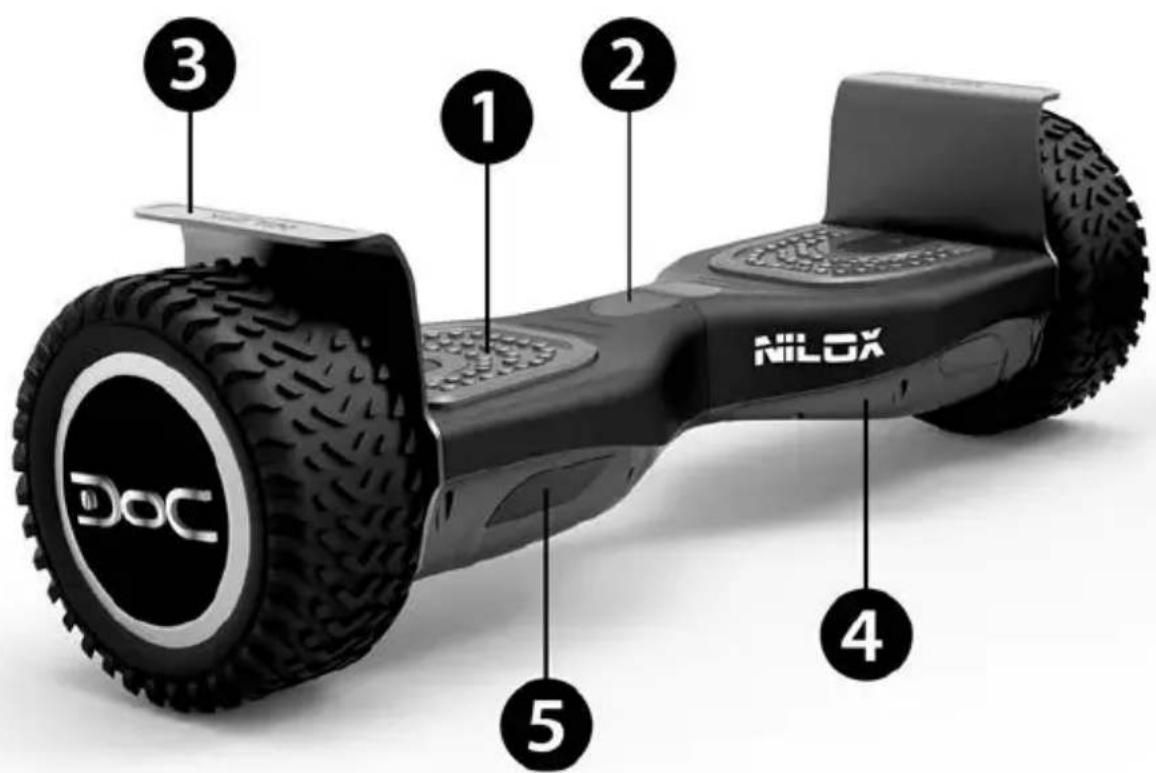
DOC OFF ROAD: DESCRIPTION
DOC is a self-balancing electric skateboard.
The move forwards, backwards, turn and stop functions are controlled by gentle and balanced movements on the footboards. Very easy to use, easy to control and incredibly fun.
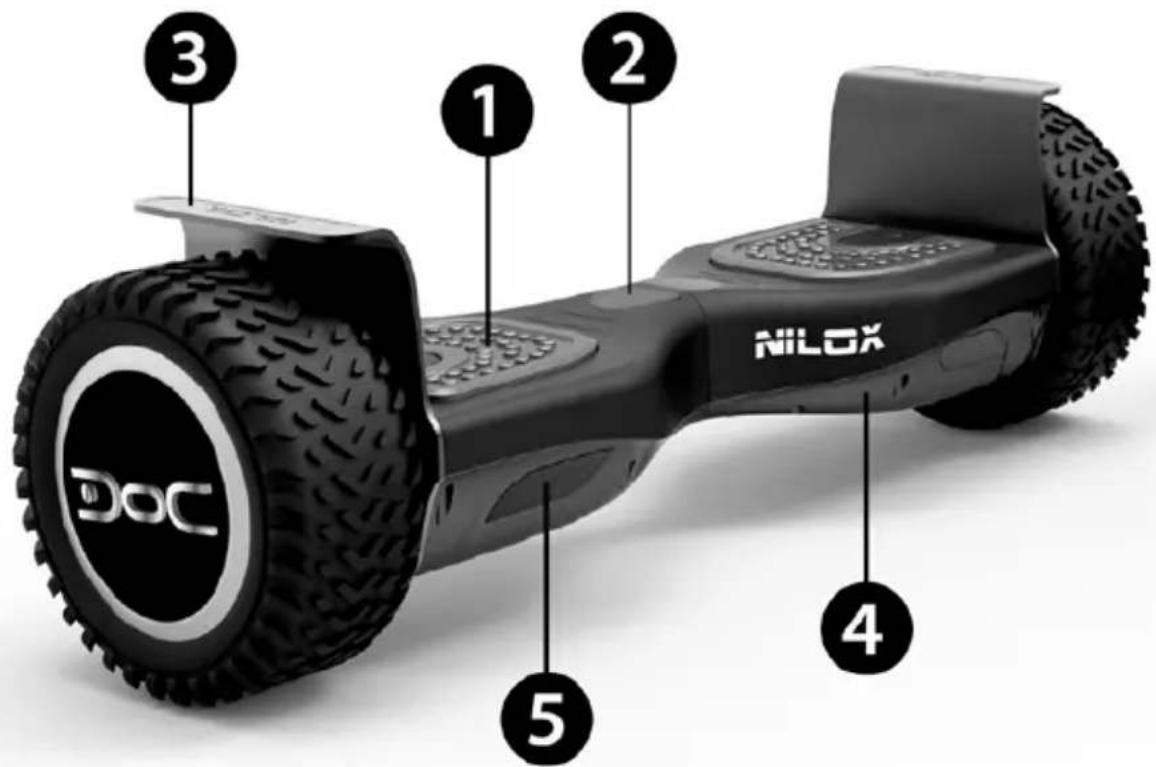
1) Foot-board
2) Status indicators
3) Mudguard
4) Protective shell
5) Direction indicators
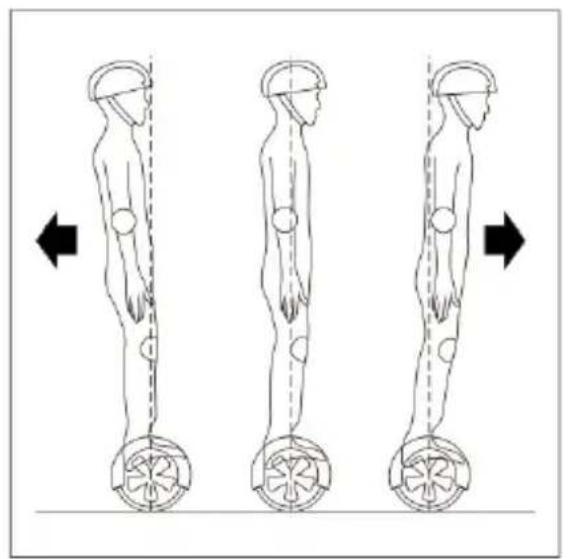
DOC moves thanks to the concept of dynamic balance. It uses an internal system of sensors and gyroscopes that allow it to move on the basis of the variation of the centre of gravity, instructing the wheels in real time to turn forwards or backwards to remain in a position of balance. By leaning forwards, you will move forwards and the angle of inclination determines the speed at which you move. To turn it is sufficient to gently transfer your weight to one of your feet. DOC has a system of inertial stabilization, which helps you to maintain a vertical position; if it notices an excessive inclination of your body towards either side or lack of contact of the footboard by either of your feet it will stop automatically.
BEFORE TURNING, YOU HAVE TO REDUCE THE SPEED OF DOC.
CONTROL SENSORS
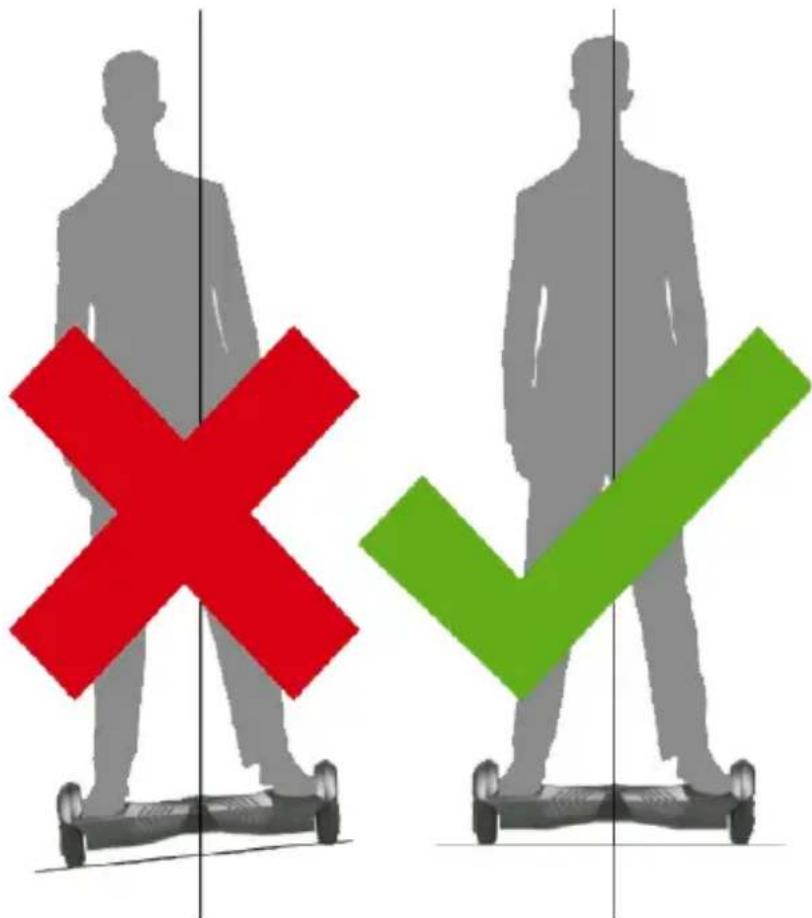
DOC has 4 sensors under the pedals.
When you climb onto the footboards DOC balances automatically.
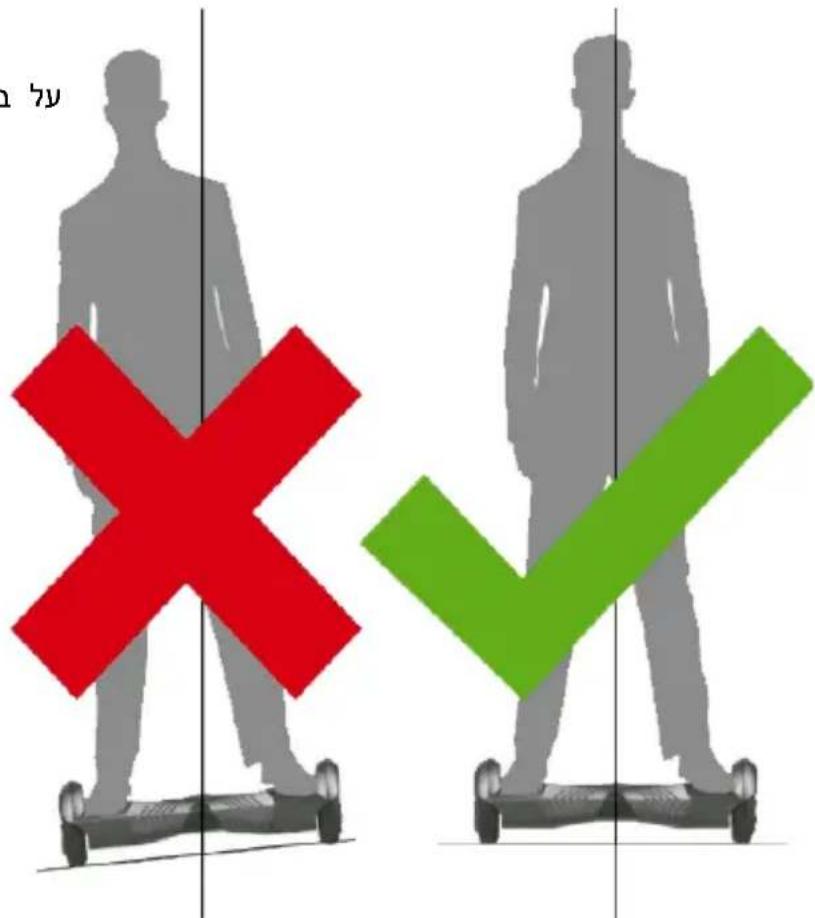
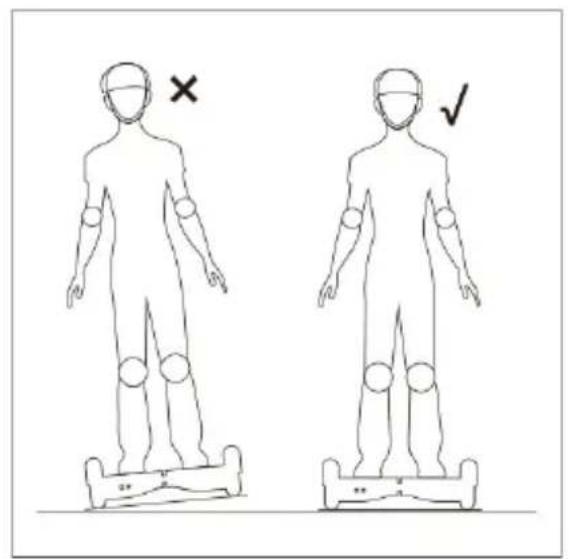
To use it you need to ensure that you are touching both the footboards.
Be careful not to place your foot on the external part of the footboards, as DOC may not realize you are there.
Do not lean forwards or backwards excessively and do not drive on a slope.
Do not lean objects on the pedals, as this will result in DOC noticing a constant presence and prevent it from stopping thus significantly increasing the possibility of falls or damage to the vehicle.
DO NOT PUT YOUR WEIGHT IN THE CENTRAL PART OF DOC; THIS IS WHERE THE MECHANICAL STEERING MECHANISM IS HOUSED. AN EXCESSIVE WEIGHT COULD RESULT IN IT BREAKING OR NOT FUNCTIONING CORRECTLY.
CONTROL LIGHTS
The control indicators are in the center of your DOC: a status indicator of the battery and a status indicator of the pedals.
The battery control light can be:
- Green: this means that the battery is fully charged.
- Flashing green: means the battery has a charge of circa 50% .
- Red: battery with less than 20% charge. In this case, stop using DOC and charge the battery.
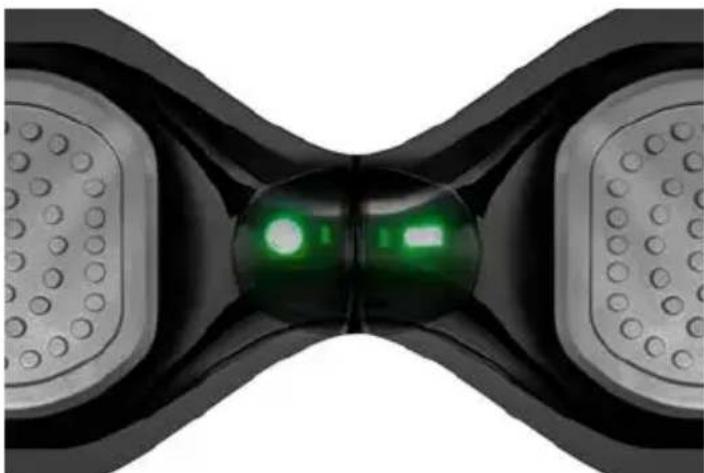
The pedals indicator can be:
- Green: a foot has been placed on the pedal and the balancing system is operating correctly.
- Red: a foot has been placed on the pedal, but the balancing system is not operating correctly, usually in the event of excessive lateral slopes.
IF ONE OF THE 2 INDICATORS BECOMES RED, GET OFF DOC IMMEDIATELY, AS THE SYSTEM IS UNSTABLE.
SAFEUSE
We are certain that you will be able to use DOC with absolute peace of mind and have a great deal of fun. All you need is a little practice at the start, in order to fully master this new means of transport: you have probably already learned how to ride a bike, use a skateboard and ski. These experiences will help you to master your DOC in a short space of time.
- Read the manual carefully.
Before using it for the first time, make sure that the tires are not damaged and that there are no missing mechanical parts. - Never use DOC with the aim of damaging people or things.
- Do not amend the mechanical parts. Since it is a highly technological device, any tampering or amendment could result in irregular performance.
While using the DOC make sure to take all necessary security measures; in particular we remind, once more, that is recommended to wear a helmet, kneepads, elbow pads, gloves, etc.
There are two fundamental reasons for weight limit:
Ensure the safety of driver.
Reduce the overload of DOC.
The maximum weight of the driver is 100kg
The minimum weight of the driver is 20kg
SPEEDLIMIT
The maximum speed of DOC is 10km / hour
Below this speed, DOC easily maintains the driver's balance.
- When the speed exceeds the specified limit, please slow down and bring the vehicle speed back within the safety range.
If the maximum speed is exceeded the DOC will make an alarm sound.
DISTANCES YOU CAN TRAVEL
If DOC is driven on flat terrain, the distance that can be covered increases.
If the terrain is not flat the distance you will be able to cover will be smaller.
The driver's weight affects the distance that can be covered.
- Correct charging and maintenance of the battery increase the battery life. The opposite is true in the case incorrect charging and maintenance.
- A driving style with continual accelerations and braking reduces the duration of the battery.
SLOPES
- Do not use DOC on routes with gradients of more than 15 degrees.
If the gradient exceeds 15 degrees you risk losing control of DOC.
HOW TO DRIVE DOC
You must read the following instructions carefully before getting onto DOC.
TO START
Press the power button to start DOC.
- As you get on, put one foot on the side of the footboard; DOC will notice the weight and will activate the balancing system.
- Slowly lift the other foot and then put it back on the ground.
- Practice lifting your foot and bringing back down to the ground for a few times until you are able to lift it without making DOC sway from side to side.
Try to keep your head held high as much as possible and look ahead.
- When you are easily able to lift your foot from the ground without DOC moving slowly place your other foot on the pedal.
TO GET ON SAFELY WE REMIND THE USER THAT IS PROHIBITED TO JUMP ONTO DOC.
- Get control of the frontal movements of DOC and remember that movements of the body axis must not be too broad or made through sharp and sudden movements.
Always maintain control of lateral movements (to the right and to the left).
Before getting off DOC, make sure it is completely stationary. - Alight, by removing one foot at a time from the footboard.
THE FIRST TIMES YOU USE DOC IT IS QUITE NORMAL TO SWAY BACKWARDS AND FORWARDS INVOLUNTARILY.
WARNING!
GET OFF ALWAYS FROM THE REAR OF THE VEHICLE IN ORDER TO AVOID RISKS OF LOSING CONTROL OF THE VEHICLE AND FALLING.
IF DOC DOES NOT ACTIVATE THE AUTO BALANCING, WHEN YOU GET ONTO THE FOOTBOARD THE LED ALARM LIGHT WILL SWITCH ON. DO NOT USE DOC, WAIT FOR A FEW MINUTES AND TRY AGAIN. IF YOU ARE ON A SLOPE, MOVE TO FLAT TERRAIN.
RUNNING
As explained above DOC moves on the basis of the perception of the body's centre of gravity upon it.
As a result:
- If there is an excessive lateral inclination, DOC will notice more weight on the external footboard and will tend to curve.
- A perfectly vertical position keeps DOC stationary, a slight movement forwards or backwards will make DOC start in the respective direction.
The pressure on the right or left footboard will make it curve to the right or left.
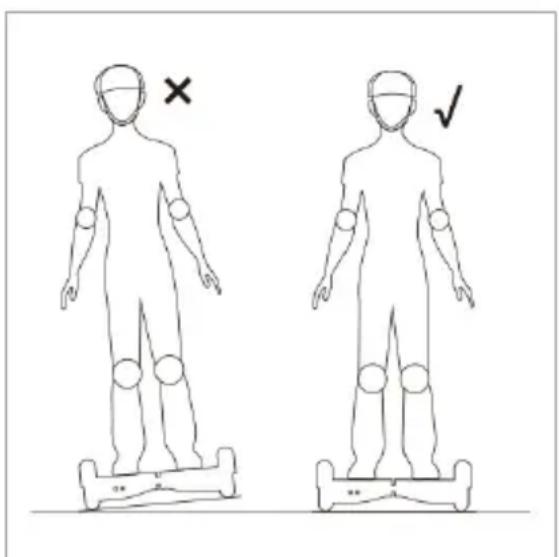
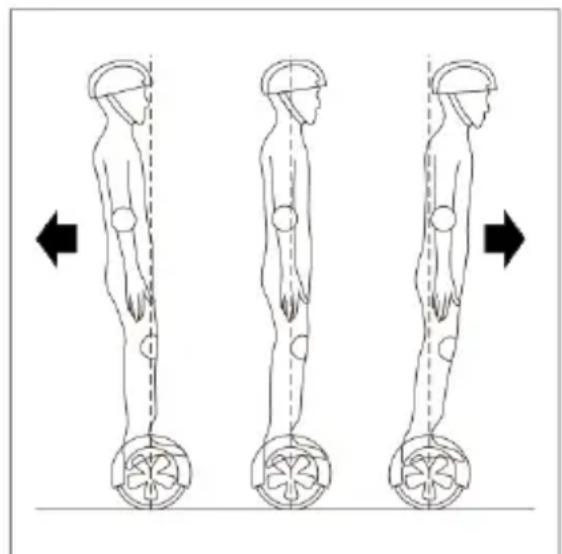
DO NOT MAKE SHARP TURNS OR TURNS AT HIGH SPEEDS: THESE ARE DANGEROUS SITUATIONS FOR DRIVING DOC.
BE CAREFUL ON CROSS SLOPES PARTICULARLY ROUGH: THIS TYPE OF CONDUCT AFFECTS THE DRIVING SAFETY OF DOC.
PROTECTION FUNCTIONS
There follows a list of the anomalies that could lead to the protection functions of DOC being activated.
During use, if the system notes the presence of errors or the loss of balance, it will warn the user of these anomalies, through control lights and intermittent alarm sounds. Example:
- Driving on slopes with a gradient of more than 15 degrees.
- When the voltage of the battery is too low.
In the event of speed that is excessively high.
In the event of the battery being exhausted.
In the event of oscillation forwards and backwards for more than 30 seconds.
If the system goes into protection mode, the alarm sensors switch on and the control lights start to sound.
If the battery reaches a voltage that is lower than the minimum value of protection, after 15 seconds DOC will switch off automatically. In the event of the wheels becoming blocked, after 2 seconds, DOC will switch off automatically.
In the event of activities which involve a significant consumption of energy (lengthy climbs, particularly steep descents), the vehicle could activate the automatic turning off mode.
IN THE ABOVE CIRCUMSTANCES STEP DOWN FROM DOC AND Suspend USE OF IT: THE AUTO-BALANCING MIGHT NOT FUNCTION CORRECTLY AND POTENTIALLY CAUSE YOU TO FALL.
DRIVING PRACTICE AND SAFE DRIVING
Before using the vehicle on the road, or in an external area, make sure you have mastered it sufficiently:
It is advisable to wear comfortable clothes and shoes in order to move more freely and flexibly.
It is not advisable to use the vehicle in open spaces, if you have not learnt all of the functions completely (movements forwards/backwards, to the right /left, start-up /stop).
Make sure that the surface is suitable for the use of the vehicle.
- The vehicle can be used on various types of surfaces however, if it is used on irregular terrain or by users without much experience, we recommend you use it at low speeds.
- For inexperienced users, we recommend avoiding crowded places, where there are obstacles or factors that could represent a danger for the user or other people.
Children, elderly people and pregnant women should not use DOC.
- Do not drive when drunk or under the influence of pharmaceutical products or drugs.
Relax your legs when driving, bend your knees slightly. This will help you to keep the right balance on irregular terrain.
- Do not transport objects when driving.
- Make sure that your feet are always on the footboards; loss of contact with a footboard causes the immediate imbalance of DOC.
- DOC was conceived and designed to be used by a single person. It is never to
EN
be used by more than one person at once.
- Do not start or stop suddenly.
The weight of the driver must not exceed the maximum load specified in the instructions: the vehicle could be damaged or users could fall. - The weight must not be less than the minimum weight specified in the instructions as DOC would not correctly notice the presence of a person on the sensors; be extremely careful of this especially when travelling downhill, where high speeds can be reached, without the correct control of the vehicle.
- Keep a speed that is appropriate for stopping DOC in a suitable manner.
If you are travelling close to another DOC, or a similar vehicle, you need to keep a safe distance between the 2 vehicles to avoid collisions. - When you pass through doors, remember that your height will be about 12 cm higher.
- During bends, be careful of the centre of gravity of your body. A sudden variation could cause a fall.
- Do not drive under the rain.
- Do not drive backwards for long distances or at high speeds.
- DOC is not a medical mobility device, and is not non-equivalent to motorized wheelchairs for disabled people or pedal assisted bicycles.
- Avoid driving in confined space or areas with obstacles.
BATTERY
USE OF THE BATTERY
We will now look at the means of charging and maintaining the battery, as well as potential problems there might be.
For the safety of the consumer and to extend the duration and improve performance of the battery, please follow the following instructions:
- When the battery indicator is red, it means the charge is not sufficient. We recommend stopping DOC.
- When the power is low, there is not enough energy to drive normally. DOC will automatically stop and will incline the 2 pedals, in order to prevent people from getting on and thus discourage use.
-
Do not use the battery in the following cases:
-
Strong smell and/or excessive heat.
-
If it is losing liquid.
-
The dismantling and maintenance of the battery must be carried out solely by an authorized professional.
Do not touch any substance that comes out of the battery. - Do not allow children and animals to touch the battery.
Before installing the battery, disconnect the battery charger. - DOC cannot be used when the battery is charging.
-
The batteries contain dangerous substances. Do not open the battery and do not put anything inside them.
-
Only use the battery charger provided by our company.
If they are over-charged, lithium batteries can explode. - Do not throw into a fire.
INSTRUCTIONS FOR CHARGING THE BATTERY
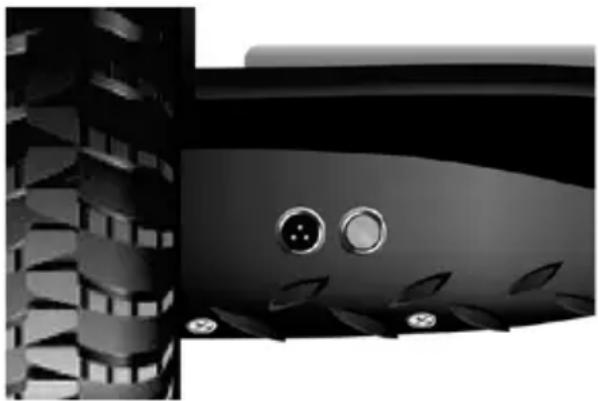
Find the battery compartment on the back of DOC.
Make sure it is fully dry.
- Connect the battery charger to the electrical mains (100V-240V; 50,60Hz), make sure it is switched on and then connect the other end of the charger to DOC.
The red control light on the battery-charge means that it is charging correctly.
- When the control light goes from red to green, the battery is fully charged, so unplug the battery-charger.
- Charging time is about 90-120 minutes.
- Keep the charging contacts clean and dry.
If the battery compartment is not dry, do not charge DOC.
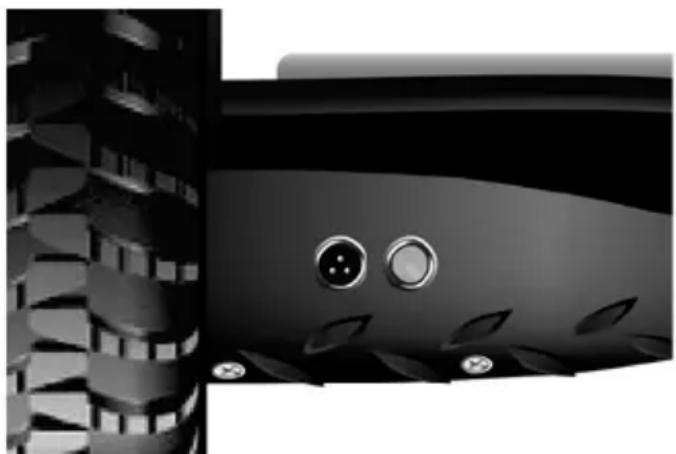
PLEASE NOTE: IF THE BATTERY IS KEPT CHARGING FOR EXCESSIVELY LONG PERIODS ITS LIFE CYCLE WILL BE REDUCED.
TEMPERATURE OF THE BATTERY AND SPECIFICATIONS
For DOC to operate efficiently, the temperature of the battery must be within the range shown below and the temperature, before and after charging, must be within the recommended range.
The efficiency of the charging process will be maximized if the following conditions are respected.
A temperature that is excessively high or low increases charging time and reduces efficiency.
Battery
Lithium Ion
Charging time
about 90-120 minutes
Volts
36
Amps
4.3 Ah
Use temperature
-20°C / 60°C
Charging temperature
0^ / 45^
TRANSPORTATION OF THE BATTERIES
Lithium batteries are considered to be dangerous material. Transportation of lithium batteries is governed by the laws of each individual state.
Delivery of single lithium batteries is prohibited under international law.
If you send your DOC, the battery must be inside it.
THE BATTERY CANNOT BE SENT SEPARATELY.
- In order to avoid fire risks or electrical shock, when charging, only place the device in a room with controlled temperature and humidity without conductive agents of any kind.
- When charging, the device should be placed in a fully fireproof room (keep away from wood floors, furniture, paper, sofas, rugs, flammable liquids, etc.) with controlled temperature and humidity.
- Charge the battery in a ventilated room to reduce overheating when charging.
- If the battery suffered shocks or if the battery or power cord are not perfectly intact, avoid charging and contact a service centre.
- The manufacturer and distributor cannot be held liable for damages to third party products due to improper battery and charger use.
MAINTENANCE
DOC must be maintained and cleaned after use.
Follow the brief instructions below to ensure a longer duration and correct functioning of the vehicle.
CLEANING
- Make sure that the power cable is disconnected and that DOC is off before proceeding.
Clean the external shell of DOC with a soft and dry cloth. - DOC complies with the IP54 standard, which means it is spray resistant, but cannot be immersed in water.
- Do not allow water or other liquid to get inside DOC, as this could cause permanent damage to the electronic circuitry.
Clean DOC after every use and do not store in a dusty environment.
CONSERVATION
If you expect not to use DOC for a long period:
- Charge the battery completely as this will prevent it from becoming completely exhausted over time.
-
Per long periods of time remove the battery and run it down /recharge it every three months.
Cover DOC with a cloth. Dust and sand could get into the engine and damage it. -
Store indoors, at a dry and suitable temperature.
- Do not store in an unbeated garage or warehouse.
ANY ATTEMPT TO REPAIR OR AMEND DOC AND ALL TAMPERING WILL RESULT IN THE AUTOMATIC CANCELLATION OF THE WARRANTY.
| TECHNICAL SPECIFICATIONS | |
| Product dimensions | 73*21*23 cm |
| Minimum height from the ground | 530 mm |
| Height on the foot-boards | 120 mm |
| Maximum height from the ground | 230 mm |
| Weight of the product | 12 kg (DOC OFF ROAD) |
| Maximum weight supported | 100 kg |
| Minimum weight supported | 20 kg |
| Maximum speed | 10 km/h |
| Maximum distance that can be covered with full charge | 16 km |
| Minimum radius of curvature | 0° |
| Maximum inclination | 17° |
RULES FOR USE ON PAVEMENTS
WITH REGARD TO THE APPLICABLE LAWS IN EACH COUNTRY, THE USER IS REQUIRED TO CHECK THE LAWS ON ROAD CIRCULATION RELATING TO THE COUNTRY IN WHICH DOC IS TO BE USED.
ALSO CHECK THE POSSIBILITY OF BEING ABLE TO CIRCULATE EXCLUSIVELY IN PRIVATE AREAS OR EVEN THE POSSIBILITY AND THE RESPECTIVE MEANS OF CIRCULATION ON PUBLIC LAND.
C E
The product meets European safety directive requirements.
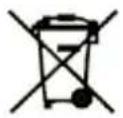
The product contains a battery. At the end of the battery working life in the product, it must be separately discarded from generic waste (see introduction).
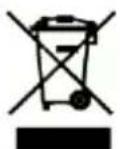
The product contains electric and electronic equipment. At the end of the product working life, it cannot be discarded with normal urban waste and must be sent to separate collection (see introduction).

Wear appropriate safety equipment such as knee pads, elbow pads and wrist bands. Use a well-buckled helmet that provides cranial protection.

It's use is prohibited by minors under 16 years of age. Otherwise, adult supervision is required.
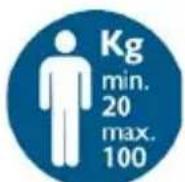
Minimum weight for use 20kg , maximum weight 100kg .
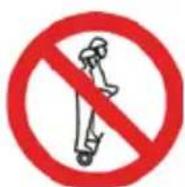
DOC was conceived and designed to be used by a single person. It is never to be used by more than one person at once.
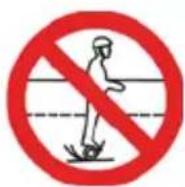
The user is required to check the laws on road circulation relating to the country in which DOC is to be used. Also check the possibility of being able to circulate exclusively in private areas or even the possibility and the respective means of circulation on public land.
EN
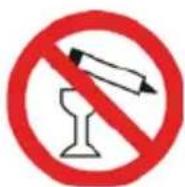
Do not use DOC under the effect of alcohol, drugs or other substances that could alter the user's reflexes
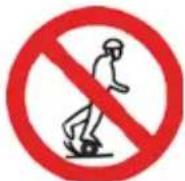
Whenever you ride DOC you risk injury due to loss of control, collision and falling. Read and follow all instructions and warning contained in the user manual.
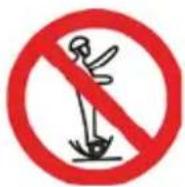
Whenever you ride DOC you risk injury due to loss of control, collision and falling. Read and follow all instructions and warning contained in the user manual.
INFORMATIONS SUR LA GARANTIE
Transport des batteries. 14
ENTRETIEN 14
Nettoyage. 14
Conservation 15
SPECIFICATIONS TECHNIQUES. 15
NORMES D'UTILISATION SUR LES TROTTOIRS 15
SYMBLOGIE ET PICTOGRAMMES SUR L'EMBALLAGE/PRODUIT 16
PRÉFACE
INFORMATIONENE ZUM UMWELTSCHUTZ
. DOC OFF ROAD w nn nnnn nn "
nno
n nn nnnnnnnnnnnnnnnnnnnnnnnnnnnnnnnnnnnnnnnnnnnnnnnnnnnnnnnnnnnnnnnnnnnnnnnnnnnnnnnnnnnnnnn
n7 n7 n7 n7
nONNIN
X X X X X X X X X X X X X X X X X X X X X X X X X X X X X X X X X X X X X X X X X X X X X X X X X X X X X X X X X X X X X X X X X X X X X X X X X X X X X X X X X X X X X X X X X X X X X X X X X X X X X
n nn nnn nnn nnn nnn nnn nnn nnn nnn nnn nnn nnn nnn nnn nnn nnn nnn nnn nnn nnn nnn nnn nnn nnn nnn nnn nnn nnn nnn nnn nnn nnn nnn nnn nnn nnn nnn nnn nnn nnn nnn nnn nnn nnn nnn nnn nnn nnn nnn
.
nnnN 079
90n y) ivnn nN - 7ov nniy nn nwn nn nn
. n.v 1N .9.n
"79n77"y won nn nx,
.
.
. www.nilox.com nXnD901 D'079 : nNn
yannnnx:
n nn nnn
()
17nXnX7WnXnNnWn
niv,ovin nni o,ohn nn wv:ny oynu nn
wnnnn nn nnnn nn nnnn nnnn nnnn
y 1
y 77 nnnn nn nnnn
.1999/44/CE nnnn nn nn nn nn nn nn nn nn nn nn nn nn nn nn nn nn nn nn nn nn nn nn nn nn nn nn nn nn nn nn nn nn nn nn nn nn nn nn nn nn nn nn nn nn nn nn nn nn nn nn nn nn nn nn nn nn nn nn nn nn nn nn nn nn nn nn nn nn nn nn nn nn nn
CE
x,o'ion o'wn y nnnn nn ()WEEE 11/( C)CE
nnu nn nnnn nn nnnn nn nnnn nn nnnn nn nnnn nn nnnn nn
y
n nn nn nn nn nn nn nn
BID
4
4
6 .DOC
7
8
9 1
9 1
9
9 1
9 17
10 DOC-
10 7
10
11
11 1
12 10
12
13
13
14
14 2
14 17
14 1
15
15
X
.DOC OFF ROAD /DOC+ MUSIC OFF ROAD nnnn nn nnnn nn nnnn nn nnnn nn nnnn nn nnnn nn nnnn nn nnnn nn nnnn nn nnnn nn nnnn nn nnnn nn nnnn nn nnnn nn nnnn nn nnnn nn nnnn nn nnnn nn nnnn nn nnnn nn nnnn nn nnnn nn nnnn nn nnnn nn nnnn nn nnnn
wnnnn nn n nn n nn n nn n nn n nn n nn n nn n nn n nn n nn n nn n nn n nn n nn n nn n nn n nn n nn n nn n nn n nn n nn n nn n nn n nn n nn n nn n nn n nn n nn n nn n nn n nn n nn n nn n nn n nn n nn n nn n nn n nn n nn n nn n nn n nn n nn n nn n nn n nn n nn
y
XnNtIOIOIOIOIOIOIOIOIOIOIOIOIOIOIOIOIOIOIOIOIOIOIOIOIOIOIOIOIOIOIOIOIOIOIOIOIOIOIOIOIOIOIOIOIOIOIOIOIOIOIOIOIOIOIOIOIOIOIOIOIOIOIOIO
n nn nnnnnn nnnn nnnn nnnn nnnn nnnn nnnn nnnn nnnn nnnn nnnn nnnn nnnn nnnn nnnn nnnn nnnn nnnn nnnn nnnn nnnn nnnn nnnn nnnn nnnn nnnn nnnn nnnn nnnn nnnn nnnn nnnn nnnn nnnn nannn nnnn nnnn nnnn nnnn nnnn nnnn nnnn nnnn nnnn nnnn nnnn nnnn nnnn nnnn nnnn nnnn nnnn nnnn nnnn nnnn nnnn nnnn nnnn nnnn nnnn nnnn nnnn nnnn nnnn nnnn nnnn nnnn nnn
W 10XIOX, W X TDOC- WNNW W .N. .
y 16-n n 100 y w uynn nn .nnnn nn
wnnnn nn nnnnnnnnnnnnnnnnnnnnnnnnnnnnnnnnnnnnnnnnnnnnnnnnnnnnnnnnnnnnnnnnnnnnnnnnnnnnnnnnnnnnnnnnnnnnnnnnnnnnnnnnnnnnnnnnnnnnn
nnn nn n nn nn nn nn nn nn nn nn nn nn nn nn nn nn nn nn nn nn nn nn nn nn nn nn nn nn nn nn nn nn nn nn nn nn nn nn nn nn nn nn nn nn nn nn nn nn nn nn nn nn nn nn nn nn nn nn nn nn nn nn nn nn nn nn nn nn nn nn nn nn nn nn nn nn nn nn nn nn nn nn nn nn nn nn nn nn nn nn nn nn nn nn nn nn nn nn nn nn nn nn
. 10000000000000000000000000000000000000000000000000000
Jnynnnnnnnnnnnnnnnnnnnnnnnnnnnnnnnnnnnnnnnnnnnnnnnnnnnnnnnnnnnnnnnnnnnnnnnnnnnnnnnnnnnnnnnnnnnnnnnnnnnnnnnnnnnnnnnnnnnnnnnnnnnnnnnnnnnnnnnnnnnnnnnnnnnnn
.0n nn nnnn nn nnnn DOC-wnnnn
DOC-wnnNTT
.
12 10 Doc- nyn
.
HE
y7 10 n97 07 d7 y 0o y
nyn
.
nniynnnn nnnn nnnn nn nnnnnnnnnnnnnnnnnnnnnnnnnnnnnnnnnnnnnnnnnnnnnnnnnnnnnnnnnnnnnnnnnnnnnnnnnnnnnnnnnnnnn
:DOC
XyIiXyDyNunTTOxINDOC
Ynirnai nnynnn nnynn nnynnnn nnynnnn nn.
tnnnn nn nn nn nn nn nn nn nn nn nn
(1
2
yian (3
nnn nn (4
(5
X, DIOONI DIYIN YN NNNN ANN XIN. IIT TIRX T- yIN DOC-N JINNXI INNIXI DYNNNX INIONU |INN, TINN OIOYIOYIOYIOYIOYIOYIOYIOYIOYIOYIOYIOYIOYIOYIOYIOYIOYIOYIOYIOYIOYIOYIOYIOYIOYIOYIOYIOYIOYIOYIOYIOYIOYIOYIOYIOYIOYIOYIOYIOYIOYIOYIOYIOYIOYIOYIOYIOYIOYIOYIO
.DOC-n nn uynn-aiyooyn yin
nnnn ,nnuin 4 DOC-7
.
y 10
n-0
JUNIOIN INXV
X717 11 nnun7 T
"000
n nn nnn
nnnn nn
n nn nnn 0
n7 DOC-nPn"
.
mnnn nn nnnn
yin xi nnn y
.1
y Dxy 1yun7
-7y 7n,
nannnnn nnnn 7 DOC
xin,innnnn
nniynnniyn
777 IN 7797 nwn
.
TIN, DNTN NNNX NNNN, DOC-wnnnn
1D1,0Tn
nn nn nnn
nno n no n no n no n no n no n no n no
an nnnn nn
.DOC-n nn onnnn
100nnn nn nnnnnnnnn
20 n/nn nn nn nn nn
ninnnn
w"10DOC-nnnnnn
n nn nnnn nn nnnn nn nnnn nn nnnnnnnnn
.
.
nV'oJ'7n7n
.11 - yioi now ,yioi 1n nn ,yioi now yioi
yioi nn ywn nn
ninnnnnnn nn nnnnnnnnnnnnnnn
ninnnnnnn
nnonnnnnnnnnnnnnnnnnnnnnnnnnnnnnnnnnnn
17n
1.15% yun yu yu yu yu yu DOC-yunnun
.7n 15%- n yin ni
DOC-
.DOC-n y nynn nn nnnnnnnnnnn
nnn77ny77nxnn 7
nwn nn nnn nn nnn nnn nnn
yio nionu unnnn nn x, yon by ni
n nn nnnn nn,DOC-n nn nn nn nn nn nn
JINNNNNIIN NIN ININ INNIN NIN NIN ON
(nnn)nynnnnnaaynnnnn
.
1.11 111
ninnnnnnnnn nn nnnn nn nnnn nn nnnnnnnnnnnnn
.7n
1
y777 777,17n by nxnn nna.
nyn
:nnn nn nnnnnnnnnnnnnnnnnnnnnnnnnnnnnnnnnnnnnnnnnnnnnnnnnnnnnnnnnnnnnnnnnnnnnnnnnnnnnnnnnnnnnnnnnnnnnnnnnnnnnnnnnnnnnnnnn
DIOOIOIOIOIOIOIOIOIOIOIOIOIOIOIOIOIOIOIOIOIOIOIOIOIOIOIOIOIOIOIOIOIOIOIOIOIOIOIOIOIOIOIOIOIOIOIOIOIOIOIOIOIOIOIOIOIO
n nn
ninn nnnn nn nnnn nnnn nnnn nnnn nnnn
.0nnn nn 7DOC-7 nn
nNnNnNnNnNnNnNnNnNnNnNnNnNnNnNnNnNnNnNnNnNnNnNnNnNnNnNnNnNnNnNnNnNnNnNnNnNnNnNnNnNnNnNnNnNnNnNnNnNnNn
- yioiion 1y:niin nn nnnn nn nn nn nn nn nn nn .DOC
yoo:nnn nn y hon n nn nn nn nn nn nn nn nn nn nn nn nn nn nn nn nn nn nn nn nn nn nn nn nn nn nn nn nn nn nn nn nn nn nn nn nn nn nn nn nn nn nn nn nn nn nn nn nn nn nn nn nn nn nn nn nn nn nn nn nn nn nn nn nn nn nn nn nn nn nn nn nn nn nn nn nn nn nn nn nn nn nn nn nn nn nn nn nn nn nn nn nn nn nn nn nn nn nn nn nn
nnn nyny719
DOC w nn nnnn nn nnnn nn nnnn nn nnnn nn nnnn nn nnnn nn nnnn nn nnnn nn nnnn nn nnnn nn nnnn nn nnnn nn nnnn nn nnnn nn nnnn nn nnnn nn nnnn nn nnnn nn nnnn nn nnnn nn nnnn nn nnnn nn nnnn nn nnnn nn nnnn nn nnnnn nn nnnn nn nnnn nn nnnn nn nnnn nn nnnn nn nnnn nn nnnn nn
15-7y yinnyo
n nn nnn
.
-
30-n nn nn nnnn nn
nynnn nnnnnnnnnnnnnnnnnnnnnnnnnnnnnnnnnnnnnnnnnnnnnnnnnnnnnnnnnnnnnnnnnnnnnnnnnnnnnnn
111 111 111 111 111 111 111 111 111 111 111 111 111 111 1
n n n n n n n n n n n n n n n n n n n n n n n n n n n n n n n n n n n n n n n n n n n n n n n n n n n n n n n n n
n nn nnnn nn nnnn nn nnnn nn nnnn nn nnnn nn nnnn nn nnnn nn nnnn nn nnnn nn nnnn nn nnnn nn nnnn nn nnnn nn nnnn nn nnnn nn nnnn nn nnnn nn nnnn nn nnnn nn nnnn nn nnnn nn nnnn nn nnnn nn nnnn nn nnnn nn nann nn
nniuoyo1yoyoi
n nn nnnn nn nnnn nn nnnn nn nnnn nn nnnn nn nnnn nn nnnn nn nnnn nn nnnn nn nnnn nn nnnn nn nnnn nn nnnn nn nnnn nn nnnn nn nnnn nn nnnn nn nnnn nn nnnn nn nnnn nn nnnn nn nnnn nn nnnn nn nnnn nn nnnn nn nannn nn nnnn nn nnnn nn nnnn nn nnnn nn nnnn nn nnnn nn nnnn nn nnnn nn nnnn nn nnnn nn nnnn nn nnnn nn nnnn nn nnnn nn nnnn nn nnnn nn nnnn nn
.
n nn nnnnnnnnnnnnnnnnnnnnnnnnnnnnnnnnnnnnnnnnnnnnnnnnnnnnnnnnnnnnnnnnnnnnnnnnnnnnnnnnnnnnnnnnnnnnnnnnnnnnnnnnnnnnnnnnnnnnn
D'WN D'WN D'WN D'WN D'WN D'WN D'WN D'WN D'WN D'WN D'WN D'WN D'WN D'WN D'WN D'WN D'WN D'WN D'WN D'WN D'WN D'WN D'WN D'WN D'WN D'WN D'WN D'WN D'WN D'WN D'WN D'WN D'WN D'WN D"WN D"WN D"WN D"WN D"WN D"WN D"WN D"WN D"WN D"WN D"WN D"WN D"WN D"WN D"WN D"WN D"WN D"WN D"WN D"WN D"WN D"WN D"WN D"WN D"WN D"WN D"WN D"WN D"WN D"WN D"WN D"WN D"WN D"W
.1JIN D'WU D'WU, 7u wunwT TUN NDOC-n .19N IN NO NNN IN NNOX
y"on it nnn .n nn n nn n nn n nn n nn n nn n nn n nn n nn n nn n nn n nn n nn n nn n nn n nn n nn n nn n nn n nn n nn n nn n nn n nn n nn n nn n nn n nn n nn n nn n nn n nn n nn n nn n nn n nn n nn n nn n nn n nn n nn n nn n nn n nn n nn n nn n nn n nn n nn n nn n nn
TNN D NNN TINN OIOO Y NININ TNN D NNN NINN XTTI W .TINN JINNN NNN TNN TXX DOC- 0000
TNN NNI WINW W9X7 IN .TNN TNX TNN DNO DOC 111
1NINN 19X7Y7X7y037nn7 X
n nn nnnnnnnnnnnnnnnnnnnnnnnnnnnnnnnnnnnnnnnnnnnnnnnnnnnnnnnnnnnnnnnnnnnnnnnnnnnnnnnnnnnnnnnnnnnnnnnnnnnnnnnnnnnnnnnnnnnnnnnnnnnnnnnnn
n7DOC-nnnnnnnnnnnnnnnnnnnnnnnnnnnnnnnnnnnnnnnnnnnnnnnnnnnnnnnnnnnnnnnnnnnnnnnnnnnnnnnnnnnnnnnnnnnnnnnnnnnnnnnnnnn
. 1000000000000000000000000000000000000000000000000000000000
n 12-0 190u w ,n77 tyyn n y .
.
. 17 17 17 17 17 17 17 17 17 17 17 17 17 17 17 17 17 17 17 17 17 17 17 17 17 17 17 17 17
.
n710wn
n nn nnnn nnnn nnnn nnnn nnnn nnnn nnnn nnnn nnnn nnnn nnnn nnnn nnnn nnnn nnnn nnnn nnnn nnnn nnnn nnnn nnnn nnnn nnnn nnnn nnnn nnnn nnnn nnnn nnnn nnnn nnnn nnnn nnnn nnnn nn
DOC-nnynnnn nn nnnnnnnnnnnnnnnnnnnnnnnnnnnnnnnnnnnnnnnnnnnnnnnnnnnnnnnnnnnnnnnnnnnnnnnnnnnnnnnnnnnnnnnnnnnnnnnnnnnnnnnnnnnnnnnnnnnnnnnnnnnnnnnnnnnnnnnnnnnnnnnnnnnnnn nn
.
:0n n 710 nn 7
. nnnnnn nn 1.
HE
.2
.7010noinyixnx'x-7y7yXiyxion npinnni 9
.
.77102y7Dn7N 77N77
yann nn nnnn nn 197
.DOC-wnwnn n7nnonnnn
.
.
.
.
n7ion nynyuxnx
- n nn nn nn nn
.DOC
107nXINXTTI
ywnn
(100V-240V;50,60Hz) nunn
DnNnH pHT XINu NTiH
wnn nn nn nnn
.DOC-7
yunnnn nn
nH
nno nnu nn
Xn nnnn nn nnnnnnnnnnnnnnnnnnnnnnnnnnnnnnnnnnnnnnnnnnnnnnnnnnnnnnnnnnnnnnnnnnnnnnnnnnnnnnnnnnnnnnnnnnnnnnnnnnnnnnnnnnnnnnnnn
wnnnn nioi yon
.
.
.DOC-n nn yon n, uynnion n
nnu nn nnn nnn nnn nnn nnn nnn nnn nnn nnn nnn nnn nnn nnn nnn nnn nnn nnn nnn nnn nnn nnn nnn nnn nnn nnn nnn nnn nnn nnn nnn nnn nnn nnn nnn nnn nnn nnn nnn nnn nnn nnn
wnn nn nnnn
n nn nnn nnn nnn nnn nnn nnn nnn nnn nnn nnn nnn nnn nnn nnn nnn nnn nnn nnn nnn nnn nnn nnn nnn nnn nnn nnn nnn nnn nnn nnn nnn nnn nnn nnn nnn nnn nnn nnn nnn nnn nnn nnn nnn nnn nnn nnn nnn nnn nnn nnn
yinnn nnnn nn nnnnnnnnnnnnnnnnnnnnnnnnnnnnnnnnnnnnnnnnnnnnnnnnnnnnnnnnnnnnnnnnnnnnnnnnnnnnnnnnnnnnnnnnnnnnnnn
n nn nnnnnnnnnnnnnnnnnnnnnnnnnnnnnnnnnnnnnnnnnnnnnnnnn
nion nnynnn nn yon nnnn nnnn nnnn
111
ynu 2 ynu n
36 1
4.3 Ah
50°C Tv-20°C
40^ ty 0°C
30%-40% (DIN'O7n) IONN 7 NIN
n770 n72n
n nn nnnn nnnn nnnn nn nnnn nn nnnn nn nnnn nn nnnn nn nnnn nn nnnn nn nnnn nn nnnn nn nnnn nn nnnn nn nnnn nn nnnn nn nnnn nn nnnn nn nnnn nn nnnn nn nnnn nn nnnn nn nnnn nn nnnn nn nnnn nn nnnn nn nnnn nn nnnn nn nnnn
nirn nnnn nn nnnn nnnn nnnn
.
.791nHon u nHuyxh nN
nnu nn nnnn nn nnnnnnnnnnnnnnnnnnnnnnnnnnnnnnnnnnnnnnnnnnnnnnnnnnnnnnnnnnnnnnnnnnnnnnnnnnnnnnnnnnnnnnnnnnnnnnnnnnnnnnnnn
y 1
Inyion
nnnn nn nnnn nn nnnn nn nnnn nn nnnn nn nnnn nn
Dx(TIO Dn7nn D710, Dn'Uu, n90, n" , D'Uu, 079 n97n77
nni nni nnnn nn
n nn nnnnnnnnnnnnnnnnnnnnnnnnnnnnnnnnnnnnnnnnnnnnnnnnnnnnnnnnnnnnnnnnnnnnnnnnnnnnnnnnnnnnnnnnnnnnnnnnnnnnnnn
.ynon n
X 1X, n nn nn nn nn nn nn nn nn nn nn nn nn nn nn nn nn nn nn nn nn nn nn nn nn nn nn nn nn nn nn nn nn nn nn nn nn nn nn nn nn nn nn nn nn nn nn nn nn nn nn nn nn nn nn nn nn nn nn nn nn nn nn nn nn nn nn nn nn nn nn nn nn nn
nynnnnnnnnnnnnn
n 7000000000000000000000000000000000000000000
.
npiinn
wipw to nxy imjyDOC-n nn pnnn Tpyn
y
17
n nn yix 197 DOC-n n nn nn nn
nnon nnon DOC-n w nn noynnn
n7 nX, nniin 19y XnWnIP54 nnTNNDOC-nwn
.
Pn nnnn,DOC-n nn nn nn nn nn nn nn
nannnnn7n
JINNNN NONN 1X, WNNNDOC- nnnn
now non
DOC-wwy ytiT
y
nnn nn nnnn nn nn nn nn nn nn nn nn nn nn nn nn nn nn nn nn nn nn nn nn nn nn nn nn nn nn nn nn nn nn nn nn nn nn nn nn nn nn nn nn nn nn nn nn nn nn nn nn nn nn nn nn nn nn nn nn nn nn nn nn nn nn nn nn nn nn nn nn nn nn nn nn nn nn nn nn nn nn nn nn nn nn nn nn nn nn nn nn nn nn nn nn nn nn nn nn nn nn nn nn
.
y
17 pnny nn
nnnnnnn nn nnnnnnnnnnnnnnnnnnnnnnnnnnnnnnnnnnnnnnnnnnnnnnnnnnnnnnnnnnnnnnnnnnnnnnnnnnnnnnnnnnnnnnnnnnnnnnnnn
n nn nnnnnnnnnnnnnnnnnnnnnnnnnnnnnnnnnnn
n nn n nn nn nn nn nn nn nn nn nn nn nn nn nn nn nn nn nn nn nn nn nn nn nn nn nn nn nn nn nn nn nn nn nn nn nn nn nn nn nn nn nn nn nn nn nn nn nn nn nn nn nn nn nn nn nn nn nn nn nn nn nn nn nn nn nn nn nn nn nn nn nn nn nn nn nn nn nn nn nn nn nn nn nn nn nn nn nn nn nn nn nn nn nn nn nn nn nn nn nn nn
SYMBOLS AND PICTOGRAMS ON THE PACKAGINGPRODUCT
C E
The product meets European safety directive requirements.
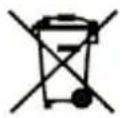
The product contains a battery. At the end of the battery working life in the product, it must be separately discarded from generic waste (see introduction).
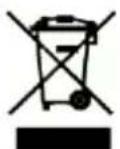
The product contains electric and electronic equipment. At the end of the product working life, it cannot be discarded with normal urban waste and must be sent to separate collection (see introduction).

Wear appropriate safety equipment such as knee pads, elbow pads and wrist bands. Use a well-buckled helmet that provides cranial protection.

It's use is prohibited by minors under 16 years of age. Otherwise, adult supervision is required.
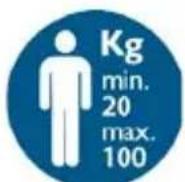
Minimum weight for use 20kg , maximum weight 100kg .
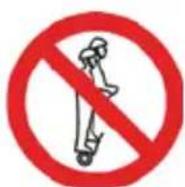
DOC was conceived and designed to be used by a single person. It is never to be used by more than one person at once.
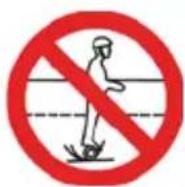
The user is required to check the laws on road circulation relating to the country in which DOC is to be used. Also check the possibility of being able to circulate exclusively in private areas or even the possibility and the respective means of circulation on public land.
HE
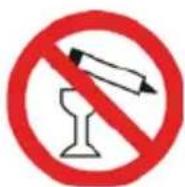
Do not use DOC under the effect of alcohol, drugs or other substances that could alter the user's reflexes
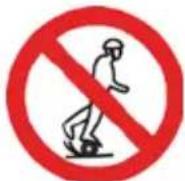
Whenever you ride DOC you risk injury due to loss of control, collision and falling. Read and follow all instructions and warning contained in the user manual.
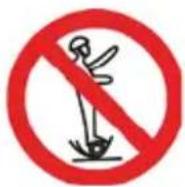
Whenever you ride DOC you risk injury due to loss of control, collision and falling. Read and follow all instructions and warning contained in the user manual.

DOC OFF ROAD and DOC+ MUSIC OFF ROAD CALIBRATION AND RESET
If your DOC seems to pull to the left or right, you may need to recalibrate its sensors. If your DOC has a charging problem, you may need to reset it. Both processes require two bubble levels (many Smartphones have free "bubble level" apps as well).
- Start with DOC powered off.
- Place each bubble level parallel with the wheel touching the inside of the footpad.
- Rotate DOC until both levels on each footpad are level. If you do not have a bubble level, make sure both footpads are equal with each other and level to the ground as best as possible.
- While keeping DOC level, hold the power button down. DOC will make the normal power on tone, wait 3 seconds and then you will hear a single beep. Front LEDs will begin flashing 5 times quickly. Release the power button. Front LEDs will continue flashing every 3 seconds. Power the DOC off.
- Power on again. DOC should now be calibrated, if DOC is still not calibrated correctly go to step 1 and begin making minor adjustments.
RESET E CALIBRAZIONE DOC OFF ROAD e DOC+ MUSIC OFF ROAD
Do not unscrew your DOC OFF ROAD / DOC+ MUSIC OFF ROAD for any reason. If you remove its seals, you will lose your right to claim any warranty.
ATTENZIONE!
Produced and Imported by Hellatron S.p.A.
Legal: Via A. Mario, 65 - 20149 Milano - Italy