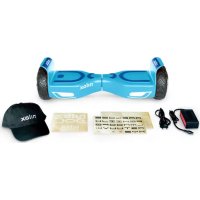
DOC 2 Plus - Self-balancing scooter NILOX - Free user manual and instructions
Find the device manual for free DOC 2 Plus NILOX in PDF.



User questions about DOC 2 Plus NILOX
0 question about this device. Answer the ones you know or ask your own.
Ask a new question about this device
Download the instructions for your Self-balancing scooter in PDF format for free! Find your manual DOC 2 Plus - NILOX and take your electronic device back in hand. On this page are published all the documents necessary for the use of your device. DOC 2 Plus by NILOX.
USER MANUAL DOC 2 Plus NILOX
Thanks for choosing DOC 2 6.5 BALANCE SCOOTER.
The electronic DOC 2 6.5 BALANCE SCOOTER manual can be downloaded from the Nilox website at www.nilox.com. Enter the DOC 2 6.5 BALANCE SCOOTER code in the search field at the top right: search for the technical sheet and download the complete manual.
TECHNICAL SUPPORT
This product is warranted in accordance with current legislation; please contact your dealer if you require technical assistance and/or warranty service.
INSTRUCTIONS FOR THE ENVIRONMENT
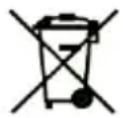
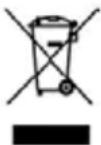
This product may contain substances that can be harmful to the environment and to human health, if not disposed of properly. We therefore provide the following information in order to prevent the release of such substances and to improve the use of natural resources. Electrical and electronic products should not be disposed of in normal household waste, but should be properly collected in order to be processed correctly. The symbol of the crossed bin shown on the product and in this page is to remind you of the need to properly dispose of the product at the end of its life. In this way, we can prevent a non-specific treatment of the substances contained in these products, or an improper use of parts of them leading to harmful consequences for the environment and human health. Moreover, you can contribute to the recovery, recycling and reuse of many of the materials that make up these products. This is why manufacturers and distributors of electrical and electronic systems organize proper collection and disposal of the equipment themselves. At the end of the product's lifespan, please contact your dealer for instructions regarding disposal. When purchasing this product your distributor will inform you of the possibility of replacing your old device with a new one, on condition that the type of product and its functions are the same or, if the dimensions do not exceed 25 cm, EEE (Electrical and Electronic Equipment) they can be returned without any equivalent product purchase obligation. Disposal of the product in any other way will be liable to the penalties established by the laws in force in the country where the product is disposed of. Moreover, we suggest adopting additional environmentally friendly measures: recycling the inner and outer packaging and disposing of any used batteries correctly. With your help, we can reduce the amount of natural resources used in the manufacturing of electrical and electronic equipment, minimize use of landfills for product disposal and improve quality of life by preventing the release into the environment of potentially dangerous substances.
BATTERY DISPOSAL
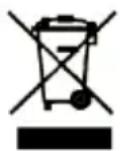
The product contains a battery, which must be disposed of separately from general household waste. Throw the battery in the appropriate containers. Collection and recycling of batteries helps protect the environment and preserve material resources, through the recovery of valuable materials. The battery in this product might not be directly removable. If this is the case, instructions for its removal by qualified personnel can be found
online at: ftp://ftp.hellatron.it (username: disposal@hellatron - password: hellatron).
For your own safety, do not attempt to remove the battery. Incorrect removal of the battery could damage the battery and device, cause accidents and/or make the device unsafe. We shall not be held liable for any losses or damage caused by failure to comply with these warnings and precautions. The product and accessories shown in this user manual may vary depending on the country in which the products are distributed
WARRANTY VALIDITY
- One year if the product is purchased by a natural or legal person who uses it in business as an entrepreneur, sales representative, craftsman or professional or his/her intermediary.
- Two years if the product is purchased by a consumer or user (the natural person who does not use it in business as an entrepreneur, sales representative, craftsman or professional).
• Six months on the battery, regardless of the occupation of the product purchaser.
• The warranty covers factory or material defects.
• Product support and warranty: visit www.nilox.com to learn more.
EN
WARRANTY RESTRICTIONS
The warranty is null and void in the following cases:
• No proof of purchase (invoice or receipt).
• Tampering or alteration of parts.
- Other defects due to: inappropriate use, unauthorized changes, operations or storage not in accordance with technical product specifications; incorrect maintenance; defects due to use of other than that supplied and all elements not designed to be used with the product; technical work performed by unauthorized personnel.
The above refers to consumer goods warranty principles pursuant to Directive 1999/44/EC.
PREFACE
Thanks for having bought DOC 2 BALANCE SCOOTER.
DOC 2 is a step forwards in the concept of transport; it combines the fun of a skateboard with the practicality of a motorized vehicle with automatic balancing.
Have fun with DOC 2 BALANCE SCOOTER.
TO GUARANTEE YOUR SAFETY AND THE SAFETY OF OTHERS, PLEASE READ THIS USER MANUAL CAREFULLY; USE OF THE DOC 2 BALANCE SCOOTER CAN BE DANGEROUS AND LOSS OF CONTROL OF THE VEHICLE, COLLISIONS OR FALLS, COULD RESULT IN SERIOUS INJURIES OR DEATH.
TO REDUCE THESE RISKS, READ AND FOLLOW ALL OF THE INSTRUCTIONS AND WARNINGS CONTAINED IN THE USER MANUAL.
SINCE THE PRODUCT IS CONSTANTLY EVOLVING, IT IS POSSIBLE THAT YOUR PRODUCT DOES NOT FULLY CORRESPONDS TO THE CONTENTS OF THIS MANUAL.
FOR THIS REASON WE RECOMMEND YOU ALWAYS DOWNLOAD THE ON-LINE VERSION AVAILABLE FROM THE NILOX WEBSITE.
READ AND OBSERVE ALL THE INSTRUCTIONS AND WARNING FOUND IN THE USER MANUAL
WARNINGS FOR USE
Carefully follow the following warnings for use. Use DOC 2 in a sensible and responsible manner.
DOC 2 BALANCE SCOOTER is a means of transport with a dual footboard that uses a self-balancing technology. Although it is a highly technological product, incorrect or inappropriate use could result in injuries. In order to minimize risks of all types we recommend carefully observing the following warnings:
• Always wear shoes, a helmet and appropriate safety equipment, like kneepads, elbow-pads and wrist-guards. We recommend the use of a well-fastened skateboard helmet that offers protection for the head.
- Do not use DOC 2 without suitable training and please consult the manual before using it. Failure to do so could result in a loss of control and falls.
- Please remember that the use of DOC 2 is solely for your personal entertainment and any other use is prohibited.
• Do not use DOC 2 in lanes reserved for motor powered vehicles.
• It should not be used by people under the age of 16, and is not advised for pregnant women and persons with disabilities.
- Do not use DOC 2 under the effect of alcohol, drugs or other substances that could alter the user's reflexes.
• Do not transport objects during use.
- Be careful of objects around you when you are moving. Maintaining a good view of the space in which you are using DOC 2 is essential for keeping it under control.
• When you are moving, ensure that both your feet are correctly positioned on the footboard.
• We recommend wearing comfortable clothing when you use DOC 2.
• DOC 2 was built to transport only one person. It should not be used by more than one person at the same time.
- It is advisable not to accelerate or stop the vehicle in a sudden or excessively sharp manner as this could result in a loss of control.
• Do not use DOC 2 in dark or poorly lit places.
• Make sure that the speed with which DOC 2 is being used allows you to stop it any time and in any situation.
• We recommend that you keep a suitable safety distance from other vehicles when you are driving DOC 2.
- When you are standing on DOC 2 the height of the user will be 10cm ; take this difference into account in the event of particularly low ceilings and doors.
- Do not use DOC 2 if there is ice or snow, and avoid using it on stones, branches or other types of vegetation or if other objects are present on the ground as this could compromise control of the vehicle.
• It is strictly forbidden to use DOC 2 in combustible environments.
• Do not use at high speeds on irregular terrain or on slopes.
• Do not try tricks or feats of agility.
- Do not lean any objects on the footboards except for your feet as these could interfere with the monitoring systems.
• Do not get off the DOC 2 when it is in motion.
It is essential to read this manual for a correct use of DOC 2 and to reduce potential risks of injury.
BEFORE USING, MAKE SURE THAT THE BATTERY IS FULLY CHARGED.
DOC 2 BALANCE SCOOTER: DESCRIPTION
DOC 2 BALANCE SCOOTER is a self-balancing electric skateboard.
The move forwards, backwards, turn and stop functions are controlled by gentle and balanced movements on the footboards. Very easy to use, easy to control and incredibly fun.
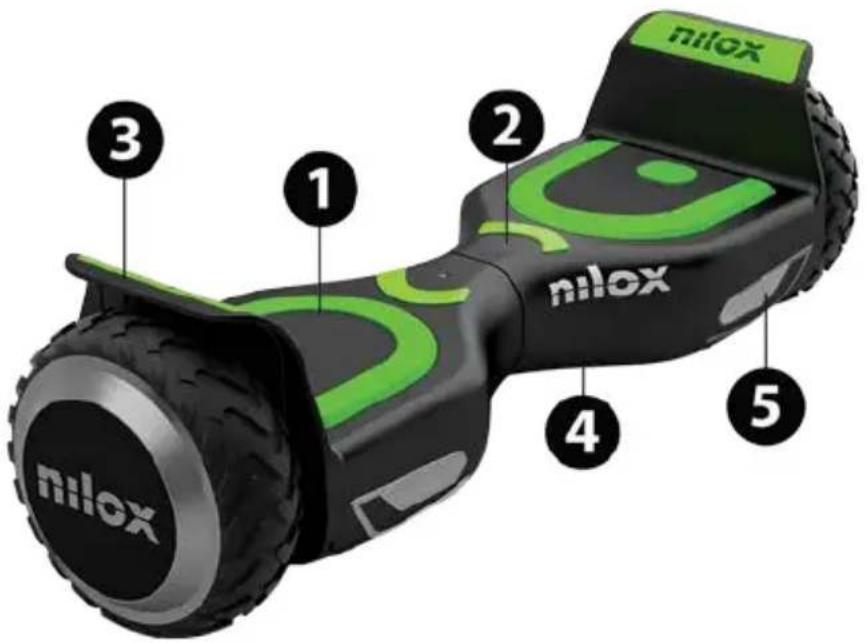
text_image
nilox nilox nilox1) Foot-board
2) Status indicators
3) Mudguard
4) Protective shell
5) Direction indicators
DOC 2 moves thanks to the concept of dynamic balance. It uses an internal system of sensors and gyroscopes that allow it to move on the basis of the variation of the centre of gravity, instructing the wheels in real time to turn forwards or backwards to remain in a position of balance. By leaning forwards, you will move forwards and the angle of inclination determines the speed at which you move. To turn it is sufficient to gently transfer your weight to one of your feet. DOC 2 BALANCE SCOOTER has a system of inertial stabilization, which helps you to maintain a vertical position; if it notices an excessive inclination of your body towards either side or lack of contact of the footboard by either of your feet it will stop automatically.
BEFORE TURNING, YOU HAVE TO REDUCE THE SPEED OF DOC 2.
CONTROL SENSORS
text_image
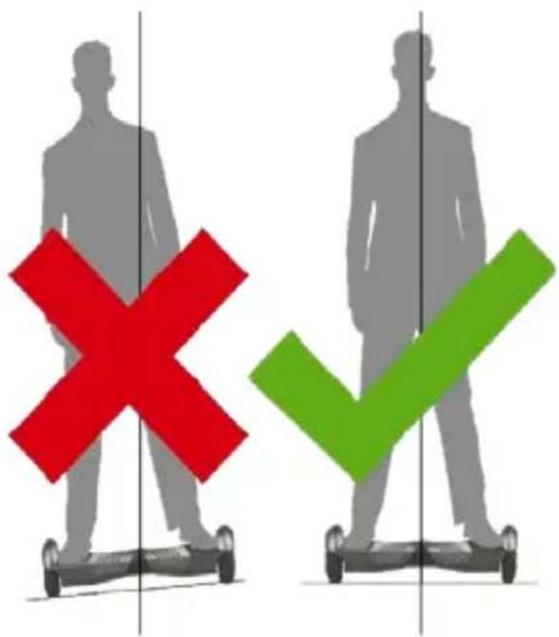
Diagram showing two human figures with a red 'X' and green checkmark signs, possibly indicating correct or incorrect actions.DOC 2 has 4 sensors under the pedals.
When you climb onto the footboards DOC 2 balances automatically.
To use it you need to ensure that you are touching both the footboards.
Be careful not to place your foot on the external part of the footboards, as DOC 2 may not realize you are there.
Do not lean forwards or backwards excessively and do not drive on a slope.
Do not lean objects on the pedals, as this will result in DOC 2 noticing a constant presence and prevent it from stopping thus significantly increasing the possibility of falls or damage to the vehicle.
DO NOT PUT YOUR WEIGHT IN THE CENTRAL PART OF DOC 2 BALANCE SCOOTER; THIS IS WHERE THE MECHANICAL STEERING MECHANISM IS HOUSED. AN EXCESSIVE WEIGHT COULD RESULT IN IT BREAKING OR NOT FUNCTIONING CORRECTLY.
CONTROL LIGHTS
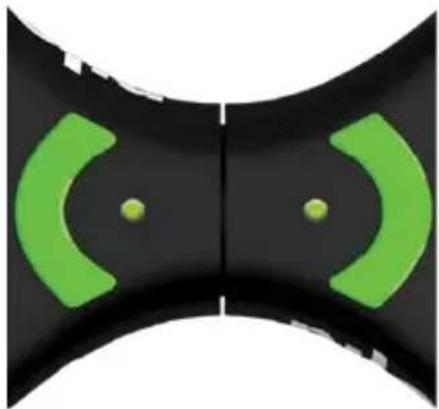
The control indicators are in the centre of your DOC 2 BALANCE SCOOTER: a status indicator of the battery and a status indicator of the pedals.
The battery control light can be:
• Green: this means that the battery is fully charged.
• Flashing green: means the battery has a charge of about 50%.
• Red: battery with less than 10% charge. In this case, stop using DOC 2 and charge the battery.
The pedals indicator can be:
• Green: a foot has been placed on the pedal and the balancing system is operating correctly.
- Red: a foot has been placed on the pedal, but the balancing system is not operating correctly, usually in the event of excessive lateral slopes.
natural_image
Abstract black and green curved shapes with two small dots, no text or symbols presentIF ONE OF THE 2 INDICATORS BECOMES RED, GET OFF DOC 2 IMMEDIATELY, AS THE SYSTEM IS UNSTABLE.
SAFE USE
We are certain that you will be able to use DOC 2 BALANCE SCOOTER with absolute peace of mind and have a great deal of fun. All you need is a little practice at the start, in order to fully master this new means of transport: you have probably already learned how to ride a bike, use a skateboard and ski. These experiences will help you to master your DOC 2 BALANCE SCOOTER in a short space of time.
- Read the manual carefully.
- Before using it for the first time, make sure that the tires are not damaged and that there are no missing mechanical parts.
• Never use DOC 2 with the aim of damaging people or things. - Do not amend the mechanical parts. Since it is a highly technological device, any tampering or amendment could result in irregular performance.
While using the DOC 2 balance scooter make sure to take all necessary security measures; in particular we remind, once more, that is recommended to wear a helmet, kneepads, elbow pads, gloves, etc.
There are two fundamental reasons for weight limit:
Ensure the safety of driver.
Reduce the overload of DOC 2 balance scooter.
• The maximum weight of the driver is 100 kg.
• The minimum weight of the driver is 20 kg.
SPEED LIMIT
• The maximum speed of DOC 2 balance scooter is 10 km/hour.
Below this speed, DOC 2 easily maintains the driver's balance.
- When the speed exceeds the specified limit, please slow down and bring the vehicle speed back within the safety range.
• If the maximum speed is exceeded the DOC 2 will make an alarm sound.
DISTANCES YOU CAN TRAVEL
• If DOC 2 is driven on flat terrain, the distance that can be covered increases.
• If the terrain is not flat the distance you will be able to cover will be smaller.
The driver's weight affects the distance that can be covered.
- Correct charging and maintenance of the battery increase the battery life. The opposite is true in the case incorrect charging and maintenance.
• A driving style with continual accelerations and braking reduces the duration of the battery.
SLOPES
• Do not use DOC 2 on routes with gradients of more than 10%.
• If the gradient exceeds 10%, you risk losing control of DOC 2.
HOW TO DRIVE DOC 2
You must read the following instructions carefully before getting onto DOC 2.
TO START
- Press the power button to start DOC 2.
- As you get on, put one foot on the side of the footboard; DOC 2 will notice the weight and will activate the balancing system.
• Slowly lift the other foot and then put it back on the ground. - Practice lifting your foot and bringing back down to the ground for a few times until you are able to lift it without making DOC 2 sway from side to side.
• Try to keep your head held high as much as possible and look ahead. - When you are easily able to lift your foot from the ground without DOC 2 moving slowly place your other foot on the pedal.
TO GET ON SAFELY WE REMIND THE USER THAT IS PROHIBITED TO JUMP ONTO DOC 2.
- Get control of the frontal movements of DOC 2 and remember that movements of the body axis must not be too broad or made through sharp and sudden movements.
• Always maintain control of lateral movements (to the right and to the left).
• Before getting off DOC 2, make sure it is completely stationary. - Alight, by removing one foot at a time from the footboard.
THE FIRST TIMES YOU USE DOC 2 IT IS QUITE NORMAL TO SWAY BACKWARDS AND FORWARDS INVOLUNTARILY.
WARNING!
GET OFF ALWAYS FROM THE REAR OF THE VEHICLE IN ORDER TO AVOID RISKS OF LOSING CONTROL OF THE VEHICLE AND FALLING.
IF THE VEHICLE DOES NOT ACTIVATE THE AUTO BALANCING, WHEN YOU GET ONTO THE FOOTBOARD THE LED ALARM LIGHT WILL SWITCH ON. DO NOT USE DOC 2, WAIT FOR A FEW MINUTES AND TRY AGAIN. IF YOU ARE ON A SLOPE, MOVE TO FLAT TERRAIN. IN ANY CASE PROCEDE WITH CALIBRATION AND RESET PROCEDURE.
RUNNING
As explained above DOC 2 BALANCE SCOOTER moves on the basis of the perception of the body's centre of gravity upon it. As a result:
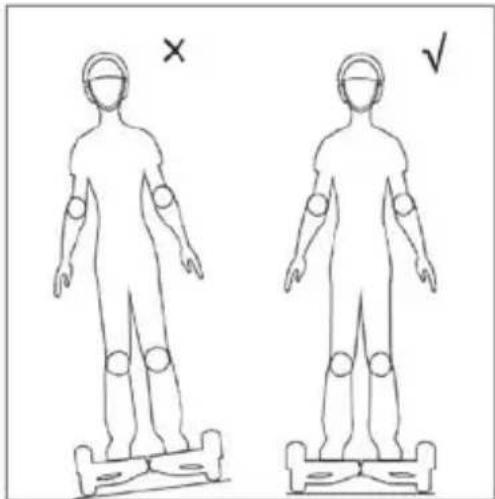
- If there is an excessive lateral inclination, DOC 2 will notice more weight on the external footboard and will tend to curve.
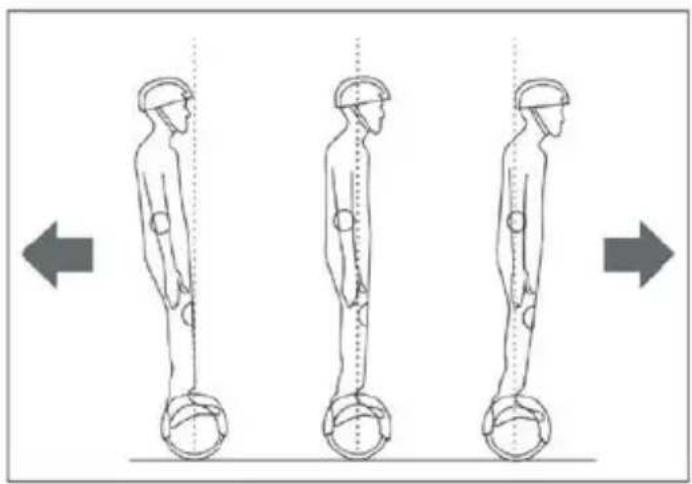
- A perfectly vertical position keeps DOC 2 stationary, a slight movement forwards or backwards will make DOC 2 start in the respective direction.
• The pressure on the right or left footboard will make it curve to the right or left.
natural_image
Two human body diagrams with marked joints, one marked with an 'X' and the other with a checkmark (no text or symbols on figures)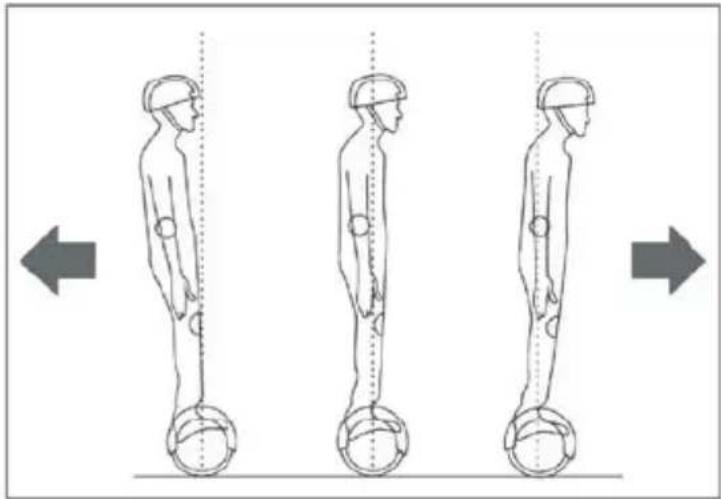
natural_image
Three sequential illustrations of human body posture with hands and legs, showing progressive movement from left to right (no text or symbols)DO NOT MAKE SHARP TURNS OR TURNS AT HIGH SPEEDS: THESE ARE DANGEROUS SITUATIONS FOR DRIVING DOC 2 BALANCE SCOOTER.
DO NOT DRIVE OVER CROSS SLOPES OR IN REVERSE: THIS TYPE OF CONDUCT AFFECTS THE DRIVING SAFETY OF DOC 2.
SELF-BALANCING FUNCTION.
DOC 2 has self-balancing function.
It allows an easy climb-on and corrects wrong positions that could be dangerous for the user.
More exactly:
- When powered on, DOC 2 places himself parallel to the ground automatically.
- When placing a foot on the platform, DOC 2 will produce an equal and opposite force in order to balance the user's weight during the climb-on.
- In presence of bumps or sudden swings, DOC 2 will automatically bring the user's center of gravity inside the platform and alert through a beep and red light.
PROTECTION FUNCTIONS
There follows a list of the anomalies that could lead to the protection functions of DOC 2 BALANCE SCOOTER being activated. During use, if the system notes the presence of errors or the loss of balance, it will warn the user of these anomalies, through control lights and intermittent alarm sounds. Example:
• When the voltage of the battery is too low.
• In the event of speed that is excessively high.
• In the event of the battery being exhausted.
If the system goes into protection mode, the alarm sensors switch on and the control lights start to sound.
In the event of activities which involve a significant consumption of energy (lengthy climbs, particularly steep descents), the vehicle could activate the automatic turning off mode.
IN THE ABOVE CIRCUMSTANCES STEP DOWN FROM DOC 2 BALANCE SCOOTER AND SUSPEND USE OF IT: THE AUTO-BALANCING MIGHT NOT FUNCTION CORRECTLY AND POTENTIALLY CAUSE YOU TO FALL.
DRIVING PRACTICE AND SAFE DRIVING
Before using the vehicle on the road, or in an external area, make sure you have mastered it sufficiently:
• It is advisable to wear comfortable clothes and shoes in order to move more freely and flexibly.
- It is not advisable to use the vehicle in open spaces, if you have not learnt all of the functions completely (movements forwards/backwards, to the right /left, start-up /stop).
• Make sure that the surface is suitable for the use of the vehicle.
- The vehicle can be used on various types of surfaces however, if it is used on irregular terrain or by users without much experience, we recommend you use it at low speeds.
- DOC 2 is a means of transport that was designed to travel mainly on smooth surfaces; this does not mean that it cannot be used on other types of terrain. When using on surfaces that are not perfectly even, we recommend maintaining a moderate speed.
- For inexperienced users, we recommend avoiding crowded places, where there are obstacles or factors that could represent a danger for the user or other people.
• Children, elderly people and pregnant women should not use DOC 2.
• Do not drive when drunk or under the influence of pharmaceutical products or drugs.
- Relax your legs when driving, bend your knees slightly. This will help you to keep the right balance on irregular terrain.
• Do not transport objects when driving.
• Make sure that your feet are always on the footboards; loss of contact with a footboard causes the immediate imbalance of DOC 2.
• DOC 2 was conceived and designed to be used by a single person. It is never to be used by more than one person at once.
- Do not start or stop suddenly.
- The weight of the driver must not exceed the maximum load specified in the instructions; the vehicle could be damaged or users could fall.
- The weight must not be less than the minimum weight specified in the instructions as DOC 2 would not correctly notice the presence of a person on the sensors; be extremely careful of this especially when travelling downhill, where high speeds can be reached, without the correct control of the vehicle.
- Keep a speed that is appropriate for stopping DOC 2 in a suitable manner.
- If you are travelling close to another DOC 2, or a similar vehicle, you need to keep a safe distance between the 2 vehicles to avoid collisions.
- When you pass through doors, remember that your height will be about 10 cm higher.
• During bends, be careful of the center of gravity of your body. A sudden variation could cause a fall. - Do not drive under the rain.
• Do not drive backwards for long distances or at high speeds.
• DOC 2 is not a medical mobility device, and is not non-equivalent to motorized wheelchairs for disabled people or pedal assisted bicycles. - Avoid driving in confined space or areas with obstacles.
BATTERY
USE OF THE BATTERY
We will now look at the means of charging and maintaining the battery, as well as potential problems there might be. For the safety of the consumer and to extend the duration and improve performance of the battery, please follow the following instructions:
- When the battery indicator is red, it means the charge is not sufficient. We recommend stopping DOC 2.
- When the power is low, there is not enough energy to drive normally. DOC 2 will automatically alert with a sound alarm.
• Do not use the battery in the following cases: - Strong smell and/or excessive heat.
- If it is losing liquid.
• The dismantling and maintenance of the battery must be carried out solely by an authorized professional.
EN
• Do not touch any substance that comes out of the battery.
• Do not allow children and animals to touch the battery.
• Before installing the battery, disconnect the battery charger.
• DOC 2 cannot be used when the battery is charging.
• The batteries contain dangerous substances. Do not open the battery and do not put anything inside them.
• Only use the battery charger provided by our company.
• If they are over-charged, lithium batteries can explode.
- Do not throw into a fire.
ATTENTION: NEVER USE DOC 2 IF THE BATTERY IS NOT FULLY CHARGED.
THE BATTERY MUST BE COMPLETELY LOADED. A NON-RECOMMENDED CARRY MAY CAUSE THE IMMEDIATE STOP WITH CONSEQUENTIAL LOSS OF CONTROL
INSTRUCTIONS FOR CHARGING THE BATTERY
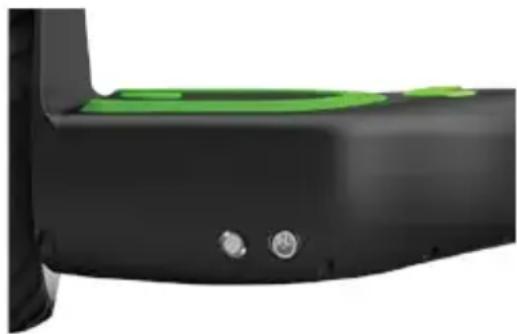
• Find the battery compartment on the back of DOC 2.
• Make sure it is fully dry.
- Connect the battery charger to the electrical mains (100V-240V; 50,60Hz), make sure it is switched on and then connect the other end of the charger to DOC 2.
• The red control light on the battery-charger means that it is charging correctly.
- When the control light goes from red to green, the battery is fully charged, so unplug the battery-charger.
• Charging time is about 180 minutes.
- Keep the charging contacts clean and dry.
• If the battery compartment is not dry, do not charge DOC 2.
natural_image
Close-up of a black and green electronic device component with two small buttons (no visible text or symbols)PLEASE NOTE: IF THE BATTERY IS KEPT CHARGING FOR EXCESSIVELY LONG PERIODS ITS LIFE CYCLE WILL BE RE
TEMPERATURE OF THE BATTERY AND SPECIFICATIONS
For DOC 2 BALANCE SCOOTER to operate efficiently, the temperature of the battery must be within the range shown below and the temperature, before and after charging, must be within the recommended range. The efficiency of the charging process will be maximized if the following conditions are respected.
A temperature that is excessively high or low increases charging time and reduces efficiency.
| Battery | Lithium Ion |
| Charging time | about 180 minutes |
| Volts | 25.2V |
| Amps | 4.3Ah |
| Use temperature | -20°C ~ 60°C |
| Charging temperature | 0°C ~ 45°C |
TRANSPORTATION OF THE BATTERIES
Lithium batteries are considered to be dangerous material. Transportation of lithium batteries is governed by the laws of each individual state.
Delivery of single lithium batteries is prohibited under international law.
If you send your DOC 2, the battery must be inside it.
THE BATTERY CANNOT BE SENT SEPARATELY.
• In order to avoid fire risks or electrical shock, when charging, only place the device in a room with controlled temperature and humidity without conductive agents of any kind.
- When charging, the device should be placed in a fully fireproof room (keep away from wood floors, furniture, paper, sofas, rugs, flammable liquids, etc.) with controlled temperature and humidity.
• Charge the battery in a ventilated room to reduce overheating when charging.
• If the battery suffered shocks or if the battery or power cord are not perfectly intact, avoid charging and contact a service centre.
EN
- The manufacturer and distributor cannot be held liable for damages to third party products due to improper battery and charger use.
WARNINGS BATTERY AND ITS POWER SUPPLY
If incorrectly used, lithium batteries can catch fire or explode.
Therefore please:
- Avoid excessive impacts that could mechanically damage the battery structure.
• If this should happen, contact Nilox customer service before using the product again.
• DO NOT USE CHARGERS OTHER THAN THE ONE SUPPLIED IN THE ORIGINAL PACKAGING FOR ANY REASON.
• Make sure there are no flammable objects or surfaces near the DOC HOVERBOARD during use (curtains, sofas, rugs, etc.) - When charging, do not leave the product unattended and do not leave it connected to the
- charger beyond the time required for charging, as specified in the manual.
If your charger breaks, send an email to supporto.postvendita@nilox.com; you will be given instructions on the correct way to purchase a new one.
MAINTENANCE
DOC 2 BALANCE SCOOTER must be maintained and cleaned after use.
Follow the brief instructions below to ensure a longer duration and correct functioning of the vehicle.
CLEANING
• Make sure that the power cable is disconnected and that DOC 2 is off before proceeding.
- Clean the external shell of DOC 2 with a soft and dry cloth.
• DOC 2 complies with the IPX4 standard, which means it is spray resistant, but cannot be immersed in water.
- Do not allow water or other liquid to get inside DOC 2, as this could cause permanent damage to the electronic circuitry.
• Clean DOC 2 after every use and do not store in a dusty environment.
CONSERVATION
If you expect not to use DOC 2 for a long period:
- Charge the battery completely as this will prevent it from becoming completely exhausted over time.
• Per long periods of time remove the battery and run it down /recharge it every three months.
• Cover DOC 2 with a cloth. Dust and sand could get into the engine and damage it.
• Store indoors, at a dry and suitable temperature.
• Do not store in an unheated garage or warehouse.
ANY ATTEMPT TO REPAIR OR AMEND DOC 2 BALANCE SCOOTER AND ALL TAMPERING WILL RESULT IN THE AUTOMATIC CANCELLATION OF THE WARRANTY.
TECHNICAL SPECIFICATIONS
| Product dimensions | 58.5 x 18.5 x 17.8 cm |
| Minimum height from the ground | 30 mm |
| Maximum height from the ground | 194 mm |
| Weight of the product | 11 kg |
| Maximum weight supported | 100 kg |
| Minimum weight supported | 20 kg |
| Maximum speed | 10 km/h |
| Maximum distance that can be covered with full charge | 12 km |
USE AND TRAFFIC RULES
IN SOME COUNTRIES DOC 2 MUST BE USED ON PRIVATE GROUNDS ONLY WHERE NORMAL ROAD SAFETY RULES DO NOT APPLY. SPECIFICALLY, IN SOME COUNTRIES, STATES OR CITIES, ELECTRIC PUSH SCOOTERS CANNOT CIRCULATE ON ROADS AND SIDE WALKS. USERS ARE RESPONSIBLE FOR CHECKING THE SAFETY REGULATIONS APPLICABLE IN THE COUNTRY WHERE THEY INTEND TO USE THE DOC 2 BEFORE USING IT.
SYMBOLS AND PICTOGRAMS ON THE PACKAGING/PRODUCT

The product meets European safety directive requirements.
The product contains a battery. At the end of the battery working life in the product, it must be separately discarded from generic waste (see introduction).
The product contains electric and electronic equipment. At the end of the product working life, it cannot be discarded with normal urban waste and must be sent to separate collection (see introduction).

Wear appropriate safety equipment such as knee pads, elbow pads and wrist bands. Use a well-buckled helmet that provides cranial protection.

It's use is prohibited by minors under 16 years of age. Otherwise, adult supervision is required.
EN
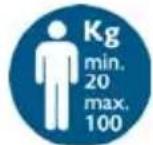
Minimum weight for use 20 kg, maximum weight 100 kg.
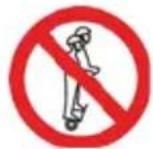
DOC 2 was conceived and designed to be used by a single person. It is never to be used by more than one person at once.
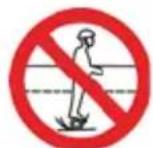
The user is required to check the laws on road circulation relating to the country in which DOC 2 is to be used. Also check the possibility of being able to circulate exclusively in private areas or even the possibility and the respective means of circulation on public land.

Do not use DOC 2 under the effect of alcohol, drugs or other substances that could alter the user's reflexes
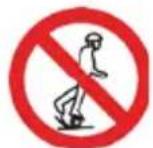
Whenever you ride DOC 2 you risk injury due to loss of control, collision and falling. Read and follow all instructions and warning contained in the user manual.
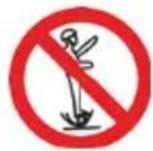
Whenever you ride DOC 2 you risk injury due to loss of control, collision and falling. Read and follow all instructions and warning contained in the user manual.
text_image
Diagram showing two human figures with red 'X' and green checkmark signs, likely indicating correct or incorrect actions.natural_image
Abstract black and green curved shape with two dots, no text or symbols presentnatural_image
Two human body diagrams with marked joints, one marked with an 'X' and the other with a checkmark (no text or symbols on the figures themselves)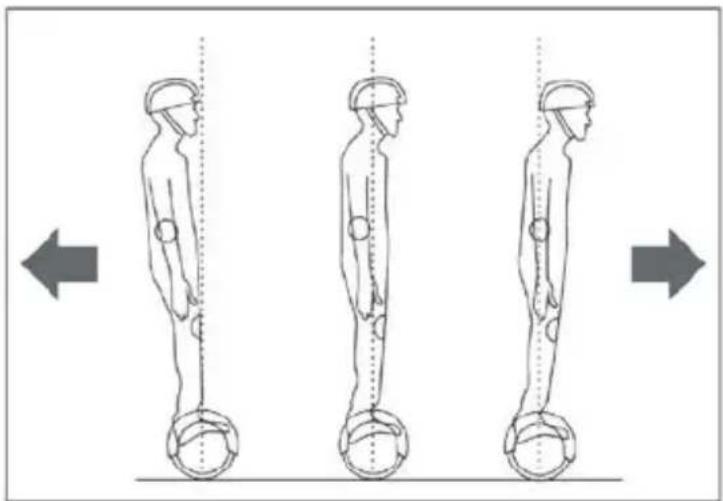
natural_image
Three sequential illustrations of human body posture with hands and legs, showing vertical alignment and movement directions (no text or symbols)SI PREGA DI NON EFFETTUARE STERZATE STRETTE E AD ALTA VELOCITÀ: SONO SITUAZIONI PERICOLOSE PER LA GUIDA DEL DOC 2 BALANCE SCOOTER.
SI PREGA DI NON GUIDARE IN PENDII TRASVERSALI O IN RETROMARCIA: QUESTI COMPORTAMENTI INFLUENZANO LA SICUREZZA DI GUIDA DI DOC 2.
AUTOBILANCIAMENTO
natural_image
Close-up of a black and green electronic device component with two small circular buttons (no visible text or symbols)ATTENZIONE: IL MANTENIMENTO ECCESSIVO IN CARICA DELLA BATTERIA NE RIDURRÀ LA DURATA.
TEMPERATURA DELLA BATTERIA E SPECIFICHE
text_image
Diagram showing two human figures with red 'X' and green checkmark signs, likely indicating correct or incorrect actions.natural_image
Abstract black and green curved shape with two central dots, no text or symbols presentUSO SEGURO
text_image
Diagram showing two human body positions with X and ✓ signs indicating different measurement points or conditions.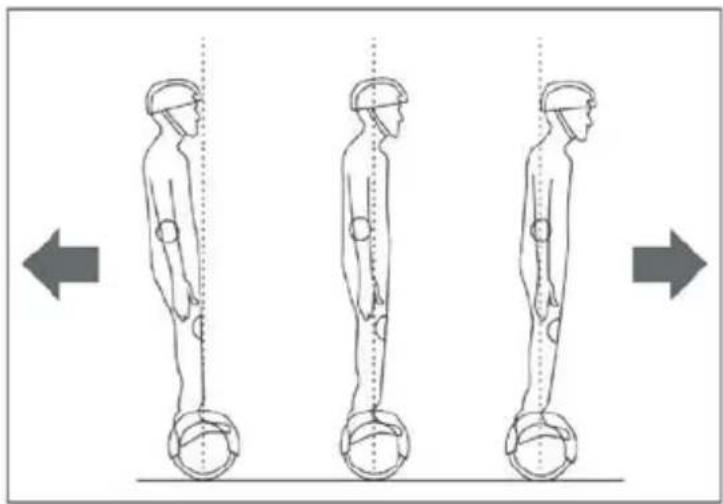
natural_image
Three sequential illustrations of human figure standing with dumbbells, showing posture changes (no text or symbols)LE ROGAMOS QUE NO HAGA CURVAS ESTRECHAS A ALTA VELOCIDAD SE TRATA DE SITUACIONES PELIGROSAS AL CONDUCIR EL DOC 2 BALANCE SCOOTER.
LE ROGAMOS QUE POR LAS CUESTAS NO CONDUZCA TRANSVERSALMENTE NI A MARCHA ATRÁS.
natural_image
Close-up of a black ergonomic device with green handle and two circular buttons (no text or symbols visible)INFORMATIONS SUR LA GARANTIE
text_image
Diagram showing two human figures with red 'X' and green checkmark signs, likely indicating correct or incorrect actions.natural_image
Abstract black and green curved shapes with two dots, no text or symbols presenttext_image
Diagram showing two human body positions with X and ✓ signs indicating different positions or conditions.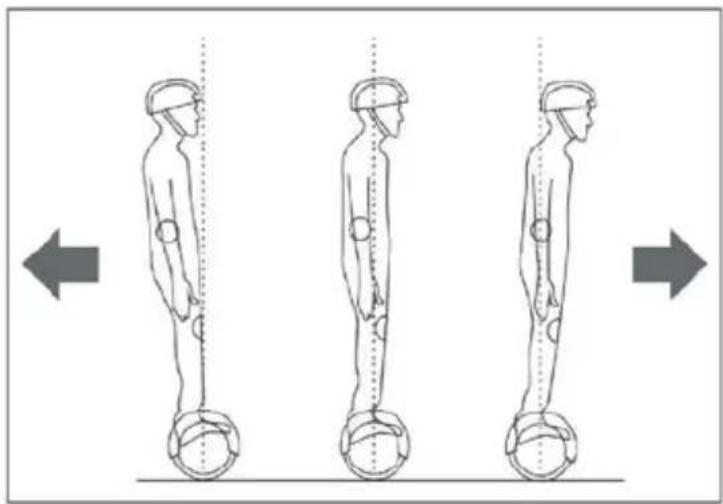
natural_image
Three sequential illustrations of human figure standing with dumbbells, showing posture changes (no text or symbols)VEUILLEZ EVITER DE FAIRE DES VIRAGES SERRES ET A GRANDE VITESSE CELA EST DANGEREUX POUR LA CONDUITE DU DOC 2 BALANCE SCOOTER.
VEUILLEZ A NE PAS CONDUIRE SUR DES PENTES TRANSVERSALES EN MARCHE ARRIERE: CES COMPORTEMENTS NUISENT A LA SECURITE DE CONDUITE DE DOC 2.
AUTO-EQUILIBRAGE
natural_image
Close-up of a black and green electronic device component with two small circular buttons (no visible text or symbols)ATTENTION: UNE DUREE DE CHARGE EXCESSIVE DE LA BATTERIE EN REDUIT LA DUREE DE VIE.
TEMPÉRATURE DE LA BATTERIE ET SPÉCIFICATIONS
INFORMATIONENE ZUM UMWELTSCHUTZ
text_image
Diagram showing two human figures with red 'X' and green checkmark signs, likely indicating correct or incorrect actions.natural_image
Abstract black and green curved shapes with two small dots, no text or symbols presentnatural_image
Two human body diagrams with measurement markings, one marked with an 'X' and the other with a checkmark (no text or symbols on figures)