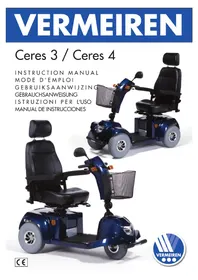
Ceres 4 - Electric scooter Vermeiren - Free user manual and instructions
Find the device manual for free Ceres 4 Vermeiren in PDF.



| Product type | Electric scooter |
| Brand | Vermeiren |
| Model | Ceres 4 |
| Dimensions (L x W x H) | 131 x 61 x 116 cm |
| Total weight | 94.7 kg |
| Battery capacity | 36 Ah x 2 or 50 Ah x 2 |
| Charger | 4 A external |
| Motor | 470 Watt nominal |
| Maximum speed | 12 km/h |
| Range | 32 to 40 km |
| Maximum payload | 135 kg |
| Maximum incline | >8° |
| Maximum obstacle height | 10 cm |
| Front tire type | 127 x 320 mm (2) |
| Rear tire type | 127 x 320 mm (2) |
| Braking system | Electromagnetic motor brake |
| Safety devices | Thermal cut-off, anti-tip protection, ignition key, hazard lights |
| Recommended maintenance | Check tires, screws, motor brake before each trip; annual inspection by an authorized dealer |
| Cleaning | Warm water and mild detergent; avoid solvents and steam cleaners |
| Removable parts | Seat, armrests, rear cover, batteries, front/rear chassis |
| Warranty | 24 months |
| Manufacturer | N.V. Vermeiren N.V., Vermeirenplein 1/15, B-2920 Kalmthout, Belgium |
Frequently Asked Questions - Ceres 4 Vermeiren
User questions about Ceres 4 Vermeiren
0 question about this device. Answer the ones you know or ask your own.
Ask a new question about this device
Download the instructions for your Electric scooter in PDF format for free! Find your manual Ceres 4 - Vermeiren and take your electronic device back in hand. On this page are published all the documents necessary for the use of your device. Ceres 4 by Vermeiren.
USER MANUAL Ceres 4 Vermeiren
Notice to the specialist dealer:
This instruction manual is part and parcel of the product and it should accompany each product delivered.
- Edition 2010
All rights reserved, including translation.
No part of this manual may be reproduced in any form whatsoever (print, photocopy, microfilm or any other process) without written permission of the publisher, or processed, duplicated, or distributed by using electronic systems.
Vermeiren Co. Ltd, 2010
CONTENTS
Section
Contents 3
Preface 4
General notes 4
Allowed and disallowed usages 4
For your safety 5
Remarks on electromagnetic compatibility (EMC) 6
Learning how to use your scooter 7
- Readying the scooter for use. 7
Handling after usage 7
- Parking the scooter. 7
Your first trip with the scooter 7
-
Moving backward 7
-
Going uphill. 8
-
Going downhill 8
Uneven terrain 8
Charging the batteries. 9
Battery storage. 10
Thermal fuses 10
Tip protectors 10
Transporting the scooter 11
Using ramps 11
Servicing 11
Inspection 12
Care 13
Disinfection 14
Guarantee 14
Statement of conformity 14
Service plan 15
Addresses 16
PREFACE
First of all we want to thank you for putting your trust in us by selecting one of our Scooters.
The expected working life of your vehicle depends essentially on your care and maintenance. This instruction manual will help you to familiarize yourself with the operation of your Scooter and advise you on keeping your it in a good operating condition to ensure a long working life.
This instruction manual reflects the latest level of development of the product. However, our firm, Vermeiren, reserves the right to introduce changes without any obligation to adapt or replace previously delivered models.
Keep in mind that your Scooter will remain in an excellent working condition and keep on functioning perfectly even after many years, on condition that you follow our advice.
For any further questions please consult your specialist dealer.
GENERAL NOTES
The electric Scooter has been designed for outside uses. Only a few models are suitable for inside uses thanks to their specific type of construction. However, users must make sure that the Scooter's turning circle diameter and uses comply with the space inside.
When using your Scooters on streets or footpaths, please obey existing laws and regulations.
You do not need a driver's licence nor vehicle insurance with the models limited to a top speed of six km/h. But for various reasons we recommend that you nonetheless take out insurance.
For the models capable of exceeding 6km / h , you will need a driver's licence. These models' Contents of the Consignment include an operating permit meeting road traffic licensing regulations that you must present to your insurer.
Use only the supplied battery charger and no other charging equipment.
We wish to point out that sources of electromagnetic waves (e.g. cell phones) are liable to create interferences. The electronics of the scooter itself could affect other electric appliances too.
Even if you have been informed by your specialist dealer about the operational elements of your scooter and their use, we recommend that you read the following pages very carefully.
We reserve the right to introduce technical changes. Our general business conditions apply.
ALLOWED AND DISALLOWED USAGES
The main use of the electric scooter is to comfortably transport people. The number of seats equals the maximum number of people that it can transport. The scooter has been designed to transport people only, no goods, nor any persons under the age of 12. Models with a top speed exceeding 6km/h may not be used to transport persons under the age of 16.
The scooter must not be used as ladder or support either for people or objects.
Neither should it be used by people obviously suffering from physical or mental limitations that render them incapable of safely handling the scooter in traffic.
These limitations could involve:
hemiplegics or paraplegics
the loss of limbs (arm amputation)
- limb defects or deformations (if resulting in reduced equilibrium and steering abilities)
- contracts or damage done to joints (if resulting in reduced equilibrium and steering abilities)
balance disturbances or cachexia
- mental disorders
- damage to the cerebral cortex owing to psychological disorders
When putting your electric scooter to use
- body size and weight
- physical and psychological condition
residential circumstances and
the environment
should also be taken into consideration.
In principle, the electric scooters are limited to uses on sidewalks. Only the models with an operating permit complying with road traffic licencing regulations (exceeding 6km / h ) may be used on urban roads. Under no circumstances may it be used for driving on larger roads or expressways.
The manufacturer shall decline all liability for damage caused by improper uses.
FOR YOUR SAFETY

No additional passengers may be taken.
Before getting on or off, taking apart or transporting your scooter, turn the start key to the "off" position.
When transporting the scooter, no person may be transferred along with it.
Test the effects on the handling of the scooter when its center of gravity is shifted, for example on up or down gradients, on laterally sloping ground or when driving over uneven terrain.
When picking up objects lying in front of, next to, or behind the scooter, take care that you do not lean too far sideways for fear of tipping over.
Avoid putting your scooter into the free-wheeling position on slopes.

Never reverse uphill.

Reduce speed when you go round corners.

While driving, hold the handle bars with both hands.

Put your legs and feet on the surfaces provided for them during the drive.

Do not use your scooter in rainy conditions.
When storing or parking your scooter outside, protect it with a shrouding cover against humidity.

High levels of humidity or very cold conditions can reduce the performance of your scooter.
Use your scooter strictly in accordance with regulations. Avoid driving straight over obstacles (e.g. step, edge of the curb) or down from high ledges.

Obey traffic regulations when driving on public roads. Please take other road-users into consideration.

As is the case with any other vehicle, you must never be under the influence of alcohol or medicine while driving your scooter. This also applies to indoor driving.

When traveling outdoors, adapt your driving to weather and traffic conditions.

When driving in the dark, wear bright clothing or clothing with reflectors to be more visible, and make sure that the reflectors on the scooter are visible clearly.

Make sure that the lights of your scooter are free from dirt and/or other objects that could hide them.

Never use your scooter as a seat in an automobile or other vehicle.

Check that the profile depth of the tyres is adequate.

Be careful when using sources of fire such as cigarettes, since they can set the seat and back covers alight.

Make sure that the maximum load is not exceeded.

If your scooter has pneumatic tyres, be careful to pump them to the correct pressure (see pressure indication on the tyres).
REMARKS ON ELECTROMAGNETIC COMPATIBILITY (EMC)
Interfering electromagnetic fields may have a negative effect on the scooter's electronic systems. These can include:
- Disengagement of the engine brake
- Uncontrollable behavior by the scooter
- Unintentional steering movements
In the presence of very strong or enduring interfering fields, the electronic systems could even break down entirely or suffer permanent damage.
Possible sources of radiation include:
- Portable receiver and transmitter installations (receiver and transmitter with fixed antenna)
- Transmitting and receiving sets
- Cell phones or cordless telephones
- portable TV, radio and navigation devices
-
other personal transmitting devices
-
Mobile medium-range transmitting and receiving devices (e.g. car antennas)
- Fixed transmitting and receiving sets
- Fixed mobile transmitting and receiving devices
- Fixed radio, TV and navigation systems
- Long-range transmitting and receiving devices
- Radio and television towers
- Amateur radio sets
- Other home devices
- CD player
- Notebook
- Microwave oven
- Cassette recorder
-etc.
Devices like electric shavers and hair dryers will have no influence provided that they function perfectly and their cabling be in an excellent condition. Please conform to the operating instructions accompanying such electric instruments to ensure troublefree operating of your scooter.
To reduce the effect of electromagnetic sources of interference, please heed the following warnings:

Avoid using any portable TV or radio in the immediate environment of your scooter for as long as it is turned on.

Avoid using any transmitter-receiver or mobile telephone in the immediate environment of your scooter for as long as it is turned on.

Check the area for transmitter masts and avoid using the scooter close to them.

If involuntary movements or braking occur, turn off the scooter as soon as it is safe to do so.
LEARNING HOW TO USE YOUR SCOOTER
- READYING THE SCOOTER FOR USE
When you use your scooter for the first time, make sure that it is standing on level ground. All wheels must be in contact with the ground.
First insert the key and turn 90^ to the right (depending on the model there can be an ON / OFF switch - please see the relevant Operating Manual). Make sure that the motor is engaged. See to it that your seat is at a height best suited to yourself. Sit down on the seat and verify that both armrests have been adjusted to your forearms or folded down and that the seat has been locked in the driving position.
Now turn the speed control to the minimum position (anticlockwise), or turn the ON/OFF button to the ON position. Your scooter is now ready for use.
- HANDLING AFTER USAGE
Before getting off from your scooter, make sure that all four wheels touch the ground simultaneously.
Next turn the key to the "OFF" (charge indicator goes out) or press the ON/OFF button to turn off the integrated light (charge indicator goes out).
PARKING THE SCOOTER
Once your scooter has been turned off, no command can be sent to the driving system. You will be unable to deactivate the electromagnetic brakes before turning on your scooter again. Always park your scooter on sites that are well guarded or clearly visible.
- YOUR FIRST TRIP
Once you are seated on your scooter and have started it as described above, take hold of the T-handle bar with both hands, put your thumbs on the accelerator (in the case of the delta handle bar, grasp the thinnest part of the bars with both hands) and use your fingers, or one finger only, to pull the speed lever in the required direction, i.e.:
ACTION BY THE RIGHT HAND = FORWARD MOVEMENT ACTION BY THE LEFT HAND = BACKWARD MOVEMENT
To brake, let go of the drive lever, which will let it return to the zero position and slow down your scooter to a gentle stop. Practice pulling away and braking to get accustomed to the scooter. You need to be able to estimate how your scooter will react when you drive or brake.
For corners and bends, use both hands to turn the handle bar in the direction you wish to take. The front wheels will turn accordingly and steer the scooter into a new direction. It is very important that you ensure that there is enough space allowing you to go around bends and corners. Narrow passages must preferably be approached in a large curve so as to allow you to enter the narrowest part as straight from the front as possible. Bear in mind that your scooter's back part will in most cases be wider than the front part.
You need to greatly reduce your speed before you enter a curve or corner.
Take care not to enter curves and corners diagonally. By 'cutting the corner', chances are that your rear wheels will run into obstacles and destabilize your scooter.

Accustom yourself with the driving behavior of your scooter.

Always maintain an adequate distance from corners and obstacles.
- BACKWARD MOVEMENT
Rearward driving requires increased concentration and care (LEFT HAND ACTION). This explains why we have greatly reduced the speed of rearward movement in comparison with forward driving. But we still recommend that you put the speed lever on minimum when you drive backward.
Do not forget that the steering direction with rearward drives is the opposite of when you go forward, and that your scooter will turn directly in the required direction.

Accustom yourself with the driving behavior of your scooter.

Always go backward in the lowest speed possible.
Always look to the back when you go backward.
GOING UPHILL
When you go uphill, be careful that the slope does not exceed the maximum gradient your scooter is capable of climbing (see "Technical Details" in your scooter's manual).
Always approach slopes directly from the front and, to avoid tipping over, see to it that all four wheels stay in contact with the ground at all times (ramps, driveways, etc.) Your scooter is powered through a differential. Both drive wheels should therefore stay in contact with the ground at all times. Should one of the drive wheels no longer be in contact with the ground, a safety device will cut the transmission of energy to the wheels, bringing the scooter to a halt.
If you come to a stop on a slope by letting go of the accelerator, the engine break will prevent your scooter from rolling backward. As soon as the accelerator returns to zero position, the engine break is activated.
To resume your uphill drive, push the accelerator throttle open fully to ensure the release of a sufficient amount of power. This will allow your scooter to slowly ascend the slope.
If your scooter is unable to drive up, turn the speed control up and try again.

Accustom yourself with the driving behavior of your scooter.
Never put your scooter in the free-wheeling position on uphill slopes.
GOINGDOWNHILL
Never drive down slopes that your scooter will be unable to ascend again. For detailed information on the gradients your scooter is capable of handling, please refer to the corresponding manual.
Always approach downhill slopes directly from the front. Slantwise approaches can lead to some of the wheels no longer staying in contact with the ground (danger of tipping over). If one of the back wheels fails to make contact, the transmission of power will be cut and the scooter come to a standstill.
The weight of the scooter will increase your downhill speed. Turn the speed control down and adjust your speed to the conditions.
Avoid sharp bends on downhill slopes. The weight of your scooter could cause your scooter to lift up on one side or even fall over around bends.

Accustom yourself with the driving behavior of your scooter.
Avoid sharp bends.
Avoid putting your scooter into the free-wheeling position on slopes.
- UNEVENTERRAIN
Your scooter has been designed for outside driving in particular. It is thus fully capable of driving over uneven terrain (grass, gravel, cobble stones, etc.). Nevertheless, on certain soils such as sand, mud or loose gravel, output can be reduced or your scooter even be brought to a standstill.
The following models are not suited to uneven terrain: TE UL7-4, TE GK-8, TE 787-L, TE 787-NA, TE 777-NA.
For more information, please refer to "Technical Details" in the corresponding manuals. If you are unsure whether your scooter will be able to drive across an uneven patch, it is best avoided.
CHARGING THE BATTERIES
The light emitting diode (LEDs) in the steering unit indicates the remaining capacity of your batteries.
Recharge the batteries on a daily basis. If you don't do that and you keep on driving, the output of your scooter will drop very significantly (uphills, bends, dim headlights). If you ignore these signals too, your scooter will turn off. You should now immediately recharge your scooter with the accompanying battery charger. Kindly also observe the accompanying operating instructions.
- Turn the key to OFF and take it out.
- Turn the protecting flap of the charging socket (steering column, with UL7-4: battery kit)
2a. with TE-777 NA / TE-787 NA: Connection of loading plug in loading device compartment under the seat.
3. Insert the plug of the loading device into the loading socket of the scooter.
4. Insert the mains plug of the loading device into the socket. Switch the loading device to ON (a few models have no ON/OFF switch; with these the loading device starts operating automatically when you insert the mains cable).
5. The loading device now starts to charge and the LED (orange) goes on, which indicates that it is busy charging.
6. Once the charging process is complete, the LED (orange) turns green, thereby indicating that loading is complete.
7. First switch off the loading device (if there is no ON/OFF switch, pull out the mains plug).
8. Pull out the loading plug from the loading socket of the scooter. Your scooter is again ready for use.
Always take out the key before you start charging.
Charge your scooter's batteries strictly in accordance with the description above. If you charge the batteries too early, they will gradually lose capacity, thus cutting your scooter's traveling range.
The manufacturer shall decline all liability for damage caused by incorrect charging.
Use only genuine original batteries. We do not accept any liability for damage caused by using batteries not supplied by us.
Do not expose the batteries to temperatures below 5^ Celsius or above 50^ Celsius.
If the batteries are opened, all liability of the manufacturer is voided as well as any claim.
If you decide not to use your scooter for a prolonged period, you must nevertheless recharge it regularly to keep it in a running condition ready for immediate use.
If the batteries are not being used for a prolonged period, they will discharge slowly by themselves (in-depth discharging). Then it becomes impossible to recharge them with the supplied battery charger. When batteries are not in use, they must be recharged at least every 4 to 8 weeks (depending on the charge indicator).
Note that if you recharge the batteries too frequently, they will eventually lose their capacity irretrievably.
Use only the supplied battery charger and no other charging equipment.
The manufacturer shall decline all liability for damage caused by improper charging.
In every case the charging cycle must not be interrupted. The battery charger has an indicator showing you when the charging cycle has been completed (also see the Instruction Manual of the loading device).
BATTERY STORAGE
If you no longer use your scooter, you could leave it connected to the battery charger. Charging is automatically controlled by the battery charger. If you remove and store the batteries, kindly note the following:
- Remove the cable clamps from the poles of the battery.
- The positive pole must at least be covered by a pole cap.
- Make sure that no objects can make contact with both poles during the time of storage (danger of short circuits!).
- Batteries should only be stored in dry, well-ventilated spaces at a temperature between 5^ and +40^ + 20^ .
- Protect the plugs and sockets against corrosion.
- Protect the batteries against deep discharging (see the chapter on battery charging).
If you have further questions, consult your specialist dealer who will gladly help you in regard to storage and servicing of your batteries.

If batteries are not used, they can discharge fully.
THERMAL SAFETY MECHANISM
To protect the motor against overload, your scooter comes with a thermal safety mechanism that will automatically cut the motor to prevent overheating and thus rapid wear and tear or breakdowns. You can access the thermal safety device through a gap in back of the synthetic cover. For those models that have no synthetic cover, the thermal safety mechanism will be located on the battery boxes.
The thermal safety device can go loose if you go up or down slopes that exceed the maximum gradient indicated. Nominal loads that exceed the maximum permitted could also cause the device to jump out. Likewise, if you keep on driving with the engine brake on, it could result in overload. The maximum values not to exceed are indicated in the chapter on "Technical Details" of the corresponding manual.
To be able to use the scooter again, remove the overload and wait till the motor has cooled off. Then gently press the thermal safety mechanism back in. Your scooter is now ready for use again.
TIP PROTECTOR
A tip protector fixed to the frame is part of the standard equipment of some of the models. It is thus not possible to remove it. The tip protector is there for your safety. It prevents the scooter from tipping over backward when you drive over small obstacles that do NOT exceed the maximum height specified.
With other models, the tip protector can be removed.
- Pull out the safety pins of the tip protector.
- Then pull out the tip protector.
- Insert the safety pins into the holes of the frame again to avoid losing them.
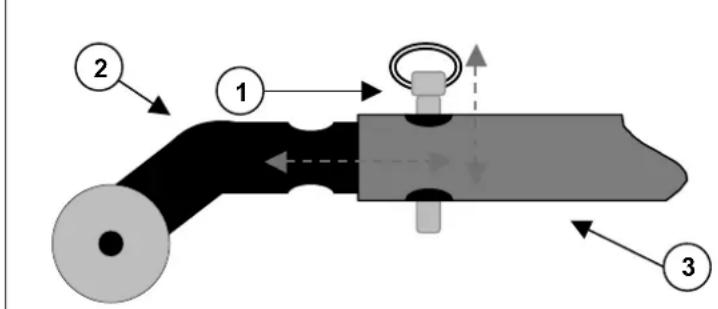
1 = Safety pin
2 = Tip protector
3 = Rear frame
Reverse these actions when putting the tip protector back.
- Pull out the safety pins.
- Insert the tip protector into the tail pipe of both the left and right parts of the rear frame. Make sure the holes are on top of each other.
- Push in the fastening pins as far as they will go.

Put the tip protector back before using the scooter.

NEVER put the tip protector back on one side only.
TRANSPORTING THE SCOOTER
If your scooter is to be transported, please note the following:
Before picking up the scooter all movable parts must be removed (basket, armrests, etc.). You could also remove the batteries / battery boxes from the seat to save weight.
As gel batteries are closed battery systems, removal for the purpose of transportation will cause no problem.

When raising the scooter, it should be held by fixed parts of the frame only.

To prevent damage, all loose parts should be removed prior to transportation.

When assembling, make sure that all screws are retightened properly.

To prevent personal injury or damage to the scooter, there should be no people or objects under the scooter during transportation.

Likewise, there must be no people or objects on the foot rests or seat during transportation.
USING RAMPS
Should you wish to use ramps to drive over an obstacle, please note the following:
For your own safety, find out from the manufacturer what the maximum load is that the ramps can bear. Drive on the ramps at the lowest speed possible. Also see the instructions in chapter "Your first trip with the scooter".
If another person is pushing you, note that the considerable weight of the electric scooter generates large reverse forces.

Observe the instructions on the maximum load of the ramps used.

We shall decline all liability for injury or damage caused by an improper choice of ramps.
SERVICING
Like all other technical products, your electric scooter will require servicing. Below follows a list of actions to be taken to ensure that you keep on enjoying the benefits of your scooter, even long after you purchased it.
BEFORE DRIVING
Check the tyres for visible damage and/or soiling. Remove any dirt as it could impair the road-holding capacity of the tyres. When a tyre is damaged, please go see an authorized workshop for repair.
Before driving, check the motor brake. If it does not function properly, please consult your specialist dealer.
Check the tyre pressure and inflate them if necessary.
Make sure that all screws are tightened properly.
Switch on the electronics after verifying that the motor is engaged. The load indicator indicates the level of the batteries. If the battery charge is sufficient for the intended route, you can set out.
APPROX.EVERY8 WEEKS
Depending on the frequency of use, check the following:
- Dirt under the rear chassis (carefully remove any dirt as it can corrode the plugs).
- Dirt / corrosion on the poles of the batteries (be careful to keep the poles of the batteries clean as dirt may damage the batteries).
Remove the pole connectors before cleaning the poles of the batteries.
! Be careful not to put any objects capable of conducting an electric current between the poles of the batteries.
- Tighten moving parts that can be removed.
APPROX.EVERY 6 MONTHS
Depending on the frequency of use check the following:
- Cleanness
- General condition
- Function of the wheels If resistance to rolling is too great, clean the wheel bearings and check tyre pressure.
- Check the following greasing points (do not use WD40 lubricating agents):
a) Wheel axles
b) Wheel bearings
c) All movable parts
INSPECTION
In principle we recommend annual inspections, but at least before usage is resumed. The following checks must at least be performed and documented by authorized persons:
- Check the cabling (especially for: crushing, abrasion, cuts, visible insulation of the inner conductor, visible metallic veins, kinks, lumpiness, color changes of the outer sleeve, brittle spots)
- Visual inspection of the frame parts to check for plastic deformation and/or wear and tear (basic frame, seat frame, back frame, side parts, motor suspensions)
- Electric leads to be securely placed to avoid shearing, crushing and other mechanical stresses and strains.
- Visually check all housings for damage, screws must be securely fixed, seals and gaskets should not exhibit visible damage.
Measure the resistance of the protective braid (O) according to VDE 0702-1
Measure the residual diversion current (A) according to VDE 0702-1
Measure insulation resistance (MO) according to VDE 0702-1 - Check functioning of the armrests (locking, load, deformation, wear and tear caused by loads)
- Check the functioning of the drives (during a test drive noises, speed, free running, etc.), if necessary: Measure the performance, first with no load and then with the nominal load, to check for wear and tear of the motors by comparing the values of the electric current with the values when the scooter was delivered.
- Check the condition of the batteries, covers, tubes, and tyres.
Checking measurements may only be carried out by skilled persons trained on the scooter and not unless under the supervision of an electrician acquainted with the checking instruments and processes. Only an electrician is able to release the scooter for use after performing measurements or servicing.
The service must only be confirmed in the service plan when at least the above-mentioned aspects have been checked. If your specialist dealer does not perform the required services, then contact the manufacturer. We shall gladly refer you to authorized specialist dealers in your area.
The manufacturer is not liable for damage caused by lacking or improper service.
CARE
Your scooter will require regular care if you want it to remain visually attractive also. Note the following hints:
- COVERS
Clean the covers with hot water. You can remove stubborn dirt by washing with a mild commercial detergent. Stains can be removed by using a sponge or a soft brush.
The textile cover is washable; use only a cloth moistened by a mild commercial detergent.
Do not use strong cleaning liquids like solvents, nor use hard brushes.
We shall decline all liability for damage caused by the use of improper cleaning agents.
Take care that you do not soak the covers.
Never use steam or pressure jets.
PLASTIC PARTS
Clean all plastic parts of your scooter with commercial plastic cleaners. Take note of special product information.
- SURFACE LAYERS
The high quality of the surface layers guarantees optimal protection against corrosion. If the outer coat is damaged by scratches or in other ways, treat the place with varnish obtainable from your specialist dealer. Occasional greasing of the movable parts will ensure that you enjoy your scooter for a long time. (do not use WD40 lubricating agents).
Initially the chrome parts only require rubbing with a dry cloth. Dull places or stubborn dirt should be treated with a suitable chrome polish.
Dulling can be avoided by lightly greasing steel parts with Vaseline.
To guarantee the long-term preservation of your scooter, we recommend that you take it to your specialist dealer for inspection once a year. These inspections can be confirmed in the "Service plan" section.

The manufacturer shall decline liability for damage/injury caused by insufficient maintenance.
ELECTRONICS
Wipe the steering unit with a cloth moistened by a few drops of a commercial domestic cleaner. Do not use any abrasives or sharp-edged polishing equipment like a metal scrubber or brush, since these can scratch the surface of the steering unit.

Regularly check the plug connectors for corrosion or damage, since it could affect the efficiency of the electronics.

To avoid involuntary conduction of currents, remove the batteries before performing any maintenance.
DISINFECTION
Strictly abide by the instructions for use of any disinfectants you use on your scooter.
Disinfecting should be performed only by skilled hygiene workers trained to know the effects of the different types of disinfectants on different materials. In principle disinfection by scrubbing/wiping only is allowed.
Special attention must be given to electronic parts since they have open sockets and must therefore be protected against moisture. The cable plug must also be protected against moisture.

Wear suitable protective clothing because the disinfectants can irritate the skin on contact. For this purpose you should also take note of the product information of the solutions concerned.

Unauthorized persons are employed at your own risk.

The manufacturer shall decline liability for damage and injury caused by improper implementation of the disinfection.
Kindly consult your specialist dealer if you have further queries about disinfection; he will gladly assist you.
GUARANTEE
Excerpt from the "General business conditions":
(…)
- The guarantee period for warranty claims is 24 months (12 months for batteries).
(…)
The guarantee excludes damage arising from structural changes to our products, insufficient maintenance, defective or improper handling or storage or the use of pirate parts. Likewise, the guarantee excludes working parts subject to natural wear and tear.
(…)
STATEMENT OF CONFORMITY
The manufacturer or his authorized representative:
N.V. VERMEIREN and Company
Address:
Vermeirenplein 1/15, B-2920 Kalmthout (Belgium)
declares that
all electric scooters,
are made in full conformity with the following European guidelines -- including the latest changes -- and with the national laws on which these guidelines are based:
EMC Directive 89/336 (EMV-Richtlinie)
Date:01 April 2003
Place: Kalmthout (Belgium)
Signature:
Name: M. Van Herck
SERVICE PLAN
Model / type:
Serial number:
The scooter was serviced:
Dealer's stamp
Date :
Dealer's stamp
Date :
Dealer's stamp
Date :
Dealer's stamp
Date :
Dealer's stamp
Date :
Dealer's stamp
Date :
Dealer's stamp
Date :
Dealer's stamp
Date :
Dealer's stamp
Date :
Dealer's stamp
Date :
Dealer's stamp
Date :
Dealer's stamp
Date :
Belgium
N.V. Vermeiren N.V.
Vermeirenplein 1/15
B-2920 Kalmhout
Tel: +32(0)3 620 20 20
Fax: +32(0)3666 4894
website: www.vermeiren.be
e-mail: info@vermeiren.be
France
Vermeiren France S.A.
Z. I., 5, Rue d'Ennevelin
F-59710 Avelin
Tel: +33(0)3 28 55 07 98
Fax:+33(0)320902889
website: www.vermeiren.fr
e-mail: info@vermeiren.fr
Italy
Realtime S.R.L.
Via Torino 5
I-20039 Varedo MI
Tel: +39 0362 55 49 50
Fax: +39 0362 54 30 91
website: www.realtime.it
e-mail: info@realtime.it
Poland
Vermeiren Polska Sp. z o.o
ul. Laczna 1
PL-55-100 Trzebnica
Tel: +48(0)713874200
Fax:+48(0)713870574
website: www.rehapola.pl
e-mail: info@vermeiren.pl
Spain
Vermeiren Iberica, S.L.
Trens Petits, 6. - Pol. Ind. Mas Xirgu.
17005 Girona
Tel: +34 902 48 72 72
Fax:+34972405054
website: www.vermeiren.es
e-mail: info@vermeiren.es
Germany
Tel: +43(0)732 37 13 66
Fax: +43(0)732 37 13 69
website: www.vermeiren.at
e-mail: info@vermeiren.at
Switzerland
Vermeiren Suisse S.A.
(given in terms of the standard adjustments when delivered)
| MEASUREMENTS | Ceres 3 | Ceres 4 |
| Length | 127 cm | 131 cm |
| Width | 61 cm | 61 cm |
| Height | 116 cm | 116 cm |
| Total weight | 92 kg | 94,7 kg |
| Motor | Nom. 470 Watt | Nom. 470 Watt |
| Batteries | 36 Ah x 2 / 50Ah x 2 | 36 Ah x 2 / 50Ah x 2 |
| Battery charger | 4 Amp (external) | 4 Amp (external) |
| Turning radius | 975 mm | 1350 mm |
| Handle bar | T-handle | T-handle |
| Operating temperature of the electronics | -10°C to +40°C | -10°C to +40°C |
| Lights | Serial | Serial |
| Indicator light | Serial | Serial |
| Drive wheels (number) | 100 x 260 mm air (1) | 127 x 320 air (2) |
| Rear wheels (number) | 127 x 320 mm air (2) | 127 x 320 air (2) |
| Max. speed | 9,6 km/h | 12 km/h |
| Traveling range | Approx. 32-40 km | Approx. 32-40 km |
| Nominal load (max. load) | 135 kg | 135 kg |
| Max. gradient | >8° | >8° |
| Max. obstacle height | 10 cm | 10 cm |
| Tip protector | Serial, removable | Serial, removable |
| Mirror | Optional | Optional |
| Shopping basket | Serial | Serial |
Measurement tolerance +/-1.5cm/kg degree
All specifications apply to the state as delivered and optimum environmental conditions. Changes in outdoor temperatures, humidity, uphills, downhills, soils and battery levels can reduce output.
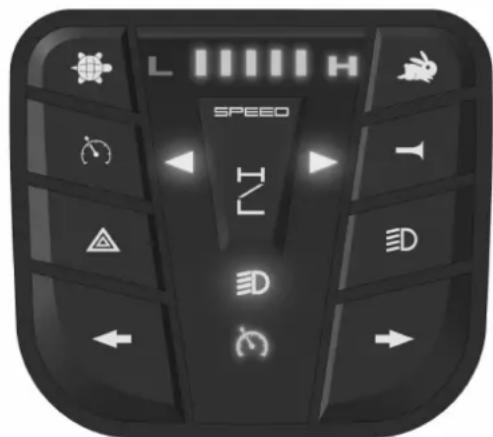
STEERING
- Put the ON/OFF key switch on.
- The battery level indicator shows the current level of your batteries.
- Now turn the speed control to the desired driving speed.
- Pull the drive lever with your fingers toward the handle bars (right lever for forward movement, left lever for backward movement).
- To sound the horn, press the horn button.
- To put on the front and back lights, press the lights button (7).
- To put on the emergency flashers, press button (6).
- To put on the indicator lights, press the desired button (8-9) (left = left indicator, right = right indicator).
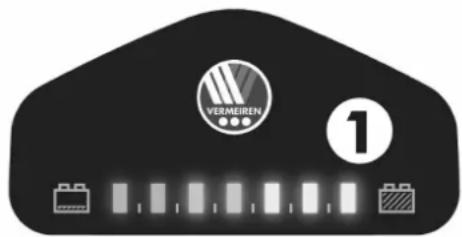
1 = Battery level indicator
2 = Speed control (slow)
3 = Speed control (fast)
4 = Speed switch
5 = Horn
6 = Emergency lights
7 = Lights (front and rear)
8 = Indicator(left)
9 = Indicator(right)



ADJUSTING THE STEERING UNIT
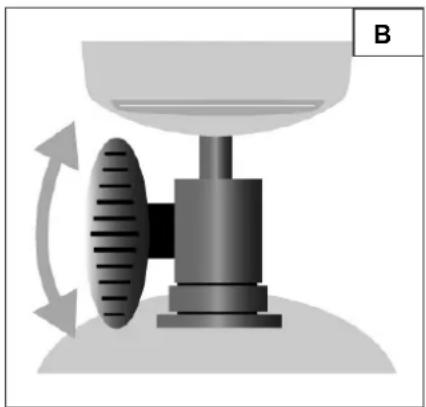
The tiller can be adjusted in to many different positions to suit each driver.
Loosen the knob to adjust the tiller to positions you want. (Fig. B)
Tighten the knob to secure the tiller.

Never adjust the angle while you are driving.

- Turn the scooter off before you adjust the angle of the long column.
A
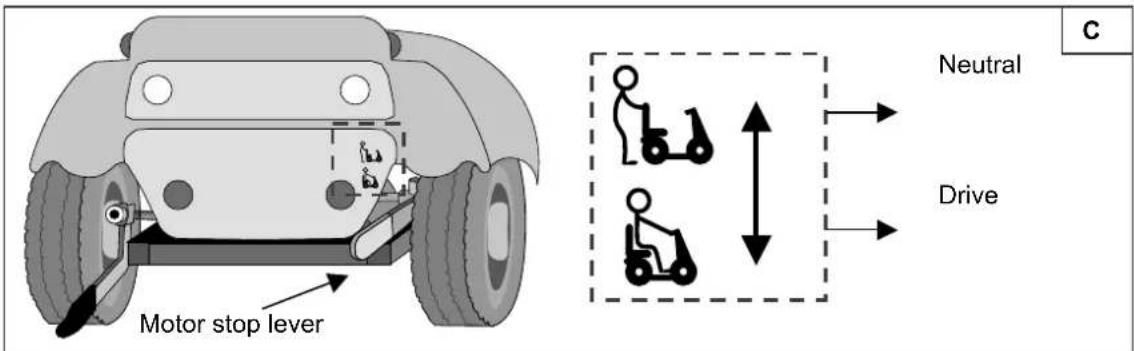
NEUTRAL
- Put the motor stop lever on neutral (see label). This separates the motor from the gears. You will now be able to push the scooter.
- Put the motor stop lever on drive. This will again interlock the motor and gears. You will now be able to again drive the scooter.

Never put the scooter in neutral while you are driving.
To prevent the motor from overheating, never pick up the electronic drive before stopping the motor/gears.
SEAT
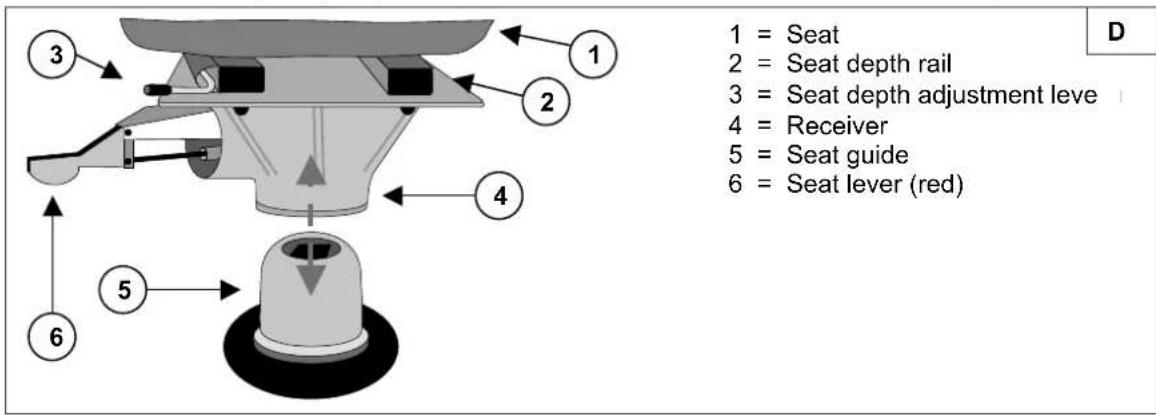
Removable seat (diagram D)
Pull the seat lever (red) up.
Pull the seat up and out.
Locking the seat in place (diagram D)
Do the reverse when you want to replace the seat.
- Put the receiver on the seat guide and press as far down as it will go (gentle to and fro turning of the seat will facilitate the process).
- When you hear the seat lock in place, the seat lever (red) must be in a horizontal position. If it is still pulled upward, the seat has not been locked in place yet.
Swivel seat (diagram D)
Pull the seat lever (red) up.
- Turn the seat in the desired direction.
- Let go of the seat lever, and the seat will always stop after 90^ .
Height adjustment (diagram D)
- Pull upward the lever used to adjust the seat height.
- Move the seat forward or backward.
To lock the seat in place, let go of the lever once the seat has reached the desired position.
Adjusting the height of the seat (diagram E)
- Loosen the fixing screws to adjust the seat height.
Pull out the safety pins. - You can now adjust the seat up or down.
- Insert the safety pins again and secure them with the attached loop by putting the loop over the end of the pins. This ensures that the pins have been inserted completely.
- Properly tighten the seat height fixing screw again.
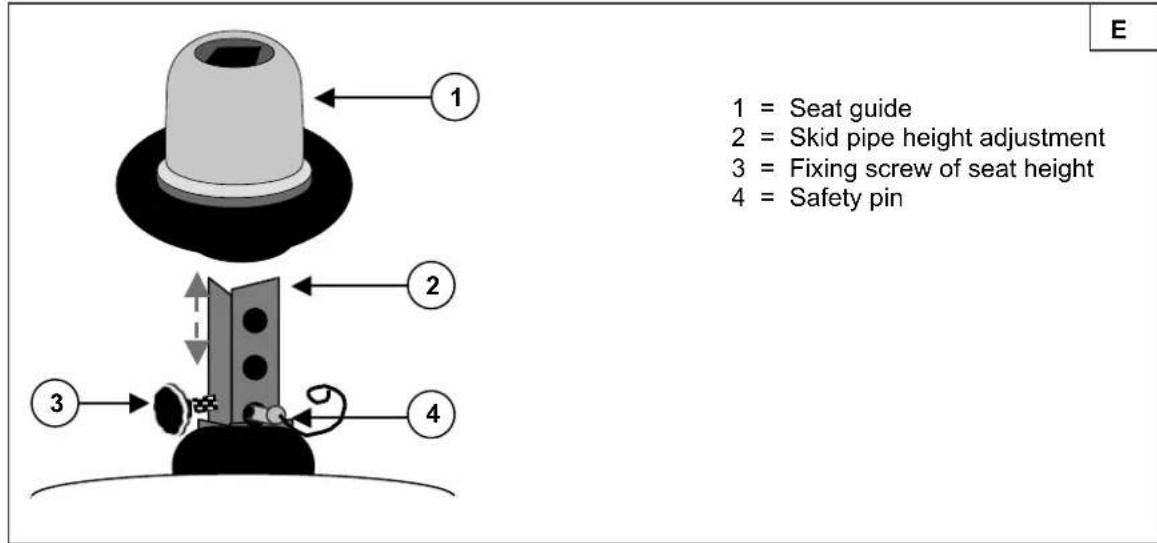

Never perform adjustments while you are driving.
Make sure that the seat is locked in place securely.
BACK
A tilt lever has been added to the side of the back rest (transition to seat upholstery). Press this lever down to release the backrest and fold it forward.
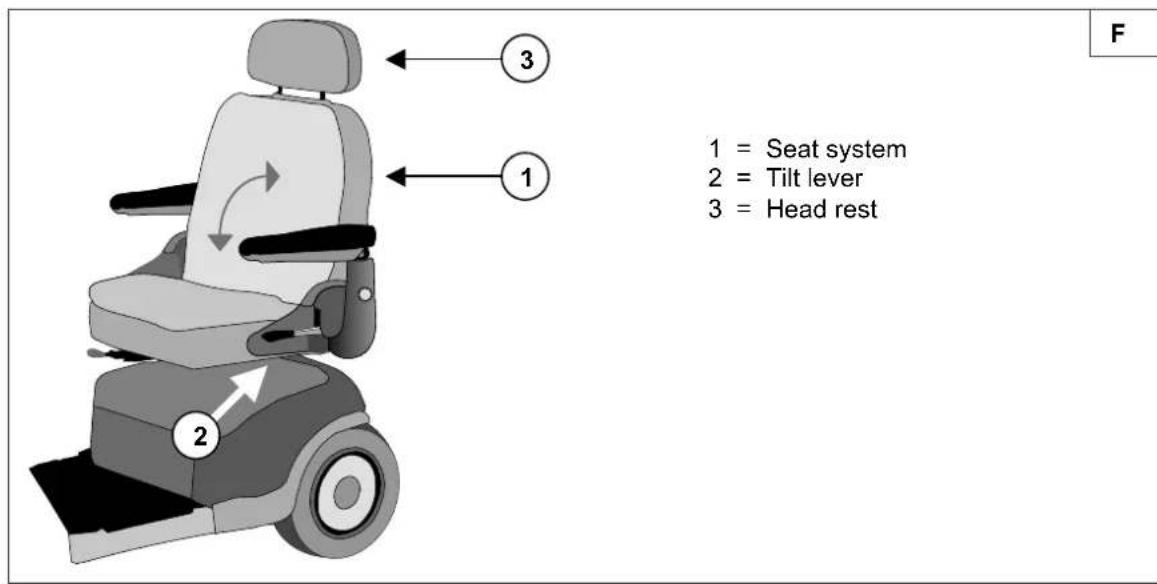
The seat can be turned 45 or 90 degrees.
Pull the seat adjustment lever forward and turn the seat.
Release the lever, then continue turning the seat until it locks in position.
The seat can be slipped backward and forward for a comfortable driving position. To slide the seat, pull the lever at the front of the seat and reposition as required.
Head rest:
- Gently press the locking pin toward the head rest.
- Move the head rest to the desired height.
- Now let go of the locking pin again.
- The head rest audibly locks into place.
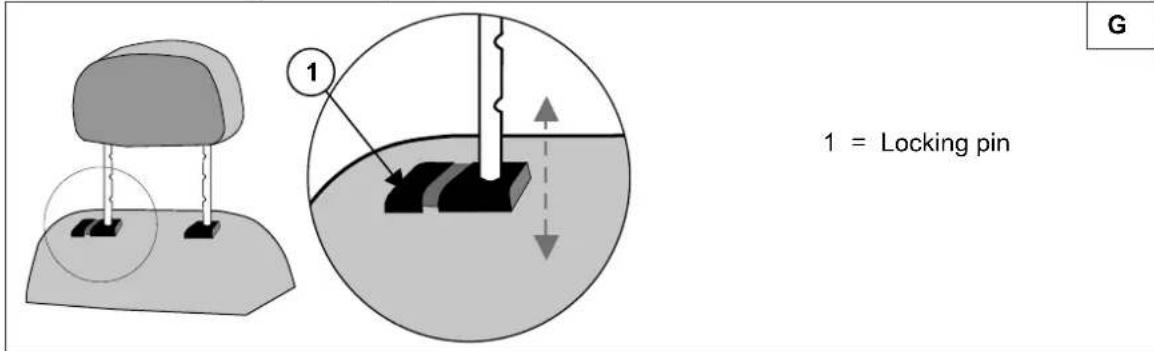

Never perform adjustments while you are driving.
ARMRESTS
The width of the seat can be changed by adjusting the arm rests.
Loosen the knobs at the back of the seat frame, then adjust the armrest by sliding the armrest. Once satisfied with the width, tighten the knob.
TYRE CHANGING
If you want to change the tyres or inner tubes, you should note the following:
Before you can remove a tyre, you must let all the air out of the tube, and insert a tyre lever between the tyre and the rim. Then slowly and carefully push the lever downwards. This will pull the tyre over the edge of the rim. If you then move the lever along the rim, the tyre will jump out. Now carefully remove the tyre from the rim and then remove the tube.

There must be no air in the tube before it can be removed.

If handled improperly, the rim might be damaged. Rather let an expert perform these activities.
Note the following before inserting the new tube:
Check the rim bed and the inside wall of the tyre for foreign matter and clean these properly if necessary. Check the condition of the rim bed, especially around the position of the air valve. Please use only genuine original replacement parts. No liability is accepted for damage caused by non-genuine replacement parts. Kindly contact your specialist dealer.
Assembly:

Put the deflated tube around the center of the rim. Make sure that the valve juts out the valve opening in the rim.
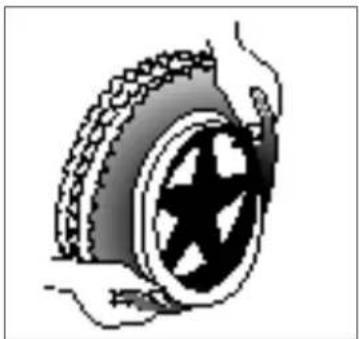
Push the tyre over the edge of the rim, starting behind the air valve. Inflate the tube slightly until it is round, and place it inside the tyre.
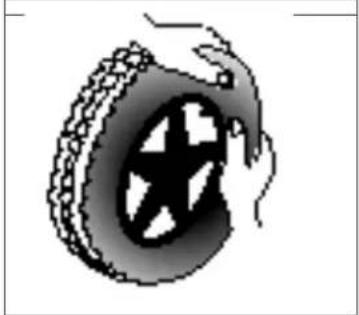
If the tube fits snugly inside the tyre without any folds (in the case of folds: let out some air), then the upper side of the tyre can be pressed lightly onto the rim with both hands, starting at the air valve.
Check all around on both sides that the tube is not pinched between the rim and the edge of the tyre. Lightly push the air valve inwards and pull it out again to make sure that the tyre is positioned properly in the region of the air valve.
To ensure that the wheel is inflated correctly, admit only so much air initially that the tyre can still be easily pushed inwards by using your thumbs. If the check-lines are equidistant from the edge of the rim on both sides of the tyre, then the tyre is centered properly. If not - let out the air and position the tyre afresh. Now the tyre can be inflated to its full operating pressure (note the maximum) and the valve cap should be replaced.

When mounting a tyre, make sure that no objects or body parts are pinched between the tyre and the rim, since that could cause damage and/or injury.

Only an expert can guarantee correct assembly. Work not done by your specialist dealer, would void any warranty claims.

When inflating the tyres, always check that the pressure is correct. The correct pressure is given on the tyre walls.

Use only inflating equipment which complies with regulations and indicates the pressure in bar.
DISASSEMBLING & ASSEMBLING
The chassis - situated below the seat and arm rests - can also be taken apart. Proceed as follows:
- Switch the scooter off
- Remove the seat (see "Seat" chapter).
- Lift off the rear plastic cover (held in place by Velcro fasteners).

Bear in mind that the cables of the rear lights are connected to the plastic cover. Unplug the plugs before entirely removing the plastic cover.
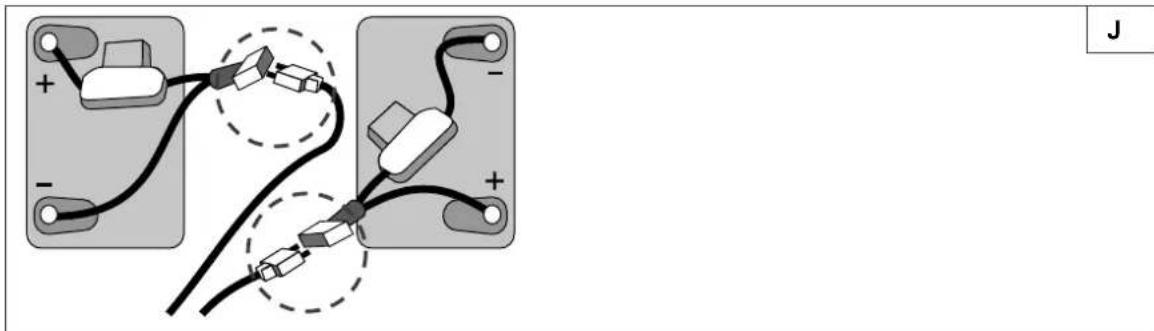
- Unplug all battery plugs (not the pole connectors) and all cable plug- and socket connections.
- Loosen the straps used to fasten the batteries in place.
- Lift the batteries out.
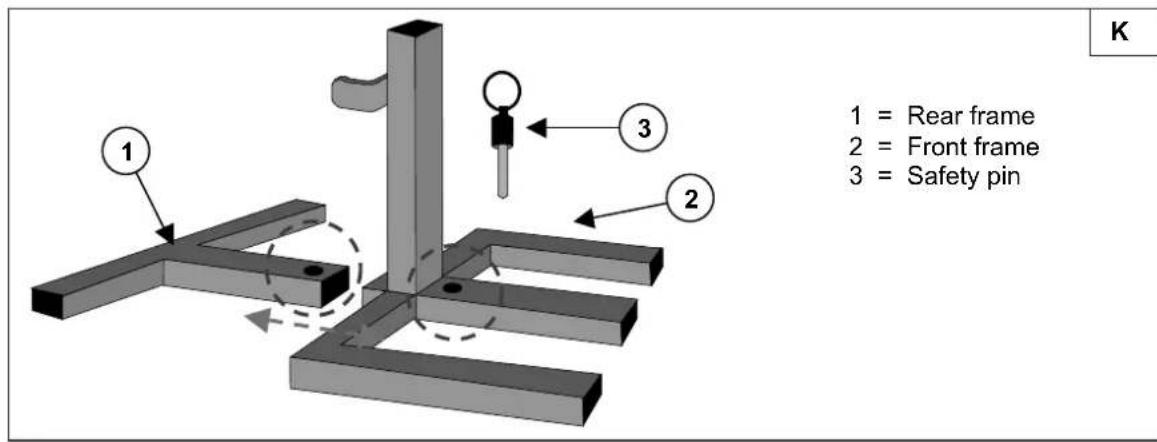
The following diagram illustrates how the front and rear parts of the chassis are connected (diagram K):
Pull out the safety pins.
- Pull apart the front and rear frames.
To reassemble, please proceed as follows (diagram K):
- Insert the supports of the front and rear frames into each other in such a way that the holes for the safety pins are in line.
- Push the fastening pins into the support holes as far as they will go.
- Reconnect the plugs linking the front and rear parts of the frame (plugs of the same color go together).
- Put the batteries back in and connect to the battery plugs (plugs of the same color go together, diagram J).
Use the straps to tighten the batteries in such a way that they won't move, even during drives.

Always turn the scooter off before disassembling it.
Be careful not to cut or bruise yourself with the cables during assembling or disassembling.
TROUBLESHOOTING
The following list will assist you with the troubleshooting of your scooter.
| Problem | Cause |
| The scooter refuses to go once started.No indication of load level | ·Key not in place or switched on.·Battery plug not connected (batteries not making contact).·Thermal safety fuses disengaged.·Batteries defective (totally discharged).·Defective control unit.·Electronic box defective.Loom of cables defective. |
| The scooter refuses to go once started.Load level insufficient. | ·Motor/gears in neutral.·Potentiometer of the rocker meter defective/loose·Magnetic brake defective·Motor defective.Electronic box defective. |
| Thermal safety fuses disengage. | ·Motor worked too hard (see "Technical details").·Thermal safety fuses defective. |
| Batteries cannot be charged. | ·Batteries not fitted correctly.·ON/OFF switch of the battery box not switched on.·Loading socket defective·Wrong charger.Loading device defective |
VERMEIREN
Ceres 3 / Ceres 4
INSTRUCTION MANUAL
MODED'EMPLOI
GEBRUIKSAANWIJZING
GEBRAUCHSANWEISUNG
ISTRUZIONI PER L'USO
MAIN DROITE = MARCHE AVANT
MAIN GAUCHE = MARCHE ARRIERE
website: www.realtime.it
e-mail: info@realtime.it
Pologne
Vermeiren Polska Sp. z o.o
ul. Laczna 1
PL-55-100 Trzebnica
Tel: +48(0)713874200
Fax:+48(0)713870574
website: www.rehapola.pl
e-mail: info@vermeiren.pl
Espagne
Vermeiren Iberica, S.L.
Trens Petits, 6. - Pol. Ind. Mas Xirgu.
17005 Girona
Tel: +34 902 48 72 72
Fax:+34972405054
website: www.vermeiren.es
e-mail: info@vermeiren.es
Allemagne
Tel: +43(0)732 37 13 66
Fax: +43(0)732 37 13 69
website: www.vermeiren.at
e-mail: info@vermeiren.at
Suisse
Vermeiren Suisse S.A.
RESOLUTION DES INCIDENTS
website: www.realtime.it
e-mail: info@realtime.it
Polen
Vermeiren Polska Sp. z o.o
ul. Laczna 1
PL-55-100 Trzebnica
Tel: +48(0)713874200
Fax:+48(0)713870574
website: www.rehapola.pl
e-mail: info@vermeiren.pl
Spanje
Vermeiren Iberica, S.L.
Trens Petits, 6. - Pol. Ind. Mas Xirgu.
17005 Girona
Tel: +34 902 48 72 72
Fax: +34 972 40 50 54
website: www.vermeiren.es
e-mail: info@vermeiren.es
Duitsland
Tel: +43(0)732 37 13 66
Fax:+43(0)732371369
website: www.vermeiren.at
e-mail: info@vermeiren.at
Zwitsserland
Vermeiren Suisse S.A.
Hoogeteverstelling (afb. E)
website: www.realtime.it
e-mail: info@realtime.it
Polen
Vermeiren Polska Sp. z o.o
ul. Laczna 1
PL-55-100 Trzebnica
Tel: +48(0)713874200
Fax:+48(0)713870574
website: www.rehapola.pl
e-mail: info@vermeiren.pl
Spanien
Vermeiren Iberica, S.L.
Trens Petits, 6. - Pol. Ind. Mas Xirgu.
17005 Girona
Tel: +34 902 48 72 72
Fax: +34 972 40 50 54
website: www.vermeiren.es
e-mail: info@vermeiren.es
Deutschland
Tel: +43(0)732 37 13 66
Fax: +43(0)732 37 13 69
website: www.vermeiren.at
e-mail: info@vermeiren.at
Schweiz
Vermeiren Suisse S.A.
Loosen the knobs at the back of the seat frame, then adjust the armrest by sliding the armrest. Once satisfied with the width, tighten the knob.

website: www.realtime.it
e-mail: info@realtime.it
Polonia
Vermeiren Polska Sp. z o.o
ul. Laczna 1
PL-55-100 Trzebnica
Tel: +48(0)713874200
Fax:+48(0)713870574
website: www.rehapola.pl
e-mail: info@vermeiren.pl
Spagna
Vermeiren Iberica, S.L.
Trens Petits, 6. - Pol. Ind. Mas Xirgu.
17005 Girona
Tel: +34 902 48 72 72
Fax: +34 972 40 50 54
website: www.vermeiren.es
e-mail: info@vermeiren.es
Germania
Tel: +43(0)732 37 13 66
Fax: +43(0)732 37 13 69
website: www.vermeiren.at
e-mail: info@vermeiren.at
Svizzera
Vermeiren Suisse S.A.
website: www.realtime.it
e-mail: info@realtime.it
Polonia
Vermeiren Polska Sp. z o.o
ul. Laczna 1
PL-55-100 Trzebnica
Tel: +48(0)713874200
Fax: +48(0)71 387 05 74
website: www.rehapola.pl
e-mail: info@vermeiren.pl
Espana
Vermeiren Iberica, S.L.
Trens Petits, 6. - Pol. Ind. Mas Xirgu.
17005 Girona
Tel: +34 902 48 72 72
Fax:+34972405054
website: www.vermeiren.es
e-mail: info@vermeiren.es
Alemania
Tel: +43(0)732 37 13 66
Fax: +43(0)732 37 13 69
website: www.vermeiren.at
e-mail: info@vermeiren.at
Suiza
Vermeiren Suisse S.A.
website: www.realtime.it
e-mail: info@realtime.it
Poland
Vermeiren Polska Sp. z o.o
ul. Laczna 1
PL-55-100 Trzebnica
Tel: +48(0)713874200
Fax: +48(0)71 387 05 74
website: www.vermeiren.pl
e-mail: info@vermeiren.pl
Spain
Vermeiren Iberica, S.L.
Trens Petits, 6. - Pol. Ind. Mas Xirgu.
17005 Girona
Tel: +34 902 48 72 72
Fax:+34972405054
website: www.vermeiren.es
e-mail: info@vermeiren.es
Germany
Tel: +43(0)732 37 13 66
Fax: +43(0)732 37 13 69
website: www.vermeiren.at
e-mail: info@vermeiren.at
Switzerland
Vermeiren Suisse S.A.
- Notice to the specialist dealer:
- CONTENTS
- Section
- PREFACE
- GENERAL NOTES
- ALLOWED AND DISALLOWED USAGES
- FOR YOUR SAFETY
- REMARKS ON ELECTROMAGNETIC COMPATIBILITY (EMC)
- LEARNING HOW TO USE YOUR SCOOTER
- - READYING THE SCOOTER FOR USE
- - HANDLING AFTER USAGE
- PARKING THE SCOOTER
- - YOUR FIRST TRIP
- - BACKWARD MOVEMENT
- GOING UPHILL
- GOINGDOWNHILL
- - UNEVENTERRAIN
- CHARGING THE BATTERIES
- BATTERY STORAGE
- THERMAL SAFETY MECHANISM
- TIP PROTECTOR
- Reverse these actions when putting the tip protector back.
- TRANSPORTING THE SCOOTER
- USING RAMPS
- SERVICING
- APPROX.EVERY8 WEEKS
- APPROX.EVERY 6 MONTHS
- INSPECTION
- CARE
- - COVERS
- PLASTIC PARTS
- - SURFACE LAYERS
- ELECTRONICS
- DISINFECTION
- GUARANTEE
- STATEMENT OF CONFORMITY
- SERVICE PLAN
- Belgium
- France
- Italy
- Poland
- Spain
- Germany
- Switzerland
- STEERING
- ADJUSTING THE STEERING UNIT
- NEUTRAL
- SEAT
- Removable seat (diagram D)
- Locking the seat in place (diagram D)
- Swivel seat (diagram D)
- Height adjustment (diagram D)
- Adjusting the height of the seat (diagram E)
- BACK
- Head rest:
- ARMRESTS
- TYRE CHANGING
- Note the following before inserting the new tube:
- Assembly:
- DISASSEMBLING & ASSEMBLING
- TROUBLESHOOTING
- VERMEIREN
- Ceres 3 / Ceres 4
- Pologne
- Espagne
- Allemagne
- Suisse
- RESOLUTION DES INCIDENTS
- Polen
- Spanje
- Duitsland
- Zwitsserland
- Hoogeteverstelling (afb. E)
- Spanien
- Deutschland
- Schweiz
- Polonia
- Spagna
- Germania
- Svizzera
- Espana
- Alemania
- Suiza
Brand : Vermeiren
Model : Ceres 4
Category : Electric scooter