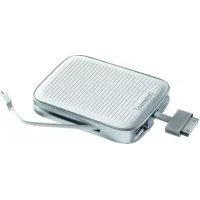
Mobypack 3000 - Power bank INTENSO - Free user manual and instructions
Find the device manual for free Mobypack 3000 INTENSO in PDF.



| Product type | External portable battery |
| Brand | Intenso |
| Model | Mobypack 3000 |
| Battery capacity | 3000 mAh (Li-polymer) |
| Charge cycles | More than 500 charges |
| Number of output ports | 3 (1x USB type A port, 1x Apple 30-pin cable, 1x micro USB cable) |
| Maximum output current | 2.1 A |
| Maximum input current | 1.8 A (5 V) |
| Dimensions | 98 x 75 x 17.5 mm |
| Weight | Approximately 120 g |
| Package contents | Mobypack 3000, mains charger 5V/1A, micro USB cable, instruction manual |
| Charge level indicator | 5 LEDs (0-20%, 21-40%, 41-60%, 61-80%, 81-100%) |
| Battery charging time | Less than 3.5 h (with 1A charger), less than 2.3 h (with iPad 1.8A charger) |
| Compatibility | iPod, iPhone, iPad, smartphones, USB devices |
| Special features | SmartCharge (port prioritization), simultaneous charging of 3 devices |
| Operating temperature | 0 °C to 40 °C |
| Maintenance and storage | Recharge every 3 months if unused; store between 10 °C and 45 °C |
| Safety | Do not open the case, avoid shocks and electrostatic discharges |
| Spare parts available | Micro USB cable (included, replaceable) |
| Warranty | Legal warranty; opening the case voids the warranty |
Frequently Asked Questions - Mobypack 3000 INTENSO
User questions about Mobypack 3000 INTENSO
0 question about this device. Answer the ones you know or ask your own.
Ask a new question about this device
Download the instructions for your Power bank in PDF format for free! Find your manual Mobypack 3000 - INTENSO and take your electronic device back in hand. On this page are published all the documents necessary for the use of your device. Mobypack 3000 by INTENSO.
USER MANUAL Mobypack 3000 INTENSO
| 5 LED | 81 - 100% |
| 4 LED | 61 - 80% |
| 3 LED | 41 - 60% |
| 2 LED | 21 - 40% |
| 1 LED | 0 - 20% |
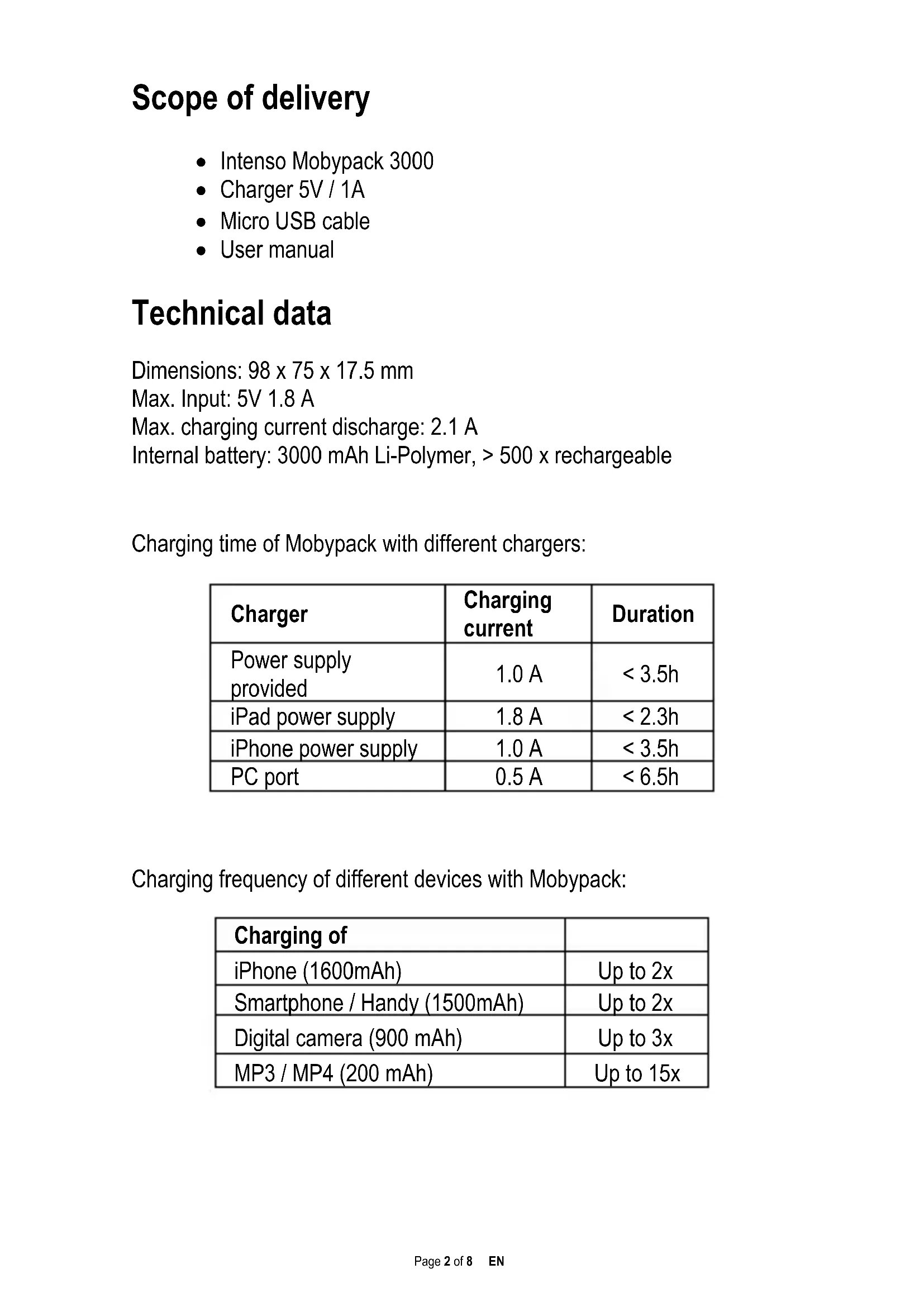
Internal battery: 3000 mAh Li-Polymer, > 500 x rechargeable
Charging time of Mobypack with different chargers:
| Charger | Charging current | Duration |
| Power supply provided | 1.0 A | < 3.5h |
| iPad power supply | 1.8 A | < 2.3h |
| iPhone power supply | 1.0 A | < 3.5h |
| PC port | 0.5 A | < 6.5h |
Charging frequency of different devices with Mobypack:
| Charging of | |
| iPhone (1600mAh) | Up to 2x |
| Smartphone / Handy (1500mAh) | Up to 2x |
| Digital camera (900 mAh) | Up to 3x |
| MP3 / MP4 (200 mAh) | Up to 15x |
Operation
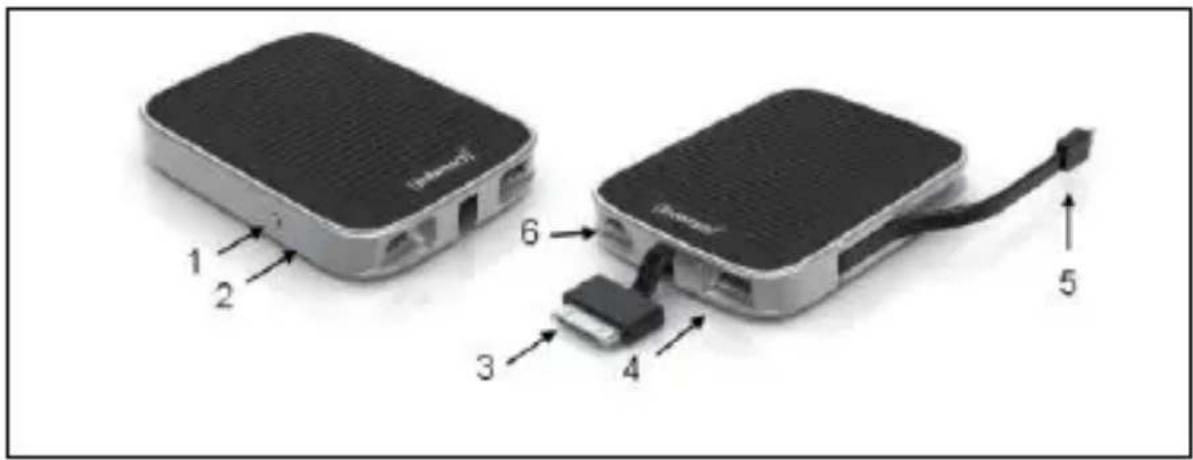
1 - On / Off Button
Output: 2 - Status LED
3 - Apple 30-pin Cable
4 - USB Port Type A
5 - Micro USB Cable
Input: 6 - Micro USB Port
Mobile devices such as iPod, iPhone, iPad as well as a variety of Smartphones and electronic devices can be charged with Intenso Mobypack using USB port.
Note:
The Mobypack switches on automatically as soon as you connect a device and switches off automatically as soon as the last device is disconnected. Hold the on-off button (1) down for at least 3 seconds to switch on or off the Mobypack manually.
The battery level will be displayed through Status LED (2) when the button is pressed briefly:
| 5 LED | 81 - 100% |
| 4 LED | 61 - 80% |
| 3 LED | 41 - 60% |
| 2 LED | 21 - 40% |
| 1 LED | 0 - 20% |
To charge your iPad, iPod, Smartphone or similar devices, please connect it to the corresponding port (3, 4, 5). Up to three devices can be charged at the same time.
SmartCharge
Smart Charge for rapid charging in conjunction with Apple devices:
The Intenso Mobypack charges devices based on their specifications. The total charging current is limited to 2.1A. The priorities of charging ports are as follows:
- Apple - 30-pin Cable (3) max. 2.1 A
- USB Port (4) max. 1 A
- Micro USB Cable (5) max 1 A
If more than one device is connected, and the total charging current of 2.1A has been exceeded, the charging current will be distributed based on this prioritisation to avoid overloading the Intenso Mobypack.
Note:
It is possible to charge Mobypack and also charge the connected devices simultaneously from Mobypack.
Made for
iPod touch (4th generation), iPod touch (3rd generation), iPod touch (2nd generation), iPod touch (1st generation), iPod nano (6th generation), iPod nano (5th generation), iPod nano (4th generation), iPhone 4S, iPhone 4, iPhone 3GS, iPhone 3G, iPad (3rd generation), iPad2 and iPad.
"Made for iPod", "Made for iPhone" and "Made for iPad" means that an electronic accessory has been designed for connecting to iPod, iPhone and iPad models and has been certified by the developers that it conforms to the Apple standards.
Apple is not responsible for the functionality of the device or its adherence to the safety standards and regulations.
Please note that the use of this accessory with an iPod, iPhone or iPad may impair the performance of cable-free transfer.
iPad, iPhone, iPod, iPod nano, and iPod touch are registered trademarks of Apple Inc. They are registered in USA and other countries.
Intended use
This Mobypack is meant solely for the purpose of power supply to devices with an operating voltage of 5V DC (mobile phones, MP3 player etc.). Any other use is considered as unintended use and may lead to damages and injuries. Claims of any type resulting from unintended use are ruled out.
Operating instructions

Operating conditions:
Operate the device at 0 to 40 degree Celsius at max. 90% relative humidity. If you do not use Mobypack for long periods of time, store the device at a temperature range of -10 to 45 degree Celsius at max. 90% relative humidity (for short period) and charge the device every three months to maintain the total performance of the device.
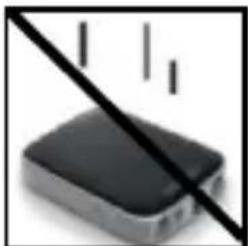
Shock, drop:
Please protect the device against shock and drops in all operating modes.

Electrostatic discharge:
This device is sensitive to electrostatic discharge. Please protect the device against any possible electrostatic discharge.
Disposal of old batteries
The devices marked with this symbol are subject to the European Directive 2002/96/EC. All the old batteries must be disposed separated from household garbage through the government agencies designated for that purpose.
By disposing the batteries in this prescribed manner, you can avoid environmental damages.
Limited warranty conditions
The warranty only covers the replacement of this Intenso product. The warranty is not applicable for normal wear & tear resulting from erroneous, improper use of the device, negligence, accident or incompatibility.
There are no warranty claims if the Intenso user manual is not followed and if the device is damaged through improper use or defects caused by other devices.
There are no warranty claims if the product is exposed to shocks, electrostatic discharges, heat or humidity effects beyond the product specifications.
Intenso is not liable for any collateral damages or consequential losses, for violation of warranty conditions or any other losses irrespective of the cause.
Important note:
Please note that any warranty claim shall expire if the housing of the Mobypack 3000 has been opened.
This product is not meant for a commercial use or for medical and special applications, where the failure of the product may cause injuries, death or significant material damages.
Intenso Warranty conditions
Dear Intenso customer,
Thank you for opting for a high-quality Intenso product. All Intenso products are subject to constant quality inspections and the legal warranty period applies, of course, from the date of purchase. Please be sure therefore to save the sales receipt as proof of purchase.
Warranty conditions
The warranty only covers material and production defects. Intenso GmbH is not liable for the loss of data in units sent to us. The free of charge warranty service covers the repair or replacement of defective parts. Please understand that we cannot render any warranty services, e.g. in case of:
- Misuse or improper handling, installation or use
- Damages, scratches or wear
- Modifications, manipulation or repairs by third parties
- Damages through force majeure or transport
Your Intenso GmbH
CLAIM PROCEDURE
In case of a claim, please proceed as follows:
- Only returns accompanied with all accessories and sales receipt are accepted.
- In addition, a RMA number is absolutely required for return shipments. You can request this RMA number via e-mail or through the service hotline.
- Please package the product including all accessories and the sales receipt safe for transport. Please stamp the package.
- Please affix the RMA number clearly visible on the outside of the package.
Please send to the following service address:
INTENSO GMBH Service Hotline: +49 (0) 900 -1504030
Service Center (your RMA-No.) (0.39 € / min. from the landline in Germany.
| 5 LED | 81 - 100% |
| 4 LED | 61 - 80% |
| 3 LED | 41 - 60% |
| 2 LED | 21 - 40% |
| 1 LED | 0 - 20% |
Service Center (Votre referrerce RMA)
Service Hotline: +49 (0) 900 -1 50 40 30
| 5 LED | 81 - 100% |
| 4 LED | 61 - 80% |
| 3 LED | 41 - 60% |
| 2 LED | 21 - 40% |
| 1 LED | 0 - 20% |
| 5 LED | 81 - 100% |
| 4 LED | 61 - 80% |
| 3 LED | 41 - 60% |
| 2 LED | 21 - 40% |
| 1 LED | 0 - 20% |
| 5 LED | 81 - 100% |
| 4 LED | 61 - 80% |
| 3 LED | 41 - 60% |
| 2 LED | 21 - 40% |
| 1 LED | 0 - 20% |
BbIXoI: 2-CBeToIOIObI COCTOHNIA
3-Ka6eIbApple30pin
4-USBpa3bem,TINA
5-Ka6eJb Micro-USB
Bxod: 6-Pa3bem Micro USB
При пош Intenso Mobypack можно заржатб такne мобиьные устpoиства, кak iPod, iPhone, iPad, a takke mhorne smapTфони и јелктонные устpoиства, ochaшиени USB-pa3beMOM.
PpumeyaHue:
Mobypack BKJIIOUaETcA ABTOMaTInueckn PpN NOcOeINHeHn Pnp6opa N BbIKJIIOUaETcPn OTCoEINHeHn NocJeHero Pnp6opa. YdepxNBaIte KHOKNy BKN./BbIKN. (1) HaxaToH He MeHee 3 cekyHd dIpyHoro BKJIIOUeHn/BlKJIIOUeHn Mobypack.
| 5 LED | 81 - 100% |
| 4 LED | 61 - 80% |
| 3 LED | 41 - 60% |
| 2 LED | 21 - 40% |
| 1 LED | 0 - 20% |
ДяЗардк iPad, iPod, cMapToHa nIaHAnuHOro yCTpoiCTBa, NOKJIIOHTe erO K COOTBeTcTByUOSeMy pa3bemy (3, 4, 5). OdnoBpeMeHHO MoJHO 3apXKaTb Do Tpex yCTpoiCTB.
SmartCharge
Yka3aHnI NO npIMeHnIO

YcNoBna 3KcNpyatauIN:
YcTpoIcTBO 3KcNlyaTnPOBaTb npi Tempeatype ot O do 40 rpaDycOB Lelbcnpy OTHOCHTbHOB BJaXHOCTn BO3dyxa mAc. 90%. EcIn Mobypack dOnrOe Bpemr He NcNoJIb3yETcra, xpaHnte erO npi Tempeatype ot -10 n do 45 rpaDycOB Lelbcnpy OTHOCHTbHOB BJaXHOCTn BO3dyxa mAc. 90% (kopOTkoe Bpemr) n 3apJxaiTe oINH pa3 B Tpr Meca, yTO6bl POnDEpXNBaTb ero pa6OTocnoc6HoCTb.
yapbl, naeHnra:
B IIObOM pa6Oyem COCToHn 3aUuIaIte yCTpOiCTBO OT yIapOB n IaIeHn.

3neKtpocTaTnueckn pa3pIa
Данhoe yctpoiCTBO BOCPnIMMNUBO K эл ektpoCTaTnueckOMy pa3pyd. 3aunuaiTe yctpoiCTBO OT JIO6Oro эл ektpoCTaTnueckoro pa3pda.
YTNIN3aun Otpa6oTaHHbIX aKKymyIaTOPOB n 6atapeek
YcTpoIcTba, o6o3HaueHHbIe 3TIM CmMBOJOM
POnIpaIaIOT POn IeIcTBnE EByPoIeNcKoI dIpeKTHBbl
2002/96/EC.
Otpa6oTaHHbIe aKKymyJIaTOpbI n 6batapeKn Heo6xOdIMo yTIN3uPoBaTb OTJeNbHO OT 6bITOBOr Mycopa, B npeducmOTpeHHbIX dIЯ 3TOrO MeCTax. Bnaorapra HaJnxKaUeY TIN3aUHn He Hahocntcra yuepe6 OkpykaIOUe CpeDe.
OrpaHnueHHbIe rapaHTnHbIe o6aTeJIbCTBa
IapaHTnI NOpa3yMeBaET TOnbKO 3aMeHy DaHHoro n3dJIy.
TapaHTnHe paCnpocTppaHareTcHa eCTeCTBeHHbI N3HOC, KOTOpbIB BO3NkAeT B pe3yJIbTaTe He npaBnIbHOrO, HeHaJNeXaUeTo IcNoJIb3OBaHnY, XaJaTHoCTn, HeCuaCTHOrO cJyUaY aIIN HECOBMECTMIOCTn.
При Нecobлodeн Tpe6oBaHи INHCTpyKcHи NO 3KcNPyaTcuHn ФИрMbI Intenso, a ТаЖe При HeHaJNeJxAaSem IcNoJIb3OBaHn ИЛ ПОВпeждeHи ДугIMn yCtpoiCTBaMn, rapaHTиHbIe Tpe6oBaHn He PrINHMaIOTcY.
EcIn yctpoiCTBO NOBepraIocb cotpceHnM, 3JIeKTPoCTaTnueckOMy pa3py, TeNIOBOMy BO3dIeCTBnIO nI IN BO3dIeCTBnIO BJaI, OTIIuHaUOIMC8 OT CpeUΦnKaUHn Ha npOdyKT, rapaHTnHbIe Tpe6OBaHn He npHHMaIoTc.
KoMaHnIa Intenso He HecET OTBeTCTBHeHHocTn 3a IIO60B BO3HKnI IO6OHyI INI KOCBeHNbI yUeP6, 3a HApUSeHneYcNoBn rapaHTnHbIX o6aTeJIbCTB INI 3a dpyroJ yUeP6, He3aBNCmO OT erO npuH.
BaxHoe npumeyaHue:
IoxaanyiCTa, yuTnTe, yTO rapaHTnHbIe Tpe6oBaHnnaHHyI npUOTc, ecn OTKpbIbAICI KOpNyc ycToPocCTBa Mobypack 3000.
Данhoe ИЗдени He npedHa3HaueNo Дя Испльь3OBaHЯВ KOMМерчecKIX, MeDnUHcKIX IIN CpeZnaIbHbIX ZeJIAX, B XOde KOTOpbIX BbIXOD IN3dEJIY N3 CTpoR MOKeT Bbl3BaTb TpaBMbl, rI6eJIb JIOdeI INIcEpBe3HbIM MaTePnAJIbHbIM yIep6.
Intenso YCIOBIA TAPAHTN
YBaXaEmbI KJIeHtB I KomnaHn Intenso!
BoIbIoe cIacn6o, YTO BblpeHnn npno6peTn BbICOKokaeCTBeHHyIO npOdyKcuHOM KOMnaHIN Intenso. B OTHOWeHN BcE NpOdyKcuN KOMnaHIN Intenso npOBODITcA peryIaRbHn KOHTpoJIb KaeeCTBa. Pa3yMeEtCra, YTO C MOMeHTa npNo6peTeHn EDeiCTByeT yCTaHOBIIeHbI 3aKOHm rapaHTnHbI cPOK. Po3TOMy, NoXaIyIcTa, COxpaHnTe kaccobbl Yek KAK NOdTBePKeHne NOKynk.
YcNoBna rapaHTn
IpeoCTaBHeHne rapaHTn paCnpocTpaHReTcra Tolbko Ha 6pak MaTePnAna n npOn3BOJCTBeHHbIe DeΦeKtbl. KomnaHn «Intenso GmbH» He Hecet OTBeTCTBeHHOCTb 3a NotepHO DaHHbIX Ha npCnlaHbIX yCTpoiCTbax. BeCnPaTHoe IpeoCTaBHeHne rapaHTn paCnpocTpaHReTcHa peMOHT nn 3aMeHy 6paKOBaHHbIX DeTanei. Ioxaanyucta, OTHecuTEcB C NOHMaHnEM K TOMy, YTO MbI He MOxem IpeoCTaBHTb rapaHTnIO B TaKx CnyaX, KaK, HAnpIMep:
3NoymbIiJIeHHOe IIN HeinpabInbHoe o6paueHne, yCTaHOBka IIN NCIOJIb3OBAHne
IOBpeKdEHHaapanHbIINnN3HOC
■ N3MeHeHn, BMeWateJIbCTBa INI peMOHT, OCyUeCTBJIeHHbIE TpeTbIMN JINuCaMn
IOBpeJdeHnB pe3yIbTaTe φopc-MaxOpHbIX o6CToTebCTB IIN TpaHCnpTupOBKn
Bawa kompanna «Intenso GmbH»
ENCTBnI PNI INPEIDbYABJEHIN PEKJAMAUIN
B cnyuae npedbavlenya pekamaunneiCTbYte TaKIM o6pa3OM:
- Ha3aπ npHnHaetcTToIbKO npOdyKcIg CO BCEMn npHaJnxKHOCTaM N KACCOBbIM YeKOM
- 063aTeJIbHbIM yCIOBnEM dIy BO3BpaueHn IpoDyKuIN YBnEeTcHomep RMA. 3TOT HOMep RMA Bbl MoXeTe 3anPoCnTB nO 3JeKTPOHHo NouTe INI rOpYueJ nnHn CepBnCHOrO o6CnyKuBaHn.
- Пожауньста, унakутп рорукш, влочая Се пинадnexхови Каскову чек, наджно Дя Траснортувки. Н посылky Должно 6ыт b HaKleeho DoCTaTOHoe KOINueCTBO NOYTOBbIX Марok.
- Hanecnte, noxanyucta, yecko Homep RMA c Bheunne CTOpohbl.
OTnpabBte, noXaJyInCTa, no TaKOMy aDpecy:
INTENSO GMBH
TopaJyHnHcepBnCHoro 06CJyKbAHn:
+49 (0) 900 -1 50 40 30 (0,39 eBpo /
CepBnchbIeHtp (BaN No RMA) MIn. B HemeKo CtaNoHapHOcTeN.
UeHbHa CBA3b MoBnIbHbIX
- OPERATION
- NOTE
- SMARTCHARGE
- MADE FOR
- INTENDED USE
- OPERATING INSTRUCTIONS
- OPERATING CONDITIONS
- SHOCK, DROP
- ELECTROSTATIC DISCHARGE
- DISPOSAL OF OLD BATTERIES
- LIMITED WARRANTY CONDITIONS
- INTENSO WARRANTY CONDITIONS
- WARRANTY CONDITIONS
- YOUR INTENSO GMBH
- CLAIM PROCEDURE
- PPUMEYAHUE
- YKA3AHNI NO NPIMEHNIO
- YCNOBNA 3KCNPYATAUIN
- YAPBL, NAEHNRA
- 3NEKTPOCTATNUECKN PA3PIA
- YTNIN3AUN OTPA6OTAHHBIX AKKYMYIATOPOB N 6ATAPEEK
- ORPAHNUEHHBIE RAPAHTNHBIE O6ATEJIBCTBA
- BAXHOE NPUMEYAHUE
- INTENSO YCIOBIA TAPAHTN
- YCNOBNA RAPAHTN
- BAWA KOMPANNA «INTENSO GMBH
- ENCTBNI PNI INPEIDBYABJEHIN PEKJAMAUIN
Brand : INTENSO
Model : Mobypack 3000
Category : Power bank