TX550 - Desk Phone PROFOON - Free user manual and instructions
Find the device manual for free TX550 PROFOON in PDF.


User questions about TX550 PROFOON
0 question about this device. Answer the ones you know or ask your own.
Ask a new question about this device
Download the instructions for your Desk Phone in PDF format for free! Find your manual TX550 - PROFOON and take your electronic device back in hand. On this page are published all the documents necessary for the use of your device. TX550 by PROFOON.
USER MANUAL TX550 PROFOON
The PROFOON TX-550vm is developed and approved according to the CTR-21, CTR-37 and CTR-38 telecommunication standards.
Profoon ensures the correct functioning of this telephone when connected to the public telephone network of Holland and Belgium and when connected to the cable providers in as far as they support telephony.
Each country and/or provider might require a different telephoneplug.
No guarantee can be given that the TX-550vm functions correctly when connected to another public or private network.
DECLARATION OF CONFORMITY
The PROFOON TX-550vm is constructed according to LVD 73/23/EEC and EMC 89/336/EEC.
INTRODUCTION
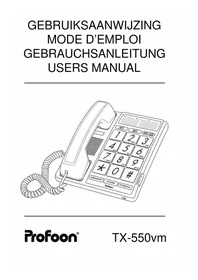
The Profoon TX-550vm is a telephone with big buttons, a receiver amplifier and a VoiceMail indication.
The TX-550vm has a memory for 13 frequent dialed numbers. 3 can be dialed directly and 10 can be dialed through the keyboard.
The VoiceMail indication is based on the count of ringerpulses. There is no guarantee that actual a message is left in your mailbox.
The power supply to feed the telephone, comes from the telephone exchange. There is no need for an external power supply or batteries.
In case you want to move the telephone to another location, make sure the handset stays on the cradle and re-connect the telephone within one minute. Check the memories by dialing them.
INSTALLATION
HANDSET:
Connect the handset with the base unit using the handsetwire and the connectors and press the connectors in until you hear a light 'click'.
TELEPHONE CONNECTION:
Connect the telephone to the wall socket using the telephone wire. The small plug should be in the connector at the backside of the base unit.
WALL MOUNTING:
The TX-550vm is suitable for wall mounting and during the conversation the handset can be placed on the temporary holder without disconnecting:
- drill two holes vertical aligned at a distance of 8cm , place two plugs with screws and have the head of the screws stick out a few millimetres
- mount the telephone on the wall by placing the recesses in the telephone over the screwheads and slightly pressing the telephone down
- hold the telephone wire with cable clips
USAGE
RECEIVING A CALL:
The ringer volume can be adjusted using the ringer volume switch on the right side of the base unit. Pick up the handset and start the conversation.
DIALING:
Pick up the handset and wait for the dialtone. Key in the preferred telephonenumber on the keyboard.
ADJUSTING VOLUME:
Use the volume slider to enhance the handset volume.
LAST NUMBER MEMORY:
In case the person you were calling was busy or you want to dial the last dialed number again, this number is stored in memory:
- pick up the handset and wait for the dialtone
- press the P/REDIAL button; the last dialed number will be redailed
If, for privacy reasons, you do not want to have the last dialed number stored in memory, than dial after your call a non-existing number (for example a 0).
PAUSE:
In case you are using a PABX system and you must dial a prefix number (0 or 9) to get an outside line, it is recommendable to insert a pause by pressing the
P/REDIAL button after the cited prefix. This to prevent that redialing the number will go too fast.
MEMORY
The TX-550vm has a memory capacity of 13 telephone numbers of 16 digits each (pause included).
PROGRAMMING MEMORY-NUMBERS:
- pick up the handset and put it aside
- press the STORE button and release it
- key in the telephone number on the keyboard
- press STORE again
- press one of the three memory buttons (M1/M3) or one of the keys (0-9) on the keyboard
- repeat steps 2 to 5 for the other memory positions
- replace the handset on the base unit
DIALING FROM MEMORY:
- pick up the handset and wait for the dialtone
- press one of the three memory buttons (M1/M3) or press memory, followed by one of the keys (0-9) on the keyboard
- the programmed number will automatically be dialed
Remarks:
- When your telephone is connected to a PABX system, it is advised to include a dialing-pause in the number. Refer to the chapter PAUSE.
- The power to uphold the memories is taken from the telephone net, make sure the telephone stays connected to the telephone net.
- You may however disconnect the telephone to move it. A built-in capacitor will keep the memory's for a few minutes.
- It's not possible to erase a memory position, just reprogram them to erase the present number.
- Memory location M3 can be used to store the telephonenumber of your VoiceMail. In case you have no Voicemail, you can store any frequently dialed telephonenumber.
VOICE MAIL
When you have activated your personal Voice Mail, after 5 rings the caller will be connected to your mailbox and has the possibility to leave a message.
The TX-550vm has a LED lamp which starts to flash, indicating that someone might have left a message.
Please note that in case the caller does not leave a message or in case you have not activated the Voice Mail, after 5 rings this LED will flash anyway.
As soon as you lift the handset of this TX-550vm, the LED will go OFF so it is recommendable to first dial the number of your Voice Mail and listen if someone left a message for you.
In case more telephones with Voice Mail indication are connected, you can turn the Voice Mail indication of this TX-550vm OFF using the Voice Mail 0/1 switch on the right side of your telephone (0 = OFF, 1 = ON).
If you have questions concerning the Voice Mail feature, please contact your telephone company.
MAINTENANCE
Do not locate the telephone in direct sunlight or in a moist environment.
Never use chemical cleansers to clean the cabinet, the cabinet may only be cleaned with a moist cloth.
Don't place the TX-550vm on furniture with a cellulose based coating; the rubber feet will leave stains on the cellulose.
Under certain circumstances, the sound of the TX-550vm might be influenced by electromagnetic fields of electronic devices like TV, computer or radio transmitters close to the telephone. Move the telephone to gain better results in such cases.
WARRANTY CARD
See page 22.
Postcode / code postal
Name / Name: Attach here your
Address / Adresse purchase ticket
You have a guarantee of 12 MONTHS after the date of purchase of this Telephone. We guarantee during this period the free repair of defects caused by material- and construction faults. This at the importers discretion. It is only possible to claim to the guarantee when you enclose your purchase ticket with the TX-550vm.
HOW TO ACT:
If you notice a defect, consult the manual first. If this manual gives you no definite answer, consult your dealer with a clear description of your complaint. He will collect the device together with this guarantee card and the dated purchase ticket and he will take care of a prompt repair, respectively free sending to the importer.
THE GUARANTEE EXPIRES:
When used inexpert, faulty connections, use of unoriginal parts or accessories, negligence and defects caused by fire, flood, stroke of lightning and natural disasters. With unqualified modifications or repairs by third persons. With incorrect transport without a suitable packing. If the device is not handed in with the correct filled in guarantee card and the purchase ticket.
NOT UNDER THIS GUARANTEE: cords and plugs.
All further responsibilities, in particular subsequent damages, are excluded.