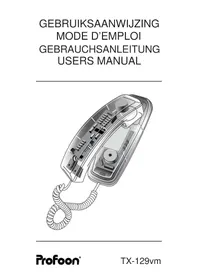
TX129 - Desk Phone PROFOON - Free user manual and instructions
Find the device manual for free TX129 PROFOON in PDF.



| Product type | Desk phone |
| Brand | Profoon |
| Model | TX129 |
| Approximate dimensions | 22 x 18 x 8 cm |
| Approximate weight | 600 g |
| Power supply | Via the telephone network (PSTN), no additional power required |
| Connection | Standard telephone jack, cable supplied with modular plug |
| Main functions | Call reception, dialing, last number redial (P/REDIAL), pause, flash (R/FLASH), voicemail (Voice Mail), ringer on/off (RINGER ON/OFF) |
| Visual indicator | Neon lamp for incoming calls, Voice Mail flasher for messages |
| Wall mounting | Possible, with adjustable tab and screws provided |
| Compatibility | Analog public telephone networks (single line) in Europe |
| Standards | European Directive 1999/5/EC, declaration of conformity available at www.profoon.nl |
| Maintenance and cleaning | Clean with a soft, dry cloth; do not use aerosols, liquids, or cellulose-based products |
| Safety and precautions | Do not expose to direct sunlight, humidity, motors, or fluorescent tubes; do not place on surfaces treated with cellulose |
| Warranty | 12 months from date of purchase, covers manufacturing or material defects (excluding wires, plugs, improper use, modification by third parties) |
| Spare parts and repairability | Handset, base, spiral cord, telephone cable; repairs by the importer after supplier approval |
Frequently Asked Questions - TX129 PROFOON
User questions about TX129 PROFOON
0 question about this device. Answer the ones you know or ask your own.
Ask a new question about this device
Download the instructions for your Desk Phone in PDF format for free! Find your manual TX129 - PROFOON and take your electronic device back in hand. On this page are published all the documents necessary for the use of your device. TX129 by PROFOON.
USER MANUAL TX129 PROFOON
VERKLARING VAN CONFORMITEIT
DÉCLARATION DE CONFORMITÉ
DECLARATION OF CONFORMITY
The Profoon TX-129vm is designed for use on the ‘public switched telephone networks (analogue single-line)’ of telephone- and cable-companies inside the EU.
Each country and/or provider might require a different telephone-plug.
The Profoon TX-129vm complies to the essential requirements and provisions as described in the European Directive 1999/5/EC.
The declaration of conformity is available on the website WWW.PROFOON.NL
INSTALLATION
Wall Mount:
Drill two holes in the wall with a distance of 10 cm and insert two crews. Let the heads of the screws stick a few millimeters out of the wall.
Lift the handsetholder for a few mm, rotate it 180? and replace it. This holder will hold the handset when wall mounted.
Hang the unit on the wall and fixate the telephone wire by means of cable-clips.
Connection:
Connect the handsetwire between the handset and base.
Connect the CO-wire to the backside of the telephone; push the connectors till you hear a click.
Plug the telephone plug into your telephone outlet.
HOW TO USE
Incoming calls:
The ringer can be switched-OFF by means of the RINGER-ON/OFF switch on the base. An incoming call is still visible through the lighting lamps.
Lift the handset and start the conversation.
Outgoing Calls:
Lift the handset and wait for the dialtone. Key in the desired telephone number.
Last number redial:
Lift the handset and wait for the dialtone. Press the P/REDIAL button; the TX-129vm now automatically redials the last dialed number.
NOTE: If REDIAL is pressed AFTER one of the number buttons has been pressed, then it acts as a pause.
Pause:
In case you are calling through a PABX, it is preferable to press the P/REDIAL button direct after the prefix (mostly 0).
NOTE: If this key is pressed BEFORE one of the number buttons has been pushed, then this key acts as a REDIAL key.
R/flash:
The TX-129vm has a R/FLASH button to transfer calls when connected to a PABX or to gain access to special services from your provider. Consult the manual of your PABX or consult your provider. The FLASH time is 100 mS.
VOICEMAIL
The VoiceMail indication is based on the count of ringerpulses. There is no guarantee that actual a message is left in your mailbox.
The power supply to feed the VoiceMail circuit, comes from the telephone exchange. There is no need for an external power supply or batteries.
When you have activated your personal VoiceMail, after 5 rings the caller will be connected to your mailbox and has the possibility to leave a message.
The TX-129vm has LED lamps which start to flash, indicating that someone might have left a message.
Please note that in case the caller does not leave a message or in case you have not activated the Voice Mail, after 5 rings this LED will flash anyway.
As soon as you lift the handset of this telephone, the LEDs will go OFF so it is recommendable to first dial the number of your VoiceMail and listen if someone left a message for you.
In case more telephones with VoiceMail indication are connected, you can turn the Voice Mail indication of this TX-129vm OFF (position 0) using the VoiceMail switch on the keyboard.
If you have questions concerning the Voice Mail feature, please contact your telephone company.
MAINTENANCE
Do not place the telephone in direct sunlight nor in wet surroundings.
Clean the cabinet only with a damp cloth; do not use chemical cleansers.
Do not place the TX-129vm on a cellulose based surface; the rubber feet can damage the surface.
Avoid placing in Electro-magnetic fields; this might influence the audio-quality.
Postcode / code postal
Name / Name: Attach here your
Address / Adresse purchase ticket
You have a guarantee of 12 months after the date of purchase of this Telephone. We guarantee during this period the free repair of defects caused by material- and construction faults. This at the importers discretion. It is only possible to claim to the guarantee when you enclose your purchase ticket with the TX-129vm.
HOW TO ACT:
If you notice a defect, consult the manual first. If this manual gives you no definite answer, consult your dealer with a clear description of your complaint. He will collect the device together with this guarantee card and the dated purchase ticket and he will take care of a prompt repair, respectively free sending to the importer.
THE GUARANTEE EXPIRES:
When used inexpert, faulty connections, use of unoriginal parts or accessories, negligence and defects caused by fire, flood, stroke of lightning and natural disasters. With unqualified modifications or repairs by third persons. With incorrect transport without a suitable packing. If the device is not handed in with the correct filled in guarantee card and the purchase ticket.
NOT UNDER THIS GUARANTEE: cords and plugs.
All further responsibilities, in particular subsequent damages, are excluded.
D:

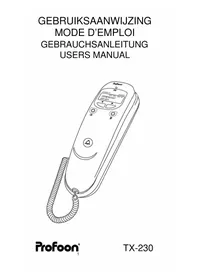
Brand : PROFOON
Model : TX129
Category : Desk Phone