GO! S2.4 - Scooter Govecs - Free user manual and instructions
Find the device manual for free GO! S2.4 Govecs in PDF.


| Product type | Electric scooter |
| Brand | Govecs |
| Model | GO! S2.4 |
| Dimensions (L x W x H) | 1800 x 685 x 1120 mm (without mirrors) |
| Seat height | 790 mm |
| Empty weight | ~115 kg |
| Maximum load capacity | 150 kg (rider + passenger + cargo) |
| Battery type | Lithium-Ion 72 V, 40 Ah |
| Battery voltage | max 84 V, min 64 V |
| Range | 60 to 100 km (depending on riding style, tire pressure, weather conditions) |
| Charging time | 80% in 2.5 h, 100% in 3.5 to 4 h |
| Motor | 3 kW (4.03 kW in + version) |
| Front brake type | Hydraulic brake |
| Rear brake type | Drum/disc brake (depending on batch) |
| Brake fluid | DOT4 |
| Tire dimensions | 130/60-R13 |
| Front tire pressure | 2.5 bar (without load), 2.6 bar (with load) |
| Rear tire pressure | 2.5 bar (without load), 2.8 bar (with load) |
| Front bulb | H4 35 W 12 V |
| Rear light | LED |
| Under-seat storage capacity | 5 kg max |
| Bag hook capacity | 3 kg max |
| Number of seats | 2 |
| Maintenance | Clean with sponge and clean water; do not use a pressure washer |
| Warranty | 2 years parts and labor; lithium battery: 70% after 700 cycles or 2 years |
Frequently Asked Questions - GO! S2.4 Govecs
User questions about GO! S2.4 Govecs
0 question about this device. Answer the ones you know or ask your own.
Ask a new question about this device
Download the instructions for your Scooter in PDF format for free! Find your manual GO! S2.4 - Govecs and take your electronic device back in hand. On this page are published all the documents necessary for the use of your device. GO! S2.4 by Govecs.
USER MANUAL GO! S2.4 Govecs
Dear User of scooter GOVECS,
We are excited that you have made the decision to purchase a GOVECS scooter and it is our pleasure to welcome you among the great number of GOVECS' scooter drivers.
This manual includes instructions concerning proper use, maintenance, and care of your GOVECS scooter. For your own safety and optimal comfort of usage we advice you to carefully read this manual before the first use.
Proper maintenance of the vehicle, observing all usage instructions included in this manual and visiting GOVECS service stations for regular inspections will ensure faultless operation of your scooter as well as continuation of warranty period.
Have a comfortable and accident free journey!
Table of contents
1. Safe riding instructions
1.1 Pre-ride activities
1.2 Clothing
1.3 Riding technique
1.4 Carrying cargo and passengers
1.5 After riding
2. Vehicle equipment
2.1 Left side of the vehicle
2.2 Right side of the vehicle
2.3 Operational elements
2.4 Ignition switch
2.5 Speedometer
2.6 Left side controllers
2.7 Right side controllers
2.8 Throttle
2.9 Trunk
2.10 Charging of the battery
2.11 Handle
2.12 Position the vehicle on the center stand
2.13 Hook for bags
2.14 Lighting
2.15 Tires
2.16 Brakes
2.17 Controll of braking liquid level
2.18 Controll of belt tension
2.19 Motor Controller Communication Codes
2.20 Technical specification
2.21 How to check the VIN number of a vehicle
3. Taking care of the vehicle
4. Transfer of the vehicle
4.1 Inspection before transfer of the vehicle
4.2 Acceptance of the vehicle
4.3 Warranty terms
4.4 Technical inspection
5. Helpful Tips



1. Safety guidelines
1.1 Pre-ride activities
Before riding scooter make sure that:
• The charging plug is out of the socket
- The battery is sufficiently charged
- The lighting, turn signals, and horn function properly
- The mirrors are adjusted for proper use
- There is the correct air pressure and proper tread depth in tires
- The brakes work properly (braking test while pushing the scooter)
- There is the correct level of braking fluid and that the brake pads are not worn out
- It is easy to turn the handlebars without resistance, fully left and right
• There is proper belt tension
1.2 Clothing
• Always ride in proper clothes and proper helmet.
- Wear tight fitting and comfortable clothing
- Wear proper boots (don't ride in high heels, flip-flops, or similar open footgear)
Inadequate clothing may become a threat to safe riding!

1.3 Riding technique
• Vehicle should be ridden carefully and sensibly
• Always hold the handlebars with two hands
- While turning the rider and passenger should tilt along with the scooter
• Particular wariness is recommended while riding on poorly hardened or wet road surfaces
- Pay attention to atypical sounds or behavior of the scooter while riding
1.4 Carrying cargos and passengers
- In order to carry objects or bags one should explicitly use top case, under seat trunk or a hook for bags. The maximum weight allowance for top case is 5 kg.
- Maximum scooter weight allowance must not be exceeded (150kg including passengers' weight)
• The scooter is allowed to carry maximum 2 persons
1.5 After riding
• Check if the battery needs charging
Riding with low level of battery signifi cantly decreases its life.
Battery life can be extended by recharging it each time with use of originally installed GOVECS charger. There is no risk of overcharging, because after reaching maximum charging level the charger disconnects automatically (even though the fen is still working).



2. Vehicle equipment
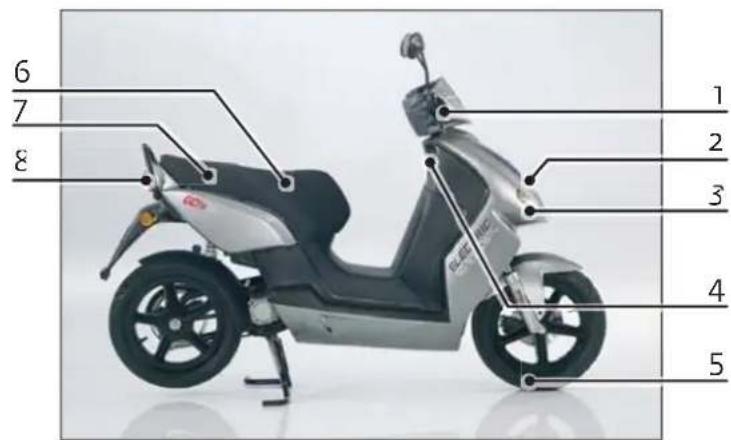
2.1 Left side of the vehicle
- Left mirror
- Right mirror
- Speedometer
- Ignition switch
- Single piece seat
- Handle
- Seat lock
- Rear shock absorber
- Rear wheel
- Center stand
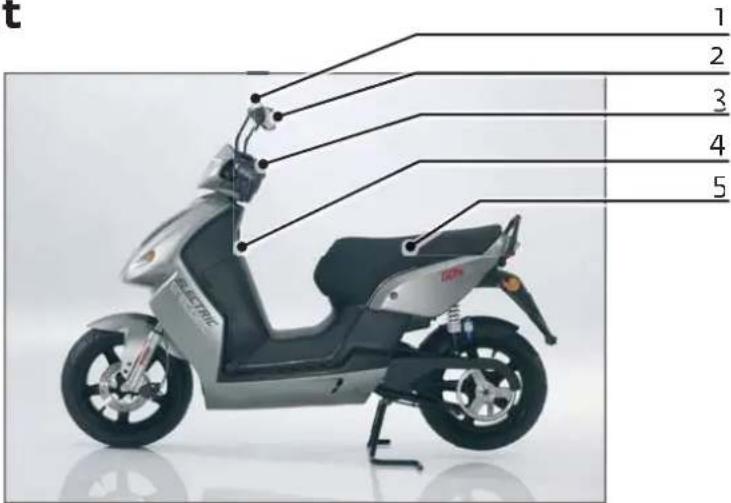
text_image
t 1 2 3 4 5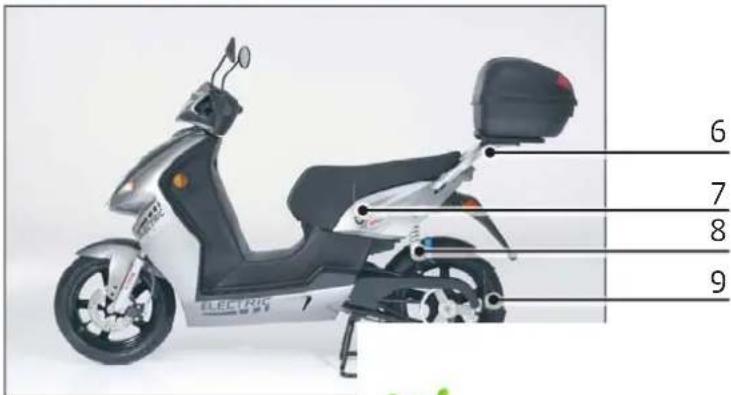
text_image
ELECTRIC 7 6 7 8 9
2.2 Right side of the vehicle
- Brake lever
- Head-light
- Front turn signal
- Hook for bags
- Front Wheel
- Storage compartment under the seat
- Cable for charging under the seat
- Parking and braking light
- Rear turn signal
- Registration Plate Light (only „+” version)
- Engine

text_image
6 7 8 1 2 3 4 5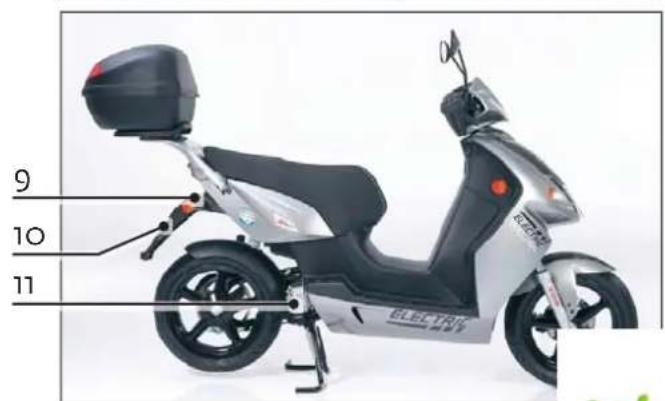
text_image
9 10 11
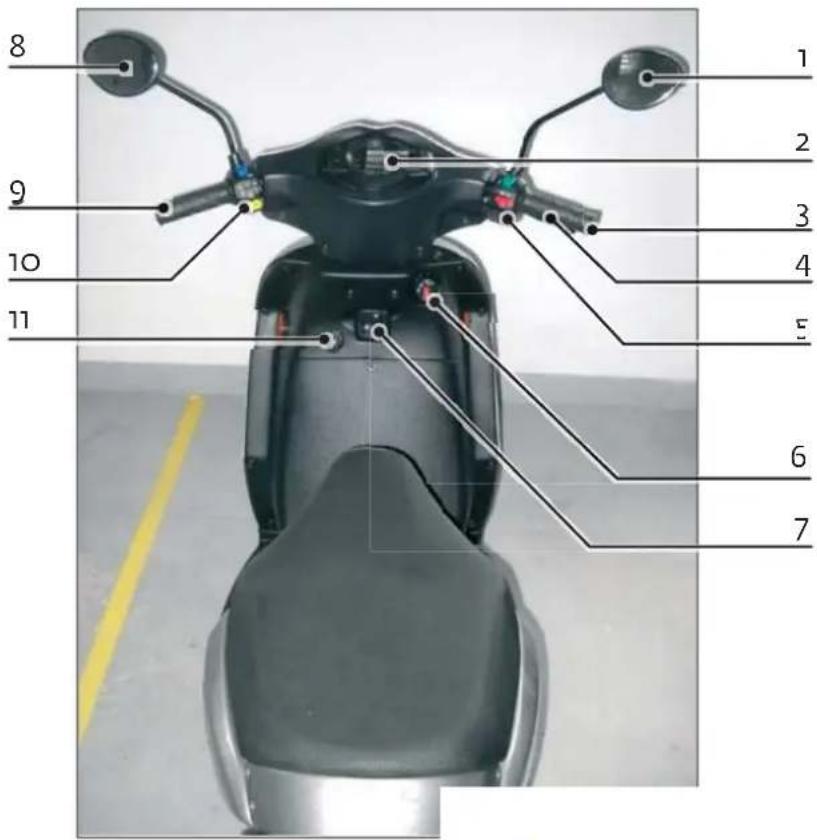
- Right mirror
- Speedometer
- Handlebar throttle
- Front wheel brake lever
- Right side switches
- Ignition switch
- Hook for bags
- Left mirror
- Rare wheel brake lever
- Left side switches
- Power socket 12V
text_image
8 9 10 11 1 2 3 4 5 6 7
elektrischescooterwinkel.nl
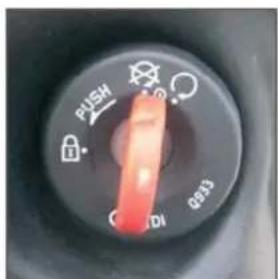
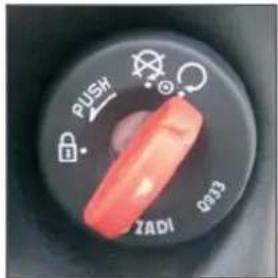
2.4 Ignition switch
Turned off
• All the functions turned off
- Handlebar is not locked
- Scooter can be rolled
- Scooter can be safely handled
Riding position (vehicle turned on)
• All the functions active
- Scooter is ready for riding
• Taking out the key in this position is not possible
- The key should be turned to riding position only after the rider is seated on the vehicle, directly before riding.
Note:
The sound of the engine is not heard although the handlebar throttle is active.

text_image
FUSH Q833 CDIIgnition off
EN
text_image
PUSH OK 1020 1030Riding position


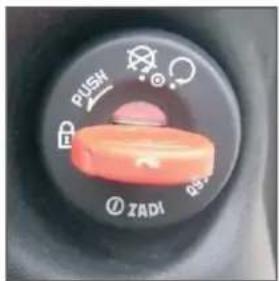
Ignition switch position „Handlebar locked"
• All the functions turned off
• The handlebar locked
- Scooter can be safely handled
Locking handlebar
- Turn the handlebar left all the way to the end
- Push in the key turning it left at the same time to the padlock position
- Pull out the key
text_image
PUSH ZADIHandlebar locked
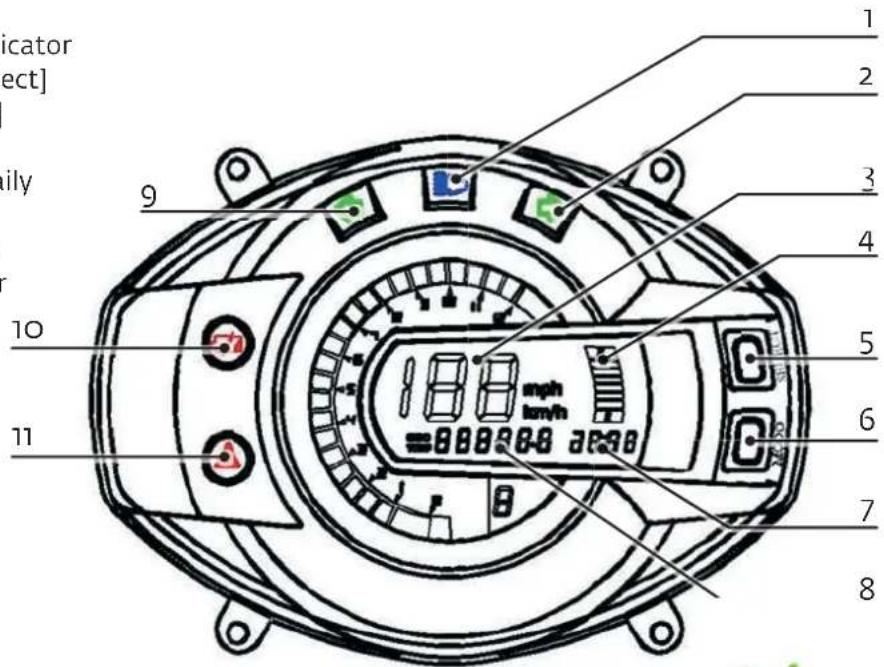
2.5 Speedometer
Speedometer is equipped with the following functions and indicators
- Head light
- Right turn signal
- Riding speed
- Charging battery indicator
- Selection button [Select]
- Mode button [Mode]
- Clock
- Kilometres: total / daily
- Left turn signal
- Battery signal light
- Charging indicator
text_image
Indicator [ect] ily 10 11 9 1 2 3 4 5 6 7 8
EN

Switching between total kilometers (odo) and daily kilometres (trip)
Holding pressed mode button [mode] (6) for one second switches from total kilometers count (odo) to the dialy kilometers one (trip).
Pressing the selection button for 3 seconds [select] (5) results in resetting the trip meter.
Pressing the mode [Mode] (6) and selection [Select] (5) buttons for 3 seconds switches speed unit from km/h to mph (miles per hour) or vice-versa.
Setting the clock
In order to set up the clock keep pressing the mode [Mode] (6) button until the minutes value begins to pulsate.
Then set up the minutes by pushing in the selection [Select] (5) button.
After pushing in mode button [Mode] (6) again the hour value begins to pulsate and the hour can be set. In order to confirm the setting, the mode button [Mode] (6) should be pushed in again.

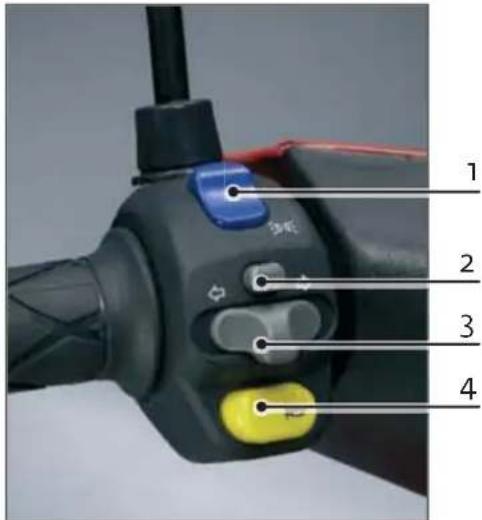
2.6 Left side controllers

Turn light is on by moving to the left or to the right the turn light switch (3) according to intended riding direction.
In order to turn it off, press the „turn off“ button (2).
- Running light / head light switch
1.* Running light / high beam switch for „+” version - Turn signal button (for canceling)
- Turn signal switch
- Horn button
text_image
1 2 3 4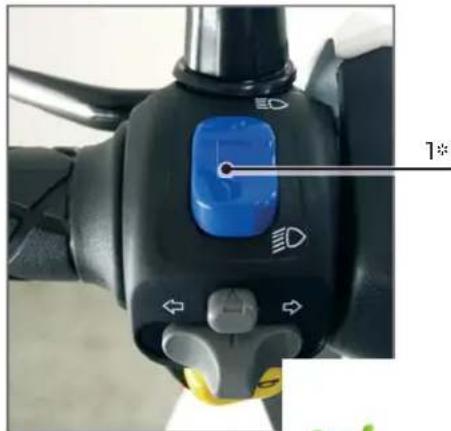
natural_image
Close-up of a bicycle's front wheel control lever with blue push button and directional arrows (no text or symbols)
elektrischescooterwinkel.nl

2.7 Right side controllers
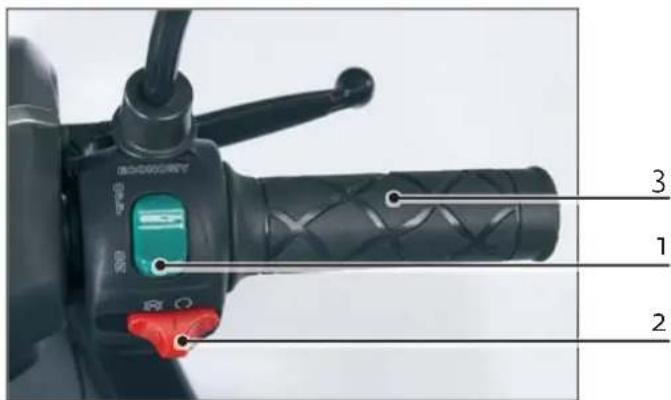
- On/Off economy function switch
• Economy function allows the increase of vehicle distance range.
- Setting the switch to „on” position slightly reduces the acceleration of the scooter, at the same time lowers the use of energy, thus increasing the range of the scooter.
text_image
3 1 2- Safety kill switch
- This kill switch MUST be moved to the left hand side position when the ignition key is being turned on! After ignition is turned on, move the kill switch to the right hand side position. Scooter is activated. Failure to do so will display the error code F-0884 on the speedometer.
Economy function does not aff ect maximum speed!
2.8 Throttle
By turning of handlebar throttle (3) the speed can be controlled
2.9 Trunk
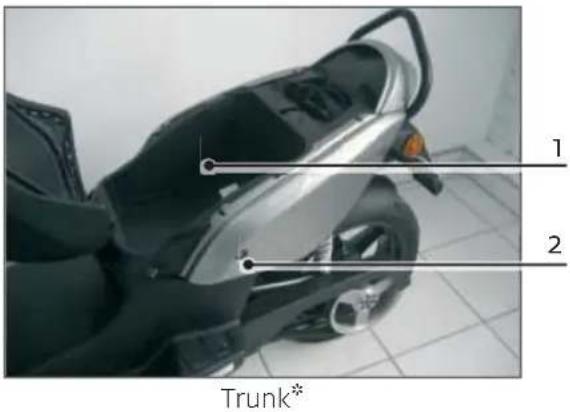
- Trunk
-
Seat lock
-
In order to unlock the seat the key should be inserted and turned left, then the seat will raise up.
- In order to close the seat push the seat in the middle until you hear the lock click
• Maximum load of the trunk is 5 kg.
Note!
Never place the key in the trunk before locking the seat
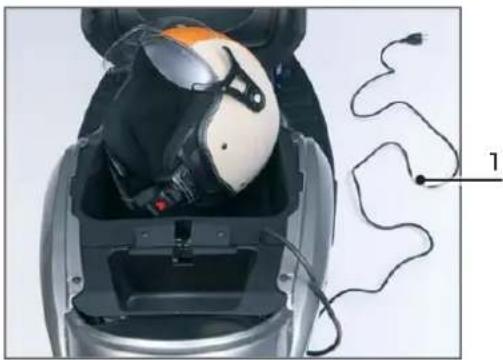
Please take care of the charging cable when closing
text_image
1 2 Trunk** Depending on the model of the scooter it's appearance may be different

2.10 Charging of the battery
- Charging cable (in trunk under the seat)
- Plug CEE7-VII at the end of charging cable
| GO! S1.2 GO! S2.4 | |
| Blinking 0-80% charged - | |
| Solid light 80-99% charged 80-90% charged | |
| No light 100 % charged 100% charged |
Charging cable can be used for all sockets type E/F or CEE 7/4 with specification 16A/250V.
Charging time of empty battery is about 4-5 hours. Battery should be charged each time it is possible since it extends its lifetime.
Charging phase is visible on Batery signal light on speedometer.
Avoid riding with not fully charged battery since it decreases its lifetime. There is no possibility to overcharge the battery.
natural_image
Close-up of a person wearing a helmet and headset, with earplands and wires visible (no text or symbols)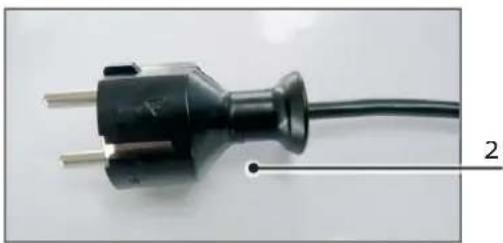
natural_image
Close-up of a black electrical plug with two metal pins, connected to a wire (no text or symbols visible)Important note: battery requires to be charged at least once a month, even if you do not use your scooter.
Do not load the battery at temperature lower than -10 degrees.
2.11 Handle
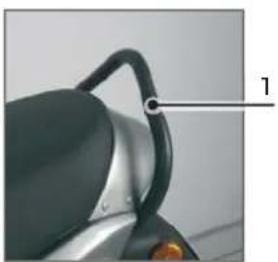
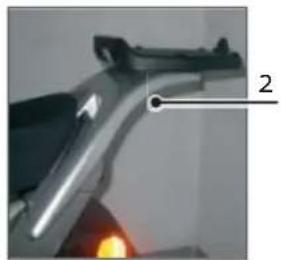
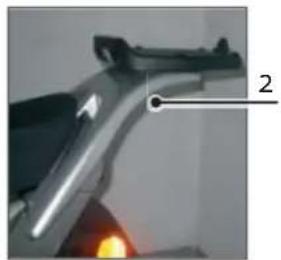
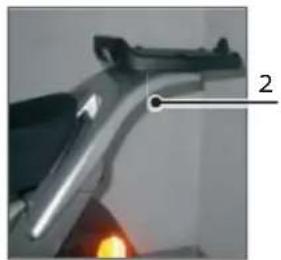
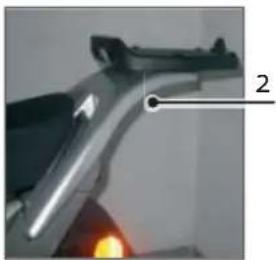
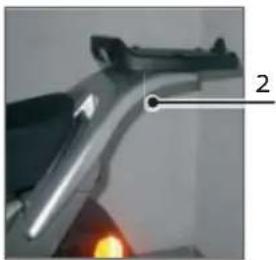
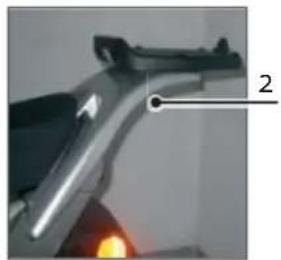
Handle (1) allows passenger to hold during riding. Moreover, the handle is helpful while positioning the vehicle on center stand. GO!S2.4 is equipped with handle that is also a top case holder (2).
natural_image
Close-up of a scooter's seat and handle with a black strap (no text or symbols visible)Handle GO! S1.2
natural_image
Close-up of a metallic mechanical component with a numbered annotation pointing to a corner detail (no readable text or symbols)Handle GO! S2.4

EN
2.12 Position the vehicle on the center stand
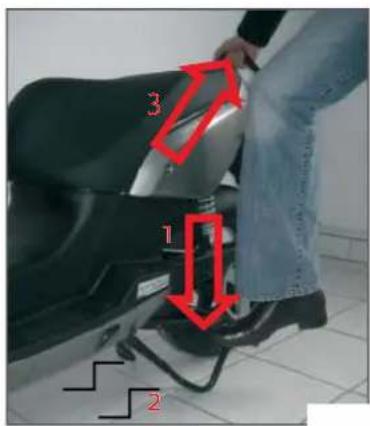
- In order to support the vehicle on stand, press down the catch of the center stand from the left side of the scooter (arrow 1)
- Both legs of center stand must stand on the surface (arrow 2)
- Press down the catch of the center stand at the same time pull the handle backwards and upwards until the scooter is safely supported on the center stand.
Do not sit on the scooter while it is supported on the stand since it may damage the vehicle!
* Depending on the model of the scooter it's appearance may be different
text_image
1 2 3Position on center stan


2.13 Hook for bags
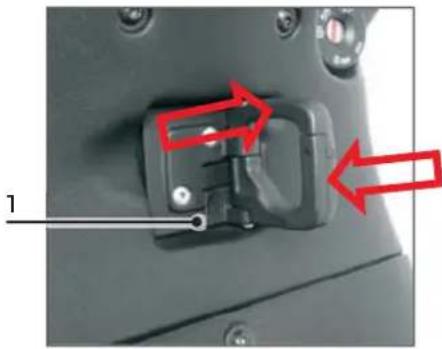
Hook for bags (1) can be used to hang bags.
Hook has protection, which prevents from unfastening and loosing the bag.
In order to hang a bag the operator should expand the hooks in directions showed with arrows.
Remember that while turning the vehicle the swinging bags may affect riding.
Do not hang weights exceeding 3 kg on the hook.
natural_image
Close-up of a mechanical component with red arrows pointing to features, no visible text or symbolsHook for bags
2.14 Lighting
Each time, before riding the lighting installation should be checked in respect of its functionality, damages, and settings.
- Head-light ("+" high beam) and parking light
- Front and rear turn signals
- Tail light
- Brake light for front and rear brake
• Number-plate light
Due to the fact that the LED energy-saving bulbs were used in GOVECS scooters, in case of abnormal functioning or damage of lighting installation, at GOVECS service station.

2.15 Tires

It is necessary to check tires before riding for possible damages or lack of air.
Too low air pressure or worn out tires have negative impact on the scooter's performance during riding and reducing the scooters' range.
Tires can be replaced only at the GOVECS service station.
Air pressure in tires can be checked and adjusted at every petrol station. Pressure in tires should be checked once a week and after longer periods of downtime.
| Airpressure Without load With load (2 persons) | |
| Front 2,5 bar 2,6 bar | |
| Rear 2,5 bar 2,8 bar |

Braking system is the safety system of the vehicle. For personal safety one should particularly consider condition of braking system.
The following elements of braking system should be checked before riding:
- Braking fluid level (see point 2.17).
- Seal of the braking system.
- Performance control.
In order to check performance of the brakes the operator should push the scooter several meters. While pushing squeeze the front brake and then the rear brake, one at a time. During braking test the scooter should be firmly held, which will prevent it from falling over.
Note! Maintenance works and repair of the braking system are only allowed at GOVECS service stations.
2.17 Control of braking liquid level
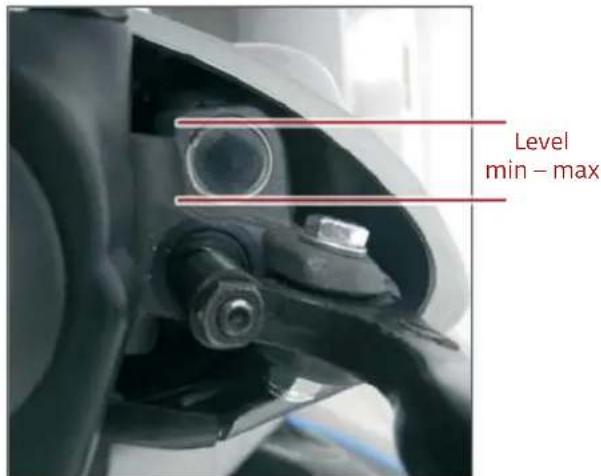
Braking liquid level should be checked each time before riding.
- Position the vehicle on the center stand
- Turn the handlebar to the left
- Check the level on the sight-glass from the right side of the vehicle - It must fit between upper and lower edge of the sight-glass.
Absence of visible liquid in the sight-glass means damage of braking system.
Scooter should not be used until the braking system is repaired at the GOVECS service station.
text_image
Level min - maxSight-glass of the braking liquid level
2.18 Control of belt tension
The belt tension should be 80-85 Hz which can be measured with a standard Trummeter for measuring belt tensions. Please contact your service station for measurement and tension adjustment.


2.19 Technical specification
GO! S1.2 GO! S2.4 Comments
| Length 1800mm without grabhandle | |
| Width 685 mm without mirrors | |
| Height 1120 mm without mirrors | |
| Seat Height 790 mm | |
| Weight ~ 140 kg ~ 115 kg | |
| Loading capacities max 150 kg including the passenger | |
| Under seat trunk capacity | max 5 kg |
| Topcase (optional) loading capacity | 3 kg |
| Tire pressure | front 2,5 bar 2,6 bar (2 persons) rear 2,5 bar 2,8 bar (2 persons) |
| Tire sizes | 130/60-R13 |
| Heidenau K61 | |
| Tire type | Duro DM1017 |
| Duro HF916 | |
| Maxxis M6029 | |
| Light bulbs | Front - H4 35W 12V |
| Rear: LED 12V | |
| position light power 0,9W brake light power 2,7W | |
| Indicators - LED 12V 1,0W Ngt | |
| Licence Pate Light: LED 12V | |

| Fuses 60A, 20A | ||
| Transmission ratio 5.69 | ||
| Motor Brushless, 3 KW Brushless, 3 KW | For „+” versions motor power is 4,03 KW | |
| Battery type | 8x Greensaver SP20-1212V 20Ah Lead/Silicone | 72V, 40Ah Lithium Ion |
| Battery capacity and voltage | max 126V max 84Vmin 88,2V min 64V | |
| Charger details | not detachable, power8A/116V max 930W | 220-110V; 6A/220 V |
| Battery charging cycles 500 1000 | ||
| Range 40-60 km 60-100 km | depending on driving profi le, tires pressure, weather conditions etc. | |
| Charging time | 4-5 hours (95%) | 2,5h (80%) and 3,5-4h(100%) |
| Brakes type | Front - hydraulic brake,rear – drum brake/disc brake* | |
| Brake fl uid | DOT4 | |
* Depending on production batch

2.20 How to check the VIN number
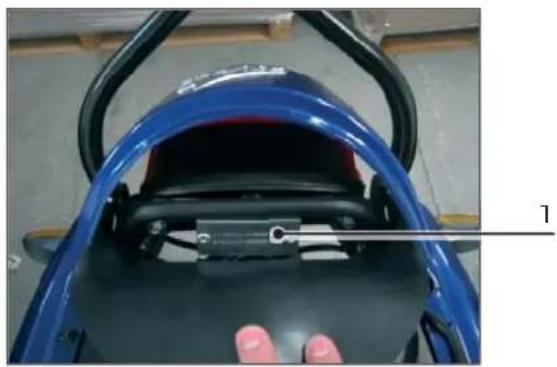
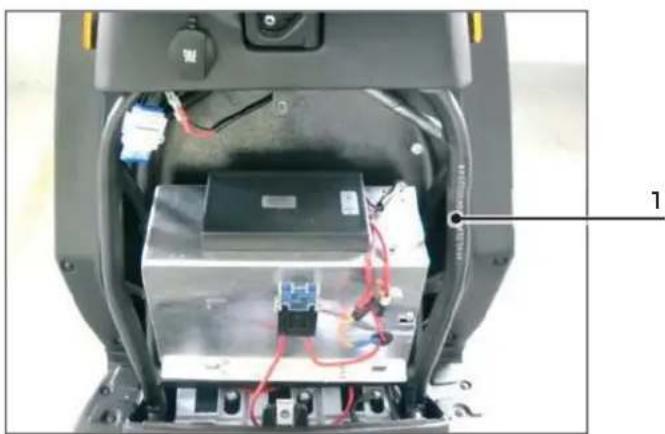
You can find the VIN number in two different places on the scooter: under the seat and under the charger box cover.
- In order to find the VIN number under the seat, open it and bend back the rubber lamp cover.*
- On the rectangle shaped metal plate you will see the VIN number of the vehicle.*
natural_image
Close-up of a blue motorcycle seat with a hand adjusting the seat, showing internal components and a numbered label (1) on the side.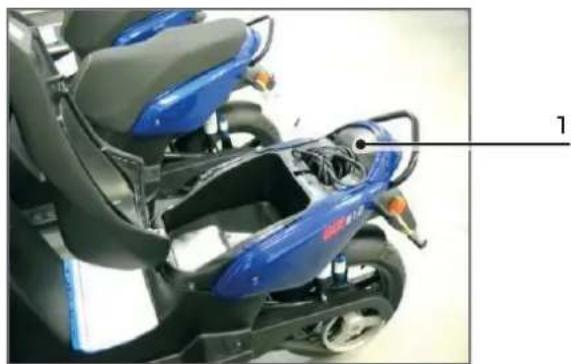
natural_image
Close-up of a blue sports motorcycle seat with gray backrest and black frame, no visible text or symbols* Depending on the model of the scooter its appearance may be different
• In order to find the VIN number under the plastic charger cover you need to unscrew it in four places (please refer to the pictures).
- Once unscrewed, remove the plastic cover.
- You will find the VIN number engraved on the right hand side of the frame.
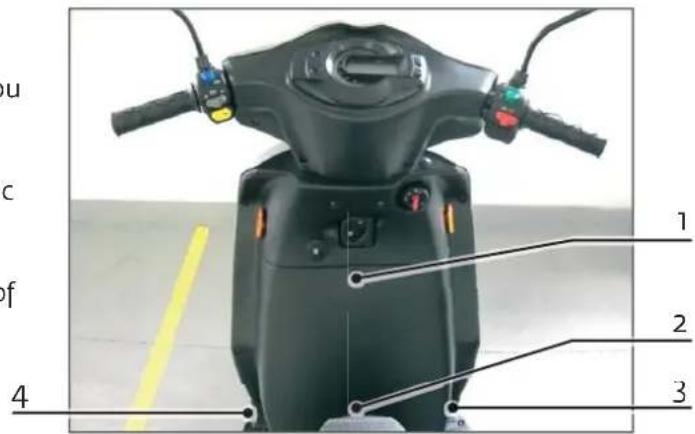
text_image
u c of 4 1 2 3
EN
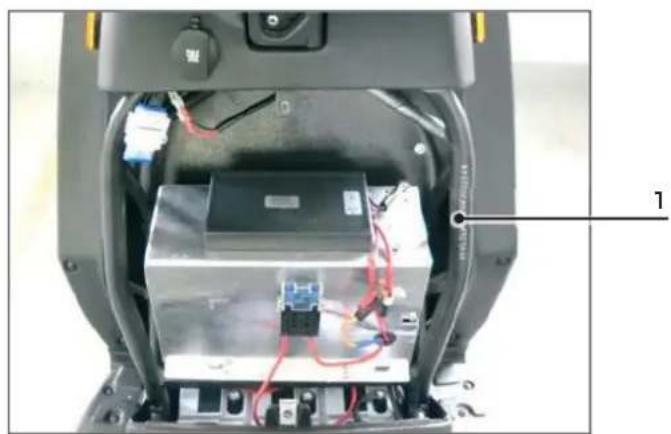
natural_image
Interior view of a robotic device showing internal components and wiring (no visible text or symbols)
elektrischescooterwinkel.nl

2.21 Motor Controller Communication Codes
Code Message Limit Action
| F-0884 Sequence code | Please shut off scooter and restart the ignition with the kill switch in the "Off" position. | ||
| F-05C1 | Battery Discharge Indicator - Warning | SOC<3% - GO! S1.2/GO! S1.2+; SOC<10% - GO! S2.4/GO! S2.4+ | The operator should charge the battey. When the battery is full charge the operator can resume riding. |
| F-05C2 | Battery Discharge Cut-out - Warning | SOC<1% | The operator should charge the battey. When the battery is full charge the operator can resume riding. |
| F-05C3 | Low Battery Voltage - Warning | 80V - GO! S1.2/GO! S1.2+; 56V - GO! S2.4/GO! S2.4+ | The operator should charge the battey. When the battery is full charge the operator can resume riding. |
| F-05C4 | High Battery Voltage - Warning | 114V - GO! S1.2/GO! S1.2+; 112V - GO! S2.4/GO! S2.4+ | The operator should leave scooter in idle state (ignition ON) for 2-3 minutes, battery balancing in process. |
| F-05C5 | Hight Capacitor Voltage - Warning | 114V - GO! S1.2/GO! S1.2+; 112V - GO! S2.4/GO! S2.4+ | The operator should leave scooter in idle state (ignition ON) for 2-3 minutes, battery balancing in process. |
| F-05C6 | Low Battery Voltage - Warning | 39.1V | The operator should charge the battery. When the battery is fully charge the operator can resume ridi |

| F-05C7 | High Battery Voltage - Warning | 116V | The operator should leave scooter in idle statge (ignition ON) for 2-3 minutes, battery balancing in process |
| F-05C8 | High Capacitor Voltage Warning | 150V | The operator should leave scooter in idle statge (ignition ON) for 2-3 minutes, battery balancing in process |
| F-05C9 | Motor in low voltage cutback | 84V - GO! S1.2/GO! S1.2+; 60V - GO! S2.4/GO! S2.4+ | |
| F-0601 | Low Scooter Temperature - Warning | -30°C | The operator should allow the scooter to warm to room temperature before resuming to ride the scooter. |
| F-0602 | High Scooter Temperature - Warning | 80°C | The operator should allow the scooter to cool to room temperature before resuming to ride the scooter. |
| F-0603 | High Motor Temperature - Warning | 130°C | The operator should allow the motor to cool to room temperature before resuming to ride the scooter. |
| F-0604 | Low Motor Temperature - Warning | -30°C | The operator should allow the motor to warm to room temperature before resuming to ride the scooter. |
| High Curr | High current due to battery regeneration | n/a No action necessary, not a fault | |

3. Taking care of the vehicle
In order to maintain the vehicle properly certain instructions must be observed.
- Clean the vehicle with sponge and clean water on regular basis.
- Do not use hard sponges or scratching materials for insects removal.
- Varnished covered elements should be cleaned with use of varnish preparations.
- Plastic parts should only be cleaned with agents dedicated to plastic elements.
- Make sure that the anticorrosive aerosol sprays are not used on braking system elements, varnished parts and plastic elements.
- The vehicle parked outdoor should be protected with a breathing cover. Standard covers made of artificial material cause water condensation under the cover and consequently make the scooter corroded.
Under no circumstances can the high-pressure washer be used for the scooter cleaning.

4. Transfer of the vehicle

4.1 Inspection before transfer of the vehicle
Before transfer of the vehicle at the sales center of GOVECS the following inspections should be performed:
- Checking the vehicle in respect of transport damages
- Battery charging
• Control and possible adjustment of air pressure in tires
• Control of lighting installation in respect of positioning and proper performance
• Control of performance of all operational elements - Test riding

4.2 Acceptance of the vehicle
Hereby this document is the basis for recognition of warranty claim. If the warranty sheet is not filled in or is partially filled in, the warranty claims will not be recognized.
EN
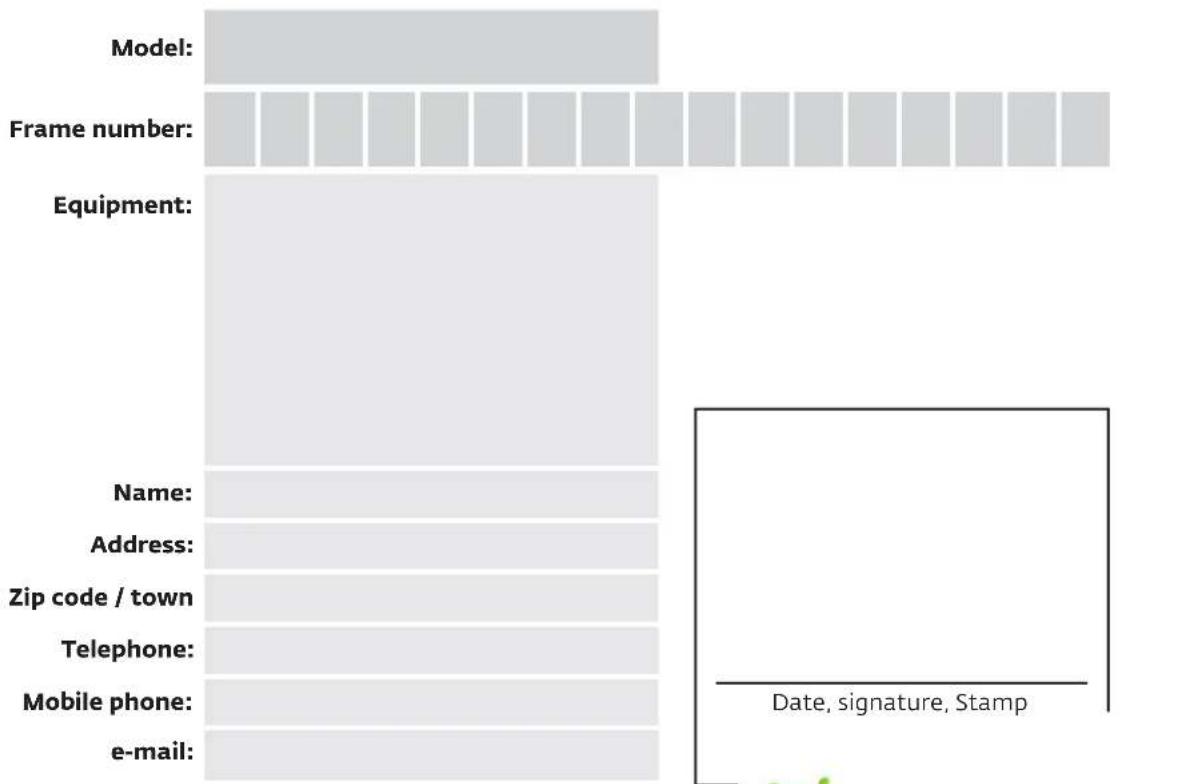
bar
| Category | Value | | ------------------ | ----- | | Model | 100 | | Frame number | 100 | | Equipment | 100 | | Name | 100 | | Address | 100 | | Zip code / town | 100 | | Telephone | 100 | | Mobile phone | 100 | | e-mail | 100 |
- Warranty liabilities are determined by statutory regulations (two years) counted from the date of acceptance of the vehicle by the end user.
- Batteries are subject to warranty under the below conditions:
a) silicone - 80% state of health after 450 cycles or two years, whatever comes earlier;
b) lithium - 70% state of health after 700 cycles or two years whatever comes earlier;
- The failures that are not reported within specified period of time at authorized sales center GOVECS shall not be the subject to warranty repairs.
- Usable parts (e.g. Lighting, bulbs, tires, brake pads or brake discs) are not covered by warranty.
- It depends on GOVECS GmbH company – hereinafter refer to as GOVECS – whether the defective parts shall be replaced or repaired.
- Warranty legal rights shall not apply to any of the following situations:
a) Fault is a result of operation inconsistent with regulations, in particular by overloading the vehicle by the end user.
b) The end user shall make inspection or repair, recommended in servicing book, in the workshop other than authorized by GOVECS.
c) The vehicle shall undergo any modification, reconstruction or shall be equipped with parts that do not have firm approval of GOVECS as the equipment of the vehicle.
d) The vehicle was used in motor-sport events.
e) The instructions concerning operation, care and maintenance described in hereby manual were not observed.
- Agreements other than the above warranty terms require written consent of GOVECS to be effective.


The warranty does not apply to the following parts:
- Bulbs
- Brake pads and brake discs
- Tires
• Accessories that are not part of the serial equipment
I hereby accept the warranty terms specified herein. I confirm personal acceptance of the vehicle in faultless condition. The sales assistant explained me the warranty terms.
Customer signature

4.4 Technical inspection

The vehicle must undergo technical inspection plus or minus 100 km of the recommended term and minimum once per year.
EN
| Inspection500 kmkm:Date, signature, stamp of sales assistant GOVECS | Inspection5000 kmkm:Date, signature, stamp of sales assistant GOVECS | Inspection10000 kmkm:Date, signature, stamp of sales assistant GOVECS |
| Inspection15000 kmkm:Date, signature, stamp of sales assistant GOVECS | Inspection20000 kmkm:Date, signature, stamp of sales assistant GOVECS | Inspection25000 kmkm:Date, signature, st assistant GO |

| Inspection30000 kmkm:Date, signature, stamp of sales assistant GOVECS | Inspection35000 kmkm:Date, signature, stamp of sales assistant GOVECS | Inspection40000 kmkm:Date, signature, stamp of sales assistant GOVECS |
| Inspection45000 kmkm:Date, signature, stamp of sales assistant GOVECS | Inspection50000 kmkm:Date, signature, stamp of sales assistant GOVECS | Inspection55000 kmkm:Date, signature, stamp of sales assistant GOVECS |
| Inspection60000 kmkm:Date, signature, stamp of sales assistant GOVECS | Inspection65000 kmkm:Date, signature, stamp of sales assistant GOVECS | Inspection70000 kmkm:Date, signature, stamp of sales assistant GOVECS |

| Inspection75000 kmkm:Date, signature, stamp of sales assistant GOVECS | Inspection80000 kmkm:Date, signature, stamp of sales assistant GOVECS | Inspection85000 kmkm:Date, signature, stamp of sales assistant GOVECS |
| Inspection90000 kmkm:Date, signature, stamp of sales assistant GOVECS | Inspection95000 kmkm:Date, signature, stamp of sales assistant GOVECS | Inspection100000 kmkm:Date, signature, stamp of sales assistant GOVECS |
| Inspection105000 kmkm:Date, signature, stamp of sales assistant GOVECS | Inspection115000 kmkm:Date, signature, stamp of sales assistant GOVECS | Inspection125000 kmkm:Date, signature, st assistant GO |

EN

The task of GOVECS' representative at service station is comprehensive counseling and professional inspection of the vehicle.
Hereunder are presented some helpful tips for carrying out an efficient inspection and repair.
- Inspections and repairs should be ordered at exclusively authorized GOVECS service stations.
- Dates should be consulted with workshop manager.
- If there is something difficult to understand it should be discussed with workshop manager.
- Only clear orders should be made.
- Expected costs should be inquired in advance.
- Telephone number should be given to the service technician in case of questions.
- In case of any additional works appearing, it is necessary to establish the upper cost limit.
- In case of lack of clarity, questions should be asked openly.
- The dates of regular technical inspections of the vehicle should be observed.

text_image
6 7 8 in 1 2 3 4 5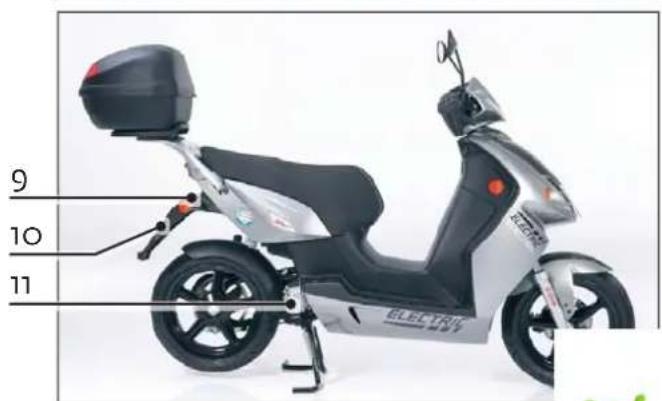
text_image
9 10 11 ELECTRIC

natural_image
Close-up of a bicycle's front wheel and steering wheel with blue control knob (no text or symbols visible)
natural_image
Close-up of a scooter's rear wheel and seat, labeled with parts 1 and 2 (no text or symbols on the car itself)Staufach*

DE
Achtung!
natural_image
Close-up of a person wearing a helmet and headset, with ear wiring and a numbered annotation (1) pointing to the device.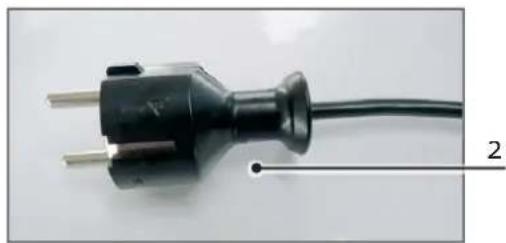
natural_image
Close-up of a black electrical plug with three leads and a wire, labeled with number 2 (no text or symbols on the plug itself)natural_image
Close-up of a scooter's rear wheel and seat, showing black grip and orange flame (no text or symbols)Handle GO! S1.2
natural_image
Close-up of a metallic mechanical component with a numbered annotation (2) and light source indicator (no readable text or symbols)Handle GO! S2.4

natural_image
Close-up of a mechanical component with red arrows pointing to features, no visible text or symbolsTaschenhaken
natural_image
Close-up of a blue motorcycle seat with visible mechanical components and a finger pointing to the side (no text or symbols)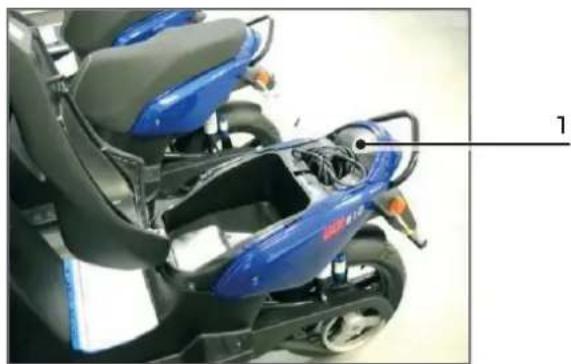
natural_image
Close-up of a blue sports motorcycle seat and rear gear assembly (no visible text or symbols)natural_image
Interior view of a robotic device showing internal components and wiring (no visible text or symbols)natural_image
Close-up of a scooter's rear wheel and side seat, labeled with numbers 1 and 2 (no text or symbols on the car itself)Guantera*

natural_image
Close-up of a person wearing a full-face helmet and headset, with cable routing around the seat (no visible text or symbols)natural_image
Close-up of a black electrical plug with two metal pins, connected to a wire (no text or symbols visible)natural_image
Close-up of a scooter's rear wheel and seat, showing black grip and orange flame (no text or symbols)Agarre GO! S1.2
natural_image
Close-up of a metallic mechanical component with a numbered annotation (2) and a glowing orange spot, no readable text or symbols present.Agarre GO! S2.4

natural_image
Close-up of a mechanical component with red arrows pointing to specific parts (no text or symbols visible)Gancho para bolsas
2.14 Iluminación
natural_image
Close-up of a blue motorcycle seat with black handle and attached gear, showing a finger pressing a button (no text or symbols visible)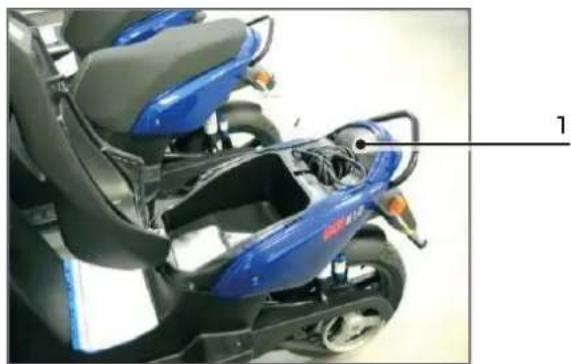
natural_image
Close-up of a blue sports motorcycle with gray seat and black frame (no visible text or symbols)natural_image
Interior view of a robotic device showing exposed internal components with wiring and a labeled component '1' (no text or symbols on the device itself)natural_image
Close-up of a bicycle handset with blue control knob and directional arrows (no text or symbols)FR

natural_image
Close-up of a person wearing a full-face helmet and headset, with ear wiring and a numbered annotation (1) pointing to the device.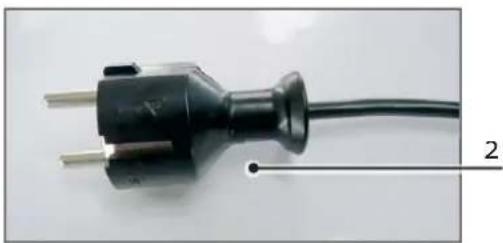
natural_image
Close-up of a black electrical plug with three metal pins, connected to a wire (no text or symbols visible)natural_image
Close-up of a scooter's rear wheel and seat, showing black strap and orange flame (no text or symbols visible)Poignée GO! S1.2
natural_image
Close-up of a metallic mechanical component with a numbered annotation (2) and light source indicator (no readable text or symbols)Poignée GO! S2.4
natural_image
Close-up of a mechanical component with red arrows pointing to specific parts (no text or symbols visible)natural_image
Close-up of a blue motorcycle seat with a finger pressing a cable, no visible text or symbols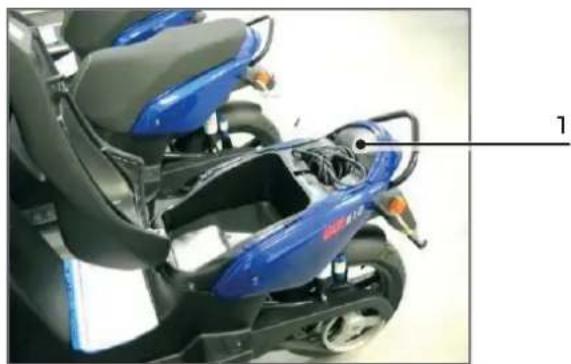
natural_image
Close-up of a blue sports motorcycle with gray seat and black body (no visible text or symbols)natural_image
Interior view of a robotic device showing internal components and wiring (no visible text or symbols)4.4 Révision technique

natural_image
Close-up of a scooter's rear wheel and seat, labeled with parts 1 and 2 (no text or symbols on the body)Bauletto*

natural_image
Close-up of a person wearing a full-face helmet and headset, with cable routing and a numbered annotation (1) pointing to the device.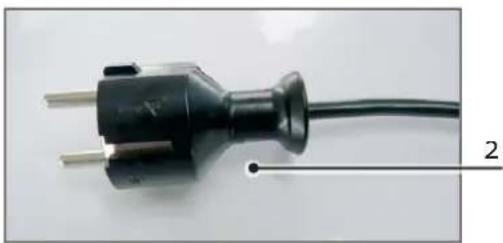
natural_image
Close-up of a black electrical outlet plug with metal pins, connected to a wire (no text or symbols visible)natural_image
Close-up of a scooter's rear wheel and seat, showing black handle and silver body (no text or symbols)Manico GO! S1.2
natural_image
Close-up of a metallic mechanical component with a numbered annotation (2) and light source indicator (no readable text or symbols)Manico GO! S2.4
natural_image
Close-up of a mechanical component with red arrows pointing to specific parts (no text or symbols visible)Gancio per borse
2.14 Illuminazione
natural_image
Close-up of a blue motorcycle seat with a hand holding the grip, showing internal components and a numbered label (2) on the side.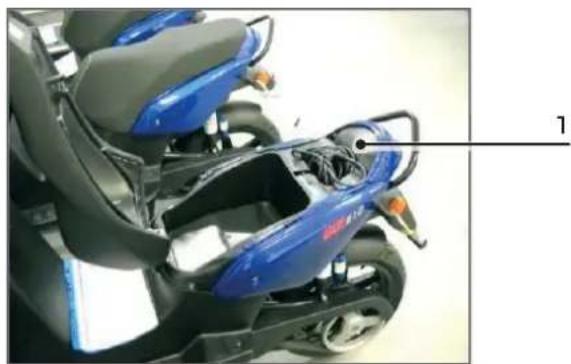
natural_image
Close-up of a blue sports motorcycle with gray seat and black frame (no visible text or symbols)text_image
Labeled photo of an electric scooter front view with numbered parts and a yellow safety line indicator.
natural_image
Interior view of an electronic device showing internal components and wiring (no visible text or symbols)natural_image
Close-up of a bicycle brake lever with blue control knob and directional arrows (no text or symbols)
natural_image
Close-up of a person wearing a helmet and headset, with ear wiring and a numbered annotation (1) pointing to the device.natural_image
Close-up of a black electrical outlet plug with metal pins, connected to a wire (no text or symbols visible)natural_image
Close-up of a scooter's rear wheel and seat, showing black grip and orange flame (no text or symbols)Handgreep GO! S1.2
natural_image
Close-up of a metallic mechanical component with a numbered annotation (2) pointing to a specific part, no visible text or symbols on the main subject.Handgreep GO! Sz.4

2.12 Hoofdstandaard
natural_image
Close-up of a mechanical component with red arrows pointing to features, no visible text or symbolsBagagehaak
2.14 Verlichting
natural_image
Close-up of a blue motorcycle seat with a finger inserted, showing internal components and a numbered label '2' (no text or symbols on the main subject)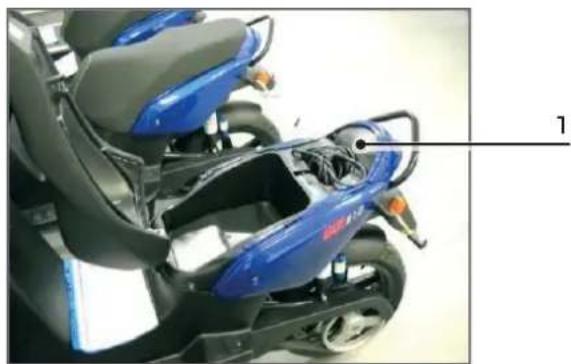
natural_image
Close-up of a blue sports motorcycle seat with gray backrest and black frame, no visible text or symbolsnatural_image
Interior view of a robotic device showing internal components and wiring (no visible text or symbols)Govecs Poland Sp. z.o.o.
ul. Wodzisławska 6a
52-017 Wrocław
Poland
www.govecs.com