
LSM100 - Speaker TEAC - Free user manual and instructions
Find the device manual for free LSM100 TEAC in PDF.



| Product Type | Active Speaker 2.0 |
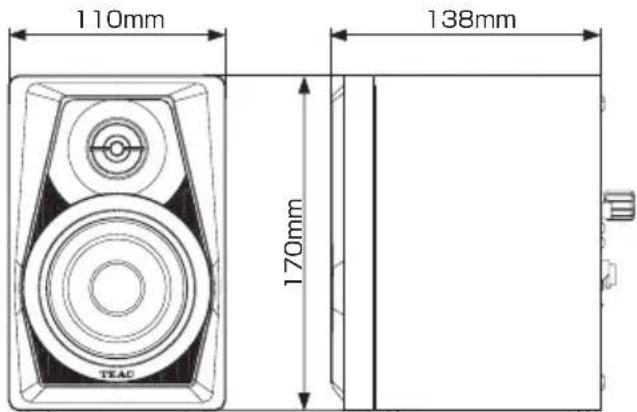
| Dimensions (W × H × D) | 110 × 170 × 138 mm (per unit) |
| Weight | Active unit: 1.1 kg Passive unit: 1.0 kg |
| Power Supply | AC adapter PS-P1524E (input: 100-240 V AC, 50/60 Hz; output: 15 V DC, 2.4 A) |
| Power Consumption | 6.2 W |
| Maximum Output Power | 14 W + 14 W (10% distortion) |
| Speakers | 3-inch woofer (76.2 mm) + 0.5-inch tweeter (12.7 mm) |
| Speaker Type | Bass reflex |
| Frequency Response | 80 Hz - 22 kHz |
| Crossover Frequency | 8 kHz |
| Audio Inputs | RCA (cinch) jacks + Stereo mini-jack |
| Input Impedance | 50 kΩ |
| Volume Control | Yes, on the active unit |
| Supplied Accessories | Active unit ×1, passive unit ×1, AC adapter PS-P1524E, speaker cable, instruction manual (with warranty) |
| Cleaning | Soft dry cloth; do not use chemicals |
| Safety Precautions | Do not expose to water, do not place near heat sources, do not block ventilation openings, unplug during storms or prolonged non-use |
| Repairability | All repairs should be carried out by a qualified technician; no user-serviceable parts inside |
| Warranty | Legal warranty in the country of purchase; contact the retailer in case of defect |
Frequently Asked Questions - LSM100 TEAC
User questions about LSM100 TEAC
0 question about this device. Answer the ones you know or ask your own.
Ask a new question about this device
Download the instructions for your Speaker in PDF format for free! Find your manual LSM100 - TEAC and take your electronic device back in hand. On this page are published all the documents necessary for the use of your device. LSM100 by TEAC.
USER MANUAL LSM100 TEAC
DO NOT REMOVE THE EXTERNAL CASES OR CABINETS TO EXPOSE THE ELECTRONICS. NO USER SERVICEABLE PARTS ARE INSIDE.
- IF YOU ARE EXPERIENCING PROBLEMS WITH THIS PRODUCT, CONTACT THE STORE WHERE YOU PURCHASED THE UNIT FOR A SERVICE REFERRAL. DO NOT USE THE PRODUCT UNTIL IT HAS BEEN REPAIRED.
- USE OF CONTROLS OR ADJUSTMENTS OR PERFORMANCE OF PROCEDURES OTHER THAN THOSE SPECIFIED HEREIN MAY RESULT IN HAZARDOUS RADIATION EXPOSURE.
1) Read these instructions.
2) Keep these instructions.
3) Heed all warnings.
4) Follow all instructions.
5) Do not use this apparatus near water.
6) Clean only with dry cloth.
7) Do not block any ventilation openings. Install in accordance with the manufacturer's instructions.
8) Do not install near any heat sources such as radiators, heat registers, stoves, or other apparatus (including amplifiers) that produce heat.
9) Do not defeat the safety purpose of the polarized or grounding-type plug. A polarized plug has two blades with one wider than the other. A grounding type plug has two blades and a third grounding prong. The wide blade or the third prong are provided for your safety. If the provided plug does not fit into your outlet, consult an electrician for replacement of the obsolete outlet.
10) Protect the power cord from being walked on or pinched particularly at plugs, convenience receptacles, and the point where they exit from the apparatus.
11) Only use attachments/accessories specified by the manufacturer.
12) Use only with the cart, stand, tripod, bracket, or table specified by the manufacturer, or sold with the apparatus. When a cart is used, use caution when moving the cart/apparatus combination to avoid injury from tip-over.
13) Unplug this apparatus during lightning storms or when unused for long periods of time.
14) Refer all servicing to qualified service personnel. Servicing is required when the apparatus has been
damaged in any way, such as power-supply cord or plug is damaged, liquid has been spilled or objects have fallen into the apparatus, the apparatus has been exposed to rain or moisture, does not operate normally, or has been dropped.
The apparatus draws nominal non-operating power from the AC outlet with its POWER or STANDBY/ON switch not in the ON position.
- The mains plug is used as the disconnect device; the disconnect device shall remain readily operable.
- Caution should be taken when using earphones or headphones with the product because excessive sound pressure (volume) from earphones or headphones can cause hearing loss.
CAUTION
- Do not expose this apparatus to drips or splashes.
- Do not place any objects filled with liquids, such as vases, on the apparatus.
- Do not install this apparatus in a confined space such as a book case or similar unit.
- The apparatus should be located close enough to the AC outlet so that you can easily reach the power cord plug at any time.
- If the product uses batteries (including a battery pack or installed batteries), they should not be exposed to sunshine, fire or excessive heat.
- CAUTION for products that use replaceable lithium batteries: there is danger of explosion if a battery is replaced with an incorrect type of battery. Replace only with the same or equivalent type.
CAUTION
Changes or modifications not expressly approved by the party responsible for compliance could void the user's authority to operate the equipment.
Model for Europe
DECLARATION OF CONFORMITY
Hereby, TEAC Corporation declares that the product complies with the European Directives request and the other Commission Regulations.

For European Customers
Disposal of electrical and electronic equipment and batteries and/or accumulators
(a) All electrical/electronic equipment and waste batteries/accumulators should be disposed of separately from the municipal waste stream via collection facilities designated by the government or local authorities.
(b) By disposing of electrical/electronic equipment and waste batteries/accumulators correctly, you will help save valuable resources and prevent any potential negative effects on human health and the environment.
(c) Improper disposal of waste electrical/electronic equipment and batteries/accumulators can have serious effects on the environment and human health because of the presence of hazardous substances in the equipment.
(d) The Waste Electrical and Electronic Equipment (WEEE) symbols, which show wheeled bins that have been crossed out, indicate that electrical/electronic equipment and batteries/accumulators must be collected and disposed of separately from householo
If a battery or accumulator contains more than the specified values of lead (Pb), mercury (Hg), and/or cadmium (Cd) as defined in the Battery Directive (2006/66/EC), then the chemical symbols for those elements will be indicated beneath the WEEE symbol.
(e) Return and collection systems are available to end users. For more detailed information about the disposal of old electrical/electronic equipment and waste batteries/accumulators, please contact your city office, waste disposal service or the shop where you purchased the equipment.
Contents
IMPORTANT SAFETY INSTRUCTIONS 2
Introduction 4
Features 4
Included items 4
Conventions used in this manual 5
Precautions for placement and use 5
Beware of condensation 5
Cleaning the unit. 5
Using the TEAC Global Site. 5
Product registration. 5
Names and functions of parts 6
Front panel. 6
Rear panel. 6
Preparation. 6
Precautions before making connections..6
Connections. 6
Installation 7
Specifications. 7
General 7
Dimensional drawing. 7
Introduction
Thank you for choosing TEAC.
Before using these speakers, read this Owner's Manual carefully so that you will be able to use them correctly and enjoy having them for many years. After you have finished reading this manual, please keep it in a safe place for future reference.
Features
3-inch (76.2mm) woofer
0.5-inch (12.7mm) tweeeter
Built-in 14W+14W power amplifier
- RCA pin input jacks
- Stereo mini input jack
Built-in volume control
Included items
This product includes the following items.
Take care when opening the package not to damage the items. Keep the box and packing materials for transportation in the future.
Please contact us if any of these items are missing or have been damaged during transportation.
- Main units
Active unit. X 1
Passive unit. X 1
- AC adapter (PS-P1524E)
- Speaker cable. X 1
- Owner's Manual
(this document, including warranty) .X1
ATTENTION
Always use the included AC adapter (PS-P1524E) when using this unit. Never use the included AC adapter with any other device. Doing so could cause damage, fire or electric shock.
Precautions for placement and use
The operating temperature range of this unit is 5 - 35^
- Do not install this unit in the following types of locations. Doing so could degrade the sound quality and/or cause malfunctions.
Places with significant vibrations
Near windows or other places exposed to direct sunlight
Near heaters or other extremely hot places
Extremely cold places
Places with bad ventilation or high humidity
- To enable good heat dissipation, do not place anything on top of the unit.
- Do not place the unit on top of a power amplifier or other device that generates heat.
- If this unit is placed near a power amplifier or other device with a large transformer, it could cause a hum. If this occurs, increase the distance between this unit and the other device.
- This unit could cause color irregularities on a TV screen or noise from a radio if used nearby. If this occurs, use this unit farther away.
- This unit might produce noise if a mobile phone or other wireless device is used nearby to make calls or send or receive signals. If this occurs, increase the distance between this unit and those devices or turn them off.
Beware of condensation
If the unit is moved from a cold to a warm place, or used after a sudden temperature change, there is a danger of condensation; vapor in the air could condense on the internal mechanism, making correct operation impossible. To prevent this, or if this occurs, let the unit sit for one or two hours at the new room temperature before using it.
Cleaning the unit
Use a dry soft cloth to wipe the unit clean. Do not wipe with chemical cleaning cloths, thinner, alcohol or other chemical agents. Doing so could damage the surface or cause discoloration.
Using the TEAC Global Site
You can download updates for this unit from the TEAC Global Site: http://teac-global.com/
- Open the TEAC Global Site.
- In the TEAC Downloads section, click the desired language to open the Downloads website page for that language.
NOTE
If the desired language does not appear, click Other Languages.
- Click the product name in the "Products" section.
- Select and download the updates that are needed.
Names and functions of parts
Front panel
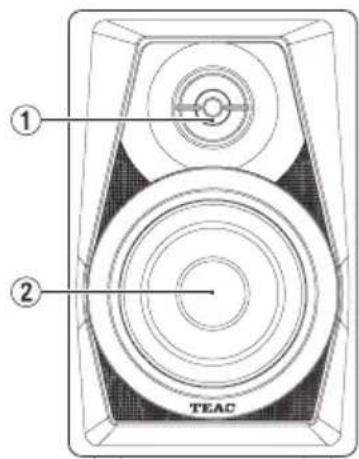
Same for both active and passive units
① Tweeter
② Woofer
Rear panel
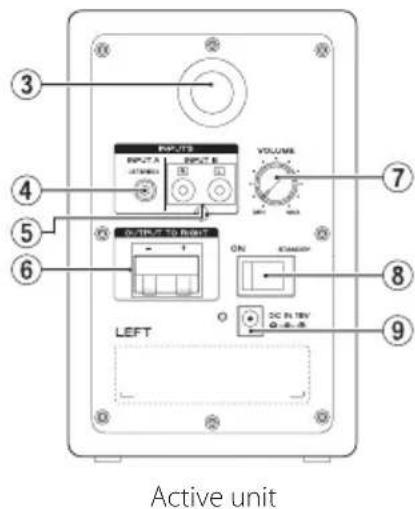
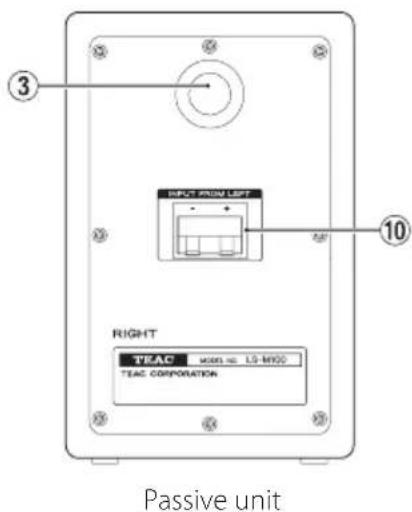
Bass reflex port
④ Stereo mini input jack
⑤ RCA pin input jacks
⑥ Speaker terminal (OUTPUT TO RIGHT) Connect to passive unit.
⑦ Output volume knob
8 Standby/On switch/indicator
DC IN 15V connector
10 Speaker terminal (INPUT FROM LEFT) Connect to active unit.
Preparation
Precautions before making connections
- When unpacking the speaker units, do not hold them by their tweeters or woofers.
- Connect signal cables and power cords so that they will not become caught on anything.
- Before turning the built-in amplifier on, minimize the volume of the input signal. Turning it on while inputting a loud signal could damage the speaker.
- Do not continuously use it for a long time at a loud volume. Doing so could harm your hearing.
- Use power cords, power outlets, audio signal cables and connectors that are undamaged and free of wiring shorts and other defects.
- Set the power switch to OFF before connecting the power cord.
- Do not input signals other than audio signals.
- Before connecting an audio signal to this unit, confirm that the level of the input signal is minimized and the power switch of the built-in power amplifier is set to OFF.
Always use the correct polarity.
Connections
- Set the power switch to OFF.
- Connect the included AC adapter (PS-P1524E) to the speaker and then to the power supply.
- Use a commercially available connection cable to connect the input jack(s) of the active unit to the output device.
- Use the included speaker cable to connect the output terminal of the active unit to the input terminal of the passive unit.
Installation
Installing speakers correctly is extremely important. The volume of low frequencies will seem to change according to the positions where the speakers are installed. Test various installation positions to find the best places for maximizing the capabilities of the speakers.
- Place the active unit to the left and the passive unit to the right.
- Place the speakers so that they form an equilateral triangle with the listening position.
LEFT: Active unit RIGHT: Passive unit
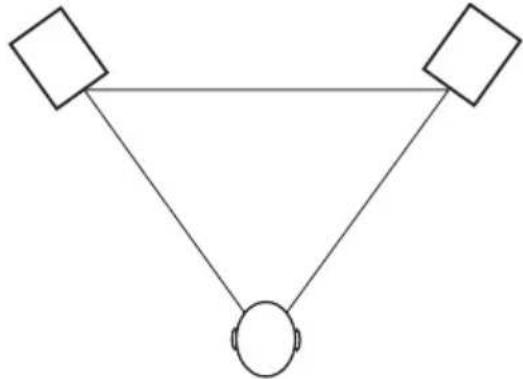
- Install each speaker so that the top of its woofer is at ear height.
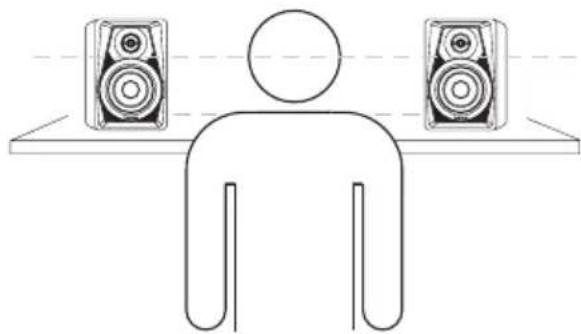
- Do not install speakers near mirrors, glass or other surfaces that reflect sound. Do not place anything between the speakers and the listening position.
Specifications
General
Maximum effective output (distortion: 10%)
$$ 1 4 W + 1 4 W $$
Speaker units
3-inch (76.2mm) woofer
0.5-inch (12.7mm) tweeter
Enclosure
Bassreflextype
Frequency response
$$ 8 0 \mathrm {H z} - 2 2 \mathrm {k H z} $$
Crossover frequency
$$ 8 \mathrm {k H z} $$
External input jacks
Output voltage: DC 15 V
Output current: 2.4 A
Power consumption
$$ 6. 2 \mathrm {W} $$
Dimensions
110× 170× 138mm (43 / 8^ × 63 / 4^ × 51 / 2^ )
(width × height × depth, excluding protrusions)
Weight
Active unit: 1.1kg (2 1/2 lb)
Passive unit: 1.0kg (2 1/4 lb)
Dimensional drawing
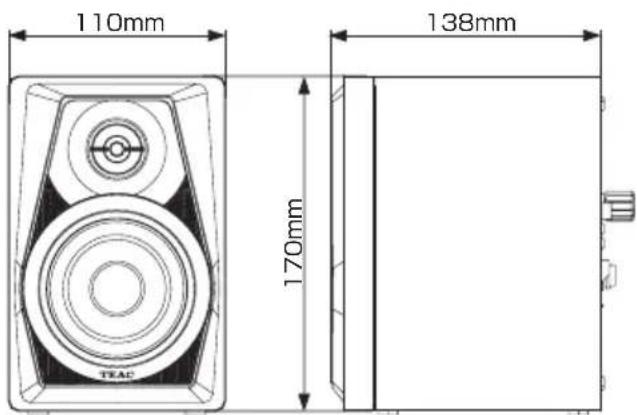
- Illustrations in this manual might differ in part from the actual product.
Weight and dimensions are approximate. - Specifications and external appearance might be changed without notification to improve the product.
ATTENTION
-NE RETIREZ PAS LES CAPOTS EXTERNES OU BOITIERS POUR EXPOSER L'ÉLECTRONIQUE. AUCUNE PIECE INTERNE N'EST REPARABLE PAR L'UTILISATEUR.
SI VOUS RENCONTREZ DES PROBLEMES AVEC CE PRODUIT, CONTACTEZ LE MAGASIN OU VOUS AVEZ ACHETÉ L'UNITE. N'UTILISEZ PAS LE PRODUIT TANT QU'IL N'A PAS ETÉ REPARE.
L'UTILISATION DE COMMANDES, DE RÉGLAGES OU LE SUVI DE PROCÉDURES AUTRES QUE CE QUI EST DÉCRIT DANS CE DOCUMENT PEUT PROVOQUER UNE EXPOSITION À UN RAYONNEMENT DANGEREUX.
Passiv enchet: 1,0 kg
Mättritning
This product is subject to the legal warranty regulations of the country of purchase. In case of a defect or a problem, please contact the dealer where you bought the product.
In countries/regions other than the USA, Canada and Europe
This warranty gives you specific legal rights, and you may also have other rights that vary by country, state or province.
If you have a warranty claim or request, please contact the dealer where you bought the product.
1834 Gage Road, Montebello, California 90640 U.S.A. Phone: +1-323-726-0303
TEAC AUDIO EUROPE Gutenbergstr. 3, 82178 Puchheim, Germany Phone: +49-8142-4208-141
This device has a serial number located on its back panel. Please record the serial number and retain it for your records.

- CAUTION
- Model for Europe
- DECLARATION OF CONFORMITY
- For European Customers
- Disposal of electrical and electronic equipment and batteries and/or accumulators
- Contents
- Introduction
- Features
- Included items
- ATTENTION
- Precautions for placement and use
- Beware of condensation
- Cleaning the unit
- Using the TEAC Global Site
- NOTE
- Names and functions of parts
- Front panel
- Rear panel
- Preparation
- Precautions before making connections
- Connections
- Installation
- Specifications
- General
- Dimensional drawing
- Mättritning
- In countries/regions other than the USA, Canada and Europe
Brand : TEAC
Model : LSM100
Category : Speaker