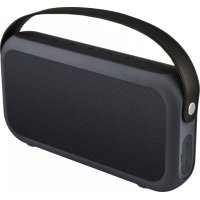
ZX9 - Docking station Billow - Free user manual and instructions
Find the device manual for free ZX9 Billow in PDF.



User questions about ZX9 Billow
0 question about this device. Answer the ones you know or ask your own.
Ask a new question about this device
Download the instructions for your Docking station in PDF format for free! Find your manual ZX9 - Billow and take your electronic device back in hand. On this page are published all the documents necessary for the use of your device. ZX9 by Billow.
USER MANUAL ZX9 Billow
portable speaker LOW
ZX9 | USER GUIDE
m1 |001
MUSIC
g billow
TECHNOLOGY
billowtechnology.com

text_image
m1 l001MUSIC
text_image
Product Front 8 9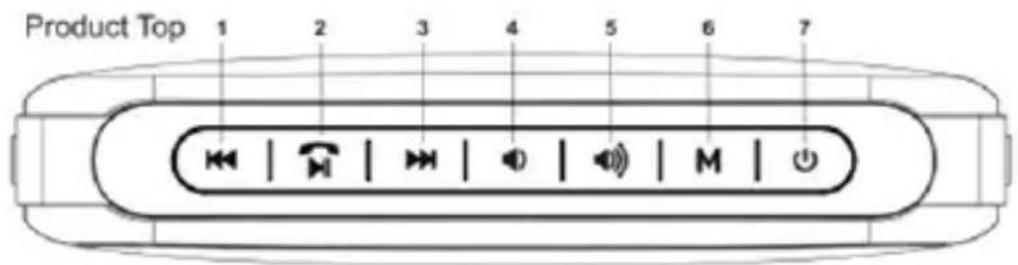
text_image
Product Top 1 2 3 4 5 6 7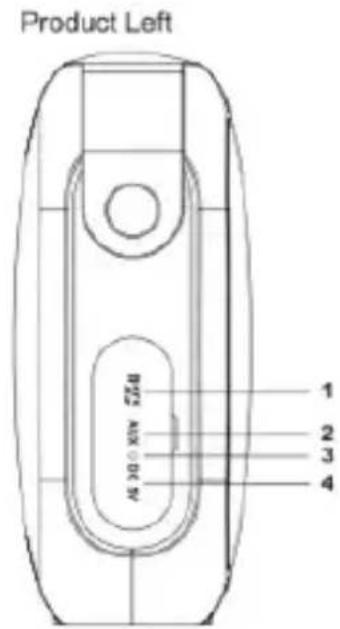
text_image
Product Left 1 2 3 4 M0.05V M0.05V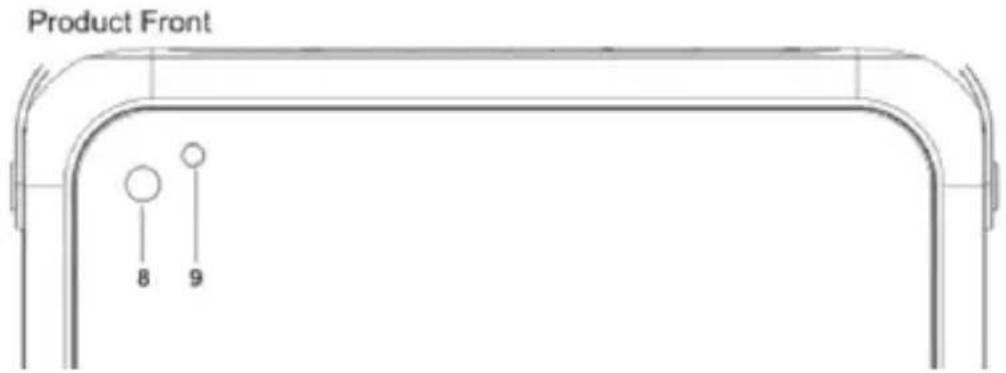
text_image
Product Front 8 9text_image
AUX Play Connect NOTE : The speaker is powered by a Lithium-ion rechargeable battery, if you start to notice sound distortion or the LED is flashing, the battery is low and needs to be recharged.text_image
Diagram showing a portable electronic device connected to a laptop, with wireless icons and devices like a smartphone and tablet nearby.NOTE: The speaker is powered by a Lithium-ion rechargeable battery, if you start to notice sound distortion or the LED is flashing, the battery is low and needs to be recharged.
text_image
Diagram showing a portable electronic device with musical notes and wireless icons connected to a laptop, illustrating smart home connectivity.NOTE: The speaker is powered by a rechargeable lithium battery, if it begins to notice sound distortion or the LED blinks, the battery is low and must be charged.
Micro SD card playback mode
- Insert your Micro SD card into the Micro SD slot of the ZX9.
- Press the M button until a tone appears to show that the unit is in playback mode by Micro SD card, the LED will turn red.
- Press the Volume + or Volume - button to adjust the volume of the ZX9.
- Press the ZX9 button to move to the next or previous song.
- Press the button to pause / play the volume of the ZX9.
NOTE: MP3 and WMA files are compatible, please copy the music to the root of the Micro SD card directly, be sure to insert the Micro SD Card in the correct direction.
Make Calls
Before making a call with the ZX9, you must pair and pair your phone with Bluetooth with the ZX9, if in doubt consult the procedure explained above.
- To answer a call, press the button, Now you can use the ZX9 as a hands-free.
- To end the call, press the button.
- Press and hold the button to reject the call
NOTE: The microphone is in the upper left corner (near the LED light) on the front panel, to keep the call quality as good as possible, when answering the call, try to speak at the microphone position,
Safety warnings
-
Use only the supplied USB cable.
-
Use a 5VDC / 1A USB charger to charge.
-
Disconnect the USB cable after fully charging the unit.
-
Do not charge the unit for a long time after the unit is fully charged.
-
Do not immerse the product in water. Risk of short circuit.
-
Do not use the product near a heat source such as a fire or a heater, a fire hazard.
-
Do not knock or throw the product.
Precautions
-
Do not use or leave the product in high temperature (for example, in direct sunlight or a vehicle in hot conditions), otherwise it may overheat or catch fire.
-
Do not use it in a place where static electricity is large, otherwise, the electronic safety components may be damaged, which will cause problems in the device.
-
The device should be stored at room temperature, please avoid completely discharging the battery, make periodic charges.
Technical Support.
Please visit our website www.billowtechnology.com for more information on installation and configuration of this product.
Play by Auxiliary Eingang
text_image
AUX Play Connect NOTE : The speaker is powered by a Lithium-ion chargeable battery, if you start to notice sound distortion or the LED is flashing, the battery is low and needs to be recharged. 5% AUX PC 5VBluetooth-Wiedergabemodus
text_image
Illustration of a portable electronic device with musical notes and wireless icons, alongside a laptop connected to devices.text_image
Product Top 1 2 3 4 5 6 7 OK | M | OK | OK | M | OK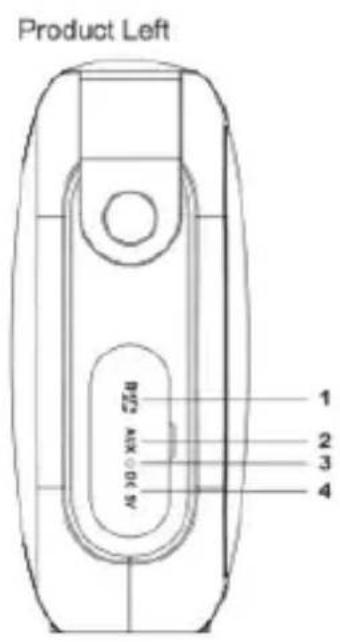
text_image
Product Left B23 A100 D47 1 2 3 4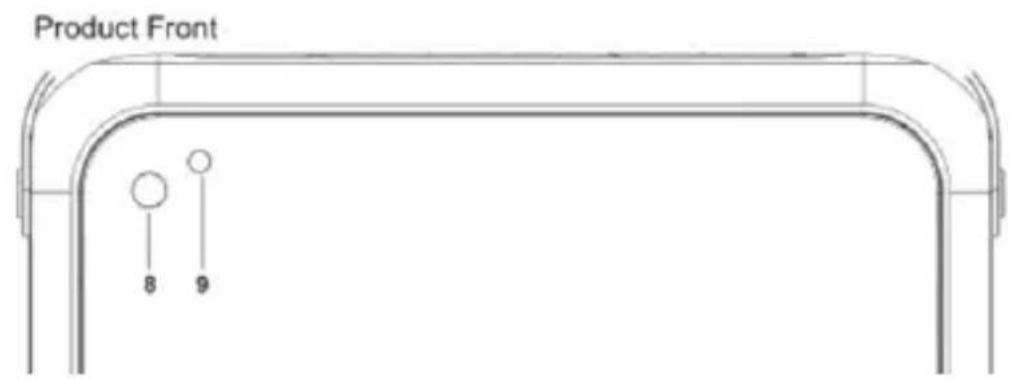
text_image
Product Front 8 9LED, μοβ led mode AUX)
text_image
AUX Play Connect NOTE : The speaker is powered by a Lithium-ion rechargeable battery, if you start to notice sound distortion or the LED is flashing, the battery is low and needs to be recharged.text_image
Illustration of a portable electronic device with musical notes and wireless icons, alongside a laptop connected to devices.Introduction and Product Description
Thank you for choosing the ZX9 Portable Bluetooth Speaker.
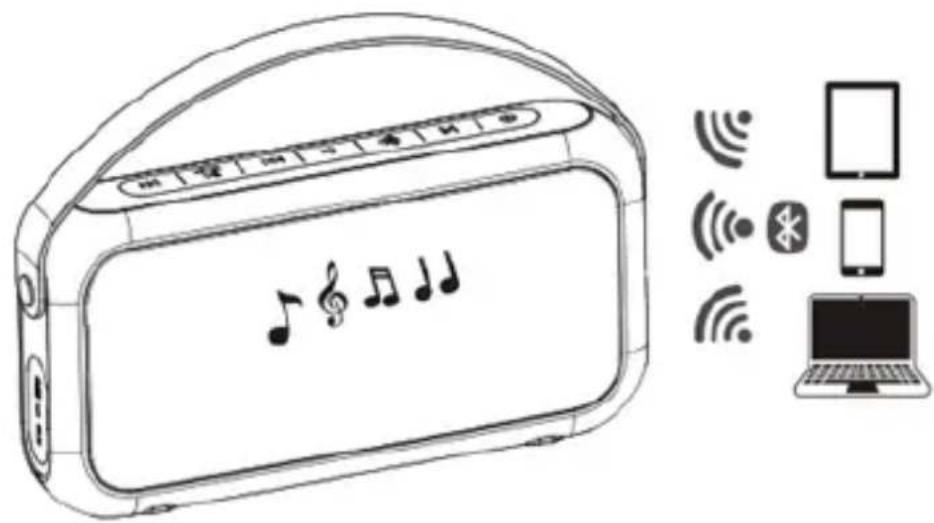
The ZX9 speaker is a Bluetooth multimedia speaker that connects to any Bluetooth phone, iPad, tablet or laptop. It is portable with an ideal size, elegant and 10W RMS power, the ZX9 is designed for indoor and outdoor use.
The ZX9 allows you to receive calls, including a rubber handle for easy transport. In addition to its portability, the ZX9 can play music from its Micro SD slot or through its Auxiliary input. With an autonomy of 7 hours you can enjoy your music for a very long time, the battery is recharged with a standard USB charger, so that it can be charged from a USB port of the car, through a laptop or using an outlet Electric, making it the perfect solution to take you to a barbecue or to the beach, to go out camping during the weekend or just enjoy your favorite music for hours outdoors.
Discover the new way to enjoy your Music!
Package Contents
·ZX9
· Quick installation guide.
- USB to Micro USB cable
Note: Make sure that your packaging contains the items described above. If you find that something is missing or damaged, please contact your dealer.
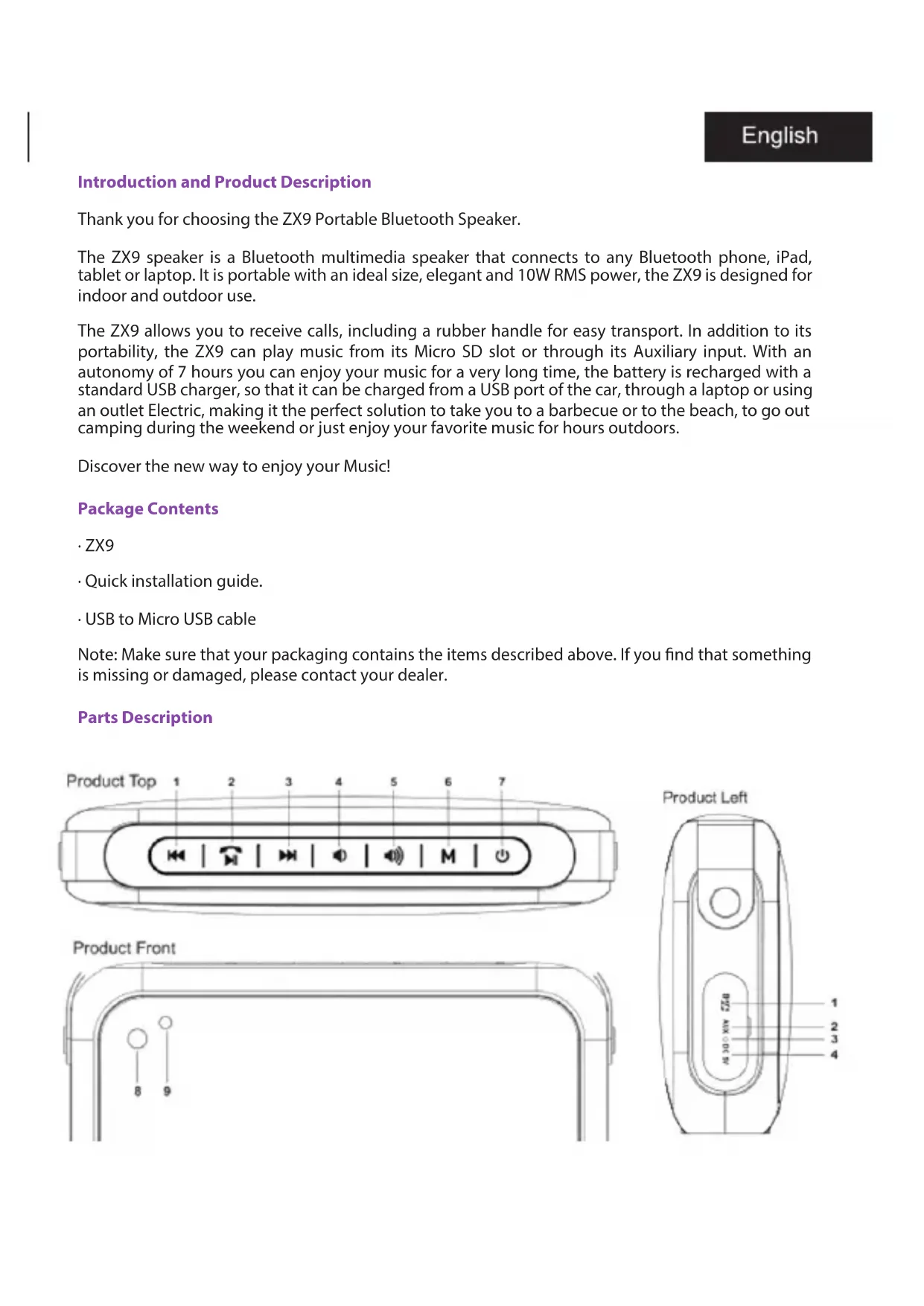
Parts Description
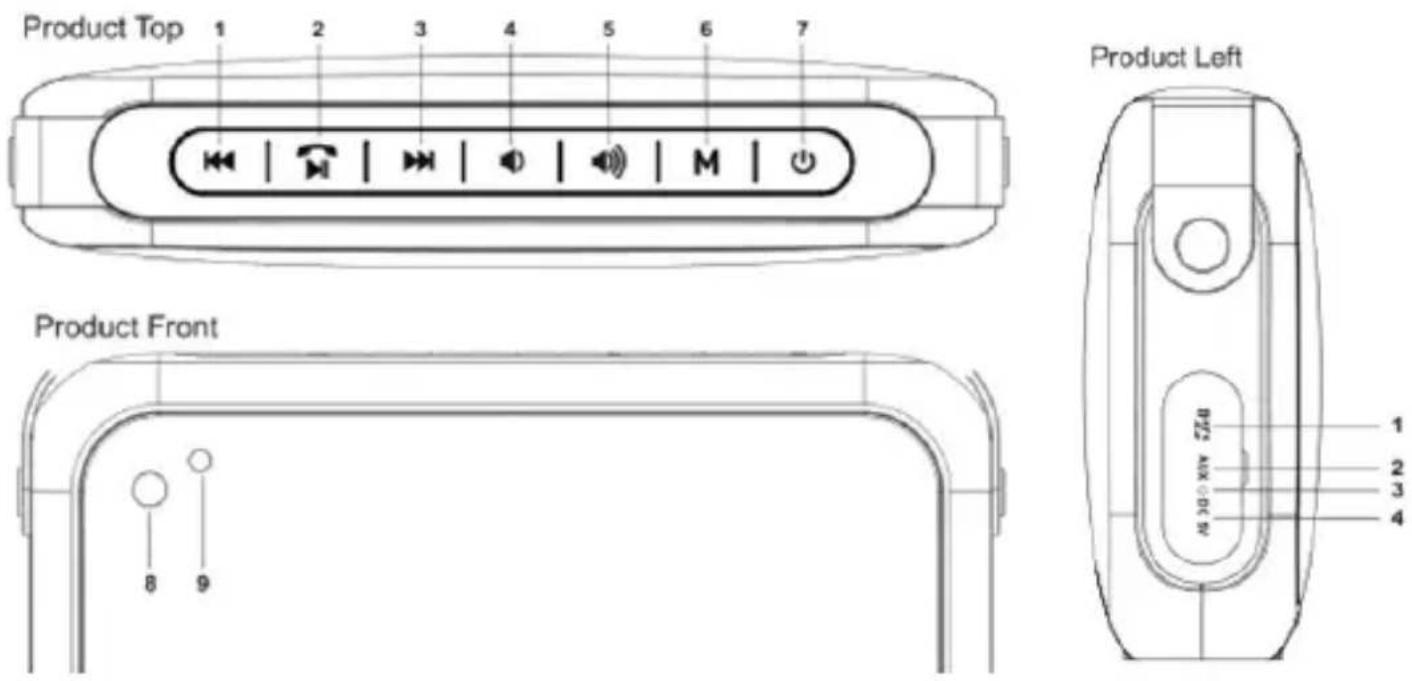
-
Previous song
-
Handsfree / Play / Pause / Mute (Hold to disconnect the Bluetooth pairing in Bluetooth mode, Hold to reject the incoming call)
-
Next song
-
Volume-
-
Volume +
-
Selecting the audio mode
-
On / Off (Press and hold the ON / OFF button)
-
LED mode indicator (blue-blue LED mode, micro SD card playback mode red LED, purple led AUX mode)
-
Microphone
-
Micro SD Card Slot
-
Auxiliary audio jack jack 3.5 mm
-
Charge Indicator
-
Micro USB input for 5VDC / 1A charging
Basic Operations. Charging the device
-
Use the supplied USB cable, connect it between the device's Micro USB port and a 5VDC / 1A UBS charger (not included)
-
The battery will charge fully in 2.5 hours (charging time will be longer if you play music during charging)
-
The LED indicator will turn red during charging, it will turn off once charging is complete.
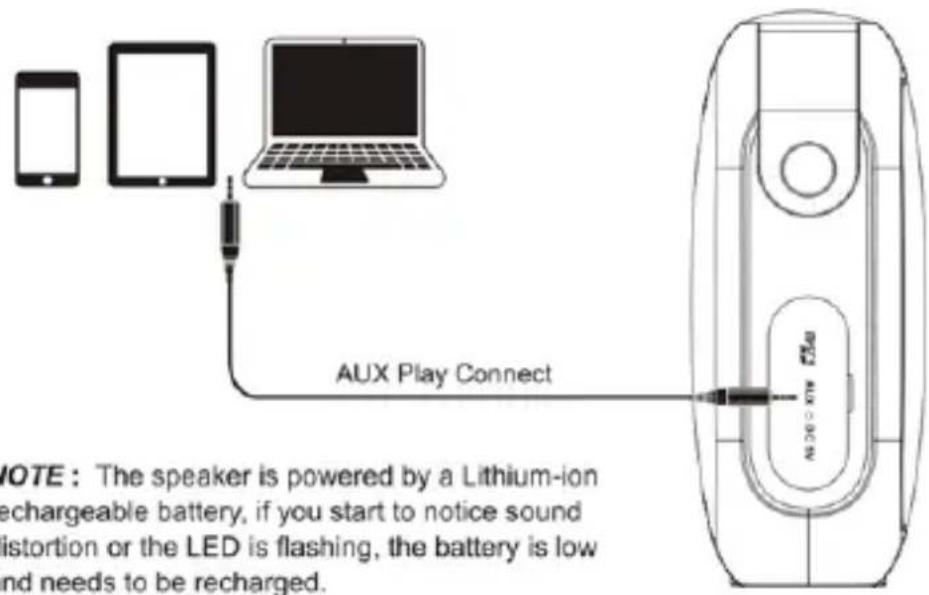
Play by Auxiliary input
-
Use a 3.5mm Jack to 3.5mm Jack and connect it between the ZX9's 3.5mm Jack Plug and your device (Smartphone, Tablet, etc.)
-
Press the M button, the ZX9 will indicate a tone to show that it is in AUX playback mode, and the LED will light purple.
-
Turn on your audio device and play music.
-
Adjust the volume of your audio device to the desired level.
text_image
AUX Play Connect NOTE : The speaker is powered by a Lithium-ion rechargeable battery, if you start to notice sound distortion or the LED is flashing, the battery is low and needs to be recharged.Bluetooth playback mode
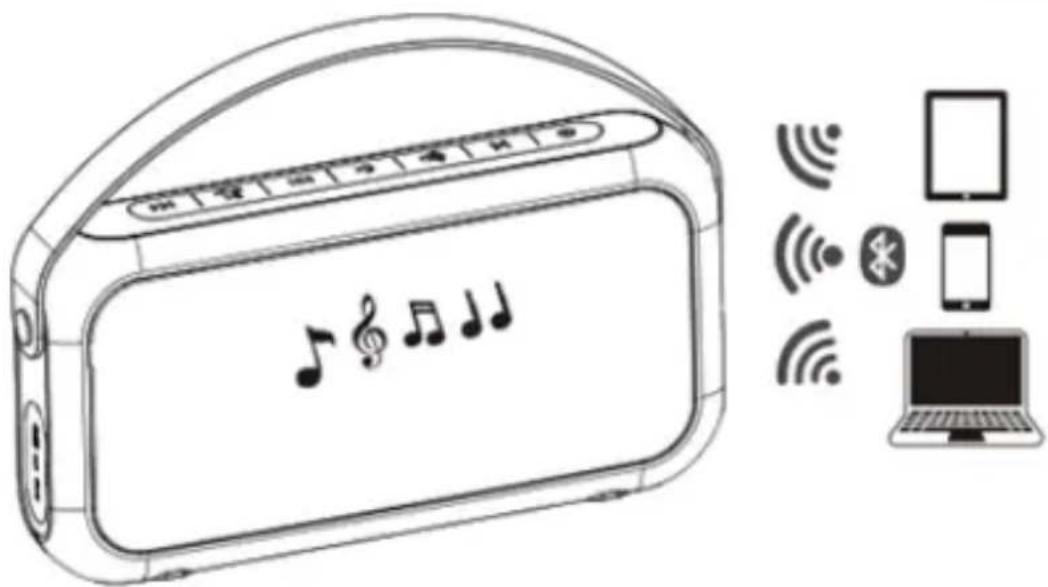
If you want to play music over Bluetooth, make sure the distance between ZX9 and your device is less than 10m.
- Press the M button, a tone will sound to show that the unit is in Bluetooth mode, the blue LED light will blink rapidly
- Activate Bluetooth on your audio device and perform a Bluetooth device search.
- ZX9 will appear, establish the connection, if the device requires the password, enter "0000"
- Adjust the volume of the audio device to the desired level.
- Press the Volume + or Volume - button to adjust the volume of the ZX9.
- Press the ZX9 button to move to next or previous song.
- Press the button to pause / play the volume of the ZX9
text_image
Diagram showing a portable electronic device connected to a laptop via wireless signals, including icons for devices like a smartphone and a laptop.NOTE: The speaker is powered by a rechargeable lithium battery, if it begins to notice sound distortion or the LED blinks, the battery is low and must be charged.
Micro SD card playback mode
- Insert your Micro SD card into the Micro SD slot of the ZX9.
- Press the M button until a tone appears to show that the unit is in playback mode by Micro SD card, the LED will turn red.
- Press the Volume + or Volume - button to adjust the volume of the ZX9.
- Press the ZX9 button to move to the next or previous song.
- Press the button to pause / play the volume of the ZX9.
NOTE: MP3 and WMA files are compatible, please copy the music to the root of the Micro SD card directly, be sure to insert the Micro SD Card in the correct direction.
Make Calls
Before making a call with the ZX9, you must pair and pair your phone with Bluetooth with the ZX9, if in doubt consult the procedure explained above.
- To answer a call, press the button, Now you can use the ZX9 as a hands-free.
- To end the call, press the button.
- Press and hold the button to reject the call
NOTE: The microphone is in the upper left corner (near the LED light) on the front panel, to keep the call quality as good as possible, when answering the call, try to speak at the microphone position,
Safety warnings
- Use only the supplied USB cable.
- Use a 5VDC / 1A USB charger to charge.
- Disconnect the USB cable after fully charging the unit.
- Do not charge the unit for a long time after the unit is fully charged.
- Do not immerse the product in water. Risk of short circuit.
- Do not use the product near a heat source such as a fire or a heater, a fire hazard.
- Do not knock or throw the product.
Precautions
- Do not use or leave the product in high temperature (for example, in direct sunlight or a vehicle in hot conditions), otherwise it may overheat or catch fire.
- Do not use it in a place where static electricity is large, otherwise, the electronic safety components may be damaged, which will cause problems in the device.
- The device should be stored at room temperature, please avoid completely discharging the battery, make periodic charges.
Technical Support.
Please visit our website www.billowtechnology.com for more information on installation and configuration of this product.
text_image
Product Top 1 2 3 4 5 6 7 ← | | → | | | | M | |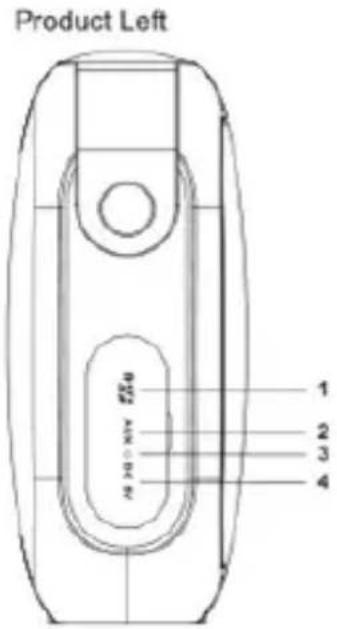
text_image
Product Left 1 2 3 4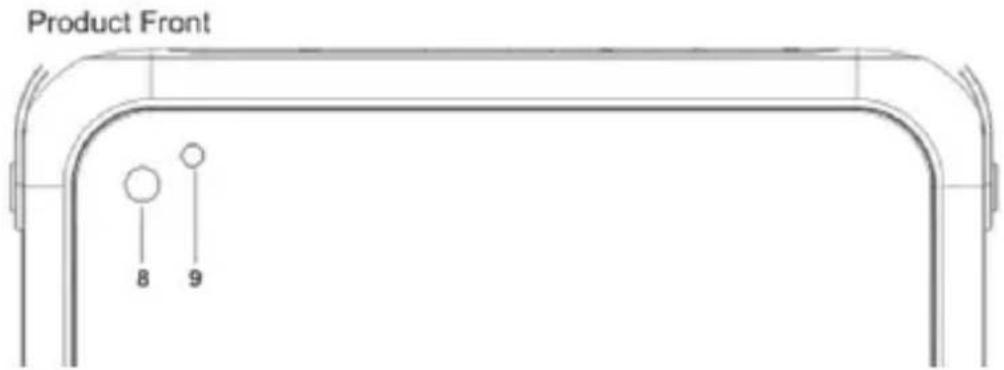
text_image
Product Front 8 9text_image
AUX Play Connect NOTE : The speaker is powered by a Lithium-ion rechargeable battery, if you start to notice sound distortion or the LED is flashing, the battery is low and needs to be recharged.NOTE: The speaker is powered by a Lithium-ion rechargeable battery, if you start to notice sound distortion or the LED is flashing, the battery is low and needs to be recharged.
text_image
Diagram showing a portable radio device connected to devices with wireless signals, including a laptop and smartphone.text_image
Product Top 1 2 3 4 5 6 7 OK | | | | | | | | M | |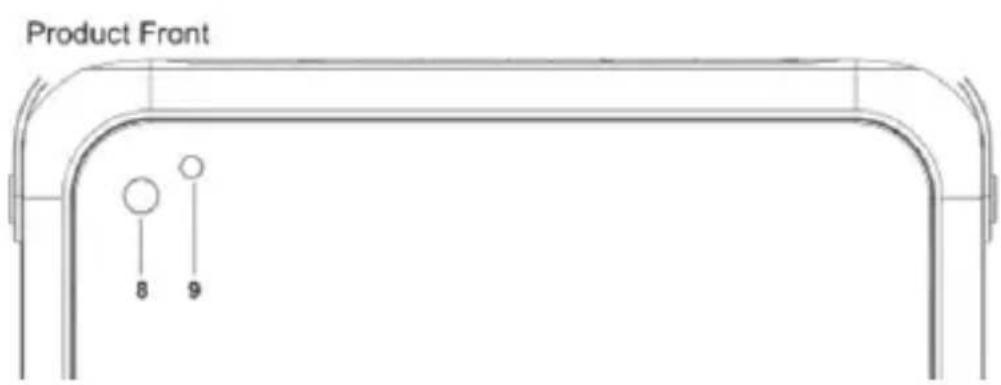
text_image
Product Front 8 9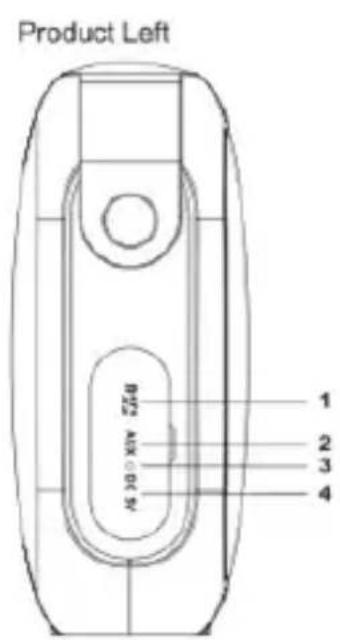
text_image
Product Left B22 AUX ∘ EC 5V 1 2 3 4Seadme laadimine
text_image
AUX Play ConnectNOTE: The speaker is powered by a Lithium-ion rechargeable battery, if you start to notice sound distortion or the LED is flashing, the battery is low and needs to be recharged.
text_image
Illustration of a portable electronic device with musical notes and wireless icons, alongside a laptop connected to devices.text_image
Product Front 8 9text_image
AUX Play ConnectNOTE: The speaker is powered by a Lithium-ion rechargeable battery, if you start to notice sound distortion or the LED is flashing, the battery is low and needs to be recharged.
Mode de lecture Bluetooth
text_image
Diagram showing a portable radio with musical notes and connected to a laptop, accompanied by icons for wireless connectivity.text_image
Product Front 8 9- Micro SD kartica
- Pomoćni audio priključak 3,5 mm
-
Indikator naplate
-
Mikro USB ulaz za napajanje od 5VDC / 1A
OSNOVNE OPERACIJE
Punjenje uređaja
text_image
AUX Play Connect NOTE : The speaker is powered by a Lithium-ion rechargeable battery, if you start to notice sound distortion or the LED is flashing, the battery is low and needs to be recharged.NOTE: The speaker is powered by a Lithium-ion rechargeable battery, if you start to notice sound distortion or the LED is flashing, the battery is low and needs to be recharged.
-
Koristite utičnicu od 3,5 mm do 3,5 mm i spojite ga između utičnice Jacka od 3,5 mm ZX9 i vašeg uređaja (Smartphone, Tablet i sl.)
-
Pritisnite tipku M, ZX9 će pokazivati ton koji će pokazati da je u AUX reprodukcijskom načinu, a LED će svijetliti ljubičastim bojama.
-
Uključite audio uređaj i reproducirajte glazbu.
-
Podesite glasnoću vašeg audio uređaja na željenu razinu.
BLUETOOTH NAČIN REPRODUKCIJE
Ako želite reproducirati glazbu preko Bluetootha, provjerite je li udaljenost između ZX9 i vašeg uređaja manja od 10m.
- Pritisnite tipku M, čuje se ton koji će pokazati da je uređaj u Bluetooth modu, plava LED svjetlost će brzo treptati
- Aktivirajte Bluetooth na svoj audio uređaj i obavite pretraživanje Bluetooth uređaja.
- ZX9 će se pojaviti, uspostaviti vezu, ako uređaj zahtijeva lozinku, unesite "0000"
- Podesite glasnoću audio uređaja na željenu razinu.
- Pritisnite tipku Volume + ili Volume - za podešavanje glasnoće ZX9.
- Pritisnite gumb ZX9 za prijelaz na sljedeću ili prethodnu pjesmu.
- Pritisnite gumb za pauziranje / reprodukciju glasnoće ZX9
NAPOMENA: Zvučnik se napaja punjenom litijskom baterijom, ako počinje primijetiti izobličenje zvuka ili LED trepće, baterija je prazna i mora biti napunjena.
Način reprodukcije Micro SD kartice
- Umetnite svoju Micro SD karticu u utor za Micro SD od ZX9.
- Pritisnite tipku M dok se ne pojavi ton koji pokazuje da je uređaj u načinu reprodukcije
Hrvatski
Micro SD karticom, LED će postati crveni.
- Pritisnite tipku Volume + ili Volume - za podešavanje glasnoće ZX9.
- Pritisnite gumb ZX9 za prijelaz na sljedeću ili prethodnu pjesmu.
- Pritisnite gumb za pauzu / reprodukciju glasnoće ZX9.
text_image
Diagram showing a portable radio device with musical notes and wireless icons, alongside a laptop connected to devices.Upućivanje poziva
Prije upućivanja poziva putem ZX9, morate upariti i upariti telefon s Bluetoothom pomoću ZX9, ako ste u nedoumici, pogledajte gore opisani postupak.
- Da biste odgovorili na poziv, pritisnite gumb, Sada možete koristiti ZX9 kao hands-free.
- Da biste prekinuli poziv, pritisnite gumb.
- Pritisnite i držite gumb za odbijanje poziva
text_image
AUX Play Connect NOTE : The speaker is powered by a Lithium-ion rechargeable battery, if you start to notice sound distortion or the LED is flashing, the battery is low and needs to be recharged.3
NOTE: The speaker is powered by a Lithium-ion rechargeable battery, if you start to notice sound distortion or the LED is flashing, the battery is low and needs to be recharged.
text_image
Diagram showing a portable radio with musical notes and wireless icons connected to a laptop, illustrating wireless signal transmission.text_image
Product Front 8 9-
Slot Micro SD Card
-
Jack jack audio ausiliario 3,5 mm
text_image
AUX Play Connect NOTE : The speaker is powered by a Lithium-ion rechargeable battery, if you start to notice sound distortion or the LED is flashing, the battery is low and needs to be recharged.text_image
Diagram showing a portable radio with musical notes and connected to a laptop via wireless devices.text_image
Product Front 8 9text_image
AUX Play Connect NOTE : The speaker is powered by a Lithium-ion rechargeable battery, if you start to notice sound distortion or the LED is flashing, the battery is low and needs to be recharged.NOTE: The speaker is powered by a Lithium-ion rechargeable battery, if you start to notice sound distortion or the LED is flashing, the battery is low and needs to be recharged.
(Smartphone, Tablet, etc.)

text_image
Diagram showing a portable radio device connected to a laptop via wireless signals, including icons for devices like a smartphone, tablet, and wireless devices.text_image
AUX Play Connect NOTE : The speaker is powered by a Lithium-ion rechargeable battery, if you start to notice sound distortion or the LED is flashing, the battery is low and needs to be recharged.text_image
Diagram showing a portable radio device connected to a laptop via wireless signals, including icons for devices like a smartphone and a laptop.text_image
AUX Play Connect NOTE : The speaker is powered by a Lithium-ion rechargeable battery, if you start to notice sound distortion or the LED is flashing, the battery is low and needs to be recharged.NOTE: The speaker is powered by a Lithium-ion rechargeable battery, if you start to notice sound distortion or the LED is flashing, the battery is low and needs to be recharged.
text_image
Illustration of a portable electronic device with musical notes and wireless icons, alongside a laptop connected to devices.Português
text_image
AUX Play Connect NOTE : The speaker is powered by a Lithium-ion rechargeable battery, if you start to notice sound distortion or the LED is flashing, the battery is low and needs to be recharged.NOTE: The speaker is powered by a Lithium-ion rechargeable battery, if you start to notice sound distortion or the LED is flashing, the battery is low and needs to be recharged.
text_image
Diagram showing a portable radio with musical notes and connected to devices including a laptop, wireless signals, and smartphone.text_image
AUX Play Connect NOTE : The speaker is powered by a Lithium-ion rechargeable battery, if you start to notice sound distortion or the LED is flashing, the battery is low and needs to be recharged.NOTE: The speaker is powered by a Lithium-ion rechargeable battery, if you start to notice sound distortion or the LED is flashing, the battery is low and needs to be recharged.
Nabíjanie zariadenia
text_image
Illustration of a portable electronic device with musical notes and connected to devices including a laptop, wireless signals, and a smartphone.text_image
AUX Play ConnectNOTE: The speaker is powered by a Lithium-ion rechargeable battery, if you start to notice sound distortion or the LED is flashing, the battery is low and needs to be recharged.
text_image
Diagram showing a portable radio device connected to devices including a laptop, wireless signals, and smartphone.AEE REI-RAEE 5548 In this manual, the container (bin) symbol indicates that the product is subject to the European directive 2002/96 / EC, electrical and electronic products, batteries, and batteries and other accessories must necessarily be subject to a selective collection.
At the end of the life of the device, make use of the recycling bins. This gesture Will help reduce the health risks and preserve the environment.
Municipalities and distributors, Will provide essential details on recycling your old device. If this device carries an internal battery, it must be removed and deposited separately for proper management.
Recyclage
EU DECLARATION OF CONFORMITY SIMPLIFIED
Hereby, Billow Technology declares that the radio equipment type ZX9 is in compliance with Directives 2014/53/EU and 2011/65/EU.
The full text of the EU declaration of conformity is available at the following internet address: http://billowtechnology.com/CE/ZX9_DECLARATION.pdf
DÉCLARATION UE DE CONFORMITÉ SIMPLIFIÉE
The content of this guide is subject to typographical errors

text_image
billow billowtechnology.comportable speaker

text_image
LOWZX9 | USER GUIDE
m1 |001
MUSIC
g billow
TECHNOLOGY