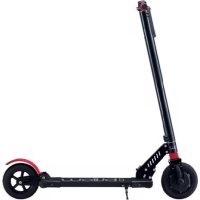
eScooter - Scooter Billow - Free user manual and instructions
Find the device manual for free eScooter Billow in PDF.




| Product Type | Foldable electric scooter |
| Brand | Billow |
| Model | eScooter URBAN85 |
| Maximum speed | 25 km/h (3 speed levels) |
| Range | 15 km |
| Maximum user weight | 120 kg |
| Recommended minimum age | 14 years |
| Battery type | Lithium-ion (rechargeable) |
| Power supply | AC/DC adapter included |
| Front brake | Electric brake |
| Rear brake | Manual shoe brake (plastic) |
| Lighting | LED front headlight and LED rear light |
| Display | Multifunction display: speed, distance, battery, time |
| Foldability | Yes, with unlocking lever |
| Scooter weight | Approximately 12 kg |
| Package contents | Urban 85, quick start guide, M3 Allen key, two handlebar grips, AC/DC adapter |
| Maintenance | Clean with a damp cloth; store in a cool, dry place |
| Safety | Helmet and protective gear recommended; do not use under influence |
Frequently Asked Questions - eScooter Billow
User questions about eScooter Billow
0 question about this device. Answer the ones you know or ask your own.
Ask a new question about this device
Download the instructions for your Scooter in PDF format for free! Find your manual eScooter - Billow and take your electronic device back in hand. On this page are published all the documents necessary for the use of your device. eScooter by Billow.
USER MANUAL eScooter Billow
text_image
Labeled diagram of a scooter with numbered parts for identificationnatural_image
Mechanical component with threaded shaft and dotted circular motion arrow (no text or symbols)COUNTER CLOCKWISE
EN SENTIDO CONTRARIO A LAS AGUJAS DEL RELOJ
natural_image
Mechanical component with clockwise rotation indicator (no text or symbols on the device itself)EN SENTIDO DE LAS AGUJAS DEL RELOJ
natural_image
Mechanical assembly diagram showing a black shaft connected to blue and red components with directional arrows indicating motion (no text or symbols)PLEGANDO & DESPLEGANDO SU E-SCOOTER.
natural_image
Black mechanical vehicle with wheels and suspension components (no text or symbols visible)natural_image
Product photo showing a black electric shaver with attached cable, target, and digital display (no text or symbols visible)text_image
Labeled diagram of a scooter with numbered parts for identificationnatural_image
Close-up of a black threaded bolt with a dotted circular arrow indicating rotation (no text or symbols)COUNTER CLOCKWISE
CONTRE LES AIGUILLES DE
L'HORLOGE
natural_image
Mechanical component with clockwise rotation indicator (no text or symbols on the device itself)AU SENS DES AIGUILLES D'HORLOGE
natural_image
Mechanical assembly diagram showing a black shaft connected to blue and red components with directional arrows indicating motion (no text or symbols)PLIER ET DÉPLIER VOTRE E-SCOOTER.
natural_image
Black mechanical vehicle with wheels and suspension components (no text or symbols visible)Écran multifonction
PANEL D'INFORMATION
natural_image
Product photo showing a black electric shaver with attached cable, target, and digital display (no text or symbols visible)Introduction and description of the product.
Thank you for choosing the URBAN85 E-Scooter. The URBAN85 electric scooter has been created to circulate around the city in a comfortable, safe way and avoiding the pollution of the environment since it works with electric power. In addition, it can be folded quickly and easily, making it ideal to accompany you on all urban trips. It can circulate at 24Km / h, and its large battery provides a range of 15km.
Packing content
· Urban 85
· Quick installation guide.
· Allen key M3
- Two handlebar handles (left and right)
· AC / DC adapter
Make sure your packaging contains the items described above. If you find that any item is missing or damaged, please contact your dealer.
Warnings
Before operating this E-Scooter, read all instructions for safe assembly and operation. This manual can guide you through the functions and use of the electric scooter. Before using this scooter, familiarize yourself with its operating mode, so that you can keep the E-Scooter in the best possible conditions.
This device can be used by children from the age of 14 and people with reduced physical capacity provided they are supervised or given instructions on how to use E-Scooter safely and understand the risks involved.
Children should not play with the appliance.
Children should not perform cleaning or maintenance without supervision.
The E-scooter can only be driven by a person of not less than 14 years old with a maximum weight of 120 kg. The other parameters for the permissible operation of the scooter are defined in the product data sheet. Additionally, the scooter can only be used in conditions of good visibility and only if the physical-mental
conditions for the stability of the scooter are met (for example, it can not be used by a person under the influence of drugs or alcohol). When using the scooter, it is recommended that the user wear a helmet for greater safety, the helmet helps save lives in the event of an accident.
Be sure to check that the steering system is properly adjusted and that all components of the connection are firmly secured and not broken before driving, refer to the handlebar assembly and safety instructions.
Always wear shoes.
When the safety nuts and other safety accessories may lose their effectiveness, do not use the E-Scooter and contact technical support.
It is totally forbidden to modify the quality of the original parts and materials of the E-scooter.
Security instructions
We recommend that you always wear a helmet and protective equipment such as elbow pads, knee pads and wrist guards to ensure your personal safety.
Make sure you have read the user manual carefully, to make sure you know how to drive it safely and fun.
It is your responsibility to be aware and comply with all the regulations according to your country. If there is no regulation for this scooter in your country, take care of your own safety and the safety of others.
Pay attention to other people. Always drive safely and only at a speed that allows you to brake safely at any time. Something common to all these products is that there is a risk that they may fall off the product and injure themselves. Always drive in the safest way possible.
Avoid applying too much force or stepping on the rear fender permanently. This can cause the fender to loosen or damage the spring that supports the mudguard.
As a result, the brake shoe constantly touches the wheel and the engine temperature increases due to the additional resistance. The rear tire can also loosen if the brake is in the braking position constantly.
Avoid constantly braking. As a result, the tires will not only wear out, they will heat up permanently. This will soften the wheel and will no longer have the same grip on the road as normal. Do not touch the tire after braking.
If you hear unusual noise or note friction when you turn on the electric scooter, a bearing may be damaged. A worn bearing can even be indicated by a strong vibration of the handlebar. In this case, contact the authorized technical service, as it is necessary to replace the bearing and / or check and adjust the handlebar.
Drive the electric scooter only on a dry surface; otherwise, the driving safety and braking performance may be affected and the motor or bearings may be damaged.
Do not go up or down long and steep slopes.
Stop driving when you receive the "Low Battery Warning". The electric scooter subsequently moves slowly and does not have the same traction as normal and the electric brake does not work. In this case, use the rear brake to stop the electric scooter.
Get off the scooter as soon as the speed allows you to do it safely.
Do not use the electric brake and hand throttle at the same time.
An electric scooter that works normally works safely and quietly. If you hear noises or notice a stumbling operation, check the wheels, bearings and brakes. Contact customer service for repair and maintenance if necessary.
If you lend the E-Scooter to friends or relatives, make sure they wear the protective gear and that they know how to drive it.
Before driving the scooter, please check that all the parts work as they are supposed to work. If any loose parts are detected, abnormal noise, reduced battery life, contact the place where you purchased it for product maintenance and warranty. Do not repair the e-Scooter yourself.
Maintenance
Storage and cleaning
If the standing e-scooter becomes dirty, clean it with a damp cloth. (You can use a stiff brush first to remove the worst dirt and then use a cloth to clean it.)
Be sure to keep the e-scooter standing off while you clean it and be sure to cover the load inlet to avoid problems with the electronic components.
Please note: Do not use alcohol, gasoline or other volatile or corrosive chemical components. This can damage both the appearance and the internal structure of the scooter.
Also, do not use a pressure water gun or running water.
Store the E-Scooter standing in a cool, dry environment when not in use. Avoid leaving it outside, as it is not manufactured for use in wet areas. It is also not recommended to expose it to high temperatures caused by direct sunlight for a long time.
Maintenance of batteries
Please make sure that the batteries do not exceed 50 ° Celsius, or are below 10 ° Celsius for a prolonged period of time. (For example, do not leave the E-Scooter standing in a hot car in summer, do not place the battery in the fire.) Low temperatures (for example, sub-zero temperatures) can damage the battery cells. Keep the electric scooter away from any live flame or other sources of heat to prevent the battery from getting too hot. Be sure not to leave the electric scooter in very cold temperatures. Both heat and excessive cold can cause the battery to discharge.
Please, avoid downloading the batteries 100%. It is better to charge them while there is still power in them. This will prolong the life of the battery. Also, if you drive the E-Scooter standing in very hot or very cold areas, the battery life may be shorter than when driving at temperatures between 15-25 ° Celsius. It is not a failure of the batteries, but it is their normal behavior.
Do not overcharge or discharge the battery.
Always charge the batteries with the supplied AC / DC adapter.
Make sure the battery is charged at regular intervals, even if you are not going to use the electric scooter for an extended period of time. This is to prevent damage to the battery caused by low voltage for a prolonged period of time.
Please note: Even fully charged batteries may be depleted if the E-Scooter is not used for an extended period of time. It is expected between 90 and 120 days in off mode if the batteries are fully charged. If they are only partially loaded, this period of time will be lower.
Please be sure to charge the batteries before they are at 100% capacity to avoid damaging the battery cells. (a battery with damage caused by improper handling is not covered by the warranty)
It is forbidden to disassemble the battery pack. This can only be managed by the official and professional repairs service center.
If the E-scooter remains stored for more than 120 days they must be charged, by the corresponding distributor. The non-maintenance of the same leaves them out of guarantee.
Maintenance of bearings
The electric scooter has sealed bearings and dust proof so that lubrication is not necessary. Check bearing wear at regular intervals to avoid unsafe driving. Do not raise and lower and do not apply excessive force to avoid damaging the bearings.
Maintenance of the wheels
Check the wear of the wheels at regular intervals to avoid unsafe driving.
Brake maintenance
The brake shoe is made of plastic. Check the wear of the brake shoe at regular intervals to avoid unsafe driving. Use only the manual brake in case of problem with the electric brake. When the manual brake shoe measures 1.3mm, it is necessary to replace it.
Make sure all screws are properly tightened to avoid dangerous situations.
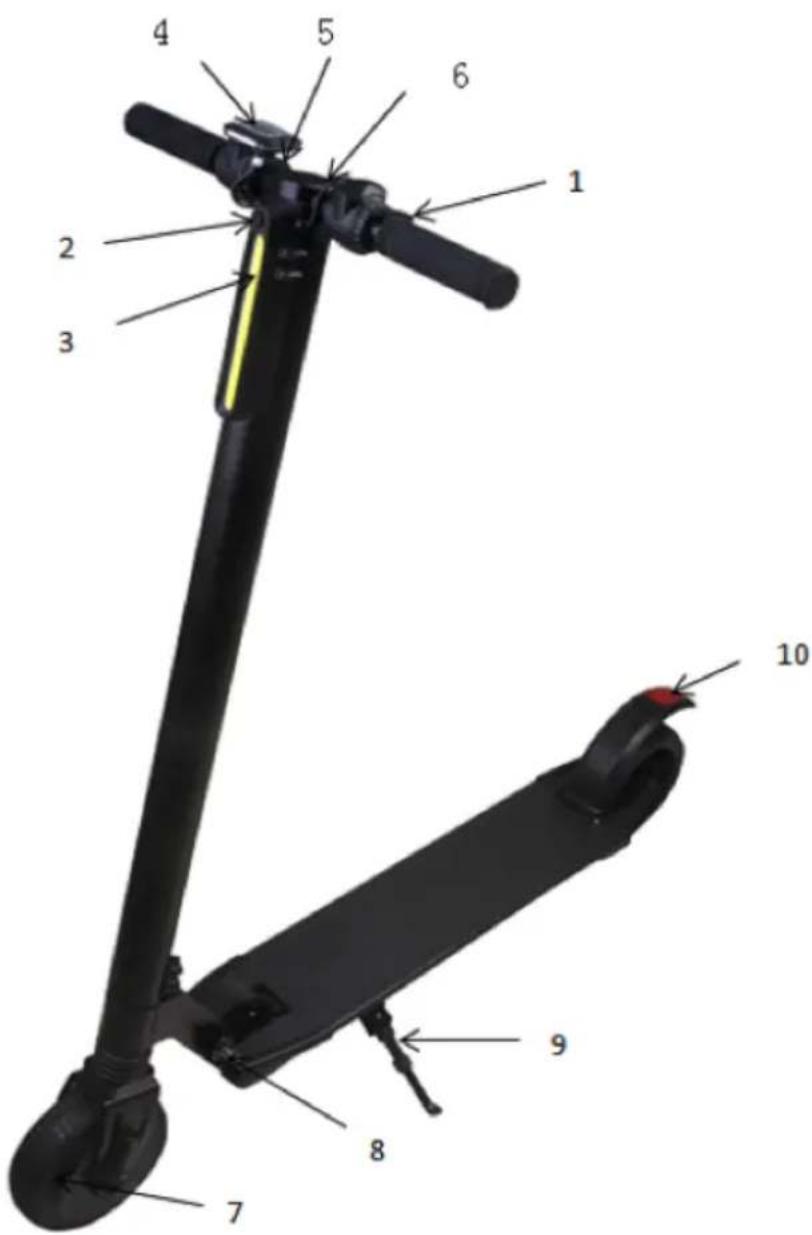
Description of the parts.
text_image
Labeled diagram of a scooter with numbered parts for identification| 1. Electric brake 6. DC Load Input | |
| 2. Front led headlight on / off button | 7. Wheel |
| 3. Front Led Headlight 8. Lever scooter | |
| 4. Multifunction screen 9. Pin / support | |
| 5. Accelerator 10. LED rear light |
Mounting.
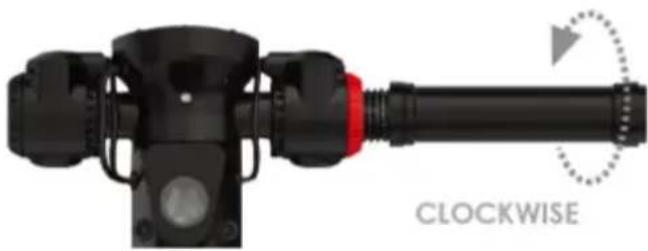
Placement of handlebar handles
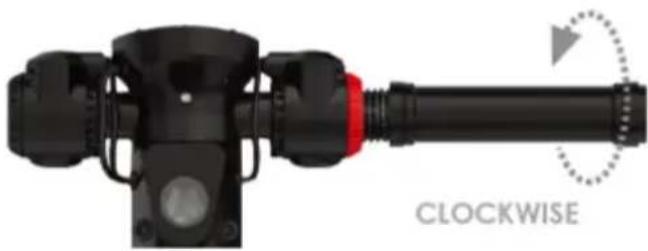
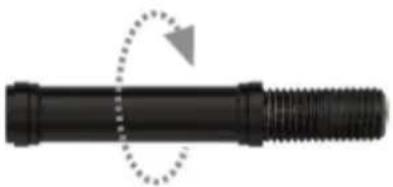
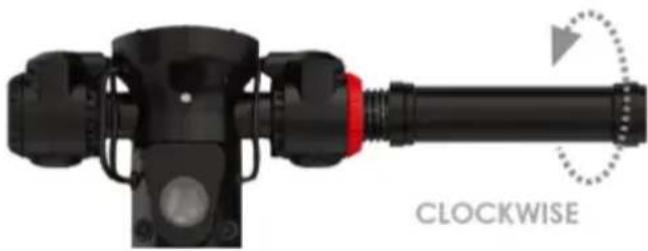
Place the handles in the correct location and screw them in the correct direction.
natural_image
Pure mechanical component diagram showing a threaded shaft with a dotted circular arrow indicating rotation (no text or symbols)COUNTER CLOCKWISE
COUNTERCLOCKWISE TO THE CLOCK NEEDLES
natural_image
Mechanical component with clockwise rotation indicator (no text or symbols on the device itself)IN THE SENSE OF THE CLOCK NEEDLES
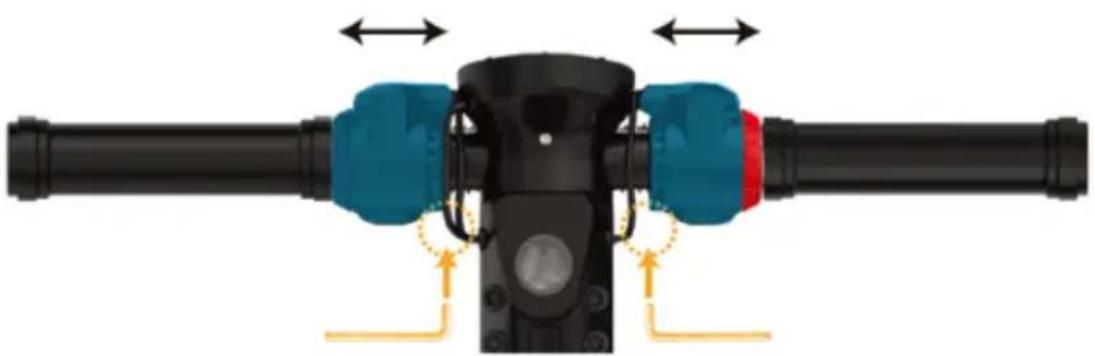
NOTE: If the handlebar bars do not adjust to the level of the frame, you may need to change the location of your accelerator and brake assembly appropriately.
Tighten or loosen the throttle and brake assembly with a hex wrench and make sure they are NOT touching or blocking the handlebar.
natural_image
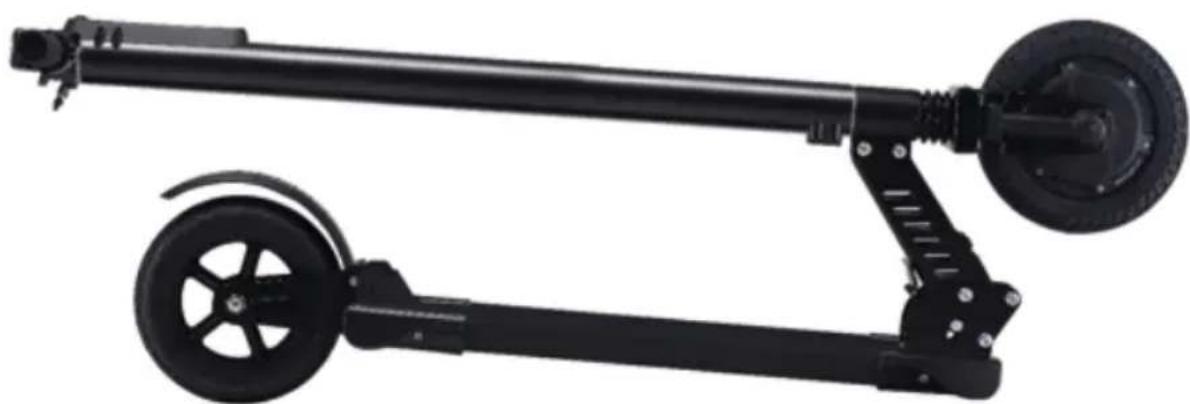
Mechanical assembly diagram showing a black shaft connected to blue and red components with directional arrows indicating motion (no text or symbols)FOLDING & UNFOLDING YOUR E-SCOOTER.
Pull and hold the release lever, near the front of the footrest, and lift the handlebars to unfold them or pull them down to bend them. You will hear a click in both directions, this means that it is now locked in place.
natural_image
Black manual pallet jack with wheels and wheel (no text or symbols visible)Multifunction screen
INFORMATION PANEL
Shows total mileage, distance traveled, battery, travel time traveled, etc.
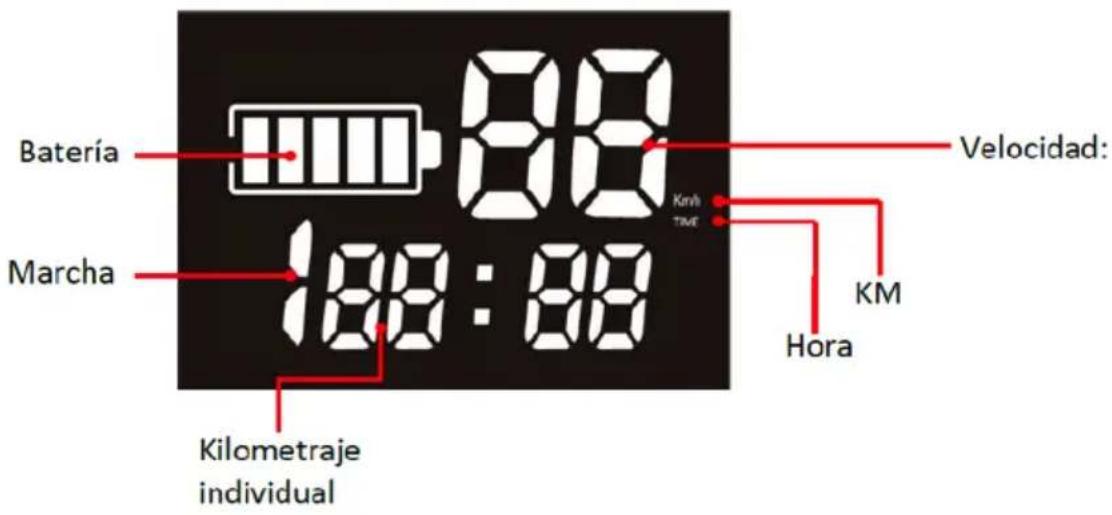
BUTTON AND FUNCTIONS
① March + button: Serves to increase up to speed 3.
② On / off button:
1) Press and hold the button for 3 seconds to turn on or off.
2) Press the power button several times until VOL is displayed, the value shown is the battery voltage (V)
3) Press the power button several times until it shows DIS, the value shown is the distance traveled (KM)
4) Press the power button several times until ODO is displayed, the value that shows the accumulated driving distance (KM)
5) Press the power button several times until it shows TIM, the value shown is the duration in driving time (H)
③ March Button: used to decrease the speed to -1.
Note:
Speed vs. March:
March-1: 10 km/h.
March-2: 18 km/h.
March-3: 25 km / h.
Zeroing: When the multi-function display is turned off, press and hold the Run - and + buttons, without releasing at the same time press the Power button until it lights up and the system configuration will be reset to the settings of factory.
Loading the e-Scooter
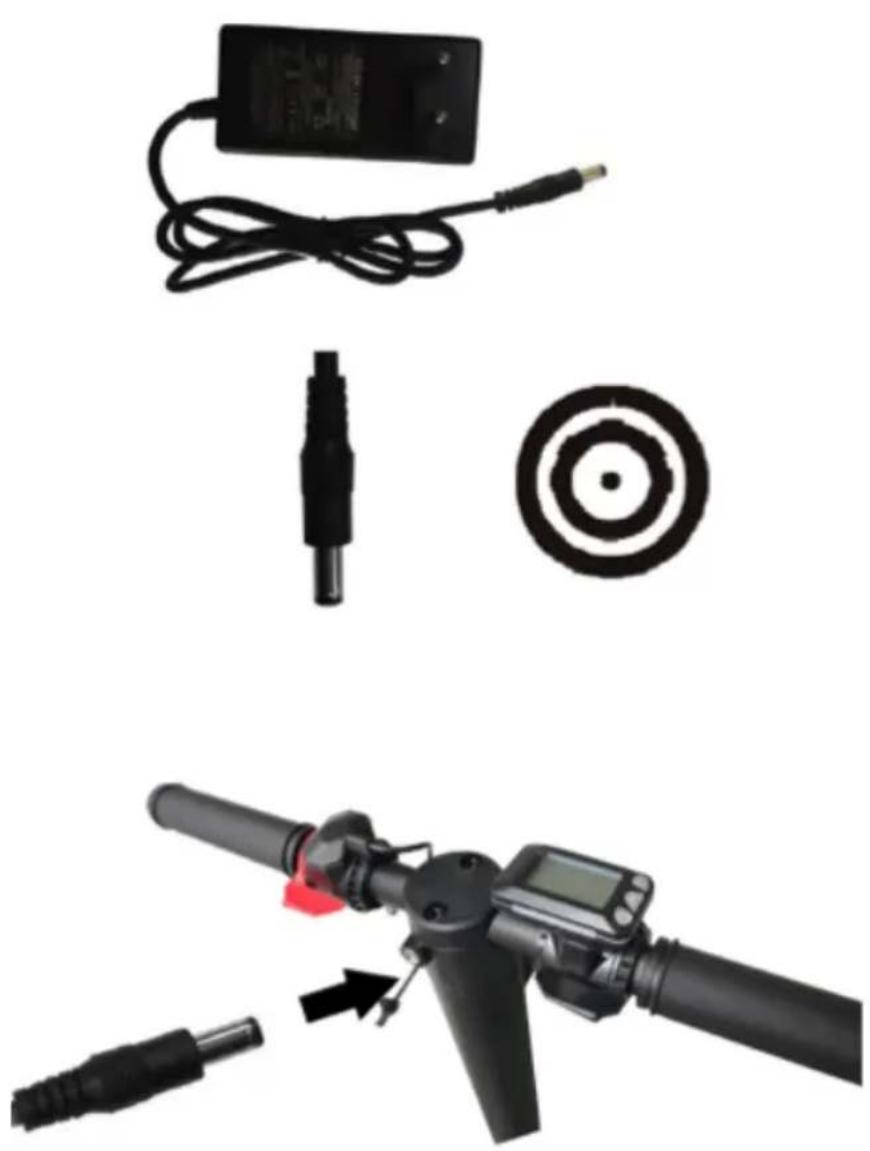
Connect the supplied AC / DC adapter between a mains socket in the home and the DC input of the e-Scooter.
The adapter indicator will glow red during charging and once charged it will turn green.
natural_image
Product photo showing a handheld electric shaver with attached cable, target, and two black probes (no text or symbols visible)Note: Charging must always be carried out with the E-scooter turned off and stopped.
Initiation to driving
- Press the power button to turn on the multifunction screen.
- Press the Speed + button or the Speed - button to adjust the speed level.
- Press the accelerator to accelerate, so you can drive.
- Press the brake button to brake.
- In the event of failure in electric brake and for safety, the manual rear wheel brake system should be used when driving at high speed.
- When driving at night, press the power button on the Led headlight to turn on the lighting.
Technical support.
Please, for more information about the installation and configuration of this product, go to our website www.billowtechnology.com and open a support ticket.

e-Scooter
8.0" ELECTRIC SCOOTER
d billow
TECHNOLOGY

text_image
#emologyReciclado
AEE REI-RAEE 5548 In this manual, the container (bin) symbol indicates that the product is subject to the European directive 2002/96 / EC, electrical and electronic products, batteries, and batteries and other accessories must necessarily be subject to a selective collection. At the end of the life of the device, make use of the recycling bins. This gesture Will help reduce the health risks and preserve the environment.
Municipalities and distributors, Will provide essential details on recycling your old device. If this device carries an internal battery, it must be removed and deposited separately for proper management.
Recyclage
This guide is subject to typographical errors.