USER MANUAL FM 27 M Ariston Thermo
Congratulations on choosing an Ariston appliance, which you will find is dependable and easy to use. We recommend that you read this manual for best performance and to extend the life of your appliance. Thank you.
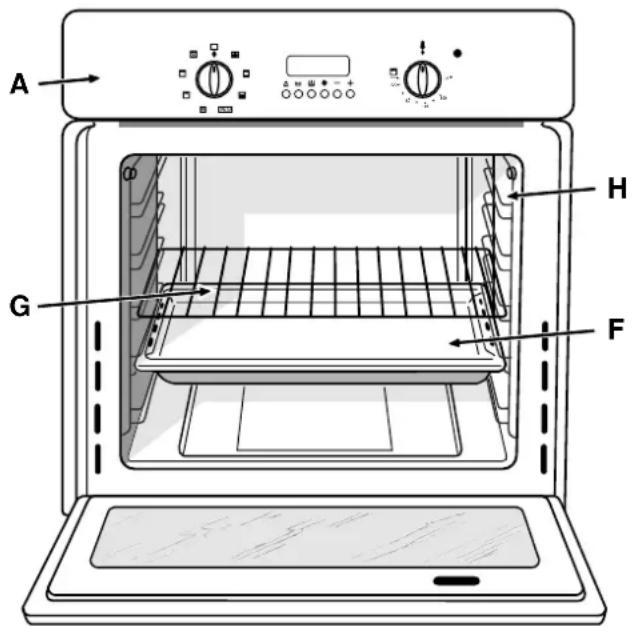
Close-up View
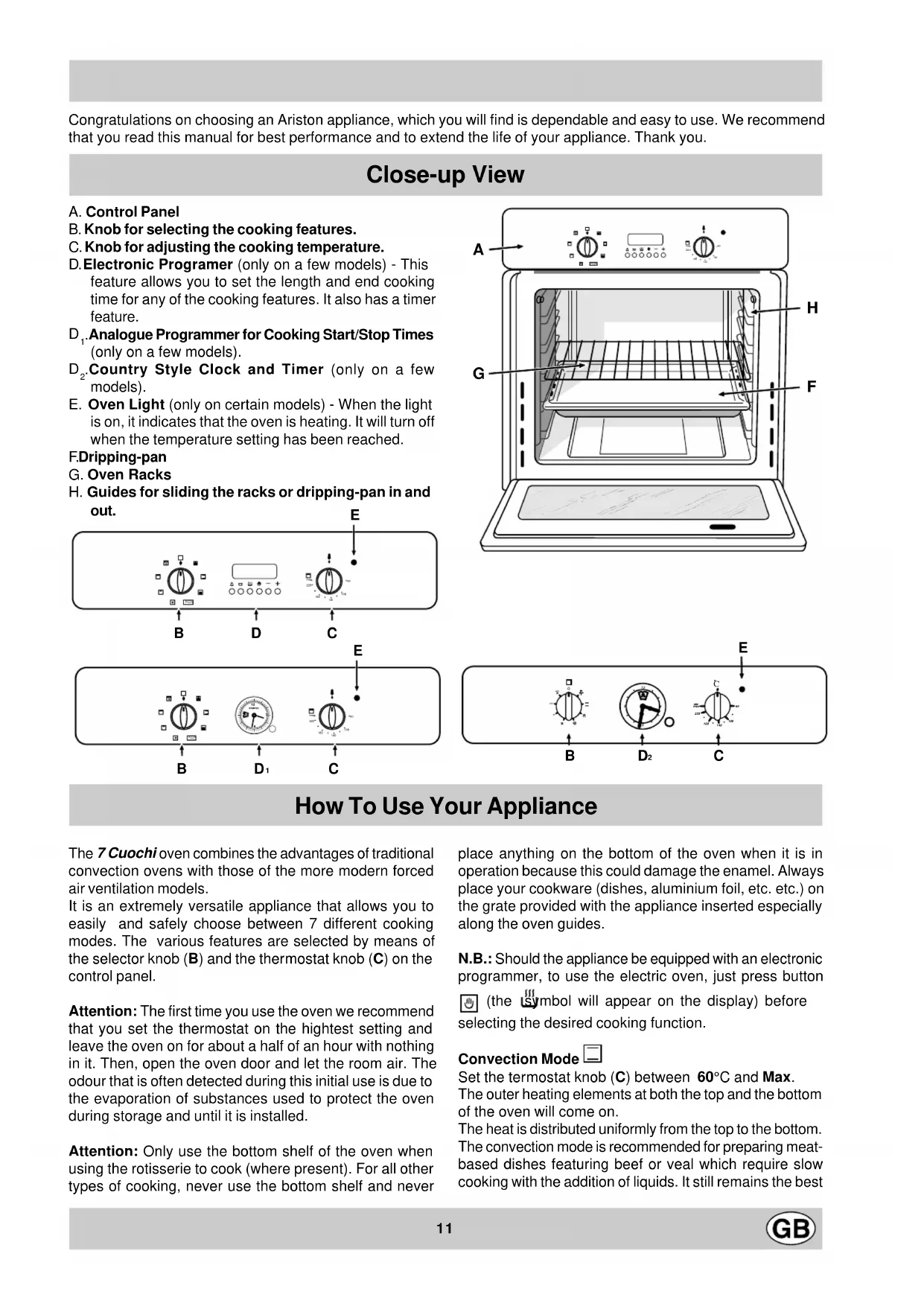
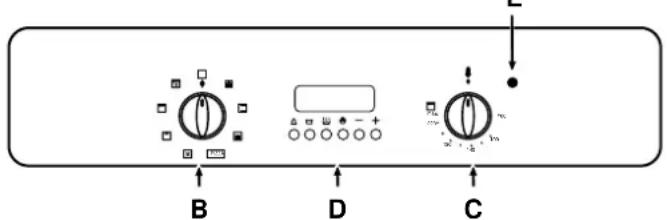
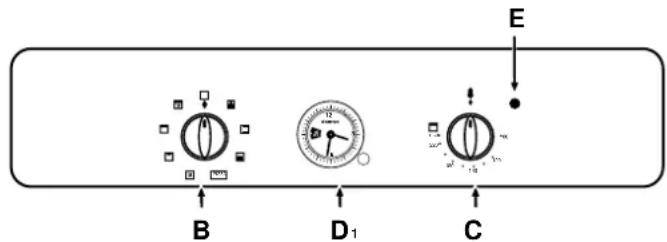
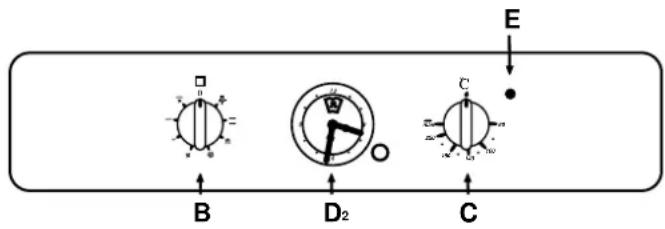
A. Control Panel
B. Knob for selecting the cooking features.
C. Knob for adjusting the cooking temperature.
D. Electronic Programmer (only on a few models) - This feature allows you to set the length and end cooking time for any of the cooking features. It also has a timer feature.
D1 Analogue Programmer for Cooking Start/Stop Times (only on a few models).
D2 Country Style Clock and Timer (only on a few models).
E. Oven Light (only on certain models) - When the light is on, it indicates that the oven is heating. It will turn off when the temperature setting has been reached.
F.Dripping-pan
G.Oven Racks
H. Guides for sliding the racks or dripping-pan in and out. E
How To Use Your Appliance
The 7 Cuochi oven combines the advantages of traditional convection ovens with those of the more modern forced air ventilation models.
It is an extremely versatile appliance that allows you to easily and safely choose between 7 different cooking modes. The various features are selected by means of the selector knob (B) and the thermostat knob (C) on the control panel.
Attention: The first time you use the oven we recommend that you set the thermostat on the highest setting and leave the oven on for about a half of an hour with nothing in it. Then, open the oven door and let the room air. The odour that is often detected during this initial use is due to the evaporation of substances used to protect the oven during storage and until it is installed.
Attention: Only use the bottom shelf of the oven when using the rotisserie to cook (where present). For all other types of cooking, never use the bottom shelf and never
place anything on the bottom of the oven when it is in operation because this could damage the enamel. Always place your cookware (dishes, aluminium foil, etc. etc.) on the grate provided with the appliance inserted especially along the oven guides.
N.B.: Should the appliance be equipped with an electronic programmer, to use the electric oven, just press button (the symbol will appear on the display) before selecting the desired cooking function.
Convection Mode
Set the termostat knob (C) between 60^ and Max.
The outer heating elements at both the top and the bottom of the oven will come on.
The heat is distributed uniformly from the top to the bottom. The convection mode is recommended for preparing meat-based dishes featuring beef or veal which require slow cooking with the addition of liquids. It still remains the best
cooking mode for dry pastries and fruit in general. When cooking in convection mode, only use one dripping-pan or cooking rack at a time, otherwise the heat distribution with be uneven. Select from among the various rack heights based on the whether the dish needs more or less heat from the top or bottom.
Pastry Mode
Set the termostat knob (C) between 60^ and Max.
The fan will start and all of the heating elements will turn on. This provides a delicate heating process with a prevalence of heat from the bottom.
This mode is ideal for baking and cooking delicate foods - especially pastries that need to rise because the heat coming from the bottom helps the leavening process.
Pizza Mode PIZZA
Set the termostat knob (C) between 60^ and Max.
The bottom and circular heating elements, as well as the fan, will come on. This combination rapidly heats the oven due to the large amount of power used by the appliance (2800-2900 W), which results in the production of considerable heat coming prevalently from the bottom.
The pizza mode is ideal for foods which need high temperatures to cook, like pizza and large roasts. Use only one dripping-pan or rack at a time. However, if more than one is used, they must be switched half way through the cooking process.
Ventilated Mode
Set the thermostat knob (C) between 60^ and Max.
Both the heating elements and the fan will come on. Since the heat remains constant and uniform throughout the oven, the air cooks and browns food uniformly over its entire surface. With this mode, you can also cook various dishes at the same time, as long as their respective cooking temperatures are the same. A maximum of 2 rack levels can be used at the same time, following the instructions in the section entitled, "Cooking On More Than One Rack".
This cooking mode is ideal for au gratin dishes or those which require an extended cooking time.
Moreover, the excellent heat distribution makes it possible to use lower temperatures when cooking roasts. This results in less loss of juices, meat which is more tender and a decrease in the loss of weight for the roast.
The ventilated mode is especially suited for cooking fish, which can be prepared with the addition of a limited amount of condiments, thus maintaining their flavor and appearance.
The ventilated mode can also be used to thaw white or red meat, fish and bread by setting the temperature to 80^ - 100^ . To thaw more delicate foods, set the termostat to 60^ or use only the cold air circulation feature by setting the thermostat to 0^ .
Grill
Set the thermostat to "C": Max.
The central heating element of the grill will come on. The incandescent heating element cooks food by means of thermal radiation directed downward. The extremely high and direct temperature of the grill makes it possible to brown the surface of meats and roasts while locking in the juices to keep them tender.
Double Grill
Set the thermostat to "C": Max.
Both of the grill elements are activated. This oversized grill has a completely new design, increasing cooking efficiency by 50% . The double grill also eliminates pockets of unheated air in the corners of the oven.
Ventilated Double Grill
Set the thermostat to "C": between 60^ and 200^ .
Both of the heating elements of the grill are activated, as well as the fan. This combination of features increases the effectiveness of the unidirectional thermal radiation of the heating elements through forced air circulation of the air throughout the oven. This helps prevents foods from burning on the surface, allowing the heat to penetrate into the food.
Oven Light
The light comes on when the "B" knob is turned to the
setting. The light illuminates the oven and remains on when any of the heating elements is turned on.
Forced Air Ventilation
In order to reduce the external temperature of the oven, some models have been equipped with a cooling fan which comes on when the "B" knob is turned to a cooking setting. The fan remains on during the cooking process and a flow of air can be heard exiting between the oven door and the control panel.
After you have finished cooking, it a good idea to keep the fan on for a few minutes by setting the thermostat knob to "·" in order to allow the oven to cool down rapidly.
A supplemental kit (code 053414) is available from the nearest Merloni Elettrodomestic Service Centre for those models that do not come with this feature.
3rd Oven Glass
In order to further decrease the temperature of the oven door and reduce energy consumption, a supplemental kit has been made available. This kit should be installed if the oven is used in the presence of small children. To install the protective glass for the oven door (code 053413), contact your nearest Merloni Eletrodomestici Service Centre.
The programmer makes it possible to preset the oven and the grill in terms of:
- delay start with a preset length of time for cooking;
- immediate start with a preset length of time for cooking;
-timer.
Button functions:
: Timer with hour and minutes;
Length of cooking time;
End cooking time;
:Manual change;
:Change time (backwards);
+ :Change time (forwards).
How to Reset the Digital Clock
After the appliance has been connected to the power source or following a power outage, the clock display will begin to blink and read: 0:00
- Press the and buttons at the same time. Then
use (within 4 seconds) the and buttons to set the exact time.
Use the button to move the time forwards.
Use the button to move the time backwards.
The time can also be changed in the following two ways:
- Repeat all of the foregoing steps.
- Press the button, and then use the a+ buttons to reset the time.
Manual Operation Mode for the Oven
After the time has been set, the programmer is automatically set to manual mode.
Note: Press the button to return the oven to manual mode after every "Automatic" cooking session.
Delayed Start Time with Preset Cooking Length
The length and the end cooking times must be set. Let us suppose that the display shows 10:00.
- Turn the oven control knob to the cooking setting and temperature desired (example: convection oven at 200^ ).
- Press the and the use (within 4 seconds) the
and buttons to set the length of the cooking time. Let us suppose that 30 minutes was set for the length of the cooking time. In this case, the display will show:
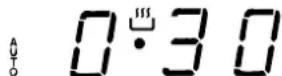
Release the button, and within 4 seconds, the current time will reappear with the isymbol and "auto."
- Press the button, and then use the + buttons to set the end cooking time. Let us suppose that it is 13:00
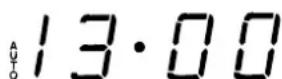
- Release the button and the display will show the current time within 4 seconds:
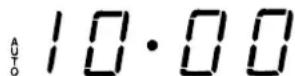
When "auto" is lighted, it indicates that the length and end cooking time have been preset to operate in automatic mode. At this point, the oven will turn on automatically at 12:30 in order to finish the cooking session within 30
minutes. When the oven is on, the symbol (cooking pot) will appear on the display for the entire length of the
cooking process. The button can be pressed at any time to display the setting for the length of the cooking
time, while the button can be pressed to display the end cooking time.
At the end of the cooking time, an acoustic signal will
sound. Press any button it turn it off (except the and buttons).
When only the length of the cooking time is set (points 1 and 2 of the paragraph entitled, "Delayed Start Time with Preset Cooking Length"), the cooking session starts immediately.
Cancelling a Preset Cooking Time
Press the button, and use the button to set the time to:
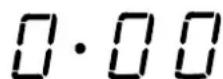
Then press the manual cooking mode button
Timer Feature
The timer can be used to count down from a given length of time. This feature does not control when the oven comes on or turns off, but, rather, it only emits an acoustic signal when the preset time has run out.
Press the A button, and the display will read:
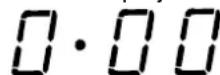
Then use the and buttons to set the desired time.
Release the button, and the timer will start at that second. The display will show the current time.
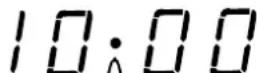
At the end of the preset time, an acoustic signal will sound, which can be turned off by pressing any button (except the
+ and buttons), and the symbol will turn off.
Changing and Cancelling Settings
- The settings can be changed at any time by pressing the corresponding button and using the button.
- When the length setting for the cooking time is cancelled, the end cooking time setting is also cancelled, and vice versa.
- When in automatic cooking mode, the appliance will not accept end cooking times prior to the start cooking time proposed by the appliance itself.
Country Style Clock and Timer
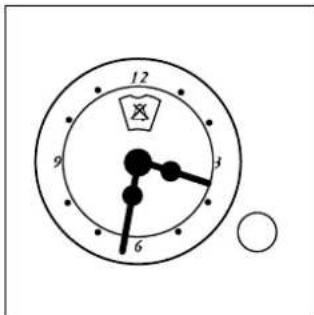
How to Set the Current Time
The oven must be connected to the power supply.
Pull and turn the knob in the clockwise direction to set the time.
N.B.: The clock is electric. Therefore, in the event of a power outage, the clock will stop for the entire time the oven remains without power. When the power comes back on, the clock must be reset to the current time
Timer Feature
The timer operates by counting down a given period of time. This feature does not, however, turn the oven on or off. It merely emits an acoustical alarm when the time has run out.
How to Set the Timer
Turn the knob until the indicator is set on the length of time desired (using the inside numbers). The time is clearly visible through the transparent window on the indicator itself.
The timer will begin to count down immediately.
The sound will stop automatically after approximately 2 minutes and the timer will be set to the symbol (clock function).
To turn off the buzzer, or to use only the clock, set the indicator on the symbol.
Analogue Programmer for Start/End Cooking Time
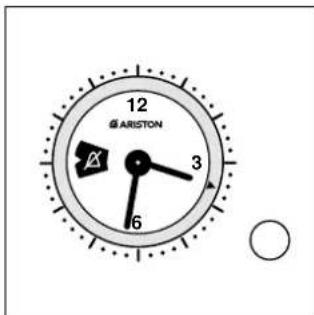
How to Reset the Current Time
The oven must be connected to the power supply.
Press the knob and turn it in the counter-clockwise direction until the correct time appears.
NB: The programmer runs on electricity. Therefore, it will stop during a power outage for the entire length of time that the power is off. After the power comes back on, the current time will have to be set again.
Manual Operation
NB: This mode should be used when the cooking time does not need to be programmed.
1 Turn the knob in the counter-clockwise direction until the
symbol appears in the small window.
2 Pull the knob and turn it in the counter-clockwise direction until the marker is aligned with the current time. A click indicates that the procedure has been completed.
Use the oven knob to select the desired cooking program. To turn the oven off, turn the knob to the "0" setting.
1 Turn the knob in the counter-clockwise direction until the Total Cooking Time desired appears in the small time display.
2 Pull the knob and turn it in the counter-clockwise direction until the marker is aligned with the current time. A click indicates that the procedure has been completed.
Use the oven knob to select the desired cooking program. The oven will turn on immediately and stay on for the entire length of the programmed cooking time. The oven will buzz to indicate that it has automatically turned off.
To interrupt the programmed cooking time, turn the knob in the counter-clockwise direction until the symbol appears in the small window.
Programmed Cooking Time - Delayed Start
1 Total Cooking Time:
Turn the knob in the counter-clockwise direction until the Total Cooking Time desired appears in the time display.
2 Start Cooking Time:
Pull the knob and turn it in the counter-clockwise direction until the marker is aligned with the desired Start Cooking Time.
Use the oven knob to select the desired cooking program. The oven will turn on at the time set for the Start Cooking Time and will stay on for the entire length of time programmed. The oven will buzz to indicate that it has automatically turned off.
To interrupt the programmed cooking time, turn the knob in the counter-clockwise direction until the symbol appears in the small window.
How to Keep Your Oven in Shape
Before cleaning your oven, or performing maintenance, disconnect it from the power supply.
To extend the life of your oven, it must be cleaned frequently, keeping in mind that:
- The self-cleaning panels (if present) and the enameled parts should be washed with warm water - abrasive powders and corrosive substances should be avoided;
- The inside of the oven should be cleaned immediately after use with warm water and soap; the soap should be rinsed away and the interior dried thoroughly;
- Stainless steel can be stained if it remains in contact with a greasy, greasy, or greasy surface (containing phosphorus) or water with a high lime content. We recommend that you rinse these parts thoroughly and dry them well after cleaning. It is also a good idea to dry any water spills;
- Never line the bottom of the oven with aluminium foil because the buildup of heat will not only impede the cooking process, but could also damage the enamel.
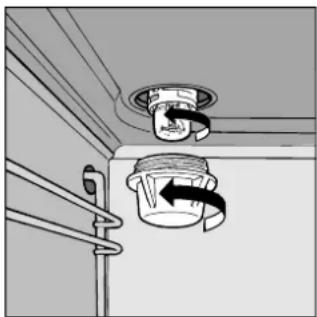
Replacing the Lamp in the Oven
- Cutoff the supply of power to the oven by turning off the omni-polar switch connecting it to the mains, or by removing the plug if it is accessible;
- Unscrew the glass cover attached to the lamp holder;
- Unscrew the lamp and replace it with another high-temperature lamp (300^) with the following characteristics:
Voltage: 230/240 V
-Wattage:25W
- Socket: E14
- Remount the glass cover and reconnect the appliance to the power supply.
Practical Cooking Advice
Preheating
If the oven must be preheated (this is generally the case when cooking leavened foods), the "pizza mode" can be used to reach the desired temperature as quickly as possible in order to save on energy.
Once the food has been placed in the oven, the most appropriate cooking mode can then be selected.
Cooking on More Than One Rack
If you have to cook on more than one rack at the same time, use only the × "ventilated" mode, as it is the only one which is appropriate for this type of cooking.
Use the second and third rack heights from the bottom because the first and fourth receive too much direct heat and this could cause more delicate foods to burn.
If you would like to use 3 racks at the same time, use the three central rack heights. If this is done, the third and fourth may have to be switched halfway through the cooking process.
Using the Grill
The 7 cuochi oven offers you three different grilling modes.
Use the "grill" setting for small portions. Although electrical consumption is a mere 1200 W, it allows you to grill small portions like toasted sandwiches, hotdogs, etc., to perfection.
Position the food under the center of the grill because only the central part of the top heating element is turned on. Food placed in the corners will not cook properly.
The "Double Grill" setting allows you to grill along the entire surface area of the grill. Use this mode when you have food distributed uniformly throughout the oven and you would like to brown the items uniformly.
The "Ventilated Double Grill" is extremely useful for grilling foods rapidly, as the distribution of heat makes it possible not only to brown the surface, but also to cook the bottom part.
This mode can also be used for browning foods at the end of the cooking process.
Important: always use the grill with the oven door closed. This will allow you both to attain excellent results and to save energy (10% circa).
When using any of the three grilling modes, it is recommended that the thermostat knob be turned to the highest setting, as it is the most efficient way to use the grill (which utilizes infrared rays).
If necessary, however, the thermostat can be set to lower temperatures by simply turning the knob to the desired setting.
When utilizing the grill, place the rack at the lower levels (see cooking table). To catch grease or fat and prevent smoke, place a dripping-pan at the bottom rack level.
Baking Pastries
When baking pastries, always place them in the oven after it has been preheated. Make sure you wait until the oven has been preheated thoroughly (the red "E" light will turn off). Do not open the door while the pastry is cooking in order to prevent it from dropping. Batters must not be too runny, as this will result in prolonged cooking times. In general:
Pastry is too dry
Increase the temperature by 10^ and reduce the cooking time.
Pastry dropped
Use less liquid or lower the the temperature by 10^
Pastry is too dark on top
Place it on a lower rack, lower the temperature, and increase the cooking time.
Cooked well on the inside but sticky on the outside
Use less liquid, lower the temperature, and increase the cooking time.
The pastry sticks to the pan
Grease the pan well and sprinkle it with a dusting of flour.
I used more than one level and they are not all at the same cooking point
Use a lower temperature setting. It is not necessary to remove the food from all the racks at the same time.
Cooking Pizza
For best results when cooking pizza, use the PIZZA "pizza mode":
- Preheat the oven for at least 10 minutes;
- Use a light aluminum pizza pan, placing it on the broiler supplied with the oven. If the dripping-pan is used, this will extend the cooking time, making it difficult to get a crispy crust;
- Do not open the oven door frequently while the pizza is cooking;
- If the pizza has a lot of toppings (three of four), it is recommended that the mozzarella cheese be placed on top halfway through the cooking process;
- If you cook pizza on more than one rack at the same time (up to 3), it is recommended that you use the ventilated mode because the pizza mode will cook the pizza on the first rack from the bottom before the others.
Cooking Fish and Meat
Meat must weigh at least 1Kg in order to prevent it from drying out. When cooking white meat, fowl and fish, use low temperature settings (150^ - 175^) . For red meat that should be well done on the outside while tender and juicy in the inside, it is a good idea to start with a high temperature setting (200^ - 220^) for a short time, then turn the oven down afterwards. In general, the larger the roast, the lower the temperature setting. Place the meat on the centre of the rack and place the dripping pan beneath it to catch the fat.
Make sure that the rack is inserted so that it is in the centre of the oven. If you would like to increase the amount of heat from below, use the low rack heights. For savory roasts (especially duck and wild game), dress the meat with lard or bacon on the top.
| Selection Knob Setting | Type of Food Wt. | (Kg) | Rack Position From Oven Bottom | Preheating Time (minutes) | Thermostat Knob Setting C | Cooking Time (minutes) |
| 1 Convection Mode | Duck | 1 | 3 | 15 | 200 | 65-75 |
| Roast beef | 1 | 3 | 15 | 200 | 70-75 |
| Roast pork | 1 | 3 | 15 | 200 | 70-80 |
| Biscuits | - | 3 | 15 | 160 | 15-20 |
| 2 Pastry Mode | Cakes | 0.5 | 3 | 15 | 180 | 20-30 |
| Pies | 1 | 2/3 | 15 | 180 | 45-50 |
| 3 Pizza Mode | Pizza | 0.5 | 3 | 15 | 220 | 15-20 |
| Roast beef | 1 | 3 | 10 | 200 | 45-55 |
| Chicken | 1 | 2/3 | 10 | 180 | 60-70 |
| 4 Ventilation Mode | Pizza (several levels) | 1 | 2/3 | 15 | 220 | 15-20 |
| Lasagne | 1 | 3 | 10 | 180 | 30-35 |
| Baked Tagliatelle | 1 | 3 | 10 | 180 | 20-30 |
| Baked Pasta | 1 | 3 | 10 | 180 | 20-30 |
| Lamb | 1 | 2 | 10 | 180 | 40-45 |
| Chicken | 1 | 3 | 15 | 200 | 60-70 |
| Mackerel | 1 | 2 | 10 | 180 | 50-55 |
| Sea Bream | 1.5 | 2 | 10 | 180 | 55-60 |
| Chocolate cake | 1 | 3 | 10 | 160 | 50-60 |
| 5 Grill Mode | Sole and squid | 1 | 4 | 5 | Max | 8 |
| Calamari and shrimp | | | | | |
| Kabobs | 1 | 4 | 5 | Max | 4 |
| Cod fillets | 1 | 4 | 5 | Max | 10 |
| Grilled vegetables | 1 | 3-4 | 5 | Max | 8-10 |
| 6 Double Grill Mode | Veal steaks | 1 | 4 | 5 | Max | 15-20 |
| Chops | 1.5 | 4 | 5 | Max | 25 |
| Hamburgers | 1 | 3 | 5 | Max | 7 |
| Mackerel | 1 | 4 | 5 | Max | 20-25 |
| 7 Double Grill Ventilation Mode | Grilled chicken | 1.5 | 2 | 5 | 200 | 55-60 |
| Stuffed cuttle-fish | 1.5 | 2 | 5 | 200 | 40-45 |
Note: cooking times are approximate and may vary according to personal taste.
Safety Is A Good Habit To Get Into
To maintain the EFFICIENCY and SAFETY of this appliance, we recommend:
- call only the Service Centers authorized by the manufacturer
-
always use original Spare Parts
-
This appliance is designed for non-professional, household use and its functions must not be changed.
- These instructions are only valid for the countries whose symbols appear on the manual and the serial number plate.
- The electrical system of this appliance may be used safely only when it is correctly connected to an efficient earthing system in compliance with the safety standards currently in effect.
The following items are potentially dangerous, and, therefore, appropriate measures must be taken to
prevent children and the disabled from coming into contact with them:
- Controls and the appliance in general;
- Packaging (bags, polystyrene, nails, etc.);
- The appliance immediately after use of the oven or grill due to the heat generated;
- The appliance when no longer in use (potentially dangerous parts must be made safe).
Avoid the following:
- Installation (following the manufacturer's instructions);
- When in doubt about operating the appliance;
- Replacing the electrical outlet when it is not compatible with the plug for the appliance.
It is a good idea to do the following:
- Only use the appliance to cook food, nothing else;
- Check the soundness of the appliance after it has been unpacked;
- disconnect the appliance from the electrical mains if it is not functioning properly and before cleaning or performing maintenance;
- When the appliance is not used for an extended period of time, cut off the supply of power and close the gas cock (if present);
- Use cooking gloves to place cookware in the oven or when removing it;
- Always grasp the oven door in the centre because the ends may be hot due to the escape of hot air;
- Make sure that the control knobs are on the “-”/“o” setting when the appliance is not in use;
- Cut the power supply chord after disconnecting it from the mains when you decide not to use the appliance any longer.
- The manufacturer will not be held liable for any damages that might arise out of incorrect installation or improper, incorrect or unreasonable use of the appliance.
Installation
Important: The power supply to the appliance must be cut off before any adjustments or maintenance work is done on it.
Installation of Built-in Ovens
In order to insure that the built-in appliance functions properly, the cabinet containing it must be appropriate. The figure below gives the dimensions of the cutout for installation under the counter or in a cabinet wall unit.
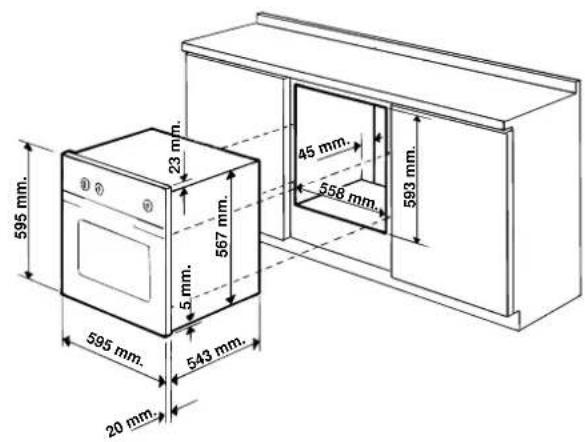
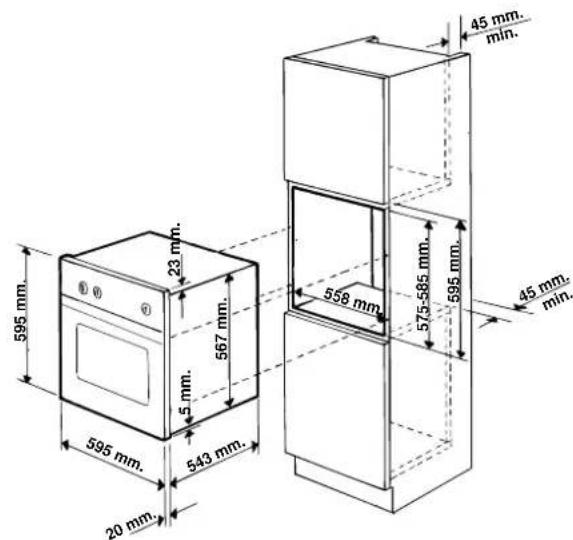
In order to ensure adequate ventilation, the back panel of the cabinet must be removed. Installing the oven so that it rests on two strips of wood is preferable. In the case where the oven rests on a continuous, flat surface, there must be an aperture of at least 45 × 560 ~mm .
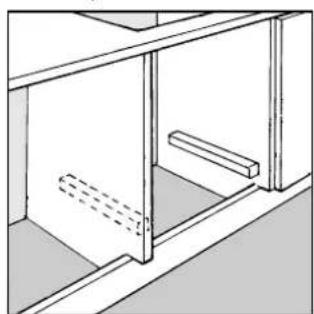
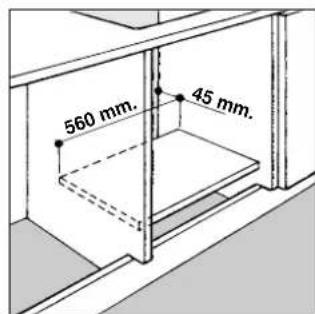
To fasten the oven to the cabinet, open the door of the oven and fasten it by inserting the 4 wood screws into the 4 holes locate on the perimeter of the frame. The panels of the adjacent cabinets must be made of heat resistant material. In particular, cabinets with a

veneer exterior must be assembled with glues able to withstand temperatures of up to 100^ .
In compliance with current safety standards, contact with the electrical parts of the oven must not be possible once it has been installed.
All parts which ensure safe operation of the appliance must not be able to be removed without the use of a tool.
Electrical Connection
Those ovens equipped with a three-pole power supply cord are designed to operate with alternating current with the voltage and frequency indicated on the data plate (located on the appliance) and in the instruction manual. The wire for grounding the appliance is yellow-green in color.
Mounting a Power Supply Cable
Opening the terminal board:
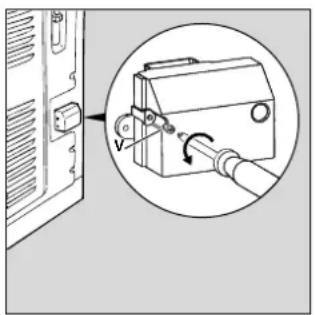
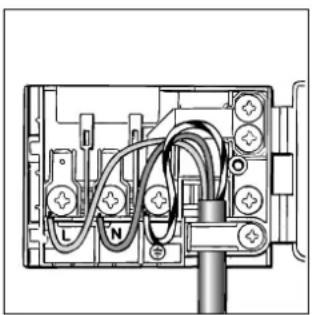
- Remove the "V" screw;
- Pull to open the cover of the terminal board.
To install the cable, proceed as follows:
- Remove the wire clamp screw and the three contact screws L-N-
- Fasten the wires beneath the heads of the screws using the following color scheme: Blue (N) Brown (L) Yellow-Green 12
- Fasten the suppy cable in place with the clamp, close the cover to the terminal box and fasten it with the "V" screw.
Attaching the Power Supply Cable to the Mains
The appliance must be connected directly to the mains by means of an omni-polar switch with a minimum contact break of 3mm sized for the load and in compliance with the standards currently in effect (the earthing wire must not be interrupted by the switch).
The power supply cord must be positioned so that it does not reach a temperature 50^ above ambient temperature at any one point.
Before making the connection, check that:
- the fuse and the electrical system in the home can handle the load of the appliance (see the data plate);
- the electrical mains in the home are equipped with an efficient grounding system in compliance with the safety standards currently in effect;
- The electrical outlet or omnipolar switch is within easy reach when the oven is installed.
NB: Do not use adaptors, shunts or reducing devices as they may cause overheating and lead to fires.
Technical Specifications
Inner Dimensions of the Oven:
Width - 40 cm
Depth - 39 cm
Height- 34 cm
Inner Volume of the Oven:
53 Liters
Energy Consumption:
To reach 200^ : 0.45 kWh
To maintain the temp. at 200^ for 1 hour: 0.95 kWh
Total: 1.40 kWh
Voltage and Frequency of Power Supply:
230V/50Hz/2950W

- 73/23/EEC of 19/02/73 (Low Voltage) and subsequent modifications;
- 89/336/EEC of 03/05/89 (Electromagnetic Compatibility) and subsequent modifications;
- 93/68/EEC of 22/07/93 and subsequent modifications.