EasyManual
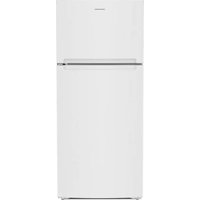
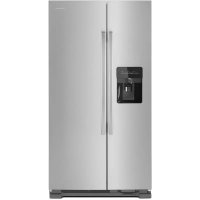
XRSS 204 Proline - Fridge AMANA - Free user manual and instructions
Find the device manual for free XRSS 204 Proline AMANA in PDF.



Questions des utilisateurs sur XRSS 204 Proline AMANA
0 question sur cet appareil. Repondez a celles que vous connaissez ou posez la votre.
Poser une nouvelle question sur cet appareil
Download the instructions for your Fridge in PDF format for free! Find your manual XRSS 204 Proline - AMANA and take your electronic device back in hand. On this page are published all the documents necessary for the use of your device. XRSS 204 Proline by AMANA.
USER MANUAL XRSS 204 Proline AMANA
Printed in U.S.A. 07/02
Thank you for purchasing this refrigerator!
Please read this Owner's Manual thoroughly. This manual provides proper maintenance information.
Warranty service must be performed by an authorized servicer. The manufacturer also recommends contacting an authorized servicer if service is required after warranty expires. To locate an authorized servicer, contact your distributor.
When contacting your servicer, please provide the following information. Product information is on the serial plate, located on ceiling of fresh food section.
Model Number
P' Number
Serial Number
Purchase Date
Dealer Name
Dealer Address
Dealer Phone
Contents
Introduction 2
Contents 2
Important Safety Information 3
Installing Your Refrigerator 4
How to Transport Your Unit 4
How to Select the Best Location 4
How to Install and Remove Handles 5
How to Level Your Refrigerator 6
How to Adjust the Temperature Controls 7
About Your Filtration System 8
Refrigerator Features 9
Interior Shelves 9
Door Storage 10
Drawers 11
Freezer Features 12
Primary Features 12
Shelves 13
Door Storage 13
Dispenser Features 14
Primary Features 14
Water Dispenser Operation 14
Control Features (5-button control) 15
Control Features (Electronic control) 16
Hints and Care 19
How to Clean Your Unit 19
How to Remove and Replace Light Bulbs 20
Before Calling Service 21
Water Filter Data 25
How to Obtain Replacement Parts and Services?
Problems? Save yourself the nuisance of unnecessary service calls; check the "Before Calling Service" section of the owner's manual.
Your new refrigerator has been carefully engineered and manufactured under strict quality standards and should give you satisfactory and dependable operation. However, like all mechanical merchandise, it may occasionally require adjustment, replacement parts, or maintenance. Should you ever need assistance, please contact the dealer from whom you purchased the refrigerator.
Provide the following:
Model
Manufacturing Number
- Serial Number and all of the other data shown on the model serial plate.
- State briefly the trouble you are having.
The page area to the left has been provided to record valuable information.
Keep instructions for future reference!
Keep this manual and your sales receipt together in a safe place in case warranty service is required.
What if These Features are Different from Mine?
This book is intended to show the variety of features that are available in the product line. If interested in purchasing additional items available for your unit, please contact your distributor.
Features at a Glance
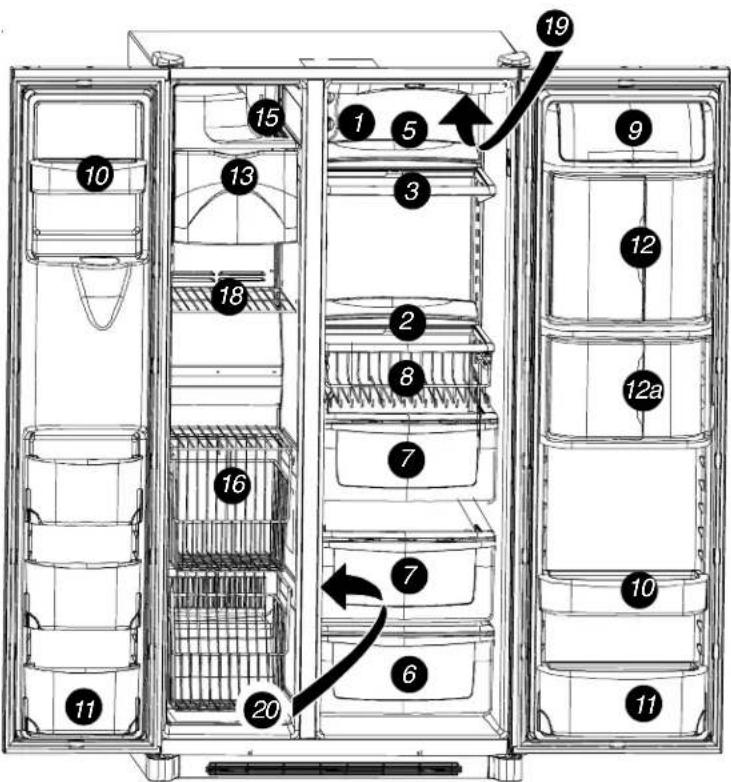
- Temp Assure controls
- Spill SaverTM shelf
- Spill Saver™ Easy Glide™ shelf
- Side GlideTM shelves-not shown
- Rear shelf extensions
- Deli/Crisper drawer
- Crisper drawer
- Beverage OrganizerTM
- Dairy center
- Door buckets
10a. Bucket grippers-not shown - Tilt-out bucket
- Beverage ChillerTM
12a. Mini-Beverage Chiller - Ice storage bin
- Ice maker-not shown
- Ice Cream Shelf
- Stor-Mor system
- Hanging wire shelf-not shown
- Fixed freezer shelf
- Water filter-not shown
- Air filter-not shown
- Lights-not shown
Upper fresh food
Lower fresh food
Freezer
Dispenser
Important Safety Information
Recognize Safety Symbols, Words, Labels

DANGER
DANGER—Immediate hazards which WILL result in severe personal injury or death.

WARNING
WARNING—Hazards or unsafe practices which COULD result in severe personal injury or death.

CAUTION
CAUTION—Hazards or unsafe practices which COULD result in minor personal injury or product or property damage.

DANGER
To reduce risk of injury or death, follow basic precautions, including the following:
Proper Disposal of Your Refrigerator
IMPORTANT: Child entrapment and suffocation are not problems of the past. Junked or abandoned refrigerators are still dangerous—even if they sit out for "just a few days". If you are getting rid of your old refrigerator, please follow the instructions below to help prevent accidents.
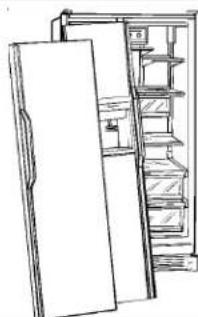
Take off the doors.
- Leave the shelves in place so children may not easily climb inside.
Installing Your Refrigerator
These instructions were provided to aid you in the installation of your unit. The manufacturer cannot be responsible for improper installation.
Steps to Follow…
A qualified engineer must connect refrigerator in accordance with these installation instructions. Measure door opening and depth and width of refrigerator. Remove handles or doors if required. Engineer must also do the following:
- Follow local water and electrical company connection regulations.
- Complete water supply connection before electrical supply connection.
Service to or replacement of power cord must be performed by a qualified servicer.
Installation Requirements
- Install on an earthed outlet with a separate 230-240 volt, 50hz., 10A circuit Y-connection type power cord.
- Protect soft flooring with cardboard or rugs.
- Install on a floor which supports up to 429kg
- Provide 5mm clearance at side of refrigerator and for models more than 60~cm deep, provide 12.7mm clearance at top of refrigerator.
- 60 cm deep models.
Trim corners of counter top to a 45^ angle if counter top has 25 mm overhang.
Provide 5mm clearance on both sides of refrigerator, and allow 7mm on top for ease of installation and leveling.
No minimum clearance is required at the rear of the cabinet.
How to Remove Wooden Base

CAUTION
To avoid personal injury or property damage, two people must remove wooden base.
- Tape doors shut to prevent doors from opening unexpectedly.
- Slide appliance cart under side of refrigerator.
- Wrap refrigerator with blanket or pad. Thread strap around refrigerator. Put foam shipping pads, located in shipping carton, under strap. Tighten strap securely.
- Lower appliance cart to floor with appliance cart handles on bottom.
- Remove top two bolts from skid.
- Return refrigerator and appliance cart to an upright position. Remove strap.
- Slide appliance cart under opposite side of refrigerator.
- Repeat steps 3-5.
- Remove wooden base.
- Return refrigerator and appliance cart to an upright position and remove appliance cart.
IMPORTANT:
Do not leave refrigerator on its side longer than necessary to remove bolts.
How to Remove and Replace Doors and Hinges
- Contact a qualified engineer to perform this task.
Installing Your Refrigerator
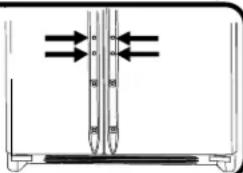
How to Install and Remove Handles
Handles are located within fresh food section of refrigerator. Trim, plugs, and accent pieces will be located within the literature assembly.
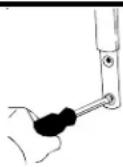
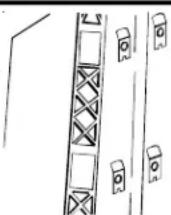
Full-Length Grab Handles (non-stainless steel)
1 Remove two 14 hex nut screws from bottom of refrigerator and freezer door.
3 Insert screws removed in step 1 into screw holes at bottom of handle section.
2 Align door handles with top and bottom sets of door clips, and slide down until screw boles on bottom of handles match with door screw boles.
4 Snap trim over bottom portion of handles and retainers on bottom of door
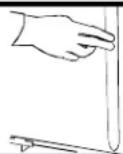
To remove after initial install...
- Follow steps 3 through 4 in reverse order.
NOTE: Fit may be tight. When removing handle, pull up and out.
Half-Length Grab Handles (non-stainless steel)
1 Remove four 14 hex nut screws from top and bottom of doors.
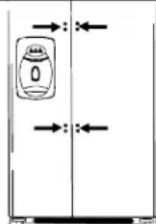
3 Snap colored handle trim over screw holes at top and bottom of handles.
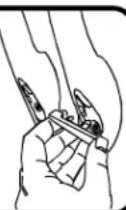
- Snap in trim by inserting large round end first.
2 Align door handles with screw holes and insert screws removed in step 1.
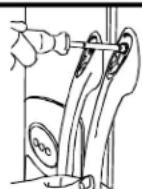
To remove after initial install...
Handles may need to be removed if transporting unit through tight spaces.
- Follow steps 2 and 3 in reverse order.
IMPORTANT: To avoid damage to handle, use a flat blade screwdriver edge wrapped in masking tape to remove colored handle trim.
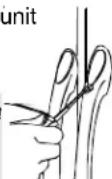

WARNING
To avoid risk of serious personal injury from sharp edges, use extreme caution when removing & installing handles.
Stainless Steel Models
1 Loosen lower door clip on refrigerator door with 14 hex nut driver.
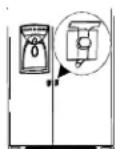
3 Fit other end of handle over upper door clip and slide up as far as possible.
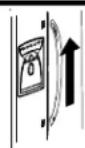
2 Locate predrilled hole at base of handle, and fit hollow end of handle over lower door clip.
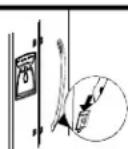
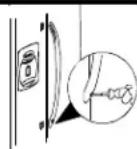
Insert 14 hex nut driver into predrilled hole at base of handle and tighten screw.
Installing Your Refrigerator
How to Install the Handles continued
Stainless Steel Handles continued
5 Insert screw plug into predrilled hole.
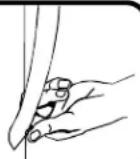
To remove after initial install...
- Follow steps 2 through 5 in reverse order.
IMPORTANT: To avoid damage to unit, use a flat blade screwdriver edge wrapped in masking tape to remove screw plugs.
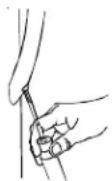
6 Repeat steps 2 through 5 to install freezer handle.
How to Connect the Water Supply
- Contact a qualified engineer to perform this task.
How to Level Your Refrigerator

CAUTION
- To avoid damage to walls and flooring, protect soft vinyl or other flooring with cardboard, rugs, or other protective material
- To avoid damage or breakage to adjusting bolt, do not use power tools to correct leveling.
- DO NOT adjust unit to be any shorter than 173.9cm tall (minus hinge and cap). Doing so may damage underside components.
Materials Needed
- 3 / 8 hex head driver • Level
1 Remove Toe Grille and Bottom Hinge Covers
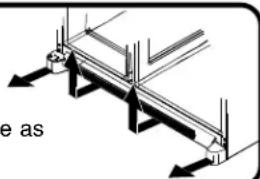
- Open both doors 180^ , or as wide as possible, to remove.
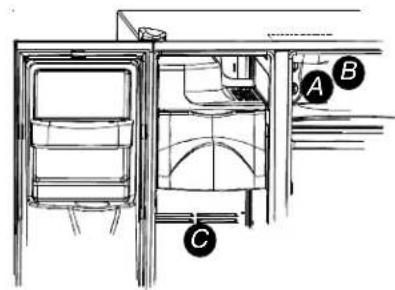
2 Turn both front adjustment screws (A) clockwise to raise and counterclockwise to lower.
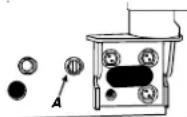
3 Turn both rear adjustment screws (B) clockwise to raise and counterclockwise to lower.
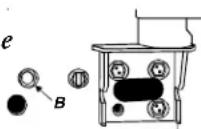
4 Check with level to verify 6mm tilt to the back for proper door closure.
- If unit is aligned and stable, replace toe grille.
What if my doors are not aligned?
- Locate the higher door, and turn front adjustment screw counterclockwise. Continue until doors are level.
- If bottom of adjustment range is reached, and doors are not level raise opposite door by turning front adjustment screw clockwise.
- Replace toe grille
What if my unit rocks?
- Turn rear adjustment screw clockwise to raise rocking corner.
- Replace toe grille.
Installing Your Refrigerator
How to Adjust the Temperature Controls
This refrigerator is designed to operate at a household temperature of 16^ to 43^ C.
1 Locate refrigerator and freezer controls on upper left wall of fresh food section, and set both controls to 4.
IMPORTANT: Neither section will cool if freezer control is set to Off.
4 Check to see that fresh food section is 3^ to 4^
- Turn control to next highest number if too warm.
- Turn control to next lowest number if too cold.
- Allow 5 to 8 hours for adjustments to take effect.
2 Allow 24 hours for temperatures to stabilize.
IMPORTANT: Due to design of unit, always start temperature adjustments with freezer section.
3 Check to see if freezer temperature is -17° to -16°C.
- Turn control to next highest number if too warm.
- Turn control to next lowest number if too cold.
- Allow 5 to 8 hours for adjustments to take effect.
5 Repeat process, as necessary.
How do I perform a temperature test? Materials needed
- 2 thermometers measuring -21^ to 10^
2 drinking glasses
For Freezer
- Place thermometer in glass of vegetable oil in middle of freezer and continue with step 3 of Temperature Adjustment section.
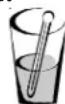
For Refrigerator
- Place thermometer in glass of water in middle of unit and continue with step 3 of Temperature Adjustment section.
Electronic Temperature Control Models
1 To set temperature of the freezer, use the 12 buttons next to the button. A setting of 0^ to 2^ (-17° to -16° C) is recommended
- Use the button to raise the temperature of the freezer section, or the to lower it.
- Press the button to confirm the settings.
2 To set temperature of the fresh food section, use the buttons next to the button. A setting of 38^ to 40^ ( 3^ to 4^ ) is recommended.
- Use the button to raise the temperature of the fresh food section, or the to lower it.
- Press the button to confirm the settings.
3 Allow 24 hours for temperatures to stabilize. NOTE: If adjusting the temperature of an operational unit, only 5 to 8 hours is required for temperatures to take effect.
About Your Filtration System...
Water Filter Removal and Installation

WARNING
To avoid serious illness or death, do not use unit where water is unsafe or of unknown quality without adequate disinfection before or after use of filter.

CAUTION
- Bypass cartridge DOES NOT filter water. Be sure to have replacement cartridge available when filter change is required.
- If water filtration system has been allowed to freeze, replace filter cartridge.
- If system has not been used for several months, and water has an unpleasant taste or odor, flush system by dispensing 2-3 glasses of water. If unpleasant taste or odor persists, change filter cartridge.
Initial Install of Water Filter
1 Remove blue bypass cap and retain for later use.
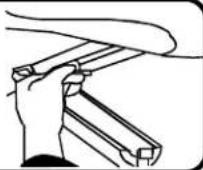
2 Remove sealing label from end of filter and insert into filter bead.
- Rotate gently clockwise until filter stops and snap filter cover closed.
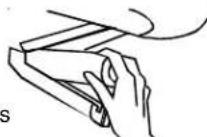
Reduce water spurts by flushing air from system. Run water continuously (approximately 2 minutes) through dispenser until water runs steady.
Additional flushing may be required in some households where water is of poor quality.
I'm trying to dispense water to flush the system. Where's the water?
During initial use, allow about a 1 to 2 minute delay to allow internal water tank to fill.

What if I choose not to use the water filtration system?
Dispenser feature may be used without water filter cartridge. If you choose this option, replace filter with blue bypass cap.
Replacing Water Filter
IMPORTANT: Air trapped in system may cause water and cartridge to eject. Use caution when removing.
1 Turn filter counterclockwise until it releases from filter bead.
2 Drain water from filter into sink or toilet, and dispose in normal household garbage.
3 Wipe up excess water in filter cover and continue with installation steps 2 and 3.
When do I change the water filter?
Select dispenser models feature a water filter change indicator. For instructions on how to operate and reset this feature, refer to the dispenser features section in your manual.
For units without indicator feature, filter should be changed approximately every 6 months.
IMPORTANT: Condition of water and amount used determines life span of water filter cartridge. If water use is high, or if water is of poor quality, replacement may need to take place more often.
How do I order a replacement filter cartridge?
Replacement Water Filter cartridge model OWF51 is available through your dealers and servicers. Contact your local distributor for more information.
What if These Features are Different from Mine?
This book is intended to show the variety of features that are available in the product line. If your refrigerator does not have all the options that are shown, many of these options may be purchased by contacting your local distributor.
Interior Shelves

CAUTION
To avoid personal injury or property damage, observe the following:
- Confirm shelf is secure before placing items on shelf.
- Handle tempered glass shelves carefully. Shelves may break suddenly if nicked, scratched, or exposed to sudden temperature change.
Side Glide™ Shelves (some models)
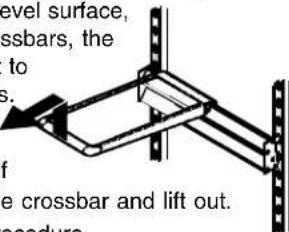
Side GlideTM shelves hook onto a rear double-crossbar assembly. Shelves may be aligned side
by side to create a full width level surface,
or if attached to separate crossbars, the
shelves may slide left or right to
accommodate storage needs.
To remove and install shelf:
To remove shelf, raise shelf 10^ to unhook from double crossbar and lift out.
- To install, reverse above procedure.
To slide shelves:
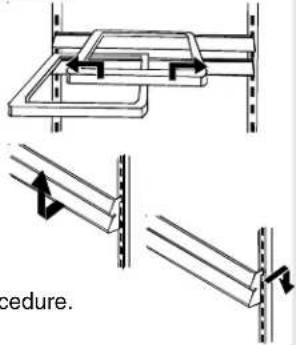
- Lift front of shelf slightly and slide left or right.
To remove and install
double-crossbar assembly:
- To remove, slide assembly up to unhook from metal track.
- To install, reverse above procedure.
SpillsaverTM Easy GlideTM (some models)
SpillsaverTM Easy GlideTM shelves feature the convenience of easy cleaning with a pull-out design to reach items in the back. For ease of cleaning, glass shelf may be removed by p extension and lifting out of frame
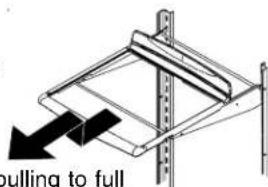
To remove shelf and frame, see instructions for SpillsaverTM stationary shelves.
SpillsaverTM
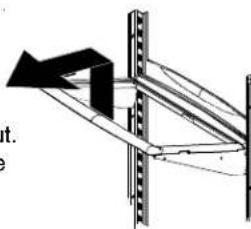
SpillsaverTMstationary shelves hold simple spills for easier cleaning.
- To remove shelves, lift up and out.
- To install shelves, reverse above procedure.
Rear Shelf Extensions (some models)
Rear shelf extensions help prevent articles from falling off the back of the shelf.
To remove and install shelf extension:
To remove, pull extension straight up from rear of shelf.
- To install, insert posts of the shelf extension into holes in the shelf frame.
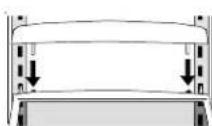
Fresh Food Features
Door Storage
Dairy Center
The dairy center provides convenient storage for items such as butter, yogurt, cheese, etc. This compartment is an adjustable feature located in the door. It can be moved to several different locations to accommodate storage needs.
To remove, slide dairy center up and pull straight out.
- To install, reverse above procedure.
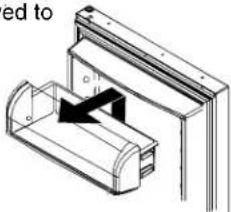
Tilt-Out Door Buckets (some models)
The Tilt-Out Bucket assembly consists of a bucket and frame, providing adjustable, convenient storage for food items in door. The bucket assembly tilts forward for easy access of items, and lifts out for ease in cleaning and adjusting.
To remove and install bucket:
- To remove bucket, tip bucket forward and pull straight out to remove.
- To install bucket, slide bucket into bucket frame and push bucket upright.
To adjust bucket frame:
- Remove bucket per above instructions.
- Lift frame off door support and place in desired door location.
Grip Pads
The Grip Pads prevent objects from sliding in the door bucket. Grip Pads are removable and are top-rack dishwasher safe for easy cleaning.
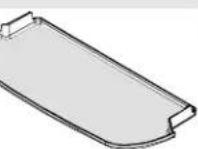
Beverage ChillerTM/ Mini-ChillerTM (some models)

The Temperature-Controlled Beverage Chiller™ and Temperature-Controlled Mini Beverage Chiller™ keep beverages and other items up to 3^ colder than the rest of the fresh food section. Air inlet allows air from the freezer section to pass to Beverage Chiller™.
The Beverage Chiller™ control is located on the left wall of fresh food section.
Control adjusts amount of air circulating in Beverage Chiller™. Turn control toward the large snowflake icon for colder temperature
To remove and install Beverage ChillerTM:
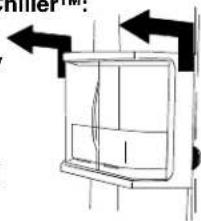
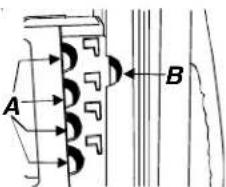
- If located directly above Chiller, dairy center or door bucket may need to be removed. Refer to appropriate instructions and remove item. Slide Beverage Chiller™ assembly up and pull straight out.
To install, align one of the Beverage Chiller™ cold air intake holes (A) with one of the two air inlets (B) in door liner. Push assembly down onto door liner retainer until it stops.
IMPORTANT: Beverage ChillerTM will not operate properly if air intake holes are not aligned with air inlet in door liner.
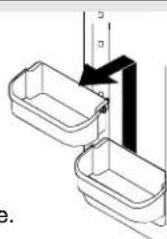
Door Buckets
Door buckets adjust to meet individual storage needs.
- To remove, slide bucket up and pull straight out.
- To install, reverse above procedure.
Fresh Food Features
Drawers
Deli/Crisper Painter climate controlled
The Deli/Crisper system provides a drawer with a variable temperature control that keeps the compartment up to 3^ colder than refrigerator temperature. This drawer can be used for deli storage or additional produce storage.
NOTE: Cold air directed to the Deli/Crisper System can decrease refrigerator temperature. Refrigerator control may need to be adjusted.
Controls
Located on the wall to the left of the drawer, the climate controls regulate the air temperature in the Deli/Crisper drawer. Set control level to cold to provide normal refrigerator temperature for produce with outer skins. Use the coldest setting for meats or other deli items.
Crisper Painter climate controlled
Garden Fresh™ crisper keeps produce fresh longer by providing an environment with adjustable humidity.
Controls
The Garden Fresh™ controls regulate the amount of humidity in the risper drawer. Use the low setting for produce with outer skins. Use the high setting for leafy produce.
To remove and install drawers:
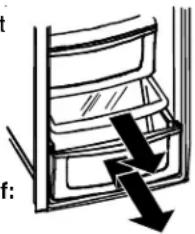
- To remove drawer, pull drawer out to full extension. Tilt up front of drawer and pull straight out.
- To install, reverse above procedure.
To remove and install crisper shelf:
- Lift off wall supports and remove.
- To install shelf, lower shelf onto wall supports and push in until shelf is flush with rear wall.
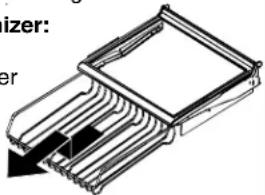
Beverage OrganizerTM (some models)
The Beverage Organizer™ slides out from underneath the Spillsaver™ Easy Glide™ shelf. The Organizer holds up to twelve 12-ounce beverage cans.
To remove and install Organizer:
To remove, empty contents of Organizer.Pull Organizer forward to full extension and lift front to release from shelf rail.Pull straight out to remove.
To install, reverse above procedure.
Freezer Features
What if These Features are Different from Mine?
This book is intended to show the variety of features that are available in the product line. If your refrigerator does not have all the options that are shown, many of these options may be purchased by contacting your local distributor.
Primary Features

CAUTION
To avoid property damage, observe the following:
- Do not force ice maker arm down or up.
- Do not place or store anything in ice storage bin.
Automatic Dispensing Ice Maker
This ice maker creates the ice used in the dispensing system.
Using Ice Maker for the First Time
- Confirm ice bin is in place and ice maker arm is down.
After freezer section reaches between -18^ to -17^ C, ice maker fills with water and begins operating. - Allow approximately 24 hours after installation to receive first harvest of ice.
- Discard ice created within first 12 hours of operation to verify system is flushed of impurities.
Operating Instructions
- Confirm ice bin is in place and ice maker arm is down.
After freezer section reaches -18^ to -17^ C, ice
maker fills with water and begins operating. You will have a complete harvest of ice approximately every 3 hours.
- Stop ice production by raising ice maker arm until click is heard.
- Ice maker will remain in the off position until arm is pushed down.
IMPORTANT: Ice Cream Shelf should not be installed if ice maker arm is in "off" position
Ice Cream Shelf
The Ice Cream Shelf provides a space for items to be chilled or frozen quickly.
- To remove, lift Ice Cream Shelf from ice bin rails and pull straight out.
- To install, reverse above procedure.
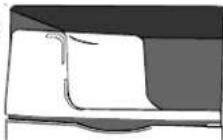
IMPORTANT: Ice Cream Shelf should not be installed if ice maker arm is in "off" position
Ice Storage Bin

The ice storage bin is located below the automatic dispensing ice maker.
To remove and install ice storage bin:
- To remove bin, remove Ice Cre Shelf. Raise ice maker arm to deactivate ice maker.
- Lift front of bin and pull out to its full extension. Lift up front of bin and remove.
- To install, slide bin into rails below ice maker until bin locks into place. Drop ice maker arm to activate ice maker, and replace Ice Cream Shelf.
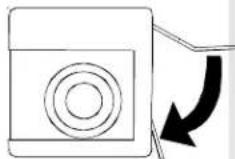
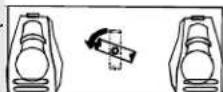
IMPORTANT: Ice bin must be locked in proper place for proper ice dispensing. If freezer door does not close, bin is not in proper location. Turn auger driver as shown to properly align ice bin with back of unit.
Freezer Features
Shelves
Stor-Mor® System
Baskets slide out for easy access of items in back. Shelves can be removed to meet individual storage needs.
To remove and install Stor-Mor shelf:
- To remove, snap right side of shelf from cabinet railing and remove from wall mounting clips.
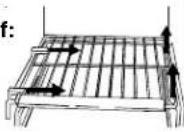
- To install, reverse above procedure.
NOTE: Back of shelf must be flush with back of cabinet to secure firmly in cabinet railing. Improper alignment will cause shelf to slide.
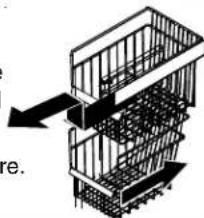
To remove and install baskets:
-
To remove, pull basket forward to full extension. Lift front handle to release basket from rails and remove.
-
To install, reverse above procedure.
Door Storage
Door Buckets
Refer to Fresh Food section for instructions.
Fixed Freezer Shelf
To remove and install shelves:
- Remove shelf from wall mounting clips and pull out of left side mounting holes.
To install, reverse above procedure.
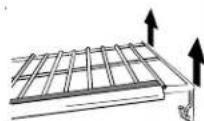
Hanging Wire Shelf (some models)
Hanging wire shelf provides extra storage for ice cube trays, boxed frozen foods, ice packs, etc.
To remove shelf:
- Pinch rung hook of hanging wire shelf inward to release hanging wire shelf from right side of Stor-Mor shelf. Shelf will swing downward.
- Press rung hook of hanging wire shelf outward to remove shelf from freezer section.
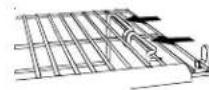
To install shelf:
- Perform above steps in reverse order.
Tilt-Out Door Buckets (some models)
Refer to Fresh Food section for instructions.
Dispenser Features
Primary Features
Dispenser Light not shown
A light activates within the dispenser area at full power when dispensing ice or water.
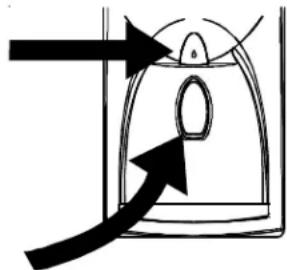
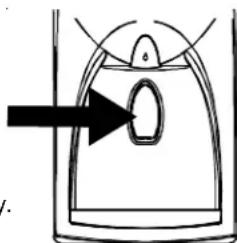
Front Fill Button (some models)
The Front Fill button works independently of the dispenser controls, providing an up-front alternative to the dispenser pad for dispensing water. This feature is convenient for filling large items that will not fit into the dispenser area (i.e. sport bottles, pitchers, large pans, coffee pots).
This feature allows added convenience of dispensing ice and water simultaneously. To use, choose your preferred ice mode from dispenser control panel. Press container against dispenser pad while pressing the Front Fill button.
Dispenser Pad
The dispenser pad is located on the back wall of the dispensing area. When the dispenser pad is pressed, the selection chosen on your dispenser control panel will dispense.
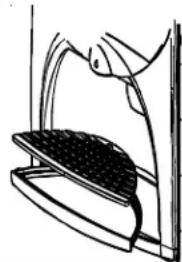
Removable Tray
The removable tray at the bottom of the dispenser area is designed to collect small spills and may be easily removed for cleaning and emptying purposes.
IMPORTANT: Removable tray does not drain. Continuous water running into tray will cause tray to overflow.
Water Dispenser Operation

CAUTION
To avoid personal injury or property damage, observe following instructions:
- Do not put fingers, hands, or any foreign object into dispenser opening.
- Do not use sharp objects to break ice.
- Do not dispense ice directly into thin glass, fine china, or delicate crystal.
NOTE: During initial use of water dispenser, allow an approximate 1-2 minute delay in water dispersal to allow internal water tank to fill. Discard first 10-14 containers of water after initially connecting refrigerator to household water supply and extended periods of nonuse.
To use dispenser pad:
- Choose water selection from dispenser control panel.
- Press sturdy, wide-mouthed container against dispenser pad.
- Release pressure on dispenser pad to stop water from dispensing. A small amount of water may continue to dispense, and collect in dispenser tray. Large spills should be wiped dry.
To use Front Fill button (some models):
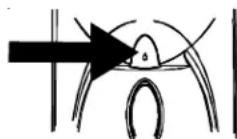
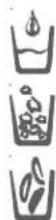
- Align container under Front Fill button using water droplet as guide.
- Press and hold Front Fill button.
- Release button when desired fill is reached. A small amount of water may continue to dispense, and collect in dispenser tray. Large spills should be wiped dry.
NOTE: If water dispenser is active for more than 5 minutes, an automatic lock out sensor will shut down power to dispenser area. See Automatic Lock Out for further information.
Dispenser Features
Control Features
(Five button control)
Ice Dispenser Operation
To dispense ice:
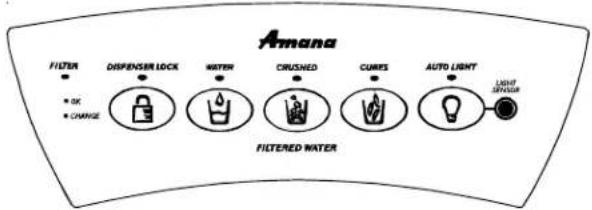
- Select Cubed or Crushed ice mode by pushing button on dispenser control panel. A green indicator light above button shows mode selection.
- Press container against dispenser pad. When dispensing crushed ice, hold container as close to chute as possible to reduce spraying. Selection mode may not be changed while ice dispenser is in operation.
NOTE: If dispenser is active for more than 3 minutes, an automatic lock out sensor will shut down power to dispenser area. See Automatic Lock Out for further information.
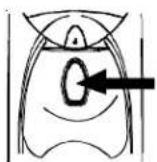
Dispenser Lock
This feature prevents ice or water from being dispensed.
To lock and unlock dispenser:
- To lock dispenser, press and hold Dispenser Lock button for 3 seconds. A green indicator light above button confirms dispenser is locked.
To unlock dispenser, hold Dispenser Lock button for 3 seconds. Green indicator light above button will go out.
What is the Automatic Lock Out feature?
The Automatic Lock Out feature shuts down power to the water and ice dispenser when either dispenser has run continuously for approximately 3 minutes. If this mode goes into effect, the green light will activate above the Dispenser Lock button.
To unlock dispenser:
To unlock dispenser, hold Dispenser Lock button for 3 seconds. Green indicator light above button will go out.
Filter Status Indicator Light
The Filter Status Indicator Light serves as a reminder to replace the water filter. A green light indicates that the filter is in good condition. A red light indicates the filter should be changed. Once light turns red, it will remain red until function is reset.
To reset indicator:
- Press and hold both Dispenser Lock and Auto Light buttons simultaneously for 4 seconds. The green Filter Status Indicator Light will flash 3 times when the function has successfully reset.
Auto Light
The Auto Light function offers the ability to activate the dispenser light at half-power when the Light Sensor detects that the light levels in room are low.
To activate and deactivate Auto Light:
- To activate, press Auto Light button located on control panel. A green indicator light above button displays to show that sensor is active.
- To deactivate, press Auto Light button. Green indicator light will go out.
NOTE: Dispenser light will operate whether or not Auto Light is selected.
Sabbath Mode (some models)
This mode is intended to deactivate power to the LED and dispenser lights, while allowing the controls to remain operational.
To activate Sabbath Mode:
- Press and hold both Dispenser Lock and Auto Light buttons simultaneously for 3 to 4 seconds. After 3 to 4 seconds, the LED and dispenser lights will turn off. Dispenser light will not activate during dispensing while in this mode.
To deactivate Sabbath Mode:
- Press and hold both Dispenser Lock and Auto Light buttons simultaneously for 3 to 4 seconds. After 3 to 4 seconds, the LED and dispenser lights will activate.
NOTE: In the event that power is interrupted while the Sabbath Mode is active, the control will remain in Sabbath Mode when power returns.
Dispenser Features
Control Features
(Electronic control)
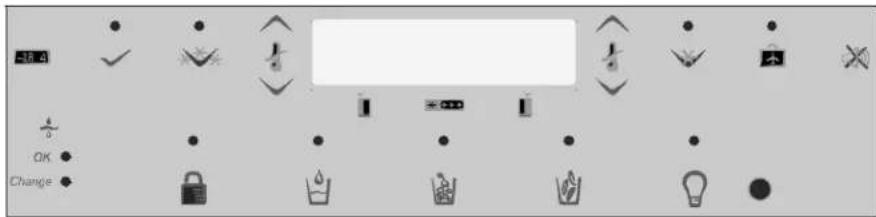
Water and Ice Dispensing (main activator)
The water and ice dispensing functions work independently of each other.
To disperse water:
To dispense ice:
- Press the
- Press the

button for crescent ice.
-
Press water activator
-
Press the

button for crushed ice.


Dispenser Lock
This feature prevents ice or water from being dispensed.

To lock and unlock dispenser:
- To lock dispenser, press and hold the is locked.

button for 3 seconds. A green indicator light above button confirms dispenser
To unlock dispenser, hold the

button for 3 seconds. Green indicator light above button will go out.
Light Function
The Light function offers offers two settings: OFF and AUTO.
NOTE: Dispenser light will operate at full power when ice or water functions are in use.
The OFF setting allows the light to function only as a dispenser cavity light.
The AUTO setting allows the SENSOR to measure the surrounding light levels and adjust the power of the cavity light accordingly. When the sensor registers lower light levels (night time, darkened kitchen), the cavity light will respond at 50% power. When the sensor registers high light levels (lighted kitchen, direct sunlight), the cavity light will not activate.
To deactivate the AUTO setting:
- Press the button located on control panel. When the green indicator light above button display is off, the light will function only when dispensing ice or water.
To activate the AUTO setting, press the button. When the green indicator light above the button display is on, the cavity dispenser light will use the AUTO setting.
Filter Status Indicator Light
The Filter Status Indicator Light serves as a reminder to replace the water filter. A green light indicates that the filter is in good condition. A red light indicates the filter should be changed. Once light turns red, it will remain red until function is reset.

OK
nge
To reset indicator:
- Press and hold both the
- buttons simultaneously for 4 seconds. The green Filter Status Indicator Light has successfully reset.
What is the Automatic Lock Out feature?
The Automatic Lock Out feature shuts down power to the water and ice dispenser when either dispenser has run continuously for approximately
2 minutes. If this mode goes into effect, the green light will activate above the button.
To unlock dispenser:
- To unlock dispenser, hold

button for 3 seconds. Green indicator light above button will go out.
Dispenser Features
Control Features continued
(Electronic control)
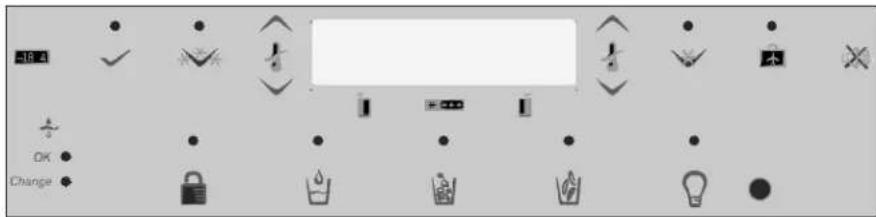
Temperature Keys
These keys will lower or raise the freezer or fresh food compartment temperature.
To set the fresh food temperature:
- Locate the

next to the button. Use the
button to raise the temperature of the fresh food section, or the to lower it.
- Press the button to confirm the setting.
To set the freezer temperature:
Repeat the above instructions with the button on the display.

buttons next to
Max Cool
NOTE: The temperature setting cannot be changed if Max Cool or Max Freeze setting is active.

This function causes the fresh food temperature to drop to the Minimum Refrigerator Temperature Setting preset by the control. This setting remains in effect for approximately 10 hours.
To activate Max Cool:
- Press the

button. The green light above the rate active status.
To deactivate Max Cool:
- Press the turn off.

button. The green light above the button will
Max Freeze
NOTE: The temperature setting cannot be changed if Max Cool or Max Freeze setting is active.
This function causes the freezer temperature to drop to the Minimum Freezer Temperature Setting preset by the control. This setting remains in effect for approximately 24 hours.

To activate Max Freeze:
- Press the

button. The green light above the
button will indicate active status.
To deactivate Max Freeze:
Press the

按钮. The green light above the
button will go out.
Display On/Off
The Display On/Off switch controls power to the LED display.

To deactivate display:
- Press the

The display will turn off.
To reactivate display:
- Press the

The display will turn back on.
Vacation Mode
This key, if enabled, causes less frequent defrost cycles. This conserves energy.
To place refrigerator into Vacation Mode:
Press the

button.
To deactivate Vacation Mode:
Press the

button, or open either refrigerator door.
Alarm Off
This key is used to turn the HI TEMP Warning Indicator and audio alarm, as well as the OPEN DOOR audio alarm off.
To turn the alarm off:
Press the


Dispenser Features
Hidden Control Features (Electronic Control)
Sabbath Mode
This mode is intended to deactivate power to the LED and dispenser lights, while allowing the controls to remain operational. No visual or audio alarms will be available while in this mode.
To activate Sabbath Mode:
- Press and hold both the
and buttons
simultaneously for 3 seconds. After 3 seconds, the LED and dispenser lights will turn off. Dispenser light will not activate during dispensing while in
this mode.
To deactivate Sabbath Mode:
- Press and hold both

and buttons simultaneously for 3
seconds. After 3 seconds, the LED and dispenser lights will activate.
NOTE: In the event that power is interrupted while the Sabbath Mode is active, the control will remain in Sabbath Mode when power returns.
Auto Display
The AUTO Display controls the illumination of the LED display based on the light readings received from the SENSOR. In AUTO mode, if the SENSOR indicates low light levels, the display will be dimmer than if displaying during well-lit periods. In ON mode, the display will have only one illumination setting and will not change due to light levels.
To set the power level of the display:
- Press and hold both the

button and the freezer

non for 3 seconds. The c

nt active state will show in
the display by using for on,

for auto.
- Use the refrigerator

on to scroll through the display states.
- Activate the chosen setting by pressing the

button.
Temperature Conversion Mode
This mode is available to change the Temperature Display between Fahrenheit and Celsius.

change temperature reading:
- Press the

and freezer

buttons simultaneously
for 3 seconds. Pressing the same button combination will allow the user to toggle between the two selections.


Hidden Lockout for Upper Keypad
The purpose of this mode is to prevent tampering with the upper set of dispenser controls. This includes the Display On/Off, Max Freeze, Max Cool, Vacation Mode, and Temperature Set functions.
To activate Hidden Dispenser Lockout:
Press the


is simultaneously for
3 seconds.

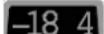
To deactivate Hidden Dispenser Lockout:
- Press the

but-184imultaneously
for 3 seconds.
ON/OFF Function
The ON/OFF function turns off cooling to the fresh food and freezer sections.
To turn the unit off:
-
Press the freezer button until the readout registers beyond the maximum allowable freezer temperature. At this point, the LED displays:
-
Press the button to confirm the selection.

WARNING
To avoid electrical shock which can cause severe personal injury or death, do not perform maintenance or service on refrigerator unless unit is unplugged.
To reactivate the unit:
-
Press the freezer button.
-
Press the button to confirm the selection.
How to Clean Your Unit

WARNING
To avoid electrical shock which can cause severe personal injury or death, disconnect power to refrigerator before cleaning. After cleaning, connect power.

CAUTION
To avoid personal injury or property damage:
- Read and follow manufacturer's directions for all cleaning products.
- Do not place buckets, shelves, or accessories in dishwasher. Cracking or warping of accessories may result.
- Handle tempered glass shelves carefully. Shelves may break suddenly if nicked, scratched, or exposed to sudden temperature change.
- Protect soft vinyl or other flooring with cardboard, rugs, or other protective material.
Hints and Care
What cleaners are recommended for my stainless steel product?
Your manufacturer has a cleaner available for purchase (Part # 31960801). Please contact your local distributor for purchase.
IMPORTANT: Damage to stainless steel finish due to improper use of cleaning products or non-recommended productions is not covered under any warranty.
General
- Wash surfaces with a warm water and baking soda solution. Use a soft clean cloth to clean surfaces.
- Rinse surfaces with warm water. Dry surfaces with a soft, clean cloth.
Adhesives
- Remove glue residue by rubbing toothpaste into adhesive with fingers until adhesive loosens.
- Rinse surface with warm water. Dry surface with a soft, clean cloth.
Door Gaskets
- Keep gaskets clean at all times. Clean door gaskets thoroughly every 3 months according to "General" instructions.
Condenser Coils
Clean condenser coil every 3 months to ensure maximum performance of refrigerator. Accumulated dust and lint may cause the following:
- reduced cooling performance
- increased energy usage
-
in extreme cases, premature compressor failure
-
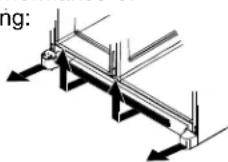
Remove toe grille and bottom hinge covers as shown right.
-
Clean front surface of condenser coil with a vacuum cleaner hose nozzle.
- Replace toe grille by inserting clips in holes and snapping in. Snap bottom hinge covers over bottom hinges.
Glass Shelves
Remove shelf by lifting front, releasing hooks from metal track then pulling out. Place shelf on a towel. Allow shelf to adjust to room temperature before cleaning. Clean crevices by completing the following steps:
- Dilute mild detergent and brush solution into crevices using a plastic bristle brush. Let set for 5 minutes.
- Spray warm water into crevices using faucet spray attachment.
- Dry shelf thoroughly and replace shelf by inserting hooks into metal track and lowering front.
How do I remove an odor from my refrigerator?
- Remove all food and disconnect power to refrigerator.
- Clean all interior surfaces including ceiling, floor, and walls according to "General" instructions. Pay special attention to corners, crevices, and grooves. Include all drawers, shelves, and gaskets.
- Connect power to refrigerator and return food to refrigerator. Wash and dry all bottles, containers and jars. Wrap foods in tightly sealed containers to prevent further odor. After 24 hours, check if odor was eliminated.
Complete the following steps if odor was not eliminated.
4.Complete steps 1-2.
5. Place garden fresh crispers on top shelf of refrigerator section. Pack refrigerator and freeze-sections including doors with crumpled sheets of black and white newspaper.
6. Place charcoal briquettes randomly throughout newspaper.
7. Close doors and let stand 24-48 hours.
8. Remove charcoal briquettes and newspapers.
9. Complete steps 2-3.
If odor was still not eliminated, contact your local retailer for assistance.
Hints and Care
How to Get the Most Out of Your Energy Dollar
This refrigerator is designed to be one of the most energy efficient refrigerators available. Reduce energy use by observing the following.
- Operate in normal household temperatures of 16^ to 43^ away from heat sources and direct sunlight.
- Set refrigerator, freezer, and Chiller Fresh™ system controls no colder than necessary.
- Keep freezer section full.
- Keep door gaskets clean and pliable. Replace gaskets if worn.
- Keep condenser coils clean.
How to Remove and Replace Light Bulbs

WARNING
To avoid electrical shock which can cause severe personal injury or death, disconnect power to refrigerator before replacing light bulb. If unable to disconnect power by unplugging power cord then remove the fuse at mains. After replacing light bulb, connect power.

CAUTION
To avoid personal injury or property damage, observe the following:
- Allow light bulb to cool.
- Wear gloves when replacing light bulb.
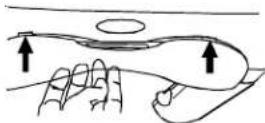
Upper fresh food section
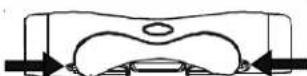
- Locate finger gaps on each side of clear light shield. Insert fingers and press in on each side of shield. Pull shield down and remove.
- Remove light bulbs.
- Replace with appliance bulbs, type Krypton E27, no greater than 25 watts.
- Replace light bulb cover by inserting front tabs of light shield into holes in liner directly in front of light assembly.
- Snap back of light cover into place.
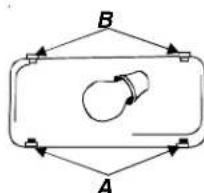
Lower fresh food section and Non-dispensing model freezer section
- Pinch bottom tabs (A) on light cover and pull straight out.
- Remove light bulb.
- Replace with appliance bulbs, type Krypton E27, no greater than 25 watts.
- Insert top tabs (B) of light cover into refrigerator liner and snap bottom portion over light assembly.
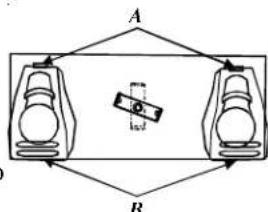
Dispensing model freezer section
- Remove ice bin by lifting front of bin and pulling out.
- Remove light bulb cover by pinching top tab (A) and pulling cover out of liner.
- Replace with appliance bulbs, type Krypton E27, no greater than 25 watts.
- Insert bottom tab (B) of light cover into liner and snap top portion over light assembly.
- Replace ice bin by sliding in until bin locks into place.
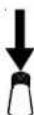
Ice 'N Water dispenser
- Locate light bulb inside top edge of dispenser frame. Unscrew to remove.
- Replace bulbs with a 230/240VAC bulb no greater than 12 watts. Extra light bulbs are provided in crisper due to local unavailability.
Before Calling Service
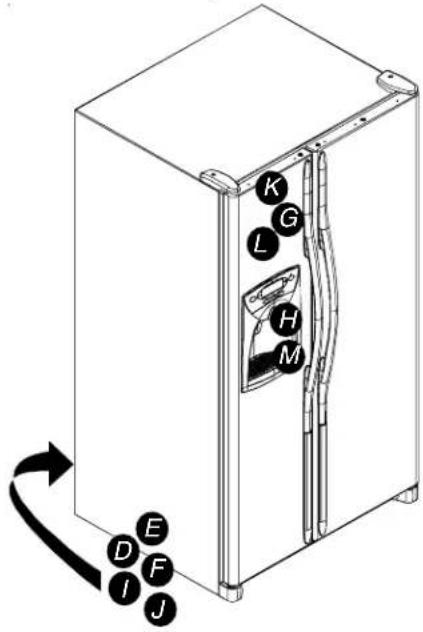
NOISE
Today's refrigerators have new features and are more energy efficient. Foam insulation is very energy efficient and has excellent insulating capabilities, however, foam insulation is not as sound absorbent. As a result, certain sounds may be unfamiliar. In time, these sounds will become familiar. Please refer to this information before calling service.
| TOPIC | POSSIBLE CAUSE | SOLUTION |
| Clicking | Freezer control (A) clicks when starting or stopping compressor. | Normal operation |
| Defrost timer (B) sounds like an electric clock and snaps in and out of defrost cycle. | Normal operation | |
| Air rushing or whirring | Freezer fan (C) and condenser fan (D) make this noise while operating. | Normal operation |
| Gurgling or boiling sound | Evaporator (E) and heat exchanger (F) refrigerant makes this noise when flowing. | Normal operation |
| Thumping | Ice cubes from ice maker(some models) drop into ice bucket (G). | Normal operation |
| Dispenser ice chute(H) closing. | Normal operation | |
| Vibrating noise | Compressor (I) makes a pulsating sound while running. | Normal operation |
| Refrigerator is not level. | See Installation Instructions for details on how to level your unit. | |
| Buzzing | Ice maker water valve (J) hookup (some models) buzzes when ice maker fills with water. | Normal operation |
| Humming | Ice maker (K) is in the 'on' position without water connection. | Stop sound by raising ice maker arm to 'off' position. See Automatic Ice Maker section in your owner's manual for details. |
| Ice auger (L) (some models) hums as auger agitates ice during dispensing. | Normal operation | |
| Compressor (I) can make a high pitched hum while operating. | Normal operation | |
| Solenoid valve (M) operating ice chute door. | Normal operation |
OPERATION

| Freezer control and lights are on, but compressor is not operating. | Refrigerator is in defrost mode. Normal operation | Wait 40 minutes to see if refrigerator restarts. |
| Deli/Crisper system temperature is too warm | Control settings are too low. See section on Freezer controls are set too low. See control | Deli/Crisper system to adjust controls. |
| section in Owner's Manual on how to adjust your controls. | ||
| Drawer is improperly positioned. See section | on Deli/Crisper system to verify drawer positioning. | |
| Refrigerator does not operate | Refrigerator is not plugged in. Plug in unit. | |
| Freezer control is not on. See section on controls in your Owner's Manual. | ||
| Fuse is blown, or circuit breaker needs to be reset. | Replace any blown fuses. Check circuit breaker and reset if necessary. | |
| Power outage has occurred Call local power | company listing to report outage. | |
| Refrigerator still won't operate | Unit is malfunctioning. Unplug refrigerator and transfer food to another unit. If another unit is not available, place dry ice in freezer section to preserve food. Warranty does not cover food loss. Contact service for assistance. | |
| Fresh food temperature is too cold | Condenser coils are dirty. Clean according to cleaning instructions in your Owner's Manual. | |
| Refrigerator or freezer controls are set too high. | See controls section in Owner's Manual on how to adjust your controls. | |
| Beverage Chiller™ (some models) is improperly positioned. | See section on Temperature-Controlled Beverage Chiller™ to verify proper positioning. | |
TOPIC POSSIBLE CAUSE SOLUTION
| Food temperature appears too w arm | Door is not closing properly. | Refrigerator is not level.See Installation Instructions for details on how to level your unit. |
| Check gaskets for proper seal.Clean, if necessary, according to cleaning instructions in Owner's Manual. | ||
| Check for internal obstructions that are keeping door from closing properly (i.e. improperly closed drawers, ice buckets, oversized or improperly stored containers or foodstuffs, etc.). | ||
| Controls need to be adjusted.See the controls section in your Owner's Manual for assistance in how to adjust your controls. | ||
| Condenser coils are dirty.Clean according to cleaning instructions in your Owner's Manual. | ||
| Rear air grille is blocked on models over 60 cm deep. | Check the positioning of food items in refrigerator to make sure grille is not blocked.Rear air grille is located behind risper drawers. | |
| Door has been opened frequently, or has been opened for long periods of time. | Reduce time door is open. Organize food items efficiently to assure door is open for as short a time as possible. | |
| Allow interior environment to adjust for period the door has been open. | ||
| Food has recently been added. Allow time for recently-added food to reach refrigerator or freezer temperature. | ||
| Compartment is dirty or has odor-causing food. | Refer to odor removal instructions in Owner's Manual. Refrigerator has an odor | |
| Air filter (some models) needs to be changed. | Change air filter. | |
| Water droplets form on outside of refrigerator | Check gaskets for proper seal.Clean, if necessary, according to cleaning instructions in Owner's Manual. | |
| Humidity levels are high. Normal during times of high humidity. | ||
| Controls require adjustment.See the controls section in your Owner's Manual for assistance in how to adjust your controls. | ||
| Water droplets form on inside of refrigerator | Humidity levels are high or door has been opened frequently. | See the controls section in your Owner's Manual for assistance in how to adjust your controls. |
| Check gaskets for proper seal. | Reduce time door is open. Organize food items efficiently to assure door is open for as short a time as possible. Clean, if necessary, according to cleaning instructions in Owner's Manual. | |
| Refrigerator or ice maker make unfamiliar sounds or seems too loud | Normal operation Refer to "Noise" section of Before Calling Service in your Owner's Manual. | |
| Deli/Crisper System and/or crisper drawers do not close freely | Contents of drawer, or positioning of items in the surrounding compartment could be obstructing drawer | Reposition food items and containers to avoid interference with the drawers. |
| Drawer is not in proper position. See section on Deli/Crisper System and/or crisper drawer section for proper placement. | ||
| Refrigerator is not level. | See Installation Instructions for details on how to level your unit. | |
| Drawer channels are dirty or need treatment. | Clean drawer channels with warm, soapy water. Rinse and dry thoroughly. | |
| Apply a thin layer of petroleum jelly to drawer channels. | ||
| Refrigerator runs too frequently | Doors have been opened frequently or have been opened for long periods of time. | Reduce time door is open. Organize food items efficiently to assure door is open for as short a time as possible. |
| Allow interior environment to adjust for period the door has been open. | ||
| Humidity or heat in surrounding area is high. | Normal operation | |
| Food has recently been added. | Allow time for recently-added food to reach refrigerator or freezer temperature. | |
| Unit is exposed to heat by environment or by appliances nearby. | Evaluate your unit's environment. Unit may need to be moved to run more efficiently. | |
| Condenser coils are dirty. | Clean according to cleaning instructions in your Owner's Manual. | |
TOPIC POSSIBLE CAUSE SOLUTION
ICE & WATER
| Refrigerator runs too frequently (continued) | Controls need to be adjusted. | See the controls section in your Owner's Manual for assistance in how to adjust your controls. |
| Door is not closing properly | Refrigerator is not level. See Installation Instructions for details on how to level your unit | |
| Check for internal obstructions that are keeping door from closing properly (i.e. improperly closed drawers, ice buckets, oversized or improperly stored containers or foodstuffs, etc.). | ||
| Check gaskets for proper seal. Clean, if necessary, according to cleaning instructions in Owner's Manual. |

| Water appears cloudy | Air or air bubbles in water. This is normal when | first using dispenser and will disappear with use. |
| Particles in water and/or ice cubes. | Carbon dust from water filter cartridge. Initial water ejected through cartridge may contain harmless carbon dust flushed from cartridge. Particles are safe for consumption. Will disappear after the first few uses. | |
| Concentrations of minerals in water will form particles when water becomes frozen and melts. | Particles are not harmful and naturally occur in water supplies. | |
| No indicator lights are lit on dispenser control (some models) | Freezer door is not closed. | Verify that freezer door is closed. Power is removed from the control when freezer door is opened. |
| Refrigerator is not plugged in. Plug in unit. | ||
| Fuse is blown, or circuit breaker needs to be reset. | Replace any blown fuses. Check circuit breakers for any tripped circuits. | |
| Power outage has occurred. Call local power company listing to report outage. | ||
| Neither ice nor water is dispensed when pads are pushed (some models) | Freezer door is not closed. Verify that freezer door is closed. Power is removed from the control when freezer door is opened. | |
| Controls are in lock mode. | See Dispenser control instructions. | |
| Water tank is filling. | At initial use, there is an approximate 45-second delay in dispensing while the internal water tank is filling. | |
| Ice maker or ice maker-equipped unit has just recently been installed or a large amount of ice has just been used. | Wait 24 hours for ice production to begin and for ice maker to restock after emptied. | |
| Water filter is clogged or needs to be changed. | Change water filter. | |
| Ice maker is not producing enough ice or ice is malformed (some models) | Ice maker has just recently been installed or a large amount of ice has just been used. | Wait 24 hours for ice production to begin and for ice maker to restock after emptied. |
| Water pressure is too low. | Low water pressure can cause valve to leak. Water pressure must be between 20 to 100 pounds per square inch to function properly. A minimum pressure of 35 pounds per square inch is recommended for units with water filters. | |
| Water filter is clogged or needs to be changed. | Change water filter. | |
| Ice maker is not producing ice (some models) | Ice maker arm is not in correct position | Confirm ice maker arm is down. See Automatic Ice Maker section in your Owner's Manual for details. |
| Household water supply is not reaching water valve | Check water connection procedure in your Installation Instructions. | |
| Water supply tubing has kinks. | Turn off water supply and remove kinks. If kinks cannot be removed, replace tubing. | |
| Water pressure is too low. | Water pressure must be between 20 to 100 pounds per square inch to function properly. A minimum pressure of 35 pounds per square inch is recommended for units with water filters. | |
| Check freezer temperature. | See the controls section in your Owner's Manual for assistance on how to adjust your controls. Freezer must be between 0 to 2°F (-18 to -17°C) to produce ice. | |
| Ice bin is not installed properly | See ice bin section for proper installation and alignment. | |
Before Calling Service
ICE & WATER

| TOPIC | POSSIBLE | CAUSE | SOLUTION |
| Ice maker is not producing ice (some models-continued) | Improper water valve was installed. Check water connection procedure in your Installation Instructions, Self-piercing and "3/16" saddle valves cause low water pressure and may clog the line over time. The manufacturer is not responsible for property damage due to Improper installation or water connection. | ||
| Unit is leaking water | Plastic tubing was used to complete water connection. | The manufacturer recommends using copper tubing for installation. Plastic is less durable and can cause leakage. The manufacturer is not responsible for property damage due to improper installation or water connection. | |
| Improper water valve was installed check water connection procedure in your Installation Instructions, Self-piercing and "3/8" saddle valves cause low water pressure and may clog the line over time. The manufacturer is not responsible for property damage due to improper installation or water connection. | |||
| Ice forms in inlet tube to ice maker | Water pressure is low. Water pressure must be between 20 to 100 pounds per square inch to function properly. A minimum pressure of 35 pounds per square inch is recommended for units with water filters. | ||
| Freezer temperature is too high. | See the controls section in your Owner's Manual for assistance on how to adjust your controls. Freezer is recommended to be between 0 to 2°C (-18 to -17°C). | ||
| Water flow is slower than normal | Water pressure is low. Water pressure must be between 20 to 100 pounds per square inch to function properly. A minimum pressure of 35 pounds per square inch is recommended for units with water filters. | ||
| Improper water valve was installed. Check water connection procedure in your Installation Instructions. Self-piercing and "3/16" saddle valves cause low water pressure and may clog the line over time. The manufacturer is not responsible for property damage due to improper installation or water connection. | |||
| Water inlet tubing has kinks. | Turn off water supply and remove kinks. If kinks cannot be removed, replace tubing. | ||
| Water filter is clogged or needs to be changed. | Change water filter. | ||
| Dispenser water is not cold | Refrigerator has been recently installed | Allow approximately 12 hours for water in holding tank to chill. | |
| Water supply in holding tank has been depleted. | |||
| Water has settle into water lines outside holding tank and has warmed to room temperature. | Discard first glass of water and refill. | ||
System Specification and Performance Data Sheet Refrigerator Water Filter Cartridge Model OWF-51
Specifications
Service Flow Rate (Maximum) 0.75 GPM (2.83 L/min)
Rated Service Life OWF-51-NI300 (Maximum) 300 gallons/ 1135 liters
Rated Service Life OWF-51-WI500 (Maximum) 500 gallons/ 1892 liters
Maximum Operating Temperature 100° F/38°C
Minimum Pressure Requirement 35 psi/138 kPa
Minimum Operating Temperature 33° F/1°C
Maximum Operating Pressure 120 psi/827 kPa
General Use Conditions: Read this Performance Data Sheet and compare the capabilities of this unit with your actual water treatment needs.
DO NOT use this product where water is microbiologically unsafe or of unknown quality without adequate disinfection before or after the system. System certified for cyst reduction may be used on disinfected water that may contain filterable cysts.
The retractable water filtration system uses a OWF-51 replacement cartridge (see your distributor to order). Timely replacement of filter cartridge is essential for performance satisfaction from this filtration system. Please refer to the applicable section in this Owner's Manual for general operation, maintenance requirements and troubleshooting.
This systems has been tested according to ANSI/NSF 42 and 53 for reduction of the substances listed below. The concentration of the indicated substances in water entering the system was reduced to a concentration less than or equal to the permissible limit for water leaving the system, as specified in ANSI/NSF 42 and 53.
Performance Data*
| Substance | Influent challenge concentration | Effluent Average | Average % Reduction | Maximum Effluent | Min. Required Reduction | Inlet pH |
| Lead | 0.15mg/L +/- 10% | 0.001 mg/L | 99.33% | 0.001 mg/L | 0.010 mg/L | 6.5 |
| Lead | 0.15mg/L +/- 10% | 0.002 mg/L | 98.66% | 0.003 mg/L | 0.010 mg/L | 8.5 |
| Cyst | Minimum 50,000/L | 1count/mL | 99.99% | 3 count/mL | >99.95% | NA |
| Turbidity | 11 +/- 1 NTU | 0.12 NTU | 98.98% | 0.18 NTU | 0.5 NTU | NA |
| Lindane | 0.002mg/L +/- 10% | 0.00005 mg/L | 97.62% | 0.00005 mg/L | 0.00002 mg/L | NA |
| Atrazine | 0.009mg/L +/- 10% | 0.0002 mg/L | 97.93% | 0.0006 mg/L | 0.003 mg/L | NA |
| Chlorine | 2.0mg/L +/- 10% | 0.09 mg/L | 95.26% | 0.17 mg/L | ≥75% | NA |
| Particulate** | at least 10,000 particles/mL | 900 count/mL | 99.68% | 2400 count/mL | ≥85% | NA |
| 2,4-D | 0.210mg/L +/- 10% | 45.45 ug/L | 84.42% | 100 ug/L | 0.0017 mg/L | NA |
| Asbestos | 10 to 10^6 fibers/L; fibers greater than 10 micometers in length | 0.16 MFL/mL | 99.96% | 0.16 MFL/mL | 99% | NA |
- Tested using a flow rate of 0.75 GPM (2.83 L/min.) and a maximum pressure of 120 psi (827 kPa) under standard laboratory conditions, however, actual performance may vary. Health Claim Performance tested and certified by NSF International
** Particle size range classification of test. Particles used were 0.5 -1 microns.
Pentapure, Incorporated
1000 Apollo Road
Eagan, Minnesota U.S.A.
EPA EST #35917-MN-1

Tested and Certified by NSF International against ANSI/NSF Standards 42 & 53 in models OWF50-W1500 and OWF50-N1300 for the reduction of:
Standard No. 42: Authentic Effects
Taste & Odor Reduction
Chlorine Reduction Class 1
Mechanical Filtration Unit
Participate Reduction Class 1
Standard No. 53: Health Effects
Chemical Reduction Unit
Lead, Atrazine, Lindane & 2,4-D Reduction
Mechanical Filtration Unit
Cyst, Turbidity, & Asbestos Reduction
Eagan, Minnesota U.S.A.
EPA EST #35917-MN-1

Pentapure, Incorporated
1000 Apollo Road
Eagan, Minnesota U.S.A.
EPA EST #35917-MN-1

Para activar Vacation Mode:
- Pulse el botón

Para deactivate Vacation Mode:
- Pulse el botón

Hidden Lockout for Upper Keypad
Para activar Hidden Dispenser Lockout:
PROBLEMA POSIBLE CAUSA SOLUCION
PROBLEMA POSIBLE CAUSA SOLUCION
Pentapure, Incorporated
1000 Apollo Road
Eagan, Minnesota,
Estados Unidos
EPA EST N. ^ 35917-MN-1

Anvanda Front Fill Button (Fyll Framtill-knappen):
Deaktivera Sabbath Mode (Sabbatsfungtion):
Pentapure, Incorporated
1000 Apollo Road
Eagan, Minnesota
U.S.A.
EPA EST nr 35917-MN-1

Sabbath Mode (Sapattitila)
Pentapure, Incorporated
1000 Apollo Road
Eagan, Minnesota U.S.A.
EPA EST #35917-MN-1

Dispenser Lock (Dispenservergrendeling)
Dispenser Lock (Dispenservergrendeling)
Ice 'N Water-dispenser
Pentapure, Incorporated
1000 Apollo Road
Eagan, Minnesota U.S.A.
EPA EST #35917-MN-1

Pentapure, Incorporated
1000 Apollo Road
Eagan, Minnesota, USA
EPA EST #35917-MN-1

Beverage Organizer™ (noen modeller)
Beverage Organizer™ glir ut fra under Spillsaver™ Easy Glide™-hyllen. Den kan holde opp til 12 brusbokser.
For à fjerne eller installere Beverage Organizer:
Dispenser Lock (Dispenserlås)
knappen for isterning.
- Trykk pa vannaktivatoren
Trykk pa
knappen for knust is.
Dispenserlock (Dispenserlås)
Max Freeze (maks frying)
Sādan fjernes after forteinstalling...
Dispenser Lock (Dispenserlås)
Denne Funktion forbinder, at der serveres vand.
Sadan Iases dispenser op:
Dispenseren Iases op ved at holde knappen Dispenser Lock (Dispenserlas) nede i 3 til 4 sekunder. Den gronne indicatorlampe oven over knappen garr ud.
Indikatorlampe for filterstatus
Dispenser Lock (Dispenserlås)
Max Freeze (maksimal fries)
Deaktivering af Max Freeze (maksimal fries):
Tryk paa
- knappen. Den gronne lampe ovens happen gár ud.
Display taendt/slukket
Display taendt/slukket-knappen styrer stromeffekten til LED-displayet
Pentapure, Incorporated
1000 Apollo Road
Eagan, Minnesota U.S.A.
EPA EST #35917-MN-1

Egnynto ovvtoua to npoBnau noo npoeKoye.
Oxpooc otn oeliaopaipotepa npexetai
Yta nV kaatypaon noutuov
πnpopopov.
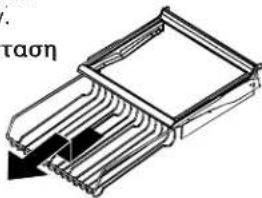
Tia aapaieon kai ekataoan Tou Beverage OrganizerTM:
Tia apaipoeon, aediaote to Organizer. TpaBnEto Organizer npoc ta eunpoc 0o nai kal onkwotetynpooyn ia va to aneaeuepwote ano tv poxla tou paiou. TpaBnEto iia npoc ta Eew ia va to apaipoeote.
TgEyaKataoan,avntoppeyTe Tny npanavw diaikiaia.
Xapaktnpiootikka katayoktn
Tiyivetaiavra
xapaktnpiotikauot
eivaideltaopertka
aoTaikauo;
To auto anokorei oto va deigc ta diapopa xapakntipotika nov utapxov stn eipap npoiov. Av to yoyio oac dev exe 08c tic enloyec nov Eukovcovtaednoa aaoutc tic enloyec mnpoeite va tic ayopaoet EIKOIOVovtac me tv tonko unofovo diaos
Kúpia xapaktnpiotika

PPOOxH
Tia va anopuyetye znua otic ykataoadoic, npite ta Enc:
Mn cipizete to bpaxiova tnc mnxavns nayokubwky kata to avebokatepaaqa.
Mny tonothe tte oue va anoennkueete tinote meoa otov kao nayokuow.
Autopatn mnxav nayokubw
Autn n umxavn nayokubw npaye1 tov naoyou xpoaonoiieital otnv Ewotepikn npoxh.
Ppwn xpon tnc mnxavic nayokuow
BebawBeite ot kaooc nayokubw evai otn theon tou kal o bpaxiovac tnc mnxavnc nayokubw evai katepaaevoc.
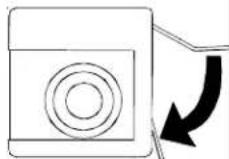
Oraovkataukntc pTaoei 180wC-17oC, n unxavn nayokow yuiz e vep kai apixz va aetoupysi.
- Iepieevete npinou 24 wpc e ta tvv Eykataotaon yia tny npwn nprtna nayokubw.
- TetaTe Ta nayakia nou napaxhknav tic npwtes 12 wpc aeitoupyia yia va bebaiwte ot to ouotnma exei enanoei ano tic akabapoiec.
OdyieC xepioou
- 2uBouAeutEte to tmuau ouvtipnoC yia oyniec.
XapaktnpioTKa EwTeepikns npoxns
Kupia xapaktnpioTik
Yia Koumuatia nayou.
-
PatnoTe to EvepyOnountn vepou
-
NaHOTe TO KOUMTI

Tpuévo nayo.
Dispenser Lock (Kλειδωμα npαρχής)
To xapaktnpiotiko auto eunoiizei tnv eEwTepkn npoxn nayou n vepou.
Tia va kLeiDwOeTe Kai va EekLeiDwOeTe Tny EeWTePiK npoxh:
Tvaevepyonnoe to Max Cool:
Tva anevpyonouoEto Max Cool:
Pte TO Koum

- PIIÉOTÉ TO KOUJNT

an to koumi unoobexvEvepykn kataotaon.
kouπiθaσhει.
Max Freeze
SHMEIOH: Hpuuon 8epoikpia 8v uopei va aAaEvi av npuoiom Max Cool n Max Freeze eivai evpyn.
H Iaoupyia autn npokalei tn 0epukpaia katayuene va neoi otny elambdaotn puthetaon eepuokpaoia c katayuene nou exei npoeilveyia ano to xepiotnpio. H puthetaion ioxue iya 24 nepinou opc.

Tua vA EvpyonnoEto Max Freeze:
Tva anevpyonnoeTo Max Freeze:
PteTOKoumI

- TlEOTe TO KOUH

TO KOUNIUNOEBIXVAEVPNKAATAOaON.
to koumu tha oBnoeI.
On/Off EvdsIeNc

O diakontns On/Off EvdoiEgN ElambdaxTn Vxu Tng EvdoEgLED.
Tva anevepyonnoeTe nV evoiEi:
Tia va evepyonnoe nai Tnv evdiEi:
PiEeTe Kouun. -18 4nθaσnoεi
Pleote to koumt. -18 4Eg th eepavotef mai.
Vacation Mode (Oeon diaokowv)
To koumi auto, av evepyointhe, npokalei lyotepo ouxvouc kuklouc anouuEnc. Aut eokovoei evpeyia.
Pentapure, Incorporated
1000 Apollo Road
Eagan, Minnesota U.S.A.
EPA EST #35917-MN-1

Eeey0ke kai mtononfke ano thy NSF International ouuowva ta npotuna ANSI/NSF 42 ka 53 otaovtela OW50-W1500 kai OW50-N1300 va tn meiwn tow napakatw npayovtw.
PpOTo 42:Aio8nTikcE EinnTWOeI
Meiwanyeuongkaiogui
MeiowonXwpiou
Meiow moaBou, atpQivnc, hivav ka 2,4-D
Mxavik mova dpaipiaqato
Meiwn kuotw, 0ePOTnTac kai qiaTvou
Para deslizar as prateleiras:
Para退还 e instalar as gavetas:
Para retiring e instalar as prateleiras:
TÓPICO CAUSA POSSÍVEL SOLUÇA
TÓPICO CAUSA POSSÍVEL SOLUÇA
TÓPICO CAUSA POSSÍVEL SOLUÇão
Pentapure, Incorporated
1000 Apollo Road
Dispenser Lock (Sebl Klittlenmesl)Dispenser Lock (
Klor Azaltma Kurşun, Atrazin, Lindan ve 2,4-D Azaltma
Mekanik Filtre Birimi Mekanik Filtre Birimi
Paracik Azaltma Sinif 1 Kist, Bulaniklik ve Asbest Azaltma