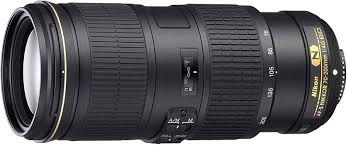
AF-S 70-200MM F/4G ED VR - Camera lens NIKON - Free user manual and instructions
Find the device manual for free AF-S 70-200MM F/4G ED VR NIKON in PDF.



| Product Type | AF-S G-type lens with built-in microprocessor and F mount |
| Brand | NIKON |
| Model | AF-S 70-200MM F/4G ED VR |
| Focal Length | 70-200 mm |
| Maximum Aperture | f/4 |
| Optical Construction | 20 lenses in 14 groups (including 3 ED glass lenses and nanocrystal coating) |
| Angle of View | FX/film: 34°20' - 12°20'; DX: 22°50' - 8°; IX240: 27°40' - 9°50' |
| Minimum Focus Distance | 1 m (from focal plane) |
| Diaphragm | 9 circular blades, range f/4 to f/32 |
| Filter Thread Size | 67 mm (P = 0.75 mm) |
| Dimensions | 78 mm (max diameter) × 178.5 mm (length) |
| Weight | Approx. 850 g |
| Focusing | Autofocus SWM (Silent Wave Motor) with manual override A/M; manual focus possible |
| Vibration Reduction | Yes (VR II), modes NORMAL and ACTIVE, gain up to 5 stops |
| Focus Limit | Switch: FULL (∞ - 1 m) or ∞ - 3 m |
| Supplied Accessories | Front cap LC-67, rear cap LF-4, lens hood HB-60, case CL-1225 |
| Maintenance and Cleaning | Blower, lens cleaner, avoid solvents; store dry and away from sunlight |
| Safety | Do not disassemble, do not look at the sun, keep out of reach of children, no flammable gas |
| Repairability | Repair only by Nikon authorized service center |
Frequently Asked Questions - AF-S 70-200MM F/4G ED VR NIKON
User questions about AF-S 70-200MM F/4G ED VR NIKON
0 question about this device. Answer the ones you know or ask your own.
Ask a new question about this device
Download the instructions for your Camera lens in PDF format for free! Find your manual AF-S 70-200MM F/4G ED VR - NIKON and take your electronic device back in hand. On this page are published all the documents necessary for the use of your device. AF-S 70-200MM F/4G ED VR by NIKON.
USER MANUAL AF-S 70-200MM F/4G ED VR NIKON
- Do not disassemble. Touching the internal parts of the camera or lens could result in injury. In the event of malfunction, the product should be repaired only by a qualified technician. Should the product break open as the result of a fall or other accident, remove the camera battery and/or disconnect the AC adapter and then take the product to a Nikon-authorized service center for inspection.
- Turn the camera off immediately in the event of malfunction. Should you notice smoke or an unusual smell coming from the equipment, immediately unplug the AC adapter and remove the camera battery, taking care to avoid burns. Continued operation could result in fire or injury. After removing the battery, take the equipment to a Nikon-authorized service center for inspection.
- Do not use in the presence of flammable gas. Operating electronic equipment in the presence of flammable gas could result in explosion or fire.
- Do not look at the sun through the lens or the camera viewfinder. Viewing the sun or other bright light source through the lens or viewfinder could cause permanent visual impairment.
- Keep out of reach of children. Failure to observe this precaution could result in injury.
-
Observe the following precautions when handling the lens and camera:
-
Keep the lens and camera dry. Failure to observe this precaution could result in fire or electric shock.
-
Do not handle the lens or camera with wet hands. Failure to observe this precaution could result in electric shock.
-
Keep the sun well out of the frame when shooting backlit subjects. Sunlight focused into the camera when the sun is in or close to the frame could cause a fire.
-
If the lens will not be used for an extended period, attach the front and rear lens caps and store the lens out of direct sunlight. If left in direct sunlight, the lens could focus the sun's rays onto flammable objects, causing fire.
-
Do not carry tripods with a lens or camera attached. You could trip or accidentally strike others, resulting in injury.
- Do not leave the lens where it will be exposed to extremely high temperatures, such as in an enclosed automobile or in direct sunlight. Failure to observe this precaution could adversely affect the lens' internal parts, causing fire.
Parts of the Lens
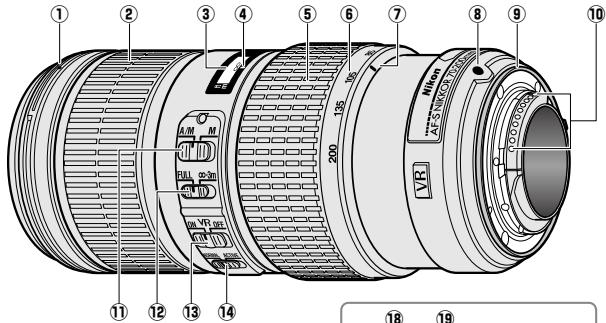
* Optional.
① Lens hood mounting mark.....18
Focus ring. 15
3 Focus distance indicator
(4) Focus distance mark
⑤ Zoom ring. 15
(6) Focal length scale. 15
⑦ Focal length mark
Lens mounting mark
9 Rubber lens-mount gasket.....20
10 CPU contacts. 20
1 Focus-mode switch 15
12 Focus limit switch. 15
Vibration reduction ON/OFF switch 16
Vibration reduction mode switch. 16
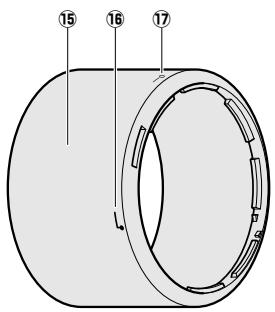
Lens hood. 18
16 Lens hood alignment mark.....18
Lens hood lock mark. 18
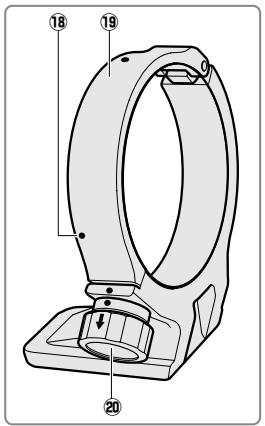
18 Position indices (90^)^* 19
19 Tripod collar ring* 19
20 Tripod collar ring attachment knob* 19
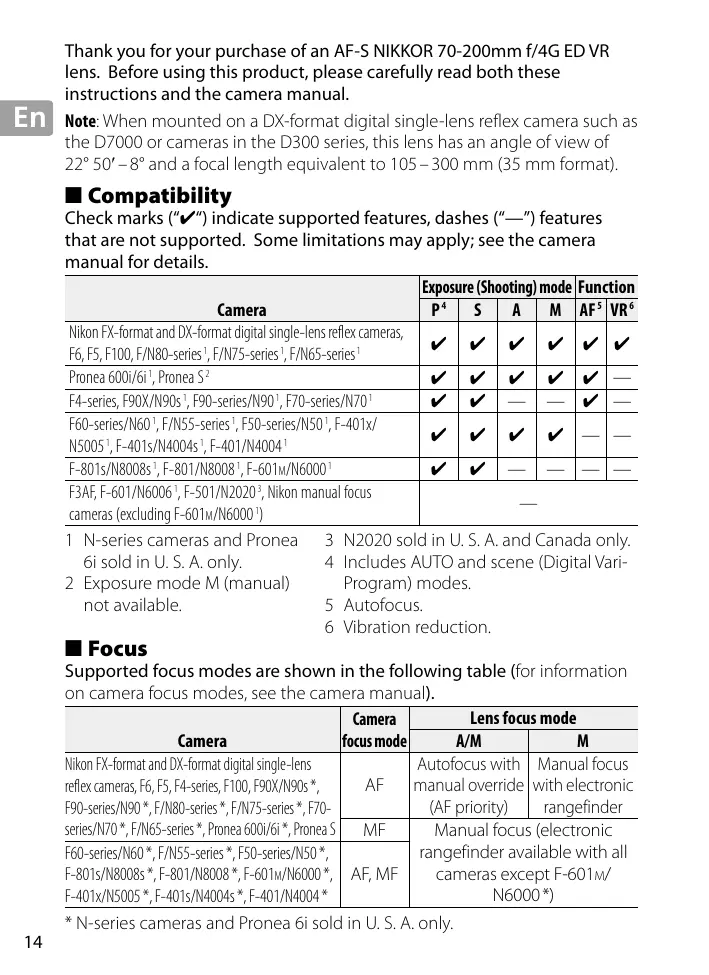
Thank you for your purchase of an AF-S NIKKOR 70-200mm f/4G ED VR lens. Before using this product, please carefully read both these instructions and the camera manual.
Note: When mounted on a DX-format digital single-lens reflex camera such as the D7000 or cameras in the D300 series, this lens has an angle of view of 22^50^-8^ and a focal length equivalent to 105-300mm (35 mm format).
Compatibility
Check marks ("✔") indicate supported features, dashes ("—") features that are not supported. Some limitations may apply; see the camera manual for details.
| Camera | Exposure (Shooting) mode | Function | ||||
| P4 | S | A | M | AF5 | VR6 | |
| Nikon FX-format and DX-format digital single-lens reflex cameras, F6, F5, F100, F/N80-series1, F/N75-series1, F/N65-series1 | ✓ | ✓ | ✓ | ✓ | ✓ | ✓ |
| Pronea 600i/6i1, Pronea S2 | ✓ | ✓ | ✓ | ✓ | ✓ | — |
| F4-series, F90X/N90s1, F90-series/N901, F70-series/N701 | ✓ | ✓ | — | — | ✓ | — |
| F60-series/N601, F/N55-series1, F50-series/N501, F-401x/N50051, F-401s/N4004s1, F-401/N40041 | ✓ | ✓ | ✓ | ✓ | — | — |
| F-801s/N8008s1, F-801/N80081, F-601M/N60001 | ✓ | ✓ | — | — | — | — |
| F3AF, F-601/N60061, F-501/N20203, Nikon manual focus cameras (excluding F-601M/N60001) | — | |||||
1 N-series cameras and Pronea 6i sold in U. S. A. only.
2 Exposure mode M (manual) not available.
3 N2020 sold in U. S. A. and Canada only.
4 Includes AUTO and scene (Digital Vari-Program) modes.
5 Autofocus.
6 Vibration reduction.
Focus
Supported focus modes are shown in the following table (for information on camera focus modes, see the camera manual).
| Camera | Camera focus mode | Lens focus mode | |
| A/M | M | ||
| Nikon FX-format and DX-format digital single-lens reflex cameras, F6, F5, F4-series, F100, F90X/N90s *, F90-series/N90*, F/N80-series *, F/N75-series *, F70-series/N70*, F/N65-series *, Pronea 600i/6i *, Pronea S | AF | Autofocus with manual override (AF priority) | Manual focus with electronic rangefinder |
| MF | Manual focus (electronic rangefinder available with all cameras except F-601M/N6000*) | ||
| F60-series/N60*, F/N55-series *, F50-series/N50 *, F-801s/N8008s *, F-801/N8008*, F-601M/N6000 *, F-401x/N5005 *, F-401s/N4004s *, F-401/N4004 * | |||
- N-series cameras and Pronea 6i sold in U. S. A. only.
A/M (Autofocus with Manual Override/AF Priority)
To focus using autofocus with manual override (A/M):
1 Slide the lens focus-mode switch to A/M.
2 Focus.
If desired, autofocus can be over-ridden by rotating the lens focus ring while the shutter-release button is pressed halfway (or, if the camera is equipped with an AF-ON button, while the AF-ON button is pressed); note that the ring must be rotated a short distance before autofocus is over-ridden. To refocus using autofocus, press the shutter-release button halfway or press the AF-ON button again.
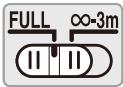
The Focus Limit Switch
This switch determines the focus distance limits for autofocus.
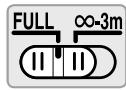
FULL: Select this option for subjects that may be closer than 3 m (9.84 ft).
- 3 ~m : If your subject will always be at distance of at least 3 ~m (9.84 ft), select this option for faster focusing.
Zoom and Depth of Field
Before focusing, rotate the zoom ring to adjust the focal length and frame the photograph. If the camera offers depth-of-field preview (stop down), depth of field can be previewed in the viewfinder (see page 210 for more information).
Note: Note that the focus distance indicator is intended only as a guide and may not accurately show the distance to the subject and may, due to depth of field or other factors, not show when the camera is focused on a distant object.
Aperture
Aperture is adjusted using camera controls.
Built-in Flash Units
When using the built-in flash on cameras equipped with a built-in flash unit, remove the lens hood to prevent vignetting (shadows created where the end of the lens obscures the built-in flash).
Vibration Reduction
Vibration reduction reduces blur caused by camera shake, allowing shutter speeds up to five stops slower than would otherwise be the case (Nikon measurements; effects vary with the photographer and shooting conditions). This increases the range of shutter speeds available and permits hand-held, tripod-free photography in a wide range of situations.
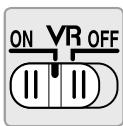
Using the Vibration Reduction ON/OFF Switch
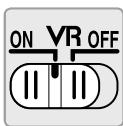
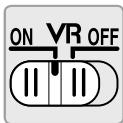
Select ON to enable vibration reduction. Vibration reduction is activated when the shutter-release button is pressed halfway, reducing the effects of camera shake for improved framing and focus.
Select OFF to turn vibration reduction off.
Using the Vibration Reduction Mode Switch
The vibration reduction mode switch is used to select the vibration reduction mode when vibration reduction is on.
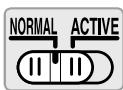
Select NORMAL to reduce the effects of vibration when photographing from a fixed position and in other situations with comparatively little camera motion.
Select ACTIVE to reduce the effects of vibration when shooting from a moving vehicle, while walking, and in other situations with active camera motion.
Using Vibration Reduction: Notes
- Slide the vibration reduction switch to OFF if the camera does not support vibration reduction (pg. 14). Leaving vibration reduction on may greatly increase the drain on the battery, particularly in the case of Pronea 600i/6i cameras.
- When using vibration reduction, press the shutter-release button halfway and wait for the image in the viewfinder to stabilize before pressing the shutter-release button the rest of the way down.
- When vibration reduction is active, the image in the viewfinder may be blurred after the shutter is released. This does not indicate a malfunction.
- Slide the vibration reduction mode switch to NORMAL for panning shots. When the camera is panned, vibration reduction applies only to motion that is not part of the pan (if the camera is panned horizontally, for example, vibration reduction will be applied only to vertical shake), making it much easier to pan the camera smoothly in a wide arc.
- Do not turn the camera off or remove the lens while vibration reduction is in effect. If power to the lens is cut while vibration reduction is on, the lens may rattle when shaken. This is not a malfunction, and can be corrected by reattaching the lens and turning the camera on.
- If the camera is equipped with a built-in flash, vibration reduction will be disabled while the flash charges.
- Turn vibration reduction off when the camera is securely mounted on a tripod, but leave it on if the tripod head is not secured or when using a monopod.
The Lens Hood
The lens hoods protect the lens and block stray light that would otherwise cause flare or ghosting.
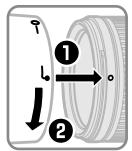

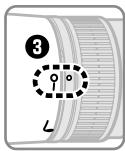
Align the lens hood lock mark (-) with the lens hood mounting mark () on the lens () .
When attaching or removing the hood, hold it near the symbol on its base and avoid gripping it too tightly. Vignetting may occur if the hood is not correctly attached.
The hood can be reversed and mounted on the lens when not in use.
When the hood is reversed, it can be attached and removed by rotating it while holding it near the lock mark (—O).
Focusing Screens
The following cameras support a variety of focusing screens for use in different situations.
| Camera\Screen | A | B | C | E | EC-B EC-E | G1 | G2 | G3 | G4 | J | L | M | U |
| F6 | ◎ | ◎ | — | ◎ | — | — | — | — | — | ◎ | ◎ | ◎ | |
| F5+DP-30 | ◎ | ◎ | ○ | ◎ | ◎ | ◎ (+0.5) | ◎ | ◎ | ◎ | ||||
| F5+DA-30 | ◎ (+1.0) | ◎ (+0.5) | ○ | ◎ (+0.5) | ◎ | ○ (-1.0) | ◎ (+0.5) | ◎ (+1.0) | ◎ |
: Recommended.
O: Vignetting visible in viewfinder (photographs are not affected).
Not compatible with camera.
( ): Figures in parentheses give the exposure compensation for center-weighted metering. Select "Other screen" for Custom Setting b6 ("Screen comp.") when adjusting exposure compensation for the F6; note that with screens other than B or E, "Other screen" must be selected even when the value for exposure compensation is 0. Exposure compensation for the F5 can be adjusted using Custom Setting 18; see the camera manual for details.
Empty cell: Not suited to use with this lens. Note that type M screens can however be used for photomicrography and macro photography at magnifications of 1 : 1 or higher.
Note: The F5 supports matrix metering with A, B, E, EC-B/EC-E, J, and L focusing screens only.
The Optional RT-1 Tripod Collar Ring
Loosen the tripod collar ring attachment knob to rotate the camera to the desired position and orient the display horizontally or vertically. Note that your hand may come into contact with the tripod if you rotate the camera while holding it by the handgrip. Depending on how the camera or tripod is attached, camera shake may be reduced by attaching the tripod to the camera tripod mount.
WARNING
Fully tighten the tripod collar ring attachment knob when attaching tripod collar ring. Failure to observe this precaution could result in the tripod collar ring becoming detached from the lens, causing injury.
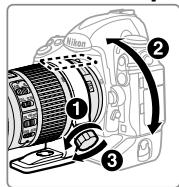
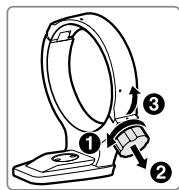
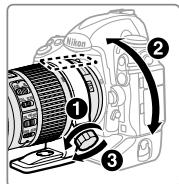
Attaching the Tripod Collar Ring
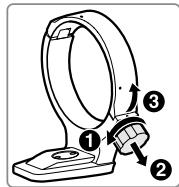
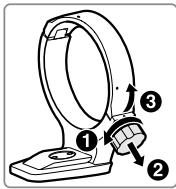
1 Loosen the tripod collar ring attachment knob (1).
2 Open the ring.
Pull the attachment knob toward you (2) and open the ring (3).
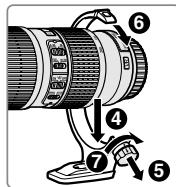
3 Place the lens in the ring (4).
4 Close the ring.
Pull the attachment knob toward you (5) and close the ring (6). Do not use excessive force, as your hand could be caught in the ring.
5 Tighten the attachment knob (7).
Positioning the Camera
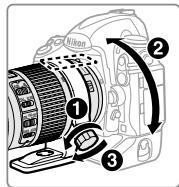
Loosen the attachment knob (1), adjust the position indices to the desired vertical or horizontal orientation (2), and then tighten the attachment knob (3).
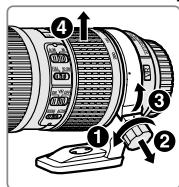
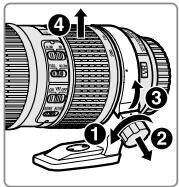
Removing the Tripod Collar Ring
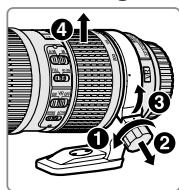
1 Loosen the attachment knob (1).
2 Remove the ring.
Pulling the attachment knob toward you (2), open (3) and remove the lens (4).
Lens Care
- Do not pick up or hold the lens or camera using only the lens hood.
- Keep the CPU contacts clean.
- Should the rubber lens-mount gasket be damaged, cease use immediately and take the lens to a Nikon-authorized service center for repair.
- Use a blower to remove dust and lint from the lens surfaces. To remove smudges and fingerprints, apply a small amount of ethanol or lens cleaner to a soft, clean cotton cloth or lens-cleaning tissue and clean from the center outwards using a circular motion, taking care not to leave smears or touch the glass with your fingers.
- Never use organic solvents such as paint thinner or benzene to clean the lens.
- The lens hood or NC filters can be used to protect the front lens element.
- Attach the front and rear caps before placing the lens in its flexible pouch.
- If the lens will not be used for an extended period, store it in a cool, dry location to prevent mold and rust. Do not store in direct sunlight or with naphtha or camphor moth balls.
- Keep the lens dry. Rusting of the internal mechanism can cause irreparable damage.
- Leaving the lens in extremely hot locations could damage or warp parts made from reinforced plastic.
Supplied Accessories
- 67 mm snap-on Front Lens Cap LC-67
Rear Lens Cap LF-4
Bayonet Hood HB-60 - Flexible Lens Pouch CL-1225
Compatible Accessories
- 67 mm screw-on filters
- Tripod collar ring RT-1
-
AF-I/AF-S Teleconverters TC-14E/TC-14E II/TC-17E II/TC-20E/TC-20E II/TC-20E III
-
Autofocus is available only with cameras that offer f/8 support.
Specifications
| Type | Type G AF-S lens with built-in CPU and F mount |
| Focal length | 70–200 mm |
| Maximum aperture | f/4 |
| Lens construction | 20 elements in 14 groups (including 3 ED lens elements and lens elements with Nano-Crystal coatings) |
| Angle of view | · Nikon film SLR and FX-format D-SLR cameras: 34° 20' – 12° 20' · Nikon DX-format D-SLR cameras: 22° 50' – 8° · IX240 system cameras: 27° 40' – 9° 50' |
| Focal length scale | Graduated in millimeters (70, 85, 105, 135, 200) |
| Distance information | Output to camera |
| Zoom | Manual zoom using independent zoom ring |
| Focusing | Nikon Internal Focusing (IF) System with autofocus controlled by Silent Wave Motor and separate focus ring for manual focus |
| Vibration reduction | Lens shift using voice coil motors (VCMs) |
| Focus distance indicator | 1 m to infinity (∞) |
| Minimum focus distance | 1 m (3.28 ft) from focal plane at all zoom positions |
| Diaphragm blades | 9 (rounded diaphragm opening) |
| Diaphragm | Fully automatic |
| Aperture range | f/4 to f/32 |
| Metering | Full aperture |
| Focus limit switch | Two positions: FULL (∞ - 1 m) and ∞ - 3 m |
| Filter-attachment size | 67 mm (P = 0.75 mm) |
| Dimensions | Approx. 78 mm maximum diameter × 178.5 mm (distance from camera lens mount flange) |
| Weight | Approx. 850 g (30.0 oz) |
Nikon reserves the right to change the specifications of the hardware described in this manual at any time and without prior notice.
SICHERHEITSHINWEISE
BcTpoeHHbI BCnblIuKn
ПиИСПОЛБЗOBAHINBCTPoeEHNOI BCNblIKnHaФOTOKaMepe, O6OpYIDOBAHHOI TAKO BcNblIKoN,CHIMITE6JIeHny O6bEKTnBa,чTO6bl I36eKaTb BUNbETnPOBAHnI (TeHei, O6pa3yUoiNXc TaM, rIe KpaI O6bEKTnBa 3aTeMHReT BCNblIKy).
IopadBHeHnBn6paun
IpaBHeHne Bn6paun yMeHb7aet CMa3bBaHne, Bbl3BaHHoe
IpoJkaHHeM fOToKamepbI, IIO3BOJra COKpATNTB BblEepKky Ha 5 cTypeHn (N3MepenHya Nikon; pe3yIbTaTb 3aBcTt OT fOToRpafo uYcNoBn cbemKn). 3TO yBeJIuHbAe T dIaIa3OH DoCTyHNOB bIePjKn I IO3BOJra TcIPOJIb3OBA Tb pyUHyO fOToCbeMKy 6e3 7tAtnBa B pa3LIuHbIX cTuTaUzix.
IcnoJIb3ObaHne nepeKJIIOUaTeNa NOaBNeHnBa6paCNI BKJ./BblKJI.
BbIbePHTe ON (BKJI.) UTO6bI BkNIOHTb NOaBnEHe BV6paun.
O: BnHbTeHOpBaHne BnIDHO uepe3 BnDOnCKaTeNb (Ha fOToRpaФиAx He OTo6pKaetc).
He coBmecTm C oTOkamepoi.
(): LüφbBCK6kAnpeaIOTKopkeuO3Kcno3uINJZHTPOB3BWeHNO3aMepa3Kcno3uIN. Bb6epTe «Other screen (DpyroJ 3KpaH)» JnPaTlb3OBATEBckOHaCTPOBKnB6(«Screen comp.(3KpaH KOMJ)»),npnHaCTPOKeKopkeuN3Kcno3uINJnF6;6oPaTne BnHMnHe HaTo,TOJnE3KpAHOB KpOME BnE,doJenE 6bTbBb6pan «Other screen (DpyroJ 3KpaH)»,daJeecn3HaueHeneKopkeuN3Kcno3uINpABNo0.KopkeuN3Kcno3uINJnF5 MoKeT bItbHaCTPoeHa,MCIOJIb3yI PloIb3OBATEBckCkyU HAcTPOKy18;cm.PykoBOdCTBOΦOTOKapebI DnI POlyeHIn DOIoHNtJEbHO INΦOpMaUN.
Iyctraayeika:He npdxoindTnIaNcNoIb3OBAHnC daHHbIMOb6BeKtNBOM.ObpaTnte BHNMaHne, UTo 3kpaHbTItnaMMOrT TakJxEncNoIb3OBAbTCBdIyMNkpoΦOTOrpaΦHpOBaHnI MaKpOΦOTorpaΦnPn yBelenueHm1:1nINBblwe.
PnmeHne: F5 nOepeKxBaet oKycnpoBouHbI eKpaHbI TOlbKO C MaTpnuHbIM 3amepom A, B, E, EC-B/EC-E, J n L.
DOnonHnTeNbHoe KOnbO uTaNBa RT-1
Ocna6bte pyuK kpeIeHnHa 7tAtnBa KoJIbca, YTO6bl NOBepHyb foTOKaMepy B HuxHoe nIOJoxHeHne, IN paCNOJoxHb DmCPIeB VertNkaJIbHO INI rOpN3OHTaJIbHO. IMeTe B VNDy, UTo Ba7a pyKa MoKeT 3aJeT bIaTnB, ecN BiI NobopauHbaete fOTOKaMepy, ydePknBaA ee 3a pyKoRrKy. B 3aBNCIMocTn OT cNoC06a npICoeDInHeHn foTOKaMepbI INI 7tATnBa dpoXaHne foTOKaMepbI MOxHO yMeHbIITb, pIncOeDInHb 7tATnB K KpeIeHnIO dIra 7tATnBa Ha foTOKaMepe.
ПЕДУПЕЖДЕНЕ
Ipn yctahOBKe KOJIbca Ⅲa TATnBa NOJHOCTbIO 3aTARnBaIte pyKU yCTaHOBKn KOJIbca Ⅲa TATnBa. HeBbINONHeHne 3ToI Mepbl npedocTOPOXHOCTN MOKeT npINBeCTN KOTCOeINHeHNIIO KOJIbca Ⅲa TATnBa OT ObekTnBa, YTO MOKeT npINHNTb TpaBMbl.
UctaHOBKa Koblua WtTaTnBa
1 Ocna6bTe pyky yctaHOBKn KOJIbza wTaTnBa (1).
2 OTkpoIte KoiIbIo. IOTaHInTe Ha ce6a pyuKy yCTaHOBKn (2) n OTkpoIte KoiIbIo (3).
3ПOMeCTIteO6beKtNB K0JIbIo (4).
4 3akpoite KoIbIo. IOTaHnTe Ha ce68 pyuKy yUCTaHOBKn (5) n 3akpoite KoIbIo (6). He npunlaarTe ue3MePnbIX ycNJIi, NocKoIbKy KOJIbIO MoJxET 3aUeMnTb pyKy.
5 3aTAHnTe pyUky yCTaHOBKn (7).
YcTaHOBKa fOToKaMepbl
Ocna6bTe pyKu yCTaHOBKn (1), nocTaBBte yKa3aTeIIN oIIOJKeHn B HxKHyIO BepTtKaJIbHyIO IIN rOpN3OHTaJIbHyIO opNeHTaCNIIO (2), a 3aTEM 3aTaNHTe pyKu yCTaHOBKn (3).
CHaTne KoJIbUca WtTaTnBa
1 Ocna6bTe pyUky yCTaHOBKn (D).
2 CHINMNTe KOJIbO. IOTaHbY bpyu kU yCTaHOBKn Ha ce68 (2),OTKpoIte 3) IN BblbTe O6beKTnB (4).
yXoD3aO6beKTHBOM
- He noDnHmaiTe n He depKnte oBekTb uInu foToKamepy TOnbKO 3a 6JeHny.
Copepknte KOHTaKtbl MmKpOnpocecccopa B uHcTote. - Ecni pe3iHOBa npokladaK kpenleHn o6bekTtBa nobpeJdeHa, HemeJeHHo npekpaTne IcNoIb3ObaHne N OTHeCtTe ee B OphiuaIbHbI cepBucHbI ueHTp Nikon dIy peMOHTa.
- IcnoIb3yIte rpyu ydaJIeHnC nOBepxHOCTn OBeKTHBa nbIn N BOPCNHOK. YTO6blYdaJIHTb PAnTHa NOTNeAATKn NaJIbUeB, Do6abBTe He6OJIbJooE KOJIueCTBO 3TINIOBORO CnIPrTa ININ OUnCTNTeI JnO6BeKTnBa Ha MArKyIO, UChTyO XJIOKNOByIO TkAhb ININ TKAHB DnI OUnCTKn OBeKTHBa IN, HauHHaOn OT cEHTPa, OUnCTNTe ERO KpyroBbIMN DBNXeHnAMM, CTapaCb He NoCTaBtB PANTHO IN He DToPOHyTBcN aJIbCuAMN DO CTEKJa.
- HnKoIa He nCnoIb3yIe Dny OuyNCTKn 06BeKTnBa opraHnueckne paCTBOpnteIn, taKe KaK pa36abNTel JnKpaacku nn 6eH3nH.
-Бл endуил Фьtr NC moхно Incnoь3OBaTb Дя 3aunTbI nepeHero элем enta obekTuBa.
3aKpoIe npEeHIOu 3aDnHOU KpbIuKu ObBeKTuBa,peepTeM KaK NOJoxITb OBeKTuB BMrKmYexOJ. - Ecnn O6bekTnB He 6ydtncnObl3OBaTbc B TeueHne npoJOnKInTeIbHoro BpeMeHN, XpaHnTe erO B npoxlaHOM, Cyxom MeCTe, YTO6bl IpEDoTbPaTtB NOBLeHne PnEcEHn IpxaBUnHb. He xpaHnTe PoD Bo3dEiCTBnEM PnpMOrO CoJIHeHOrO CBeta NIN BmecTe C NaftaIIHOBBIMN INI KAMapHbIMN ShapIKaMn IpOTNB MoIN.
XpaHnTe o6bekTnB cyxum.PKaBLeHne BHyTpehero MexaHn3Ma MoKeT npuBeCTN K HENOppaBUMOMy NOBpeJdeHIO. - Eçnl octabɪt b ɔběkɪnt B vʒe3bɪyáɪn Hɔ ḌapKOM MecTe, ṢT O MɒkjET npɪvBéCTN K NOBpejʌdɛHNU NɪN DeΦopMaɪn yacteɪ, cʒeɪaɪHbɪx n3 yCüneHŋHO pIaCTɪka.
BxoJaIeB KOMnIeK TnpHaIeJXHOCTN
Compatibility
| Tela Cârma | A | B | C | E | EC-B EC-E | G1 | G2 | G3 | G4 | J | L | M | U |
| F6 | ◎ | ◎ | — | ◎ | — | — | — | — | — | ◎ | ◎ | ◎ | |
| F5+DP-30 | ◎ | ◎ | ○ | ◎ | ◎ | ◎ (+0,5) | ◎ | ◎ | ◎ | ||||
| F5+DA-30 | ◎ (+1,0) | ◎ (+0,5) | ○ | ◎ (+0,5) | ◎ | ○ (-1,0) | ◎ (+0,5) | ◎ (+1,0) | ◎ |
: Recomendado.
BukopncTaHH nepeMnKaua ON/OFF 3MeHseHnB Bi6paCi
Bn6epitb ON, 0o6 3aTIN 3MeHSeHHN Bi6paui. 3MeHSeHHN Bi6paui akTNByeTBcR, KOJI N KONKJa cnyCKy 3aTBopa HaTNCHyTa HAnOJIOBuNHy, 3MeHsuOuOn eΦeKT TpeMTiHHN ΦOTOKaMepn dIg KpaIoro KaIpyBaHHI i oKycBaHHN.
Bn6epitb OFF, 106 BmKHytn 3MeHneHna Bi6paaii.
BnKOpncTaNHn nepemukaua pexmib 3meHneHHn Bi6paicij
O: EfeKT BiHbetyBaHHa 3'ABMaTbCaY BnDooyKaui (Ha 3HIMKax BiCyTHi).
He cymichn 3 oToKamepoIO.
(:) YncnB KpyrInx DzykXaO3NaUaIOb TnnpaBky EKcNo3uII dIy CEHTpaJIbHO- 3BaJKeHOro BmImpOBaHNHa. Bn6epiTb «Other sreen (IHnnI ekpAH)Dnla BlaChoro HanaHTyBaHNb6 («Screen comp.(PonpaBkn EKpaHa))》,KoJI NaaHTObYeTe nonpaBky EKcNo3uII dIy F6;MaIte Ha yBa3I,0o 3 ycima ekpaHAmn,OkrIM Ba6oE, 6yde o6paHo «Other sreen (IHssI ekpAH),HAVITb JAKIo nonpaBka EKcNo3uII O. IpnpaBky EKcNo3uII dIy F5 MoKHa HanaHTobYbATn 3a DoNOMorIO BnaCHoro HanaHTyBaHNH 18;DN.BdoAtKOBy IHΦOpMaIIO B noci6HNIy KopiCTyBaHa φOTOKampi.
IopoxnKaJIITHa: He BnKOpNCTOByETbCz 3 cmm 06'ekTINBOM. MaTe h a yBa3i, ekpaHn Tnpy M MoJyTb BnKOpNCTOByBaTNCb dJa MIkoPfOTo3HImaHHra Ta dJa 3IOMKn 3 6Ibn3bKoI BiDCTaHI B MacSta6i 1:1 a6o 6Inbwe.
PpimrKa: F5 niTpmye MaTpyHm MeToD 3amipy TiIbKn 3 ekpaHAmn fokycBaHHa A, B, E, EC-B/EC-E, J Ta L.
IodatkoBe KInbue dny KpinHeHna uTATNB RT-1
Bidkpytib pykoRTky npikpInnHnKinbua 7aTnBa, 0o6 nobepHytn
fotoKaMepy y notpi6he noLoKeHH Ta po3a7yBaTu dinCnnei
ropu3oHTaIbHo a6o BeptnKaJIbHo. 3ayBaXte, oO Bu MoKeTe 3aenuNTu
7taTnB pykoIO, kso NobepTaTe fotoKaMepy, TpmaIoOni II 3a pyKy.
3anExNo BID cnoc6by npikpInnHnF fotoKaMepn a6o 7taTnBa,
tpemTiHHNf fotoKaMepn MoKHnA 3meHUnTI, pID'cHabUH n 7taTnB do
rHi3da dIy KpInnHnF fotoKaMepn Ha 7taTnB.
PONPEJXEHNA
IobHicTIO 3aTaHITb pykU npKpInnEHn KJIbUd Ia KpInnEHnHa WtATNB pnpNcDnAHHI KJIbUdo WtATNBy. HexTyBaHHa ZIMM 3actepexeHHa MOnKe npIN3BecTu DO TORO, UO KJIbUe DnKpInnEHn Ha WtATNB BiID'cHaETCBa BID O6'ekTNBa, cPnUnHIOUCh TpaBMYaHHa.
PnueHaHH KInbua Ia KpInneHna Ha WtataNB
1 BiDkpyTtB pyKu npiKpInnHn KInbZdIa KpinHeHa wTaTNB (0).
2 BiDkpniTe KjIbue. IotTnHtB pyuKy Ha ce6e (2) i BiDkpniTe KjIbue (3).
3 Tomictb 06'ekTb y kInbce (4).
4 3akpniTe kInbue. IotarHtB pyuKy Ha ce6e (5) i 3akpniTe kInbue (6). He JOKnadaJte HAdmipHnx 3ucnbl, 0o6 He 3axaTn KInbceM pyKy.
5 3aTgHItb pyky (7).
POnuioHyBaHHaToKamepn
Bikpytibpuyky (1), BvdpernyIOte noJoxeHHaMITOK nO3nioHyBaHH BIDNOBINOHO do notpi6HOi opiHTaui, BepTKaJIbHOI cH rOpN3oHTaJIbHOI (2),notIM 3aTARHIb puyky (3).
BicEHaHHKInbuaKpInHeHHa WtTaHB
BiiKpyTiB pyuKy (1).
2 3HimiItb kiIbue.
IotrHiB pyky Ha ce6e (2), BiikpnTe (3) Ta 3HIMiTb 06'kTNB (4).
Доглдза 06'КТИВОМ
- He niiHimaiTe Ta He TpImaTe O6'KtNB a6o foToKamepy TiNbKn 3a 6JIeNdy.
Cπiδκηγte 3a tɪm, Μιος ΚΚΟΤΑΚΤι προύεcopa 3aβχκιν Μυλη Κινήν Κινήνι.
B pa3i no5kOJKeHn rMoBOoi npOKIaKn IЯкPInNeHn 6o'ekTtBa HeraHIO npINHHitb KOpNCTyBaHN i 3BepHITbcrdo cepBicHO ro cHTpy KomnaHii Nikon 3a donOMorOIO. - BvdaJnTe pnn, npx Ta BOPc 3 nobepxoHb 06'kTnBv 3a donomoroIO npncToPO dny O6dyBaHH. Lio6 BnuDAnTu BiD6nTk nIaBuc IB ta 6pyd, KopnCTyTEcra M'koIO qNCTOIO 6aBOBnHOIO TkaHNOIO a6o CneiaJbHMn cepBeTKamn dnyuNHe 06'kTnBIB Ta HeBENKOIO kInbKiCTU eTaHOly a6o piDHN dnyuNHe 06'kTnBIB, BNTnpaiTe nobepxHIO KOnOBmPyxAm BiD ceHTpy; 6ydbTe o6epeKHi, He 3aIIuAaTe po3BOID i He TopKaITEcra NaIbCzMn cKnA.
Длячишенио6'ekTиBy 3a6opohЯeTbCЯKOpntyBaTncaOprAhHnMn po3uHHNKamN, taKmNЯkpo3piJxJyBaUдЯфap6a6o6eh30J.
ДязхиступегдьолінЗи 06'ЕКТИВУ ВИКОПСТОВУTe 6JIeHДу a6O NCФльтп.
3akpmbaTe 06'KTnB nepeHbOTo 3aDhboIO KpuIkaMn nepeTm, JOKPONJIactN Ioro B M'AKN YOXON.
-Як soo He 36ираeTeCb KOpNCTyBaTnC8 O6'EkTNBOM DoBm TepmiH, 36epiraTe Ioro B npoxIoNDHomy cyxomy MiCi, Ioo6 3anO6irTu PIIICHBn Ta Kopo3ii. He 36epiraTe pncTpiI NiD npaMM COHyaHm CBITnOM Ta nopArd 3 NaftaiINOBIMn a6o KamΦopHmN 3ac06amn IpOTn MoJI. - UtpmyTe 06'ekTnB cyxNM. Kopo3ia BHyTpiiHbOro MexaHi3My MOnKe npu3BeCTn Do HeBiIDHOBHOrO NOpKoJxHeHHa.
JaKIO 36epiratn O6'ekTINB Micux 3 BUCOKOIO TempeaTpoIO, ce MoKe noUKoDNtA 60 deΦopMyBaTN KOMIHOENTN, 3pO6JIeHI 3 NocNIHeOI PIACTMaCn.
DogaTKOBe npnaA
- 67 MM Nepeendna Kpniushka 3 KpɪnJIeHŋm 3aɪnchorno Tɪny LC-67
3aHnKpnuKa o6'ekTnBa LF-4 - BaioHeta 6JIeHnDa HB-60
M'ankuoxoJnO6'ekTnByCL-1225
Cymiche npnilaand
-ДодаТКОВI 67 MM HaraBnHcyBaHi Флтп
Kinbue dny KpInIeHHHa WtAtnB RT-1
- TelekoHBPopn AF-I/AF-S TC-14E/TC-14E II/TC-17E II/TC-20E/TC-20E II/TC-20E III
- AByofoKycBaHnna DocTyHne TiIbKn IyI FOToKamep, kni NiTpmyOt biaiparMy f/8.
Texhhi xapaKTepuCTnKn
| 照相机\对焦屏 | J | L | M | U |
| F6 | ◎ | ◎ | ◎ | |
| F5+DP-30 | ◎ | ◎ | ◎ | |
| F5+DA-30 | ◎ (+0.5) | ◎ (+1.0) | ◎ |
推荐使用。
An antonym of the subject
| 스크리류가머라 | A | B | C | E | EC-BEC-E | G1 | G2 | G3 | G4 | J | L | M | U |
| F6 | ◎ | ◎ | - | ◎ | - | - | - | - | - | ◎ | ◎ | ◎ | |
| F5+DP-30 | ◎ | ◎ | ○ | ◎ | ◎ | ◎ (+0.5) | ◎ | ◎ | ◎ | ||||
| F5+DA-30 | ◎ (+1.0) | ◎ (+0.5) | ○ | ◎ (+0.5) | ◎ | ○ (-1.0) | ◎ (+0.5) | ◎ (+1.0) | ◎ |
@:
O: 見和在上用的,
.(gjdlj),jbi j0000000000000000000000000000000
1.2ol≤1g0g3g2g 二
"Other screen" j
jLd jic (aL) ("Screen comp.") b6 5LcXJ L dU aLJI (s
"Other screen" J b 12456789010111111111111111111111111
gjglal jyglil jzglj 0gLwgl gjglal jyglil jzglj aocLs1j gj (5)
JusuU JusuL Jusu:18 yuuey uua yuuey F5 yuolui
LgolssuJ 52M egill no Llul J IaX aIg .wseill ao go plai wU wliio: aLjlaL
1g1:1 1sS aaiy yaiy all g yay S ayy ayy ayy ayy
LgJgEC-E/EC-BgBgA gjIJJlUwLo aegdofoF5Ioo
bà
(AF aJg/laLc gLaJ gLaU yj-2) A/M
:(A/M)gssJjLjSsJg yIaJI JgJgJgJgJgJgJgJgJgJgJgJg
A/M gogJg c aewal jyjI yjI g Cia
1
5j
2
a#u#j#j#j#j#j#j#j#j#j#j#j#j#j#j#j#j#j#
AF-ON jj yj g o lSJI ciS [j] g) a h e i aai jll jnn j jlc hnn Jsl
slll J 1000000000000000000000000000000000000000000000000000000000000000000000
Jalal Jll jll jll jll jll jll jll jll jll jll jll
AF-ON jJJI JIJI gJIJIJIJIJIJIJIJI
gjJzSjL 2Li
Jalalj jj j j j j j j j j j j j j j j j j j j j j j j j j j j j j j j j j j j j j
3 0 2 1 2 1 2 1 2 1 2 1 2 1 2 1 2 1 2 1 2 1 2 1 2 1 2 1 (Lots) FULL
1a 1j3 Jc 3 aLw 1c LsJgJgJgJg:oo-3 m
1
jIbji jocg pjj
- JbJx Jx Jx Jx Jx Jx Jx Jx Jx Jx Jx Jx Jx Jx Jx Jx
jglblglacaileooSaj.(aiaillgai)glblilglaoaileoogolSll
L 210 aee jie JUs
aLwOJgJU5 1000
IolLJI Iooi Iooic 0oJrJg 8.5 Jolge g jlll goe J aee
JyolSJIy aolllsai jilao plsiuily aasell anie Jyj
JLJI 200-70f/4GE VR jIb c Jc Jc Jc Jc
gD7000IgOLJI JIO DX aagaaagagwlae aagcIgolS Ic aawll Sjic: 300-105 gJg8°-22°50' oagaaagagwlae aawll OgiD300 alwuu no 3
a=
aillbglI (") abolalLoIe J. aogcdoall bllgJGL (10) 1oJL SoIe J. JauuUJUJUJUJUJUJUJUJUJUJUJUJUJUJUJUJUJU
| \( {}^{4} \) BV | \( {}^{3} \) AF | \( {}^{2} \) AF | \( {}^{2} \) P | |||
| M | A | S | F | |||
| ✓ | ✓ | ✓ | ✓ | ✓ | ✓ | g FX \( \mathrm{a}{\mathrm{L}}^{\prime } \) , \( {\mathrm{F}}_{1} \) , \( {\mathrm{F}}_{2} \) , \( {\mathrm{F}}_{3} \) , \( {\mathrm{F}}_{4} \) , \( {\mathrm{F}}_{5} \) , \( {\mathrm{F}}_{6} \) , \( {\mathrm{F}}_{7} \) , \( {\mathrm{F}}_{8} \) , \( {\mathrm{F}}_{9} \) , \( {\mathrm{F}}_{10} \) , \( {\mathrm{F}}_{11} \) , \( {\mathrm{F}}_{12} \) , \( {\mathrm{F}}_{13} \) , \( {\mathrm{F}}_{14} \) , \( {\mathrm{F}}_{15} \) , \( {\mathrm{F}}_{16} \) , \( {\mathrm{F}}_{17} \) , \( {\mathrm{F}}_{18} \) , \( {\mathrm{F}}_{19} \) , \( {\mathrm{F}}_{20} \) , \( {\mathrm{F}}_{21} \) , \( {\mathrm{F}}_{22} \) , \( {\mathrm{F}}_{23} \) , \( {\mathrm{F}}_{24} \) , \( {\mathrm{F}}_{25} \) , \( {\mathrm{F}}_{26} \) , \( {\mathrm{F}}_{27} \) , \( {\mathrm{F}}_{28} \) , \( {\mathrm{F}}_{29} \) , \( {\mathrm{F}}_{30} \) , \( {\mathrm{F}}_{31} \) , \( {\mathrm{F}}_{32} \) , \( {\mathrm{F}}_{33} \) , \( {\mathrm{F}}_{34} \) , \( {\mathrm{F}}_{35} \) , \( {\mathrm{F}}_{36} \) , \( {\mathrm{F}}_{37} \) , \( {\mathrm{F}}_{38} \) , \( {\mathrm{F}}_{39} \) , \( {\mathrm{F}}_{40} \) , \( {\mathrm{F}}_{41} \) , \( {\mathrm{F}}_{42} \) , \( {\mathrm{F}}_{43} \) , \( {\mathrm{F}}_{44} \) , \( {\mathrm{F}}_{45} \) , \( {\mathrm{F}}_{46} \) , \( {\mathrm{F}}_{47} \) , \( {\mathrm{F}}_{48} \) , \( {\mathrm{F}}_{49} \) , \( {\mathrm{F}}_{50} \) , \( {\mathrm{F}}_{51} \) , \( {\mathrm{F}}_{52} \) , \( {\mathrm{F}}_{53} \) , \( {\mathrm{F}}_{54} \) , \( {\mathrm{F}}_{55} \) , \( {\mathrm{F}}_{56} \) , \( {\mathrm{F}}_{57} \) , \( {\mathrm{F}}_{58} \) , \( {\mathrm{F}}_{59} \) , \( {\mathrm{F}}_{60} \) , \( {\mathrm{F}}_{61} \) , \( {\mathrm{F}}_{62} \) , \( {\mathrm{F}}_{63} \) , \( {\mathrm{F}}_{64} \) , \( {\mathrm{F}}_{65} \) , \( {\mathrm{F}}_{66} \) , \( {\mathrm{F}}_{67} \) , \( {\mathrm{F}}_{68} \) , \( {\mathrm{F}}_{69} \) , \( {\mathrm{F}}_{70} \) , \( {\mathrm{F}}_{71} \) , \( {\mathrm{F}}_{72} \) , \( {\mathrm{F}}_{73} \) , \( {\mathrm{F}}_{74} \) , \( {\mathrm{F}}_{75} \) , \( {\mathrm{F}}_{76} \) , \( {\mathrm{F}}_{77} \) , \( {\mathrm{F}}_{78} \) , \( {\mathrm{F}}_{79} \) , \( {\mathrm{F}}_{80} \) , \( {\mathrm{F}}_{81} \) , \( {\mathrm{F}}_{82} \) , \( {\mathrm{F}}_{83} \) , \( {\mathrm{F}}_{84} \) , \( {\mathrm{F}}_{85} \) , \( {\mathrm{F}}_{86} \) , \( {\mathrm{F}}_{87} \) , \( {\mathrm{F}}_{88} \) , \( {\mathrm{F}}_{89} \) , \( {\mathrm{F}}_{90} \) , \( {\mathrm{F}}_{91} \) , \( {\mathrm{F}}_{92} \) , \( {\mathrm{F}}_{93} \) , \( {\mathrm{F}}_{94} \) , \( {\mathrm{F}}_{95} \) , \( {\mathrm{F}}_{96} \) , \( {\mathrm{F}}_{97} \) , \( {\mathrm{F}}_{98} \) , \( {\mathrm{F}}_{99} \) , \( {\mathrm{F}}_{100} \) , \( {\mathrm{F}}_{101} \) , \( {\mathrm{F}}_{102} \) , \( {\mathrm{F}}_{103} \) , \( {\mathrm{F}}_{104} \) , \( {\mathrm{F}}_{105} \) , \( {\mathrm{F}}_{106} \) , \( {\mathrm{F}}_{107} \) , \( {\mathrm{F}}_{108} \) , \( {\mathrm{F}}_{109} \) , \( {\mathrm{F}}_{110} \) , \( {\mathrm{F}}_{111} \) , \( {\mathrm{F}}_{112} \) , \( {\mathrm{F}}_{113} \) , \( {\mathrm{F}}_{114} \) , \( {\mathrm{F}}_{115} \) , \( {\mathrm{F}}_{116} \) , \( {\mathrm{F}}_{117} \) , \( {\mathrm{F}}_{118} \) , \( {\mathrm{F}}_{119} \) , \( {\mathrm{F}}_{120} \) , \( {\mathrm{F}}_{121} \) , \( {\mathrm{F}}_{122} \) , \( {\mathrm{F}}_{123} \) , \( {\mathrm{F}}_{124} \) , \( {\mathrm{F}}_{125} \) , \( {\mathrm{F}}_{126} \) , \( {\mathrm{F}}_{127} \) , \( {\mathrm{F}}_{128} \) , \( {\mathrm{F}}_{129} \) , \( {\mathrm{F}}_{130} \) , \( {\mathrm{F}}_{131} \) , \( {\mathrm{F}}_{132} \) , \( {\mathrm{F}}_{133} \) , \( {\mathrm{F}}_{134} \) , \( {\mathrm{F}}_{135} \) , \( {\mathrm{F}}_{136} \) , \( {\mathrm{F}}_{137} \) , \( {\mathrm{F}}_{138} \) , \( {\mathrm{F}}_{139} \) , \( {\mathrm{F}}_{140} \) , \( {\mathrm{F}}_{141} \) , \( {\mathrm{F}}_{142} \) , \( {\mathrm{F}}_{143} \) , \( {\mathrm{F}}_{144} \) , \( {\mathrm{F}}_{145} \) , \( {\mathrm{F}}_{146} \) , \( {\mathrm{F}}_{147} \) , \( {\mathrm{F}}_{148} \) , \( {\mathrm{F}}_{149} \) , \( {\mathrm{F}}_{150} \) , \( {\mathrm{F}}_{151} \) , \( {\mathrm{F}}_{152} \) , \( {\mathrm{F}}_{153} \) , \( {\mathrm{F}}_{154} \) , \( {\mathrm{F}}_{155} \) , \( {\mathrm{F}}_{156} \) , \( {\mathrm{F}}_{157} \) , \( {\mathrm{F}}_{158} \) , \( {\mathrm{F}}_{159} \) , \( {\mathrm{F}}_{160} \) , \( {\mathrm{F}}_{161} \) , \( {\mathrm{F}}_{162} \) , \( {\mathrm{F}}_{163} \) , \( {\mathrm{F}}_{164} \) , \( {\mathrm{F}}_{165} \) , \( {\mathrm{F}}_{166} \) , \( {\mathrm{F}}_{167} \) , \( {\mathrm{F}}_{168} \) , \( {\mathrm{F}}_{169} \) , \( {\mathrm{F}}_{170} \) , \( {\mathrm{F}}_{171} \) , \( {\mathrm{F}}_{172} \) , \( {\mathrm{F}}_{173} \) , \( {\mathrm{F}}_{174} \) , \( {\mathrm{F}}_{175} \) , \( {\mathrm{F}}_{176} \) , \( {\mathrm{F}}_{177} \) , \( {\mathrm{F}}_{178} \) , \( {\mathrm{F}}_{179} \) , \( {\mathrm{F}}_{180} \) , \( {\mathrm{F}}_{181} \) , \( {\mathrm{F}}_{182} \) , \( {\mathrm{F}}_{183} \) , \( {\mathrm{F}}_{184} \) , \( {\mathrm{F}}_{185} \) , \( {\mathrm{F}}_{186} \) , \( {\mathrm{F}}_{187} \) , \( {\mathrm{F}}_{188} \) , \( {\mathrm{F}}_{189} \) , \( {\mathrm{F}}_{190} \) , \( {\mathrm{F}}_{191} \) , \( {\mathrm{F}}_{192} \) , \( {\mathrm{F}}_{193} \) , \( {\mathrm{F}}_{194} \) , \( {\mathrm{F}}_{195} \) , \( {\mathrm{F}}_{196} \) , \( {\mathrm{F}}_{197} \) , \( {\mathrm{F}}_{198} \) , \( {\mathrm{F}}_{199} \) , \( {\mathrm{F}}_{200} \) , \( {\mathrm{F}}_{201} \) , \( {\mathrm{F}}_{202} \) , \( {\mathrm{F}}_{203} \) , \( {\mathrm{F}}_{204} \) , \( {\mathrm{F}}_{205} \) , \( {\mathrm{F}}_{206} \) , \( {\mathrm{F}}_{207} \) , \( {\mathrm{F}}_{208} \) , \( {\mathrm{F}}_{209} \) , \( {\mathrm{F}}_{210} \) , \( {\mathrm{F}}_{211} \) , \( {\mathrm{F}}_{212} \) , \( {\mathrm{F}}_{213} \) , \( {\mathrm{F}}_{214} \) , \( {\mathrm{F}}_{215} \) , \( {\mathrm{F}}_{216} \) , \( {\mathrm{F}}_{217} \) , \( {\mathrm{F}}_{218} \) , \( {\mathrm{F}}_{219} \) , \( {\mathrm{F}}_{220} \) , \( {\mathrm{F}}_{221} \) , \( {\mathrm{F}}_{222} \) , \( {\mathrm{F}}_{223} \) , \( {\mathrm{F}}_{224} \) , \( {\mathrm{F}}_{225} \) , \( {\mathrm{F}}_{226} \) , \( {\mathrm{F}}_{227} \) , \( {\mathrm{F}}_{228} \) , \( {\mathrm{F}}_{229} \) , \( {\mathrm{F}}_{230} \) , \( {\mathrm{F}}_{231} \) , \( {\mathrm{F}}_{232} \) , \( {\mathrm{F}}_{233} \) , \( {\mathrm{F}}_{234} \) , \( {\mathrm{F}}_{235} \) , \( {\mathrm{F}}_{236} \) , \( {\mathrm{F}}_{237} \) , \( {\mathrm{F}}_{238} \) , \( {\mathrm{F}}_{239} \) , \( {\mathrm{F}}_{240} \) , \( {\mathrm{F}}_{241} \) , \( {\mathrm{F}}_{242} \) , \( {\mathrm{F}}_{243} \) , \( {\mathrm{F}}_{244} \) , \( {\mathrm{F}}_{245} \) , \( {\mathrm{F}}_{246} \) , \( {\mathrm{F}}_{247} \) , \( {\mathrm{F}}_{248} \) , \( {\mathrm{F}}_{249} \) , \( {\mathrm{F}}_{250} \) , \( {\mathrm{F}}_{251} \) , \( {\mathrm{F}}_{252} \) , \( {\mathrm{F}}_{253} \) , \( {\mathrm{F}}_{254} \) , \( {\mathrm{F}}_{255} \) , \( {\mathrm{F}}_{256} \) , \( {\mathrm{F}}_{257} \) , \( {\mathrm{F}}_{258} \) , \( {\mathrm{F}}_{259} \) , \( {\mathrm{F}}_{260} \) , \( {\mathrm{F}}_{261} \) , \( {\mathrm{F}}_{262} \) , \( {\mathrm{F}}_{263} \) , \( {\mathrm{F}}_{264} \) , \( {\mathrm{F}}_{265} \) , \( {\mathrm{F}}_{266} \) , \( {\mathrm{F}}_{267} \) , \( {\mathrm{F}}_{268} \) , \( {\mathrm{F}}_{269} \) , \( {\mathrm{F}}_{270} \) , \( {\mathrm{F}}_{271} \) , \( {\mathrm{F}}_{272} \) , \( {\mathrm{F}}_{273} \) , \( {\mathrm{F}}_{274} \) , \( {\mathrm{F}}_{275} \) , \( {\mathrm{F}}_{276} \) , \( {\mathrm{F}}_{277} \) , \( {\mathrm{F}}_{278} \) , \( {\mathrm{F}}_{279} \) , \( {\mathrm{F}}_{280} \) , \( {\mathrm{F}}_{281} \) , \( {\mathrm{F}}_{282} \) , \( {\mathrm{F}}_{283} \) , \( {\mathrm{F}}_{284} \) , \( {\mathrm{F}}_{285} \) , \( {\mathrm{F}}_{286} \) , \( {\mathrm{F}}_{287} \) , \( {\mathrm{F}}_{288} \) , \( {\mathrm{F}}_{289} \) , \( {\mathrm{F}}_{290} \) , \( {\mathrm{F}}_{291} \) , \( {\mathrm{F}}_{292} \) , \( {\mathrm{F}}_{293} \) , \( {\mathrm{F}}_{294} \) , \( {\mathrm{F}}_{295} \) , \( {\mathrm{F}}_{296} \) , \( {\mathrm{F}}_{297} \) , \( {\mathrm{F}}_{298} \) , \( {\mathrm{F}}_{299} \) , \( {\mathrm{F}}_{300} \) , \( {\mathrm{F}}_{301} \) , \( {\mathrm{F}}_{302} \) , \( {\mathrm{F}}_{303} \) , \( {\mathrm{F}}_{304} \) , \( {\mathrm{F}}_{305} \) , \( {\mathrm{F}}_{306} \) , \( {\mathrm{F}}_{307} \) , \( {\mathrm{F}}_{308} \) , \( {\mathrm{F}}_{309} \) , \( {\mathrm{F}}_{310} \) , \( {\mathrm{F}}_{311} \) , \( {\mathrm{F}}_{312} \) , \( {\mathrm{F}}_{313} \) , \( {\mathrm{F}}_{314} \) , \( {\mathrm{F}}_{315} \) , \( {\mathrm{F}}_{316} \) , \( {\mathrm{F}}_{317} \) , \( {\mathrm{F}}_{318} \) , \( {\mathrm{F}}_{319} \) , \( {\mathrm{F}}_{320} \) , \( {\mathrm{F}}_{321} \) , \( {\mathrm{F}}_{322} \) , \( {\mathrm{F}}_{323} \) , \( {\mathrm{F}}_{324} \) , \( {\mathrm{F}}_{325} \) , \( {\mathrm{F}}_{326} \) , \( {\mathrm{F}}_{327} \) , \( {\mathrm{F}}_{328} \) , \( {\mathrm{F}}_{329} \) , \( {\mathrm{F}}_{330} \) , \( {\mathrm{F}}_{331} \) , \( {\mathrm{F}}_{332} \) , \( {\mathrm{F}}_{333} \) , \( {\mathrm{F}}_{334} \) , \( {\mathrm{F}}_{335} \) , \( {\mathrm{F}}_{336} \) , \( {\mathrm{F}}_{337} \) , \( {\mathrm{F}}_{338} \) , \( {\mathrm{F}}_{339} \) , \( {\mathrm{F}}_{340} \) , \( {\mathrm{F}}_{341} \) , \( {\mathrm{F}}_{342} \) , \( {\mathrm{F}}_{343} \) , \( {\mathrm{F}}_{344} \) , \( {\mathrm{F}}_{345} \) , \( {\mathrm{F}}_{346} \) , \( {\mathrm{F}}_{347} \) , \( {\mathrm{F}}_{348} \) , \( {\mathrm{F}}_{349} \) , \( {\mathrm{F}}_{350} \) , \( {\mathrm{F}}_{351} \) , \( {\mathrm{F}}_{352} \) , \( {\mathrm{F}}_{353} \) , \( {\mathrm{F}}_{354} \) , \( {\mathrm{F}}_{355} \) , \( {\mathrm{F}}_{356} \) , \( {\mathrm{F}}_{357} \) , \( {\mathrm{F}}_{358} \) , \( {\mathrm{F}}_{359} \) , \( {\mathrm{F}}_{360} \) , \( {\mathrm{F}}_{361} \) , \( {\mathrm{F}}_{362} \) , \( {\mathrm{F}}_{363} \) , \( {\mathrm{F}}_{364} \) , \( {\mathrm{F}}_{365} \) , \( {\mathrm{F}}_{366} \) , \( {\mathrm{F}}_{367} \) , \( {\mathrm{F}}_{368} \) , \( {\mathrm{F}}_{369} \) , \( {\mathrm{F}}_{370} \) , \( {\mathrm{F}}_{371} \) , \( {\mathrm{F}}_{372} \) , \( {\mathrm{F}}_{373} \) , \( {\mathrm{F}}_{374} \) , \( {\mathrm{F}}_{375} \) , \( {\mathrm{F}}_{376} \) , \( {\mathrm{F}}_{377} \) , \( {\mathrm{F}}_{378} \) , \( {\mathrm{F}}_{379} \) , \( {\mathrm{F}}_{380} \) , \( {\mathrm{F}}_{381} \) , \( {\mathrm{F}}_{382} \) , \( {\mathrm{F}}_{383} \) , \( {\mathrm{F}}_{384} \) , \( {\mathrm{F}}_{385} \) , \( {\mathrm{F}}_{386} \) , \( {\mathrm{F}}_{387} \) , \( {\mathrm{F}}_{388} \) , \( {\mathrm{F}}_{389} \) , \( {\mathrm{F}}_{390} \) , \( {\mathrm{F}}_{391} \) , \( {\mathrm{F}}_{392} \) , \( {\mathrm{F}}_{393} \) , \( {\mathrm{F}}_{394} \) , \( {\mathrm{F}}_{395} \) , \( {\mathrm{F}}_{396} \) , \( {\mathrm{F}}_{397} \) , \( {\mathrm{F}}_{398} \) , \( {\mathrm{F}}_{399} \) , \( {\mathrm{F}}_{400} \) , \( {\mathrm{F}}_{401} \) , \( {\mathrm{F}}_{402} \) , \( {\mathrm{F}}_{403} \) , \( {\mathrm{F}}_{404} \) , \( {\mathrm{F}}_{405} \) , \( {\mathrm{F}}_{406} \) , \( {\mathrm{F}}_{407} \) , \( {\mathrm{F}}_{408} \) , \( {\mathrm{F}}_{409} \) , \( {\mathrm{F}}_{410} \) , \( {\mathrm{F}}_{411} \) , \( {\mathrm{F}}_{412} \) , \( {\mathrm{F}}_{413} \) , \( {\mathrm{F}}_{414} \) , \( {\mathrm{F}}_{415} \) , \( {\mathrm{F}}_{416} \) , \( {\mathrm{F}}_{417} \) , \( {\mathrm{F}}_{418} \) , \( {\mathrm{F}}_{419} \) , \( {\mathrm{F}}_{420} \) , \( {\mathrm{F}}_{421} \) , \( {\mathrm{F}}_{422} \) , \( {\mathrm{F}}_{423} \) , \( {\mathrm{F}}_{424} \) , \( {\mathrm{F}}_{425} \) , \( {\mathrm{F}}_{426} \) , \( {\mathrm{F}}_{427} \) , \( {\mathrm{F}}_{428} \) , \( {\mathrm{F}}_{429} \) , \( {\mathrm{F}}_{430} \) , \( {\mathrm{F}}_{431} \) , \( {\mathrm{F}}_{432} \) , \( {\mathrm{F}}_{433} \) , \( {\mathrm{F}}_{434} \) , \( {\mathrm{F}}_{435} \) , \( {\mathrm{F}}_{436} \) , \( {\mathrm{F}}_{437} \) , \( {\mathrm{F}}_{438} \) , \( {\mathrm{F}}_{439} \) , \( {\mathrm{F}}_{440} \) , \( {\mathrm{F}}_{441} \) , \( {\mathrm{F}}_{442} \) , \( {\mathrm{F}}_{443} \) , \( {\mathrm{F}}_{444} \) , \( {\mathrm{F}}_{445} \) , \( {\mathrm{F}}_{446} \) , \( {\mathrm{F}}_{447} \) , \( {\mathrm{F}}_{448} \) , \( {\mathrm{F}}_{449} \) , \( {\mathrm{F}}_{450} \) , \( {\mathrm{F}}_{451} \) , \( {\mathrm{F}}_{452} \) , \( {\mathrm{F}}_{453} \) , \( {\mathrm{F}}_{454} \) , \( {\mathrm{F}}_{455} \) , \( {\mathrm{F}}_{456} \) , \( {\mathrm{F}}_{457} \) , \( {\mathrm{F}}_{458} \) , \( {\mathrm{F}}_{459} \) , \( {\mathrm{F}}_{460} \) , \( {\mathrm{F}}_{461} \) , \( {\mathrm{F}}_{462} \) , \( {\mathrm{F}}_{463} \) , \( {\mathrm{F}}_{464} \) , \( {\mathrm{F}}_{465} \) , \( {\mathrm{F}}_{466} \) , \( {\mathrm{F}}_{467} \) , \( {\mathrm{F}}_{468} \) , \( {\mathrm{F}}_{469} \) , \( {\mathrm{F}}_{470} \) , \( {\mathrm{F}}_{471} \) , \( {\mathrm{F}}_{472} \) , \( {\mathrm{F}}_{473} \) , \( {\mathrm{F}}_{474} \) , \( {\mathrm{F}}_{475} \) , \( {\mathrm{F}}_{476} \) , \( {\mathrm{F}}_{477} \) , \( {\mathrm{F}}_{478} \) , \( {\mathrm{F}}_{479} \) , \( {\mathrm{F}}_{480} \) , \( {\mathrm{F}}_{481} \) , \( {\mathrm{F}}_{482} \) , \( {\mathrm{F}}_{483} \) , \( {\mathrm{F}}_{484} \) , \( {\mathrm{F}}_{485} \) , \( {\mathrm{F}}_{486} \) , \( {\mathrm{F}}_{487} \) , \( {\mathrm{F}}_{488} \) , \( {\mathrm{F}}_{489} \) , \( {\mathrm{F}}_{490} \) , \( {\mathrm{F}}_{491} \) , \( {\mathrm{F}}_{492} \) , \( {\mathrm{F}}_{493} \) , \( {\mathrm{F}}_{494} \) , \( {\mathrm{F}}_{495} \) , \( {\mathrm{F}}_{496} \) , \( {\mathrm{F}}_{497} \) , \( {\mathrm{F}}_{498} \) , \( {\mathrm{F}}_{499} \) , \( {\mathrm{F}}_{500} \) , \( {\mathrm{F}}_{501} \) , \( {\mathrm{F}}_{502} \) , \( {\mathrm{F}}_{503} \) , \( {\mathrm{F}}_{504} \) , \( {\mathrm{F}}_{505} \) , \( {\mathrm{F}}_{506} \) , \( {\mathrm{F}}_{507} \) , \( {\mathrm{F}}_{508} \) , \( {\mathrm{F}}_{509} \) , \( {\mathrm{F}}_{510} \) , \( {\mathrm{F}}_{511} \) , \( {\mathrm{F}}_{512} \) , \( {\mathrm{F}}_{513} \) , \( {\mathrm{F}}_{514} \) , \( {\mathrm{F}}_{515} \) , \( {\mathrm{F}}_{516} \) , \( {\mathrm{F}}_{517} \) , \( {\mathrm{F}}_{518} \) , \( {\mathrm{F}}_{519} \) , \( {\mathrm{F}}_{520} \) , \( {\mathrm{F}}_{521} \) , \( {\mathrm{F}}_{522} \) , \( {\mathrm{F}}_{523} \) , \( {\mathrm{F}}_{524} \) , \( {\mathrm{F}}_{525} \) , \( {\mathrm{F}}_{526} \) , \( {\mathrm{F}}_{527} \) , \( {\mathrm{F}}_{528} \) , \( {\mathrm{F}}_{529} \) , \( {\mathrm{F}}_{530} \) , \( {\mathrm{F}}_{531} \) , \( {\mathrm{F}}_{532} \) , \( {\mathrm{F}}_{533} \) , \( {\mathrm{F}}_{534} \) , \( {\mathrm{F}}_{535} \) , \( {\mathrm{F}}_{536} \) , \( {\mathrm{F}}_{537} \) , \( {\mathrm{F}}_{538} \) , \( {\mathrm{F}}_{539} \) , \( {\mathrm{F}}_{540} \) , \( {\mathrm{F}}_{541} \) , \( {\mathrm{F}}_{542} \) , \( {\mathrm{F}}_{543} \) , \( {\mathrm{F}}_{544} \) , \( {\mathrm{F}}_{545} \) , \( {\mathrm{F}}_{546} \) , \( {\mathrm{F}}_{547} \) , \( {\mathrm{F}}_{548} \) , \( {\mathrm{F}}_{549} \) , \( {\mathrm{F}}_{550} \) , \( {\mathrm{F}}_{551} \) , \( {\mathrm{F}}_{552} \) , \( {\mathrm{F}}_{553} \) , \( {\mathrm{F}}_{554} \) , \( {\mathrm{F}}_{555} \) , \( {\mathrm{F}}_{556} \) , \( {\mathrm{F}}_{557} \) , \( {\mathrm{F}}_{558} \) , \( {\mathrm{F}}_{559} \) , \( {\mathrm{F}}_{560} \) , \( {\mathrm{F}}_{561} \) , \( {\mathrm{F}}_{562} \) , \( {\mathrm{F}}_{563} \) , \( {\mathrm{F}}_{564} \) , \( {\mathrm{F}}_{565} \) , \( {\mathrm{F}}_{566} \) , \( {\mathrm{F}}_{567} \) , \( {\mathrm{F}}_{568} \) , \( {\mathrm{F}}_{569} \) , \( {\mathrm{F}}_{570} \) , \( {\mathrm{F}}_{571} \) , \( {\mathrm{F}}_{572} \) , \( {\mathrm{F}}_{573} \) , \( {\mathrm{F}}_{574} \) , \( {\mathrm{F}}_{575} \) , \( {\mathrm{F}}_{576} \) , \( {\mathrm{F}}_{577} \) , \( {\mathrm{F}}_{578} \) , \( {\mathrm{F}}_{579} \) , \( {\mathrm{F}}_{580} \) , \( {\mathrm{F}}_{581} \) , \( {\mathrm{F}}_{582} \) , \( {\mathrm{F}}_{583} \) , \( {\mathrm{F}}_{584} \) , \( {\mathrm{F}}_{585} \) , \( {\mathrm{F}}_{586} \) , \( {\mathrm{F}}_{587} \) , \( {\mathrm{F}}_{588} \) , \( {\mathrm{F}}_{589} \) , \( {\mathrm{F}}_{590} \) , \( {\mathrm{F}}_{591} \) , \( {\mathrm{F}}_{592} \) , \( {\mathrm{F}}_{593} \) , \( {\mathrm{F}}_{594} \) , \( {\mathrm{F}}_{595} \) , \( {\mathrm{F}}_{596} \) , \( {\mathrm{F}}_{597} \) , \( {\mathrm{F}}_{598} \) , \( {\mathrm{F}}_{599} \) , \( {\mathrm{F}}_{600} \) , \( {\mathrm{F}}_{601} \) , \( {\mathrm{F}}_{602} \) , \( {\mathrm{F}}_{603} \) , \( {\mathrm{F}}_{604} \) , \( {\mathrm{F}}_{605} \) , \( {\mathrm{F}}_{606} \) , \( {\mathrm{F}}_{607} \) , \( {\mathrm{F}}_{608} \) , \( {\mathrm{F}}_{609} \) , \( {\mathrm{F}}_{610} \) , \( {\mathrm{F}}_{611} \) , \( {\mathrm{F}}_{612} \) , \( {\mathrm{F}}_{613} \) , \( {\mathrm{F}}_{614} \) , \( {\mathrm{F}}_{615} \) , \( {\mathrm{F}}_{616} \) , \( {\mathrm{F}}_{617} \) , \( {\mathrm{F}}_{618} \) , \( {\mathrm{F}}_{619} \) , \( {\mathrm{F}}_{620} \) , \( {\mathrm{F}}_{621} \) , \( {\mathrm{F}}_{622} \) , \( {\mathrm{F}}_{623} \) , \( {\mathrm{F}}_{624} \) , \( {\mathrm{F}}_{625} \) , \( {\mathrm{F}}_{626} \) , \( {\mathrm{F}}_{627} \) , \( {\mathrm{F}}_{628} \) , \( {\mathrm{F}}_{629} \) , \( {\mathrm{F}}_{630} \) , \( {\mathrm{F}}_{631} \) , \( {\mathrm{F}}_{632} \) , \( {\mathrm{F}}_{633} \) , \( {\mathrm{F}}_{634} \) , \( {\mathrm{F}}_{635} \) , \( {\mathrm{F}}_{636} \) , \( {\mathrm{F}}_{637} \) , \( {\mathrm{F}}_{638} \) , \( {\mathrm{F}}_{639} \) , \( {\mathrm{F}}_{640} \) , \( {\mathrm{F}}_{641} \) , \( {\mathrm{F}}_{642} \) , \( {\mathrm{F}}_{643} \) , \( {\mathrm{F}}_{644} \) , \( {\mathrm{F}}_{645} \) , \( {\mathrm{F}}_{646} \) , \( {\mathrm{F}}_{647} \) , \( {\mathrm{F}}_{648} \) , \( {\mathrm{F}}_{649} \) , \( {\mathrm{F}}_{650} \) , \( {\mathrm{F}}_{651} \) , \( {\mathrm{F}}_{652} \) , \( {\mathrm{F}}_{653} \) , \( {\mathrm{F}}_{654} \) , \( {\mathrm{F}}_{655} \) , \( {\mathrm{F}}_{656} \) , \( {\mathrm{F}}_{657} \) , \( {\mathrm{F}}_{658} \) , \( {\mathrm{F}}_{659} \) , \( {\mathrm{F}}_{660} \) , \( {\mathrm{F}}_{661} \) , \( {\mathrm{F}}_{662} \) , \( {\mathrm{F}}_{663} \) , \( {\mathrm{F}}_{664} \) , \( {\mathrm{F}}_{665} \) , \( {\mathrm{F}}_{666} \) , \( {\mathrm{F}}_{667} \) , \( {\mathrm{F}}_{668} \) , \( {\mathrm{F}}_{669} \) , \( {\mathrm{F}}_{670} \) , \( {\mathrm{F}}_{671} \) , \( {\mathrm{F}}_{672} \) , \( {\mathrm{F}}_{673} \) , \( {\mathrm{F}}_{674} \) , \( {\mathrm{F}}_{675} \) , \( {\mathrm{F}}_{676} \) , \( {\mathrm{F}}_{677} \) , \( {\mathrm{F}}_{678} \) , \( {\mathrm{F}}_{679} \) , \( {\mathrm{F}}_{680} \) , \( {\mathrm{F}}_{681} \) , \( {\mathrm{F}}_{682} \) , \( {\mathrm{F}}_{683} \) , \( {\mathrm{F}}_{684} \) , \( {\mathrm{F}}_{685} \) , \( {\mathrm{F}}_{686} \) , \( {\mathrm{F}}_{687} \) , \( {\mathrm{F}}_{688} \) , \( {\mathrm{F}}_{689} \) , \( {\mathrm{F}}_{690} \) , \( {\mathrm{F}}_{691} \) , \( {\mathrm{F}}_{692} \) , \( {\mathrm{F}}_{693} \) , \( {\mathrm{F}}_{694} \) , \( {\mathrm{F}}_{695} \) , \( {\mathrm{F}}_{696} \) , \( {\mathrm{F}}_{697} \) , \( {\mathrm{F}}_{698} \) , \( {\mathrm{F}}_{699} \) , \( {\mathrm{F}}_{700} \) , \( {\mathrm{F}}_{701} \) , \( {\mathrm{F}}_{702} \) , \( {\mathrm{F}}_{703} \) , \( {\mathrm{F}}_{704} \) , \( {\mathrm{F}}_{705} \) , \( {\mathrm{F}}_{706} \) , \( {\mathrm{F}}_{707} \) , \( {\mathrm{F}}_{708} \) , \( {\mathrm{F}}_{709} \) , \( {\mathrm{F}}_{710} \) , \( {\mathrm{F}}_{711} \) , \( {\mathrm{F}}_{712} \) , \( {\mathrm{F}}_{713} \) , \( {\mathrm{F}}_{714} \) , \( {\mathrm{F}}_{715} \) , \( {\mathrm{F}}_{716} \) , \( {\mathrm{F}}_{717} \) , \( {\mathrm{F}}_{718} \) , \( {\mathrm{F}}_{719} \) , \( {\mathrm{F}}_{720} \) , \( {\mathrm{F}}_{721} \) , \( {\mathrm{F}}_{722} \) , \( {\mathrm{F}}_{723} \) , \( {\mathrm{F}}_{724} \) , \( {\mathrm{F}}_{725} \) , \( {\mathrm{F}}_{726} \) , \( {\mathrm{F}}_{727} \) , \( {\mathrm{F}}_{728} \) , \( {\mathrm{F}}_{729} \) , \( {\mathrm{F}}_{730} \) , \( {\mathrm{F}}_{731} \) , \( {\mathrm{F}}_{732} \) , \( {\mathrm{F}}_{733} \) , \( {\mathrm{F}}_{734} \) , \( {\mathrm{F}}_{735} \) , \( {\mathrm{F}}_{736} \) , \( {\mathrm{F}}_{737} \) , \( {\mathrm{F}}_{738} \) , \( {\mathrm{F}}_{739} \) , \( {\mathrm{F}}_{740} \) , \( {\mathrm{F}}_{741} \) , \( {\mathrm{F}}_{742} \) , \( {\mathrm{F}}_{743} \) , \( {\mathrm{F}}_{744} \) , \( {\mathrm{F}}_{745} \) , \( {\mathrm{F}}_{746} \) , \( {\mathrm{F}}_{747} \) , \( {\mathrm{F}}_{748} \) , \( {\mathrm{F}}_{749} \) , \( {\mathrm{F}}_{750} \) , \( {\mathrm{F}}_{751} \) , \( {\mathrm{F}}_{752} \) , \( {\mathrm{F}}_{753} \) , \( {\mathrm{F}}_{754} \) , \( {\mathrm{F}}_{755} \) , \( {\mathrm{F}}_{756} \) , \( {\mathrm{F}}_{757} \) , \( {\mathrm{F}}_{758} \) , \( {\mathrm{F}}_{759} \) , \( {\mathrm{F}}_{760} \) , \( {\mathrm{F}}_{761} \) , \( {\mathrm{F}}_{762} \) , \( {\mathrm{F}}_{763} \) , \( {\mathrm{F}}_{764} \) , \( {\mathrm{F}}_{765} \) , \( {\mathrm{F}}_{766} \) , \( {\mathrm{F}}_{767} \) , \( {\mathrm{F}}_{768} \) , \( {\mathrm{F}}_{769} \) , \( {\mathrm{F}}_{770} \) , \( {\mathrm{F}}_{771} \) , \( {\mathrm{F}}_{772} \) , \( {\mathrm{F}}_{773} \) , \( {\mathrm{F}}_{774} \) , \( {\mathrm{F}}_{775} \) , \( {\mathrm{F}}_{776} \) , \( {\mathrm{F}}_{777} \) , \( {\mathrm{F}}_{778} \) , \( {\mathrm{F}}_{779} \) , \( {\mathrm{F}}_{780} \) , \( {\mathrm{F}}_{781} \) , \( {\mathrm{F}}_{782} \) , \( {\mathrm{F}}_{783} \) , \( {\mathrm{F}}_{784} \) , \( {\mathrm{F}}_{785} \) , \( {\mathrm{F}}_{786} \) , \( {\mathrm{F}}_{787} \) , \( {\mathrm{F}}_{788} \) , \( {\mathrm{F}}_{789} \) , \( {\mathrm{F}}_{790} \) , \( {\mathrm{F}}^{\prime }{}^{\prime }{}^{\prime }{}^{\prime }{}^{\prime }{}^{\prime }{}^{\prime }{}^{\prime }{}^{\prime }{}^{\prime }{}^{\prime }{}^{\prime }{}^{\prime }{}^{\prime }{}^{\prime }{}^{\prime }{}^{\prime }{}^{\prime }{}^{\prime }{}^{\prime }{}^{\prime } {}^{\prime }{}^{\prime }{}^{\prime }{}^{\prime }{}^{\prime }{}^{\prime }{}^{\prime }{}^{\prime }{}^{\prime }{}^{\prime }{}^{\prime }{}^{\prime }{}^{\prime }{}^{\prime }{}^{\prime }{}^{\prime }{}^{\prime }{}^{\prime }{}^{\prime }{}^{\prime }{\prime }^{\prime }{}^{\prime }{}^{\prime }{}^{\prime }{}^{\prime }{}^{\prime }{}^{\prime }{}^{\prime }{}^{\prime }{}^{\prime }{}^{\prime }{}^{\prime }{}^{\prime }{}^{\prime }{}^{\prime }{}^{\prime }{}^{\prime }{}^{\prime }{}^{\prime }{}^{\prime }\left( {{\mathrm{{AF}}}^{\prime }}\right. \) ) |
.(g)Mgjgljglg jg 1
a a a a a a a a a a a a a a a a a a a a a a a
jll jll jll jll jll jll jll jll jll jll jll jll
aagglg wuyuuyuuyuuyuuyuuyuuyuuyuuyuuyuuyuuyuuyuuyuuyuuyuuyuuyuuyuuyuuyuuyuuyuuyuuyuuyuuyuuyuuyuuyuuyuuyuuyuuyuuyuuyuuyuuyuuy
ED = AE = 5
aJyjyjy jyjy jyjy jyjy jyjy jyjy jyjy jyjy jyjy jyjy jyjy jyjy jyjy jyjy jyjy jyjy jyjy jyjy jyjy jyjy jyjy jyjy jyjy jyjy jyjy jyjy
ED = AE = 5
a a a a a a a a a a a a a a a a a a a a a a a a a a a
g g g g g g g g g g g g g g g g g g g g g g g g g g g
Jg jg golal aewll s algljai Jwseell poaui j all
a aewell jj d wll s g aewell jj JJ
jg jgl JlueuUaLg 1c u
JyI LbLbI yIyIyIyIyIyIyIyIyIyIyIyIyIyIyIy
.
a aiee eae 1000000000000000000000000000000000000000
g 1111 1111 1111 1111 1111 1111 1111
(m)
■被写界深度表 □Depth of field (Metric) ■Tiefenschärfe ■Profondeur de champ ■Profundidad de campo
■Skärpedjup ■Глубина peзко ИЗобрахаямoro npocstpaнства ■Scherptediepte ■Profundidad de campo
■Profundidade de campo ■Profondità di campo ■Tabulka hloubky ostrosti (m) ■Hlbka ostrosti
■Profunzime de câmp ■Гл先把ина piizkocti ■景深 ■景深 ■肺사개심도 ■Kedalaman Bidang
| ·摄影距離 ·Focus distance ·Enternungseinstellung ·Distance de mise au point ·Distancia de enfoque ·Fokusavstand ·Pacstownne φokucropobk ·Scherpstelafstand ·Distancia de focagem ·Distancia de foco | ·Distanza di messa a fuoco ·Zaostrená vzdalenost ·Zaostrená vzdialenost' ·Distanța focală ·Дистанцьфokycubanha ·对焦距离 ·對焦距離 ·热処態力 ·Jarak fokus ·mássaçance l'ordre bêzhiy | ·被写界深度 ·Depth of field ·Tiefenschärfe ·Profondeur de champ ·Profundituded Campo ·Skärpedjup ·Лобніа pezmio Избрахmae'mого пострах'tba ·Scherptediepte ·Profunditudede Campo ·Profunditudede Campo | ·Profondità di Campo ·Hloubka ostroti ·Hlbka ostroti ·Profunzime de camp ·Глбина piizkocti ·景深 ·景深 ·PIsuake本身 ·Kedalaman Bidang ·Gocic du'luca ·Profunditudede Campo | ·摄影倍率 ·Reproduction ratio ·Abbildungsmaßstab ·Rapport de reproduction ·Relación de reproducción ·Reproduktionsförhällande ·MâschütabópoBanie ·Reproductieverhouting ·Razão de reprodução ·Razão de reprodução | ·Rapporto di riproduzione ·Měřitko zobrazné ·Pomer reproduktion ·Rapport de reproduzione ·Глбина зорожуаного постору ·成像率 ·重現率 ·新規売売 ·Rasio penggandaan ·donna'la'adonna'la' | |||
| f/4 | f/5.6 | f/8 | f/11 | f/16 | f/22 | f/32 | ||
| [f=70 mm] | ||||||||
| 1 | 0.99-1.02 | 0.98-1.02 | 0.97-1.03 | 0.96-1.04 | 0.95-1.06 | 0.93-1.09 | 0.90-1.13 | 1/9.9 |
| 1.2 | 1.18-1.22 | 1.17-1.23 | 1.16-1.25 | 1.14-1.27 | 1.11-1.30 | 1.09-1.35 | 1.04-1.43 | 1/12.8 |
| 1.5 | 1.46-1.54 | 1.45-1.56 | 1.42-1.59 | 1.40-1.62 | 1.36-1.69 | 1.31-1.77 | 1.24-1.93 | 1/17.0 |
| 2 | 1.92-2.09 | 1.89-2.12 | 1.85-2.18 | 1.80-2.25 | 1.73-2.39 | 1.65-2.58 | 1.53-2.99 | 1/24.0 |
| 3 | 2.81-3.22 | 2.75-3.31 | 2.65-3.46 | 2.54-3.68 | 2.38-4.10 | 2.22-4.78 | 1.99-6.64 | 1/38.0 |
| 5 | 4.46-5.69 | 4.29-6.00 | 4.05-6.57 | 3.79-7.46 | 3.42-9.65 | 3.06-15.04 | 2.62-296.00 | 1/66.0 |
| ∞ | 37.48-∞ | 27.49-∞ | 19.30-∞ | 14.09-∞ | 9.74-∞ | 7.14-∞ | 4.97-∞ | 1/∞ |
f/4 f/5.6 f/8 f/11 f/16 f/22 f/32
| [f=85 mm] | ||||||||
| 1 | 0.99 - 1.01 | 0.99 - 1.01 | 0.98 - 1.02 | 0.97 - 1.03 | 0.96 - 1.04 | 0.95 - 1.06 | 0.93 - 1.09 | 1/8.3 |
| 1.2 | 1.18 - 1.22 | 1.18 - 1.22 | 1.17 - 1.23 | 1.16 - 1.25 | 1.14 - 1.27 | 1.12 - 1.30 | 1.08 - 1.35 | 1/10.7 |
| 1.5 | 1.47 - 1.53 | 1.46 - 1.54 | 1.44 - 1.56 | 1.42 - 1.59 | 1.39 - 1.63 | 1.36 - 1.68 | 1.30 - 1.78 | 1/14.3 |
| 2 | 1.94 - 2.06 | 1.92 - 2.08 | 1.89 - 2.12 | 1.86 - 2.17 | 1.80 - 2.26 | 1.73 - 2.38 | 1.64 - 2.61 | 1/20.1 |
| 3 | 2.86 - 3.15 | 2.82 - 3.21 | 2.74 - 3.31 | 2.66 - 3.45 | 2.53 - 3.70 | 2.39 - 4.07 | 2.20 - 4.87 | 1/32.0 |
| 5 | 4.61 - 5.47 | 4.48 - 5.67 | 4.29 - 6.01 | 4.07 - 6.51 | 3.76 - 7.56 | 3.45 - 9.41 | 3.03 - 16.00 | 1/55.5 |
| ∞ | 53.06 - ∞ | 38.92 - ∞ | 27.30 - ∞ | 19.91 - ∞ | 13.75 - ∞ | 10.05 - ∞ | 6.98 - ∞ | 1/∞ |
| [f=105 mm] | ||||||||
| 1 | 0.99 - 1.01 | 0.99 - 1.01 | 0.99 - 1.01 | 0.98 - 1.02 | 0.97 - 1.03 | 0.96 - 1.04 | 0.95 - 1.06 | 1/6.7 |
| 1.2 | 1.19 - 1.21 | 1.18 - 1.22 | 1.18 - 1.22 | 1.17 - 1.23 | 1.16 - 1.25 | 1.14 - 1.27 | 1.12 - 1.30 | 1/8.7 |
| 1.5 | 1.48 - 1.52 | 1.47 - 1.53 | 1.46 - 1.54 | 1.45 - 1.56 | 1.43 - 1.58 | 1.40 - 1.62 | 1.36 - 1.68 | 1/11.6 |
| 2 | 1.96 - 2.04 | 1.95 - 2.05 | 1.93 - 2.08 | 1.90 - 2.11 | 1.86 - 2.16 | 1.81 - 2.23 | 1.74 - 2.36 | 1/16.3 |
| 3 | 2.91 - 3.10 | 2.88 - 3.14 | 2.83 - 3.20 | 2.77 - 3.28 | 2.67 - 3.43 | 2.57 - 3.62 | 2.41 - 4.01 | 1/25.9 |
| 5 | 4.73 - 5.30 | 4.64 - 5.42 | 4.51 - 5.62 | 4.35 - 5.90 | 4.11 - 6.43 | 3.85 - 7.21 | 3.49 - 9.07 | 1/44.9 |
| ∞ | 80.81 - ∞ | 59.25 - ∞ | 41.50 - ∞ | 30.25 - ∞ | 20.88 - ∞ | 15.19 - ∞ | 10.50 - ∞ | 1/∞ |
| [f=135 mm] | ||||||||
| 1 | 1.00 - 1.00 | 0.99 - 1.01 | 0.99 - 1.01 | 0.99 - 1.01 | 0.98 - 1.02 | 0.98 - 1.02 | 0.97 - 1.04 | 1/5.3 |
| 1.2 | 1.19 - 1.21 | 1.19 - 1.21 | 1.19 - 1.21 | 1.18 - 1.22 | 1.17 - 1.23 | 1.16 - 1.24 | 1.15 - 1.26 | 1/6.7 |
| 1.5 | 1.49 - 1.51 | 1.48 - 1.52 | 1.48 - 1.52 | 1.47 - 1.53 | 1.45 - 1.55 | 1.44 - 1.57 | 1.41 - 1.60 | 1/9.0 |
| 2 | 1.98 - 2.02 | 1.97 - 2.03 | 1.95 - 2.05 | 1.94 - 2.07 | 1.91 - 2.10 | 1.88 - 2.14 | 1.83 - 2.21 | 1/12.7 |
| 3 | 2.94 - 3.06 | 2.92 - 3.08 | 2.89 - 3.12 | 2.85 - 3.17 | 2.79 - 3.25 | 2.72 - 3.35 | 2.61 - 3.54 | 1/20.1 |
| 5 | 4.83 - 5.18 | 4.78 - 5.25 | 4.69 - 5.36 | 4.58 - 5.51 | 4.41 - 5.78 | 4.23 - 6.14 | 3.96 - 6.87 | 1/34.9 |
| ∞ | 133.50 - ∞ | 97.75 - ∞ | 68.50 - ∞ | 49.75 - ∞ | 34.50 - ∞ | 25.00 - ∞ | 17.25 - ∞ | 1/∞ |
f/4 f/5.6 f/8 f/11 f/16 f/22 f/32
| [f=200 mm] | ||||||||
| 1 | 1.00-1.00 | 1.00-1.00 | 1.00-1.00 | 0.99-1.01 | 0.99-1.01 | 0.99-1.01 | 0.98-1.02 | 1/3.7 |
| 1.2 | 1.20-1.20 | 1.20-1.21 | 1.19-1.21 | 1.19-1.21 | 1.19-1.21 | 1.18-1.22 | 1.17-1.23 | 1/4.7 |
| 1.5 | 1.49-1.51 | 1.49-1.51 | 1.49-1.51 | 1.48-1.52 | 1.48-1.52 | 1.47-1.53 | 1.45-1.55 | 1/6.3 |
| 2 | 1.99-2.01 | 1.98-2.02 | 1.98-2.02 | 1.97-2.03 | 1.95-2.05 | 1.94-2.07 | 1.91-2.10 | 1/8.8 |
| 3 | 2.97-3.03 | 2.96-3.04 | 2.95-3.06 | 2.93-3.08 | 2.89-3.12 | 2.85-3.16 | 2.79-3.24 | 1/14.0 |
| 5 | 4.92-5.09 | 4.89-5.12 | 4.84-5.17 | 4.78-5.24 | 4.69-5.35 | 4.59-5.50 | 4.43-5.77 | 1/24.3 |
| ∞ | 275.62-∞ | 202.00-∞ | 141.62-∞ | 103.00-∞ | 71.00-∞ | 51.75-∞ | 35.75-∞ | 1/∞ |
- Al contrario di altri obietti, la lunghezza fiscale degli obietti con messa a fuoco interna (IF) diminuise con l'augimento della distanza di messa a fuoco.
- Na rozdil od objektiv' jinch konstrukci se u objektiv' vybavenych vinitn'im zaostrovanim (IF) zkracije se zaostrenou vzdalenosti rovnézh ohnskova vzdalenost objektivu.
- Na Rozdiel od ostatnych objektivov, ohniskova vzdialenost objektivos vnu'tornym zaostrovanim (IF) so zaostrenou vzdialenostou klesa.
- Spre deosebire de alte objective, distaţa focală a objektivelor cu focalizare internă (IF) scade odata cu distaţa de focalizare.
HaBidiMHy BIDIHIMX 06'kTbIB,foKYChBa IBCTaHb 06'kTbIBi3B HHTpiHIM fokCyBaHnIM (IF)3MeHJyTeBCa 3I 36JIbUeHNHM DInCTAHIIf fokCyCbAHn. 与其它镜头不同,内部对焦(IF)镜头的焦距 随着对焦距离的缩短而减小。 - 與其他鏡頭不同,內部對焦(IF)鏡頭的焦距隨著對焦距離的縮短而減小。
- 普遍的籠子和鴻鶴形內部,無主點(IF)籠子的主點,態態是為避免主點,態態態態態態態態態態態態態態態態態態態態態態態態態態態態態態態態態態態態態態態態態態態態態態態態態態態態態態態態態態態態態態態態態態態態態態態態態態態態態態態態態態態態態態態態態態態態態態態態態態態態态態態態態態態態態態態態態態態態態態態態態態態態態態態態態態態態態態態態態態態態態態態態態態態態態態態態態態態態態態態態態態態態態態態態態態態態態態態態態態態態態態態態態態態態態態態態態態態態態態態態線。
- Tidak seperi lensa lainnya, panjang fokal dari lensa fokus internal (IF) akan menurun seiring jarak fokus.
JyS Jy S Jy Jy Jy Jy Jy Jy Jy Jy Jy Jy Jy Jy Jy Jy Jy Jy Jy Jy Jy Jy Jy Jy Jy Jy Jy Jy Jy Jy Jy Jy Jy Jy Jy Jy Jy Jy Jy Jy Jy Jy Jy Jy Jy Jy Jy Jy Jy Jy Jy Jy J yJ yJ yJ yJ yJ yJ yJ yJ yJ yJ yJ yJ yJ yJ yJ yJ yJ yJ yJ yJ yJ yJ yJ yJ yJ yJ yJ yJ yJ yJ yJ yJ yJ yJ yJ yJ yJ yJ yJ yJ yJ yJ yJ yJ yJ yJ yJ yJ yJ yJ y
(ft)
Depth of field (Imperial)
| Focus distance | Depth of field | Reproduction ratio | |||||
| f/4 | f/5.6 | f/8 | f/11 | f/16 | f/22 | f/32 | |
| [f=70 mm] | |||||||
| 3.5 | 3 ft 5 4/6 in. - 3 ft 6 12/6 in. | 3 ft 5 1/6 in. - 3 ft 6 15/6 in. | 3 ft 4 11/6 in. - 3 ft 7 7/6 in. | 3 ft 4 3/6 in. - 3 ft 7 15/6 in. | 3 ft 3 8/6 in. - 3 ft 8 14/6 in. | 3 ft 2 10/6 in. - 3 ft 10 3/6 in. | 3 ft 1 5/6 in. - 4 ft 8/6 in. |
| 4 | 3 ft 11 1/6 in. - 4 ft 15/6 in. | 3 ft 10 11/6 in. - 4 ft 1 7/6 in. | 3 ft 10 3/6 in. - 4 ft 2 1/6 in. | 3 ft 9 8/6 in. - 4 ft 2 12/6 in. | 3 ft 8 8/6 in. - 4 ft 4 3/6 in. | 3 ft 7 5/6 in. - 4 ft 6 2/6 in. | 3 ft 5 8/6 in. - 4 ft 9 8/6 in. |
| 5 | 4 ft 10 5/6 in. - 5 ft 1 13/6 in. | 4 ft 9 12/6 in. - 5 ft 2 6/6 in. | 4 ft 8 14/6 in. - 5 ft 3 10/6 in. | 4 ft 7 13/6 in. - 5 ft 5 1/6 in. | 4 ft 6 2/6 in. - 5 ft 7 11/6 in. | 4 ft 4 3/6 in. - 5 ft 11 3/6 in. | 4 ft 1 5/6 in. - 6 ft 5 14/6 in. |
| 7 | 6 ft 8 6/6 in. - 7 ft 3 15/6 in. | 6 ft 7 3/6 in. - 7 ft 5 8/6 in. | 6 ft 5 4/6 in. - 7 ft 8 1/6 in. | 6 ft 3 2/6 in. - 7 ft 11 8/6 in. | 5 ft 11 12/6 in. - 8 ft 6 2/6 in. | 5 ft 8 1/6 in. - 9 ft 3 4/6 in. | 5 ft 2 14/6 in. - 10 ft 11 6/6 in. |
| 10 | 9 ft 4 5/6 in. - 10 ft 8 14/6 in. | 9 ft 1 11/6 in. - 11 ft 10/6 in. | 8 ft 9 13/6 in. - 11 ft 6 13/6 in. | 8 ft 5 8/6 in. - 12 ft 3 10/6 in. | 7 ft 10 15/6 in. - 13 ft 9 4/6 in. | 7 ft 4 3/6 in. - 16 ft 1 7/6 in. | 6 ft 6 15/6 in. - 22 ft 7 13/6 in. |
| ∞ | 122 ft 11 10/6 in. - ∞ | 90 ft 2 4/6 in. - ∞ | 63 ft 3 12/6 in. - ∞ | 46 ft 2 10/6 in. - ∞ | 31 ft 11 10/6 in. - ∞ | 23 ft 5 4/6 in. - ∞ | 16 ft 3 6/6 in. - ∞ |
f/4 f/5.6 f/8 f/11 f/16 f/22 f/32
| [f=85 mm] | ||||||||
| 3.5 | 3 ft 58/6 in. - 3 ft 68/6 in. | 3 ft 54/6 in. - 3 ft 612/6 in. | 3 ft 51/6 in. - 3 ft 615/6 in. | 3 ft 411/6 in. - 3 ft 77/6 in. | 3 ft 43/6 in. - 3 ft 81/6 in. | 3 ft 38/6 in. - 3 ft 814/6 in. | 3 ft 28/6 in. - 3 ft 105/6 in. | 1/9.1 |
| 4 | 3 ft 114/6 in. - 4 ft 12/6 in. | 3 ft 111/6 in. - 4 ft 15/6 in. | 3 ft 1011/6 in. - 4 ft 17/6 in. | 3 ft 103/6 in. - 4 ft 15/6 in. | 3 ft 98/6 in. - 4 ft 3 in. | 3 ft 88/6 in. - 4 ft 43/6 in. | 3 ft 73/6 in. - 4 ft 66/6 in. | 1/10.9 |
| 5 | 4 ft 1013/6 in. - 5 ft 13/6 in. | 4 ft 107/6 in. - 5 ft 111/6 in. | 4 ft 912/6 in. - 5 ft 28/6 in. | 4 ft 814/6 in. - 5 ft 38/6 in. | 4 ft 711/6 in. - 5 ft 54/6 in. | 4 ft 64/6 in. - 5 ft 77/6 in. | 4 ft 315/6 in. - 5 ft 111/6 in. | 1/14.6 |
| 7 | 6 ft 98/6 in. - 7 ft 212/6 in. | 6 ft 88/6 in. - 7 ft 313/6 in. | 6 ft 71/6 in. - 7 ft 58/6 in. | 6 ft 58/6 in. - 7 ft 715/6 in. | 6 ft 214/6 in. - 8 ft | 6 ft - 8 ft 58/6 in. | 5 ft 711/6 in. - 9 ft 49/6 in. | 1/21.7 |
| 10 | 9 ft 68/6 in. - 10 ft 64/6 in. | 9 ft 49/6 in. - 10 ft 810/6 in. | 9 ft 19/6 in. - 11 ft 12/6 in. | 8 ft 103/6 in. - 11 ft 64/6 in. | 8 ft 51/6 in. - 12 ft 411/6 in. | 7 ft 116/6 in. - 13 ft 711/6 in. | 7 ft 38/6 in. - 16 ft 54/6 in. | 1/32.5 |
| ∞ | 174 ft 12/6 in. - ∞ | 127 ft 84/6 in. - ∞ | 89 ft 612/6 in. - ∞ | 65 ft 312/6 in. - ∞ | 45 ft 17/6 in. - ∞ | 33 ft - ∞ | 22 ft 109/6 in. - ∞ | 1/∞ |
f/4 f/5.6 f/8 f/11 f/16 f/22 f/32
| [f=105 mm] | ||||||||
| 3.5 | 3 ft 5 10/6 in. - 3 ft 6 6/6 in. | 3 ft 5 8/6 in. - 3 ft 6 8/6 in. | 3 ft 5 6/6 in. - 3 ft 6 12/6 in. | 3 ft 5 3/6 in. - 3 ft 6 15/6 in. | 3 ft 4 13/6 in. - 3 ft 7 5/6 in. | 3 ft 4 5/6 in. - 3 ft 7 15/6 in. | 3 ft 3 10/6 in. - 3 ft 8 12/6 in. | 1/7.4 |
| 4 | 3 ft 11 8/6 in. - 4 ft 8/6 in. | 3 ft 11 6/6 in. - 4 ft 10/6 in. | 3 ft 11 3/6 in. - 4 ft 15/6 in. | 3 ft 10 13/6 in. - 4 ft 1 5/6 in. | 3 ft 10 3/6 in. - 4 ft 1 15/6 in. | 3 ft 9 10/6 in. - 4 ft 2 10/6 in. | 3 ft 8 10/6 in. - 4 ft 4 1/6 in. | 1/8.6 |
| 5 | 4 ft 11 3/6 in. - 5 ft 13/6 in. | 4 ft 10 15/6 in. - 5 ft 1 1/6 in. | 4 ft 10 7/6 in. - 5 ft 1 11/6 in. | 4 ft 9 15/6 in. - 5 ft 2 4/6 in. | 4 ft 9 in. - 5 ft 3 6/6 in. | 4 ft 8 1/6 in. - 5 ft 4 13/6 in. | 4 ft 6 6/6 in. - 5 ft 7 3/6 in. | 1/11.8 |
| 7 | 6 ft 10 5/6 in. - 7 ft 1 13/6 in. | 6 ft 9 12/6 in. - 7 ft 2 8/6 in. | 6 ft 8 12/6 in. - 7 ft 3 10/6 in. | 6 ft 7 9/6 in. - 7 ft 5 1/6 in. | 6 ft 5 10/6 in. - 7 ft 7 9/6 in. | 6 ft 3 10/6 in. - 7 ft 10 13/6 in. | 6 ft 6/6 in. - 8 ft 4 13/6 in. | 1/17.6 |
| 10 | 9 ft 8 4/6 in. - 10 ft 3 15/6 in. | 9 ft 6 15/6 in. - 10 ft 5 8/6 in. | 9 ft 4 15/6 in. - 10 ft 8 1/6 in. | 9 ft 2 8/6 in. - 10 ft 11 6/6 in. | 8 ft 10 11/6 in. - 11 ft 5 6/6 in. | 8 ft 6 8/6 in. - 12 ft 1 7/6 in. | 8 ft 4/6 in. - 13 ft 5 6/6 in. | 1/26.3 |
| ∞ | 265 ft 3 in. - ∞ | 194 ft 6 in. - ∞ | 136 ft 6 in. - ∞ | 99 ft 6 in. - ∞ | 68 ft 6 in. - ∞ | 50 ft - ∞ | 34 ft 6 in. - ∞ | 1/∞ |
f/4 f/5.6 f/8 f/11 f/16 f/22 f/32
| [f=135 mm] | ||||||||
| 3.5 | 3 ft 5 12/6 in. - 3 ft 6 4/6 in. | 3 ft 5 12/6 in. - 3 ft 6 4/6 in. | 3 ft 5 10/6 in. - 3 ft 6 6/6 in. | 3 ft 5 6/6 in. - 3 ft 6 10/6 in. | 3 ft 5 3/6 in. - 3 ft 6 13/6 in. | 3 ft 4 15/6 in. - 3 ft 7 3/6 in. | 3 ft 4 7/6 in. - 3 ft 7 11/6 in. | 1/5.8 |
| 4 | 3 ft 11 12/6 in. - 4 ft 4/6 in. | 3 ft 11 10/6 in. - 4 ft 6/6 in. | 3 ft 11 6/6 in. - 4 ft 10/6 in. | 3 ft 11 4/6 in. - 4 ft 13/6 in. | 3 ft 10 15/6 in. - 4 ft 13/6 in. | 3 ft 10 7/6 in. - 4 ft 11/6 in. | 3 ft 9 13/6 in. - 4 ft 2 6/6 in. | 1/6.9 |
| 5 | 4 ft 11 8/6 in. - 5 ft 8/6 in. | 4 ft 11 4/6 in. - 5 ft 12/6 in. | 4 ft 11 1/6 in. - 5 ft 15/6 in. | 4 ft 10 11/6 in. - 5 ft 1 5/6 in. | 4 ft 10 1/6 in. - 5 ft 2 1/6 in. | 4 ft 9 8/6 in. - 5 ft 2 14/6 in. | 4 ft 8 6/6 in. - 5 ft 4 3/6 in. | 1/9.2 |
| 7 | 6 ft 10 15/6 in. - 7 ft 1 1/6 in. | 6 ft 10 9/6 in. - 7 ft 1 9/6 in. | 6 ft 9 15/6 in. - 7 ft 2 3/6 in. | 6 ft 9 4/6 in. - 7 ft 3 in. | 6 ft 8 1/6 in. - 7 ft 4 7/6 in. | 6 ft 6 10/6 in. - 7 ft 6 4/6 in. | 6 ft 4 7/6 in. - 7 ft 9 8/6 in. | 1/13.7 |
| 10 | 9 ft 9 12/6 in. - 10 ft 2 6/6 in. | 9 ft 8 14/6 in. - 10 ft 3 6/6 in. | 9 ft 7 9/6 in. - 10 ft 4 13/6 in. | 9 ft 6 in. - 10 ft 6 12/6 in. | 9 ft 3 8/6 in. - 10 ft 10 1/6 in. | 9 ft 10/6 in. - 11 ft 2 6/6 in. | 8 ft 8 3/6 in. - 11 ft 10 3/6 in. | 1/20.5 |
| ∞ | 438 ft 6 in. - ∞ | 321 ft - ∞ | 225 ft 6 in. - ∞ | 164 ft - ∞ | 113 ft 6 in. - ∞ | 82 ft 6 in. - ∞ | 57 ft 6 in. - ∞ | 1/∞ |
f/4 f/5.6 f/8 f/11 f/16 f/22 f/32
| [f=200 mm] | ||||||||
| 3.5 | 3 ft 514/6in. - 3 ft 62/6in. | 3 ft 514/6in. - 3 ft 62/6in. | 3 ft 512/6in. - 3 ft 64/6in. | 3 ft 512/6in. - 3 ft 64/6in. | 3 ft 510/6in. - 3 ft 68/6in. | 3 ft 56/6in. - 3 ft 610/6in. | 3 ft 53/6in. - 3 ft 613/6in. | 1/4.0 |
| 4 | 3 ft 1114/6in. - 4 ft2/6in. | 3 ft 1112/6in. - 4 ft4/6in. | 3 ft 1112/6in. - 4 ft4/6in. | 3 ft 1110/6in. - 4 ft6/6in. | 3 ft 116/6in. - 4 ft10/6in. | 3 ft 113/6in. - 4 ft13/6in. | 3 ft 1015/6in. - 4 ft13/6in. | 1/4.8 |
| 5 | 4 ft 1112/6in. - 5 ft4/6in. | 4 ft 1110/6in. - 5 ft6/6in. | 4 ft 118/6in. - 5 ft8/6in. | 4 ft 114/6in. - 5 ft12/6in. | 4 ft 111/6in. - 5 ft15/6in. | 4 ft 1011/6in. - 5 ft17/6in. | 4 ft 101/6in. - 5 ft21/6in. | 1/6.4 |
| 7 | 6 ft 118/6in. - 7 ft10/6in. | 6 ft 114/6in. - 7 ft12/6in. | 6 ft 1015/6in. - 7 ft11/6in. | 6 ft 109/6in. - 7 ft17/6in. | 6 ft 915/6in. - 7 ft23/6in. | 6 ft 94/6in. - 7 ft3in. | 6 ft 81/6in. - 7 ft47/6in. | 1/9.5 |
| 10 | 9 ft 1013/6in. - 10 ft 13/6in. | 9 ft 107/6in. - 10 ft 11/6in. | 9 ft 912/6in. - 10 ft 24/6in. | 9 ft 9in. - 10 ft 34/6in. | 9 ft 711/6in. - 10 ft 413/6in. | 9 ft 62/6in. - 10 ft 612/6in. | 9 ft 310/6in. - 10 ft 915/6in. | 1/14.3 |
| ∞ | 904 ft - ∞ | 662 ft 6 in. - ∞ | 464 ft 6 in. - ∞ | 338 ft - ∞ | 233 ft - ∞ | 169 ft 6 in. - ∞ | 117 ft - ∞ | 1/∞ |
- Unlike other lenses, the focal length of internal focus (IF) lenses decreases with focus distance.
No reproduction in any form of this manual, in whole or in part (except for brief quotation in critical articles or reviews), may be made without written authorization from NIKON CORPORATION.
NIKON CORPORATION
Printed in Thailand




