PR970 - Answering machine Premier - Free user manual and instructions
Find the device manual for free PR970 Premier in PDF.


| Product Type | Answering Machine |
| Brand | Premier |
| Model | PR970 |
| Main Power Supply | AC adapter (not included, plug into mains) |
| Backup Batteries | 3 AAA 1.5V batteries (not included) for memory backup during power outage |
| Total Recording Capacity | 15 minutes |
| Maximum Message Duration | 1 minute |
| Personal Message Duration | 30 seconds maximum |
| Number of Voice Mailboxes | 2 (Mail 1 and Mail 2) |
| Number of Rings Selection | 2, 4 or TS (Toll Saver) |
| Remote Listening Function | Yes, with 3-digit PIN code |
| PIN Code | 3 digits, located on the back of the device |
| Built-in Speaker | Yes, for listening to messages |
| Memo Recording | Yes, up to 60 seconds in a mailbox |
| Message Saving | Possible during playback or after messages end |
| Automatic Disconnect | After 7 seconds of silence or when the caller hangs up |
| Time and Day Announcement | Yes, programmable, announced after each message |
| Indicator Lights | BATT LOW (low battery), new message, mailboxes |
| Maintenance and Cleaning | Clean with a dry cloth; avoid moisture |
| Safety | Use only the supplied adapter; do not open the device |
| Spare Parts | AAA batteries (not included), AC adapter (reference not specified) |
Frequently Asked Questions - PR970 Premier
User questions about PR970 Premier
0 question about this device. Answer the ones you know or ask your own.
Ask a new question about this device
Download the instructions for your Answering machine in PDF format for free! Find your manual PR970 - Premier and take your electronic device back in hand. On this page are published all the documents necessary for the use of your device. PR970 by Premier.
USER MANUAL PR970 Premier
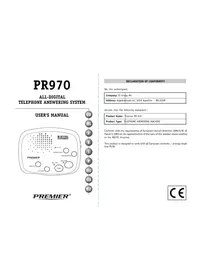
ALL-DIGITAL TELEPHONE ANSWERING SYSTEM
USER'S MANUAL
PREMIER

DECLARATION OF CONFORMITY
We, the undersigned,
| Company: TE-Group NV |
| Address: Kapelsestraat 61, 2950 Kapellen - BELGIUM - |
declare, that the following equipment :
| Product Name: | Premier PR 970 |
| Product Type: | TELEPHONE ANSWERING MACHINE |
Conforms with the requirements of European Council Directive 1999/5/EC of March 9, 1999 on the approximation of the laws of the member states relating to the R&TTE directive.
This product is designed to work with all European networks - analog single line PSTN

ILLUSTRATIONI
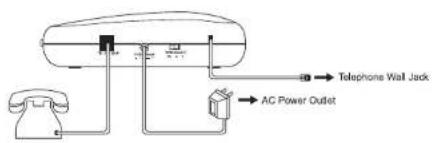
ILLUSTRATION II
CONTENTS
GB
INSTALLATION 4
SETTING DAY AND TIME 5
RECORDING INCOMING MESSAGES 6
REORING MEMO MNSAGE 7
MESSAGE PLAYBACK 7
SAVING MESSAGES 8
REMOTE CONTROL 8
NL
INSTALLEREN 11
DE MELDIERST OPNEMEN 1246 EN IERST INGILEN
M E M A G E S M E O U 22
MEEASGES ENREGISTRES 23
SAUVEGARDER DES MESSAGES 23
FONCTIONS A DISTANCE 24
PR970-1
E
INSTALACION 27
GRABACION DEL MENSAJE DE ACOGIDA 28
INDICACION DEL DIA Y DE LA HORA 28
GRABACION DE MENSAJES DE LAMADAS 29
CRAPADIATION DE MENSAJES DE PEGADOE 30
GRABACION DE MENSALES DE RECADES 30
INTERPURACTION DE UNA GRABACON 30
MENSAJES GRABADOS 31
GUARDAR MENSAJES 31
UTILIZACION DESDE UN TELEFONO REMOTO 32
T
INSTALLAZIONE 35
PER REGISTRARE IL MESSAGGIO PERSONALE 36
PER PROGRAMMARE L'ORA E IL GIORNO 36
PER REGISTRARE MESSAGGI 37
PER INTERROMPERF UN MESSAGGIO 38
MESSAGE REGISTRATI 39
PROGRAMAR A HORA E O DIA 44
GRAVAR AS MENSAGENS 45
MENAGENS MEMO 46
INTERMORPER OMA MENSAGEM 46
MENSAGENS GRAVADAS 47
SALVAGUARDAR MENSAGENS 47
FUNCOES A DISTANCIA 48
PR370-2

UZEMBE HELYEZÉS 51
A BEJELENTKEZO SZÖVEG FELVÉTELE 52
NAP ES IDOPONT BEALLITAS 52
UZENETFELVETEL 53
MEMO UZENETEK FELVÉTELE 54
FELVETEL MEGSZAKITASA 54
ROGZITETT UZENETEK 55
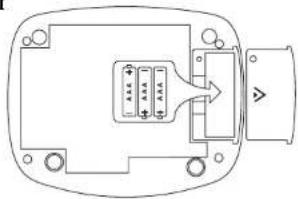
BATTERY (see illustration I)
You can put 3 AAA batteries (not included) in the appliance in order to save all memorised information in the event of current interruption.
ATTENTION!
The batteries only serve to save all memorised information and do NOT power the machine during a current interruption.
Except for the fact that all messages will be lost in the case of a current interruption, the absence of batteries will have no adverse effects for the normal functioning of the appliance.
ALWAYS INSERT THE BATTERIES AFTER CONNECTION OF ADAPTOR!
- Remove the screw located in the battery compartment on the bottom of the base and lift the battery compartment door.
Install three AAA 4.5V batteries. - Close the battery compartment and screw it down again.
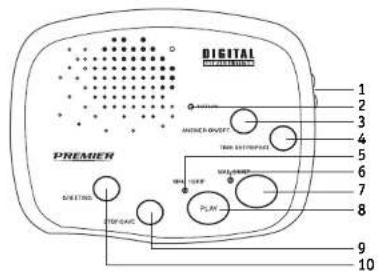
The BATT LOW indicator (2) will start blinking when:
- There are no batteries in the appliance.
The batteries have not been placed properly.
The batteries are flat and need to be replaced.
CONNECTION (see illustration II)
- Plug the telephone line cord into your telephone wall jack.
- If you want to use your PR970 in combination with an extension telephone, plug one end of the extension telephone line cord to the extension line jack. Plug the other end into the telephone.
If your telephone does not have a modular plug, insert the telephone plug of your telephone together with the telephone plug of the answering machine directly in the wall socket of your telephone connection.
- Connect the AC adaptor into the back of the appliance. Plug the other end into the AC wall power outlet.
ON/OFF SWITCH
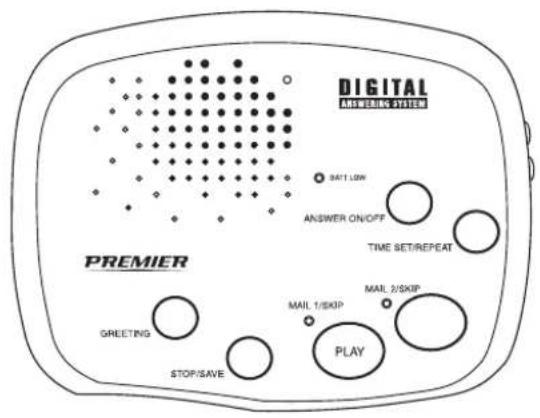
- The PR970 is switched on by pressing the ANSWER ON/OFF button (3).
- If you do not want your appliance to answer calls, press the ANSWER ON/OFF button again. All indicators will turn off.
VOLUME CONTROL (1)
Use the digital VOLUME CONTROL on the right side of the appliance to set the volume to the desired sound level.
After the answering machine has been installed, you can record your personal greeting. This is intended for the people who call you in your absence. The maximum recording time of the outgoing message is 30 seconds.
The PR970 comes with a pre-recorded outgoing greeting: "Hello, please leave your message after the beep."
This message will AUTOMATICALLY switch on if you have not recorded your personal greeting.
- Press and hold the GREETING button (10).
After you hear one beep, speak clearly towards the appliance. - When finished, release the GREETING button.
- The unit will beep once and play back your recorded greeting. The message LED indicators (5,6) will be lit solid to indicate the unit is in Answer On mode.
Note:
The PR970 has two personalised mailboxes. You have an option to have callers leave messages in either of the two mailboxes.
If you want the caller to leave a message in a particular mailbox, your greeting should instruct the callers to press either "1#" or "2#" before their message recording. If the caller doesn't press a key, presses a key other than "1#" or "2#" or waits longer than 3 seconds before pressing a key, the caller's message will be automatically recorded in Mailbox 1.
WOULD YOU LIKE TO HEAR YOUR GREETING AGAIN?
To check the greeting, press and release the GREETING button (10) quickly.
- Your outgoing greeting will be played back to you, and then your system will reset to answer incoming calls.
SETTING DAY AND TIME
If you wish, you can set DAY and TIME.
AFTER each recorded incoming message the PR970 records the day and the time of reception of the recorded incoming message.
When setting the Time/Day, do not allow more than 20 seconds to elapse between any step:
Day Set
- Press and hold the TIME SET/REPEAT button (4) for 2 seconds. The unit will say "Monday".
- Press the ANSWER ON/OFF button (3) until you hear the correct day. To return to the previous day, press the MAIL 1 (7) or MAIL 2 button (8).
Hour Set
- Once you hear the correct day, press the TIME SET/REPEAT button to set the hour. The unit will say "Twelve".
- Press the ANSWER ON/OFF button until you hear the correct hour. To return to the previous hour, press the MAIL 1 or MAIL 2 button.
Minute Set
- Once you hear the correct hour, press the TIME SET/REPEAT button to set the minute. The unit will say "0" (which sounds like "oh").
- Press the ANSWER ON/OFF button until you hear the correct minute. To return to the previous minute, press the MAIL 1 or MAIL 2 button.
AM/PM Set
Once you hear the correct minute, press the TIME SET/REPEAT button to set AM/PM. The unit will say "AM".
- Press the ANSWER ON/OFF button. The unit will say "PM". Press the MAIL 1 or MAIL 2 button to return to "AM".
- Once you hear the correct AM/PM setting, press the TIME SET/REPEAT button to complete the procedure. The unit will announce the day and time that is now set.
To check the current day and time, press and release the TIME SET/REPEAT button. If you did not set the Voice Time/Day Stamp, the unit will say "Time is not set".
RECORDING INCOMING MESSAGES
The total recording time of the PR970 amounts to approximately 15 minutes.
The maximum digital recording time for each incoming message is 60 seconds.
When the message LED indicators (5,6) blink, you have received new messages.
Ring Select
You can select the number of rings in which a call will be answered.
Do you wish the PR970 to switch on after two rings?
- Set the RING SELECT to setting 2.
Do you want the PR970 to switch on only after the phone has rung 4 times, so that, when you are in, you have enough time to take the call before the PR970 does?
- Set the RING SELECT to setting 4.
The PR970 also enables you to listen to your messages from a remote phone. To avoid unnecessary toll charges, you can switch the RING SELECT switch to the TS (Toll Saver) setting.
- In the TS position, the PR970 will pick up the first message on the fourth ring.
- For the second and all following messages, the appliance will pick up on the second ring.
- If you wish to listen to your PR970 from a remote phone and you hear 3 rings, hang up immediately. This means that you have no new messages.
ATTENTION!
If you have no preference as to the number of rings, we advise you to set the RING SELECT switch to the TS setting.
Note:
The PR970 signals the caller when the message capacity is full. When the message capacity is full, the unit will answer with 3 beeps on the 10th ring, pause 20 seconds, and then automatically disconnect the telephone line.
RECORDING MEMOMESSAGE
You can record a memo message, for another member of your household, in either of the two mailboxes (Mailbox 1 or Mailbox 2). It will be played back, along with other messages, in the corresponding mailbox.
To Record Memo
- Press and hold one of the MAIL 1 (7) or MAIL 2 (8) buttons.
- A beep will sound and all the message LED indicators will turn off. Record your message (up to 60 seconds) through the microphone in the speaker holes.
- When your message is completed, release the button. A beep will sound.
INTERRUPTING A RECORDING CALL
The integrated loudspeaker enables you to hear the message while the caller is recording it. If you decide to take the call yourself after all, simply lift the telephone handset. The PR970 will automatically stop recording and you can have a normal telephone conversation.
In some cases, the appliance might not switch off automatically. If so, you can take over the call by:
- pressing the STOP/SAVE button (9) after having picked up the handset. The PR970 will now stop recording and you can have a normal conversation.
ATTENTION!
The PR970 will automatically stop recording as soon as the caller hangs up. To avoid wasting recording time, the machine will also automatically stop recording if there is a silence for more than 7 seconds.
MESSAGE PLAYBACK
To Hear Your Messages
- Press and release the corresponding Mailbox button on your unit.
The PR970 will automatically playback your messages in the order they were received. - Your PR970 will automatically stop and sound 3 beeps after the last message has been played back.
ATTENTION!
New incoming messages will replace old messages unless you follow the save procedure.
To Stop Message Playback
During message playback, press and release the STOP/SAVE button (9). Your PR970 will reset and will save all messages.
To Repeat the Current Message
During playback, press and quickly release the TIME SET/REPEAT button (4) ONCE.
To Repeat the Previous Message
During playback, press and quickly release TIME SET/REPEAT button (4) TWICE within 2 seconds.
To Skip the Current Message
During playback, press and quickly release the respective SKIP button.
SAVING MESSAGES
To Save All of Your Messages
If you wish to save your messages after listening to them:
After the last message has played back, and 3 beeps sound, press and release the STOP/SAVE button. Both Mail 1 and Mail 2 LED indicators will flash rapidly for 20 seconds.
Within this period, press MAIL 1 button to save Mailbox 1 messages or press MAIL 2 button to save Mailbox 2 messages.
To Save Selected Messages
If you wish to save a particular message (but not ALL of the messages), press the ANSWER ON/OFF button (3) during playback of the message. After you press the ANSWER ON/OFF button to save a particular message, the corresponding MAIL 1 or MAIL 2 LED will blink rapidly during the remaining playback of that message.
IMPORTANT!
You must follow the above "SAVE" procedure each time you listen to your incoming messages and before the system answers a new incoming call or all messages will be lost.
REMOTE CONTROL
To access answering functions from an outside line, you will need to enter the three-digit security code located on the bottom of your unit.
ATTENTION!
These functions can only be used if you call your PR970 from a tone phone. You can be certain that you are using a tone phone if you hear short beeps when dialling.
With a pulse phone (which clicks when dialling) you cannot use these functions.
Remote Turn On
If you forget to turn on your unit:
- Call your answering machine from a remote phone.
The appliance will automatically turn on after 10 rings.
- You may hang up and subsequent calls will be answered in accordance with ring select.
Remote Message Playback
- Call your unit from a touch-tone telephone.
- After your PR970 answers, it plays the outgoing greeting and beeps once. Dial your three digit security code within 20 seconds after the beep, pressing and holding each digit for 1-2 seconds. Allow a 2-second interval between each digit.
- Your PR970 will sound one beep to indicate the code was entered correctly. If there are no beeps, enter your code again.
- Then you can press "1#" or "2#" on your keypad and the PR970 will playback the messages recorded in Mailbox 1 or Mailbox 2, respectively.
Remote Record New Greeting
The PR970 enables you to change your outgoing greeting from a remote phone.
- Call your unit from a touch-tone telephone.
- After your PR970 answers, it plays the outgoing greeting and beeps once. Dial your three digit security code within 20 seconds after the beep, pressing and holding each digit for 1-2 seconds. Allow a 2-second interval between each digit.
- Your PR970 will sound one beep to indicate the code was entered correctly. If there are no beeps, enter your code again.
Press"8#".
- When you hear a beep, begin recording your new greeting (up to 30 seconds).
- When you have finished recording your new greeting, press "5#".
The unit will beep, and the new greeting will playback to you.
- Hang up the telephone.
Remote Record Memo
- Call your unit from a touch-tone telephone.
- After your PR970 answers, it plays the outgoing greeting and beeps once. Dial your three digit security code within 20 seconds after the beep, pressing and holding each digit for 1-2 seconds. Allow a 2-second interval between each digit.
- Your PR970 will sound one beep to indicate the code was entered correctly. If there are no beeps, enter your code again.
- Press "3#" . Then within three seconds of pressing "3#" press "1#" or "2#" to select Mailbox 1 or Mailbox 2. Otherwise the memo will be recorded in Mailbox 1.
- When you hear a beep, begin recording your memo (up to 60 seconds).
- When you have finished recording your memo message, press "5#".
Remote Turn Off Answer On
If you forget to turn off the answer mode of your PR970, you can do this from a remote phone.
- Call your unit from a touch-tone telephone.
- After your PR970 answers, it plays the outgoing greeting and beeps once. Dial your three digit security code within 20 seconds after the beep, pressing and holding each digit for 1-2 seconds. Allow a 2-second interval between each digit.
- Your PR970 will sound one beep to indicate the code was entered correctly. If there are no beeps, enter your code again.
Press"9#"
- You can now hang up.
Repeat Current Message
- Press "4#" WHILE you are listening to the message. The message will be played again.
- All following messages will then be played as usual and will be memorised when you hang up.
Erase Current Message
- Press "0#" WHILE you are listening to the message you wish to erase. The message will be played to the end.
The following messages can be erased in the same way. - When you hang up, the message(s) will be automatically erased.
Repeat Previous Message
- Press "4#" repeatedly WHILE you are listening to the message. The previous message will be played again.
- All following messages will then be played as usual and will be memorised when you hang up.
Stop Message Playback
Press "5#" WHILE you are listening to the message.
- All messages will be memorised when you hang up.
Skip to Next Message
Press "6#" WHILE you are listening to the message. The next message will be played.
- All following messages will then be played as usual and will be memorised when you hang up.
IMPORTANT!
If your appliance is not operating properly before contacting a Service Center we advise you to do a "RESET" of your unit. In many cases, the appliance will again function normally after you have done this.
To reset unit:
- Unplug the telephone line from the wall jack.
- Unplug the AC adapter from the power outlet.
- Remove the AAA batteries, and then replace.
- Plug the AC adapter back into the power outlet.
- Plug the telephone line back into the wall jack.
- Record a new outgoing greeting or you can use the pre-recorded announcement.
- Reset the Voice Day/Time Stamp.
ATTENTION!
This RESET erases all information (e.g. programmed day and time indication, outgoing greeting, etc. will be erased)!
INSTALLLEREN
FONCTIONS A DISTANCE
PROGRAMAR A HORA E DIA
GRAVAR UMA MENSAGEM MEMO
GRAVAR UMA MENSAGEM MEMO
TIOIOEHTEH TQN MIIATAPION
HXOTPAΦHSEMHNYMATOEMO
KaTeTovPR970aOaOuaogkevH'FV'tovikn).
Oa oakote to npoaoikok aoc xapetiaou, oakolouhovvo an eva nntko anma.
xynuataoe to PIN oac (3 ynpia) uca 20 deutpolarnta, kpatovtaa natnevo kahe
piktpo ia 2 deutpolenta. IepueveTe Eioe 1 eoc 2 deutpeleTn piv matane to
enuevo npkto.
EevivawoosocKoikoc,0aakooetEvnayntiko oma.2tnvavriotn nepirotwn. oxmuatoe eva tv KoiKO aC
Hariote to nakto 3#' knte, moe a 3 de npolale, to nakto 1f' n 2#. avaloya me tn hupida umvuaotov stnyoia enoite va opnene to MEMO. Eav 8ev enlilec tohpida umvuaotov, to MEMO th oxyopaonct otn hupida MAIL 1.
- Oa aokouot Eva nntko onma, mnpoeite toe va apxioet neyn oxypqnon.
Meta tynxoyapopn (muio tsdiapkcoa60 6eutpoctov) nntote to ktpo5#
ANIENEPROIOIH THE ΣYΣKEYH
Eav Exaate va aenepepyoonoe tov nAeepovntn oag PR970:
KaEoTe Tov PR970 6aC aO uia ookvFV (tovikn).
Oa aokote to npooanikocac xapetio, aokoloubouevo ano eva nntiko oma.
xnuartoe to PIN aoc (3 ynpia) meea or 20 deupeoentka, kpatovas nortnuevo kae
pnoyia 2 deupeoentra. Hepuveve enionc 1 eoc 2 deupeoentra npiv nathe to
enoevo npkto.
EevivawoostocOKBIOKc,0aakooote evnynko oJma.2tnyavriBt npintoon. OynuataorevaovKOIOAC.
-Παπησε τότε το πληκτρο 9#
Kaeiote to kouotikó.
EIIANAAHΨH TOY TPEXONTO ΜΗΝΥΜΑΤΟ
- ALL-DIGITAL TELEPHONE ANSWERING SYSTEM
- DECLARATION OF CONFORMITY
- CONTENTS
- GB
- NL
- E
- T
- BATTERY (see illustration I)
- ATTENTION!
- CONNECTION (see illustration II)
- ON/OFF SWITCH
- VOLUME CONTROL (1)
- Note:
- WOULD YOU LIKE TO HEAR YOUR GREETING AGAIN?
- SETTING DAY AND TIME
- Day Set
- Hour Set
- Minute Set
- AM/PM Set
- RECORDING INCOMING MESSAGES
- Ring Select
- RECORDING MEMOMESSAGE
- To Record Memo
- INTERRUPTING A RECORDING CALL
- MESSAGE PLAYBACK
- To Hear Your Messages
- To Stop Message Playback
- To Repeat the Current Message
- To Repeat the Previous Message
- To Skip the Current Message
- SAVING MESSAGES
- To Save All of Your Messages
- To Save Selected Messages
- IMPORTANT!
- REMOTE CONTROL
- Remote Turn On
- Remote Message Playback
- Remote Record New Greeting
- Remote Record Memo
- Remote Turn Off Answer On
- Repeat Current Message
- Erase Current Message
- Repeat Previous Message
- Stop Message Playback
- Skip to Next Message
- INSTALLLEREN
- FONCTIONS A DISTANCE
- PROGRAMAR A HORA E DIA
- GRAVAR UMA MENSAGEM MEMO
- TIOIOEHTEH TQN MIIATAPION
- HXOTPAΦHSEMHNYMATOEMO
- ANIENEPROIOIH THE ΣYΣKEYH
- EIIANAAHΨH TOY TPEXONTO ΜΗΝΥΜΑΤΟ
Brand : Premier
Model : PR970
Category : Answering machine