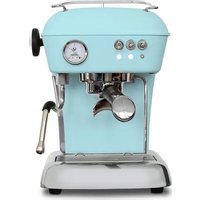
Steel Duo Pro - Coffee machine ASCASO - Free user manual and instructions
Find the device manual for free Steel Duo Pro ASCASO in PDF.



User questions about Steel Duo Pro ASCASO
0 question about this device. Answer the ones you know or ask your own.
Ask a new question about this device
Download the instructions for your Coffee machine in PDF format for free! Find your manual Steel Duo Pro - ASCASO and take your electronic device back in hand. On this page are published all the documents necessary for the use of your device. Steel Duo Pro by ASCASO.
USER MANUAL Steel Duo Pro ASCASO
Disposal of your appliance
Old appliances may contain materials which can be reclaimed or removed.
Please contact your distributor or your local waste collection sector
Thank you very much for purchasing an ascaso product. This machine makes the best espresso coffee and delicious cappuccinoa. Your coffee machine has been designed and built using the latest technological computing and engineering innovations. It is therefore a high-quality, safe and reliable product.
Introduction
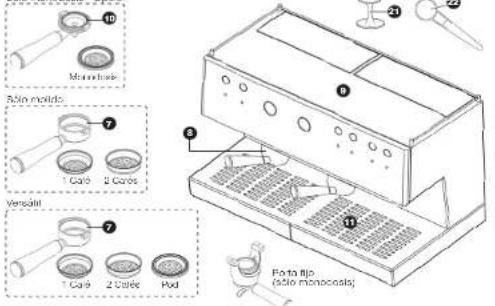
Solo monocals. Opción
text_image
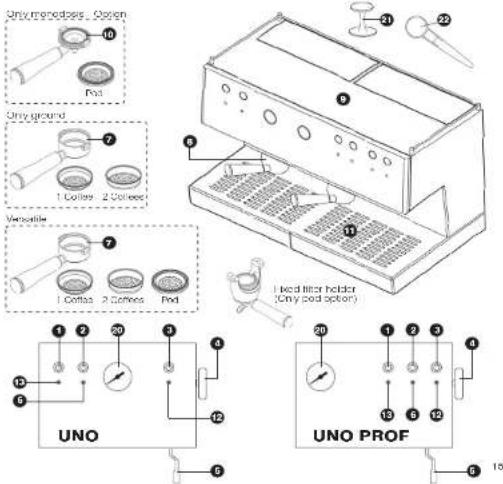
10 Monochrome 23 Rim-moldo 7 1 Caré 2 Caros Versatil 7 1 Caré 2 Carée Pod 8 11 Pota flip (Pie monocaste)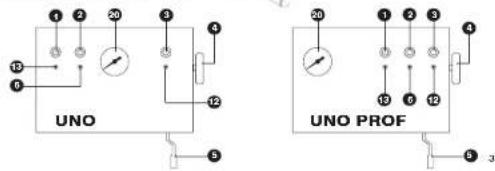
text_image
UNO UNO PROFascaso
- Радион
12 Ploto fato se aqua
43 Pinko On/Off
⑦ Ingramexor scaril (lue/lnot
① Inst. Dis. 14, (2017) - 中国银行股份有限公司(以下简称“公司”)
Tube delta (Dusine) - Pinto njoed grupo/aper (Trio)
13 Interexor (or) grupo vapor
Terraômetro caló - Eurosa café
① Pintendola
natural_image
Line drawing of a microwave oven with cooling unit and fan (no text or symbols)natural_image
Line drawing of a desktop computer with a keyboard and mouse (no text or symbols)natural_image
Line drawing of a desktop computer with a hand operating it (no text or symbols)ascasoascaso
natural_image
Line drawing of a laboratory setup with a tray holding multiple test tubes (no text or symbols visible)
TERMOMETRO:
natural_image
Isometric line drawing of a computer with a scroll and mouse, showing no text or symbolstext_image
CE ascaso for coffee loversascasoascaso
11. Tabla de consulta rápida
-
Technical specifications
-
Diagram
-
Safety. Start-up
-
Preparation for Conco
-
Conce size programming
-
Preparation of cappon
-
Proportion of death
-
Maintenance and Clearing
-
Declaration of EC conformity
-
Quaker, compound factor
1-. Technical specifications
| Voltage Power (W) Pump Weight (kg) Dimensions Reservoir Filter (V) Pressure (Jx 1"x2") capacity (h) hovor (dBm) | ||||||||
| UND-4 UNG (FM) 352 I | 250VAC-750L | 16 PA (GB) | 248X360X3.5 | 2 | Base | |||
| UND-3 UNG (FM) PROF | 12 | |||||||
| UND-1 | UND (PE) | 11 | ||||||
| DUD-5 | DUC (%) | 15 | 270X360X3.5 | |||||
| DUD-15 | DUC (PH) PROF | 16 | ||||||
| DUD-2 | DUC (PI) | 15 | ||||||
| THIO 3 (HO (PM)) | 2612 | 21 | 700X360X3.5 | 2+2 | ||||
| THIO 10 | THIO (HM) PRO | 20 | ||||||
| THIO 1 | THIO (PH) | 21 | ||||||
"length x height x copy [mm]
F = F(R),H(R), MF = M(R),H(R),
Main features
Metal body.
Brass coffee Unit.
Professional system
Automatic temperature control.
Cappuccino maker and hot water.
versatile (mobile filter): Ground coffee/pod. (Option)
Food materials.
Cup warmer
Innovative and functional design
EC certification
ascaso
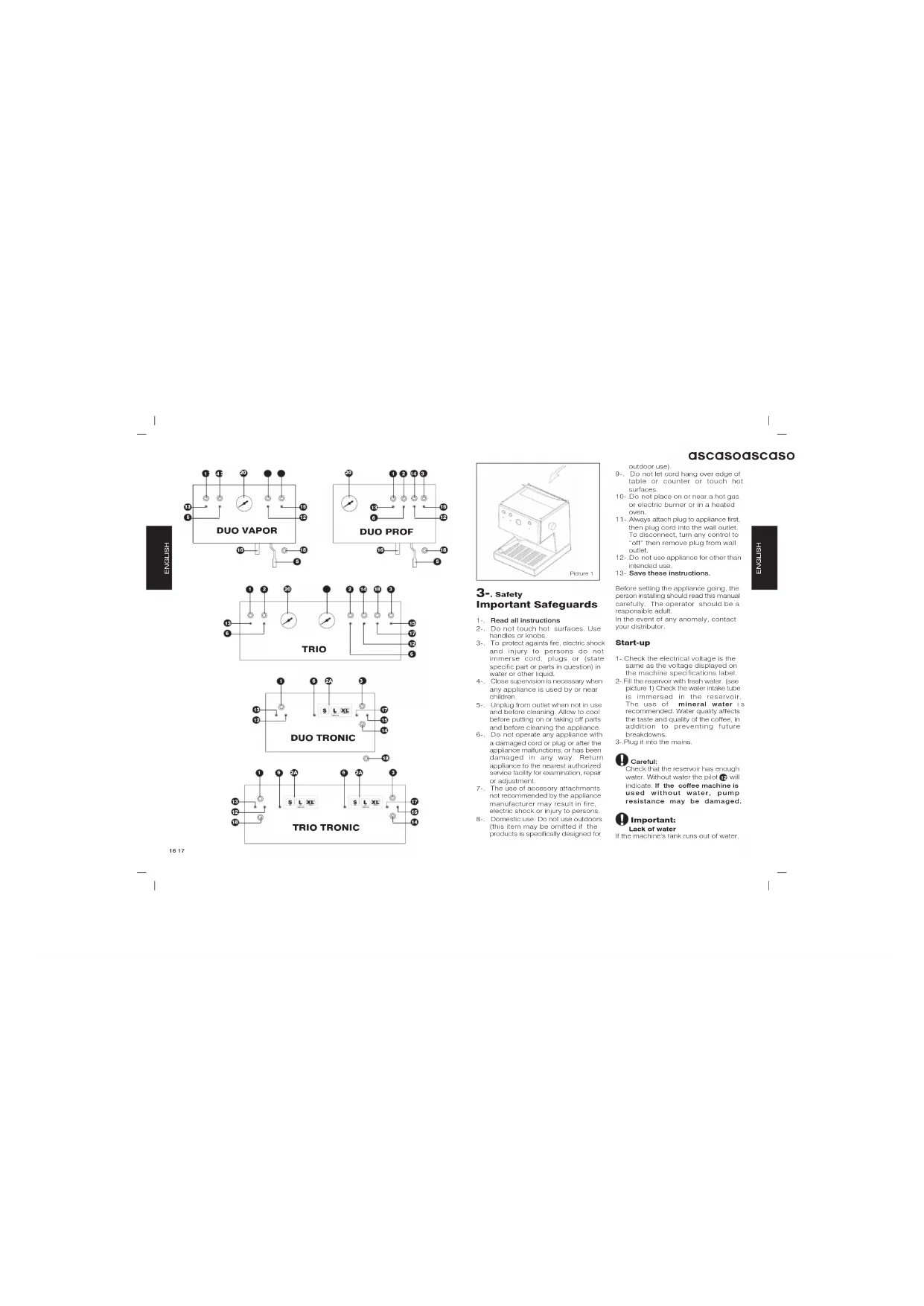
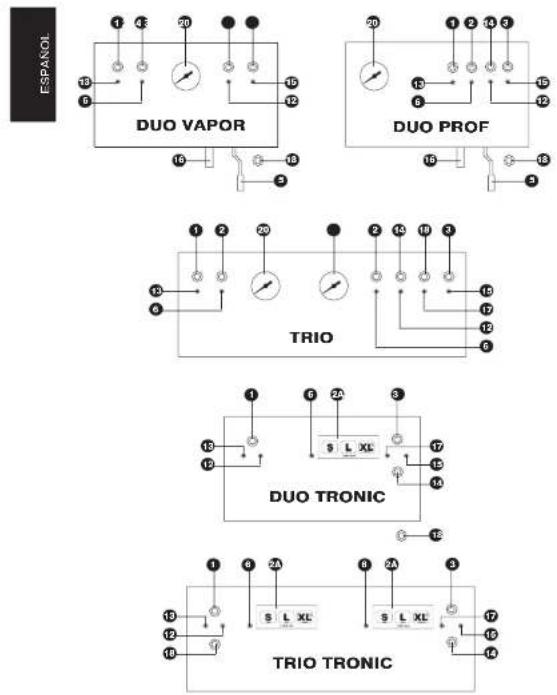
③ Steam/water tube (Tube steam DUO/TRIO)
A temperature plot light
• Mioles, illes, invices, 2004 and 2005
• The following section of the 2016 Annual Report
- Office group (Attention Hot Sunday)
- Caps Arthrix. (Attention not surface)
19 Mobile timer holder (only pod option)
19
Water keep plot
- OASIL-2017
① Water switch (P) = 5(Ω)
-
-
-
-
-
-
-
-
-
- 100.
-
-
-
-
-
-
-
-
-
Imporations clean and (out of the
-
Also tube (DCE 745)
7 ON/OI pilot (steam group) (Inc)
19 switch or/off steam group ( Info)
-
Teetoporelet (exclam)
-
Cotton press
③
text_image
Only meredges Option 10 Pod Only ground 7 1 Coffee 2 Cottles 8 9 11 Volatile 7 1 Coffee 2 Cottles Pod I bed litter holder (Only pod option) 12 6 4 3 20 3 5 4 12 UNO 20 1 2 3 4 13 6 12 15 UNO PROF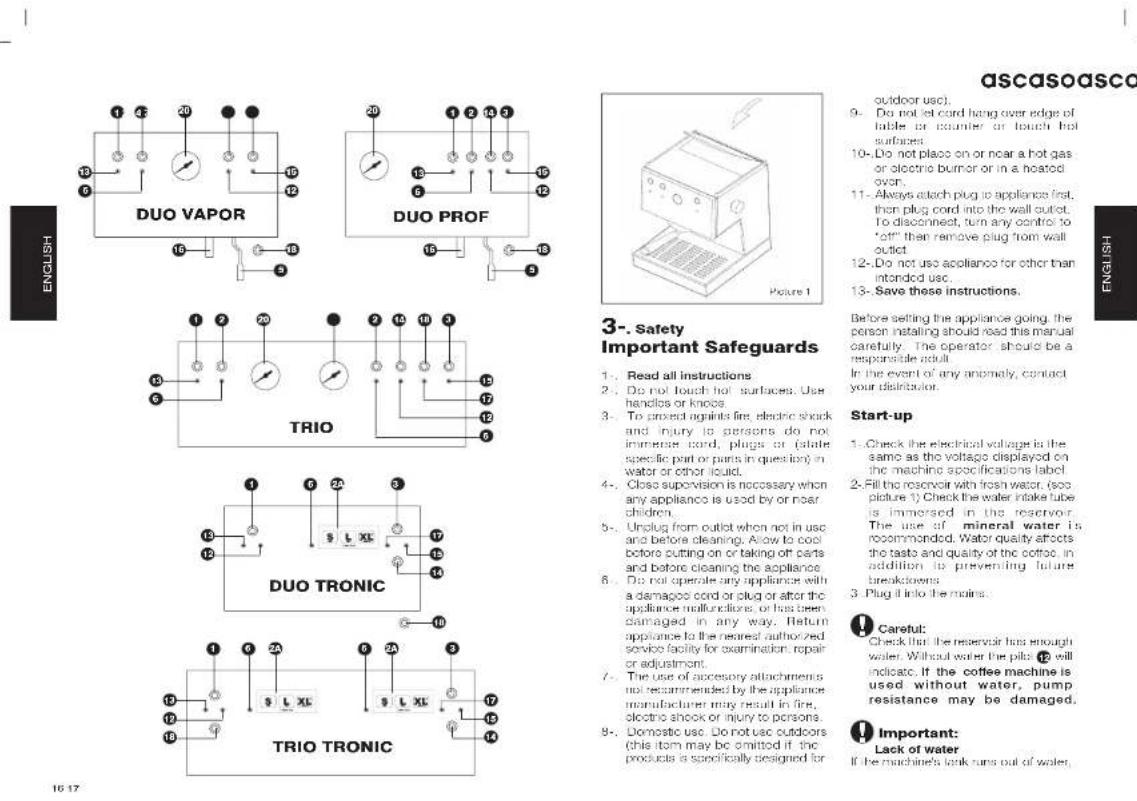
16 17
ascasoascaso
3-. Safety
Important Safeguards
- Read all instructions
- Do not touch hot surfaces. Use handles or knots.
- To project against fire, electric shock and injury to persons do not immerse cord, plugs or (state specific part or parts in question) in water or other liquid.
4-. Close supervision is necessary when any appliance is used by or near children.
5-. Unplug from outlet when not in use and before cleaning. Allow to cool before putting on or taking off parts and before cleaning the appliance - Do not operate any appliance with a damaged cord or plug or after the appliance malfunctions, or has been damaged in any way. Return appliance to the nearest authorized service facility for examination, repair or adjustment.
- The use of accessory attachments not recommended by the appliance manufacturer may result in fire, electro shock or injury to persons
8-. Domestic use. Do not use outdoors (this item may be omitted if the products is specifically designed for
9- Do not let cord hang over edge of table or counter or touch hot surfaces.
10.-Do not place on or near a hot gas or electric burner or in a heated oven.
11.- Always attach plug to appliance first, then plug cord into the wall outlet. To disconnect, turn any control to "off" then remove plug from wall outlet
12.-Do not use appliance for other than intended use.
13-. Save these instructions.
Before setting the appliance going, the person installing should read this manual carefully. The operator should be a responsible adult.
In the event of any anomaly, contact your distritator.
Start-up
- Check the electrical voltage is the same as the voltage displayed on the machine specifications label
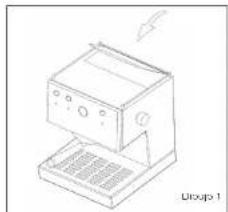
- Fill the reservoir with fresh water, (see picture 1). Check the water intake tube is immersed in the reservoir. The use of mineral water is recommended. Water quality affects the taste and quality of the coffee. In addition to preventing future breakdowns
- Plug it into the mains.
Caretful:
Check that the reservoir has enough water. Without water the pits 12 will indicate. If the coffee machine is used without water, pump resistance may be damaged.
Important:
Lack of water If the machine's tank runs out of water,
the machine will disconnect and pilot light 12 will light up. Fill the tank with water (3/4). Pilot light 12 will switch off and the machine will connect again.
In Tronic Series models, if water is not added within 2 minutes, an intermittent alarm will sound and the machine will switch off. Fill the tank with water. Switch the machine off and then switch it on again.
In Tronic Series models with direct main water input, the tank fills up automatically
Important:
MOBILE FILTER HOLDER SYSTEM A) The machine is being used for the first time or has not been used for some time.
Change the water in the boiler and circuit 1. Connect the coffee machine with switch 0/1
- Put the filter holder 7 without coffee into position and a recipient below
3- Switch on the coffee switch ② and run approximately half a reservoir capacity of water (through it
B) PRIMING
- If coffee does not emerge - When the machine has not been used for some time - After producing steam
- If there is no water in the reservoir.
Model Duo/Trio: please repeat step A. Model Uno: the following procedure should be performed:
-
Turn on the steam tap ④ with the coffee, mushroom, switched up
-
Turn on the coffee function ② and allow the water to come out (one cup) through the steam tube ③
3-Turn off the coffee function 2 and
turn off the steam tap 4. The coffee machine is now ready for use.
C) Only for uno model
After steam has been produced, it is very important to wait 5 min, or for the pilot light 6 to go on again and other to switch off or to perform priming.
FIXED FILTER HOLDER SYSTEM
UNO model: Step A is unnecessary.
Step B and C are necessary.
DUO/TRIO model: Only step A
4-. Preparation of coffee Please check your system (forround, versatile, pod)
Ground
(Only ground system + UNO PROF) Any type of coffee may be used. For optimum results, we recommend using special 'ospresso' coffee clords as they provide a suitable grind. If the coffee comes out either very quickly or very slowly, the type of coffee should be changed for another tincr or thicker grind and tamping of the coffee should be varied according to our recommendations.
- Switch on the machine using the main switch 0/1 and place the litterholder (with the filter) into the group. Due & Trio Models: Switch on steam group switch 10.
- Wall for the pills light to switch off (approx. 1.5 minutes). This means the coffee machine has reached the ideal temperature Press coffee switch and lot water run out. Do this before making the coffee. This will remove residue and balance the temperature to create optimum working conditions
ascasoascaso
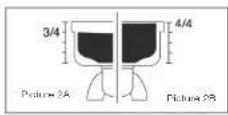
3- Fill the coffee filter basket (1 or two coffees according to requirements), Three-quarter size. The filter must be filled to 3/4 of its capacity, once pressed (see picture 2A)
4.-Clean off the remains of coffee that have been deposited on the edges of the filler basket so that it fits perfectly.
5 Place the filter holder ⑦ into the group ⑧ starting from the left and turning towards the right with enough pressure at the end (from right on 2)
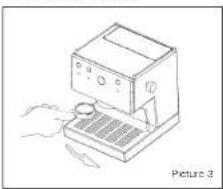
6. Pull the cups at cup on the grille and switch on the coffee switch 2.
7. When the coffee has a kitchen
7. When the table has a market being made, switch off the coffee switch 2.
It takes 20/25 seconds to make anospresso perfectly
natural_image
Line drawing of a desktop computer with a hand operating it (no text or symbols)Versatile (pod/ground)
(versatile mobile system) For perfect extraction of single-cup coffee, order the special optional Kit
Pod coffee/ground:
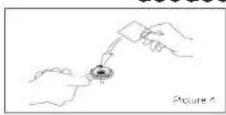
Points 1 and 2 as in the above section. Use the specific filter holder 10 or pod filter (option). (See picture 4)
Points 1, 2, 5, 6, 7 and notes as in the above section.
Ground coffee:
For ground coffee, fill the coffee filter basket up to the rim. (See picture 2B) To tamp and fill the coffee again. Points 1,2,4,5,6 and 7 as in the above section
It is normal for the coffee grounds to be very well or a soup-like consistency if the filter holder is removed within one to minutes after browning
Pod
(fixed holder-pod only).
Points 1 and 2 as in the section on ground coffee.
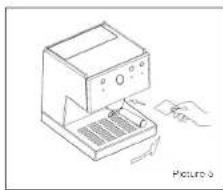
Place the pod in the filter holder and turn it gently to the right as far as it will go. Do not exert force. Close gently (see picture 5) Points 5, 6, 7 and notes as in the section on ground coffee.

Careful:
Do not remove or turn the filter holder while the water is passing through as the appliance is at low pressure at this moment.
natural_image
Line drawing of a kitchen appliance with a hand operating the base (no text or symbols)Notes:
- The liter holder should always be placed in the machine so that it remains warm. Closed position
- Only UNO model. If the coffee does not come out very hot, press steam switch ③ for 10 seconds. This will raise the temperature of the machine
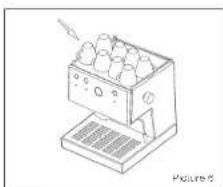
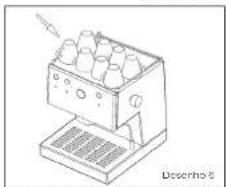
- Place the cups on the cup warmer
- The right temperature (optimum 40°C/105°F) will improve the espresso. (see picture 6)
- Coffee will continue to drip from the spouts for a moment after the coffee switch is turned off.
natural_image
Line drawing of a laboratory apparatus with a tray and control panel (no text or symbols)20 21

THERMOMETER
The thermometer will mark you the machine temperature. It has to be in between 90°C/180°F and 110°C/230°F for coffee and above 100°C/212°F degrees for steam

Important: Tamped
The best espresso result are obtained when the ground coffee is firmly tamped

. Programming the amount coffee (TRONIC)
Electronic: push button control functions.
S. small coffee L: large coffee XL non-slop coffee (push button again to stop flow)
Programming the amount of coffee
With the machine on, push the 'XL' programming button for 5 or 6 seconds until the LED flashes.
Push the 'S' small coffee button. The LED will light up, at the same time the 'XL' programming LED stops flashing. Let the coffee flow.
Once you have the desired amount push the "S" again. The machine is now programmed.
To programme large coffee *L*, repeat the operation
To personalise the amount of coffee (non-slop), push the "XL" button. Once you have the desired amount, push the button again to stop the flow of coffee

. Preparation of cappuccino
UNO Mobile filterholder
1-.Press general switch 1 Pilots 15
and will come on.
2.-When pilot 6 goes out, press steam
switch 3. Pilot 5 will come on.
3.-Wait for light 6 to go out. This indicates that the coffee machine has reached its ideal temperature, reached the ideal temperature.
1. Turn the hot water/steam knob 4 to open and allow the first drops of water to come out. In a few moments, only steam will come out.
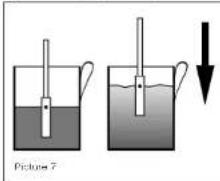
5. Put the tube into the milk to beat it so that the milk covers exactly half that abrogating holes (over) totally.
the transformation hole (piver form) cover it) Do this for the whole process. (see picture 7).
text_image
Picture 76.-Liquid is absorbed through the hole and cream forms automatically. The recipient should be lowered gradually while the milk emulsifies.
7. Turn the water/steam knob ④ to closed - and turn off the steam switch ③
UNO Fixed filterholder
- Press general switch ① Pilots ⑮
and 6 will come out - When pilot 6 goes out, press switch
③ and pilots ⑥ and ⑦ will come
ascasodscaso
on simultaneously and the pump will
be pressed at short intervals
Wait for approximately 15' and then
open side knob 4 and let the first
drops of water run out. After a
moment only steam will come out.
Points 5, 6 and 7 are the same as in
the previous section.
DUC VAPOR / TRIO
- Turn on the main switch 1. On THIO Model turn on the switch 18, wall for a 1.5 minutes approx. If the machine was already turned on (and the THIO switch 18- was already on) pass to step n° 2
2-Press switch 3. The plot light will turn on.
3.-You will get steam instantly.
- Put the tube 5 into the milk to heat
it so that the milk covers exactly half
the absorption hole (never totally
cover it). Do this for the whole
process (see picture 7)
- Liquid is absorbed through the hole
and cream forms automatically
The recipient should be lowered
gradually while the milk culishes. 6-. Turn off the switch 8.
If you want a creamy cappuccino, use cold, fresh, whole milk.
For obtaining micro-toam, you should
maintain the associated hole in the
same position.
Important
We recommend running steam through the wand for a few seconds (5') after each use to clean and prevent clogging.
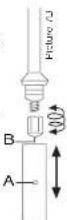
To clean the absorption holes (A and B), you can use a toothpick or a paperclip. This will ensure the tube is free of blockages. Hole B always on the top (see picture 7B)
7-. Preparation of hot water
MODELO UNO
-
Put a cup under the steam tube 5
-
Turn the hot water/steam knob to once and turn on the coffee switch
②. Do the opposite operation after having obtained the required water.
MODELO DUO/TRIO
1- Put a cup under the steam tube
2- Tum On the switch14. Do the opposite operation after having obtained the required water.
8-. Maintenance and cleaning
General warning: Cleaning and maintenance should be done when the appliance is cold and disconnected from the man. Do not immerse the appliance in water. It should not be cleaned in a dishwasher.
1.-Cleaning the outside: To clean the outside of the machine, use alcohol 96 ^a or specific products for inox.
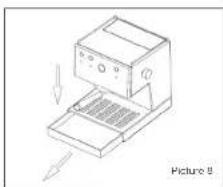
- Remove the tray regularly and clean it.
natural_image
Line drawing of a kitchen appliance with a downward arrow indicating compression or disassembly (no text or symbols)- If the machine is not to be used for some time, empty the water reservoir.
- Clean the steam tube with a damp cloth immediately after use. To clear the inside of the steam tube, allow the water to circulate.
- To clean the absorption hole, you can use a toothpick or a paperclip. This will ensure the tube is free of blockages.
2.-Internal cleaning: To obtain top quality expression coffee it is vital to clean the inner workings of the machine. To clean the interior of the distribution unit, use Ascoaso Coffee Washer. This product is also useful to prevent limescale buildup in the machine. Regular descaling will contribute to ensuring top quality coffee and it will prolong the useful life of the machine. Consult your distributor.
Coffee Washer use recommendations
| Coffee/day Descaling |
| >10 every month |
| 5-10 every 2 months |
| 1-5 every 3 months |
To avoid limoscale buildup, you can also use water treatment filters. However,
ascasoascaso
it is advisable to clean the machine in accordance with consumption. Using filters and Coffee Washer will help to maintain the coffee machine in optimum working condition for longer
Important
Duo/Trio Steam Group Cleaning : switch off switch 18. The cleaning of steam group should must be done when steam group is cold. Use Ascaso Cortoc Washer, switch on steam switch 3.
Important
It is advisable not to leave the god or ground coffee in the filler-holder. Otherwise, coffee will build up affecting the taste of the coffee. Should this occur, run a load of water through the system.
3-. Cleaning the filterholders and the showerheads
- Mobile filterholder: Wash the filterholder in hot water with a neutral detergent. Rinse thoroughly. Dry the filterholder with a soft cloth. Do not wash it in the dishwasher.
- The titters, tray and reservoir can be cleaned in the top of the dishwasher. If you wash them by hand, do not forget to rinse thoroughly. Dry with a soft cloth.
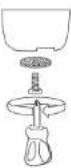
- Use a brush or similar item to remove coffee residue from the showerhead.
Important (mobile filterholder)
The showerhead must be cleaned after 80 to 100 espresso coffees have been made. This should done as follows:
Remove and clean the showerhead with hot water with a neutral detergent. Once clean, replace it, following the instructions for the previous operation in reverse.
Water tank Cleaning
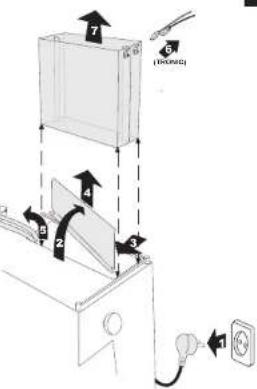
text_image
Diagram showing a device with numbered components and directional arrows indicating assembly or operation.9-. Guarantee
The guarantee for this appliance is the receipt of purchase. Please keep this. This receipt must be shown at the Service Centre in this event of breakdown. This appliance is guaranteed for our distributor(from the date of purchase) against any manufacturing fault or in the materials used.
The amount paid for transport and packaging which may arise are payable by the user.
This guarantee will not be valid if I-.The receipt of purchase is not presented.
2.-The machine has not been cleaned sufficiently or limiterally has built up
sufficiently of timescale has built up.
3. The machine has not been cleaned
sufficiently or timescale has built up.
4. The appliance has been dismantled by people who are not authorised by the Ascaso Official Technical Assistance Network.
10-. EC declaration of conformity
ASCASO FACTORY SL declares that the product referred to in this declaration - espresso coffee machine - complies with the requirements of the Directive of 14th of June 1989 on the standardisation of the laws of Member States with regard to machinery (89/392/LEC), on electrical material (73/23/EEC) and on electromagnetic compatibility (89/396/EEC).

24 25

text_image
ascaso since 10 wk for coffee loversascasoascaso
- Quick consultation table
| Possible problems | Causes What to do? | |
| The coffee is not hot. | The coffee machine has not reached the proper temperature. Cold accessories (cup, litter holder) | Wait until the on pilot light has switched offUse general advice. Point a sec thermometer 50 |
| The coffee comes out very | The grind is too thick. The coffee has not been tamped.There is insufficient ground cullers | Use special expression coffeeExperiment with greater or lesser ramping.Fill the litter basket up to the edge. |
| The coffee is not crazy. | The grind is too thick.The coffee has not been tamped enough.The coffee is stable or not of good quality. | Use special expression coffeeExperiment with greater or lesser ramping.Change the coffee type.Use fresh and recently ground cullers. |
| The coffee does not come out or it comes out very slowly. | There is no water in the reservoir or it is body positioned.Steen salten on.The grind is very thin of or has been tamped the much dry/and shower.The litter basket is constructed.The appliance has loose could up. | Fill the reservoir or position if properly.Turn scon swet off.Use special expression coffee.Experiment with greater or lesser ramping.Clean the litter basket and throwClean the appliance.See point 7 |
| A lot of water is left in the filter basket after mixing the coffee | The coffee has not been properly tamped.There is insufficient coffee in the filter basket. | Tamp properly.See point 3.Increase the amount of coffee in the filter basket, up to the edge |
| Coffee comes over the edges of the filter basket | The litter holder is not positioned properly.There are remains of ground coffee on the edge of the filter basket.the part of the topic is dirty.the joint of the head is detective. | I follow the litter holder adjustment procedure. Point 2.Clean the remains of colles from the edge of the litter basket before positioning.Glean the joint with a damp strip.Coll the service centre. |
| The milk is not crazy. | The steam tube is blocked.the milk is off.The milk is hot or ukawarm. | Clean the steam tube. Use fresh, oleic milk (ridge temperature).See thermometer 50 |
| The machine makes a lot of coffee | There is no water in the reservoir. The reservoir is not positioned properly.The outlet intake is not increased in the reservoir. The coffee is stable or very dry. | Fill the reservoir with waterAdjust the reservoir.Increase the tube in the reservoir.Use fresh coffee. |
*There are no grind, coffee amount or tamping problems with the pod or pod system. Call your technical service for any anomaly.
Mode d'emploi
Table des matières
natural_image
Line drawing of a desktop kitchen with a keyboard and mouse (no text or symbols)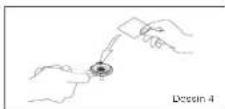
natural_image
Line drawing of a hand using a computer to press a keyboard (no text or symbols present)ascasoascaso
Remarques:
natural_image
Line drawing of a vintage typewriter with control panel and buttons (no text or symbols)- Place/one lease marks to lease vaporur
5
2. OL
natural_image
Line drawing of a desktop computer with an open screen and keyboard (no text or symbols)text_image
Technical diagram showing a device with labeled components and directional arrows indicating motion or assembly.ascasoascaso
9. Garantie
text_image
ascaso since 10:00 for coffee lovers36 37
"Large x lobe x here (mm)
PS = Fester Slachinger, AS = Ahnermbarer Slachinger.
Elgenschaften
natural_image
Line drawing of a portable kitchen appliance with a lightning bolt, labeled 'Abbildung 1' (no other text or symbols)Inbetriebnahme.
natural_image
Line drawing of a desktop computer with a keyboard and mouse (no text or symbols)natural_image
Line drawing of a laboratory apparatus with a tray holding multiple samples, no text or symbols presentascaso
natural_image
Line drawing of a desktop computer with a hand operating it (no text or symbols)text_image
7 6 [1704C] 4 5 2 3 1
text_image
for ascaso since 10% strische Betriebsmittel doklstrommagnetsoho 9/396/EWöferuft. for coffee lovers12-. Fehlertabelle
ascaso
- 1.2.3.4.5.6.7.8.9.10.11.12.13.14.15.16.17.18.19.20.21.22.23.24.25.26.27.28.29.30.31.32.33.34.35.36.37.38.39.40.41.42.43.44.45.46.47.48.49.50.51.52.53.54.55.56.57.58.59.60.61.62.63.64.65.66.67.68.69.70.71.72.73.74.75.76.77.78.79.80.81.82.83.84.85.86.87.88.89.90.91.92.93.94.95.96.97.98.99.100
natural_image
Line drawing of a desktop computer with ventilation slots and a speaker base (no text or symbols)Arranque.
natural_image
Line drawing of a desktop kitchen with a hand operating the keyboard (no text or symbols)natural_image
Line drawing of a desktop computer with an open screen and keyboard, no text or symbols presentascasoascaso
natural_image
Line drawing of a laboratory apparatus with multiple test tubes and a base, no text or symbols present- Colocar as chávenas no esquenlador
do chávones 9. A temperatura (óptima 40°C/105°F) melhorará o passo expresso (ver desentro 6)
natural_image
Line drawing of a kitchen appliance with a downward arrow indicating motion (no text or symbols)text_image
ascaso since 19c for coffee lovers60 61
natural_image
Line drawing of a computer monitor with a keyboard and ventilation grille (no text or symbols)Accensione
natural_image
Line drawing of a desktop computer with keyboard and monitor (no text or symbols)natural_image
Line drawing of a desktop computer with an open screen and keyboard, showing no text or symbols on the device itself.natural_image
Line drawing of a portable kitchen machine with multiple round food items and a stand (no text or symbols)TERMOMETRO
natural_image
Line drawing of a computer with an open lid and keyboard, showing a downward arrow indicating compression or disassembly (no text or symbols)text_image
Technical diagram illustrating a mechanical assembly with numbered components and Chinese explanatory text.ITALIANO
ITALIANO
7071