Barcode - Coffee machine Faema - Free user manual and instructions
Find the device manual for free Barcode Faema in PDF.



| Product type | Professional automatic espresso coffee machine |
| Brand | Faema |
| Model | Barcode |
| Dimensions (approx.) | Width 600 mm, Depth 550 mm, Height 800 mm |
| Weight (approx.) | 100 kg |
| Power supply | 230 V or 400 V three-phase, depending on configuration |
| Power (approx.) | 4000 W |
| Working pressure | Approximately 9 bar |
| Boiler capacity | Approximately 11 L |
| Display | Color graphic display |
| Control panel | Selection keypad with programmable keys |
| Beverage types | Coffee, cappuccino, milk, hot water, steam, chocolate and other solubles (depending on configuration) |
| Integrated grinder | Yes, two hoppers for coffee beans |
| Soluble hopper | Yes, depending on configuration |
| Dosing system | Electronic volumetric with coffee doser |
| Automatic washing | Coffee, milk and soluble circuits with timed programs |
| Programmable functions | Doses, repeats, service times, languages |
| Routine maintenance | Daily cleaning of groups, milk circuit, emptying of grounds drawer |
| Safety | Automatic shutdown, overheating protection, safety blocks |
| Included accessories | Steam wand, hot water spout, grounds drawer, drip tray |
Frequently Asked Questions - Barcode Faema
User questions about Barcode Faema
0 question about this device. Answer the ones you know or ask your own.
Ask a new question about this device
Download the instructions for your Coffee machine in PDF format for free! Find your manual Barcode - Faema and take your electronic device back in hand. On this page are published all the documents necessary for the use of your device. Barcode by Faema.
USER MANUAL Barcode Faema
USE AND INSTALLATION
USAGE ET INSTALLATION
GEBRAUCH UND INSTALLATION
USO Y INSTALACION
USO E INSTALLAÇAO
BARCODE
FEMA


FAEMA
EC Declaration of conformity
GRUPPO CIMBALI S.P.A., hereby declares, under its own responsibility, that:
Certificat de conformité CE
This declaration is null and void if the machine is modified without the express authorization of the manufacturer or if improperly installed and used in such a way that does not comply with indications in the users' manual and the instructions.
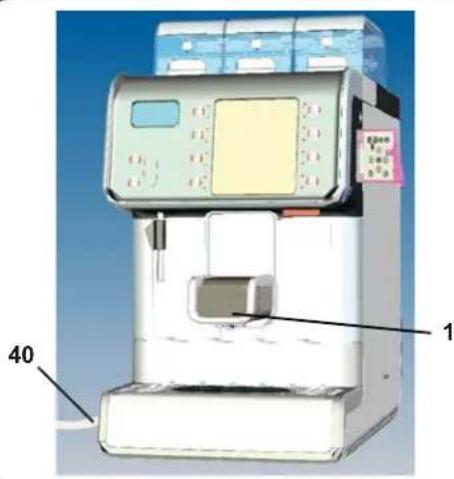
1 Delivery spout
3 Selection panel
5 Graphical display
6 Coffee hoppers 1
6a Coffee hoppers.
6b Soluble hoppers
12 Hot water button
13 Steam dispensing button *
14 Hot water outlet
15 Steam pipe *
16 Tray
23 Main switch
26 Coffee circuit flushing key / short washing
28 Milk circuit wash key - automatic wash
39 Card services slit (technical programming *)
Tp Programming keyboard
The components - * - are applied only in some produit configurations
FR LEGENDE
Translation of the original instructions
45
François
WARNING: Hot surface
ATTENTION: Surface chaude
Dear Madam, Dear Sir
Congratulations on your new Faema!
With this purchase, you have chosen an advanced espresso coffee machine built with the most modern technologies. This machine not only offers you a perfect combination of efficiency and functionality, but also provides you with all the tools you need to do your job in the best possible way.
We recommend that you take some time to read this Use and Maintenance Booklet. It will help you become more familiar with your new espresso machine, which we're sure you are looking forward to using.
Wishing you all the best.
GRUPPO CIMBALI
Index
PagePage
1. General Rules 46
- Installation Rules
- Electrical Installation Rules 47
- Water Installation Rules 48 Emptying the hydraulic circuit 49
- Installation Check-up 50
USE
6.Description of the control panel-Keyboard 51
- Daily powering 52 Description display symbols 53
- Dispensing of beverages - coffee 53
Dispensing STOP function 53
Selection repetition function 54
Coffee dose variation 54
Emptying the coffee grounds drawer 55
8.1 Dispensing of beverages - cappuccino / milk 56
Connecting the Machine -
Modulo BARCODE Milk + Cup 57
Connecting the machine to a generic fridge module 57
8.2 Dispensing of beverages - Chocolate / Solubles (where contemplated) 58
8.3 Dispensing of beverages - hot water 58
8.4 Dispensing of beverages - steam 59 - Cleaning operations (Level 1) 59
COFFEE CIRCUIT CLEANING CYCLE 60
MILK CIRCUIT CLEANING CYCLE 61
CLEANING THE SOLUBLES CIRCUIT (WHERE PRESENT) 63
(Level 2) 68
aning the coffee beans hopper 68
LUBLES HOPPER CLEANING, where present 69
- Rules for the worker operating the machine 71
- Caution 72
- Maintenance and Repairs 72
- Dismantling the machine 73
- Check Control Messages 74
- Defects - Malfunctions 76
CUSTOMER PROGRAMMING
- Clock adjustment 77
- Customer parameters menu 77
Language selection 77
Service time menu 78
Date and time 78 - DATA menu: COUNTERS 79
18.1 DATA menu: accounting 79 - How to access the programming mode 80
19.1 Key menu - Coffee selection 80
19.2 Key menu - Cappuccino selection 81
19.3 Key menu - Milk selection 81
19.4 Key menu - Chocolate / Solubles selection (where contemplated) 81
19.5 Key menu - Mixed soluble selection (where contemplated) 82
19.6 Key menu - Hot water selection 82
19.7 Key menu - Steam selection 82
ILLUSTRATIONS 235
These chapters in the manual are to be used by qualified, authorized technical staff.
1. General Rules

Please read the warnings and rules in this User's Manual carefully before using or handling the machine in any way because they provide important information regarding safety and hygiene when operating the machine.
Keep this booklet handy for easy reference.
The machine was designed solely for preparing espresso coffee and hot beverages using hot water or steam and for preparing cappuccino with fresh milk.
The machine must only be used by suitably trained employees who are well aware of the possible risks that can occur when operating the machine.
The machine is for professional use only. It must only be installed in places where it can be supervised by qualified staff.
The machine must not be used by children or by people with physical, sensorial, or mental impairments: if such people use the machine, they must be supervised during operation.
The machine must not be left unattended.
The machine must not be used outdoors.
If the machine is stored in rooms where the temperature can drop below freezing, empty the service boiler, the coffee boiler and water circuit tubes.
Do not expose the machine to atmospheric agents (rain, sun, and cold).
Noise: the equipment does not exceed 70dB.
If the machine is used improperly or for purposes other than those described above, it can be a source of danger. The manufacturer will not be held responsible for damages caused by improper use of the machine.

These chapters in the manual are to be used by qualified, authorized technical staff.
2. Installation Rules

WARNING
Installation, dismantling, and adjustments must only be performed by qualified and authorized technicians.
Carefully read the warnings and rules in this manual because they provide important information regarding safe installation, use and maintenance of the machine.
Keep this booklet handy for easy reference.
Staff responsible for moving the machine must realize the risks in moving heavy loads.
Move the machine carefully, using the correct lifting equipment (fork lift, for example).
If moving the machine by hand, make sure:
- enough people are available for the task, depending on the machine weight and difficult handling;
- to always use the necessary safety gear (shoes/gloves).
After removing the machine from its packing materials, make sure that the machine and its safety devices are intact.
If the power supply cord is damaged, it can only be replaced by qualified and authorized technicians.
- Packing materials (plastic bags, polystyrene foam, staples, etc.) must be kept out of the reach of children because they are potentially hazardous.
- Before plugging in the machine, make sure that the information on the nameplate (voltage, etc.) matches that of the electrical and water systems.
Completely unwind the power supply cable.
- The coffee machine should sit on a flat, stable surface at least 20mm from walls and from the counter. Keep in mind that the highest surface on the machine (the cup warmer tray) sits at a height of at least 1.2 meters. Make sure there is a shelf nearby for accessories.
Room temperature must range between 10^ and 32^ (50^ and 90^) .
An electrical outlet, water connections, and a drain with siphon must be in the immediate vicinity.
Do not install in rooms (kitchens) that are cleaned with jets of water.
Do not clean the machine with jets of water.
Do not obstruct openings or ventilation and heat vents.
Do not install the machine outdoors.
3. Electrical Installation Rules
Prior to installation, make sure there is a circuit breaker installed with a distance between the contacts that allows for complete disconnection when there is a category III overload and that provides protection against current leakage equal to 30mA . The circuit breaker must be installed on the power supply in compliance with installation rules.
The electrical safety of this machine is only ensured when it is correctly connected to an efficient earthing system in compliance with the electrical safety laws in force. This fundamental safety requirement must be verified. If in doubt, request that a qualified electrician inspect the system. The manufacturer cannot be held responsible for any damage caused by the lack of an earthing system on the electrical supply.
It is unadvisable to use adaptors, multiple plugs, and/or extension cords. If their use is indispensable, only use simple or multiple adaptor plugs and extension cords that are in compliance with safety laws. Make sure these devices do not exceed the voltage capacity marked on the simple adaptor and on extension cords, and the maximum voltage marked on the multiple adaptor.
Check that the type of connection and voltage correspond with the information on the nameplate: see illustrations chapter figure 1.
For machines with a Y connection: see illustrations chapter figure 2.
4. Water Installation Rules
WATER REQUIREMENTS
Water used in coffee machines must be potable and suitable for human consumption (see laws and regulations in force).
Check on the machine's water inlet that:
the pH level complies with the laws in force
the chloride value is less than 100mg / l
If the values do not fall within the limits, an appropriate water treatment device must be inserted (respecting the local laws and compatible with the machine).
If the machine uses water with a hardness exceeding 8^ (4.5 °D), a specific maintenance plan must be implemented according to the hardness detected and machine usage.
WARNING
Only use the supplied parts for installation. If other parts are installed, they must be new (not used) and they must be able to come in contact with potable water suitable for human consumption (according to local laws in force).
WATER CONNECTIONS
Place the machine on a flat surface and stabilize it by adjusting and securing the feet.
Hook up the water connections as shown in the Illustrations chapter Figure 3, respecting the hygiene, water safety, and anti-pollution laws in the country of installation.
Note: If the water pressure can rise above 3 bar, install a pressure reducer set at 2-3 bar. See Illustrations chapter Figure 4.
Water draining tube: place the end of the water draining tube in a drain with a siphon for inspection and cleaning.
IMPORTANT: The curves of the draining tube must NOT bend as shown in Illustrations chapter Figure 5.

These chapters in the manual are to be used by qualified, authorized technical staff.

EMPTYING THE HYDRAULIC CIRCUIT
When the machine is stored or during transportation from one location to another, the services boiler, coffee boiler, and the tubes of the hydraulic circuit must be emptied.
For this procedure, open the rear panel to access the tubes. For more information, please consult the technical manual.
MACHINE EMPTYING PROCESS: MACHINE SWITCHED ON AND IN NORMAL OPERATING CONDITIONS
Switch off the machine*
open the rear panel;
disconnect the connector for the resistences power supply;
switch on the machine;
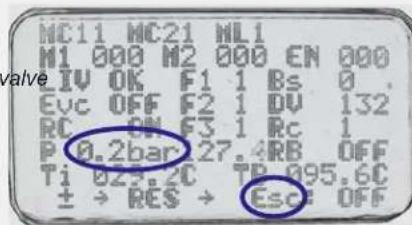
Access the manual controls and operate the "Esc" discharge solenoid until the pressure on the display is 0.2 bar (so that the machine is filled with cold water from the water supply);
switch off the machine;
reconnect the connector for the resistences power supply;
manually empty the coffee boiler:
Unscrew the cap (A) first and then the cap (B);
Wait until all the water empties before screwing back on the caps (A) and (B).
remove the water feed tube;
switch on the machine and wait for the "timeout boiler filling" error message to appear;
after the error message appears, zero the error log, switch off the machine, and close the rear panel;
now the machine can be packed and transported.
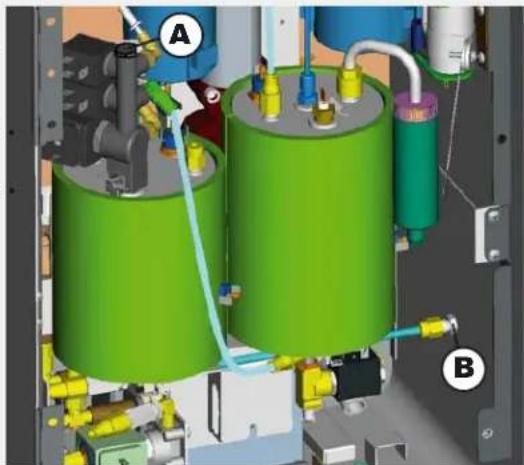
MACHINE EMPTYING PROCESS: MACHINE COLD AND NOT FUNCTIONING
open the rear panel:
Manually empty the coffee boiler and services boiler:
BOILER: Unscrew the cap (A) first and then the cap (B);
Wait until all the water empties before screwing back on the (A) and (B).
SERVICES BOILER: Detach the feed tube (C) first and then the feed tube (D); Wait until all the water empties before reattaching the tubes (C) and (D).
remove the water feed tube;
now the machine can be packed and transported.
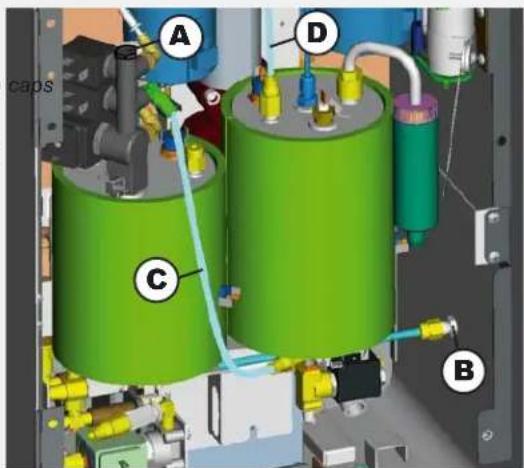

These chapters in the manual are to be used by qualified, authorized technical staff.
5. Installation Check-up

WARNING: AFTER INSTALLATION, CHECK TO SEE IF THE MACHINE IS WORKING PROPERLY (see the Installation Module C)
WATER CONNECTIONS
No leaks from the connections or tubes
FUNCTIONING
Boiler and operating pressures are normal.
The pressure gauge is working properly.
The self-leveling device is working properly.
The expansion valves are working properly

WARNING: ONCE THE MACHINE HAS BEEN INSTALLED AND IS READY FOR USE, BEFORE ALLOWING THE WORKER TO START USING THE MACHINE, WASH THE INTERNAL COMPONENTS ACCORDING TO THE INSTRUCTIONS BELOW:
COFFEE CIRCUIT
Keep the coffee circuit wash key ( 26 pressed for a few seconds and follow the steps indicated on the display.
HOT WATER
Continuously dispense hot water until at least 0.5 liters of water have been dispensed.
STEAM (where present)
Dispense steam from the nozzles for about a minute, using the appropriate buttons.
MILK CIRCUIT
Keep the milk circuit wash key (28) pressed for a few seconds and follow the steps indicated on the display (for more information, please consult the "Cleaning and Maintenance" chapter).
SOLUABLES CIRCUIT (only for machines with solubles)
Keep the coffee circuit wash key (26) and the milk circuit wash key (28) stressed for a few seconds (for more information, please consult the "Cleaning and Maintenance" chapter).
USE
6. Description of the control panel - Keyboard
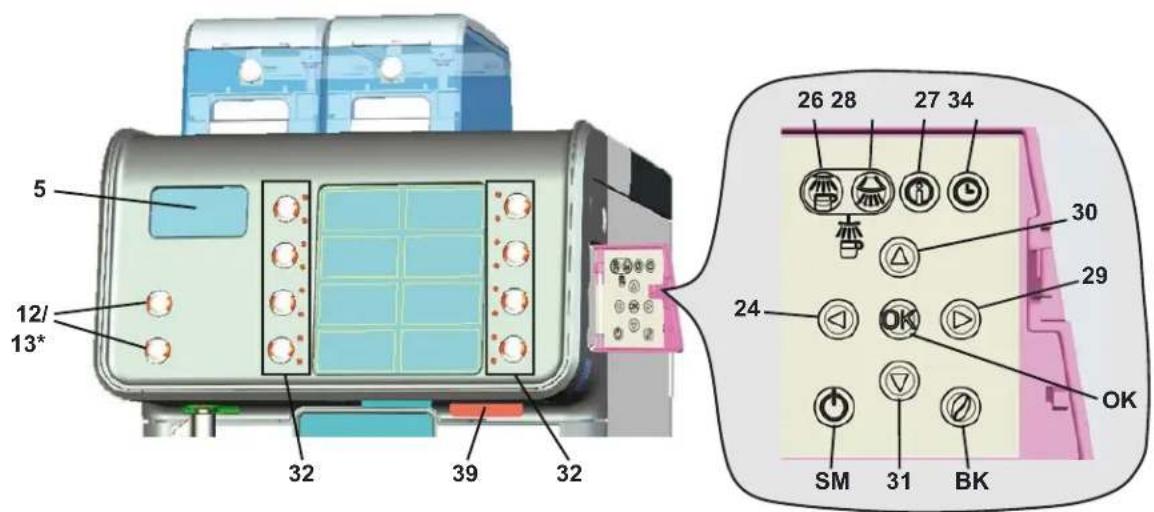
DESCRIPTION OF THE COMPONENTS
5 Graphical display
12 Hot water button
13 Steam dispensing button *
24 "RES" key (to quit programming mode)
26 Coffee circuit flushing key
27 "i" key (displays the number of cycles)
28 Milk circuit wash key - automatic wash
29 "PRG" key (to access programming mode/menu)
30 "+"key (to modify parameters/clock)
31 "--" key (to modify parameters/clock)
32 Beverage selector key
34 "CUSTOMER PARAMETERS" key
39 Card services slit (technical programming *)
BK "bean" key (coffee dose variation)
OK "OK" key (stops products from being dispensed) / Input data confirmation key
SM "Sleep mode" button
The components - * - are applied only in some produit configurations
7. Daily powering

"Before setting the machine at work, make sure that:
the main electric power switch is on; the mains water cock has been turned on.
MANUAL POWERING
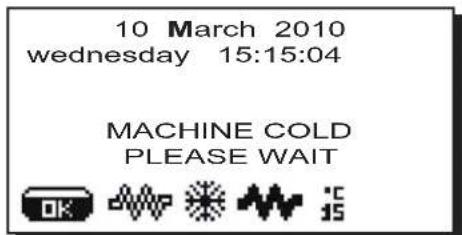
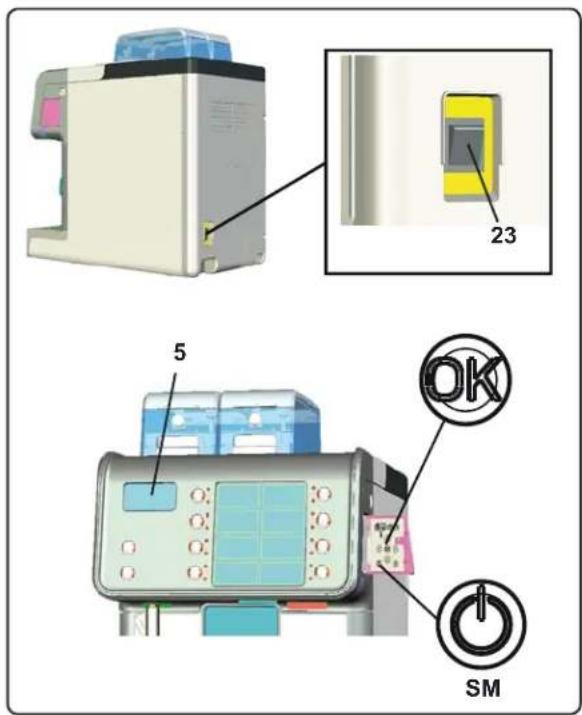
Set in action the main switch (23) to turn on the machine. The following message will appear on the display (5):
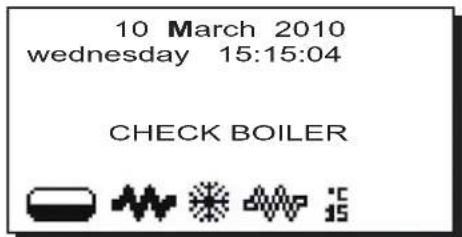
The preset working pressure must be reached before the machine is ready for use.
If any dispensing key is pressed during this phase, the following message will appear on the display:
AUTOMATIC SWITCH OFF
The machine can be set to switch off and switch on at programmed times. Consult the "Service Time Menu" chapter to set the "ON Time" switch-on time and the "OFF Time" switch-off time.
When a service time is set, the machine automatically switches off at the programmed time. During the automatic switch-off phase, the following message will appear on the display:
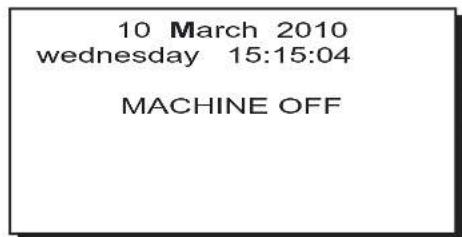
Note. When the machine is working in the automatic on/off function do not use the general switch (23) to switch off the machine. If this happens, the machine will not be able to switch on again automatically.
AUTOMATIC SWITCH ON
The machine switches on automatically at the programmed timed. The messages displayed and the operations performed by the machine are the same as those described in the paragraph "MANUAL POWERING".
FORCED SWITCH ON
Press the OK key for a few seconds to force the machine on again.
Note. Forcing the machine on does not change the programmed on/off times.
Note. At this point the machine will remain on until the next switch off time is reached.
To immediately return the machine to "off" as originally programmed, switch it off and on again using the general on-off switch (23).
SLEEP MODE
ON and OFF functions can also be activated by manually pressing the Sleep mode key (SM).
Keep the key (SM) pressed for a few seconds to enter the Sleep mode. During this phase, the LED above the dispensing nozzle remains lit and the dispensing keys alternately blink.
Keep the key (SM) pressed again for a few seconds to exit the Sleep mode Mode and to return to the machine's work phase.
Description display symbols

This symbol indicates the boiler water level.
During the loading phase, the dark bottom part of the icon blinks.
When the optimum level is reached, the symbol looks like this:
When the resistance (services boiler and coffee boiler) is activated and functioning, the icon looks like this

(dark inside).
When the services boiler pressure and the temperature of the coffee boiler reach the set values, the icon appears as shown below

(light inside).
While the machine is working, the two icons


will alternate on the display, indicating activation of electrical heating.

This symbol indicates the boiler pressure value.

This symbol indicates that:
- the machine is in the first heating phase;
- the boiler pressure has dropped below 0.5 bar;
the boiler temperature is less than 60^
Note: when the services boiler and boiler have still not reached operating parameters and dispensing keys are pressed, the message "MACHINE COLD - WAIT" appears and the symbols

and alternate on the display screen.
The machine has reached the set work pressure and temperature when the icon

disappears from the display.

This symbol indicates the coffee boiler temperature.

This symbol indicates that a services card has been inserted in the slot (39) and, therefore, the technical programming menu can be accessed.
8. Dispensing of beverages - coffee
GENERAL INFORMATION
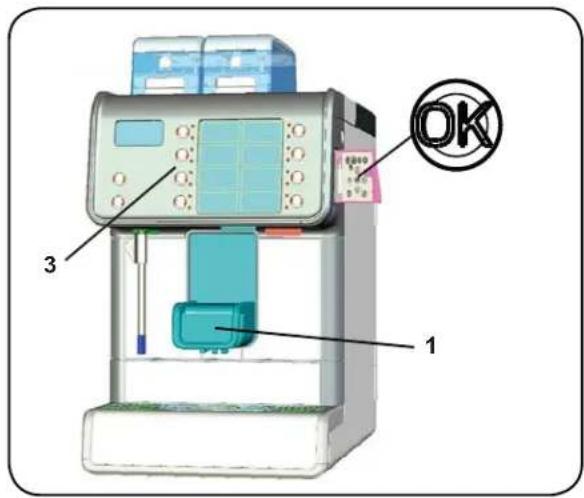
Place the cup (or cups) under dispenser (1) of the required group.
Adjust the height of the dispenser (1) if necessary.
On the selection keypad (3), press the coffee dispensing key corresponding to the chosen dose: only the LED of the selected key remains lit and the dispensing process begins.
The following message will appear on the display:
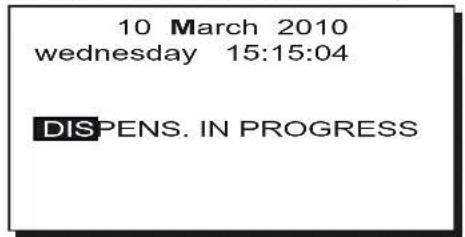
Dispensing stops automatically.
Note: Coffee cannot be dispensed while hot water is dispensed.
Dispensing STOP function
Pressing the selection key again stops beverage dispensing before it reaches the programmed dose.
Note: Pressing the key does not change program settings.
Otherwise, if the "Technical Programming/Configuration/stop dispensing" function has NOT been enabled by the installer, dispensing can be stopped by pressing the key.
SELECTION REPETITION Function
This function can be activated in various ways:
1) setting the desired number at the repeats entry in the beverage recipe (see CLIENT PROGRAMMING and paragraphs referring to Key Menu).
Note: To have access to customer programming, the function must have been previously enabled by the installer "Technician programming/Configuration/Customer prog. YES".
2) Press any one of the selection keys and after about 3 seconds press the same key again for the number of dispensed drinks required.
Note: This second mode can be used only if the "Technician programming/Configuration/Dispensing Stop: NO" WAS NOT enabled by the installer.
The number of dispensed drinks programmed is indicated on the top left of the display. Press the key and keep pressed for about 3 sec. to reset.
NOTE. These functions are deactivated when error messages and/or codes are displayed and the item "Technician program- "Technicjing/Configuration/Program.block" is set on "YES".
Coffee dose variation
The machine is equipped with a software program that makes it possible to quickly change the coffee dose without needing the technician's assistance.
Note: This function is possible ONLY if the entry "bean key", in the technical configuration menu, has been set to "YES" by the installer.
To modify the coffee dose, access the programming key (Tp) and press the "bean" key (BK). The following will appear on the display:
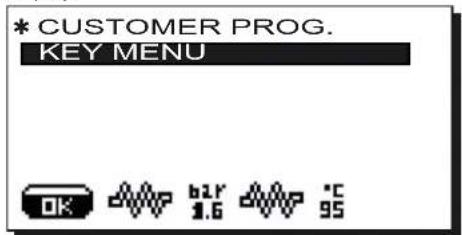
Press the key (32) for which you want to vary the coffee dose. The following will appear on the display:
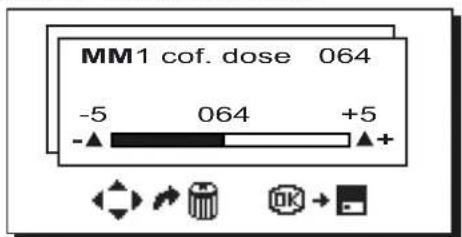
Use the ^+ + ^ 30 and - 1 keys to set the number.
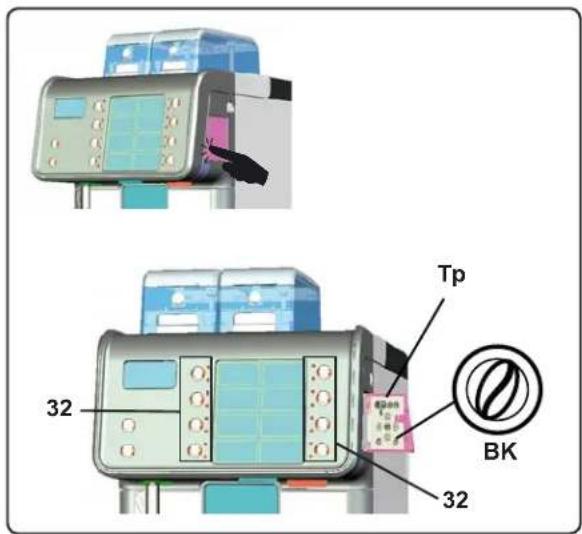
The dose set for both grinders in the technician programming menu can vary by ± 5
Example
Technician programming Customer programming
Coffee dose MM1 045 Coffee dose MM1 040÷050
Coffee dose MM2 020 Coffee dose MM2 015÷025
To exit the panel, press the key OK to confirm any changes made to the numbers or press the RES (24) key to leave the settings as is.
Emptying the coffee grounds drawer
When the machine has reached the amount of coffee grounds set by the installer, the following warning message will appear on the display:
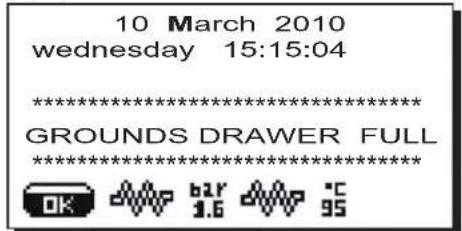
This message warns the user that the coffee grounds drawer is full. It is still possible to dispense ten coffee-based beverages (10 singles or 5 doubles) before the machine is blocked. Immediately empty the drawer to reset the counter.
Otherwise, it will be possible to work until the message "EMPTY DRAWER" appears. At this point, the machine is blocked and stops any coffee dispensing.
Activities are restored only after the coffee grounds drawer is emptied.
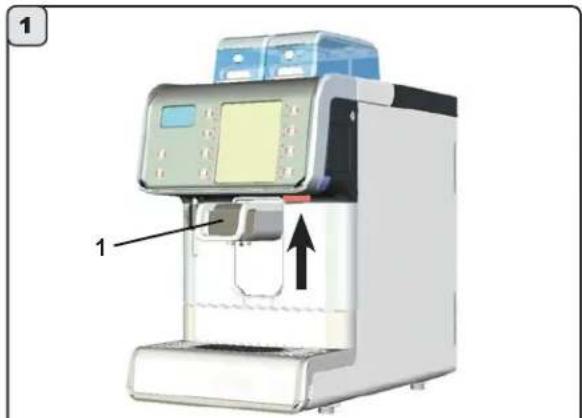
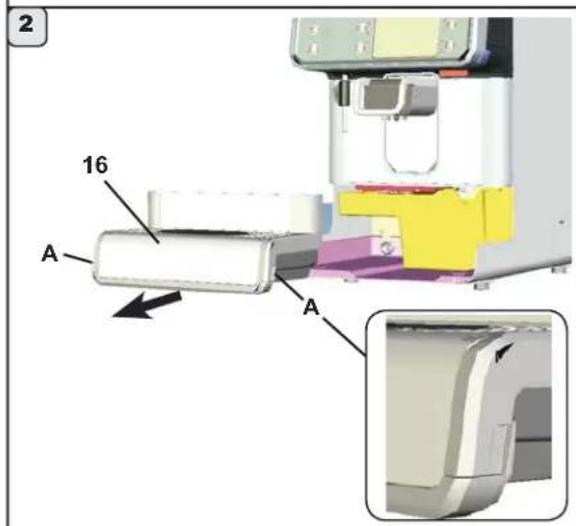
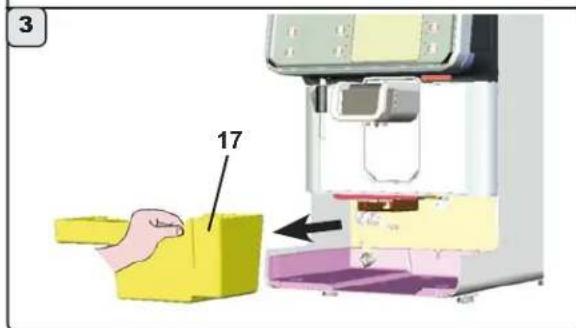
To empty the coffee grounds drawer, please follow these steps:
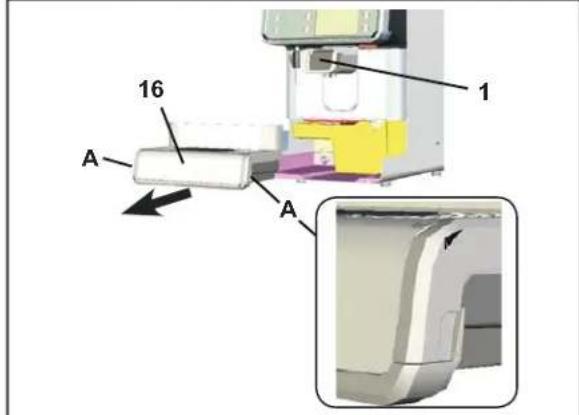
1) Raise the dispensing nozzle (1);
2) Pull out the drawer (16); lifting it slightly at points (A);
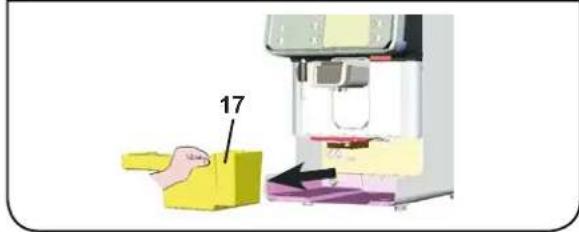
3) Remove the coffee grounds drawer (17) and empty it;
4) Insert the coffee grounds drawer (17); reposition the tray (16); and place the dispensing nozzle (1) in the original position.
8.1. Dispensing of beverages - cappuccino / milk
GENERAL INDICATIONS
Milk is a delicate biological product and can easily deteriorate. Heat modifies its structure. Milk must be kept at a storage temperature no higher than 5^ (41^) from the moment the container is opened and throughout its entire period of use.
Our storage appliances are suitable for this purpose.
NOTE: at the end of the work day (or not more than 24 hours from the time the container is opened), any remaining milk must be discarded.
Preliminary operations
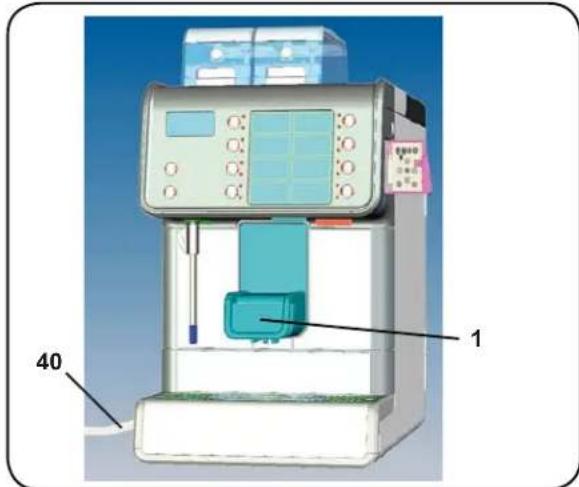
Insert the tube (40) of the dispenser (1) into the milk container.
Place the cup (or cups) under the dispenser (1).
If necessary, adjust the dispenser height.
Cappuccino dispenser
Press the cappuccino dispensing button corresponding to the required dose. The led in the selected button will come on and dispensing will begin. Dispensing will stop automatically. Beverage dispensing can be stopped before the set time by pressing the same key again.
Milk dispenser
Press the milk dispensing button corresponding to the required dose. The led in the selected button will come on and dispensing will begin. Dispensing will stop automatically. Beverage dispensing can be stopped before the set time by pressing the same key again.
OPTIONS
The options indicated in section "Coffee dispensing" are available.
The technician who installs the machine can also be asked to personalize the cappuccino buttons in the following ways:
- milk dispensing before the coffee or vice versa (only when cappuccino is dispensed);
Proceed as explained in section "CUSTOMERPROGRAMMING" to obtain hot or tepid milk.
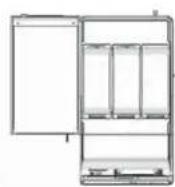
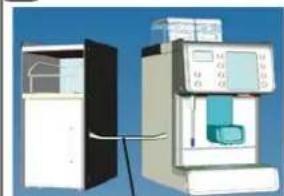
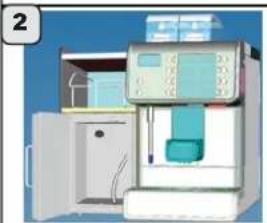
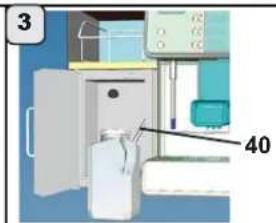
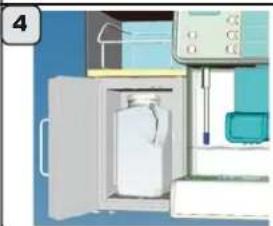
Connecting the Machine - Modulo BARCODE Milk + Cup
Please follow these steps to connect the MODULO BARCODE MILK + CUP to the machine:
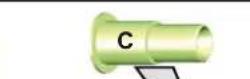
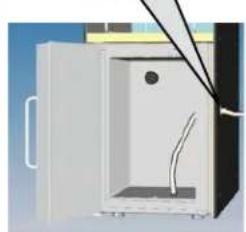
1) insert the milk intake tube (40), from the machine, in the manifold (C) positioned in the specific hole of the MODULO BARCODE MILK + CUP;
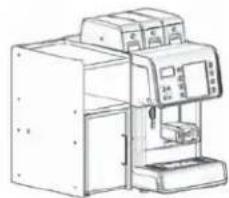
2) Place the module next to the machine as shown in the figure. Make sure the manifold (C) is inserted in the side hole of the machine;
3) Insert the intake tube (40) into the milk container;
4) Insert the milk container in the MODULO BARCODE MILK + CUP and close the door.

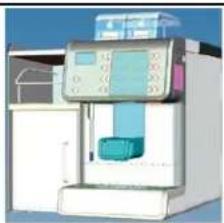
When placing the MODULO BARCODE MILK + CUP next to the machine, make sure the control panel can be opened.
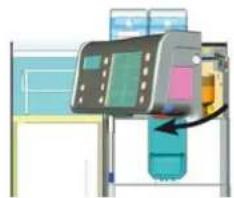
The correct position is show below:
1
40
2
4
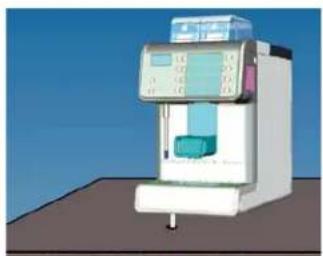
Connecting the machine to a generic fridge module
Besides being able to connect the machine to the MODULO BARCODE MILK + CUP, it can also be used with a generic milk cooler.
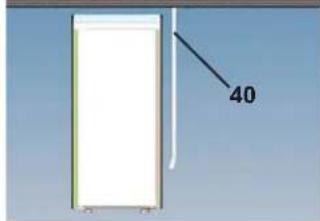
The position of the generic milk cooler is different from the position of the MODULO BARCODE MILK + CUP. For example, the illustration here shows how to connect the machine to the milk cooler positioned underneath the machine counter.
Note: In this case, the milk intake tube (40) comes from the machine base and not from the side as with the MODULO BARCODE MILK + CUP.
The installer connects the milk tube.
8.2 Dispensing of beverages - Chocolate / Solubles (where contemplated)
Preliminary operations
Place the cup (or cups) under dispenser (1) of the required group.
uuiu
Soluble beverage dispenser
Press the chocolate (or other soluble beverage) dispensing button corresponding to the required dose. The led in the selected button will come on and dispensing will begin. Dispensing will stop automatically.
Beverage dispensing can be stopped before the set time by pressing the same key again.
Mixed Soluble dispenser
Combined dispensing that can include coffee, milk and solubles beverages.
Selection customization, with the sequence and duration of the dispensing cycles for each beverage, is done by the installer.
Insert the tube (40) into the milk container.
Press the mixed soluble dispensing button corresponding to the required dose. The led in the selected button will come on and dispensing will begin. Dispensing will stop automatically. Beverage dispensing can be stopped before the set time by pressing the same key again.
8.3 Dispensing of beverages - hot water

Scalding hazard! Use the appropriate insulating devices to move the water and steam wands.
HOT WATER:GENERAL INSTRUCTIONS
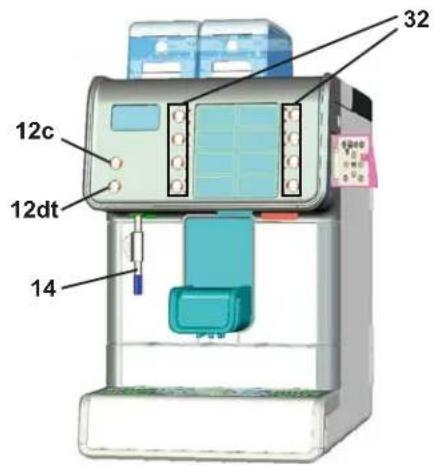
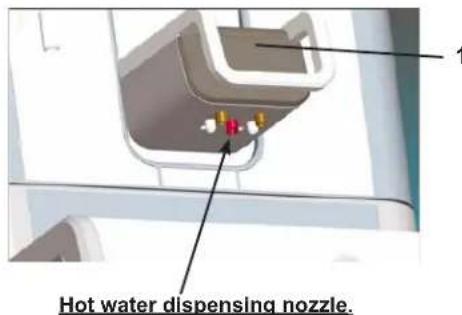
Place the appropriate container under the hot water dispenser (14). Dispensing can be dosed automatically or occur in continuous mode (manually).
Note: hot water dispensing cannot take place during coffee dispensing.
Dispensing with automatic dosing
Press one of the hot water dispensing keys (12dt) corresponding to the desired dose.
The programmed dose of hot water will pour from the dispenser (14) and will stop automatically.
Note Dispensing may be stopped by pressing the (12dt) key. Pressing the (12dt) key does not change the parameters set during the programming phase.
Manual dispensing
Press the hot water dispensing key (12c).
Hot water is dispensed continuously until the water key is pressed again (12c) to stop it.
In some product configurations, hot water dispensing can occur through the dispensing nozzle (1). The special key (32) on the selection pad must be enabled by the installer.
8.4 Dispensing of beverages - steam

Scalding hazard! Use the appropriate insulating devices to move the water and steam wands.
STEAM:GENERAL INSTRUCTIONS
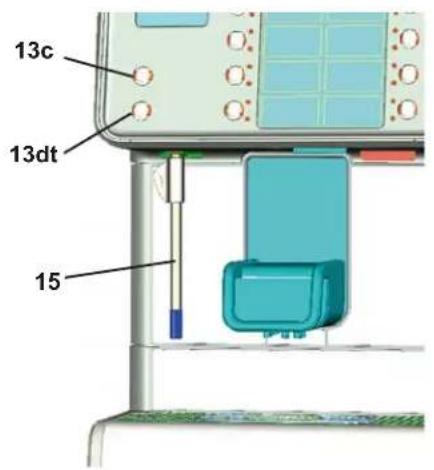
Completely immerse the steam wand (15) in the container with the beverage to be heated. Dispensing can be done automatically or in continuous mode (manually).
Automatic dispensing
Press the steam dispensing key (13dt).
The dispenser (15) will work for a preset time and will stop automatically.
Note: Dispensing can be interrupted by pressing the key (13dt).
Pressing the key (13dt) does not change the settings set through the programming menu.
Manual dispensing
Press the steam dispensing key (13c).
Steam is dispensed continuously until the steam key (13c) is pressed again to stop it.
Note: At the conclusion of each steam dispensing phase, clean the inside of the steam nozzle as follows:
Turn the nozzle towards the cup tray and carefully activate steam dispensing at least once.

9. Cleaning operations
Level 1

The following cleaning operations can be carried out by a Level 1 worker (barman/user).

For correct application of the food safety system (HACCP), please follow the instructions in this paragraph.
MILK CIRCUIT AND COFFEE CIRCUIT CLEANING CYCLES
The purpose of the flushing cycle is to remove all traces of grease and scaling deposited when the milk is conveyed and emulsified and when the coffee is dispensed.
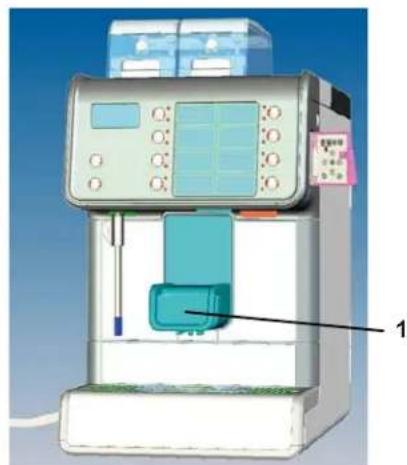
Failure to flush out the circuit will allow these deposits to solidify. This will impair the qualitative performance of the cappuccino maker (1) and of the coffee circuit.
NOTE: the following operations must be carried out when the machine is on and pressurized.
ATTENTION, RISK OF SCALDING: hot water, steam and milk residues will spill out when the spouts of the cappuccino maker/dispenser spout (1) are flushed. Keep the hands and all other parts of the body well away until the cleaning cycle has terminated.
Level 1
COFFEE CIRCUIT CLEANING CYCLE
These procedures are to be performed at the end of the work day or when the machine sends a message (see paragraph "Customer programming - Services hour menu). When the machine sends a message, the screen displays "EXECUTE WASHING GROUP", accompanied by an acoustic signal.
The message and signal will continue until the wash cycle is performed or up until the end of the timeout (60^)
Please follow these instructions for the washing process:
1) After the machine sends the message;
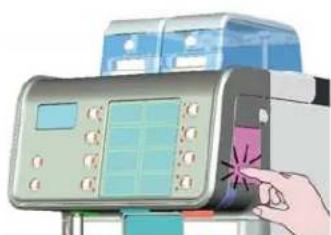
2) Open the door to access the programming keypad; Lower the dispensing nozzle (1);
3) Keep the coffee circuit washing key (26), pressed until the message "START WASHING" appears, as shown below:
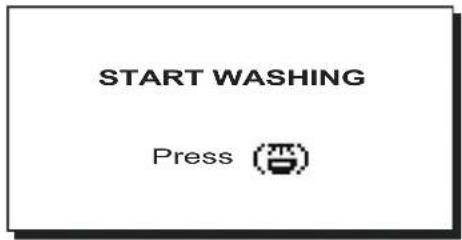
Keep the coffee circuit washing key pressed again (26) until the message "WASHING IN PROGRESS" appears on the display:
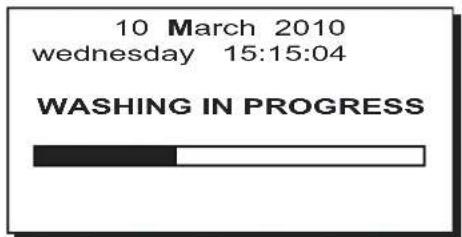
Wait until the machine performs an automatic washing cycle (approximately 2 minutes). The washing cycle has ended when this message appears on the display:
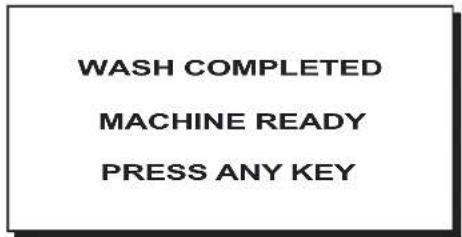
4) Press any dispensing key to return to normal work operations.
NOTE. Once the wash cycle is underway, it CANNOT be stopped, even if the machine is switched off. If the power supply goes off or the machine switches off during the cycle, when the power returns the message "PRESS WASH" will appear on the display screen.
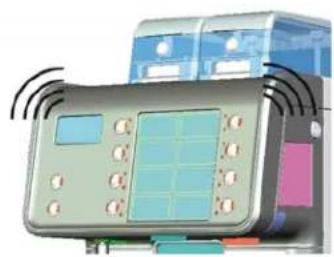
1
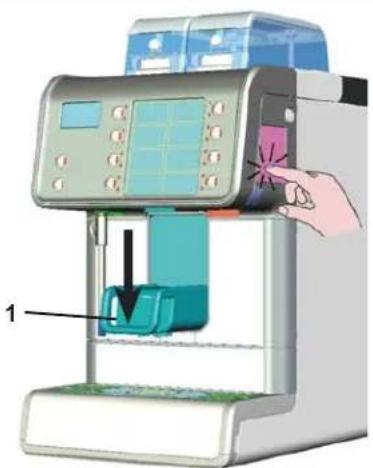
2
3
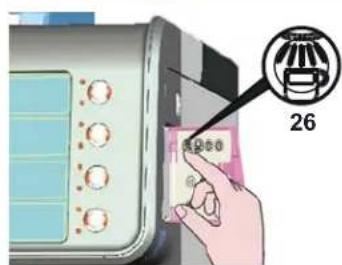
4
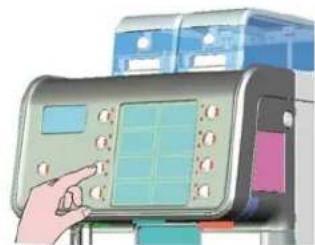
To continue, press key (26) to complete the cleaning cycle.
Programmed wash cycles that are not effected will be memorized by the machine.
Selection block - This occurs after 60^ of functioning from the preset time if the washing cycle has not taken place, with the "Block coffee circuit" function enabled (YES) by the installer.
Level 1
MILK CIRCUIT CLEANING CYCLE
These procedures are to be performed at the end of the work day or when the machine sends a message (see paragraph "Customer programming - Services hour menu). When the machine sends a message, the screen displays "EXECUTE WASHING MILK CIRCUIT" accompanied by an acoustic signal.
The message and signal will continue until the procedure is performed or up until the end of the timeout (60').

MILKISAFOODPRODUCTTHATREQUIRESMAXIMUM HYGIENE! NOT PERFORMING REGULAR AND DAILY WASHING CYCLES CAUSES OCCLUSIONS,WHICH CAN MAKE THE CIRCUIT BREAK AND CAUSE LEAKS.
Therefore, please scrupulously follow the washing instructions.
Please follow these instructions for the washing process:
1) After the machine sends the message;
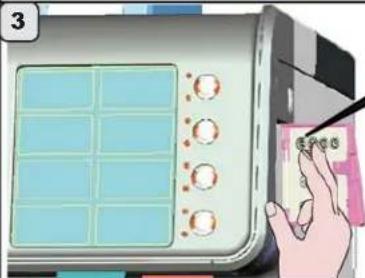
2) Open the door to access the programming keypad;
3) Keep the coffee circuit washing key (28) pressed until the message appears with washing instructions:
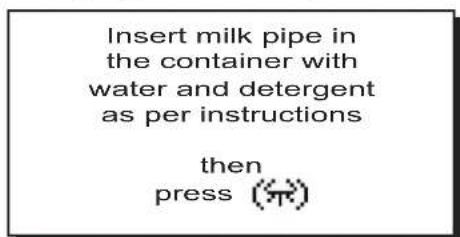
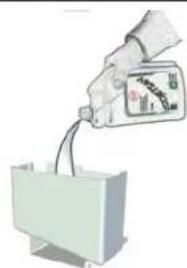
4) Place approximately 0.7 liters of cold water in a container and add a dose of liquid detergent (see product instructions);
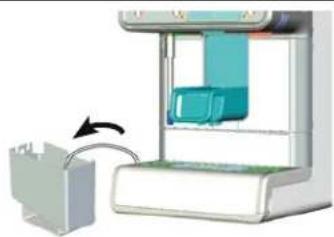
5) Remove the intake tube from the milk container and immerse it in the solution (water-detergent);
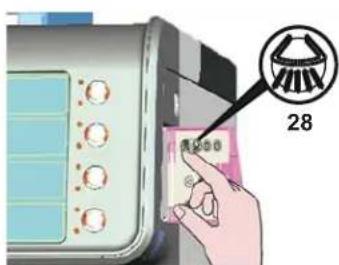
6) Keep the milk circuit washing key (28) pressed until the message "WASHING IN PROGRESS" appears on the display:
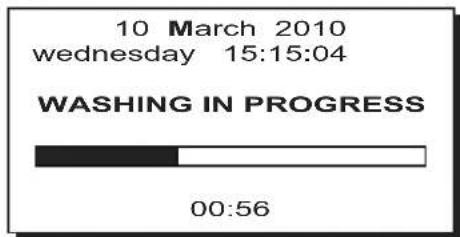
The numbers in the lower part of the display indicate the remaining time for this procedure;
At the end of this phase, the following message will appear on the display:
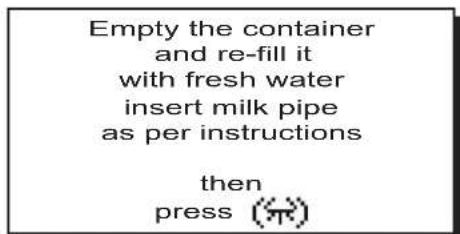
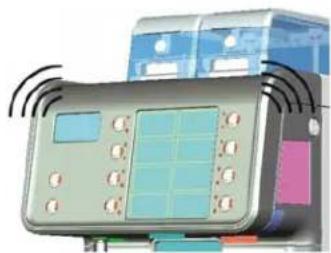
1
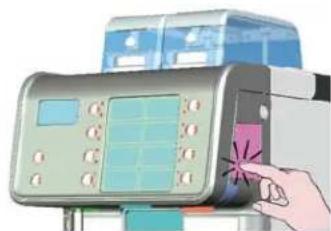
2
3
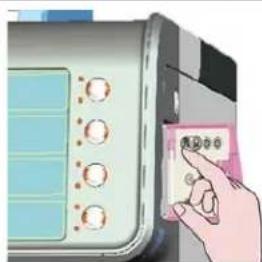
4
5
6
FAEMA
7) Eliminate any remaining washing solution in the container and add about 0.7 liters of cold water, leaving the milk intake tube in the container;
8) Keep the milk circuit washing key (28) pressed until the "WASHING IN PROGRESS" message appears again on the display:
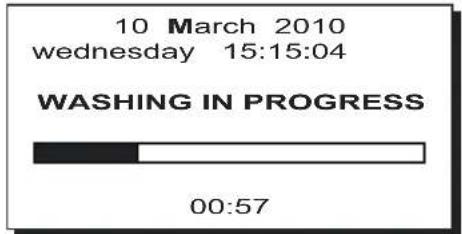
The washing cycle has ended when this message appears on the display:
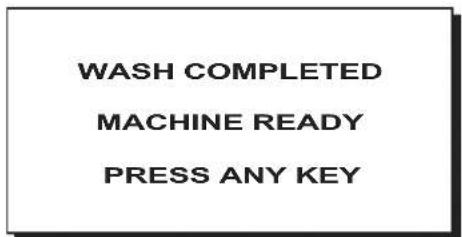
9) Remove the milk intake tube from the container and reposition the tube back into the milk container.
10) Press any dispensing key to return to normal work operations.

Do not remove the container during the washing procedure: otherwise, the washing cycle must be repeated.
Selection block - This occurs after 60' of functioning from the preset time if the washing cycle has not taken place, with the "Block milk circuit" function enabled (YES) by the installer.
For machines with soluble product dispensing, please consult the paragraph "CLEANING THE SOLUBLES CIRCUIT".
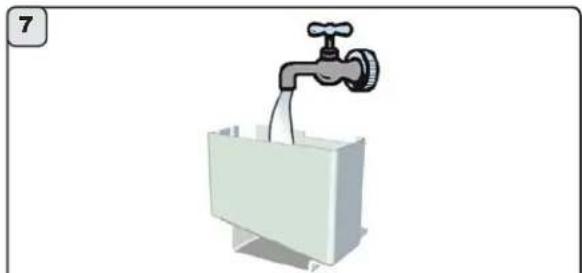
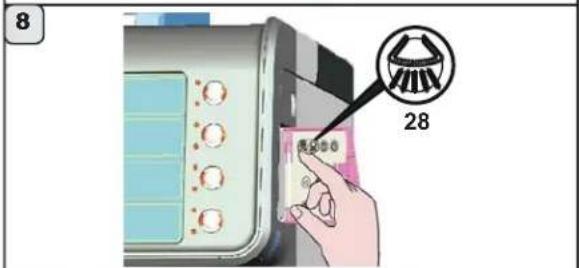
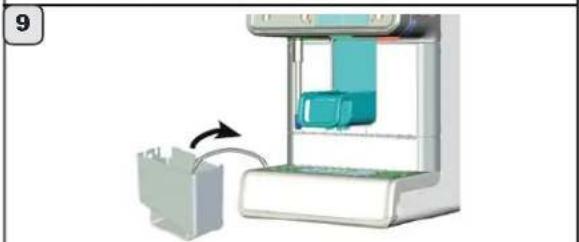
Level 1
CLEANING THE SOLUBLES CIRCUIT (WHERE PRESENT)
Only for machines with soluble products
Functioning: At the end of each soluble product dispensing phase, the preset counter starts (from 1 to 20 minutes, OFF, function disabled). Afterwards, the request to wash the circuit will appear.
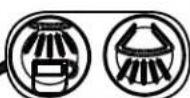
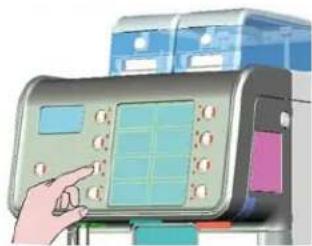
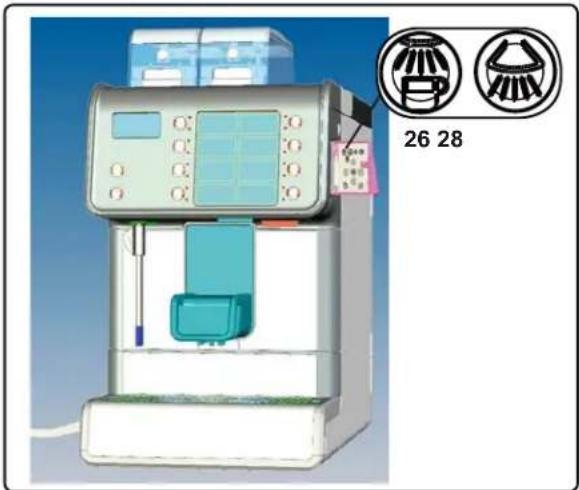
Activation: The washing cycle is performed after simultaneously pressing and holding the keys (26) and (28) for at least a second.
Selection block: If the washing cycle is not performed within 60' after the message appears, with the "block soluble circuit" function set (YES), the machine is blocked to prevent all soluble-based selections.
Washing process: With water, completely automatically.
For more details, please see the technical manual at the paragraph "Menu configuration - wash options".
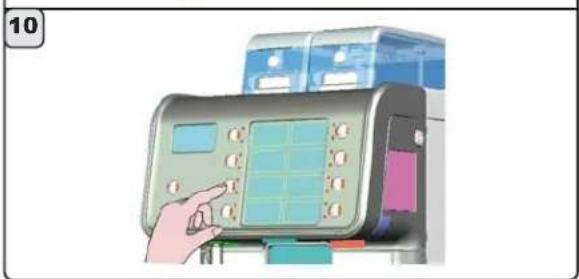
Please follow these instructions for the washing process:
1) After the machine sends the message;
2) Open the door to access the programming keypad;
3) Keep keys (26) and (28) stressed until the message appears with "WASHING IN PROGRESS" message:
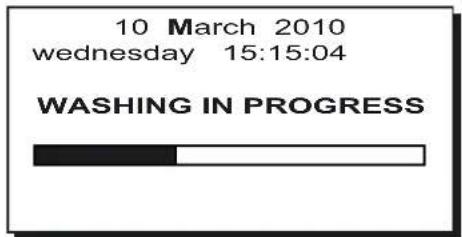
Wait until the machine performs an automatic washing cycle (approximately 2 minutes).
The washing cycle has ended when this message appears on the display:
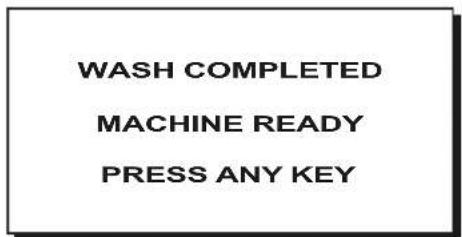
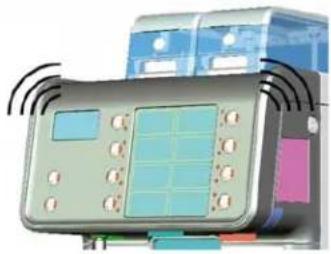
4) Press any dispensing key to return to normal work operations.
The indications above are performed in addition to the solubles circuit washing process described on the following page.
1
2
3
4
26 28
WASHING THE SOLUBLES CIRCUIT (WHERE PRESENT)
The following indications are for machines with a soluble products selection and performed in addition to the washing procedure described above.
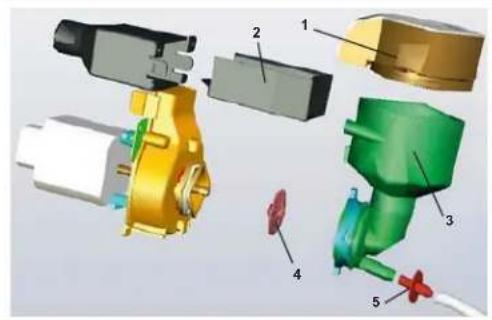
MIXER CLEANING
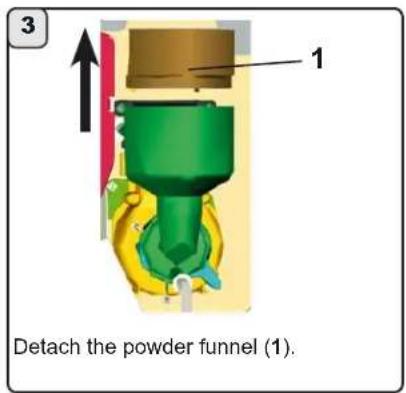
1 powder funnel
2 powder storage drawer
3 mixer conveyor
4 mixer blade
5 nozzle
Here are the steps to perform at the end of the work day. Please follow these steps:
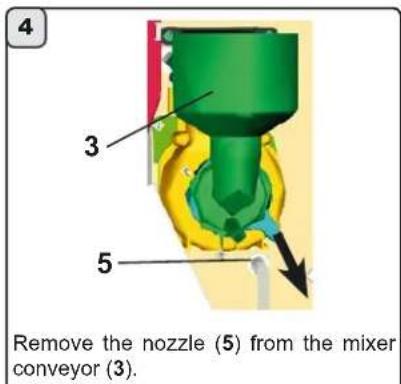
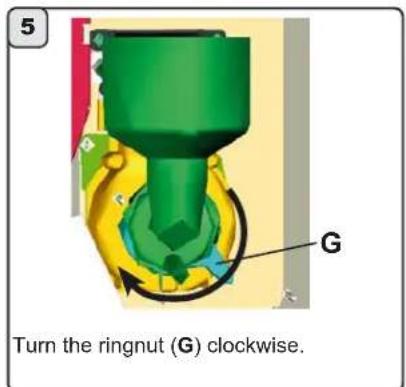
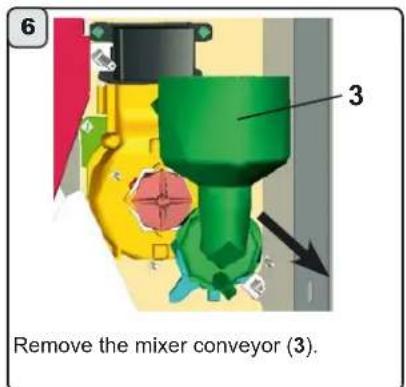
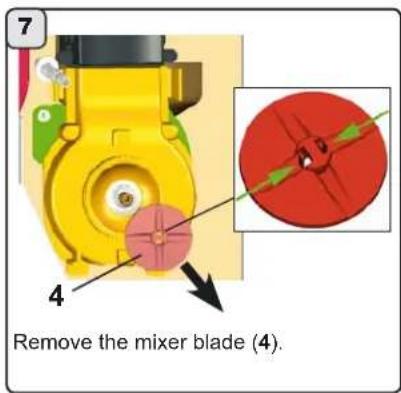
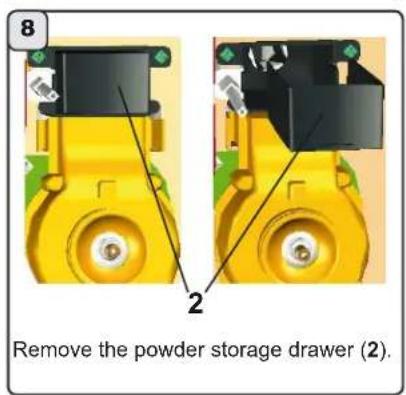
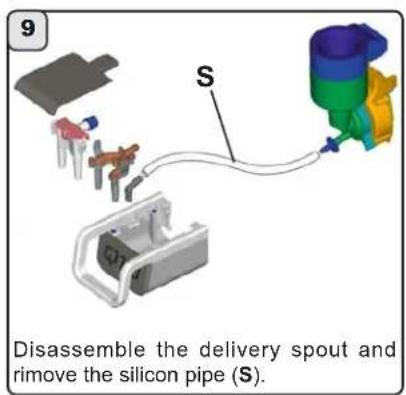
FAEMA
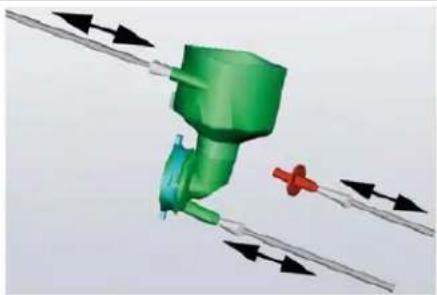
10
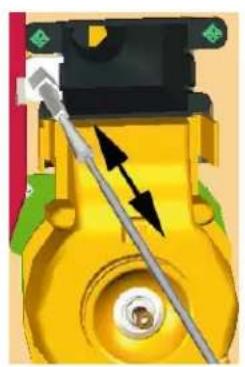
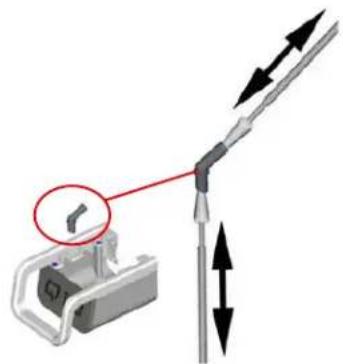
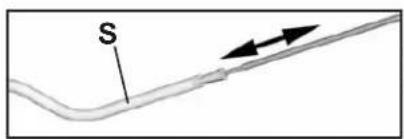
11
Use a brush to clean all the holes where the liquid passes through and clean also the silicon pipe (S).
Place 1 / 2 liter of cold water into a container and add a dose of liquid detergent (see product instructions). Wash the separe parts, removing any organic residue with a sponge. Immerse all mixer parts in the solution (water - detergent) for at least 15 minutes. Remove all parts from the solution and rinse.
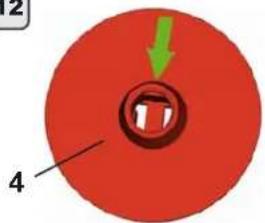
12
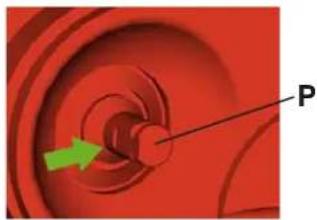
13
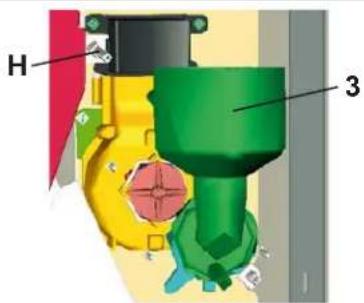
Reassemble the parts and attach the mixer to its base. Note: Take care when reattaching the mixer blade (4) to the pin (P), and make sure the two flat parts on the 2 components match. Note: Take care when reattaching the mixer conveyor (3) to water nozzle (H).
After the machine has returned to its normal working conditions, simultaneously press the keys (26) and (28) for at least a second to perform a washing cycle.

9. Cleaning operations
Level 1
Preset automatic washing cycle
only for machines with cappuccino maker
Function - after each milk cycle has terminated, the timer count-down starts (max 210'). At the end, "AUTOMATIC WASHING" appears on the display, with the time remaining before the wash cycle begins.
Activation - activation is automatic at the end of the remaining 30^ seconds. During this stand-by time: if the coffee dispensing key is pressed, the timer countdown will start again from 30^ seconds before the end of the dispensing cycle;
if the milk/cappuccino dispensing key is pressed, the timer count-down will start from the set up time (210').
If the (28) key is pressed, the automatic wash cycle will be performed immediately.
Selection block - always inactive. The wash cycle is performed even if the user does not intervene.
Wash type - with milk or water, completely automatic.
Special conditions
1) with each washing cycle with detergent (at a preset time) or daily washing cycle:
In this case, the entire circuit is washed. Therefore, during the first milk dispensing procedure, the circuit is considered free of residual milk and the timer (210') countdown is not launched.
2) each time the machine is switched off while the timer countdown (210^) is underway:
when the machine is switched on again, if 210' have passed, once the machine reaches its operating temperature, the preset automatic washing cycle is launched and cannot be stopped.
When the machine is blocked, and the following message appears on the display:
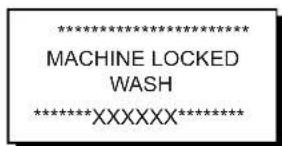
When the key corresponding to the wash requested in the message (key 26 or key 28), the wash cycle is activated and the machine is unblocked.
Note: In the absence of washing messages and when the machine is used frequently, washing cycles can be performed at any time by following the Instructions described previously.
Automatic wash (if programmed)
only for machines with cappuccino maker
Function - after each milk cycle has terminated, the timer count-down starts (from 10 to 99 minutes, OFF disabled function). At the end, "AUTOMATIC WASHING" appears on the display, with the time remaining before the wash cycle begins.
Activation - activation is automatic at the end of the remaining 30^ seconds. During this stand-by time:
if the coffee dispensing key is pressed, the timer countdown will start again from 30^ seconds before the end of the dispensing cycle;
if the milk/cappuccino dispensing key is pressed, the timer count-down will start from the set up time (10' ÷ 99') .
If the (28) key is pressed, the automatic wash cycle will be performed immediately.
Selection block - always inactive. The wash cycle is performed even if the user does not intervene.
Wash type - with water, completely automatic.
For more details, please consult the technical manual at the "Configuration menu - wash options" paragraph.

9. Cleaning operations
Level 1
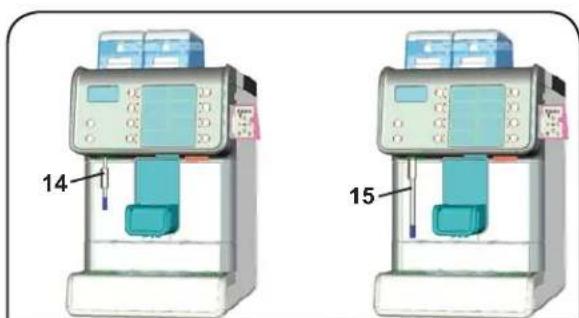
HOT WATER DISPENSER (14) AND STEAM TUBE (15) (where contemplated)
Wash with hot water and a clean cloth or sponge, removing all organic matter.
Thoroughly rinse.
Clean up the inner part of the steam dispenser operating in the following way:
direct the tube towards the cup tray, and paying particular attention, allow the steam to flow at least once.
CUP TRAY (16)
At the end of the working day, pour a jug of hot water into the tray (16) and remove any deposits from the drain. Remove and wash under running water.
For removal:
Raise the dispensing nozzle ( 1)
Pull out the tray (16), lifting it slightly at points (A);
Do not use abrasive products, do not place in the dishwasher.
COFFEE GROUND TRAY (17)
For removal:
Raise the dispensing nozzle (· 1);
Pull out the tray (16), lifting it slightly at points (A);
Remove the coffee grounds drawer (17)
Empty the drawer and rinse it under running water.
- Accurately clean the drawer compartment (17) with a damp cloth, removing any organic residues.
- Insert the coffee grounds drawer (17); reposition the tray (16); and place the dispensing nozzle (1) in the original position.
EXTERNAL PARTS
Warning: The polished parts of the machine body must be cleaned using the supplied cloth. If there is persistent dirt, clean with a damp sponge and dry with a soft cloth.
Clean the machine body using products containing NO amoniac or abrasives. Use a soft cloth to remove any organic residues in the work zone.
Note: DO NOT spray liquids in the holes on the body panels, and do NOT use rough cloths or paper for cleaning.

CAUTION
When the machine has not been used for more than 8 hours, and in any case once a day, the internal components must be washed before use, in accordance to the following instructions:
Hot water
Dispense hot water repeatedly (using the relative command) until at least 0.5 liter of water have been dispensed from the machine.
Steam
Allow the steam to flow through the nozzles for approximately one minute, using the appropriate commands.
Coffee circuit / Milk circuit: follow the instructions contained in this manual to perform the various operations.

9. Cleaning operations
Level 2

The following cleaning operations MUST be carried out by a Level 2 worker (trained user).
1
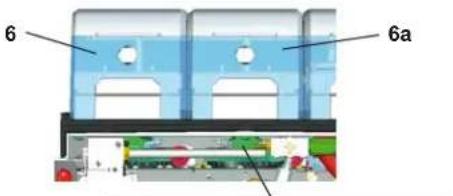
CLEANING THE COFFEE BEANS HOPPER (6 - 6a)
The coffee hoppers (6 and 6a) must be periodically cleaned (every week, approximately). Depending on consumption and type of coffee, cleaning can be performed more frequently.
Please follow these steps:
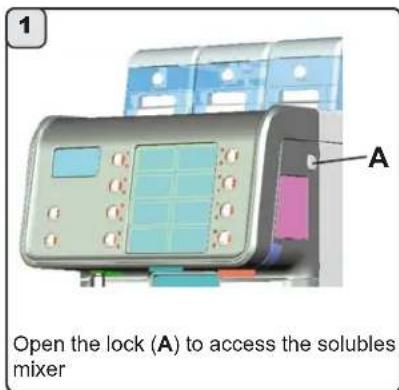
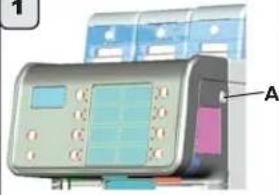
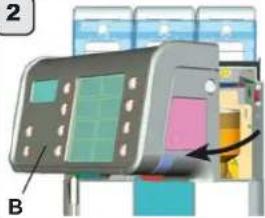
1) Open the lock (A);
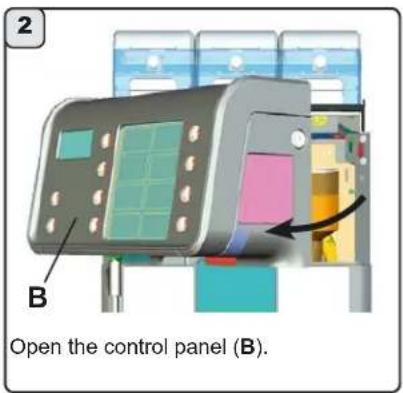
2) Open the control panel (B);
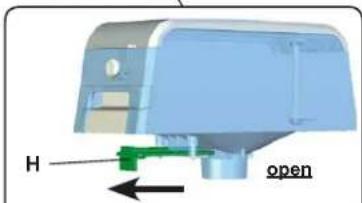
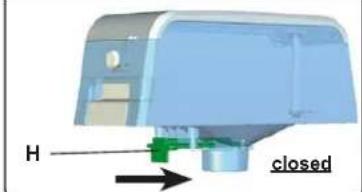
3) Push the hopper closing device (H) towards the back of the machine;
1
2
3
4) Open the hopper lock (T) and remove the cover (C);
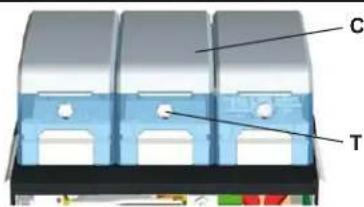
4
5) Use a tool to turn the fastening device (F) counterclockwise and remove the coffee hopper (6a) from the machine.
Remove any remaining coffee from the coffee beans hopper. Wash the receptacle with a damp cloth using methods and detergents suitable to objects that come into contact with foodstuffs. Rinse thoroughly and dry, removing any organic residue.
Before replacing the coffee beans hopper on the machine, ensure that all the parts have been dried thoroughly.
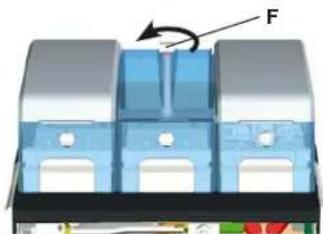
5
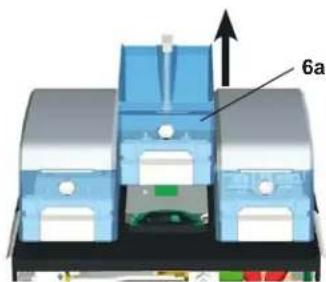

9. Cleaning operations
Level 2
SOLUBLES HOPPER CLEANING (6b), where present
The solubles hopper (6b) must be periodically cleaned (every week, approximately). Depending on consumption and type of product, cleaning can be performed more frequently.
The images opposite are that of a double solubles hopper.
Please follow these steps:
1) Open the lock (A);
2) Open the control panel (B);
3) Push the hopper closing device (Hs) towards the back of the machine;
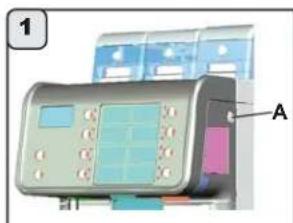
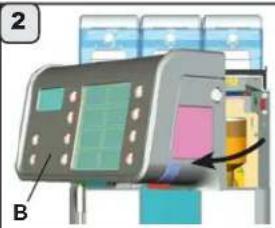
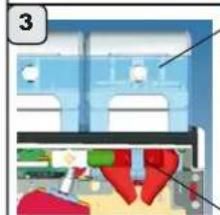
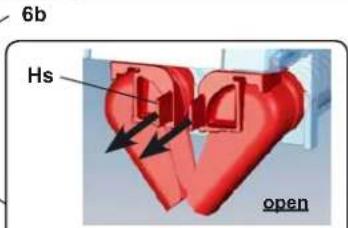
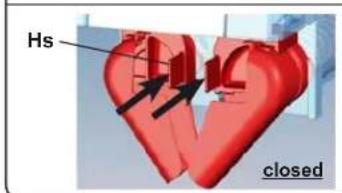
4) Open the hopper lock (Ts) and remove the cover (Cs);
5) Use a tool to turn the fastening device (Fs) counterclockwise;
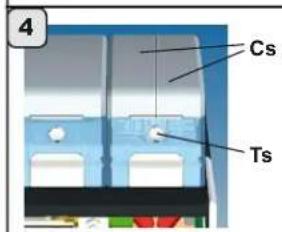
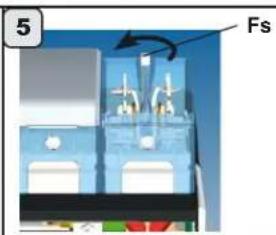
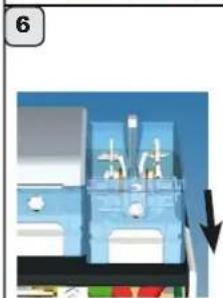
6) Move the hopper towards the front of the machine;
7) Slightly raise the rear of the hopper and remove the solubles hopper (6b) from the machine;
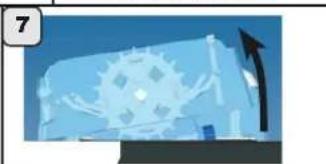
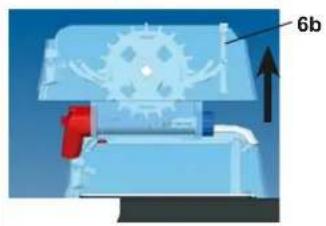
8) Remove the 2 wheel stop (P);
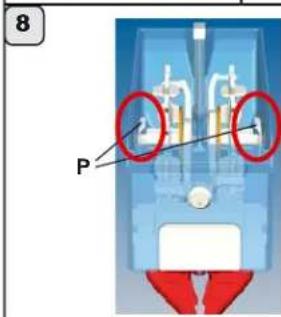
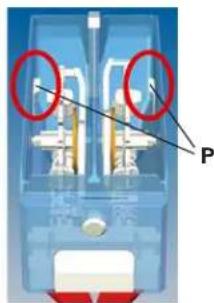
FAEMA
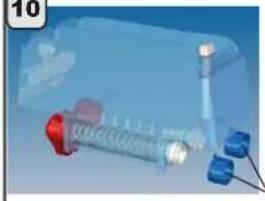
9) Remove the wheel fastening pin on the side (L) and remove the moving mechanisms inside the hopper;
English
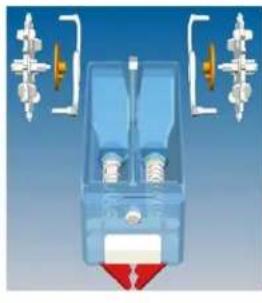
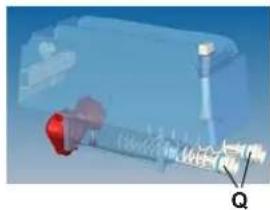
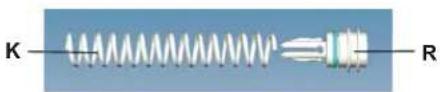
10) Turn the fastening ring (M) at the rear of the hopper clockwise and remove the dispensing screw unit (Q);
11) Remove the worm screw (K) from the dispensing unit (R);
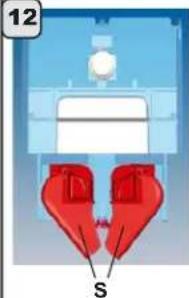
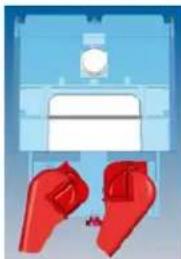
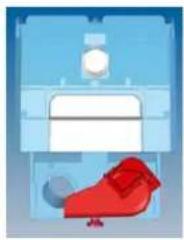
12) Remove the solubles chute unit (S) turning it clockwise (in configurations with a double chute, remove the unit on the left first);
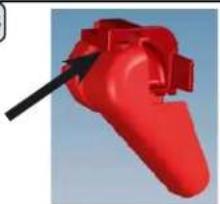
13) Separate the solubles chute unit (S), lightly lifting it in the indicated point.
Remove any soluble product remaining in the hopper.
Use a damp cloth to clean the hopper with products suitable for objects that come in contact with foodstuffs. Carefully rinse and dry, and remove any organic residues.
Before repositioning all the parts previously removed, make sure all the wet or damp parts have been perfectly dried.
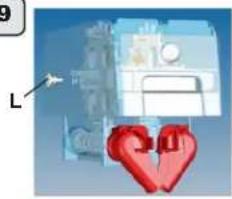
9
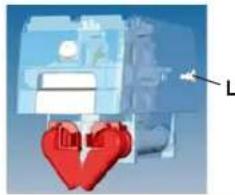
10
11
12
13
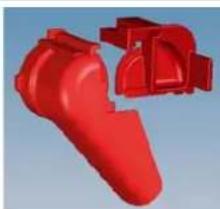
10. Rules for the worker operating the machine
BEFORE YOU START

WARNING: BEFORE YOU START OPERATING THE MACHINE, WASH THE INTERNAL COMPONENTS FOLLOWING THE INSTRUCTIONS INDICATED BELOW.
THESE STEPS MUST BE REPEATED AT LEAST ONCE A DAY AND WHEN THE MACHINE HAS NOT BEEN OPERATED FOR MORE THAN 8 HOURS.
Coffee circuit
Keep the coffee circuit wash key (26) pressed for a few seconds.
Hot water
Continuously dispense hot water until at least 0.5 liters of water have been dispensed.
Steam (where present)
Dispense steam from the nozzles for about a minute, using the appropriate buttons.
Milk circuit
Keep the milk circuit washing key (28) pressed for a few seconds and follow the instructions indicated on the display (for more information, please consult the "Cleaning and Maintenance" chapter).
Solubles circuit (only for machines with solubles)
Keep the coffee circuit washing (26) and milk circuit washing (28) keys pressed for a few seconds (for more information, please consult the "Cleaning and Maintenance" chapter).
ON THE JOB
Coffee / Cappuccino / Milk dispensing
If the machine has remained inactive for more than an hour, before dispensing a beverage, perform a wash cycle following the instructions in this manual (see "Cleaning" paragraph).
Hot water dispensing
If the machine has remained inactive for more than an hour, before dispensing hot water for consumption, dispense hot water for 2-3 seconds and discard.
Steam dispensing (where present)
- Before heating the beverage (water, milk, etc.), open the steam nozzle for at least 3 seconds and let the steam escape so that the condensation is eliminated.
Milk circuit and coffee circuit cleaning cycles / solubles circuit (only for machines with solubles)
Please read the specific section in the user's manual to learn how to clean these circuits.
11. Caution

Danger of burns
The areas marked with this sign become hot. Great care should be taken when in the vicinity of these areas.

WARNING: Hot surface
ATTENTION: Surface chaude
The manufacturer disclaims all liability for damages to items or persons due to improper use or due to the coffee machine being used for reasons other than its intended use.
Never work the coffee machine with wet hands or naked feet.
Danger of Burns
Do not place the hands or parts of the body near the beverage dispensing nozzle, or near the steam and hot water dispensing wands.
Ensure that the machine is not handled by children or persons who have not been instructed in its correct use.
Cup-warming plate
Place only coffee cups, cups and glasses to be used in conjunction with the coffee machine on the cup-warming plate.
Ensure that the coffee cups are completely drained before placing them on the cup-warming plate.
No other objects shall be placed on the cup-warming plate.

MACHINE CLOSE-DOWN
When the machine remains unattended for a long period of time (at night, during the weekly closing day or during holidays) the following operations shall be performed:
-
Remove the plug or switch off the main switch.
-
Close the water tap.
Non-compliance with these safety measures exonerates the manufacturer from all liability for malfunctions or damage to persons or items.
12. Maintenance and Repairs
If the machine is not working properly, turn off the machine, turn off the main off-on switch, and call the service center.

WARNING: Maintenance by unqualified people can jeopardize the safety and conformity of the machine.
Only use qualified, authorized technicians for repairs.
WARNING

Only use original spare parts guaranteed by the manufacturer.
If original spare parts are not used, the manufacturer warranty will no longer be valid.
WARNING

After maintenance, perform the installation CHECK-UP as indicated in the specific section of the user's manual.
If the power supply cord is damaged, switch off the machine and request a replacement from the service center.

To ensure safety during operation, it is absolutely necessary to:
- follow all the manufacturer's instructions;
have qualified and authorized technicians periodically check that all safety devices are intact and functioning properly (the first inspection within three years of purchase and every year after that).
13. Dismantling the machine
Electrical equipment cannot be disposed of as ordinary urban waste: it must be disposed of according to the special EU directive for the recycling of electric and electronic equipment.
GRUPPO CIMBALI electrical equipment is marked with a pictogram of a garbage can inside a barred circle. This symbol means that the equipment was sold on the market after August 13, 2005, and must be disposed of accordingly.
Due to the substances and materials it contains, inappropriate or illegal disposal of this equipment, or improper use of the same, can be harmful to humans and the environment.
Improper disposal of electric equipment that fails to respect the laws in force will be subject to administrative fines and penal sanctions.
DISMANTLING THE MACHINE To protect the environment, please proceed in compliance with the local laws in force.
ENVIRONMENTAL INFORMATION
This product contains a non-rechargeable lithium (lithium manganese dioxide chemistry) button cell battery fully encapsulated in the final product.
Recycle or dispose of batteries in accordance with the battery manufacturer's instructions and local/national disposal and recycling regulations.
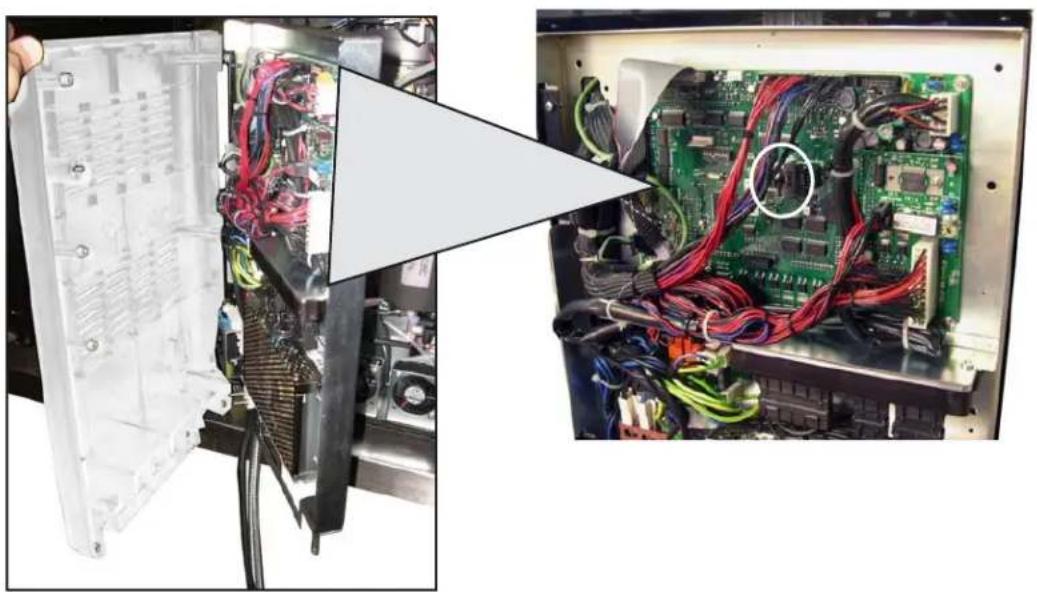
Location of the battery
14. Check Control Messages
The check-control messages are divided into two groups:
- Messages in explicit mode: they position on the last line at the bottom of the Display (5). They are cancelled on each new cycle and then appear again if the cause that generated them returns
- Messages in code: these appear in the top right-hand corner with the following syntax:i: Exxx
where:
E indicates an error:
xxx rappresents the error code
When there are several errors, their representation is timed, passing in succession on the display.
For more details, please consult the technical manual at the "Configuration menu - Defect - Malfunctions".
Messages in explicit mode
| MESSAGE | POSSIBLE CAUSES: when the message is visualized | VERIFICATIONS |
| Machine cold | 1. This message appears on the display after a dispensing key has been pressed when:- the services boiler pressure is below the preset operating pressure;- the boiler temperature is below 60°C.When the operating pressure and temperature are reached, the message will disappear automatically.2. When the services boiler or the coffee boiler cannot respectively reach the operating pressure and temperature due to problems, an error code will appear on the display identifying the defective component that caused the problem. | 2. Consult the technical manual and refer to the specific error code which will be flashed on the display to solve the problem |
| Check Boiler | This message is displayed when the machine is switched on and verifies the filling status of the coffee boiler. | Worker has not intervened. |
| Grounds drawer full | This message means that the coffee ground drawer is full. 10 more coffee selections (or 5 double dose) may be made (coffee-based drinks) before the machine is blocked and the following message is then displayed. | Empty the drawer to reset the counter or wait until when the machine will display the message 'empty drawer'. Consult the technical manual to program the number of grounds to the attainment of which the message will be visualized. |
| Empty drawer | The machine counts in decreasing order the pre-set maximum grounds number. This message means that that value run out. The machine is blocked and no coffees beverages can be delivered. | Remove the coffee grounds drawer. Empty the drawer and replace it in the correct position. Close the panel. During this operation the message 'Groun. Draw. Removed' will be displayed. |
| Grounds drawer removed | This message always appears when the back side of the drawer is not in the right position. | If this message appears when the drawer is inserted, check the drawer is correctly positioned. |
| Tray extracted | This message (accompanied by the icon on the display) always appears when the tray is not positioned properly. | Make sure the tray is correctly positioned. |
| Boiler filling | This message is displayed when the machine is filling the boiler | This operation is performed automatically and requires no action by the user. This operation does not impede the hot water delivery. |
| Service needed | This message is displayed when the machine requires the periodic maintenance intervention. In order to eliminate temporary the message, keep pressed RES key for approximately 8 seconds. The message will reappears in the successive relighting of the machine with the main switch. | Contact the authorized technical department. The message will be displayed until the service will be carried out. (Refer to the Technician's Manual). |
Messages in explicit mode
MESSAGE VERIFICATIONSPOSSIBLE CAUSES: when the message is visualized
| Softener | This message is displayed when the softener resins need to be regenerated. (Follow the instructions on softener maintenance). | Once regeneration has been completed, keep the RESET key pressed for approximately 8 seconds to cancel out the message. |
| Machine in stand-by | This message is displayed when the machine switch ON/OFF has been programmed. The message indicates that the machine is switch-off and is in stand-by status. | Refer to the Technician's Manual to see how to program the switch ON/OFF of the machine. Press the key for a few seconds to force the machine on. |
| Blocked key | During normal use of the machine, sometimes a key may become mechanically blocked. If this happens and the key remains blocked for more than 1 minute, this message will appear on the display screen: Linked key. Note: All other keys except the one involved will function normally. | To solve the problem, examine the keypad, identify the blocked key that caused the message, and follow the steps needed to remedy the situation. |
| Messages about washings | Please consult this manual at the "Cleaning operations". |
15. Defects - Malfunctions
Customer interventions
Before calling the servicing department, verify whether the problem encountered with the machine is described here below in order to avoid unnecessary expenses:
| ANOMALIES | CAUSE | REMEDY |
| The coffee machine does not function and the display (5) is off. | No electricity. | Check that the electricity is on. Check the position of the main switch (23). |
| Water leak in the cup-warmer tray (16) | Clogged basin hole. | Clean |
| Coffee dispensing time too short. | Not enough coffee. Coffee too old. * Coffee ground too coarse. | Increase the dose using the "bean" key (BK). Use new coffee. * Use a finer grind. |
| Coffee drips out of machine. | Too much coffee. * Coffee ground too fine. | Decrease the dose using the "bean" key (BK). * Use a coarser grind. |
| Loss of water under the machine. | Discharge well clogged up. Clogged drainage basin | Clean. |
| Machine heated up, but it does not dispense coffee. | Water supply or water softener tap closed. No water in system. | Open. Wait until water is available or call a plumber. |
| The automatic level control devices remain in operation. | Same causes as above. | Same solution as above. |
- These procedures MUST be performed by Level II workers (trained staff).
CUSTOMER PROGRAMMING
16. Clock adjustment
yss63
Use the "+" (30) and "-" (31) keys to adjust the clock.
The time increases (or decreases) one minute each time the key is pressed.
If one of the keys (30 or 31) is pressed and held down for more than 10 seconds, the minutes setting stops and the hours setting increases (or decreases).
During the time setting phase, the seconds remain at "00".
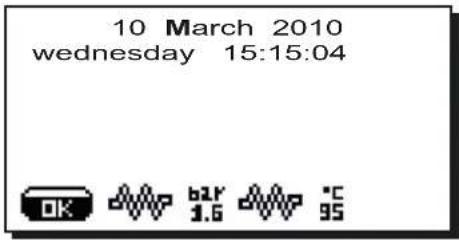
17. Customer parameters menu
To access "Customer parameters" press (34) key; the following message will appear on the display:
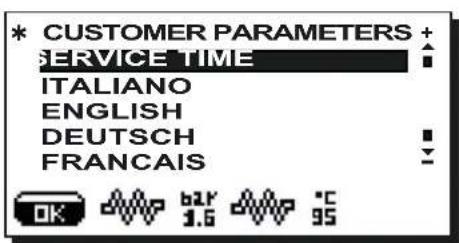
Language selection
To display the messages in a different language from that set, after entering into Programming mode, position the cursor on the desired language by pressing the "+" (30) and "-" (31) keys and then pressing the PRG (29) key. The machine will restart with the messages provided in the selected language.
The display (5) provides a choice of the following languages: Italian, English, German, French, Polish, Spanish, Portuguese, Dutch, Japanese and Russian.
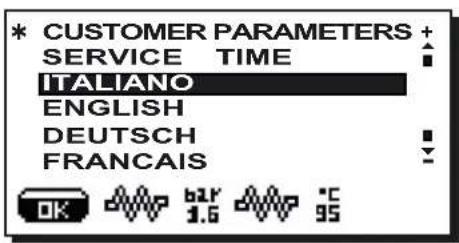
Service time menu
Pressing the PRG (29), the following message will appear on the display:
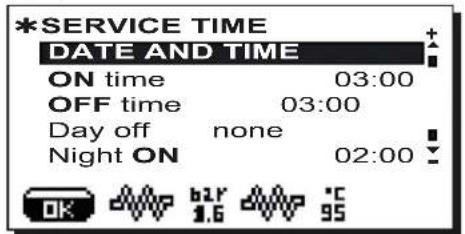
The following service time parameters can be modified:
- ON time (time the machine switches on);
- OFF time (time the machine switches off);
- day off (day on which the enterprise is closed);
- Night ON (start time for evening beverage price: only when payment system is connected);
- Night OFF (end time for evening beverage price: only when payment system is connected);
- Wash 1 (request - every 24 hrs - at the programmed hour; cannot be disabled);
- Wash 2 ÷ 5 (hour of scheduled washes from 2 to 5)
General indications
If there is no day off (i.e. the enterprise never closes), enter "none" for the "day off" item.
Enter the same time for the "ON time" and "OFF time" parameters (for example:
ON time 22:00 OFF time 22:00
if the automatic switch on/switch off function is not required and you wish to manually switch the machine on and off.
"WASH 1" AND "WASHES 2 ÷ 5
These are scheduled washes that are independent of the wash cycles related to the switching on and switching off phases. At the set hour, the messages "EXECUTE WASHING GROUP", "EXECUTE WASHING MILK CIRCUIT", "EXECUTE SHORT WASHING" appear, according to the programmed washing.
After having positioned the cursor on the line to be changed and after having pressed the PRG (29) key, change the value using the "+" (30) and "-" (31) keys. Then press the "OK" key to confirm.
Repeat the above operations to change the other wash scheduling times.
"Wash 1"
When this function is requested, a long wash cycle is performed (milk circuit and coffee circuit) as described in the "Cleaning operations" paragraph.
NOTE: Wash 1 cannot be disabled. It is requested daily at the programmed hour, and always within 24 hours.
"Washes 2 ÷ 5
When these functions are requested, they can either be a long or short wash cycle depending on how they were programmed. If the set hour for these wash cycles occurs when the machine is switched off, the request will be canceled.
NOTE: Set OFF against the time so as to not activate these wash cycles.
OFF is displayed press the "-" (31) key the indicated time is "00:00".
For more details, please consult the technical manual at the "Configuration menu - wash options" paragraph.
Date and time
To modify the date and hour, press the PRG (29) key for the corresponding line. The following message will appear:
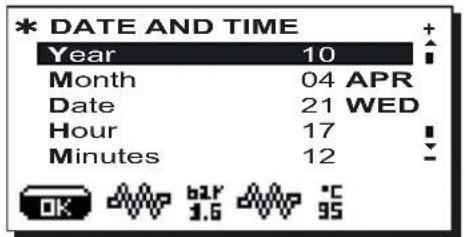
Use the "+" (30) and "-" (31) keys to move the cursor (black line) to the entry to be modified, then press the PRG (29) key. The cursor will turn into an arrow → and it becomes possible to change the number for the selected entry by using the "+" (30) and "-" (31) keys.
Once the operation is completed, press the RES (24) key to confirm the data.
Note: the cursor changes back to black line.
Repeat the operation described above to modify other parameters.
18. DATA menu: COUNTERS
Access the DATA MENU, pressing the "i" (27) key. The following will be displayed:
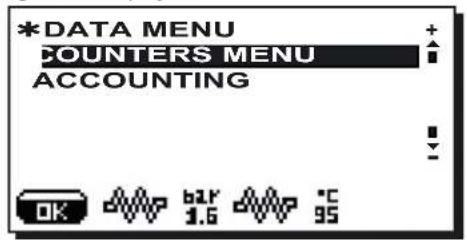
Use the ^+ + 30 and 一 ^ 一 31 keys to position the cursor on the COUNTER line, then press the PRG (29) key. The
following will appear on the display:
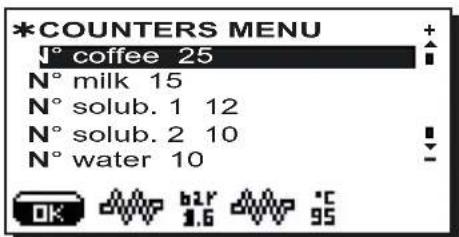
To access the various menus, position the cursor on the line that interests you, using the "+" (30) or "-" (31) keys.
Press the PRG (29) key and then press the "+" (30) or "-" (31) keys to reset the number. The meter will be reset.
When the key is pressed, zeroing is confirmed. Press the RES (24) key to return to the main menu.
The total number of coffees and the number of cycles CANNOT be zeroed.
The total number of grinding procedures recorded for the two grinders (MM1 and MM2) can only be zeroed by the installer technician when the grinders are replaced.
18.1 DATA menu: ACCOUNTING
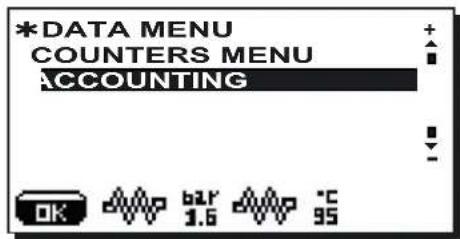
Use the +^ (30) and - (31) keys to position the cursor on the ACCOUNTING line, then press the PRG (29) key. The following will appear on the display:
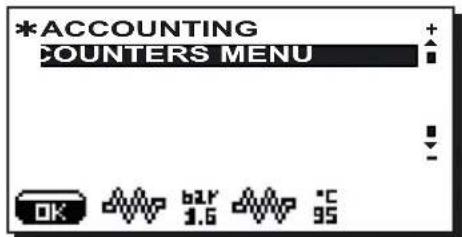
Pressing again the PRG (29) key, on the display will appear the number of all dispensings performed and the number of dispensing for each selection key:
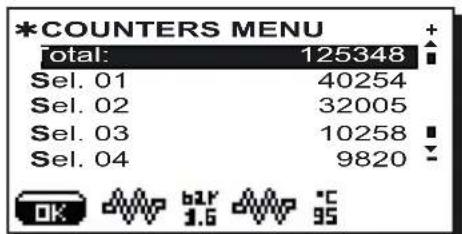
Placing the cursor on the various selections, the led associated to the key remains ignited:
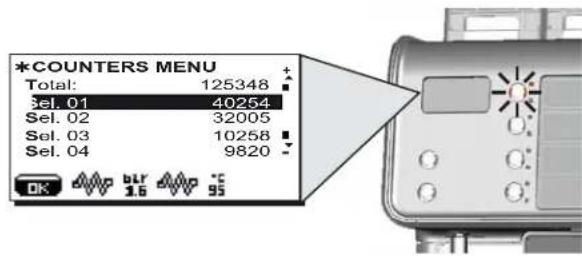
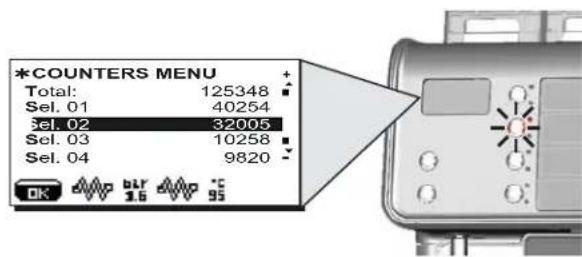
Note: the total number and numbers of single selections CANNOT be zeroed.
19. How to access the programming mode
NOTE ONLY if the item "Customer Progr." is set on "YES" and the item "Program. block" is set on "NO".
To access programming press the PRG (29) key; the following message will appear on the display:
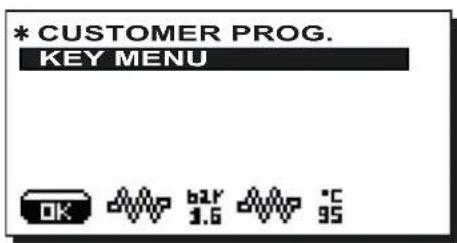
Access to menus: press a selection key.
Access and modification of sub-menus: Use the "+" (30) and "-" (31) keys to position the cursor (black line) on the desired line, then press the PRG (29) key.
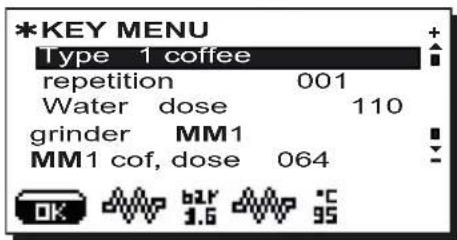
Use the "+" (30) and "-" (31) keys also to modify the message or number.
Note: During the Data Modification phase, the cursor turns into “→” or a slide bar with minimum and maximum settings appears:
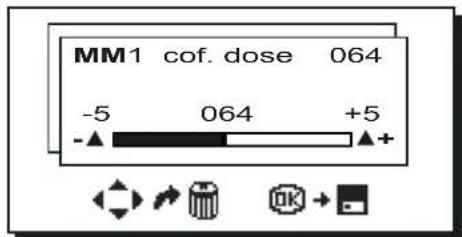
The icons below appear in alternating order in the lower part of the display:
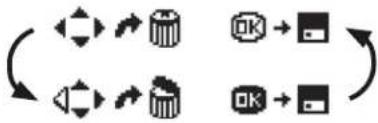
Exiting the programming menu
- Press the OK key to confirm changes;
- Press the RES (24) key to leave settings unchanged and exit the menu
If the "Customer Progr." is set to "NO", the following message will appear on the display:
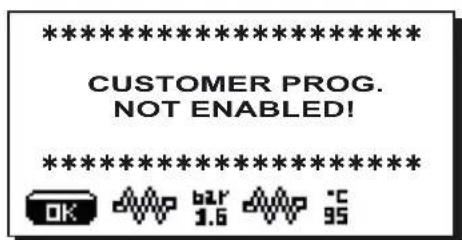
19.1 Key menu - Coffee selection
Press one of the coffee dispensing keys (32) (the relative led will remain on). The following message will appear on the display:
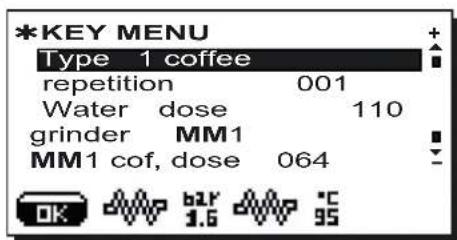
The following coffee selection parameters can be modified:
- repetition (it represents the number of distributions of the selected drink, from 001 to 099);
-
water dose (volumetric dosage pulses, from 0 to 999, with increments of 1);
-
grinder (chosen between grinder MM1 or MM2);
- coffee dose... (coffee dose grinde ...impulses, 0 ÷ 200 with increments of 1);
- water start (determines if the water must be added (before) or (after) the coffee dispensing);
Additional water (volumetric dosage pulses, from 0 to 999, with increments of 1).
The components - * - are applied only in some product configurations
The dose setting for both grinders has a field range of ± 5 of the value set in the technical programming menu.
Example
technical programming
coffee dose MM1 045
coffee dose MM2 020
customer programming
coffee dose MM1 040÷050
coffee dose MM2 015÷025
19.2 Key menu - Cappuccino selection
Press one of the cappuccino dispensing keys (32) (the relative led will remain on). The following message will appear on the display:
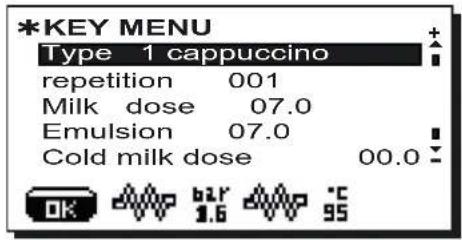
The following cappuccino selection parameters can be modified:
- repetition (it represents the number of distributions of the selected drink, from 001 to 099);
- milk dose (milk dispensing time: 0 ÷ 60 seconds, with increments of 0.1);
-
emulsion ((foamed milk dispensing time, 0 + time set in the milk dose);
-
cold milk dose (cold milk dose; the setting of this parameter makes it possible to obtain warm milk; setting between 0 to 20 with increments of 0.1 seconds);
water dose(volumetric dosage pulses, from 0 to 999, with increments of 1); - grinder (chosen between grinder MM1 or MM2);
- coffee dose... (coffee dose grinde ...impulses, 0 ÷ 200 with increments of 1);
- water start (determines if the water must be added (before) or (after) the coffee dispensing);
Additional water (volumetric dosage pulses, from 0 to 999, with increments of 1).
The components - * - are applied only in some product configurations
The dose setting for both grinders has a field range of ± 5 of the value set in the technical programming menu.
Example
technical programming
customer programming
coffee dose MM1 045
coffee dose MM1 040÷050
coffee dose MM2 020
coffee dose MM2 015÷025
19.3 Key menu - Milk selection
Press one of the cappuccino dispensing keys (32) (the relative led will remain on). The display appears as follows:
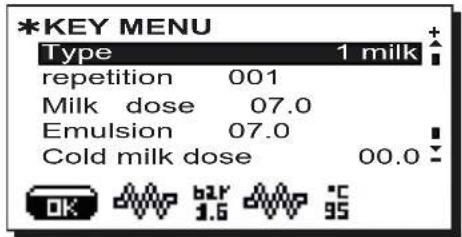
The following cappuccino selection parameters can be modified:
- repetition (it represents the number of distributions of the selected drink, from 001 to 099);
- milk dose (milk dispensing time: 0 ÷ 60 seconds, with increments of 0.1);
- emulsion ((foamed milk dispensing time, 0÷ time set in the milk dose);
- cold milk dose (cold milk dose; the setting of this parameter makes it possible to obtain warm milk; setting between 0 to 20 with increments of 0.1 seconds).
19.4 Key menu - Chocolate / Solubles selection (where contemplated)
Press one of the cappuccino dispensing keys (32) (the relative led will remain on). The display appears as follows:
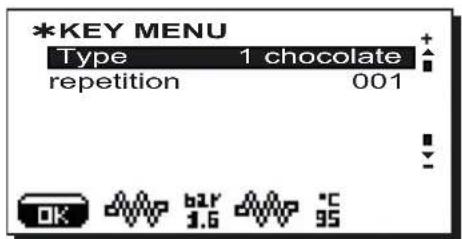
The following chocolate (or other soluble beverage) selection parameters can be modified:
- repetition (it represents the number of distributions of the selected drink, from 001 to 099).
19.5 Key menu - Mixed soluble selection (where contemplated)
Press one of the cappuccino dispensing keys (32) (the relative led will remain on). The display appears as follows:
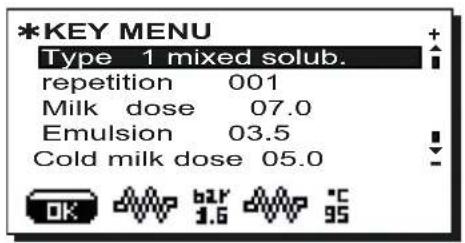
The following mixed soluble selection parameters can be modified:
repetition (it represents the number of distributions of the selected drink, from 001 to 099);
- Milk dose (milk dispensing time: 0 ÷ 60 seconds, with increments of 0.1);
- emulsion ((foamed milk dispensing time, 0 ÷ time set in the milk dose);
- cold milk dose (cold milk dose; the setting of this parameter makes it possible to obtain warm milk; setting between 0 to 20 with increments of 0.1 seconds).
19.6 Key menu - Hot water selection
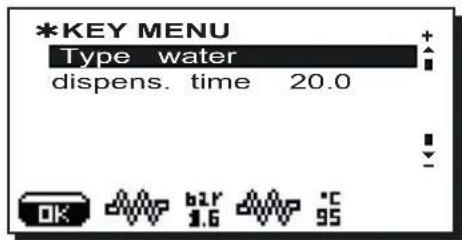
Press the hot water dispensing key (12dt). The following message will appear on the display:
The following hot water selection parameters can be modified:
- water dispensing time (from 0 to 60, with increments of 0.1 seconds).
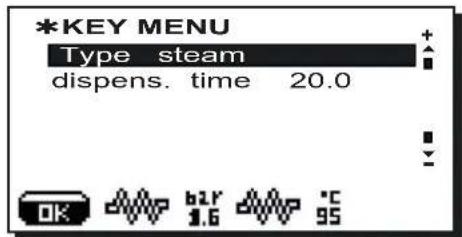
19.7 Key menu - Steam selection
Press the steam dispensing key (13dt). The following message will appear on the display:
The following steam selection parameters can be modified:
- steam dispensing time (from 0 to 60, with increments of 0.1 seconds).
FAEMA
Chere Madame, cher Monsieur
CONDITIONS HYDRAULIQUES REQUISES
INDICATIONS GENERALES
INDICATIONS GENERALES
WARNING: Hot surface
ATTENTION: Surface chaude
Doses cafe Doses cafe
Doses cafe Doses cafe
Doses cafe Doses cafe
broyeur gauche 045
Doses café Doses cafe
broyeur droit 020
LOSLICHE PRODUKTE (sofern praesent) 145
Dampfabgabe (sofern praesent)
WARNING: Hot surface
ATTENTION: Surface chaude
WARNING: Hot surface
ATTENTION: Surface chaude
aguardar a saida de toda a agua e voltar a aperture as tampas (A) e (B).
remover o tubo de alimentacao hidrica;
aguardar a saida de toda a agua e voltar a aperture as tampas (A) e (B).
CALDEIRA DE SERVICOS: desligar o tubo fep (C) e posteriormente o tubo fep (D);
WARNING: Hot surface
ATTENTION: Surface chaude
The labels associated with the dispensing keys that identify the available beverages can be customized and are managed by a special software program. You must ask an installer to customize the labels.
After the software is installed on the PC, please follow these steps:
1) Create the label using the desired icons and text;
2) Insert the provided sheet in the printer (preferably laser). After printing, use a fixative to ensure a better-quality, longer-lasting label;
3) Cut out the label and fold on the indicated line (A);
4) Loosen and remove the screw (S) under the panel;
5) Open the door (P) by pressing on the two extremities;
6) Insert the printed label as shown;
7) Close the door (P);
8) Insert and tighten the screw (S).
GRUPPO CIMBALI reserves the right to make changes to the machines in accordance with the needs of individual countries and on the basis of technological progresses. This publication may not, either in whole or in part, be used, copied or published without the written authorisation of GRUPPO CIMBALI S.p.A.
Copyright by GRUPPO CIMBALI S.p.A., Milan, Italy All rights reserved

Copyright by GRUPPO CIMBALI S.p.A., Milan
Todoosdedechosestanreservados

The GRUPPO CIMBALI Company's client service, the aim of which is to assure top coffee-machine performance for its clients at all times, also makes available its ECO LINE, a series of specific cleaning products expressly designed for this purpose.
ECO LINE - Cleaning products
A) For cappuccino makers in liquid form 610-004-129
B) For dispensers, filter-holders, coffee cups in powder form 610-004-220;
C) For dispensers, filter-holders, coffee cups in small envelopes 610-004-224;
D) For superautomatic-machine dispensers in tablet form 610-004-214.
Order directly from your local distributor and refer to the particular item you require by its number, as shown above.
FR GRUPPO CIMBALI et la "SERVICE LINE"
The Manufacturer reserves the right to modify the appliances presented in this publication without notice

- FEMA
- FAEMA
- EC Declaration of conformity
- Certificat de conformité CE
- FR LEGENDE
- François
- WARNING: Hot surface
- Index
- General Rules 46
- USE
- 6.Description of the control panel-Keyboard 51
- CUSTOMER PROGRAMMING
- General Rules
- Installation Rules
- WARNING
- Electrical Installation Rules
- Water Installation Rules
- WATER REQUIREMENTS
- WATER CONNECTIONS
- EMPTYING THE HYDRAULIC CIRCUIT
- MACHINE EMPTYING PROCESS: MACHINE SWITCHED ON AND IN NORMAL OPERATING CONDITIONS
- MACHINE EMPTYING PROCESS: MACHINE COLD AND NOT FUNCTIONING
- Installation Check-up
- FUNCTIONING
- COFFEE CIRCUIT
- HOT WATER
- STEAM (where present)
- MILK CIRCUIT
- SOLUABLES CIRCUIT (only for machines with solubles)
- Description of the control panel - Keyboard
- DESCRIPTION OF THE COMPONENTS
- Daily powering
- MANUAL POWERING
- AUTOMATIC SWITCH OFF
- AUTOMATIC SWITCH ON
- FORCED SWITCH ON
- SLEEP MODE
- Description display symbols
- Dispensing of beverages - coffee
- GENERAL INFORMATION
- Dispensing STOP function
- SELECTION REPETITION Function
- Coffee dose variation
- Example
- Emptying the coffee grounds drawer
- Dispensing of beverages - cappuccino / milk
- GENERAL INDICATIONS
- Preliminary operations
- Cappuccino dispenser
- Milk dispenser
- OPTIONS
- Connecting the Machine - Modulo BARCODE Milk + Cup
- Connecting the machine to a generic fridge module
- Dispensing of beverages - Chocolate / Solubles (where contemplated)
- uuiu
- Soluble beverage dispenser
- Mixed Soluble dispenser
- Dispensing of beverages - hot water
- HOT WATER:GENERAL INSTRUCTIONS
- Dispensing with automatic dosing
- Manual dispensing
- Dispensing of beverages - steam
- STEAM:GENERAL INSTRUCTIONS
- Automatic dispensing
- Cleaning operations
- Level 1
- MILK CIRCUIT AND COFFEE CIRCUIT CLEANING CYCLES
- NOTE: the following operations must be carried out when the machine is on and pressurized.
- COFFEE CIRCUIT CLEANING CYCLE
- MILK CIRCUIT CLEANING CYCLE
- CLEANING THE SOLUBLES CIRCUIT (WHERE PRESENT)
- WASHING THE SOLUBLES CIRCUIT (WHERE PRESENT)
- MIXER CLEANING
- Preset automatic washing cycle
- Special conditions
- Automatic wash (if programmed)
- HOT WATER DISPENSER (14) AND STEAM TUBE (15) (where contemplated)
- CUP TRAY (16)
- COFFEE GROUND TRAY (17)
- EXTERNAL PARTS
- CAUTION
- Steam
- Level 2
- 1
- CLEANING THE COFFEE BEANS HOPPER (6 - 6a)
- SOLUBLES HOPPER CLEANING (6b), where present
- English
- Rules for the worker operating the machine
- BEFORE YOU START
- Solubles circuit (only for machines with solubles)
- ON THE JOB
- Coffee / Cappuccino / Milk dispensing
- Hot water dispensing
- Steam dispensing (where present)
- Milk circuit and coffee circuit cleaning cycles / solubles circuit (only for machines with solubles)
- Caution
- Danger of burns
- Cup-warming plate
- MACHINE CLOSE-DOWN
- Maintenance and Repairs
- Dismantling the machine
- ENVIRONMENTAL INFORMATION
- Check Control Messages
- Messages in explicit mode
- Defects - Malfunctions
- Customer interventions
- Clock adjustment
- yss63
- Customer parameters menu
- Language selection
- Service time menu
- "WASH 1" AND "WASHES 2 ÷ 5
- "Wash 1"
- "Washes 2 ÷ 5
- Date and time
- DATA menu: COUNTERS
- DATA menu: ACCOUNTING
- How to access the programming mode
- Key menu - Coffee selection
- Key menu - Cappuccino selection
- Key menu - Milk selection
- Key menu - Chocolate / Solubles selection (where contemplated)
- Key menu - Mixed soluble selection (where contemplated)
- Key menu - Hot water selection
- Key menu - Steam selection
- CONDITIONS HYDRAULIQUES REQUISES
- INDICATIONS GENERALES
- Dampfabgabe (sofern praesent)
- FR GRUPPO CIMBALI et la "SERVICE LINE"
Brand : Faema
Model : Barcode
Category : Coffee machine