TM1920 - Coffee machine Tomado - Free user manual and instructions
Find the device manual for free TM1920 Tomado in PDF.



| Product type | Electric filter coffee maker |
| Model | TM-1920 |
| Brand | Tomado |
| Power supply | 220-240 V ~ 50/60 Hz, 915-1080 W |
| Water tank capacity | Level indicator with number of cups (max not specified, about 10-12 cups) |
| Filter | Permanent filter + possibility to use paper filters |
| Functions | Delayed programming (0-24 h), keep warm, automatic shut-off after 2 h |
| Display | LED screen with clock, operation and programming indicators |
| Anti-drip system | Yes, filter holder with anti-drip |
| Hotplate | Keeps coffee warm |
| Material | Plastic body, glass carafe |
| Dimensions | Approximately 25 x 30 x 35 cm (estimate) |
| Weight | Approximately 1.5 kg (estimate) |
| Cable length | Approximately 80 cm (estimate) |
| Cleaning | Monthly cleaning, regular descaling with white vinegar |
| Cleaning signal | Alarm after 200 uses, can be deactivated |
| Safety | Automatic shut-off, overheating protection, do not immerse |
| Warranty | 2 years, covers manufacturing defects |
| Use | Domestic only |
Frequently Asked Questions - TM1920 Tomado
User questions about TM1920 Tomado
0 question about this device. Answer the ones you know or ask your own.
Ask a new question about this device
Download the instructions for your Coffee machine in PDF format for free! Find your manual TM1920 - Tomado and take your electronic device back in hand. On this page are published all the documents necessary for the use of your device. TM1920 by Tomado.
USER MANUAL TM1920 Tomado
natural_image
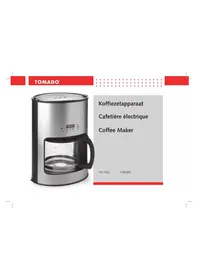
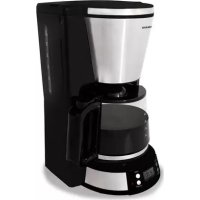
Modern glass coffee maker with digital display and control buttons (no visible text or symbols on device body)Nederlands
TOMADO®
Français
TOMADO®
Figure 2
Congratulations on your purchase of this high-quality product. Read these instructions carefully, so that you can make the best use of this coffee maker. These instructions give you all the necessary directions and advice for using, cleaning and maintaining the appliance. If you follow these instructions, you will always get the best results from the appliance. You will also save time and avoid any problems.
We hope that you will enjoy using this coffee maker.
◆ SAFETY INSTRUCTIONS
General information
- Read these instructions carefully and keep them in a safe place for future reference.
- Only use the appliance as described in this instruction manual.
- Never leave the appliance unattended when it is turned on.
- Keep the appliance out of the reach of children.
- The use of this appliance by children or persons with a physical, sensory, mental or motor disability or with a lack of the necessary knowledge and experience may cause a hazard. Persons responsible for the safety of these people should give explicit instructions or supervise the use of the appliance.
- Any repairs must be carried out by a qualified service centre.
Electricity and heat
- Before use, check that the power supply voltage is the same as the voltage indicated on the appliance.
- Only connect the appliance to an earthed plug socket.
- Check the power cord regularly for damage. Do not use the appliance if the power cord is damaged. Have a damaged power cord replaced by a qualified service centre.
English
TOMADO®
- Pull the plug to remove the plug from the plug socket. Do not pull the power cord.
- Do not allow the power cord to come into contact with a hot surface or steam.
- Always remove the plug from the plug socket before moving or cleaning the appliance and whenever it is not in use.
- Do not use the appliance in the immediate vicinity of a heat source, such as a cooker or an oven.
Use
- The appliance is only intended for domestic use. It is not suitable for professional use.
- Only use the appliance indoors in a dry room and not near, for example, a sink.
- Place the appliance on a stable, level surface from which it cannot fall onto the floor.
- Only use the appliance for the purposes given in this instruction manual. If you use the appliance for other purposes, this may result in damage to the appliance.
- Never allow the power cord to hang over the edge of a draining board, worktop or table.
- Never immerse the appliance or the power cord in water or another liquid. This can cause an electric shock.
- Do not touch the appliance if it has fallen into water. Take the plug out of the plug socket, turn off the appliance and do not use it again.
• Turn off the appliance and remove the plug from the
plug socket if you experience any faults during use, before cleaning the appliance or when it is no longer being used.
- Do not move the appliance whilst it is turned on.
- Do not touch the hotplate during use. It may be very hot.
• Never fill the water reservoir above the maximum level. - Do not fill an empty water reservoir when the appliance is turned on. This will cause the appliance to emit hot steam. Allow the appliance to cool down for 5 minutes before refilling the water reservoir.
- Never turn the appliance on when it does not contain water. Pay particular attention to the volume of water in the water reservoir when using the timer.
- If you leave the appliance turned on for two hours without pressing a button, the appliance will turn itself off for safety reasons.
TOMADO®
English
◆ OPERATION
General information
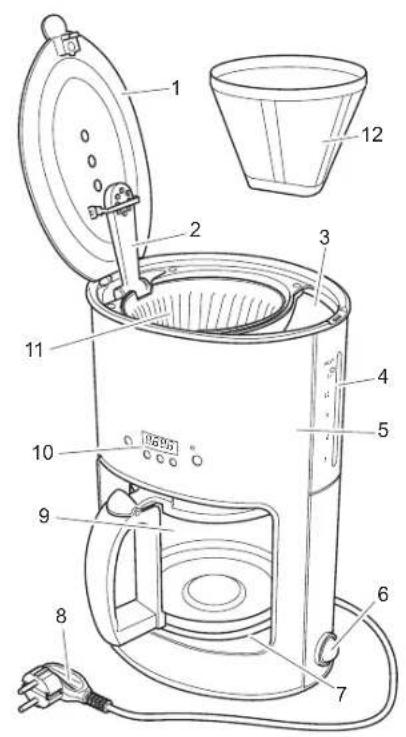
You can use this appliance to make coffee.
- Lid
- Power cord and plug
- Supply tube
- Coffee jar with lid
- Water reservoir
- Display with function buttons
- Indicator for the number of cups
- Filter holder with pause-and-serve function
- Housing
- Permanent filter
- On/Off switch
- Hotplate
English
TOMADO®
Display and function buttons
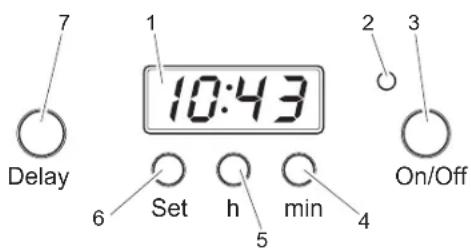
Figure 2
- Display - Time display Displays the time the appliance will be turned on (when pressing the 'Set' button).
- Indicator - OFF: Appliance is turned off
RED: Appliance is turned on (coffee is being made)
BLUE: Time that the appliance will turn itself on - 'On/Off' - Every time this button is pressed, the appliance turns itself either on or off.
-
'min' - Pressed quickly: the time is increased by 1 minute Pressed for longer: minutes are increased quickly
-
'h' - Pressed quickly: time is increased by 1 hour Pressed for longer: hours are increased quickly
- 'Set' - Sets the timer (in combination with the 'h' and 'min' buttons)
- 'Delay' - Turns on the appliance after a set time Stops the cleaning reminder sound signal (see 'Cleaning and maintenance')
USE
When using for the first time
- Remove all the packaging materials from the appliance.
- Clean the appliance. See 'Cleaning and maintenance'.
- Use the appliance 2 or 3 times without adding any coffee. Follow the instructions given in 'Making coffee', but do not add any ground coffee.
- Remove the plug from the plug socket and allow the appliance to cool down.
Setting the time
The time is set on a 24-hour clock. If the time is not set, '00:00' will be shown on the display. The numbers will flash. The timer is running when the time is visible on the display and the ':' sign flashes.
- Place the appliance on a flat, stable surface.
TOMADO®
- Insert the plug into the plug socket.
- Set the On/Off button to ON ('I').
- Press the 'h' function button to set the hours.
- Press the 'min' function button to set the minutes.
TIPS FOR USE
NOTE
• Only use cold, clean water to make coffee.
If you do not wish to use the timer, then follow the instructions given below:
- Place the appliance on a flat, stable surface.
- Insert the plug into the plug socket.
- Set the On/Off button to ON ('I').
- Fill the water reservoir with clean, cold water. Make sure the level of water in the reservoir is not below the lowest mark and not above the 'Max' mark. The number of cups of coffee that will be made can be read from the indicator on the water reservoir.
- Check whether the permanent filter has been placed in the filter holder. If the permanent filter is not used, then a paper coffee filter must be used. Place this filter in the filter holder.
- Fill the filter with the desired quantity of ground coffee (use approximately 5-6 g of ground coffee per cup).
- Check whether the coffee jar is empty and has been
correctly placed on the hotplate.
- Press the 'On/Off' button to turn on the appliance immediately.
- Once all the coffee has passed through the appliance, the indicator light will be lit RED continuously. The appliance will keep the coffee warm on the hotplate until you turn off the appliance.
- Press the 'On/Off' button to turn off the appliance. If you leave the appliance turned on for two hours without pressing a button, the appliance will turn itself off.
- Remove the paper filter and the coffee dregs from the filter holder.
- If you wish to make some more coffee immediately, wait at least 5 minutes so that the appliance can cool down. It will then be safe to refill the water reservoir.
Setting the timer (0 - 24 hours)
You can set the timer between 0 and 24 hours. This can be used, for example, to turn on the appliance at 11.00 p.m. with a delayed start time of 8 hours, so that you can enjoy a fresh cup of coffee at 7.00 a.m the next morning.
- Place the appliance on a flat, stable surface.
- Insert the plug into the plug socket.
- Set the On/Off button to ON ('I').
- Press the 'Set' button and do not release it.
- Press the 'h' button to set the desired number of hours before the appliance will turn itself on.
English
TOMADO®
- Press the 'min' button to set the desired number of minutes.
- Press the 'Delay' button to start the timer. The indicator will be lit (BLUE). During the countdown, you can view how much longer it is until the appliance will start making coffee by pressing the 'Set' button. When you release the button, the normal time will be displayed again. Once the countdown time has elapsed, the appliance will start to make coffee. The indicator light will now turn RED.
- Press the 'On/Off' button if you wish to stop the countdown (whilst the indicator light is BLUE). If you press this button again, the appliance will start making coffee immediately.
♦ CLEANING AND MAINTENANCE
Clean the appliance once a month
NOTE
- Before cleaning, always switch off the appliance and remove the plug from the plug socket.
- Never immerse the appliance or the power cord in water or any other liquid. This can result in an electric shock.
- Do not use aggressive cleaning products, abrasives or sharp objects, such as metal scourers, to clean the appliance.
• Clean the appliance once a month.
Once you have used the appliance 200 times, it will emit a sound signal to remind you that it should be cleaned.
You can turn off this signal by pressing the 'Delay' button for
3 seconds. The counter will be reset to 0.
- Set the On/Off button to OFF ('O').
- Remove the plug from the plug socket.
- Check whether the coffee and the paper filter have been removed from the filter holder.
- Clean the appliance with a damp cloth. Dry it with a tea towel.
- Wash the coffee jar, the filter holder and the permanent filter in hot water with a small amount of washing-up liquid and dry everything thoroughly.
Descaling
NOTE
The harder the water, the more often it is necessary to descale the appliance.
TOMADO®
English
Regularly descale the appliance.
- To do so, follow the instructions given for 'Making coffee', but with the following differences:
- Do not use water. Use standard vinegar.
-
Use a coffee filter, but do not use any ground coffee.
-
Repeat step 1 as often as is necessary.
-
Repeat step 1 two or three times. Do not use vinegar this time. Use water to remove any vinegar and scale remnants.
TECHNICAL DATA
TM-1920
Power: 915 \~ 1080 W
Power supply voltage: 220 - 240 V \~ 50/60 Hz
ENVIRONMENT
If you wish to dispose of the appliance, take the appliance to an approved collection point.
Dispose of the packaging materials, such as plastic and boxes, in the containers provided for this purpose.
English
TOMADO®
We would like to congratulate you on buying an appliance from the TOMADO product range.
◆ Warranty regulations
- TOMADO provides a 2-year warranty for all defects caused by hidden deficiencies which render the appliance useless for normal operation.
- The warranty runs from the date of purchase; we advise you to carefully save your receipt.
- Within the warranty period any defects in production or material will be resolved free of charge, by means of reparation, replacement of parts or replacement of the appliance as a whole.
- The warranty certificate has to be filled in by the sales person at the moment of purchase.
- Repairs will only be made under warranty in case it can proven (by means of a filled in warranty card and the receipt) that the day the complaint is filed falls into the warranty period.
- The warranty does not apply when defects or damages result from an accident, misuse, negligence (e.g. incorrect cleansing), or when repairs of alterations have been executed outside the authorized TOMADO service centre (excl. disassembling, as stated in the instruction manual).
- The warranty does not cover any defects arising when the appliance is connected to the wrong outlet voltage, not following the guidelines in the instruction manual and usual wear and tear.
-
The warranty does not cover any defects arising from the lack of frequent descaling of appliances, whatever type of water has been used (especially for steam irons, coffee machines and water boilers).
-
TOMADO cannot be held responsible for any material damage or personal accident resulting from connecting the appliance in breach of the locally applicable safety regulations and technical standards (for instance an inferior AC outlet). The warranty under no circumstances grants the right for any compensation.
- All other claims, including damages, are excluded unless the Law states otherwise.
- Other warranty regulations than the warranty regulations stated above are not applicable.
Service
For more information you can write to the following address (postage paid):
TOMADO Consumentenservice
Antwoordnummer 19016
NL - 1000 VC Amsterdam
The Netherlands
tomado@blokker.nl
What do you do in case your appliance does not work?
When your appliance shows defects, you can refer to your salesperson. Your salesperson will make sure any defect will be repaired as soon as possible.
Repairs outside the warranty period
You can always hand in your appliance to have it repaired outside the warranty period. This will of course not be free of charge.
TOMADO®
TOMADO®

- Nederlands
- TOMADO®
- Français
- ◆ SAFETY INSTRUCTIONS
- General information
- Electricity and heat
- English
- Use
- ◆ OPERATION
- When using for the first time
- Setting the time
- TIPS FOR USE
- NOTE
- Setting the timer (0 - 24 hours)
- ♦ CLEANING AND MAINTENANCE
- Clean the appliance once a month
- Descaling
- TECHNICAL DATA
- ENVIRONMENT
- ◆ Warranty regulations
- Service
- What do you do in case your appliance does not work?
- Repairs outside the warranty period
Brand : Tomado
Model : TM1920
Category : Coffee machine