MD 15396 - Ice machine Micromaxx - Free user manual and instructions
Find the device manual for free MD 15396 Micromaxx in PDF.



User questions about MD 15396 Micromaxx
0 question about this device. Answer the ones you know or ask your own.
Ask a new question about this device
Download the instructions for your Ice machine in PDF format for free! Find your manual MD 15396 - Micromaxx and take your electronic device back in hand. On this page are published all the documents necessary for the use of your device. MD 15396 by Micromaxx.
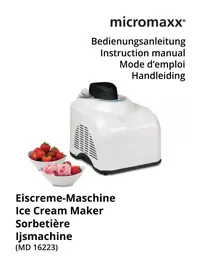
USER MANUAL MD 15396 Micromaxx
natural_image
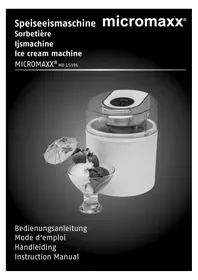
Black-and-white photo of a digital ice cream maker with a bowl of strawberries and an umbrella, no visible text or symbols.Bedienungsanleitung
Mode d'emploi
Handleiding
Instruction Manual
Inhaltsverzeichnis
DE
Medion AG
Am Zehnthof 77
45307 Essen
Deutschland
natural_image
Symbol of a trash bin crossed with a diagonal line and a horizontal bar below (no text or labels)Appareil
- About these instructions.... 46
1.1. Warning symbols and key words used in these instructions .....46
-
Package contents
-
Requirements 4
-
Proper use EN
-
Safety instructions
5.1. People not permitted to use this appliance ....48
5.2. General instructions....48
5.3. Setting up and electrical connection ....49
5.4. Safe operation....49
5.5. Faults 49
5.6. Cleaning and maintenance ....50
- Overview of the appliance 51
6.1. Operating elements....52
-
Installation and initial use 52
-
Using the ice cream maker 52
-
Recipe suggestion 54
9.1. Vanilla ice cream....54
-
Cleaning the appliance.... 54
-
End of operation 54
-
Troubleshooting 55
-
Disposal 55
-
Technical data 55
-
Declaration of conformity.... 56
-
Legal notice 56
Restricted Warranty (United Kingdom) 57
1. About these instructions

Read the safety instructions carefully before use. Note the warnings on the device and in the operating instructions.
Always keep the operating instructions close to hand. If you sell the device or give it away, make sure you also hand over these instructions and the warranty card.
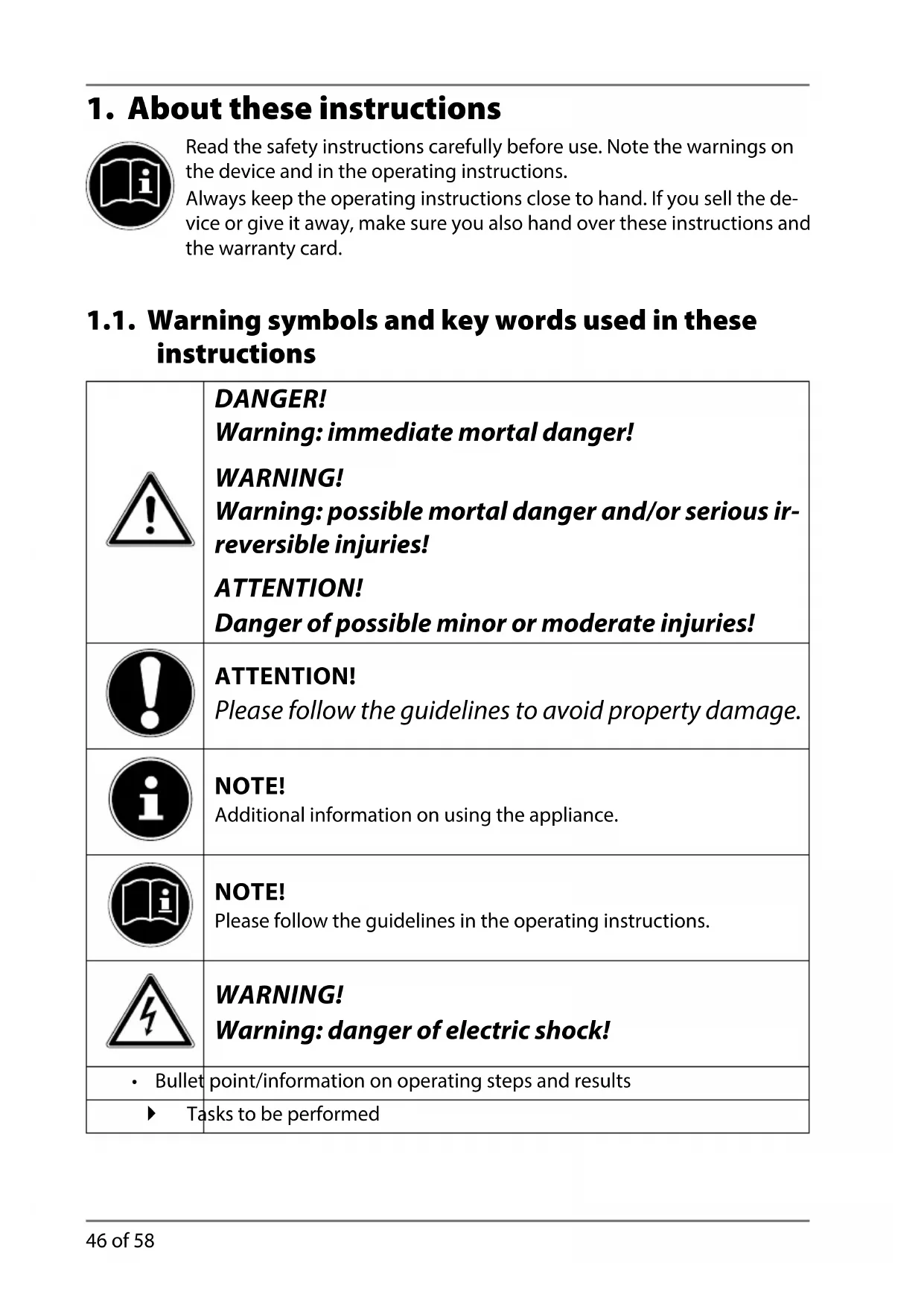
1.1. Warning symbols and key words used in these instructions
 | DANGER!Warning: immediate mortal danger!WARNING!Warning: possible mortal danger and/or serious irreversible injuries!ATTENTION!Danger of possible minor or moderate injuries! |
 | ATTENTION!Please follow the guidelines to avoid property damage. |
 | NOTE!Additional information on using the appliance. |
 | NOTE!Please follow the guidelines in the operating instructions. |
 | WARNING!Warning: danger of electric shock! |
| • Bullet | point/information on operating steps and results |
| ► Tasks to be performed | |
2. Package contents
When unpacking the product, ensure that the following parts are included:
- Ice cream maker
- Operating instructions and warranty documents
3. Requirements

NOTE
Due to the dimensions of the ice cream container, a freezer compartment ( ^*** /-18°C, min. 165 mm high) or a chest freezer is required for pre-cooling.
4. Proper use
This device is designed for the preparation of soft ice cream, sorbets and frozen yoghurt.
This appliance is designed to be used in the household. It is not intended, however, for use in similar applications, such as
–in commercial kitchens, for employees in shops, offices and other commercial areas; –on agricultural estates;
- by customers in hotels, motels and other residential facilities; -in bed & breakfast accommodation.
Please note that we shall not be liable in cases of improper use:
- Do not modify the appliance without our consent and do not use any auxiliary equipment that we have not approved or supplied.
- Use only spare parts and accessories which we have supplied or approved.
- Follow all the instructions in these operating instructions, especially the safety information. Any other use is deemed improper and can cause personal injury or damage to the product.
- Do not use the appliance in extreme environmental conditions.
5. Safety instructions
5.1. People not permitted to use this appliance
- Keep the appliance and its accessories out of reach of children.
- This appliance may be used by children over the age of 8 and by persons with reduced physical, sensory or mental abilities or by those without experience and/or knowledge, if they are supervised or have been instructed in the safe use of the appliance and have understood the dangers that result from it. Children must not play with the appliance. Cleaning and user maintenance must not be carried out by children, unless they are aged 8 or over and are supervised.
- Children younger than 8 should be kept away from the appliance and the mains cable.

WARNING!
Keep plastic packaging out of the reach of children.
There is a risk of suffocation.
5.2. General instructions
- Make sure that the mains cable does not present a trip hazard. Do not allow the connecting cable to become trapped or squashed.
- Do not use the appliance if it or the connecting cable is visibly damaged or if the appliance itself has been dropped.
- There are dangerous voltages inside the appliance. Never open the housing or insert objects into the ventilation slots. Risk of fatal electrical shock!
- In order to disconnect the appliance completely from the power supply, pull the plug from the socket. Always pull the plug, never the cable.
- Appliances left connected to the mains power supply during thunderstorms may be damaged. Therefore, always remove the mains plug if there is a thunderstorm.
- Avoid touching moving parts. Keep hair, clothing, hands, cutlery, mixing spoons or similar items away from the appliance during op-
eration to avoid injuries or damage to property.
- Sensitive surfaces. Do not store any acidic liquids (e.g. lemon juice) in the ice cream container.
5.3. Setting up and electrical connection
- Only connect the appliance to a properly installed AC 220-240 V\~, 50 Hz safety plug socket that has at least a 16 A fuse. Do not use an extension cable.
- Place the device on a firm, level surface.
- Never place the device on the edge of a table – it could tip over and fall.
- Remove the plug from the mains socket after each use, before cleaning and during periods when the appliance is left unattended.
- Unwind the cable fully when using the appliance.
- Do not allow the mains cable to come into contact with hot objects or surfaces (e.g. cooker hob).
- Do not allow the mains cable to come into contact with water or other liquids.
5.4. Safe operation
- Never immerse the appliance in liquids!
- Do not use the appliance outdoors.
- Do not leave the appliance unattended during operation.
- Ensure that no foreign objects (spoon, spatula or similar items) are in the ice cream container during operation.
5.5. Faults

WARNING!
Live components. There is a risk of electric shock. Therefore, follow the instructions below:
- Avoid damaging the appliance or the power cable.
• Always check the cable and the appliance before each use. -
Do not use the appliance if the ice cream container is damaged. Coolant could leak and cause damage to health.
-
Never try to open and/or repair an appliance component yourself.
- Ensure that a defective appliance is immediately repaired by a specialist workshop. In order to reduce risks: if the mains cable for this device is damaged then it must be replaced by the Medion Service Centre or a similarly qualified person.
5.6. Cleaning and maintenance

WARNING!
Live components. There is a risk of electric shock. Therefore, follow the instructions below:
- Never immerse the appliance in water or other liquids!
- Always disconnect the appliance's plug from the mains socket before cleaning or servicing the appliance and before fitting or dismantling the attachments.
- As a general rule, remove the attachments from the main appliance before cleaning.
6. Overview of the appliance
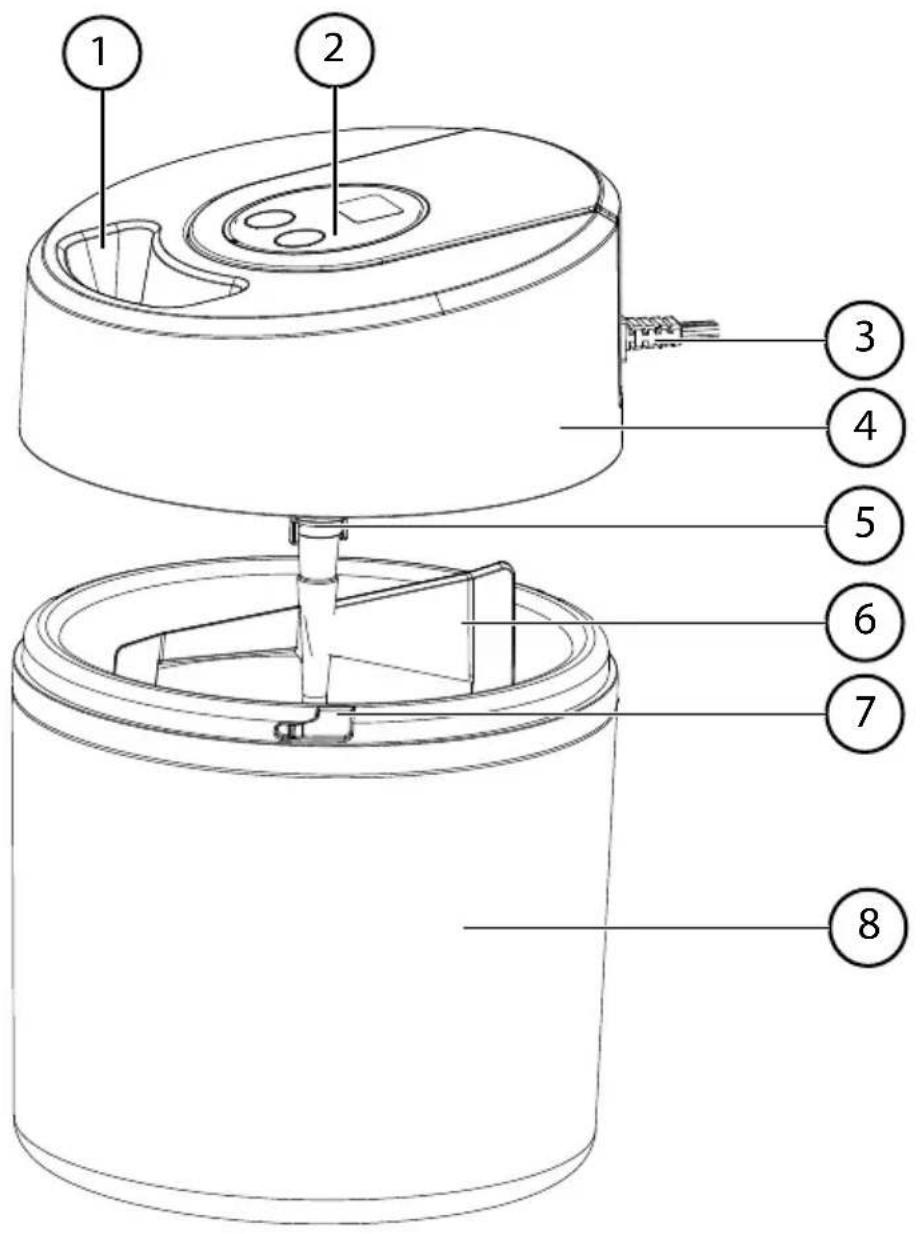
1) Cover with filling opening
2) Motor block with control elements
3) Network connection cable
4) Motor base unit
5) Drive shaft
6) Stirrer
7) Fixing recess
8) Ice cream container
6.1. Operating elements
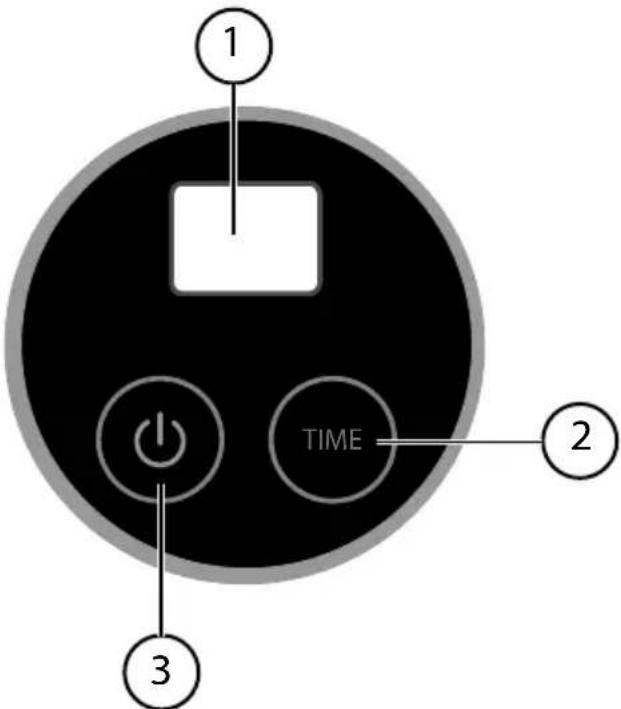
1) Display indicator
2) Setting the timer
3) Switching on/off
7. Installation and initial use
Before using the device for the first time, clean all parts that come into contact with foodstuffs (ice cream container, stirrer, cover) thoroughly. Please note that the parts are not dishwasher safe.
▶ Detach the motor block from the cover before cleaning. First remove the stirrer and press in the tabs towards the drive shaft and use the other hand to pull off the motor block.

NOTE
The appliance is driven by an electric motor. This can lead to a slight smell during initial operation. This smell is normal and is not a sign of a malfunctioning appliance. Ensure that there is adequate ventilation.
8. Using the ice cream maker
Pack the ice cream container into a sufficiently large freezer bag.
Place the ice cream container upright in the freezer compartment.
At a temperature of -18^ , the cooling process takes around 1 hour. If the temperature is higher, the cooling process can last anything up to about 16 hours.

NOTE
The double-walled container contains coolant. Place the ice cream container back in the freezer compartment if you hear the sound of moving liquid when you agitate the container. If you do not hear anything, the container is sufficiently cooled.
▶ After the cooling process is completed, remove the ice cream container and place it on a flat surface.
Mount the motor block into the recess on the cover. Ensure that both tabs snap audibly into place in the two recesses on the cover.
▶ Attach the stirrer on the drive shaft.
Place all the ingredients in the container. Do not exceed the capacity of 1.5 litres.
Place the cover together with the motor block onto the ice cream container. Ensure that the locking tabs fit into the recesses and close the ice cream container by turning the cover slightly in a clockwise direction.
Connect the appliance to a properly installed 220–240 V\~, 50 Hz safety socket.
▶ Press the button to switch on the appliance.
The operating time 30 minutes flashes in the display.
You can set an operating time of up to 45 minutes.
▶ Set the desired operating time. Press the TIME button to adjust the time in 5-minute increments (the timer counts up to 45 minutes, then starts again at 5 minutes).

NOTE
The preparation time for ice cream is approx. 30–40 minutes depending on the amount.
▶ Fill the ice cream container during operation via the filling opening in the cover.
▶ After the time is up, disconnect the plug from the mains socket and remove the cover with engine block and the stirrer.
▶ Use a spatula to remove the ice cream from the container.

CAUTION!
Do not store finished ice cream in the ice cream container. Use a suitable deep freeze container.
Clean the appliance components (container, stirrer, cover) carefully as described below after preparing the ice cream.
9. Recipe suggestion
9.1. Vanilla ice cream
Ingredients for approximately six portions
200 ml full cream milk
150 ml whipping cream
120 g icing sugar
3 egg yolks
A few drops of vanilla extract
Preparation
Mix the milk, cream and half of the sugar. Separate the three eggs. Beat the egg yolks with the other half of the sugar in another bowl until fluffy. Now add the milk-cream mix and vanilla extract. Stir the ingredients until you have a relatively firm mass. Pour this into the ice cream container.
▶ Set the ice cream machine to run for approx. 30 minutes.
Vanilla ice cream is the ideal base for a wide range of different flavours. Flavour your vanilla ice cream according to your taste, e.g. with chocolate curls or ground nuts. Do not add the additional ingredients until the ice cream in the machine is almost ready.
10. Cleaning the appliance

WARNING!
Live components. There is a risk of electric shock.
Never immerse the appliance in water or other liquids!

NOTE!
Do not use any harsh or abrasive cleaning agents or objects to clean the accessories and the housing because these items could damage the surfaces. Use a mild cleaning agent e.g. washing-up liquid and a soft cloth.
Please note that the parts are not dishwasher safe.
▶ Pull the plug from the mains socket before cleaning the appliance.
▶ Detach the motor block.
Clean the accessories with hot water and washing-up liquid.
Wipe the surfaces of the appliance with a slightly damp, soft cloth.
11. End of operation
If you do not plan to use the appliance for a long period of time, pull out the mains plug and store the appliance in a dry location.
12. Troubleshooting
The product left our warehouse in perfect condition. If you do, however, discover a problem, see if you can solve it by using the solutions offered in the following table. If these do not work, contact our Customer Services department.
| Problem Possible cause Troubleshooting | ||
| The ice cream machine is not working. | The plug is not connected to the mains. | Connect the appliance to a properly installed 220–240 V~, 50 Hz safety socket. |
| The stirrer does not rotate. | • The ice cream is too thick.• Preparation time too long. | • Change the recipe.• Adjust the preparation time. |
| Ice cream consistency too runny. | Ice cream container not cold enough. | Chill the container at -18°C for at least 30–60 minutes before making the ice cream. |
13. Disposal

Packaging
Your appliance has been packaged to protect it from damage in transit. Packaging is raw material and can be re-used or added to the recycling system.
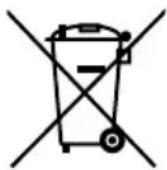
Appliance
Do not under any circumstances dispose of the appliance with the household rubbish at the end of its service life. Please consult your local authority for advice on correct and eco-friendly methods of disposal.
14. Technical data
Power supply 220–240 V \~, 50 Hz
Nominal power consumption 8 W
Container fill capacity 1.5 litres
Dimensions: approx. 230 x 178 x 178 mm
Subject to technical modifications.
15. Declaration of conformity

Medion AG hereby declares that the product MD 15396 conforms to the following European requirements:
• EMC Directive 2004/108/EC
• Low Voltage Directive 2006/95/EC
• Ecodesign Directive 2009/125/EC
• RoHS Directive 2011/65/EU.
Full declarations of conformity are available at www.medion.com/conformity.
16. Legal notice
Copyright © 2014
All rights reserved.
This operating manual is protected by copyright.
Mechanical, electronic and any other form of reproduction is prohibited without the written permission of the manufacturer. Copyright is owned by the company:
Medion AG
Am Zehnthof 77
45307 Essen
Germany

The operating manual can be reordered via the service hotline and is available for download via the service portal at www.medion.com/gb/service/start/.
You can also scan the QR code above and download the operating manual onto your mobile device via the service portal.
I. Restricted Warranty Kingdom)
I.I. General Conditions of Warranty
I.I.1. General
This warranty covers defects relating to workmanship and manufacture in MEDION products. The period during which this warranty is valid and during which claims against the warranty can be made to MEDION must be in accordance with the following terms in order to be considered eligible:
- Is effective from the date of purchase or receipt of the MEDION product from an authorised seller of MEDION products;
and
- expires at the end of the warranty period.
For the warranty to be valid, you must:
• provide suitable evidence of purchase, a copy of the original purchase receipt from an authorised seller of MEDION products is preferred;
or
- register your product within 28 days of purchase online at www.MEDION.co.uk.
Please keep the original purchase receipt in a safe place. MEDION and its authorised sellers reserve the right to refuse a repair under warranty or a warranty confirmation if a proof of purchase [or registration of purchase] cannot be established, or has not been, submitted.
When it is necessary to return your product for repair please ensure that your product is suitably packed for transportation.
Provided that your product is still within warranty (please check the duration of the warranty period as described above) and is eligible for repair or replacement under the terms of the warranty, to return your product, please telephone MEDION on the service hotline number. You will be sent a pre-paid transportation box suitable for returning your product to MEDION or a voucher.
PLEASE MAKE SURE THAT YOU HAVE A BACKUP COPY OF ALL DATA ON THE PRODUCT BEFORE RETURNING THE PRODUCT TO MEDION.
MEDION shall bear the costs of postage and packaging for returning the product and the transportation risk. However, if following examination of the defective product in question, MEDION, in its reasonable opinion, considers that the defect has been caused by:
- your operating and/or using the product other than as instructed in the accompanying documentation;
- damage caused in transit as a result of your negligence in packaging of the product; and/or
- otherwise than in accordance with the terms of this warranty;
This warranty shall be void and you may be required by MEDION to reimburse MEDION for the reasonable costs of postage and packaging before MEDION will return the product to you. If so and you would still like MEDION to repair or replace the product, MEDION may do so but you will be charged MEDION's standard rates for repair and replacement for this service.
(United) burning the product, please contact MEDION via the service hotline or via the internet www.MEDION.co.uk.
You will receive a reference number (RMA No.). Please mark the outside of your package to ensure that this reference number is clearly visible. Please submit a letter containing as much detailed information as possible and, a full description of the defect or fault.
This should include:
• a description of the fault;
- when it occurred, how long it has been evident and how frequently it occurs;
- any errors message(s) displayed when using the product;
- a description of the circumstance(s) and conditions in which the fault occurs;
and
- whether it is an intermittent or persistent fault.
This will greatly assist MEDION in identifying the defect, when submitted together with the defective product. Unless otherwise instructed by a MEDION representative in all cases, the product must be returned complete with all parts which were included with the original product. Incomplete contents of the returned package may lead to a delay in the repair or replacement. MEDION does not accept any liability for any additionally submitted material(s) which were not supplied with the original MEDION product.
This warranty does not affect your statutory rights in any way and is subject to the applicable legal statutes of the country where the product was sold to you by an authorised MEDION seller.
I.I.2. Scope
Subject to any exclusions set out within this warranty, where there is a defect in your MEDION product covered by this warranty, MEDION will repair or replace the MEDION product. The decision whether to repair or replace the product will be made solely at the discretion of MEDION. MEDION may, in its own discretion, replace the product returned for repair under warranty with a replacement product that is either identical or, in the event that such product(s) are no longer available, a product of equal or superior specification and quality.
No warranty is given for batteries or rechargeable batteries or for consumable materials subject to wear and tear, i.e. for parts which have to be replaced periodically during the normal use of the product, such as video-projector lamp.
Non critical failures that fall within industry specified tolerances e.g. noise, LCD pixels are not covered by this warranty. Please consult the appropriate section in your user or instruction manual for this product for exact specifications and tolerances.
To the extent which is permitted under law, MEDION will accept no liability for burnt-in images on plasma or LCD products as a result of normal wear and tear during the operation of the product. Please refer to your user or instruction manual for this product for detailed operating instructions for your plasma or LCD product.
The warranty does not cover errors relating to the play-back of data media in an incompatible format or created with unsuitable software.
If it is found during repair or assessment that the defect concerned is not covered under warranty, MEDION reserves the right to invoice you for all reasonable costs incurred by MEDION. These costs will be in relation to the return of the product, including reasonable administration costs, plus reasonable costs for materials used and labour provided when repairing or replacing the product. This is subject to MEDION providing you with an estimate for carrying out such work prior to costs being incurred and that you have accepted the estimate.
You are entitled to seek independent advice or consultation relating to your product or any of MEDION's findings. MEDION will not be liable for any costs incurred to you when doing so.
I.I.3. Exclusion from warranty
To the extent permitted by law, this warranty shall be void in the event that defects or loss caused by:
- failure and damage resulting from the operation of the product in an environment other than that recommended in the accompanying user or instruction manual (e.g. in direct sunlight or in a damp room);
- accidental damage;
- use other than in accordance with the accompanying user or instruction manual;
- modifications, conversions, expansions, maintenance and/or repairs made to the MEDION product by unauthorised repairers or use of unauthorised third party parts;
negligence; - virus attack or software errors; or
- improper transportation or packaging during return of the product.
- This warranty will also be considered void if labels or serial numbers of the product or of a component of the product are modified or made illegible.
- To the extent permitted by law, MEDION shall; only be responsible for losses which are a reasonably foreseeable consequence of the relevant defect in the product; MEDION will not be responsible for any costs incurred in relation to software configuration; economic loss; loss of opportunity; loss of income; or loss of data or software arising out of its repair or replacement of a MEDION product under this warranty
I.I.4. Service Hotline
Before returning the product to MEDION you must contact us using the service hotline or via the internet (www.MEDION.co.uk). You will receive further instructions for making your claim under warranty when you call.
The price of your call will be stated at the beginning of the call.
II. Service Address
① 0871 37 61 020 📁 01793 715716
(Costs 7p/min from a BT landline, mobile costs may be higher)
© Mo - Fr: 08:00 - 20:00
Sa - Su: 10:00 - 16:00
www.medion.co.uk
@ To contact us by email please visit the "Service" section of our website at www.medion.co.uk.