Azur 540C - Cd player/recorder CAMBRIDGE - Free user manual and instructions
Find the device manual for free Azur 540C CAMBRIDGE in PDF.



| Product Type | CD Player |
| Brand | Cambridge Audio |
| Model | Azur 540C |
| Family | Azur |
| Power Supply | Mains, 220-240 V AC, 50/60 Hz |
| Power Consumption | Approx. 15 W (estimated) |
| Analog Outputs | 2 stereo RCA outputs (Cinch) |
| Digital Outputs | 1 coaxial S/PDIF output (RCA), 1 optical TOSLINK output |
| Analog Output Level (0 dB) | 2.2 V RMS |
| Total Harmonic Distortion (THD) | 0.007% (20 Hz - 20 kHz, unweighted bandwidth) |
| Signal-to-Noise Ratio | 95 dB minimum |
| Frequency Response | 10 Hz - 20 kHz |
| Jitter | Better than 300 pS |
| Output Impedance | < 200 Ω |
| Supported Disc Formats | CD, CD-R, CD-RW (compatible logos) |
| Playback Functions | Normal play, random, repeat (track/disc), program, intro, A-B, space |
| Remote Control | Yes, with numeric keys and advanced functions |
| Display | Backlit LCD screen (145 x 22 mm) |
| Maintenance | Soft lint-free cloth slightly damp; avoid alcohol, ammonia, abrasive products |
| Safety | Do not open the casing; risk of electric shock. Have any repairs carried out by a qualified technician |
| Repairability | No user-serviceable parts; contact Cambridge Audio support |
Frequently Asked Questions - Azur 540C CAMBRIDGE
User questions about Azur 540C CAMBRIDGE
0 question about this device. Answer the ones you know or ask your own.
Ask a new question about this device
Download the instructions for your Cd player/recorder in PDF format for free! Find your manual Azur 540C - CAMBRIDGE and take your electronic device back in hand. On this page are published all the documents necessary for the use of your device. Azur 540C by CAMBRIDGE.
USER MANUAL Azur 540C CAMBRIDGE
Cambridge Audio warrants this product to be free from defects in materials and workmanship (subject to the terms set forth below). Cambridge Audio will repair or replace (at Cambridge Audio's option) this product or any defective parts in this product. Warranty periods may vary from country to country. If in doubt consult your dealer and ensure that you retain proof of purchase.
To obtain warranty service, please contact the Cambridge Audio authorised dealer from which you purchased this product. If your dealer is not equipped to perform the repair of your Cambridge Audio product, it can be returned by your dealer to Cambridge Audio or an authorised Cambridge Audio service agent. You will need to ship this product in either its original packaging or packaging affording an equal degree of protection.
Proof of purchase in the form of a bill of sale or receipted invoice, which is evidence that this product is within the warranty period, must be presented to obtain warranty service.
This Warranty is invalid if (a) the factory-applied serial number has been altered or removed from this product or (b) this product was not purchased from a Cambridge Audio authorised dealer. You may call Cambridge Audio or your local country Cambridge Audio distributor to confirm that you have an unaltered serial number and/or you purchased from a Cambridge Audio authorised dealer.
This Warranty does not cover cosmetic damage or damage due to acts of God, accident, misuse, abuse, negligence, commercial use, or modification of, or to any part of, the product. This Warranty does not cover damage due to improper operation, maintenance or installation, or attempted repair by anyone other than Cambridge Audio or a
Cambridge Audio dealer, or authorised service agent which is authorised to do Cambridge Audio warranty work. Any unauthorised repairs will void this Warranty. This Warranty does not cover products sold AS IS or WITH ALL FAULTS.
REPAIRS OR REPLACEMENTS AS PROVIDED UNDER THIS WARRANTY ARE THE EXCLUSIVE REMEDY OF THE CONSUMER. CAMBRIDGE AUDIO SHALL NOT BE LIABLE FOR ANY INCIDENTAL OR CONSEQUENTIAL DAMAGES FOR BREACH OF ANY EXPRESS OR IMPLIED WARRANTY IN THIS PRODUCT. EXCEPT TO THE EXTENT PROHIBITED BY LAW, THIS WARRANTY IS EXCLUSIVE AND IN LIEU OF ALL OTHER EXPRESS AND IMPLIED WARRANTYES WHATSOEVER INCLUDING, BUT NOT LIMITED TO, THE WARRANTY OF MERCHANTABILITY AND FITNESS FOR A PRACTICAL PURPOSE.
Some countries and US states do not allow the exclusion or limitation of incidental or consequential damages or implied warranties so the above exclusions may not apply to you. This Warranty gives you specific legal rights, and you may have other statutory rights, which vary from state to state or country to country.
540C/640C Compact disc player
INTRODUCTION
Thank you for purchasing this Cambridge Audio azur range CD player. It is the result of our most extensive ever research and development program in over three decades of producing quality audio products. We hope that you will appreciate the results and enjoy many years of listening pleasure.
About this unit
The azimuth range utilises a highly advanced control system that has been custom designed for Cambridge Audio. At the heart of this system is a VLSI (very large scale integration) circuit which dynamically adjusts the focusing, tracking and output level of the laser for the maximum retrieval of digital information. Some models also feature separate digital and analogue stabilised power supplies and high quality clock modules, employing jitter regulation, which are coupled to the latest Wolfson DACs and digital filters to give an outstanding level of performance and reliability.
This attention to detail has resulted in CD players that are convincing in the reproduction of both tonal colour and dynamic contrast, deliver a vibrant and fluid performance with music of all types and are therefore musically very involving.
To gain the greatest musical rewards from this equipment we would encourage you to use only high quality amplification and revealing loudspeakers. We particularly recommend amplification from the Cambridge Audio azur range, which has been designed to the same exacting standards as our CD players.
Interconnects and speaker cables are also something that shouldn't be overlooked. Please do not compromise your system's performance by
using poor quality cables to connect your azur Compact Disk player to your amplifier or the amplifiers output to your loudspeakers. A system is only as good as its weakest link. For this reason we do not include cheap "freebie" cables with any of our units. Your dealer can supply quality Cambridge Audio interconnects that will ensure your whole system realises its full potential.
Now we invite you to sit back, relax and enjoy!
Matthew Bramble
Technical Director
CONTENTS
Limited warranty. 2
Introduction 3
Safety precautions. 4
Installation 5
Rear panel connections 6-7
Front Panel Controls. 6-7
Operating instructions 8
Troubleshooting 11
Specifications. 11
Cambridge Audio
SAFETY PRECAUTIONS
Checking the power supply rating
For your own safety please read the following instructions carefully before attempting to connect this unit to the mains.
Check that the rear of your unit indicates the correct supply voltage. If your mains supply voltage is different, consult your dealer.
This unit is designed to operate only on the supply voltage and type that is indicated on the rear panel of the unit. Connecting to other power sources may damage the unit.
This equipment must be switched off when not in use and must not be used unless correctly earthed. To reduce the risk of electric shock, do not remove the unit's cover (or back). There are no user serviceable parts inside. Refer servicing to qualified service personnel. If the power cord is fitted with a moulded mains plug the unit must not be used if the plastic fuse carrier is not in place. Should you lose the fuse carrier the correct part must be reordered from your Cambridge Audio dealer.
The lightning flash with the arrowhead symbol within an equilateral triangle is intended to alert the user to the presence of uninsulated 'dangerous voltage' within the product's enclosure that may be of sufficient magnitude to constitute a risk of electric shock to persons.
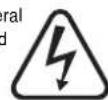

The exclamation point within an equilateral triangle is intended to alert the user to the presence of important operating and maintenance instructions in the service literature relevant to this appliance.
This product complies with European Low Voltage (73/23/EEC) and Electromagnetic Compatibility (89/336/EEC) Directives when used and installed according to this instruction manual. For continued compliance only Cambridge Audio accessories should be used with this product and servicing must be referred to qualified service personnel.

Plug fitting instructions (UK only)
The cord supplied with this appliance is factory fitted with a 13A mains plug fitted with a 3A fuse inside. If it is necessary to change the fuse, it is important that a 3A one is used. If the plug needs to be changed because it is not suitable for your socket, or becomes damaged, it should be cut off and an appropriate plug fitted following the wiring instructions below. The plug must then be disposed of safely, as insertion into a 13A socket is likely to cause an electrical hazard. Should it be necessary to fit a 3-pin BS mains plug to the power cord the wires should be fitted as shown in this diagram. The colours of the wires in the mains lead of this appliance may not correspond with the coloured markings identifying the terminals in your plug. Connect them as follows:
The wire which is coloured BLUE must be connected to the terminal which is marked with the letter 'N' or coloured BLACK.
The wire which is coloured BROWN must be connected to the terminal which is marked with the letter 'L' or coloured RED
The wire which is coloured GREEN/YELLOW must be connected to the terminal which is marked with the letter 'E' or coloured GREEN.
If your model does not have an earth wire, then disregard this instruction.
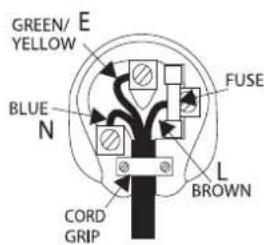
If a 13 Amp (BS 1363) plug is used, a 3 Amp fuse must be fitted, or if any other type of plug is used a 3 Amp or 5 Amp fuse must be fitted, either in the plug or adaptor, or on the distribution board.
540C/640CCompact disc player
INSTALLATION
Please take a moment to read these notes before installing your azure Compact Disc player, they will enable you to get the best performance and prolong the life of the product.
This unit may be installed on any sturdy, level surface. Since the power transformers generate a magnetic hum field of moderate strength, a turntable should not be located nearby.
The unit requires ventilation. Do not situate it on a rug or other soft surface and do not obstruct any air inlets or outlet grilles.
Do not place in an enclosed area such as a bookcase or in a cabinet.
This unit must not be exposed to dripping or splashing water or other liquids. No objects filled with liquid, such as vases, shall be placed on the unit. In the event, switch off immediately, disconnect from the mains supply and contact your dealer for advice.
Ensure that small objects do not fall through any ventilation grille. If this happens, switch off immediately, disconnect from the mains supply and contact your dealer for advice.
Do not route the power cable so that it can be walked upon or damaged by other items near it.
Like all audiophile electronic components, this unit will perform best once it has warmed up. When using for the first time it is advisable that it is left on, playing music, for at least 36 hours prior to critical listening. For subsequent use, a warm up period of 10-15 minutes is recommended for maximum enjoyment.
Do not plug your CD player directly into a power amplifier.
If you do not intend to use this unit for a long period, switch it to standby and unplug it from the mains socket.
To clean the unit, wipe its case with a moist, lint-free cloth. Do not use any cleaning fluids containing alcohol, ammonia or abrasives. Do not spray an aerosol at or near your CD player.
This product is not user serviceable, never attempt to repair, disassemble or reconstruct the unit if there seems to be a problem. A serious electric shock could result if this precautionary measure is ignored. In the event of a problem or failure, please contact your dealer.
Important note

This unit has been designed to play Compact Discs, Recordable CD's and Rewritable CD's bearing the identification logo shown here. No other discs can be used.
Cambridge Audio
REAR PANEL CONNECTIONS FRONT PANEL CONTROLS
AC power socket
Once you have completed all connections to the amplifier, plug the AC Power Cable into an appropriate mains socket. Your Compact Disc player is now ready for use.
Line output
Use good quality interconnect cables from these sockets to any line level input on your amplifier.
Optical Digital output
Use this socket to connect to the input of a separate DAC or digital recording machine. Use a high quality TOSLINK fibre optic interconnect cable designed specifically for audio use.
Coaxial Digital output
This coaxial output is for input to a separate DAC or digital recording machine. Use a high quality 75 ohm digital RCA interconnect cable for this connection (not one designed for normal audio use).
Standby/On
This control switches the unit from Standby mode to On.
Open/ Close
Allows you to open and close the disc tray thus making it possible to load a disc. Pressing Play will also close the tray and start the CD.
Play/Pause
Plays the disc and pauses play.
Stop
Stops the CD playing.
Skip/Scan
Allows for skipping between tracks and also searching within tracks.
540C/640CCompact disc player


Cambridge Audio
OPERATING INSTRUCTIONS
Loading and unloading discs
- Press the Standby/On switch.
- Press the Open/ Close button.
- When the disc tray has opened fully, place a disc carefully in the tray with the label side facing up.
- To close the disc tray, press the Open/ Close button again. When the tray with a correctly loaded disc is fully closed, the disc will start turning automatically. After the CD player has read the disc it will be ready to play. Pressing Play will also close the tray and start playing the disc
- The disc tray can be opened at any time by pressing the Open/ Close button. Only remove the disc after the tray has fully opened.
Note
Do not put anything except a Compact Disc into the tray, foreign objects may damage the mechanism.
Do not force the tray by hand during the opening and closing operations.
To avoid dirt and dust entering the mechanism, keep the disc tray closed.
If the Compact Disc is seriously scratched or too dirty the player may not be able to read it or play it.
Never load more than one disc into the disc tray at one time.
Normal disc play
- Switch on your amplifier and set its input selector to the correct position. Adjust the volume control to a minimum.
- Press the On/ Standby switch.
- Press the Open/ Close button to open the disc tray, and load a disc.
- Press the Open/ Close button again to close the tray. The CD player will read the disc and enter standby mode. Alternatively pressing Play will close the tray and start playing the disc.
- Press the Play button. The disc will start playing from the beginning of the first track. When the last track has finished playing, the CD player will return to standby mode.
- To stop the disc at any point press the Stop button. Pressing the Play button while the disc is playing will pause the disc. When the disc is paused the display will flash, play can be resumed by pressing the PLAY button again.
Locating a specific track
- Ensure that a disc is loaded and the player is in stopped mode.
- Pressing the Skip/ Scan Right button once will forward the CD by one track. Repeat as necessary.
- Press Play. The disc will play to the end of the disc and then return to standby mode.
- Pressing the Skip/ Scan Left button will access the previous track. During play, pressing reverse will firstly rewind the track playing. Pressing again will then access the previous track.
540C/640CCompact disc player
Locating a particular point in a track
- Ensure that the disc is playing the desired track.
- Press and hold the Skip/Scan Right button, the CD will then fast forward in the track.
- Release the button when the desired time has been reached. Play will resume.
- Press and hold the Skip/ Scan Left button, the CD will then rewind in the track.
Repeating discs and tracks
- Ensure that the disc is playing.
- Press the Repeat button on the remote handset. Repeat All will appear on the display. The whole disc will now be repeated until the function is turned off.
- To repeat a specific track press Repeat twice while the track is playing. Repeat will appear on the display and the selected track will now be repeated until the function is turned off.
- Press Repeat again to turn off the repeat function.
Playing tracks in a random order
- Ensure that a disc is loaded and the player is in standby mode.
-
Press the Random button on the remote handset. Random will appear on the display.
-
Press Play. The CD Player will now play the entire disc in a random order.
- Press Random to exit Random function. The disc will continue playing to the end in the correct order.
- Press the Stop button at any time to stop the disc.
Using the intro function
- Ensure that a disc is loaded. The player can be in standby or playing.
- Press Intro on the remote handset. If the player is in standby mode it will automatically play the first ten seconds of each track and then return to standby mode. If a disc is being played when Intro is pressed the player will progress to the next track and play the first ten seconds of any remaining tracks.
- Press Intro again at any time to enter normal play mode.
Using the A-B function
- Ensure that the disc is playing. The A-B function will allow you to continuously repeat a specific section of a track.
- Press the Repeat button on the remote handset at the beginning of the section you want to loop. The A-B icon will be displayed and the player will memorise the time A-B was pressed.
- Press A-B again at the end of the section that you want to loop. The player will now continuously repeat the selected section.
- Press A-B again to return to normal play mode.
Cambridge Audio
Using the Remain function
- Ensure that the disc is playing.
- Press the Remain button on the remote handset once to display the time remaining on the track playing.
- Press Remain a second time to show remaining number of tracks and total disc time remaining.
- Press Remain again to return to normal play mode.
Using the Space function
- Ensure that a disc is loaded. The player can be in standby mode or playing.
- Press Space on the remote handset. Space will appear on the display and a four second gap will be put between each track played.
Programming disc play
- Ensure that a disc is loaded and the player is in standby mode.
- Press Program on the remote handset. The Program setup will appear in the display.
- Using the skip/ scan buttons or the remote handset skip to the track number that you want to program as your first track.
- Press Program. The desired track is now entered and the program number increases by one.
-
Repeat steps three and four until all your desired tracks are entered.
-
Press Play. The programmed tracks will play.
- You can use the skip and search functions to move through your programmed selection in the same way as normal playback.
- Pressing Stop once will stop play and pressing Stop twice at any time will wipe the program and return the player to stopped mode.
Using the remote handset
- You can use the numerical keys on your supplied remote handset to choose tracks.
- Ensure that a disc is loaded. The player can be in standby mode or playing.
- Simply press the number of the desired track and the player will play the disc from the start of that track.
- If the track number required is greater than ten press -/-- followed by the track number.
Note: When pressing the Skip/ Scan button on the remote, the skip and search buttons are separate. Pressing the skip buttons on the remote means the CD player will only skip between tracks and will not search within the tracks. Search will only search within the tracks.
540C/640CCompact disc player
TROUBLESHOOTING SPECIFICATIONS
There is no power
Ensure the AC power cord is connected securely.
Ensure the plug is fully inserted into the wall socket and is switched on.
Check fuse in the mains plug or adaptor.
The player will not read the disc
Check the disc is not loaded upside down.
Check that the disc is not too scratched or dirty.
There is no sound
Ensure that the amplifier is set correctly.
Check that the interconnects are inserted correctly.
The disc is skipping
Check that the disc is not too scratched or dirty.
Ensure the player is on a firm surface and not subject to vibrations.
There is a hum coming from the speaker
Ensure that all cable connections are secure.
The remote handset will not function
Check that the batteries have not expired.
Ensure that nothing is blocking the remote sensor.
| 540C | 640C | |
| D/A Converter | Wolfson | Wolfson |
| WM8716 | WM8740 | |
| 24-Bit/ 192kHz | 24-Bit/ 192kHz | |
| Capable Capable | ||
| Freq response (-0.5dB) | 10Hz to 20kHz | 10Hz to 20kHz |
| THD | < -88dB | < -92dB |
| Dynamic Range | > 95dB | > 105dB |
| Channel Separation | > 70dB | > 75dB |
| Jitter (correlated) | < 300pS | < 260pS |
| Digital Outputs | Opt and Coax | Opt and Coax |
| Dimensions (mm) (H x W x D) | 70 x 430 x 310 | 70 x 430 x 310 |
| Weight (kg) | 4.6 | 4.6 |
Cambridge Audio
540C/640CCompactDiscPlayer
EINLEITUNG
540C/640CCompactDiscPlayer
INSTALLATION
540C/640CCompactDiscPlayer


Cambridge Audio
BEDIENUNGSHINWEISE
540C/640CCompactDiscPlayer
Suchlauf-FFunktionr
540C/640CCompactDiscPlayer
Skip/ Scan [Saltar/ Explorar]
PROBLEEMOPLOSSING SPECIFICATIONS
Controls Front Panel Buttons 540C/640C OPEN/CLOSE 540C/640C
OPEN-OLGE 540C/640C PLAY/PALUSE 540C/640C
STOP 540C/640C
TRACKSKIPBACK 540C/640C
TRACKSKIPFORWARD 540C/640C
MAINS ON/OFF (Power switch) 540C/640C
PpOBepka COOTBcETCTBn HAnpJKeHn NHTAHN
IINBaWaeC6CTBENHO 6e3oNaCHOCTn, NOXaNyIcTa, BHMaTeNbHO npOHTaTE cNeDyUeHne HNCTpyKuIN nepeD nonbIKoN noCDoeHNbTTo yCTPOCTBO K 3NEKTPNecCKo CetN.
PObepbTe, TOb6bI Na3aHne NaaHn Bauero yctpoiCTBa 6bIn yka3aHo npablnbHeo HapraeHne NtAnH. Ecnn HapraeHne B Bauen 3NeKtpnHecko CETn OTNHaTaTc, pOKOCHyNtTpYntEc b Yauero dnpepa.
3To yctpoCTBO npedHa3NaHcEHO nI npMHeHnTObKO npN BeHnHHe I Tne NtAouero HAnpJxEHn, yka3aHOrO Ha 3aHNe nAHeHn yctpoCTBA. PocoeiHeHne Kdpymn NcToHHKam nTanHn MoKET nobpeNTb yctpoCTBO.
3To 06opuyoBaHHe DOnJxO 6bTb BbIKIOueHO, KOrda OHO He NcNoB3yETcH, nOHO He DoJIxHO npImeHATbCn PnO TcYCTBn HnDJIeXaUero 3aEEMNEHn. 4To6b MyeMHbIHTPuck 3NeKTPPOwOka, He yDaJIaTe KpIbIKy CypOHTCBa (mN 3aHIHO CTENK). BHyTpHn HE NkAKnx CuaTe, NdJIeXaUHX K 6ocNyKBaHBOHNO pONb3OBaTeJen. IInr O6cNyKuBAHHn O6paauNTecb K KBaUNfNpOBAHHOmy O6cnyKbNAOuMoE npcoHany. Ecnn WHyP NtAnHn CHa6XeHN BnIKoC nITbIM KopynCOM, To YcTpoCTBO He DoJIxHO nCOnl83OBaTcR, ECINOTCYCTBYET nactMaCCOBbl 3neMENT C nNaBKM npedoxpAHntEn. EcnBb NtopePte 3neMENT nNAbKoro npedeoxpAHntEn, TO HyKHyO DetAIB MoXHO NOBTOPHO 3aKa3aTb Yepe3 BaWero DnnpaHnTeJen.
PpeDynpexdaOoHpaBHOCTOpOHnTpeYrObHnK C cMmBOOMONHH CO CTpeKn pPeHa3HaHeH Dn PpeDynpexdHNOIb3OBaTeN O HauHn HEn3OJIPOBaHHOro ONaCHORHANpaxHnBHTyn KOpNyCA yCTpoiCTBa, KOToPoE MoXeMTb DOCTaOHyBENuHv, YTObI CoCTaBtB PnCKnopaxEHNIIODe 3NEKTPOWOKOM.

3Hak Bocknuaa Hn B npedax paBocO hero TpeyrolbHaKnA npeDn3aueh dnn ppeynpekdeHn noNb3oBaTeN bTOHCntelbHO mEHOxncB C cepBnCHo DOKyMeHTaun BaxHbX yka3aHn OTHOCNTeHbNo paobtI N 06cnyKnaHn, npmHeHHbIX K 3TOMy npu6opy.
3To n3dennne cooTBeTCTBye EbponecknM NpeKTHBAM
no Hn3KOMy HanpJxehHIO (73/23/EEC) n 3NeKtpomAHTHNO COBMeCTMmocTn (89/336/EEC), KOrda OHO yCTaHOBNEo iNcNoIb3yeTc corNaCHO 3ToMy pyKOBOCTBy dnn NOnb3OBaTeNA. Ira rapaHTn HnpepeBHON COBMeCTMmocTn 3TOr MdENn DOnJIckHb
NCN0Lb3OBaBcR NCKIHOHTeBbHO pnpHaNDeXHOctn KOMNaHH Cambridge Audio u 06cnyKBAHHe DoJIxHO 6bTb DOBepeHO KBaINHUPoBaHHOMy 06cnyKBAHOUeMny nepcoany.

ПОНгьВаTeЛь KOMпАКТ-ДИСКOB TИпа 540C/640C
YCTAHOBKA
IpoKanyiTa, ydEnite HEMHoro BpemEHn, 40bI npOHTaB 3TN pnpMeyAHHnepeYcTahOBKO Baewero npOpyBbaTeJN KOMNAKT-DINCKOB cepn Azur, OHNI NO3BOJNT Bam O6eCneuNT haNnyuWne 3KcNpyataUHOHhbe KaeeCTBa N pOdoNtB kN3Hb N3denn.
3To yctpoiCTBO dONKHO 6bIb ycTaHOBNEHO Ha yCtOHNBOB,POBHOI NOBepxHOCTNo. Ncoklbky CnIOBBe TpaHcFopmatOpbl rHepepyOT MARTHHOte NmEpeHOH INTECHIBHOCTN, He cNeDyET paCOnanarTaNo6NH3OCTn pOIRpblBaTeNb DnR nNaCTHNOK.
VCTpOCTBO HUKDAETCB BENTHNAUM He pacnonaratae erHa KOBpKe IINIpyrON MANKOEBPHXOHTN K 3aTpydHnTe Doctyn BXOHBIM OTBepCTRMMIK PpeWetKAM DnI BbXoDa BO3dyxa.
He yctaHaBnBaIe ero B repMeTnHoe MeCTo TnPa KnJxHOrO uKaapa nn Rnka.
3To yctpoictbo He donxHNO nOBepraTcB Oo3eNCTBnO 6pbi3r Hnn nponitOn BObl nn DpynX XIKKOCTe. He YcTaHAbNBAite Ha yctpoictBO hKakne npedMeTb TnBa3, 3anJHeHHie KINKOCTbO. B Cnyae NonaDAHnA B Hero XIKKCTn, HEmdJeHHo BBykIOuHTe yctpoictBO, OTcoEduHInTe OT 3neKTPueckoi CETn N Obpatntecb KaBaewmy dIlepy Ira NonyehnpeKOMeHaaui.
CneDnTE 3a TEM, yTO6bI MEJKHe ppeMeTbI He npOBaINBaINcB Yepe3 BEHTNIAUHNO HpeWtck. Ecnn 3TO npONOuNO, HEMeJNeHHO BbIKNoNTHe YCTPOJCTBO, OTCoeINHInTe OTJeKTPnuEeCKo Cetn I ObaPntTeB K BaWemy DInepy DnI NOUYeHNPeKOMHdAaN.
He npoknaabai Te HpynTaHn TaK, YTObHa Hero MOrn HaCytnb mOH Mor 6bl NobpeXdH dpYrMM COeHNM NpeMeTAM.
IIOO6HO BCEM 3NEKTPoHHbIM KOMNOHEHTAM 3BYKOBORO BOCPON3BDEEHN,3TO yCTPOINCTBO 6yET 3aMeTHO NyUe paBoTatb NOcne npedBapntelhoro nporpeBa. PnnpEBOM NcNoB3oBAHmHNaTeNbHO BKLIOHtB EOr nponrpBbAHm My3bKn, NO MeHbWei MEpe,B TeueHne 36 YacOB nepd cepbe3bHM pocnyuBaHmE.B NOcne dyIoUeM,DnA DoCTNXeHn HauNyUwero KauecTBa
Bocnpoun3BeDenepeKOMeHnyetc nporpeBaT ero B TeueHne 10-15 MHyT.
He noKIOUaIe Baw npOurpbIbATEnb KOMnAKT-DnCKOB npRMO K yCINNTENIO MOUHOCTN.
EcHn Bb He HAMEpeBaTeCb NCN0B3OBaTb 3TO yCTPOIcTB O B TceHHe N IeINbHorO nepIOA BpEMHe, nepeKIOuHte Ero B pEKIM OXnDAHN IOTcOeHNTEE rO EToEKTNJNEKTPNueCKO CETN.
YTObI OUCNTb yCTpoIcTBo, npOtnpaIe Eero BnaJHoN TkaHbIO 6e3 BOPCHNK. He NcPON3yIte HnKAKNX XnKoCTeI dAe YnCtKn, COepKaUxN cInpt, AMMnAk IIN abpAaNBb. He paCnblne AaP03oJIb Ha BaW npOrrpBbATEb KOMnKaT-DnCKOB INB5n3 Hero.
3To n3dJIeHe NoIOnJExnIT 06cnyKbAHHIO NOIb3OBATeENM, HIKORJa npn B03HNIHOBENH HNCnPABHOCHT He NItaTBeC Camn IpOn3BOJNTb peMOHT, pa3bnpaTb INI peKOHCTpyNPOBaTB yCTpoiCTBO. EcIn 3TN npDeynpejXdoUHne Mepbl HnHOpNPYTOCR, TO Bo3MOKeH cepbe3HbI 3NEKTPoWOk. B CnYae BO3HNIHOBENH HNCnPABHOCTN INI NOBPEXDEHN, NOkAnyHCTa, O6paTIeTCb K BaWemy DInnepy..
BaxHoe npImeuaHne

3To yctpoiCTBO 6blno pa3pa6oTaHO dna npOnpBlBaHnN KOMNaKT-DINCKOB, KOMNaKT-DINCKOB ODHOKpaTHOH N MHorOKpaTHOH 3aNNc, IMeIOuNX nOKa3aHHyO 3dEcB NororpAMMy. He cneDyert IcNoJIb30BaTb KOMNaKT-DINCKn DpyNX TINOB.
Cambridge Audio
ПОДСОЕДИЕняHA 3АДHEЯ
ПАHEЛN
AC Power socket (Pa3bem nHTaHn OT cetn nepemehhoro Toka (AC))
Nocne toro, kak Bby 3aBepwnn BCE noKnIOueHn K yCunnteHIO, BKNOHTe HYPurNTAHnK Cetn NpepeMeHHoro Toka (AC) B noXODAuyo po3ETky 3NeKTpueckoCetn. Tenepb Baaw npOnrpbIbATEnb KOMNAKT- DNCOB TOBOT K NCNOJI30BAHIO.
Line output (NHeHbB BbIXoD)
Ucnb3ynte coedHnHtneBhle kabenn XopoWero KaecTba Dnna nokKJIOuHcHn 3TNx pa3BeMoB KIO6Omy BxOy BaWero ycNHTenC nIO6bM yOBHem CrrHana B NHHN.
Optical Digital output (OnTnueckn uΦpOBoB BbIXoJ)
NcnoB3yIe 3OT pa3bem dINr coeMHENH C BXoDM OTdEBHO RANu UnDPOBOrO yCTPOJcTBa 3AcapNC. NcNoB3yIe BICOKOKaueCTBEHHBBOLOKOHbONTtueckn coeHNHTeNBHKn Ka6eNb TnA TOSLINK, CneuNbHO pa3pa60taHbN DnR 3ByKOBOrO 06pyDobAHN.
Coaxial Digital output (KoakcnaIbHbI uΦpOBoB BblXoD)
3TOT KoakcnaihBbXoD CnykNT B KaeeCTBE BXOa DT DeHBOF L4Tnnn cnpbooro yctpoCTBa 3annc. Dn n 3TOF coeHNHeHHN cnoNb3yTe BcKoKaQaCteBHeHHu cnpboo CoeHNHTbeHb Ka6enb Tnna RCA c conpotmbneHem 75 OM (HO He TO, KOTopoPi PpeHa3HaueH dNnCnONb3OBAHn B O6BHnOM 3ByKOBOM 06OpyoDaBHn).
OPRAHbI YNPABJIENHA NEPEdHeI PAHEJI
Standby/On (Pexm oXnDaHnBkNoeHo)
3TOTNEKIOHATIELNEPEBOINTYCTPOICTBOINPEXKIMAOKNDAHNOB BIKIOENHOE COCTHOHE.
Open/Close (OTKpbITb/3aKpbITb)
No3B0BnE8 Bam OtKpbBbBb 3aKpbBbBb NotOK DnCKa, No3BOJH BInONHbT 3arpy3ky DnCKa. HaxKatne KhoNkPi Foy (BoCpOn3BeHe) TAKKe pINBODIT K 3akPbITIO NOTKa 3aNcyKOMNAKT-DnCKa
Play/Pause (PpOrrpBbAHe/Play3a)
PpOurpbBaHne DnCKa N BpeMeHHaNay3a npOurpbBaHna.
Stop (OCTAHOBka)
OctahOBKa npOrrpbBaHnKOMNaKT-ДИСКА.
Skip/Scan (Pponyck/Noonck)
I03BONHET deNaTb npOnyckn Mekdy TpekAmu n TaKxe npoBOaNTb NOnCK TpeKOB.
ПрогьаTeль KOMпАТ-ДИСКОВ TИпа 540C/640C


Cambridge Audio
YKA3AHNIO 3KcPJIyATAUIN
3arpy3ka n ydaJIeHne IaCKOB
- Haxmnte Ha nepeKIOyateIb Standby/On (PexMM OxuHaHnB/ BkIOeHo).
- HaxmTe Ha KHonky Open/Close (OTKpbTb/3aKpbTb).
- KOrda NotOK DNCKa NONHOCTbHO OTKPOETCA, OCTOPOXHO NOONKTE DNCK HA NOTOK TAK, YTO6bI CTOPOHA C 3TNIKETKO CMOTPena BBepx.
- TTo6bI 3aKpbITb IOTOK DNCKA, CHOBa HaxKMITE Ha KHONky Open/Close (OTKpbITb/3aKpbITb). KOrJa IOTOK C npABINbHO yNOXeHHBIM NDCOM 3aKpBT NNOHCTO, NCK ABOTAMInCeHKNHaHTHe BpaUAtbCn. Nocne TOrO, KAK pOnpRpbIBATEb KOMNAKT-DiCKOB nPoYTeT Ha3BaHme DNCKA, OH ByET rOToB K BOCPON3BeDEHnIO. HaxKatne HA KHONky Play (BocnpOn3BeHene) TaKe npBEdet K 3aKpBTINOJtKa N K Haany npOnpRbAHnN DmCKA.
- JOTOK DnCKA MoKET 6bTb OTKpbl T NHOoM MoMeH BpeMeHH NOpeCTBOM HAKATNA HA KHONY Open/Close (OTKpbTB/3aKpbl). YdAnrTB DnCK MOKHO TOJbKO NOcNE NOJHORO OTKpbln JOtKa.
PpmeaHne
He 3arpykae B NOTOK HnHero, KpOME KOMNaKT-DnCKOB; NOCTOPOHHe npedmetbl MoryT NoBpeNdmbexAHn3M.
He haxmte pykno HA notok B teuehe onepaun OTkpitn 3aKpTn.
Bo n36exaHne nonaDaHnI rpa3n I nbIn B MexAHm, loTOK dNCKa DOnxeh 6bIb 3akpbIbIM.
ECN KOMNAKT-DNCK CNBHO NOUAPAAN H NIN CNIWKOM TPR3HbI, BNOJHE BO3MOXHO, YTO PONURPBtAE He CMOKET YTAb NIN PONURPBtB erO.
HnkOrda He 3aRpykaTe B loTOK oNHOBpeMeHHO 6oNe e OndHO rDcKa.
HopmaIbHoe npoIrpblBaHne dIscKa
1.BKNOHTe Baa YcunntEnb N nepeBedeHte ero ceneKTOp BXoHDORO CIRHana B HxHoe nOnoxKeHne. HactpoTe MmHMaIbHyIO rPOMKocTb 3Byka.
- Haxmte Ha nepeKIOHateIb On/Standby (BKnIOeHO/Pexm Oxuadn).
- HaxMMTE Ha KHONky Open/Close (OTKpbITb/3aKpbITb), YTO6bl OTKpbITb JIOTOK DNCKA, N BCTaBbTe DNCK.
- Haxmte Ha KhoNky Open/Close (OTKpbTb/3aKpbTb) eue pa3, YTo6bl 3aKpbTb Notok. PnOurPbBAteBb KOMNAKT-DNCKOB npOHTeT Ha3BaHne DnCA u NpeiDeT B pEKM OxKnDaHnB. B KaueCTBe anbTePHaTNBbl, HaxKaTHe Ha KhoNky Play (BocpOn3BeDeHne) npBBeTe K 3aKpbTnO JOTKA u Hany npOnrPBbAHnDnCKA.
5.Haxmte KhoNky Play (Bocnpo3BeHne).PpOurpbBaHne Dncka HauHTcH C Hauana nepBoro Tpeka. Korda 3akOHunTcBOcnpo3BeHne NoCleHero Tpeka, npouRpbBatelb KomnaktDnCKOB BepETcH B pexHM OxuaHaHra.
6.ДиoctaHOBKn DnCKa B JIObOM MeCTe HaxMNTe KhoNky Stop (CToT). HaKaTne KhoNkn Play (Bocnpo3BeDeHHe) B npOceCE npOnrPbBaHna NDCKa npNBedet K BpEmHoH OctaHOBKe DnCKa. Korda dmck BpEmHoO OCTaHOBNeH, DmCnIe NaHcHT MrrTa; npOnrPbBaHne MOxKet 6bItb BO306HOBHeNo nOpCepdCTBOM NOBtOPHO r HoXaTNr KhoNkn PLAY (BOcnpo3BEDEHNE).
06HapyKeHne 36paHHoro TpeKa
1.Y6eHNTecbBTOM,YTOINCK HAXOHTCBNOTKe INPONrpbBATEb NEPEKNIIOEH B PEXIM OCTaHOBA.
2. Odnokpathoe HakaTne Ha KhoNky Skip/Scan Right (Pponyctntb/ CkaHnpoBab BnPaBO) 3actaBNT KomKt-ndck nepenTu HA oINH Tpek BnepeD. PnH eO6XIOIMCToN, NOBtOpTE.
3. Haxmte Ha kHonky Play (Bocnpo3BeHne). Dnck 6ydet npourpbBaTbca DO KOHcA NcKa N3aTeM npeiDet B pexkM OxndaHn.
4. Haxatne Ha KhoNky Skip/Scan Left (PpOpyCTMb/CKaHmPoBaTb BnEBo) cDnaeT nepExoHa npDeBdyuun TpeK. Haxatne Ha KhoNky 'reverse' (peBepc) cHaana npOn3BeTeB O3Bpat K Haany npOnrPbBaemoro TpeKa. HoBoe Haxatne Ha KhoNky npBBeTe 3aTe M npexoDy Ha npDeBdyuun TpeK.
ПОНгьВаTeЛь KOMпАКТ-ДИСКOB TИпа 540C/640C
06hApyuKeHne yKa3aHHoN ToUKN B ppeJax TpeKa
1.Y6eNTecbTOM,HTO DnCK BOCPON3BOIDNTKeJaembl TpeK.
2. Haxmnte He OTnycaite KhoNky Skip/Scan Right (Pponyctntb / CkaHnpoBaTb BnPaBO), KOMnKaT-DnCK TOrda 6bIcTpo nepeIeT BnepeHa OdMH TPEK.
3. OTnyctnte KhoNky, KOrda 6yDet DoCTMHyT XeNaembIM MOMENT BpEmH. CHOBA BO306HOBnTCB OBCnpOn3BeDeHne.
4. Haxmnte n He otnyckaite KhoNky Skip/Scan Left (Pponyctntb / CkaHnpoBaT BneBO), KOMnakT-DnCK TOrda nepeeJed K Haany Tpeka.
IobToP npOnrpbBaHnA DnCKOB n TpeKOB
1.Y6eHNTecbB TOM,HTO Dnck npoRpbBaETCA.
- Haxmte KhoNky Repeat (NoBtop) Ha nyIbTe nctaHcHNOHHORo ynpabHeHnHa DnCnnee NOBNTco COo5ueHne Repeat All (NoBtopntBce). Noka He BkHIOeHa 3ta fynKun, dyet NoBTOPTbCA npOrrpblBaHne BCero nckA.
- TObb noBToptb Bb6paHHb TpeK, HaxMnte DbaXdb Ha KhoNky Repeat (Tobtp) BO BpMa npOurPbHbAHn TpeKa. Ha dncnnee NOBtcr coo6ueHne Repeat (Tobtp) n Bb6paHHb TpeK 6ydet Tenepb NoBToPbTaC, Noka He BbKnIOeHa 3ta fHyKUN.
- Haxmte Ha KhoNky Repeat (NoBtOp) eue pa3 dIy BbIKnOHeHn IyHKuIN NOBtopa.
PpOurpbBaHne TpeKOB B CJIyuaHOM nopAKe
1.Y6eNTecb B TOM, YTO DnCK 3aRpyKeH IN npOnrpblBaTeIb HaxOHTcB B peKIMe OXkDaHn.
2. Haxmnte Khony Random (CnyaHbB Bb6op) Ha nyIbTe DnCTAHIOHOY npabHeHa. Ha dncnnee noBHTc coo6eHne Rando (CnyaHbB b6Op).
3. HaxkMnTe Ha KhoNkY Play (Bocnpom3BeHne). PpOurpBbATEnb KOMKAnT-DnCKOB 6ydtenepe BbINONHrTb npOurpBbAHne BCero DnCKBa CnyaHOM NopRdKe.
- Haxmte Ha KhoNy Randoom (CnyaHbB b6Op) nA BbXoHa n3 cyHKuRnAMr PtoPONCTBOcpon3BeDeHne DnCKa DO KOHcBA 06bHNoNocJeDoBaTeNbHOtN.
5.ДЯocTaHOBKnДИСКa HAXMNTe KHOKNy Stop (CTon)ВЛIO6OIMOMeHT BpeMeHn.
UcnoJIb3OBAHneФyHKmnn intro (BctynJeHne)
1.Y6eTeTcB TOM,4TO NICK 3aRpyxH. PpOINrPBtEnb MoKet 6bITb BpeKIMe OXnDaHn INN BOCIpON3BeDeHn.
2. Haxmte Ha KhONky Intro (BctynneHme) Ha nyIbTe nCTaHnOHHoro ynpabneHn. Ecn npoRpBateNB haoDITcB pexnme OxndAHnOH AT ABMATHECKN npoPraeT nepBle 10 cekyHk kAnDo TpeKa n 3aTEM BepHTcB pexMn OxndAHn. Ecn kOnka Ntro (BctynneHme) Haxata B npocce BOCPONBDEEHn, To npoRpBateNB nepEiDc K OpeDnHomTypeKu npoRpaet nepBle 10 cekyHk kAnDo n3 OCTABWnxC TpeKOB.
3.Дипорexopoа В ржимобчного BOCPON3BeDEHЯВ JIO60МOMENTВременешпэхКМТЕHAKNKNYIInTO(BcTynJIeHne).
UcnnoJIb3OBAHneФyHKcnnA-B
1.Y6eNTecbBTOM,TO DNCKPONRpbIbAeTc.ΦYHKnA-B NO3BOJNT Bam dINTeJIbHO NOBToprTb BbIpaHny qactb Tpeka.
2. Haxmte KhoNky Repeat (NoBtOp) Ha nctaHnOHHom nyIbTe b HauJIe ToT cactn, KOTpyo Bby xotnte NoBtOpItb. Ha dncInee NOBHTcN KOHKA A-B, n pOurpBaTeB 3aONMHNT Momet BPemEH, KORda 6bIHa hXATA KhoNka A-B.
3.Eue pa3 haxmTHe Ha KhoNky A-B B KOHcTe ToH qactn, KOtpyO Bb XoHTHe NOBtOpTB. Tenebp npOnrPbIbAtebn 6ydt DnTIeBHO NOBtOPrB BBbpaHHyO qactb.
4.Ди BO3BpATA BpeKIM O6bIuHOrO BOCnPOn3BeDeEHn CHOBa HaxMnte Ha KhoNky A-B.
Cambridge Audio
Mcnolb3OBaHne yHKnN Remain (OcTaTOk)
1.Y6eNTecbB TOM,HTO DnCK npOnrpBbAeTCA.
2. OINH pa3 HAXMnTE KHOKNy Remain (OcTaK) Ha nyIbTe DCaTHIOHHORo UnpABeHNHa TOp6bl NOKa3aTb Ha 3KpaHE BpEMr, OCTABweecr DnpoNRpBBAHNr TpeKa.
3. Haxmnte Ha Khonky Remain (OctaToK) BtopoJ pa3 Ira noka3o octabewocn YIcJa TpekoB N O6eero BpemEHn Ha pOONrPbBaHne octabwee cAteu dNCKA.
4.ДЯ BO3Bpata BpeKIM O6bHORO BOCnpon3BeDEHNA CHOBA HAXMITE Ha KhoNky Remain (OctaTOK).
IcnoJb3OBAHne yHKuN Space (PpomexkyTOK BpeMeH)
1.Y6eNTecbBTOM,TOIMCK3aRpyxhen.IponrpblBaTeIbMOxET6bITBpeXnmeOKNDaHnNINBOCpON3BeDeHn.
2. Haxmte Ha KHonky Space (PpomexytoK BpeMeHn) Ha nylte DCTAHIOHOHoro ynpabEnHn. Ha 3kpahe NoBNTC coo5uHne Space (PpomexytoK BpeHn) n peed kaxdbim pnoRpbAeMbIM Tpekom 6byet BCTABNeH INTEbpAa 3aepckNb B yeTbpe CekyHdbI.
Bocnpon3BeHeHne Dncka n nporpamme
1.Y6eNTecbBTOM,TOI DnCK 3aRpyKeH I npOIRpbBATEb HaxODNTcBpeKIMe OXuHaHn.
2. HaxmTe Ha KONy Progam (PporpaMMbI peXIM) Ha nynBe IaCTAUHOHOrO ynpabJeHHA Ha DCnnee NOBHTcR OKHo HAcTPOKIN pporpaMMHOpeXIMa.
3. Icnonb0aHne KhONok Skip/Scan (Pponyck/Noonck)nnynbTa DCNTAUHOHO OYPaBHeHn NO3BOJNE Bb6pAte HOMe TOr PTeKa, KOPTAH DOnJXe 6bIb NepBbIM npi BOCPNPO3BeHEnn No nporpaMme.
4. Haxmte Ha KhONky Program (PporpaMMbIpeKHM).BboNTcH HoMeP Jenaemoro TpeKa, H OmeP corlacho nporpamme yBENHBAeTCHa edHHNUy.
- NOBTOPAITE WARM TPN HETBIE PO TEX NOP, NOKA HE 6ydyT BBeDeHbI HOMepa BBpaHHbx Bamn TpeKOB.
- Haxmnte Ha KhoNky Play (Bocpon3BepeHne). BydyT BOCPON3BOIDTBcA 3anporpaMMPOBAHHbte TpeKN.
- Bbl MoXeTe NcNoIb3oBaTb KOnKn npOnyCa n NoNcKa dnnepemEeHnBHTpBauero 3AnporPamMPOBaHORo pa3dena aHaONrHO 06BuHOMY BocPOn3BeHNO.
- Odnokpathoe haxatne Ha Khonky Stop (OctahOB) npekpatnt npoRpbBAAH, a HOBOE BOHOe HAXATNE Ha Khonky Stob BIO60Momet BpemEH N03BONT ydaNtB nporpaMMy npebEcTn npoRpbBATEJB B pexm OCTAHOBKN.
IcnoJb3ObaHne nylbTa dNCTaHcNOHOro ynpabNeHHA
- DnBb6opa TpeKOB BblMOKeTe HcNOb3oBaT bncpOBBe KnaBnHa npnilaraemom Nylte nCTAHNOHORO ynpaJIeHnA.
2.Y6eNTecbBTOM,HTOIMCK3aRpyxhen.PPOINrPBIBATEbMOKET6bITBpeKIMeOKNiDaHnNINBOCIPoIN3BeDeHn.
3.ПрocToHaxMnTeHaHOMep HxKHO TpeKa;H npOurpbIbATEnb 6ydet npOurpbIbTaBmck,HaHHaC 3Toro TpeKa. - EcnHOMep Tpe6yemoro Tpeka npeBbIaet DecrTb, HaxMnTe Ha KhoNky --n Danee Habepe NTe HOpE TpeKa.
PnmuemaeHHe:Korda nCnObn3yetyra DnCTaHnOHHb NynbT,TO, npn Haxatnn Ha KhoNkY Skip/Scan (Pponyck/NoNCK), KhoNkn npOnycka n NoNcKa DeNCTbyOT camoTcTeBnHO. Haxatne Ha KhoNkn npOnycka Ha dNCTaHnOHHom NynbTe O3Haayet, 70 pnoIpyBaTeB Komnakt-DnCKOB 6yEdenJaT npOnyckn MmB mEeKamn He 6yEdet NcKaT TpeKn. FyHKnna NOncKa 6yEdet BInONHb TmB NmB NOnck TpeKn.
ПОНгьВаTeЛь KOMпАКТ-ДИСКOB TИпа 540C/640C
BbIABJIeHHe HEnCnPABHOCTeI TEXHnueCKNe XAPAKTEPNCTIKN
PpOBepeT, TTo6bI dNcK He 6bl cInuKOM noUapanaH nn 3arp3HeH.
OTcyTCTByeT 3ByK
Y6eNTecb TOM, YTO yCUNITEb npabunbHO HAcTpoH.
PpOBeBpTe npaBnIbHocTb B3aUMHbIX CoeINHeHm.
Dnck YHTaetc n nponyckamn
PpOBeBpTe, TTo6bI DnCK He 6bJI CnIuKOM noCuapanan nn 3aqr3HeH.
Y6eHNTecb B TOM, yTO npOuRpbBateIb yCTaHOBnE Ha npOCHOM OCHOBAHN H He NOBepraTcBn6paunM.
B dHamaKe cJIbIweH Wym
PpOBepeHnEDEXHOCTb BcEx Ka6eBbHbIX CoeHNHeHm.
He pa6oTaet nyIbT dNCTaHcUHOHOrO ynpaBJeHnA
PpOepeTe nCnpaBHOCTb 6aTapeek nntAHnA.
Y6eIITecb B TOM, YTO HNUTO He nepeKpbIbae TceHCOP dNCTaHIOHOHOro nylbTa.
540C 640C
L/A npeo6pa3oBateB Wolfson
Wolfson
WM8716 WM8740
24-6nta/192 KΓu 24-6nta/192 KΓu
BO3MOXHOCTN BO3MOXHOCTN
Yact.xap-ku(-0,5deu6en)ot 10Tu do 20KTu ot 10Tu do 20KTu
THD (cymm. 3Ha4. Ko3ΦΦ.
Henn. nckaeHH) <-88 deun6en<-92 deun6en
Dnhammuecknn dana30H>95 deu6en>105 deu6en
Pa3deneHne KaHaNoB > 70 deu6en > 75 deu6en

- 540C/640C Compact disc player
- INTRODUCTION
- About this unit
- CONTENTS
- Cambridge Audio
- SAFETY PRECAUTIONS
- Checking the power supply rating
- Plug fitting instructions (UK only)
- 540C/640CCompact disc player
- INSTALLATION
- Important note
- Cambridge Audio
- REAR PANEL CONNECTIONS FRONT PANEL CONTROLS
- AC power socket
- Line output
- Optical Digital output
- Coaxial Digital output
- Standby/On
- Open/ Close
- Play/Pause
- Stop
- Skip/Scan
- OPERATING INSTRUCTIONS
- Loading and unloading discs
- Note
- Normal disc play
- Locating a specific track
- Locating a particular point in a track
- Repeating discs and tracks
- Playing tracks in a random order
- Using the intro function
- Using the A-B function
- Using the Remain function
- Using the Space function
- Programming disc play
- Using the remote handset
- TROUBLESHOOTING SPECIFICATIONS
- There is no power
- The player will not read the disc
- There is no sound
- The disc is skipping
- There is a hum coming from the speaker
- The remote handset will not function
- 540C/640CCompactDiscPlayer
- EINLEITUNG
- BEDIENUNGSHINWEISE
- Suchlauf-FFunktionr
- Skip/ Scan [Saltar/ Explorar]
- PROBLEEMOPLOSSING SPECIFICATIONS
- PpOBepka COOTBcETCTBn HAnpJKeHn NHTAHN
- ПОНгьВаTeЛь KOMпАКТ-ДИСКOB TИпа 540C/640C
- YCTAHOBKA
- BaxHoe npImeuaHne
- ПОДСОЕДИЕняHA 3АДHEЯ
- Line output (NHeHbB BbIXoD)
- Optical Digital output (OnTnueckn uΦpOBoB BbIXoJ)
- Coaxial Digital output (KoakcnaIbHbI uΦpOBoB BblXoD)
- OPRAHbI YNPABJIENHA NEPEdHeI PAHEJI
- Open/Close (OTKpbITb/3aKpbITb)
- Play/Pause (PpOrrpBbAHe/Play3a)
- Stop (OCTAHOBka)
- Skip/Scan (Pponyck/Noonck)
- ПрогьаTeль KOMпАТ-ДИСКОВ TИпа 540C/640C
- YKA3AHNIO 3KcPJIyATAUIN
- 3arpy3ka n ydaJIeHne IaCKOB
- PpmeaHne
- HopmaIbHoe npoIrpblBaHne dIscKa
- 06HapyKeHne 36paHHoro TpeKa
- 06hApyuKeHne yKa3aHHoN ToUKN B ppeJax TpeKa
- IobToP npOnrpbBaHnA DnCKOB n TpeKOB
- PpOurpbBaHne TpeKOB B CJIyuaHOM nopAKe
- UcnoJIb3OBAHneФyHKmnn intro (BctynJeHne)
- UcnnoJIb3OBAHneФyHKcnnA-B
- Mcnolb3OBaHne yHKnN Remain (OcTaTOk)
- IcnoJb3OBAHne yHKuN Space (PpomexkyTOK BpeMeH)
- Bocnpon3BeHeHne Dncka n nporpamme
- IcnoJb3ObaHne nylbTa dNCTaHcNOHOro ynpabNeHHA
- BbIABJIeHHe HEnCnPABHOCTeI TEXHnueCKNe XAPAKTEPNCTIKN
- OTcyTCTByeT 3ByK
- Dnck YHTaetc n nponyckamn
- B dHamaKe cJIbIweH Wym
- He pa6oTaet nyIbT dNCTaHcUHOHOrO ynpaBJeHnA
- 540C 640C
Brand : CAMBRIDGE
Model : Azur 540C
Category : Cd player/recorder